

依托 Google 搜索进行接地可将 Gemini 模型与实时 Web 内容连接起来,该功能支持所有可用语言。这让 Gemini 能够提供更准确的回答,并引用其知识截点之外的可验证来源。
接地功能可帮助您构建能够执行以下操作的应用:
- 提高事实准确性 :以真实世界的信息为依据,减少模型幻觉。
- 获取实时信息 :回答有关近期活动和主题的问题。
提供引用 :通过显示模型声明的来源,建立用户信任。
Python
from google import genai

client = genai.Client()

interaction = client.interactions.create(
    model="gemini-3.6-flash",
    input="Who won the euro 2024?",
    tools=[{"type": "google_search"}]
)

print(interaction.output_text)
JavaScript
import { GoogleGenAI } from "@google/genai";

const client = new GoogleGenAI({});

const interaction = await client.interactions.create({
    model: "gemini-3.6-flash",
    input: "Who won the euro 2024?",
    tools: [{ type: "google_search" }]
});

console.log(interaction.output_text);
REST
curl -X POST "https://generativelanguage.googleapis.com/v1beta/interactions" \
  -H "x-goog-api-key: $GEMINI_API_KEY" \
  -H "Content-Type: application/json" \
  -d '{
    "model": "gemini-3.6-flash",
    "input": "Who won the euro 2024?",
    "tools": [{"type": "google_search"}]
  }'
“依托 Google 搜索进行接地”功能的运作方式
启用 google_search 工具后,模型会自动处理搜索、处理和引用信息的整个工作流程。
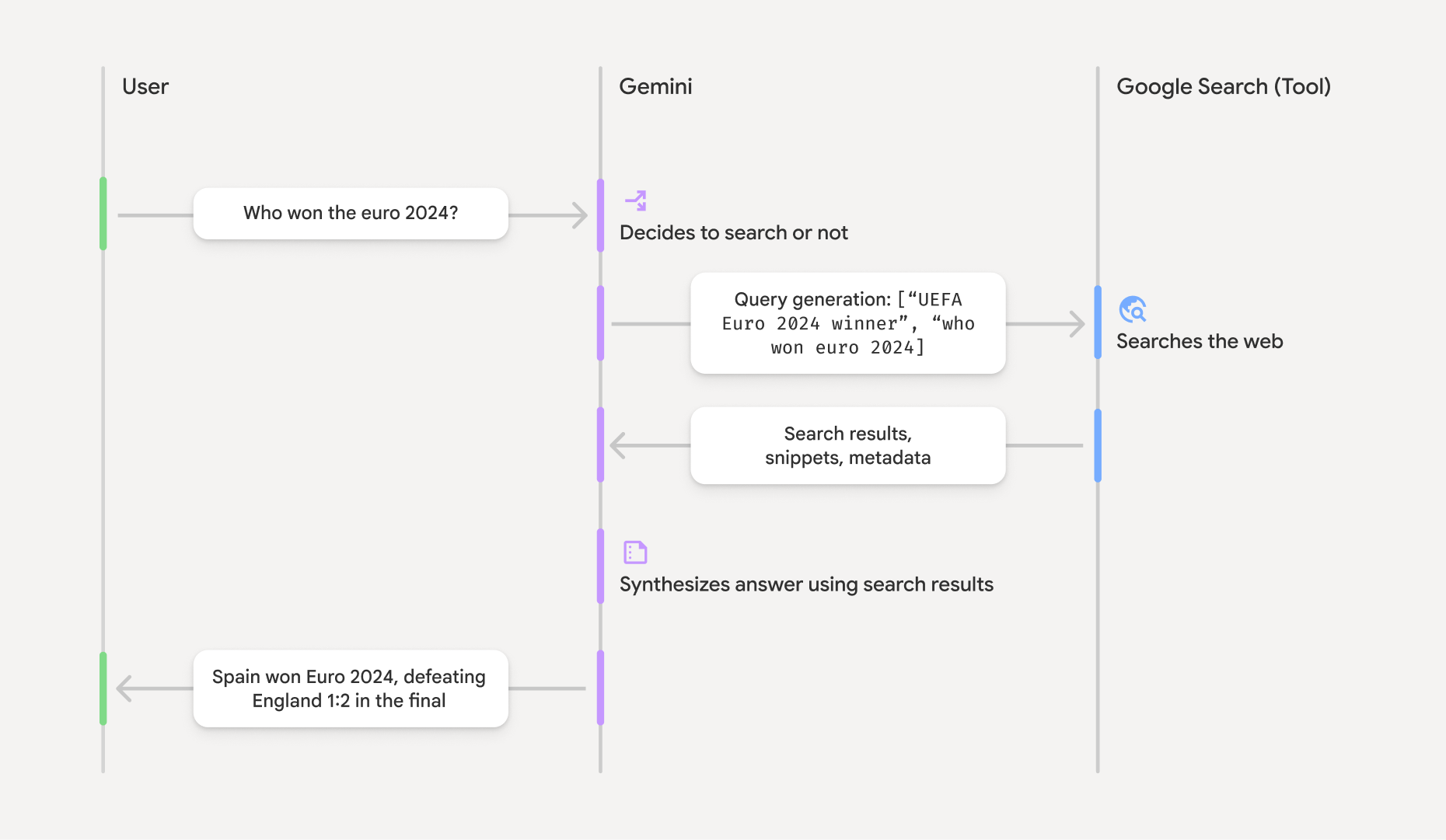
- 用户提示 :您的应用会向 Gemini API 发送用户提示,并启用
google_search工具。 - 提示分析 :模型会分析提示,并确定 Google 搜索是否可以改进回答。
- Google 搜索 :如果需要,模型会自动生成一个或多个搜索查询并执行这些查询。
- 搜索结果处理 :模型会处理搜索结果、综合信息并制定回答。
- 接地回答 :API 会返回最终的、用户友好的回答,该回答以搜索结果为依据。此回答包含模型的文本回答,其中内嵌了包含引用的
annotations,以及包含搜索查询和搜索建议的google_search_call和google_search_result步骤。
了解接地回答
如果成功接地,模型的文本输出会在文本内容块中直接包含内嵌的 annotations。这些注释提供引用信息,将回答的各个部分链接到其来源。
{
  "steps": [
    {
      "type": "thought",
      "summary": [
        {
          "type": "text",
          "text": "The user is asking for the winner of Euro 2024. I need to search for the result of the Euro 2024 final."
        }
      ],
      "signature": "CoMDAXLI2nynRYojJIy6B1Jh9os2crpWLfB0..."
    },
    {
      "type": "google_search_call",
      "arguments": {
        "queries": ["UEFA Euro 2024 winner"]
      }
    },
    {
      "type": "google_search_result",
      "call_id": "search_001",
      "result": [
        {
          "search_suggestions": "<!-- HTML and CSS for the search widget -->"
        }
      ]
    },
    {
      "type": "model_output",
      "content": [
        {
          "type": "text",
          "text": "Spain won Euro 2024, defeating England 2-1 in the final. This victory marks Spain's record fourth European Championship title.",
          "annotations": [
            {
              "type": "url_citation",
              "url": "https://www.aljazeera.com/sports/euro-2024-final",
              "title": "aljazeera.com",
              "start_index": 0,
              "end_index": 56
            },
            {
              "type": "url_citation",
              "url": "https://www.uefa.com/euro2024/news/spain-wins-euro-2024",
              "title": "uefa.com",
              "start_index": 57,
              "end_index": 124
            }
          ]
        }
      ]
    }
  ]
}
回答中的关键字段:
google_search_call:包含模型执行的搜索queries。google_search_result:包含search_suggestions,这是一个用于在界面中呈现搜索建议的 HTML 代码段。如需了解完整的使用要求,请参阅服务条款。- 包含
annotations的text:模型综合的回答,其中包含内嵌的引用。每个url_citation注释都会将文本段(由start_index和end_index定义)链接到来源网址。这是构建内嵌引用的关键。
“依托 Google 搜索进行接地”功能还可以与 网址 上下文工具结合使用,以便根据 公开 Web 数据和您提供的特定网址来接地回答。
使用内嵌引用归因来源
API 会在文本内容块中返回内嵌的 url_citation 注释,让您可以完全控制在界面中显示来源的方式。
每个注释都包含
start_index 和 end_index,用于标识其引用的文本部分。下面介绍了如何提取和显示这些注释。
Python
for step in interaction.steps:
    if step.type == "model_output":
        for content_block in step.content:
            if content_block.type == "text":
                print(content_block.text)
                if content_block.annotations:
                    print("\nCitations:")
                    for annotation in content_block.annotations:
                        if annotation.type == "url_citation":
                            cited_text = content_block.text[annotation.start_index:annotation.end_index]
                            print(f"  [{annotation.title}]({annotation.url})")
                            print(f"    Cited text: \"{cited_text}\"")
JavaScript
for (const step of interaction.steps) {
  if (step.type === 'model_output') {
    for (const contentBlock of step.content) {
      if (contentBlock.type === 'text') {
        console.log(contentBlock.text);
        if (contentBlock.annotations) {
          console.log("\nCitations:");
          for (const annotation of contentBlock.annotations) {
            if (annotation.type === 'url_citation') {
              const citedText = contentBlock.text.slice(annotation.startIndex, annotation.endIndex);
              console.log(`  [${annotation.title}](${annotation.url})`);
              console.log(`    Cited text: "${citedText}"`);
            }
          }
        }
      }
    }
  }
}
输出将显示文本及其引用:
Spain won Euro 2024, defeating England 2-1 in the final. This victory marks Spain's record fourth European Championship title.

Citations:
  [aljazeera.com](https://www.aljazeera.com/sports/euro-2024-final)
    Cited text: "Spain won Euro 2024, defeating England 2-1 in the final."
  [uefa.com](https://www.uefa.com/euro2024/news/spain-wins-euro-2024)
    Cited text: "This victory marks Spain's record fourth European Championship title."
价格
如果您将“依托 Google 搜索进行接地”功能与 Gemini 3 结合使用,则系统会针对模型决定执行的每个搜索查询向您的项目收费。如果模型决定执行多个搜索查询来回答单个提示(例如,在同一 API 调用中搜索 "UEFA Euro 2024 winner" 和 "Spain vs England Euro 2024 final
score"),则此请求将计为该工具的两次付费使用。出于结算目的,我们在统计唯一查询时会忽略空 Web 搜索查询。此结算模式仅适用于 Gemini 3 模型;如果您将搜索接地功能与 Gemini 2.5 或更早版本的模型结合使用,则系统会按提示向您的项目收费。
如需详细了解价格信息,请参阅 Gemini API 价格 页面。
支持的模型
您可以在模型 概览页面上找到完整的功能。
| 模型 | 依托 Google 搜索进行接地 |
|---|---|
| Gemini 3.6 Flash | ✔️ |
| Gemini 3.5 Flash-Lite | ✔️ |
| Gemini 3.5 Flash | ✔️ |
| Gemini 3.1 Flash Image 预览版 | ✔️ |
| Gemini 3.1 Pro 预览版 | ✔️ |
| Gemini 3 Pro Image 预览版 | ✔️ |
| Gemini 3 Flash 预览版 | ✔️ |
| Gemini 2.5 Pro | ✔️ |
| Gemini 2.5 Flash | ✔️ |
| Gemini 2.5 Flash-Lite | ✔️ |
| Gemini 2.0 Flash | ✔️ |
支持的工具组合
您可以将“依托 Google 搜索进行接地”功能与其他工具(如 代码执行和 网址上下文)结合使用,以支持更复杂的 用例。
Gemini 3 模型支持将内置工具(如“依托 Google 搜索进行接地”)与自定义工具(函数调用)相结合。如需了解详情,请参阅 工具组合页面。