

Google Search-এর মাধ্যমে গ্রাউন্ডিং, Gemini মডেলকে রিয়েল-টাইম ওয়েব কন্টেন্টের সাথে কানেক্ট করে এবং উপলভ্য সব ভাষায় কাজ করে। এর ফলে Gemini আরও নির্ভুল উত্তর দিতে এবং নলেজ কাটঅফের পরেও যাচাইযোগ্য সোর্স উল্লেখ করতে পারে।
গ্রাউন্ডিং আপনাকে এমন অ্যাপ্লিকেশন তৈরি করতে সাহায্য করে যা:
- ফ্যাকচুয়াল নির্ভুলতা বাড়ানো: বাস্তব-জগতের তথ্যের উপর ভিত্তি করে উত্তর দেওয়ার মাধ্যমে মডেল হ্যালুসিনেশন কমানো।
- রিয়েল-টাইম তথ্য অ্যাক্সেস করা: সাম্প্রতিক ইভেন্ট এবং বিষয় সম্পর্কে প্রশ্নের উত্তর দেওয়া।
উদ্ধৃতি প্রদান করুন: মডেলের দাবিগুলির সোর্স দেখিয়ে ব্যবহারকারীর বিশ্বাস অর্জন করুন।
Python
from google import genai

client = genai.Client()

interaction = client.interactions.create(
    model="gemini-3.8-flash",
    input="Who won the euro 2024?",
    tools=[{"type": "google_search"}]
)

print(interaction.output_text)
জাভাস্ক্রিপ্ট
import { GoogleGenAI } from "@google/genai";

const client = new GoogleGenAI({});

const interaction = await client.interactions.create({
    model: "gemini-3.8-flash",
    input: "Who won the euro 2024?",
    tools: [{ type: "google_search" }]
});

console.log(interaction.output_text);
Java
import com.google.genai.Client;
import com.google.genai.gaos.models.interactions.CreateModelInteraction;
import com.google.genai.gaos.models.interactions.GoogleSearch;
import com.google.genai.gaos.models.interactions.Interaction;
import com.google.genai.gaos.models.interactions.InteractionsInput;
import com.google.genai.gaos.models.interactions.Model;
import com.google.genai.gaos.models.operations.CreateInteractionRequestBody;
import java.util.Arrays;

Client client = new Client();

CreateModelInteraction params =
    CreateModelInteraction.builder()
        .model(Model.of("gemini-3.8-flash"))
        .input(InteractionsInput.of("Who won the euro 2024?"))
        .tools(Arrays.asList(GoogleSearch.builder().build()))
        .build();

Interaction interaction =
    client.interactions.create(CreateInteractionRequestBody.of(params)).interaction().get();

System.out.println(interaction.outputText().orElse(""));
খুলুন
package main

import (
    "context"
    "fmt"
    "log"

    "google.golang.org/genai"
    "google.golang.org/genai/interactions/models/interactions"
    "google.golang.org/genai/interactions/models/operations"
)

func main() {
    ctx := context.Background()
    client, err := genai.NewClient(ctx, nil)
    if err != nil {
        log.Fatal(err)
    }

    resp, err := client.Interactions.Create(ctx, operations.CreateInteractionRequest{
        Body: operations.NewCreateInteractionRequestBody(
            interactions.CreateModelInteraction{
                Model: interactions.Model("gemini-3.8-flash"),
                Input: interactions.NewInteractionsInput("Who won the euro 2024?"),
                Tools: []interactions.Tool{
                    interactions.NewTool(interactions.GoogleSearch{}),
                },
            },
        ),
    })
    if err != nil {
        log.Fatal(err)
    }

    fmt.Println(resp.Interaction.GetOutputText())
}
REST
curl -X POST "https://generativelanguage.googleapis.com/v1beta/interactions" \
  -H "x-goog-api-key: $GEMINI_API_KEY" \
  -H "Content-Type: application/json" \
  -d '{
    "model": "gemini-3.8-flash",
    "input": "Who won the euro 2024?",
    "tools": [{"type": "google_search"}]
  }'
Grounding with Google Search কীভাবে কাজ করে
আপনি google_search টুল চালু করলে, মডেলটি তথ্য সার্চ, প্রসেস ও উদ্ধৃত করার
সম্পূর্ণ ওয়ার্কফ্লো অটোমেটিক ম্যানেজ করে।
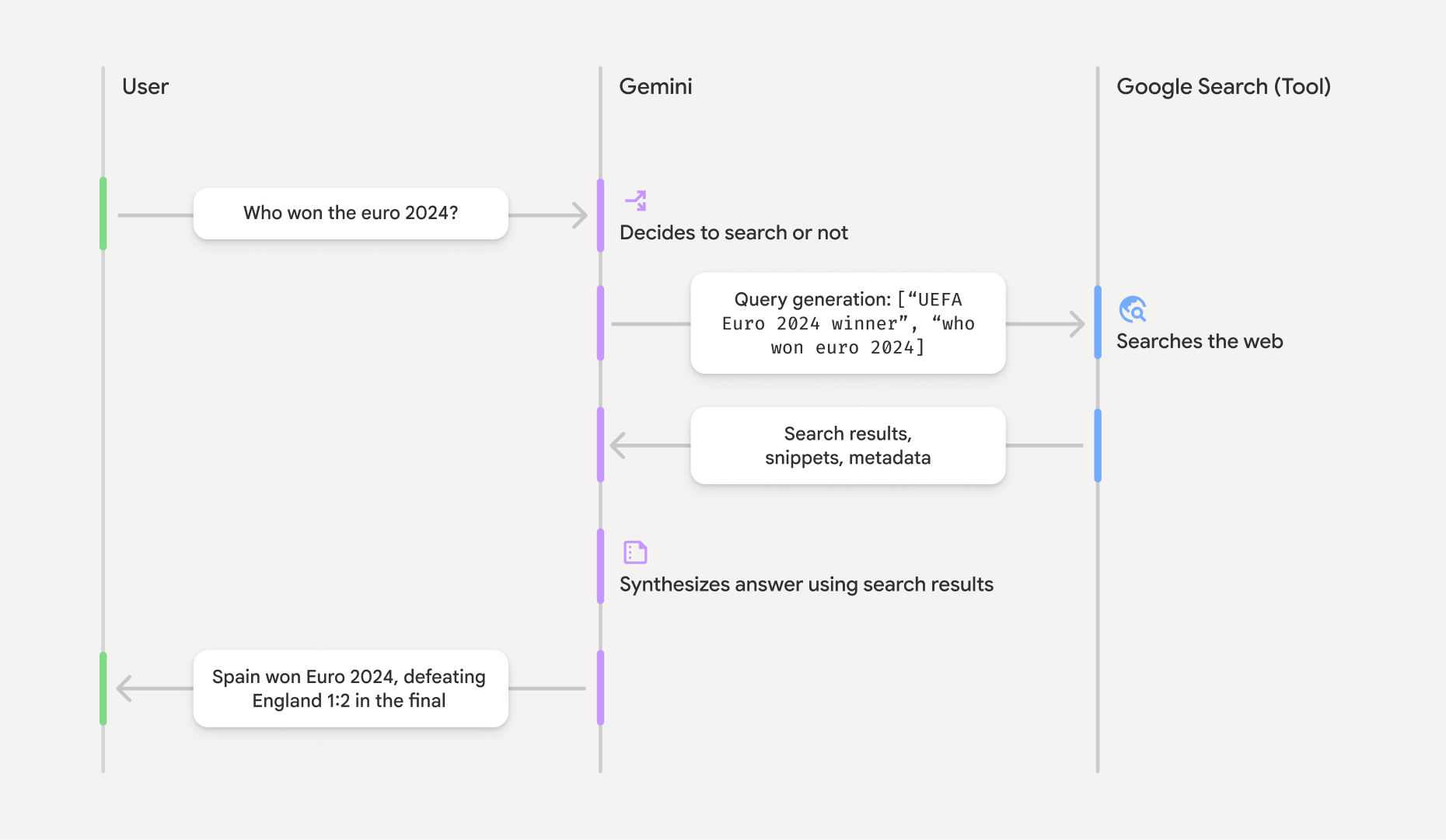
- ব্যবহারকারীর প্রম্পট: আপনার অ্যাপ্লিকেশন
google_searchটুল চালু করে Gemini API-তে ব্যবহারকারীর প্রম্পট পাঠায়। - প্রম্পট বিশ্লেষণ: মডেলটি প্রম্পট বিশ্লেষণ করে এবং নির্ধারণ করে যে Google Search উত্তরটিকে উন্নত করতে পারে কিনা।
- Google Search: প্রয়োজন হলে, মডেল অটোমেটিক এক বা একাধিক সার্চ কোয়েরি তৈরি করে এবং সেগুলি এক্সিকিউট করে।
- সার্চ ফলাফল প্রসেস করা: মডেলটি সার্চ ফলাফল প্রসেস করে, তথ্য একত্রিত করে এবং একটি উত্তর তৈরি করে।
- গ্রাউন্ডেড উত্তর: API একটি চূড়ান্ত, ব্যবহারকারীর পক্ষে উপযুক্ত উত্তর দেয় যা
সার্চ ফলাফলের উপর ভিত্তি করে দেওয়া হয়। এই উত্তরে মডেলের টেক্সট
ইনলাইন
annotationsসহ উত্তর দেওয়া হয়েছে, এতে উদ্ধৃতি সহgoogle_search_callএবংgoogle_search_resultধাপের সাথে সার্চ কোয়েরি ও সার্চ সাজেশনও রয়েছে।
গ্রাউন্ডিং উত্তর সম্পর্কে বোঝা
কোনও উত্তর সফলভাবে গ্রাউন্ড করা হলে, মডেলের টেক্সট আউটপুটে
ইনলাইন annotations সরাসরি টেক্সট কন্টেন্ট ব্লকে অন্তর্ভুক্ত থাকে। এইসব অ্যানোটেশন
উত্তরের বিভিন্ন অংশকে তাদের সোর্সের সাথে লিঙ্ক করে সাইটেশন সংক্রান্ত তথ্য প্রদান করে।
{
  "steps": [
    {
      "type": "thought",
      "summary": [
        {
          "type": "text",
          "text": "The user is asking for the winner of Euro 2024. I need to search for the result of the Euro 2024 final."
        }
      ],
      "signature": "CoMDAXLI2nynRYojJIy6B1Jh9os2crpWLfB0..."
    },
    {
      "type": "google_search_call",
      "arguments": {
        "queries": ["UEFA Euro 2024 winner"]
      }
    },
    {
      "type": "google_search_result",
      "call_id": "search_001",
      "result": [
        {
          "search_suggestions": "<!-- HTML and CSS for the search widget -->"
        }
      ]
    },
    {
      "type": "model_output",
      "content": [
        {
          "type": "text",
          "text": "Spain won Euro 2024, defeating England 2-1 in the final. This victory marks Spain's record fourth European Championship title.",
          "annotations": [
            {
              "type": "url_citation",
              "url": "https://www.aljazeera.com/sports/euro-2024-final",
              "title": "aljazeera.com",
              "start_index": 0,
              "end_index": 56
            },
            {
              "type": "url_citation",
              "url": "https://www.uefa.com/euro2024/news/spain-wins-euro-2024",
              "title": "uefa.com",
              "start_index": 57,
              "end_index": 124
            }
          ]
        }
      ]
    }
  ]
}
উত্তরে থাকা মূল ফিল্ড:
google_search_call: মডেলের এক্সিকিউট করা সার্চqueriesরয়েছে।google_search_result:search_suggestions, একটি HTML স্নিপেট রয়েছে আপনার UI-তে সার্চ সাজেশন রেন্ডার করার জন্য। পরিষেবার শর্তাবলীতে ব্যবহারের সম্পূর্ণ প্রয়োজনীয়তা বিস্তারিতভাবে উল্লেখ করা আছে।annotationsসহtext: ইনলাইন সাইটেশন সহ মডেলের সিন্থেসাইজ করা উত্তর। প্রতিটিurl_citationঅ্যানোটেশন একটি টেক্সট সেগমেন্টকে (start_indexএবংend_indexদ্বারা সংজ্ঞায়িত) একটি সোর্স URL-এর সাথে লিঙ্ক করে। ইনলাইন উদ্ধৃতি তৈরি করার জন্য এটি গুরুত্বপূর্ণ।
Grounding with Google Search-এর সাথে URL কন্টেক্সট টুল ব্যবহার করে পাবলিক ওয়েব ডেটা এবং আপনার দেওয়া নির্দিষ্ট URL, দুটির ভিত্তিতেই উত্তর দেওয়া যায়।
ইনলাইন সাইটেশনের মাধ্যমে সোর্স অ্যাট্রিবিউট করা
API টেক্সট কন্টেন্ট ব্লকে ইনলাইন url_citation অ্যানোটেশন রিটার্ন করে,
যার ফলে আপনার ইউজার ইন্টারফেসে সোর্স কীভাবে দেখাবেন তার উপর আপনার সম্পূর্ণ কন্ট্রোল থাকে।
প্রতিটি অ্যানোটেশনে start_index ও end_index থাকে, যাতে টেক্সটের কোন অংশ
সেটি উল্লেখ করছে তা শনাক্ত করা যায়। কীভাবে সেগুলি এক্সট্র্যাক্ট ও ডিসপ্লে করতে হয় তা এখানে দেওয়া হল।
Python
for step in interaction.steps:
    if step.type == "model_output":
        for content_block in step.content:
            if content_block.type == "text":
                print(content_block.text)
                if content_block.annotations:
                    print("\nCitations:")
                    for annotation in content_block.annotations:
                        if annotation.type == "url_citation":
                            cited_text = content_block.text[annotation.start_index:annotation.end_index]
                            print(f"  [{annotation.title}]({annotation.url})")
                            print(f"    Cited text: \"{cited_text}\"")
জাভাস্ক্রিপ্ট
for (const step of interaction.steps) {
  if (step.type === 'model_output') {
    for (const contentBlock of step.content) {
      if (contentBlock.type === 'text') {
        console.log(contentBlock.text);
        if (contentBlock.annotations) {
          console.log("\nCitations:");
          for (const annotation of contentBlock.annotations) {
            if (annotation.type === 'url_citation') {
              const citedText = contentBlock.text.slice(annotation.startIndex, annotation.endIndex);
              console.log(`  [${annotation.title}](${annotation.url})`);
              console.log(`    Cited text: "${citedText}"`);
            }
          }
        }
      }
    }
  }
}
Java
import com.google.genai.Client;
import com.google.genai.gaos.models.interactions.Annotation;
import com.google.genai.gaos.models.interactions.Content;
import com.google.genai.gaos.models.interactions.CreateModelInteraction;
import com.google.genai.gaos.models.interactions.GoogleSearch;
import com.google.genai.gaos.models.interactions.Interaction;
import com.google.genai.gaos.models.interactions.InteractionsInput;
import com.google.genai.gaos.models.interactions.Model;
import com.google.genai.gaos.models.interactions.ModelOutputStep;
import com.google.genai.gaos.models.interactions.Step;
import com.google.genai.gaos.models.interactions.TextContent;
import com.google.genai.gaos.models.interactions.URLCitation;
import com.google.genai.gaos.models.operations.CreateInteractionRequestBody;
import java.util.Arrays;

Client client = new Client();

CreateModelInteraction params =
    CreateModelInteraction.builder()
        .model(Model.of("gemini-3.8-flash"))
        .input(InteractionsInput.of("Who won the euro 2024?"))
        .tools(Arrays.asList(GoogleSearch.builder().build()))
        .build();

Interaction interaction =
    client.interactions.create(CreateInteractionRequestBody.of(params)).interaction().get();

if (interaction.steps().isPresent()) {
  for (Step step : interaction.steps().get()) {
    if (step instanceof ModelOutputStep) {
      ModelOutputStep outputStep = (ModelOutputStep) step;
      if (outputStep.content().isPresent()) {
        for (Content contentBlock : outputStep.content().get()) {
          if (contentBlock instanceof TextContent) {
            TextContent textContent = (TextContent) contentBlock;
            String text = textContent.text().orElse("");
            System.out.println(text);
            if (textContent.annotations().isPresent()
                && !textContent.annotations().get().isEmpty()) {
              System.out.println("\nCitations:");
              for (Annotation annotation : textContent.annotations().get()) {
                if (annotation instanceof URLCitation) {
                  URLCitation citation = (URLCitation) annotation;
                  int start = citation.startIndex().orElse(0);
                  int end = citation.endIndex().orElse(0);
                  String citedText =
                      (start >= 0 && end <= text.length() && start <= end)
                          ? text.substring(start, end)
                          : "";
                  System.out.printf(
                      "  [%s](%s)%n", citation.title().orElse(""), citation.url().orElse(""));
                  System.out.printf("    Cited text: \"%s\"%n", citedText);
                }
              }
            }
          }
        }
      }
    }
  }
}
খুলুন
package main

import (
    "context"
    "fmt"
    "log"

    "google.golang.org/genai"
    "google.golang.org/genai/interactions/models/interactions"
    "google.golang.org/genai/interactions/models/operations"
)

func main() {
    ctx := context.Background()
    client, err := genai.NewClient(ctx, nil)
    if err != nil {
        log.Fatal(err)
    }

    resp, err := client.Interactions.Create(ctx, operations.CreateInteractionRequest{
        Body: operations.NewCreateInteractionRequestBody(
            interactions.CreateModelInteraction{
                Model: interactions.Model("gemini-3.8-flash"),
                Input: interactions.NewInteractionsInput("Who won the euro 2024?"),
                Tools: []interactions.Tool{
                    interactions.NewTool(interactions.GoogleSearch{}),
                },
            },
        ),
    })
    if err != nil {
        log.Fatal(err)
    }

    for _, step := range resp.Interaction.Steps {
        if step.ModelOutputStep != nil {
            for _, content := range step.ModelOutputStep.Content {
                if content.TextContent != nil {
                    text := content.TextContent.Text
                    fmt.Println(text)
                    if len(content.TextContent.Annotations) > 0 {
                        fmt.Println("\nCitations:")
                        for _, annotation := range content.TextContent.Annotations {
                            if annotation.URLCitation != nil {
                                c := annotation.URLCitation
                                start := 0
                                if c.StartIndex != nil {
                                    start = *c.StartIndex
                                }
                                end := 0
                                if c.EndIndex != nil {
                                    end = *c.EndIndex
                                }
                                citedText := ""
                                if start >= 0 && end <= len(text) && start <= end {
                                    citedText = text[start:end]
                                }
                                title := ""
                                if c.Title != nil {
                                    title = *c.Title
                                }
                                url := ""
                                if c.URL != nil {
                                    url = *c.URL
                                }
                                fmt.Printf("  [%s](%s)\n", title, url)
                                fmt.Printf("    Cited text: %q\n", citedText)
                            }
                        }
                    }
                }
            }
        }
    }
}
আউটপুটে টেক্সট ও তার সাইটেশন দেখানো হবে:
Spain won Euro 2024, defeating England 2-1 in the final. This victory marks Spain's record fourth European Championship title.

Citations:
  [aljazeera.com](https://www.aljazeera.com/sports/euro-2024-final)
    Cited text: "Spain won Euro 2024, defeating England 2-1 in the final."
  [uefa.com](https://www.uefa.com/euro2024/news/spain-wins-euro-2024)
    Cited text: "This victory marks Spain's record fourth European Championship title."
দাম
আপনি Gemini 3 এবং আরও নতুন মডেলের সাথে Grounding with Google Search ব্যবহার করলে, মডেলটি যে প্রতিটি সার্চ কোয়েরি চালানোর সিদ্ধান্ত নেয় তার জন্য আপনার প্রোজেক্টে বিল করা হয়। এই কোয়েরি-প্রতি বিলিং মডেলে প্রতি মাসে ৫,০০০টি ফ্রি সার্চ অনুরোধ অন্তর্ভুক্ত থাকে যা সমস্ত Gemini 3 এবং নতুন মডেল জুড়ে শেয়ার করা হয় এবং তারপরে প্রতি ১,০০০টি সার্চ অনুরোধের জন্য$১৪ খরচ হয়।
যেমন, কোনও মডেল যদি একটি প্রম্পটের উত্তর দেওয়ার জন্য একাধিক সার্চ কোয়েরি এক্সিকিউট করার সিদ্ধান্ত নেয় (যেমন, একই API কলের মধ্যে "UEFA Euro 2024 winner" ও "Spain vs
England Euro 2024 final score" সার্চ করা), তাহলে এটি সেই অনুরোধের জন্য টুলের দুটি
বিলযোগ্য ব্যবহার হিসেবে গণ্য হবে। বিলিংয়ের জন্য, অনন্য কোয়েরি গণনা করার সময় আমরা
ফাঁকা ওয়েব সার্চ কোয়েরি উপেক্ষা করি।
আপনি Gemini 2.5 বা এর আগের মডেলের সাথে সার্চ গ্রাউন্ডিং ব্যবহার করলে, আপনার প্রোজেক্টে প্রতিটি প্রম্পটের জন্য বিল করা হয়।
মূল্য সংক্রান্ত বিস্তারিত তথ্য পেতে, Gemini API-এর মূল্য পৃষ্ঠা দেখুন।
যেসব মডেলে কাজ করে
আপনি মডেল ওভারভিউ পৃষ্ঠা থেকে সম্পূর্ণ ক্ষমতা সম্পর্কে জানতে পারবেন।
| মডেল | Google Search-এর মাধ্যমে গ্রাউন্ডিং |
|---|---|
| Gemini 4 Argon | ✔️ |
| Gemini 3.8 Flash | ✔️ |
| Gemini 3.6 Flash | ✔️ |
| Gemini 3.5 Flash-Lite | ✔️ |
| Gemini 3.1 Flash Image Preview | ✔️ |
| Gemini 3.1 Pro প্রিভিউ | ✔️ |
| Gemini 3 Pro ইমেজ প্রিভিউ | ✔️ |
| Gemini 3 Flash প্রিভিউ | ✔️ |
| Gemini 2.5 Pro | ✔️ |
| Gemini 2.5 Flash | ✔️ |
| Gemini 2.5 Flash-Lite | ✔️ |
| Gemini 2.0 Flash | ✔️ |
কাজ করে এমন টুলের কম্বিনেশন
আরও জটিল ব্যবহারের ক্ষেত্রে সাহায্য পেতে, আপনি Google Search-এর সাথে গ্রাউন্ডিংয়ের পাশাপাশি কোড এক্সিকিউশন, URL কনটেক্সট এবং Google Maps-এর সাথে গ্রাউন্ডিং (এগুলি Gemini 3.5 Flash-Lite ও এর পরের মডেলগুলিতে কাজ করে) ব্যবহার করতে পারেন। এছাড়াও, Gemini 3 মডেল কাস্টম টুলের (ফাংশন কলিং) সাথে এইসব বিল্ট-ইন টুল একত্রিত করার সুবিধা দেয়। টুল কম্বিনেশন পৃষ্ঠা থেকে আরও জানুন।
এর পরে কী করতে হবে
- ফাংশন কলিং-এর মতো অন্যান্য উপলভ্য টুল সম্পর্কে জানুন।
- URL কন্টেক্সট টুল ব্যবহার করে নির্দিষ্ট URL-এর মাধ্যমে কীভাবে প্রম্পট অগমেন্ট করবেন তা জানুন।