

Google Search से सटीक जानकारी पाने की सुविधा, Gemini मॉडल को रीयल-टाइम में वेब कॉन्टेंट से कनेक्ट करती है और सभी उपलब्ध भाषाओं में काम करती है. इससे Gemini, जानकारी न मिलने की स्थिति के दायरे से बाहर निकलकर ज़्यादा सटीक जवाब और भरोसेमंद सोर्स के रेफ़रंस दे पाता है.
Google Search से सटीक जानकारी पाने की सुविधा की मदद से, ऐसे ऐप्लिकेशन बनाए जा सकते हैं जो:
- जानकारी की सटीकता बढ़ा सकते हैं: असल दुनिया की जानकारी के आधार पर जवाब देकर, मॉडल के गलत जवाब देने की समस्या को कम कर सकते हैं.
- रीयल-टाइम में जानकारी ऐक्सेस कर सकते हैं: हाल ही में हुई घटनाओं और विषयों के बारे में सवालों के जवाब दे सकते हैं.
रेफ़रंस दे सकते हैं: मॉडल के दावों के सोर्स दिखाकर, उपयोगकर्ताओं का भरोसा जीत सकते हैं.
Python
from google import genai

client = genai.Client()

interaction = client.interactions.create(
    model="gemini-3.8-flash",
    input="Who won the euro 2024?",
    tools=[{"type": "google_search"}]
)

print(interaction.output_text)
JavaScript
import { GoogleGenAI } from "@google/genai";

const client = new GoogleGenAI({});

const interaction = await client.interactions.create({
    model: "gemini-3.8-flash",
    input: "Who won the euro 2024?",
    tools: [{ type: "google_search" }]
});

console.log(interaction.output_text);
Java
import com.google.genai.Client;
import com.google.genai.gaos.models.interactions.CreateModelInteraction;
import com.google.genai.gaos.models.interactions.GoogleSearch;
import com.google.genai.gaos.models.interactions.Interaction;
import com.google.genai.gaos.models.interactions.InteractionsInput;
import com.google.genai.gaos.models.interactions.Model;
import com.google.genai.gaos.models.operations.CreateInteractionRequestBody;
import java.util.Arrays;

Client client = new Client();

CreateModelInteraction params =
    CreateModelInteraction.builder()
        .model(Model.of("gemini-3.8-flash"))
        .input(InteractionsInput.of("Who won the euro 2024?"))
        .tools(Arrays.asList(GoogleSearch.builder().build()))
        .build();

Interaction interaction =
    client.interactions.create(CreateInteractionRequestBody.of(params)).interaction().get();

System.out.println(interaction.outputText().orElse(""));
ऐप पर जाएं
package main

import (
    "context"
    "fmt"
    "log"

    "google.golang.org/genai"
    "google.golang.org/genai/interactions/models/interactions"
    "google.golang.org/genai/interactions/models/operations"
)

func main() {
    ctx := context.Background()
    client, err := genai.NewClient(ctx, nil)
    if err != nil {
        log.Fatal(err)
    }

    resp, err := client.Interactions.Create(ctx, operations.CreateInteractionRequest{
        Body: operations.NewCreateInteractionRequestBody(
            interactions.CreateModelInteraction{
                Model: interactions.Model("gemini-3.8-flash"),
                Input: interactions.NewInteractionsInput("Who won the euro 2024?"),
                Tools: []interactions.Tool{
                    interactions.NewTool(interactions.GoogleSearch{}),
                },
            },
        ),
    })
    if err != nil {
        log.Fatal(err)
    }

    fmt.Println(resp.Interaction.GetOutputText())
}
REST
curl -X POST "https://generativelanguage.googleapis.com/v1beta/interactions" \
  -H "x-goog-api-key: $GEMINI_API_KEY" \
  -H "Content-Type: application/json" \
  -d '{
    "model": "gemini-3.8-flash",
    "input": "Who won the euro 2024?",
    "tools": [{"type": "google_search"}]
  }'
Google Search से सटीक जानकारी पाने की सुविधा कैसे काम करती है
google_search टूल चालू करने पर, मॉडल खोज करने, जानकारी प्रोसेस करने, और रेफ़रंस देने का पूरा वर्कफ़्लो अपने-आप मैनेज करता है.
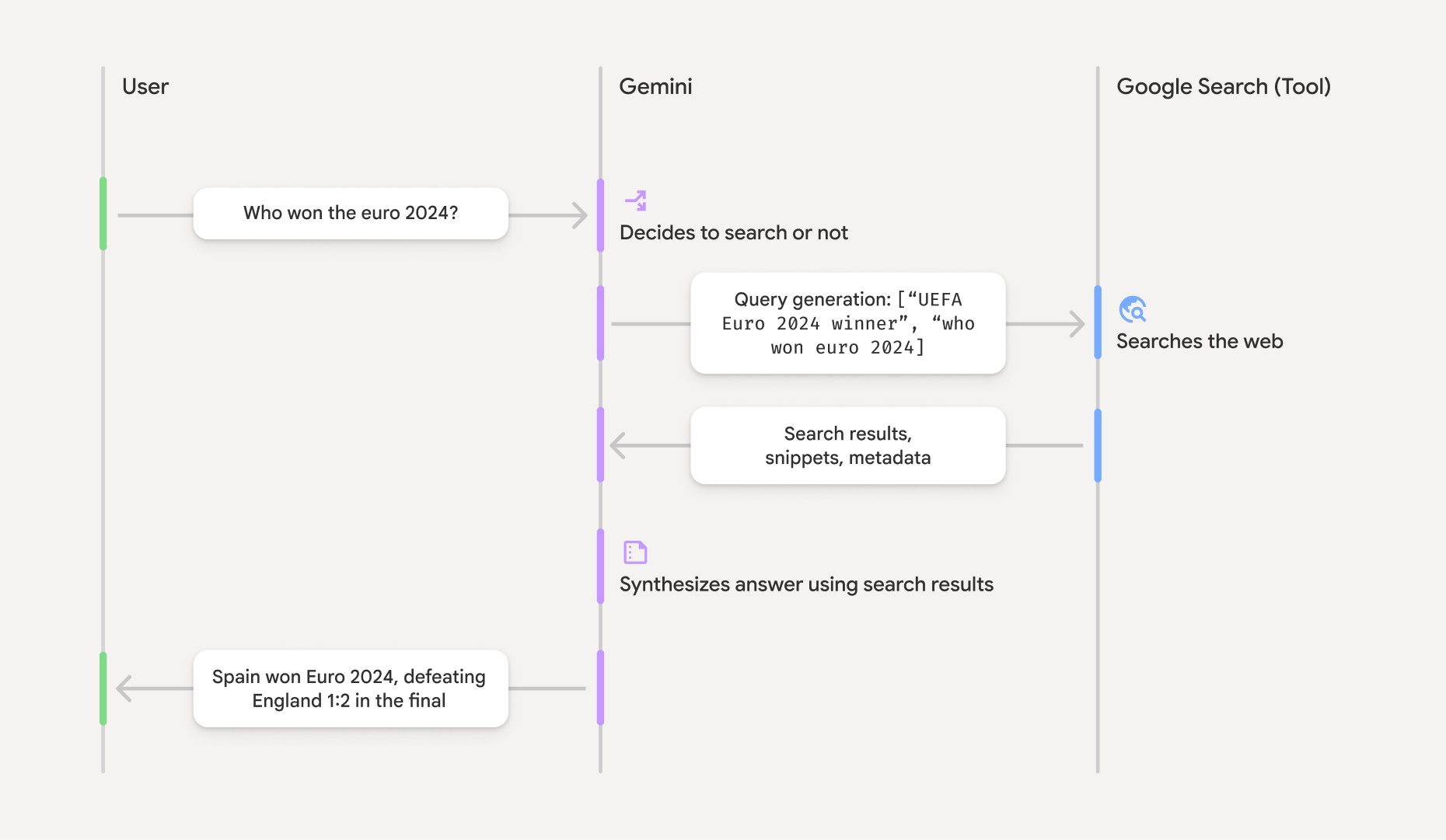
- उपयोगकर्ता का प्रॉम्प्ट: आपका ऐप्लिकेशन,
google_searchटूल चालू होने पर, उपयोगकर्ता का प्रॉम्प्ट Gemini API को भेजता है. - प्रॉम्प्ट का विश्लेषण: मॉडल, प्रॉम्प्ट का विश्लेषण करता है और यह तय करता है कि Google Search की मदद से जवाब को बेहतर बनाया जा सकता है या नहीं.
- Google Search: ज़रूरत पड़ने पर, मॉडल अपने-आप एक या एक से ज़्यादा सर्च क्वेरी जनरेट करता है और उन्हें लागू करता है.
- खोज के नतीजों को प्रोसेस करना: मॉडल, खोज के नतीजों को प्रोसेस करता है, जानकारी को सिंथेसाइज़ करता है, और जवाब तैयार करता है.
- भरोसेमंद स्रोतों से मिला जवाब: एपीआई, खोज के नतीजों के आधार पर, उपयोगकर्ता के लिए फ़ाइनल और आसान जवाब देता है. इस जवाब में, मॉडल का टेक्स्ट जवाब शामिल होता है. इसमें इनलाइन
annotationsभी शामिल होते हैं, जिनमें रेफ़रंस होते हैं. इसके अलावा, इसमेंgoogle_search_callऔरgoogle_search_resultके चरण भी शामिल होते हैं, जिनमें सर्च क्वेरी और खोज से जुड़े सुझाव होते हैं.
भरोसेमंद स्रोतों से मिले जवाब को समझना
जवाब के लिए भरोसेमंद सोर्स मिलने पर, मॉडल के टेक्स्ट आउटपुट में, टेक्स्ट कॉन्टेंट ब्लॉक पर सीधे इनलाइन annotations शामिल होते हैं. इन एनोटेशन में, रेफ़रंस की जानकारी होती है. इससे जवाब के हिस्सों को उनके सोर्स से लिंक किया जाता है.
{
  "steps": [
    {
      "type": "thought",
      "summary": [
        {
          "type": "text",
          "text": "The user is asking for the winner of Euro 2024. I need to search for the result of the Euro 2024 final."
        }
      ],
      "signature": "CoMDAXLI2nynRYojJIy6B1Jh9os2crpWLfB0..."
    },
    {
      "type": "google_search_call",
      "arguments": {
        "queries": ["UEFA Euro 2024 winner"]
      }
    },
    {
      "type": "google_search_result",
      "call_id": "search_001",
      "result": [
        {
          "search_suggestions": "<!-- HTML and CSS for the search widget -->"
        }
      ]
    },
    {
      "type": "model_output",
      "content": [
        {
          "type": "text",
          "text": "Spain won Euro 2024, defeating England 2-1 in the final. This victory marks Spain's record fourth European Championship title.",
          "annotations": [
            {
              "type": "url_citation",
              "url": "https://www.aljazeera.com/sports/euro-2024-final",
              "title": "aljazeera.com",
              "start_index": 0,
              "end_index": 56
            },
            {
              "type": "url_citation",
              "url": "https://www.uefa.com/euro2024/news/spain-wins-euro-2024",
              "title": "uefa.com",
              "start_index": 57,
              "end_index": 124
            }
          ]
        }
      ]
    }
  ]
}
जवाब में मौजूद मुख्य फ़ील्ड:
google_search_call: इसमें मॉडल की लागू की गई खोजqueriesशामिल होती हैं.google_search_result: इसमेंsearch_suggestionsशामिल होते हैं. यह आपके यूज़र इंटरफ़ेस (यूआई) में खोज से जुड़े सुझाव दिखाने के लिए, एचटीएमएल स्निपेट होता है. इस्तेमाल से जुड़ी पूरी ज़रूरी शर्तें, सेवा की शर्तों में बताई गई हैं.textwithannotations: मॉडल का सिंथेसाइज़ किया गया जवाब, जिसमें इनलाइन रेफ़रंस शामिल होते हैं. हरurl_citationएनोटेशन, टेक्स्ट के किसी सेगमेंट (start_indexऔरend_indexसे तय) को सोर्स यूआरएल से लिंक करता है. इनलाइन रेफ़रंस बनाने के लिए, यह ज़रूरी है.
Google Search से सटीक जानकारी पाने की सुविधा को, यूआरएल कॉन्टेक्स्ट टूल के साथ भी इस्तेमाल किया जा सकता है. इससे जवाबों को, सार्वजनिक वेब डेटा और आपके दिए गए खास यूआरएल, दोनों के आधार पर तैयार किया जा सकता है.
इनलाइन रेफ़रंस की मदद से सोर्स एट्रिब्यूट करना
एपीआई, टेक्स्ट कॉन्टेंट ब्लॉक पर इनलाइन url_citation एनोटेशन दिखाता है. इससे आपको यह तय करने का पूरा कंट्रोल मिलता है कि अपने यूज़र इंटरफ़ेस में सोर्स कैसे दिखाए जाएं.
हर एनोटेशन में start_index और end_index शामिल होता है. इससे यह पता चलता है कि यह टेक्स्ट के किस हिस्से का रेफ़रंस है. इन्हें एक्सट्रैक्ट और दिखाने का तरीका यहां बताया गया है.
Python
for step in interaction.steps:
    if step.type == "model_output":
        for content_block in step.content:
            if content_block.type == "text":
                print(content_block.text)
                if content_block.annotations:
                    print("\nCitations:")
                    for annotation in content_block.annotations:
                        if annotation.type == "url_citation":
                            cited_text = content_block.text[annotation.start_index:annotation.end_index]
                            print(f"  [{annotation.title}]({annotation.url})")
                            print(f"    Cited text: \"{cited_text}\"")
JavaScript
for (const step of interaction.steps) {
  if (step.type === 'model_output') {
    for (const contentBlock of step.content) {
      if (contentBlock.type === 'text') {
        console.log(contentBlock.text);
        if (contentBlock.annotations) {
          console.log("\nCitations:");
          for (const annotation of contentBlock.annotations) {
            if (annotation.type === 'url_citation') {
              const citedText = contentBlock.text.slice(annotation.startIndex, annotation.endIndex);
              console.log(`  [${annotation.title}](${annotation.url})`);
              console.log(`    Cited text: "${citedText}"`);
            }
          }
        }
      }
    }
  }
}
Java
import com.google.genai.Client;
import com.google.genai.gaos.models.interactions.Annotation;
import com.google.genai.gaos.models.interactions.Content;
import com.google.genai.gaos.models.interactions.CreateModelInteraction;
import com.google.genai.gaos.models.interactions.GoogleSearch;
import com.google.genai.gaos.models.interactions.Interaction;
import com.google.genai.gaos.models.interactions.InteractionsInput;
import com.google.genai.gaos.models.interactions.Model;
import com.google.genai.gaos.models.interactions.ModelOutputStep;
import com.google.genai.gaos.models.interactions.Step;
import com.google.genai.gaos.models.interactions.TextContent;
import com.google.genai.gaos.models.interactions.URLCitation;
import com.google.genai.gaos.models.operations.CreateInteractionRequestBody;
import java.util.Arrays;

Client client = new Client();

CreateModelInteraction params =
    CreateModelInteraction.builder()
        .model(Model.of("gemini-3.8-flash"))
        .input(InteractionsInput.of("Who won the euro 2024?"))
        .tools(Arrays.asList(GoogleSearch.builder().build()))
        .build();

Interaction interaction =
    client.interactions.create(CreateInteractionRequestBody.of(params)).interaction().get();

if (interaction.steps().isPresent()) {
  for (Step step : interaction.steps().get()) {
    if (step instanceof ModelOutputStep) {
      ModelOutputStep outputStep = (ModelOutputStep) step;
      if (outputStep.content().isPresent()) {
        for (Content contentBlock : outputStep.content().get()) {
          if (contentBlock instanceof TextContent) {
            TextContent textContent = (TextContent) contentBlock;
            String text = textContent.text().orElse("");
            System.out.println(text);
            if (textContent.annotations().isPresent()
                && !textContent.annotations().get().isEmpty()) {
              System.out.println("\nCitations:");
              for (Annotation annotation : textContent.annotations().get()) {
                if (annotation instanceof URLCitation) {
                  URLCitation citation = (URLCitation) annotation;
                  int start = citation.startIndex().orElse(0);
                  int end = citation.endIndex().orElse(0);
                  String citedText =
                      (start >= 0 && end <= text.length() && start <= end)
                          ? text.substring(start, end)
                          : "";
                  System.out.printf(
                      "  [%s](%s)%n", citation.title().orElse(""), citation.url().orElse(""));
                  System.out.printf("    Cited text: \"%s\"%n", citedText);
                }
              }
            }
          }
        }
      }
    }
  }
}
ऐप पर जाएं
package main

import (
    "context"
    "fmt"
    "log"

    "google.golang.org/genai"
    "google.golang.org/genai/interactions/models/interactions"
    "google.golang.org/genai/interactions/models/operations"
)

func main() {
    ctx := context.Background()
    client, err := genai.NewClient(ctx, nil)
    if err != nil {
        log.Fatal(err)
    }

    resp, err := client.Interactions.Create(ctx, operations.CreateInteractionRequest{
        Body: operations.NewCreateInteractionRequestBody(
            interactions.CreateModelInteraction{
                Model: interactions.Model("gemini-3.8-flash"),
                Input: interactions.NewInteractionsInput("Who won the euro 2024?"),
                Tools: []interactions.Tool{
                    interactions.NewTool(interactions.GoogleSearch{}),
                },
            },
        ),
    })
    if err != nil {
        log.Fatal(err)
    }

    for _, step := range resp.Interaction.Steps {
        if step.ModelOutputStep != nil {
            for _, content := range step.ModelOutputStep.Content {
                if content.TextContent != nil {
                    text := content.TextContent.Text
                    fmt.Println(text)
                    if len(content.TextContent.Annotations) > 0 {
                        fmt.Println("\nCitations:")
                        for _, annotation := range content.TextContent.Annotations {
                            if annotation.URLCitation != nil {
                                c := annotation.URLCitation
                                start := 0
                                if c.StartIndex != nil {
                                    start = *c.StartIndex
                                }
                                end := 0
                                if c.EndIndex != nil {
                                    end = *c.EndIndex
                                }
                                citedText := ""
                                if start >= 0 && end <= len(text) && start <= end {
                                    citedText = text[start:end]
                                }
                                title := ""
                                if c.Title != nil {
                                    title = *c.Title
                                }
                                url := ""
                                if c.URL != nil {
                                    url = *c.URL
                                }
                                fmt.Printf("  [%s](%s)\n", title, url)
                                fmt.Printf("    Cited text: %q\n", citedText)
                            }
                        }
                    }
                }
            }
        }
    }
}
आउटपुट में, टेक्स्ट के बाद उसके रेफ़रंस दिखेंगे:
Spain won Euro 2024, defeating England 2-1 in the final. This victory marks Spain's record fourth European Championship title.

Citations:
  [aljazeera.com](https://www.aljazeera.com/sports/euro-2024-final)
    Cited text: "Spain won Euro 2024, defeating England 2-1 in the final."
  [uefa.com](https://www.uefa.com/euro2024/news/spain-wins-euro-2024)
    Cited text: "This victory marks Spain's record fourth European Championship title."
कीमत
Gemini 3 और उसके बाद के मॉडल के साथ, Google Search से सटीक जानकारी पाने की सुविधा का इस्तेमाल करने पर, आपके प्रोजेक्ट से हर सर्च क्वेरी के लिए शुल्क लिया जाता है. यह शुल्क तब लिया जाता है, जब मॉडल उस क्वेरी को लागू करने का फ़ैसला लेता है. क्वेरी के हिसाब से शुल्क लेने वाले इस मॉडल में, हर महीने 5,000 खोज अनुरोध मुफ़्त में किए जा सकते हैं. ये अनुरोध, Gemini 3 और उसके बाद के सभी मॉडल के लिए शेयर किए जाते हैं. इसके बाद, 1,000 खोज अनुरोधों के लिए 14 डॉलर का शुल्क लिया जाता है.
उदाहरण के लिए, अगर मॉडल किसी एक प्रॉम्प्ट का जवाब देने के लिए, एक से ज़्यादा सर्च क्वेरी लागू करने का फ़ैसला लेता है (जैसे, एक ही एपीआई कॉल में "UEFA Euro 2024 winner" और "Spain vs
England Euro 2024 final score" की खोज करना), तो इस अनुरोध के लिए, टूल के दो बार इस्तेमाल का शुल्क लिया जाएगा. शुल्क लेने के मकसद से, यूनीक क्वेरी की गिनती करते समय, हम वेब पर खोज की खाली क्वेरी को अनदेखा करते हैं.
Gemini 2.5 या उससे पुराने मॉडल के साथ, खोज के लिए सटीक जानकारी पाने की सुविधा का इस्तेमाल करने पर, आपके प्रोजेक्ट से हर प्रॉम्प्ट के लिए शुल्क लिया जाता है.
कीमत की ज़्यादा जानकारी के लिए, Gemini API की कीमत वाला पेज देखें.
इस्तेमाल किए जा सकने वाले मॉडल
मॉडल की पूरी क्षमताओं के बारे में, मॉडल की खास जानकारी वाले model overview पेज पर देखा जा सकता है.
| मॉडल | Google Search से सटीक जानकारी पाने की सुविधा |
|---|---|
| Gemini 4 Argon | ✔️ |
| Gemini 3.8 Flash | ✔️ |
| Gemini 3.6 Flash | ✔️ |
| Gemini 3.5 Flash-Lite | ✔️ |
| Gemini 3.1 Flash Image Preview | ✔️ |
| Gemini 3.1 Pro Preview | ✔️ |
| Gemini 3 Pro Image Preview | ✔️ |
| Gemini 3 Flash Preview | ✔️ |
| Gemini 2.5 Pro | ✔️ |
| Gemini 2.5 Flash | ✔️ |
| Gemini 2.5 Flash-Lite | ✔️ |
| Gemini 2.0 Flash | ✔️ |
टूल के इस्तेमाल के लिए उपलब्ध कॉम्बिनेशन
ज़्यादा मुश्किल इस्तेमाल के मामलों के लिए, Google Search से सटीक जानकारी पाने की सुविधा को अन्य टूल के साथ इस्तेमाल किया जा सकता है. जैसे, कोड एक्ज़ीक्यूशन, यूआरएल कॉन्टेक्स्ट, और Google Maps से सटीक जानकारी पाने की सुविधा. Google Maps से सटीक जानकारी पाने की सुविधा, Gemini 3.5 Flash-Lite और उसके बाद के मॉडल पर उपलब्ध है. Gemini 3 मॉडल में, इन बिल्ट-इन टूल को कस्टम टूल (फ़ंक्शन कॉलिंग) के साथ भी इस्तेमाल किया जा सकता है. टूल के कॉम्बिनेशन वाले पेज पर ज़्यादा जानें.
आगे क्या करना है
- फ़ंक्शन कॉलिंग जैसे अन्य उपलब्ध टूल के बारे में जानें.
- यूआरएल कॉन्टेक्स्ट टूल का इस्तेमाल करके, खास यूआरएल की मदद से प्रॉम्प्ट को बेहतर बनाने का तरीका जानें.