

การสร้างรูปภาพด้วย Nano Banana
- หรือสร้างเองจากพรอมต์
-






-
สร้างโดย Nano Banana 2 พรอมต์: "รูปภาพหน้าปกนิตยสารแบบมัน หน้าปกสีน้ำเงินแบบมินิมอลมีคำว่า Nano Banana ตัวหนาขนาดใหญ่ ข้อความอยู่ในแบบอักษร Serif และเต็มมุมมอง ไม่มีข้อความอื่น ด้านหน้าข้อความมีภาพบุคคลในชุดเดรสเรียบหรูและมินิมอล โดยเธอถือหมายเลข 2 อย่างสนุกสนาน ซึ่งเป็นจุดโฟกัส
ใส่หมายเลขฉบับและวันที่ "ก.พ. 2026" ไว้ที่มุมพร้อมกับบาร์โค้ด นิตยสารวางอยู่บนชั้นวางติดกับผนังสีส้มที่ฉาบปูนภายในร้านค้าของดีไซเนอร์" -
สร้างโดย Nano Banana Pro พรอมต์: "นำเสนอฉากการ์ตูน 3 มิติขนาดเล็กแบบไอโซเมตริกจากมุมมองด้านบน 45° ที่ชัดเจนของลอนดอน โดยมีสถานที่สำคัญและองค์ประกอบทางสถาปัตยกรรมที่เป็นสัญลักษณ์มากที่สุด ใช้พื้นผิวที่นุ่มนวลและละเอียดด้วยวัสดุ PBR ที่สมจริง รวมถึงแสงและเงาที่นุ่มนวลและสมจริง ผสานรวมสภาพอากาศปัจจุบันเข้ากับสภาพแวดล้อมของเมืองโดยตรงเพื่อสร้างบรรยากาศที่สมจริง ใช้การจัดองค์ประกอบที่เรียบง่ายและสะอาดตาโดยมีพื้นหลังสีทึบแบบนุ่ม ที่ด้านบนตรงกลาง ให้วางชื่อ "ลอนดอน" เป็นข้อความตัวหนาขนาดใหญ่ ไอคอนสภาพอากาศที่โดดเด่นไว้ใต้ชื่อ จากนั้นวางวันที่ (ข้อความขนาดเล็ก) และอุณหภูมิ (ข้อความขนาดกลาง) ข้อความทั้งหมดต้องอยู่ตรงกลางโดยมีระยะห่างที่สอดคล้องกัน และอาจซ้อนทับส่วนบนของอาคารเล็กน้อย" -
สร้างโดย Nano Banana 2 พรอมต์: "ใช้การค้นหารูปภาพเพื่อหารูปภาพที่ถูกต้องของนกเควทซัลที่สวยงาม สร้างวอลเปเปอร์ขนาด 3:2 ที่สวยงามของนกตัวนี้ โดยใช้การไล่ระดับสีจากบนลงล่างตามธรรมชาติและองค์ประกอบที่เรียบง่าย" -

สร้างโดย Nano Banana Pro พรอมต์: "ใส่โลโก้นี้ในโฆษณาน้ำหอมกลิ่นกล้วยระดับไฮเอนด์ โลโก้ผสานรวมกับขวดได้อย่างลงตัว" -
สร้างโดย Nano Banana Pro พรอมต์: "รูปภาพฉากในชีวิตประจำวันที่คาเฟ่ที่วุ่นวายซึ่งเสิร์ฟอาหารเช้า ในเบื้องหน้าเป็นชายหนุ่มในการ์ตูนที่มีผมสีน้ำเงิน คนหนึ่งเป็นภาพร่างดินสอ อีกคนเป็นตัวละครดินน้ำมัน" -
สร้างโดย Nano Banana Pro พรอมต์: "ใช้ Search เพื่อดูว่าการเปิดตัว Gemini 3 Flash ได้รับการตอบรับอย่างไร ใช้ข้อมูลนี้เพื่อเขียนบทความสั้นๆ เกี่ยวกับเรื่องนี้ (พร้อมหัวข้อ) ส่งคืนรูปภาพของบทความตามที่ปรากฏในนิตยสารแบบมันที่เน้นการออกแบบ เป็นรูปภาพของหน้าเดียวที่พับอยู่ ซึ่งแสดงบทความเกี่ยวกับ Gemini 3 Flash รูปภาพหลัก 1 รูป บรรทัดแรกในแบบอักษร Serif" -
สร้างโดย Nano Banana Pro พรอมต์: "ไอคอนที่แสดงสุนัขน่ารัก พื้นหลังเป็นสีขาว สร้างไอคอนในสไตล์ 3 มิติที่มีสีสันและจับต้องได้ ไม่มีข้อความ" -
สร้างโดย Nano Banana 2 พรอมต์: "สร้างรูปภาพที่สมมาตรอย่างสมบูรณ์ นี่ไม่ใช่ภาพขนาดเล็ก แต่เป็นภาพที่ถ่ายได้ซึ่งมีลักษณะเป็นไอโซเมตริกอย่างสมบูรณ์ เป็นรูปภาพของสวนสมัยใหม่ที่สวยงาม มีสระว่ายน้ำขนาดใหญ่รูปเลข 2 และคำว่า "Nano Banana 2"
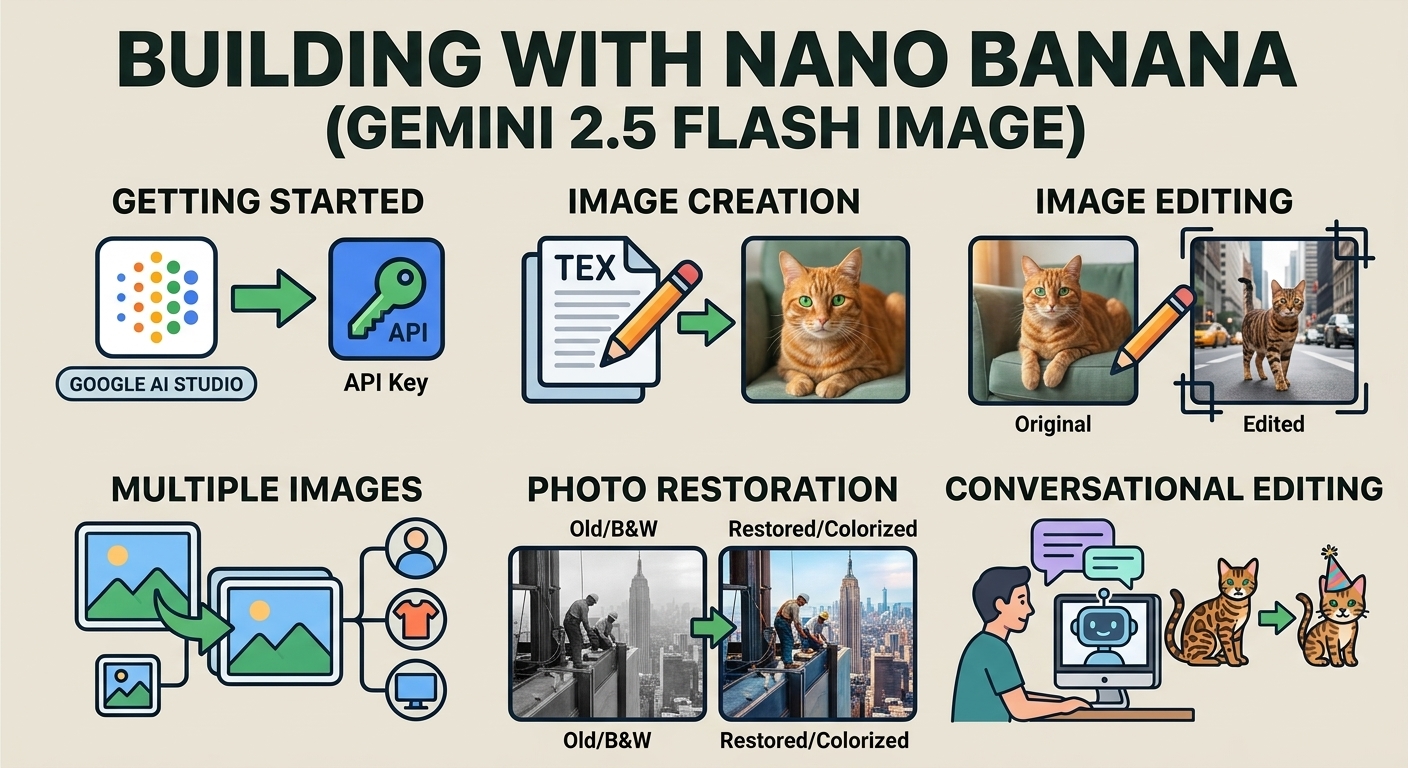
Nano Banana คือชื่อของความสามารถในการสร้างรูปภาพดั้งเดิมของ Gemini Gemini สามารถสร้างและประมวลผลรูปภาพแบบสนทนา ด้วยข้อความ รูปภาพ หรือทั้ง 2 อย่างรวมกัน ซึ่งช่วยให้คุณสร้าง แก้ไข และ ทำซ้ำภาพด้วยการควบคุมที่ไม่เคยมีมาก่อน
Nano Banana หมายถึงโมเดลที่แตกต่างกัน 4 โมเดลซึ่งพร้อมใช้งานใน Gemini API ดังนี้
- Nano Banana 2 Lite (Gemini 3.1 Flash Lite Image)
(
gemini-3.1-flash-lite-image): โมเดลรูปภาพ Gemini ที่เร็วที่สุดและถูกที่สุดของเรา ออกแบบมาเพื่อความเร็วและขนาดที่ความเร็วและต้นทุนเป็น ข้อจำกัดในการดำเนินงานหลัก ไม่ได้เพิ่มประสิทธิภาพสำหรับการป้อนข้อมูลอ้างอิงหลายรายการ หรือการแก้ไขแบบต่อเนื่องหลายรอบ - Nano Banana 2 (Gemini 3.1 Flash Image)
(
gemini-3.1-flash-image): เป็นโมเดลที่ใช้งานได้หลากหลายที่สุด ซึ่งเป็นโมเดล อเนกประสงค์สำหรับทุกงาน โดยจะผสานความเร็วเข้ากับการสร้างวิดีโอ 4K ที่ล้ำสมัย ความรู้เกี่ยวกับโลก และการแสดงข้อความที่เชื่อถือได้ ความสามารถในการ ประมวลผลรูปภาพอ้างอิงหลายรูปและความสอดคล้องกัน - Nano Banana Pro (Gemini 3 Pro Image)
(
gemini-3-pro-image): ตัวเลือกพรีเมียมสำหรับงานด้านภาพที่ซับซ้อนที่สุด ซึ่งมีความรู้เกี่ยวกับโลกในระดับสูงสุด การแปลขั้นสูง ความสอดคล้องของแบรนด์ที่แม่นยำ และการควบคุมครีเอทีฟโฆษณาที่แม่นยำ - Nano Banana (Gemini 2.5 Flash Image)
(
gemini-2.5-flash-image): ผู้บุกเบิกดั้งเดิมของซีรีส์ Nano Banana แม้ว่าจะเป็นเครื่องมือที่เชื่อถือได้ แต่เราขอแนะนำอย่างยิ่งให้ลูกค้าเปลี่ยนไปใช้ Nano Banana 2 Lite เพื่อสัมผัสคุณภาพที่ดียิ่งขึ้น ความเร็วในการสร้างที่เร็วขึ้น และราคา API ที่ถูกลง
รูปภาพที่สร้างขึ้นทั้งหมดจะมีลายน้ำ SynthID
การสร้างรูปภาพ (เปลี่ยนข้อความเป็นรูปภาพ)
Python
from google import genai
from PIL import Image
import base64

client = genai.Client()

interaction = client.interactions.create(
    model="gemini-3.1-flash-image",
    input="Create a picture of a nano banana dish in a fancy restaurant with a Gemini theme",
)

with open("generated_image.png", "wb") as f:

    f.write(base64.b64decode(interaction.output_image.data))
JavaScript
import { GoogleGenAI } from "@google/genai";
import * as fs from "node:fs";

async function main() {

  const ai = new GoogleGenAI({});

  const prompt =
    "Create a picture of a nano banana dish in a fancy restaurant with a Gemini theme";

  const interaction = await ai.interactions.create({
    model: "gemini-3.1-flash-image",
    input: prompt,
  });
  const generatedImage = interaction.output_image;
  if (generatedImage) {
    const buffer = Buffer.from(generatedImage.data, "base64");
    fs.writeFileSync("gemini-native-image.png", buffer);
    console.log("Image saved as gemini-native-image.png");
  }
}

main();
REST
curl -s -X POST \
  "https://generativelanguage.googleapis.com/v1beta/interactions" \
  -H "x-goog-api-key: $GEMINI_API_KEY" \
  -H "Content-Type: application/json" \
  -d '{
    "model": "gemini-3.1-flash-image",
    "input": [
      {"type": "text", "text": "Create a picture of a nano banana dish in a fancy restaurant with a Gemini theme"}
    ]
  }'
คุณเรียกข้อมูลรูปภาพที่สร้างขึ้นได้โดยใช้พร็อพเพอร์ตี้ interaction.output_image
ซึ่งจะแสดงบล็อกรูปภาพที่สร้างล่าสุด ดูรายละเอียดเกี่ยวกับพร็อพเพอร์ตี้ความสะดวกได้ที่ภาพรวมของการโต้ตอบ
การแต่งรูป (เปลี่ยนข้อความและรูปภาพเป็นรูปภาพ)
โปรดทราบ: โปรดตรวจสอบว่าคุณมีสิทธิ์ที่จำเป็นสำหรับรูปภาพใดก็ตามที่คุณอัปโหลด อย่าสร้างเนื้อหาที่ละเมิดสิทธิของผู้อื่น รวมถึงวิดีโอหรือรูปภาพที่หลอกลวง คุกคาม หรือเป็นอันตราย การใช้บริการ Generative AI นี้เป็นไปตามนโยบายการใช้งานที่ไม่อนุญาตของเรา
ระบุรูปภาพและใช้พรอมต์ข้อความเพื่อเพิ่ม นำออก หรือแก้ไของค์ประกอบ เปลี่ยนสไตล์ หรือปรับการไล่ระดับสี
ตัวอย่างต่อไปนี้แสดงการอัปโหลดรูปภาพที่เข้ารหัส base64
สำหรับรูปภาพหลายรูป เพย์โหลดขนาดใหญ่ และประเภท MIME ที่รองรับ โปรดดูหน้าการทำความเข้าใจรูปภาพ
Python
from google import genai
from PIL import Image
import base64

client = genai.Client()

with open("/path/to/cat_image.png", "rb") as f:
    image_bytes = f.read()

interaction = client.interactions.create(
    model="gemini-3.1-flash-image",
    input=[
        {
          "type": "text",
          "text": "Create a picture of a nano banana dish in a fancy restaurant with a Gemini theme"
        },
        {
            "type": "image",
            "data": base64.b64encode(image_bytes).decode('utf-8'),
            "mime_type": "image/png"
        }
    ],
)

with open("generated_image.png", "wb") as f:

    f.write(base64.b64decode(interaction.output_image.data))
JavaScript
import { GoogleGenAI } from "@google/genai";
import * as fs from "node:fs";

async function main() {

  const ai = new GoogleGenAI({});

  const imagePath = "path/to/cat_image.png";
  const imageData = fs.readFileSync(imagePath);
  const base64Image = imageData.toString("base64");

  const prompt = [
    { type: "text", text: "Create a picture of my cat eating a nano-banana in a" +
            "fancy restaurant under the Gemini constellation" },
    {
      type: "image",
      mime_type: "image/png",
      data: base64Image
    },
  ];

  const interaction = await ai.interactions.create({
    model: "gemini-3.1-flash-image",
    input: prompt,
  });
  const generatedImage = interaction.output_image;
  if (generatedImage) {
    const buffer = Buffer.from(generatedImage.data, "base64");
    fs.writeFileSync("gemini-native-image.png", buffer);
    console.log("Image saved as gemini-native-image.png");
  }
}

main();
REST
curl -s -X POST \
  "https://generativelanguage.googleapis.com/v1beta/interactions" \
    -H "x-goog-api-key: $GEMINI_API_KEY" \
    -H 'Content-Type: application/json' \
    -d "{
      \"model\": \"gemini-3.1-flash-image\",
      \"input\": [
        {\"type\": \"text\", \"text\": \"Create a picture of my cat eating a nano-banana in a fancy restaurant under the Gemini constellation\"},
        {
          \"type\": \"image\",
          \"mime_type\": \"image/jpeg\",
          \"data\": \"<BASE64_IMAGE_DATA>\"
        }
      ]
    }"
การแต่งรูปภาพแบบต่อเนื่อง
สร้างและแก้ไขรูปภาพต่อไปด้วยการสนทนา การสนทนาไปมาเป็นวิธีที่แนะนำในการทำซ้ำรูปภาพ ตัวอย่างต่อไปนี้ แสดงพรอมต์ในการสร้างอินโฟกราฟิกเกี่ยวกับกระบวนการสังเคราะห์แสง
Python
from google import genai
import base64

client = genai.Client()

interaction = client.interactions.create(
    model="gemini-3.1-flash-image",
    input="Create a vibrant infographic that explains photosynthesis as if it were a recipe for a plant's favorite food. Show the \"ingredients\" (sunlight, water, CO2) and the \"finished dish\" (sugar/energy). The style should be like a page from a colorful kids' cookbook, suitable for a 4th grader.",
    tools=[{"type": "google_search"}],
)

with open("photosynthesis.png", "wb") as f:

    f.write(base64.b64decode(interaction.output_image.data))
JavaScript
import { GoogleGenAI } from "@google/genai";
import * as fs from "node:fs";

const ai = new GoogleGenAI({});

async function main() {
  const interaction = await ai.interactions.create({
    model: "gemini-3.1-flash-image",
    input: "Create a vibrant infographic that explains photosynthesis as if it were a recipe for a plant's favorite food. Show the \"ingredients\" (sunlight, water, CO2) and the \"finished dish\" (sugar/energy). The style should be like a page from a colorful kids' cookbook, suitable for a 4th grader.",
    tools: [{"type": "google_search"}],
  });

  const generatedImage = interaction.output_image;
  if (generatedImage) {
    const buffer = Buffer.from(generatedImage.data, "base64");
    fs.writeFileSync("photosynthesis.png", buffer);
    console.log("Image saved as photosynthesis.png");
  }
}

await main();
REST
curl -s -X POST \
  "https://generativelanguage.googleapis.com/v1beta/interactions" \
  -H "x-goog-api-key: $GEMINI_API_KEY" \
  -H "Content-Type: application/json" \
  -d '{
    "model": "gemini-3.1-flash-image",
    "input": [
      {"type": "text", "text": "Create a vibrant infographic that explains photosynthesis as if it were a recipe for a plants favorite food. Show the \"ingredients\" (sunlight, water, CO2) and the \"finished dish\" (sugar/energy). The style should be like a page from a colorful kids cookbook, suitable for a 4th grader."}
    ],
    "tools": [{"type": "google_search"}]
  }'
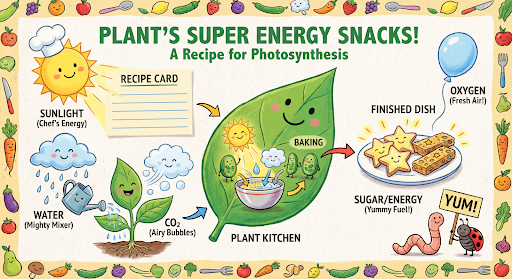
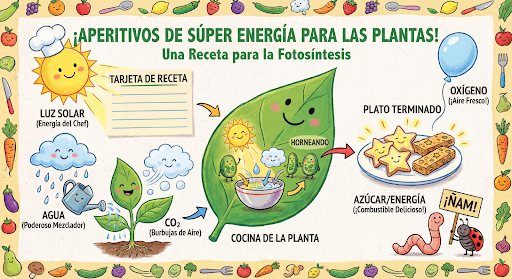
จากนั้นคุณสามารถใช้ previous_interaction_id เพื่อเปลี่ยนภาษาในกราฟิกเป็นภาษาสเปนได้
Python
interaction_2 = client.interactions.create(
    model="gemini-3.1-flash-image",
    input="Update this infographic to be in Spanish. Do not change any other elements of the image.",
    previous_interaction_id=interaction.id,
    response_format={
        "type": "image",
        "mime_type": "image/jpeg",
        "aspect_ratio": "16:9",
        "image_size": "2K"
    },
)

generated_image = interaction_2.output_image
if generated_image:
    with open("photosynthesis_spanish.png", "wb") as f:
        f.write(base64.b64decode(generated_image.data))
JavaScript
const interaction2 = await ai.interactions.create({
  model: "gemini-3.1-flash-image",
  input: "Update this infographic to be in Spanish. Do not change any other elements of the image.",
  previous_interaction_id: interaction.id,
  response_format: {
    type: "image",
    mime_type: "image/png",
    aspect_ratio: "16:9",
    image_size: "2K"
  },
});

const generatedImage = interaction2.output_image;
if (generatedImage) {
  const buffer = Buffer.from(generatedImage.data, "base64");
  fs.writeFileSync("photosynthesis_spanish.png", buffer);
}
REST
curl -s -X POST \
  "https://generativelanguage.googleapis.com/v1beta/interactions" \
  -H "x-goog-api-key: $GEMINI_API_KEY" \
  -H 'Content-Type: application/json' \
  -d '{
    "model": "gemini-3.1-flash-image",
    "input": "Update this infographic to be in Spanish. Do not change any other elements of the image.",
    "previous_interaction_id": "<PREVIOUS_INTERACTION_ID>",
    "response_format": {
      "type": "image",
      "mime_type": "image/jpeg",
      "aspect_ratio": "16:9",
      "image_size": "2K"
    }
  }'
ฟีเจอร์ใหม่ในโมเดลรูปภาพ Gemini 3
Gemini 3 มีโมเดลการสร้างและแก้ไขรูปภาพที่ล้ำสมัย รูปภาพ Gemini 3.1 Flash ได้รับการเพิ่มประสิทธิภาพเพื่อความเร็วและกรณีการใช้งานที่มีปริมาณสูง ส่วนรูปภาพ Gemini 3 Pro ได้รับการเพิ่มประสิทธิภาพเพื่อการผลิตชิ้นงานระดับมืออาชีพ ออกแบบมาเพื่อจัดการเวิร์กโฟลว์ที่ท้าทายที่สุดผ่านการให้เหตุผลขั้นสูง จึงทำงานได้ดีในงานสร้างสรรค์และการแก้ไขที่ซับซ้อนแบบการสนทนาไปมา
- เอาต์พุตความละเอียดสูง: ความสามารถในการสร้างภาพความละเอียด 1K, 2K และ 4K ในตัว
- Gemini 3.1 Flash Image เพิ่มความละเอียด 512 พิกเซล (0.5K) ที่เล็กลง
- รูปภาพ Gemini 3.1 Flash Lite รองรับความละเอียด 1K เท่านั้น
- การแสดงข้อความขั้นสูง: สร้างข้อความที่อ่านได้และมีสไตล์สำหรับอินโฟกราฟิก เมนู ไดอะแกรม และชิ้นงานทางการตลาด
- การอ้างอิงจาก Google Search: โมเดลสามารถใช้ Google Search เป็นเครื่องมือเพื่อ
ยืนยันข้อเท็จจริงและสร้างภาพตามข้อมูลแบบเรียลไทม์ (เช่น แผนที่
สภาพอากาศปัจจุบัน แผนภูมิหุ้น เหตุการณ์ล่าสุด)
- โมเดลรูปภาพ Gemini 3.1 Flash Lite ไม่รองรับ
- รูปภาพ Gemini 3.1 Flash เพิ่มการผสานรวมการอ้างอิงของ Google Image Search ควบคู่ไปกับการค้นหาบนเว็บ
- โหมดการคิด: โมเดลใช้กระบวนการ "การคิด" เพื่อให้เหตุผลผ่านพรอมต์ที่ซับซ้อน โดยจะสร้าง "รูปภาพความคิด" ชั่วคราว (มองเห็นได้ในแบ็กเอนด์ แต่ไม่มีการเรียกเก็บเงิน) เพื่อปรับแต่งองค์ประกอบก่อนที่จะสร้างเอาต์พุตคุณภาพสูง ขั้นสุดท้าย
- รูปภาพอ้างอิงสูงสุด 14 รูป: ตอนนี้คุณสามารถผสมรูปภาพอ้างอิงได้สูงสุด 14 รูปเพื่อ สร้างรูปภาพสุดท้าย
- สัดส่วนภาพใหม่: Gemini 3.1 Flash Lite Image เพิ่ม
1:1,3:2,2:3,3:4,4:3,4:5,5:4,9:16,16:9,21:9สัดส่วนภาพ
ใช้รูปภาพอ้างอิงได้สูงสุด 14 รูป
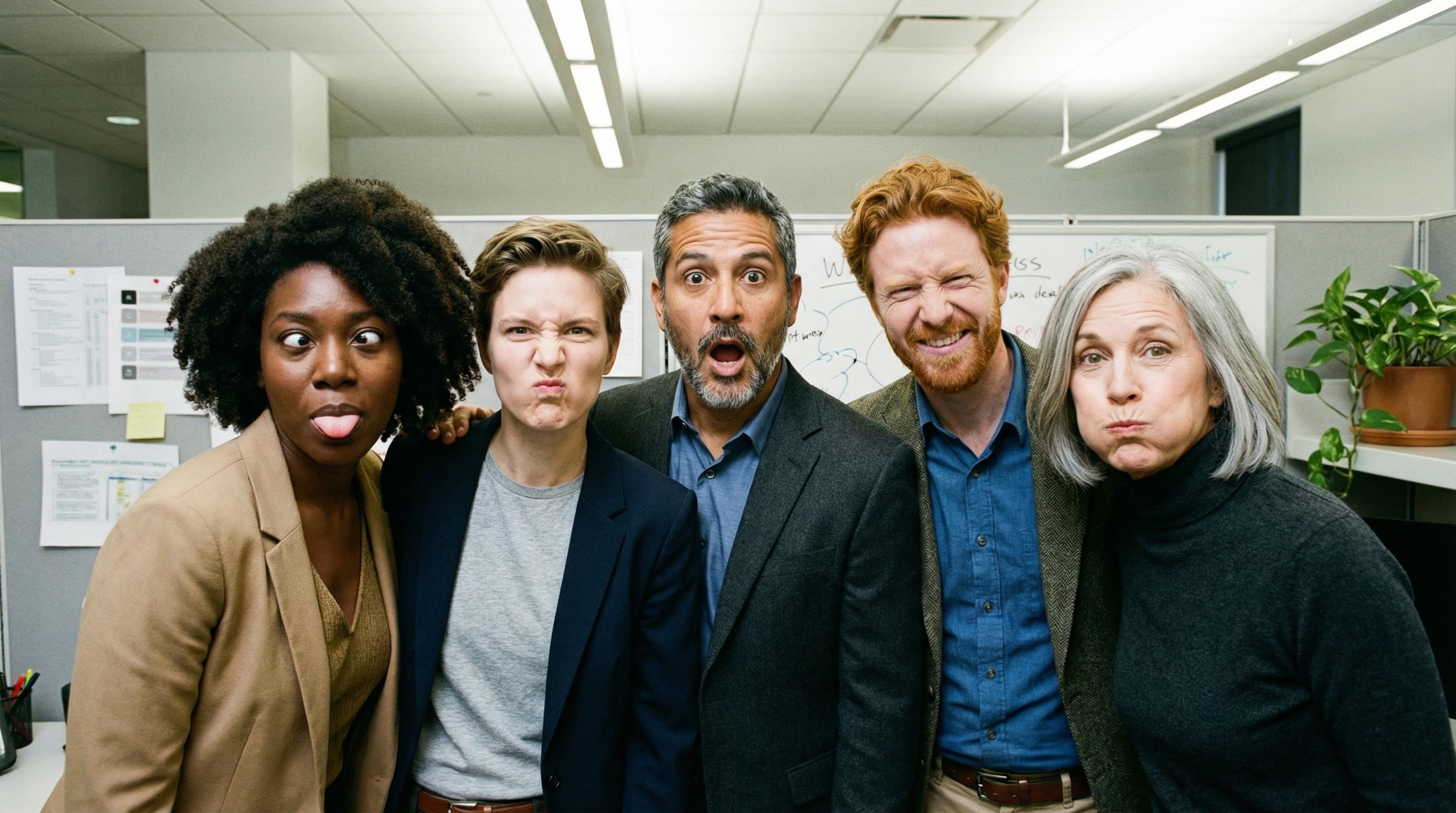
โมเดลรูปภาพของ Gemini 3 ช่วยให้คุณผสมรูปภาพอ้างอิงได้สูงสุด 14 รูป รูปภาพทั้ง 14 รูป อาจมีลักษณะต่อไปนี้
| รูปภาพ Gemini 3.1 Flash Lite | รูปภาพ Gemini 3.1 Flash | รูปภาพ Gemini 3 Pro |
|---|---|---|
| รูปภาพวัตถุที่มีความเที่ยงตรงสูงสูงสุด 14 ภาพที่จะรวมไว้ในรูปภาพสุดท้าย | รูปภาพวัตถุที่มีความเที่ยงตรงสูงสูงสุด 10 ภาพที่จะรวมไว้ในรูปภาพสุดท้าย | รูปภาพวัตถุที่มีความเที่ยงตรงสูงสูงสุด 6 ภาพที่จะรวมไว้ในรูปภาพสุดท้าย |
| ไม่มี | รูปภาพตัวละครสูงสุด 4 ภาพเพื่อรักษาความสอดคล้องของตัวละคร | รูปภาพตัวละครสูงสุด 5 รูปเพื่อคงความสอดคล้องของตัวละคร |
| ไม่มี | ไม่มี | รูปภาพสูงสุด 3 รูปที่จะใช้เป็นข้อมูลอ้างอิงสไตล์ |
Python
from google import genai
from google.genai import types
from PIL import Image
import base64

prompt = "An office group photo of these people, they are making funny faces."

client = genai.Client()

interaction = client.interactions.create(
    model="gemini-3.1-flash-image",
    input=[
        {
            "type": "text",
            "text": prompt,
        },
        {
            "type": "image",
            "data": base64.b64encode(image_bytes).decode('utf-8'),
            "mime_type": "image/png"
        },
        {
            "type": "image",
            "data": base64.b64encode(image_bytes).decode('utf-8'),
            "mime_type": "image/png"
        },
        {
            "type": "image",
            "data": base64.b64encode(image_bytes).decode('utf-8'),
            "mime_type": "image/png"
        },
        {
            "type": "image",
            "data": base64.b64encode(image_bytes).decode('utf-8'),
            "mime_type": "image/png"
        },
        {
            "type": "image",
            "data": base64.b64encode(image_bytes).decode('utf-8'),
            "mime_type": "image/png"
        },
    ],
    response_format={
        "type": "image",
        "aspect_ratio": "5:4",
        "image_size": "2K"
    },
)

with open("office.png", "wb") as f:

    f.write(base64.b64decode(interaction.output_image.data))
JavaScript
import { GoogleGenAI } from "@google/genai";
import * as fs from "node:fs";

async function main() {
  const ai = new GoogleGenAI({});

  const input = [
    {
      type: "text",
      text: "An office group photo of these people, they are making funny faces.",
    },
    { type: "image", mime_type: "image/jpeg", data: base64ImageFile1 },
    { type: "image", mime_type: "image/jpeg", data: base64ImageFile2 },
    { type: "image", mime_type: "image/jpeg", data: base64ImageFile3 },
    { type: "image", mime_type: "image/jpeg", data: base64ImageFile4 },
    { type: "image", mime_type: "image/jpeg", data: base64ImageFile5 },
  ];

  const interaction = await ai.interactions.create({
    model: "gemini-3.1-flash-image",
    input: input,
    response_format: {
      type: "image",
      aspect_ratio: "5:4",
      image_size: "2K",
    },
  });

  const buffer = Buffer.from(interaction.output_image.data, 'base64');

  fs.writeFileSync('office.png', buffer);
}

main();
REST
curl -s -X POST \
  "https://generativelanguage.googleapis.com/v1beta/interactions" \
    -H "x-goog-api-key: $GEMINI_API_KEY" \
    -H 'Content-Type: application/json' \
    -d "{
      \"model\": \"gemini-3.1-flash-image\",
      \"input\": [
        {\"type\": \"text\", \"text\": \"An office group photo of these people, they are making funny faces.\"},
        {\"type\": \"image\", \"mime_type\": \"image/png\", \"data\": \"<BASE64_DATA_IMG_1>\"},
        {\"type\": \"image\", \"mime_type\": \"image/png\", \"data\": \"<BASE64_DATA_IMG_2>\"},
        {\"type\": \"image\", \"mime_type\": \"image/png\", \"data\": \"<BASE64_DATA_IMG_3>\"},
        {\"type\": \"image\", \"mime_type\": \"image/png\", \"data\": \"<BASE64_DATA_IMG_4>\"},
        {\"type\": \"image\", \"mime_type\": \"image/png\", \"data\": \"<BASE64_DATA_IMG_5>\"}
      ],
      \"response_format\": {
        \"type\": \"image\",
        \"aspect_ratio\": \"5:4\",
        \"image_size\": \"2K\"
      }
    }"
การเชื่อมต่อแหล่งข้อมูลกับ Google Search
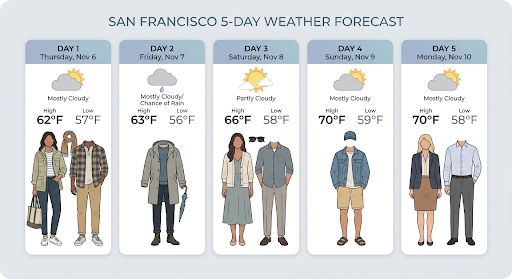
ใช้เครื่องมือ Google Search เพื่อสร้างรูปภาพ โดยอิงตามข้อมูลแบบเรียลไทม์ เช่น พยากรณ์อากาศ แผนภูมิหุ้น หรือ เหตุการณ์ล่าสุด
โปรดทราบว่าเมื่อใช้การอ้างอิงจาก Google Search ร่วมกับการสร้างรูปภาพ ระบบจะไม่ส่งผลการค้นหาที่อิงตามรูปภาพไปยังโมเดลการสร้างและจะ ยกเว้นออกจากคำตอบ (ดูการอ้างอิงจาก Google Image Search)
Python
from google import genai
from google.genai import types
import base64
prompt = "Visualize the current weather forecast for the next 5 days in San Francisco as a clean, modern weather chart. Add a visual on what I should wear each day"

client = genai.Client()

interaction = client.interactions.create(
    model="gemini-3.1-flash-image",
    input=prompt,
    tools=[{"type": "google_search"}],
    response_format={
        "type": "image",
        "mime_type": "image/jpeg",
        "aspect_ratio": "16:9"
    },
)

with open("weather.png", "wb") as f:

    f.write(base64.b64decode(interaction.output_image.data))
JavaScript
import { GoogleGenAI } from "@google/genai";
import * as fs from "node:fs";

async function main() {
  const ai = new GoogleGenAI({});

  const interaction = await ai.interactions.create({
    model: "gemini-3.1-flash-image",
    input: "Visualize the current weather forecast for the next 5 days in San Francisco as a clean, modern weather chart. Add a visual on what I should wear each day",
    tools: [{"type": "google_search"}],
    response_format: {
      type: "image",
      mime_type: "image/png",
      aspect_ratio: "16:9",
      image_size: "2K"
    },
  });

  const buffer = Buffer.from(interaction.output_image.data, 'base64');

  fs.writeFileSync('weather.png', buffer);
}

main();
REST
curl -s -X POST \
  "https://generativelanguage.googleapis.com/v1beta/interactions" \
  -H "x-goog-api-key: $GEMINI_API_KEY" \
  -H "Content-Type: application/json" \
  -d '{
    "model": "gemini-3.1-flash-image",
    "input": [
      {"type": "text", "text": "Visualize the current weather forecast for the next 5 days in San Francisco as a clean, modern weather chart. Add a visual on what I should wear each day"}
    ],
    "tools": [{"type": "google_search"}],
    "response_format": {
      "type": "image",
      "mime_type": "image/jpeg",
      "aspect_ratio": "16:9"
    }
  }'
การตอบกลับประกอบด้วยขั้นตอน google_search_call และ google_search_result
พร้อมด้วยคำอธิบายประกอบ url_citation ในบรรทัดในขั้นตอนข้อความ
google_search_result: มีsearch_suggestionsซึ่งเป็นข้อมูลโค้ด HTML สำหรับการแสดงผลคำแนะนำในการค้นหาใน UIurl_citationหมายเหตุ: การอ้างอิงในบรรทัดในขั้นตอนข้อความที่ลิงก์ ส่วนต่างๆ ของคำตอบไปยังแหล่งข้อมูลบนเว็บ
การเชื่อมต่อแหล่งข้อมูลกับ Google Search สำหรับรูปภาพ (3.1 Flash)
การอ้างอิงด้วย Google Image Search ช่วยให้โมเดลใช้รูปภาพบนเว็บที่ดึงข้อมูลผ่าน Google Image Search เป็นบริบทภาพสำหรับการสร้างรูปภาพได้ การค้นหารูปภาพเป็น การค้นหาประเภทใหม่ภายในเครื่องมือการเชื่อมต่อแหล่งข้อมูลกับ Google Search ที่มีอยู่ ซึ่งทำงานควบคู่ไปกับการค้นเว็บมาตรฐาน
หากต้องการเปิดใช้การค้นหารูปภาพ ให้กำหนดค่าเครื่องมือ google_search ในคำขอ API
และระบุ image_search ภายในอาร์เรย์ search_types คุณใช้ฟีเจอร์ค้นหารูปภาพแยกกันหรือใช้ร่วมกับฟีเจอร์ค้นหาเว็บก็ได้
Python
from google import genai

client = genai.Client()

interaction = client.interactions.create(
    model="gemini-3.1-flash-image",
    input="A detailed painting of a Timareta butterfly resting on a flower",
    tools=[{
      "type": "google_search",
      "search_types": ["web_search", "image_search"]
    }]
)
JavaScript
import { GoogleGenAI } from "@google/genai";

async function main() {
  const ai = new GoogleGenAI({});

  const interaction = await ai.interactions.create({
    model: "gemini-3.1-flash-image",
    input: "A detailed painting of a Timareta butterfly resting on a flower",
    tools: [{
      "type": "google_search",
      "search_types": ["web_search", "image_search"]
    }]
  });
}

main();
REST
curl -s -X POST \
  "https://generativelanguage.googleapis.com/v1beta/interactions" \
  -H "x-goog-api-key: $GEMINI_API_KEY" \
  -H "Content-Type: application/json" \
  -d '{
    "model": "gemini-3.1-flash-image",
    "input": "A detailed painting of a Timareta butterfly resting on a flower",
    "tools": [{"type": "google_search", "search_types": ["web_search", "image_search"]}]
  }'
ข้อกำหนดในการแสดงผล
เมื่อใช้การค้นหารูปภาพในการเชื่อมต่อแหล่งข้อมูลกับ Google Search คุณต้องแสดง
search_suggestions จากขั้นตอนที่ google_search_result ข้อกำหนดในการใช้งานฉบับเต็ม
มีรายละเอียดอยู่ในข้อกำหนดในการให้บริการ
การตอบกลับ
สำหรับคำตอบที่อิงตามข้อมูลโดยใช้การค้นหารูปภาพ API จะแสดงการอ้างอิงในบรรทัด และข้อมูลเมตาของการระบุแหล่งที่มาเป็นส่วนหนึ่งของขั้นตอนการตอบกลับ ดังนี้
url_citationคำอธิบายประกอบ: การอ้างอิงแบบแทรกในบล็อกเนื้อหาข้อความ ภายในmodel_outputซึ่งลิงก์เนื้อหาที่สร้างขึ้นไปยังแหล่งที่มาgoogle_search_result: มีsearch_suggestionsซึ่งเป็นข้อมูลโค้ด HTML สำหรับการแสดงผลคำแนะนำในการค้นหาใน UI
การสร้างรูปภาพจากวิดีโอ (3.1 Flash)
การสร้างรูปภาพจากวิดีโอช่วยให้คุณสร้างรูปภาพใหม่โดยใช้บริบทของวิดีโอ เป็นข้อมูลอ้างอิงแบบมัลติโมดัล ซึ่งมีประโยชน์ในการสร้างภาพปกวิดีโอคุณภาพสูง โปสเตอร์ภาพยนตร์ อินโฟกราฟิกสรุป หรืออาร์ตเวิร์กใหม่ที่ได้แรงบันดาลใจจากฉากในวิดีโอ
ในระหว่างการสร้าง โมเดลจะวิเคราะห์เฟรมวิดีโอในบริบทเพื่อดึงธีมภาพ และเหตุการณ์สําคัญ จากนั้นจะใช้ธีมและเหตุการณ์เหล่านั้นร่วมกับพรอมต์ข้อความเพื่อสังเคราะห์รูปภาพเอาต์พุต
คุณสามารถส่ง URL ของ YouTube ที่เป็นแบบสาธารณะในคำขอ API โดยตรง หรืออัปโหลดไฟล์วิดีโอในเครื่องโดยใช้ Files API
Python
from google import genai
from google.genai import types
import base64

client = genai.Client()

interaction = client.interactions.create(
    model="gemini-3.1-flash-image",
    input=[
        {
            "type": "video",
            "uri": "https://www.youtube.com/watch?v=UTdfxFyOQTI",
            "mime_type": "video/mp4"
        },
        {"type": "text", "text": "Generate a poster image that captures the key themes of this video."}
    ],
    response_format={"type": "image", "aspect_ratio": "16:9"}
)

# Save the generated image part
for step in interaction.steps:
    if step.type == "model_output":
        for content_block in step.content:
            if content_block.type == "text":
                print(content_block.text)
            elif content_block.type == "image":
                with open("video_poster.png", "wb") as f:
                    f.write(base64.b64decode(content_block.data))
                print("Image saved as video_poster.png")
JavaScript
import { GoogleGenAI } from "@google/genai";
import * as fs from "node:fs";

async function main() {
  const ai = new GoogleGenAI({});

  const interaction = await ai.interactions.create({
    model: "gemini-3.1-flash-image",
    input: [
      {
        type: "video",
        uri: "https://www.youtube.com/watch?v=UTdfxFyOQTI",
        mime_type: "video/mp4"
      },
      { type: "text", text: "Generate a poster image that captures the key themes of this video." }
    ],
    response_format: {
      type: "image",
      aspect_ratio: "16:9"
    }
  });

  for (const step of interaction.steps) {
    if (step.type === "model_output") {
      for (const contentBlock of step.content) {
        if (contentBlock.type === "text") {
          console.log(contentBlock.text);
        } else if (contentBlock.type === "image") {
          const buffer = Buffer.from(contentBlock.data, "base64");
          fs.writeFileSync("video_poster.png", buffer);
          console.log("Image saved as video_poster.png");
        }
      }
    }
  }
}

main();
REST
curl -s -X POST \
  "https://generativelanguage.googleapis.com/v1beta/interactions" \
  -H "x-goog-api-key: $GEMINI_API_KEY" \
  -H 'Content-Type: application/json' \
  -d '{
    "model": "gemini-3.1-flash-image",
    "input": [
      {
        "type": "video",
        "uri": "https://www.youtube.com/watch?v=UTdfxFyOQTI",
        "mime_type": "video/mp4"
      },
      {
        "type": "text",
        "text": "Generate a poster image that captures the key themes of this video."
      }
    ],
    "response_format": {
      "type": "image",
      "aspect_ratio": "16:9"
    }
  }'
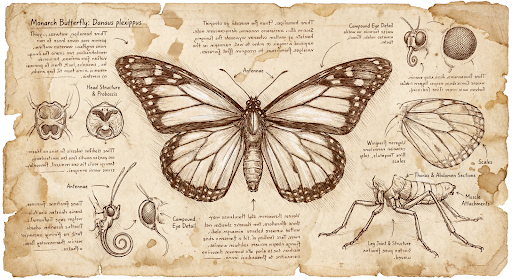
สร้างรูปภาพที่มีความละเอียดสูงสุด 4K
โมเดลรูปภาพ Gemini 3 สร้างรูปภาพขนาด 1K โดยค่าเริ่มต้น แต่ก็สามารถแสดงรูปภาพขนาด 2K, 4K และ 512 พิกเซล (0.5K) (รูปภาพ Gemini 3.1 Flash เท่านั้น) ได้เช่นกัน หากต้องการสร้างชิ้นงานที่มีความละเอียดสูงขึ้น
ให้ระบุ image_size ใน response_format
คุณต้องใช้ตัว "K" พิมพ์ใหญ่ (เช่น 512px (05.K), 1K, 2K, 4K) ระบบจะปฏิเสธพารามิเตอร์ตัวพิมพ์เล็ก (เช่น 1k)
Python
from google import genai
from google.genai import types
import base64

prompt = "Da Vinci style anatomical sketch of a dissected Monarch butterfly. Detailed drawings of the head, wings, and legs on textured parchment with notes in English."

client = genai.Client()

interaction = client.interactions.create(
    model="gemini-3.1-flash-image",
    input=prompt,
    response_format={
        "type": "image",
        "mime_type": "image/jpeg",
        "aspect_ratio": "1:1",
        "image_size": "1K"
    },
)

print(interaction.output_text)

with open("butterfly.png", "wb") as f:

    f.write(base64.b64decode(interaction.output_image.data))
JavaScript
import { GoogleGenAI } from "@google/genai";
import * as fs from "node:fs";

async function main() {
  const ai = new GoogleGenAI({});

  const interaction = await ai.interactions.create({
    model: "gemini-3.1-flash-image",
    input: "Da Vinci style anatomical sketch of a dissected Monarch butterfly. Detailed drawings of the head, wings, and legs on textured parchment with notes in English.",
    response_format: {
      type: "image",
      mime_type: "image/png",
      aspect_ratio: "1:1",
      image_size: "1K",
    },
  });

  console.log(interaction.output_text);

  const buffer = Buffer.from(interaction.output_image.data, 'base64');

  fs.writeFileSync('butterfly.png', buffer);
}

main();
REST
curl -s -X POST \
  "https://generativelanguage.googleapis.com/v1beta/interactions" \
  -H "x-goog-api-key: $GEMINI_API_KEY" \
  -H "Content-Type: application/json" \
  -d '{
    "model": "gemini-3.1-flash-image",
    "input": "Da Vinci style anatomical sketch of a dissected Monarch butterfly. Detailed drawings of the head, wings, and legs on textured parchment with notes in English.",
    "response_format": {
      "type": "image",
      "mime_type": "image/jpeg",
      "aspect_ratio": "1:1",
      "image_size": "1K"
    }
  }'
ต่อไปนี้เป็นตัวอย่างรูปภาพที่สร้างขึ้นจากพรอมต์นี้
กระบวนการคิด
โมเดลรูปภาพ Gemini 3 เป็นโมเดลการคิดที่ใช้กระบวนการให้เหตุผล ("การคิด") สำหรับพรอมต์ที่ซับซ้อน ฟีเจอร์นี้เปิดใช้อยู่โดยค่าเริ่มต้นและ ปิดใช้ใน API ไม่ได้ ดูข้อมูลเพิ่มเติมเกี่ยวกับกระบวนการคิดได้ที่คำแนะนำการคิดของ Gemini
โมเดลจะสร้างรูปภาพชั่วคราวสูงสุด 2 รูปเพื่อทดสอบองค์ประกอบและตรรกะ รูปภาพสุดท้ายในส่วน "กำลังคิด" คือรูปภาพสุดท้ายที่แสดงผล
คุณสามารถตรวจสอบความคิดที่นำไปสู่การสร้างรูปภาพสุดท้ายได้
Python
for step in interaction.steps:
    if step.type == "thought":
        for content_block in step.summary:
            if content_block.type == "text":
                print(content_block.text)
            elif content_block.type == "image":
                image = Image.open(io.BytesIO(base64.b64decode(content_block.data)))
                image.show()
JavaScript
for (const step of interaction.steps) {
  if (step.type === "thought") {
    for (const contentBlock of step.summary) {
      if (contentBlock.type === "text") {
        console.log(contentBlock.text);
      } else if (contentBlock.type === "image") {
        const buffer = Buffer.from(contentBlock.data, 'base64');
        fs.writeFileSync('thought_image.png', buffer);
      }
    }
  }
}
ข้อความและรูปภาพที่มีการแทรกสลับ
แม้ว่าโมเดลการสร้างรูปภาพมาตรฐานจะแสดงเฉพาะรูปภาพ แต่โมเดล Gemini 3 ขั้นสูงบางรุ่น (เช่น gemini-3-pro-image) สามารถสร้างเนื้อหาแบบสลับ
ได้ เช่น เรื่องราวหรือคำแนะนำที่มีทั้งบล็อกข้อความและภาพประกอบภายในคำตอบเดียวกัน
เนื่องจากเอาต์พุตมีความซับซ้อนและสลับกัน พร็อพเพอร์ตี้ความสะดวก เช่น
.output_image หรือ .output_text จะไม่บันทึกลำดับทั้งหมด หากต้องการเข้าถึง
และบันทึกเนื้อหาที่สลับกัน คุณต้องวนซ้ำ steps ด้วยตนเอง ดังนี้
Python
interaction = client.interactions.create(
    model="gemini-3-pro-image",
    input="Write the story of the lifecycle of a monarch butterfly, interleave illustrations",
)

image_counter = 1
for step in interaction.steps:
    if step.type == "model_output":
        for content_block in step.content:
            if content_block.type == "text":
                print(content_block.text)
            elif content_block.type == "image":
                filename = f"butterfly_lifecycle_{image_counter}.png"
                with open(filename, "wb") as f:
                    f.write(base64.b64decode(content_block.data))
                print(f"\n[Saved illustration: {filename}]\n")
                image_counter += 1
JavaScript
const interaction = await ai.interactions.create({
    model: "gemini-3-pro-image",
    input: "Write the story of the lifecycle of a monarch butterfly, interleave illustrations",
});

let imageCounter = 1;
for (const step of interaction.steps) {
  if (step.type === "model_output") {
    for (const contentBlock of step.content) {
      if (contentBlock.type === "text") {
        console.log(contentBlock.text);
      } else if (contentBlock.type === "image") {
        const buffer = Buffer.from(contentBlock.data, "base64");
        const filename = `butterfly_lifecycle_${imageCounter}.png`;
        fs.writeFileSync(filename, buffer);
        console.log(`\n[Saved illustration: ${filename}]\n`);
        imageCounter++;
      }
    }
  }
}
การควบคุมระดับการคิด
Gemini 3.1 Flash Image ช่วยให้คุณควบคุมปริมาณการคิดของโมเดล
เพื่อรักษาสมดุลระหว่างคุณภาพและเวลาในการตอบสนองได้ ค่าเริ่มต้น thinking_level คือ minimal
และระดับที่รองรับคือ minimal และ high
Python
from google import genai
from PIL import Image
import base64
import io

client = genai.Client()

interaction = client.interactions.create(
    model="gemini-3.1-flash-image",
    input="A futuristic city built inside a giant glass bottle floating in space",
    generation_config={"thinking_level": "high"},
)

print(interaction.output_text)

image = Image.open(io.BytesIO(base64.b64decode(interaction.output_image.data)))

image.show()
JavaScript
import { GoogleGenAI } from "@google/genai";
import * as fs from "node:fs";

async function main() {
  const ai = new GoogleGenAI({});

  const interaction = await ai.interactions.create({
    model: "gemini-3.1-flash-image",
    input: "A futuristic city built inside a giant glass bottle floating in space",
    generation_config: { thinking_level: "high" },
  });

  console.log(interaction.output_text);

  const buffer = Buffer.from(interaction.output_image.data, 'base64');

  fs.writeFileSync('image.png', buffer);
}
main();
REST
curl -s -X POST \
  "https://generativelanguage.googleapis.com/v1beta/interactions" \
  -H "x-goog-api-key: $GEMINI_API_KEY" \
  -H "Content-Type: application/json" \
  -d '{
    "model": "gemini-3.1-flash-image",
    "input": "A futuristic city built inside a giant glass bottle floating in space",
    "generation_config": {
      "thinking_level": "high"
    }
  }'
โปรดทราบว่าระบบจะเรียกเก็บเงินโทเค็นการคิดสำหรับโมเดลการคิดโดยค่าเริ่มต้น เนื่องจากกระบวนการคิดจะเกิดขึ้นโดยค่าเริ่มต้นเสมอไม่ว่าคุณจะดู กระบวนการดังกล่าวหรือไม่ก็ตาม
โหมดการสร้างรูปภาพอื่นๆ
แม้ว่าเราจะแนะนำให้ใช้โมเดลการสร้างรูปภาพ Nano Banana สำหรับกรณีการใช้งานส่วนใหญ่ แต่คุณก็สามารถสำรวจโมเดลการสร้างรูปภาพเฉพาะได้เช่นกัน
- Imagen: โมเดลการเปลี่ยนข้อความเป็นรูปภาพของ Google ที่ได้รับการเพิ่มประสิทธิภาพเพื่อสร้างรูปภาพคุณภาพสูง
- Veo: โมเดลการสร้างวิดีโอของ Google
สร้างรูปภาพเป็นชุด
ความสามารถในการสร้างรูปภาพทั้งหมดที่อธิบายไว้ในหน้านี้ยังสามารถ เรียกใช้เป็นงานแบบเป็นชุดได้โดยใช้ Batch API ซึ่งเหมาะอย่างยิ่งหากคุณ ต้องการสร้างรูปภาพจำนวนมาก คุณจะได้รับโควต้าที่สูงขึ้นเพื่อแลกกับ เวลาในการตอบกลับสูงสุด 24 ชั่วโมง
คำแนะนำและกลยุทธ์ในการเขียนพรอมต์
ส่วนนี้จะแสดงตัวอย่างพรอมต์และเทมเพลตสำหรับเวิร์กโฟลว์การสร้าง และแก้ไขรูปภาพที่พบบ่อย ตัวอย่างแต่ละรายการมีเทมเพลตที่นำกลับมาใช้ใหม่ได้และพรอมต์ตัวอย่างสำหรับ Interactions API
พรอมต์สำหรับการสร้างรูปภาพ
ตัวอย่างต่อไปนี้แสดงวิธีใช้พรอมต์ข้อความเพื่อสร้างรูปภาพประเภทต่างๆ
1. ฉากภาพสมจริง
อธิบายฉากอย่างละเอียด ยิ่งเจาะจงมากเท่าไร คุณก็จะยิ่งควบคุมผลลัพธ์ได้มากขึ้นเท่านั้น
เทมเพลต
A photorealistic [type of shot] of a [subject description] in a [setting
description]. [Description of the light]. Shot from a [camera angle]
with a [lens type].
พรอมต์
A photorealistic wide-angle shot of a vibrant coral reef teeming with tropical fish. Crystal-clear turquoise water with sunbeams filtering down from the surface, illuminating a sea turtle gliding gracefully over the coral. Shot from a low perspective with a wide-angle lens. Aspect ratio 16:9.
Python
from google import genai
from google.genai import types
import base64

client = genai.Client()

interaction = client.interactions.create(
    model="gemini-3.1-flash-image",
    input="A photorealistic wide-angle shot of a vibrant coral reef teeming with tropical fish. Crystal-clear turquoise water with sunbeams filtering down from the surface, illuminating a sea turtle gliding gracefully over the coral. Shot from a low perspective with a wide-angle lens. Aspect ratio 16:9.",
    response_format=[
        {
            "type": "image",
            "mime_type": "image/jpeg",
            "aspect_ratio": "16:9",
        }
    ],
)

print(interaction.output_text)

with open("coral_reef.png", "wb") as f:

    f.write(base64.b64decode(interaction.output_image.data))
JavaScript
import { GoogleGenAI } from "@google/genai";
import * as fs from "node:fs";

async function main() {
  const ai = new GoogleGenAI({});

  const interaction = await ai.interactions.create({
    model: "gemini-3.1-flash-image",
    input: "A photorealistic wide-angle shot of a vibrant coral reef teeming with tropical fish. Crystal-clear turquoise water with sunbeams filtering down from the surface, illuminating a sea turtle gliding gracefully over the coral. Shot from a low perspective with a wide-angle lens. Aspect ratio 16:9.",
    response_format: [
      {
        type: "image",
        mime_type: "image/jpeg",
        aspect_ratio: "16:9",
      }
    ],
  });
  console.log(interaction.output_text);

  const buffer = Buffer.from(interaction.output_image.data, 'base64');

  fs.writeFileSync('coral_reef.png', buffer);
}

main();
REST
curl -s -X POST \
  "https://generativelanguage.googleapis.com/v1beta/interactions" \
  -H "x-goog-api-key: $GEMINI_API_KEY" \
  -H "Content-Type: application/json" \
  -d '{
    "model": "gemini-3.1-flash-image",
    "input": "A photorealistic wide-angle shot of a vibrant coral reef teeming with tropical fish. Crystal-clear turquoise water with sunbeams filtering down from the surface, illuminating a sea turtle gliding gracefully over the coral. Shot from a low perspective with a wide-angle lens. Aspect ratio 16:9.",
    "response_format": {
      "type": "image",
      "mime_type": "image/png",
      "aspect_ratio": "16:9"
    }
  }'
2. ภาพวาดและสติกเกอร์ที่ผ่านการปรับแต่ง
อธิบายสไตล์ศิลปะ วัตถุ และสื่อ ระบุรายละเอียดภาพ (เส้นหนา สี ฯลฯ) ให้ชัดเจนเพื่อให้ได้ผลลัพธ์ที่สอดคล้องกัน
เทมเพลต
A [style] of a [subject, with details about accessories or actions]
doing [activity]. The design features [visual qualities, e.g., bold outlines,
cel-shading, etc.] and [color/background preference].
พรอมต์
A kawaii-style sticker of a happy red panda wearing a tiny bamboo hat. It's munching on a green bamboo leaf. The design features bold, clean outlines, simple cel-shading, and a vibrant color palette. The background must be white.
Python
from google import genai
import base64

client = genai.Client()

interaction = client.interactions.create(
    model="gemini-3.1-flash-image",
    input="A kawaii-style sticker of a happy red panda wearing a tiny bamboo hat. It's munching on a green bamboo leaf. The design features bold, clean outlines, simple cel-shading, and a vibrant color palette. The background must be white.",
)

for step in interaction.steps:
    if step.type == "model_output":
        for content_block in step.content:
            if content_block.type == "text":
                print(content_block.text)
            elif content_block.type == "image":
                with open("red_panda_sticker.png", "wb") as f:
                    f.write(base64.b64decode(content_block.data))
JavaScript
import { GoogleGenAI } from "@google/genai";
import * as fs from "node:fs";

async function main() {
  const ai = new GoogleGenAI({});

  const interaction = await ai.interactions.create({
    model: "gemini-3.1-flash-image",
    input: "A kawaii-style sticker of a happy red panda wearing a tiny bamboo hat. It's munching on a green bamboo leaf. The design features bold, clean outlines, simple cel-shading, and a vibrant color palette. The background must be white.",
  });
  for (const step of interaction.steps) {
    if (step.type === "model_output") {
      for (const contentBlock of step.content) {
        if (contentBlock.type === "text") {
          console.log(contentBlock.text);
        } else if (contentBlock.type === "image") {
          const buffer = Buffer.from(contentBlock.data, "base64");
          fs.writeFileSync("red_panda_sticker.png", buffer);
        }
      }
    }
  }
}

main();
REST
curl -s -X POST \
  "https://generativelanguage.googleapis.com/v1beta/interactions" \
  -H "x-goog-api-key: $GEMINI_API_KEY" \
  -H "Content-Type: application/json" \
  -d '{
    "model": "gemini-3.1-flash-image",
    "input": "A kawaii-style sticker of a happy red panda wearing a tiny bamboo hat. It is munching on a green bamboo leaf. The design features bold, clean outlines, simple cel-shading, and a vibrant color palette. The background must be white."
  }'

3. ข้อความที่ถูกต้องในรูปภาพ
Gemini ทำงานด้านการแสดงข้อความได้ดีเยี่ยม ระบุข้อความ รูปแบบแบบอักษร (อย่างละเอียด) และการออกแบบโดยรวมให้ชัดเจน ใช้ Gemini 3 Pro สำหรับรูปภาพเพื่อ การผลิตชิ้นงานระดับมืออาชีพ
เทมเพลต
Create a [image type] for [brand/concept] with the text "[text to render]"
in a [font style]. The design should be [style description], with a
[color scheme].
พรอมต์
Create a modern, minimalist logo for a coffee shop called 'The Daily Grind'. The text should be in a clean, bold, sans-serif font. The color scheme is black and white. Put the logo in a circle. Use a coffee bean in a clever way.
Python
from google import genai
import base64

client = genai.Client()

interaction = client.interactions.create(
    model="gemini-3.1-flash-image",
    input="Create a modern, minimalist logo for a coffee shop called 'The Daily Grind'. The text should be in a clean, bold, sans-serif font. The color scheme is black and white. Put the logo in a circle. Use a coffee bean in a clever way.",
    response_format={"type": "image", "aspect_ratio": "1:1"},
)

for step in interaction.steps:
    if step.type == "model_output":
        for content_block in step.content:
            if content_block.type == "text":
                print(content_block.text)
            elif content_block.type == "image":
                with open("logo_example.jpg", "wb") as f:
                    f.write(base64.b64decode(content_block.data))
JavaScript
import { GoogleGenAI } from "@google/genai";
import * as fs from "node:fs";

async function main() {
  const ai = new GoogleGenAI({});

  const interaction = await ai.interactions.create({
    model: "gemini-3.1-flash-image",
    input: "Create a modern, minimalist logo for a coffee shop called 'The Daily Grind'. The text should be in a clean, bold, sans-serif font. The color scheme is black and white. Put the logo in a circle. Use a coffee bean in a clever way.",
    response_format: { type: "image", aspect_ratio: "1:1" },
  });
  for (const step of interaction.steps) {
    if (step.type === "model_output") {
      for (const contentBlock of step.content) {
        if (contentBlock.type === "text") {
          console.log(contentBlock.text);
        } else if (contentBlock.type === "image") {
          const buffer = Buffer.from(contentBlock.data, "base64");
          fs.writeFileSync("logo_example.jpg", buffer);
        }
      }
    }
  }
}

main();
REST
curl -s -X POST \
  "https://generativelanguage.googleapis.com/v1beta/interactions" \
  -H "x-goog-api-key: $GEMINI_API_KEY" \
  -H "Content-Type: application/json" \
  -d '{
    "model": "gemini-3.1-flash-image",
    "input": "Create a modern, minimalist logo for a coffee shop called The Daily Grind. The text should be in a clean, bold, sans-serif font. The color scheme is black and white. Put the logo in a circle. Use a coffee bean in a clever way.",
    "response_format": {
      "type": "image",
      "aspect_ratio": "1:1"
    }
  }'

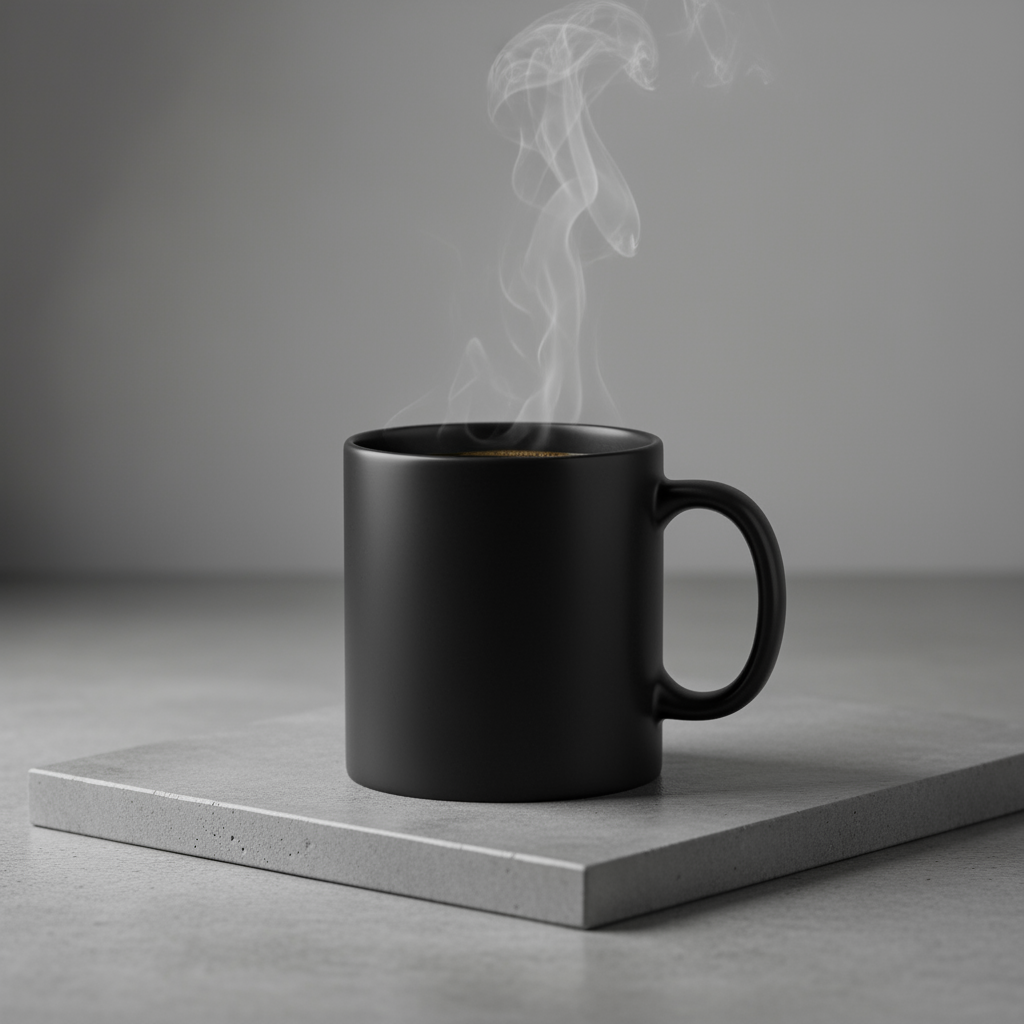
4. ภาพจำลองผลิตภัณฑ์และการถ่ายภาพเชิงพาณิชย์
เหมาะอย่างยิ่งสำหรับการสร้างภาพผลิตภัณฑ์ที่สะอาดตาและดูเป็นมืออาชีพสำหรับอีคอมเมิร์ซ การโฆษณา หรือการสร้างแบรนด์
เทมเพลต
A high-resolution, studio-lit product photograph of a [product description]
on a [background surface/description]. The lighting is a [lighting setup,
e.g., three-point softbox setup] to [lighting purpose]. The camera angle is
a [angle type] to showcase [specific feature]. Ultra-realistic, with sharp
focus on [key detail]. [Aspect ratio].
พรอมต์
A high-resolution, studio-lit product photograph of a minimalist ceramic
coffee mug in matte black, presented on a polished concrete surface. The
lighting is a three-point softbox setup designed to create soft, diffused
highlights and eliminate harsh shadows. The camera angle is a slightly
elevated 45-degree shot to showcase its clean lines. Ultra-realistic, with
sharp focus on the steam rising from the coffee. Square image.
Python
from google import genai
import base64

client = genai.Client()

interaction = client.interactions.create(
    model="gemini-3.1-flash-image",
    input="A high-resolution, studio-lit product photograph of a minimalist ceramic coffee mug in matte black, presented on a polished concrete surface. The lighting is a three-point softbox setup designed to create soft, diffused highlights and eliminate harsh shadows. The camera angle is a slightly elevated 45-degree shot to showcase its clean lines. Ultra-realistic, with sharp focus on the steam rising from the coffee. Square image.",
)

for step in interaction.steps:
    if step.type == "model_output":
        for content_block in step.content:
            if content_block.type == "text":
                print(content_block.text)
            elif content_block.type == "image":
                with open("product_mockup.png", "wb") as f:
                    f.write(base64.b64decode(content_block.data))
JavaScript
import { GoogleGenAI } from "@google/genai";
import * as fs from "node:fs";

async function main() {
  const ai = new GoogleGenAI({});

  const interaction = await ai.interactions.create({
    model: "gemini-3.1-flash-image",
    input: "A high-resolution, studio-lit product photograph of a minimalist ceramic coffee mug in matte black, presented on a polished concrete surface. The lighting is a three-point softbox setup designed to create soft, diffused highlights and eliminate harsh shadows. The camera angle is a slightly elevated 45-degree shot to showcase its clean lines. Ultra-realistic, with sharp focus on the steam rising from the coffee. Square image.",
  });
  for (const step of interaction.steps) {
    if (step.type === "model_output") {
      for (const contentBlock of step.content) {
        if (contentBlock.type === "text") {
          console.log(contentBlock.text);
        } else if (contentBlock.type === "image") {
          const buffer = Buffer.from(contentBlock.data, "base64");
          fs.writeFileSync("product_mockup.png", buffer);
        }
      }
    }
  }
}

main();
REST
curl -s -X POST \
  "https://generativelanguage.googleapis.com/v1beta/interactions" \
  -H "x-goog-api-key: $GEMINI_API_KEY" \
  -H "Content-Type: application/json" \
  -d '{
    "model": "gemini-3.1-flash-image",
    "input": "A high-resolution, studio-lit product photograph of a minimalist ceramic coffee mug in matte black, presented on a polished concrete surface. The lighting is a three-point softbox setup designed to create soft, diffused highlights and eliminate harsh shadows. The camera angle is a slightly elevated 45-degree shot to showcase its clean lines. Ultra-realistic, with sharp focus on the steam rising from the coffee. Square image."
  }'
5. การออกแบบพื้นที่ว่างและสไตล์มินิมอล
เหมาะอย่างยิ่งสำหรับการสร้างพื้นหลังสำหรับเว็บไซต์ งานนำเสนอ หรือสื่อการตลาด ที่จะมีการวางซ้อนข้อความ
เทมเพลต
A minimalist composition featuring a single [subject] positioned in the
[bottom-right/top-left/etc.] of the frame. The background is a vast, empty
[color] canvas, creating significant negative space. Soft, subtle lighting.
[Aspect ratio].
พรอมต์
A minimalist composition featuring a single, delicate red maple leaf
positioned in the bottom-right of the frame. The background is a vast, empty
off-white canvas, creating significant negative space for text. Soft,
diffused lighting from the top left. Square image.
Python
from google import genai
import base64

client = genai.Client()

interaction = client.interactions.create(
    model="gemini-3.1-flash-image",
    input="A minimalist composition featuring a single, delicate red maple leaf positioned in the bottom-right of the frame. The background is a vast, empty off-white canvas, creating significant negative space for text. Soft, diffused lighting from the top left. Square image.",
)

for step in interaction.steps:
    if step.type == "model_output":
        for content_block in step.content:
            if content_block.type == "text":
                print(content_block.text)
            elif content_block.type == "image":
                with open("minimalist_design.png", "wb") as f:
                    f.write(base64.b64decode(content_block.data))
JavaScript
import { GoogleGenAI } from "@google/genai";
import * as fs from "node:fs";

async function main() {
  const ai = new GoogleGenAI({});

  const interaction = await ai.interactions.create({
    model: "gemini-3.1-flash-image",
    input: "A minimalist composition featuring a single, delicate red maple leaf positioned in the bottom-right of the frame. The background is a vast, empty off-white canvas, creating significant negative space for text. Soft, diffused lighting from the top left. Square image.",
  });
  for (const step of interaction.steps) {
    if (step.type === "model_output") {
      for (const contentBlock of step.content) {
        if (contentBlock.type === "text") {
          console.log(contentBlock.text);
        } else if (contentBlock.type === "image") {
          const buffer = Buffer.from(contentBlock.data, "base64");
          fs.writeFileSync("minimalist_design.png", buffer);
        }
      }
    }
  }
}

main();
REST
curl -s -X POST \
  "https://generativelanguage.googleapis.com/v1beta/interactions" \
  -H "x-goog-api-key: $GEMINI_API_KEY" \
  -H "Content-Type: application/json" \
  -d '{
    "model": "gemini-3.1-flash-image",
    "input": "A minimalist composition featuring a single, delicate red maple leaf positioned in the bottom-right of the frame. The background is a vast, empty off-white canvas, creating significant negative space for text. Soft, diffused lighting from the top left. Square image."
  }'

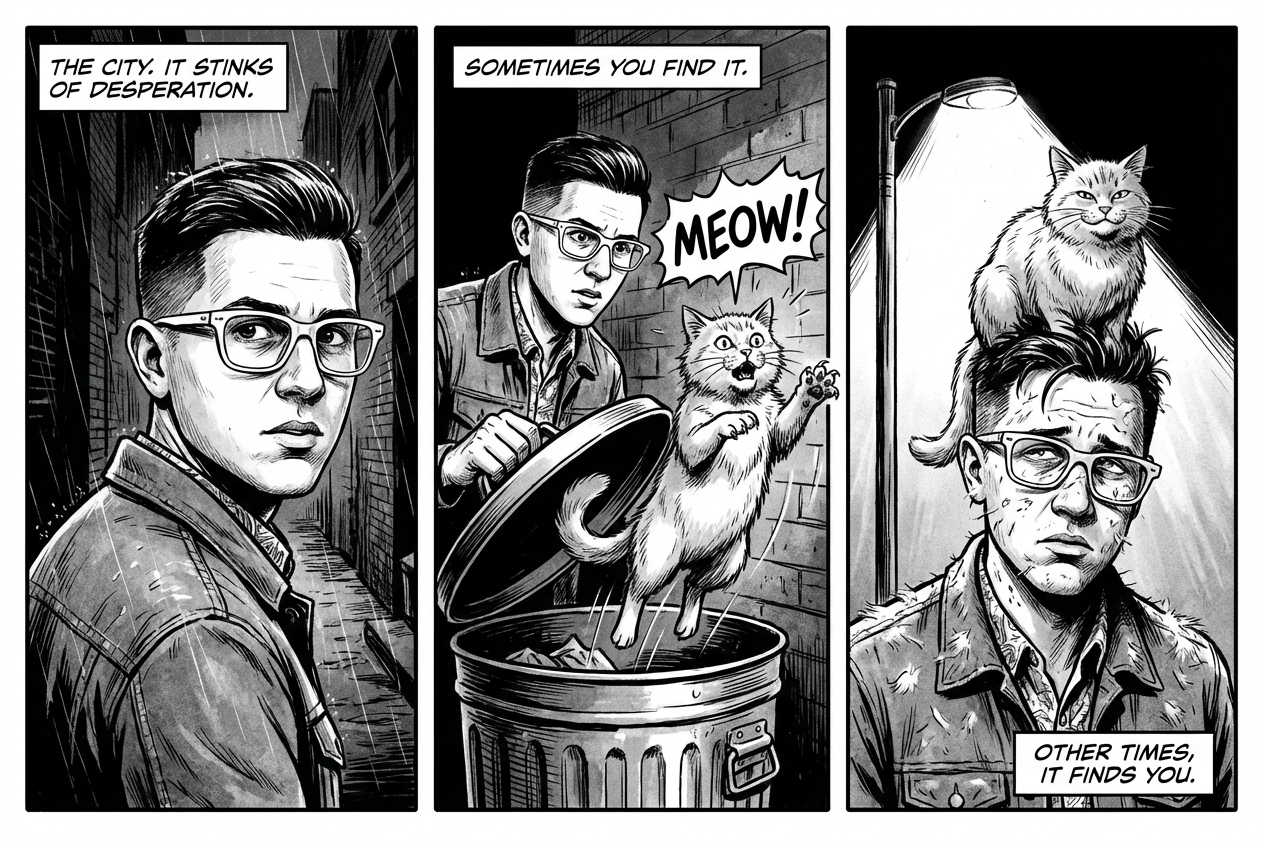
6. ภาพต่อเนื่อง (แผงการ์ตูน / สตอรีบอร์ด)
สร้างความสม่ำเสมอของตัวละครและคำอธิบายฉากเพื่อสร้างแผงสำหรับ การเล่าเรื่องด้วยภาพ สำหรับความแม่นยำของข้อความและความสามารถในการเล่าเรื่อง พรอมต์เหล่านี้ ทำงานได้ดีที่สุดกับ Gemini 3 Pro และ Gemini 3.1 Flash Image
เทมเพลต
Make a 3 panel comic in a [style]. Put the character in a [type of scene].
พรอมต์
Make a 3 panel comic in a gritty, noir art style with high-contrast black and white inks. Put the character in a humurous scene.
Python
from google import genai
from PIL import Image
import base64

client = genai.Client()

with open('/path/to/your/man_in_white_glasses.jpg', 'rb') as f:
    image_bytes = f.read()
text_input = "Make a 3 panel comic in a gritty, noir art style with high-contrast black and white inks. Put the character in a humurous scene."

interaction = client.interactions.create(
    model="gemini-3.1-flash-image",
    input=[
        {"type": "text", "text": text_input},
        {
            "type": "image",
            "data": base64.b64encode(image_bytes).decode('utf-8'),
            "mime_type": "image/jpeg"
        }
    ],
)

for step in interaction.steps:
    if step.type == "model_output":
        for content_block in step.content:
            if content_block.type == "text":
                print(content_block.text)
            elif content_block.type == "image":
                with open("comic_panel.jpg", "wb") as f:
                    f.write(base64.b64decode(content_block.data))
JavaScript
import { GoogleGenAI } from "@google/genai";
import * as fs from "node:fs";

async function main() {
  const ai = new GoogleGenAI({});

  const imagePath = "/path/to/your/man_in_white_glasses.jpg";
  const imageData = fs.readFileSync(imagePath);
  const base64Image = imageData.toString("base64");

  const input = [
    { type: "text", text: "Make a 3 panel comic in a gritty, noir art style with high-contrast black and white inks. Put the character in a humurous scene." },
    {
      type: "image",
      mime_type: "image/jpeg",
      data: base64Image
    },
  ];

  const interaction = await ai.interactions.create({
    model: "gemini-3.1-flash-image",
    input: input,
  });
  for (const step of interaction.steps) {
    if (step.type === "model_output") {
      for (const contentBlock of step.content) {
        if (contentBlock.type === "text") {
          console.log(contentBlock.text);
        } else if (contentBlock.type === "image") {
          const buffer = Buffer.from(contentBlock.data, "base64");
          fs.writeFileSync("comic_panel.jpg", buffer);
        }
      }
    }
  }
}

main();
REST
curl -s -X POST \
  "https://generativelanguage.googleapis.com/v1beta/interactions" \
  -H "x-goog-api-key: $GEMINI_API_KEY" \
  -H "Content-Type: application/json" \
  -d '{
    "model": "gemini-3.1-flash-image",
    "input": [
      {"type": "text", "text": "Make a 3 panel comic in a gritty, noir art style with high-contrast black and white inks. Put the character in a humurous scene."},
      {"type": "image", "data": "<BASE64_IMAGE_DATA>", "mime_type": "image/jpeg"}
    ]
  }'
อินพุต |
เอาต์พุต |

|
|
7. การเชื่อมต่อแหล่งข้อมูลกับ Google Search
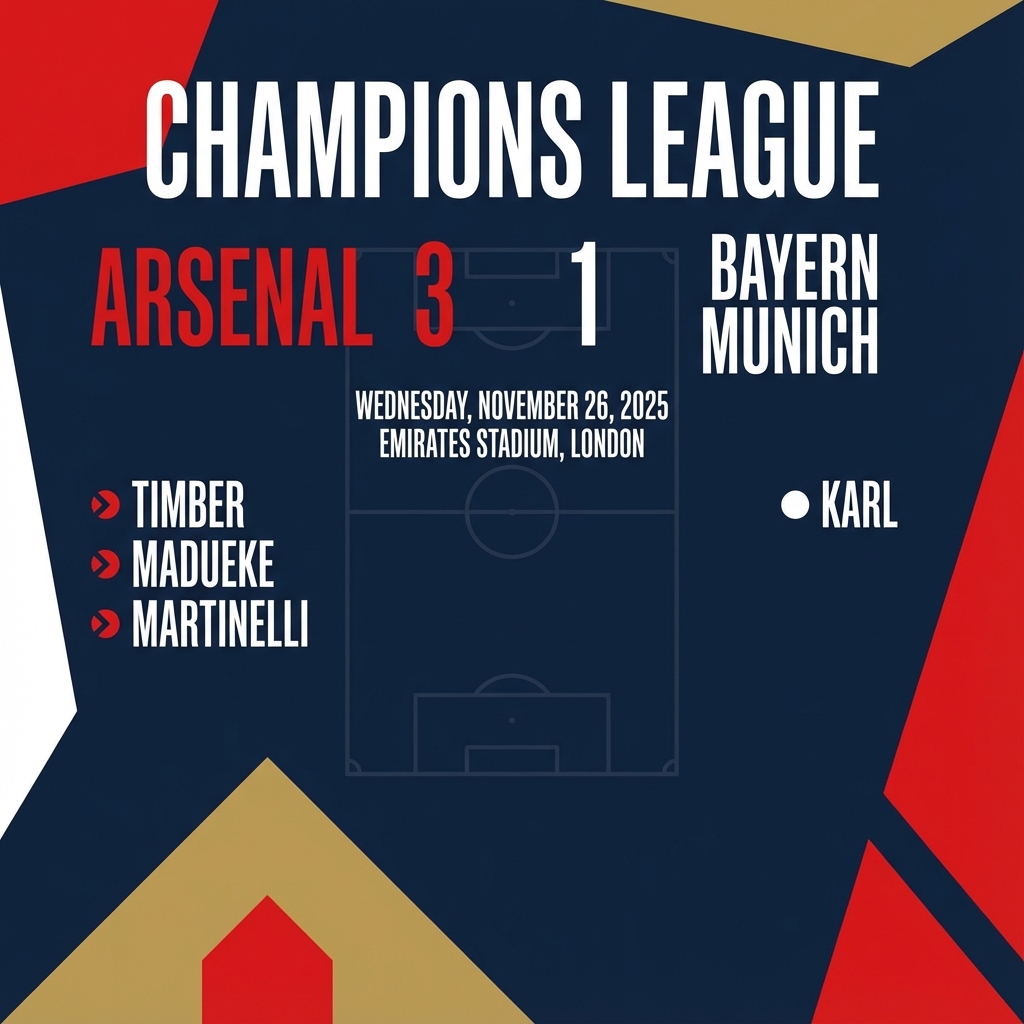
ใช้ Google Search เพื่อสร้างรูปภาพโดยอิงตามข้อมูลล่าสุดหรือข้อมูลแบบเรียลไทม์ ซึ่งมีประโยชน์สำหรับข่าวสาร สภาพอากาศ และหัวข้ออื่นๆ ที่ต้องอัปเดตอยู่เสมอ
พรอมต์
Make a simple but stylish graphic of last night's Arsenal game in the Champion's League
Python
from google import genai
from google.genai import types
import base64

client = genai.Client()

interaction = client.interactions.create(
    model="gemini-3.1-flash-image",
    input="Make a simple but stylish graphic of last night's Arsenal game in the Champion's League",
    tools=[{"type": "google_search"}],
    response_format={"type": "image", "aspect_ratio": "16:9"},
)

for step in interaction.steps:
    if step.type == "model_output":
        for content_block in step.content:
            if content_block.type == "text":
                print(content_block.text)
            elif content_block.type == "image":
                with open("football-score.jpg", "wb") as f:
                    f.write(base64.b64decode(content_block.data))
JavaScript
import { GoogleGenAI } from "@google/genai";
import * as fs from "node:fs";

async function main() {
  const ai = new GoogleGenAI({});

  const interaction = await ai.interactions.create({
    model: "gemini-3.1-flash-image",
    input: "Make a simple but stylish graphic of last night's Arsenal game in the Champion's League",
    tools: [{ type: "google_search" }],
    response_format: { type: "image", aspect_ratio: "16:9", image_size: "2K" },
  });

  for (const step of interaction.steps) {
    if (step.type === "model_output") {
      for (const contentBlock of step.content) {
        if (contentBlock.type === "text") {
          console.log(contentBlock.text);
        } else if (contentBlock.type === "image") {
          const buffer = Buffer.from(contentBlock.data, "base64");
          fs.writeFileSync("football-score.jpg", buffer);
        }
      }
    }
  }
}

main();
REST
curl -s -X POST \
  "https://generativelanguage.googleapis.com/v1beta/interactions" \
  -H "x-goog-api-key: $GEMINI_API_KEY" \
  -H "Content-Type: application/json" \
  -d '{
    "model": "gemini-3.1-flash-image",
    "input": "Make a simple but stylish graphic of last nights Arsenal game in the Champions League",
    "tools": [{"type": "google_search"}],
    "response_format": {
      "type": "image",
      "aspect_ratio": "16:9"
    }
  }'
พรอมต์สำหรับการแก้ไขรูปภาพ
ตัวอย่างเหล่านี้แสดงวิธีระบุรูปภาพพร้อมกับพรอมต์ข้อความสำหรับการ แก้ไข องค์ประกอบ และการโอนสไตล์
1. การเพิ่มและนำองค์ประกอบออก
ระบุรูปภาพและอธิบายการเปลี่ยนแปลง โมเดลจะตรงกับสไตล์ แสง และมุมมองของรูปภาพต้นฉบับ
เทมเพลต
Using the provided image of [subject], please [add/remove/modify] [element]
to/from the scene. Ensure the change is [description of how the change should
integrate].
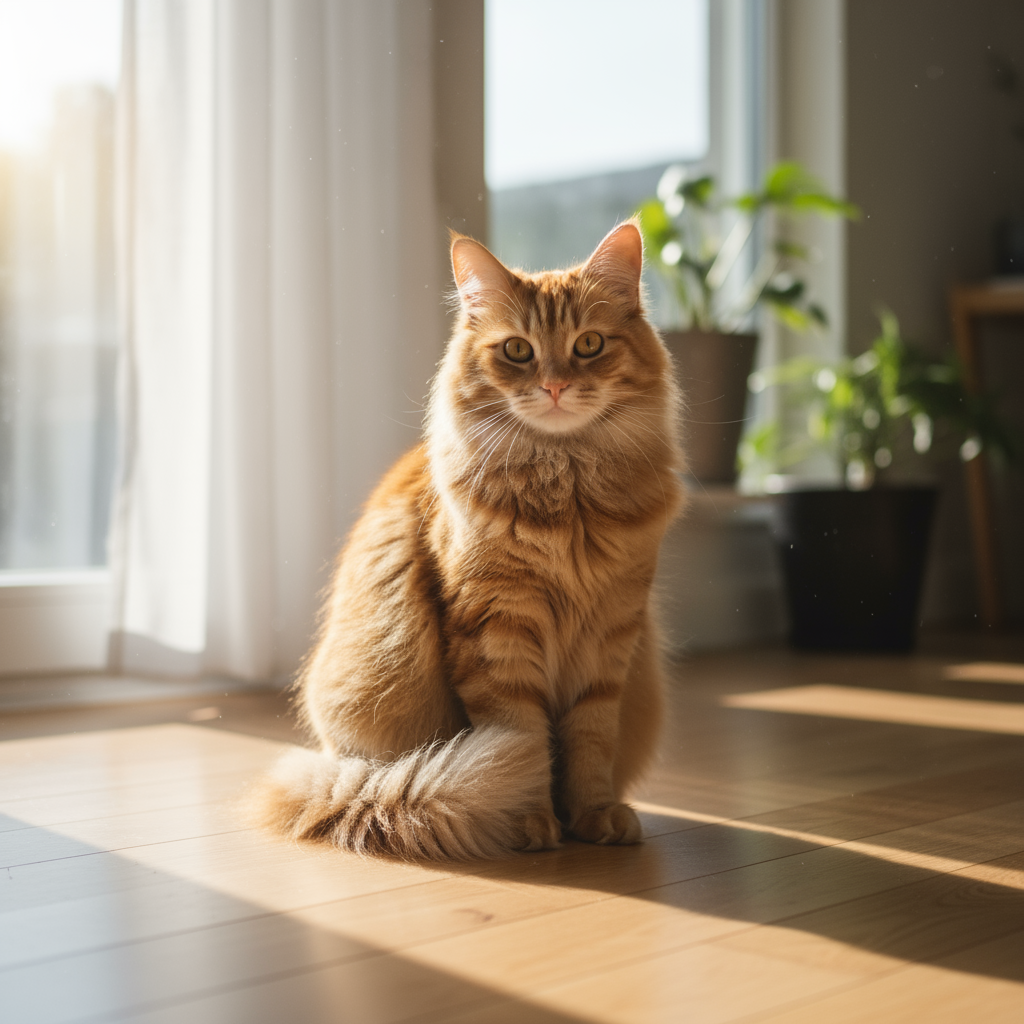
พรอมต์
"Using the provided image of my cat, please add a small, knitted wizard hat
on its head. Make it look like it's sitting comfortably and matches the soft
lighting of the photo."
Python
from google import genai
from PIL import Image
import base64

client = genai.Client()

with open('/path/to/your/cat_photo.png', 'rb') as f:
    image_bytes = f.read()
text_input = """Using the provided image of my cat, please add a small, knitted wizard hat on its head. Make it look like it's sitting comfortably and not falling off."""

interaction = client.interactions.create(
    model="gemini-3.1-flash-image",
    input=[
        {"type": "text", "text": text_input},
        {
            "type": "image",
            "data": base64.b64encode(image_bytes).decode('utf-8'),
            "mime_type": "image/png"
        }
    ],
)

for step in interaction.steps:
    if step.type == "model_output":
        for content_block in step.content:
            if content_block.type == "text":
                print(content_block.text)
            elif content_block.type == "image":
                with open("cat_with_hat.png", "wb") as f:
                    f.write(base64.b64decode(content_block.data))
JavaScript
import { GoogleGenAI } from "@google/genai";
import * as fs from "node:fs";

async function main() {
  const ai = new GoogleGenAI({});

  const imagePath = "/path/to/your/cat_photo.png";
  const imageData = fs.readFileSync(imagePath);
  const base64Image = imageData.toString("base64");

  const input = [
    { type: "text", text: "Using the provided image of my cat, please add a small, knitted wizard hat on its head. Make it look like it's sitting comfortably and not falling off." },
    {
      type: "image",
      mime_type: "image/png",
      data: base64Image
    },
  ];

  const interaction = await ai.interactions.create({
    model: "gemini-3.1-flash-image",
    input: input,
  });
  for (const step of interaction.steps) {
    if (step.type === "model_output") {
      for (const contentBlock of step.content) {
        if (contentBlock.type === "text") {
          console.log(contentBlock.text);
        } else if (contentBlock.type === "image") {
          const buffer = Buffer.from(contentBlock.data, "base64");
          fs.writeFileSync("cat_with_hat.png", buffer);
        }
      }
    }
  }
}

main();
REST
curl -s -X POST \
  "https://generativelanguage.googleapis.com/v1beta/interactions" \
    -H "x-goog-api-key: $GEMINI_API_KEY" \
    -H 'Content-Type: application/json' \
    -d "{
      \"model\": \"gemini-3.1-flash-image\",
      \"input\": [
            {\"type\": \"text\", \"text\": \"Using the provided image of my cat, please add a small, knitted wizard hat on its head. Make it look like it's sitting comfortably and not falling off.\"},
            {\"type\": \"image\", \"mime_type\":\"image/png\", \"data\": \"<BASE64_IMAGE_DATA>\"}
        ]
    }"
อินพุต |
เอาต์พุต |
|

|
2. การลบสิ่งที่ไม่ต้องการออกจากภาพ (การมาสก์เชิงความหมาย)
กำหนด "มาสก์" ในลักษณะการสนทนาเพื่อแก้ไขส่วนที่ต้องการของรูปภาพโดย ไม่แตะต้องส่วนอื่นๆ
เทมเพลต
Using the provided image, change only the [specific element] to [new
element/description]. Keep everything else in the image exactly the same,
preserving the original style, lighting, and composition.
พรอมต์
"Using the provided image of a living room, change only the blue sofa to be
a vintage, brown leather chesterfield sofa. Keep the rest of the room,
including the pillows on the sofa and the lighting, unchanged."
Python
from google import genai
from PIL import Image
import base64

client = genai.Client()

with open('/path/to/your/living_room.png', 'rb') as f:
    image_bytes = f.read()
text_input = """Using the provided image of a living room, change only the blue sofa to be a vintage, brown leather chesterfield sofa. Keep the rest of the room, including the pillows on the sofa and the lighting, unchanged."""

interaction = client.interactions.create(
    model="gemini-3.1-flash-image",
    input=[
        {
            "type": "image",
            "data": base64.b64encode(image_bytes).decode('utf-8'),
            "mime_type": "image/png"
        },
        {"type": "text", "text": text_input}
    ],
)

for step in interaction.steps:
    if step.type == "model_output":
        for content_block in step.content:
            if content_block.type == "text":
                print(content_block.text)
            elif content_block.type == "image":
                with open("living_room_edited.png", "wb") as f:
                    f.write(base64.b64decode(content_block.data))
JavaScript
import { GoogleGenAI } from "@google/genai";
import * as fs from "node:fs";

async function main() {
  const ai = new GoogleGenAI({});

  const imagePath = "/path/to/your/living_room.png";
  const imageData = fs.readFileSync(imagePath);
  const base64Image = imageData.toString("base64");

  const input = [
    {
      type: "image",
      mime_type: "image/png",
      data: base64Image
    },
    { type: "text", text: "Using the provided image of a living room, change only the blue sofa to be a vintage, brown leather chesterfield sofa. Keep the rest of the room, including the pillows on the sofa and the lighting, unchanged." },
  ];

  const interaction = await ai.interactions.create({
    model: "gemini-3.1-flash-image",
    input: input,
  });
  for (const step of interaction.steps) {
    if (step.type === "model_output") {
      for (const contentBlock of step.content) {
        if (contentBlock.type === "text") {
          console.log(contentBlock.text);
        } else if (contentBlock.type === "image") {
          const buffer = Buffer.from(contentBlock.data, "base64");
          fs.writeFileSync("living_room_edited.png", buffer);
        }
      }
    }
  }
}

main();
REST
curl -s -X POST \
  "https://generativelanguage.googleapis.com/v1beta/interactions" \
    -H "x-goog-api-key: $GEMINI_API_KEY" \
    -H 'Content-Type: application/json' \
    -d "{
      \"model\": \"gemini-3.1-flash-image\",
      \"input\": [
        {\"type\": \"image\", \"mime_type\":\"image/png\", \"data\": \"<BASE64_IMAGE_DATA>\"},
        {\"type\": \"text\", \"text\": \"Using the provided image of a living room, change only the blue sofa to be a vintage, brown leather chesterfield sofa. Keep the rest of the room, including the pillows on the sofa and the lighting, unchanged.\"}
      ]
    }"
อินพุต |
เอาต์พุต |

|

|
3. การถ่ายโอนสไตล์
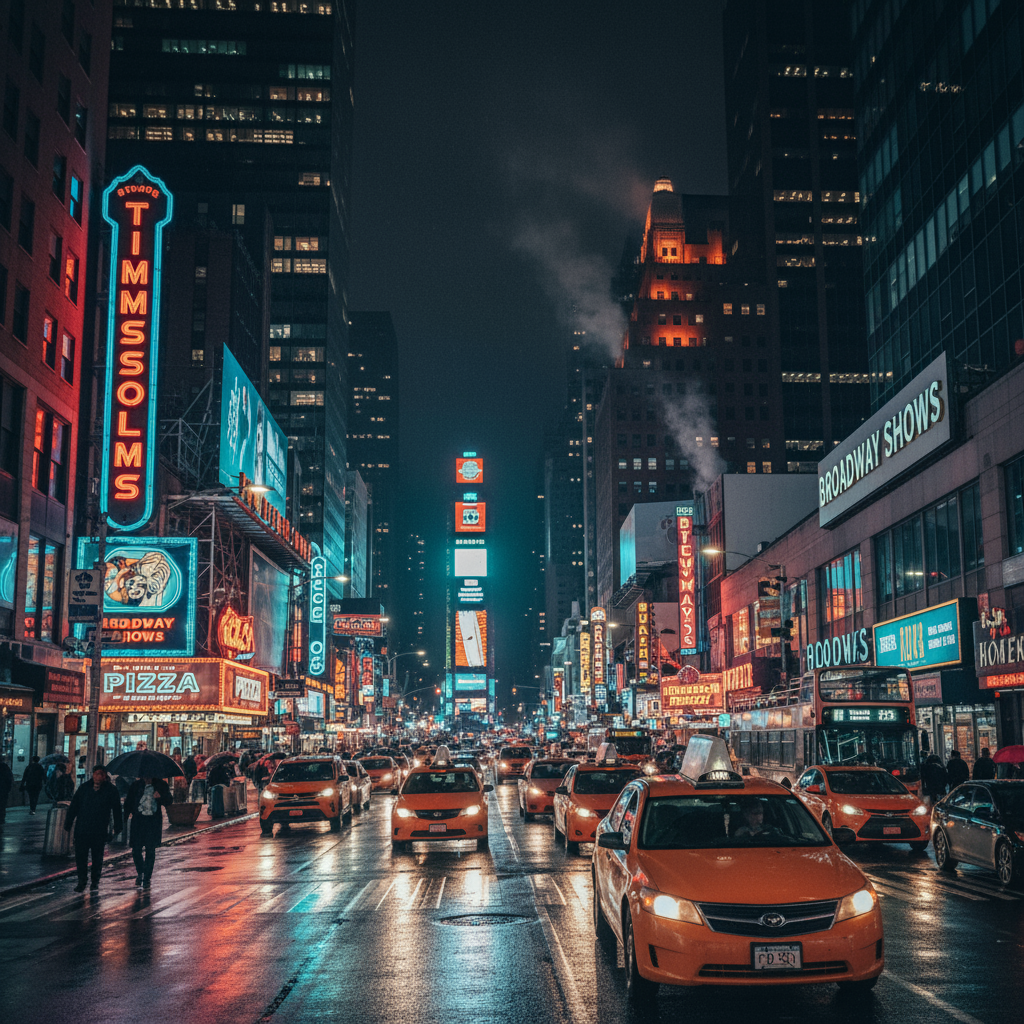
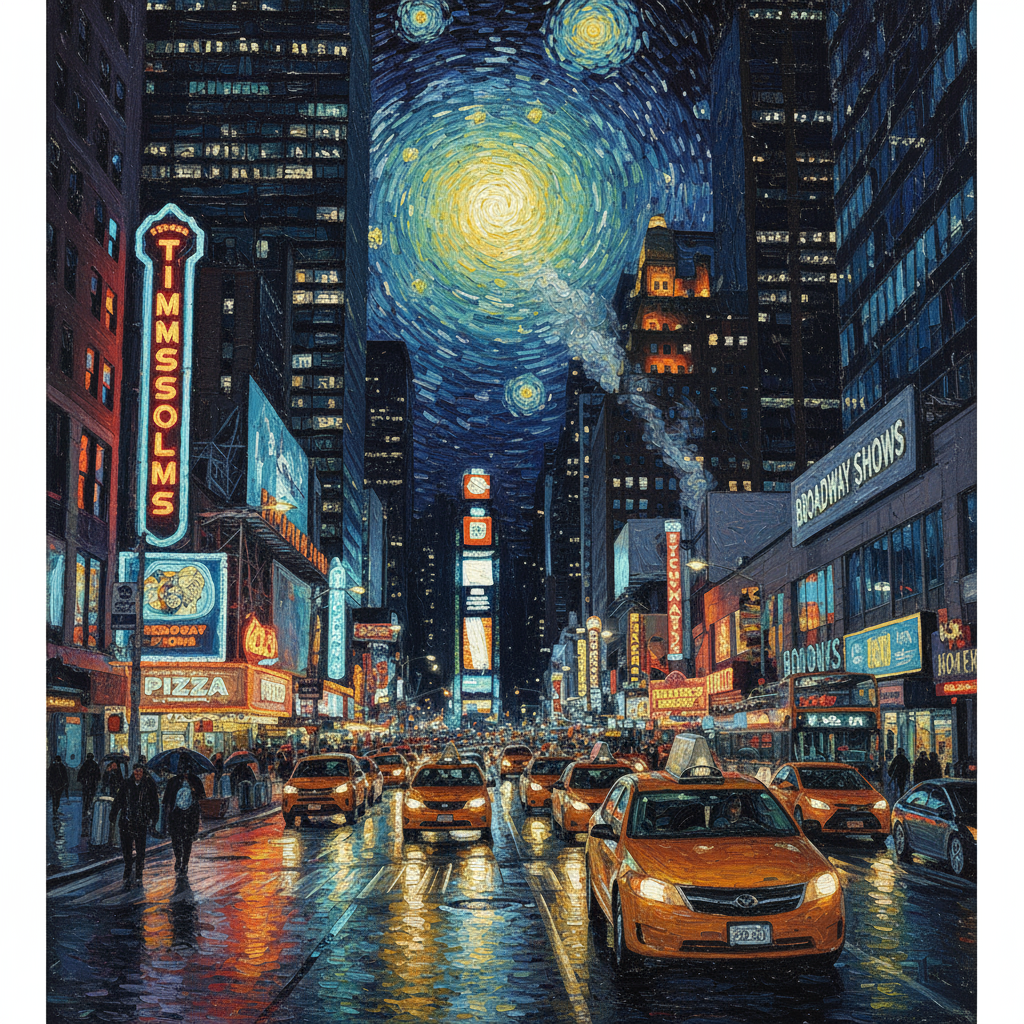
ส่งรูปภาพและขอให้โมเดลสร้างเนื้อหาของรูปภาพนั้นใหม่ใน สไตล์ศิลปะที่แตกต่างกัน
เทมเพลต
Transform the provided photograph of [subject] into the artistic style of [artist/art style]. Preserve the original composition but render it with [description of stylistic elements].
พรอมต์
"Transform the provided photograph of a modern city street at night into the artistic style of Vincent van Gogh's 'Starry Night'. Preserve the original composition of buildings and cars, but render all elements with swirling, impasto brushstrokes and a dramatic palette of deep blues and bright yellows."
Python
from google import genai
from PIL import Image
import base64

client = genai.Client()

with open('/path/to/your/city.png', 'rb') as f:
    image_bytes = f.read()
text_input = """Transform the provided photograph of a modern city street at night into the artistic style of Vincent van Gogh's 'Starry Night'. Preserve the original composition of buildings and cars, but render all elements with swirling, impasto brushstrokes and a dramatic palette of deep blues and bright yellows."""

interaction = client.interactions.create(
    model="gemini-3.1-flash-image",
    input=[
        {
            "type": "image",
            "data": base64.b64encode(image_bytes).decode('utf-8'),
            "mime_type": "image/png"
        },
        {"type": "text", "text": text_input}
    ],
)

for step in interaction.steps:
    if step.type == "model_output":
        for content_block in step.content:
            if content_block.type == "text":
                print(content_block.text)
            elif content_block.type == "image":
                with open("city_style_transfer.png", "wb") as f:
                    f.write(base64.b64decode(content_block.data))
JavaScript
import { GoogleGenAI } from "@google/genai";
import * as fs from "node:fs";

async function main() {
  const ai = new GoogleGenAI({});
  const imageData = fs.readFileSync("/path/to/your/city.png");
  const base64Image = imageData.toString("base64");

  const interaction = await ai.interactions.create({
    model: "gemini-3.1-flash-image",
    input: [
      {
        type: "image",
        mime_type: "image/png",
        data: base64Image
      },
      { type: "text", text: "Transform the provided photograph of a modern city street at night into the artistic style of Vincent van Gogh's 'Starry Night'. Preserve the original composition of buildings and cars, but render all elements with swirling, impasto brushstrokes and a dramatic palette of deep blues and bright yellows." },
    ],
  });
  for (const step of interaction.steps) {
    if (step.type === "model_output") {
      for (const contentBlock of step.content) {
        if (contentBlock.type === "text") {
          console.log(contentBlock.text);
        } else if (contentBlock.type === "image") {
          const buffer = Buffer.from(contentBlock.data, "base64");
          fs.writeFileSync("city_style_transfer.png", buffer);
        }
      }
    }
  }
}

main();
REST
curl -s -X POST \
  "https://generativelanguage.googleapis.com/v1beta/interactions" \
    -H "x-goog-api-key: $GEMINI_API_KEY" \
    -H 'Content-Type: application/json' \
    -d "{
      \"model\": \"gemini-3.1-flash-image\",
      \"input\": [
        {\"type\": \"image\", \"mime_type\":\"image/png\", \"data\": \"<BASE64_IMAGE_DATA>\"},
        {\"type\": \"text\", \"text\": \"Transform the provided photograph of a modern city street at night into the artistic style of Vincent van Gogh's 'Starry Night'. Preserve the original composition of buildings and cars, but render all elements with swirling, impasto brushstrokes and a dramatic palette of deep blues and bright yellows.\"}
      ]
    }"
อินพุต |
เอาต์พุต |
|
|
4. การจัดองค์ประกอบขั้นสูง: การรวมรูปภาพหลายรูป
ระบุรูปภาพหลายรูปเป็นบริบทเพื่อสร้างฉากคอมโพสิตใหม่ ซึ่งเหมาะสำหรับภาพจำลองผลิตภัณฑ์หรือภาพคอลลาจที่สร้างสรรค์
เทมเพลต
Create a new image by combining the elements from the provided images. Take
the [element from image 1] and place it with/on the [element from image 2].
The final image should be a [description of the final scene].
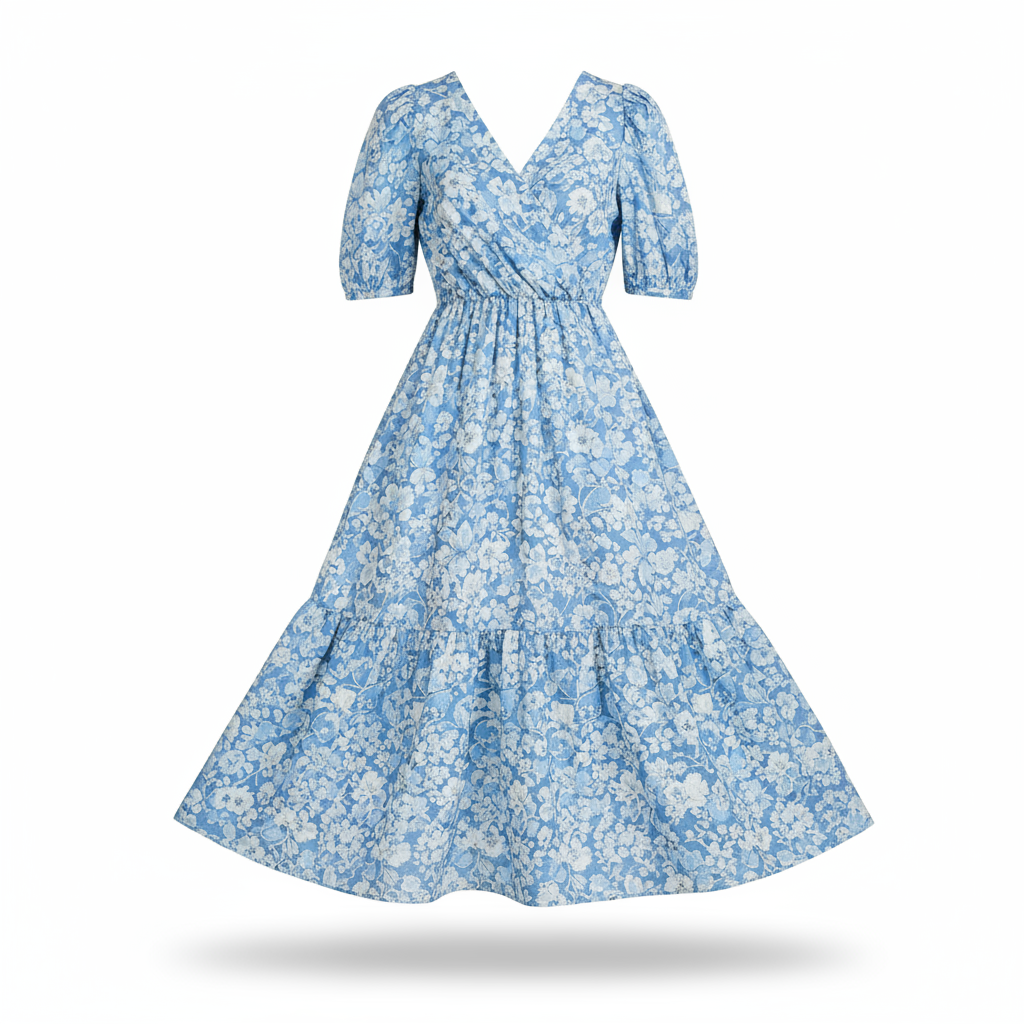
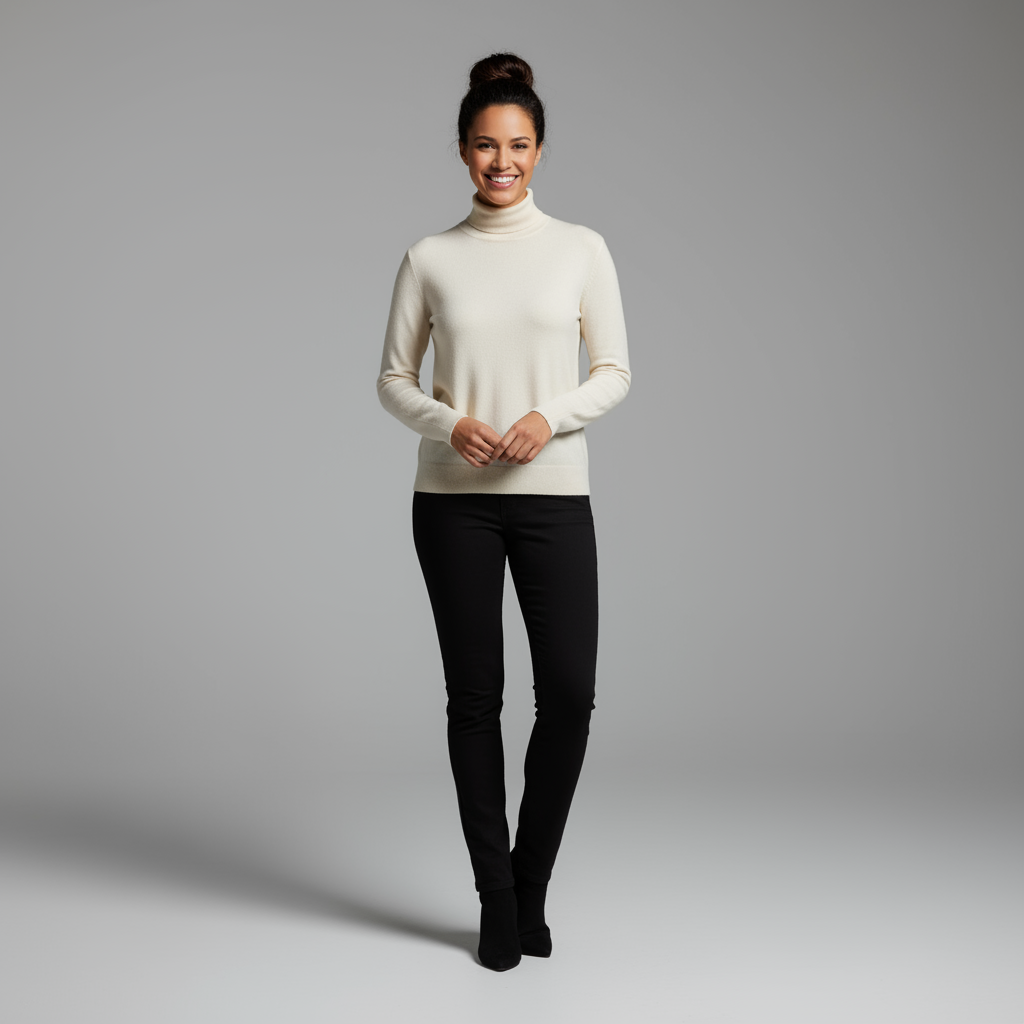
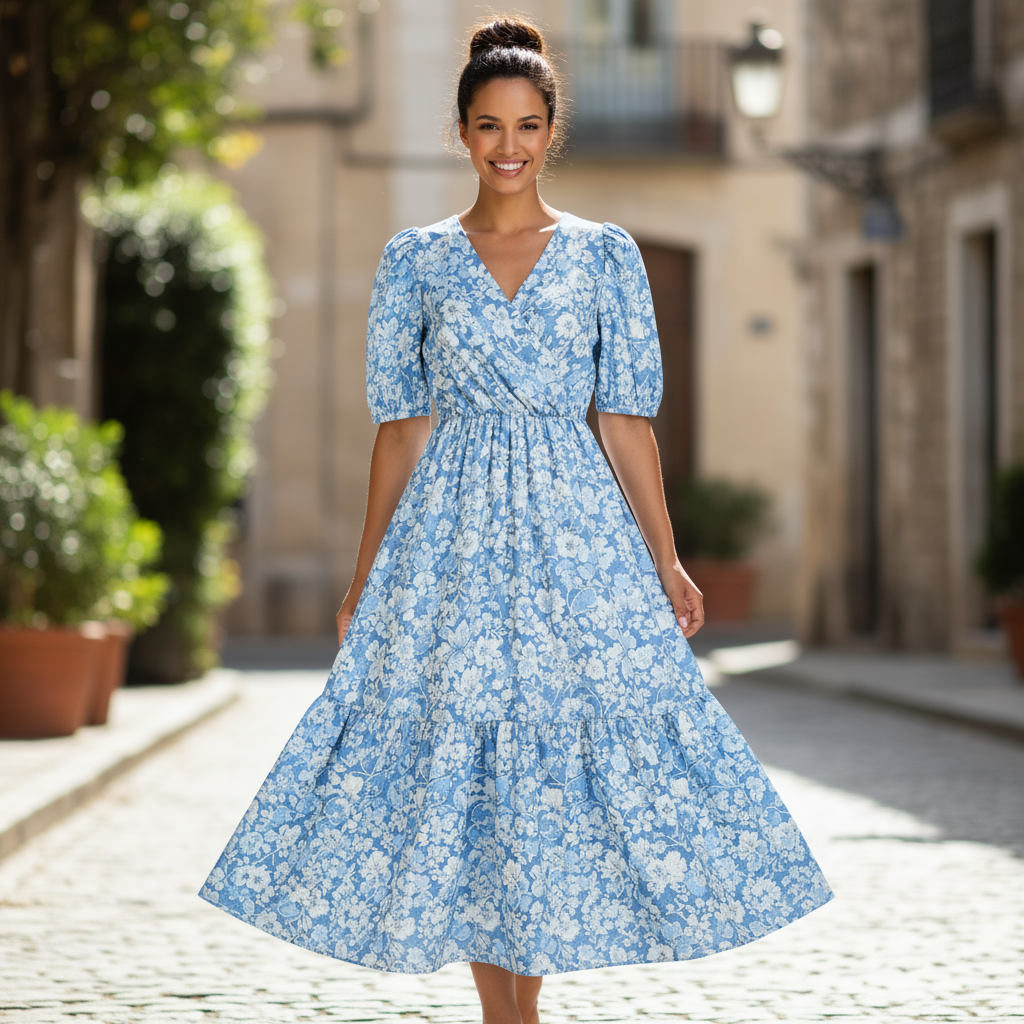
พรอมต์
"Create a professional e-commerce fashion photo. Take the blue floral dress
from the first image and let the woman from the second image wear it.
Generate a realistic, full-body shot of the woman wearing the dress, with
the lighting and shadows adjusted to match the outdoor environment."
Python
from google import genai
from PIL import Image
import base64

client = genai.Client()

with open('/path/to/your/dress.png', 'rb') as f:
    dress_bytes = f.read()
with open('/path/to/your/model.png', 'rb') as f:
    model_bytes = f.read()
text_input = """Create a professional e-commerce fashion photo. Take the blue floral dress from the first image and let the woman from the second image wear it. Generate a realistic, full-body shot of the woman wearing the dress, with the lighting and shadows adjusted to match the outdoor environment."""

interaction = client.interactions.create(
    model="gemini-3.1-flash-image",
    input=[
        {
            "type": "image",
            "data": base64.b64encode(dress_bytes).decode('utf-8'),
            "mime_type": "image/png"
        },
        {
            "type": "image",
            "data": base64.b64encode(model_bytes).decode('utf-8'),
            "mime_type": "image/png"
        },
        {"type": "text", "text": text_input}
    ],
)

for step in interaction.steps:
    if step.type == "model_output":
        for content_block in step.content:
            if content_block.type == "text":
                print(content_block.text)
            elif content_block.type == "image":
                with open("fashion_ecommerce_shot.png", "wb") as f:
                    f.write(base64.b64decode(content_block.data))
JavaScript
import { GoogleGenAI } from "@google/genai";
import * as fs from "node:fs";

async function main() {
  const ai = new GoogleGenAI({});

  const imagePath1 = "/path/to/your/dress.png";
  const imageData1 = fs.readFileSync(imagePath1);
  const base64Image1 = imageData1.toString("base64");
  const imagePath2 = "/path/to/your/model.png";
  const imageData2 = fs.readFileSync(imagePath2);
  const base64Image2 = imageData2.toString("base64");

  const input = [
    {
      type: "image",
      mime_type: "image/png",
      data: base64Image1
    },
    {
      type: "image",
      mime_type: "image/png",
      data: base64Image2
    },
    { type: "text", text: "Create a professional e-commerce fashion photo. Take the blue floral dress from the first image and let the woman from the second image wear it. Generate a realistic, full-body shot of the woman wearing the dress, with the lighting and shadows adjusted to match the outdoor environment." },
  ];

  const interaction = await ai.interactions.create({
    model: "gemini-3.1-flash-image",
    input: input,
  });
  for (const step of interaction.steps) {
    if (step.type === "model_output") {
      for (const contentBlock of step.content) {
        if (contentBlock.type === "text") {
          console.log(contentBlock.text);
        } else if (contentBlock.type === "image") {
          const buffer = Buffer.from(contentBlock.data, "base64");
          fs.writeFileSync("fashion_ecommerce_shot.png", buffer);
        }
      }
    }
  }
}

main();
REST
curl -s -X POST \
  "https://generativelanguage.googleapis.com/v1beta/interactions" \
    -H "x-goog-api-key: $GEMINI_API_KEY" \
    -H 'Content-Type: application/json' \
    -d "{
      \"model\": \"gemini-3.1-flash-image\",
      \"input\": [
            {\"type\": \"image\", \"mime_type\":\"image/png\", \"data\": \"<BASE64_IMAGE_DATA_1>\"},
            {\"type\": \"image\", \"mime_type\":\"image/png\", \"data\": \"<BASE64_IMAGE_DATA_2>\"},
            {\"type\": \"text\", \"text\": \"Create a professional e-commerce fashion photo. Take the blue floral dress from the first image and let the woman from the second image wear it. Generate a realistic, full-body shot of the woman wearing the dress, with the lighting and shadows adjusted to match the outdoor environment.\"}
      }]
    }"
อินพุต 1 |
อินพุต 2 |
เอาต์พุต |
|
|
|
5. การคงรายละเอียดที่มีความเที่ยงตรงสูง
หากต้องการให้ระบบเก็บรายละเอียดที่สำคัญ (เช่น ใบหน้าหรือโลโก้) ไว้ในระหว่างการแก้ไข โปรดอธิบายรายละเอียดเหล่านั้นพร้อมกับคำขอแก้ไข
เทมเพลต
Using the provided images, place [element from image 2] onto [element from
image 1]. Ensure that the features of [element from image 1] remain
completely unchanged. The added element should [description of how the
element should integrate].
พรอมต์
"Take the first image of the woman with brown hair, blue eyes, and a neutral
expression. Add the logo from the second image onto her black t-shirt.
Ensure the woman's face and features remain completely unchanged. The logo
should look like it's naturally printed on the fabric, following the folds
of the shirt."
Python
from google import genai
from PIL import Image
import base64

client = genai.Client()

with open('/path/to/your/woman.png', 'rb') as f:
    woman_bytes = f.read()
with open('/path/to/your/logo.png', 'rb') as f:
    logo_bytes = f.read()
text_input = """Take the first image of the woman with brown hair, blue eyes, and a neutral expression. Add the logo from the second image onto her black t-shirt. Ensure the woman's face and features remain completely unchanged. The logo should look like it's naturally printed on the fabric, following the folds of the shirt."""

interaction = client.interactions.create(
    model="gemini-3.1-flash-image",
    input=[
      {"type": "image", "mime_type":"image/png", "data": base64.b64encode(woman_bytes).decode('utf-8')},
      {"type": "image", "mime_type":"image/png", "data": base64.b64encode(logo_bytes).decode('utf-8')},
      {"type": "text", "text": text_input}
    ],
)

for step in interaction.steps:
    if step.type == "model_output":
        for content_block in step.content:
            if content_block.type == "text":
                print(content_block.text)
            elif content_block.type == "image":
                with open("woman_with_logo.png", "wb") as f:
                    f.write(base64.b64decode(content_block.data))
JavaScript
import { GoogleGenAI } from "@google/genai";
import * as fs from "node:fs";

async function main() {
  const ai = new GoogleGenAI({});

  const imagePath1 = "/path/to/your/woman.png";
  const imageData1 = fs.readFileSync(imagePath1);
  const base64Image1 = imageData1.toString("base64");
  const imagePath2 = "/path/to/your/logo.png";
  const imageData2 = fs.readFileSync(imagePath2);
  const base64Image2 = imageData2.toString("base64");

  const input = [
    {"type": "image", "mime_type":"image/png", "data": base64Image1},
    {"type": "image", "mime_type":"image/png", "data": base64Image2},
    {"type": "text", "text": "Take the first image of the woman with brown hair, blue eyes, and a neutral expression. Add the logo from the second image onto her black t-shirt. Ensure the woman's face and features remain completely unchanged. The logo should look like it's naturally printed on the fabric, following the folds of the shirt."},
  ];

  const interaction = await ai.interactions.create({
    model: "gemini-3.1-flash-image",
    input: input,
  });
  for (const step of interaction.steps) {
    if (step.type === "model_output") {
      for (const contentBlock of step.content) {
        if (contentBlock.type === "text") {
          console.log(contentBlock.text);
        } else if (contentBlock.type === "image") {
          const buffer = Buffer.from(contentBlock.data, "base64");
          fs.writeFileSync("woman_with_logo.png", buffer);
        }
      }
    }
  }
}

main();
REST
curl -s -X POST \
  "https://generativelanguage.googleapis.com/v1beta/interactions" \
    -H "x-goog-api-key: $GEMINI_API_KEY" \
    -H 'Content-Type: application/json' \
    -d "{
      \"model\": \"gemini-3.1-flash-image\",
      \"input\": [
        {\"type\": \"image\", \"mime_type\":\"image/png\", \"data\": \"<BASE64_IMAGE_DATA_1>\"},
        {\"type\": \"image\", \"mime_type\":\"image/png\", \"data\": \"<BASE64_IMAGE_DATA_2>\"},
        {\"type\": \"text\", \"text\": \"Take the first image of the woman with brown hair, blue eyes, and a neutral expression. Add the logo from the second image onto her black t-shirt. Ensure the woman's face and features remain completely unchanged. The logo should look like it's naturally printed on the fabric, following the folds of the shirt.\"}
      ]
    }"
อินพุต 1 |
อินพุต 2 |
เอาต์พุต |

|

|

|
6. ทำให้มีชีวิตชีวา
อัปโหลดภาพร่างหรือภาพวาดคร่าวๆ แล้วขอให้โมเดลปรับแต่งให้เป็น รูปภาพที่เสร็จสมบูรณ์
เทมเพลต
Turn this rough [medium] sketch of a [subject] into a [style description]
photo. Keep the [specific features] from the sketch but add [new details/materials].
พรอมต์
"Turn this rough pencil sketch of a futuristic car into a polished photo of the finished concept car in a showroom. Keep the sleek lines and low profile from the sketch but add metallic blue paint and neon rim lighting."
Python
from google import genai
from PIL import Image
import base64

client = genai.Client()

with open('/path/to/your/car_sketch.png', 'rb') as f:
    sketch_bytes = f.read()
text_input = """Turn this rough pencil sketch of a futuristic car into a polished photo of the finished concept car in a showroom. Keep the sleek lines and low profile from the sketch but add metallic blue paint and neon rim lighting."""

interaction = client.interactions.create(
    model="gemini-3.1-flash-image",
    input=[
      {"type": "image", "mime_type":"image/png", "data": base64.b64encode(sketch_bytes).decode('utf-8')},
      {"type": "text", "text": text_input}
    ],
)

for step in interaction.steps:
    if step.type == "model_output":
        for content_block in step.content:
            if content_block.type == "text":
                print(content_block.text)
            elif content_block.type == "image":
                with open("car_photo.png", "wb") as f:
                    f.write(base64.b64decode(content_block.data))
JavaScript
import { GoogleGenAI } from "@google/genai";
import * as fs from "node:fs";

async function main() {
  const ai = new GoogleGenAI({});

  const imagePath = "/path/to/your/car_sketch.png";
  const imageData = fs.readFileSync(imagePath);
  const base64Image = imageData.toString("base64");

  const input = [
    {"type": "image", "mime_type":"image/png", "data": base64Image},
    {"type": "text", "text": "Turn this rough pencil sketch of a futuristic car into a polished photo of the finished concept car in a showroom. Keep the sleek lines and low profile from the sketch but add metallic blue paint and neon rim lighting."},
  ];

  const interaction = await ai.interactions.create({
    model: "gemini-3.1-flash-image",
    input: input,
  });
  for (const step of interaction.steps) {
    if (step.type === "model_output") {
      for (const contentBlock of step.content) {
        if (contentBlock.type === "text") {
          console.log(contentBlock.text);
        } else if (contentBlock.type === "image") {
          const buffer = Buffer.from(contentBlock.data, "base64");
          fs.writeFileSync("car_photo.png", buffer);
        }
      }
    }
  }
}

main();
REST
curl -s -X POST \
  "https://generativelanguage.googleapis.com/v1beta/interactions" \
    -H "x-goog-api-key: $GEMINI_API_KEY" \
    -H 'Content-Type: application/json' \
    -d "{
      \"model\": \"gemini-3.1-flash-image\",
      \"input\": [
        {\"type\": \"image\", \"mime_type\":\"image/png\", \"data\": \"<BASE64_IMAGE_DATA>\"},
        {\"type\": \"text\", \"text\": \"Turn this rough pencil sketch of a futuristic car into a polished photo of the finished concept car in a showroom. Keep the sleek lines and low profile from the sketch but add metallic blue paint and neon rim lighting.\"}
      ]
    }"
อินพุต |
เอาต์พุต |
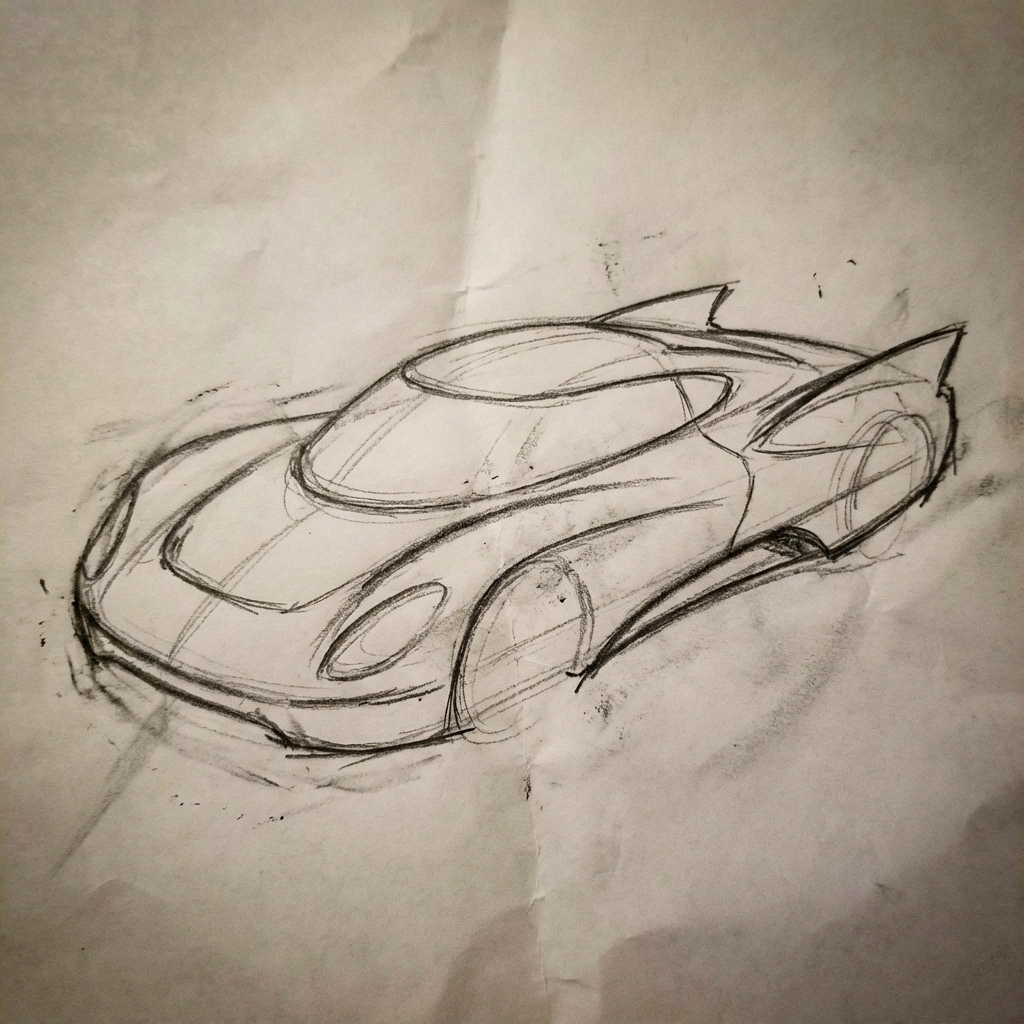
|
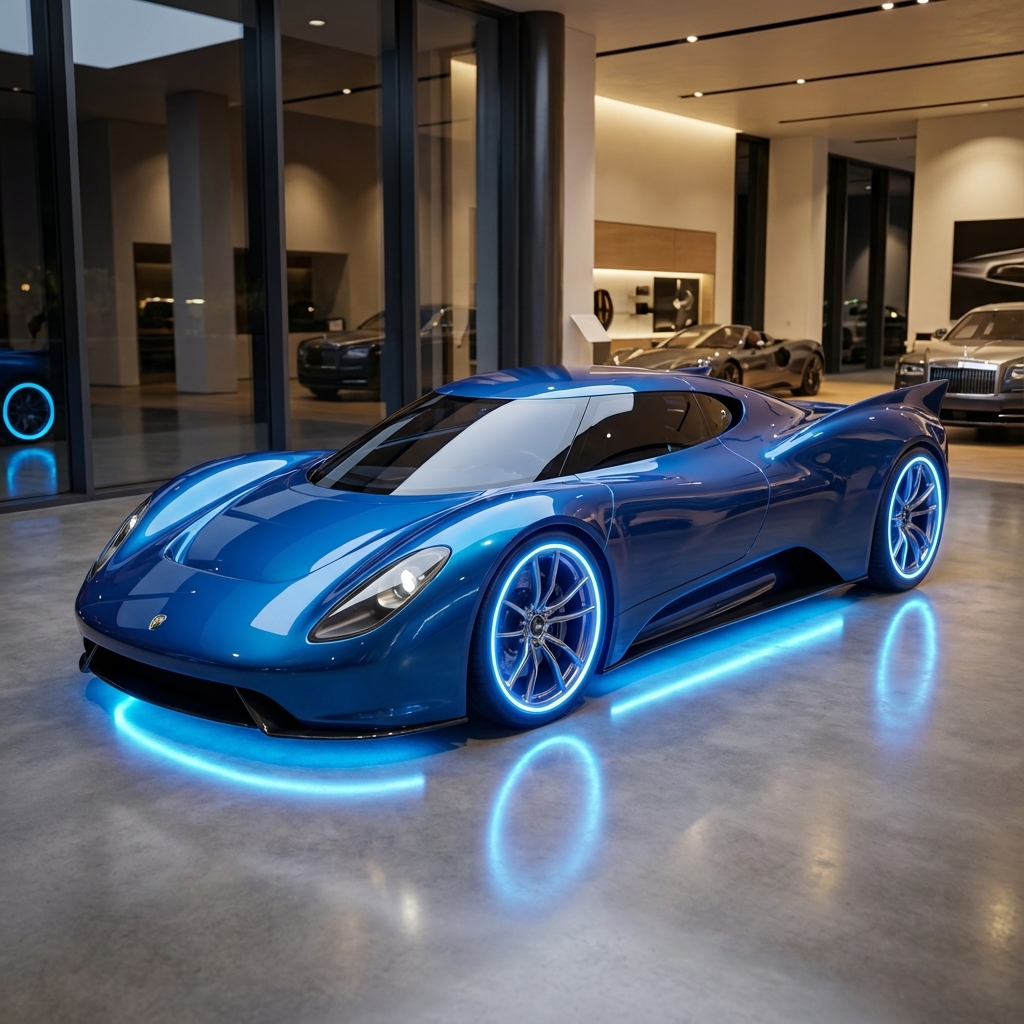
|
7. ความสอดคล้องของตัวละคร: มุมมอง 360 องศา
คุณสร้างมุมมอง 360 องศาของตัวละครได้โดยการป้อนพรอมต์ซ้ำๆ เพื่อให้ได้มุมที่แตกต่างกัน เพื่อผลลัพธ์ที่ดีที่สุด ให้ใส่รูปภาพที่สร้างไว้ก่อนหน้านี้ในพรอมต์ถัดไปเพื่อรักษาความสอดคล้องกัน สำหรับท่าทางที่ซับซ้อน ให้ใส่ รูปภาพอ้างอิงของท่าทางที่เลือก
เทมเพลต
A studio portrait of [person] against [background], [looking forward/in profile looking right/etc.]
พรอมต์
A studio portrait of this man against white, in profile looking right
Python
from google import genai
from PIL import Image
import base64

client = genai.Client()

with open('/path/to/your/man_in_white_glasses.jpg', 'rb') as f:
    image_bytes = f.read()
text_input = """A studio portrait of this man against white, in profile looking right"""

interaction = client.interactions.create(
    model="gemini-3.1-flash-image",
    input={
      {"type": "text", "text": text_input},
      {"type": "image", "mime_type":"image/png", "data": base64.b64encode(image_bytes).decode('utf-8')}
    },
)

for step in interaction.steps:
    if step.type == "model_output":
        for content_block in step.content:
            if content_block.type == "text":
                print(content_block.text)
            elif content_block.type == "image":
                with open("man_right_profile.png", "wb") as f:
                    f.write(base64.b64decode(content_block.data))
อินพุต |
เอาต์พุต 1 |
เอาต์พุต 2 |
|
|

|

|
แนวทางปฏิบัติแนะนำ
หากต้องการยกระดับผลลัพธ์จากดีเป็นยอดเยี่ยม ให้ใช้กลยุทธ์ระดับมืออาชีพเหล่านี้ ในเวิร์กโฟลว์
- ระบุรายละเอียดให้ชัดเจน: ยิ่งให้รายละเอียดมากเท่าไหร่ คุณก็ยิ่งควบคุมได้มากขึ้นเท่านั้น แทนที่จะใช้คำว่า "ชุดเกราะแฟนตาซี" ให้อธิบายว่า "ชุดเกราะเพลทของเอลฟ์ที่ตกแต่งอย่างงดงาม สลักลายใบไม้สีเงิน มีคอเสื้อสูงและเกราะไหล่รูปปีกเหยี่ยว"
- ระบุบริบทและเจตนา: อธิบายวัตถุประสงค์ของรูปภาพ ความเข้าใจบริบทของโมเดลจะส่งผลต่อเอาต์พุตสุดท้าย เช่น "สร้างโลโก้สำหรับแบรนด์ผลิตภัณฑ์ดูแลผิวระดับไฮเอนด์ที่เน้นความเรียบง่าย" จะให้ผลลัพธ์ที่ดีกว่า เพียงแค่ "สร้างโลโก้"
- ทำซ้ำและปรับแต่ง: อย่าคาดหวังว่าจะได้รูปภาพที่สมบูรณ์แบบตั้งแต่ครั้งแรก ใช้ ลักษณะการสนทนาของโมเดลเพื่อทำการเปลี่ยนแปลงเล็กๆ น้อยๆ ติดตามด้วยพรอมต์ เช่น "ดีมาก แต่ช่วยปรับแสงให้ดูอบอุ่นขึ้นหน่อยได้ไหม" หรือ "คงทุกอย่างไว้เหมือนเดิม แต่เปลี่ยนสีหน้าของตัวละครให้ดู จริงจังมากขึ้น"
- ใช้คำสั่งแบบทีละขั้นตอน: สำหรับฉากที่ซับซ้อนซึ่งมีองค์ประกอบจำนวนมาก ให้แบ่งพรอมต์ออกเป็นขั้นตอน "ก่อนอื่น ให้สร้างพื้นหลังเป็นป่าที่เงียบสงบและมีหมอก ในตอนเช้า จากนั้นที่ด้านหน้า ให้เพิ่มแท่นบูชาหินโบราณที่ปกคลุมด้วยมอส สุดท้าย ให้วางดาบเรืองแสงเล่มเดียวไว้บนแท่นบูชา"
- ใช้ "พรอมต์เชิงลบเชิงความหมาย": แทนที่จะพูดว่า "ไม่มีรถ" ให้อธิบาย ฉากที่ต้องการในเชิงบวกว่า "ถนนที่ว่างเปล่าและรกร้างไม่มีร่องรอย การจราจร"
- ควบคุมกล้อง: ใช้ภาษาที่เกี่ยวข้องกับการถ่ายภาพและภาพยนตร์เพื่อควบคุม
องค์ประกอบ คำอย่าง
wide-angle shot,macro shot,low-angle perspective
ข้อจำกัด
- เพื่อประสิทธิภาพสูงสุด ให้ใช้ภาษาต่อไปนี้ EN, ar-EG, de-DE, es-MX, fr-FR, hi-IN, id-ID, it-IT, ja-JP, ko-KR, pt-BR, ru-RU, ua-UA, vi-VN, zh-CN
- การสร้างรูปภาพไม่รองรับอินพุตเสียง ระบบรองรับอินพุตวิดีโอสำหรับรูปภาพ Gemini 3.1 Flash เท่านั้น
- โมเดลจะไม่สร้างรูปภาพตามจำนวนที่ผู้ใช้ขออย่างชัดเจนเสมอไป
gemini-2.5-flash-imageทำงานได้ดีที่สุดเมื่อมีรูปภาพเป็นอินพุตไม่เกิน 3 รูป ส่วนgemini-3-pro-imageรองรับรูปภาพ 5 รูปที่มีความเที่ยงตรงสูง และรองรับรูปภาพทั้งหมดไม่เกิน 14 รูปgemini-3.1-flash-imageรองรับความคล้ายคลึงของตัวละคร ได้สูงสุด 4 ตัว และความสมจริงของออบเจ็กต์ได้สูงสุด 10 รายการใน เวิร์กโฟลว์เดียว- เมื่อสร้างข้อความสำหรับรูปภาพ Gemini จะทำงานได้ดีที่สุดหากคุณสร้างข้อความก่อน แล้วจึงขอรูปภาพที่มีข้อความนั้น
gemini-3.1-flash-imageขณะนี้การเชื่อมต่อแหล่งข้อมูลกับ Google Search ไม่รองรับการใช้รูปภาพของผู้คนในโลกแห่งความเป็นจริงจากการค้นหาบนเว็บ- รูปภาพที่สร้างขึ้นทั้งหมดจะมีลายน้ำ SynthID
การกำหนดค่าที่ไม่บังคับ
คุณเลือกกำหนดค่ารูปแบบเอาต์พุต สัดส่วนภาพ และขนาดรูปภาพได้โดยใช้พารามิเตอร์ response_format
รูปแบบเอาต์พุต
โมเดลจะแสดงทั้งคำตอบที่เป็นข้อความและรูปภาพโดยค่าเริ่มต้น คุณกำหนดค่าการตอบกลับให้แสดงเฉพาะรูปภาพที่สร้างขึ้น (ละเว้นข้อความสนทนา) ได้โดยระบุรูปแบบรูปภาพในพารามิเตอร์ response_format
หากต้องการขอหลายรูปแบบ (เช่น ทั้งข้อความและรูปภาพที่สร้างขึ้น) ให้ส่งอาร์เรย์ของรายการรูปแบบไปยัง response_format แทน
Python
interaction = client.interactions.create(
    model="gemini-3.1-flash-image",
    input="Write a short poem about a starry night and generate an image of it.",
    response_format=[
        {"type": "text"},
        {"type": "image"},
    ],
)
JavaScript
const interaction = await ai.interactions.create({
  model: "gemini-3.1-flash-image",
  input: "Write a short poem about a starry night and generate an image of it.",
  response_format: [
    { type: "text" },
    { type: "image" },
  ],
});
REST
curl -s -X POST \
  "https://generativelanguage.googleapis.com/v1beta/interactions" \
  -H "x-goog-api-key: $GEMINI_API_KEY" \
  -H 'Content-Type: application/json' \
  -d '{
    "model": "gemini-3.1-flash-image",
    "input": "Write a short poem about a starry night and generate an image of it.",
    "response_format": [
      { "type": "text" },
      { "type": "image" }
    ]
  }'
สัดส่วนภาพและขนาดรูปภาพ
โดยค่าเริ่มต้น โมเดลจะจับคู่ขนาดรูปภาพเอาต์พุตกับขนาดรูปภาพอินพุต หรือสร้างสี่เหลี่ยมจัตุรัส 1:1 คุณควบคุมสัดส่วนภาพและขนาดของรูปภาพเอาต์พุตได้โดยใช้ฟิลด์ aspect_ratio และ image_size ในส่วน response_format เมื่อตั้งค่า type เป็น "image"
Python
interaction = client.interactions.create(
    model="gemini-3.1-flash-image",
    input=prompt,
    response_format={
        "type": "image",
        "aspect_ratio": "16:9",
        "image_size": "2K",
    },
)
JavaScript
const interaction = await ai.interactions.create({
    model: "gemini-3.1-flash-image",
    input: prompt,
    response_format: {
      type: "image",
      aspect_ratio: "16:9",
      image_size: "2K",
    },
  });
REST
curl -s -X POST \
  "https://generativelanguage.googleapis.com/v1beta/interactions" \
  -H "x-goog-api-key: $GEMINI_API_KEY" \
  -H 'Content-Type: application/json' \
  -d '{
    "model": "gemini-3.1-flash-image",
    "input": "Create a picture of a nano banana dish in a fancy restaurant with a Gemini theme",
    "response_format": {
      "type": "image",
      "aspect_ratio": "16:9",
      "image_size": "2K"
    }
  }'
อัตราส่วนต่างๆ ที่พร้อมใช้งานและขนาดของรูปภาพที่สร้างขึ้นแสดงอยู่ในตารางต่อไปนี้
3.1 Flash Image
| สัดส่วนภาพ | ความละเอียด 512 พิกเซล | 0.5K โทเค็น | ความละเอียดระดับ 1K | 1,000 โทเค็น | ความละเอียดระดับ 2K | 2,000 โทเค็น | ความละเอียดระดับ 4K | 4,000 โทเค็น |
|---|---|---|---|---|---|---|---|---|
| 1:1 | 512x512 | 747 | 1024x1024 | 1120 | 2048x2048 | 1120 | 4096x4096 | 2000 |
| 1:4 | 256x1024 | 747 | 512x2048 | 1120 | 1024x4096 | 1120 | 2048x8192 | 2000 |
| 1:8 | 192x1536 | 747 | 384x3072 | 1120 | 768x6144 | 1120 | 1536x12288 | 2000 |
| 2:3 | 424x632 | 747 | 848x1264 | 1120 | 1696x2528 | 1120 | 3392x5056 | 2000 |
| 3:2 | 632x424 | 747 | 1264x848 | 1120 | 2528x1696 | 1120 | 5056x3392 | 2000 |
| 3:4 | 448x600 | 747 | 896x1200 | 1120 | 1792x2400 | 1120 | 3584x4800 | 2000 |
| 4:1 | 1024x256 | 747 | 2048x512 | 1120 | 4096x1024 | 1120 | 8192x2048 | 2000 |
| 4:3 | 600x448 | 747 | 1200x896 | 1120 | 2400x1792 | 1120 | 4800x3584 | 2000 |
| 4:5 | 464x576 | 747 | 928x1152 | 1120 | 1856x2304 | 1120 | 3712x4608 | 2000 |
| 5:4 | 576x464 | 747 | 1152x928 | 1120 | 2304x1856 | 1120 | 4608x3712 | 2000 |
| 8:1 | 1536x192 | 747 | 3072x384 | 1120 | 6144x768 | 1120 | 12288x1536 | 2000 |
| 9:16 | 384x688 | 747 | 768x1376 | 1120 | 1536x2752 | 1120 | 3072x5504 | 2000 |
| 16:9 | 688x384 | 747 | 1376x768 | 1120 | 2752x1536 | 1120 | 5504x3072 | 2000 |
| 21:9 | 792x168 | 747 | 1584x672 | 1120 | 3168x1344 | 1120 | 6336x2688 | 2000 |
3.1 Pro Image
| สัดส่วนภาพ | ความละเอียดระดับ 1K | 1,000 โทเค็น | ความละเอียดระดับ 2K | 2,000 โทเค็น | ความละเอียดระดับ 4K | 4,000 โทเค็น |
|---|---|---|---|---|---|---|
| 1:1 | 1024x1024 | 1120 | 2048x2048 | 1120 | 4096x4096 | 2000 |
| 2:3 | 848x1264 | 1120 | 1696x2528 | 1120 | 3392x5056 | 2000 |
| 3:2 | 1264x848 | 1120 | 2528x1696 | 1120 | 5056x3392 | 2000 |
| 3:4 | 896x1200 | 1120 | 1792x2400 | 1120 | 3584x4800 | 2000 |
| 4:3 | 1200x896 | 1120 | 2400x1792 | 1120 | 4800x3584 | 2000 |
| 4:5 | 928x1152 | 1120 | 1856x2304 | 1120 | 3712x4608 | 2000 |
| 5:4 | 1152x928 | 1120 | 2304x1856 | 1120 | 4608x3712 | 2000 |
| 9:16 | 768x1376 | 1120 | 1536x2752 | 1120 | 3072x5504 | 2000 |
| 16:9 | 1376x768 | 1120 | 2752x1536 | 1120 | 5504x3072 | 2000 |
| 21:9 | 1584x672 | 1120 | 3168x1344 | 1120 | 6336x2688 | 2000 |
รูปภาพ Gemini 2.5 Flash
| สัดส่วนภาพ | ความละเอียด | โทเค็น |
|---|---|---|
| 1:1 | 1024x1024 | 1290 |
| 2:3 | 832x1248 | 1290 |
| 3:2 | 1248x832 | 1290 |
| 3:4 | 864x1184 | 1290 |
| 4:3 | 1184x864 | 1290 |
| 4:5 | 896x1152 | 1290 |
| 5:4 | 1152x896 | 1290 |
| 9:16 | 768x1344 | 1290 |
| 16:9 | 1344x768 | 1290 |
| 21:9 | 1536x672 | 1290 |
การเลือกโมเดล
เลือกโมเดลที่เหมาะกับกรณีการใช้งานของคุณมากที่สุด
รูปภาพ Gemini 3.1 Flash (Nano Banana 2) ควรเป็นโมเดลการสร้างรูปภาพที่คุณเลือกใช้ เนื่องจากมีประสิทธิภาพและความอัจฉริยะรอบด้านที่ดีที่สุด รวมถึงความสมดุลระหว่างต้นทุนกับเวลาในการตอบสนอง ดูรายละเอียดเพิ่มเติมได้ที่หน้าราคาและความสามารถของโมเดล
รูปภาพ Gemini 3.1 Flash Lite (Nano Banana 2 Lite) เป็นโมเดลที่มีประสิทธิภาพมากที่สุด ในตระกูลการสร้างรูปภาพ โดยมี เวลาในการตอบสนองที่ต่ำมาก รวมถึงการสร้างและแก้ไขรูปภาพที่คุ้มค่า ดูรายละเอียดเพิ่มเติมได้ที่หน้าราคา และความสามารถของโมเดล
Gemini 3 Pro Image (Nano Banana Pro) ออกแบบมาเพื่อ การผลิตชิ้นงานระดับมืออาชีพและคำสั่งที่ซับซ้อน โมเดลนี้มี การอ้างอิงจากโลกแห่งความเป็นจริงโดยใช้ Google Search, กระบวนการ "การคิด" เริ่มต้นที่ ปรับแต่งองค์ประกอบก่อนการสร้าง และสร้างรูปภาพที่มีความละเอียดสูงสุด 4K ได้ ดูรายละเอียดเพิ่มเติมได้ที่หน้าราคาและความสามารถของโมเดล
รูปภาพ Gemini 2.5 Flash (Nano Banana) ออกแบบมาเพื่อความเร็วและ ประสิทธิภาพ โมเดลนี้ได้รับการเพิ่มประสิทธิภาพสำหรับงานที่มีปริมาณมากและมีเวลาในการตอบสนองต่ำ และสร้างรูปภาพที่ความละเอียด 1024 พิกเซล ดูรายละเอียดเพิ่มเติมได้ที่หน้าราคาและ ความสามารถของโมเดล
กรณีที่ควรใช้ Imagen
นอกเหนือจากการใช้ความสามารถในการสร้างรูปภาพในตัวของ Gemini แล้ว คุณยังเข้าถึง Imagen ซึ่งเป็นโมเดลการสร้างรูปภาพเฉพาะของเราผ่าน Gemini API ได้ด้วย โปรดวางแผนที่จะย้ายข้อมูลก่อนวันที่ปิดตัว
ขั้นตอนถัดไป
- ดูคู่มือ Veo เพื่อดูวิธีสร้างวิดีโอด้วย Gemini API
- ดูข้อมูลเพิ่มเติมเกี่ยวกับโมเดล Gemini ได้ที่โมเดล Gemini