

يمكن لـ Gemini تحليل الإدخال الصوتي وإنشاء ردود نصية.
Python
from google import genai
import base64

client = genai.Client()

uploaded_file = client.files.upload(file="path/to/sample.mp3")

interaction = client.interactions.create(
    model="gemini-3.7-flash",
    input=[
        {"type": "text", "text": "Describe this audio clip"},
        {
            "type": "audio",
            "uri": uploaded_file.uri,
            "mime_type": uploaded_file.mime_type
        }
    ]
)
print(interaction.output_text)
JavaScript
import { GoogleGenAI } from "@google/genai";

const client = new GoogleGenAI({});

const uploadedFile = await client.files.upload({
    file: "path/to/sample.mp3",
    config: { mime_type: "audio/mp3" }
});

const interaction = await client.interactions.create({
    model: "gemini-3.7-flash",
    input: [
        {type: "text", text: "Describe this audio clip"},
        {
            type: "audio",
            uri: uploadedFile.uri,
            mime_type: uploadedFile.mimeType
        }
    ]
});
console.log(interaction.output_text);
جافا
import com.google.genai.Client;
import com.google.genai.gaos.models.interactions.AudioContent;
import com.google.genai.gaos.models.interactions.AudioContentMimeType;
import com.google.genai.gaos.models.interactions.Content;
import com.google.genai.gaos.models.interactions.CreateModelInteraction;
import com.google.genai.gaos.models.interactions.Interaction;
import com.google.genai.gaos.models.interactions.InteractionsInput;
import com.google.genai.gaos.models.interactions.Model;
import com.google.genai.gaos.models.interactions.TextContent;
import com.google.genai.gaos.models.operations.CreateInteractionRequestBody;
import java.util.Arrays;
import java.util.List;

Client client = new Client();

Content textContent = TextContent.builder().text("Provide a transcript and summary of this audio.").build();
Content audioContent =
    AudioContent.builder()
        .uri("gs://cloud-samples-data/generative-ai/audio/pixel.mp3")
        .mimeType(AudioContentMimeType.AUDIO_MP3)
        .build();

List<Content> contents = Arrays.asList(textContent, audioContent);

CreateModelInteraction params =
    CreateModelInteraction.builder()
        .model(Model.of("gemini-3.7-flash"))
        .input(InteractionsInput.ofContent(contents))
        .build();

Interaction interaction =
    client.interactions.create(CreateInteractionRequestBody.of(params)).interaction().get();

System.out.println(interaction.outputText().orElse(""));
REST
# First upload the file, then use the URI:
curl -X POST "https://generativelanguage.googleapis.com/v1beta/interactions" \
  -H "x-goog-api-key: $GEMINI_API_KEY" \
  -H 'Content-Type: application/json' \
  -d '{
    "model": "gemini-3.7-flash",
    "input": [
      {"type": "text", "text": "Describe this audio clip"},
      {
        "type": "audio",
        "uri": "YOUR_FILE_URI",
        "mime_type": "audio/mp3"
      }
    ]
  }'
نظرة عامة
يمكن لـ Gemini تحليل الإدخال الصوتي وفهمه وإنشاء ردود نصية، ما يتيح حالات استخدام مثل:
- وصف المحتوى الصوتي أو تلخيصه أو الإجابة عن الأسئلة المتعلقة به
- تحويل الكلام إلى نص وترجمته
- تمييز أصوات المتحدّثين (تحديد المتحدّثين المختلفين)
- رصد المشاعر في الكلام والموسيقى
- تحليل شرائح معيّنة باستخدام الطوابع الزمنية
للتفاعلات الصوتية والمرئية في الوقت الفعلي، يُرجى الاطّلاع على الـ Live API. لاستخدام نماذج مخصّصة لتحويل الكلام إلى نص تتيح تحويل الكلام في الوقت الفعلي، استخدِم Google Cloud Speech-to-Text API.
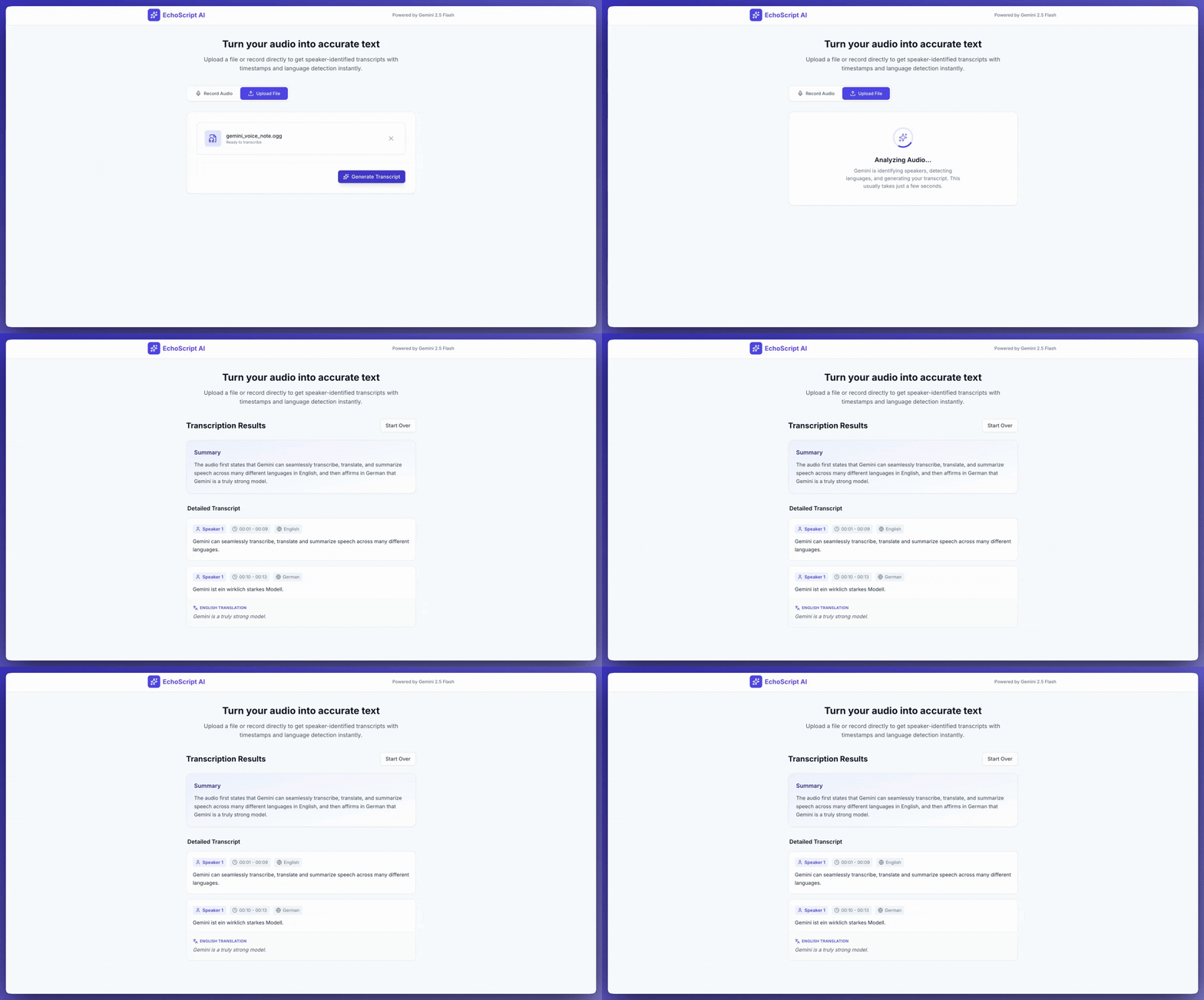
تحويل الكلام إلى نص
يوضّح هذا المثال كيفية تحويل الكلام إلى نص وترجمته وتلخيصه باستخدام الطوابع الزمنية وتمييز أصوات المتحدّثين ورصد المشاعر باستخدام مخرجات منظَّمة.
Python
from google import genai

client = genai.Client()

YOUTUBE_URL = "https://www.youtube.com/watch?v=ku-N-eS1lgM"

prompt = """
  Process the audio file and generate a detailed transcription.

  Requirements:
  1. Identify distinct speakers (e.g., Speaker 1, Speaker 2).
  2. Provide accurate timestamps for each segment (Format: MM:SS).
  3. Detect the primary language of each segment.
  4. If not English, provide the English translation.
  5. Identify the primary emotion: Happy, Sad, Angry, or Neutral.
  6. Provide a brief summary at the beginning.
"""

response_schema = {
    "type": "object",
    "properties": {
        "summary": {"type": "string"},
        "segments": {
            "type": "array",
            "items": {
                "type": "object",
                "properties": {
                    "speaker": {"type": "string"},
                    "timestamp": {"type": "string"},
                    "content": {"type": "string"},
                    "language": {"type": "string"},
                    "emotion": {
                        "type": "string",
                        "enum": ["happy", "sad", "angry", "neutral"]
                    }
                },
                "required": ["speaker", "timestamp", "content", "emotion"]
            }
        }
    },
    "required": ["summary", "segments"]
}

interaction = client.interactions.create(
    model="gemini-3.7-flash",
    input=[
        {"type": "video", "uri": YOUTUBE_URL, "mime_type": "video/mp4"},
        {"type": "text", "text": prompt}
    ],
    response_format=response_schema,
)

print(interaction.output_text)
JavaScript
import { GoogleGenAI } from "@google/genai";

const client = new GoogleGenAI({});

const YOUTUBE_URL = "https://www.youtube.com/watch?v=ku-N-eS1lgM";

const prompt = `
  Process the audio file and generate a detailed transcription.

  Requirements:
  1. Identify distinct speakers (e.g., Speaker 1, Speaker 2).
  2. Provide accurate timestamps for each segment (Format: MM:SS).
  3. Detect the primary language of each segment.
  4. If not English, provide the English translation.
  5. Identify the primary emotion: Happy, Sad, Angry, or Neutral.
  6. Provide a brief summary at the beginning.
`;

const responseSchema = {
    type: "object",
    properties: {
        summary: { type: "string" },
        segments: {
            type: "array",
            items: {
                type: "object",
                properties: {
                    speaker: { type: "string" },
                    timestamp: { type: "string" },
                    content: { type: "string" },
                    language: { type: "string" },
                    emotion: {
                        type: "string",
                        enum: ["happy", "sad", "angry", "neutral"]
                    }
                },
                required: ["speaker", "timestamp", "content", "emotion"]
            }
        }
    },
    required: ["summary", "segments"]
};

const interaction = await client.interactions.create({
    model: "gemini-3.7-flash",
    input: [
        { type: "video", uri: YOUTUBE_URL, mime_type: "video/mp4" },
        { type: "text", text: prompt }
    ],
    response_format: responseSchema,
});

console.log(JSON.parse(interaction.output_text));
جافا
import com.google.genai.Client;
import com.google.genai.gaos.models.interactions.AudioContent;
import com.google.genai.gaos.models.interactions.AudioContentMimeType;
import com.google.genai.gaos.models.interactions.Content;
import com.google.genai.gaos.models.interactions.CreateModelInteraction;
import com.google.genai.gaos.models.interactions.Interaction;
import com.google.genai.gaos.models.interactions.InteractionsInput;
import com.google.genai.gaos.models.interactions.Model;
import com.google.genai.gaos.models.interactions.TextContent;
import com.google.genai.gaos.models.operations.CreateInteractionRequestBody;
import java.util.Arrays;
import java.util.List;

Client client = new Client();

Content textContent = TextContent.builder().text("Provide a transcript and summary of this audio.").build();
Content audioContent =
    AudioContent.builder()
        .uri("gs://cloud-samples-data/generative-ai/audio/pixel.mp3")
        .mimeType(AudioContentMimeType.AUDIO_MP3)
        .build();

List<Content> contents = Arrays.asList(textContent, audioContent);

CreateModelInteraction params =
    CreateModelInteraction.builder()
        .model(Model.of("gemini-3.7-flash"))
        .input(InteractionsInput.ofContent(contents))
        .build();

Interaction interaction =
    client.interactions.create(CreateInteractionRequestBody.of(params)).interaction().get();

System.out.println(interaction.outputText().orElse(""));
REST
curl -X POST "https://generativelanguage.googleapis.com/v1beta/interactions" \
  -H "x-goog-api-key: $GEMINI_API_KEY" \
  -H 'Content-Type: application/json' \
  -d '{
    "model": "gemini-3.7-flash",
    "input": [
      {
        "type": "video",
        "uri": "https://www.youtube.com/watch?v=ku-N-eS1lgM",
        "mime_type": "video/mp4"
      },
      {
        "type": "text",
        "text": "Transcribe with speaker diarization and emotion detection."
      }
    ],
    "response_format": {
        "type": "object",
        "properties": {
          "summary": {"type": "string"},
          "segments": {
            "type": "array",
            "items": {
              "type": "object",
              "properties": {
                "speaker": {"type": "string"},
                "timestamp": {"type": "string"},
                "content": {"type": "string"},
                "emotion": {"type": "string", "enum": ["happy", "sad", "angry", "neutral"]}
              }
            }
          }
        }
      }
  }'
إدخال الصوت
يمكنك تقديم البيانات الصوتية بالطُرق التالية:
- تحميل ملف صوتي قبل إرسال الطلب
- تمرير البيانات الصوتية المضمّنة مع الطلب
تحميل ملف صوتي
استخدِم Files API للملفات التي يزيد حجمها عن 20 ميغابايت.
Python
from google import genai

client = genai.Client()

uploaded_file = client.files.upload(file="path/to/sample.mp3")

interaction = client.interactions.create(
    model="gemini-3.7-flash",
    input=[
        {"type": "text", "text": "Describe this audio clip"},
        {
            "type": "audio",
            "uri": uploaded_file.uri,
            "mime_type": uploaded_file.mime_type
        }
    ]
)
print(interaction.output_text)
JavaScript
import { GoogleGenAI } from "@google/genai";

const client = new GoogleGenAI({});

const uploadedFile = await client.files.upload({
    file: "path/to/sample.mp3",
    config: { mimeType: "audio/mp3" }
});

const interaction = await client.interactions.create({
    model: "gemini-3.7-flash",
    input: [
        {type: "text", text: "Describe this audio clip"},
        {
            type: "audio",
            uri: uploadedFile.uri,
            mime_type: uploadedFile.mimeType
        }
    ]
});
console.log(interaction.output_text);
جافا
import com.google.genai.Client;
import com.google.genai.gaos.models.interactions.AudioContent;
import com.google.genai.gaos.models.interactions.AudioContentMimeType;
import com.google.genai.gaos.models.interactions.Content;
import com.google.genai.gaos.models.interactions.CreateModelInteraction;
import com.google.genai.gaos.models.interactions.Interaction;
import com.google.genai.gaos.models.interactions.InteractionsInput;
import com.google.genai.gaos.models.interactions.Model;
import com.google.genai.gaos.models.interactions.TextContent;
import com.google.genai.gaos.models.operations.CreateInteractionRequestBody;
import java.util.Arrays;
import java.util.List;

Client client = new Client();

Content textContent = TextContent.builder().text("Provide a transcript and summary of this audio.").build();
Content audioContent =
    AudioContent.builder()
        .uri("gs://cloud-samples-data/generative-ai/audio/pixel.mp3")
        .mimeType(AudioContentMimeType.AUDIO_MP3)
        .build();

List<Content> contents = Arrays.asList(textContent, audioContent);

CreateModelInteraction params =
    CreateModelInteraction.builder()
        .model(Model.of("gemini-3.7-flash"))
        .input(InteractionsInput.ofContent(contents))
        .build();

Interaction interaction =
    client.interactions.create(CreateInteractionRequestBody.of(params)).interaction().get();

System.out.println(interaction.outputText().orElse(""));
REST
# First upload the file using the Files API, then use the URI:
curl -X POST "https://generativelanguage.googleapis.com/v1beta/interactions" \
  -H "x-goog-api-key: $GEMINI_API_KEY" \
  -H 'Content-Type: application/json' \
  -d '{
    "model": "gemini-3.7-flash",
    "input": [
      {"type": "text", "text": "Describe this audio clip"},
      {
        "type": "audio",
        "uri": "YOUR_FILE_URI",
        "mime_type": "audio/mp3"
      }
    ]
  }'
تمرير البيانات الصوتية المضمّنة
بالنسبة إلى الملفات الصوتية الصغيرة التي يقلّ إجمالي حجم الطلب فيها عن 20 ميغابايت:
Python
from google import genai
import base64

client = genai.Client()

with open('path/to/small-sample.mp3', 'rb') as f:
    audio_bytes = f.read()

interaction = client.interactions.create(
    model="gemini-3.7-flash",
    input=[
        {"type": "text", "text": "Describe this audio clip"},
        {
            "type": "audio",
            "data": base64.b64encode(audio_bytes).decode('utf-8'),
            "mime_type": "audio/mp3"
        }
    ]
)
print(interaction.output_text)
JavaScript
import { GoogleGenAI } from "@google/genai";
import * as fs from "node:fs";

const client = new GoogleGenAI({});

const audioData = fs.readFileSync("path/to/small-sample.mp3", {
    encoding: "base64"
});

const interaction = await client.interactions.create({
    model: "gemini-3.7-flash",
    input: [
        {type: "text", text: "Describe this audio clip"},
        {
            type: "audio",
            data: audioData,
            mime_type: "audio/mp3"
        }
    ]
});
console.log(interaction.output_text);
جافا
import com.google.genai.Client;
import com.google.genai.gaos.models.interactions.AudioContent;
import com.google.genai.gaos.models.interactions.AudioContentMimeType;
import com.google.genai.gaos.models.interactions.Content;
import com.google.genai.gaos.models.interactions.CreateModelInteraction;
import com.google.genai.gaos.models.interactions.Interaction;
import com.google.genai.gaos.models.interactions.InteractionsInput;
import com.google.genai.gaos.models.interactions.Model;
import com.google.genai.gaos.models.interactions.TextContent;
import com.google.genai.gaos.models.operations.CreateInteractionRequestBody;
import java.util.Arrays;
import java.util.List;

Client client = new Client();

Content textContent = TextContent.builder().text("Provide a transcript and summary of this audio.").build();
Content audioContent =
    AudioContent.builder()
        .uri("gs://cloud-samples-data/generative-ai/audio/pixel.mp3")
        .mimeType(AudioContentMimeType.AUDIO_MP3)
        .build();

List<Content> contents = Arrays.asList(textContent, audioContent);

CreateModelInteraction params =
    CreateModelInteraction.builder()
        .model(Model.of("gemini-3.7-flash"))
        .input(InteractionsInput.ofContent(contents))
        .build();

Interaction interaction =
    client.interactions.create(CreateInteractionRequestBody.of(params)).interaction().get();

System.out.println(interaction.outputText().orElse(""));
REST
AUDIO_PATH="path/to/sample.mp3"

if [[ "$(base64 --version 2>&1)" = *"FreeBSD"* ]]; then
  B64FLAGS="--input"
else
  B64FLAGS="-w0"
fi

curl -X POST "https://generativelanguage.googleapis.com/v1beta/interactions" \
  -H "x-goog-api-key: $GEMINI_API_KEY" \
  -H 'Content-Type: application/json' \
  -d '{
    "model": "gemini-3.7-flash",
    "input": [
      {"type": "text", "text": "Describe this audio clip"},
      {
        "type": "audio",
        "data": "'$(base64 $B64FLAGS $AUDIO_PATH)'",
        "mime_type": "audio/mp3"
      }
    ]
  }'
ملاحظات حول البيانات الصوتية المضمّنة: * الحد الأقصى لحجم الطلب هو 20 ميغابايت إجمالاً (بما في ذلك الطلبات وجميع الملفات) * لإعادة الاستخدام، يُرجى تحميل الملف بدلاً من ذلك.
الحصول على نص
للحصول على نص، اطلب ذلك في الطلب:
Python
interaction = client.interactions.create(
    model="gemini-3.7-flash",
    input=[
        {"type": "text", "text": "Generate a transcript of the speech."},
        {
            "type": "audio",
            "uri": uploaded_file.uri,
            "mime_type": uploaded_file.mime_type
        }
    ]
)
print(interaction.output_text)
JavaScript
const interaction = await client.interactions.create({
    model: "gemini-3.7-flash",
    input: [
        { type: "text", text: "Generate a transcript of the speech." },
        {
            type: "audio",
            uri: uploadedFile.uri,
            mime_type: uploadedFile.mimeType
        }
    ]
});
console.log(interaction.output_text);
جافا
import com.google.genai.Client;
import com.google.genai.gaos.models.interactions.AudioContent;
import com.google.genai.gaos.models.interactions.AudioContentMimeType;
import com.google.genai.gaos.models.interactions.Content;
import com.google.genai.gaos.models.interactions.CreateModelInteraction;
import com.google.genai.gaos.models.interactions.Interaction;
import com.google.genai.gaos.models.interactions.InteractionsInput;
import com.google.genai.gaos.models.interactions.Model;
import com.google.genai.gaos.models.interactions.TextContent;
import com.google.genai.gaos.models.operations.CreateInteractionRequestBody;
import java.util.Arrays;
import java.util.List;

Client client = new Client();

Content textContent = TextContent.builder().text("Provide a transcript and summary of this audio.").build();
Content audioContent =
    AudioContent.builder()
        .uri("gs://cloud-samples-data/generative-ai/audio/pixel.mp3")
        .mimeType(AudioContentMimeType.AUDIO_MP3)
        .build();

List<Content> contents = Arrays.asList(textContent, audioContent);

CreateModelInteraction params =
    CreateModelInteraction.builder()
        .model(Model.of("gemini-3.7-flash"))
        .input(InteractionsInput.ofContent(contents))
        .build();

Interaction interaction =
    client.interactions.create(CreateInteractionRequestBody.of(params)).interaction().get();

System.out.println(interaction.outputText().orElse(""));
الرجوع إلى الطوابع الزمنية
استخدِم تنسيق MM:SS للإشارة إلى أقسام معيّنة:
Python
interaction = client.interactions.create(
    model="gemini-3.7-flash",
    input=[
        {"type": "text", "text": "Provide a transcript from 02:30 to 03:29."},
        {
            "type": "audio",
            "uri": uploaded_file.uri,
            "mime_type": uploaded_file.mime_type
        }
    ]
)
JavaScript
const interaction = await client.interactions.create({
    model: "gemini-3.7-flash",
    input: [
        { type: "text", text: "Provide a transcript from 02:30 to 03:29." },
        { type: "audio", uri: uploadedFile.uri, mime_type: "audio/mp3" }
    ]
});
جافا
import com.google.genai.Client;
import com.google.genai.gaos.models.interactions.AudioContent;
import com.google.genai.gaos.models.interactions.AudioContentMimeType;
import com.google.genai.gaos.models.interactions.Content;
import com.google.genai.gaos.models.interactions.CreateModelInteraction;
import com.google.genai.gaos.models.interactions.Interaction;
import com.google.genai.gaos.models.interactions.InteractionsInput;
import com.google.genai.gaos.models.interactions.Model;
import com.google.genai.gaos.models.interactions.TextContent;
import com.google.genai.gaos.models.operations.CreateInteractionRequestBody;
import java.util.Arrays;
import java.util.List;

Client client = new Client();

Content textContent = TextContent.builder().text("Provide a transcript and summary of this audio.").build();
Content audioContent =
    AudioContent.builder()
        .uri("gs://cloud-samples-data/generative-ai/audio/pixel.mp3")
        .mimeType(AudioContentMimeType.AUDIO_MP3)
        .build();

List<Content> contents = Arrays.asList(textContent, audioContent);

CreateModelInteraction params =
    CreateModelInteraction.builder()
        .model(Model.of("gemini-3.7-flash"))
        .input(InteractionsInput.ofContent(contents))
        .build();

Interaction interaction =
    client.interactions.create(CreateInteractionRequestBody.of(params)).interaction().get();

System.out.println(interaction.outputText().orElse(""));
حساب الرموز المميّزة
لحساب الرموز المميّزة في ملف صوتي:
Python
response = client.models.count_tokens(
    model="gemini-3.7-flash",
    contents=[uploaded_file]
)
print(response)
JavaScript
const response = await client.models.countTokens({
    model: "gemini-3.7-flash",
    contents: [
        { fileData: { fileUri: uploadedFile.uri, mimeType: uploadedFile.mimeType } }
    ]
});
console.log(response.totalTokens);
جافا
import com.google.genai.Client;
import com.google.genai.gaos.models.interactions.AudioContent;
import com.google.genai.gaos.models.interactions.AudioContentMimeType;
import com.google.genai.gaos.models.interactions.Content;
import com.google.genai.gaos.models.interactions.CreateModelInteraction;
import com.google.genai.gaos.models.interactions.Interaction;
import com.google.genai.gaos.models.interactions.InteractionsInput;
import com.google.genai.gaos.models.interactions.Model;
import com.google.genai.gaos.models.interactions.TextContent;
import com.google.genai.gaos.models.operations.CreateInteractionRequestBody;
import java.util.Arrays;
import java.util.List;

Client client = new Client();

Content textContent = TextContent.builder().text("Provide a transcript and summary of this audio.").build();
Content audioContent =
    AudioContent.builder()
        .uri("gs://cloud-samples-data/generative-ai/audio/pixel.mp3")
        .mimeType(AudioContentMimeType.AUDIO_MP3)
        .build();

List<Content> contents = Arrays.asList(textContent, audioContent);

CreateModelInteraction params =
    CreateModelInteraction.builder()
        .model(Model.of("gemini-3.7-flash"))
        .input(InteractionsInput.ofContent(contents))
        .build();

Interaction interaction =
    client.interactions.create(CreateInteractionRequestBody.of(params)).interaction().get();

System.out.println(interaction.outputText().orElse(""));
تنسيقات الصوت المتوافقة
تتوافق Gemini مع أنواع MIME التالية لتنسيقات الصوت:
- WAV -
audio/wav - MP3 -
audio/mp3 - AIFF -
audio/aiff - AAC -
audio/aac - OGG -
audio/ogg - FLAC -
audio/flac - MPEG -
audio/mpeg - M4A -
audio/m4a - L16 -
audio/l16 - Opus -
audio/opus - ALAW -
audio/alaw - MULAW -
audio/mulaw - WebM -
audio/webm
للاطّلاع على القائمة الكاملة بأنواع MIME ومخططات المعلمات المتوافقة، يُرجى الرجوع إلى مرجع Interactions API.
التفاصيل الفنية حول الصوت
- الرموز المميّزة: 32 رمزًا مميّزًا لكل ثانية من الصوت (دقيقة واحدة = 1,920 رمزًا مميّزًا)
- الأصوات غير الكلامية: يفهم Gemini الأصوات غير الكلامية (زقزقة العصافير، صفارات الإنذار، إلخ)
- الحد الأقصى للطول: 9.5 ساعات من الصوت لكل طلب
- الدقة: يتم تقليل معدّل أخذ العيّنات إلى 16 كيلوبت في الثانية
- القنوات: يتم دمج الصوت المتعدد القنوات في قناة واحدة
الخطوات التالية
- Files API: تحميل الملفات الصوتية وإدارتها
- تعليمات النظام: تخصيص سلوك النموذج
- الناتج المنظَّم: الحصول على نتائج تحويل الكلام إلى نص بتنسيق JSON