

Gemini Live API 可與 Gemini 模型進行即時雙向語音對話。
標準語音模型很適合用於即時對話。你對模型說話,模型會立即生成語音回覆。但如果要求需要規劃、複雜分析或外部工具,直接回應就會受到限制。模型必須在沒有推論的情況下回答,或在等待工具完成時暫停。
Thinking in the Live API (gemini-3.8-live-extended-thinking) 會在即時語音對話中加入背景推論。模型會在背景規劃及呼叫非同步工具,同時說出自然對話的填充詞,讓互動持續進行。
這項架構會透過兩種主要方式改變對話生命週期:
- 對話式填充內容:模型會在背景執行工具時,提供中間更新 (例如「正在檢查航班選項」)。
- 追蹤互動狀態:由於模型在單一要求期間可能會多次說話,因此伺服器會在背景處理期間發出
interaction_status: "IN_PROGRESS",並在整體工作完成時發出interaction_status: "IDLE"。
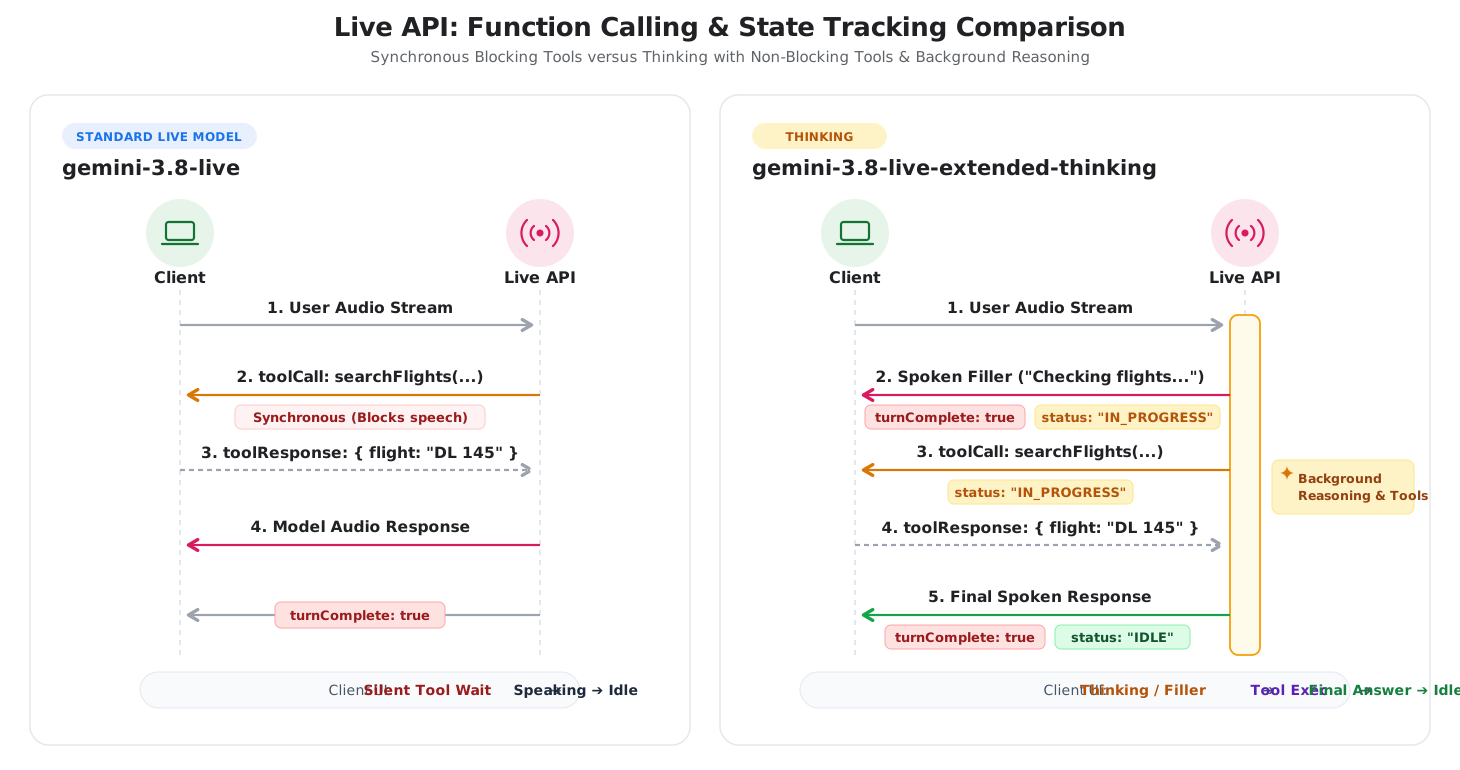
下圖比較標準 Live 語音通話和「思考並推理」的互動生命週期:
選擇合適的機型
在 gemini-3.8-live 和 gemini-3.8-live-extended-thinking 之間做決定時,請考量以下三項主要因素:回應延遲時間、工作複雜度和用戶端狀態處理。
何時使用 Gemini 3.8 Live
如果需要低延遲的對話式語音代理,且必須立即輪流對話並直接執行工作,請使用 gemini-3.8-live。
- 對話式語音助理:客戶服務分流、語言練習、語音搜尋和互動式說故事。
- 快速執行工具:外部工具會在毫秒內傳回資料的工作流程 (例如讀取感應器值或控制智慧型裝置)。
- 簡單的用戶端邏輯:應用程式中,每個使用者回合都會收到單一模型回覆,且
turnComplete: true會在工作階段閒置時可靠地發出信號。
何時使用 Gemini 3.8 Live Extended Thinking
如果代理程式必須評估複雜資料、規劃多個步驟,或處理需要幾秒才能執行的工具,請使用 gemini-3.8-live-extended-thinking。
- 多步驟診斷與支援:技術支援專員會診斷多個記錄檔、錯誤代碼和設定檢查中的系統問題。
- 協調資料擷取:旅遊和預訂代理程式,可透過平行 API 呼叫搜尋航班、查詢飯店和比較價格。
- STEM 和程式碼輔導:教育代理程式會先驗證公式、偵錯程式碼或逐步完成邏輯,再提供說明。
- 遮蓋工具延遲:語音體驗,其中長期執行的函式會為聆聽者造成尷尬的沉默。
主要差異摘要
下表摘要列出這兩種模型之間的技術差異:
| 功能 | Gemini 3.8 Live | Gemini 3.8 Live Extended Thinking |
|---|---|---|
| 主要用途 | 低延遲語音代理、直接指令、快速工具 | 解決多步驟問題、規劃複雜事項、多工具工作流程 |
| 模型端點 | gemini-3.8-live |
gemini-3.8-live-extended-thinking |
| 推論架構 | 交錯推論,延遲時間設定檔固定 (不支援 thinking_level) |
可設定的背景推論 (thinking_level:low、medium、high;不支援 MINIMAL) |
| 開啟界線 | turnComplete: true 會關閉回合並返回閒置狀態 |
turnComplete: true 結束語音輸入;interaction_status 控制工作階段生命週期 |
| 對話填充詞 | 模型會等待工具執行完畢再說話 | 模型會在處理期間串流中間對話填充詞 |
| 執行工具 | 支援同步 (BLOCKING) 和非同步 (NON_BLOCKING) 工具 |
需要非同步 (NON_BLOCKING) 工具聲明 |
遷移和整合路徑
請按照下列步驟升級現有的語音應用程式,或將 Thinking 整合至 Live API 工作階段。
從 Gemini 3.1 Flash Live 升級
如果現有的語音應用程式使用 gemini-3.1-flash-live-preview,升級至 gemini-3.8-live 時,需要更新模型字串,並從設定中省略 thinking_level (或 thinking_config),因為 gemini-3.8-live 不支援 thinking_level:
{
  "setup": {
    "model": "models/gemini-3.8-live"
  }
}
回合生命週期和 turnComplete 信號維持不變。
採用思考模式
如要採用 gemini-3.8-live-extended-thinking,請更新三個整合點:
追蹤
interaction_status,而非turnComplete:在思考階段,模型可能會在推論時發出中間對話填充詞。檢查伺服器傳送的訊息中的interaction_status欄位,管理 UI 狀態。只有在interaction_status為IDLE時,才返回閒置狀態。Python
status = getattr(message, "interaction_status", None)
if status == "IDLE":
    # Ready for user input
    set_ui_state("listening")
elif status == "IN_PROGRESS":
    # Reasoning or executing tools
    set_ui_state("thinking")
JavaScript
if (message.interactionStatus === 'IDLE') { // Ready for user input setUiState('listening'); } else if (message.interactionStatus === 'IN_PROGRESS') { // Reasoning or executing tools setUiState('thinking'); }宣告非封鎖函式:在所有函式宣告中設定
"behavior": "NON_BLOCKING"。思考模型會在背景非同步執行工具,同時串流傳送口頭更新。同步封鎖工具會傳回錯誤。Python
search_flights = types.FunctionDeclaration(
    name="search_flights",
    description="Searches for available flights.",
    behavior="NON_BLOCKING",
    parameters={
        "type": "OBJECT",
        "properties": {
            "destination": {"type": "STRING"},
        },
        "required": ["destination"],
    },
)
JavaScript
const searchFlights = { name: 'search_flights', description: 'Searches for available flights.', behavior: 'NON_BLOCKING', parameters: { type: 'OBJECT', properties: { destination: { type: 'STRING' }, }, required: ['destination'], }, };設定推論深度:在工作階段設定中設定
thinking_config,即可調整推論層級 (low、medium或high;不支援MINIMAL)。Python
config = types.LiveConnectConfig(
    response_modalities=["AUDIO"],
    thinking_config=types.ThinkingConfig(
        thinking_level="low",
    ),
    tools=[types.Tool(function_declarations=[search_flights])],
)
JavaScript
const config = {
  responseModalities: [Modality.AUDIO],
  thinkingConfig: {
    thinkingLevel: 'low',
  },
  tools: [{ functionDeclarations: [searchFlights] }],
};
並排比較通訊協定
本節會比較 Live API 工作階段各階段交換的 WebSocket 訊息。
步驟 1:設定課程
這兩個模型都會連線至相同的 WebSocket 端點:
wss://generativelanguage.googleapis.com/ws/google.ai.generativelanguage.v1alpha.GenerativeService.BidiGenerateContent?key=$API_KEY
- 相同:WebSocket 網址和 API 金鑰驗證。
- 模型字串:
gemini-3.8-live與gemini-3.8-live-extended-thinking。 - 思考設定:思考會新增
thinkingConfig,用來調整推論深度。 工具行為:思考需要在函式宣告中加入
"behavior": "NON_BLOCKING"。
Gemini 3.8 Live
{
  "setup": {
    "model": "models/gemini-3.8-live",
    "generationConfig": {
      "responseModalities": ["AUDIO"],
      "speechConfig": {
        "voiceConfig": {
          "prebuiltVoiceConfig": {
            "voiceName": "Puck"
          }
        }
      }
    }
  }
}
Gemini 3.8 Live Extended Thinking
{
  "setup": {
    "model": "models/gemini-3.8-live-extended-thinking",
    "generationConfig": {
      "responseModalities": ["AUDIO"],
      "speechConfig": {
        "voiceConfig": {
          "prebuiltVoiceConfig": {
            "voiceName": "Puck"
          }
        }
      },
      "thinkingConfig": {
        "thinkingLevel": "LOW"
      }
    },
    "tools": [{
      "functionDeclarations": [{
        "name": "searchFlights",
        "description": "Searches for flights between cities.",
        "behavior": "NON_BLOCKING",
        "parameters": {
          "type": "OBJECT",
          "properties": {
            "destination": { "type": "STRING" }
          },
          "required": ["destination"]
        }
      }]
    }]
  }
}
這兩種模型在連線時都會收到相同的伺服器確認訊息:
{
  "setupComplete": {}
}
步驟 2:使用者輸入音訊
兩款機型的音訊串流方式相同。使用 realtimeInput 串流即時 16 kHz 原始 PCM 音訊區塊:
{
  "realtimeInput": {
    "audio": {
      "data": "UklGRiQAAABXQVZF...",
      "mimeType": "audio/pcm;rate=16000"
    }
  }
}
步驟 3:模型回應和狀態生命週期
這兩款機型都會在 serverContent.modelTurn 中串流 24kHz PCM 音訊區塊。不過,生命週期管理有所不同:
Gemini 3.8 Live 回覆流程
- 伺服器會串流傳輸輪流的音訊區塊。
- 伺服器會傳送
turnComplete: true,表示模型已說完話,且工作階段處於閒置狀態。
// 1. Audio stream chunks
{
  "serverContent": {
    "modelTurn": {
      "parts": [
        {
          "inlineData": {
            "mimeType": "audio/pcm;rate=24000",
            "data": "..."
          }
        }
      ]
    }
  }
}

// 2. Turn completion -> Signals client to switch UI to Idle/Listening
{
  "serverContent": {
    "turnComplete": true
  }
}
Gemini 3.8 Live Extended Thinking 回覆流程
- 口語填充詞:模型會發出中間語音 (例如「正在查詢飛往西雅圖的航班...」),並使用
turnComplete: true和interactionStatus: "IN_PROGRESS"。 - 非同步工具呼叫:伺服器會發出工具呼叫,而
interactionStatus仍為"IN_PROGRESS",表示伺服器正在積極處理多步驟對話,並等待工具回應。 - 工具回應:用戶端執行函式並傳回輸出內容。
- 最終回應:伺服器會透過
turnComplete: true和interactionStatus: "IDLE"傳送完整答案。
// 1. Spoken verbal filler while background reasoning proceeds
{
  "serverContent": {
    "modelTurn": {
      "parts": [
        {
          "inlineData": {
            "mimeType": "audio/pcm;rate=24000",
            "data": "..."
          }
        }
      ]
    },
    "turnComplete": true,
    "interactionStatus": "IN_PROGRESS"
  }
}

// 2. Asynchronous tool call emitted with IN_PROGRESS status
{
  "toolCall": {
    "functionCalls": [
      {
        "id": "call_123",
        "name": "searchFlights",
        "args": {
          "destination": "Seattle"
        }
      }
    ]
  },
  "interactionStatus": "IN_PROGRESS"
}

// 3. Client executes function and returns result
{
  "toolResponse": {
    "functionResponses": [
      {
        "response": {
          "output": {
            "flight": "DL 145",
            "price": "$145"
          }
        },
        "id": "call_123"
      }
    ]
  }
}

// 4. Final spoken answer delivered -> session transitions to IDLE when done
{
  "serverContent": {
    "modelTurn": {
      "parts": [
        {
          "inlineData": {
            "mimeType": "audio/pcm;rate=24000",
            "data": "..."
          }
        }
      ]
    },
    "interactionStatus": "IDLE",
    "turnComplete": true
  }
}
SDK 導入範例
下列範例說明如何使用 Google GenAI SDK 設定「思考」並處理 interaction_status。
Python
import asyncio
from google import genai
from google.genai import types

client = genai.Client()
model = "gemini-3.8-live-extended-thinking"

# Define non-blocking function declaration
search_flights = types.FunctionDeclaration(
    name="search_flights",
    description="Searches for available flights to a destination.",
    behavior="NON_BLOCKING",
    parameters={
        "type": "OBJECT",
        "properties": {
            "destination": {"type": "STRING"}
        },
        "required": ["destination"]
    }
)

config = types.LiveConnectConfig(
    response_modalities=["AUDIO"],
    thinking_config=types.ThinkingConfig(
        thinking_level="low"
    ),
    tools=[types.Tool(function_declarations=[search_flights])]
)

async def main():
    async with client.aio.live.connect(model=model, config=config) as session:
        print("Session connected with Thinking")

        async for message in session.receive():
            # Inspect interaction status for server lifecycle tracking
            status = getattr(message, "interaction_status", None)
            if status:
                print(f"Interaction status: {status}")

            # Handle audio output parts
            if message.server_content and message.server_content.model_turn:
                for part in message.server_content.model_turn.parts:
                    if part.inline_data:
                        # Process 24kHz audio chunk
                        pass

            # Handle asynchronous tool call
            if message.tool_call:
                for call in message.tool_call.function_calls:
                    print(f"Executing tool: {call.name}")
                    # Simulate function execution
                    response = types.FunctionResponse(
                        id=call.id,
                        name=call.name,
                        response={"result": "Flight DL 145 ($145)"}
                    )
                    await session.send_tool_response(
                        function_responses=[response]
                    )

            # Status is IDLE when reasoning and all turns are complete
            if status == "IDLE":
                print("Session is idle and ready for user input.")

if __name__ == "__main__":
    asyncio.run(main())
JavaScript
import { GoogleGenAI, Modality } from '@google/genai';

const ai = new GoogleGenAI({});
const model = 'gemini-3.8-live-extended-thinking';

const searchFlights = {
  name: 'search_flights',
  description: 'Searches for available flights to a destination.',
  behavior: 'NON_BLOCKING',
  parameters: {
    type: 'OBJECT',
    properties: {
      destination: { type: 'STRING' }
    },
    required: ['destination']
  }
};

const config = {
  responseModalities: [Modality.AUDIO],
  thinkingConfig: {
    thinkingLevel: 'low'
  },
  tools: [{ functionDeclarations: [searchFlights] }]
};

async function main() {
  const session = await ai.live.connect({
    model: model,
    config: config,
    callbacks: {
      onopen: () => console.log('Session connected'),
      onmessage: async (event) => {
        const message = JSON.parse(event.data);

        if (message.interactionStatus) {
          console.log(`Interaction status: ${message.interactionStatus}`);
        }

        if (message.toolCall) {
          for (const call of message.toolCall.functionCalls) {
            console.log(`Executing tool: ${call.name}`);
            session.sendToolResponse({
              functionResponses: [{
                id: call.id,
                name: call.name,
                response: { result: 'Flight DL 145 ($145)' }
              }]
            });
          }
        }

        if (message.interactionStatus === 'IDLE') {
          console.log('Session is idle and waiting for input.');
        }
      }
    }
  });
}

main();
後續步驟
- 請參閱 Gemini 3.8 Live 和 Gemini 3.8 Live Extended Thinking 模型頁面。
- 如要詳細比較所有 Live API 模型的各項功能,請參閱「模式比較」表格。
- 如要進一步瞭解函式呼叫,請參閱即時 API 工具使用指南。
- 請參閱「工作階段管理」一文,瞭解如何處理工作階段續傳和內容生命週期。