

Gemini Live API की मदद से, Gemini मॉडल के साथ रीयल-टाइम में बोलकर बातचीत की जा सकती है.
स्टैंडर्ड वॉइस मॉडल, बातचीत को तुरंत समझने और जवाब देने के लिए बेहतर होते हैं. मॉडल से बात करने पर, वह तुरंत बोलकर जवाब देता है. हालांकि, जब किसी अनुरोध के लिए प्लानिंग, जटिल विश्लेषण या बाहरी टूल की ज़रूरत होती है, तो सीधे तौर पर जवाब देने की सुविधा सीमित हो जाती है. मॉडल को या तो बिना किसी वजह के जवाब देना चाहिए या टूल के पूरा होने का इंतज़ार करते समय चुपचाप रुक जाना चाहिए.
लाइव एपीआई (gemini-3.8-live-extended-thinking) की मदद से, रीयल-टाइम वॉइस सेशन में बैकग्राउंड की जानकारी जोड़ी जाती है. मॉडल, बातचीत को जारी रखने के लिए नैचुरल फ़िलर का इस्तेमाल करता है. साथ ही, बैकग्राउंड में एसिंक्रोनस टूल को प्लान करता है और उन्हें कॉल करता है.
यह आर्किटेक्चर, बातचीत के लाइफ़साइकल को दो मुख्य तरीकों से बदलता है:
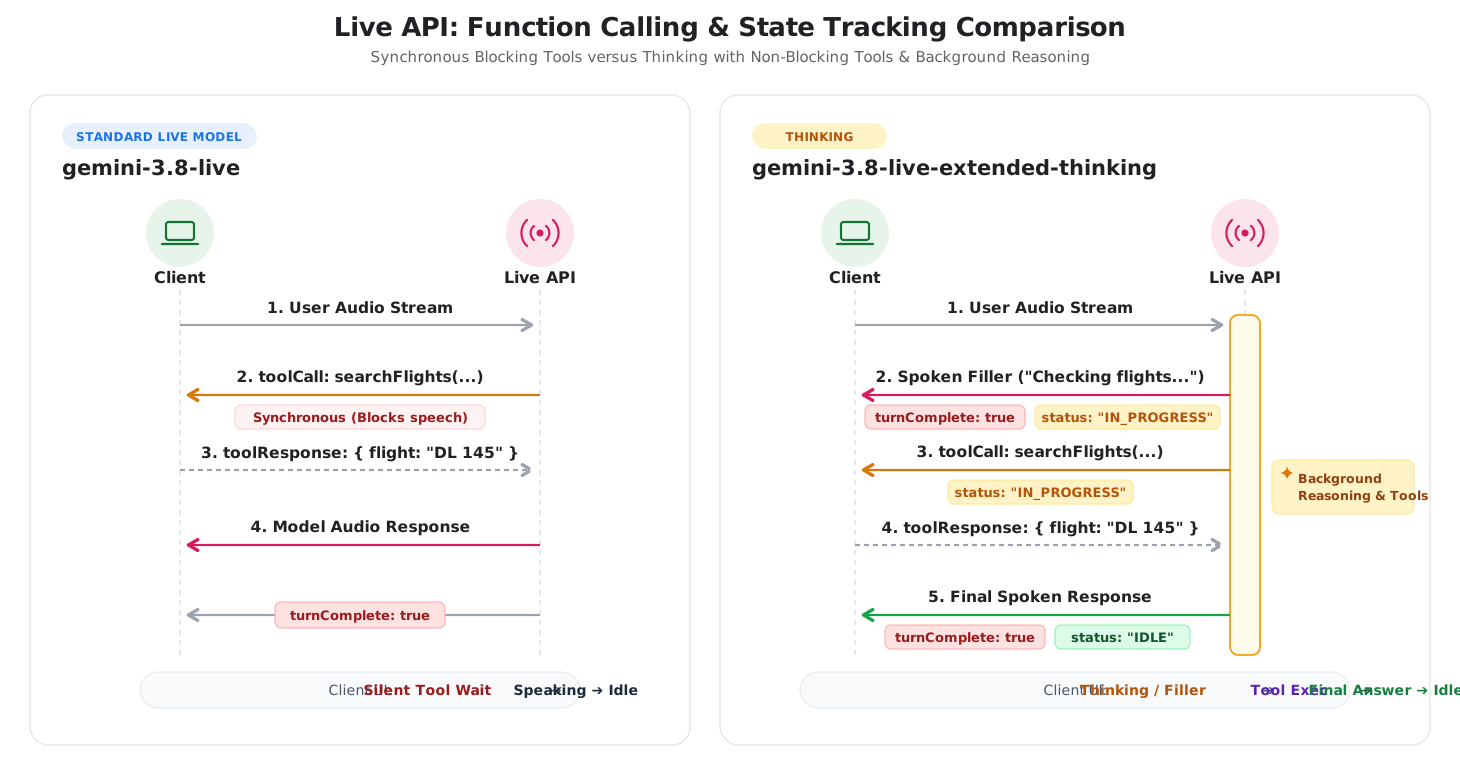
- बातचीत के दौरान इस्तेमाल किए जाने वाले फ़िलर: मॉडल, बैकग्राउंड में टूल इस्तेमाल करते समय, बीच-बीच में अपडेट देता है. जैसे, "फ़्लाइट के विकल्प देखे जा रहे हैं".
- इंटरैक्शन की स्थिति को ट्रैक करना: मॉडल एक अनुरोध के दौरान कई बार बोल सकता है. इसलिए, बैकग्राउंड में प्रोसेसिंग के दौरान सर्वर
interaction_status: "IN_PROGRESS"और टास्क पूरा होने परinteraction_status: "IDLE"दिखाता है.
यहां दिए गए डायग्राम में, स्टैंडर्ड लाइव वॉइस सेशन और बैकग्राउंड रीज़निंग के साथ सोचने की सुविधा के बीच इंटरैक्शन के लाइफ़साइकल की तुलना की गई है:
सही मॉडल चुनना
gemini-3.8-live और gemini-3.8-live-extended-thinking में से किसी एक को चुनते समय, इन तीन बातों पर ध्यान दें: जवाब मिलने में लगने वाला समय, टास्क कितना मुश्किल है, और क्लाइंट की स्थिति को कैसे मैनेज किया जाता है.
Gemini 3.8 Live का इस्तेमाल कब करना चाहिए
gemini-3.8-live का इस्तेमाल, कम समय में जवाब देने वाले ऐसे वॉइस एजेंट के लिए करें जहां तुरंत जवाब देना ज़रूरी हो और टास्क सीधे तौर पर दिए गए हों.
- बातचीत करने वाली वॉइस असिस्टेंट: ग्राहक सेवा से जुड़ी समस्याओं को हल करना, भाषा का अभ्यास करना, वॉइस सर्च करना, और इंटरैक्टिव तरीके से कहानी सुनाना.
- टूल को तेज़ी से लागू करना: ऐसे वर्कफ़्लो जहां बाहरी टूल, मिलीसेकंड में जवाब देते हैं. जैसे, सेंसर की वैल्यू पढ़ना या स्मार्ट डिवाइसों को कंट्रोल करना.
- आसान क्लाइंट लॉजिक: ऐसे ऐप्लिकेशन जहां हर उपयोगकर्ता को एक ही मॉडल से जवाब मिलता है. साथ ही,
turnComplete: trueयह भरोसेमंद तरीके से बताता है कि सेशन कब बंद हो गया है.
ज़्यादा सोच-विचार करके जवाब देने वाले Gemini 3.8 Live का इस्तेमाल कब करना चाहिए
जब आपके एजेंट को जटिल डेटा का आकलन करना हो, कई चरणों की योजना बनानी हो या ऐसे टूल इस्तेमाल करने हों जिन्हें चलने में कई सेकंड लगते हैं, तब gemini-3.8-live-extended-thinking का इस्तेमाल करें.
- कई चरणों में गड़बड़ियों की जानकारी और सहायता: तकनीकी सहायता देने वाले एजेंट, कई लॉग, गड़बड़ी कोड, और कॉन्फ़िगरेशन की जांच करके सिस्टम से जुड़ी गड़बड़ियों का पता लगाते हैं.
- डेटा को एक साथ वापस पाना: यात्रा और बुकिंग एजेंट, फ़्लाइट खोजते हैं, होटलों के बारे में क्वेरी करते हैं, और पैरलल एपीआई कॉल के ज़रिए किराये की तुलना करते हैं.
- एसटीईएम और कोडिंग की ट्यूशन: शिक्षा से जुड़े एजेंट, फ़ॉर्मूलों की पुष्टि करते हैं, कोड को डीबग करते हैं या जवाब देने से पहले कई चरणों वाले लॉजिक पर काम करते हैं.
- मास्किंग टूल की वजह से होने वाली देरी: आवाज़ से जुड़े ऐसे अनुभव जहां लंबे समय तक चलने वाले फ़ंक्शन की वजह से, सुनने वाले व्यक्ति को अजीब तरह की चुप्पी का सामना करना पड़ता है.
मुख्य अंतर के बारे में खास जानकारी
यहां दी गई टेबल में, दोनों मॉडल के बीच के तकनीकी अंतर के बारे में खास जानकारी दी गई है:
| सुविधा | Gemini 3.8 Live | Gemini 3.8 Live Extended Thinking |
|---|---|---|
| इस्तेमाल के मुख्य उदाहरण | कम समय में जवाब देने वाले वॉइस एजेंट, सीधे तौर पर दिए जाने वाले निर्देश, तेज़ी से काम करने वाले टूल | कई चरणों में समस्या हल करना, जटिल प्लानिंग करना, और कई टूल वाले वर्कफ़्लो |
| मॉडल एंडपॉइंट | gemini-3.8-live |
gemini-3.8-live-extended-thinking |
| तर्क करने वाला आर्किटेक्चर | जवाब देने के दौरान तर्क शामिल करना, जिसमें जवाब देने में लगने वाले समय की जानकारी शामिल हो (thinking_level काम नहीं करता) |
कॉन्फ़िगर किया जा सकने वाला बैकग्राउंड रीज़निंग (thinking_level: low, medium, high; MINIMAL काम नहीं करता) |
| सीमाएं चालू करना | turnComplete: true बंद हो जाता है और फिर से निष्क्रिय हो जाता है |
turnComplete: true किसी बातचीत को खत्म करता है; interaction_status सेशन के लाइफ़साइकल को कंट्रोल करता है |
| बातचीत के दौरान इस्तेमाल होने वाले शब्द | मॉडल, जवाब देने से पहले टूल के काम करने का इंतज़ार करता है | मॉडल, बातचीत को प्रोसेस करते समय, बीच-बीच में फ़िलर स्ट्रीम करता है |
| टूल का इस्तेमाल | सिंक्रोनस (BLOCKING) और एसिंक्रोनस (NON_BLOCKING) टूल के साथ काम करता है |
टूल के एसिंक्रोनस (NON_BLOCKING) एलान ज़रूरी हैं |
माइग्रेशन और इंटिग्रेशन के तरीके
मौजूदा वॉइस ऐप्लिकेशन को अपग्रेड करने या Live API सेशन में Thinking को इंटिग्रेट करने के लिए, यह तरीका अपनाएं.
Gemini 3.1 Flash Live से अपग्रेड करना
gemini-3.1-flash-live-preview का इस्तेमाल करने वाले मौजूदा वॉइस ऐप्लिकेशन के लिए, gemini-3.8-live पर अपग्रेड करने के लिए, मॉडल स्ट्रिंग को अपडेट करना होगा. साथ ही, अपने सेटअप कॉन्फ़िगरेशन से thinking_level (या thinking_config) को हटाना होगा, क्योंकि gemini-3.8-live के लिए thinking_level काम नहीं करता:
{
  "setup": {
    "model": "models/gemini-3.8-live"
  }
}
टर्न की लाइफ़साइकल और turnComplete सिग्नल एक जैसे रहते हैं.
सोचने का तरीका अपनाना
gemini-3.8-live-extended-thinking को अपनाने के लिए, तीन इंटिग्रेशन पॉइंट अपडेट करें:
turnCompleteके बजायinteraction_statusको ट्रैक करें: सोचने-समझने की प्रोसेस के दौरान, मॉडल बातचीत को जारी रखने के लिए कुछ शब्दों का इस्तेमाल कर सकता है. यूज़र इंटरफ़ेस (यूआई) की स्थिति मैनेज करने के लिए, सर्वर से मिले मैसेज में मौजूदinteraction_statusफ़ील्ड की जांच करें. सिर्फ़ तब निष्क्रिय हो, जबinteraction_statusIDLEहो.Python
status = getattr(message, "interaction_status", None)
if status == "IDLE":
    # Ready for user input
    set_ui_state("listening")
elif status == "IN_PROGRESS":
    # Reasoning or executing tools
    set_ui_state("thinking")
JavaScript
if (message.interactionStatus === 'IDLE') {
  // Ready for user input
  setUiState('listening');
} else if (message.interactionStatus === 'IN_PROGRESS') {
  // Reasoning or executing tools
  setUiState('thinking');
}
नॉन-ब्लॉकिंग फ़ंक्शन का एलान करें: सभी फ़ंक्शन के एलान पर
"behavior": "NON_BLOCKING"सेट करें. सोचने वाले मॉडल, टूल को एसिंक्रोनस तरीके से बैकग्राउंड में चलाते हैं. साथ ही, वर्बल अपडेट स्ट्रीम करते हैं. सिंक्रोनस ब्लॉकिंग टूल, गड़बड़ी की जानकारी देते हैं.Python
search_flights = types.FunctionDeclaration(
    name="search_flights",
    description="Searches for available flights.",
    behavior="NON_BLOCKING",
    parameters={
        "type": "OBJECT",
        "properties": {
            "destination": {"type": "STRING"},
        },
        "required": ["destination"],
    },
)
JavaScript
const searchFlights = {
  name: 'search_flights',
  description: 'Searches for available flights.',
  behavior: 'NON_BLOCKING',
  parameters: {
    type: 'OBJECT',
    properties: {
      destination: { type: 'STRING' },
    },
    required: ['destination'],
  },
};
तर्क की गहराई को कॉन्फ़िगर करना: अपने सेशन के कॉन्फ़िगरेशन में
thinking_configसेट करके, तर्क के लेवल (low,mediumयाhigh) में बदलाव करें.MINIMALकाम नहीं करता है.Python
config = types.LiveConnectConfig(
    response_modalities=["AUDIO"],
    thinking_config=types.ThinkingConfig(
        thinking_level="low",
    ),
    tools=[types.Tool(function_declarations=[search_flights])],
)
JavaScript
const config = {
  responseModalities: [Modality.AUDIO],
  thinkingConfig: {
    thinkingLevel: 'low',
  },
  tools: [{ functionDeclarations: [searchFlights] }],
};
प्रोटोकॉल की अगल-बगल में तुलना
इस सेक्शन में, Live API सेशन के हर चरण के दौरान एक्सचेंज किए गए WebSocket मैसेज की तुलना की गई है.
पहला चरण: सेशन सेट अप करना
दोनों मॉडल, एक ही WebSocket एंडपॉइंट से कनेक्ट होते हैं:
wss://generativelanguage.googleapis.com/ws/google.ai.generativelanguage.v1alpha.GenerativeService.BidiGenerateContent?key=$API_KEY
- एक जैसा: WebSocket यूआरएल और एपीआई पासकोड की पुष्टि.
- मॉडल स्ट्रिंग:
gemini-3.8-liveबनामgemini-3.8-live-extended-thinking. - सोचने की क्षमता को कॉन्फ़िगर करना: सोचने की क्षमता को कॉन्फ़िगर करने से,
thinkingConfigजुड़ जाता है. इससे जवाब में दी गई जानकारी की गहराई को अडजस्ट किया जा सकता है. टूल का व्यवहार: फ़ंक्शन के एलान के लिए,
"behavior": "NON_BLOCKING"चालू होना ज़रूरी है.
Gemini 3.8 Live
{
  "setup": {
    "model": "models/gemini-3.8-live",
    "generationConfig": {
      "responseModalities": ["AUDIO"],
      "speechConfig": {
        "voiceConfig": {
          "prebuiltVoiceConfig": {
            "voiceName": "Puck"
          }
        }
      }
    }
  }
}
Gemini 3.8 Live Extended Thinking
{
  "setup": {
    "model": "models/gemini-3.8-live-extended-thinking",
    "generationConfig": {
      "responseModalities": ["AUDIO"],
      "speechConfig": {
        "voiceConfig": {
          "prebuiltVoiceConfig": {
            "voiceName": "Puck"
          }
        }
      },
      "thinkingConfig": {
        "thinkingLevel": "LOW"
      }
    },
    "tools": [{
      "functionDeclarations": [{
        "name": "searchFlights",
        "description": "Searches for flights between cities.",
        "behavior": "NON_BLOCKING",
        "parameters": {
          "type": "OBJECT",
          "properties": {
            "destination": { "type": "STRING" }
          },
          "required": ["destination"]
        }
      }]
    }]
  }
}
कनेक्ट होने पर, दोनों मॉडल को सर्वर से एक जैसा जवाब मिलता है:
{
  "setupComplete": {}
}
दूसरा चरण: उपयोगकर्ता के ऑडियो इनपुट
दोनों मॉडल में ऑडियो स्ट्रीमिंग की सुविधा एक जैसी है. realtimeInput का इस्तेमाल करके, रीयल-टाइम 16kHz रॉ पीसीएम ऑडियो
चंक स्ट्रीम किए जाते हैं:
{
  "realtimeInput": {
    "audio": {
      "data": "UklGRiQAAABXQVZF...",
      "mimeType": "audio/pcm;rate=16000"
    }
  }
}
तीसरा चरण: मॉडल का जवाब और स्टेट लाइफ़साइकल
दोनों मॉडल, serverContent.modelTurn में 24 किलोहर्ट्ज़ पीसीएम ऑडियो चंक स्ट्रीम करते हैं. हालांकि, लाइफ़साइकल मैनेजमेंट अलग होता है:
Gemini 3.8 Live की जवाब देने की प्रोसेस
- सर्वर, बातचीत के दौरान ऑडियो के छोटे-छोटे हिस्से स्ट्रीम करता है.
- सर्वर
turnComplete: trueभेजता है. इससे पता चलता है कि मॉडल ने बोलना बंद कर दिया है और सेशन निष्क्रिय है.
// 1. Audio stream chunks
{
  "serverContent": {
    "modelTurn": {
      "parts": [
        {
          "inlineData": {
            "mimeType": "audio/pcm;rate=24000",
            "data": "..."
          }
        }
      ]
    }
  }
}

// 2. Turn completion -> Signals client to switch UI to Idle/Listening
{
  "serverContent": {
    "turnComplete": true
  }
}
ज़्यादा सोच-विचार करके जवाब देने वाले Gemini 3.8 Live के जवाब देने का फ़्लो
- बोलने के दौरान रुकना: मॉडल,
turnComplete: trueऔरinteractionStatus: "IN_PROGRESS"के साथ बीच-बीच में बोलता है. जैसे, "सिएटल के लिए फ़्लाइट देखी जा रही हैं...". - एसिंक्रोनस टूल कॉल: सर्वर, टूल कॉल तब करता है, जब
interactionStatus"IN_PROGRESS"रहता है. इसका मतलब है कि सर्वर, कई चरणों वाले टर्न को प्रोसेस कर रहा है और टूल के जवाब का इंतज़ार कर रहा है. - टूल का जवाब: क्लाइंट, फ़ंक्शन को लागू करता है और आउटपुट दिखाता है.
- आखिरी जवाब: सर्वर,
turnComplete: trueऔरinteractionStatus: "IDLE"के साथ पूरा जवाब देता है.
// 1. Spoken verbal filler while background reasoning proceeds
{
  "serverContent": {
    "modelTurn": {
      "parts": [
        {
          "inlineData": {
            "mimeType": "audio/pcm;rate=24000",
            "data": "..."
          }
        }
      ]
    },
    "turnComplete": true,
    "interactionStatus": "IN_PROGRESS"
  }
}

// 2. Asynchronous tool call emitted with IN_PROGRESS status
{
  "toolCall": {
    "functionCalls": [
      {
        "id": "call_123",
        "name": "searchFlights",
        "args": {
          "destination": "Seattle"
        }
      }
    ]
  },
  "interactionStatus": "IN_PROGRESS"
}

// 3. Client executes function and returns result
{
  "toolResponse": {
    "functionResponses": [
      {
        "response": {
          "output": {
            "flight": "DL 145",
            "price": "$145"
          }
        },
        "id": "call_123"
      }
    ]
  }
}

// 4. Final spoken answer delivered -> session transitions to IDLE when done
{
  "serverContent": {
    "modelTurn": {
      "parts": [
        {
          "inlineData": {
            "mimeType": "audio/pcm;rate=24000",
            "data": "..."
          }
        }
      ]
    },
    "interactionStatus": "IDLE",
    "turnComplete": true
  }
}
एसडीके टूल लागू करने के उदाहरण
यहां दिए गए उदाहरणों में, Google GenAI SDK का इस्तेमाल करके, interaction_status को कॉन्फ़िगर करने और उसे मैनेज करने का तरीका बताया गया है.
Python
import asyncio
from google import genai
from google.genai import types

client = genai.Client()
model = "gemini-3.8-live-extended-thinking"

# Define non-blocking function declaration
search_flights = types.FunctionDeclaration(
    name="search_flights",
    description="Searches for available flights to a destination.",
    behavior="NON_BLOCKING",
    parameters={
        "type": "OBJECT",
        "properties": {
            "destination": {"type": "STRING"}
        },
        "required": ["destination"]
    }
)

config = types.LiveConnectConfig(
    response_modalities=["AUDIO"],
    thinking_config=types.ThinkingConfig(
        thinking_level="low"
    ),
    tools=[types.Tool(function_declarations=[search_flights])]
)

async def main():
    async with client.aio.live.connect(model=model, config=config) as session:
        print("Session connected with Thinking")

        async for message in session.receive():
            # Inspect interaction status for server lifecycle tracking
            status = getattr(message, "interaction_status", None)
            if status:
                print(f"Interaction status: {status}")

            # Handle audio output parts
            if message.server_content and message.server_content.model_turn:
                for part in message.server_content.model_turn.parts:
                    if part.inline_data:
                        # Process 24kHz audio chunk
                        pass

            # Handle asynchronous tool call
            if message.tool_call:
                for call in message.tool_call.function_calls:
                    print(f"Executing tool: {call.name}")
                    # Simulate function execution
                    response = types.FunctionResponse(
                        id=call.id,
                        name=call.name,
                        response={"result": "Flight DL 145 ($145)"}
                    )
                    await session.send_tool_response(
                        function_responses=[response]
                    )

            # Status is IDLE when reasoning and all turns are complete
            if status == "IDLE":
                print("Session is idle and ready for user input.")

if __name__ == "__main__":
    asyncio.run(main())
JavaScript
import { GoogleGenAI, Modality } from '@google/genai';

const ai = new GoogleGenAI({});
const model = 'gemini-3.8-live-extended-thinking';

const searchFlights = {
  name: 'search_flights',
  description: 'Searches for available flights to a destination.',
  behavior: 'NON_BLOCKING',
  parameters: {
    type: 'OBJECT',
    properties: {
      destination: { type: 'STRING' }
    },
    required: ['destination']
  }
};

const config = {
  responseModalities: [Modality.AUDIO],
  thinkingConfig: {
    thinkingLevel: 'low'
  },
  tools: [{ functionDeclarations: [searchFlights] }]
};

async function main() {
  const session = await ai.live.connect({
    model: model,
    config: config,
    callbacks: {
      onopen: () => console.log('Session connected'),
      onmessage: async (event) => {
        const message = JSON.parse(event.data);

        if (message.interactionStatus) {
          console.log(`Interaction status: ${message.interactionStatus}`);
        }

        if (message.toolCall) {
          for (const call of message.toolCall.functionCalls) {
            console.log(`Executing tool: ${call.name}`);
            session.sendToolResponse({
              functionResponses: [{
                id: call.id,
                name: call.name,
                response: { result: 'Flight DL 145 ($145)' }
              }]
            });
          }
        }

        if (message.interactionStatus === 'IDLE') {
          console.log('Session is idle and waiting for input.');
        }
      }
    }
  });
}

main();
आगे क्या करना है
- Gemini 3.8 Live और ज़्यादा सोच-विचार करके जवाब देने वाले Gemini 3.8 Live मॉडल के पेज पढ़ें.
- सभी लाइव एपीआई मॉडल की सुविधाओं की तुलना करने के बारे में ज़्यादा जानने के लिए, मॉडल की तुलना करने वाली टेबल देखें.
- लाइव एपीआई टूल के इस्तेमाल से जुड़ी गाइड में, फ़ंक्शन कॉलिंग के बारे में ज़्यादा जानें.
- सेशन फिर से शुरू करने और कॉन्टेक्स्ट के लाइफ़साइकल को मैनेज करने के लिए, सेशन मैनेजमेंट की समीक्षा करें.