

Gemini Live API ช่วยให้สนทนาด้วยเสียงแบบเรียลไทม์และ 2 ทิศทางกับโมเดล Gemini ได้
โมเดลเสียงมาตรฐานเหมาะสำหรับการสนทนาแบบไปๆ มาๆ ในทันที คุณพูดกับโมเดล และโมเดลจะสร้างคำตอบที่พูดออกมาทันที แต่เมื่อคำขอ ต้องมีการวางแผน การวิเคราะห์ที่ซับซ้อน หรือเครื่องมือภายนอก คำตอบโดยตรงจะถึง ขีดจำกัด โมเดลต้องตอบโดยไม่ต้องให้เหตุผลหรือหยุดชั่วคราวโดยไม่มีเสียงขณะรอให้เครื่องมือทำงานเสร็จ
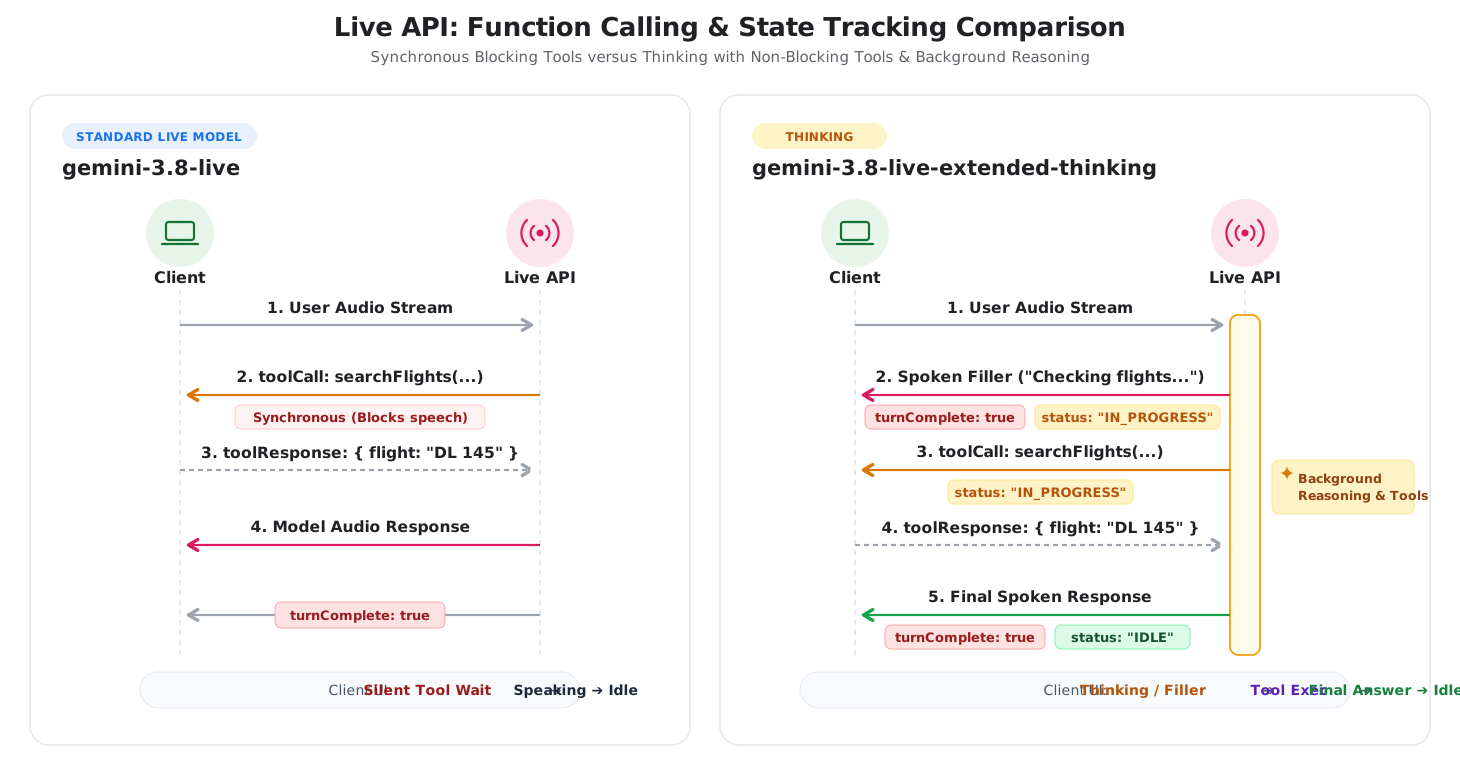
การคิดใน Live API (gemini-3.8-live-extended-thinking) จะเพิ่มการให้เหตุผลเบื้องหลังลงในเซสชันเสียงแบบเรียลไทม์ โมเดลจะวางแผนและเรียกใช้เครื่องมือแบบอะซิงโครนัส
ในเบื้องหลังขณะพูดคำเติมเต็มในการสนทนาที่เป็นธรรมชาติเพื่อรักษา
การโต้ตอบให้ทำงานอยู่
สถาปัตยกรรมนี้จะเปลี่ยนวงจรการสนทนาใน 2 ด้านหลักๆ ดังนี้
- ข้อความเติมบทสนทนา: โมเดลจะพูดการอัปเดตระดับกลาง (เช่น "กำลังตรวจสอบตัวเลือกเที่ยวบิน") ขณะที่เรียกใช้เครื่องมือในเบื้องหลัง
- การติดตามสถานะการโต้ตอบ: เนื่องจากโมเดลพูดได้หลายครั้ง
ในคำขอเดียว เซิร์ฟเวอร์จึงปล่อย
interaction_status: "IN_PROGRESS"ระหว่างการประมวลผลเบื้องหลังและinteraction_status: "IDLE"เมื่อ งานโดยรวมเสร็จสมบูรณ์
แผนภาพต่อไปนี้เปรียบเทียบวงจรการโต้ตอบระหว่างเซสชัน Live voice มาตรฐานกับฟีเจอร์การคิดโดยใช้เหตุผลเบื้องหลัง
การเลือกรุ่นที่เหมาะสม
เมื่อต้องเลือกระหว่าง gemini-3.8-live กับ gemini-3.8-live-extended-thinking
ให้พิจารณา 3 เรื่องหลักๆ ได้แก่ เวลาในการตอบสนอง ความซับซ้อนของงาน และการจัดการสถานะของไคลเอ็นต์
เมื่อใดที่ควรใช้ Gemini 3.8 Live
ใช้ gemini-3.8-live สำหรับเอเจนต์เสียงแบบสนทนาที่มีเวลาในการตอบสนองต่ำ ซึ่ง
การสลับกันพูดทันทีเป็นสิ่งจำเป็นและงานเป็นแบบตรงไปตรงมา
- ผู้ช่วยเสียงแบบสนทนา: การคัดกรองการบริการลูกค้า การฝึกภาษา การค้นหาด้วยเสียง และการเล่าเรื่องแบบโต้ตอบ
- การเรียกใช้เครื่องมืออย่างรวดเร็ว: เวิร์กโฟลว์ที่เครื่องมือภายนอกตอบกลับภายใน มิลลิวินาที (เช่น การอ่านค่าเซ็นเซอร์หรือการควบคุมอุปกรณ์อัจฉริยะ)
- ตรรกะไคลเอ็นต์อย่างง่าย: แอปพลิเคชันที่ผู้ใช้แต่ละรายจะได้รับการตอบกลับจากโมเดลเพียงครั้งเดียว
และ
turnComplete: trueจะส่งสัญญาณอย่างน่าเชื่อถือเมื่อเซสชันไม่ได้ใช้งาน
เมื่อใดที่ควรใช้การคิดแบบขยายของ Gemini 3.8 Live
ใช้ gemini-3.8-live-extended-thinking เมื่อเอเจนต์ต้องประเมินข้อมูลที่ซับซ้อน
วางแผนหลายขั้นตอน หรือจัดการเครื่องมือที่ใช้เวลาหลายวินาทีในการเรียกใช้
- การวินิจฉัยและการสนับสนุนแบบหลายขั้นตอน: เจ้าหน้าที่ฝ่ายสนับสนุนด้านเทคนิคที่วินิจฉัย ปัญหาของระบบในบันทึก รหัสข้อผิดพลาด และการตรวจสอบการกำหนดค่าหลายรายการ
- การดึงข้อมูลที่ประสานกัน: ตัวแทนการท่องเที่ยวและการจองที่ค้นหาเที่ยวบิน ค้นหาโรงแรม และเปรียบเทียบราคาในการเรียก API แบบขนาน
- การสอน STEM และการเขียนโค้ด: ตัวแทนด้านการศึกษาที่ยืนยันสูตร แก้จุดบกพร่อง ของโค้ด หรือทำงานตามตรรกะแบบหลายขั้นตอนก่อนที่จะอธิบาย
- เวลาในการตอบสนองของเครื่องมือมาสก์: ประสบการณ์การใช้งานด้วยเสียงที่ฟังก์ชันที่ทำงานเป็นเวลานานจะทำให้ผู้ฟังรู้สึกอึดอัดเนื่องจากไม่มีเสียง
สรุปความแตกต่างที่สำคัญ
ตารางต่อไปนี้จะสรุปความแตกต่างทางเทคนิคระหว่างทั้ง 2 รุ่น
| ฟีเจอร์ | Gemini 3.8 Live | Gemini 3.8 Live Extended Thinking |
|---|---|---|
| กรณีการใช้งานหลัก | เอเจนต์เสียงที่มีเวลาในการตอบสนองต่ำ คำสั่งโดยตรง เครื่องมือที่รวดเร็ว | การแก้ปัญหาแบบหลายขั้นตอน การวางแผนที่ซับซ้อน เวิร์กโฟลว์แบบหลายเครื่องมือ |
| ปลายทางของโมเดล | gemini-3.8-live |
gemini-3.8-live-extended-thinking |
| สถาปัตยกรรมการให้เหตุผล | การให้เหตุผลแบบสลับที่มีโปรไฟล์เวลาในการตอบสนองคงที่ (ไม่รองรับ thinking_level) |
เหตุผลเบื้องหลังที่กำหนดค่าได้ (thinking_level: low, medium, high; MINIMAL ไม่รองรับ) |
| กำหนดขอบเขต | turnComplete: true จะปิดรอบและกลับไปที่สถานะว่าง |
turnComplete: true จบคำพูด interaction_status ควบคุมวงจรเซสชัน |
| คำเติมเต็มในการสนทนา | โมเดลจะรอการดำเนินการเครื่องมือก่อนพูด | โมเดลจะสตรีมคำเติมระหว่างการสนทนาขณะประมวลผล |
| การดำเนินการเครื่องมือ | รองรับเครื่องมือแบบเรียลไทม์ (BLOCKING) และไม่เรียลไทม์ (NON_BLOCKING) |
ต้องมีการประกาศเครื่องมือแบบอะซิงโครนัส (NON_BLOCKING) |
เส้นทางการย้ายข้อมูลและการผสานรวม
ทำตามขั้นตอนต่อไปนี้เพื่ออัปเกรดแอปพลิเคชันเสียงที่มีอยู่หรือผสานรวมการคิดเข้ากับเซสชัน Live API
การอัปเกรดจาก Gemini 3.1 Flash Live
สำหรับแอปพลิเคชันเสียงที่มีอยู่ซึ่งใช้ gemini-3.1-flash-live-preview การอัปเกรด
เป็น gemini-3.8-live ต้องอัปเดตสตริงโมเดลและละเว้น
thinking_level (หรือ thinking_config) จากการกำหนดค่าการตั้งค่า เนื่องจาก
thinking_level ไม่รองรับ gemini-3.8-live
{
  "setup": {
    "model": "models/gemini-3.8-live"
  }
}
วงจรการเลี้ยวและสัญญาณ turnComplete จะยังคงเหมือนเดิม
การนำการคิดมาใช้
หากต้องการใช้ gemini-3.8-live-extended-thinking ให้อัปเดตจุดผสานรวม 3 จุดดังนี้
ติดตาม
interaction_statusแทนturnComplete: ในเซสชันการคิด โมเดลสามารถปล่อยคำพูดเติมระหว่างการสนทนาขณะให้เหตุผลได้ ตรวจสอบฟิลด์interaction_statusในข้อความเซิร์ฟเวอร์ขาเข้า เพื่อจัดการสถานะ UI กลับไปที่สถานะว่างเมื่อinteraction_statusเป็นIDLEเท่านั้นPython
status = getattr(message, "interaction_status", None)
if status == "IDLE":
    # Ready for user input
    set_ui_state("listening")
elif status == "IN_PROGRESS":
    # Reasoning or executing tools
    set_ui_state("thinking")
JavaScript
if (message.interactionStatus === 'IDLE') { // Ready for user input setUiState('listening'); } else if (message.interactionStatus === 'IN_PROGRESS') { // Reasoning or executing tools setUiState('thinking'); }ประกาศฟังก์ชันที่ไม่บล็อก: ตั้งค่า
"behavior": "NON_BLOCKING"ในการประกาศฟังก์ชันทั้งหมด โมเดลการคิดจะเรียกใช้เครื่องมือแบบไม่พร้อมกันใน เบื้องหลังขณะสตรีมการอัปเดตด้วยคำพูด เครื่องมือบล็อกแบบซิงโครนัสจะแสดงข้อผิดพลาดPython
search_flights = types.FunctionDeclaration(
    name="search_flights",
    description="Searches for available flights.",
    behavior="NON_BLOCKING",
    parameters={
        "type": "OBJECT",
        "properties": {
            "destination": {"type": "STRING"},
        },
        "required": ["destination"],
    },
)
JavaScript
const searchFlights = { name: 'search_flights', description: 'Searches for available flights.', behavior: 'NON_BLOCKING', parameters: { type: 'OBJECT', properties: { destination: { type: 'STRING' }, }, required: ['destination'], }, };กำหนดค่าความลึกของการให้เหตุผล: ตั้งค่า
thinking_configในการกำหนดค่าเซสชันเพื่อปรับระดับการให้เหตุผล (low,mediumหรือhighระบบไม่รองรับMINIMAL)Python
config = types.LiveConnectConfig(
    response_modalities=["AUDIO"],
    thinking_config=types.ThinkingConfig(
        thinking_level="low",
    ),
    tools=[types.Tool(function_declarations=[search_flights])],
)
JavaScript
const config = {
  responseModalities: [Modality.AUDIO],
  thinkingConfig: {
    thinkingLevel: 'low',
  },
  tools: [{ functionDeclarations: [searchFlights] }],
};
การเปรียบเทียบข้อมูลคู่กันของโปรโตคอล
ส่วนนี้จะเปรียบเทียบข้อความ WebSocket ที่แลกเปลี่ยนกันในแต่ละเฟสของเซสชัน Live API
ขั้นตอนที่ 1: ตั้งค่าเซสชัน
โมเดลทั้ง 2 เชื่อมต่อกับปลายทาง WebSocket เดียวกัน
wss://generativelanguage.googleapis.com/ws/google.ai.generativelanguage.v1alpha.GenerativeService.BidiGenerateContent?key=$API_KEY
- เหมือนกัน: การตรวจสอบสิทธิ์ URL ของ WebSocket และคีย์ API
- สตริงรุ่น:
gemini-3.8-liveversusgemini-3.8-live-extended-thinking - การกำหนดค่าการคิด: การคิดจะเพิ่ม
thinkingConfigเพื่อปรับ ความลึกของการให้เหตุผล ลักษณะการทำงานของเครื่องมือ: การคิดต้องใช้
"behavior": "NON_BLOCKING"ใน การประกาศฟังก์ชัน
Gemini 3.8 Live
{
  "setup": {
    "model": "models/gemini-3.8-live",
    "generationConfig": {
      "responseModalities": ["AUDIO"],
      "speechConfig": {
        "voiceConfig": {
          "prebuiltVoiceConfig": {
            "voiceName": "Puck"
          }
        }
      }
    }
  }
}
Gemini 3.8 Live Extended Thinking
{
  "setup": {
    "model": "models/gemini-3.8-live-extended-thinking",
    "generationConfig": {
      "responseModalities": ["AUDIO"],
      "speechConfig": {
        "voiceConfig": {
          "prebuiltVoiceConfig": {
            "voiceName": "Puck"
          }
        }
      },
      "thinkingConfig": {
        "thinkingLevel": "LOW"
      }
    },
    "tools": [{
      "functionDeclarations": [{
        "name": "searchFlights",
        "description": "Searches for flights between cities.",
        "behavior": "NON_BLOCKING",
        "parameters": {
          "type": "OBJECT",
          "properties": {
            "destination": { "type": "STRING" }
          },
          "required": ["destination"]
        }
      }]
    }]
  }
}
ทั้ง 2 โมเดลจะได้รับการรับทราบจากเซิร์ฟเวอร์เหมือนกันเมื่อเชื่อมต่อ ดังนี้
{
  "setupComplete": {}
}
ขั้นตอนที่ 2: เสียงที่ผู้ใช้ป้อน
การสตรีมเสียงจะเหมือนกันในทั้ง 2 รุ่น ระบบจะสตรีมเสียง PCM ดิบแบบเรียลไทม์ที่ 16kHz
โดยใช้realtimeInput
{
  "realtimeInput": {
    "audio": {
      "data": "UklGRiQAAABXQVZF...",
      "mimeType": "audio/pcm;rate=16000"
    }
  }
}
ขั้นตอนที่ 3: การตอบกลับของโมเดลและวงจรสถานะ
ทั้ง 2 รุ่นจะสตรีมเสียง PCM 24 kHz แบบเป็นกลุ่มใน serverContent.modelTurn อย่างไรก็ตาม การจัดการวงจรมีข้อแตกต่างดังนี้
ขั้นตอนการตอบกลับแบบสดของ Gemini 3.8
- เซิร์ฟเวอร์จะสตรีมเสียงเป็นกลุ่มๆ สำหรับแต่ละรอบ
- เซิร์ฟเวอร์จะส่ง
turnComplete: trueเพื่อระบุว่าโมเดลพูดจบแล้ว และเซสชันไม่ได้ใช้งาน
// 1. Audio stream chunks
{
  "serverContent": {
    "modelTurn": {
      "parts": [
        {
          "inlineData": {
            "mimeType": "audio/pcm;rate=24000",
            "data": "..."
          }
        }
      ]
    }
  }
}

// 2. Turn completion -> Signals client to switch UI to Idle/Listening
{
  "serverContent": {
    "turnComplete": true
  }
}
ขั้นตอนการตอบกลับของ Gemini 3.8 Live Extended Thinking
- คำพูดเสริม: โมเดลจะปล่อยคำพูดกลาง (เช่น
"กำลังตรวจสอบเที่ยวบินไปซีแอตเทิล...") พร้อมด้วย
turnComplete: trueและinteractionStatus: "IN_PROGRESS" - การเรียกใช้เครื่องมือแบบไม่พร้อมกัน: เซิร์ฟเวอร์จะส่งการเรียกใช้เครื่องมือขณะที่
interactionStatusยังคงเป็น"IN_PROGRESS"ซึ่งบ่งบอกว่าเซิร์ฟเวอร์ กำลังประมวลผลการสนทนาแบบหลายขั้นตอนและรอการตอบกลับจากเครื่องมือ - การตอบกลับของเครื่องมือ: ไคลเอ็นต์จะเรียกใช้ฟังก์ชันและแสดงผลลัพธ์
- คำตอบสุดท้าย: เซิร์ฟเวอร์จะส่งคำตอบที่สมบูรณ์พร้อมด้วย
turnComplete: trueและinteractionStatus: "IDLE"
// 1. Spoken verbal filler while background reasoning proceeds
{
  "serverContent": {
    "modelTurn": {
      "parts": [
        {
          "inlineData": {
            "mimeType": "audio/pcm;rate=24000",
            "data": "..."
          }
        }
      ]
    },
    "turnComplete": true,
    "interactionStatus": "IN_PROGRESS"
  }
}

// 2. Asynchronous tool call emitted with IN_PROGRESS status
{
  "toolCall": {
    "functionCalls": [
      {
        "id": "call_123",
        "name": "searchFlights",
        "args": {
          "destination": "Seattle"
        }
      }
    ]
  },
  "interactionStatus": "IN_PROGRESS"
}

// 3. Client executes function and returns result
{
  "toolResponse": {
    "functionResponses": [
      {
        "response": {
          "output": {
            "flight": "DL 145",
            "price": "$145"
          }
        },
        "id": "call_123"
      }
    ]
  }
}

// 4. Final spoken answer delivered -> session transitions to IDLE when done
{
  "serverContent": {
    "modelTurn": {
      "parts": [
        {
          "inlineData": {
            "mimeType": "audio/pcm;rate=24000",
            "data": "..."
          }
        }
      ]
    },
    "interactionStatus": "IDLE",
    "turnComplete": true
  }
}
ตัวอย่างการใช้งาน SDK
ตัวอย่างต่อไปนี้แสดงวิธีกำหนดค่าการคิดและจัดการ
interaction_status โดยใช้ Google GenAI SDK
Python
import asyncio
from google import genai
from google.genai import types

client = genai.Client()
model = "gemini-3.8-live-extended-thinking"

# Define non-blocking function declaration
search_flights = types.FunctionDeclaration(
    name="search_flights",
    description="Searches for available flights to a destination.",
    behavior="NON_BLOCKING",
    parameters={
        "type": "OBJECT",
        "properties": {
            "destination": {"type": "STRING"}
        },
        "required": ["destination"]
    }
)

config = types.LiveConnectConfig(
    response_modalities=["AUDIO"],
    thinking_config=types.ThinkingConfig(
        thinking_level="low"
    ),
    tools=[types.Tool(function_declarations=[search_flights])]
)

async def main():
    async with client.aio.live.connect(model=model, config=config) as session:
        print("Session connected with Thinking")

        async for message in session.receive():
            # Inspect interaction status for server lifecycle tracking
            status = getattr(message, "interaction_status", None)
            if status:
                print(f"Interaction status: {status}")

            # Handle audio output parts
            if message.server_content and message.server_content.model_turn:
                for part in message.server_content.model_turn.parts:
                    if part.inline_data:
                        # Process 24kHz audio chunk
                        pass

            # Handle asynchronous tool call
            if message.tool_call:
                for call in message.tool_call.function_calls:
                    print(f"Executing tool: {call.name}")
                    # Simulate function execution
                    response = types.FunctionResponse(
                        id=call.id,
                        name=call.name,
                        response={"result": "Flight DL 145 ($145)"}
                    )
                    await session.send_tool_response(
                        function_responses=[response]
                    )

            # Status is IDLE when reasoning and all turns are complete
            if status == "IDLE":
                print("Session is idle and ready for user input.")

if __name__ == "__main__":
    asyncio.run(main())
JavaScript
import { GoogleGenAI, Modality } from '@google/genai';

const ai = new GoogleGenAI({});
const model = 'gemini-3.8-live-extended-thinking';

const searchFlights = {
  name: 'search_flights',
  description: 'Searches for available flights to a destination.',
  behavior: 'NON_BLOCKING',
  parameters: {
    type: 'OBJECT',
    properties: {
      destination: { type: 'STRING' }
    },
    required: ['destination']
  }
};

const config = {
  responseModalities: [Modality.AUDIO],
  thinkingConfig: {
    thinkingLevel: 'low'
  },
  tools: [{ functionDeclarations: [searchFlights] }]
};

async function main() {
  const session = await ai.live.connect({
    model: model,
    config: config,
    callbacks: {
      onopen: () => console.log('Session connected'),
      onmessage: async (event) => {
        const message = JSON.parse(event.data);

        if (message.interactionStatus) {
          console.log(`Interaction status: ${message.interactionStatus}`);
        }

        if (message.toolCall) {
          for (const call of message.toolCall.functionCalls) {
            console.log(`Executing tool: ${call.name}`);
            session.sendToolResponse({
              functionResponses: [{
                id: call.id,
                name: call.name,
                response: { result: 'Flight DL 145 ($145)' }
              }]
            });
          }
        }

        if (message.interactionStatus === 'IDLE') {
          console.log('Session is idle and waiting for input.');
        }
      }
    }
  });
}

main();
ขั้นตอนถัดไป
- อ่านหน้าโมเดล Gemini 3.8 Live และ Gemini 3.8 Live Extended Thinking
- ดูตารางการเปรียบเทียบโมเดลเพื่อดูการเปรียบเทียบฟีเจอร์แบบละเอียด ในโมเดล Live API ทั้งหมด
- ดูข้อมูลเพิ่มเติมเกี่ยวกับการเรียกใช้ฟังก์ชันในคู่มือการใช้เครื่องมือ API แบบสด
- ดูการจัดการเซสชันเพื่อจัดการการกลับมาใช้เซสชันต่อ และวงจรบริบท