

Gemini Omni Flash (gemini-omni-1.1-flash) 是一款高性能多模态模型,专为高速视频生成、编辑和电影级控制而设计。Gemini Omni 基于以下核心功能构建而成,这使其有别于之前的视频模型:
- 原生多模态:可同时处理文本、图片、音频和视频,为您提供更连贯、一致且可控的输出。
- 对话式编辑:通过 Interactions API 实现,让您可以通过自然语言对话迭代优化和编辑视频。描述您想要更改的内容,模型会应用相应编辑,同时保留您想要保留的视频部分。
- 世界知识:Gemini Omni 将对物理的理解与 Gemini 在历史、科学和文化背景方面的知识相结合,弥合了从照片写实主义到有意义的故事讲述之间的差距。
文生视频
根据文本提示生成视频。模型会根据您的文字说明生成包含音频的视频。撰写提示时,请添加场景描述、镜头移动、光效和氛围等详细信息,以便获得最佳效果。
Python
import base64
from google import genai

client = genai.Client()

interaction = client.interactions.create(
    model="gemini-omni-1.1-flash",
    input="A marble rolling fast on a chain reaction style track, continuous smooth shot."
)
with open("marble.mp4", "wb") as f:
    f.write(base64.b64decode(interaction.output_video.data))
JavaScript
import { GoogleGenAI } from '@google/genai';
import * as fs from 'fs';
const ai = new GoogleGenAI({});

const interaction = await ai.interactions.create({
  model: 'gemini-omni-1.1-flash',
  input: 'A marble rolling fast on a chain reaction style track, continuous smooth shot.',
});

if (interaction.output_video?.data) {
  fs.writeFileSync('marble.mp4', Buffer.from(interaction.output_video.data, 'base64'));
}
Java
import com.google.genai.Client;
import com.google.genai.gaos.models.interactions.CreateModelInteraction;
import com.google.genai.gaos.models.interactions.Interaction;
import com.google.genai.gaos.models.interactions.InteractionsInput;
import com.google.genai.gaos.models.interactions.Model;
import com.google.genai.gaos.models.operations.CreateInteractionRequestBody;
import java.nio.file.Files;
import java.nio.file.Paths;
import java.util.Base64;

Client client = new Client();

CreateModelInteraction params =
    CreateModelInteraction.builder()
        .model(Model.of("gemini-omni-1.1-flash"))
        .input(InteractionsInput.of("A marble rolling fast on a chain reaction style track, continuous smooth shot."))
        .build();

Interaction interaction =
    client.interactions.create(CreateInteractionRequestBody.of(params)).interaction().get();

if (interaction.outputVideo().isPresent() && interaction.outputVideo().get().data().isPresent()) {
    byte[] videoBytes = Base64.getDecoder().decode(interaction.outputVideo().get().data().get());
    Files.write(Paths.get("marble.mp4"), videoBytes);
}
REST
curl -X POST "https://generativelanguage.googleapis.com/v1beta/interactions?key=$API_KEY" \
-H "Content-Type: application/json" \
-d '{
 "model": "gemini-omni-1.1-flash",
 "input": "A marble rolling fast on a chain reaction style track, continuous smooth shot."
}'
REST 响应 schema
便捷字段 interaction.output_video 仅适用于 SDK。
直接使用 REST API 时,从 steps 数组获取视频输出。
原始 REST JSON 结构:
{
  "steps": [
    { "type": "user_input", "content": [{"type": "text", "text": "..."}] },
    { "type": "thought", "content": [{"text": "...", "type": "thought"}] },
    {
      "type": "model_output",
      "content": [
        {
          "type": "video",
          "mime_type": "video/mp4",
          "data": "AAAAIGZ0eXBpc29t..." // Base64 encoded video data
        }
      ]
    }
  ],
  "id": "v1_...",
  "status": "completed",
  "model": "gemini-omni-1.1-flash",
  "object": "interaction"
}
控制宽高比
将aspect_ratio设置为 "9:16",即可创建竖屏视频。横向 (16:9) 是默认设置。
Python
import base64
from google import genai

client = genai.Client()

interaction = client.interactions.create(
    model="gemini-omni-1.1-flash",
    input="A futuristic city with neon lights and flying cars, cyberpunk style",
    response_format={
        "type": "video",  # optional
        "aspect_ratio": "9:16"  # Supported values: "9:16", "16:9"
    }
)
with open("example.mp4", "wb") as f:
    f.write(base64.b64decode(interaction.output_video.data))
JavaScript
import { GoogleGenAI } from '@google/genai';
import * as fs from 'fs';
const ai = new GoogleGenAI({});

const interaction = await ai.interactions.create({
  model: 'gemini-omni-1.1-flash',
  input: 'A futuristic city with neon lights and flying cars, cyberpunk style',
  response_format: {
    type: 'video', // optional
    aspect_ratio: '9:16' // Supported values: '9:16', '16:9'
  },
});

if (interaction.output_video?.data) {
  fs.writeFileSync('example.mp4', Buffer.from(interaction.output_video.data, 'base64'));
}
Java
import com.google.genai.Client;
import com.google.genai.gaos.models.interactions.CreateModelInteraction;
import com.google.genai.gaos.models.interactions.CreateModelInteractionResponseFormat;
import com.google.genai.gaos.models.interactions.Interaction;
import com.google.genai.gaos.models.interactions.InteractionsInput;
import com.google.genai.gaos.models.interactions.Model;
import com.google.genai.gaos.models.interactions.ResponseFormat;
import com.google.genai.gaos.models.interactions.VideoResponseFormat;
import com.google.genai.gaos.models.interactions.VideoResponseFormatAspectRatio;
import com.google.genai.gaos.models.operations.CreateInteractionRequestBody;
import java.nio.file.Files;
import java.nio.file.Paths;
import java.util.Base64;

Client client = new Client();

VideoResponseFormat videoFormat =
    VideoResponseFormat.builder()
        .aspectRatio(VideoResponseFormatAspectRatio.of("9:16"))
        .build();

CreateModelInteraction params =
    CreateModelInteraction.builder()
        .model(Model.of("gemini-omni-1.1-flash"))
        .input(InteractionsInput.of("A futuristic city with neon lights and flying cars, cyberpunk style"))
        .responseFormat(CreateModelInteractionResponseFormat.of(ResponseFormat.of(videoFormat)))
        .build();

Interaction interaction =
    client.interactions.create(CreateInteractionRequestBody.of(params)).interaction().get();

if (interaction.outputVideo().isPresent() && interaction.outputVideo().get().data().isPresent()) {
    byte[] videoBytes = Base64.getDecoder().decode(interaction.outputVideo().get().data().get());
    Files.write(Paths.get("example.mp4"), videoBytes);
}
REST
curl -X POST "https://generativelanguage.googleapis.com/v1beta/interactions?key=$API_KEY" \
-H "Content-Type: application/json" \
-d '{
 "model": "gemini-omni-1.1-flash",
 "input": "A futuristic city with neon lights and flying cars, cyberpunk style",
 "response_format": {
   "type": "video",
   "aspect_ratio": "9:16"
 }
}'
输出分辨率
使用 response_format 中的 resolution 参数控制所生成视频的输出分辨率。默认分辨率为 720p。
| 值 | 说明 |
|---|---|
360p |
360p 输出分辨率 |
720p |
720p 输出分辨率(默认) |
1080p |
1080p 输出(高清重塑) |
4k |
4K 输出(画质提升) |
Python
import base64
from google import genai

client = genai.Client()

interaction = client.interactions.create(
    model="gemini-omni-1.1-flash",
    input="A drone shot of a mountain landscape at sunrise.",
    response_format={
        "type": "video",
        "resolution": "1080p",
    },
)
with open("hires.mp4", "wb") as f:
    f.write(base64.b64decode(interaction.output_video.data))
JavaScript
import { GoogleGenAI } from '@google/genai';
import * as fs from 'fs';
const ai = new GoogleGenAI({});

const interaction = await ai.interactions.create({
  model: 'gemini-omni-1.1-flash',
  input: 'A drone shot of a mountain landscape at sunrise.',
  response_format: {
    type: 'video',
    resolution: '1080p',
  },
});

if (interaction.output_video?.data) {
  fs.writeFileSync('hires.mp4', Buffer.from(interaction.output_video.data, 'base64'));
}
Java
import com.google.genai.Client;
import com.google.genai.gaos.models.interactions.CreateModelInteraction;
import com.google.genai.gaos.models.interactions.CreateModelInteractionResponseFormat;
import com.google.genai.gaos.models.interactions.Interaction;
import com.google.genai.gaos.models.interactions.InteractionsInput;
import com.google.genai.gaos.models.interactions.Model;
import com.google.genai.gaos.models.interactions.Resolution;
import com.google.genai.gaos.models.interactions.ResponseFormat;
import com.google.genai.gaos.models.interactions.VideoResponseFormat;
import com.google.genai.gaos.models.operations.CreateInteractionRequestBody;
import java.nio.file.Files;
import java.nio.file.Paths;
import java.util.Base64;

Client client = new Client();

VideoResponseFormat videoFormat =
    VideoResponseFormat.builder()
        .resolution(Resolution.of("1080p"))
        .build();

CreateModelInteraction params =
    CreateModelInteraction.builder()
        .model(Model.of("gemini-omni-1.1-flash"))
        .input(InteractionsInput.of("A drone shot of a mountain landscape at sunrise."))
        .responseFormat(CreateModelInteractionResponseFormat.of(ResponseFormat.of(videoFormat)))
        .build();

Interaction interaction =
    client.interactions.create(CreateInteractionRequestBody.of(params)).interaction().get();

if (interaction.outputVideo().isPresent() && interaction.outputVideo().get().data().isPresent()) {
    byte[] videoBytes = Base64.getDecoder().decode(interaction.outputVideo().get().data().get());
    Files.write(Paths.get("hires.mp4"), videoBytes);
}
REST
curl -X POST "https://generativelanguage.googleapis.com/v1beta/interactions?key=$API_KEY" \
-H "Content-Type: application/json" \
-d '{
 "model": "gemini-omni-1.1-flash",
 "input": "A drone shot of a mountain landscape at sunrise.",
 "response_format": {
   "type": "video",
   "resolution": "1080p"
 }
}'
图片转视频生成
您可以提供参考图片和文本提示。模型会根据您的提示决定如何使用图片。这对于让产品照片、插图或照片栩栩如生非常有用。
以下示例展示了如何使用鱼跃出水面的绘画参考图片:
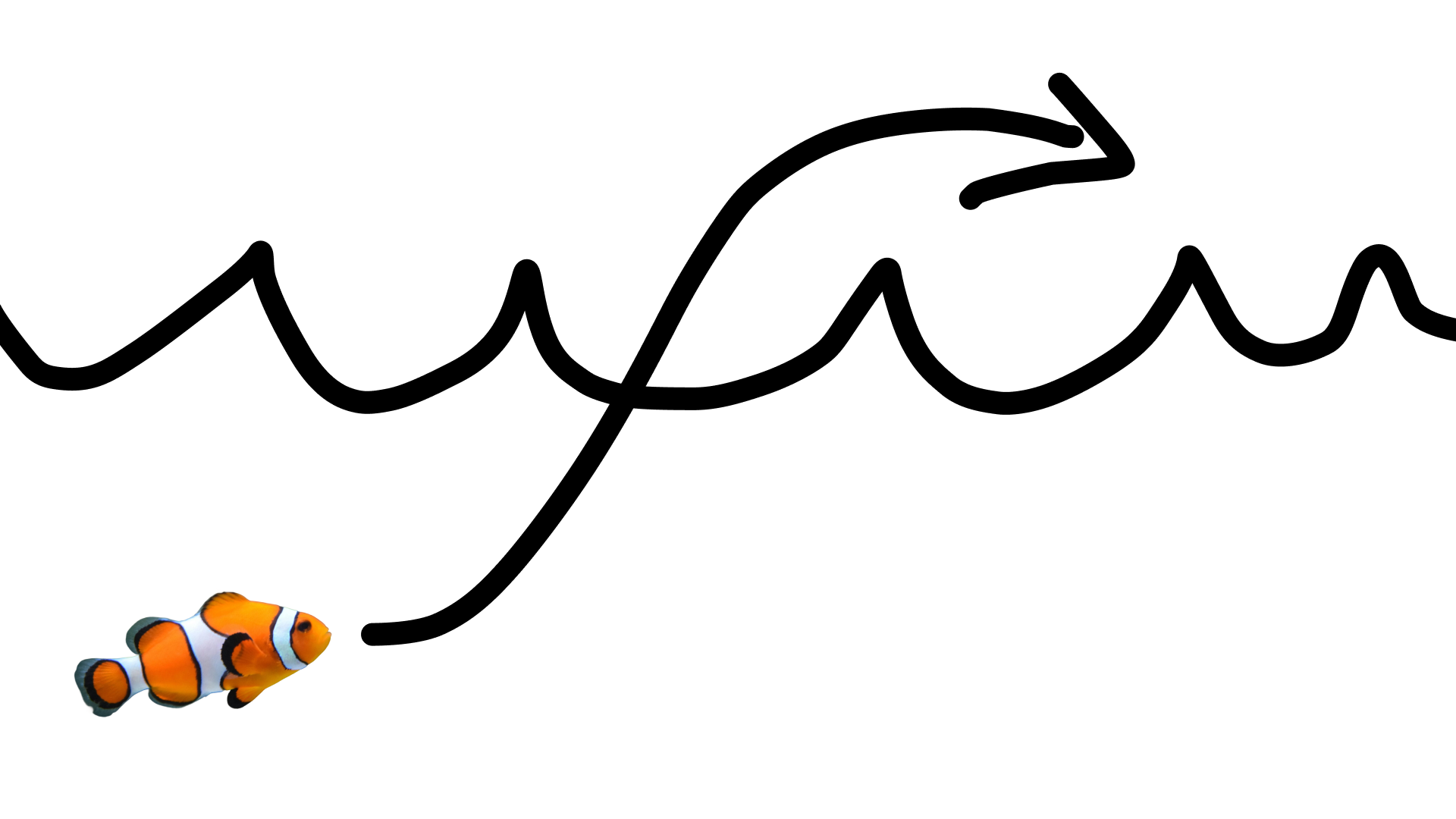
使用以下提示:
turn this into realistic footage, using the drawing only as a guide for movement, do not show the drawing in the final video
生成逼真的绘画视频。
Python
import base64
from google import genai

client = genai.Client()

interaction = client.interactions.create(
    model="gemini-omni-1.1-flash",
    input=[
        {"type": "image", "data": base64_image, "mime_type": "image/jpeg"},
        {"type": "text", "text": "turn this into realistic footage, using the drawing only as a guide for movement, do not show the drawing in the final video"}
    ],
)
with open("clownfish.mp4", "wb") as f:
    f.write(base64.b64decode(interaction.output_video.data))
JavaScript
import { GoogleGenAI } from '@google/genai';
import * as fs from 'fs';
const ai = new GoogleGenAI({});

const interaction = await ai.interactions.create({
  model: 'gemini-omni-1.1-flash',
  input: [
    { type: 'image', data: base64Image, mime_type: 'image/jpeg' },
    { type: 'text', text: 'turn this into realistic footage, using the drawing only as a guide for movement, do not show the drawing in the final video' }
  ]
});

if (interaction.output_video?.data) {
  fs.writeFileSync('clownfish.mp4', Buffer.from(interaction.output_video.data, 'base64'));
}
Java
import com.google.genai.Client;
import com.google.genai.gaos.models.interactions.Content;
import com.google.genai.gaos.models.interactions.CreateModelInteraction;
import com.google.genai.gaos.models.interactions.ImageContent;
import com.google.genai.gaos.models.interactions.ImageContentMimeType;
import com.google.genai.gaos.models.interactions.Interaction;
import com.google.genai.gaos.models.interactions.InteractionsInput;
import com.google.genai.gaos.models.interactions.Model;
import com.google.genai.gaos.models.interactions.TextContent;
import com.google.genai.gaos.models.operations.CreateInteractionRequestBody;
import java.nio.file.Files;
import java.nio.file.Paths;
import java.util.Arrays;
import java.util.Base64;
import java.util.List;

Client client = new Client();

byte[] imageBytes = Files.readAllBytes(Paths.get("first_frame.png"));
String base64Image = Base64.getEncoder().encodeToString(imageBytes);

Content imageContent =
    ImageContent.builder()
        .data(base64Image)
        .mimeType(ImageContentMimeType.IMAGE_PNG)
        .build();

Content textContent =
    TextContent.builder()
        .text("A mythical dragon perched on a craggy peak slowly unfolds its wings and lets out a roar.")
        .build();

List<Content> contents = Arrays.asList(imageContent, textContent);

CreateModelInteraction params =
    CreateModelInteraction.builder()
        .model(Model.of("gemini-omni-1.1-flash"))
        .input(InteractionsInput.ofContent(contents))
        .build();

Interaction interaction =
    client.interactions.create(CreateInteractionRequestBody.of(params)).interaction().get();

if (interaction.outputVideo().isPresent() && interaction.outputVideo().get().data().isPresent()) {
    byte[] videoBytes = Base64.getDecoder().decode(interaction.outputVideo().get().data().get());
    Files.write(Paths.get("dragon.mp4"), videoBytes);
}
REST
curl -X POST "https://generativelanguage.googleapis.com/v1beta/interactions?key=$API_KEY" \
-H "Content-Type: application/json" \
-d '{
 "model": "gemini-omni-1.1-flash",
 "input": [
   {"type": "image", "data": "'"$BASE64_IMAGE"'", "mime_type": "image/jpeg"},
   {"type": "text", "text": "turn this into realistic footage, using the drawing only as a guide for movement, do not show the drawing in the final video"}
 ]
}'
第一帧和最后一帧插值
Gemini Omni Flash 支持视频插值,可让您生成在起始图片(首帧)和结束图片(尾帧)之间平滑过渡的视频。
在 input 列表中提供两张图片,并在提示中描述所需的转场效果。模型将从第一帧到最后一帧为场景添加动画效果。
Python
import base64
from google import genai

client = genai.Client()

interaction = client.interactions.create(
    model="gemini-omni-1.1-flash",
    input=[
        {"type": "image", "data": first_frame_b64, "mime_type": "image/jpeg"},
        {"type": "image", "data": last_frame_b64, "mime_type": "image/jpeg"},
        {"type": "text", "text": "A smooth cinematic transition from a lush green forest at sunrise to a snowy forest under a starry night sky."}
    ],
)
with open("interpolation.mp4", "wb") as f:
    f.write(base64.b64decode(interaction.output_video.data))
JavaScript
import { GoogleGenAI } from '@google/genai';
import * as fs from 'fs';
const ai = new GoogleGenAI({});

const interaction = await ai.interactions.create({
  model: 'gemini-omni-1.1-flash',
  input: [
    { type: 'image', data: firstFrameB64, mime_type: 'image/jpeg' },
    { type: 'image', data: lastFrameB64, mime_type: 'image/jpeg' },
    { type: 'text', text: 'A smooth cinematic transition from a lush green forest at sunrise to a snowy forest under a starry night sky.' }
  ]
});

if (interaction.output_video?.data) {
  fs.writeFileSync('interpolation.mp4', Buffer.from(interaction.output_video.data, 'base64'));
}
Java
import com.google.genai.Client;
import com.google.genai.gaos.models.interactions.Content;
import com.google.genai.gaos.models.interactions.CreateModelInteraction;
import com.google.genai.gaos.models.interactions.ImageContent;
import com.google.genai.gaos.models.interactions.ImageContentMimeType;
import com.google.genai.gaos.models.interactions.Interaction;
import com.google.genai.gaos.models.interactions.InteractionsInput;
import com.google.genai.gaos.models.interactions.Model;
import com.google.genai.gaos.models.interactions.TextContent;
import com.google.genai.gaos.models.operations.CreateInteractionRequestBody;
import java.nio.file.Files;
import java.nio.file.Paths;
import java.util.Arrays;
import java.util.Base64;
import java.util.List;

Client client = new Client();

String firstFrameB64 = Base64.getEncoder().encodeToString(Files.readAllBytes(Paths.get("first_frame.jpg")));
String lastFrameB64 = Base64.getEncoder().encodeToString(Files.readAllBytes(Paths.get("last_frame.jpg")));

Content firstFrame =
    ImageContent.builder()
        .data(firstFrameB64)
        .mimeType(ImageContentMimeType.IMAGE_JPEG)
        .build();

Content lastFrame =
    ImageContent.builder()
        .data(lastFrameB64)
        .mimeType(ImageContentMimeType.IMAGE_JPEG)
        .build();

Content prompt =
    TextContent.builder()
        .text("A smooth cinematic transition from a lush green forest at sunrise to a snowy forest under a starry night sky.")
        .build();

List<Content> contents = Arrays.asList(firstFrame, lastFrame, prompt);

CreateModelInteraction params =
    CreateModelInteraction.builder()
        .model(Model.of("gemini-omni-1.1-flash"))
        .input(InteractionsInput.ofContent(contents))
        .build();

Interaction interaction =
    client.interactions.create(CreateInteractionRequestBody.of(params)).interaction().get();

if (interaction.outputVideo().isPresent() && interaction.outputVideo().get().data().isPresent()) {
    byte[] videoBytes = Base64.getDecoder().decode(interaction.outputVideo().get().data().get());
    Files.write(Paths.get("interpolation.mp4"), videoBytes);
}
REST
curl -X POST "https://generativelanguage.googleapis.com/v1beta/interactions?key=$API_KEY" \
-H "Content-Type: application/json" \
-d '{
 "model": "gemini-omni-1.1-flash",
 "input": [
   {"type": "image", "data": "'"$FIRST_FRAME_B64"'", "mime_type": "image/jpeg"},
   {"type": "image", "data": "'"$LAST_FRAME_B64"'", "mime_type": "image/jpeg"},
   {"type": "text", "text": "A smooth cinematic transition from a lush green forest at sunrise to a snowy forest under a starry night sky."}
 ]
}'
主题参考
您可以生成包含参考图片中提供的特定主题的视频。 例如,以下代码展示了如何提供 2 张猫和毛线的图片,以生成猫玩毛线的视频。
Python
import base64
from google import genai

client = genai.Client()

interaction = client.interactions.create(
    model="gemini-omni-1.1-flash",
    input=[
        {"type": "image", "data": cat_b64, "mime_type": "image/png"},
        {"type": "image", "data": yarn_b64, "mime_type": "image/png"},
        {"type": "text", "text": "A cat playfully batting at a ball of yarn."}
    ],
)
with open("cat.mp4", "wb") as f:
    f.write(base64.b64decode(interaction.output_video.data))
JavaScript
import { GoogleGenAI } from '@google/genai';
import * as fs from 'fs';
const ai = new GoogleGenAI({});

const interaction = await ai.interactions.create({
  model: 'gemini-omni-1.1-flash',
  input: [
    { type: 'image', data: catData, mime_type: 'image/png' },
    { type: 'image', data: yarnData, mime_type: 'image/png' },
    { type: 'text', text: 'A cat playfully batting at a ball of yarn.' }
  ]
});

if (interaction.output_video?.data) {
  fs.writeFileSync('cat.mp4', Buffer.from(interaction.output_video.data, 'base64'));
}
Java
import com.google.genai.Client;
import com.google.genai.gaos.models.interactions.Content;
import com.google.genai.gaos.models.interactions.CreateModelInteraction;
import com.google.genai.gaos.models.interactions.ImageContent;
import com.google.genai.gaos.models.interactions.ImageContentMimeType;
import com.google.genai.gaos.models.interactions.Interaction;
import com.google.genai.gaos.models.interactions.InteractionsInput;
import com.google.genai.gaos.models.interactions.Model;
import com.google.genai.gaos.models.interactions.TextContent;
import com.google.genai.gaos.models.operations.CreateInteractionRequestBody;
import java.nio.file.Files;
import java.nio.file.Paths;
import java.util.Arrays;
import java.util.Base64;
import java.util.List;

Client client = new Client();

byte[] imageBytes = Files.readAllBytes(Paths.get("reference.png"));
String base64Image = Base64.getEncoder().encodeToString(imageBytes);

Content imageContent =
    ImageContent.builder()
        .data(base64Image)
        .mimeType(ImageContentMimeType.IMAGE_PNG)
        .build();

Content textContent =
    TextContent.builder()
        .text("A cute small creature like the one in <image_1> is running in a sunny park chasing a butterfly.")
        .build();

List<Content> contents = Arrays.asList(imageContent, textContent);

CreateModelInteraction params =
    CreateModelInteraction.builder()
        .model(Model.of("gemini-omni-1.1-flash"))
        .input(InteractionsInput.ofContent(contents))
        .build();

Interaction interaction =
    client.interactions.create(CreateInteractionRequestBody.of(params)).interaction().get();

if (interaction.outputVideo().isPresent() && interaction.outputVideo().get().data().isPresent()) {
    byte[] videoBytes = Base64.getDecoder().decode(interaction.outputVideo().get().data().get());
    Files.write(Paths.get("creature.mp4"), videoBytes);
}
REST
curl -X POST "https://generativelanguage.googleapis.com/v1beta/interactions?key=$API_KEY" \
-H "Content-Type: application/json" \
-d '{
 "model": "gemini-omni-1.1-flash",
 "input": [
   {"type": "image", "data": "'"$CAT_B64"'", "mime_type": "image/png"},
   {"type": "image", "data": "'"$YARN_B64"'", "mime_type": "image/png"},
   {"type": "text", "text": "A cat playfully batting at a ball of yarn."}
 ]
}'
任务参数
使用 video_config 中的 task 参数可明确指定预期行为,例如,如果您希望模型根据图片生成视频,可以将该参数设置为 image_to_video。如果未设置此参数,模型将根据提示推断您的意图。
允许使用以下值:
text_to_videoimage_to_videoreference_to_videoeditextend
以下示例展示了如何为之前展示的图片到视频示例设置此参数。
Python
import base64
from google import genai

client = genai.Client()

interaction = client.interactions.create(
    model="gemini-omni-1.1-flash",
    input=[
        {"type": "image", "data": base64_image, "mime_type": "image/jpeg"},
        {"type": "text", "text": "turn this into realistic footage, using the drawing only as a guide for movement, do not show the drawing in the final video"}
    ],
    generation_config={
      "video_config": {
        "task": "image_to_video",
      }
    },
)
with open("example.mp4", "wb") as f:
    f.write(base64.b64decode(interaction.output_video.data))
JavaScript
import { GoogleGenAI } from "@google/genai";
import * as fs from 'fs';
const ai = new GoogleGenAI({});

const interaction = await ai.interactions.create({
  model: 'gemini-omni-1.1-flash',
  input: [
    { type: 'image', data: base64Image, mime_type: 'image/jpeg' },
    { type: 'text', text: 'turn this into realistic footage, using the drawing only as a guide for movement, do not show the drawing in the final video' }
  ],
  generationConfig: {
    videoConfig: {
      task: 'image_to_video',
    }
  }
});

if (interaction.output_video?.data) {
  fs.writeFileSync('example.mp4', Buffer.from(interaction.output_video.data, 'base64'));
}
Java
import com.google.genai.Client;
import com.google.genai.gaos.models.interactions.Content;
import com.google.genai.gaos.models.interactions.CreateModelInteraction;
import com.google.genai.gaos.models.interactions.GenerationConfig;
import com.google.genai.gaos.models.interactions.ImageContent;
import com.google.genai.gaos.models.interactions.ImageContentMimeType;
import com.google.genai.gaos.models.interactions.Interaction;
import com.google.genai.gaos.models.interactions.InteractionsInput;
import com.google.genai.gaos.models.interactions.Model;
import com.google.genai.gaos.models.interactions.Task;
import com.google.genai.gaos.models.interactions.TextContent;
import com.google.genai.gaos.models.interactions.VideoConfig;
import com.google.genai.gaos.models.operations.CreateInteractionRequestBody;
import java.nio.file.Files;
import java.nio.file.Paths;
import java.util.Arrays;
import java.util.Base64;
import java.util.List;

Client client = new Client();

byte[] imageBytes = Files.readAllBytes(Paths.get("reference.png"));
String base64Image = Base64.getEncoder().encodeToString(imageBytes);

Content imageContent =
    ImageContent.builder()
        .data(base64Image)
        .mimeType(ImageContentMimeType.IMAGE_PNG)
        .build();

Content textContent =
    TextContent.builder()
        .text("A fast red sports car drives down an empty desert highway at dusk.")
        .build();

List<Content> contents = Arrays.asList(imageContent, textContent);

GenerationConfig generationConfig =
    GenerationConfig.builder()
        .videoConfig(VideoConfig.builder().task(Task.IMAGE_TO_VIDEO).build())
        .build();

CreateModelInteraction params =
    CreateModelInteraction.builder()
        .model(Model.of("gemini-omni-1.1-flash"))
        .input(InteractionsInput.ofContent(contents))
        .generationConfig(generationConfig)
        .build();

Interaction interaction =
    client.interactions.create(CreateInteractionRequestBody.of(params)).interaction().get();

if (interaction.outputVideo().isPresent() && interaction.outputVideo().get().data().isPresent()) {
    byte[] videoBytes = Base64.getDecoder().decode(interaction.outputVideo().get().data().get());
    Files.write(Paths.get("task_output.mp4"), videoBytes);
}
REST
curl -X POST "https://generativelanguage.googleapis.com/v1beta/interactions" \
  -H "x-goog-api-key: $GEMINI_API_KEY" \
  -H "Content-Type: application/json" \
  -d '{
    "model": "gemini-omni-1.1-flash",
    "input": [
      {
        "type": "image",
        "data": "'"$BASE64_IMAGE"'",
        "mime_type": "image/jpeg"
      },
      {
        "type": "text",
        "text": "turn this into realistic footage, using the drawing only as a guide for movement, do not show the drawing in the final video"
      }
    ],
    "generation_config": {
      "video_config": {
        "task": "image_to_video"
      }
    }
  }'
有状态视频编辑
生成视频并使用后续提示进行迭代式修改。每个回合都基于上一个回合的结果。该模型会记住视频上下文,在应用您的更改的同时保留您未提及的元素。使用 previous_interaction_id 跟踪对话记录和生成的视频状态,而无需重新上传之前的视频。
以下示例演示了如何生成第一个视频,然后对其进行修改:
Python
import base64
from google import genai

client = genai.Client()

# Turn 1: Generate initial video
res1 = client.interactions.create(model="gemini-omni-1.1-flash", input="A woman playing violin outdoors.")

# Turn 2: Edit the previous video
res2 = client.interactions.create(
    model="gemini-omni-1.1-flash",
    previous_interaction_id=res1.id,
    input="Make the violin invisible."
)
with open("example.mp4", "wb") as f:
    f.write(base64.b64decode(res2.output_video.data))
JavaScript
import { GoogleGenAI } from '@google/genai';
import * as fs from 'fs';
const ai = new GoogleGenAI({});

// Turn 1: Generate initial video
const res1 = await ai.interactions.create({
  model: 'gemini-omni-1.1-flash',
  input: 'A woman playing violin outdoors.',
});

// Turn 2: Edit the previous video
const res2 = await ai.interactions.create({
  model: 'gemini-omni-1.1-flash',
  previous_interaction_id: res1.id,
  input: 'Make the violin invisible.',
});

if (res2.output_video?.data) {
  fs.writeFileSync('example.mp4', Buffer.from(res2.output_video.data, 'base64'));
}
Java
import com.google.genai.Client;
import com.google.genai.gaos.models.interactions.CreateModelInteraction;
import com.google.genai.gaos.models.interactions.Interaction;
import com.google.genai.gaos.models.interactions.InteractionsInput;
import com.google.genai.gaos.models.interactions.Model;
import com.google.genai.gaos.models.operations.CreateInteractionRequestBody;
import java.nio.file.Files;
import java.nio.file.Paths;
import java.util.Base64;

Client client = new Client();

// Turn 1: Generate initial video
CreateModelInteraction turn1Params =
    CreateModelInteraction.builder()
        .model(Model.of("gemini-omni-1.1-flash"))
        .input(InteractionsInput.of("A person in a red jacket standing in a snowy landscape."))
        .build();

Interaction turn1 =
    client.interactions.create(CreateInteractionRequestBody.of(turn1Params)).interaction().get();

// Turn 2: Edit the previous video using previousInteractionId
CreateModelInteraction turn2Params =
    CreateModelInteraction.builder()
        .model(Model.of("gemini-omni-1.1-flash"))
        .input(InteractionsInput.of("Change the jacket to bright yellow."))
        .previousInteractionId(turn1.id().get())
        .build();

Interaction turn2 =
    client.interactions.create(CreateInteractionRequestBody.of(turn2Params)).interaction().get();

if (turn2.outputVideo().isPresent() && turn2.outputVideo().get().data().isPresent()) {
    byte[] videoBytes = Base64.getDecoder().decode(turn2.outputVideo().get().data().get());
    Files.write(Paths.get("edited.mp4"), videoBytes);
}
REST
curl -X POST "https://generativelanguage.googleapis.com/v1beta/interactions?key=$API_KEY" \
-H "Content-Type: application/json" \
-d '{
 "model": "gemini-omni-1.1-flash",
 "previous_interaction_id": "'"$PREVIOUS_ID"'",
 "input": "Make the violin invisible."
}'
初始视频示例:
修改后的视频示例:
对话中的每一轮都会生成一个新视频。该模型可以理解之前对话轮次中的上下文,让您能够进行增量更改,例如调整光照和更换背景,而无需重新描述整个场景。
编辑自己的视频
使用 Files API 上传视频,然后使用 Gemini Omni Flash 对其进行编辑。
以下示例展示了如何编辑以下原始视频:
Python
import time
import base64
from google import genai

client = genai.Client()

# Upload video using the file API
video_file = client.files.upload(file="Video.mp4")

while video_file.state == "PROCESSING":
    print('Waiting for video to be processed.')
    time.sleep(10)
    video_file = client.files.get(name=video_file.name)

if video_file.state == "FAILED":
  raise ValueError(video_file.state)
print(f'Video processing complete: ' + video_file.uri)

# Edit your video
interaction = client.interactions.create(
    model="gemini-omni-1.1-flash",
    input=[
        {"type": "video", "uri": video_file.uri},
        {"type": "text", "text": "When the person touches the mirror, make the mirror ripple beautifully like liquid, and the person's arm turns into reflective mirror material"}
    ],
)
with open("example.mp4", "wb") as f:
    f.write(base64.b64decode(interaction.output_video.data))
JavaScript
import { GoogleGenAI } from '@google/genai';
import * as fs from 'fs';
const ai = new GoogleGenAI({});

// Upload video using the file API
let videoFile = await ai.files.upload({
  file: 'Video.mp4',
});

while (videoFile.state === 'PROCESSING') {
  console.log('Waiting for video to be processed.');
  await new Promise(r => setTimeout(r, 10000));
  videoFile = await ai.files.get({ name: videoFile.name });
}

if (videoFile.state === 'FAILED') {
  throw new Error(videoFile.state);
}
console.log('Video processing complete: ' + videoFile.uri);

// Edit your video
const interaction = await ai.interactions.create({
  model: 'gemini-omni-1.1-flash',
  input: [
    { type: 'video', uri: videoFile.uri },
    { type: 'text', text: "When the person touches the mirror, make the mirror ripple beautifully like liquid, and the person's arm turns into reflective mirror material" }
  ],
});

if (interaction.output_video?.data) {
  fs.writeFileSync('example.mp4', Buffer.from(interaction.output_video.data, 'base64'));
}
Java
import com.google.genai.Client;
import com.google.genai.gaos.models.interactions.Content;
import com.google.genai.gaos.models.interactions.CreateModelInteraction;
import com.google.genai.gaos.models.interactions.Interaction;
import com.google.genai.gaos.models.interactions.InteractionsInput;
import com.google.genai.gaos.models.interactions.Model;
import com.google.genai.gaos.models.interactions.TextContent;
import com.google.genai.gaos.models.interactions.VideoContent;
import com.google.genai.gaos.models.interactions.VideoContentMimeType;
import com.google.genai.gaos.models.operations.CreateInteractionRequestBody;
import java.nio.file.Files;
import java.nio.file.Paths;
import java.util.Arrays;
import java.util.Base64;
import java.util.List;

Client client = new Client();

byte[] videoBytes = Files.readAllBytes(Paths.get("my_video.mp4"));
String base64Video = Base64.getEncoder().encodeToString(videoBytes);

Content videoContent =
    VideoContent.builder()
        .data(base64Video)
        .mimeType(VideoContentMimeType.VIDEO_MP4)
        .build();

Content textContent =
    TextContent.builder()
        .text("Make the violin completely invisible while keeping the musician playing normally in the air.")
        .build();

List<Content> contents = Arrays.asList(videoContent, textContent);

CreateModelInteraction params =
    CreateModelInteraction.builder()
        .model(Model.of("gemini-omni-1.1-flash"))
        .input(InteractionsInput.ofContent(contents))
        .build();

Interaction interaction =
    client.interactions.create(CreateInteractionRequestBody.of(params)).interaction().get();

if (interaction.outputVideo().isPresent() && interaction.outputVideo().get().data().isPresent()) {
    byte[] editedBytes = Base64.getDecoder().decode(interaction.outputVideo().get().data().get());
    Files.write(Paths.get("edited_invisible_violin.mp4"), editedBytes);
}
REST
#!/bin/bash
VIDEO_B64=$(encode_file "$VIDEO_FILE")

curl -sS -w "\n[HTTP %{http_code}]\n" "https://generativelanguage.googleapis.com/v1beta/interactions" \
  -H "x-goog-api-key: ${API_KEY}" \
  -H "Content-Type: application/json" \
  -d @- <<EOF > video_editing_response.json
{
  "model": "gemini-omni-1.1-flash",
  "input": [
    {
      "type": "user_input",
      "content": [
        {
          "type": "video",
          "mime_type": "video/mp4",
          "data": "$VIDEO_B64"
        },
        {
          "type": "text",
          "text": "When the person touches the mirror, make the mirror ripple beautifully like liquid, and the person's arm turns into reflective mirror material"
        }
      ]
    }
  ],
  "response_format": { "type": "video" }
}
EOF
修改后的视频示例:
使用 URI 检索视频
在 response_format 中使用 delivery="uri" 参数可检索大于 4MB 的生成的视频。
此方法会返回一个 Google 托管的 URI,您可以轮询该 URI,直到视频变为 ACTIVE,然后才能下载。
Python
import time
from google import genai

client = genai.Client()

# 1. Request video via URI delivery
interaction = client.interactions.create(
    model="gemini-omni-1.1-flash",
    input="A beautiful sunset.",
    response_format={"type": "video", "delivery": "uri"}
)

# 2. Extract file name and poll for ACTIVE state
video_output = interaction.output_video
file_name = video_output.uri.split("/")[-1] # Extract ID

print("Waiting for video processing...")
while True:
    f_info = client.files.get(name=f"files/{file_name}")
    if f_info.state.name == "ACTIVE":
        break
    elif f_info.state.name == "FAILED":
        raise RuntimeError("Generation failed.")
    time.sleep(5)

# 3. Download the final video
client.files.download(file=video_output.uri, destination="output.mp4")
JavaScript
import { GoogleGenAI } from '@google/genai';
const ai = new GoogleGenAI({});

// 1. Request video via URI delivery
const interaction = await ai.interactions.create({
  model: 'gemini-omni-1.1-flash',
  input: 'A beautiful sunset.',
  response_format: { type: 'video', delivery: 'uri' },
});

// 2. Extract file name and poll for ACTIVE state
const videoOutput = interaction.output_video;
const fileId = videoOutput.uri.match(/files\/([a-zA-Z0-9]+)/)[1];
const name = `files/${fileId}`;

console.log("Waiting for video processing...");
while (true) {
  const fInfo = await ai.files.get({ name });
  if (fInfo.state.name === 'ACTIVE') break;
  if (fInfo.state.name === 'FAILED') throw new Error("Generation failed.");
  await new Promise(r => setTimeout(r, 5000));
}

// 3. Download the final video
await ai.files.download({
  file: videoOutput,
  downloadPath: 'output.mp4',
});
console.log("💾 Saved video to output.mp4");
Java
import com.google.genai.Client;
import com.google.genai.gaos.models.interactions.CreateModelInteraction;
import com.google.genai.gaos.models.interactions.CreateModelInteractionResponseFormat;
import com.google.genai.gaos.models.interactions.Interaction;
import com.google.genai.gaos.models.interactions.InteractionsInput;
import com.google.genai.gaos.models.interactions.Model;
import com.google.genai.gaos.models.interactions.ResponseFormat;
import com.google.genai.gaos.models.interactions.VideoResponseFormat;
import com.google.genai.gaos.models.interactions.VideoResponseFormatDelivery;
import com.google.genai.gaos.models.operations.CreateInteractionRequestBody;

Client client = new Client();

// 1. Request video via URI delivery
VideoResponseFormat videoFormat =
    VideoResponseFormat.builder()
        .delivery(VideoResponseFormatDelivery.URI)
        .build();

CreateModelInteraction params =
    CreateModelInteraction.builder()
        .model(Model.of("gemini-omni-1.1-flash"))
        .input(InteractionsInput.of("A camera flies over a misty redwood forest at sunrise."))
        .responseFormat(CreateModelInteractionResponseFormat.of(ResponseFormat.of(videoFormat)))
        .build();

Interaction interaction =
    client.interactions.create(CreateInteractionRequestBody.of(params)).interaction().get();

// 2. Extract file URI
interaction.outputVideo().flatMap(v -> v.uri()).ifPresent(uri -> {
    System.out.println("Video URI: " + uri);
});
REST
#!/bin/bash

# 1. Initial request to generate the video
RESPONSE=$(curl -s -X POST "https://generativelanguage.googleapis.com/v1beta/interactions?key=$API_KEY" \
-H "Content-Type: application/json" \
-d '{
 "model": "gemini-omni-1.1-flash",
 "input": "A beautiful sunset over a calm ocean.",
 "response_format": {"type": "video", "delivery": "uri"}
}')

# Extract FILE_ID from the URI (e.g., "files/abc-123" -> "abc-123")
FILE_URI=$(echo $RESPONSE | jq -r '.output_video.uri')
FILE_ID=$(echo $FILE_URI | cut -d'/' -f2)

echo "Video requested (ID: $FILE_ID). Waiting for processing..."

# 2. Polling loop
while true; do
 # Get current file status
 STATUS_JSON=$(curl -s -X GET "https://generativelanguage.googleapis.com/v1beta/files/$FILE_ID?key=$API_KEY")
 STATE=$(echo $STATUS_JSON | jq -r '.state')

 if [ "$STATE" == "ACTIVE" ]; then
   echo "Processing complete! Downloading..."
   break
 elif [ "$STATE" == "FAILED" ]; then
   echo "Error: Generation failed."
   exit 1
 else
   echo "Current state: $STATE... (waiting 5s)"
   sleep 5
 fi
done

# 3. Final download
curl -L -X GET "https://generativelanguage.googleapis.com/v1beta/files/$FILE_ID:download?alt=media&key=$API_KEY" \
--output "output.mp4"

echo "Done! Video saved to output.mp4"
原始 REST JSON 结构 (URI):
{
  "steps": [
    { "type": "user_input", "content": [{"type": "text", "text": "..."}] },
    { "type": "thought", "content": [{"text": "...", "type": "thought"}] },
    {
      "type": "model_output",
      "content": [
        {
          "type": "video",
          "mime_type": "video/mp4",
          "uri": "https://generativelanguage.googleapis.com/v1beta/files/...:download?alt=media"
        }
      ]
    }
  ],
  "id": "v1_...",
  "status": "completed",
  "model": "gemini-omni-1.1-flash",
  "object": "interaction"
}
视频延长
通过在视频片段的末尾生成无缝的后续内容来延长现有视频。在提示中描述您希望视频如何继续,例如 "Extend this video" 或 "Continue the scene: the camera pans across the mountains"。
模型会分析输入视频,以生成 3-10 秒的续集。
您可以延期:
- 模型生成的视频(多轮):通过引用之前生成的视频的
previous_interaction_id来扩展该视频。 上传的视频:提供上传的视频文件(通过 Files API)以及扩展程序提示。
Python
import base64
from google import genai

client = genai.Client()

# Upload your video using the Files API
video_file = client.files.upload(file="my_video.mp4")

# Extend the video using prompt-based extension
interaction = client.interactions.create(
    model="gemini-omni-1.1-flash",
    input=[
        {"type": "video", "uri": video_file.uri},
        {"type": "text", "text": "Continue the scene."}
    ],
)
with open("extended.mp4", "wb") as f:
    f.write(base64.b64decode(interaction.output_video.data))
JavaScript
import { GoogleGenAI } from '@google/genai';
import * as fs from 'fs';
const ai = new GoogleGenAI({});

// Upload your video using the Files API
let videoFile = await ai.files.upload({
  file: 'my_video.mp4',
});

while (videoFile.state === 'PROCESSING') {
  await new Promise(r => setTimeout(r, 10000));
  videoFile = await ai.files.get({ name: videoFile.name });
}

// Extend the video using prompt-based extension
const interaction = await ai.interactions.create({
  model: 'gemini-omni-1.1-flash',
  input: [
    { type: 'video', uri: videoFile.uri },
    { type: 'text', text: 'Continue the scene.' }
  ],
});

if (interaction.output_video?.data) {
  fs.writeFileSync('extended.mp4', Buffer.from(interaction.output_video.data, 'base64'));
}
Java
import com.google.genai.Client;
import com.google.genai.gaos.models.interactions.Content;
import com.google.genai.gaos.models.interactions.CreateModelInteraction;
import com.google.genai.gaos.models.interactions.Interaction;
import com.google.genai.gaos.models.interactions.InteractionsInput;
import com.google.genai.gaos.models.interactions.Model;
import com.google.genai.gaos.models.interactions.TextContent;
import com.google.genai.gaos.models.interactions.VideoContent;
import com.google.genai.gaos.models.interactions.VideoContentMimeType;
import com.google.genai.gaos.models.operations.CreateInteractionRequestBody;
import java.nio.file.Files;
import java.nio.file.Paths;
import java.util.Arrays;
import java.util.Base64;
import java.util.List;

Client client = new Client();

// Load base video
byte[] videoBytes = Files.readAllBytes(Paths.get("my_video.mp4"));
String base64Video = Base64.getEncoder().encodeToString(videoBytes);

Content videoContent =
    VideoContent.builder()
        .data(base64Video)
        .mimeType(VideoContentMimeType.VIDEO_MP4)
        .build();

// Prompt describing seamless continuation
Content promptContent =
    TextContent.builder()
        .text("Continue the scene.")
        .build();

List<Content> contents = Arrays.asList(videoContent, promptContent);

CreateModelInteraction params =
    CreateModelInteraction.builder()
        .model(Model.of("gemini-omni-1.1-flash"))
        .input(InteractionsInput.ofContent(contents))
        .build();

Interaction interaction =
    client.interactions.create(CreateInteractionRequestBody.of(params)).interaction().get();

if (interaction.outputVideo().isPresent() && interaction.outputVideo().get().data().isPresent()) {
    byte[] extendedBytes = Base64.getDecoder().decode(interaction.outputVideo().get().data().get());
    Files.write(Paths.get("extended.mp4"), extendedBytes);
}
REST
curl -X POST "https://generativelanguage.googleapis.com/v1beta/interactions?key=$API_KEY"     -H "Content-Type: application/json"     -d '{
 "model": "gemini-omni-1.1-flash",
 "input": [
   {"type": "video", "uri": "'"$VIDEO_URI"'"},
   {"type": "text", "text": "Continue the scene."}
 ]
}'
使用参考媒体进行扩展
您可以在 input 数组中提供参考图片,并附上提示,以便在扩展视频中引入新角色或元素:
Python
import base64
from google import genai

client = genai.Client()

# Upload base video and reference image using the Files API
video_file = client.files.upload(file="my_video.mp4")
character_img = client.files.upload(file="character.png")

# Extend the video while introducing the reference character
interaction = client.interactions.create(
    model="gemini-omni-1.1-flash",
    input=[
        {"type": "video", "uri": video_file.uri},
        {"type": "image", "uri": character_img.uri},
        {"type": "text", "text": "Extend this video: have the character shown in <IMAGE_REF_0> enter the scene and wave."}
    ],
)
with open("extended_with_character.mp4", "wb") as f:
    f.write(base64.b64decode(interaction.output_video.data))
JavaScript
import { GoogleGenAI } from '@google/genai';
import * as fs from 'fs';
const ai = new GoogleGenAI({});

// Upload base video and reference image using the Files API
let videoFile = await ai.files.upload({ file: 'my_video.mp4' });
let characterImg = await ai.files.upload({ file: 'character.png' });

while (videoFile.state === 'PROCESSING' || characterImg.state === 'PROCESSING') {
  await new Promise(r => setTimeout(r, 10000));
  videoFile = await ai.files.get({ name: videoFile.name });
  characterImg = await ai.files.get({ name: characterImg.name });
}

// Extend the video while introducing the reference character
const interaction = await ai.interactions.create({
  model: 'gemini-omni-1.1-flash',
  input: [
    { type: 'video', uri: videoFile.uri },
    { type: 'image', uri: characterImg.uri },
    { type: 'text', text: 'Extend this video: have the character shown in <IMAGE_REF_0> enter the scene and wave.' }
  ],
});

if (interaction.output_video?.data) {
  fs.writeFileSync('extended_with_character.mp4', Buffer.from(interaction.output_video.data, 'base64'));
}
Java
import com.google.genai.Client;
import com.google.genai.gaos.models.interactions.Content;
import com.google.genai.gaos.models.interactions.CreateModelInteraction;
import com.google.genai.gaos.models.interactions.ImageContent;
import com.google.genai.gaos.models.interactions.ImageContentMimeType;
import com.google.genai.gaos.models.interactions.Interaction;
import com.google.genai.gaos.models.interactions.InteractionsInput;
import com.google.genai.gaos.models.interactions.Model;
import com.google.genai.gaos.models.interactions.TextContent;
import com.google.genai.gaos.models.interactions.VideoContent;
import com.google.genai.gaos.models.interactions.VideoContentMimeType;
import com.google.genai.gaos.models.operations.CreateInteractionRequestBody;
import java.nio.file.Files;
import java.nio.file.Paths;
import java.util.Arrays;
import java.util.Base64;
import java.util.List;

Client client = new Client();

// Load base video and reference character image
byte[] videoBytes = Files.readAllBytes(Paths.get("my_video.mp4"));
byte[] charBytes = Files.readAllBytes(Paths.get("character.png"));

Content baseVideo =
    VideoContent.builder()
        .data(Base64.getEncoder().encodeToString(videoBytes))
        .mimeType(VideoContentMimeType.VIDEO_MP4)
        .build();

Content characterImg =
    ImageContent.builder()
        .data(Base64.getEncoder().encodeToString(charBytes))
        .mimeType(ImageContentMimeType.IMAGE_PNG)
        .build();

Content prompt =
    TextContent.builder()
        .text("Extend the video: the car stops, and the traveler from <image_1> steps out and waves at the sunset.")
        .build();

List<Content> contents = Arrays.asList(baseVideo, characterImg, prompt);

CreateModelInteraction params =
    CreateModelInteraction.builder()
        .model(Model.of("gemini-omni-1.1-flash"))
        .input(InteractionsInput.ofContent(contents))
        .build();

Interaction interaction =
    client.interactions.create(CreateInteractionRequestBody.of(params)).interaction().get();

if (interaction.outputVideo().isPresent() && interaction.outputVideo().get().data().isPresent()) {
    byte[] extendedBytes = Base64.getDecoder().decode(interaction.outputVideo().get().data().get());
    Files.write(Paths.get("extended_with_character.mp4"), extendedBytes);
}
REST
curl -X POST "https://generativelanguage.googleapis.com/v1beta/interactions?key=$API_KEY"     -H "Content-Type: application/json"     -d '{
 "model": "gemini-omni-1.1-flash",
  "input": [
    {"type": "video", "uri": "'$VIDEO_URI'"},
    {"type": "image", "uri": "'$CHARACTER_IMG_URI'"},
    {"type": "text", "text": "Extend this video: have the character shown in <IMAGE_REF_0> enter the scene and wave."}
  ]
}'
扩展限制条件和准则
在延长视频时,请谨记以下规则和限制:
- 上传视频中的对话:目前,您无法扩展上传的视频,在其中添加其他对话(如果角色保持沉默或提示不添加对话,则支持此操作)。
- 多轮语音扩展:通过多轮 (
previous_interaction_id) 扩展之前生成的视频时,系统支持生成语音对话或语音。 - 仅限片段末尾:扩展内容只能附加到视频末尾。 您无法在内容前面添加内容或延长剪辑的中间部分。
- 时长限制:上传时,扩展服务所用的输入视频时长必须不超过 10 秒(除非使用多轮对话)。
- 区域可用性:欧洲经济区 (EEA)、瑞士和英国境内的用户目前无法延长上传的视频(所有可用区域均支持延长模型生成的视频)。
最佳做法
- 针对大型视频使用 URI 传送:对于大于 4MB 的视频(如果可用,则分辨率高于 720p),请在
response_format中使用delivery="uri",以避免载荷大小限制。 - 优化性能:设置
background=false、store=false和stream=false,以实现更快的同步一元生成。请注意,设置store=false意味着生成的视频在后续轮次中无法使用previous_interaction_id进行编辑。 - 提示精确度:如需了解详情,请参阅提示指南部分。
限制
- 在欧洲经济区、瑞士和英国,不支持上传和修改包含未成年人的图片。
- 不支持上传和修改包含某些可识别人物的图片。
- 欧洲经济区 (EEA)、瑞士和英国境内的用户目前无法编辑或延长上传的视频(但可以编辑或延长由模型生成的视频)。
- 上传用于编辑和延长的输入视频时,时长不得超过 10 秒(除非延长多轮对话中由模型生成的视频)。
- 视频扩展功能仅限于附加到视频末尾;不支持在片段开头添加或在片段中间添加内容。
- 您无法扩展已上传的视频(其中有人在说话),以添加其他对话(角色可以保持沉默,也可以使用
previous_interaction_id进行多轮扩展)。 - 不支持语音编辑。
- 当前版本的 API 不支持上传音频参考。
- 视频参考素材最适合用于生成人物肖像;视频参考素材中的任何音频都会被忽略。视频参考内容最多支持 3 个片段,每个片段最长 3 秒。
- 不支持跨多个视频进行参考或推理。尝试多视频提示可能会导致模型性能下降或输出意外结果。
- 不支持预配吞吐量。
- 不支持系统指令、温度、
top_p、停止序列和负面提示(您可以将负面提示放在常规提示中,例如“请勿执行 X”)。 - 不支持使用 YouTube 视频作为媒体来源。
技术详情
- 所有生成的视频都包含 SynthID 水印,该水印对观看者不可见,但可通过程序检测以验证来源。
- 视频生成时间因时长、分辨率和当前 API 负载而异。生成时长较长且分辨率较高的视频需要更多时间。
- Omni 会对输入提示和生成的视频应用内容安全过滤条件(因地区而异)。违反使用政策的提示会被屏蔽。
- 系统完全支持英语 (EN),但尚未评估其他语言,因此这些语言可能可以正常使用,但结果可能会有所不同。
Gemini Omni Flash 提示指南
本部分包含有关如何有效提示 Gemini Omni Flash 的提示和示例。
单一场景
默认情况下,Omni Flash 会尝试创建包含几个不同镜头的视频。 它会尝试根据提示创作有趣的故事。
如果您需要输出视频包含单个场景,则必须在提示中指定:
- 以一个不间断的场景
- 以单个连续镜头拍摄
- 无场景剪辑
例如:
Continuous, unbroken handheld shot of a fluffy tabby cat sitting on a sunny windowsill, looking out into a leafy garden. The cat's tail twitches slowly, and its ears rotate slightly toward ambient noises. Sunbeams illuminate dust motes in the air. Sound design: Gentle breeze, distant bird chirps. No dialogue.
移除不需要的元素
如果生成的视频包含您不想要的内容,请添加简单的负面提示来避免这些内容:
- 无对话
- 无装饰
- 没有额外的音效
用于编辑的提示
简单的提示最适合用于视频编辑。过于详细的提示可能会导致意外的更改。
以下是更多简单的编辑提示示例:
- 将此视频变成动漫风
- 给这个人戴上时尚的帽子
- 将光效更改为更具戏剧性
- 将标牌上的文字更改为“Omni Flash”
在修改视频的特定方面时,请添加 "Keep everything else the same" 以保持视觉一致性。
以下是一些示例,展示了如何应用此技术:
- 应避免以下做法:
In the video of the man sitting on the sofa, please add a small black cat that runs from the right side of the screen, jumps onto his lap, and then he starts to stroke its head while looking down.- 文本简化:
Add a cat that jumps onto his lap, he begins to pet it.
Keep everything else the same.
- 文本简化:
- 应避免以下做法:
Please remove the cell phone that the person is holding in their hand and fill in the background so it looks like they are just holding their hand empty.- 文本简化:
Make the phone invisible. Keep everything else the
same.
- 文本简化:
提示音频
默认情况下,模型会尝试为视频生成合适的音轨。这可能并不总是您想要的结果。您可以使用提示来描述所需的音频类型。如果您想在视频中使用音乐,这一点尤为重要:
- 包含舒缓的背景音乐
- 视频配乐是高燃的电子舞曲
- 音频是背景中播放的一首歌曲,声音低沉而尖锐,像是收音机播放的
时间事件
您可以提示在视频中的特定时间发生某些事情,无需使用精确的语法,只需使用自然语言即可。这在创建自己的场景剪辑、节奏或快速连续镜头时尤其有用。 如需查看示例,请参阅以下内容:
- 3 秒后,一位女性进入画面。
- 在 5 秒时,背景音频中开始播放合唱。
- 每 2 秒切换到新帧。
- 在快速拍摄序列中,每半秒(24 fps 下为 12 帧)将场景更改为新位置。
您还可以使用时间码语法:
[0-3s] A person is walking
[3-6s] They stop and turn around
[6-10s] They start running
Meta 提示
您可以要求 Gemini Omni Flash 注意视频生成的一般质量或原则:
- 考虑微细节、表情和时间,以创建非常丰富、细致但完全自然的场景。
- 在描述角色和环境时要非常详细。 将服装设计原则应用于角色。非常具体地描述场景中的人物、物品和对象。
- 在背景元素中添加大量适当的细节,使场景看起来逼真自然。
- 制作一个快节奏的视频,每秒显示一个不同的稀有
[thing],搭配欢快的音乐,并添加文字标签来标记事物。
视频中的文字
您可以提示在视频中添加文字,Gemini Omni 会以正确且易于阅读的方式呈现文字。如果您的视频中包含自然出现的文字(即使是在背景元素中),最好定义一下这些文字的内容。
- 屏幕上一次显示一个字词:“did, you, know, that, Omni, can, do, awesome, text?”每个字词都会以不同的动画样式显示 1 秒。无对话。
- 有一块街牌上写着:“这是 Omni 生成的 AI”,有一家店面的招牌上写着:“All you need AI”,有一辆车的车牌号是“OMNI1.1”。
有关延长视频时长的提示
借助 Gemini Omni 1.1 Flash,您可以使用 "Extend this video" 或 "The scene continues" 等提示来延长视频。您可以将视频延长 10 秒,总时长最多可达 40 秒。
Omni 会使用原始视频的最后 10 秒作为上下文,创建一个可保持视频、动作、人物和音频连贯性的扩展。系统会编辑输入视频中的部分最终帧,以实现无缝转场。
在扩展时,本指南中的所有 Omni 提示技巧仍然适用:
- 描述加长场景中的音频,尤其是在您需要更改音频时:
"The music continues into the chorus" - 描述场景是否继续,或者是否切换到新场景(可能包含相同的角色):
"Show the same characters in the next scene" - 在扩展时添加图片和视频作为参考,以帮助保持输出内容的准确性,或引入新角色:
"The person shown in the reference image enters the scene"、"The dog in the reference video <VIDEO_REF_0> jumps onto the sofa" - 如果使用时间戳或时间码语法,0s 指的是视频扩展部分的开头。如果延长 10 秒的视频,此提示中的场景剪切将在 12 秒后发生:
"After 2s cut to a new scene with the same characters"
在提示中使用标记来设置图片和视频角色
您可以使用标记将上传的媒体与特定生成角色绑定。这样一来,您就可以指定每张图片或每个视频是起始帧、最终帧还是参考帧。
1. 简单代码(推荐)
对于媒体角色在提示中明确的简单情况,您可以直接将图片和视频绑定到角色:
<FIRST_FRAME>:将图片用作视频的起始帧,例如:<FIRST_FRAME> a woman is walking<LAST_FRAME>:将图片用作视频的最后一帧,以便过渡到该图片。必须与<FIRST_FRAME>搭配使用,例如:<FIRST_FRAME> <LAST_FRAME> a woman is walking<IMAGE_REF_N>:将图片用作参考,例如:in the style of <IMAGE_REF_0> a woman <IMAGE_REF_1> is walking(结合了第一张图片的风格参考和第二张图片的正文参考)。图片引用从 0 开始。<VIDEO_REF_N>:将视频用作角色或对象参考,例如:the person in <VIDEO_REF_0> is playing the violin。视频参考的起始编号也是 0。
以下是包含 6 张参考图片的示例:
[0-3s] A studio fashion sequence. Starting with woman <IMAGE_REF_0>, she is holding <IMAGE_REF_1>
[3-6s] Then we see the man <IMAGE_REF_2> holding <IMAGE_REF_3>
[6-10s] And finally another woman <IMAGE_REF_4> who is holding <IMAGE_REF_5> while walking.
2. 声明来源和参考文档
对于涉及多个媒体输入源和多个角色的更复杂情况,您可以搭配使用明确的前缀标记和自然语言指令。您应在提示的开头声明这些来源和参考内容。
[# Sources <FIRST_FRAME>@Image1]将使用第一张图片作为起始帧。[# Sources <FIRST_FRAME>@Image1 <LAST_FRAME>@Image2]将使用第一张图片作为起始帧,第二张图片作为结束帧。[# Sources <FIRST_FRAME>@Image1 <LAST_FRAME>@Image1]会将第一张图片同时用作第一帧和最后一帧,从而创建一个循环播放的视频。[# Sources <FIRST_FRAME>@Image1] [# References <IMAGE_REF_0>@Image2]将使用第一张图片作为起始帧,并使用第二张图片作为参考。[# Sources <VIDEO_0>@Video1]将使用该视频作为主要来源视频进行编辑或修改。[# Sources <PREVIOUS_VIDEO>@Video1]将使用上一个回合的视频进行扩展。[# References <IMAGE_REF_0>@Image1]将使用第一张图片作为参考。[# References <IMAGE_REF_1>@Image2]将使用第二张图片作为参考。[# References <IMAGE_REF_0>@Image1 <IMAGE_REF_1>@Image2]会将这两张图片都用作参考。[# References <VIDEO_REF_0>@Video1]将使用第一个视频作为参考。[# References <IMAGE_REF_0>@Image1 <VIDEO_REF_0>@Video1]将同时使用图片和视频作为参考。
在提示末尾添加引导性指令:
- 对于起始帧:
"Use this image as the starting frame." - 对于通过起始帧和结束帧实现的循环播放视频:
"Use this image as the first frame and the last frame." - 参考图片:
"Use the given image(s) as references for video generation. The images should not be used as literal initial frames." - 对于参考视频:
"Use the given video(s) as references. Do not use them as a source for video editing."
以下是一些包含来源和参考声明的提示示例:
与参考图片结合的起始帧:
[# Sources <FIRST_FRAME>@Image1] [# References <IMAGE_REF_0>@Image2] a woman <IMAGE_REF_0> is walking. Use Image1 as the starting frame. Use Image2 as a reference for the video generation.
角色参考视频与对象参考图片相结合:
[# References <IMAGE_REF_0>@Image1 <VIDEO_REF_0>@Video1] The woman in <VIDEO_REF_0> is playing the violin shown in <IMAGE_REF_0>. Use Video1 as a character reference and Image1 as an object reference.
后续步骤
- 在 Omni 快速入门 Colab 中进行实验,开始使用 Gemini Omni Flash。
- 如需了解如何撰写更好的提示,请参阅我们的提示设计简介。