

Modelet ER të Gemini Robotics mund të shkruajnë dhe ekzekutojnë kod Python për të manipuluar imazhet dhe për të aplikuar logjikën para se të përgjigjen. Kjo faqe mbulon shembuj të ekzekutimit të kodit: zbulimin e objekteve me zmadhim dhe prerje, leximin e instrumenteve, matjen e lëngjeve, leximin e qarkut dhe shënimin e imazhit.
Për t'i përshtatur këto shembuj sipas rastit tuaj të përdorimit, zëvendësoni tekstin e kërkesës dhe skedarin e imazhit të ngarkuar me tuajin. Gjithashtu mund ta rregulloni skemën JSON të kërkuar në kërkesë për t'iu përshtatur strukturës së daljes që i nevojitet aplikacionit tuaj, ose të shtoni një system_instruction për të zbatuar formatin dhe saktësinë e daljes.
Për kodin e plotë të ekzekutueshëm, shihni librin e gatimit të Robotics .
Niveli i të menduarit
Mund ta kontrolloni nivelin e të menduarit të modelit për të shkëmbyer vonesën me saktësi. Detyrat hapësinore si zbulimi i objekteve funksionojnë mirë me një nivel të ulët të të menduarit. Detyrat komplekse si numërimi ose vlerësimi i peshës përfitojnë nga një nivel më i lartë i të menduarit.
Shembulli i mëposhtëm e vendos nivelin e të menduarit në high për një detyrë komplekse numërimi:
Python
from google import genai

client = genai.Client()

uploaded_file = client.files.upload(file="scene.jpeg")

interaction = client.interactions.create(
    model="gemini-robotics-er-2-preview",
    input=[
        {
            "type": "image",
            "uri": uploaded_file.uri,
            "mime_type": uploaded_file.mime_type
        },
        {"type": "text", "text": "Identify and count all objects on the table."}
    ],
    generation_config={
        "thinking_level": "high"  # Use "minimal" or "low" for faster spatial tasks
    }
)

print(interaction.output_text)
Shihni Të menduarit për detaje.
Zbulimi i objekteve (Zmadhim dhe prerje)
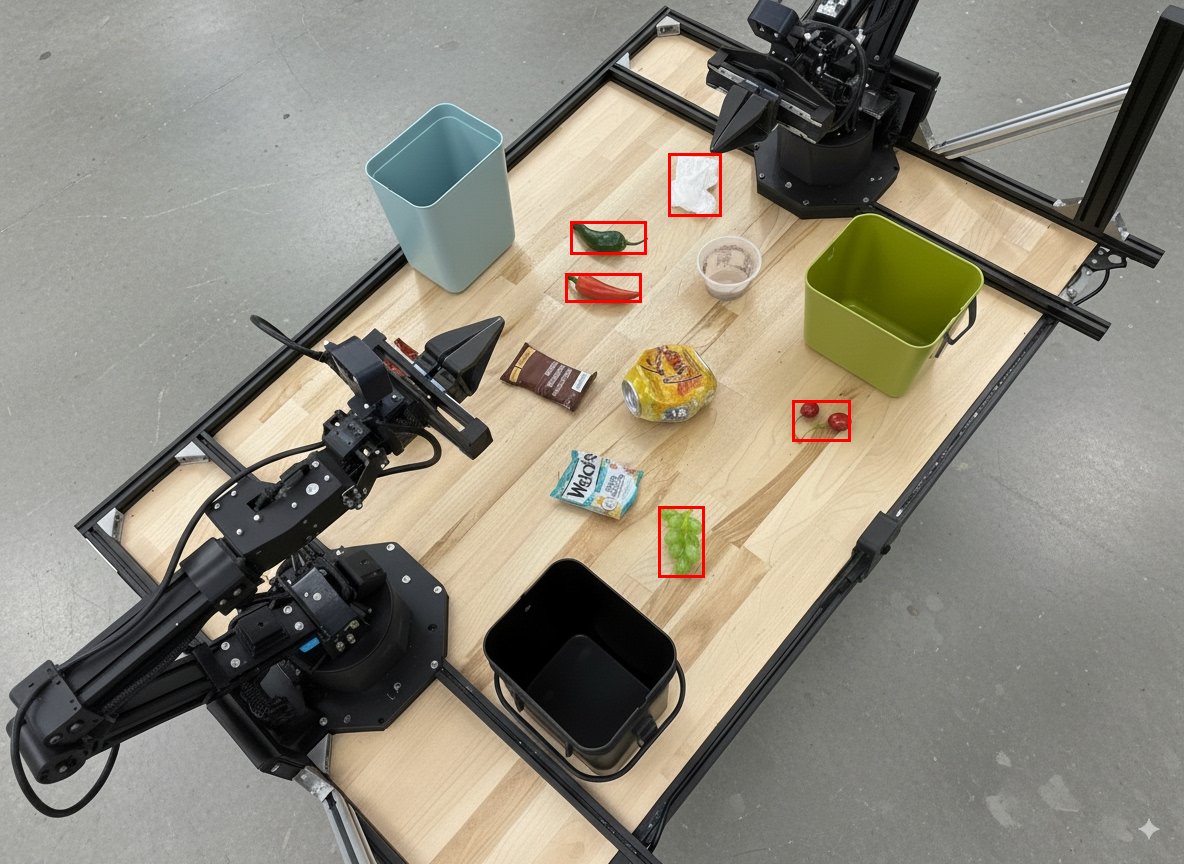
Shembulli i mëposhtëm përdor ekzekutimin e kodit për të zmadhuar dhe prerë një imazh për një pamje më të qartë kur zbulohen objekte dhe kthehen kutitë kufizuese.
Python
from google import genai

client = genai.Client()

uploaded_file = client.files.upload(file="sorting.jpeg")

prompt = """
Return JSON in the format {label: val, y: val, x: val, y2: val, x2: val} for
the compostable objects in this scene. Please Zoom and crop the image for a
clearer view. Return an annotated image of the final result with the bounding
boxes drawn on it to the API caller as a part of your process.
"""

interaction = client.interactions.create(
    model="gemini-robotics-er-2-preview",
    input=[
        {
            "type": "image",
            "uri": uploaded_file.uri,
            "mime_type": uploaded_file.mime_type
        },
        {"type": "text", "text": prompt}
    ],
    tools=[{"type": "code_execution"}]
)

print(interaction.output_text)
Rezultati i modelit do të ishte i ngjashëm me përgjigjen e mëposhtme json:
[
  {"label": "compostable", "y": 256, "x": 482, "y2": 295, "x2": 546},
  {"label": "compostable", "y": 317, "x": 478, "y2": 350, "x2": 542},
  {"label": "compostable", "y": 586, "x": 556, "y2": 668, "x2": 595},
  {"label": "compostable", "y": 463, "x": 669, "y2": 511, "x2": 718},
  {"label": "compostable", "y": 178, "x": 565, "y2": 250, "x2": 609}
]
Imazhi i mëposhtëm shfaq kutitë e kthyera nga modeli.
Lexoni një matës analog dhe zbatoni logjikën
Shembulli i mëposhtëm tregon se si të përdoret modeli për të lexuar një matës analog dhe për të kryer llogaritjet e kohës. Ai përdor një udhëzim sistemi për të zbatuar një dalje JSON.
Python
from google import genai

client = genai.Client()

uploaded_file = client.files.upload(file="gauge.jpeg")

interaction = client.interactions.create(
    model="gemini-robotics-er-2-preview",
    system_instruction="Be precise. When JSON is requested, reply with ONLY that JSON (no preface, no code block).",
    input=[
        {
            "type": "image",
            "uri": uploaded_file.uri,
            "mime_type": uploaded_file.mime_type
        },
        {"type": "text", "text": """Read the current value from this gauge. Then, calculate how long
        it will take at the current rate for the value to reach maximum.
        Reply in JSON: {"current_value": val, "max_value": val,
        "time_to_max_minutes": val}"""}
    ],
    tools=[{"type": "code_execution"}]
)

print(interaction.output_text)
Matni lëngun në një enë
Shembulli i mëposhtëm tregon se si të përdoret ekzekutimi i kodit për të matur nivelin e lëngut në një enë.
Python
from google import genai

client = genai.Client()

uploaded_file = client.files.upload(file="fluid.jpeg")

interaction = client.interactions.create(
    model="gemini-robotics-er-2-preview",
    system_instruction="Be precise. When JSON is requested, reply with ONLY that JSON (no preface, no code block).",
    input=[
        {
            "type": "image",
            "uri": uploaded_file.uri,
            "mime_type": uploaded_file.mime_type
        },
        {"type": "text", "text": """Measure the amount of fluid in the container. Reply in JSON:
        {"fluid_level_ml": val, "container_capacity_ml": val,
        "percentage_full": val}"""}
    ],
    tools=[{"type": "code_execution"}]
)

print(interaction.output_text)
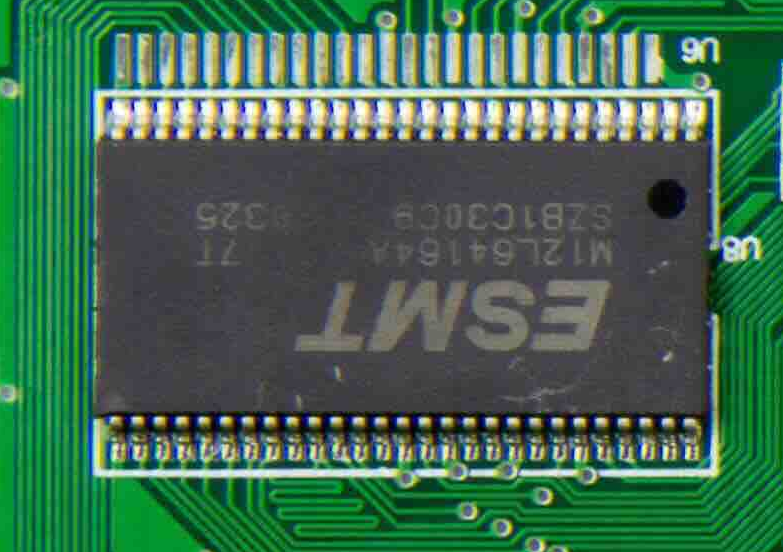
Lexoni shenjat në një qark të pllakës
Shembulli i mëposhtëm tregon se si të përdoret ekzekutimi i kodit për të lexuar shenjat në një qark elektrik.
Python
from google import genai

client = genai.Client()

uploaded_file = client.files.upload(file="circuit_board.jpeg")

interaction = client.interactions.create(
    model="gemini-robotics-er-2-preview",
    system_instruction="Be precise. When JSON is requested, reply with ONLY that JSON (no preface, no code block).",
    input=[
        {
            "type": "image",
            "uri": uploaded_file.uri,
            "mime_type": uploaded_file.mime_type
        },
        {"type": "text", "text": """Read all visible component labels and markings on this circuit
        board. Reply in JSON: {"components": [{"label": val,
        "location": [y, x]}]}"""}
    ],
    tools=[{"type": "code_execution"}]
)

print(interaction.output_text)
Shënim i imazhit
Shembulli i mëposhtëm tregon se si të përdoret ekzekutimi i kodit për të shënuar një imazh (p.sh., duke vizatuar shigjeta për udhëzime për asgjësimin) dhe për të kthyer imazhin e modifikuar.
Python
from google import genai

client = genai.Client()

# Load your image
uploaded_file = client.files.upload(file="sorting.jpeg")

prompt = """
Look at this image and return it as an annotated version using arrows of
different colors to represent which items should go in which bins for
disposal. You must return the final image to the API caller.
"""

interaction = client.interactions.create(
    model="gemini-robotics-er-2-preview",
    input=[
        {
            "type": "image",
            "uri": uploaded_file.uri,
            "mime_type": uploaded_file.mime_type
        },
        {"type": "text", "text": prompt}
    ],
    tools=[{"type": "code_execution"}]
)

print(interaction.output_text)
Më poshtë është një shembull i futjes së imazhit.
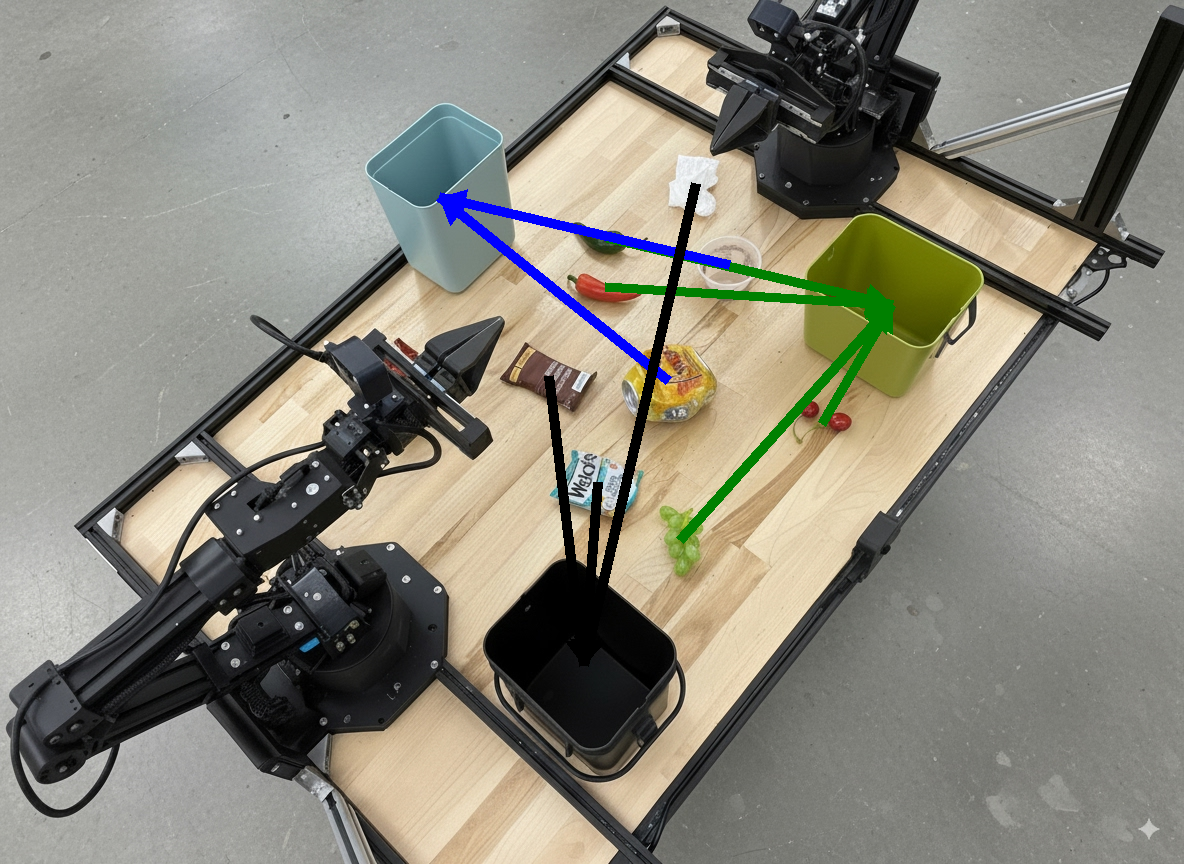
Prodhimi i modelit do të jetë i ngjashëm me sa vijon:
  The annotated image shows the suggested disposal locations for the items on the table:
  - **Green bin (Compost/Organic)**: Green chili, red chili, grapes, and cherries.
  - **Blue bin (Recycling)**: Yellow crushed can and plastic container.
  - **Black bin (Trash)**: Chocolate bar wrapper, Welch's packet, and white tissue.
Çfarë vjen më pas
- Orkestrimi i detyrave — detyra me horizont të gjatë me API-të e robotëve të personalizuar.
- Robotikë me transmetim — transmetim dypalësh në kohë reale (vetëm Gemini Robotics ER 2).
- Kuptimi i videos — gjetja e momenteve dhe klasifikimi i progresit (vetëm Gemini Robotics ER 2).
Modelet ER të Gemini Robotics mund të shkruajnë dhe ekzekutojnë kod Python për të manipuluar imazhet dhe për të aplikuar logjikën para se të përgjigjen. Kjo faqe mbulon shembuj të ekzekutimit të kodit: zbulimin e objekteve me zmadhim dhe prerje, leximin e instrumenteve, matjen e lëngjeve, leximin e qarkut dhe shënimin e imazhit.
Për t'i përshtatur këto shembuj sipas rastit tuaj të përdorimit, zëvendësoni tekstin e kërkesës dhe skedarin e imazhit të ngarkuar me tuajin. Gjithashtu mund ta rregulloni skemën JSON të kërkuar në kërkesë për t'iu përshtatur strukturës së daljes që i nevojitet aplikacionit tuaj, ose të shtoni një system_instruction për të zbatuar formatin dhe saktësinë e daljes.
Për kodin e plotë të ekzekutueshëm, shihni librin e gatimit të Robotics .
Niveli i të menduarit
Mund ta kontrolloni nivelin e të menduarit të modelit për të shkëmbyer vonesën me saktësi. Detyrat hapësinore si zbulimi i objekteve funksionojnë mirë me një nivel të ulët të të menduarit. Detyrat komplekse si numërimi ose vlerësimi i peshës përfitojnë nga një nivel më i lartë i të menduarit.
Shembulli i mëposhtëm e vendos nivelin e të menduarit në high për një detyrë komplekse numërimi:
Python
from google import genai

client = genai.Client()

uploaded_file = client.files.upload(file="scene.jpeg")

interaction = client.interactions.create(
    model="gemini-robotics-er-2-preview",
    input=[
        {
            "type": "image",
            "uri": uploaded_file.uri,
            "mime_type": uploaded_file.mime_type
        },
        {"type": "text", "text": "Identify and count all objects on the table."}
    ],
    generation_config={
        "thinking_level": "high"  # Use "minimal" or "low" for faster spatial tasks
    }
)

print(interaction.output_text)
Shihni Të menduarit për detaje.
Zbulimi i objekteve (Zmadhim dhe prerje)
Shembulli i mëposhtëm përdor ekzekutimin e kodit për të zmadhuar dhe prerë një imazh për një pamje më të qartë kur zbulohen objekte dhe kthehen kutitë kufizuese.
Python
from google import genai

client = genai.Client()

uploaded_file = client.files.upload(file="sorting.jpeg")

prompt = """
Return JSON in the format {label: val, y: val, x: val, y2: val, x2: val} for
the compostable objects in this scene. Please Zoom and crop the image for a
clearer view. Return an annotated image of the final result with the bounding
boxes drawn on it to the API caller as a part of your process.
"""

interaction = client.interactions.create(
    model="gemini-robotics-er-2-preview",
    input=[
        {
            "type": "image",
            "uri": uploaded_file.uri,
            "mime_type": uploaded_file.mime_type
        },
        {"type": "text", "text": prompt}
    ],
    tools=[{"type": "code_execution"}]
)

print(interaction.output_text)
Rezultati i modelit do të ishte i ngjashëm me përgjigjen e mëposhtme json:
[
  {"label": "compostable", "y": 256, "x": 482, "y2": 295, "x2": 546},
  {"label": "compostable", "y": 317, "x": 478, "y2": 350, "x2": 542},
  {"label": "compostable", "y": 586, "x": 556, "y2": 668, "x2": 595},
  {"label": "compostable", "y": 463, "x": 669, "y2": 511, "x2": 718},
  {"label": "compostable", "y": 178, "x": 565, "y2": 250, "x2": 609}
]
Imazhi i mëposhtëm shfaq kutitë e kthyera nga modeli.
Lexoni një matës analog dhe zbatoni logjikën
Shembulli i mëposhtëm tregon se si të përdoret modeli për të lexuar një matës analog dhe për të kryer llogaritjet e kohës. Ai përdor një udhëzim sistemi për të zbatuar një dalje JSON.
Python
from google import genai

client = genai.Client()

uploaded_file = client.files.upload(file="gauge.jpeg")

interaction = client.interactions.create(
    model="gemini-robotics-er-2-preview",
    system_instruction="Be precise. When JSON is requested, reply with ONLY that JSON (no preface, no code block).",
    input=[
        {
            "type": "image",
            "uri": uploaded_file.uri,
            "mime_type": uploaded_file.mime_type
        },
        {"type": "text", "text": """Read the current value from this gauge. Then, calculate how long
        it will take at the current rate for the value to reach maximum.
        Reply in JSON: {"current_value": val, "max_value": val,
        "time_to_max_minutes": val}"""}
    ],
    tools=[{"type": "code_execution"}]
)

print(interaction.output_text)
Matni lëngun në një enë
Shembulli i mëposhtëm tregon se si të përdoret ekzekutimi i kodit për të matur nivelin e lëngut në një enë.
Python
from google import genai

client = genai.Client()

uploaded_file = client.files.upload(file="fluid.jpeg")

interaction = client.interactions.create(
    model="gemini-robotics-er-2-preview",
    system_instruction="Be precise. When JSON is requested, reply with ONLY that JSON (no preface, no code block).",
    input=[
        {
            "type": "image",
            "uri": uploaded_file.uri,
            "mime_type": uploaded_file.mime_type
        },
        {"type": "text", "text": """Measure the amount of fluid in the container. Reply in JSON:
        {"fluid_level_ml": val, "container_capacity_ml": val,
        "percentage_full": val}"""}
    ],
    tools=[{"type": "code_execution"}]
)

print(interaction.output_text)
Lexoni shenjat në një qark të pllakës
Shembulli i mëposhtëm tregon se si të përdoret ekzekutimi i kodit për të lexuar shenjat në një qark elektrik.
Python
from google import genai

client = genai.Client()

uploaded_file = client.files.upload(file="circuit_board.jpeg")

interaction = client.interactions.create(
    model="gemini-robotics-er-2-preview",
    system_instruction="Be precise. When JSON is requested, reply with ONLY that JSON (no preface, no code block).",
    input=[
        {
            "type": "image",
            "uri": uploaded_file.uri,
            "mime_type": uploaded_file.mime_type
        },
        {"type": "text", "text": """Read all visible component labels and markings on this circuit
        board. Reply in JSON: {"components": [{"label": val,
        "location": [y, x]}]}"""}
    ],
    tools=[{"type": "code_execution"}]
)

print(interaction.output_text)
Shënim i imazhit
Shembulli i mëposhtëm tregon se si të përdoret ekzekutimi i kodit për të shënuar një imazh (p.sh., duke vizatuar shigjeta për udhëzime për asgjësimin) dhe për të kthyer imazhin e modifikuar.
Python
from google import genai

client = genai.Client()

# Load your image
uploaded_file = client.files.upload(file="sorting.jpeg")

prompt = """
Look at this image and return it as an annotated version using arrows of
different colors to represent which items should go in which bins for
disposal. You must return the final image to the API caller.
"""

interaction = client.interactions.create(
    model="gemini-robotics-er-2-preview",
    input=[
        {
            "type": "image",
            "uri": uploaded_file.uri,
            "mime_type": uploaded_file.mime_type
        },
        {"type": "text", "text": prompt}
    ],
    tools=[{"type": "code_execution"}]
)

print(interaction.output_text)
Më poshtë është një shembull i futjes së imazhit.
Prodhimi i modelit do të jetë i ngjashëm me sa vijon:
  The annotated image shows the suggested disposal locations for the items on the table:
  - **Green bin (Compost/Organic)**: Green chili, red chili, grapes, and cherries.
  - **Blue bin (Recycling)**: Yellow crushed can and plastic container.
  - **Black bin (Trash)**: Chocolate bar wrapper, Welch's packet, and white tissue.
Çfarë vjen më pas
- Orkestrimi i detyrave — detyra me horizont të gjatë me API-të e robotëve të personalizuar.
- Robotikë me transmetim — transmetim dypalësh në kohë reale (vetëm Gemini Robotics ER 2).
- Kuptimi i videos — gjetja e momenteve dhe klasifikimi i progresit (vetëm Gemini Robotics ER 2).
Modelet ER të Gemini Robotics mund të shkruajnë dhe ekzekutojnë kod Python për të manipuluar imazhet dhe për të aplikuar logjikën para se të përgjigjen. Kjo faqe mbulon shembuj të ekzekutimit të kodit: zbulimin e objekteve me zmadhim dhe prerje, leximin e instrumenteve, matjen e lëngjeve, leximin e qarkut dhe shënimin e imazhit.
Për t'i përshtatur këto shembuj sipas rastit tuaj të përdorimit, zëvendësoni tekstin e kërkesës dhe skedarin e imazhit të ngarkuar me tuajin. Gjithashtu mund ta rregulloni skemën JSON të kërkuar në kërkesë për t'iu përshtatur strukturës së daljes që i nevojitet aplikacionit tuaj, ose të shtoni një system_instruction për të zbatuar formatin dhe saktësinë e daljes.
Për kodin e plotë të ekzekutueshëm, shihni librin e gatimit të Robotics .
Niveli i të menduarit
Mund ta kontrolloni nivelin e të menduarit të modelit për të shkëmbyer vonesën me saktësi. Detyrat hapësinore si zbulimi i objekteve funksionojnë mirë me një nivel të ulët të të menduarit. Detyrat komplekse si numërimi ose vlerësimi i peshës përfitojnë nga një nivel më i lartë i të menduarit.
Shembulli i mëposhtëm e vendos nivelin e të menduarit në high për një detyrë komplekse numërimi:
Python
from google import genai

client = genai.Client()

uploaded_file = client.files.upload(file="scene.jpeg")

interaction = client.interactions.create(
    model="gemini-robotics-er-2-preview",
    input=[
        {
            "type": "image",
            "uri": uploaded_file.uri,
            "mime_type": uploaded_file.mime_type
        },
        {"type": "text", "text": "Identify and count all objects on the table."}
    ],
    generation_config={
        "thinking_level": "high"  # Use "minimal" or "low" for faster spatial tasks
    }
)

print(interaction.output_text)
Shihni Të menduarit për detaje.
Zbulimi i objekteve (Zmadhim dhe prerje)
Shembulli i mëposhtëm përdor ekzekutimin e kodit për të zmadhuar dhe prerë një imazh për një pamje më të qartë kur zbulohen objekte dhe kthehen kutitë kufizuese.
Python
from google import genai

client = genai.Client()

uploaded_file = client.files.upload(file="sorting.jpeg")

prompt = """
Return JSON in the format {label: val, y: val, x: val, y2: val, x2: val} for
the compostable objects in this scene. Please Zoom and crop the image for a
clearer view. Return an annotated image of the final result with the bounding
boxes drawn on it to the API caller as a part of your process.
"""

interaction = client.interactions.create(
    model="gemini-robotics-er-2-preview",
    input=[
        {
            "type": "image",
            "uri": uploaded_file.uri,
            "mime_type": uploaded_file.mime_type
        },
        {"type": "text", "text": prompt}
    ],
    tools=[{"type": "code_execution"}]
)

print(interaction.output_text)
Rezultati i modelit do të ishte i ngjashëm me përgjigjen e mëposhtme json:
[
  {"label": "compostable", "y": 256, "x": 482, "y2": 295, "x2": 546},
  {"label": "compostable", "y": 317, "x": 478, "y2": 350, "x2": 542},
  {"label": "compostable", "y": 586, "x": 556, "y2": 668, "x2": 595},
  {"label": "compostable", "y": 463, "x": 669, "y2": 511, "x2": 718},
  {"label": "compostable", "y": 178, "x": 565, "y2": 250, "x2": 609}
]
Imazhi i mëposhtëm shfaq kutitë e kthyera nga modeli.
Lexoni një matës analog dhe zbatoni logjikën
Shembulli i mëposhtëm tregon se si të përdoret modeli për të lexuar një matës analog dhe për të kryer llogaritjet e kohës. Ai përdor një udhëzim sistemi për të zbatuar një dalje JSON.
Python
from google import genai

client = genai.Client()

uploaded_file = client.files.upload(file="gauge.jpeg")

interaction = client.interactions.create(
    model="gemini-robotics-er-2-preview",
    system_instruction="Be precise. When JSON is requested, reply with ONLY that JSON (no preface, no code block).",
    input=[
        {
            "type": "image",
            "uri": uploaded_file.uri,
            "mime_type": uploaded_file.mime_type
        },
        {"type": "text", "text": """Read the current value from this gauge. Then, calculate how long
        it will take at the current rate for the value to reach maximum.
        Reply in JSON: {"current_value": val, "max_value": val,
        "time_to_max_minutes": val}"""}
    ],
    tools=[{"type": "code_execution"}]
)

print(interaction.output_text)
Matni lëngun në një enë
Shembulli i mëposhtëm tregon se si të përdoret ekzekutimi i kodit për të matur nivelin e lëngut në një enë.
Python
from google import genai

client = genai.Client()

uploaded_file = client.files.upload(file="fluid.jpeg")

interaction = client.interactions.create(
    model="gemini-robotics-er-2-preview",
    system_instruction="Be precise. When JSON is requested, reply with ONLY that JSON (no preface, no code block).",
    input=[
        {
            "type": "image",
            "uri": uploaded_file.uri,
            "mime_type": uploaded_file.mime_type
        },
        {"type": "text", "text": """Measure the amount of fluid in the container. Reply in JSON:
        {"fluid_level_ml": val, "container_capacity_ml": val,
        "percentage_full": val}"""}
    ],
    tools=[{"type": "code_execution"}]
)

print(interaction.output_text)
Lexoni shenjat në një qark të pllakës
Shembulli i mëposhtëm tregon se si të përdoret ekzekutimi i kodit për të lexuar shenjat në një qark elektrik.
Python
from google import genai

client = genai.Client()

uploaded_file = client.files.upload(file="circuit_board.jpeg")

interaction = client.interactions.create(
    model="gemini-robotics-er-2-preview",
    system_instruction="Be precise. When JSON is requested, reply with ONLY that JSON (no preface, no code block).",
    input=[
        {
            "type": "image",
            "uri": uploaded_file.uri,
            "mime_type": uploaded_file.mime_type
        },
        {"type": "text", "text": """Read all visible component labels and markings on this circuit
        board. Reply in JSON: {"components": [{"label": val,
        "location": [y, x]}]}"""}
    ],
    tools=[{"type": "code_execution"}]
)

print(interaction.output_text)
Shënim i imazhit
Shembulli i mëposhtëm tregon se si të përdoret ekzekutimi i kodit për të shënuar një imazh (p.sh., duke vizatuar shigjeta për udhëzime për asgjësimin) dhe për të kthyer imazhin e modifikuar.
Python
from google import genai

client = genai.Client()

# Load your image
uploaded_file = client.files.upload(file="sorting.jpeg")

prompt = """
Look at this image and return it as an annotated version using arrows of
different colors to represent which items should go in which bins for
disposal. You must return the final image to the API caller.
"""

interaction = client.interactions.create(
    model="gemini-robotics-er-2-preview",
    input=[
        {
            "type": "image",
            "uri": uploaded_file.uri,
            "mime_type": uploaded_file.mime_type
        },
        {"type": "text", "text": prompt}
    ],
    tools=[{"type": "code_execution"}]
)

print(interaction.output_text)
Më poshtë është një shembull i futjes së imazhit.
Prodhimi i modelit do të jetë i ngjashëm me sa vijon:
  The annotated image shows the suggested disposal locations for the items on the table:
  - **Green bin (Compost/Organic)**: Green chili, red chili, grapes, and cherries.
  - **Blue bin (Recycling)**: Yellow crushed can and plastic container.
  - **Black bin (Trash)**: Chocolate bar wrapper, Welch's packet, and white tissue.
Çfarë vjen më pas
- Orkestrimi i detyrave — detyra me horizont të gjatë me API-të e robotëve të personalizuar.
- Robotikë me transmetim — transmetim dypalësh në kohë reale (vetëm Gemini Robotics ER 2).
- Kuptimi i videos — gjetja e momenteve dhe klasifikimi i progresit (vetëm Gemini Robotics ER 2).
Modelet ER të Gemini Robotics mund të shkruajnë dhe ekzekutojnë kod Python për të manipuluar imazhet dhe për të aplikuar logjikën para se të përgjigjen. Kjo faqe mbulon shembuj të ekzekutimit të kodit: zbulimin e objekteve me zmadhim dhe prerje, leximin e instrumenteve, matjen e lëngjeve, leximin e qarkut dhe shënimin e imazhit.
Për t'i përshtatur këto shembuj sipas rastit tuaj të përdorimit, zëvendësoni tekstin e kërkesës dhe skedarin e imazhit të ngarkuar me tuajin. Gjithashtu mund ta rregulloni skemën JSON të kërkuar në kërkesë për t'iu përshtatur strukturës së daljes që i nevojitet aplikacionit tuaj, ose të shtoni një system_instruction për të zbatuar formatin dhe saktësinë e daljes.
Për kodin e plotë të ekzekutueshëm, shihni librin e gatimit të Robotics .
Niveli i të menduarit
Mund ta kontrolloni nivelin e të menduarit të modelit për të shkëmbyer vonesën me saktësi. Detyrat hapësinore si zbulimi i objekteve funksionojnë mirë me një nivel të ulët të të menduarit. Detyrat komplekse si numërimi ose vlerësimi i peshës përfitojnë nga një nivel më i lartë i të menduarit.
Shembulli i mëposhtëm e vendos nivelin e të menduarit në high për një detyrë komplekse numërimi:
Python
from google import genai

client = genai.Client()

uploaded_file = client.files.upload(file="scene.jpeg")

interaction = client.interactions.create(
    model="gemini-robotics-er-2-preview",
    input=[
        {
            "type": "image",
            "uri": uploaded_file.uri,
            "mime_type": uploaded_file.mime_type
        },
        {"type": "text", "text": "Identify and count all objects on the table."}
    ],
    generation_config={
        "thinking_level": "high"  # Use "minimal" or "low" for faster spatial tasks
    }
)

print(interaction.output_text)
Shihni Të menduarit për detaje.
Zbulimi i objekteve (Zmadhim dhe prerje)
Shembulli i mëposhtëm përdor ekzekutimin e kodit për të zmadhuar dhe prerë një imazh për një pamje më të qartë kur zbulohen objekte dhe kthehen kutitë kufizuese.
Python
from google import genai

client = genai.Client()

uploaded_file = client.files.upload(file="sorting.jpeg")

prompt = """
Return JSON in the format {label: val, y: val, x: val, y2: val, x2: val} for
the compostable objects in this scene. Please Zoom and crop the image for a
clearer view. Return an annotated image of the final result with the bounding
boxes drawn on it to the API caller as a part of your process.
"""

interaction = client.interactions.create(
    model="gemini-robotics-er-2-preview",
    input=[
        {
            "type": "image",
            "uri": uploaded_file.uri,
            "mime_type": uploaded_file.mime_type
        },
        {"type": "text", "text": prompt}
    ],
    tools=[{"type": "code_execution"}]
)

print(interaction.output_text)
Rezultati i modelit do të ishte i ngjashëm me përgjigjen e mëposhtme json:
[
  {"label": "compostable", "y": 256, "x": 482, "y2": 295, "x2": 546},
  {"label": "compostable", "y": 317, "x": 478, "y2": 350, "x2": 542},
  {"label": "compostable", "y": 586, "x": 556, "y2": 668, "x2": 595},
  {"label": "compostable", "y": 463, "x": 669, "y2": 511, "x2": 718},
  {"label": "compostable", "y": 178, "x": 565, "y2": 250, "x2": 609}
]
Imazhi i mëposhtëm shfaq kutitë e kthyera nga modeli.
Lexoni një matës analog dhe zbatoni logjikën
Shembulli i mëposhtëm tregon se si të përdoret modeli për të lexuar një matës analog dhe për të kryer llogaritjet e kohës. Ai përdor një udhëzim sistemi për të zbatuar një dalje JSON.
Python
from google import genai

client = genai.Client()

uploaded_file = client.files.upload(file="gauge.jpeg")

interaction = client.interactions.create(
    model="gemini-robotics-er-2-preview",
    system_instruction="Be precise. When JSON is requested, reply with ONLY that JSON (no preface, no code block).",
    input=[
        {
            "type": "image",
            "uri": uploaded_file.uri,
            "mime_type": uploaded_file.mime_type
        },
        {"type": "text", "text": """Read the current value from this gauge. Then, calculate how long
        it will take at the current rate for the value to reach maximum.
        Reply in JSON: {"current_value": val, "max_value": val,
        "time_to_max_minutes": val}"""}
    ],
    tools=[{"type": "code_execution"}]
)

print(interaction.output_text)
Matni lëngun në një enë
Shembulli i mëposhtëm tregon se si të përdoret ekzekutimi i kodit për të matur nivelin e lëngut në një enë.
Python
from google import genai

client = genai.Client()

uploaded_file = client.files.upload(file="fluid.jpeg")

interaction = client.interactions.create(
    model="gemini-robotics-er-2-preview",
    system_instruction="Be precise. When JSON is requested, reply with ONLY that JSON (no preface, no code block).",
    input=[
        {
            "type": "image",
            "uri": uploaded_file.uri,
            "mime_type": uploaded_file.mime_type
        },
        {"type": "text", "text": """Measure the amount of fluid in the container. Reply in JSON:
        {"fluid_level_ml": val, "container_capacity_ml": val,
        "percentage_full": val}"""}
    ],
    tools=[{"type": "code_execution"}]
)

print(interaction.output_text)
Lexoni shenjat në një qark të pllakës
Shembulli i mëposhtëm tregon se si të përdoret ekzekutimi i kodit për të lexuar shenjat në një qark elektrik.
Python
from google import genai

client = genai.Client()

uploaded_file = client.files.upload(file="circuit_board.jpeg")

interaction = client.interactions.create(
    model="gemini-robotics-er-2-preview",
    system_instruction="Be precise. When JSON is requested, reply with ONLY that JSON (no preface, no code block).",
    input=[
        {
            "type": "image",
            "uri": uploaded_file.uri,
            "mime_type": uploaded_file.mime_type
        },
        {"type": "text", "text": """Read all visible component labels and markings on this circuit
        board. Reply in JSON: {"components": [{"label": val,
        "location": [y, x]}]}"""}
    ],
    tools=[{"type": "code_execution"}]
)

print(interaction.output_text)
Shënim i imazhit
Shembulli i mëposhtëm tregon se si të përdoret ekzekutimi i kodit për të shënuar një imazh (p.sh., duke vizatuar shigjeta për udhëzime për asgjësimin) dhe për të kthyer imazhin e modifikuar.
Python
from google import genai

client = genai.Client()

# Load your image
uploaded_file = client.files.upload(file="sorting.jpeg")

prompt = """
Look at this image and return it as an annotated version using arrows of
different colors to represent which items should go in which bins for
disposal. You must return the final image to the API caller.
"""

interaction = client.interactions.create(
    model="gemini-robotics-er-2-preview",
    input=[
        {
            "type": "image",
            "uri": uploaded_file.uri,
            "mime_type": uploaded_file.mime_type
        },
        {"type": "text", "text": prompt}
    ],
    tools=[{"type": "code_execution"}]
)

print(interaction.output_text)
Më poshtë është një shembull i futjes së imazhit.
Prodhimi i modelit do të jetë i ngjashëm me sa vijon:
  The annotated image shows the suggested disposal locations for the items on the table:
  - **Green bin (Compost/Organic)**: Green chili, red chili, grapes, and cherries.
  - **Blue bin (Recycling)**: Yellow crushed can and plastic container.
  - **Black bin (Trash)**: Chocolate bar wrapper, Welch's packet, and white tissue.
Çfarë vjen më pas
- Orkestrimi i detyrave — detyra me horizont të gjatë me API-të e robotëve të personalizuar.
- Robotikë me transmetim — transmetim dypalësh në kohë reale (vetëm Gemini Robotics ER 2).
- Kuptimi i videos — gjetja e momenteve dhe klasifikimi i progresit (vetëm Gemini Robotics ER 2).