

يمكن لنماذج Gemini Robotics ER التخطيط للمهام والاستدلال على المساحة، ما يتيح لها تحديد الإجراءات التي يجب اتّخاذها والأشياء التي يجب نقلها لإكمال هدف معيّن. تعرض هذه الصفحة مثالاً على تنفيذ عملية اختيار ونقل من خلال واجهة برمجة تطبيقات مخصّصة للروبوتات لتنظيم مهمة وضع عنصر في وعاء. يستخدم هذا المثال نموذج Gemini ER 2 العادي. للحصول على مثال على البث ، يُرجى الاطّلاع على دليل البث في Gemini ER 2.
للاطّلاع على رمز قابل للتنفيذ بالكامل، يُرجى الرجوع إلى كتاب وصفات Robotics.
استخدام واجهة برمجة تطبيقات مخصّصة للروبوتات
يوضّح هذا المثال تنظيم المهام باستخدام واجهة برمجة تطبيقات مخصّصة للروبوتات. ويقدّم واجهة برمجة تطبيقات وهمية مصمّمة لعملية اختيار ونقل. المهمة هي التقاط مكعّب أزرق ووضعه في وعاء برتقالي:
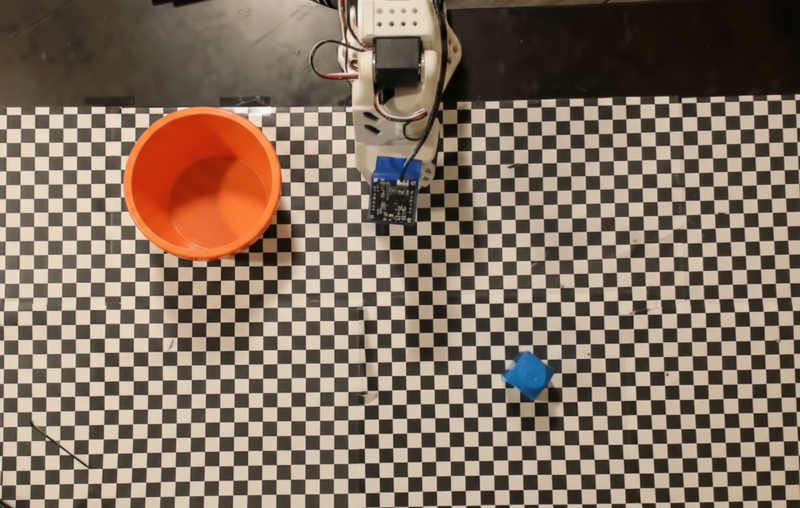
يستخدم هذا المثال واجهة برمجة التطبيقات الوهمية التالية للروبوتات:
Python
def move(x, y, high):
  print(f"Mock Robot: Moving to coordinates: {x}, {y}, {'high above table' if high else 'down at table level'}")

def setGripperState(opened):
  print(f"Mock Robot: {'Opening gripper' if opened else 'Closing gripper'}")

robot_origin_y = 300
robot_origin_x = 500

move_function = {
    "type": "function",
    "name": "move",
    "description": "Moves the arm to the given coordinates.",
    "parameters": {
        "type": "object",
        "properties": {
            "x": {"type": "integer", "description": "X coordinate relative to the origin"},
            "y": {"type": "integer", "description": "Y coordinate relative to the origin"},
            "high": {"type": "boolean", "description": "Set to True to lift the robot arm above the scene for avoiding obstacles. Set to False to place the gripper on the surface."}
        },
        "required": ["x", "y", "high"]
    }
}

set_gripper_state_function = {
    "type": "function",
    "name": "setGripperState",
    "description": "Opens or closes the robot's gripper.",
    "parameters": {
        "type": "object",
        "properties": {
            "opened": {"type": "boolean", "description": "True opens the gripper, False closes the gripper."}
        },
        "required": ["opened"]
    }
}
يرسل المثال التالي الطلب والصورة إلى النموذج مع تعريفات الأدوات. ثم يتم تشغيل حلقة الوكيل: بعد كل استجابة من النموذج، يتم تنفيذ أي استدعاءات مطلوبة للدوال (move وsetGripperState)، ويتم إرجاع النتائج إلى النموذج باستخدام previous_interaction_id، وتتكرّر العملية إلى أن يتوقف النموذج عن استدعاء الدوال أو يتم بلوغ الحد الأقصى للخطوات.
Python
prompt = (
    "You are a robotic arm with six degrees-of-freedom. "
    f"The origin point for calculating the moves is at normalized point y={robot_origin_y}, x={robot_origin_x}. "
    "Use this as the new (0,0) for calculating moves, allowing x and y to be negative.\n\n"
    "Find the blue block and the orange bowl. Calculate their coordinates relative to the origin.\n"
    "Perform a pick and place operation where you pick up the blue block and place it into the orange bowl. "
    "Call the appropriate sequence of functions to complete this operation."
)

# 1. Initial Interaction
interaction = client.interactions.create(
    model=MODEL_ID,
    input=[{"type": "user_input", "content": [
        {"type": "image", "data": img_b64, "mime_type": "image/png"},
        {"type": "text", "text": prompt}
    ]}],
    tools=[move_function, set_gripper_state_function],
    generation_config={"thinking_level": "low"}
)

print("\n--- Executing Orchestrated Plan ---")

max_steps = 15 # Safety limit to prevent infinite loops
step_count = 0

# 2. The Agentic Loop
while step_count < max_steps:
    step_count += 1

    # Check if the model wants to call any functions
    tool_calls = [step for step in interaction.steps if step.type == "function_call"]

    if not tool_calls:
        # If no tools were called, the model is finished with the sequence
        print("Sequence complete.")
        if interaction.output_text:
            print(f"Model Summary: {interaction.output_text}")
        break

    function_results = []

    for step in tool_calls:
        function_name = step.name
        arguments = step.arguments

        # Execute the mock function
        if function_name == "move":
            move(**arguments)
        elif function_name == "setGripperState":
            setGripperState(**arguments)
        else:
            print(f"Unknown function: {function_name}")

        # 3. Create a result object to tell the model the function succeeded
        function_results.append({
            "type": "function_result",
            "name": step.name,
            "call_id": step.id,
            "result": [{"type": "text", "text": '{"status": "success"}'}]
        })

    # 4. Send the results back to the model, passing previous_interaction_id
    # so it remembers the conversation history and generates the NEXT step
    interaction = client.interactions.create(
        model=MODEL_ID,
        previous_interaction_id=interaction.id,
        tools=[move_function, set_gripper_state_function],
        input=function_results
    )
يعرض ما يلي ناتجًا محتملاً للنموذج استنادًا إلى الطلب وواجهة برمجة التطبيقات الوهمية للروبوتات. يشمل الناتج ناتج استدعاءات دوال الروبوت التي رتّبها النموذج معًا.
--- Executing Orchestrated Plan ---
Mock Robot: Opening gripper
Mock Robot: Moving to coordinates: 160, 440, high above table
Mock Robot: Moving to coordinates: 160, 440, down at table level
Mock Robot: Closing gripper
Mock Robot: Moving to coordinates: 160, 440, high above table
Mock Robot: Moving to coordinates: -250, 60, high above table
Mock Robot: Moving to coordinates: -250, 60, down at table level
Mock Robot: Opening gripper
Mock Robot: Moving to coordinates: -250, 60, high above table
Sequence complete.
Model Summary: I have completed the task of picking up the blue block and placing it into the orange bowl.
الخطوات التالية
- الروبوتات مع البث: البث في الوقت الفعلي مع استدعاء الدوال (Gemini Robotics ER 2 فقط)
- فهم الفيديو: تتبُّع تقدّم المهام من الفيديو (ER 2 فقط)
- الاستدلال المكاني: أمثلة على الإشارة والتتبُّع ومربع الإحاطة