

Los modelos de Gemini Robotics ER pueden planificar tareas y razonar sobre el espacio, lo que infiere qué acciones tomar y qué objetos mover para completar un objetivo. En esta página se muestra un ejemplo para controlar una operación de selección y colocación a través de una API de robot personalizada para organizar la tarea de colocar un elemento en un tazón. En este ejemplo, se usa el modelo estándar de Gemini ER 2. Para ver un ejemplo de transmisión, consulta la guía de transmisión de Gemini ER 2.
Para obtener el código ejecutable completo, consulta el libro de recetas de robótica.
Usa una API de robot personalizada
En este ejemplo, se muestra la organización de tareas con una API de robot personalizada. Se presenta una API simulada diseñada para una operación de selección y colocación. La tarea consiste en recoger un bloque azul y colocarlo en un tazón naranja:
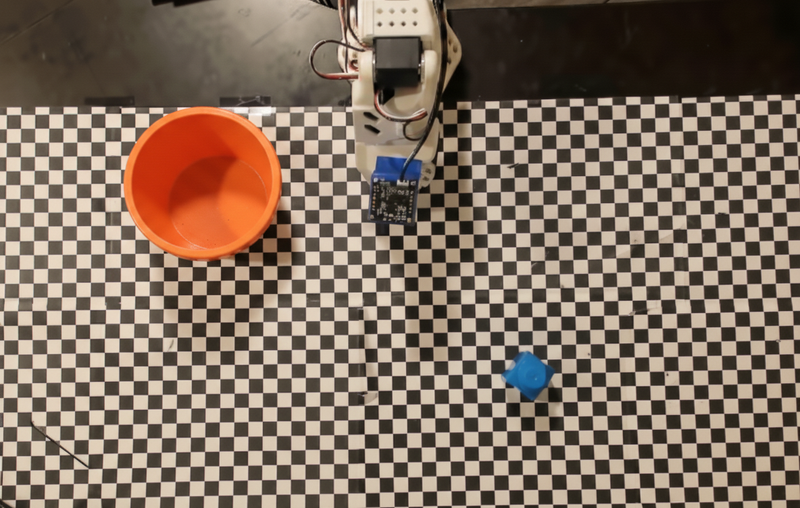
En este ejemplo, se usa la siguiente API de robot simulada:
Python
def move(x, y, high):
  print(f"Mock Robot: Moving to coordinates: {x}, {y}, {'high above table' if high else 'down at table level'}")

def setGripperState(opened):
  print(f"Mock Robot: {'Opening gripper' if opened else 'Closing gripper'}")

robot_origin_y = 300
robot_origin_x = 500

move_function = {
    "type": "function",
    "name": "move",
    "description": "Moves the arm to the given coordinates.",
    "parameters": {
        "type": "object",
        "properties": {
            "x": {"type": "integer", "description": "X coordinate relative to the origin"},
            "y": {"type": "integer", "description": "Y coordinate relative to the origin"},
            "high": {"type": "boolean", "description": "Set to True to lift the robot arm above the scene for avoiding obstacles. Set to False to place the gripper on the surface."}
        },
        "required": ["x", "y", "high"]
    }
}

set_gripper_state_function = {
    "type": "function",
    "name": "setGripperState",
    "description": "Opens or closes the robot's gripper.",
    "parameters": {
        "type": "object",
        "properties": {
            "opened": {"type": "boolean", "description": "True opens the gripper, False closes the gripper."}
        },
        "required": ["opened"]
    }
}
En el siguiente ejemplo, se envían la instrucción y la imagen al modelo con las definiciones de herramientas. Luego, se ejecuta un bucle de agente: después de cada respuesta del modelo, se ejecutan las llamadas a funciones solicitadas (move, setGripperState), se devuelven los resultados al modelo con previous_interaction_id y se repite hasta que el modelo deja de llamar a funciones o se alcanza el límite de pasos.
Python
prompt = (
    "You are a robotic arm with six degrees-of-freedom. "
    f"The origin point for calculating the moves is at normalized point y={robot_origin_y}, x={robot_origin_x}. "
    "Use this as the new (0,0) for calculating moves, allowing x and y to be negative.\n\n"
    "Find the blue block and the orange bowl. Calculate their coordinates relative to the origin.\n"
    "Perform a pick and place operation where you pick up the blue block and place it into the orange bowl. "
    "Call the appropriate sequence of functions to complete this operation."
)

# 1. Initial Interaction
interaction = client.interactions.create(
    model=MODEL_ID,
    input=[{"type": "user_input", "content": [
        {"type": "image", "data": img_b64, "mime_type": "image/png"},
        {"type": "text", "text": prompt}
    ]}],
    tools=[move_function, set_gripper_state_function],
    generation_config={"thinking_level": "low"}
)

print("\n--- Executing Orchestrated Plan ---")

max_steps = 15 # Safety limit to prevent infinite loops
step_count = 0

# 2. The Agentic Loop
while step_count < max_steps:
    step_count += 1

    # Check if the model wants to call any functions
    tool_calls = [step for step in interaction.steps if step.type == "function_call"]

    if not tool_calls:
        # If no tools were called, the model is finished with the sequence
        print("Sequence complete.")
        if interaction.output_text:
            print(f"Model Summary: {interaction.output_text}")
        break

    function_results = []

    for step in tool_calls:
        function_name = step.name
        arguments = step.arguments

        # Execute the mock function
        if function_name == "move":
            move(**arguments)
        elif function_name == "setGripperState":
            setGripperState(**arguments)
        else:
            print(f"Unknown function: {function_name}")

        # 3. Create a result object to tell the model the function succeeded
        function_results.append({
            "type": "function_result",
            "name": step.name,
            "call_id": step.id,
            "result": [{"type": "text", "text": '{"status": "success"}'}]
        })

    # 4. Send the results back to the model, passing previous_interaction_id
    # so it remembers the conversation history and generates the NEXT step
    interaction = client.interactions.create(
        model=MODEL_ID,
        previous_interaction_id=interaction.id,
        tools=[move_function, set_gripper_state_function],
        input=function_results
    )
A continuación, se muestra un resultado posible del modelo basado en la instrucción y la API de robot simulada. El resultado incluye el resultado de las llamadas a funciones del robot que el modelo secuenció.
--- Executing Orchestrated Plan ---
Mock Robot: Opening gripper
Mock Robot: Moving to coordinates: 160, 440, high above table
Mock Robot: Moving to coordinates: 160, 440, down at table level
Mock Robot: Closing gripper
Mock Robot: Moving to coordinates: 160, 440, high above table
Mock Robot: Moving to coordinates: -250, 60, high above table
Mock Robot: Moving to coordinates: -250, 60, down at table level
Mock Robot: Opening gripper
Mock Robot: Moving to coordinates: -250, 60, high above table
Sequence complete.
Model Summary: I have completed the task of picking up the blue block and placing it into the orange bowl.
¿Qué sigue?
- Robótica con transmisión: Transmisión en tiempo real con llamadas a funciones (solo Gemini Robotics ER 2)
- Comprensión de video: Realiza un seguimiento del progreso de las tareas desde el video (solo ER 2)
- Razonamiento espacial: Ejemplos de señalamiento, seguimiento y cuadros delimitadores.