

Gemini Robotics ER (具身推論) 模型是視覺語言模型 (VLM),可讓機器人感知實體世界並與之互動。解讀視覺資料、執行空間和時間推論、規劃多步驟工作,以及自動調度管理機器人和工具。
模型
Gemini Robotics ER 2 模型是 Gemini Robotics 的最新模型。 這是我們更新的推論模型,可讓機器人精確瞭解環境。這項技術專門用於具身推論功能,例如代理程式協調機器人 (例如使用 VLA)、瞭解機器人影片 (包括瞭解進度和偵測成功)、讀取儀表、指向和空間推論。
Gemini Robotics ER 2 模型推出兩個模型端點:
gemini-robotics-er-2-preview:標準 ER 2 模型。以 Gemini 3.5 Flash 為基礎,改善空間推理、影片片段搜尋、影片進度分類、多機器人協調和多步驟工具使用。gemini-robotics-er-2-streaming-preview:透過 Live API 進行即時串流時,可獲得最佳體驗。這個模型適用於低延遲的機器人代理程式,可處理連續的音訊和視訊輸入內容。
如果您使用 Gemini Robotics ER 1.6,請在 API 呼叫中將 model="gemini-robotics-er-1.6-preview" 替換為 model="gemini-robotics-er-2-preview" 或 model="gemini-robotics-er-2-streaming-preview",升級至 Gemini Robotics ER 2。請注意,Gemini Robotics ER 1.6 模型將於 8 月底停用。
在 Google AI Studio 中試用 Gemini Robotics ER 2
機器人功能
Gemini Robotics ER 支援多種具身推論功能。 選取功能即可瞭解詳情:
| 功能 | 說明 | 指南 |
|---|---|---|
| 空間推論 | 指向物件、在影片中追蹤物件、使用定界框偵測物件,以及規劃軌跡。 | 空間推論 |
| 代理式願景 | 運用圖片處理工具,透過執行程式碼功能提升其他功能。 | 代理願景 |
| 工作自動化調度管理 | 結合空間推論和自訂機器人 API,完成長期任務。 | 工作自動化調度管理 |
| 串流 (僅限 Gemini Robotics ER 2 串流端點) | 雙向串流,適用於低延遲的即時機器人代理程式,可呼叫函式。 | 機器人串流 |
| 影片進度 (僅限 Gemini Robotics ER 2) | 從連續影片動態饋給中尋找重要時刻,並分類進度。 | 影片理解 |
開始使用
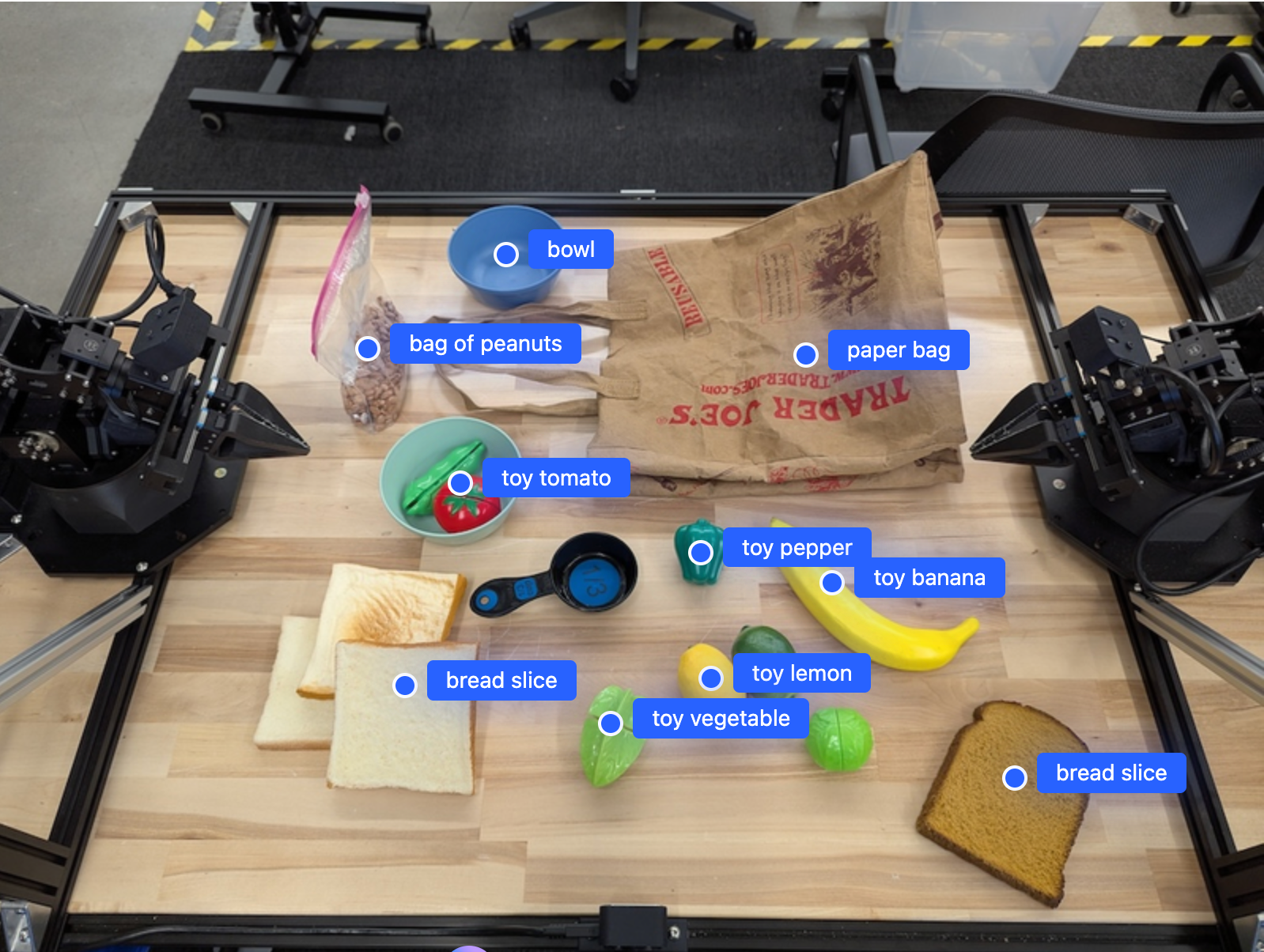
以下範例會在圖片中尋找物件,並傳回物件的標準化 2D 座標和標籤。您可以將這項輸出內容直接傳遞至機器人 API 或 VLA 模型,產生機器人動作。
Python
from google import genai

PROMPT = """
          Point to no more than 10 items in the image. The label returned
          should be an identifying name for the object detected.
          The answer should follow the json format: [{"point": <point>,
          "label": <label1>}, ...]. The points are in [y, x] format
          normalized to 0-1000.
        """
client = genai.Client()

uploaded_file = client.files.upload(file="my-image.png")

image_response = client.interactions.create(
    model="gemini-robotics-er-2-preview",
    input=[
        {
            "type": "image",
            "uri": uploaded_file.uri,
            "mime_type": uploaded_file.mime_type
        },
        {"type": "text", "text": PROMPT}
    ],
    generation_config={"thinking_level": "high"},
)

print(image_response.output_text)
JavaScript
import { GoogleGenAI } from "@google/genai";

const PROMPT = `
  Point to no more than 10 items in the image. The label returned
  should be an identifying name for the object detected.
  The answer should follow the json format: [{"point": <point>,
  "label": <label1>}, ...]. The points are in [y, x] format
  normalized to 0-1000.
`;
const client = new GoogleGenAI();

const uploadedFile = await client.files.upload({ file: "my-image.png" });

const imageResponse = await client.interactions.create({
  model: "gemini-robotics-er-2-preview",
  input: [
    {
      type: "image",
      uri: uploadedFile.uri,
      mime_type: uploadedFile.mimeType,
    },
    { type: "text", text: PROMPT },
  ],
  generation_config: { thinking_level: "high" },
});

console.log(imageResponse.output_text);
Java
import com.google.genai.Client;
import com.google.genai.gaos.models.interactions.Content;
import com.google.genai.gaos.models.interactions.CreateModelInteraction;
import com.google.genai.gaos.models.interactions.GenerationConfig;
import com.google.genai.gaos.models.interactions.ImageContent;
import com.google.genai.gaos.models.interactions.ImageContentMimeType;
import com.google.genai.gaos.models.interactions.Interaction;
import com.google.genai.gaos.models.interactions.InteractionsInput;
import com.google.genai.gaos.models.interactions.Model;
import com.google.genai.gaos.models.interactions.TextContent;
import com.google.genai.gaos.models.interactions.ThinkingLevel;
import com.google.genai.gaos.models.operations.CreateInteractionRequestBody;
import com.google.genai.types.File;
import com.google.genai.types.UploadFileConfig;
import java.util.List;

Client client = new Client();

String prompt =
    "Point to no more than 10 items in the image. The label returned "
        + "should be an identifying name for the object detected. "
        + "The answer should follow the json format: [{\"point\": <point>, "
        + "\"label\": <label1>}, ...]. The points are in [y, x] format "
        + "normalized to 0-1000.";

File uploadedFile =
    client.files.upload(
        new java.io.File("my-image.png"),
        UploadFileConfig.builder().mimeType("image/png").build());

Content imageContent =
    ImageContent.builder()
        .uri(uploadedFile.uri().orElse(""))
        .mimeType(ImageContentMimeType.of(uploadedFile.mimeType().orElse("image/png")))
        .build();
Content textContent = TextContent.builder().text(prompt).build();

CreateModelInteraction params =
    CreateModelInteraction.builder()
        .model(Model.of("gemini-robotics-er-2-preview"))
        .input(InteractionsInput.ofContent(List.of(imageContent, textContent)))
        .generationConfig(
            GenerationConfig.builder().thinkingLevel(ThinkingLevel.HIGH).build())
        .build();

Interaction imageResponse =
    client.interactions.create(CreateInteractionRequestBody.of(params)).interaction().get();

System.out.println(imageResponse.outputText().orElse(""));
Go
package main

import (
    "context"
    "fmt"
    "log"

    "google.golang.org/genai"
    "google.golang.org/genai/interactions/models/interactions"
    "google.golang.org/genai/interactions/models/operations"
)

func main() {
    ctx := context.Background()
    client, err := genai.NewClient(ctx, nil)
    if err != nil {
        log.Fatal(err)
    }

    prompt := `Point to no more than 10 items in the image. The label returned
should be an identifying name for the object detected.
The answer should follow the json format: [{"point": <point>,
"label": <label1>}, ...]. The points are in [y, x] format
normalized to 0-1000.`

    uploadedFile, err := client.Files.UploadFromPath(ctx, "my-image.png", &genai.UploadFileConfig{
        MIMEType: "image/png",
    })
    if err != nil {
        log.Fatal(err)
    }

    res, err := client.Interactions.Create(ctx, operations.CreateInteractionRequest{
        Body: operations.NewCreateInteractionRequestBody(interactions.CreateModelInteraction{
            Model: interactions.Model("gemini-robotics-er-2-preview"),
            Input: interactions.NewInteractionsInput([]interactions.Content{
                interactions.NewContent(interactions.ImageContent{
                    URI:      genai.Ptr(uploadedFile.URI),
                    MimeType: genai.Ptr(interactions.ImageMimeTypeImagePng),
                }),
                interactions.NewContent(interactions.TextContent{
                    Text: prompt,
                }),
            }),
            GenerationConfig: &interactions.GenerationConfig{
                ThinkingLevel: interactions.ThinkingLevelHigh.ToPointer(),
            },
        }),
    })
    if err != nil {
        log.Fatal(err)
    }
    if res.Interaction.OutputText != nil {
        fmt.Println(*res.Interaction.OutputText)
    }
}
REST
# First, ensure you have the image file locally.
# Encode the image to base64
IMAGE_BASE64=$(base64 -w 0 my-image.png)

curl -X POST \
  "https://generativelanguage.googleapis.com/v1beta/interactions" \
  -H "x-goog-api-key: $GEMINI_API_KEY" \
  -H "Content-Type: application/json" \
  -d '{
    "model": "gemini-robotics-er-2-preview",
    "input": {
      "parts": [
        {
          "inlineData": {
            "mimeType": "image/png",
            "data": "'"${IMAGE_BASE64}"'"
          }
        },
        {
          "text": "Point to no more than 10 items in the image. The label returned should be an identifying name for the object detected. The answer should follow the json format: [{\"point\": [y, x], \"label\": <label1>}, ...]. The points are in [y, x] format normalized to 0-1000."
        }
      ]
    },
    "generation_config": {
      "thinking_config": {
        "thinking_level": "high"
      }
    }
  }'
輸出內容會是包含物件的 JSON 陣列,每個物件都有 point (標準化 [y, x] 座標) 和識別物件的 label。
JSON
[
  {"point": [376, 508], "label": "small banana"},
  {"point": [287, 609], "label": "larger banana"},
  {"point": [223, 303], "label": "pink starfruit"},
  {"point": [435, 172], "label": "paper bag"},
  {"point": [270, 786], "label": "green plastic bowl"},
  {"point": [488, 775], "label": "metal measuring cup"},
  {"point": [673, 580], "label": "dark blue bowl"},
  {"point": [471, 353], "label": "light blue bowl"},
  {"point": [492, 497], "label": "bread"},
  {"point": [525, 429], "label": "lime"}
]
下圖是顯示這些點的範例:
運作方式
Gemini Robotics ER 會接收圖片、影片或音訊輸入內容,並以自然語言提示。這項功能會識別物件、推論場景脈絡和空間關係,並傳回座標或定界框等結構化輸出內容。
Gemini Robotics ER 也是代理式模型,可將複雜工作分解為子工作,並呼叫機器人函式或執行生成的程式碼來完成這些子工作。舉例來說,「把蘋果放進碗裡」會變成一連串的定位、抓取和放置步驟。
如要瞭解 Gemini 如何執行工具呼叫,請參閱「函式呼叫」。
安全性
雖然 Gemini Robotics ER 的設計以安全為考量,但您仍有責任確保機器人周圍環境安全。生成式 AI 模型可能會出錯,實體機器人則可能造成損壞。如要瞭解詳情,請前往 Google DeepMind 機器人安全頁面。
最佳做法
使用平實的自然語言。請像對人一樣描述機器人要執行的動作。如果某個字詞無法正常運作,請嘗試使用常見的同義字。
最佳化視覺輸入內容。先裁剪或放大圖片中的小型或模糊物件,再傳送圖片。光線和低色彩對比度可能會影響偵測結果。
將複雜任務分解成多個步驟。請將每個步驟做為個別提示詞傳送,讓模型專注於特定內容,並提高準確率。
多次查詢並平均結果,以處理高精確度的工作。這種共識做法可減少空間輸出內容的差異。
限制
使用 Gemini Robotics ER 進行開發時,請注意下列限制:
- API 金鑰限制:Gemini API 不接受來自未受限 API 金鑰的要求,並會傳回
403 Forbidden錯誤。在 AI Studio 中新增限制,確保 API 金鑰安全無虞。詳情請參閱「保護未設限的 API 金鑰安全」一文。 - 延遲時間與效能:複雜的查詢、高解析度輸入內容或高思考程度可能會導致處理時間增加。思考層級請使用中等,在延遲時間和效能之間取得平衡。
- 幻覺:如同所有大型語言模型,Gemini Robotics ER 模型有時也會產生「幻覺」或提供錯誤資訊,尤其是針對模稜兩可的提示或超出分布範圍的輸入內容。
- 取決於提示品質:輸出內容品質取決於輸入提示的清晰度。使用具體且結構完整的提示。
- 運算成本:執行模型 (尤其是使用影片輸入內容或高
thinking_budget時) 會消耗運算資源並產生費用。詳情請參閱「思考」頁面。 - 輸入類型:如要瞭解各模式的限制,請參閱下列主題。
隱私權聲明
您瞭解本文件提及的模型 (以下稱「機器人模型」) 會運用影片和音訊資料,依據您的指示操作及移動硬體。因此,您可能會操作機器人模型,讓模型收集可識別身分者的資料,例如語音、圖像和肖像資料 (以下簡稱「個人資料」)。如果您選擇以會收集個人資料的方式操作機器人模型,即表示您同意不會允許任何可識別身分的人與機器人模型互動,或出現在機器人模型周圍區域,除非且直到這類人員充分瞭解並同意,Google 可能會根據 https://ai.google.dev/gemini-api/terms 上的《Gemini API 附加服務條款》(以下簡稱「條款」) 提供及使用他們的個人資料,包括根據「Google 如何使用您的資料」一節的規定。您應確保這類通知允許收集及使用《條款》所述的個人資料,並盡可能運用商業上合理的努力,透過臉部模糊處理等技術,以及在不含可識別身分人員的區域操作機器人模型,盡量減少個人資料的收集和散布。
定價
如需定價和適用區域的詳細資訊,請參閱定價頁面。
模型端點
Gemini Robotics ER 2 預先發布版
| 屬性 | 說明 |
|---|---|
| 模型代碼 | gemini-robotics-er-2-preview |
| 支援的資料類型 |
輸入裝置 文字、圖片、影片、音訊 輸出內容 文字 |
| 代幣限制[*] |
輸入權杖限制 131,072 輸出詞元限制 65,536 |
| 功能 | 不支援 支援 支援 支援 支援 支援 支援 不支援 不支援 支援 支援 支援 支援 |
| 計費方案 |
支援 不支援 不支援 |
| 個版本 |
|
| 最新更新 | 2026 年 7 月 |
| 模型資訊卡 | 模型資訊卡 |
Gemini Robotics ER 2 Streaming Preview
| 屬性 | 說明 |
|---|---|
| 模型代碼 | gemini-robotics-er-2-streaming-preview |
| 支援的資料類型 |
輸入裝置 文字、圖片、影片、音訊 輸出內容 文字 |
| 代幣限制[*] |
輸入權杖限制 131,072 輸出詞元限制 65,536 |
| 功能 | 不支援 不支援 不支援 不支援 不支援 支援 不支援 不支援 支援 支援 不支援 支援 不支援 |
| 計費方案 |
不支援 不支援 不支援 |
| 個版本 |
|
| 最新更新 | 2026 年 7 月 |
| 模型資訊卡 | 模型資訊卡 |
Gemini Robotics ER 1.6 預先發布版
| 屬性 | 說明 |
|---|---|
| 模型代碼 | gemini-robotics-er-1.6-preview |
| 支援的資料類型 |
輸入裝置 文字、圖片、影片、音訊 輸出內容 文字 |
| 代幣限制[*] |
輸入權杖限制 131,072 輸出詞元限制 65,536 |
| 功能 | 不支援 支援 支援 支援 支援 支援 支援 不支援 不支援 支援 支援 支援 支援 |
| 計費方案 |
支援 不支援 不支援 |
| 個版本 |
|
| 最新更新 | 2025 年 12 月 |
| 知識截點 | 2025 年 1 月 |