জেমিনি রোবোটিক্স-ইআর ১.৬

জেমিনি রোবোটিক্স-ইআর ১.৬ হলো একটি ভিশন-ল্যাঙ্গুয়েজ মডেল (ভিএলএম) যা রোবটিক্সে জেমিনির সক্রিয় সক্ষমতা নিয়ে আসে। এটি বাস্তব জগতে উন্নত যুক্তিবোধের জন্য ডিজাইন করা হয়েছে, যা রোবটকে জটিল ভিজ্যুয়াল ডেটা ব্যাখ্যা করতে, স্থানিক যুক্তি প্রয়োগ করতে এবং স্বাভাবিক ভাষার কমান্ড থেকে কাজের পরিকল্পনা করতে সক্ষম করে।

প্রধান বৈশিষ্ট্য ও সুবিধাসমূহ:

  • বর্ধিত স্বায়ত্তশাসন: রোবটরা উন্মুক্ত পরিবেশে যুক্তি দিয়ে ভাবতে, মানিয়ে নিতে এবং পরিবর্তনের প্রতি সাড়া দিতে পারে।
  • স্বাভাবিক ভাষার মিথস্ক্রিয়া: স্বাভাবিক ভাষা ব্যবহার করে জটিল কাজ অর্পণের সুযোগ দিয়ে রোবটের ব্যবহার সহজতর করে তোলে।
  • কার্য সমন্বয়: স্বাভাবিক ভাষার নির্দেশাবলীকে উপ-কার্যে বিভক্ত করে এবং দীর্ঘমেয়াদী কাজ সম্পন্ন করার জন্য বিদ্যমান রোবট কন্ট্রোলার ও আচরণের সাথে সেগুলোকে একীভূত করে।
  • বহুমুখী সক্ষমতা: বস্তুর অবস্থান নির্ণয় ও শনাক্ত করে, বস্তুগুলোর পারস্পরিক সম্পর্ক বোঝে, কোনো কিছু ধরার কৌশল ও তার গতিপথ পরিকল্পনা করে এবং পরিবর্তনশীল দৃশ্য ব্যাখ্যা করে।

এই নথিতে মডেলটি কী করে তা বর্ণনা করা হয়েছে এবং এমন কয়েকটি উদাহরণ তুলে ধরা হয়েছে যা মডেলটির সক্রিয় সক্ষমতাগুলোকে তুলে ধরে।

আপনি যদি সরাসরি শুরু করতে চান, তাহলে গুগল এআই স্টুডিওতে মডেলটি পরীক্ষা করে দেখতে পারেন।

গুগল এআই স্টুডিওতে চেষ্টা করুন

নিরাপত্তা

যদিও জেমিনি রোবোটিক্স-ইআর ১.৬ নিরাপত্তা মাথায় রেখে তৈরি করা হয়েছে, রোবটটির চারপাশে একটি নিরাপদ পরিবেশ বজায় রাখা আপনার দায়িত্ব। জেনারেটিভ এআই মডেল ভুল করতে পারে এবং বাস্তব রোবট ক্ষতি করতে পারে। নিরাপত্তা একটি অগ্রাধিকার, এবং বাস্তব জগতের রোবটিক্সের সাথে ব্যবহারের জন্য জেনারেটিভ এআই মডেলকে নিরাপদ করে তোলা আমাদের গবেষণার একটি সক্রিয় ও গুরুত্বপূর্ণ ক্ষেত্র। আরও জানতে, গুগল ডিপমাইন্ড রোবোটিক্স সেফটি পেজটি দেখুন।

শুরু করা: একটি দৃশ্যে বস্তু খোঁজা

নিম্নলিখিত উদাহরণটি রোবোটিক্সের একটি সাধারণ ব্যবহার প্রদর্শন করে। এটি দেখায় কিভাবে generateContent পদ্ধতি ব্যবহার করে মডেলে একটি ছবি এবং একটি টেক্সট প্রম্পট পাঠিয়ে শনাক্তকৃত বস্তুগুলোর একটি তালিকা এবং তাদের সংশ্লিষ্ট 2D পয়েন্টগুলো পাওয়া যায়। মডেলটি ছবিতে শনাক্ত করা আইটেমগুলোর জন্য পয়েন্ট ফেরত দেয় এবং তাদের নর্মালাইজড 2D স্থানাঙ্ক ও লেবেল প্রদান করে।

আপনি এই আউটপুটটি একটি রোবোটিক্স এপিআই (API)-এর সাথে ব্যবহার করতে পারেন অথবা একটি রোবটের সম্পাদনের জন্য অ্যাকশন তৈরি করতে ভিশন-ল্যাঙ্গুয়েজ-অ্যাকশন (VLA) মডেল বা অন্য কোনো থার্ড-পার্টি ইউজার-ডিফাইন্ড ফাংশন কল করতে পারেন।

পাইথন

from google import genai
from google.genai import types

PROMPT = """
          Point to no more than 10 items in the image. The label returned
          should be an identifying name for the object detected.
          The answer should follow the json format: [{"point": <point>,
          "label": <label1>}, ...]. The points are in [y, x] format
          normalized to 0-1000.
        """
client = genai.Client()

# Load your image
with open("my-image.png", 'rb') as f:
    image_bytes = f.read()

image_response = client.models.generate_content(
    model="gemini-robotics-er-1.6-preview",
    contents=[
        types.Part.from_bytes(
            data=image_bytes,
            mime_type='image/png',
        ),
        PROMPT
    ],
    config = types.GenerateContentConfig(
        temperature=1.0,
        thinking_config=types.ThinkingConfig(thinking_budget=0)
    )
)

print(image_response.text)

বিশ্রাম

# First, ensure you have the image file locally.
# Encode the image to base64
IMAGE_BASE64=$(base64 -w 0 my-image.png)

curl -X POST \
  "https://generativelanguage.googleapis.com/v1beta/models/gemini-robotics-er-1.6-preview:generateContent \
  -H "x-goog-api-key: $GEMINI_API_KEY" \
  -H "Content-Type: application/json" \
  -d '{
    "contents": [
      {
        "parts": [
          {
            "inlineData": {
              "mimeType": "image/png",
              "data": "'"${IMAGE_BASE64}"'"
            }
          },
          {
            "text": "Point to no more than 10 items in the image. The label returned should be an identifying name for the object detected. The answer should follow the json format: [{\"point\": [y, x], \"label\": <label1>}, ...]. The points are in [y, x] format normalized to 0-1000."
          }
        ]
      }
    ],
    "generationConfig": {
      "temperature": 0.5,
      "thinkingConfig": {
        "thinkingBudget": 0
      }
    }
  }'

আউটপুটটি একটি JSON অ্যারে হবে, যার মধ্যে অবজেক্ট থাকবে। প্রতিটি অবজেক্টে একটি point (স্বাভাবিককৃত [y, x] স্থানাঙ্ক) এবং অবজেক্টটিকে শনাক্তকারী একটি label থাকবে।

JSON

[
  {"point": [376, 508], "label": "small banana"},
  {"point": [287, 609], "label": "larger banana"},
  {"point": [223, 303], "label": "pink starfruit"},
  {"point": [435, 172], "label": "paper bag"},
  {"point": [270, 786], "label": "green plastic bowl"},
  {"point": [488, 775], "label": "metal measuring cup"},
  {"point": [673, 580], "label": "dark blue bowl"},
  {"point": [471, 353], "label": "light blue bowl"},
  {"point": [492, 497], "label": "bread"},
  {"point": [525, 429], "label": "lime"}
]

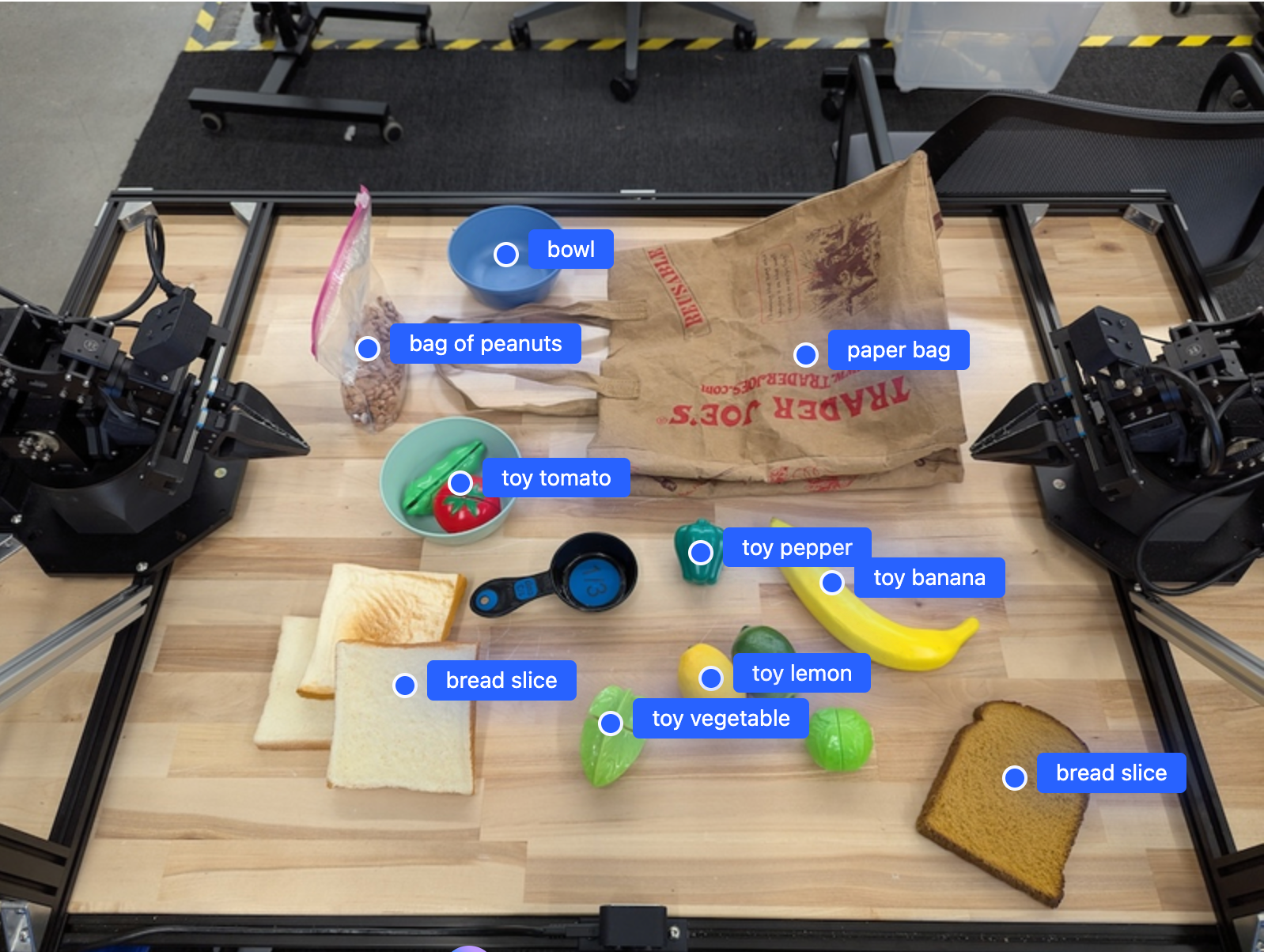
নিচের ছবিটি এই পয়েন্টগুলো কীভাবে প্রদর্শন করা যেতে পারে তার একটি উদাহরণ:

একটি উদাহরণ যা একটি ছবির বস্তুগুলোর বিন্দুগুলো প্রদর্শন করে।

এটি কীভাবে কাজ করে

জেমিনি রোবোটিক্স-ইআর ১.৬ আপনার রোবটকে স্থানিক বোধ ব্যবহার করে বাস্তব জগতে পারিপার্শ্বিক পরিস্থিতি অনুধাবন করতে এবং কাজ করতে সক্ষম করে। এটি ছবি/ভিডিও/অডিও ইনপুট এবং স্বাভাবিক ভাষার নির্দেশ গ্রহণ করে:

  • বস্তু ও দৃশ্যের প্রেক্ষাপট বোঝা : বস্তু শনাক্ত করে এবং দৃশ্যের সাথে সেগুলোর সম্পর্ক, যার মধ্যে সেগুলোর সামর্থ্যও অন্তর্ভুক্ত, সে সম্পর্কে যুক্তি দিয়ে বিচার করে।
  • কাজের নির্দেশনা বোঝে : স্বাভাবিক ভাষায় দেওয়া কাজ ব্যাখ্যা করে, যেমন "কলাটি খুঁজে বের করো"।
  • স্থান ও কাল অনুসারে যুক্তি দিন : ক্রিয়াকলাপের ক্রম এবং সময়ের সাথে সাথে একটি দৃশ্যে বস্তুগুলো কীভাবে পারস্পরিক ক্রিয়া করে তা বুঝুন।
  • কাঠামোগত আউটপুট প্রদান করুন : বস্তুর অবস্থান নির্দেশকারী স্থানাঙ্ক (বিন্দু বা বাউন্ডিং বক্স) ফেরত দেয়।

এর মাধ্যমে রোবট প্রোগ্রামিংয়ের সাহায্যে তাদের পরিবেশকে 'দেখতে' ও 'বুঝতে' পারে।

জেমিনি রোবোটিক্স-ইআর ১.৬-ও এজেন্সিক, যার অর্থ হলো এটি জটিল কাজগুলোকে (যেমন "আপেলটি বাটিতে রাখো") ছোট ছোট উপ-কাজে ভেঙে দীর্ঘমেয়াদী কাজগুলো সমন্বয় করতে পারে:

  • উপ-কাজের ক্রমবিন্যাস : নির্দেশাবলীকে একটি যৌক্তিক অনুক্রমিক ধাপে বিভক্ত করে।
  • ফাংশন কল/কোড এক্সিকিউশন : আপনার বিদ্যমান রোবট ফাংশন/টুল কল করে অথবা জেনারেটেড কোড এক্সিকিউট করে ধাপগুলো সম্পাদন করে।

জেমিনিতে ফাংশন কলিং কীভাবে কাজ করে সে সম্পর্কে আরও জানতে ফাংশন কলিং পৃষ্ঠাটি পড়ুন।

জেমিনি রোবোটিক্স-ইআর ১.৬ এর সাথে থিঙ্কিং বাজেট ব্যবহার করা

জেমিনি রোবোটিক্স-ইআর ১.৬-এর একটি নমনীয় থিঙ্কিং বাজেট রয়েছে, যা আপনাকে ল্যাটেন্সি ও অ্যাকুরেসির মধ্যে ভারসাম্য রক্ষার সুযোগ দেয়। অবজেক্ট ডিটেকশনের মতো স্থানিক বোধগম্যতার কাজগুলোর জন্য, মডেলটি একটি ছোট থিঙ্কিং বাজেট দিয়েই উচ্চ পারফরম্যান্স অর্জন করতে পারে। গণনা এবং ওজন অনুমানের মতো আরও জটিল যুক্তিনির্ভর কাজগুলোর জন্য একটি বড় থিঙ্কিং বাজেট প্রয়োজন হয়। এটি আপনাকে আরও কঠিন কাজগুলোর জন্য কম-ল্যাটেন্সির প্রতিক্রিয়া এবং উচ্চ-অ্যাকুরেসির ফলাফলের মধ্যে ভারসাম্য বজায় রাখতে সাহায্য করে।

চিন্তাশীল বাজেট সম্পর্কে আরও জানতে, ‘চিন্তাশীল মূল সক্ষমতা’ পৃষ্ঠাটি দেখুন।

প্রমিত স্থানিক যুক্তি

নিম্নলিখিত উদাহরণগুলি স্বাভাবিক ভাষার নির্দেশ ব্যবহার করে রোবোটিক উপলব্ধি এবং স্থানিক যুক্তির কাজগুলি প্রদর্শন করে, যার মধ্যে একটি ছবিতে বস্তু নির্দেশ করা ও খুঁজে বের করা থেকে শুরু করে গতিপথ পরিকল্পনা পর্যন্ত অন্তর্ভুক্ত। সরলতার জন্য, এই উদাহরণগুলির কোড স্নিপেটগুলিকে সংক্ষিপ্ত করে শুধুমাত্র নির্দেশ এবং generate_content API-এর কলটি দেখানো হয়েছে।

সম্পূর্ণ কার্যকর কোড এবং অতিরিক্ত উদাহরণ রোবোটিক্স কুকবুকে পাওয়া যাবে।

বস্তু নির্দেশ করা

রোবোটিক্সে ভিশন-অ্যান্ড-ল্যাঙ্গুয়েজ মডেল (ভিএলএম)-এর একটি সাধারণ ব্যবহার হলো ছবি বা ভিডিও ফ্রেমে কোনো বস্তুকে নির্দেশ করা এবং খুঁজে বের করা। নিচের উদাহরণটিতে মডেলটিকে একটি ছবির মধ্যে নির্দিষ্ট বস্তু খুঁজে বের করতে এবং সেগুলোর স্থানাঙ্ক ফেরত দিতে বলা হয়েছে।

পাইথন

from google import genai
from google.genai import types

client = genai.Client()

# Load your image and set up your prompt
with open('path/to/image-with-objects.jpg', 'rb') as f:
    image_bytes = f.read()

queries = [
    "bread",
    "starfruit",
    "banana",
]

prompt = f"""
    Get all points matching the following objects: {', '.join(queries)}. The
    label returned should be an identifying name for the object detected.
    The answer should follow the json format:

    [{{"point": , "label": }}, ...]. The points are in

    [y, x] format normalized to 0-1000.
    """

image_response = client.models.generate_content(
  model="gemini-robotics-er-1.6-preview",
  contents=[
    types.Part.from_bytes(
      data=image_bytes,
      mime_type='image/jpeg',
    ),
    prompt
  ],
  config = types.GenerateContentConfig(
      temperature=1.0,
      thinking_config=types.ThinkingConfig(thinking_budget=0)
  )
)

print(image_response.text)

আউটপুটটি গেটিং স্টার্টেড উদাহরণের মতোই হবে, যেখানে খুঁজে পাওয়া অবজেক্টগুলোর স্থানাঙ্ক এবং তাদের লেবেল সম্বলিত একটি JSON থাকবে।

[
  {"point": [671, 317], "label": "bread"},
  {"point": [738, 307], "label": "bread"},
  {"point": [702, 237], "label": "bread"},
  {"point": [629, 307], "label": "bread"},
  {"point": [833, 800], "label": "bread"},
  {"point": [609, 663], "label": "banana"},
  {"point": [770, 483], "label": "starfruit"}
]

একটি ছবিতে চিহ্নিত বস্তুগুলোর বিন্দু প্রদর্শনকারী একটি উদাহরণ।

নির্দিষ্ট বস্তুর পরিবর্তে 'ফল'-এর মতো বিমূর্ত বিভাগগুলোকে ব্যাখ্যা করতে এবং ছবিতে থাকা এর সমস্ত দৃষ্টান্ত সনাক্ত করতে মডেলকে অনুরোধ করতে নিম্নলিখিত নির্দেশটি ব্যবহার করুন।

পাইথন

prompt = f"""
        Get all points for fruit. The label returned should be an identifying
        name for the object detected.
        """ + """The answer should follow the json format:
        [{"point": <point>, "label": <label1>}, ...]. The points are in
        [y, x] format normalized to 0-1000."""

অন্যান্য চিত্র প্রক্রিয়াকরণ কৌশল জানতে চিত্র অনুধাবন পৃষ্ঠাটি দেখুন।

ভিডিওতে বস্তু ট্র্যাক করা

জেমিনি রোবোটিক্স-ইআর ১.৬ সময়ের সাথে সাথে বস্তু ট্র্যাক করার জন্য ভিডিও ফ্রেমও বিশ্লেষণ করতে পারে। সমর্থিত ভিডিও ফরম্যাটের তালিকার জন্য ভিডিও ইনপুটস দেখুন।

মডেলটি প্রতিটি ফ্রেমে যে নির্দিষ্ট বস্তুগুলো বিশ্লেষণ করে, সেগুলো খুঁজে বের করার জন্য নিম্নলিখিতটি মূল নির্দেশ হিসেবে ব্যবহৃত হয়:

পাইথন

# Define the objects to find
queries = [
    "pen (on desk)",
    "pen (in robot hand)",
    "laptop (opened)",
    "laptop (closed)",
]

base_prompt = f"""
  Point to the following objects in the provided image: {', '.join(queries)}.
  The answer should follow the json format:

  [{{"point": , "label": }}, ...].

  The points are in [y, x] format normalized to 0-1000.
  If no objects are found, return an empty JSON list [].
  """

আউটপুটে দেখা যাচ্ছে, ভিডিও ফ্রেমগুলো জুড়ে একটি কলম এবং ল্যাপটপকে ট্র্যাক করা হচ্ছে।

একটি উদাহরণ যা একটি GIF-এর ফ্রেম জুড়ে বস্তু ট্র্যাক করার প্রক্রিয়া দেখায়।

সম্পূর্ণ কার্যকর কোডের জন্য রোবোটিক্স কুকবুকটি দেখুন।

বস্তু সনাক্তকরণ এবং বাউন্ডিং বক্স

একক বিন্দুর বাইরেও, মডেলটি 2D বাউন্ডিং বক্স ফেরত দিতে পারে, যা একটি বস্তুকে ঘিরে থাকা একটি আয়তক্ষেত্রাকার অঞ্চল প্রদান করে।

এই উদাহরণটিতে একটি টেবিলের উপর থাকা শনাক্তযোগ্য বস্তুগুলোর জন্য দ্বি-মাত্রিক বাউন্ডিং বক্স চাওয়া হয়েছে। মডেলটিকে আউটপুট ২৫টি বস্তুর মধ্যে সীমাবদ্ধ রাখতে এবং একাধিক বস্তুর নাম স্বতন্ত্রভাবে দেওয়ার জন্য নির্দেশ দেওয়া হয়েছে।

পাইথন

from google import genai
from google.genai import types

client = genai.Client()

# Load your image and set up your prompt
with open('path/to/image-with-objects.jpg', 'rb') as f:
    image_bytes = f.read()

prompt = """
      Return bounding boxes as a JSON array with labels. Never return masks
      or code fencing. Limit to 25 objects. Include as many objects as you
      can identify on the table.
      If an object is present multiple times, name them according to their
      unique characteristic (colors, size, position, unique characteristics, etc..).
      The format should be as follows: [{"box_2d": [ymin, xmin, ymax, xmax],
      "label": <label for the object>}] normalized to 0-1000. The values in
      box_2d must only be integers
      """

image_response = client.models.generate_content(
  model="gemini-robotics-er-1.6-preview",
  contents=[
    types.Part.from_bytes(
      data=image_bytes,
      mime_type='image/jpeg',
    ),
    prompt
  ],
  config = types.GenerateContentConfig(
      temperature=1.0,
      thinking_config=types.ThinkingConfig(thinking_budget=0)
  )
)

print(image_response.text)

নিচে মডেল থেকে প্রাপ্ত বক্সগুলো দেখানো হলো।

পাওয়া বস্তুগুলির বাউন্ডিং বক্স দেখানোর একটি উদাহরণ

সম্পূর্ণ কার্যকর কোডের জন্য রোবোটিক্স কুকবুকটি দেখুন। ইমেজ আন্ডারস্ট্যান্ডিং পেজটিতে সেগমেন্টেশন, অবজেক্ট ডিটেকশন এবং বাউন্ডিং বক্সের মতো ভিজ্যুয়াল টাস্কের আরও উদাহরণ রয়েছে।

গতিপথ

জেমিনি রোবোটিক্স-ইআর ১.৬ এমন সব বিন্দুর অনুক্রম তৈরি করতে পারে যা একটি গতিপথ নির্ধারণ করে, যা রোবটের চলাচল নির্দেশনার জন্য উপযোগী।

এই উদাহরণটিতে একটি লাল কলমকে একটি অর্গানাইজারে নিয়ে যাওয়ার জন্য একটি গতিপথ চাওয়া হয়েছে, যার মধ্যে প্রারম্ভিক বিন্দু এবং একাধিক মধ্যবর্তী বিন্দু অন্তর্ভুক্ত থাকবে।

পাইথন

from google import genai
from google.genai import types

client = genai.Client()

# Load your image and set up your prompt
with open('path/to/image-with-objects.jpg', 'rb') as f:
    image_bytes = f.read()

points_data = []
prompt = """
        Place a point on the red pen, then 15 points for the trajectory of
        moving the red pen to the top of the organizer on the left.
        The points should be labeled by order of the trajectory, from '0'
        (start point at left hand) to <n> (final point)
        The answer should follow the json format:
        [{"point": <point>, "label": <label1>}, ...].
        The points are in [y, x] format normalized to 0-1000.
        """

image_response = client.models.generate_content(
  model="gemini-robotics-er-1.6-preview",
  contents=[
    types.Part.from_bytes(
      data=image_bytes,
      mime_type='image/jpeg',
    ),
    prompt
  ],
  config = types.GenerateContentConfig(
      temperature=1.0,
  )
)

print(image_response.text)

প্রতিক্রিয়াটি হলো একগুচ্ছ স্থানাঙ্ক, যা সেই পথের গতিপথ বর্ণনা করে যে পথ অনুসরণ করে লাল কলমটিকে অর্গানাইজারের উপরে সরানোর কাজটি সম্পন্ন করতে হবে:

[
  {"point": [550, 610], "label": "0"},
  {"point": [500, 600], "label": "1"},
  {"point": [450, 590], "label": "2"},
  {"point": [400, 580], "label": "3"},
  {"point": [350, 550], "label": "4"},
  {"point": [300, 520], "label": "5"},
  {"point": [250, 490], "label": "6"},
  {"point": [200, 460], "label": "7"},
  {"point": [180, 430], "label": "8"},
  {"point": [160, 400], "label": "9"},
  {"point": [140, 370], "label": "10"},
  {"point": [120, 340], "label": "11"},
  {"point": [110, 320], "label": "12"},
  {"point": [105, 310], "label": "13"},
  {"point": [100, 305], "label": "14"},
  {"point": [100, 300], "label": "15"}
]

পরিকল্পিত গতিপথ দেখানো একটি উদাহরণ

সক্রিয় ক্ষমতা

নিম্নলিখিত উদাহরণগুলি মডেলের সক্রিয় ক্ষমতা, বিশেষত কোড নির্বাহ ব্যবহার করে উন্নত রোবোটিক যুক্তি প্রদর্শন করে। এই পরিস্থিতিগুলিতে, মডেলটি উত্তর দেওয়ার আগে অস্পষ্টতা দূর করতে বা নির্ভুলতা উন্নত করতে ছবি পরিবর্তন করার জন্য (যেমন জুম ইন করা, ক্রপ করা বা ঘোরানো) পাইথন কোড লেখা এবং নির্বাহ করার সিদ্ধান্ত নিতে পারে।

বস্তু শনাক্তকরণ (জুম এবং ক্রপ)

নিম্নলিখিত উদাহরণটি দেখায় যে কীভাবে অবজেক্ট সনাক্ত করার সময় এবং বাউন্ডিং বক্স ফেরত দেওয়ার সময়, আরও স্পষ্ট দৃশ্যের জন্য কোড এক্সিকিউশন ব্যবহার করে একটি ছবি জুম এবং ক্রপ করা যায়।

পাইথন

from google import genai
from google.genai import types

client = genai.Client()

# Load your image
with open('sorting.jpeg', 'rb') as f:
    image_bytes = f.read()

prompt = """
Return JSON in the format {label: val, y: val, x: val, y2: val, x2: val} for
the compostable objects in this scene. Please Zoom and crop the image for a
clearer view. Return an annotated image of the final result with the bounding
boxes drawn on it to the API caller as a part of your process.
"""

response = client.models.generate_content(
    model="gemini-robotics-er-1.6-preview",
    contents=[
        types.Part.from_bytes(
            data=image_bytes,
            mime_type='image/jpeg',
        ),
        prompt
    ],
    config = types.GenerateContentConfig(
        temperature=1.0,
        tools=[types.Tool(code_execution=types.ToolCodeExecution)],
    )
)

print(response.text)

মডেলের আউটপুটটি নিম্নলিখিতের অনুরূপ হবে:

[
  {"label": "compostable", "y": 256, "x": 482, "y2": 295, "x2": 546},
  {"label": "compostable", "y": 317, "x": 478, "y2": 350, "x2": 542},
  {"label": "compostable", "y": 586, "x": 556, "y2": 668, "x2": 595},
  {"label": "compostable", "y": 463, "x": 669, "y2": 511, "x2": 718},
  {"label": "compostable", "y": 178, "x": 565, "y2": 250, "x2": 609}
]

নিচে মডেল থেকে প্রাপ্ত বক্সগুলো দেখানো হলো।

পাওয়া বস্তুগুলির বাউন্ডিং বক্স দেখানোর একটি উদাহরণ

অ্যানালগ গেজ পড়া এবং যুক্তি প্রয়োগ করা

নিম্নলিখিত উদাহরণটি দেখায় কিভাবে মডেলটি ব্যবহার করে একটি অ্যানালগ গেজ থেকে পাঠ নেওয়া যায় এবং সময়ের গণনা করা যায়। এটি একটি JSON আউটপুট নিশ্চিত করতে একটি সিস্টেম নির্দেশনা ব্যবহার করে।

পাইথন

from google import genai
from google.genai import types

client = genai.Client()

# Load your image
with open('clock.jpg', 'rb') as f:
    image_bytes = f.read()

q_time = """
Tell me what the value is. Please respond in the following JSON format:\n {\n "hours": X,\n  "minutes": Y,\n}. Zoom in or crop as necessary to confirm location of the clock hands.
"""

system_instruction = "Be precise. When JSON is requested, reply with ONLY that JSON (no preface, no code block)."

response = client.models.generate_content(
    model="gemini-robotics-er-1.6-preview",
    contents=[
        types.Part.from_bytes(
            data=image_bytes,
            mime_type='image/jpeg',
        ),
        system_instruction + " " + q_time
    ],
    config = types.GenerateContentConfig(
        temperature=1.0,
    )
)

print(response.text)

নিম্নলিখিতটি একটি উদাহরণ চিত্র ইনপুট।

একটি ঘড়ির পাঠ দেখানোর উদাহরণ

মডেলের আউটপুটটি নিম্নলিখিতের অনুরূপ হবে:

Time Response:  {
  "hours": 12,
  "minutes": 46
 }

একটি পাত্রে তরল পরিমাপ করুন

নিম্নলিখিত উদাহরণটিতে দেখানো হয়েছে কিভাবে কোড এক্সিকিউশন ব্যবহার করে একটি মিটার থেকে তরলের স্তর পাঠ করে শতাংশ হিসাবে গণনা করা যায়।

পাইথন

from google import genai
from google.genai import types

client = genai.Client()

# Load your image
with open('meter.jpeg', 'rb') as f:
    image_bytes = f.read()

prompt = """
How full is the meter of liquid?
To read it,
1) Find the points for the top of the sight window, bottom of the sight window and the liquid level, formatted as [y, x] with values ranging from 0-1000;
2) Use math to determine the liquid level as a percentage;
3) Output "Answer: ??" on a separate line, where ?? is a number without % or unit.
"""

response = client.models.generate_content(
    model="gemini-robotics-er-1.6-preview",
    contents=[
        types.Part.from_bytes(
            data=image_bytes,
            mime_type='image/jpeg',
        ),
        prompt
    ],
    config = types.GenerateContentConfig(
        temperature=1.0,
        tools=[types.Tool(code_execution=types.ToolCodeExecution)],
    )
)

print(response.text)

নিচে ইনপুটটির জুম করা ছবি দেওয়া হলো।

একটি ঘড়ির পাঠ দেখানোর উদাহরণ

সার্কিট বোর্ডের চিহ্নগুলো পড়ুন

নিম্নলিখিত উদাহরণটি দেখায় কিভাবে কোড এক্সিকিউশন ব্যবহার করে একটি সার্কিট বোর্ড চিপের টেক্সট পড়া যায়, যা মডেলটিকে প্রয়োজন অনুযায়ী ছবিটি জুম, ক্রপ এবং রোটেট করার সুযোগ দেয়।

পাইথন

from google import genai
from google.genai import types

client = genai.Client()

# Load your image
with open('circuit_board.jpeg', 'rb') as f:
    image_bytes = f.read()

prompt = "What is the number on the ESMT chip? Zoom, crop, and rotate if needed."

response = client.models.generate_content(
    model="gemini-robotics-er-1.6-preview",
    contents=[
        types.Part.from_bytes(
            data=image_bytes,
            mime_type='image/jpeg',
        ),
        prompt
    ],
    config = types.GenerateContentConfig(
        temperature=1.0,
        tools=[types.Tool(code_execution=types.ToolCodeExecution)],
    )
)

print(response.text)

নিচে ইনপুটটির জুম করা ছবি দেওয়া হলো।

একটি ঘড়ির পাঠ দেখানোর উদাহরণ

ছবির টীকা

নিম্নলিখিত উদাহরণটি দেখায় কিভাবে কোড এক্সিকিউশন ব্যবহার করে একটি ছবিতে টীকা যোগ করা যায় (যেমন, অপসারণের নির্দেশাবলীর জন্য তীরচিহ্ন আঁকা) এবং পরিবর্তিত ছবিটি ফেরত দেওয়া যায়।

পাইথন

from google import genai
from google.genai import types

client = genai.Client()

# Load your image
with open('sorting.jpeg', 'rb') as f:
    image_bytes = f.read()

prompt = """
Look at this image and return it as an annotated version using arrows of
different colors to represent which items should go in which bins for
disposal. You must return the final image to the API caller.
"""

response = client.models.generate_content(
    model="gemini-robotics-er-1.6-preview",
    contents=[
        types.Part.from_bytes(
            data=image_bytes,
            mime_type='image/jpeg',
        ),
        prompt
    ],
    config = types.GenerateContentConfig(
        temperature=1.0,
        tools=[types.Tool(code_execution=types.ToolCodeExecution)],
    )
)

print(response.text)

নিম্নলিখিতটি একটি উদাহরণ চিত্র ইনপুট।

একটি ঘড়ির পাঠ দেখানোর উদাহরণ

মডেলের আউটপুটটি নিম্নলিখিতের অনুরূপ হবে:

The annotated image shows the suggested disposal locations for the items on the table:
- **Green bin (Compost/Organic)**: Green chili, red chili, grapes, and cherries.
- **Blue bin (Recycling)**: Yellow crushed can and plastic container.
- **Black bin (Trash)**: Chocolate bar wrapper, Welch's packet, and white tissue.

অর্কেস্ট্রেশন

জেমিনি রোবোটিক্স-ইআর ১.৬ দীর্ঘমেয়াদী কাজ সমন্বয় করার জন্য কার্য পরিকল্পনা এবং উচ্চ-স্তরের স্থানিক যুক্তি সম্পাদন করতে পারে, এবং প্রাসঙ্গিক উপলব্ধির উপর ভিত্তি করে কর্মপন্থা অনুমান করতে বা সর্বোত্তম অবস্থান শনাক্ত করতে পারে।

ল্যাপটপের জন্য জায়গা তৈরি করা

এই উদাহরণটি দেখায় কিভাবে জেমিনি রোবোটিক্স-ইআর একটি স্থান সম্পর্কে বিচার-বিশ্লেষণ করতে পারে। এখানে মডেলটিকে জিজ্ঞাসা করা হয় যে, অন্য একটি জিনিসের জন্য জায়গা তৈরি করতে কোন বস্তুটি সরাতে হবে।

পাইথন

from google import genai
from google.genai import types

client = genai.Client()

# Load your image and set up your prompt
with open('path/to/image-with-objects.jpg', 'rb') as f:
    image_bytes = f.read()

prompt = """
          Point to the object that I need to remove to make room for my laptop
          The answer should follow the json format: [{"point": <point>,
          "label": <label1>}, ...]. The points are in [y, x] format normalized to 0-1000.
        """

image_response = client.models.generate_content(
  model="gemini-robotics-er-1.6-preview",
  contents=[
    types.Part.from_bytes(
      data=image_bytes,
      mime_type='image/jpeg',
    ),
    prompt
  ],
  config = types.GenerateContentConfig(
      temperature=1.0,
      thinking_config=types.ThinkingConfig(thinking_budget=0)
  )
)

print(image_response.text)

প্রতিক্রিয়াটিতে সেই বস্তুটির একটি দ্বি-মাত্রিক স্থানাঙ্ক থাকে যা ব্যবহারকারীর প্রশ্নের উত্তর দেয়; এক্ষেত্রে, যে বস্তুটি একটি ল্যাপটপের জন্য জায়গা করে দিতে সরানো উচিত।

[
  {"point": [672, 301], "label": "The object that I need to remove to make room for my laptop"}
]

একটি উদাহরণ যা দেখায় কোন বস্তুকে অন্য বস্তুর জন্য সরাতে হবে।

দুপুরের খাবার প্যাক করা

মডেলটি একাধিক ধাপের কাজের জন্য নির্দেশনা দিতে পারে এবং প্রতিটি ধাপের জন্য প্রাসঙ্গিক বস্তু নির্দেশ করতে পারে। এই উদাহরণটি দেখায় কিভাবে মডেলটি একটি লাঞ্চ ব্যাগ গোছানোর জন্য ধারাবাহিক পদক্ষেপের পরিকল্পনা করে।

পাইথন

from google import genai
from google.genai import types

client = genai.Client()

# Load your image and set up your prompt
with open('path/to/image-of-lunch.jpg', 'rb') as f:
    image_bytes = f.read()

prompt = """
          Explain how to pack the lunch box and lunch bag. Point to each
          object that you refer to. Each point should be in the format:
          [{"point": [y, x], "label": }], where the coordinates are
          normalized between 0-1000.
        """

image_response = client.models.generate_content(
  model="gemini-robotics-er-1.6-preview",
  contents=[
    types.Part.from_bytes(
      data=image_bytes,
      mime_type='image/jpeg',
    ),
    prompt
  ],
  config = types.GenerateContentConfig(
      temperature=1.0,
      thinking_config=types.ThinkingConfig(thinking_budget=0)
  )
)

print(image_response.text)

এই প্রম্পটের উত্তর হলো প্রদত্ত ছবি থেকে কীভাবে একটি লাঞ্চ ব্যাগ গোছাতে হয়, তার একটি ধাপে ধাপে নির্দেশাবলী।

ইনপুট ছবি

একটি লাঞ্চ বক্স এবং তার মধ্যে রাখার জিনিসপত্রের ছবি।

মডেল আউটপুট

Based on the image, here is a plan to pack the lunch box and lunch bag:

1.  **Pack the fruit into the lunch box.** Place the [apple](apple), [banana](banana), [red grapes](red grapes), and [green grapes](green grapes) into the [blue lunch box](blue lunch box).
2.  **Add the spoon to the lunch box.** Put the [blue spoon](blue spoon) inside the lunch box as well.
3.  **Close the lunch box.** Secure the lid on the [blue lunch box](blue lunch box).
4.  **Place the lunch box inside the lunch bag.** Put the closed [blue lunch box](blue lunch box) into the [brown lunch bag](brown lunch bag).
5.  **Pack the remaining items into the lunch bag.** Place the [blue snack bar](blue snack bar) and the [brown snack bar](brown snack bar) into the [brown lunch bag](brown lunch bag).

Here is the list of objects and their locations:
*   [{"point": [899, 440], "label": "apple"}]
*   [{"point": [814, 363], "label": "banana"}]
*   [{"point": [727, 470], "label": "red grapes"}]
*   [{"point": [675, 608], "label": "green grapes"}]
*   [{"point": [706, 529], "label": "blue lunch box"}]
*   [{"point": [864, 517], "label": "blue spoon"}]
*   [{"point": [499, 401], "label": "blue snack bar"}]
*   [{"point": [614, 705], "label": "brown snack bar"}]
*   [{"point": [448, 501], "label": "brown lunch bag"}]

কাস্টম রোবট এপিআই কল করা

এই উদাহরণটি একটি কাস্টম রোবট এপিআই ব্যবহার করে টাস্ক অর্কেস্ট্রেশন প্রদর্শন করে। এটি একটি পিক-এন্ড-প্লেস অপারেশনের জন্য ডিজাইন করা একটি মক এপিআই উপস্থাপন করে। কাজটি হলো একটি নীল ব্লক তুলে একটি কমলা বাটিতে রাখা:

ব্লক এবং বাটির একটি ছবি

এই পৃষ্ঠার অন্যান্য উদাহরণগুলোর মতোই, সম্পূর্ণ কার্যকর কোডটি রোবোটিক্স কুকবুকে পাওয়া যাবে।

প্রথম ধাপ হলো নিচের নির্দেশনার সাহায্যে উভয় বস্তু খুঁজে বের করা:

পাইথন

prompt = """
            Locate and point to the blue block and the orange bowl. The label
            returned should be an identifying name for the object detected.
            The answer should follow the json format: [{"point": <point>, "label": <label1>}, ...].
            The points are in [y, x] format normalized to 0-1000.
          """

মডেল প্রতিক্রিয়াটিতে ব্লক এবং বাটির স্বাভাবিকীকৃত স্থানাঙ্ক অন্তর্ভুক্ত রয়েছে:

[
  {"point": [389, 252], "label": "orange bowl"},
  {"point": [727, 659], "label": "blue block"}
]

এই উদাহরণটিতে নিম্নলিখিত মক রোবট এপিআই ব্যবহার করা হয়েছে:

পাইথন

def move(x, y, high):
  print(f"moving to coordinates: {x}, {y}, {15 if high else 5}")

def setGripperState(opened):
  print("Opening gripper" if opened else "Closing gripper")

def returnToOrigin():
  print("Returning to origin pose")

পরবর্তী ধাপ হলো কাজটি সম্পাদনের জন্য প্রয়োজনীয় লজিকসহ ধারাবাহিকভাবে এপিআই ফাংশনগুলোকে কল করা। নিম্নলিখিত প্রম্পটে রোবট এপিআই-এর একটি বিবরণ রয়েছে, যা এই কাজটি পরিচালনা করার সময় মডেলটির ব্যবহার করা উচিত।

পাইথন

prompt = f"""
    You are a robotic arm with six degrees-of-freedom. You have the
    following functions available to you:

    def move(x, y, high):
      # moves the arm to the given coordinates. The boolean value 'high' set
      to True means the robot arm should be lifted above the scene for
      avoiding obstacles during motion. 'high' set to False means the robot
      arm should have the gripper placed on the surface for interacting with
      objects.

    def setGripperState(opened):
      # Opens the gripper if opened set to true, otherwise closes the gripper

    def returnToOrigin():
      # Returns the robot to an initial state. Should be called as a cleanup
      operation.

    The origin point for calculating the moves is at normalized point
    y={robot_origin_y}, x={robot_origin_x}. Use this as the new (0,0) for
    calculating moves, allowing x and y to be negative.
    Perform a pick and place operation where you pick up the blue block at
    normalized coordinates ({block_x}, {block_y}) (relative coordinates:
    {block_relative_x}, {block_relative_y}) and place it into the orange
    bowl at normalized coordinates ({bowl_x}, {bowl_y})
    (relative coordinates: {bowl_relative_x}, {bowl_relative_y}).
    Provide the sequence of function calls as a JSON list of objects, where
    each object has a "function" key (the function name) and an "args" key
    (a list of arguments for the function).
    Also, include your reasoning before the JSON output.
    For example:
    Reasoning: To pick up the block, I will first move the arm to a high
    position above the block, open the gripper, move down to the block,
    close the gripper, lift the arm, move to a high position above the bowl,
    move down to the bowl, open the gripper, and then lift the arm back to
    a high position.
"""

নিম্নলিখিত অংশে প্রম্পট এবং মক রোবট এপিআই-এর উপর ভিত্তি করে মডেলটির একটি সম্ভাব্য আউটপুট দেখানো হয়েছে। এই আউটপুটে মডেলটির চিন্তন প্রক্রিয়া এবং এর ফলস্বরূপ পরিকল্পিত কাজগুলো অন্তর্ভুক্ত রয়েছে। এছাড়াও, মডেলটি দ্বারা ক্রমানুসারে সাজানো রোবট ফাংশন কলগুলোর আউটপুটও এতে দেখানো হয়েছে।

Reasoning: To perform the pick and place operation, I will first move the
robotic arm to a high position above the blue block to ensure clearance. Then, I
will open the gripper in preparation for grasping. Next, I will lower the arm to
the surface level to position the gripper around the block and close the gripper
to secure it. After picking up the block, I will lift the arm to clear the
surface and move towards the orange bowl, maintaining a high position to avoid
collisions. Once positioned above the bowl, I will lower the arm to place the
block inside. I will then open the gripper to release the block. Finally, I will
lift the arm out of the bowl and call `returnToOrigin` to reset the robot's
state.

[
  {
    "function": "move",
    "args": [
      163,
      427,
      true
    ]
  },
  {
    "function": "setGripperState",
    "args": [
      true
    ]
  },
  {
    "function": "move",
    "args": [
      163,
      427,
      false
    ]
  },
  {
    "function": "setGripperState",
    "args": [
      false
    ]
  },
  {
    "function": "move",
    "args": [
      163,
      427,
      true
    ]
  },
  {
    "function": "move",
    "args": [
      -247,
      90,
      true
    ]
  },
  {
    "function": "move",
    "args": [
      -247,
      90,
      false
    ]
  },
  {
    "function": "setGripperState",
    "args": [
      true
    ]
  },
  {
    "function": "move",
    "args": [
      -247,
      90,
      true
    ]
  },
  {
    "function": "returnToOrigin",
    "args": []
  }
]


Executing Function Calls:
moving to coordinates: 163, 427, 15
Opening gripper
moving to coordinates: 163, 427, 5
Closing gripper
moving to coordinates: 163, 427, 15
moving to coordinates: -247, 90, 15
moving to coordinates: -247, 90, 5
Opening gripper
moving to coordinates: -247, 90, 15
Returning to origin pose

সর্বোত্তম অনুশীলন

আপনার রোবোটিক্স অ্যাপ্লিকেশনগুলির কর্মক্ষমতা এবং নির্ভুলতা সর্বোত্তম করতে, জেমিনি মডেলের সাথে কীভাবে কার্যকরভাবে কাজ করতে হয় তা বোঝা অত্যন্ত গুরুত্বপূর্ণ। এই বিভাগে সবচেয়ে নির্ভরযোগ্য ফলাফল অর্জনের জন্য প্রম্পট তৈরি, ভিজ্যুয়াল ডেটা পরিচালনা এবং কাজগুলির কাঠামো তৈরির সেরা পদ্ধতি ও মূল কৌশলগুলি তুলে ধরা হয়েছে।

  1. স্পষ্ট ও সহজ ভাষা ব্যবহার করুন।

    • স্বাভাবিক ভাষা ব্যবহার করুন : জেমিনি মডেলটি স্বাভাবিক, কথোপকথনমূলক ভাষা বোঝার জন্য ডিজাইন করা হয়েছে। আপনার নির্দেশগুলো এমনভাবে সাজান যা অর্থগতভাবে স্পষ্ট এবং একজন ব্যক্তি স্বাভাবিকভাবে যেভাবে নির্দেশ দেন তার অনুরূপ।

    • দৈনন্দিন পরিভাষা ব্যবহার করুন : প্রযুক্তিগত বা বিশেষ পরিভাষার পরিবর্তে সাধারণ, দৈনন্দিন ভাষা বেছে নিন। যদি মডেলটি কোনো নির্দিষ্ট শব্দে প্রত্যাশিতভাবে সাড়া না দেয়, তবে সেটিকে আরও প্রচলিত কোনো প্রতিশব্দ দিয়ে পুনরায় বলার চেষ্টা করুন।

  2. ভিজ্যুয়াল ইনপুট অপ্টিমাইজ করুন।

    • বিস্তারিত দেখার জন্য জুম করুন : যখন কোনো বস্তু ছোট হয় বা বড় শটে তা ভালোভাবে বোঝা যায় না, তখন কাঙ্ক্ষিত বস্তুটিকে আলাদা করতে একটি বাউন্ডিং বক্স ফাংশন ব্যবহার করুন। এরপর আপনি এই নির্বাচিত অংশটুকুতে ছবিটি ক্রপ করে আরও বিস্তারিত বিশ্লেষণের জন্য নতুন, ফোকাস করা ছবিটি মডেলের কাছে পাঠাতে পারেন।

    • আলো ও রঙ নিয়ে পরীক্ষা করুন : প্রতিকূল আলোর পরিস্থিতি এবং রঙের দুর্বল বৈসাদৃশ্য মডেলের উপলব্ধিকে প্রভাবিত করতে পারে।

  3. জটিল সমস্যাগুলোকে ছোট ছোট ধাপে ভাগ করুন। প্রতিটি ছোট ধাপকে আলাদাভাবে সমাধান করার মাধ্যমে, আপনি মডেলটিকে আরও সুনির্দিষ্ট ও সফল ফলাফলের দিকে পরিচালিত করতে পারেন।

  4. ঐকমত্যের মাধ্যমে নির্ভুলতা বাড়ান। যেসব কাজের জন্য উচ্চ মাত্রার সূক্ষ্মতা প্রয়োজন, সেগুলোর ক্ষেত্রে আপনি একই প্রম্পট দিয়ে মডেলটিকে একাধিকবার কোয়েরি করতে পারেন। প্রাপ্ত ফলাফলগুলোর গড় করে আপনি এমন একটি 'ঐকমত্যে' পৌঁছাতে পারেন যা প্রায়শই আরও নির্ভুল এবং নির্ভরযোগ্য হয়।

সীমাবদ্ধতা

Gemini Robotics-ER 1.6 ব্যবহার করে ডেভেলপ করার সময় নিম্নলিখিত সীমাবদ্ধতাগুলো বিবেচনা করুন:

  • প্রিভিউ স্ট্যাটাস: মডেলটি বর্তমানে প্রিভিউ পর্যায়ে রয়েছে। এপিআই এবং কার্যক্ষমতা পরিবর্তিত হতে পারে, এবং পুঙ্খানুপুঙ্খ পরীক্ষা ছাড়া এটি প্রোডাকশন-ক্রিটিক্যাল অ্যাপ্লিকেশনের জন্য উপযুক্ত নাও হতে পারে।
  • লেটেন্সি: জটিল কোয়েরি, উচ্চ-রেজোলিউশনের ইনপুট, বা ব্যাপক thinking_budget ফলে প্রসেসিং সময় বেড়ে যেতে পারে।
  • বিভ্রম: অন্যান্য সকল বৃহৎ ভাষা মডেলের মতো, জেমিনি রোবোটিক্স-ইআর ১.৬ মাঝে মাঝে "বিভ্রম" করতে পারে বা ভুল তথ্য প্রদান করতে পারে, বিশেষ করে দ্ব্যর্থক নির্দেশ বা বিতরণের বাইরের ইনপুটের ক্ষেত্রে।
  • প্রম্পটের মানের উপর নির্ভরতা: মডেলের আউটপুটের মান ইনপুট প্রম্পটের স্পষ্টতা এবং সুনির্দিষ্টতার উপর অনেকাংশে নির্ভরশীল। অস্পষ্ট বা দুর্বলভাবে গঠিত প্রম্পটের ফলে আশানুরূপ ফলাফল নাও পাওয়া যেতে পারে।
  • গণনাগত খরচ: মডেলটি চালানো, বিশেষ করে ভিডিও ইনপুট বা উচ্চ thinking_budget সহ, গণনাগত সম্পদ ব্যবহার করে এবং খরচ বহন করে। আরও বিস্তারিত জানার জন্য থিঙ্কিং পৃষ্ঠাটি দেখুন।
  • ইনপুট প্রকারভেদ: প্রতিটি মোডের সীমাবদ্ধতা সম্পর্কে বিস্তারিত জানতে নিম্নলিখিত বিষয়গুলো দেখুন।

গোপনীয়তা বিজ্ঞপ্তি

আপনি স্বীকার করছেন যে এই নথিতে উল্লেখিত মডেলগুলি ("রোবোটিক্স মডেল") আপনার নির্দেশাবলী অনুসারে আপনার হার্ডওয়্যার পরিচালনা এবং সরানোর জন্য ভিডিও এবং অডিও ডেটা ব্যবহার করে। অতএব, আপনি রোবোটিক্স মডেলগুলি এমনভাবে পরিচালনা করতে পারেন যাতে শনাক্তযোগ্য ব্যক্তিদের ডেটা, যেমন কণ্ঠস্বর, চিত্র এবং সাদৃশ্য ডেটা ("ব্যক্তিগত ডেটা"), রোবোটিক্স মডেলগুলি দ্বারা সংগ্রহ করা হবে। আপনি যদি এমনভাবে রোবোটিক্স মডেলগুলি পরিচালনা করার সিদ্ধান্ত নেন যা ব্যক্তিগত ডেটা সংগ্রহ করে, তাহলে আপনি সম্মত হচ্ছেন যে আপনি কোনও শনাক্তযোগ্য ব্যক্তিকে রোবোটিক্স মডেলগুলির সাথে যোগাযোগ করতে বা তার আশেপাশের এলাকায় উপস্থিত থাকতে দেবেন না, যতক্ষণ না এবং যদি না সেই শনাক্তযোগ্য ব্যক্তিদের পর্যাপ্তভাবে অবহিত করা হয় এবং তারা এই বিষয়ে সম্মতি দেয় যে তাদের ব্যক্তিগত ডেটা https://ai.google.dev/gemini-api/terms- এ পাওয়া Gemini API অতিরিক্ত পরিষেবার শর্তাবলীতে ("শর্তাবলী") বর্ণিত "Google কীভাবে আপনার ডেটা ব্যবহার করে" শিরোনামের বিভাগ সহ, Google-কে প্রদান করা হতে পারে এবং Google দ্বারা ব্যবহৃত হতে পারে। আপনি নিশ্চিত করবেন যে এই ধরনের বিজ্ঞপ্তি শর্তাবলীতে বর্ণিত ব্যক্তিগত তথ্য সংগ্রহ এবং ব্যবহারের অনুমতি দেয়, এবং আপনি বাণিজ্যিকভাবে যুক্তিসঙ্গত প্রচেষ্টা ব্যবহার করে ব্যক্তিগত তথ্য সংগ্রহ ও বিতরণ হ্রাস করবেন, যার জন্য আপনি মুখ ঝাপসা করার মতো কৌশল ব্যবহার করবেন এবং যতদূর সম্ভব শনাক্তযোগ্য ব্যক্তি নেই এমন এলাকায় রোবোটিক মডেলগুলো পরিচালনা করবেন।

মূল্য নির্ধারণ

মূল্য এবং উপলব্ধ অঞ্চল সম্পর্কে বিস্তারিত তথ্যের জন্য, মূল্য তালিকাটি দেখুন।

মডেল সংস্করণ

রোবোটিক্স-ইআর ১.৬ প্রিভিউ

সম্পত্তি বর্ণনা
মডেল কোড gemini-robotics-er-1.6-preview
সমর্থিত ডেটা প্রকারগুলি

ইনপুট

লেখা, ছবি, ভিডিও, অডিও

আউটপুট

পাঠ্য

টোকেন সীমা [*]

ইনপুট টোকেন সীমা

১,০৪৮,৫৭৬

আউটপুট টোকেন সীমা

৬৫,৫৩৬

সক্ষমতা

অডিও জেনারেশন

সমর্থিত নয়

ব্যাচ এপিআই

সমর্থিত

ক্যাশিং

সমর্থিত

কোড এক্সিকিউশন

সমর্থিত

কম্পিউটার ব্যবহার

সমর্থিত

ফাইল অনুসন্ধান

সমর্থিত

ফ্লেক্স ইনফারেন্স

সমর্থিত

ফাংশন কলিং

সমর্থিত

গুগল ম্যাপস দিয়ে গ্রাউন্ডিং

সমর্থিত

চিত্র তৈরি

সমর্থিত নয়

লাইভ এপিআই

সমর্থিত নয়

অগ্রাধিকার অনুমান

সমর্থিত

অনুসন্ধান গ্রাউন্ডিং

সমর্থিত

কাঠামোগত আউটপুট

সমর্থিত

চিন্তা

সমর্থিত

URL প্রসঙ্গ

সমর্থিত

সংস্করণ
আরও বিস্তারিত জানতে মডেল ভার্সন প্যাটার্নগুলো পড়ুন।
  • প্রিভিউ: gemini-robotics-er-1.6-preview
সর্বশেষ আপডেট ডিসেম্বর ২০২৫
জ্ঞানের কাটঅফ জানুয়ারি ২০২৫

রোবোটিক্স-ইআর ১.৫ প্রিভিউ

সম্পত্তি বর্ণনা
মডেল কোড gemini-robotics-er-1.5-preview
সমর্থিত ডেটা প্রকারগুলি

ইনপুট

লেখা, ছবি, ভিডিও, অডিও

আউটপুট

পাঠ্য

টোকেন সীমা [*]

ইনপুট টোকেন সীমা

১,০৪৮,৫৭৬

আউটপুট টোকেন সীমা

৬৫,৫৩৬

সক্ষমতা

অডিও জেনারেশন

সমর্থিত নয়

ব্যাচ এপিআই

সমর্থিত নয়

ক্যাশিং

সমর্থিত নয়

কোড এক্সিকিউশন

সমর্থিত

ফাংশন কলিং

সমর্থিত

গুগল ম্যাপস দিয়ে গ্রাউন্ডিং

সমর্থিত নয়

চিত্র তৈরি

সমর্থিত নয়

লাইভ এপিআই

সমর্থিত নয়

অনুসন্ধান গ্রাউন্ডিং

সমর্থিত

কাঠামোগত আউটপুট

সমর্থিত

চিন্তা

সমর্থিত

URL প্রসঙ্গ

সমর্থিত

সংস্করণ
আরও বিস্তারিত জানতে মডেল ভার্সন প্যাটার্নগুলো পড়ুন।
  • প্রিভিউ: gemini-robotics-er-1.5-preview
সর্বশেষ আপডেট সেপ্টেম্বর ২০২৫
জ্ঞানের কাটঅফ জানুয়ারি ২০২৫

পরবর্তী পদক্ষেপ