

জেমিনি রোবোটিক্স ইআর মডেলগুলো কোনো বস্তুকে নির্দেশ করতে, ভিডিওতে সেটিকে ট্র্যাক করতে, বাউন্ডিং বক্সের সাহায্যে শনাক্ত করতে এবং তার গতিপথ তৈরি করতে পারে।
সম্পূর্ণভাবে কার্যকর কোডের জন্য রোবোটিক্স কুকবুকটি দেখুন।
বস্তুগুলো নির্দেশ করুন
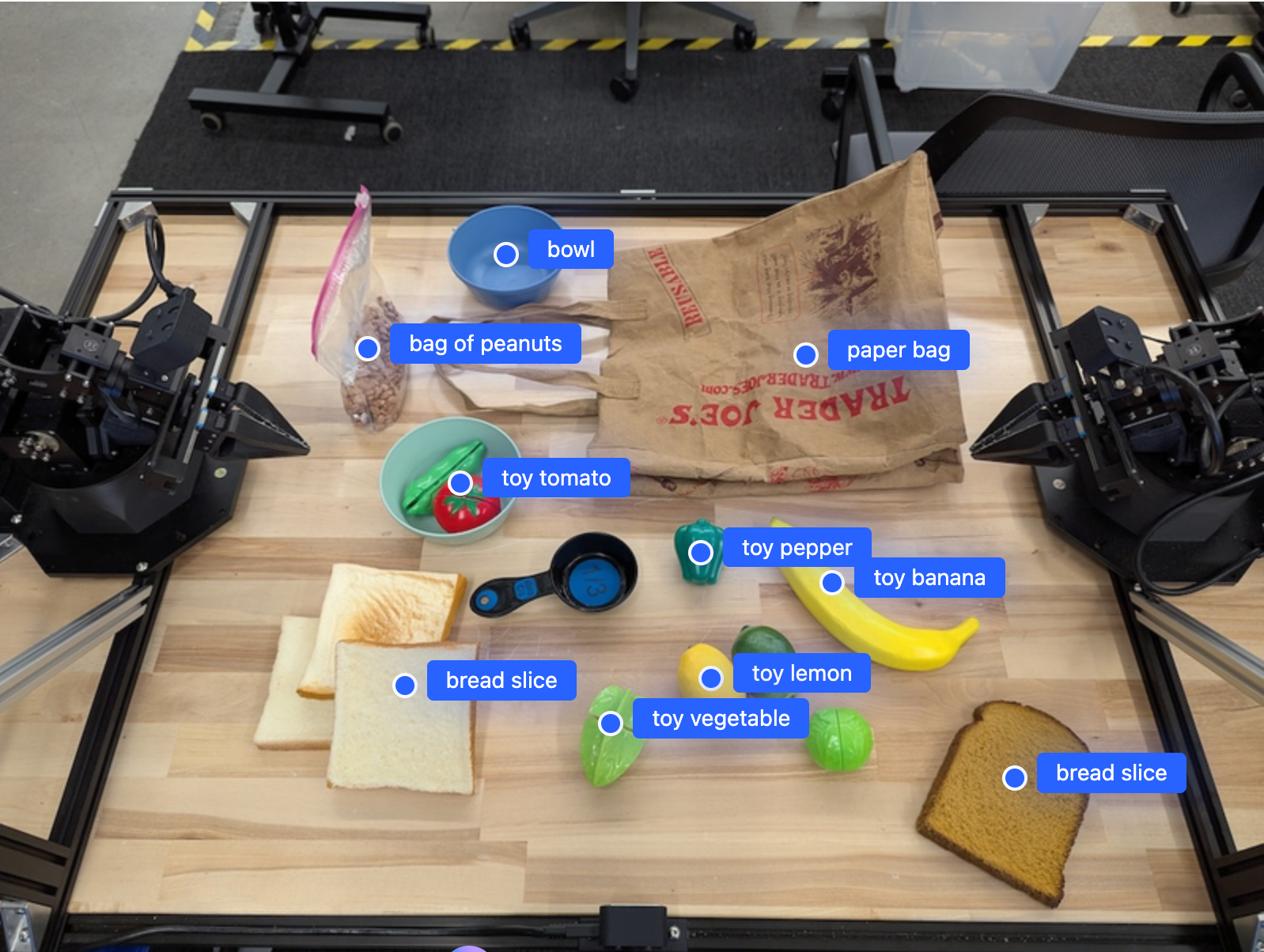
নিম্নলিখিত উদাহরণটি একটি ছবিতে নির্দিষ্ট বস্তু খুঁজে বের করে এবং তাদের স্বাভাবিককৃত [y, x] স্থানাঙ্ক ফেরত দেয়:
পাইথন
from google import genai

PROMPT = """
          Point to no more than 10 items in the image. The label returned
          should be an identifying name for the object detected.
          The answer should follow the json format: [{"point": <point>,
          "label": <label1>}, ...]. The points are in [y, x] format
          normalized to 0-1000.
        """
client = genai.Client()

uploaded_file = client.files.upload(file="my-image.png")

image_response = client.interactions.create(
    model="gemini-robotics-er-2-preview",
    input=[
        {
            "type": "image",
            "uri": uploaded_file.uri,
            "mime_type": uploaded_file.mime_type
        },
        {"type": "text", "text": PROMPT}
    ],
    generation_config={"thinking_level": "high"},
)

print(image_response.output_text)
বিশ্রাম
# First, ensure you have the image file locally.
# Encode the image to base64
IMAGE_BASE64=$(base64 -w 0 my-image.png)

curl -X POST \
  "https://generativelanguage.googleapis.com/v1beta/interactions" \
  -H "x-goog-api-key: $GEMINI_API_KEY" \
  -H "Content-Type: application/json" \
  -d '{
    "model": "gemini-robotics-er-2-preview",
    "input": {
      "parts": [
        {
          "inlineData": {
            "mimeType": "image/png",
            "data": "'"${IMAGE_BASE64}"'"
          }
        },
        {
          "text": "Point to no more than 10 items in the image. The label returned should be an identifying name for the object detected. The answer should follow the json format: [{\"point\": [y, x], \"label\": <label1>}, ...]. The points are in [y, x] format normalized to 0-1000."
        }
      ]
    },
    "generation_config": {
      "thinking_config": {
        "thinking_level": "high"
      }
    }
  }'
আউটপুটটি একটি JSON অ্যারে হবে, যার মধ্যে অবজেক্ট থাকবে। প্রতিটি অবজেক্টে একটি point (স্বাভাবিককৃত [y, x] স্থানাঙ্ক) এবং অবজেক্টটিকে শনাক্তকারী একটি label থাকবে।
JSON
[
  {"point": [376, 508], "label": "small banana"},
  {"point": [287, 609], "label": "larger banana"},
  {"point": [223, 303], "label": "pink starfruit"},
  {"point": [435, 172], "label": "paper bag"},
  {"point": [270, 786], "label": "green plastic bowl"},
  {"point": [488, 775], "label": "metal measuring cup"},
  {"point": [673, 580], "label": "dark blue bowl"},
  {"point": [471, 353], "label": "light blue bowl"},
  {"point": [492, 497], "label": "bread"},
  {"point": [525, 429], "label": "lime"}
]
নিচের ছবিটি এই পয়েন্টগুলো কীভাবে প্রদর্শন করা যেতে পারে তার একটি উদাহরণ:
ভিডিওতে বস্তু ট্র্যাক করা
জেমিনি রোবোটিক্স ইআর ২ সময়ের সাথে সাথে বস্তু ট্র্যাক করার জন্য ভিডিও ফ্রেমও বিশ্লেষণ করতে পারে। সমর্থিত ভিডিও ফরম্যাটের তালিকার জন্য ভিডিও ইনপুটস দেখুন।
পাইথন
from google import genai

client = genai.Client()

uploaded_file = client.files.upload(file="my-video.mp4")

prompt = """
          Point to the red ball in every frame where it appears.
          The answer should follow the json format: [{"point": [y, x],
          "label": <label>}, ...]. The points are in [y, x] format
          normalized to 0-1000. Return one entry per frame that contains
          the object.
        """

image_response = client.interactions.create(
  model="gemini-robotics-er-2-preview",
  input=[
    {
        "type": "video",
        "uri": uploaded_file.uri,
        "mime_type": uploaded_file.mime_type
    },
    {"type": "text", "text": prompt}
  ],
)

print(image_response.output_text)
বস্তু সনাক্তকরণ এবং বাউন্ডিং বক্স
পয়েন্টের পাশাপাশি, আপনি মডেলটিকে 2D বাউন্ডিং বক্স ফেরত দিতে বলতে পারেন, যা শনাক্ত করা বস্তুগুলোর জন্য আরও স্থানিক বিবরণ প্রদান করে।
পাইথন
from google import genai

client = genai.Client()

uploaded_file = client.files.upload(file="my-image.png")

prompt = """
          Detect all objects in this image and return bounding boxes.
          The answer should follow the JSON format:
          [{"label": <label>, "y": <y_min>, "x": <x_min>,
            "y2": <y_max>, "x2": <x_max>}, ...]
          where coordinates are normalized to 0-1000.
        """

image_response = client.interactions.create(
  model="gemini-robotics-er-2-preview",
  input=[
    {
        "type": "image",
        "uri": uploaded_file.uri,
        "mime_type": uploaded_file.mime_type
    },
    {"type": "text", "text": prompt}
  ],
)

print(image_response.output_text)
গতিপথ
জেমিনি রোবোটিক্স ইআর ২ এমন বিন্দুর ক্রম তৈরি করতে পারে যা একটি গতিপথ নির্ধারণ করে, যা রোবটের চলাচল নির্দেশনার জন্য উপযোগী।
এই উদাহরণটিতে একটি লাল কলমকে একটি অর্গানাইজারে নিয়ে যাওয়ার জন্য একটি গতিপথের অনুরোধ করা হয়েছে, যার মধ্যে মধ্যবর্তী ওয়েপয়েন্টগুলোর একটি আনুমানিক হিসাবও অন্তর্ভুক্ত রয়েছে। কোডটি সংক্ষিপ্ত করে শুধু নির্দেশটি দেখানো হয়েছে।
পাইথন
prompt = """
          Generate a trajectory for the robotic arm to pick up the red pen
          and place it in the organizer. Return a list of waypoints as JSON:
          [{"step": <int>, "point": [y, x], "action": <description>}, ...]
          where coordinates are normalized to 0-1000.
        """
ল্যাপটপের জন্য জায়গা তৈরি করা
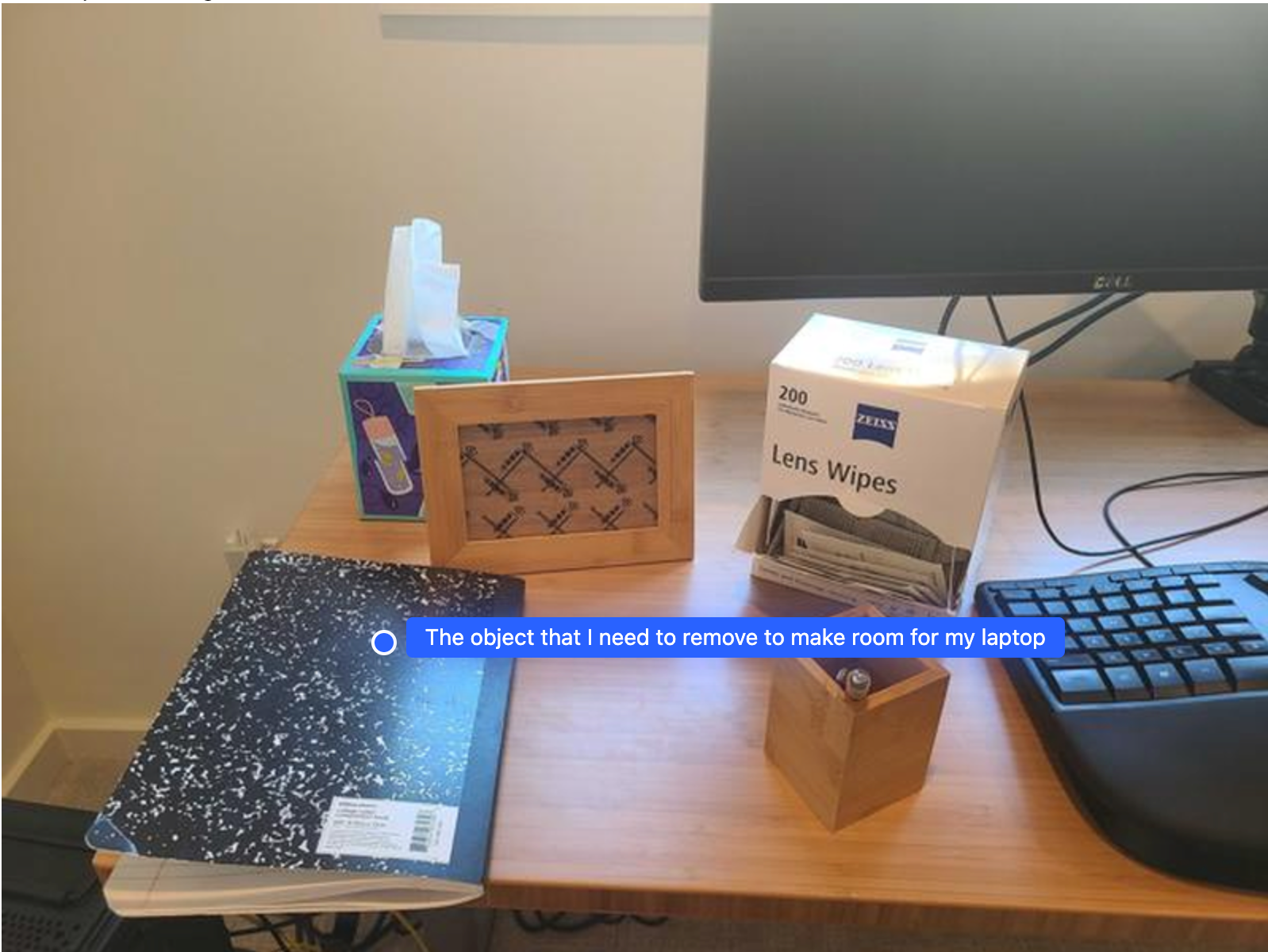
এই উদাহরণটি দেখায় কিভাবে জেমিনি রোবোটিক্স ইআর একটি স্থান সম্পর্কে ধারণা করতে পারে। এখানে মডেলটিকে জিজ্ঞাসা করা হয় যে, অন্য একটি জিনিসের জন্য জায়গা তৈরি করতে কোন বস্তুটি সরাতে হবে।
পাইথন
from google import genai

client = genai.Client()

uploaded_file = client.files.upload(file="path/to/image-with-objects.jpg")

prompt = """
          Point to the object that I need to remove to make room for my laptop
          The answer should follow the JSON format: [{"point": <point>,
          "label": <label1>}, ...]. The points are in [y, x] format normalized to 0-1000.
        """

image_response = client.interactions.create(
  model="gemini-robotics-er-2-preview",
  input=[
    {
        "type": "image",
        "uri": uploaded_file.uri,
        "mime_type": uploaded_file.mime_type
    },
    {"type": "text", "text": prompt}
  ],
)

print(image_response.output_text)
প্রতিক্রিয়াটিতে সেই বস্তুটির একটি দ্বি-মাত্রিক স্থানাঙ্ক থাকে যা ব্যবহারকারীর প্রশ্নের উত্তর দেয়; এক্ষেত্রে, যে বস্তুটি একটি ল্যাপটপের জন্য জায়গা করে দিতে সরানো উচিত।
[
  {"point": [672, 301], "label": "The object that I need to remove to make room for my laptop"}
]
দুপুরের খাবার প্যাক করা
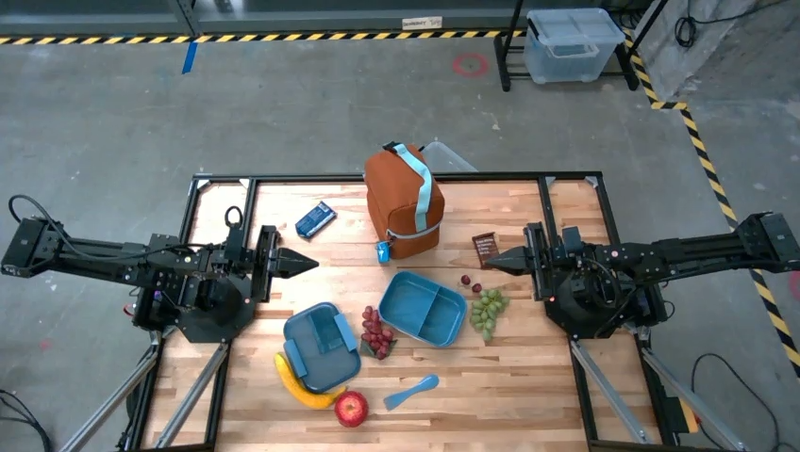
মডেলটি একাধিক ধাপের কাজের জন্য নির্দেশনা দিতে পারে এবং প্রতিটি ধাপের জন্য প্রাসঙ্গিক বস্তু নির্দেশ করতে পারে। এই উদাহরণটি দেখায় কিভাবে মডেলটি একটি লাঞ্চ ব্যাগ গোছানোর জন্য ধারাবাহিক পদক্ষেপের পরিকল্পনা করে।
পাইথন
from google import genai

client = genai.Client()

uploaded_file = client.files.upload(file="path/to/image-of-lunch.jpg")

prompt = """
          Explain how to pack the lunch box and lunch bag. Point to each
          object that you refer to. Each point should be in the format:
          [{"point": [y, x], "label": }], where the coordinates are
          normalized between 0-1000.
        """

image_response = client.interactions.create(
  model="gemini-robotics-er-2-preview",
  input=[
    {
        "type": "image",
        "uri": uploaded_file.uri,
        "mime_type": uploaded_file.mime_type
    },
    {"type": "text", "text": prompt}
  ],
)

print(image_response.output_text)
এই প্রম্পটের উত্তর হলো প্রদত্ত ছবি থেকে কীভাবে একটি লাঞ্চ ব্যাগ গোছাতে হয়, তার একটি ধাপে ধাপে নির্দেশাবলী।
ইনপুট ছবি
মডেল আউটপুট
Based on the image, here is a plan to pack the lunch box and lunch bag:

1.  **Pack the fruit into the lunch box.** Place the [apple](apple), [banana](banana), [red grapes](red grapes), and [green grapes](green grapes) into the [blue lunch box](blue lunch box).
2.  **Add the spoon to the lunch box.** Put the [blue spoon](blue spoon) inside the lunch box as well.
3.  **Close the lunch box.** Secure the lid on the [blue lunch box](blue lunch box).
4.  **Place the lunch box inside the lunch bag.** Put the closed [blue lunch box](blue lunch box) into the [brown lunch bag](brown lunch bag).
5.  **Pack the remaining items into the lunch bag.** Place the [blue snack bar](blue snack bar) and the [brown snack bar](brown snack bar) into the [brown lunch bag](brown lunch bag).

Here is the list of objects and their locations:
*   [{"point": [899, 440], "label": "apple"}]
*   [{"point": [814, 363], "label": "banana"}]
*   [{"point": [727, 470], "label": "red grapes"}]
*   [{"point": [675, 608], "label": "green grapes"}]
*   [{"point": [706, 529], "label": "blue lunch box"}]
*   [{"point": [864, 517], "label": "blue spoon"}]
*   [{"point": [499, 401], "label": "blue snack bar"}]
*   [{"point": [614, 705], "label": "brown snack bar"}]
*   [{"point": [448, 501], "label": "brown lunch bag"}]
এরপর কী?
- সক্রিয় সক্ষমতা — কোড নির্বাহ, যন্ত্র পাঠ, চিত্র টীকা সংযোজন।
- টাস্ক অর্কেস্ট্রেশন — কাস্টম রোবট এপিআই ব্যবহার করে দীর্ঘমেয়াদী কাজ সম্পাদন।
- স্ট্রিমিং সহ রোবোটিক্স — রিয়েল-টাইম দ্বিমুখী স্ট্রিমিং (শুধুমাত্র জেমিনি রোবোটিক্স ইআর ২-এর জন্য)।
- ভিডিও বোঝা — মুহূর্ত শনাক্তকরণ এবং অগ্রগতি শ্রেণিবিন্যাস (শুধুমাত্র জেমিনি রোবোটিক্স ইআর ২-এর জন্য)।