

หากต้องการดูข้อมูลเกี่ยวกับการทำความเข้าใจวิดีโอ โปรดดูคู่มือการทำความเข้าใจวิดีโอ
Veo 3.1 เป็นโมเดลสำหรับสร้างวิดีโอความยาว 8 วินาที (720p, 1080p หรือ 4K) พร้อมเสียงที่สร้างขึ้นแบบเนทีฟ คุณสามารถเข้าถึงโมเดลนี้แบบเป็นโปรแกรมได้โดยใช้ Gemini API ดูข้อมูลเพิ่มเติมเกี่ยวกับตัวแปรโมเดล Veo ที่มีได้ที่ส่วนเวอร์ชันโมเดล
Veo 3.1 โดดเด่นในด้านสไตล์ภาพและภาพยนตร์ที่หลากหลาย และมาพร้อมความสามารถใหม่ๆ หลายอย่าง ดังนี้
- วิดีโอแนวตั้ง: เลือกระหว่างวิดีโอแนวนอน (
16:9) กับวิดีโอแนวตั้ง (9:16) - ส่วนขยายวิดีโอ: ขยายวิดีโอที่สร้างไว้ก่อนหน้านี้โดยใช้ Veo
- การสร้างแบบเฉพาะเฟรม: สร้างวิดีโอโดยระบุเฟรมแรกและเฟรมสุดท้าย
- คำสั่งตามรูปภาพ: ใช้รูปภาพอ้างอิงสูงสุด 3 รูปเพื่อกำหนดเนื้อหาของวิดีโอที่สร้างขึ้น
ดูข้อมูลเพิ่มเติมเกี่ยวกับการเขียนพรอมต์ข้อความที่มีประสิทธิภาพสำหรับการสร้างวิดีโอได้ที่คู่มือพรอมต์ Veo
การสร้างวิดีโอจากข้อความ
ตัวอย่างต่อไปนี้แสดงวิธีสร้างวิดีโอที่มีบทสนทนา ความสมจริงแบบภาพยนตร์ หรือภาพเคลื่อนไหวที่สร้างสรรค์
บทสนทนาและเอฟเฟกต์เสียง
Python
import time
from google import genai
from google.genai import types

client = genai.Client()

prompt = """A close up of two people staring at a cryptic drawing on a wall, torchlight flickering.
A man murmurs, 'This must be it. That's the secret code.' The woman looks at him and whispering excitedly, 'What did you find?'"""

operation = client.models.generate_videos(
    model="veo-3.1-generate-preview",
    prompt=prompt,
)

# Poll the operation status until the video is ready.
while not operation.done:
    print("Waiting for video generation to complete...")
    time.sleep(10)
    operation = client.operations.get(operation)

# Download the generated video.
generated_video = operation.response.generated_videos[0]
client.files.download(file=generated_video.video, destination="dialogue_example.mp4")
print("Generated video saved to dialogue_example.mp4")
JavaScript
import { GoogleGenAI } from "@google/genai";

const ai = new GoogleGenAI({});

const prompt = `A close up of two people staring at a cryptic drawing on a wall, torchlight flickering.
A man murmurs, 'This must be it. That's the secret code.' The woman looks at him and whispering excitedly, 'What did you find?'`;

let operation = await ai.models.generateVideos({
    model: "veo-3.1-generate-preview",
    prompt: prompt,
});

// Poll the operation status until the video is ready.
while (!operation.done) {
    console.log("Waiting for video generation to complete...")
    await new Promise((resolve) => setTimeout(resolve, 10000));
    operation = await ai.operations.getVideosOperation({
        operation: operation,
    });
}

// Download the generated video.
ai.files.download({
    file: operation.response.generatedVideos[0].video,
    downloadPath: "dialogue_example.mp4",
});
console.log(`Generated video saved to dialogue_example.mp4`);
Go
package main

import (
    "context"
    "log"
    "os"
    "time"

    "google.golang.org/genai"
)

func main() {
    ctx := context.Background()
    client, err := genai.NewClient(ctx, nil)
    if err != nil {
        log.Fatal(err)
    }

    prompt := `A close up of two people staring at a cryptic drawing on a wall, torchlight flickering.
    A man murmurs, 'This must be it. That's the secret code.' The woman looks at him and whispering excitedly, 'What did you find?'`

    operation, _ := client.Models.GenerateVideos(
        ctx,
        "veo-3.1-generate-preview",
        prompt,
        nil,
        nil,
    )

    // Poll the operation status until the video is ready.
    for !operation.Done {
    log.Println("Waiting for video generation to complete...")
        time.Sleep(10 * time.Second)
        operation, _ = client.Operations.GetVideosOperation(ctx, operation, nil)
    }

    // Download the generated video.
    video := operation.Response.GeneratedVideos[0]
    client.Files.Download(ctx, video.Video, nil)
    fname := "dialogue_example.mp4"
    _ = os.WriteFile(fname, video.Video.VideoBytes, 0644)
    log.Printf("Generated video saved to %s\n", fname)
}
Java
import com.google.genai.Client;
import com.google.genai.types.GenerateVideosOperation;
import com.google.genai.types.GeneratedVideo;

Client client = new Client();

String prompt =
    "A close up of two people staring at a cryptic drawing on a wall, torchlight flickering.\n"
        + "A man murmurs, 'This must be it. That's the secret code.' The woman looks at him and whispering excitedly, 'What did you find?'";

GenerateVideosOperation operation =
    client.models.generateVideos("veo-3.1-generate-preview", prompt, null, null);

// Poll the operation status until the video is ready.
while (!operation.done().orElse(false)) {
  System.out.println("Waiting for video generation to complete...");
  Thread.sleep(10000);
  operation = client.operations.getVideosOperation(operation, null);
}

// Download the generated video.
GeneratedVideo generatedVideo = operation.response().get().generatedVideos().get().get(0);
client.files.download(generatedVideo, "dialogue_example.mp4", null);
System.out.println("Generated video saved to dialogue_example.mp4");
REST
# Note: This script uses jq to parse the JSON response.
# GEMINI API Base URL
BASE_URL="https://generativelanguage.googleapis.com/v1beta"

# Send request to generate video and capture the operation name into a variable.
operation_name=$(curl -s "${BASE_URL}/models/veo-3.1-generate-preview:predictLongRunning" \
  -H "x-goog-api-key: $GEMINI_API_KEY" \
  -H "Content-Type: application/json" \
  -X "POST" \
  -d '{
    "instances": [{
        "prompt": "A close up of two people staring at a cryptic drawing on a wall, torchlight flickering. A man murmurs, \"This must be it. That'\''s the secret code.\" The woman looks at him and whispering excitedly, \"What did you find?\""
      }
    ]
  }' | jq -r .name)

# Poll the operation status until the video is ready
while true; do
  # Get the full JSON status and store it in a variable.
  status_response=$(curl -s -H "x-goog-api-key: $GEMINI_API_KEY" "${BASE_URL}/${operation_name}")

  # Check the "done" field from the JSON stored in the variable.
  is_done=$(echo "${status_response}" | jq .done)

  if [ "${is_done}" = "true" ]; then
    # Extract the download URI from the final response.
    video_uri=$(echo "${status_response}" | jq -r '.response.generateVideoResponse.generatedSamples[0].video.uri')
    echo "Downloading video from: ${video_uri}"

    # Download the video using the URI and API key and follow redirects.
    curl -L -o dialogue_example.mp4 -H "x-goog-api-key: $GEMINI_API_KEY" "${video_uri}"
    break
  fi
  # Wait for 5 seconds before checking again.
  sleep 10
done
ความสมจริงแบบภาพยนตร์
Python
import time
from google import genai
from google.genai import types

client = genai.Client()

prompt = """Drone shot following a classic red convertible driven by a man along a winding coastal road at sunset, waves crashing against the rocks below.
The convertible accelerates fast and the engine roars loudly."""

operation = client.models.generate_videos(
    model="veo-3.1-generate-preview",
    prompt=prompt,
)

# Poll the operation status until the video is ready.
while not operation.done:
    print("Waiting for video generation to complete...")
    time.sleep(10)
    operation = client.operations.get(operation)

# Download the generated video.
generated_video = operation.response.generated_videos[0]
client.files.download(file=generated_video.video, destination="realism_example.mp4")
print("Generated video saved to realism_example.mp4")
JavaScript
import { GoogleGenAI } from "@google/genai";

const ai = new GoogleGenAI({});

const prompt = `Drone shot following a classic red convertible driven by a man along a winding coastal road at sunset, waves crashing against the rocks below.
The convertible accelerates fast and the engine roars loudly.`;

let operation = await ai.models.generateVideos({
    model: "veo-3.1-generate-preview",
    prompt: prompt,
});

// Poll the operation status until the video is ready.
while (!operation.done) {
    console.log("Waiting for video generation to complete...")
    await new Promise((resolve) => setTimeout(resolve, 10000));
    operation = await ai.operations.getVideosOperation({
        operation: operation,
    });
}

// Download the generated video.
ai.files.download({
    file: operation.response.generatedVideos[0].video,
    downloadPath: "realism_example.mp4",
});
console.log(`Generated video saved to realism_example.mp4`);
Go
package main

import (
    "context"
    "log"
    "os"
    "time"

    "google.golang.org/genai"
)

func main() {
    ctx := context.Background()
    client, err := genai.NewClient(ctx, nil)
    if err != nil {
        log.Fatal(err)
    }

    prompt := `Drone shot following a classic red convertible driven by a man along a winding coastal road at sunset, waves crashing against the rocks below.
  The convertible accelerates fast and the engine roars loudly.`

    operation, _ := client.Models.GenerateVideos(
        ctx,
        "veo-3.1-generate-preview",
        prompt,
        nil,
        nil,
    )

    // Poll the operation status until the video is ready.
    for !operation.Done {
    log.Println("Waiting for video generation to complete...")
        time.Sleep(10 * time.Second)
        operation, _ = client.Operations.GetVideosOperation(ctx, operation, nil)
    }

    // Download the generated video.
    video := operation.Response.GeneratedVideos[0]
    client.Files.Download(ctx, video.Video, nil)
    fname := "realism_example.mp4"
    _ = os.WriteFile(fname, video.Video.VideoBytes, 0644)
    log.Printf("Generated video saved to %s\n", fname)
}
Java
import com.google.genai.Client;
import com.google.genai.types.GenerateVideosOperation;
import com.google.genai.types.GeneratedVideo;

Client client = new Client();

String prompt =
    "Drone shot following a classic red convertible driven by a man along a winding coastal road at sunset, waves crashing against the rocks below.\n"
        + "The convertible accelerates fast and the engine roars loudly.";

GenerateVideosOperation operation =
    client.models.generateVideos("veo-3.1-generate-preview", prompt, null, null);

// Poll the operation status until the video is ready.
while (!operation.done().orElse(false)) {
  System.out.println("Waiting for video generation to complete...");
  Thread.sleep(10000);
  operation = client.operations.getVideosOperation(operation, null);
}

// Download the generated video.
GeneratedVideo generatedVideo = operation.response().get().generatedVideos().get().get(0);
client.files.download(generatedVideo, "realism_example.mp4", null);
System.out.println("Generated video saved to realism_example.mp4");
REST
# Note: This script uses jq to parse the JSON response.
# GEMINI API Base URL
BASE_URL="https://generativelanguage.googleapis.com/v1beta"

# Send request to generate video and capture the operation name into a variable.
operation_name=$(curl -s "${BASE_URL}/models/veo-3.1-generate-preview:predictLongRunning" \
  -H "x-goog-api-key: $GEMINI_API_KEY" \
  -H "Content-Type: application/json" \
  -X "POST" \
  -d '{
    "instances": [{
        "prompt": "Drone shot following a classic red convertible driven by a man along a winding coastal road at sunset, waves crashing against the rocks below. The convertible accelerates fast and the engine roars loudly."
      }
    ]
  }' | jq -r .name)

# Poll the operation status until the video is ready
while true; do
  # Get the full JSON status and store it in a variable.
  status_response=$(curl -s -H "x-goog-api-key: $GEMINI_API_KEY" "${BASE_URL}/${operation_name}")

  # Check the "done" field from the JSON stored in the variable.
  is_done=$(echo "${status_response}" | jq .done)

  if [ "${is_done}" = "true" ]; then
    # Extract the download URI from the final response.
    video_uri=$(echo "${status_response}" | jq -r '.response.generateVideoResponse.generatedSamples[0].video.uri')
    echo "Downloading video from: ${video_uri}"

    # Download the video using the URI and API key and follow redirects.
    curl -L -o realism_example.mp4 -H "x-goog-api-key: $GEMINI_API_KEY" "${video_uri}"
    break
  fi
  # Wait for 5 seconds before checking again.
  sleep 10
done
ภาพเคลื่อนไหวที่สร้างสรรค์
Python
import time
from google import genai

client = genai.Client()
prompt = "A whimsical stop-motion animation of a tiny robot tending to a garden of glowing mushrooms on a miniature planet."

operation = client.models.generate_videos(
    model="veo-3.1-generate-preview",
    prompt=prompt,
)

# Poll the operation status until the video is ready.
while not operation.done:
    print("Waiting for video generation to complete...")
    time.sleep(10)
    operation = client.operations.get(operation)

# Download the generated video.
generated_video = operation.response.generated_videos[0]
client.files.download(file=generated_video.video, destination="style_example.mp4")
print("Generated video saved to style_example.mp4")
JavaScript
import { GoogleGenAI } from "@google/genai";

const ai = new GoogleGenAI({});

const prompt = "A whimsical stop-motion animation of a tiny robot tending to a garden of glowing mushrooms on a miniature planet.";

let operation = await ai.models.generateVideos({
    model: "veo-3.1-generate-preview",
    prompt: prompt,
});

// Poll the operation status until the video is ready.
while (!operation.done) {
    console.log("Waiting for video generation to complete...")
    await new Promise((resolve) => setTimeout(resolve, 10000));
    operation = await ai.operations.getVideosOperation({
        operation: operation,
    });
}

// Download the generated video.
ai.files.download({
    file: operation.response.generatedVideos[0].video,
    downloadPath: "style_example.mp4",
});
console.log(`Generated video saved to style_example.mp4`);
Go
package main

import (
    "context"
    "log"
    "os"
    "time"

    "google.golang.org/genai"
)

func main() {
    ctx := context.Background()
    client, err := genai.NewClient(ctx, nil)
    if err != nil {
        log.Fatal(err)
    }

    prompt := `A whimsical stop-motion animation of a tiny robot tending to a garden of glowing mushrooms on a miniature planet.`

    operation, _ := client.Models.GenerateVideos(
        ctx,
        "veo-3.1-generate-preview",
        prompt,
        nil,
        nil,
    )

    // Poll the operation status until the video is ready.
    for !operation.Done {
    log.Println("Waiting for video generation to complete...")
        time.Sleep(10 * time.Second)
        operation, _ = client.Operations.GetVideosOperation(ctx, operation, nil)
    }

    // Download the generated video.
    video := operation.Response.GeneratedVideos[0]
    client.Files.Download(ctx, video.Video, nil)
    fname := "style_example.mp4"
    _ = os.WriteFile(fname, video.Video.VideoBytes, 0644)
    log.Printf("Generated video saved to %s\n", fname)
}
Java
import com.google.genai.Client;
import com.google.genai.types.GenerateVideosOperation;
import com.google.genai.types.GeneratedVideo;

Client client = new Client();

String prompt =
    "A whimsical stop-motion animation of a tiny robot tending to a garden of glowing mushrooms on a miniature planet.";

GenerateVideosOperation operation =
    client.models.generateVideos("veo-3.1-generate-preview", prompt, null, null);

// Poll the operation status until the video is ready.
while (!operation.done().orElse(false)) {
  System.out.println("Waiting for video generation to complete...");
  Thread.sleep(10000);
  operation = client.operations.getVideosOperation(operation, null);
}

// Download the generated video.
GeneratedVideo generatedVideo = operation.response().get().generatedVideos().get().get(0);
client.files.download(generatedVideo, "style_example.mp4", null);
System.out.println("Generated video saved to style_example.mp4");
REST
# Note: This script uses jq to parse the JSON response.
# GEMINI API Base URL
BASE_URL="https://generativelanguage.googleapis.com/v1beta"

# Send request to generate video and capture the operation name into a variable.
operation_name=$(curl -s "${BASE_URL}/models/veo-3.1-generate-preview:predictLongRunning" \
  -H "x-goog-api-key: $GEMINI_API_KEY" \
  -H "Content-Type: application/json" \
  -X "POST" \
  -d '{
    "instances": [{
        "prompt": "A whimsical stop-motion animation of a tiny robot tending to a garden of glowing mushrooms on a miniature planet."
      }
    ]
  }' | jq -r .name)

# Poll the operation status until the video is ready
while true; do
  # Get the full JSON status and store it in a variable.
  status_response=$(curl -s -H "x-goog-api-key: $GEMINI_API_KEY" "${BASE_URL}/${operation_name}")

  # Check the "done" field from the JSON stored in the variable.
  is_done=$(echo "${status_response}" | jq .done)

  if [ "${is_done}" = "true" ]; then
    # Extract the download URI from the final response.
    video_uri=$(echo "${status_response}" | jq -r '.response.generateVideoResponse.generatedSamples[0].video.uri')
    echo "Downloading video from: ${video_uri}"

    # Download the video using the URI and API key and follow redirects.
    curl -L -o style_example.mp4 -H "x-goog-api-key: $GEMINI_API_KEY" "${video_uri}"
    break
  fi
  # Wait for 5 seconds before checking again.
  sleep 10
done
ควบคุมสัดส่วนภาพ
Veo 3.1 ช่วยให้คุณสร้างวิดีโอแนวนอน (16:9 ซึ่งเป็นการตั้งค่าเริ่มต้น) หรือแนวตั้ง (9:16) ได้ คุณสามารถบอกโมเดลว่าต้องการใช้โมเดลใดโดยใช้พารามิเตอร์ aspect_ratio ดังนี้
Python
import time
from google import genai
from google.genai import types

client = genai.Client()

prompt = """A montage of pizza making: a chef tossing and flattening the floury dough, ladling rich red tomato sauce in a spiral, sprinkling mozzarella cheese and pepperoni, and a final shot of the bubbling golden-brown pizza, upbeat electronic music with a rhythmical beat is playing, high energy professional video."""

operation = client.models.generate_videos(
    model="veo-3.1-generate-preview",
    prompt=prompt,
    config=types.GenerateVideosConfig(
      aspect_ratio="9:16",
    ),
)

# Poll the operation status until the video is ready.
while not operation.done:
    print("Waiting for video generation to complete...")
    time.sleep(10)
    operation = client.operations.get(operation)

# Download the generated video.
generated_video = operation.response.generated_videos[0]
client.files.download(file=generated_video.video, destination="pizza_making.mp4")
print("Generated video saved to pizza_making.mp4")
JavaScript
import { GoogleGenAI } from "@google/genai";

const ai = new GoogleGenAI({});

const prompt = `A montage of pizza making: a chef tossing and flattening the floury dough, ladling rich red tomato sauce in a spiral, sprinkling mozzarella cheese and pepperoni, and a final shot of the bubbling golden-brown pizza, upbeat electronic music with a rhythmical beat is playing, high energy professional video.`;

let operation = await ai.models.generateVideos({
    model: "veo-3.1-generate-preview",
    prompt: prompt,
    config: {
      aspectRatio: "9:16",
    },
});

// Poll the operation status until the video is ready.
while (!operation.done) {
    console.log("Waiting for video generation to complete...")
    await new Promise((resolve) => setTimeout(resolve, 10000));
    operation = await ai.operations.getVideosOperation({
        operation: operation,
    });
}

// Download the generated video.
ai.files.download({
    file: operation.response.generatedVideos[0].video,
    downloadPath: "pizza_making.mp4",
});
console.log(`Generated video saved to pizza_making.mp4`);
Go
package main

import (
    "context"
    "log"
    "os"
    "time"

    "google.golang.org/genai"
)

func main() {
    ctx := context.Background()
    client, err := genai.NewClient(ctx, nil)
    if err != nil {
        log.Fatal(err)
    }

    prompt := `A montage of pizza making: a chef tossing and flattening the floury dough, ladling rich red tomato sauce in a spiral, sprinkling mozzarella cheese and pepperoni, and a final shot of the bubbling golden-brown pizza, upbeat electronic music with a rhythmical beat is playing, high energy professional video.`

  videoConfig := &genai.GenerateVideosConfig{
      AspectRatio: "9:16",
  }

    operation, _ := client.Models.GenerateVideos(
        ctx,
        "veo-3.1-generate-preview",
        prompt,
        nil,
        videoConfig,
    )

    // Poll the operation status until the video is ready.
    for !operation.Done {
    log.Println("Waiting for video generation to complete...")
        time.Sleep(10 * time.Second)
        operation, _ = client.Operations.GetVideosOperation(ctx, operation, nil)
    }

    // Download the generated video.
    video := operation.Response.GeneratedVideos[0]
    client.Files.Download(ctx, video.Video, nil)
    fname := "pizza_making.mp4"
    _ = os.WriteFile(fname, video.Video.VideoBytes, 0644)
    log.Printf("Generated video saved to %s\n", fname)
}
REST
# Note: This script uses jq to parse the JSON response.
# GEMINI API Base URL
BASE_URL="https://generativelanguage.googleapis.com/v1beta"

# Send request to generate video and capture the operation name into a variable.
operation_name=$(curl -s "${BASE_URL}/models/veo-3.1-generate-preview:predictLongRunning" \
  -H "x-goog-api-key: $GEMINI_API_KEY" \
  -H "Content-Type: application/json" \
  -X "POST" \
  -d '{
    "instances": [{
        "prompt": "A montage of pizza making: a chef tossing and flattening the floury dough, ladling rich red tomato sauce in a spiral, sprinkling mozzarella cheese and pepperoni, and a final shot of the bubbling golden-brown pizza, upbeat electronic music with a rhythmical beat is playing, high energy professional video."
      }
    ],
    "parameters": {
      "aspectRatio": "9:16"
    }
  }' | jq -r .name)

# Poll the operation status until the video is ready
while true; do
  # Get the full JSON status and store it in a variable.
  status_response=$(curl -s -H "x-goog-api-key: $GEMINI_API_KEY" "${BASE_URL}/${operation_name}")

  # Check the "done" field from the JSON stored in the variable.
  is_done=$(echo "${status_response}" | jq .done)

  if [ "${is_done}" = "true" ]; then
    # Extract the download URI from the final response.
    video_uri=$(echo "${status_response}" | jq -r '.response.generateVideoResponse.generatedSamples[0].video.uri')
    echo "Downloading video from: ${video_uri}"

    # Download the video using the URI and API key and follow redirects.
    curl -L -o pizza_making.mp4 -H "x-goog-api-key: $GEMINI_API_KEY" "${video_uri}"
    break
  fi
  # Wait for 5 seconds before checking again.
  sleep 10
done
ควบคุมความละเอียด
นอกจากนี้ Veo 3.1 ยังสร้างวิดีโอความละเอียด 720p, 1080p หรือ 4K ได้โดยตรง (4K ไม่พร้อมใช้งานสำหรับ Veo 3.1 Lite)
โปรดทราบว่ายิ่งความละเอียดสูง เวลาในการตอบสนองก็จะยิ่งสูงขึ้น นอกจากนี้ วิดีโอ 4K ยังมีราคาแพงกว่าด้วย (ดูราคา)
ส่วนขยายวิดีโอยังจำกัดเฉพาะวิดีโอ 720p ด้วย
Python
import time
from google import genai
from google.genai import types

client = genai.Client()

prompt = """A stunning drone view of the Grand Canyon during a flamboyant sunset that highlights the canyon's colors. The drone slowly flies towards the sun then accelerates, dives and flies inside the canyon."""

operation = client.models.generate_videos(
    model="veo-3.1-generate-preview",
    prompt=prompt,
    config=types.GenerateVideosConfig(
      resolution="4k",
    ),
)

# Poll the operation status until the video is ready.
while not operation.done:
    print("Waiting for video generation to complete...")
    time.sleep(10)
    operation = client.operations.get(operation)

# Download the generated video.
generated_video = operation.response.generated_videos[0]
client.files.download(file=generated_video.video, destination="4k_grand_canyon.mp4")
print("Generated video saved to 4k_grand_canyon.mp4")
JavaScript
import { GoogleGenAI } from "@google/genai";

const ai = new GoogleGenAI({});

const prompt = `A stunning drone view of the Grand Canyon during a flamboyant sunset that highlights the canyon's colors. The drone slowly flies towards the sun then accelerates, dives and flies inside the canyon.`;

let operation = await ai.models.generateVideos({
    model: "veo-3.1-generate-preview",
    prompt: prompt,
    config: {
      resolution: "4k",
    },
});

// Poll the operation status until the video is ready.
while (!operation.done) {
    console.log("Waiting for video generation to complete...")
    await new Promise((resolve) => setTimeout(resolve, 10000));
    operation = await ai.operations.getVideosOperation({
        operation: operation,
    });
}

// Download the generated video.
ai.files.download({
    file: operation.response.generatedVideos[0].video,
    downloadPath: "4k_grand_canyon.mp4",
});
console.log(`Generated video saved to 4k_grand_canyon.mp4`);
Go
package main

import (
    "context"
    "log"
    "os"
    "time"

    "google.golang.org/genai"
)

func main() {
    ctx := context.Background()
    client, err := genai.NewClient(ctx, nil)
    if err != nil {
        log.Fatal(err)
    }

    prompt := `A stunning drone view of the Grand Canyon during a flamboyant sunset that highlights the canyon's colors. The drone slowly flies towards the sun then accelerates, dives and flies inside the canyon.`

  videoConfig := &genai.GenerateVideosConfig{
      Resolution: "4k",
  }

    operation, _ := client.Models.GenerateVideos(
        ctx,
        "veo-3.1-generate-preview",
        prompt,
        nil,
        videoConfig,
    )

    // Poll the operation status until the video is ready.
    for !operation.Done {
    log.Println("Waiting for video generation to complete...")
        time.Sleep(10 * time.Second)
        operation, _ = client.Operations.GetVideosOperation(ctx, operation, nil)
    }

    // Download the generated video.
    video := operation.Response.GeneratedVideos[0]
    client.Files.Download(ctx, video.Video, nil)
    fname := "4k_grand_canyon.mp4"
    _ = os.WriteFile(fname, video.Video.VideoBytes, 0644)
    log.Printf("Generated video saved to %s\n", fname)
}
REST
# Note: This script uses jq to parse the JSON response.
# GEMINI API Base URL
BASE_URL="https://generativelanguage.googleapis.com/v1beta"

# Send request to generate video and capture the operation name into a variable.
operation_name=$(curl -s "${BASE_URL}/models/veo-3.1-generate-preview:predictLongRunning" \
  -H "x-goog-api-key: $GEMINI_API_KEY" \
  -H "Content-Type: application/json" \
  -X "POST" \
  -d '{
    "instances": [{
        "prompt": "A stunning drone view of the Grand Canyon during a flamboyant sunset that highlights the canyon'\''s colors. The drone slowly flies towards the sun then accelerates, dives and flies inside the canyon."
      }
    ],
    "parameters": {
      "resolution": "4k"
    }
  }' | jq -r .name)

# Poll the operation status until the video is ready
while true; do
  # Get the full JSON status and store it in a variable.
  status_response=$(curl -s -H "x-goog-api-key: $GEMINI_API_KEY" "${BASE_URL}/${operation_name}")

  # Check the "done" field from the JSON stored in the variable.
  is_done=$(echo "${status_response}" | jq .done)

  if [ "${is_done}" = "true" ]; then
    # Extract the download URI from the final response.
    video_uri=$(echo "${status_response}" | jq -r '.response.generateVideoResponse.generatedSamples[0].video.uri')
    echo "Downloading video from: ${video_uri}"

    # Download the video using the URI and API key and follow redirects.
    curl -L -o 4k_grand_canyon.mp4 -H "x-goog-api-key: $GEMINI_API_KEY" "${video_uri}"
    break
  fi
  # Wait for 5 seconds before checking again.
  sleep 10
done
การสร้างวิดีโอจากรูปภาพ
โค้ดต่อไปนี้สาธิตการสร้างรูปภาพโดยใช้ Gemini 3.1 Flash Image หรือที่เรียกว่า Nano Banana 2 จากนั้นใช้รูปภาพนั้นเป็นเฟรมเริ่มต้นสำหรับการสร้างวิดีโอด้วย Veo 3.1
Python
import time
from google import genai

client = genai.Client()

prompt = "Panning wide shot of a calico kitten sleeping in the sunshine"

# Step 1: Generate an image with Nano Banana 2.
image = client.models.generate_content(
    model="gemini-3.1-flash-image-preview",
    contents=prompt,
    config={"response_modalities":['IMAGE']}
)

# Step 2: Generate video with Veo 3.1 using the image.
operation = client.models.generate_videos(
    model="veo-3.1-generate-preview",
    prompt=prompt,
    image=image.parts[0].as_image(),
)

# Poll the operation status until the video is ready.
while not operation.done:
    print("Waiting for video generation to complete...")
    time.sleep(10)
    operation = client.operations.get(operation)

# Download the video.
video = operation.response.generated_videos[0]
client.files.download(file=video.video, destination="veo3_with_image_input.mp4")
print("Generated video saved to veo3_with_image_input.mp4")
JavaScript
import { GoogleGenAI } from "@google/genai";

const ai = new GoogleGenAI({});

const prompt = "Panning wide shot of a calico kitten sleeping in the sunshine";

// Step 1: Generate an image with Nano Banana 2.
const imageResponse = await ai.models.generateContent({
  model: "gemini-3.1-flash-image-preview",
  prompt: prompt,
});

// Step 2: Generate video with Veo 3.1 using the image.
let operation = await ai.models.generateVideos({
  model: "veo-3.1-generate-preview",
  prompt: prompt,
  image: {
    imageBytes: imageResponse.generatedImages[0].image.imageBytes,
    mimeType: "image/png",
  },
});

// Poll the operation status until the video is ready.
while (!operation.done) {
  console.log("Waiting for video generation to complete...")
  await new Promise((resolve) => setTimeout(resolve, 10000));
  operation = await ai.operations.getVideosOperation({
    operation: operation,
  });
}

// Download the video.
ai.files.download({
    file: operation.response.generatedVideos[0].video,
    downloadPath: "veo3_with_image_input.mp4",
});
console.log(`Generated video saved to veo3_with_image_input.mp4`);
Go
package main

import (
    "context"
    "log"
    "os"
    "time"

    "google.golang.org/genai"
)

func main() {
    ctx := context.Background()
    client, err := genai.NewClient(ctx, nil)
    if err != nil {
        log.Fatal(err)
    }

    prompt := "Panning wide shot of a calico kitten sleeping in the sunshine"

    // Step 1: Generate an image with Nano Banana 2.
    imageResponse, err := client.Models.GenerateContent(
        ctx,
        "gemini-3.1-flash-image-preview",
        prompt,
        nil, // GenerateImagesConfig
    )
    if err != nil {
        log.Fatal(err)
    }

    // Step 2: Generate video with Veo 3.1 using the image.
    operation, err := client.Models.GenerateVideos(
        ctx,
        "veo-3.1-generate-preview",
        prompt,
        imageResponse.GeneratedImages[0].Image,
        nil, // GenerateVideosConfig
    )
    if err != nil {
        log.Fatal(err)
    }

    // Poll the operation status until the video is ready.
    for !operation.Done {
        log.Println("Waiting for video generation to complete...")
        time.Sleep(10 * time.Second)
        operation, _ = client.Operations.GetVideosOperation(ctx, operation, nil)
    }

    // Download the video.
    video := operation.Response.GeneratedVideos[0]
    client.Files.Download(ctx, video.Video, nil)
    fname := "veo3_with_image_input.mp4"
    _ = os.WriteFile(fname, video.Video.VideoBytes, 0644)
    log.Printf("Generated video saved to %s\n", fname)
}
Java
import com.google.genai.Client;
import com.google.genai.types.Blob;
import com.google.genai.types.GenerateContentConfig;
import com.google.genai.types.GenerateContentResponse;
import com.google.genai.types.GenerateVideosOperation;
import com.google.genai.types.GeneratedVideo;
import com.google.genai.types.Image;

Client client = new Client();

String prompt = "Panning wide shot of a calico kitten sleeping in the sunshine";

// Step 1: Generate an image with Nano Banana 2.
GenerateContentResponse imageResponse =
    client.models.generateContent(
        "gemini-3.1-flash-image-preview",
        prompt,
        GenerateContentConfig.builder().responseModalities("IMAGE").build());

Blob inlineData = imageResponse.parts().get(0).inlineData().get();
Image image =
    Image.builder()
        .imageBytes(inlineData.data().get())
        .mimeType(inlineData.mimeType().orElse("image/png"))
        .build();

// Step 2: Generate video with Veo 3.1 using the image.
GenerateVideosOperation operation =
    client.models.generateVideos("veo-3.1-generate-preview", prompt, image, null);

// Poll the operation status until the video is ready.
while (!operation.done().orElse(false)) {
  System.out.println("Waiting for video generation to complete...");
  Thread.sleep(10000);
  operation = client.operations.getVideosOperation(operation, null);
}

// Download the video.
GeneratedVideo video = operation.response().get().generatedVideos().get().get(0);
client.files.download(video, "veo3_with_image_input.mp4", null);
System.out.println("Generated video saved to veo3_with_image_input.mp4");
การใช้รูปภาพอ้างอิง
ตอนนี้ Veo 3.1 รองรับรูปภาพอ้างอิงสูงสุด 3 รูปเพื่อเป็นแนวทางสำหรับเนื้อหาของวิดีโอที่สร้างขึ้น ระบุรูปภาพของบุคคล ตัวละคร หรือผลิตภัณฑ์เพื่อคงรูปลักษณ์ของวัตถุไว้ในวิดีโอเอาต์พุต
ตัวอย่างเช่น การใช้รูปภาพ 3 รูปนี้ที่สร้างด้วย Nano Banana เป็นข้อมูลอ้างอิงพร้อมกับพรอมต์ที่เขียนมาอย่างดีจะสร้างวิดีโอต่อไปนี้
`dress_image` |
`woman_image` |
`glasses_image` |
|---|---|---|

|

|

|
Python
import time
from google import genai

client = genai.Client()

prompt = "The video opens with a medium, eye-level shot of a beautiful woman with dark hair and warm brown eyes. She wears a magnificent, high-fashion flamingo dress with layers of pink and fuchsia feathers, complemented by whimsical pink, heart-shaped sunglasses. She walks with serene confidence through the crystal-clear, shallow turquoise water of a sun-drenched lagoon. The camera slowly pulls back to a medium-wide shot, revealing the breathtaking scene as the dress's long train glides and floats gracefully on the water's surface behind her. The cinematic, dreamlike atmosphere is enhanced by the vibrant colors of the dress against the serene, minimalist landscape, capturing a moment of pure elegance and high-fashion fantasy."

dress_reference = types.VideoGenerationReferenceImage(
  image=dress_image, # Generated separately with Nano Banana
  reference_type="asset"
)

sunglasses_reference = types.VideoGenerationReferenceImage(
  image=glasses_image, # Generated separately with Nano Banana
  reference_type="asset"
)

woman_reference = types.VideoGenerationReferenceImage(
  image=woman_image, # Generated separately with Nano Banana
  reference_type="asset"
)

operation = client.models.generate_videos(
    model="veo-3.1-generate-preview",
    prompt=prompt,
    config=types.GenerateVideosConfig(
      reference_images=[dress_reference, glasses_reference, woman_reference],
    ),
)

# Poll the operation status until the video is ready.
while not operation.done:
    print("Waiting for video generation to complete...")
    time.sleep(10)
    operation = client.operations.get(operation)

# Download the video.
video = operation.response.generated_videos[0]
client.files.download(file=video.video, destination="veo3.1_with_reference_images.mp4")
print("Generated video saved to veo3.1_with_reference_images.mp4")
JavaScript
import { GoogleGenAI } from "@google/genai";

const ai = new GoogleGenAI({});

const prompt = "The video opens with a medium, eye-level shot of a beautiful woman with dark hair and warm brown eyes. She wears a magnificent, high-fashion flamingo dress with layers of pink and fuchsia feathers, complemented by whimsical pink, heart-shaped sunglasses. She walks with serene confidence through the crystal-clear, shallow turquoise water of a sun-drenched lagoon. The camera slowly pulls back to a medium-wide shot, revealing the breathtaking scene as the dress's long train glides and floats gracefully on the water's surface behind her. The cinematic, dreamlike atmosphere is enhanced by the vibrant colors of the dress against the serene, minimalist landscape, capturing a moment of pure elegance and high-fashion fantasy.";

// dressImage, glassesImage, womanImage generated separately with Nano Banana
// and available as objects like { imageBytes: "...", mimeType: "image/png" }
const dressReference = {
  image: dressImage,
  referenceType: "asset",
};
const sunglassesReference = {
  image: glassesImage,
  referenceType: "asset",
};
const womanReference = {
  image: womanImage,
  referenceType: "asset",
};

let operation = await ai.models.generateVideos({
  model: "veo-3.1-generate-preview",
  prompt: prompt,
  config: {
    referenceImages: [
      dressReference,
      sunglassesReference,
      womanReference,
    ],
  },
});

// Poll the operation status until the video is ready.
while (!operation.done) {
  console.log("Waiting for video generation to complete...");
  await new Promise((resolve) => setTimeout(resolve, 10000));
  operation = await ai.operations.getVideosOperation({
    operation: operation,
  });
}

// Download the video.
ai.files.download({
  file: operation.response.generatedVideos[0].video,
  downloadPath: "veo3.1_with_reference_images.mp4",
});
console.log(`Generated video saved to veo3.1_with_reference_images.mp4`);
Go
package main

import (
    "context"
    "log"
    "os"
    "time"

    "google.golang.org/genai"
)

func main() {
    ctx := context.Background()
    client, err := genai.NewClient(ctx, nil)
    if err != nil {
        log.Fatal(err)
    }

  prompt := `The video opens with a medium, eye-level shot of a beautiful woman with dark hair and warm brown eyes. She wears a magnificent, high-fashion flamingo dress with layers of pink and fuchsia feathers, complemented by whimsical pink, heart-shaped sunglasses. She walks with serene confidence through the crystal-clear, shallow turquoise water of a sun-drenched lagoon. The camera slowly pulls back to a medium-wide shot, revealing the breathtaking scene as the dress's long train glides and floats gracefully on the water's surface behind her. The cinematic, dreamlike atmosphere is enhanced by the vibrant colors of the dress against the serene, minimalist landscape, capturing a moment of pure elegance and high-fashion fantasy.`

  // dressImage, glassesImage, womanImage generated separately with Nano Banana
  // and available as *genai.Image objects.
  var dressImage, glassesImage, womanImage *genai.Image

  dressReference := &genai.VideoGenerationReferenceImage{
    Image: dressImage,
    ReferenceType: "asset",
  }
  sunglassesReference := &genai.VideoGenerationReferenceImage{
    Image: glassesImage,
    ReferenceType: "asset",
  }
  womanReference := &genai.VideoGenerationReferenceImage{
    Image: womanImage,
    ReferenceType: "asset",
  }

    operation, _ := client.Models.GenerateVideos(
        ctx,
        "veo-3.1-generate-preview",
        prompt,
    nil, // image
        &genai.GenerateVideosConfig{
      ReferenceImages: []*genai.VideoGenerationReferenceImage{
        dressReference,
        sunglassesReference,
        womanReference,
      },
    },
    )

    // Poll the operation status until the video is ready.
    for !operation.Done {
        log.Println("Waiting for video generation to complete...")
        time.Sleep(10 * time.Second)
        operation, _ = client.Operations.GetVideosOperation(ctx, operation, nil)
    }

    // Download the video.
    video := operation.Response.GeneratedVideos[0]
    client.Files.Download(ctx, video.Video, nil)
    fname := "veo3.1_with_reference_images.mp4"
    _ = os.WriteFile(fname, video.Video.VideoBytes, 0644)
    log.Printf("Generated video saved to %s\n", fname)
}
REST
# Note: This script uses jq to parse the JSON response.
# It assumes dress_image_base64, glasses_image_base64, and woman_image_base64
# contain base64-encoded image data.

# GEMINI API Base URL
BASE_URL="https://generativelanguage.googleapis.com/v1beta"

# Send request to generate video and capture the operation name into a variable.
operation_name=$(curl -s "${BASE_URL}/models/veo-3.1-generate-preview:predictLongRunning" \
  -H "x-goog-api-key: $GEMINI_API_KEY" \
  -H "Content-Type: application/json" \
  -X "POST" \
  -d '{
    "instances": [{
      "prompt": "The video opens with a medium, eye-level shot of a beautiful woman with dark hair and warm brown eyes. She wears a magnificent, high-fashion flamingo dress with layers of pink and fuchsia feathers, complemented by whimsical pink, heart-shaped sunglasses. She walks with serene confidence through the crystal-clear, shallow turquoise water of a sun-drenched lagoon. The camera slowly pulls back to a medium-wide shot, revealing the breathtaking scene as the dress'\''s long train glides and floats gracefully on the water'\''s surface behind her. The cinematic, dreamlike atmosphere is enhanced by the vibrant colors of the dress against the serene, minimalist landscape, capturing a moment of pure elegance and high-fashion fantasy.",
      "referenceImages": [
        {
          "image": {"inlineData": {"mimeType": "image/png", "data": "'"$dress_image_base64"'"}},
          "referenceType": "asset"
        },
        {
          "image": {"inlineData": {"mimeType": "image/png", "data": "'"$glasses_image_base64"'"}},
          "referenceType": "asset"
        },
        {
          "image": {"inlineData": {"mimeType": "image/png", "data": "'"$woman_image_base64"'"}},
          "referenceType": "asset"
        }
      ]
    }],
  }' | jq -r .name)

# Poll the operation status until the video is ready
while true; do
  # Get the full JSON status and store it in a variable.
  status_response=$(curl -s -H "x-goog-api-key: $GEMINI_API_KEY" "${BASE_URL}/${operation_name}")

  # Check the "done" field from the JSON stored in the variable.
  is_done=$(echo "${status_response}" | jq .done)

  if [ "${is_done}" = "true" ]; then
    # Extract the download URI from the final response.
    video_uri=$(echo "${status_response}" | jq -r '.response.generateVideoResponse.generatedSamples[0].video.uri')
    echo "Downloading video from: ${video_uri}"

    # Download the video using the URI and API key and follow redirects.
    curl -L -o veo3.1_with_reference_images.mp4 -H "x-goog-api-key: $GEMINI_API_KEY" "${video_uri}"
    break
  fi
  # Wait for 10 seconds before checking again.
  sleep 10
done
การใช้เฟรมแรกและเฟรมสุดท้าย
Veo 3.1 ช่วยให้คุณสร้างวิดีโอโดยใช้การประมาณค่าในช่วง หรือระบุเฟรมแรกและเฟรมสุดท้ายของวิดีโอได้ ดูข้อมูลเกี่ยวกับการเขียนพรอมต์ข้อความที่มีประสิทธิภาพสำหรับการสร้างวิดีโอได้ที่คู่มือพรอมต์ Veo
Python
import time
from google import genai

client = genai.Client()

prompt = "A cinematic, haunting video. A ghostly woman with long white hair and a flowing dress swings gently on a rope swing beneath a massive, gnarled tree in a foggy, moonlit clearing. The fog thickens and swirls around her, and she slowly fades away, vanishing completely. The empty swing is left swaying rhythmically on its own in the eerie silence."

operation = client.models.generate_videos(
    model="veo-3.1-generate-preview",
    prompt=prompt,
    image=first_image, # The starting frame is passed as a primary input
    config=types.GenerateVideosConfig(
      last_frame=last_image # The ending frame is passed as a generation constraint in the config
    ),
)

# Poll the operation status until the video is ready.
while not operation.done:
    print("Waiting for video generation to complete...")
    time.sleep(10)
    operation = client.operations.get(operation)

# Download the video.
video = operation.response.generated_videos[0]
client.files.download(file=video.video, destination="veo3.1_with_interpolation.mp4")
print("Generated video saved to veo3.1_with_interpolation.mp4")
JavaScript
import { GoogleGenAI } from "@google/genai";

const ai = new GoogleGenAI({});

const prompt = "A cinematic, haunting video. A ghostly woman with long white hair and a flowing dress swings gently on a rope swing beneath a massive, gnarled tree in a foggy, moonlit clearing. The fog thickens and swirls around her, and she slowly fades away, vanishing completely. The empty swing is left swaying rhythmically on its own in the eerie silence.";

// firstImage and lastImage generated separately with Nano Banana
// and available as objects like { imageBytes: "...", mimeType: "image/png" }
let operation = await ai.models.generateVideos({
    model: "veo-3.1-generate-preview",
    prompt: prompt,
    image: firstImage, // The starting frame is passed as a primary input
    config: {
      lastFrame: lastImage, // The ending frame is passed as a generation constraint in the config
    },
});

// Poll the operation status until the video is ready.
while (!operation.done) {
    console.log("Waiting for video generation to complete...")
    await new Promise((resolve) => setTimeout(resolve, 10000));
    operation = await ai.operations.getVideosOperation({
        operation: operation,
    });
}

// Download the video.
ai.files.download({
    file: operation.response.generatedVideos[0].video,
    downloadPath: "veo3.1_with_interpolation.mp4",
});
console.log(`Generated video saved to veo3.1_with_interpolation.mp4`);
Go
package main

import (
    "context"
    "log"
    "os"
    "time"

    "google.golang.org/genai"
)

func main() {
    ctx := context.Background()
    client, err := genai.NewClient(ctx, nil)
    if err != nil {
        log.Fatal(err)
    }

  prompt := `A cinematic, haunting video. A ghostly woman with long white hair and a flowing dress swings gently on a rope swing beneath a massive, gnarled tree in a foggy, moonlit clearing. The fog thickens and swirls around her, and she slowly fades away, vanishing completely. The empty swing is left swaying rhythmically on its own in the eerie silence.`

  // firstImage and lastImage generated separately with Nano Banana
  // and available as *genai.Image objects.
  var firstImage, lastImage *genai.Image

    operation, _ := client.Models.GenerateVideos(
        ctx,
        "veo-3.1-generate-preview",
        prompt,
    firstImage, // The starting frame is passed as a primary input
        &genai.GenerateVideosConfig{
      LastFrame: lastImage, // The ending frame is passed as a generation constraint in the config
    },
    )

    // Poll the operation status until the video is ready.
    for !operation.Done {
        log.Println("Waiting for video generation to complete...")
        time.Sleep(10 * time.Second)
        operation, _ = client.Operations.GetVideosOperation(ctx, operation, nil)
    }

    // Download the video.
    video := operation.Response.GeneratedVideos[0]
    client.Files.Download(ctx, video.Video, nil)
    fname := "veo3.1_with_interpolation.mp4"
    _ = os.WriteFile(fname, video.Video.VideoBytes, 0644)
    log.Printf("Generated video saved to %s\n", fname)
}
REST
# Note: This script uses jq to parse the JSON response.
# It assumes first_image_base64 and last_image_base64
# contain base64-encoded image data.

# GEMINI API Base URL
BASE_URL="https://generativelanguage.googleapis.com/v1beta"

# Send request to generate video and capture the operation name into a variable.
# The starting frame is passed as a primary input
# The ending frame is passed as a generation constraint in the config
operation_name=$(curl -s "${BASE_URL}/models/veo-3.1-generate-preview:predictLongRunning" \
  -H "x-goog-api-key: $GEMINI_API_KEY" \
  -H "Content-Type: application/json" \
  -X "POST" \
  -d '{
    "instances": [{
      "prompt": "A cinematic, haunting video. A ghostly woman with long white hair and a flowing dress swings gently on a rope swing beneath a massive, gnarled tree in a foggy, moonlit clearing. The fog thickens and swirls around her, and she slowly fades away, vanishing completely. The empty swing is left swaying rhythmically on its own in the eerie silence.",
      "image": {"inlineData": {"mimeType": "image/png", "data": "'"$first_image_base64"'"}},
      "lastFrame": {"inlineData": {"mimeType": "image/png", "data": "'"$last_image_base64"'"}}
    }],
  }' | jq -r .name)

# Poll the operation status until the video is ready
while true; do
  # Get the full JSON status and store it in a variable.
  status_response=$(curl -s -H "x-goog-api-key: $GEMINI_API_KEY" "${BASE_URL}/${operation_name}")

  # Check the "done" field from the JSON stored in the variable.
  is_done=$(echo "${status_response}" | jq .done)

  if [ "${is_done}" = "true" ]; then
    # Extract the download URI from the final response.
    video_uri=$(echo "${status_response}" | jq -r '.response.generateVideoResponse.generatedSamples[0].video.uri')
    echo "Downloading video from: ${video_uri}"

    # Download the video using the URI and API key and follow redirects.
    curl -L -o veo3.1_with_interpolation.mp4 -H "x-goog-api-key: $GEMINI_API_KEY" "${video_uri}"
    break
  fi
  # Wait for 10 seconds before checking again.
  sleep 10
done
`first_image` |
`last_image` |
veo3.1_with_interpolation.mp4 |
|---|---|---|

|

|
|
การเพิ่มความยาววิดีโอ Veo
ใช้ Veo 3.1 เพื่อขยายวิดีโอที่คุณสร้างไว้ก่อนหน้านี้ด้วย Veo ได้ 7 วินาทีและสูงสุด 20 ครั้ง
ข้อจำกัดของวิดีโออินพุตมีดังนี้
- วิดีโอที่ Veo สร้างขึ้นจะมีความยาวได้สูงสุด 141 วินาทีเท่านั้น
- Gemini API รองรับส่วนขยายวิดีโอสำหรับวิดีโอที่ Veo สร้างขึ้นเท่านั้น
- วิดีโอควรมาจากรุ่นก่อนหน้า เช่น
operation.response.generated_videos[0].video - ระบบจะจัดเก็บวิดีโอไว้เป็นเวลา 2 วัน แต่หากมีการอ้างอิงวิดีโอเพื่อขยายเวลา ตัวจับเวลาการจัดเก็บ 2 วันจะรีเซ็ต คุณขยายได้เฉพาะวิดีโอที่สร้างขึ้นหรืออ้างอิงในช่วง 2 วันที่ผ่านมาเท่านั้น
- วิดีโอที่ป้อนควรมีความยาว สัดส่วนภาพ และขนาดที่แน่นอน ดังนี้
- สัดส่วนภาพ: 9:16 หรือ 16:9
- ความละเอียด: 720p
- ความยาววิดีโอ: ไม่เกิน 141 วินาที
เอาต์พุตของส่วนขยายจะเป็นวิดีโอเดียวที่รวมวิดีโออินพุตของผู้ใช้และวิดีโอที่สร้างขึ้นซึ่งขยายเวลาแล้ว โดยมีความยาววิดีโอสูงสุด 148 วินาที
ตัวอย่างนี้จะนำวิดีโอที่ Veo สร้างขึ้น ซึ่งแสดงที่นี่พร้อมพรอมต์ต้นฉบับ และขยายวิดีโอโดยใช้พารามิเตอร์ video และพรอมต์ใหม่
| พรอมต์ | เอาต์พุต: butterfly_video |
|---|---|
| ผีเสื้อโอริงามิขยับปีกและบินออกจากประตูฝรั่งเศสเข้าไปในสวน |
|
Python
import time
from google import genai

client = genai.Client()

prompt = "Track the butterfly into the garden as it lands on an orange origami flower. A fluffy white puppy runs up and gently pats the flower."

operation = client.models.generate_videos(
    model="veo-3.1-generate-preview",
    video=operation.response.generated_videos[0].video, # This must be a video from a previous generation
    prompt=prompt,
    config=types.GenerateVideosConfig(
        number_of_videos=1,
        resolution="720p"
    ),
)

# Poll the operation status until the video is ready.
while not operation.done:
    print("Waiting for video generation to complete...")
    time.sleep(10)
    operation = client.operations.get(operation)

# Download the video.
video = operation.response.generated_videos[0]
client.files.download(file=video.video, destination="veo3.1_extension.mp4")
print("Generated video saved to veo3.1_extension.mp4")
JavaScript
import { GoogleGenAI } from "@google/genai";

const ai = new GoogleGenAI({});

const prompt = "Track the butterfly into the garden as it lands on an orange origami flower. A fluffy white puppy runs up and gently pats the flower.";

// butterflyVideo must be a video from a previous generation
// available as an object like { videoBytes: "...", mimeType: "video/mp4" }
let operation = await ai.models.generateVideos({
    model: "veo-3.1-generate-preview",
    video: butterflyVideo,
    prompt: prompt,
    config: {
        numberOfVideos: 1,
        resolution: "720p",
    },
});

// Poll the operation status until the video is ready.
while (!operation.done) {
    console.log("Waiting for video generation to complete...")
    await new Promise((resolve) => setTimeout(resolve, 10000));
    operation = await ai.operations.getVideosOperation({
        operation: operation,
    });
}

// Download the video.
ai.files.download({
    file: operation.response.generatedVideos[0].video,
    downloadPath: "veo3.1_extension.mp4",
});
console.log(`Generated video saved to veo3.1_extension.mp4`);
Go
package main

import (
    "context"
    "log"
    "os"
    "time"

    "google.golang.org/genai"
)

func main() {
    ctx := context.Background()
    client, err := genai.NewClient(ctx, nil)
    if err != nil {
        log.Fatal(err)
    }

  prompt := `Track the butterfly into the garden as it lands on an orange origami flower. A fluffy white puppy runs up and gently pats the flower.`

  // butterflyVideo must be a video from a previous generation
  // available as a *genai.Video object.
  var butterflyVideo *genai.Video

    operation, _ := client.Models.GenerateVideos(
        ctx,
        "veo-3.1-generate-preview",
        prompt,
    nil, // image
    butterflyVideo,
        &genai.GenerateVideosConfig{
      NumberOfVideos: 1,
      Resolution: "720p",
    },
    )

    // Poll the operation status until the video is ready.
    for !operation.Done {
        log.Println("Waiting for video generation to complete...")
        time.Sleep(10 * time.Second)
        operation, _ = client.Operations.GetVideosOperation(ctx, operation, nil)
    }

    // Download the video.
    video := operation.Response.GeneratedVideos[0]
    client.Files.Download(ctx, video.Video, nil)
    fname := "veo3.1_extension.mp4"
    _ = os.WriteFile(fname, video.Video.VideoBytes, 0644)
    log.Printf("Generated video saved to %s\n", fname)
}
REST
# Note: This script uses jq to parse the JSON response.
# It assumes butterfly_video_base64 contains base64-encoded
# video data from a previous generation.

# GEMINI API Base URL
BASE_URL="https://generativelanguage.googleapis.com/v1beta"

# Send request to generate video and capture the operation name into a variable.
operation_name=$(curl -s "${BASE_URL}/models/veo-3.1-generate-preview:predictLongRunning" \
  -H "x-goog-api-key: $GEMINI_API_KEY" \
  -H "Content-Type: application/json" \
  -X "POST" \
  -d '{
    "instances": [{
      "prompt": "Track the butterfly into the garden as it lands on an orange origami flower. A fluffy white puppy runs up and gently pats the flower.",
      "video": {"inlineData": {"mimeType": "video/mp4", "data": "'"$butterfly_video_base64"'"}}
    }],
    "parameters": {
      "numberOfVideos": 1,
      "resolution": "720p"
    }
  }' | jq -r .name)

# Poll the operation status until the video is ready
while true; do
  # Get the full JSON status and store it in a variable.
  status_response=$(curl -s -H "x-goog-api-key: $GEMINI_API_KEY" "${BASE_URL}/${operation_name}")

  # Check the "done" field from the JSON stored in the variable.
  is_done=$(echo "${status_response}" | jq .done)

  if [ "${is_done}" = "true" ]; then
    # Extract the download URI from the final response.
    video_uri=$(echo "${status_response}" | jq -r '.response.generateVideoResponse.generatedSamples[0].video.uri')
    echo "Downloading video from: ${video_uri}"

    # Download the video using the URI and API key and follow redirects.
    curl -L -o veo3.1_extension.mp4 -H "x-goog-api-key: $GEMINI_API_KEY" "${video_uri}"
    break
  fi
  # Wait for 10 seconds before checking again.
  sleep 10
done
ดูข้อมูลเกี่ยวกับการเขียนพรอมต์ข้อความที่มีประสิทธิภาพสำหรับการสร้างวิดีโอได้ที่คู่มือพรอมต์ Veo
การจัดการการดำเนินการแบบอะซิงโครนัส
การสร้างวิดีโอเป็นงานที่ต้องใช้การประมวลผลสูง เมื่อคุณส่งคำขอไปยัง API ระบบจะเริ่มงานที่ใช้เวลานานและแสดงผลออบเจ็กต์ operation ทันที จากนั้นคุณต้องทำการสำรวจจนกว่าวิดีโอจะพร้อม ซึ่งจะสังเกตได้จากสถานะ done เป็นจริง
หัวใจสำคัญของกระบวนการนี้คือลูปการโพล ซึ่งจะตรวจสอบสถานะของงานเป็นระยะๆ
Python
import time
from google import genai
from google.genai import types

client = genai.Client()

# After starting the job, you get an operation object.
operation = client.models.generate_videos(
    model="veo-3.1-generate-preview",
    prompt="A cinematic shot of a majestic lion in the savannah.",
)

# Alternatively, you can use operation.name to get the operation.
operation = types.GenerateVideosOperation(name=operation.name)

# This loop checks the job status every 10 seconds.
while not operation.done:
    time.sleep(10)
    # Refresh the operation object to get the latest status.
    operation = client.operations.get(operation)

# Once done, the result is in operation.response.
# ... process and download your video ...
JavaScript
import { GoogleGenAI } from "@google/genai";

const ai = new GoogleGenAI({});

// After starting the job, you get an operation object.
let operation = await ai.models.generateVideos({
  model: "veo-3.1-generate-preview",
  prompt: "A cinematic shot of a majestic lion in the savannah.",
});

// Alternatively, you can use operation.name to get the operation.
// operation = types.GenerateVideosOperation(name=operation.name)

// This loop checks the job status every 10 seconds.
while (!operation.done) {
    await new Promise((resolve) => setTimeout(resolve, 1000));
    // Refresh the operation object to get the latest status.
    operation = await ai.operations.getVideosOperation({ operation });
}

// Once done, the result is in operation.response.
// ... process and download your video ...
Go
package main

import (
    "context"
    "log"
    "time"

    "google.golang.org/genai"
)

func main() {
    ctx := context.Background()
    client, err := genai.NewClient(ctx, nil)
    if err != nil {
        log.Fatal(err)
    }

    // After starting the job, you get an operation object.
    operation, _ := client.Models.GenerateVideos(
        ctx,
        "veo-3.1-generate-preview",
        "A cinematic shot of a majestic lion in the savannah.",
        nil,
        nil,
    )

    // This loop checks the job status every 10 seconds.
    for !operation.Done {
        time.Sleep(10 * time.Second)
        // Refresh the operation object to get the latest status.
        operation, _ = client.Operations.GetVideosOperation(ctx, operation, nil)
    }

    // Once done, the result is in operation.Response.
    // ... process and download your video ...
}
Java
import com.google.genai.Client;
import com.google.genai.types.GenerateVideosOperation;

Client client = new Client();

// After starting the job, you get an operation object.
GenerateVideosOperation operation =
    client.models.generateVideos(
        "veo-3.1-generate-preview",
        "A cinematic shot of a majestic lion in the savannah.",
        null,
        null);

// Alternatively, you can use operation.name to construct the operation.
operation = GenerateVideosOperation.builder().name(operation.name().get()).build();

// This loop checks the job status every 10 seconds.
while (!operation.done().orElse(false)) {
  Thread.sleep(10000);
  // Refresh the operation object to get the latest status.
  operation = client.operations.getVideosOperation(operation, null);
}

// Once done, the result is in operation.response().
// ... process and download your video ...
REST
# Note: This script uses jq to parse the JSON response.
# GEMINI API Base URL
BASE_URL="https://generativelanguage.googleapis.com/v1beta"

# Send request to generate video and capture the operation name into a variable.
operation_name=$(curl -s "${BASE_URL}/models/veo-3.1-generate-preview:predictLongRunning" \
  -H "x-goog-api-key: $GEMINI_API_KEY" \
  -H "Content-Type: application/json" \
  -X "POST" \
  -d '{
    "instances": [{
        "prompt": "A cinematic shot of a majestic lion in the savannah."
      }
    ]
  }' | jq -r .name)

# This loop checks the job status every 10 seconds.
while true; do
  # Get the full JSON status and store it in a variable.
  status_response=$(curl -s -H "x-goog-api-key: $GEMINI_API_KEY" "${BASE_URL}/${operation_name}")

  # Check the "done" field from the JSON stored in the variable.
  is_done=$(echo "${status_response}" | jq .done)

  if [ "${is_done}" = "true" ]; then
    # Once done, the result is in status_response.
    # ... process and download your video ...
    echo "Video generation complete."
    break
  fi
  # Wait for 10 seconds before checking again.
  echo "Waiting for video generation to complete..."
  sleep 10
done
พารามิเตอร์และข้อกำหนดของ Veo API
พารามิเตอร์เหล่านี้เป็นพารามิเตอร์ที่คุณตั้งค่าได้ในคำขอ API เพื่อควบคุมกระบวนการสร้างวิดีโอ
| พารามิเตอร์ | Veo 3.1 และ Veo 3.1 Fast | Veo 3.1 Lite | Veo 3 และ Veo 3 Fast |
|---|---|---|---|
| อินสแตนซ์ | |||
prompt:คำอธิบายแบบข้อความสำหรับวิดีโอ รองรับการเตือนด้วยเสียง |
string |
string |
string |
image:รูปภาพเริ่มต้นที่จะสร้างเป็นภาพเคลื่อนไหว |
วัตถุ Image รายการ |
วัตถุ Image รายการ |
วัตถุ Image รายการ |
lastFrame:รูปภาพสุดท้ายสำหรับวิดีโอการประมาณค่าในช่วงเพื่อเปลี่ยนผ่าน ต้องใช้ร่วมกับพารามิเตอร์ image |
วัตถุ Image รายการ |
วัตถุ Image รายการ |
วัตถุ Image รายการ |
referenceImages:รูปภาพสูงสุด 3 รูปที่จะใช้เป็นข้อมูลอ้างอิงสไตล์และเนื้อหา |
วัตถุ VideoGenerationReferenceImage รายการ |
วัตถุ n/a รายการ |
ไม่มี |
video:วิดีโอที่จะใช้สำหรับชิ้นงานวิดีโอ |
วัตถุ Video รายการจากรุ่นก่อนหน้า |
ไม่มี | ไม่มี |
| พารามิเตอร์ | |||
aspectRatio:สัดส่วนภาพของวิดีโอ |
"16:9" (ค่าเริ่มต้น),"9:16" |
"16:9" (ค่าเริ่มต้น),"9:16" |
"16:9" (ค่าเริ่มต้น),"9:16" |
durationSeconds:ความยาวของวิดีโอที่สร้างขึ้น |
"4", "6", "8"ต้องเป็น "8" เมื่อใช้ส่วนขยาย รูปภาพอ้างอิง หรือความละเอียด 1080p และ 4K |
"4", "6", "8"ต้องเป็น "8" เมื่อใช้รูปภาพอ้างอิงหรือใช้ 1080p |
"4", "6", "8"ต้องเป็น "8" เมื่อใช้ส่วนขยาย รูปภาพอ้างอิง หรือความละเอียด 1080p และ 4K |
personGeneration:ควบคุมการสร้างรูปภาพผู้คน (ดูข้อจำกัดของภูมิภาคในข้อจำกัด) |
การสร้างวิดีโอจากข้อความและส่วนขยาย:"allow_all" เท่านั้นการสร้างวิดีโอจากภาพ การประมาณค่าในช่วง และรูปภาพอ้างอิง: "allow_adult" เท่านั้น
|
การเปลี่ยนข้อความเป็นวิดีโอ:"allow_all" เท่านั้นการเปลี่ยนรูปภาพเป็นวิดีโอ การประมาณค่าในช่วง และรูปภาพอ้างอิง: "allow_adult" เท่านั้น
|
เปลี่ยนข้อความเป็นวิดีโอ:"allow_all" เท่านั้นเปลี่ยนรูปภาพเป็นวิดีโอ: "allow_adult" เท่านั้น
|
resolution:ความละเอียดของวิดีโอ |
"720p" (ค่าเริ่มต้น), "1080p" (รองรับเฉพาะระยะเวลา 8 วินาที),"4k" (รองรับเฉพาะระยะเวลา 8 วินาที)"720p" สำหรับส่วนขยายเท่านั้น
|
"720p" (ค่าเริ่มต้น), "1080p" (รองรับเฉพาะระยะเวลา 8 วินาที) |
"720p" (ค่าเริ่มต้น), "1080p" (รองรับเฉพาะระยะเวลา 8 วินาที),"4k" (รองรับเฉพาะระยะเวลา 8 วินาที)"720p" สำหรับส่วนขยายเท่านั้น
|
โปรดทราบว่าพารามิเตอร์ seed พร้อมใช้งานสำหรับโมเดล Veo 3 ด้วย
ซึ่งไม่ได้รับประกันความแน่นอน แต่จะปรับปรุงให้ดีขึ้นเล็กน้อย
ฟีเจอร์ของโมเดล
| ฟีเจอร์ | Veo 3.1 และ Veo 3.1 Fast | Veo 3.1 Lite | Veo 3 และ Veo 3 Fast |
|---|---|---|---|
| เสียง: สร้างเสียงพร้อมวิดีโอแบบเนทีฟ |
✔️ เปิดตลอดเวลา | ✔️ เปิดตลอดเวลา | ✔️ เปิดตลอดเวลา |
| รูปแบบอินพุต: ประเภทอินพุตที่ใช้ในการสร้าง |
การสร้างวิดีโอจากข้อความ การสร้างวิดีโอจากภาพ การสร้างวิดีโอจากวิดีโอ | การสร้างวิดีโอจากข้อความ การสร้างวิดีโอจากภาพ | การสร้างวิดีโอจากข้อความ การสร้างวิดีโอจากภาพ |
| ความละเอียด: ความละเอียดเอาต์พุตของวิดีโอ |
720p, 1080p (ความยาว 8 วินาทีเท่านั้น), 4k (ความยาว 8 วินาทีเท่านั้น) 720p เฉพาะเมื่อใช้ส่วนขยายวิดีโอ |
720p, 1080p (ความยาว 8 วินาทีเท่านั้น) |
720p และ 1080p (16:9 เท่านั้น) |
| อัตราเฟรม: อัตราเฟรมเอาต์พุตของวิดีโอ |
24 เฟรมต่อวินาที | 24 เฟรมต่อวินาที | 24 เฟรมต่อวินาที |
| ความยาววิดีโอ: ความยาวของวิดีโอที่สร้างขึ้น |
8 วินาที, 6 วินาที, 4 วินาที 8 วินาทีเฉพาะในกรณีที่ใช้ 1080p หรือ 4K หรือใช้รูปภาพอ้างอิง |
8 วินาที, 6 วินาที, 4 วินาที 8 วินาทีเฉพาะในกรณีที่ใช้ความละเอียด 1080p หรือใช้รูปภาพอ้างอิง |
8 วินาที |
| วิดีโอต่อคำขอ: จำนวนวิดีโอที่สร้างต่อคำขอ |
1 | 1 | 1 |
| สถานะ: ความพร้อมใช้งานของโมเดล |
ตัวอย่าง | ตัวอย่าง | เสถียร |
ข้อจำกัด
- พรอมต์วิดีโอหลายรายการ: ปัจจุบันระบบยังไม่รองรับการอ้างอิงหรือการให้เหตุผลในวิดีโอหลายรายการ การพยายามใช้พรอมต์วิดีโอหลายรายการอาจส่งผลให้ประสิทธิภาพของโมเดลลดลงหรือได้เอาต์พุตที่ไม่คาดคิด
- การรองรับภาษา: ระบบรองรับภาษาอังกฤษ (EN) อย่างเต็มรูปแบบ แต่ยังไม่มีการประเมินภาษาอื่นๆ ดังนั้นจึงอาจใช้งานได้ แต่ผลลัพธ์อาจแตกต่างกันไป
- เวลาในการตอบสนองของคำขอ: ต่ำสุด: 11 วินาที สูงสุด: 6 นาที (ในช่วงเวลาที่มีการใช้พลังงานสูงสุด)
- ข้อจำกัดระดับภูมิภาค: ในสถานที่ตั้งในสหภาพยุโรป สหราชอาณาจักร สวิตเซอร์แลนด์ และ MENA ค่าที่อนุญาตสำหรับ
personGenerationมีเพียงallow_adultเท่านั้น - การเก็บรักษาวิดีโอ: ระบบจะจัดเก็บวิดีโอที่สร้างขึ้นไว้ในเซิร์ฟเวอร์เป็นเวลา 2 วัน หลังจากนั้นจะนำออก หากต้องการบันทึกสำเนาในเครื่อง คุณต้องดาวน์โหลดวิดีโอภายใน 2 วันหลังจากสร้าง ระบบจะถือว่าวิดีโอที่ขยายเวลาเป็นวิดีโอที่สร้างขึ้นใหม่
- การใส่ลายน้ำ: วิดีโอที่ Veo สร้างขึ้นจะมีการใส่ลายน้ำโดยใช้ SynthID ซึ่งเป็นเครื่องมือสำหรับใส่ลายน้ำและระบุเนื้อหาที่ AI สร้างขึ้น คุณสามารถยืนยันวิดีโอได้โดยใช้แพลตฟอร์มการยืนยัน SynthID
- ความปลอดภัย: วิดีโอที่สร้างขึ้นจะผ่านตัวกรองความปลอดภัยและกระบวนการตรวจสอบการจดจำ ซึ่งช่วยลดความเสี่ยงด้านความเป็นส่วนตัว ลิขสิทธิ์ และอคติ
- ข้อผิดพลาดเกี่ยวกับเสียง: บางครั้ง Veo 3.1 จะบล็อกไม่ให้สร้างวิดีโอเนื่องจากตัวกรองความปลอดภัยหรือปัญหาอื่นๆ ในการประมวลผลเสียง ระบบจะไม่เรียกเก็บเงินจากคุณหากวิดีโอถูกบล็อกไม่ให้สร้าง
คู่มือการใช้พรอมต์ Veo
ส่วนนี้ประกอบด้วยตัวอย่างวิดีโอที่คุณสร้างได้โดยใช้ Veo และแสดงวิธีแก้ไขพรอมต์เพื่อสร้างผลลัพธ์ที่แตกต่างกัน
ตัวกรองความปลอดภัย
Veo ใช้ตัวกรองความปลอดภัยใน Gemini เพื่อช่วยให้มั่นใจว่าวิดีโอที่สร้างขึ้นและรูปภาพที่อัปโหลดไม่มีเนื้อหาที่ทำให้เกิดความไม่พอใจ ระบบจะบล็อกพรอมต์ที่ละเมิดข้อกำหนดและหลักเกณฑ์ของเรา
ข้อมูลเบื้องต้นเกี่ยวกับการเขียนพรอมต์
พรอมต์ที่ดีควรสื่อความหมายและชัดเจน หากต้องการใช้ Veo ให้เกิดประโยชน์สูงสุด ให้เริ่มด้วยการระบุไอเดียหลัก ปรับแต่งไอเดียโดยเพิ่มคีย์เวิร์ดและตัวแก้ไข และรวมคำศัพท์เฉพาะสำหรับวิดีโอไว้ในพรอมต์
พรอมต์ควรมีองค์ประกอบต่อไปนี้
- วัตถุ: วัตถุ บุคคล สัตว์ หรือทิวทัศน์ที่ต้องการให้ปรากฏในวิดีโอ เช่น ทิวทัศน์ของเมือง ธรรมชาติ ยานพาหนะ หรือลูกสุนัข
- การกระทำ: ตัวแบบกำลังทำสิ่งใดอยู่ (เช่น กำลังเดิน กำลังวิ่ง หรือกำลังหันศีรษะ)
- สไตล์: ระบุทิศทางของครีเอทีฟโฆษณาโดยใช้คีย์เวิร์ดสไตล์ภาพยนตร์ที่เฉพาะเจาะจง เช่น ไซไฟ ภาพยนตร์สยองขวัญ ฟิล์มนัวร์ หรือสไตล์ภาพเคลื่อนไหว เช่น การ์ตูน
- ตำแหน่งและการเคลื่อนไหวของกล้อง: [ไม่บังคับ] ควบคุมตำแหน่งและการเคลื่อนไหวของกล้องโดยใช้คำต่างๆ เช่น มุมมองทางอากาศ ระดับสายตา ช็อตจากบนลงล่าง ช็อตดอลลี่ หรือมุมมองจากด้านล่าง
- องค์ประกอบภาพ: [ไม่บังคับ] การจัดเฟรมช็อตภาพ เช่น ช็อตมุมกว้าง โคลสอัพ ช็อตเดี่ยว หรือช็อตคู่
- เอฟเฟกต์โฟกัสและเลนส์: [ไม่บังคับ] ใช้คำต่างๆ เช่น โฟกัสตื้น โฟกัสลึก ซอฟต์โฟกัส เลนส์มาโคร และเลนส์มุมกว้าง เพื่อให้ได้เอฟเฟกต์ภาพที่เฉพาะเจาะจง
- แสงโดยรอบ: [ไม่บังคับ] สีและแสงส่งให้ฉากออกมาเป็นอย่างไร เช่น โทนสีฟ้า กลางคืน หรือโทนสีอบอุ่น
เคล็ดลับเพิ่มเติมในการเขียนพรอมต์
- ใช้ภาษาที่สื่อความหมาย: ใช้คำคุณศัพท์และคำกริยาวิเศษณ์เพื่อสร้างภาพที่ชัดเจนสำหรับ Veo
- ปรับปรุงรายละเอียดใบหน้า: ระบุรายละเอียดใบหน้าเป็นจุดโฟกัสของรูปภาพ เช่น ใช้คำว่าภาพบุคคลในพรอมต์
หากต้องการดูกลยุทธ์การเขียนพรอมต์ที่ครอบคลุมมากขึ้น โปรดไปที่ข้อมูลเบื้องต้นเกี่ยวกับการออกแบบพรอมต์
การเขียนพรอมต์สำหรับเสียง
คุณสามารถระบุคิวสำหรับเอฟเฟกต์เสียง เสียงแวดล้อม และบทสนทนาให้ Veo ได้ โมเดลจะจับความแตกต่างเล็กๆ น้อยๆ ของสัญญาณเหล่านี้เพื่อสร้างซาวด์แทร็กที่สอดคล้องกัน
- บทสนทนา: ใช้เครื่องหมายคำพูดสำหรับคำพูดที่เฉพาะเจาะจง (ตัวอย่าง: "นี่ต้องเป็นกุญแจแน่ๆ" เขาพึมพำ)
- เอฟเฟกต์เสียง (SFX): อธิบายเสียงอย่างชัดเจน (ตัวอย่าง: เสียงยางรถยนต์ดังเอี๊ยด เสียงเครื่องยนต์คำราม)
- เสียงแวดล้อม: อธิบายซาวด์สเคปของสภาพแวดล้อม (ตัวอย่าง: เสียงฮัมเบาๆ ที่น่าขนลุกดังก้องอยู่ในพื้นหลัง)
วิดีโอเหล่านี้แสดงการใช้พรอมต์เพื่อสร้างเสียงด้วย Veo 3 โดยมีระดับรายละเอียดที่เพิ่มขึ้น
| พรอมต์ | เอาต์พุตที่สร้างขึ้น |
|---|---|
| รายละเอียดเพิ่มเติม (บทสนทนาและบรรยากาศ) ภาพมุมกว้างของป่าแปซิฟิกตะวันตกเฉียงเหนือที่ปกคลุมไปด้วยหมอก นักเดินป่า 2 คนที่เหนื่อยล้า ซึ่งเป็นผู้ชายและผู้หญิง กำลังเดินฝ่าดงเฟิร์นเมื่อผู้ชายหยุดกะทันหันและจ้องมองไปที่ต้นไม้ ภาพระยะใกล้: รอยกรงเล็บลึกและใหม่เอี่ยมฝังลึกเข้าไปในเปลือกไม้ ชาย: (วางมือบนมีดล่าสัตว์) "นั่นไม่ใช่หมีธรรมดา" ผู้หญิง: (เสียงสั่นด้วยความกลัว พลางกวาดสายตามองไปรอบๆ ป่า) "แล้วมันคืออะไรล่ะ" เสียงเห่าห้าวๆ เสียงกิ่งไม้หัก เสียงฝีเท้าบนพื้นดินที่ชื้นแฉะ นกตัวหนึ่งส่งเสียงร้อง |
|
| รายละเอียดน้อย (บทสนทนา) ภาพเคลื่อนไหวแบบตัดกระดาษ บรรณารักษ์ใหม่: "คุณเก็บหนังสือต้องห้ามไว้ที่ไหน" Old Curator: "เราไม่มี แต่พวกเขากลับเก็บเราไว้" |
|
ลองใช้พรอมต์เหล่านี้ด้วยตัวเองเพื่อฟังเสียง ลองใช้ Veo
การเขียนพรอมต์ด้วยรูปภาพอ้างอิง
คุณสามารถใช้รูปภาพอย่างน้อย 1 รูปเป็นอินพุตเพื่อกำหนดแนวทางวิดีโอที่สร้างขึ้น โดยใช้ความสามารถการสร้างวิดีโอจากรูปภาพของ Veo Veo จะใช้รูปภาพที่ป้อนเป็นเฟรมเริ่มต้น เลือกรูปภาพที่ใกล้เคียงกับสิ่งที่คุณจินตนาการไว้มากที่สุดเป็นฉากแรกของวิดีโอเพื่อสร้างภาพเคลื่อนไหวให้กับวัตถุในชีวิตประจำวัน เติมชีวิตชีวาให้กับภาพวาด และเพิ่มการเคลื่อนไหวและเสียงให้กับฉากธรรมชาติ
| พรอมต์ | เอาต์พุตที่สร้างขึ้น |
|---|---|
| รูปภาพอินพุต (สร้างโดย Nano Banana) ภาพถ่ายมาโครที่สมจริงสุดๆ ของนักโต้คลื่นตัวจิ๋วที่กำลังโต้คลื่นในอ่างล้างหน้าหินสไตล์รัสติก ก๊อกน้ำทองเหลืองสไตล์วินเทจเปิดอยู่ ทำให้เกิดเสียงน้ำไหลตลอดเวลา เหนือจริง แปลกตา แสงธรรมชาติที่สว่างสดใส |

|
| วิดีโอเอาต์พุต (สร้างโดย Veo 3.1) วิดีโอมาโครแนวภาพยนตร์เหนือจริง นักโต้คลื่นตัวจิ๋วกำลังโต้คลื่นที่ม้วนตัวอย่างต่อเนื่องภายในอ่างล้างหน้าหิน ก๊อกน้ำทองเหลืองวินเทจที่เปิดอยู่สร้างเสียงคลื่นซัดไม่รู้จบ กล้องจะแพนช้าๆ ไปทั่วฉากที่แปลกตาและสว่างไสวด้วยแสงแดด ขณะที่ฟิกเกอร์ขนาดเล็กโต้คลื่นสีฟ้าครามอย่างเชี่ยวชาญ |
|
Veo 3.1 ช่วยให้คุณอ้างอิงรูปภาพหรือองค์ประกอบเพื่อกำหนดเนื้อหาของวิดีโอที่สร้างขึ้นได้ ระบุรูปภาพชิ้นงานของบุคคล ตัวละคร หรือผลิตภัณฑ์ 1 รายการได้สูงสุด 3 รูป Veo จะคงรูปลักษณ์ของบุคคลไว้ในวิดีโอเอาต์พุต
| พรอมต์ | เอาต์พุตที่สร้างขึ้น |
|---|---|
| รูปภาพอ้างอิง (สร้างโดย Nano Banana) ปลาแองเกลอร์ใต้ทะเลลึกซ่อนตัวอยู่ในน้ำลึกที่มืดมิด แยกเขี้ยวและมีเหยื่อเรืองแสง |

|
| รูปภาพอ้างอิง (สร้างโดย Nano Banana) ชุดเจ้าหญิงสีชมพูสำหรับเด็ก พร้อมคทาและมงกุฎ บนพื้นหลังสินค้าแบบเรียบๆ |

|
| วิดีโอเอาต์พุต (สร้างโดย Veo 3.1) สร้างวิดีโอการ์ตูนตลกๆ ของปลาที่สวมชุดว่ายน้ำและโบกไม้กายสิทธิ์ไปมา |
|
นอกจากนี้ คุณยังใช้ Veo 3.1 เพื่อสร้างวิดีโอโดยระบุเฟรมแรกและเฟรมสุดท้ายของวิดีโอได้ด้วย
| พรอมต์ | เอาต์พุตที่สร้างขึ้น |
|---|---|
| รูปภาพแรก (สร้างโดย Nano Banana) รูปภาพด้านหน้าคุณภาพสูงสมจริงของแมวสีส้มขับรถแข่งเปิดประทุนสีแดงบนชายฝั่งเฟรนช์ริเวียรา |
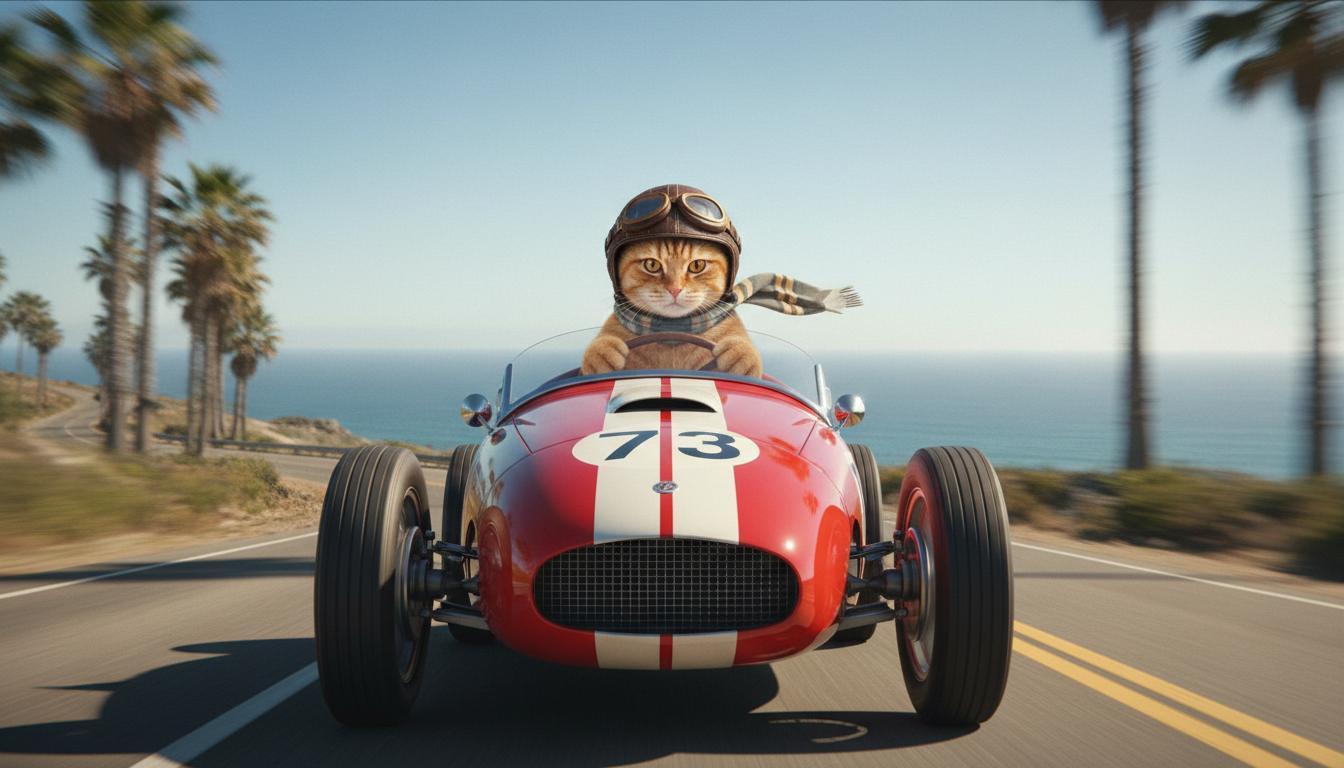
|
| รูปภาพสุดท้าย (สร้างโดย Nano Banana) แสดงสิ่งที่เกิดขึ้นเมื่อรถพุ่งออกจากหน้าผา |
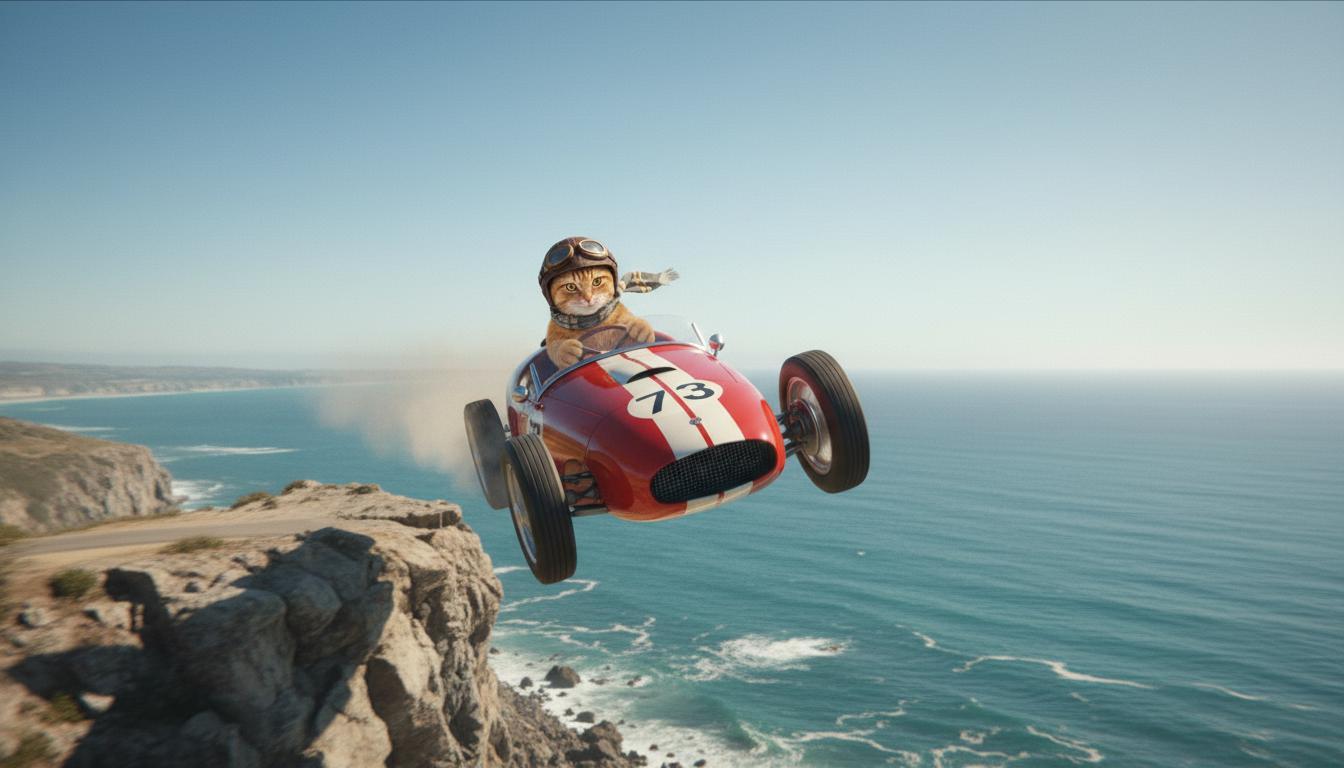
|
| วิดีโอเอาต์พุต (สร้างโดย Veo 3.1) ไม่บังคับ |
|
ฟีเจอร์นี้ช่วยให้คุณควบคุมองค์ประกอบของช็อตได้อย่างแม่นยำโดยให้คุณกำหนดเฟรมเริ่มต้นและเฟรมสิ้นสุดได้ อัปโหลดรูปภาพหรือใช้เฟรมจากวิดีโอที่สร้างไว้ก่อนหน้านี้เพื่อให้แน่ใจว่าฉากจะเริ่มต้นและจบลงตรงตามที่คุณจินตนาการไว้
การเขียนพรอมต์สำหรับส่วนขยาย
หากต้องการขยายวิดีโอที่ Veo สร้างขึ้นด้วย Veo 3.1 (ไม่พร้อมใช้งานสำหรับ Veo 3.1 Lite) ให้ใช้วิดีโอเป็นอินพุตพร้อมกับพรอมต์ข้อความ (ไม่บังคับ) ฟีเจอร์ขยายจะสรุปวินาทีสุดท้ายหรือ 24 เฟรมสุดท้ายของวิดีโอและดำเนินเหตุการณ์ต่อไป
โปรดทราบว่าระบบจะไม่สามารถขยายเสียงได้อย่างมีประสิทธิภาพหากไม่มีเสียงในช่วง 1 วินาทีสุดท้ายของวิดีโอ
| พรอมต์ | เอาต์พุตที่สร้างขึ้น |
|---|---|
| วิดีโออินพุต (สร้างโดย Veo 3.1) เครื่องร่อนพาราไกลเดอร์บินขึ้นจากยอดเขาและเริ่มร่อนลงมาตามภูเขาที่มองเห็นหุบเขาที่เต็มไปด้วยดอกไม้ด้านล่าง |
|
| วิดีโอเอาต์พุต (สร้างโดย Veo 3.1) ขยายวิดีโอนี้โดยให้เครื่องร่อนค่อยๆ ร่อนลงมา |
|
ตัวอย่างพรอมต์และเอาต์พุต
ส่วนนี้จะแสดงพรอมต์หลายรายการ โดยไฮไลต์ว่ารายละเอียดที่อธิบายสามารถยกระดับผลลัพธ์ของวิดีโอแต่ละรายการได้อย่างไร
ตีระฆังเบา
วิดีโอนี้สาธิตวิธีใช้องค์ประกอบของพื้นฐานการเขียนพรอมต์ในพรอมต์ของคุณ
| พรอมต์ | เอาต์พุตที่สร้างขึ้น |
|---|---|
| ภาพระยะใกล้ (องค์ประกอบภาพ) ของแท่งน้ำแข็งที่กำลังละลาย (วัตถุ) บนกำแพงหินที่กลายเป็นน้ำแข็ง (บริบท) ด้วยโทนสีน้ำเงินเย็น (บรรยากาศ) ซูมเข้า (การเคลื่อนไหวของกล้อง) โดยคงรายละเอียดระยะใกล้ของหยดน้ำ (การกระทำ) |
|
ผู้ชายคุยโทรศัพท์
วิดีโอเหล่านี้แสดงวิธีแก้ไขพรอมต์ด้วยรายละเอียดที่เจาะจงมากขึ้นเพื่อให้ Veo ปรับแต่งเอาต์พุตตามที่คุณต้องการ
| พรอมต์ | เอาต์พุตที่สร้างขึ้น |
|---|---|
| รายละเอียดน้อยลง กล้องเคลื่อนที่เพื่อแสดงภาพระยะใกล้ของชายหนุ่มผู้สิ้นหวังในชุดเสื้อคลุมสีเขียว เขากำลังโทรออกด้วยโทรศัพท์ติดผนังแบบแป้นหมุนพร้อมไฟนีออนสีเขียว ดูเหมือนฉากในภาพยนตร์เลย |
|
| รายละเอียดเพิ่มเติม ภาพระยะใกล้แบบภาพยนตร์ติดตามชายหนุ่มผู้สิ้นหวังในชุดเสื้อคลุมสีเขียวที่ดูเก่าขณะกำลังหมุนโทรศัพท์แป้นหมุนที่ติดตั้งบนผนังอิฐที่ดูสกปรก ท่ามกลางแสงสีเขียวสลัวๆ จากป้ายไฟนีออน กล้องเคลื่อนเข้าไปใกล้ เผยให้เห็นความตึงเครียดที่กรามและความสิ้นหวังที่ปรากฏบนใบหน้าขณะที่เขาพยายามโทรออก ระยะชัดลึกตื้นโฟกัสไปที่คิ้วที่ขมวดและโทรศัพท์แบบหมุนสีดำ โดยเบลอพื้นหลังให้กลายเป็นทะเลสีนีออนและเงาที่ไม่ชัดเจน สร้างความรู้สึกเร่งด่วนและโดดเดี่ยว |
|
เสือดาวหิมะ
| พรอมต์ | เอาต์พุตที่สร้างขึ้น |
|---|---|
| พรอมต์แบบง่าย: สิ่งมีชีวิตน่ารักที่มีขนเหมือนเสือดาวหิมะกำลังเดินอยู่ในป่าฤดูหนาว แสดงผลในสไตล์การ์ตูน 3 มิติ |
|
| พรอมต์แบบละเอียด: สร้างฉากแอนิเมชัน 3 มิติสั้นๆ ในสไตล์การ์ตูนที่สนุกสนาน สิ่งมีชีวิตน่ารักที่มีขนคล้ายเสือดาวหิมะ ดวงตาขนาดใหญ่ที่แสดงอารมณ์ และรูปร่างกลมมนที่เป็นมิตร กำลังกระโดดโลดเต้นอย่างมีความสุขผ่านป่าฤดูหนาวที่แปลกตา ฉากควรมีต้นไม้ทรงกลมที่ปกคลุมด้วยหิมะ เกล็ดหิมะที่ตกลงมาอย่างนุ่มนวล และแสงแดดอันอบอุ่นที่ส่องผ่านกิ่งก้าน การเคลื่อนไหวที่เด้งดึ๋งและรอยยิ้มกว้างของสิ่งมีชีวิตควรสื่อถึงความสุขที่แท้จริง มุ่งเน้นโทนที่สนุกสนานและอบอุ่นด้วยสีสันที่สดใสและร่าเริง รวมถึงภาพเคลื่อนไหวที่สนุกสนาน |

|
ตัวอย่างตามองค์ประกอบการเขียน
ตัวอย่างเหล่านี้แสดงวิธีปรับแต่งพรอมต์ตามองค์ประกอบพื้นฐานแต่ละรายการ
เรื่องและบริบท
ระบุจุดโฟกัสหลัก (ตัวแบบ) และพื้นหลังหรือสภาพแวดล้อม (บริบท)
| พรอมต์ | เอาต์พุตที่สร้างขึ้น |
|---|---|
| ภาพเรนเดอร์สถาปัตยกรรมของอาคารอพาร์ตเมนต์คอนกรีตสีขาวที่มีรูปทรงออร์แกนิกที่ลื่นไหล ผสมผสานอย่างกลมกลืนกับต้นไม้เขียวขจีและองค์ประกอบล้ำยุค |
|
| ดาวเทียมลอยอยู่ในอวกาศโดยมีดวงจันทร์และดวงดาวเป็นฉากหลัง |
|
การดำเนินการ
ระบุสิ่งที่ตัวแบบกำลังทำ (เช่น กำลังเดิน กำลังวิ่ง หรือกำลังหันศีรษะ)
| พรอมต์ | เอาต์พุตที่สร้างขึ้น |
|---|---|
| ภาพมุมกว้างของผู้หญิงกำลังเดินเล่นริมชายหาด มองดูขอบฟ้าอย่างมีความสุขและผ่อนคลายในช่วงพระอาทิตย์ตก |
|
รูปแบบ
เพิ่มคีย์เวิร์ดเพื่อกำหนดทิศทางการสร้างให้เป็นไปตามสุนทรียศาสตร์ที่เฉพาะเจาะจง (เช่น เหนือจริง วินเทจ ล้ำยุค ฟิล์มนัวร์)
| พรอมต์ | เอาต์พุตที่สร้างขึ้น |
|---|---|
| สไตล์ฟิล์มนัวร์ ชายและหญิงเดินบนถนน ลึกลับ ภาพยนตร์ ขาวดำ |
|
การเคลื่อนไหวของกล้องและการจัดองค์ประกอบภาพ
ระบุวิธีที่กล้องเคลื่อนไหว (ช็อต POV, มุมมองทางอากาศ, มุมมองการติดตามของโดรน) และวิธีจัดเฟรมช็อต (ช็อตมุมกว้าง, โคลสอัพ, มุมต่ำ)
| พรอมต์ | เอาต์พุตที่สร้างขึ้น |
|---|---|
| ภาพแบบ POV จากรถวินเทจที่ขับท่ามกลางสายฝนในแคนาดายามค่ำคืน สไตล์ภาพยนตร์ |
|
| ภาพระยะใกล้มากของดวงตาที่มีภาพสะท้อนของเมือง |
|
แสงโดยรอบ
ชุดสีและแสงไฟส่งผลต่ออารมณ์ ลองใช้คำต่างๆ เช่น "สีส้มหม่นโทนอบอุ่น" "แสงธรรมชาติ" "พระอาทิตย์ขึ้น" หรือ "สีฟ้าโทนเย็น"
| พรอมต์ | เอาต์พุตที่สร้างขึ้น |
|---|---|
| ภาพระยะใกล้ของเด็กผู้หญิงอุ้มลูกสุนัขพันธุ์โกลเด้นรีทรีฟเวอร์แสนน่ารักในสวนสาธารณะที่มีแสงแดดส่อง |

|
| ภาพระยะใกล้สไตล์ภาพยนตร์ของผู้หญิงที่กำลังนั่งรถบัสท่ามกลางสายฝนด้วยความเศร้า โทนสีฟ้าเย็นตา อารมณ์เศร้า |

|
สัดส่วนภาพ
Veo ช่วยให้คุณระบุสัดส่วนภาพสำหรับวิดีโอได้
| พรอมต์ | เอาต์พุตที่สร้างขึ้น |
|---|---|
| จอกว้าง (16:9) สร้างวิดีโอที่มีมุมมองโดรนติดตามชายคนหนึ่งขับรถเปิดประทุนสีแดงในปาล์มสปริงส์ ยุค 1970 แสงแดดอบอุ่น เงายาว |

|
| แนวตั้ง (9:16) สร้างไฮไลต์ของวิดีโอที่เน้นการเคลื่อนไหวที่ราบรื่นของน้ำตกฮาวายอันยิ่งใหญ่ภายในป่าฝนอันเขียวชอุ่ม เน้นที่การไหลของน้ำที่สมจริง ใบไม้ที่มีรายละเอียด และแสงธรรมชาติเพื่อสื่อถึงความเงียบสงบ จับภาพน้ำที่ไหลเชี่ยว บรรยากาศที่เต็มไปด้วยหมอก และแสงแดดที่ส่องลอดผ่านร่มไม้หนาทึบ ใช้การเคลื่อนไหวของกล้องที่ราบรื่นและสวยงามเพื่อแสดงน้ำตกและสภาพแวดล้อมโดยรอบ ตั้งเป้าให้มีโทนสีที่สงบและสมจริง ซึ่งจะนำผู้ชมไปสู่ความงามอันเงียบสงบของป่าฝนในฮาวาย |
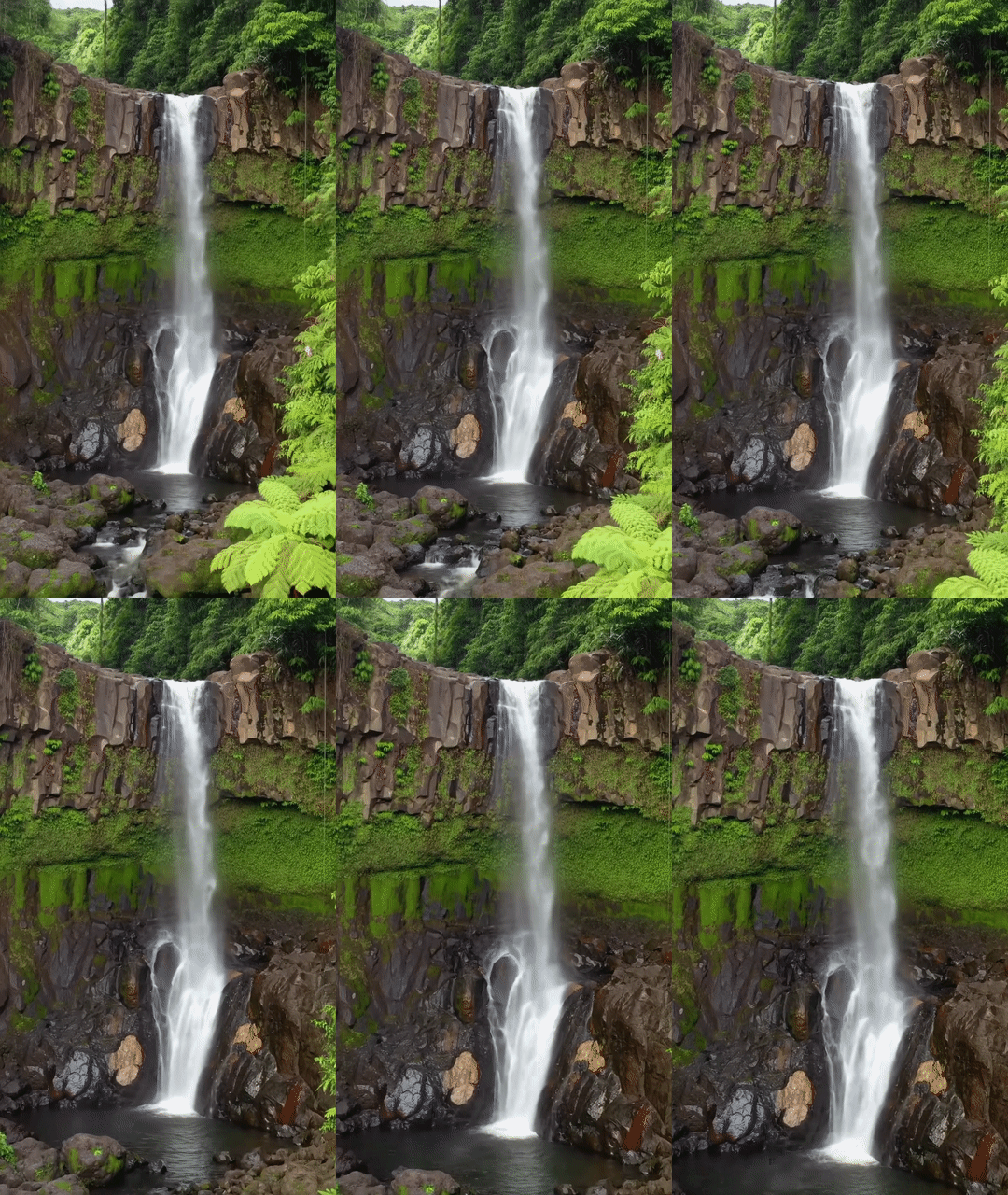
|
เวอร์ชันของโมเดล
ดูรายละเอียดการใช้งานเฉพาะโมเดล Veo เพิ่มเติมได้ที่หน้าราคาและขีดจำกัดอัตรา
Veo 3.1 เวอร์ชันตัวอย่าง
| พร็อพเพอร์ตี้ | คำอธิบาย |
|---|---|
| รหัสรุ่น |
Gemini API
|
| ประเภทข้อมูลที่รองรับ |
อินพุต ข้อความ รูปภาพ เอาต์พุต วิดีโอพร้อมเสียง |
| Limits |
การป้อนข้อความ 1,024 โทเค็น วิดีโอเอาต์พุต 1 |
| อัปเดตล่าสุด | มกราคม 2026 |
Veo 3.1 Fast เวอร์ชันตัวอย่าง
| พร็อพเพอร์ตี้ | คำอธิบาย |
|---|---|
| รหัสรุ่น |
Gemini API
|
| ประเภทข้อมูลที่รองรับ |
อินพุต ข้อความ รูปภาพ เอาต์พุต วิดีโอพร้อมเสียง |
| Limits |
การป้อนข้อความ 1,024 โทเค็น วิดีโอเอาต์พุต 1 |
| อัปเดตล่าสุด | มกราคม 2026 |
เวอร์ชันตัวอย่างของ Veo 3.1 Lite
| พร็อพเพอร์ตี้ | คำอธิบาย |
|---|---|
| รหัสรุ่น |
Gemini API
|
| ประเภทข้อมูลที่รองรับ |
อินพุต ข้อความ รูปภาพ เอาต์พุต วิดีโอพร้อมเสียง |
| Limits |
การป้อนข้อความ 1,024 โทเค็น วิดีโอเอาต์พุต 1 |
| อัปเดตล่าสุด | มีนาคม 2026 |
Veo 3 (เลิกใช้งานแล้ว)
| พร็อพเพอร์ตี้ | คำอธิบาย |
|---|---|
| รหัสรุ่น |
Gemini API
|
| ประเภทข้อมูลที่รองรับ |
อินพุต ข้อความ รูปภาพ เอาต์พุต วิดีโอพร้อมเสียง |
| Limits |
การป้อนข้อความ 1,024 โทเค็น วิดีโอเอาต์พุต 1 |
| อัปเดตล่าสุด | กรกฎาคม 2025 |
Veo 3 Fast (เลิกใช้งานแล้ว)
| พร็อพเพอร์ตี้ | คำอธิบาย |
|---|---|
| รหัสรุ่น |
Gemini API
|
| ประเภทข้อมูลที่รองรับ |
อินพุต ข้อความ รูปภาพ เอาต์พุต วิดีโอพร้อมเสียง |
| Limits |
การป้อนข้อความ 1,024 โทเค็น วิดีโอเอาต์พุต 1 |
| อัปเดตล่าสุด | กรกฎาคม 2025 |
เวอร์ชัน Veo Fast ช่วยให้นักพัฒนาซอฟต์แวร์สร้างวิดีโอพร้อมเสียงได้โดยยังคงคุณภาพสูงไว้ได้ และเพิ่มประสิทธิภาพเพื่อความรวดเร็วและกรณีการใช้งานทางธุรกิจ ซึ่งเหมาะสำหรับบริการแบ็กเอนด์ที่สร้างโฆษณาแบบเป็นโปรแกรม เครื่องมือสำหรับการทดสอบ A/B อย่างรวดเร็วของแนวคิดครีเอทีฟโฆษณา หรือแอปที่ต้องสร้างเนื้อหาโซเชียลมีเดียอย่างรวดเร็ว
ขั้นตอนถัดไป
- เริ่มต้นใช้งาน Veo 3.1 API โดยการทดลองใช้ใน Veo Quickstart Colab และแอปเพล็ต Veo 3.1
- ดูวิธีเขียนพรอมต์ให้ดียิ่งขึ้นได้ในข้อมูลเบื้องต้นเกี่ยวกับการออกแบบพรอมต์