

Pour en savoir plus sur la compréhension des vidéos, consultez le guide Compréhension des vidéos.
Veo 3.1 est un modèle permettant de générer des vidéos de huit secondes (720p, 1080p ou 4K) avec du son généré de manière native. Vous pouvez accéder à ce modèle de manière programmatique à l'aide de l'API Gemini. Pour en savoir plus sur les variantes de modèles Veo disponibles, consultez la section Versions de modèles.
Veo 3.1 excelle dans un large éventail de styles visuels et cinématographiques, et introduit plusieurs nouvelles fonctionnalités :
- Vidéos en mode portrait : choisissez entre les vidéos en mode paysage (
16:9) et en mode portrait (9:16). - Extension de vidéo : prolongez des vidéos précédemment générées à l'aide de Veo.
- Génération spécifique à une image : générez une vidéo en spécifiant la première et la dernière image.
- Direction basée sur des images : utilisez jusqu'à trois images de référence pour guider le contenu de votre vidéo générée.
Pour en savoir plus sur l'écriture de prompts textuels efficaces pour la génération de vidéos, consultez le guide des prompts Veo.
Génération de vidéos à partir de texte
Les exemples suivants montrent comment générer une vidéo avec des dialogues, un réalisme cinématographique ou une animation créative :
Dialogues et effets sonores
Python
import time
from google import genai
from google.genai import types

client = genai.Client()

prompt = """A close up of two people staring at a cryptic drawing on a wall, torchlight flickering.
A man murmurs, 'This must be it. That's the secret code.' The woman looks at him and whispering excitedly, 'What did you find?'"""

operation = client.models.generate_videos(
    model="veo-3.1-generate-preview",
    prompt=prompt,
)

# Poll the operation status until the video is ready.
while not operation.done:
    print("Waiting for video generation to complete...")
    time.sleep(10)
    operation = client.operations.get(operation)

# Download the generated video.
generated_video = operation.response.generated_videos[0]
client.files.download(file=generated_video.video, destination="dialogue_example.mp4")
print("Generated video saved to dialogue_example.mp4")
JavaScript
import { GoogleGenAI } from "@google/genai";

const ai = new GoogleGenAI({});

const prompt = `A close up of two people staring at a cryptic drawing on a wall, torchlight flickering.
A man murmurs, 'This must be it. That's the secret code.' The woman looks at him and whispering excitedly, 'What did you find?'`;

let operation = await ai.models.generateVideos({
    model: "veo-3.1-generate-preview",
    prompt: prompt,
});

// Poll the operation status until the video is ready.
while (!operation.done) {
    console.log("Waiting for video generation to complete...")
    await new Promise((resolve) => setTimeout(resolve, 10000));
    operation = await ai.operations.getVideosOperation({
        operation: operation,
    });
}

// Download the generated video.
ai.files.download({
    file: operation.response.generatedVideos[0].video,
    downloadPath: "dialogue_example.mp4",
});
console.log(`Generated video saved to dialogue_example.mp4`);
Go
package main

import (
    "context"
    "log"
    "os"
    "time"

    "google.golang.org/genai"
)

func main() {
    ctx := context.Background()
    client, err := genai.NewClient(ctx, nil)
    if err != nil {
        log.Fatal(err)
    }

    prompt := `A close up of two people staring at a cryptic drawing on a wall, torchlight flickering.
    A man murmurs, 'This must be it. That's the secret code.' The woman looks at him and whispering excitedly, 'What did you find?'`

    operation, _ := client.Models.GenerateVideos(
        ctx,
        "veo-3.1-generate-preview",
        prompt,
        nil,
        nil,
    )

    // Poll the operation status until the video is ready.
    for !operation.Done {
    log.Println("Waiting for video generation to complete...")
        time.Sleep(10 * time.Second)
        operation, _ = client.Operations.GetVideosOperation(ctx, operation, nil)
    }

    // Download the generated video.
    video := operation.Response.GeneratedVideos[0]
    client.Files.Download(ctx, video.Video, nil)
    fname := "dialogue_example.mp4"
    _ = os.WriteFile(fname, video.Video.VideoBytes, 0644)
    log.Printf("Generated video saved to %s\n", fname)
}
Java
import com.google.genai.Client;
import com.google.genai.types.GenerateVideosOperation;
import com.google.genai.types.GeneratedVideo;

Client client = new Client();

String prompt =
    "A close up of two people staring at a cryptic drawing on a wall, torchlight flickering.\n"
        + "A man murmurs, 'This must be it. That's the secret code.' The woman looks at him and whispering excitedly, 'What did you find?'";

GenerateVideosOperation operation =
    client.models.generateVideos("veo-3.1-generate-preview", prompt, null, null);

// Poll the operation status until the video is ready.
while (!operation.done().orElse(false)) {
  System.out.println("Waiting for video generation to complete...");
  Thread.sleep(10000);
  operation = client.operations.getVideosOperation(operation, null);
}

// Download the generated video.
GeneratedVideo generatedVideo = operation.response().get().generatedVideos().get().get(0);
client.files.download(generatedVideo, "dialogue_example.mp4", null);
System.out.println("Generated video saved to dialogue_example.mp4");
REST
# Note: This script uses jq to parse the JSON response.
# GEMINI API Base URL
BASE_URL="https://generativelanguage.googleapis.com/v1beta"

# Send request to generate video and capture the operation name into a variable.
operation_name=$(curl -s "${BASE_URL}/models/veo-3.1-generate-preview:predictLongRunning" \
  -H "x-goog-api-key: $GEMINI_API_KEY" \
  -H "Content-Type: application/json" \
  -X "POST" \
  -d '{
    "instances": [{
        "prompt": "A close up of two people staring at a cryptic drawing on a wall, torchlight flickering. A man murmurs, \"This must be it. That'\''s the secret code.\" The woman looks at him and whispering excitedly, \"What did you find?\""
      }
    ]
  }' | jq -r .name)

# Poll the operation status until the video is ready
while true; do
  # Get the full JSON status and store it in a variable.
  status_response=$(curl -s -H "x-goog-api-key: $GEMINI_API_KEY" "${BASE_URL}/${operation_name}")

  # Check the "done" field from the JSON stored in the variable.
  is_done=$(echo "${status_response}" | jq .done)

  if [ "${is_done}" = "true" ]; then
    # Extract the download URI from the final response.
    video_uri=$(echo "${status_response}" | jq -r '.response.generateVideoResponse.generatedSamples[0].video.uri')
    echo "Downloading video from: ${video_uri}"

    # Download the video using the URI and API key and follow redirects.
    curl -L -o dialogue_example.mp4 -H "x-goog-api-key: $GEMINI_API_KEY" "${video_uri}"
    break
  fi
  # Wait for 5 seconds before checking again.
  sleep 10
done
Réalisme cinématographique
Python
import time
from google import genai
from google.genai import types

client = genai.Client()

prompt = """Drone shot following a classic red convertible driven by a man along a winding coastal road at sunset, waves crashing against the rocks below.
The convertible accelerates fast and the engine roars loudly."""

operation = client.models.generate_videos(
    model="veo-3.1-generate-preview",
    prompt=prompt,
)

# Poll the operation status until the video is ready.
while not operation.done:
    print("Waiting for video generation to complete...")
    time.sleep(10)
    operation = client.operations.get(operation)

# Download the generated video.
generated_video = operation.response.generated_videos[0]
client.files.download(file=generated_video.video, destination="realism_example.mp4")
print("Generated video saved to realism_example.mp4")
JavaScript
import { GoogleGenAI } from "@google/genai";

const ai = new GoogleGenAI({});

const prompt = `Drone shot following a classic red convertible driven by a man along a winding coastal road at sunset, waves crashing against the rocks below.
The convertible accelerates fast and the engine roars loudly.`;

let operation = await ai.models.generateVideos({
    model: "veo-3.1-generate-preview",
    prompt: prompt,
});

// Poll the operation status until the video is ready.
while (!operation.done) {
    console.log("Waiting for video generation to complete...")
    await new Promise((resolve) => setTimeout(resolve, 10000));
    operation = await ai.operations.getVideosOperation({
        operation: operation,
    });
}

// Download the generated video.
ai.files.download({
    file: operation.response.generatedVideos[0].video,
    downloadPath: "realism_example.mp4",
});
console.log(`Generated video saved to realism_example.mp4`);
Go
package main

import (
    "context"
    "log"
    "os"
    "time"

    "google.golang.org/genai"
)

func main() {
    ctx := context.Background()
    client, err := genai.NewClient(ctx, nil)
    if err != nil {
        log.Fatal(err)
    }

    prompt := `Drone shot following a classic red convertible driven by a man along a winding coastal road at sunset, waves crashing against the rocks below.
  The convertible accelerates fast and the engine roars loudly.`

    operation, _ := client.Models.GenerateVideos(
        ctx,
        "veo-3.1-generate-preview",
        prompt,
        nil,
        nil,
    )

    // Poll the operation status until the video is ready.
    for !operation.Done {
    log.Println("Waiting for video generation to complete...")
        time.Sleep(10 * time.Second)
        operation, _ = client.Operations.GetVideosOperation(ctx, operation, nil)
    }

    // Download the generated video.
    video := operation.Response.GeneratedVideos[0]
    client.Files.Download(ctx, video.Video, nil)
    fname := "realism_example.mp4"
    _ = os.WriteFile(fname, video.Video.VideoBytes, 0644)
    log.Printf("Generated video saved to %s\n", fname)
}
Java
import com.google.genai.Client;
import com.google.genai.types.GenerateVideosOperation;
import com.google.genai.types.GeneratedVideo;

Client client = new Client();

String prompt =
    "Drone shot following a classic red convertible driven by a man along a winding coastal road at sunset, waves crashing against the rocks below.\n"
        + "The convertible accelerates fast and the engine roars loudly.";

GenerateVideosOperation operation =
    client.models.generateVideos("veo-3.1-generate-preview", prompt, null, null);

// Poll the operation status until the video is ready.
while (!operation.done().orElse(false)) {
  System.out.println("Waiting for video generation to complete...");
  Thread.sleep(10000);
  operation = client.operations.getVideosOperation(operation, null);
}

// Download the generated video.
GeneratedVideo generatedVideo = operation.response().get().generatedVideos().get().get(0);
client.files.download(generatedVideo, "realism_example.mp4", null);
System.out.println("Generated video saved to realism_example.mp4");
REST
# Note: This script uses jq to parse the JSON response.
# GEMINI API Base URL
BASE_URL="https://generativelanguage.googleapis.com/v1beta"

# Send request to generate video and capture the operation name into a variable.
operation_name=$(curl -s "${BASE_URL}/models/veo-3.1-generate-preview:predictLongRunning" \
  -H "x-goog-api-key: $GEMINI_API_KEY" \
  -H "Content-Type: application/json" \
  -X "POST" \
  -d '{
    "instances": [{
        "prompt": "Drone shot following a classic red convertible driven by a man along a winding coastal road at sunset, waves crashing against the rocks below. The convertible accelerates fast and the engine roars loudly."
      }
    ]
  }' | jq -r .name)

# Poll the operation status until the video is ready
while true; do
  # Get the full JSON status and store it in a variable.
  status_response=$(curl -s -H "x-goog-api-key: $GEMINI_API_KEY" "${BASE_URL}/${operation_name}")

  # Check the "done" field from the JSON stored in the variable.
  is_done=$(echo "${status_response}" | jq .done)

  if [ "${is_done}" = "true" ]; then
    # Extract the download URI from the final response.
    video_uri=$(echo "${status_response}" | jq -r '.response.generateVideoResponse.generatedSamples[0].video.uri')
    echo "Downloading video from: ${video_uri}"

    # Download the video using the URI and API key and follow redirects.
    curl -L -o realism_example.mp4 -H "x-goog-api-key: $GEMINI_API_KEY" "${video_uri}"
    break
  fi
  # Wait for 5 seconds before checking again.
  sleep 10
done
Animation créative
Python
import time
from google import genai

client = genai.Client()
prompt = "A whimsical stop-motion animation of a tiny robot tending to a garden of glowing mushrooms on a miniature planet."

operation = client.models.generate_videos(
    model="veo-3.1-generate-preview",
    prompt=prompt,
)

# Poll the operation status until the video is ready.
while not operation.done:
    print("Waiting for video generation to complete...")
    time.sleep(10)
    operation = client.operations.get(operation)

# Download the generated video.
generated_video = operation.response.generated_videos[0]
client.files.download(file=generated_video.video, destination="style_example.mp4")
print("Generated video saved to style_example.mp4")
JavaScript
import { GoogleGenAI } from "@google/genai";

const ai = new GoogleGenAI({});

const prompt = "A whimsical stop-motion animation of a tiny robot tending to a garden of glowing mushrooms on a miniature planet.";

let operation = await ai.models.generateVideos({
    model: "veo-3.1-generate-preview",
    prompt: prompt,
});

// Poll the operation status until the video is ready.
while (!operation.done) {
    console.log("Waiting for video generation to complete...")
    await new Promise((resolve) => setTimeout(resolve, 10000));
    operation = await ai.operations.getVideosOperation({
        operation: operation,
    });
}

// Download the generated video.
ai.files.download({
    file: operation.response.generatedVideos[0].video,
    downloadPath: "style_example.mp4",
});
console.log(`Generated video saved to style_example.mp4`);
Go
package main

import (
    "context"
    "log"
    "os"
    "time"

    "google.golang.org/genai"
)

func main() {
    ctx := context.Background()
    client, err := genai.NewClient(ctx, nil)
    if err != nil {
        log.Fatal(err)
    }

    prompt := `A whimsical stop-motion animation of a tiny robot tending to a garden of glowing mushrooms on a miniature planet.`

    operation, _ := client.Models.GenerateVideos(
        ctx,
        "veo-3.1-generate-preview",
        prompt,
        nil,
        nil,
    )

    // Poll the operation status until the video is ready.
    for !operation.Done {
    log.Println("Waiting for video generation to complete...")
        time.Sleep(10 * time.Second)
        operation, _ = client.Operations.GetVideosOperation(ctx, operation, nil)
    }

    // Download the generated video.
    video := operation.Response.GeneratedVideos[0]
    client.Files.Download(ctx, video.Video, nil)
    fname := "style_example.mp4"
    _ = os.WriteFile(fname, video.Video.VideoBytes, 0644)
    log.Printf("Generated video saved to %s\n", fname)
}
Java
import com.google.genai.Client;
import com.google.genai.types.GenerateVideosOperation;
import com.google.genai.types.GeneratedVideo;

Client client = new Client();

String prompt =
    "A whimsical stop-motion animation of a tiny robot tending to a garden of glowing mushrooms on a miniature planet.";

GenerateVideosOperation operation =
    client.models.generateVideos("veo-3.1-generate-preview", prompt, null, null);

// Poll the operation status until the video is ready.
while (!operation.done().orElse(false)) {
  System.out.println("Waiting for video generation to complete...");
  Thread.sleep(10000);
  operation = client.operations.getVideosOperation(operation, null);
}

// Download the generated video.
GeneratedVideo generatedVideo = operation.response().get().generatedVideos().get().get(0);
client.files.download(generatedVideo, "style_example.mp4", null);
System.out.println("Generated video saved to style_example.mp4");
REST
# Note: This script uses jq to parse the JSON response.
# GEMINI API Base URL
BASE_URL="https://generativelanguage.googleapis.com/v1beta"

# Send request to generate video and capture the operation name into a variable.
operation_name=$(curl -s "${BASE_URL}/models/veo-3.1-generate-preview:predictLongRunning" \
  -H "x-goog-api-key: $GEMINI_API_KEY" \
  -H "Content-Type: application/json" \
  -X "POST" \
  -d '{
    "instances": [{
        "prompt": "A whimsical stop-motion animation of a tiny robot tending to a garden of glowing mushrooms on a miniature planet."
      }
    ]
  }' | jq -r .name)

# Poll the operation status until the video is ready
while true; do
  # Get the full JSON status and store it in a variable.
  status_response=$(curl -s -H "x-goog-api-key: $GEMINI_API_KEY" "${BASE_URL}/${operation_name}")

  # Check the "done" field from the JSON stored in the variable.
  is_done=$(echo "${status_response}" | jq .done)

  if [ "${is_done}" = "true" ]; then
    # Extract the download URI from the final response.
    video_uri=$(echo "${status_response}" | jq -r '.response.generateVideoResponse.generatedSamples[0].video.uri')
    echo "Downloading video from: ${video_uri}"

    # Download the video using the URI and API key and follow redirects.
    curl -L -o style_example.mp4 -H "x-goog-api-key: $GEMINI_API_KEY" "${video_uri}"
    break
  fi
  # Wait for 5 seconds before checking again.
  sleep 10
done
Contrôler le format
Veo 3.1 vous permet de créer des vidéos en mode paysage (16:9, paramètre par défaut) ou portrait (9:16). Vous pouvez indiquer au modèle celui que vous souhaitez utiliser à l'aide du paramètre aspect_ratio :
Python
import time
from google import genai
from google.genai import types

client = genai.Client()

prompt = """A montage of pizza making: a chef tossing and flattening the floury dough, ladling rich red tomato sauce in a spiral, sprinkling mozzarella cheese and pepperoni, and a final shot of the bubbling golden-brown pizza, upbeat electronic music with a rhythmical beat is playing, high energy professional video."""

operation = client.models.generate_videos(
    model="veo-3.1-generate-preview",
    prompt=prompt,
    config=types.GenerateVideosConfig(
      aspect_ratio="9:16",
    ),
)

# Poll the operation status until the video is ready.
while not operation.done:
    print("Waiting for video generation to complete...")
    time.sleep(10)
    operation = client.operations.get(operation)

# Download the generated video.
generated_video = operation.response.generated_videos[0]
client.files.download(file=generated_video.video, destination="pizza_making.mp4")
print("Generated video saved to pizza_making.mp4")
JavaScript
import { GoogleGenAI } from "@google/genai";

const ai = new GoogleGenAI({});

const prompt = `A montage of pizza making: a chef tossing and flattening the floury dough, ladling rich red tomato sauce in a spiral, sprinkling mozzarella cheese and pepperoni, and a final shot of the bubbling golden-brown pizza, upbeat electronic music with a rhythmical beat is playing, high energy professional video.`;

let operation = await ai.models.generateVideos({
    model: "veo-3.1-generate-preview",
    prompt: prompt,
    config: {
      aspectRatio: "9:16",
    },
});

// Poll the operation status until the video is ready.
while (!operation.done) {
    console.log("Waiting for video generation to complete...")
    await new Promise((resolve) => setTimeout(resolve, 10000));
    operation = await ai.operations.getVideosOperation({
        operation: operation,
    });
}

// Download the generated video.
ai.files.download({
    file: operation.response.generatedVideos[0].video,
    downloadPath: "pizza_making.mp4",
});
console.log(`Generated video saved to pizza_making.mp4`);
Go
package main

import (
    "context"
    "log"
    "os"
    "time"

    "google.golang.org/genai"
)

func main() {
    ctx := context.Background()
    client, err := genai.NewClient(ctx, nil)
    if err != nil {
        log.Fatal(err)
    }

    prompt := `A montage of pizza making: a chef tossing and flattening the floury dough, ladling rich red tomato sauce in a spiral, sprinkling mozzarella cheese and pepperoni, and a final shot of the bubbling golden-brown pizza, upbeat electronic music with a rhythmical beat is playing, high energy professional video.`

  videoConfig := &genai.GenerateVideosConfig{
      AspectRatio: "9:16",
  }

    operation, _ := client.Models.GenerateVideos(
        ctx,
        "veo-3.1-generate-preview",
        prompt,
        nil,
        videoConfig,
    )

    // Poll the operation status until the video is ready.
    for !operation.Done {
    log.Println("Waiting for video generation to complete...")
        time.Sleep(10 * time.Second)
        operation, _ = client.Operations.GetVideosOperation(ctx, operation, nil)
    }

    // Download the generated video.
    video := operation.Response.GeneratedVideos[0]
    client.Files.Download(ctx, video.Video, nil)
    fname := "pizza_making.mp4"
    _ = os.WriteFile(fname, video.Video.VideoBytes, 0644)
    log.Printf("Generated video saved to %s\n", fname)
}
REST
# Note: This script uses jq to parse the JSON response.
# GEMINI API Base URL
BASE_URL="https://generativelanguage.googleapis.com/v1beta"

# Send request to generate video and capture the operation name into a variable.
operation_name=$(curl -s "${BASE_URL}/models/veo-3.1-generate-preview:predictLongRunning" \
  -H "x-goog-api-key: $GEMINI_API_KEY" \
  -H "Content-Type: application/json" \
  -X "POST" \
  -d '{
    "instances": [{
        "prompt": "A montage of pizza making: a chef tossing and flattening the floury dough, ladling rich red tomato sauce in a spiral, sprinkling mozzarella cheese and pepperoni, and a final shot of the bubbling golden-brown pizza, upbeat electronic music with a rhythmical beat is playing, high energy professional video."
      }
    ],
    "parameters": {
      "aspectRatio": "9:16"
    }
  }' | jq -r .name)

# Poll the operation status until the video is ready
while true; do
  # Get the full JSON status and store it in a variable.
  status_response=$(curl -s -H "x-goog-api-key: $GEMINI_API_KEY" "${BASE_URL}/${operation_name}")

  # Check the "done" field from the JSON stored in the variable.
  is_done=$(echo "${status_response}" | jq .done)

  if [ "${is_done}" = "true" ]; then
    # Extract the download URI from the final response.
    video_uri=$(echo "${status_response}" | jq -r '.response.generateVideoResponse.generatedSamples[0].video.uri')
    echo "Downloading video from: ${video_uri}"

    # Download the video using the URI and API key and follow redirects.
    curl -L -o pizza_making.mp4 -H "x-goog-api-key: $GEMINI_API_KEY" "${video_uri}"
    break
  fi
  # Wait for 5 seconds before checking again.
  sleep 10
done
Contrôler la résolution
Veo 3.1 peut également générer directement des vidéos en 720p, 1080p ou 4K (la 4K n'est pas disponible pour Veo 3.1 Lite).
Notez que plus la résolution est élevée, plus la latence sera importante. Les vidéos 4K sont également plus coûteuses (voir les tarifs).
L'extension vidéo est également limitée aux vidéos 720p.
Python
import time
from google import genai
from google.genai import types

client = genai.Client()

prompt = """A stunning drone view of the Grand Canyon during a flamboyant sunset that highlights the canyon's colors. The drone slowly flies towards the sun then accelerates, dives and flies inside the canyon."""

operation = client.models.generate_videos(
    model="veo-3.1-generate-preview",
    prompt=prompt,
    config=types.GenerateVideosConfig(
      resolution="4k",
    ),
)

# Poll the operation status until the video is ready.
while not operation.done:
    print("Waiting for video generation to complete...")
    time.sleep(10)
    operation = client.operations.get(operation)

# Download the generated video.
generated_video = operation.response.generated_videos[0]
client.files.download(file=generated_video.video, destination="4k_grand_canyon.mp4")
print("Generated video saved to 4k_grand_canyon.mp4")
JavaScript
import { GoogleGenAI } from "@google/genai";

const ai = new GoogleGenAI({});

const prompt = `A stunning drone view of the Grand Canyon during a flamboyant sunset that highlights the canyon's colors. The drone slowly flies towards the sun then accelerates, dives and flies inside the canyon.`;

let operation = await ai.models.generateVideos({
    model: "veo-3.1-generate-preview",
    prompt: prompt,
    config: {
      resolution: "4k",
    },
});

// Poll the operation status until the video is ready.
while (!operation.done) {
    console.log("Waiting for video generation to complete...")
    await new Promise((resolve) => setTimeout(resolve, 10000));
    operation = await ai.operations.getVideosOperation({
        operation: operation,
    });
}

// Download the generated video.
ai.files.download({
    file: operation.response.generatedVideos[0].video,
    downloadPath: "4k_grand_canyon.mp4",
});
console.log(`Generated video saved to 4k_grand_canyon.mp4`);
Go
package main

import (
    "context"
    "log"
    "os"
    "time"

    "google.golang.org/genai"
)

func main() {
    ctx := context.Background()
    client, err := genai.NewClient(ctx, nil)
    if err != nil {
        log.Fatal(err)
    }

    prompt := `A stunning drone view of the Grand Canyon during a flamboyant sunset that highlights the canyon's colors. The drone slowly flies towards the sun then accelerates, dives and flies inside the canyon.`

  videoConfig := &genai.GenerateVideosConfig{
      Resolution: "4k",
  }

    operation, _ := client.Models.GenerateVideos(
        ctx,
        "veo-3.1-generate-preview",
        prompt,
        nil,
        videoConfig,
    )

    // Poll the operation status until the video is ready.
    for !operation.Done {
    log.Println("Waiting for video generation to complete...")
        time.Sleep(10 * time.Second)
        operation, _ = client.Operations.GetVideosOperation(ctx, operation, nil)
    }

    // Download the generated video.
    video := operation.Response.GeneratedVideos[0]
    client.Files.Download(ctx, video.Video, nil)
    fname := "4k_grand_canyon.mp4"
    _ = os.WriteFile(fname, video.Video.VideoBytes, 0644)
    log.Printf("Generated video saved to %s\n", fname)
}
REST
# Note: This script uses jq to parse the JSON response.
# GEMINI API Base URL
BASE_URL="https://generativelanguage.googleapis.com/v1beta"

# Send request to generate video and capture the operation name into a variable.
operation_name=$(curl -s "${BASE_URL}/models/veo-3.1-generate-preview:predictLongRunning" \
  -H "x-goog-api-key: $GEMINI_API_KEY" \
  -H "Content-Type: application/json" \
  -X "POST" \
  -d '{
    "instances": [{
        "prompt": "A stunning drone view of the Grand Canyon during a flamboyant sunset that highlights the canyon'\''s colors. The drone slowly flies towards the sun then accelerates, dives and flies inside the canyon."
      }
    ],
    "parameters": {
      "resolution": "4k"
    }
  }' | jq -r .name)

# Poll the operation status until the video is ready
while true; do
  # Get the full JSON status and store it in a variable.
  status_response=$(curl -s -H "x-goog-api-key: $GEMINI_API_KEY" "${BASE_URL}/${operation_name}")

  # Check the "done" field from the JSON stored in the variable.
  is_done=$(echo "${status_response}" | jq .done)

  if [ "${is_done}" = "true" ]; then
    # Extract the download URI from the final response.
    video_uri=$(echo "${status_response}" | jq -r '.response.generateVideoResponse.generatedSamples[0].video.uri')
    echo "Downloading video from: ${video_uri}"

    # Download the video using the URI and API key and follow redirects.
    curl -L -o 4k_grand_canyon.mp4 -H "x-goog-api-key: $GEMINI_API_KEY" "${video_uri}"
    break
  fi
  # Wait for 5 seconds before checking again.
  sleep 10
done
Génération de vidéos à partir d'une image
Le code suivant montre comment générer une image à l'aide de Gemini 3.1 Flash Image (alias Nano Banana 2), puis comment utiliser cette image comme image de départ pour générer une vidéo avec Veo 3.1.
Python
import time
from google import genai

client = genai.Client()

prompt = "Panning wide shot of a calico kitten sleeping in the sunshine"

# Step 1: Generate an image with Nano Banana 2.
image = client.models.generate_content(
    model="gemini-3.1-flash-image-preview",
    contents=prompt,
    config={"response_modalities":['IMAGE']}
)

# Step 2: Generate video with Veo 3.1 using the image.
operation = client.models.generate_videos(
    model="veo-3.1-generate-preview",
    prompt=prompt,
    image=image.parts[0].as_image(),
)

# Poll the operation status until the video is ready.
while not operation.done:
    print("Waiting for video generation to complete...")
    time.sleep(10)
    operation = client.operations.get(operation)

# Download the video.
video = operation.response.generated_videos[0]
client.files.download(file=video.video, destination="veo3_with_image_input.mp4")
print("Generated video saved to veo3_with_image_input.mp4")
JavaScript
import { GoogleGenAI } from "@google/genai";

const ai = new GoogleGenAI({});

const prompt = "Panning wide shot of a calico kitten sleeping in the sunshine";

// Step 1: Generate an image with Nano Banana 2.
const imageResponse = await ai.models.generateContent({
  model: "gemini-3.1-flash-image-preview",
  prompt: prompt,
});

// Step 2: Generate video with Veo 3.1 using the image.
let operation = await ai.models.generateVideos({
  model: "veo-3.1-generate-preview",
  prompt: prompt,
  image: {
    imageBytes: imageResponse.generatedImages[0].image.imageBytes,
    mimeType: "image/png",
  },
});

// Poll the operation status until the video is ready.
while (!operation.done) {
  console.log("Waiting for video generation to complete...")
  await new Promise((resolve) => setTimeout(resolve, 10000));
  operation = await ai.operations.getVideosOperation({
    operation: operation,
  });
}

// Download the video.
ai.files.download({
    file: operation.response.generatedVideos[0].video,
    downloadPath: "veo3_with_image_input.mp4",
});
console.log(`Generated video saved to veo3_with_image_input.mp4`);
Go
package main

import (
    "context"
    "log"
    "os"
    "time"

    "google.golang.org/genai"
)

func main() {
    ctx := context.Background()
    client, err := genai.NewClient(ctx, nil)
    if err != nil {
        log.Fatal(err)
    }

    prompt := "Panning wide shot of a calico kitten sleeping in the sunshine"

    // Step 1: Generate an image with Nano Banana 2.
    imageResponse, err := client.Models.GenerateContent(
        ctx,
        "gemini-3.1-flash-image-preview",
        prompt,
        nil, // GenerateImagesConfig
    )
    if err != nil {
        log.Fatal(err)
    }

    // Step 2: Generate video with Veo 3.1 using the image.
    operation, err := client.Models.GenerateVideos(
        ctx,
        "veo-3.1-generate-preview",
        prompt,
        imageResponse.GeneratedImages[0].Image,
        nil, // GenerateVideosConfig
    )
    if err != nil {
        log.Fatal(err)
    }

    // Poll the operation status until the video is ready.
    for !operation.Done {
        log.Println("Waiting for video generation to complete...")
        time.Sleep(10 * time.Second)
        operation, _ = client.Operations.GetVideosOperation(ctx, operation, nil)
    }

    // Download the video.
    video := operation.Response.GeneratedVideos[0]
    client.Files.Download(ctx, video.Video, nil)
    fname := "veo3_with_image_input.mp4"
    _ = os.WriteFile(fname, video.Video.VideoBytes, 0644)
    log.Printf("Generated video saved to %s\n", fname)
}
Java
import com.google.genai.Client;
import com.google.genai.types.Blob;
import com.google.genai.types.GenerateContentConfig;
import com.google.genai.types.GenerateContentResponse;
import com.google.genai.types.GenerateVideosOperation;
import com.google.genai.types.GeneratedVideo;
import com.google.genai.types.Image;

Client client = new Client();

String prompt = "Panning wide shot of a calico kitten sleeping in the sunshine";

// Step 1: Generate an image with Nano Banana 2.
GenerateContentResponse imageResponse =
    client.models.generateContent(
        "gemini-3.1-flash-image-preview",
        prompt,
        GenerateContentConfig.builder().responseModalities("IMAGE").build());

Blob inlineData = imageResponse.parts().get(0).inlineData().get();
Image image =
    Image.builder()
        .imageBytes(inlineData.data().get())
        .mimeType(inlineData.mimeType().orElse("image/png"))
        .build();

// Step 2: Generate video with Veo 3.1 using the image.
GenerateVideosOperation operation =
    client.models.generateVideos("veo-3.1-generate-preview", prompt, image, null);

// Poll the operation status until the video is ready.
while (!operation.done().orElse(false)) {
  System.out.println("Waiting for video generation to complete...");
  Thread.sleep(10000);
  operation = client.operations.getVideosOperation(operation, null);
}

// Download the video.
GeneratedVideo video = operation.response().get().generatedVideos().get().get(0);
client.files.download(video, "veo3_with_image_input.mp4", null);
System.out.println("Generated video saved to veo3_with_image_input.mp4");
Utiliser des images de référence
Veo 3.1 accepte désormais jusqu'à trois images de référence pour guider le contenu de votre vidéo générée. Fournissez des images d'une personne, d'un personnage ou d'un produit pour préserver l'apparence du sujet dans la vidéo de sortie.
Par exemple, en utilisant ces trois images générées avec Nano Banana comme références avec un prompt bien rédigé, vous obtenez la vidéo suivante :
`dress_image` |
`woman_image` |
`glasses_image` |
|---|---|---|

|

|

|
Python
import time
from google import genai

client = genai.Client()

prompt = "The video opens with a medium, eye-level shot of a beautiful woman with dark hair and warm brown eyes. She wears a magnificent, high-fashion flamingo dress with layers of pink and fuchsia feathers, complemented by whimsical pink, heart-shaped sunglasses. She walks with serene confidence through the crystal-clear, shallow turquoise water of a sun-drenched lagoon. The camera slowly pulls back to a medium-wide shot, revealing the breathtaking scene as the dress's long train glides and floats gracefully on the water's surface behind her. The cinematic, dreamlike atmosphere is enhanced by the vibrant colors of the dress against the serene, minimalist landscape, capturing a moment of pure elegance and high-fashion fantasy."

dress_reference = types.VideoGenerationReferenceImage(
  image=dress_image, # Generated separately with Nano Banana
  reference_type="asset"
)

sunglasses_reference = types.VideoGenerationReferenceImage(
  image=glasses_image, # Generated separately with Nano Banana
  reference_type="asset"
)

woman_reference = types.VideoGenerationReferenceImage(
  image=woman_image, # Generated separately with Nano Banana
  reference_type="asset"
)

operation = client.models.generate_videos(
    model="veo-3.1-generate-preview",
    prompt=prompt,
    config=types.GenerateVideosConfig(
      reference_images=[dress_reference, glasses_reference, woman_reference],
    ),
)

# Poll the operation status until the video is ready.
while not operation.done:
    print("Waiting for video generation to complete...")
    time.sleep(10)
    operation = client.operations.get(operation)

# Download the video.
video = operation.response.generated_videos[0]
client.files.download(file=video.video, destination="veo3.1_with_reference_images.mp4")
print("Generated video saved to veo3.1_with_reference_images.mp4")
JavaScript
import { GoogleGenAI } from "@google/genai";

const ai = new GoogleGenAI({});

const prompt = "The video opens with a medium, eye-level shot of a beautiful woman with dark hair and warm brown eyes. She wears a magnificent, high-fashion flamingo dress with layers of pink and fuchsia feathers, complemented by whimsical pink, heart-shaped sunglasses. She walks with serene confidence through the crystal-clear, shallow turquoise water of a sun-drenched lagoon. The camera slowly pulls back to a medium-wide shot, revealing the breathtaking scene as the dress's long train glides and floats gracefully on the water's surface behind her. The cinematic, dreamlike atmosphere is enhanced by the vibrant colors of the dress against the serene, minimalist landscape, capturing a moment of pure elegance and high-fashion fantasy.";

// dressImage, glassesImage, womanImage generated separately with Nano Banana
// and available as objects like { imageBytes: "...", mimeType: "image/png" }
const dressReference = {
  image: dressImage,
  referenceType: "asset",
};
const sunglassesReference = {
  image: glassesImage,
  referenceType: "asset",
};
const womanReference = {
  image: womanImage,
  referenceType: "asset",
};

let operation = await ai.models.generateVideos({
  model: "veo-3.1-generate-preview",
  prompt: prompt,
  config: {
    referenceImages: [
      dressReference,
      sunglassesReference,
      womanReference,
    ],
  },
});

// Poll the operation status until the video is ready.
while (!operation.done) {
  console.log("Waiting for video generation to complete...");
  await new Promise((resolve) => setTimeout(resolve, 10000));
  operation = await ai.operations.getVideosOperation({
    operation: operation,
  });
}

// Download the video.
ai.files.download({
  file: operation.response.generatedVideos[0].video,
  downloadPath: "veo3.1_with_reference_images.mp4",
});
console.log(`Generated video saved to veo3.1_with_reference_images.mp4`);
Go
package main

import (
    "context"
    "log"
    "os"
    "time"

    "google.golang.org/genai"
)

func main() {
    ctx := context.Background()
    client, err := genai.NewClient(ctx, nil)
    if err != nil {
        log.Fatal(err)
    }

  prompt := `The video opens with a medium, eye-level shot of a beautiful woman with dark hair and warm brown eyes. She wears a magnificent, high-fashion flamingo dress with layers of pink and fuchsia feathers, complemented by whimsical pink, heart-shaped sunglasses. She walks with serene confidence through the crystal-clear, shallow turquoise water of a sun-drenched lagoon. The camera slowly pulls back to a medium-wide shot, revealing the breathtaking scene as the dress's long train glides and floats gracefully on the water's surface behind her. The cinematic, dreamlike atmosphere is enhanced by the vibrant colors of the dress against the serene, minimalist landscape, capturing a moment of pure elegance and high-fashion fantasy.`

  // dressImage, glassesImage, womanImage generated separately with Nano Banana
  // and available as *genai.Image objects.
  var dressImage, glassesImage, womanImage *genai.Image

  dressReference := &genai.VideoGenerationReferenceImage{
    Image: dressImage,
    ReferenceType: "asset",
  }
  sunglassesReference := &genai.VideoGenerationReferenceImage{
    Image: glassesImage,
    ReferenceType: "asset",
  }
  womanReference := &genai.VideoGenerationReferenceImage{
    Image: womanImage,
    ReferenceType: "asset",
  }

    operation, _ := client.Models.GenerateVideos(
        ctx,
        "veo-3.1-generate-preview",
        prompt,
    nil, // image
        &genai.GenerateVideosConfig{
      ReferenceImages: []*genai.VideoGenerationReferenceImage{
        dressReference,
        sunglassesReference,
        womanReference,
      },
    },
    )

    // Poll the operation status until the video is ready.
    for !operation.Done {
        log.Println("Waiting for video generation to complete...")
        time.Sleep(10 * time.Second)
        operation, _ = client.Operations.GetVideosOperation(ctx, operation, nil)
    }

    // Download the video.
    video := operation.Response.GeneratedVideos[0]
    client.Files.Download(ctx, video.Video, nil)
    fname := "veo3.1_with_reference_images.mp4"
    _ = os.WriteFile(fname, video.Video.VideoBytes, 0644)
    log.Printf("Generated video saved to %s\n", fname)
}
REST
# Note: This script uses jq to parse the JSON response.
# It assumes dress_image_base64, glasses_image_base64, and woman_image_base64
# contain base64-encoded image data.

# GEMINI API Base URL
BASE_URL="https://generativelanguage.googleapis.com/v1beta"

# Send request to generate video and capture the operation name into a variable.
operation_name=$(curl -s "${BASE_URL}/models/veo-3.1-generate-preview:predictLongRunning" \
  -H "x-goog-api-key: $GEMINI_API_KEY" \
  -H "Content-Type: application/json" \
  -X "POST" \
  -d '{
    "instances": [{
      "prompt": "The video opens with a medium, eye-level shot of a beautiful woman with dark hair and warm brown eyes. She wears a magnificent, high-fashion flamingo dress with layers of pink and fuchsia feathers, complemented by whimsical pink, heart-shaped sunglasses. She walks with serene confidence through the crystal-clear, shallow turquoise water of a sun-drenched lagoon. The camera slowly pulls back to a medium-wide shot, revealing the breathtaking scene as the dress'\''s long train glides and floats gracefully on the water'\''s surface behind her. The cinematic, dreamlike atmosphere is enhanced by the vibrant colors of the dress against the serene, minimalist landscape, capturing a moment of pure elegance and high-fashion fantasy.",
      "referenceImages": [
        {
          "image": {"inlineData": {"mimeType": "image/png", "data": "'"$dress_image_base64"'"}},
          "referenceType": "asset"
        },
        {
          "image": {"inlineData": {"mimeType": "image/png", "data": "'"$glasses_image_base64"'"}},
          "referenceType": "asset"
        },
        {
          "image": {"inlineData": {"mimeType": "image/png", "data": "'"$woman_image_base64"'"}},
          "referenceType": "asset"
        }
      ]
    }],
  }' | jq -r .name)

# Poll the operation status until the video is ready
while true; do
  # Get the full JSON status and store it in a variable.
  status_response=$(curl -s -H "x-goog-api-key: $GEMINI_API_KEY" "${BASE_URL}/${operation_name}")

  # Check the "done" field from the JSON stored in the variable.
  is_done=$(echo "${status_response}" | jq .done)

  if [ "${is_done}" = "true" ]; then
    # Extract the download URI from the final response.
    video_uri=$(echo "${status_response}" | jq -r '.response.generateVideoResponse.generatedSamples[0].video.uri')
    echo "Downloading video from: ${video_uri}"

    # Download the video using the URI and API key and follow redirects.
    curl -L -o veo3.1_with_reference_images.mp4 -H "x-goog-api-key: $GEMINI_API_KEY" "${video_uri}"
    break
  fi
  # Wait for 10 seconds before checking again.
  sleep 10
done
Utiliser les première et dernière images
Veo 3.1 vous permet de créer des vidéos par interpolation, ou en spécifiant la première et la dernière image de la vidéo. Pour en savoir plus sur l'écriture de prompts textuels efficaces pour la génération de vidéos, consultez le guide des prompts Veo.
Python
import time
from google import genai

client = genai.Client()

prompt = "A cinematic, haunting video. A ghostly woman with long white hair and a flowing dress swings gently on a rope swing beneath a massive, gnarled tree in a foggy, moonlit clearing. The fog thickens and swirls around her, and she slowly fades away, vanishing completely. The empty swing is left swaying rhythmically on its own in the eerie silence."

operation = client.models.generate_videos(
    model="veo-3.1-generate-preview",
    prompt=prompt,
    image=first_image, # The starting frame is passed as a primary input
    config=types.GenerateVideosConfig(
      last_frame=last_image # The ending frame is passed as a generation constraint in the config
    ),
)

# Poll the operation status until the video is ready.
while not operation.done:
    print("Waiting for video generation to complete...")
    time.sleep(10)
    operation = client.operations.get(operation)

# Download the video.
video = operation.response.generated_videos[0]
client.files.download(file=video.video, destination="veo3.1_with_interpolation.mp4")
print("Generated video saved to veo3.1_with_interpolation.mp4")
JavaScript
import { GoogleGenAI } from "@google/genai";

const ai = new GoogleGenAI({});

const prompt = "A cinematic, haunting video. A ghostly woman with long white hair and a flowing dress swings gently on a rope swing beneath a massive, gnarled tree in a foggy, moonlit clearing. The fog thickens and swirls around her, and she slowly fades away, vanishing completely. The empty swing is left swaying rhythmically on its own in the eerie silence.";

// firstImage and lastImage generated separately with Nano Banana
// and available as objects like { imageBytes: "...", mimeType: "image/png" }
let operation = await ai.models.generateVideos({
    model: "veo-3.1-generate-preview",
    prompt: prompt,
    image: firstImage, // The starting frame is passed as a primary input
    config: {
      lastFrame: lastImage, // The ending frame is passed as a generation constraint in the config
    },
});

// Poll the operation status until the video is ready.
while (!operation.done) {
    console.log("Waiting for video generation to complete...")
    await new Promise((resolve) => setTimeout(resolve, 10000));
    operation = await ai.operations.getVideosOperation({
        operation: operation,
    });
}

// Download the video.
ai.files.download({
    file: operation.response.generatedVideos[0].video,
    downloadPath: "veo3.1_with_interpolation.mp4",
});
console.log(`Generated video saved to veo3.1_with_interpolation.mp4`);
Go
package main

import (
    "context"
    "log"
    "os"
    "time"

    "google.golang.org/genai"
)

func main() {
    ctx := context.Background()
    client, err := genai.NewClient(ctx, nil)
    if err != nil {
        log.Fatal(err)
    }

  prompt := `A cinematic, haunting video. A ghostly woman with long white hair and a flowing dress swings gently on a rope swing beneath a massive, gnarled tree in a foggy, moonlit clearing. The fog thickens and swirls around her, and she slowly fades away, vanishing completely. The empty swing is left swaying rhythmically on its own in the eerie silence.`

  // firstImage and lastImage generated separately with Nano Banana
  // and available as *genai.Image objects.
  var firstImage, lastImage *genai.Image

    operation, _ := client.Models.GenerateVideos(
        ctx,
        "veo-3.1-generate-preview",
        prompt,
    firstImage, // The starting frame is passed as a primary input
        &genai.GenerateVideosConfig{
      LastFrame: lastImage, // The ending frame is passed as a generation constraint in the config
    },
    )

    // Poll the operation status until the video is ready.
    for !operation.Done {
        log.Println("Waiting for video generation to complete...")
        time.Sleep(10 * time.Second)
        operation, _ = client.Operations.GetVideosOperation(ctx, operation, nil)
    }

    // Download the video.
    video := operation.Response.GeneratedVideos[0]
    client.Files.Download(ctx, video.Video, nil)
    fname := "veo3.1_with_interpolation.mp4"
    _ = os.WriteFile(fname, video.Video.VideoBytes, 0644)
    log.Printf("Generated video saved to %s\n", fname)
}
REST
# Note: This script uses jq to parse the JSON response.
# It assumes first_image_base64 and last_image_base64
# contain base64-encoded image data.

# GEMINI API Base URL
BASE_URL="https://generativelanguage.googleapis.com/v1beta"

# Send request to generate video and capture the operation name into a variable.
# The starting frame is passed as a primary input
# The ending frame is passed as a generation constraint in the config
operation_name=$(curl -s "${BASE_URL}/models/veo-3.1-generate-preview:predictLongRunning" \
  -H "x-goog-api-key: $GEMINI_API_KEY" \
  -H "Content-Type: application/json" \
  -X "POST" \
  -d '{
    "instances": [{
      "prompt": "A cinematic, haunting video. A ghostly woman with long white hair and a flowing dress swings gently on a rope swing beneath a massive, gnarled tree in a foggy, moonlit clearing. The fog thickens and swirls around her, and she slowly fades away, vanishing completely. The empty swing is left swaying rhythmically on its own in the eerie silence.",
      "image": {"inlineData": {"mimeType": "image/png", "data": "'"$first_image_base64"'"}},
      "lastFrame": {"inlineData": {"mimeType": "image/png", "data": "'"$last_image_base64"'"}}
    }],
  }' | jq -r .name)

# Poll the operation status until the video is ready
while true; do
  # Get the full JSON status and store it in a variable.
  status_response=$(curl -s -H "x-goog-api-key: $GEMINI_API_KEY" "${BASE_URL}/${operation_name}")

  # Check the "done" field from the JSON stored in the variable.
  is_done=$(echo "${status_response}" | jq .done)

  if [ "${is_done}" = "true" ]; then
    # Extract the download URI from the final response.
    video_uri=$(echo "${status_response}" | jq -r '.response.generateVideoResponse.generatedSamples[0].video.uri')
    echo "Downloading video from: ${video_uri}"

    # Download the video using the URI and API key and follow redirects.
    curl -L -o veo3.1_with_interpolation.mp4 -H "x-goog-api-key: $GEMINI_API_KEY" "${video_uri}"
    break
  fi
  # Wait for 10 seconds before checking again.
  sleep 10
done
`first_image` |
`last_image` |
veo3.1_with_interpolation.mp4 |
|---|---|---|

|

|
|
Prolonger des vidéos Veo
Utilisez Veo 3.1 pour prolonger de sept secondes les vidéos que vous avez précédemment générées avec Veo, jusqu'à 20 fois.
Limites des vidéos d'entrée :
- Seules les vidéos générées par Veo d'une durée maximale de 141 secondes.
- L'API Gemini n'est compatible qu'avec les extensions de vidéo pour les vidéos générées par Veo.
- La vidéo doit provenir d'une génération précédente, comme
operation.response.generated_videos[0].video - Les vidéos sont stockées pendant deux jours, mais si une vidéo est référencée pour une extension, son minuteur de stockage de deux jours est réinitialisé. Vous ne pouvez prolonger que les vidéos générées ou référencées au cours des deux derniers jours.
- Les vidéos d'entrée doivent respecter une certaine durée, un certain format et certaines dimensions :
- Format : 9:16 ou 16:9
- Résolution : 720p
- Durée de la vidéo : 141 secondes maximum
La sortie de l'extension est une seule vidéo combinant la vidéo d'entrée de l'utilisateur et la vidéo prolongée générée, pour une durée maximale de 148 secondes.
Cet exemple prend une vidéo générée par Veo, présentée ici avec sa requête d'origine, et l'étend à l'aide du paramètre video et d'une nouvelle requête :
| Prompt | Résultat : butterfly_video |
|---|---|
| Un papillon en origami bat des ailes et s'envole par la porte-fenêtre pour aller dans le jardin. |
|
Python
import time
from google import genai

client = genai.Client()

prompt = "Track the butterfly into the garden as it lands on an orange origami flower. A fluffy white puppy runs up and gently pats the flower."

operation = client.models.generate_videos(
    model="veo-3.1-generate-preview",
    video=operation.response.generated_videos[0].video, # This must be a video from a previous generation
    prompt=prompt,
    config=types.GenerateVideosConfig(
        number_of_videos=1,
        resolution="720p"
    ),
)

# Poll the operation status until the video is ready.
while not operation.done:
    print("Waiting for video generation to complete...")
    time.sleep(10)
    operation = client.operations.get(operation)

# Download the video.
video = operation.response.generated_videos[0]
client.files.download(file=video.video, destination="veo3.1_extension.mp4")
print("Generated video saved to veo3.1_extension.mp4")
JavaScript
import { GoogleGenAI } from "@google/genai";

const ai = new GoogleGenAI({});

const prompt = "Track the butterfly into the garden as it lands on an orange origami flower. A fluffy white puppy runs up and gently pats the flower.";

// butterflyVideo must be a video from a previous generation
// available as an object like { videoBytes: "...", mimeType: "video/mp4" }
let operation = await ai.models.generateVideos({
    model: "veo-3.1-generate-preview",
    video: butterflyVideo,
    prompt: prompt,
    config: {
        numberOfVideos: 1,
        resolution: "720p",
    },
});

// Poll the operation status until the video is ready.
while (!operation.done) {
    console.log("Waiting for video generation to complete...")
    await new Promise((resolve) => setTimeout(resolve, 10000));
    operation = await ai.operations.getVideosOperation({
        operation: operation,
    });
}

// Download the video.
ai.files.download({
    file: operation.response.generatedVideos[0].video,
    downloadPath: "veo3.1_extension.mp4",
});
console.log(`Generated video saved to veo3.1_extension.mp4`);
Go
package main

import (
    "context"
    "log"
    "os"
    "time"

    "google.golang.org/genai"
)

func main() {
    ctx := context.Background()
    client, err := genai.NewClient(ctx, nil)
    if err != nil {
        log.Fatal(err)
    }

  prompt := `Track the butterfly into the garden as it lands on an orange origami flower. A fluffy white puppy runs up and gently pats the flower.`

  // butterflyVideo must be a video from a previous generation
  // available as a *genai.Video object.
  var butterflyVideo *genai.Video

    operation, _ := client.Models.GenerateVideos(
        ctx,
        "veo-3.1-generate-preview",
        prompt,
    nil, // image
    butterflyVideo,
        &genai.GenerateVideosConfig{
      NumberOfVideos: 1,
      Resolution: "720p",
    },
    )

    // Poll the operation status until the video is ready.
    for !operation.Done {
        log.Println("Waiting for video generation to complete...")
        time.Sleep(10 * time.Second)
        operation, _ = client.Operations.GetVideosOperation(ctx, operation, nil)
    }

    // Download the video.
    video := operation.Response.GeneratedVideos[0]
    client.Files.Download(ctx, video.Video, nil)
    fname := "veo3.1_extension.mp4"
    _ = os.WriteFile(fname, video.Video.VideoBytes, 0644)
    log.Printf("Generated video saved to %s\n", fname)
}
REST
# Note: This script uses jq to parse the JSON response.
# It assumes butterfly_video_base64 contains base64-encoded
# video data from a previous generation.

# GEMINI API Base URL
BASE_URL="https://generativelanguage.googleapis.com/v1beta"

# Send request to generate video and capture the operation name into a variable.
operation_name=$(curl -s "${BASE_URL}/models/veo-3.1-generate-preview:predictLongRunning" \
  -H "x-goog-api-key: $GEMINI_API_KEY" \
  -H "Content-Type: application/json" \
  -X "POST" \
  -d '{
    "instances": [{
      "prompt": "Track the butterfly into the garden as it lands on an orange origami flower. A fluffy white puppy runs up and gently pats the flower.",
      "video": {"inlineData": {"mimeType": "video/mp4", "data": "'"$butterfly_video_base64"'"}}
    }],
    "parameters": {
      "numberOfVideos": 1,
      "resolution": "720p"
    }
  }' | jq -r .name)

# Poll the operation status until the video is ready
while true; do
  # Get the full JSON status and store it in a variable.
  status_response=$(curl -s -H "x-goog-api-key: $GEMINI_API_KEY" "${BASE_URL}/${operation_name}")

  # Check the "done" field from the JSON stored in the variable.
  is_done=$(echo "${status_response}" | jq .done)

  if [ "${is_done}" = "true" ]; then
    # Extract the download URI from the final response.
    video_uri=$(echo "${status_response}" | jq -r '.response.generateVideoResponse.generatedSamples[0].video.uri')
    echo "Downloading video from: ${video_uri}"

    # Download the video using the URI and API key and follow redirects.
    curl -L -o veo3.1_extension.mp4 -H "x-goog-api-key: $GEMINI_API_KEY" "${video_uri}"
    break
  fi
  # Wait for 10 seconds before checking again.
  sleep 10
done
Pour en savoir plus sur l'écriture de prompts textuels efficaces pour la génération de vidéos, consultez le guide des prompts Veo.
Gérer les opérations asynchrones
La génération de vidéos est une tâche qui nécessite beaucoup de ressources de calcul. Lorsque vous envoyez une requête à l'API, celle-ci lance un job de longue durée et renvoie immédiatement un objet operation. Vous devez ensuite interroger l'API jusqu'à ce que la vidéo soit prête, ce qui est indiqué par l'état done défini sur "true".
Le cœur de ce processus est une boucle d'interrogation, qui vérifie régulièrement l'état du job.
Python
import time
from google import genai
from google.genai import types

client = genai.Client()

# After starting the job, you get an operation object.
operation = client.models.generate_videos(
    model="veo-3.1-generate-preview",
    prompt="A cinematic shot of a majestic lion in the savannah.",
)

# Alternatively, you can use operation.name to get the operation.
operation = types.GenerateVideosOperation(name=operation.name)

# This loop checks the job status every 10 seconds.
while not operation.done:
    time.sleep(10)
    # Refresh the operation object to get the latest status.
    operation = client.operations.get(operation)

# Once done, the result is in operation.response.
# ... process and download your video ...
JavaScript
import { GoogleGenAI } from "@google/genai";

const ai = new GoogleGenAI({});

// After starting the job, you get an operation object.
let operation = await ai.models.generateVideos({
  model: "veo-3.1-generate-preview",
  prompt: "A cinematic shot of a majestic lion in the savannah.",
});

// Alternatively, you can use operation.name to get the operation.
// operation = types.GenerateVideosOperation(name=operation.name)

// This loop checks the job status every 10 seconds.
while (!operation.done) {
    await new Promise((resolve) => setTimeout(resolve, 1000));
    // Refresh the operation object to get the latest status.
    operation = await ai.operations.getVideosOperation({ operation });
}

// Once done, the result is in operation.response.
// ... process and download your video ...
Go
package main

import (
    "context"
    "log"
    "time"

    "google.golang.org/genai"
)

func main() {
    ctx := context.Background()
    client, err := genai.NewClient(ctx, nil)
    if err != nil {
        log.Fatal(err)
    }

    // After starting the job, you get an operation object.
    operation, _ := client.Models.GenerateVideos(
        ctx,
        "veo-3.1-generate-preview",
        "A cinematic shot of a majestic lion in the savannah.",
        nil,
        nil,
    )

    // This loop checks the job status every 10 seconds.
    for !operation.Done {
        time.Sleep(10 * time.Second)
        // Refresh the operation object to get the latest status.
        operation, _ = client.Operations.GetVideosOperation(ctx, operation, nil)
    }

    // Once done, the result is in operation.Response.
    // ... process and download your video ...
}
Java
import com.google.genai.Client;
import com.google.genai.types.GenerateVideosOperation;

Client client = new Client();

// After starting the job, you get an operation object.
GenerateVideosOperation operation =
    client.models.generateVideos(
        "veo-3.1-generate-preview",
        "A cinematic shot of a majestic lion in the savannah.",
        null,
        null);

// Alternatively, you can use operation.name to construct the operation.
operation = GenerateVideosOperation.builder().name(operation.name().get()).build();

// This loop checks the job status every 10 seconds.
while (!operation.done().orElse(false)) {
  Thread.sleep(10000);
  // Refresh the operation object to get the latest status.
  operation = client.operations.getVideosOperation(operation, null);
}

// Once done, the result is in operation.response().
// ... process and download your video ...
REST
# Note: This script uses jq to parse the JSON response.
# GEMINI API Base URL
BASE_URL="https://generativelanguage.googleapis.com/v1beta"

# Send request to generate video and capture the operation name into a variable.
operation_name=$(curl -s "${BASE_URL}/models/veo-3.1-generate-preview:predictLongRunning" \
  -H "x-goog-api-key: $GEMINI_API_KEY" \
  -H "Content-Type: application/json" \
  -X "POST" \
  -d '{
    "instances": [{
        "prompt": "A cinematic shot of a majestic lion in the savannah."
      }
    ]
  }' | jq -r .name)

# This loop checks the job status every 10 seconds.
while true; do
  # Get the full JSON status and store it in a variable.
  status_response=$(curl -s -H "x-goog-api-key: $GEMINI_API_KEY" "${BASE_URL}/${operation_name}")

  # Check the "done" field from the JSON stored in the variable.
  is_done=$(echo "${status_response}" | jq .done)

  if [ "${is_done}" = "true" ]; then
    # Once done, the result is in status_response.
    # ... process and download your video ...
    echo "Video generation complete."
    break
  fi
  # Wait for 10 seconds before checking again.
  echo "Waiting for video generation to complete..."
  sleep 10
done
Paramètres et spécifications de l'API Veo
Voici les paramètres que vous pouvez définir dans votre requête API pour contrôler le processus de génération de vidéo.
| Paramètre | Veo 3.1 et Veo 3.1 Fast | Veo 3.1 Lite | Veo 3 et Veo 3 Fast |
|---|---|---|---|
| Instances | |||
prompt :Description textuelle de la vidéo. Compatible avec les signaux audio. |
string |
string |
string |
image :image initiale à animer. |
Objet Image |
Objet Image |
Objet Image |
lastFrame :Image finale vers laquelle la vidéo d'interpolation doit effectuer une transition. Doit être utilisé en combinaison avec le paramètre image. |
Objet Image |
Objet Image |
Objet Image |
referenceImages :jusqu'à trois images à utiliser comme références de style et de contenu. |
Objet VideoGenerationReferenceImage |
Objet n/a |
n/a |
video :Vidéo à utiliser pour l'extension vidéo. |
Objet Video d'une génération précédente |
n/a | n/a |
| Paramètres | |||
aspectRatio :format de la vidéo. |
"16:9" (par défaut),"9:16" |
"16:9" (par défaut),"9:16" |
"16:9" (par défaut),"9:16" |
durationSeconds :durée de la vidéo générée. |
"4", "6", "8".Doit être défini sur "8" lorsque vous utilisez des extensions, des images de référence ou des résolutions 1080p et 4K |
"4", "6", "8".Doit être défini sur "8" lorsque vous utilisez des images de référence ou une résolution de 1080p |
"4", "6", "8".Doit être défini sur "8" lorsque vous utilisez des extensions, des images de référence ou des résolutions 1080p et 4K |
personGeneration :contrôle la génération de personnes. (Consultez Limites pour connaître les restrictions régionales.) |
Texte vers vidéo et Extension :"allow_all" uniquementImage vers vidéo, Interpolation et Images de référence : "allow_adult" uniquement
|
Texte vers vidéo :"allow_all" uniquementImage vers vidéo, interpolation et images de référence : "allow_adult" uniquement
|
Texte vers vidéo :"allow_all" uniquementImage vers vidéo : "allow_adult" uniquement
|
resolution :résolution de la vidéo. |
"720p" (par défaut), "1080p" (compatible uniquement avec une durée de 8 s),"4k" (compatible uniquement avec une durée de 8 s)"720p" uniquement pour l'extension
|
"720p" (par défaut), "1080p" (compatible uniquement avec une durée de 8 s) |
"720p" (par défaut), "1080p" (compatible uniquement avec une durée de 8 s),"4k" (compatible uniquement avec une durée de 8 s)"720p" uniquement pour l'extension
|
Notez que le paramètre seed est également disponible pour les modèles Veo 3.
Cela ne garantit pas le déterminisme, mais l'améliore légèrement.
Caractéristiques du modèle
| Fonctionnalité | Veo 3.1 et Veo 3.1 Fast | Veo 3.1 Lite | Veo 3 et Veo 3 Fast |
|---|---|---|---|
| Audio : génère de l'audio de manière native avec la vidéo. |
✔️ Toujours activé | ✔️ Toujours activé | ✔️ Toujours activé |
| Modalités d'entrée : Type d'entrée utilisé pour la génération. |
Texte vers vidéo, image vers vidéo, vidéo vers vidéo | Texte vers vidéo, image vers vidéo | Texte vers vidéo, image vers vidéo |
| Résolution : Résolution de sortie de la vidéo. |
720p, 1080p (durée de 8 s uniquement), 4k (durée de 8 s uniquement) 720p uniquement lors de l'utilisation de l'extension de vidéo. |
720p, 1080p (durée de 8 s uniquement) |
720p et 1080p (16:9 uniquement) |
| Fréquence d'images Fréquence d'images de sortie de la vidéo. |
24 ips | 24 ips | 24 ips |
| Durée de la vidéo : Durée de la vidéo générée. |
8 secondes, 6 secondes, 4 secondes 8 secondes uniquement si la résolution est de 1080p ou 4K, ou si des images de référence sont utilisées |
8 secondes, 6 secondes, 4 secondes 8 secondes uniquement si 1080p ou si des images de référence sont utilisées |
8 secondes |
| Vidéos par requête : nombre de vidéos générées par requête. |
1 | 1 | 1 |
| État : Disponibilité du modèle |
Aperçu | Aperçu | Stable |
Limites
- Requêtes multividéos : le référencement ou le raisonnement sur plusieurs vidéos n'est pas possible pour le moment. Si vous essayez d'utiliser des prompts avec plusieurs vidéos, les performances du modèle risquent d'être dégradées ou les résultats inattendus.
- Langues acceptées : l'anglais (EN) est entièrement accepté, mais les autres langues n'ont pas été évaluées. Elles peuvent donc fonctionner, mais les résultats peuvent varier.
- Latence des requêtes : min. : 11 secondes ; max. : 6 minutes (pendant les heures pleines).
- Limites régionales : dans l'UE, au Royaume-Uni, en Suisse et dans la région MENA,
allow_adultest la seule valeur autorisée pourpersonGeneration. - Conservation des vidéos : les vidéos générées sont stockées sur le serveur pendant deux jours, puis supprimées. Pour enregistrer une copie locale, vous devez télécharger votre vidéo dans les deux jours suivant sa génération. Les vidéos prolongées sont traitées comme des vidéos nouvellement générées.
- Filigrane : les vidéos créées par Veo sont marquées à l'aide de SynthID, notre outil permettant d'ajouter un filigrane et d'identifier les contenus générés par l'IA. Les vidéos peuvent être vérifiées à l'aide de la plate-forme de vérification SynthID.
- Sécurité : les vidéos générées sont soumises à des filtres de sécurité et à des processus de vérification de la mémorisation qui permettent de limiter les risques liés à la confidentialité, aux droits d'auteur et aux biais.
- Erreur audio : Veo 3.1 bloque parfois la génération d'une vidéo en raison de filtres de sécurité ou d'autres problèmes de traitement de l'audio. Vous ne serez pas facturé si la génération de votre vidéo est bloquée.
Guide sur les prompts Veo
Cette section contient des exemples de vidéos que vous pouvez créer à l'aide de Veo et vous montre comment modifier les prompts pour produire des résultats distincts.
Filtres de sécurité
Veo applique des filtres de sécurité dans Gemini pour s'assurer que les vidéos générées et les photos importées ne contiennent pas de contenu offensant. Les requêtes qui ne respectent pas nos conditions d'utilisation et consignes sont bloquées.
Principes de base concernant l'écriture de requêtes
Les bons prompts sont descriptifs et clairs. Pour tirer le meilleur parti de Veo, commencez par identifier votre idée principale, affinez-la en ajoutant des mots clés et des modificateurs, et intégrez une terminologie spécifique à la vidéo dans vos prompts.
Votre requête doit inclure les éléments suivants :
- Sujet : l'objet, la personne, l'animal ou le paysage que vous souhaitez voir dans votre vidéo, par exemple paysage urbain, nature, véhicules ou chiots.
- Action : ce que fait le sujet (par exemple, marcher, courir ou tourner la tête).
- Style : spécifiez l'orientation créative à l'aide de mots clés spécifiques au style de film, tels que science-fiction, film d'horreur, film noir ou des styles d'animation comme dessin animé.
- Positionnement et mouvement de la caméra : [Facultatif] Contrôlez l'emplacement et le mouvement de la caméra à l'aide de termes tels que vue aérienne, à hauteur des yeux, plan en plongée, travelling ou contre-plongée.
- Composition : [facultatif] comment la scène est cadrée, par exemple plan large, plan rapproché, plan unique ou plan à deux.
- Effets de mise au point et d'objectif : [facultatif] Utilisez des termes tels que mise au point superficielle, mise au point profonde, mise au point douce, objectif macro et objectif grand angle pour obtenir des effets visuels spécifiques.
- Ambiance : [facultatif] comment la couleur et l'éclairage contribuent à la scène, par exemple tons bleus, nuit ou tons chauds.
Autres conseils pour rédiger des prompts
- Utilisez un langage descriptif : utilisez des adjectifs et des adverbes pour donner une image claire à Veo.
- Améliorer les détails du visage : spécifiez les détails du visage comme point central de la photo, par exemple en utilisant le mot portrait dans le prompt.
Pour découvrir des stratégies de prompt plus complètes, consultez Présentation de la conception de prompts.
Prompting for audio
Vous pouvez fournir à Veo des indications pour les effets sonores, les bruits ambiants et les dialogues. Le modèle capture la nuance de ces indices pour générer une bande-son synchronisée.
- Dialogue : utilisez des guillemets pour les citations. (Exemple : "Ça doit être la clé", murmura-t-il.)
- Effets sonores : décrivez explicitement les sons. (Exemple : crissement de pneus, vrombissement de moteur)
- Bruit ambiant : décrivez l'environnement sonore. (Exemple : Un bourdonnement faible et étrange résonne en arrière-plan.)
Ces vidéos montrent comment utiliser la génération audio de Veo 3 avec des niveaux de détail croissants.
| Prompt (Requête) | Résultat généré |
|---|---|
| Plus de détails (dialogue et ambiance) Plan large d'une forêt brumeuse du nord-ouest du Pacifique. Deux randonneurs épuisés, un homme et une femme, se frayent un chemin à travers des fougères. L'homme s'arrête brusquement et regarde un arbre. Gros plan : des traces de griffes fraîches et profondes sont gravées dans l'écorce de l'arbre. Homme : (la main sur son couteau de chasse) "Ce n'est pas un ours ordinaire." Femme (la voix tremblante de peur, scrutant les bois) : "Alors, qu'est-ce que c'est ?" Une écorce rugueuse, des brindilles qui craquent, des bruits de pas sur la terre humide. Un oiseau solitaire gazouille. |
|
| Moins de détails (Dialogue) Animation de papier découpé. Nouveau bibliothécaire : "Où gardez-vous les livres interdits ?" Ancien conservateur : "Non. Ils nous gardent." |
|
Essayez ces prompts vous-même pour écouter l'audio. Essayer Veo
Utiliser des prompts avec des images de référence
Vous pouvez utiliser une ou plusieurs images comme entrées pour guider vos vidéos générées, à l'aide des fonctionnalités image-to-video de Veo. Veo utilise l'image d'entrée comme image initiale. Sélectionnez l'image qui se rapproche le plus de ce que vous imaginez pour la première scène de votre vidéo afin d'animer des objets du quotidien, de donner vie à des dessins et des peintures, et d'ajouter du mouvement et du son à des scènes de nature.
| Prompt (Requête) | Résultat généré |
|---|---|
| Image d'entrée (générée par Nano Banana) Une macrophotographie hyperréaliste de minuscules surfeurs miniatures surfant sur les vagues de l'océan dans un lavabo rustique en pierre. Un robinet en laiton vintage coule, créant un mouvement perpétuel. Surréaliste, fantaisiste, lumière naturelle vive. |

|
| Vidéo de sortie (générée par Veo 3.1) Une vidéo macro surréaliste et cinématographique. De minuscules surfeurs glissent sur des vagues perpétuelles dans un lavabo en pierre. Un robinet en laiton vintage qui coule génère un bruit de vagues infini. La caméra effectue un panoramique lent sur la scène fantaisiste et ensoleillée, tandis que les figurines miniatures fendent l'eau turquoise avec dextérité. |
|
Veo 3.1 vous permet d'utiliser des images de référence ou des ingrédients pour orienter le contenu de la vidéo générée. Fournissez jusqu'à trois images d'une même personne, d'un même personnage ou d'un même produit. Veo préserve l'apparence du sujet dans la vidéo de sortie.
| Prompt (Requête) | Résultat généré |
|---|---|
| Image de référence (générée par Nano Banana) Une baudroie des abysses rôde dans les eaux sombres et profondes, les dents découvertes et l'appât brillant. |

|
| Image de référence (générée par Nano Banana) Un costume de princesse rose pour enfant, avec une baguette et un diadème, sur un fond de produit uni. |

|
| Vidéo de sortie (générée par Veo 3.1) Crée une version cartoon amusante du poisson portant le costume, nageant et agitant la baguette. |
|
Avec Veo 3.1, vous pouvez également générer des vidéos en spécifiant la première et la dernière image de la vidéo.
| Prompt (Requête) | Résultat généré |
|---|---|
| Première image (générée par Nano Banana) Une image photoréaliste de haute qualité d'un chat roux conduisant une voiture de course décapotable rouge sur la Côte d'Azur. |
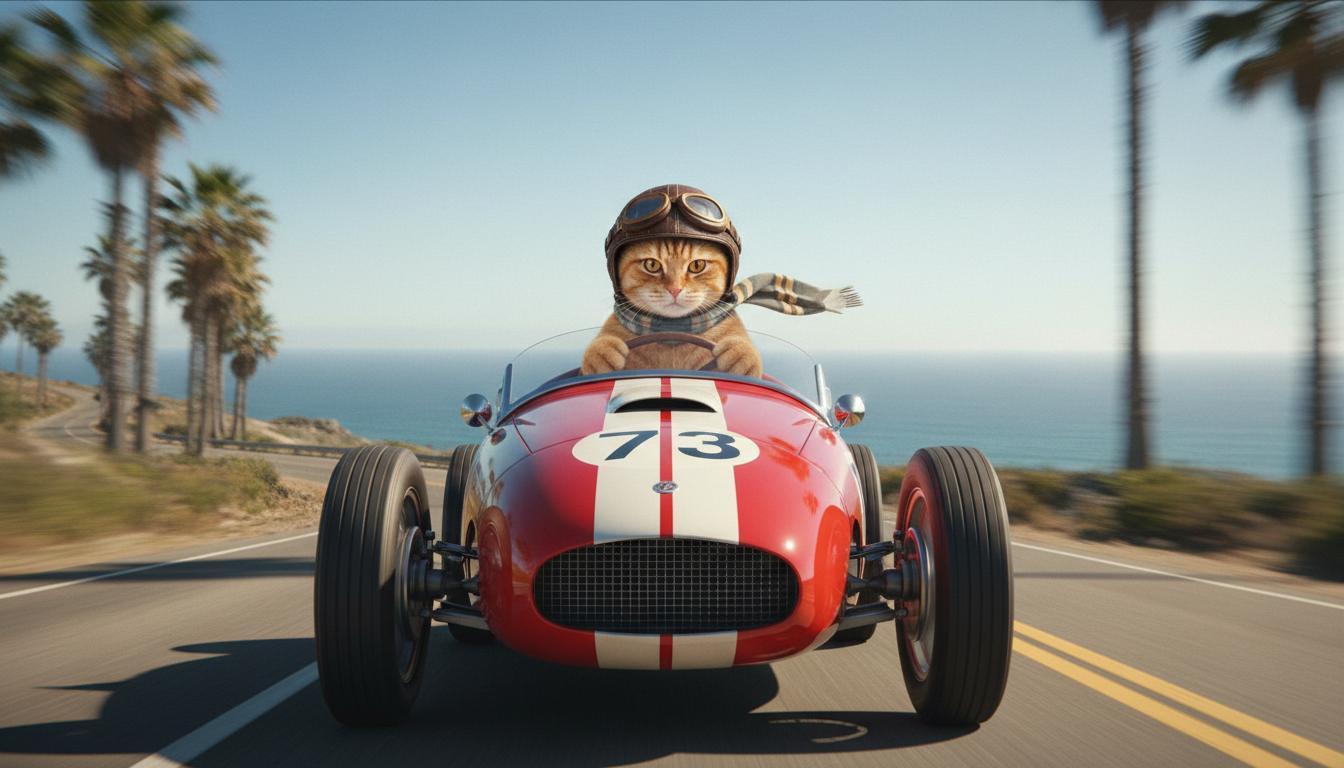
|
| Dernière image (générée par Nano Banana) Montre ce qui se passe quand la voiture s'élance d'une falaise. |
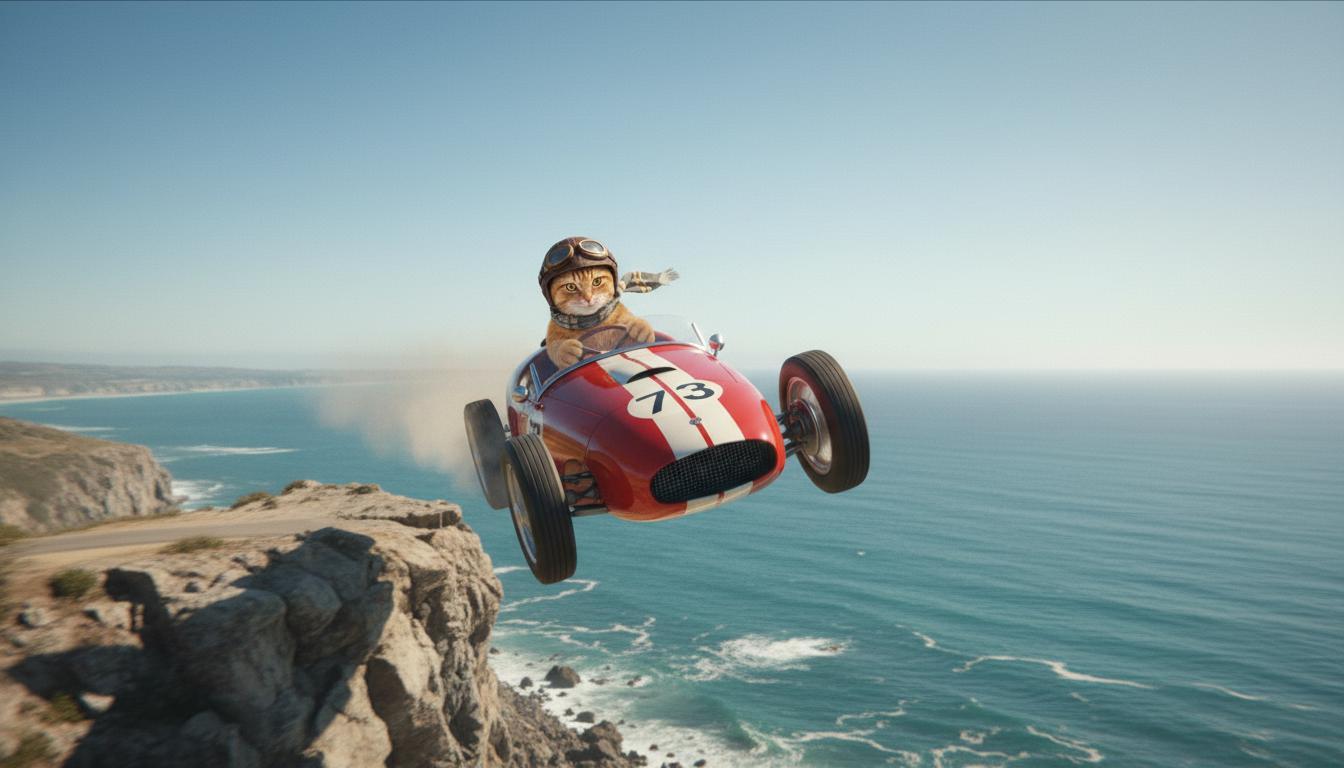
|
| Vidéo de sortie (générée par Veo 3.1) Facultatif |
|
Cette fonctionnalité vous permet de contrôler précisément la composition de votre plan en définissant les images de début et de fin. Importez une image ou utilisez une image d'une génération de vidéo précédente pour vous assurer que votre scène commence et se termine exactement comme vous l'imaginez.
Demande d'extension
Pour prolonger votre vidéo générée par Veo avec Veo 3.1 (non disponible pour Veo 3.1 Lite), utilisez la vidéo comme entrée, ainsi qu'un prompt textuel facultatif. "Prolonger" finalise la dernière seconde ou les 24 dernières images de votre vidéo et poursuit l'action.
Notez que la voix ne peut pas être prolongée efficacement si elle n'est pas présente dans la dernière seconde de la vidéo.
| Prompt (Requête) | Résultat généré |
|---|---|
| Vidéo d'entrée (générée par Veo 3.1) Le parapentiste décolle du sommet de la montagne et commence à descendre en planant au-dessus des vallées fleuries en contrebas. |
|
| Vidéo de sortie (générée par Veo 3.1) Prolonge cette vidéo avec le parapente qui descend lentement. |
|
Exemples de prompts et de résultats
Cette section présente plusieurs requêtes, en soulignant comment les détails descriptifs peuvent améliorer le résultat de chaque vidéo.
Glaçons
Cette vidéo montre comment utiliser les éléments des principes de base de la rédaction de requêtes dans votre requête.
| Prompt (Requête) | Résultat généré |
|---|---|
| Gros plan (composition) de glaçons qui fondent (sujet) sur une paroi rocheuse gelée (contexte) avec des tons bleus froids (ambiance), zoom avant (mouvement de la caméra) maintenant les détails en gros plan des gouttes d'eau (action). |
|
Un homme au téléphone
Ces vidéos montrent comment vous pouvez modifier votre prompt en ajoutant des détails de plus en plus spécifiques pour que Veo affine le résultat à votre convenance.
| Prompt (Requête) | Résultat généré |
|---|---|
| Moins de détails La caméra se déplace pour montrer un gros plan d'un homme désespéré qui porte un trench vert. Il passe un appel sur un téléphone mural à cadran avec un néon vert. On dirait une scène de film. |
|
| Plus de détails Un plan cinématographique en gros plan suit un homme désespéré portant un trench-coat vert usé, qui compose un numéro sur un téléphone à cadran fixé sur un mur de briques, baigné dans la lueur étrange d'un néon vert. La caméra effectue un travelling avant, révélant la tension dans sa mâchoire et le désespoir gravé sur son visage alors qu'il lutte pour passer l'appel. La faible profondeur de champ met l'accent sur son front plissé et le téléphone à cadran noir, floutant l'arrière-plan en une mer de couleurs néon et d'ombres indistinctes, créant un sentiment d'urgence et d'isolement. |
|
Léopard des neiges
| Prompt (Requête) | Résultat généré |
|---|---|
| Prompt simple : Une jolie créature avec une fourrure de léopard des neiges marche dans une forêt en hiver, rendu de style dessin animé 3D. |
|
| Prompt détaillé : Crée une courte scène animée en 3D dans un style cartoon joyeux. Une jolie créature à la fourrure semblable à celle d'un léopard des neiges, aux grands yeux expressifs et à la forme arrondie et amicale, gambade joyeusement dans une forêt d'hiver fantaisiste. La scène doit comporter des arbres arrondis couverts de neige, des flocons de neige qui tombent doucement et une lumière du soleil chaude qui filtre à travers les branches. Les mouvements rebondissants de la créature et son large sourire doivent exprimer une joie pure. Optez pour un ton optimiste et chaleureux, avec des couleurs vives et gaies, et une animation ludique. |

|
Exemples par éléments d'écriture
Ces exemples vous montrent comment affiner vos prompts pour chaque élément de base.
Sujet et contexte
Spécifiez le sujet principal et l'arrière-plan ou l'environnement (contexte).
| Prompt (Requête) | Résultat généré |
|---|---|
| Rendu architectural d'un immeuble d'habitation en béton blanc aux formes organiques fluides, se fondant parfaitement dans une végétation luxuriante et des éléments futuristes |
|
| Un satellite flottant dans l'espace, avec la Lune et quelques étoiles en arrière-plan. |
|
Action
Spécifiez ce que fait le sujet (par exemple, marcher, courir ou tourner la tête).
| Prompt (Requête) | Résultat généré |
|---|---|
| Plan large d'une femme marchant sur la plage, l'air heureuse et détendue, regardant l'horizon au coucher du soleil. |
|
Style
Ajoutez des mots clés pour orienter la génération vers une esthétique spécifique (par exemple, surréaliste, vintage, futuriste, film noir).
| Prompt (Requête) | Résultat généré |
|---|---|
| Style film noir, un homme et une femme marchent dans la rue, mystère, cinématographique, noir et blanc. |
|
Mouvement de la caméra et composition
Spécifiez comment la caméra se déplace (caméra subjective, vue aérienne, vue de drone) et comment la prise de vue est cadrée (plan large, gros plan, contre-plongée).
| Prompt (Requête) | Résultat généré |
|---|---|
| Vue subjective depuis une voiture vintage roulant sous la pluie, Canada, de nuit, style cinématographique. |
|
| Gros plan extrême sur un œil dans lequel se reflète une ville. |
|
Ambiance
Les palettes de couleurs et l'éclairage influencent l'ambiance. Essayez des termes comme "tons chauds orange atténué", "lumière naturelle", "lever du soleil" ou "tons bleus froids".
| Prompt (Requête) | Résultat généré |
|---|---|
| Gros plan d'une fille tenant un adorable chiot golden retriever dans un parc, lumière du soleil. |
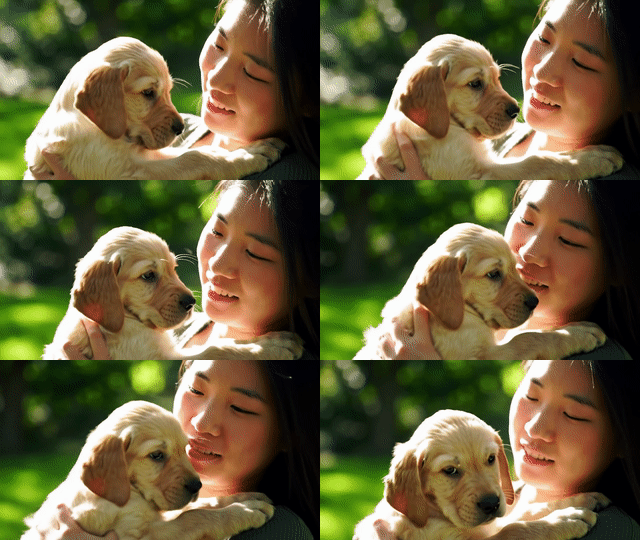
|
| Gros plan cinématique d'une femme triste dans un bus sous la pluie, tons bleus froids, ambiance triste. |

|
Formats
Veo vous permet de spécifier le format de votre vidéo.
| Prompt (Requête) | Résultat généré |
|---|---|
| Grand écran (16:9) Crée une vidéo avec une vue de drone suivant un homme au volant d'une décapotable rouge à Palm Springs, dans les années 1970, avec une lumière du soleil chaude et des ombres allongées. |
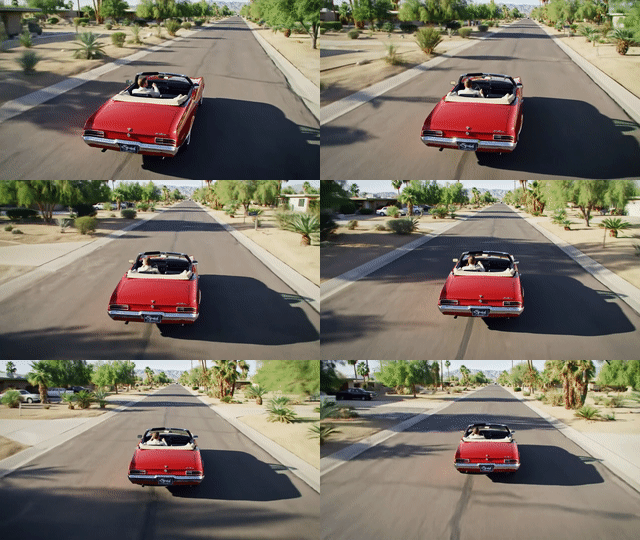
|
| Portrait (9:16) Crée une vidéo mettant en valeur le mouvement fluide d'une majestueuse cascade hawaïenne dans une forêt tropicale luxuriante. Mets l'accent sur l'écoulement réaliste de l'eau, le feuillage détaillé et l'éclairage naturel pour transmettre une sensation de tranquillité. Capturez l'eau qui s'écoule, l'atmosphère brumeuse et la lumière du soleil qui filtre à travers la canopée dense. Utilisez des mouvements de caméra fluides et cinématographiques pour mettre en valeur la cascade et ses environs. Visez un ton paisible et réaliste, qui transporte le spectateur dans la beauté sereine de la forêt tropicale hawaïenne. |
|
Versions de modèle
Pour en savoir plus sur l'utilisation des modèles Veo, consultez la page Tarifs et la section Limites de débit.
Veo 3.1 Preview
| Propriété | Description |
|---|---|
| Code du modèle |
API Gemini
|
| Types de données acceptés |
Entrée Texte, image Résultat Vidéo avec audio |
| Limites |
Saisie de texte 1 024 jetons Vidéo de sortie 1 |
| Dernière mise à jour | Janvier 2026 |
Veo 3.1 Fast (preview)
| Propriété | Description |
|---|---|
| Code du modèle |
API Gemini
|
| Types de données acceptés |
Entrée Texte, image Résultat Vidéo avec audio |
| Limites |
Saisie de texte 1 024 jetons Vidéo de sortie 1 |
| Dernière mise à jour | Janvier 2026 |
Preview de Veo 3.1 Lite
| Propriété | Description |
|---|---|
| Code du modèle |
API Gemini
|
| Types de données acceptés |
Entrée Texte, image Résultat Vidéo avec audio |
| Limites |
Saisie de texte 1 024 jetons Vidéo de sortie 1 |
| Dernière mise à jour | Mars 2026 |
Veo 3 (obsolète)
| Propriété | Description |
|---|---|
| Code du modèle |
API Gemini
|
| Types de données acceptés |
Entrée Texte, image Résultat Vidéo avec audio |
| Limites |
Saisie de texte 1 024 jetons Vidéo de sortie 1 |
| Dernière mise à jour | Juillet 2025 |
Veo 3 Fast (obsolète)
| Propriété | Description |
|---|---|
| Code du modèle |
API Gemini
|
| Types de données acceptés |
Entrée Texte, image Résultat Vidéo avec audio |
| Limites |
Saisie de texte 1 024 jetons Vidéo de sortie 1 |
| Dernière mise à jour | Juillet 2025 |
Les versions Veo Fast permettent aux développeurs de créer des vidéos avec du son tout en conservant une qualité élevée et en optimisant la vitesse et les cas d'utilisation professionnels. Ils sont parfaits pour les services de backend qui génèrent des annonces de manière programmatique, les outils de test A/B rapide de concepts créatifs ou les applications qui doivent produire rapidement du contenu pour les réseaux sociaux.
Étape suivante
- Faites vos premiers pas avec l'API Veo 3.1 en testant le Colab de démarrage rapide de Veo et l'applet Veo 3.1.
- Découvrez comment rédiger des prompts encore plus efficaces grâce à notre Introduction à la conception de prompts.