

動画理解の詳細については、動画理解のガイドをご覧ください。
Veo 3.1 は、ネイティブに生成された音声付きの 8 秒間の動画(720p、1080p、4k)を生成するためのモデルです。このモデルには、Gemini API を使用してプログラムでアクセスできます。使用可能な Veo モデル バリエーションの詳細については、モデルのバージョン セクションをご覧ください。
Veo 3.1 は、幅広いビジュアル スタイルとシネマティック スタイルに優れており、いくつかの新機能が導入されています。
- 縦向き動画: 横向き(
16:9)動画と縦向き(9:16)動画のどちらかを選択します。 - 動画の拡張: 以前に Veo を使用して生成した動画を拡張します。
- フレーム固有の生成: 最初と最後のフレームを指定して動画を生成します。
- 画像ベースの指示: 最大 3 つの参照画像を使用して、生成された動画のコンテンツを指示します。
動画生成用の効果的なテキスト プロンプトの作成方法については、Veo プロンプト ガイドをご覧ください。
テキストからの動画生成
次の例は、ダイアログ、映画のようなリアリズム、クリエイティブなアニメーションを使用して動画を生成する方法を示しています。
会話と効果音
Python
import time
from google import genai
from google.genai import types

client = genai.Client()

prompt = """A close up of two people staring at a cryptic drawing on a wall, torchlight flickering.
A man murmurs, 'This must be it. That's the secret code.' The woman looks at him and whispering excitedly, 'What did you find?'"""

operation = client.models.generate_videos(
    model="veo-3.1-generate-preview",
    prompt=prompt,
)

# Poll the operation status until the video is ready.
while not operation.done:
    print("Waiting for video generation to complete...")
    time.sleep(10)
    operation = client.operations.get(operation)

# Download the generated video.
generated_video = operation.response.generated_videos[0]
client.files.download(file=generated_video.video, destination="dialogue_example.mp4")
print("Generated video saved to dialogue_example.mp4")
JavaScript
import { GoogleGenAI } from "@google/genai";

const ai = new GoogleGenAI({});

const prompt = `A close up of two people staring at a cryptic drawing on a wall, torchlight flickering.
A man murmurs, 'This must be it. That's the secret code.' The woman looks at him and whispering excitedly, 'What did you find?'`;

let operation = await ai.models.generateVideos({
    model: "veo-3.1-generate-preview",
    prompt: prompt,
});

// Poll the operation status until the video is ready.
while (!operation.done) {
    console.log("Waiting for video generation to complete...")
    await new Promise((resolve) => setTimeout(resolve, 10000));
    operation = await ai.operations.getVideosOperation({
        operation: operation,
    });
}

// Download the generated video.
ai.files.download({
    file: operation.response.generatedVideos[0].video,
    downloadPath: "dialogue_example.mp4",
});
console.log(`Generated video saved to dialogue_example.mp4`);
Go
package main

import (
    "context"
    "log"
    "os"
    "time"

    "google.golang.org/genai"
)

func main() {
    ctx := context.Background()
    client, err := genai.NewClient(ctx, nil)
    if err != nil {
        log.Fatal(err)
    }

    prompt := `A close up of two people staring at a cryptic drawing on a wall, torchlight flickering.
    A man murmurs, 'This must be it. That's the secret code.' The woman looks at him and whispering excitedly, 'What did you find?'`

    operation, _ := client.Models.GenerateVideos(
        ctx,
        "veo-3.1-generate-preview",
        prompt,
        nil,
        nil,
    )

    // Poll the operation status until the video is ready.
    for !operation.Done {
    log.Println("Waiting for video generation to complete...")
        time.Sleep(10 * time.Second)
        operation, _ = client.Operations.GetVideosOperation(ctx, operation, nil)
    }

    // Download the generated video.
    video := operation.Response.GeneratedVideos[0]
    client.Files.Download(ctx, video.Video, nil)
    fname := "dialogue_example.mp4"
    _ = os.WriteFile(fname, video.Video.VideoBytes, 0644)
    log.Printf("Generated video saved to %s\n", fname)
}
Java
import com.google.genai.Client;
import com.google.genai.types.GenerateVideosOperation;
import com.google.genai.types.GeneratedVideo;

Client client = new Client();

String prompt =
    "A close up of two people staring at a cryptic drawing on a wall, torchlight flickering.\n"
        + "A man murmurs, 'This must be it. That's the secret code.' The woman looks at him and whispering excitedly, 'What did you find?'";

GenerateVideosOperation operation =
    client.models.generateVideos("veo-3.1-generate-preview", prompt, null, null);

// Poll the operation status until the video is ready.
while (!operation.done().orElse(false)) {
  System.out.println("Waiting for video generation to complete...");
  Thread.sleep(10000);
  operation = client.operations.getVideosOperation(operation, null);
}

// Download the generated video.
GeneratedVideo generatedVideo = operation.response().get().generatedVideos().get().get(0);
client.files.download(generatedVideo, "dialogue_example.mp4", null);
System.out.println("Generated video saved to dialogue_example.mp4");
REST
# Note: This script uses jq to parse the JSON response.
# GEMINI API Base URL
BASE_URL="https://generativelanguage.googleapis.com/v1beta"

# Send request to generate video and capture the operation name into a variable.
operation_name=$(curl -s "${BASE_URL}/models/veo-3.1-generate-preview:predictLongRunning" \
  -H "x-goog-api-key: $GEMINI_API_KEY" \
  -H "Content-Type: application/json" \
  -X "POST" \
  -d '{
    "instances": [{
        "prompt": "A close up of two people staring at a cryptic drawing on a wall, torchlight flickering. A man murmurs, \"This must be it. That'\''s the secret code.\" The woman looks at him and whispering excitedly, \"What did you find?\""
      }
    ]
  }' | jq -r .name)

# Poll the operation status until the video is ready
while true; do
  # Get the full JSON status and store it in a variable.
  status_response=$(curl -s -H "x-goog-api-key: $GEMINI_API_KEY" "${BASE_URL}/${operation_name}")

  # Check the "done" field from the JSON stored in the variable.
  is_done=$(echo "${status_response}" | jq .done)

  if [ "${is_done}" = "true" ]; then
    # Extract the download URI from the final response.
    video_uri=$(echo "${status_response}" | jq -r '.response.generateVideoResponse.generatedSamples[0].video.uri')
    echo "Downloading video from: ${video_uri}"

    # Download the video using the URI and API key and follow redirects.
    curl -L -o dialogue_example.mp4 -H "x-goog-api-key: $GEMINI_API_KEY" "${video_uri}"
    break
  fi
  # Wait for 5 seconds before checking again.
  sleep 10
done
映画のようなリアルさ
Python
import time
from google import genai
from google.genai import types

client = genai.Client()

prompt = """Drone shot following a classic red convertible driven by a man along a winding coastal road at sunset, waves crashing against the rocks below.
The convertible accelerates fast and the engine roars loudly."""

operation = client.models.generate_videos(
    model="veo-3.1-generate-preview",
    prompt=prompt,
)

# Poll the operation status until the video is ready.
while not operation.done:
    print("Waiting for video generation to complete...")
    time.sleep(10)
    operation = client.operations.get(operation)

# Download the generated video.
generated_video = operation.response.generated_videos[0]
client.files.download(file=generated_video.video, destination="realism_example.mp4")
print("Generated video saved to realism_example.mp4")
JavaScript
import { GoogleGenAI } from "@google/genai";

const ai = new GoogleGenAI({});

const prompt = `Drone shot following a classic red convertible driven by a man along a winding coastal road at sunset, waves crashing against the rocks below.
The convertible accelerates fast and the engine roars loudly.`;

let operation = await ai.models.generateVideos({
    model: "veo-3.1-generate-preview",
    prompt: prompt,
});

// Poll the operation status until the video is ready.
while (!operation.done) {
    console.log("Waiting for video generation to complete...")
    await new Promise((resolve) => setTimeout(resolve, 10000));
    operation = await ai.operations.getVideosOperation({
        operation: operation,
    });
}

// Download the generated video.
ai.files.download({
    file: operation.response.generatedVideos[0].video,
    downloadPath: "realism_example.mp4",
});
console.log(`Generated video saved to realism_example.mp4`);
Go
package main

import (
    "context"
    "log"
    "os"
    "time"

    "google.golang.org/genai"
)

func main() {
    ctx := context.Background()
    client, err := genai.NewClient(ctx, nil)
    if err != nil {
        log.Fatal(err)
    }

    prompt := `Drone shot following a classic red convertible driven by a man along a winding coastal road at sunset, waves crashing against the rocks below.
  The convertible accelerates fast and the engine roars loudly.`

    operation, _ := client.Models.GenerateVideos(
        ctx,
        "veo-3.1-generate-preview",
        prompt,
        nil,
        nil,
    )

    // Poll the operation status until the video is ready.
    for !operation.Done {
    log.Println("Waiting for video generation to complete...")
        time.Sleep(10 * time.Second)
        operation, _ = client.Operations.GetVideosOperation(ctx, operation, nil)
    }

    // Download the generated video.
    video := operation.Response.GeneratedVideos[0]
    client.Files.Download(ctx, video.Video, nil)
    fname := "realism_example.mp4"
    _ = os.WriteFile(fname, video.Video.VideoBytes, 0644)
    log.Printf("Generated video saved to %s\n", fname)
}
Java
import com.google.genai.Client;
import com.google.genai.types.GenerateVideosOperation;
import com.google.genai.types.GeneratedVideo;

Client client = new Client();

String prompt =
    "Drone shot following a classic red convertible driven by a man along a winding coastal road at sunset, waves crashing against the rocks below.\n"
        + "The convertible accelerates fast and the engine roars loudly.";

GenerateVideosOperation operation =
    client.models.generateVideos("veo-3.1-generate-preview", prompt, null, null);

// Poll the operation status until the video is ready.
while (!operation.done().orElse(false)) {
  System.out.println("Waiting for video generation to complete...");
  Thread.sleep(10000);
  operation = client.operations.getVideosOperation(operation, null);
}

// Download the generated video.
GeneratedVideo generatedVideo = operation.response().get().generatedVideos().get().get(0);
client.files.download(generatedVideo, "realism_example.mp4", null);
System.out.println("Generated video saved to realism_example.mp4");
REST
# Note: This script uses jq to parse the JSON response.
# GEMINI API Base URL
BASE_URL="https://generativelanguage.googleapis.com/v1beta"

# Send request to generate video and capture the operation name into a variable.
operation_name=$(curl -s "${BASE_URL}/models/veo-3.1-generate-preview:predictLongRunning" \
  -H "x-goog-api-key: $GEMINI_API_KEY" \
  -H "Content-Type: application/json" \
  -X "POST" \
  -d '{
    "instances": [{
        "prompt": "Drone shot following a classic red convertible driven by a man along a winding coastal road at sunset, waves crashing against the rocks below. The convertible accelerates fast and the engine roars loudly."
      }
    ]
  }' | jq -r .name)

# Poll the operation status until the video is ready
while true; do
  # Get the full JSON status and store it in a variable.
  status_response=$(curl -s -H "x-goog-api-key: $GEMINI_API_KEY" "${BASE_URL}/${operation_name}")

  # Check the "done" field from the JSON stored in the variable.
  is_done=$(echo "${status_response}" | jq .done)

  if [ "${is_done}" = "true" ]; then
    # Extract the download URI from the final response.
    video_uri=$(echo "${status_response}" | jq -r '.response.generateVideoResponse.generatedSamples[0].video.uri')
    echo "Downloading video from: ${video_uri}"

    # Download the video using the URI and API key and follow redirects.
    curl -L -o realism_example.mp4 -H "x-goog-api-key: $GEMINI_API_KEY" "${video_uri}"
    break
  fi
  # Wait for 5 seconds before checking again.
  sleep 10
done
クリエイティブ アニメーション
Python
import time
from google import genai

client = genai.Client()
prompt = "A whimsical stop-motion animation of a tiny robot tending to a garden of glowing mushrooms on a miniature planet."

operation = client.models.generate_videos(
    model="veo-3.1-generate-preview",
    prompt=prompt,
)

# Poll the operation status until the video is ready.
while not operation.done:
    print("Waiting for video generation to complete...")
    time.sleep(10)
    operation = client.operations.get(operation)

# Download the generated video.
generated_video = operation.response.generated_videos[0]
client.files.download(file=generated_video.video, destination="style_example.mp4")
print("Generated video saved to style_example.mp4")
JavaScript
import { GoogleGenAI } from "@google/genai";

const ai = new GoogleGenAI({});

const prompt = "A whimsical stop-motion animation of a tiny robot tending to a garden of glowing mushrooms on a miniature planet.";

let operation = await ai.models.generateVideos({
    model: "veo-3.1-generate-preview",
    prompt: prompt,
});

// Poll the operation status until the video is ready.
while (!operation.done) {
    console.log("Waiting for video generation to complete...")
    await new Promise((resolve) => setTimeout(resolve, 10000));
    operation = await ai.operations.getVideosOperation({
        operation: operation,
    });
}

// Download the generated video.
ai.files.download({
    file: operation.response.generatedVideos[0].video,
    downloadPath: "style_example.mp4",
});
console.log(`Generated video saved to style_example.mp4`);
Go
package main

import (
    "context"
    "log"
    "os"
    "time"

    "google.golang.org/genai"
)

func main() {
    ctx := context.Background()
    client, err := genai.NewClient(ctx, nil)
    if err != nil {
        log.Fatal(err)
    }

    prompt := `A whimsical stop-motion animation of a tiny robot tending to a garden of glowing mushrooms on a miniature planet.`

    operation, _ := client.Models.GenerateVideos(
        ctx,
        "veo-3.1-generate-preview",
        prompt,
        nil,
        nil,
    )

    // Poll the operation status until the video is ready.
    for !operation.Done {
    log.Println("Waiting for video generation to complete...")
        time.Sleep(10 * time.Second)
        operation, _ = client.Operations.GetVideosOperation(ctx, operation, nil)
    }

    // Download the generated video.
    video := operation.Response.GeneratedVideos[0]
    client.Files.Download(ctx, video.Video, nil)
    fname := "style_example.mp4"
    _ = os.WriteFile(fname, video.Video.VideoBytes, 0644)
    log.Printf("Generated video saved to %s\n", fname)
}
Java
import com.google.genai.Client;
import com.google.genai.types.GenerateVideosOperation;
import com.google.genai.types.GeneratedVideo;

Client client = new Client();

String prompt =
    "A whimsical stop-motion animation of a tiny robot tending to a garden of glowing mushrooms on a miniature planet.";

GenerateVideosOperation operation =
    client.models.generateVideos("veo-3.1-generate-preview", prompt, null, null);

// Poll the operation status until the video is ready.
while (!operation.done().orElse(false)) {
  System.out.println("Waiting for video generation to complete...");
  Thread.sleep(10000);
  operation = client.operations.getVideosOperation(operation, null);
}

// Download the generated video.
GeneratedVideo generatedVideo = operation.response().get().generatedVideos().get().get(0);
client.files.download(generatedVideo, "style_example.mp4", null);
System.out.println("Generated video saved to style_example.mp4");
REST
# Note: This script uses jq to parse the JSON response.
# GEMINI API Base URL
BASE_URL="https://generativelanguage.googleapis.com/v1beta"

# Send request to generate video and capture the operation name into a variable.
operation_name=$(curl -s "${BASE_URL}/models/veo-3.1-generate-preview:predictLongRunning" \
  -H "x-goog-api-key: $GEMINI_API_KEY" \
  -H "Content-Type: application/json" \
  -X "POST" \
  -d '{
    "instances": [{
        "prompt": "A whimsical stop-motion animation of a tiny robot tending to a garden of glowing mushrooms on a miniature planet."
      }
    ]
  }' | jq -r .name)

# Poll the operation status until the video is ready
while true; do
  # Get the full JSON status and store it in a variable.
  status_response=$(curl -s -H "x-goog-api-key: $GEMINI_API_KEY" "${BASE_URL}/${operation_name}")

  # Check the "done" field from the JSON stored in the variable.
  is_done=$(echo "${status_response}" | jq .done)

  if [ "${is_done}" = "true" ]; then
    # Extract the download URI from the final response.
    video_uri=$(echo "${status_response}" | jq -r '.response.generateVideoResponse.generatedSamples[0].video.uri')
    echo "Downloading video from: ${video_uri}"

    # Download the video using the URI and API key and follow redirects.
    curl -L -o style_example.mp4 -H "x-goog-api-key: $GEMINI_API_KEY" "${video_uri}"
    break
  fi
  # Wait for 5 seconds before checking again.
  sleep 10
done
アスペクト比を制御する
Veo 3.1 では、横向き(16:9、デフォルト設定)または縦向き(9:16)の動画を作成できます。aspect_ratio パラメータを使用して、どちらを使用するかをモデルに指示できます。
Python
import time
from google import genai
from google.genai import types

client = genai.Client()

prompt = """A montage of pizza making: a chef tossing and flattening the floury dough, ladling rich red tomato sauce in a spiral, sprinkling mozzarella cheese and pepperoni, and a final shot of the bubbling golden-brown pizza, upbeat electronic music with a rhythmical beat is playing, high energy professional video."""

operation = client.models.generate_videos(
    model="veo-3.1-generate-preview",
    prompt=prompt,
    config=types.GenerateVideosConfig(
      aspect_ratio="9:16",
    ),
)

# Poll the operation status until the video is ready.
while not operation.done:
    print("Waiting for video generation to complete...")
    time.sleep(10)
    operation = client.operations.get(operation)

# Download the generated video.
generated_video = operation.response.generated_videos[0]
client.files.download(file=generated_video.video, destination="pizza_making.mp4")
print("Generated video saved to pizza_making.mp4")
JavaScript
import { GoogleGenAI } from "@google/genai";

const ai = new GoogleGenAI({});

const prompt = `A montage of pizza making: a chef tossing and flattening the floury dough, ladling rich red tomato sauce in a spiral, sprinkling mozzarella cheese and pepperoni, and a final shot of the bubbling golden-brown pizza, upbeat electronic music with a rhythmical beat is playing, high energy professional video.`;

let operation = await ai.models.generateVideos({
    model: "veo-3.1-generate-preview",
    prompt: prompt,
    config: {
      aspectRatio: "9:16",
    },
});

// Poll the operation status until the video is ready.
while (!operation.done) {
    console.log("Waiting for video generation to complete...")
    await new Promise((resolve) => setTimeout(resolve, 10000));
    operation = await ai.operations.getVideosOperation({
        operation: operation,
    });
}

// Download the generated video.
ai.files.download({
    file: operation.response.generatedVideos[0].video,
    downloadPath: "pizza_making.mp4",
});
console.log(`Generated video saved to pizza_making.mp4`);
Go
package main

import (
    "context"
    "log"
    "os"
    "time"

    "google.golang.org/genai"
)

func main() {
    ctx := context.Background()
    client, err := genai.NewClient(ctx, nil)
    if err != nil {
        log.Fatal(err)
    }

    prompt := `A montage of pizza making: a chef tossing and flattening the floury dough, ladling rich red tomato sauce in a spiral, sprinkling mozzarella cheese and pepperoni, and a final shot of the bubbling golden-brown pizza, upbeat electronic music with a rhythmical beat is playing, high energy professional video.`

  videoConfig := &genai.GenerateVideosConfig{
      AspectRatio: "9:16",
  }

    operation, _ := client.Models.GenerateVideos(
        ctx,
        "veo-3.1-generate-preview",
        prompt,
        nil,
        videoConfig,
    )

    // Poll the operation status until the video is ready.
    for !operation.Done {
    log.Println("Waiting for video generation to complete...")
        time.Sleep(10 * time.Second)
        operation, _ = client.Operations.GetVideosOperation(ctx, operation, nil)
    }

    // Download the generated video.
    video := operation.Response.GeneratedVideos[0]
    client.Files.Download(ctx, video.Video, nil)
    fname := "pizza_making.mp4"
    _ = os.WriteFile(fname, video.Video.VideoBytes, 0644)
    log.Printf("Generated video saved to %s\n", fname)
}
REST
# Note: This script uses jq to parse the JSON response.
# GEMINI API Base URL
BASE_URL="https://generativelanguage.googleapis.com/v1beta"

# Send request to generate video and capture the operation name into a variable.
operation_name=$(curl -s "${BASE_URL}/models/veo-3.1-generate-preview:predictLongRunning" \
  -H "x-goog-api-key: $GEMINI_API_KEY" \
  -H "Content-Type: application/json" \
  -X "POST" \
  -d '{
    "instances": [{
        "prompt": "A montage of pizza making: a chef tossing and flattening the floury dough, ladling rich red tomato sauce in a spiral, sprinkling mozzarella cheese and pepperoni, and a final shot of the bubbling golden-brown pizza, upbeat electronic music with a rhythmical beat is playing, high energy professional video."
      }
    ],
    "parameters": {
      "aspectRatio": "9:16"
    }
  }' | jq -r .name)

# Poll the operation status until the video is ready
while true; do
  # Get the full JSON status and store it in a variable.
  status_response=$(curl -s -H "x-goog-api-key: $GEMINI_API_KEY" "${BASE_URL}/${operation_name}")

  # Check the "done" field from the JSON stored in the variable.
  is_done=$(echo "${status_response}" | jq .done)

  if [ "${is_done}" = "true" ]; then
    # Extract the download URI from the final response.
    video_uri=$(echo "${status_response}" | jq -r '.response.generateVideoResponse.generatedSamples[0].video.uri')
    echo "Downloading video from: ${video_uri}"

    # Download the video using the URI and API key and follow redirects.
    curl -L -o pizza_making.mp4 -H "x-goog-api-key: $GEMINI_API_KEY" "${video_uri}"
    break
  fi
  # Wait for 5 seconds before checking again.
  sleep 10
done
解像度を制御する
Veo 3.1 は、720p、1080p、4k の動画を直接生成することもできます(4k は Veo 3.1 Lite では利用できません)。
解像度が高いほど、レイテンシが高くなります。4K 動画は料金も高くなります(料金をご覧ください)。
動画拡張機能も 720p の動画に制限されています。
Python
import time
from google import genai
from google.genai import types

client = genai.Client()

prompt = """A stunning drone view of the Grand Canyon during a flamboyant sunset that highlights the canyon's colors. The drone slowly flies towards the sun then accelerates, dives and flies inside the canyon."""

operation = client.models.generate_videos(
    model="veo-3.1-generate-preview",
    prompt=prompt,
    config=types.GenerateVideosConfig(
      resolution="4k",
    ),
)

# Poll the operation status until the video is ready.
while not operation.done:
    print("Waiting for video generation to complete...")
    time.sleep(10)
    operation = client.operations.get(operation)

# Download the generated video.
generated_video = operation.response.generated_videos[0]
client.files.download(file=generated_video.video, destination="4k_grand_canyon.mp4")
print("Generated video saved to 4k_grand_canyon.mp4")
JavaScript
import { GoogleGenAI } from "@google/genai";

const ai = new GoogleGenAI({});

const prompt = `A stunning drone view of the Grand Canyon during a flamboyant sunset that highlights the canyon's colors. The drone slowly flies towards the sun then accelerates, dives and flies inside the canyon.`;

let operation = await ai.models.generateVideos({
    model: "veo-3.1-generate-preview",
    prompt: prompt,
    config: {
      resolution: "4k",
    },
});

// Poll the operation status until the video is ready.
while (!operation.done) {
    console.log("Waiting for video generation to complete...")
    await new Promise((resolve) => setTimeout(resolve, 10000));
    operation = await ai.operations.getVideosOperation({
        operation: operation,
    });
}

// Download the generated video.
ai.files.download({
    file: operation.response.generatedVideos[0].video,
    downloadPath: "4k_grand_canyon.mp4",
});
console.log(`Generated video saved to 4k_grand_canyon.mp4`);
Go
package main

import (
    "context"
    "log"
    "os"
    "time"

    "google.golang.org/genai"
)

func main() {
    ctx := context.Background()
    client, err := genai.NewClient(ctx, nil)
    if err != nil {
        log.Fatal(err)
    }

    prompt := `A stunning drone view of the Grand Canyon during a flamboyant sunset that highlights the canyon's colors. The drone slowly flies towards the sun then accelerates, dives and flies inside the canyon.`

  videoConfig := &genai.GenerateVideosConfig{
      Resolution: "4k",
  }

    operation, _ := client.Models.GenerateVideos(
        ctx,
        "veo-3.1-generate-preview",
        prompt,
        nil,
        videoConfig,
    )

    // Poll the operation status until the video is ready.
    for !operation.Done {
    log.Println("Waiting for video generation to complete...")
        time.Sleep(10 * time.Second)
        operation, _ = client.Operations.GetVideosOperation(ctx, operation, nil)
    }

    // Download the generated video.
    video := operation.Response.GeneratedVideos[0]
    client.Files.Download(ctx, video.Video, nil)
    fname := "4k_grand_canyon.mp4"
    _ = os.WriteFile(fname, video.Video.VideoBytes, 0644)
    log.Printf("Generated video saved to %s\n", fname)
}
REST
# Note: This script uses jq to parse the JSON response.
# GEMINI API Base URL
BASE_URL="https://generativelanguage.googleapis.com/v1beta"

# Send request to generate video and capture the operation name into a variable.
operation_name=$(curl -s "${BASE_URL}/models/veo-3.1-generate-preview:predictLongRunning" \
  -H "x-goog-api-key: $GEMINI_API_KEY" \
  -H "Content-Type: application/json" \
  -X "POST" \
  -d '{
    "instances": [{
        "prompt": "A stunning drone view of the Grand Canyon during a flamboyant sunset that highlights the canyon'\''s colors. The drone slowly flies towards the sun then accelerates, dives and flies inside the canyon."
      }
    ],
    "parameters": {
      "resolution": "4k"
    }
  }' | jq -r .name)

# Poll the operation status until the video is ready
while true; do
  # Get the full JSON status and store it in a variable.
  status_response=$(curl -s -H "x-goog-api-key: $GEMINI_API_KEY" "${BASE_URL}/${operation_name}")

  # Check the "done" field from the JSON stored in the variable.
  is_done=$(echo "${status_response}" | jq .done)

  if [ "${is_done}" = "true" ]; then
    # Extract the download URI from the final response.
    video_uri=$(echo "${status_response}" | jq -r '.response.generateVideoResponse.generatedSamples[0].video.uri')
    echo "Downloading video from: ${video_uri}"

    # Download the video using the URI and API key and follow redirects.
    curl -L -o 4k_grand_canyon.mp4 -H "x-goog-api-key: $GEMINI_API_KEY" "${video_uri}"
    break
  fi
  # Wait for 5 seconds before checking again.
  sleep 10
done
画像からの動画生成
次のコードは、Gemini 3.1 Flash Image(別名 Nano Banana 2)を使用して画像を生成し、その画像を Veo 3.1 で動画を生成するための開始フレームとして使用する方法を示しています。
Python
import time
from google import genai

client = genai.Client()

prompt = "Panning wide shot of a calico kitten sleeping in the sunshine"

# Step 1: Generate an image with Nano Banana 2.
image = client.models.generate_content(
    model="gemini-3.1-flash-image-preview",
    contents=prompt,
    config={"response_modalities":['IMAGE']}
)

# Step 2: Generate video with Veo 3.1 using the image.
operation = client.models.generate_videos(
    model="veo-3.1-generate-preview",
    prompt=prompt,
    image=image.parts[0].as_image(),
)

# Poll the operation status until the video is ready.
while not operation.done:
    print("Waiting for video generation to complete...")
    time.sleep(10)
    operation = client.operations.get(operation)

# Download the video.
video = operation.response.generated_videos[0]
client.files.download(file=video.video, destination="veo3_with_image_input.mp4")
print("Generated video saved to veo3_with_image_input.mp4")
JavaScript
import { GoogleGenAI } from "@google/genai";

const ai = new GoogleGenAI({});

const prompt = "Panning wide shot of a calico kitten sleeping in the sunshine";

// Step 1: Generate an image with Nano Banana 2.
const imageResponse = await ai.models.generateContent({
  model: "gemini-3.1-flash-image-preview",
  prompt: prompt,
});

// Step 2: Generate video with Veo 3.1 using the image.
let operation = await ai.models.generateVideos({
  model: "veo-3.1-generate-preview",
  prompt: prompt,
  image: {
    imageBytes: imageResponse.generatedImages[0].image.imageBytes,
    mimeType: "image/png",
  },
});

// Poll the operation status until the video is ready.
while (!operation.done) {
  console.log("Waiting for video generation to complete...")
  await new Promise((resolve) => setTimeout(resolve, 10000));
  operation = await ai.operations.getVideosOperation({
    operation: operation,
  });
}

// Download the video.
ai.files.download({
    file: operation.response.generatedVideos[0].video,
    downloadPath: "veo3_with_image_input.mp4",
});
console.log(`Generated video saved to veo3_with_image_input.mp4`);
Go
package main

import (
    "context"
    "log"
    "os"
    "time"

    "google.golang.org/genai"
)

func main() {
    ctx := context.Background()
    client, err := genai.NewClient(ctx, nil)
    if err != nil {
        log.Fatal(err)
    }

    prompt := "Panning wide shot of a calico kitten sleeping in the sunshine"

    // Step 1: Generate an image with Nano Banana 2.
    imageResponse, err := client.Models.GenerateContent(
        ctx,
        "gemini-3.1-flash-image-preview",
        prompt,
        nil, // GenerateImagesConfig
    )
    if err != nil {
        log.Fatal(err)
    }

    // Step 2: Generate video with Veo 3.1 using the image.
    operation, err := client.Models.GenerateVideos(
        ctx,
        "veo-3.1-generate-preview",
        prompt,
        imageResponse.GeneratedImages[0].Image,
        nil, // GenerateVideosConfig
    )
    if err != nil {
        log.Fatal(err)
    }

    // Poll the operation status until the video is ready.
    for !operation.Done {
        log.Println("Waiting for video generation to complete...")
        time.Sleep(10 * time.Second)
        operation, _ = client.Operations.GetVideosOperation(ctx, operation, nil)
    }

    // Download the video.
    video := operation.Response.GeneratedVideos[0]
    client.Files.Download(ctx, video.Video, nil)
    fname := "veo3_with_image_input.mp4"
    _ = os.WriteFile(fname, video.Video.VideoBytes, 0644)
    log.Printf("Generated video saved to %s\n", fname)
}
Java
import com.google.genai.Client;
import com.google.genai.types.Blob;
import com.google.genai.types.GenerateContentConfig;
import com.google.genai.types.GenerateContentResponse;
import com.google.genai.types.GenerateVideosOperation;
import com.google.genai.types.GeneratedVideo;
import com.google.genai.types.Image;

Client client = new Client();

String prompt = "Panning wide shot of a calico kitten sleeping in the sunshine";

// Step 1: Generate an image with Nano Banana 2.
GenerateContentResponse imageResponse =
    client.models.generateContent(
        "gemini-3.1-flash-image-preview",
        prompt,
        GenerateContentConfig.builder().responseModalities("IMAGE").build());

Blob inlineData = imageResponse.parts().get(0).inlineData().get();
Image image =
    Image.builder()
        .imageBytes(inlineData.data().get())
        .mimeType(inlineData.mimeType().orElse("image/png"))
        .build();

// Step 2: Generate video with Veo 3.1 using the image.
GenerateVideosOperation operation =
    client.models.generateVideos("veo-3.1-generate-preview", prompt, image, null);

// Poll the operation status until the video is ready.
while (!operation.done().orElse(false)) {
  System.out.println("Waiting for video generation to complete...");
  Thread.sleep(10000);
  operation = client.operations.getVideosOperation(operation, null);
}

// Download the video.
GeneratedVideo video = operation.response().get().generatedVideos().get().get(0);
client.files.download(video, "veo3_with_image_input.mp4", null);
System.out.println("Generated video saved to veo3_with_image_input.mp4");
参照画像の使用
Veo 3.1 では、生成された動画のコンテンツをガイドするために、最大 3 つの参照画像を使用できるようになりました。人物、キャラクター、商品の画像を指定して、出力動画で被写体の外観を保持します。
たとえば、Nano Banana で生成された次の 3 つの画像を参照として使用し、適切に記述されたプロンプトを使用すると、次の動画が作成されます。
`dress_image` |
`woman_image` |
`glasses_image` |
|---|---|---|

|

|

|
Python
import time
from google import genai

client = genai.Client()

prompt = "The video opens with a medium, eye-level shot of a beautiful woman with dark hair and warm brown eyes. She wears a magnificent, high-fashion flamingo dress with layers of pink and fuchsia feathers, complemented by whimsical pink, heart-shaped sunglasses. She walks with serene confidence through the crystal-clear, shallow turquoise water of a sun-drenched lagoon. The camera slowly pulls back to a medium-wide shot, revealing the breathtaking scene as the dress's long train glides and floats gracefully on the water's surface behind her. The cinematic, dreamlike atmosphere is enhanced by the vibrant colors of the dress against the serene, minimalist landscape, capturing a moment of pure elegance and high-fashion fantasy."

dress_reference = types.VideoGenerationReferenceImage(
  image=dress_image, # Generated separately with Nano Banana
  reference_type="asset"
)

sunglasses_reference = types.VideoGenerationReferenceImage(
  image=glasses_image, # Generated separately with Nano Banana
  reference_type="asset"
)

woman_reference = types.VideoGenerationReferenceImage(
  image=woman_image, # Generated separately with Nano Banana
  reference_type="asset"
)

operation = client.models.generate_videos(
    model="veo-3.1-generate-preview",
    prompt=prompt,
    config=types.GenerateVideosConfig(
      reference_images=[dress_reference, glasses_reference, woman_reference],
    ),
)

# Poll the operation status until the video is ready.
while not operation.done:
    print("Waiting for video generation to complete...")
    time.sleep(10)
    operation = client.operations.get(operation)

# Download the video.
video = operation.response.generated_videos[0]
client.files.download(file=video.video, destination="veo3.1_with_reference_images.mp4")
print("Generated video saved to veo3.1_with_reference_images.mp4")
JavaScript
import { GoogleGenAI } from "@google/genai";

const ai = new GoogleGenAI({});

const prompt = "The video opens with a medium, eye-level shot of a beautiful woman with dark hair and warm brown eyes. She wears a magnificent, high-fashion flamingo dress with layers of pink and fuchsia feathers, complemented by whimsical pink, heart-shaped sunglasses. She walks with serene confidence through the crystal-clear, shallow turquoise water of a sun-drenched lagoon. The camera slowly pulls back to a medium-wide shot, revealing the breathtaking scene as the dress's long train glides and floats gracefully on the water's surface behind her. The cinematic, dreamlike atmosphere is enhanced by the vibrant colors of the dress against the serene, minimalist landscape, capturing a moment of pure elegance and high-fashion fantasy.";

// dressImage, glassesImage, womanImage generated separately with Nano Banana
// and available as objects like { imageBytes: "...", mimeType: "image/png" }
const dressReference = {
  image: dressImage,
  referenceType: "asset",
};
const sunglassesReference = {
  image: glassesImage,
  referenceType: "asset",
};
const womanReference = {
  image: womanImage,
  referenceType: "asset",
};

let operation = await ai.models.generateVideos({
  model: "veo-3.1-generate-preview",
  prompt: prompt,
  config: {
    referenceImages: [
      dressReference,
      sunglassesReference,
      womanReference,
    ],
  },
});

// Poll the operation status until the video is ready.
while (!operation.done) {
  console.log("Waiting for video generation to complete...");
  await new Promise((resolve) => setTimeout(resolve, 10000));
  operation = await ai.operations.getVideosOperation({
    operation: operation,
  });
}

// Download the video.
ai.files.download({
  file: operation.response.generatedVideos[0].video,
  downloadPath: "veo3.1_with_reference_images.mp4",
});
console.log(`Generated video saved to veo3.1_with_reference_images.mp4`);
Go
package main

import (
    "context"
    "log"
    "os"
    "time"

    "google.golang.org/genai"
)

func main() {
    ctx := context.Background()
    client, err := genai.NewClient(ctx, nil)
    if err != nil {
        log.Fatal(err)
    }

  prompt := `The video opens with a medium, eye-level shot of a beautiful woman with dark hair and warm brown eyes. She wears a magnificent, high-fashion flamingo dress with layers of pink and fuchsia feathers, complemented by whimsical pink, heart-shaped sunglasses. She walks with serene confidence through the crystal-clear, shallow turquoise water of a sun-drenched lagoon. The camera slowly pulls back to a medium-wide shot, revealing the breathtaking scene as the dress's long train glides and floats gracefully on the water's surface behind her. The cinematic, dreamlike atmosphere is enhanced by the vibrant colors of the dress against the serene, minimalist landscape, capturing a moment of pure elegance and high-fashion fantasy.`

  // dressImage, glassesImage, womanImage generated separately with Nano Banana
  // and available as *genai.Image objects.
  var dressImage, glassesImage, womanImage *genai.Image

  dressReference := &genai.VideoGenerationReferenceImage{
    Image: dressImage,
    ReferenceType: "asset",
  }
  sunglassesReference := &genai.VideoGenerationReferenceImage{
    Image: glassesImage,
    ReferenceType: "asset",
  }
  womanReference := &genai.VideoGenerationReferenceImage{
    Image: womanImage,
    ReferenceType: "asset",
  }

    operation, _ := client.Models.GenerateVideos(
        ctx,
        "veo-3.1-generate-preview",
        prompt,
    nil, // image
        &genai.GenerateVideosConfig{
      ReferenceImages: []*genai.VideoGenerationReferenceImage{
        dressReference,
        sunglassesReference,
        womanReference,
      },
    },
    )

    // Poll the operation status until the video is ready.
    for !operation.Done {
        log.Println("Waiting for video generation to complete...")
        time.Sleep(10 * time.Second)
        operation, _ = client.Operations.GetVideosOperation(ctx, operation, nil)
    }

    // Download the video.
    video := operation.Response.GeneratedVideos[0]
    client.Files.Download(ctx, video.Video, nil)
    fname := "veo3.1_with_reference_images.mp4"
    _ = os.WriteFile(fname, video.Video.VideoBytes, 0644)
    log.Printf("Generated video saved to %s\n", fname)
}
REST
# Note: This script uses jq to parse the JSON response.
# It assumes dress_image_base64, glasses_image_base64, and woman_image_base64
# contain base64-encoded image data.

# GEMINI API Base URL
BASE_URL="https://generativelanguage.googleapis.com/v1beta"

# Send request to generate video and capture the operation name into a variable.
operation_name=$(curl -s "${BASE_URL}/models/veo-3.1-generate-preview:predictLongRunning" \
  -H "x-goog-api-key: $GEMINI_API_KEY" \
  -H "Content-Type: application/json" \
  -X "POST" \
  -d '{
    "instances": [{
      "prompt": "The video opens with a medium, eye-level shot of a beautiful woman with dark hair and warm brown eyes. She wears a magnificent, high-fashion flamingo dress with layers of pink and fuchsia feathers, complemented by whimsical pink, heart-shaped sunglasses. She walks with serene confidence through the crystal-clear, shallow turquoise water of a sun-drenched lagoon. The camera slowly pulls back to a medium-wide shot, revealing the breathtaking scene as the dress'\''s long train glides and floats gracefully on the water'\''s surface behind her. The cinematic, dreamlike atmosphere is enhanced by the vibrant colors of the dress against the serene, minimalist landscape, capturing a moment of pure elegance and high-fashion fantasy.",
      "referenceImages": [
        {
          "image": {"inlineData": {"mimeType": "image/png", "data": "'"$dress_image_base64"'"}},
          "referenceType": "asset"
        },
        {
          "image": {"inlineData": {"mimeType": "image/png", "data": "'"$glasses_image_base64"'"}},
          "referenceType": "asset"
        },
        {
          "image": {"inlineData": {"mimeType": "image/png", "data": "'"$woman_image_base64"'"}},
          "referenceType": "asset"
        }
      ]
    }],
  }' | jq -r .name)

# Poll the operation status until the video is ready
while true; do
  # Get the full JSON status and store it in a variable.
  status_response=$(curl -s -H "x-goog-api-key: $GEMINI_API_KEY" "${BASE_URL}/${operation_name}")

  # Check the "done" field from the JSON stored in the variable.
  is_done=$(echo "${status_response}" | jq .done)

  if [ "${is_done}" = "true" ]; then
    # Extract the download URI from the final response.
    video_uri=$(echo "${status_response}" | jq -r '.response.generateVideoResponse.generatedSamples[0].video.uri')
    echo "Downloading video from: ${video_uri}"

    # Download the video using the URI and API key and follow redirects.
    curl -L -o veo3.1_with_reference_images.mp4 -H "x-goog-api-key: $GEMINI_API_KEY" "${video_uri}"
    break
  fi
  # Wait for 10 seconds before checking again.
  sleep 10
done
最初と最後のフレームを使用する
Veo 3.1 では、補間を使用するか、動画の最初と最後のフレームを指定して動画を作成できます。動画生成用の効果的なテキスト プロンプトの作成については、Veo プロンプト ガイドをご覧ください。
Python
import time
from google import genai

client = genai.Client()

prompt = "A cinematic, haunting video. A ghostly woman with long white hair and a flowing dress swings gently on a rope swing beneath a massive, gnarled tree in a foggy, moonlit clearing. The fog thickens and swirls around her, and she slowly fades away, vanishing completely. The empty swing is left swaying rhythmically on its own in the eerie silence."

operation = client.models.generate_videos(
    model="veo-3.1-generate-preview",
    prompt=prompt,
    image=first_image, # The starting frame is passed as a primary input
    config=types.GenerateVideosConfig(
      last_frame=last_image # The ending frame is passed as a generation constraint in the config
    ),
)

# Poll the operation status until the video is ready.
while not operation.done:
    print("Waiting for video generation to complete...")
    time.sleep(10)
    operation = client.operations.get(operation)

# Download the video.
video = operation.response.generated_videos[0]
client.files.download(file=video.video, destination="veo3.1_with_interpolation.mp4")
print("Generated video saved to veo3.1_with_interpolation.mp4")
JavaScript
import { GoogleGenAI } from "@google/genai";

const ai = new GoogleGenAI({});

const prompt = "A cinematic, haunting video. A ghostly woman with long white hair and a flowing dress swings gently on a rope swing beneath a massive, gnarled tree in a foggy, moonlit clearing. The fog thickens and swirls around her, and she slowly fades away, vanishing completely. The empty swing is left swaying rhythmically on its own in the eerie silence.";

// firstImage and lastImage generated separately with Nano Banana
// and available as objects like { imageBytes: "...", mimeType: "image/png" }
let operation = await ai.models.generateVideos({
    model: "veo-3.1-generate-preview",
    prompt: prompt,
    image: firstImage, // The starting frame is passed as a primary input
    config: {
      lastFrame: lastImage, // The ending frame is passed as a generation constraint in the config
    },
});

// Poll the operation status until the video is ready.
while (!operation.done) {
    console.log("Waiting for video generation to complete...")
    await new Promise((resolve) => setTimeout(resolve, 10000));
    operation = await ai.operations.getVideosOperation({
        operation: operation,
    });
}

// Download the video.
ai.files.download({
    file: operation.response.generatedVideos[0].video,
    downloadPath: "veo3.1_with_interpolation.mp4",
});
console.log(`Generated video saved to veo3.1_with_interpolation.mp4`);
Go
package main

import (
    "context"
    "log"
    "os"
    "time"

    "google.golang.org/genai"
)

func main() {
    ctx := context.Background()
    client, err := genai.NewClient(ctx, nil)
    if err != nil {
        log.Fatal(err)
    }

  prompt := `A cinematic, haunting video. A ghostly woman with long white hair and a flowing dress swings gently on a rope swing beneath a massive, gnarled tree in a foggy, moonlit clearing. The fog thickens and swirls around her, and she slowly fades away, vanishing completely. The empty swing is left swaying rhythmically on its own in the eerie silence.`

  // firstImage and lastImage generated separately with Nano Banana
  // and available as *genai.Image objects.
  var firstImage, lastImage *genai.Image

    operation, _ := client.Models.GenerateVideos(
        ctx,
        "veo-3.1-generate-preview",
        prompt,
    firstImage, // The starting frame is passed as a primary input
        &genai.GenerateVideosConfig{
      LastFrame: lastImage, // The ending frame is passed as a generation constraint in the config
    },
    )

    // Poll the operation status until the video is ready.
    for !operation.Done {
        log.Println("Waiting for video generation to complete...")
        time.Sleep(10 * time.Second)
        operation, _ = client.Operations.GetVideosOperation(ctx, operation, nil)
    }

    // Download the video.
    video := operation.Response.GeneratedVideos[0]
    client.Files.Download(ctx, video.Video, nil)
    fname := "veo3.1_with_interpolation.mp4"
    _ = os.WriteFile(fname, video.Video.VideoBytes, 0644)
    log.Printf("Generated video saved to %s\n", fname)
}
REST
# Note: This script uses jq to parse the JSON response.
# It assumes first_image_base64 and last_image_base64
# contain base64-encoded image data.

# GEMINI API Base URL
BASE_URL="https://generativelanguage.googleapis.com/v1beta"

# Send request to generate video and capture the operation name into a variable.
# The starting frame is passed as a primary input
# The ending frame is passed as a generation constraint in the config
operation_name=$(curl -s "${BASE_URL}/models/veo-3.1-generate-preview:predictLongRunning" \
  -H "x-goog-api-key: $GEMINI_API_KEY" \
  -H "Content-Type: application/json" \
  -X "POST" \
  -d '{
    "instances": [{
      "prompt": "A cinematic, haunting video. A ghostly woman with long white hair and a flowing dress swings gently on a rope swing beneath a massive, gnarled tree in a foggy, moonlit clearing. The fog thickens and swirls around her, and she slowly fades away, vanishing completely. The empty swing is left swaying rhythmically on its own in the eerie silence.",
      "image": {"inlineData": {"mimeType": "image/png", "data": "'"$first_image_base64"'"}},
      "lastFrame": {"inlineData": {"mimeType": "image/png", "data": "'"$last_image_base64"'"}}
    }],
  }' | jq -r .name)

# Poll the operation status until the video is ready
while true; do
  # Get the full JSON status and store it in a variable.
  status_response=$(curl -s -H "x-goog-api-key: $GEMINI_API_KEY" "${BASE_URL}/${operation_name}")

  # Check the "done" field from the JSON stored in the variable.
  is_done=$(echo "${status_response}" | jq .done)

  if [ "${is_done}" = "true" ]; then
    # Extract the download URI from the final response.
    video_uri=$(echo "${status_response}" | jq -r '.response.generateVideoResponse.generatedSamples[0].video.uri')
    echo "Downloading video from: ${video_uri}"

    # Download the video using the URI and API key and follow redirects.
    curl -L -o veo3.1_with_interpolation.mp4 -H "x-goog-api-key: $GEMINI_API_KEY" "${video_uri}"
    break
  fi
  # Wait for 10 seconds before checking again.
  sleep 10
done
`first_image` |
`last_image` |
veo3.1_with_interpolation.mp4 |
|---|---|---|

|

|

|
Veo 動画を拡張する
Veo 3.1 を使用すると、以前に Veo で生成した動画を 7 秒ずつ、最大 20 回まで拡張できます。
入力動画の制限事項:
- Veo で生成された動画(最長 141 秒)のみ。
- Gemini API は、Veo で生成された動画の動画拡張のみをサポートしています。
- 動画は、
operation.response.generated_videos[0].videoなどの前の世代のものである必要があります。 - 動画は 2 日間保存されますが、動画が拡張機能で参照されると、2 日間の保存タイマーがリセットされます。続きを生成できるのは、過去 2 日間に生成または参照された動画のみです。
- 入力動画には、特定の長さ、アスペクト比、サイズが想定されています。
- アスペクト比: 9:16 または 16:9
- 解像度: 720p
- 動画の長さ: 141 秒以下
拡張機能の出力は、ユーザー入力動画と生成された拡張動画を組み合わせた 1 つの動画で、最大 148 秒の動画になります。
次の例では、Veo で生成された動画(元のプロンプトとともに表示)を取得し、video パラメータと新しいプロンプトを使用して拡張します。
| プロンプト | 出力: butterfly_video |
|---|---|
| 折り紙の蝶が羽ばたき、フランス窓から庭に飛び出す。 |
|
Python
import time
from google import genai

client = genai.Client()

prompt = "Track the butterfly into the garden as it lands on an orange origami flower. A fluffy white puppy runs up and gently pats the flower."

operation = client.models.generate_videos(
    model="veo-3.1-generate-preview",
    video=operation.response.generated_videos[0].video, # This must be a video from a previous generation
    prompt=prompt,
    config=types.GenerateVideosConfig(
        number_of_videos=1,
        resolution="720p"
    ),
)

# Poll the operation status until the video is ready.
while not operation.done:
    print("Waiting for video generation to complete...")
    time.sleep(10)
    operation = client.operations.get(operation)

# Download the video.
video = operation.response.generated_videos[0]
client.files.download(file=video.video, destination="veo3.1_extension.mp4")
print("Generated video saved to veo3.1_extension.mp4")
JavaScript
import { GoogleGenAI } from "@google/genai";

const ai = new GoogleGenAI({});

const prompt = "Track the butterfly into the garden as it lands on an orange origami flower. A fluffy white puppy runs up and gently pats the flower.";

// butterflyVideo must be a video from a previous generation
// available as an object like { videoBytes: "...", mimeType: "video/mp4" }
let operation = await ai.models.generateVideos({
    model: "veo-3.1-generate-preview",
    video: butterflyVideo,
    prompt: prompt,
    config: {
        numberOfVideos: 1,
        resolution: "720p",
    },
});

// Poll the operation status until the video is ready.
while (!operation.done) {
    console.log("Waiting for video generation to complete...")
    await new Promise((resolve) => setTimeout(resolve, 10000));
    operation = await ai.operations.getVideosOperation({
        operation: operation,
    });
}

// Download the video.
ai.files.download({
    file: operation.response.generatedVideos[0].video,
    downloadPath: "veo3.1_extension.mp4",
});
console.log(`Generated video saved to veo3.1_extension.mp4`);
Go
package main

import (
    "context"
    "log"
    "os"
    "time"

    "google.golang.org/genai"
)

func main() {
    ctx := context.Background()
    client, err := genai.NewClient(ctx, nil)
    if err != nil {
        log.Fatal(err)
    }

  prompt := `Track the butterfly into the garden as it lands on an orange origami flower. A fluffy white puppy runs up and gently pats the flower.`

  // butterflyVideo must be a video from a previous generation
  // available as a *genai.Video object.
  var butterflyVideo *genai.Video

    operation, _ := client.Models.GenerateVideos(
        ctx,
        "veo-3.1-generate-preview",
        prompt,
    nil, // image
    butterflyVideo,
        &genai.GenerateVideosConfig{
      NumberOfVideos: 1,
      Resolution: "720p",
    },
    )

    // Poll the operation status until the video is ready.
    for !operation.Done {
        log.Println("Waiting for video generation to complete...")
        time.Sleep(10 * time.Second)
        operation, _ = client.Operations.GetVideosOperation(ctx, operation, nil)
    }

    // Download the video.
    video := operation.Response.GeneratedVideos[0]
    client.Files.Download(ctx, video.Video, nil)
    fname := "veo3.1_extension.mp4"
    _ = os.WriteFile(fname, video.Video.VideoBytes, 0644)
    log.Printf("Generated video saved to %s\n", fname)
}
REST
# Note: This script uses jq to parse the JSON response.
# It assumes butterfly_video_base64 contains base64-encoded
# video data from a previous generation.

# GEMINI API Base URL
BASE_URL="https://generativelanguage.googleapis.com/v1beta"

# Send request to generate video and capture the operation name into a variable.
operation_name=$(curl -s "${BASE_URL}/models/veo-3.1-generate-preview:predictLongRunning" \
  -H "x-goog-api-key: $GEMINI_API_KEY" \
  -H "Content-Type: application/json" \
  -X "POST" \
  -d '{
    "instances": [{
      "prompt": "Track the butterfly into the garden as it lands on an orange origami flower. A fluffy white puppy runs up and gently pats the flower.",
      "video": {"inlineData": {"mimeType": "video/mp4", "data": "'"$butterfly_video_base64"'"}}
    }],
    "parameters": {
      "numberOfVideos": 1,
      "resolution": "720p"
    }
  }' | jq -r .name)

# Poll the operation status until the video is ready
while true; do
  # Get the full JSON status and store it in a variable.
  status_response=$(curl -s -H "x-goog-api-key: $GEMINI_API_KEY" "${BASE_URL}/${operation_name}")

  # Check the "done" field from the JSON stored in the variable.
  is_done=$(echo "${status_response}" | jq .done)

  if [ "${is_done}" = "true" ]; then
    # Extract the download URI from the final response.
    video_uri=$(echo "${status_response}" | jq -r '.response.generateVideoResponse.generatedSamples[0].video.uri')
    echo "Downloading video from: ${video_uri}"

    # Download the video using the URI and API key and follow redirects.
    curl -L -o veo3.1_extension.mp4 -H "x-goog-api-key: $GEMINI_API_KEY" "${video_uri}"
    break
  fi
  # Wait for 10 seconds before checking again.
  sleep 10
done
動画生成用の効果的なテキスト プロンプトの作成については、Veo プロンプト ガイドをご覧ください。
非同期オペレーションの処理
動画生成は、コンピューティング集約型のタスクです。API にリクエストを送信すると、長時間実行ジョブが開始され、operation オブジェクトがすぐに返されます。その後、動画の準備が完了するまでポーリングする必要があります。準備が完了すると、done ステータスが true になります。
このプロセスの中心は、ジョブのステータスを定期的に確認するポーリング ループです。
Python
import time
from google import genai
from google.genai import types

client = genai.Client()

# After starting the job, you get an operation object.
operation = client.models.generate_videos(
    model="veo-3.1-generate-preview",
    prompt="A cinematic shot of a majestic lion in the savannah.",
)

# Alternatively, you can use operation.name to get the operation.
operation = types.GenerateVideosOperation(name=operation.name)

# This loop checks the job status every 10 seconds.
while not operation.done:
    time.sleep(10)
    # Refresh the operation object to get the latest status.
    operation = client.operations.get(operation)

# Once done, the result is in operation.response.
# ... process and download your video ...
JavaScript
import { GoogleGenAI } from "@google/genai";

const ai = new GoogleGenAI({});

// After starting the job, you get an operation object.
let operation = await ai.models.generateVideos({
  model: "veo-3.1-generate-preview",
  prompt: "A cinematic shot of a majestic lion in the savannah.",
});

// Alternatively, you can use operation.name to get the operation.
// operation = types.GenerateVideosOperation(name=operation.name)

// This loop checks the job status every 10 seconds.
while (!operation.done) {
    await new Promise((resolve) => setTimeout(resolve, 1000));
    // Refresh the operation object to get the latest status.
    operation = await ai.operations.getVideosOperation({ operation });
}

// Once done, the result is in operation.response.
// ... process and download your video ...
Go
package main

import (
    "context"
    "log"
    "time"

    "google.golang.org/genai"
)

func main() {
    ctx := context.Background()
    client, err := genai.NewClient(ctx, nil)
    if err != nil {
        log.Fatal(err)
    }

    // After starting the job, you get an operation object.
    operation, _ := client.Models.GenerateVideos(
        ctx,
        "veo-3.1-generate-preview",
        "A cinematic shot of a majestic lion in the savannah.",
        nil,
        nil,
    )

    // This loop checks the job status every 10 seconds.
    for !operation.Done {
        time.Sleep(10 * time.Second)
        // Refresh the operation object to get the latest status.
        operation, _ = client.Operations.GetVideosOperation(ctx, operation, nil)
    }

    // Once done, the result is in operation.Response.
    // ... process and download your video ...
}
Java
import com.google.genai.Client;
import com.google.genai.types.GenerateVideosOperation;

Client client = new Client();

// After starting the job, you get an operation object.
GenerateVideosOperation operation =
    client.models.generateVideos(
        "veo-3.1-generate-preview",
        "A cinematic shot of a majestic lion in the savannah.",
        null,
        null);

// Alternatively, you can use operation.name to construct the operation.
operation = GenerateVideosOperation.builder().name(operation.name().get()).build();

// This loop checks the job status every 10 seconds.
while (!operation.done().orElse(false)) {
  Thread.sleep(10000);
  // Refresh the operation object to get the latest status.
  operation = client.operations.getVideosOperation(operation, null);
}

// Once done, the result is in operation.response().
// ... process and download your video ...
REST
# Note: This script uses jq to parse the JSON response.
# GEMINI API Base URL
BASE_URL="https://generativelanguage.googleapis.com/v1beta"

# Send request to generate video and capture the operation name into a variable.
operation_name=$(curl -s "${BASE_URL}/models/veo-3.1-generate-preview:predictLongRunning" \
  -H "x-goog-api-key: $GEMINI_API_KEY" \
  -H "Content-Type: application/json" \
  -X "POST" \
  -d '{
    "instances": [{
        "prompt": "A cinematic shot of a majestic lion in the savannah."
      }
    ]
  }' | jq -r .name)

# This loop checks the job status every 10 seconds.
while true; do
  # Get the full JSON status and store it in a variable.
  status_response=$(curl -s -H "x-goog-api-key: $GEMINI_API_KEY" "${BASE_URL}/${operation_name}")

  # Check the "done" field from the JSON stored in the variable.
  is_done=$(echo "${status_response}" | jq .done)

  if [ "${is_done}" = "true" ]; then
    # Once done, the result is in status_response.
    # ... process and download your video ...
    echo "Video generation complete."
    break
  fi
  # Wait for 10 seconds before checking again.
  echo "Waiting for video generation to complete..."
  sleep 10
done
Veo API のパラメータと仕様
動画生成プロセスを制御するために API リクエストで設定できるパラメータは次のとおりです。
| パラメータ | Veo 3.1 と Veo 3.1 Fast | Veo 3.1 Lite | Veo 3 と Veo 3 Fast |
|---|---|---|---|
| インスタンス | |||
prompt:動画のテキストによる説明。音声キューをサポートしています。 |
string |
string |
string |
image:アニメーション化する初期画像。 |
Image オブジェクト |
Image オブジェクト |
Image オブジェクト |
lastFrame:補間動画の遷移先の最終画像。 image パラメータと組み合わせて使用する必要があります。 |
Image オブジェクト |
Image オブジェクト |
Image オブジェクト |
referenceImages:スタイルとコンテンツの参照として使用する最大 3 つの画像。 |
VideoGenerationReferenceImage オブジェクト |
n/a オブジェクト |
なし |
video:動画拡張機能に使用する動画。 |
前世代の Video オブジェクト |
なし | なし |
| パラメータ | |||
aspectRatio:動画のアスペクト比。 |
"16:9"(デフォルト)、"9:16" |
"16:9"(デフォルト)、"9:16" |
"16:9"(デフォルト)、"9:16" |
durationSeconds:生成された動画の長さ。 |
"4"、"6"、"8"。拡張機能、参照画像、または 1080p と 4K の解像度を使用する場合は「8」にする必要があります。 |
"4"、"6"、"8"。参照画像を使用する場合、または 1080p の場合は「8」にする必要があります。 |
"4"、"6"、"8"。拡張機能、参照画像、または 1080p と 4K の解像度を使用する場合は「8」にする必要があります。 |
personGeneration:人物の生成を制御します。(リージョンの制限については、制限事項をご覧ください) |
テキストから動画を作成、拡張:"allow_all" のみ画像から動画を作成、補間、参照画像: "allow_adult" のみ
|
テキストから動画を作成:"allow_all" のみ画像から動画を作成、補間、参照画像: "allow_adult" のみ
|
テキストから動画を作成:"allow_all" のみ画像から動画を作成: "allow_adult" のみ
|
resolution:動画の解像度。 |
"720p"(デフォルト)、"1080p"(8 秒の長さのみをサポート)、"4k"(8 秒の長さのみをサポート)"720p" は拡張のみ
|
"720p"(デフォルト)、"1080p"(8 秒の再生時間のみをサポート) |
"720p"(デフォルト)、"1080p"(8 秒の長さのみをサポート)、"4k"(8 秒の長さのみをサポート)"720p" は拡張のみ
|
seed パラメータは Veo 3 モデルでも使用できます。決定性は保証されませんが、わずかに向上します。
モデルの機能
| 機能 | Veo 3.1 と Veo 3.1 Fast | Veo 3.1 Lite | Veo 3 と Veo 3 Fast |
|---|---|---|---|
| 音声: 動画とともに音声をネイティブに生成します。 |
✔️ 常時稼働 | ✔️ 常時稼働 | ✔️ 常時稼働 |
| 入力モダリティ: 生成に使用される入力のタイプ。 |
テキストから動画、画像から動画、動画から動画 | テキストから動画を作成、画像から動画を作成 | テキストから動画を作成、画像から動画を作成 |
| 解像度: 動画の出力解像度。 |
720p、1080p(長さ 8 秒のみ)、4k(長さ 8 秒のみ) 動画拡張機能を使用する場合は 720p のみ。 |
720p、1080p(長さ 8 秒のみ) |
720p、1080p(16:9 のみ) |
| フレームレート: 動画の出力フレームレート。 |
24 fps | 24 fps | 24 fps |
| 動画の再生時間: 生成される動画の長さ。 |
8 秒、6 秒、4 秒 8 秒(1080p または 4k の場合、または参照画像を使用する場合のみ) |
8 秒、6 秒、4 秒 8 秒(1080p の場合、または参照画像を使用する場合のみ) |
8秒 |
| リクエストあたりの動画数: リクエストごとに生成される動画の数。 |
1 | 1 | 1 |
| ステータス: モデルの提供 |
プレビュー | プレビュー | 安定版 |
制限事項
- マルチ動画プロンプト: 複数の動画にわたる参照や推論は、現在サポートされていません。マルチ動画プロンプトを試みると、モデルのパフォーマンスが低下したり、予期しない出力が生成されたりする可能性があります。
- 言語サポート: 英語(EN)は完全にサポートされていますが、他の言語は評価されていないため、動作する可能性はありますが、結果が異なる場合があります。
- リクエストのレイテンシ: 最小: 11 秒、最大: 6 分(ピーク時間帯)。
- リージョン別の制限: EU、英国、スイス、MENA の地域では、
personGenerationに指定できる値はallow_adultのみです。 - 動画の保持: 生成された動画はサーバーに 2 日間保存され、その後削除されます。ローカルコピーを保存するには、生成から 2 日以内に動画をダウンロードする必要があります。拡張された動画は、新しく生成された動画として扱われます。
- 透かし: Veo で作成された動画には、AI 生成コンテンツに透かしを入れて識別するためのツールである SynthID を使用して透かしが入れられます。動画は SynthID 検証プラットフォームを使用して検証できます。
- 安全性: 生成された動画は、安全性フィルタと記憶チェック プロセスを通過します。これにより、プライバシー、著作権、バイアスのリスクを軽減できます。
- 音声エラー: Veo 3.1 では、安全フィルタや音声の処理に関するその他の問題により、動画の生成がブロックされることがあります。動画の生成がブロックされた場合、料金は発生しません。
Veo プロンプト ガイド
このセクションでは、Veo を使用して作成できる動画の例を紹介し、プロンプトを変更して異なる結果を生成する方法について説明します。
安全フィルタ
Veo は、Gemini 全体で安全フィルタを適用し、生成された動画やアップロードされた写真に不適切なコンテンツが含まれていないことを確認します。Google の利用規約とガイドラインに違反するプロンプトはブロックされます。
プロンプト作成の基本
適切なプロンプトは、説明的で明確なものです。Veo を最大限に活用するには、まずコアとなるアイデアを特定し、キーワードと修飾子を追加してアイデアを洗練させ、動画固有の用語をプロンプトに組み込みます。
プロンプトには、次の要素を含める必要があります。
- 主題: 動画に含めるオブジェクト、人物、動物、風景(都市景観、自然、車両、子犬など)。
- アクション: 被写体の動き(歩く、走る、頭を回すなど)。
- スタイル: SF、ホラー映画、フィルム ノワール、カートゥーンなどのアニメーション スタイルなど、特定の映画スタイルのキーワードを使用してクリエイティブの方向性を指定します。
- カメラの位置と動き: [省略可] 鳥瞰図、アイレベル、トップダウン ショット、ドリーショット、虫の目などの用語を使用して、カメラの位置と動きを制御します。
- 構図: [省略可] ショットの構図(ワイドショット、クローズアップ、シングルショット、ツーショットなど)。
- フォーカスとレンズ効果: [省略可] 浅いフォーカス、深いフォーカス、ソフト フォーカス、マクロレンズ、広角レンズなどの用語を使用して、特定の視覚効果を実現します。
- アンビアンス: [省略可] 色や光によるシーンへの影響(青い色調、夜、温かみのある色調など)。
プロンプトの作成に関するその他のヒント
- わかりやすい表現を使用する: 形容詞や副詞を使用して、Veo の明確な画像を描きます。
- 顔の細部を強調する: プロンプトで「ポートレート」という単語を使用するなど、写真の焦点として顔の細部を指定します。
より包括的なプロンプト戦略については、プロンプト設計の概要をご覧ください。
音声のプロンプト
Veo に効果音、周囲のノイズ、会話のキューを提供できます。このモデルは、これらのキューのニュアンスを捉えて、同期されたサウンドトラックを生成します。
- 会話: 具体的な会話には引用符を使用します。(例: 「これが鍵に違いない」と彼はつぶやいた。)
- 効果音(SFX): 音を明示的に説明します。(例: タイヤのきしむ音、エンジンの轟音)。
- 周囲のノイズ: 環境のサウンドスケープを説明します。(例: かすかで不気味なハミングがバックグラウンドで響いている。)
これらの動画は、Veo 3 の音声生成ツールをプロンプトで指示する際に、詳細レベルを上げていく様子を示しています。
| プロンプト | 生成された出力 |
|---|---|
| 詳細(会話と環境音) 霧に包まれた太平洋岸北西部の森林の広角ショット。疲れ果てた 2 人のハイカー(男性と女性)がシダをかき分けて進んでいると、男性が突然立ち止まり、木を見つめます。クローズアップ: 木の幹に、深く、新しい爪痕が刻まれている。男性: (ハンティング ナイフに手を添えて)「あれは普通のクマじゃない。」女性: (恐怖で声を震わせ、森を見渡しながら)「じゃあ、何なの?」荒々しい吠え声、小枝が折れる音、湿った地面を踏みしめる足音。1 羽の鳥がさえずる。 |
|
| 詳細を省略(会話) ペーパー カットアウト アニメーション。新人の司書: 「禁書はどこに保管しているのですか?」古いキュレーター: 「そんなことはありません。私たちが彼らに飼われているのだ。」 |
|
これらのプロンプトを自分で試して、音声を聞いてみましょう。 Veo を試す
参照画像を使用したプロンプト
Veo の画像から動画を作成機能を使用すると、1 つ以上の画像を入力として使用して、生成された動画をガイドできます。Veo は、入力画像を最初のフレームとして使用します。動画の最初のシーンとして思い描いているものに最も近い画像を選択して、日常の物をアニメ化し、線画や絵画に命を吹き込み、自然の風景に動きと音を追加します。
| プロンプト | 生成された出力 |
|---|---|
| 入力画像(Nano Banana で生成) 素朴な石造りの洗面台の中で、小さなミニチュアのサーファーが海の波に乗っている超リアルなマクロ写真。ヴィンテージの真鍮製の蛇口から水が流れ、絶え間なく波が打ち寄せています。シュール、気まぐれ、明るい自然光。 |

|
| 出力動画(Veo 3.1 で生成) シュールで映画のようなマクロ動画。石造りの洗面台の中で、小さなサーファーが絶え間なく押し寄せる波に乗っています。ヴィンテージの真鍮製蛇口から流れる水が、無限の波を生み出します。ミニチュアのフィギュアがターコイズブルーの波を巧みに切り裂く、日差しに包まれた幻想的なシーンを、カメラがゆっくりとパンします。 |

|
Veo 3.1 では、参照画像または素材を使用して、生成された動画のコンテンツを指定できます。1 人の人物、キャラクター、商品の画像を 3 枚まで指定します。Veo は、出力動画で被写体の外観を保持します。
| プロンプト | 生成された出力 |
|---|---|
| 参照画像(Nano Banana で生成) 深海の暗い水中に潜むアンコウ。歯をむき出しにし、餌が光っている。 |

|
| 参照画像(Nano Banana で生成) ピンク色の子ども用プリンセス コスチューム。杖とティアラが付属。無地の商品背景。 |

|
| 出力動画(Veo 3.1 で生成) 衣装を着た魚が泳ぎながら杖を振っている、コミカルなカートゥーン バージョンを作成して。 |
|
Veo 3.1 を使用すると、動画の最初と最後のフレームを指定して動画を生成することもできます。
| プロンプト | 生成された出力 |
|---|---|
| 最初の画像(Nano Banana で生成) フランスのリビエラ海岸で、赤いオープンカーのレーシングカーを運転する茶トラ猫の高品質でリアルな正面画像。 |

|
| 最後の画像(Nano Banana で生成) 車が崖から飛び立つ様子を見せて。 |

|
| 出力動画(Veo 3.1 で生成) 省略可 |
|
この機能を使用すると、開始フレームと終了フレームを定義して、ショットの構図を正確に制御できます。画像をアップロードするか、以前に生成した動画のフレームを使用して、シーンが思い描いたとおりに開始、終了するようにします。
拡張機能のプロンプト
Veo 3.1(Veo 3.1 Lite では利用不可)で Veo 生成動画を拡張するには、動画を入力として使用し、オプションでテキスト プロンプトを使用します。拡張は、動画の最後の 1 秒(24 フレーム)を確定し、アクションを継続します。
動画の最後の 1 秒間に音声がない場合、音声を効果的に延長することはできません。
| プロンプト | 生成された出力 |
|---|---|
| 入力動画(Veo 3.1 で生成) パラグライダーが山頂から飛び立ち、眼下に広がる花に覆われた谷を見下ろしながら山を滑空し始める。 |
|
| 出力動画(Veo 3.1 で生成) パラグライダーがゆっくりと降下する動画を延長してください。 |
|
プロンプトと出力の例
このセクションでは、いくつかのプロンプトを紹介し、説明的な詳細が各動画の成果をどのように高めることができるかを説明します。
アイシクル
この動画では、プロンプトでプロンプト作成の基本の要素を使用する方法について説明します。
| プロンプト | 生成された出力 |
|---|---|
| 凍った岩壁(コンテキスト)で溶けているつらら(被写体)のクローズアップ ショット(構図)。冷たい青の色調(雰囲気)で、ズームイン(カメラの動き)して水滴のクローズアップの詳細(アクション)を維持します。 |
|
電話中の男性
これらの動画は、プロンプトを修正して詳細を具体的にしていくことで、Veo が出力を好みに合わせて調整する方法を示しています。
| プロンプト | 生成された出力 |
|---|---|
| 詳細が少ない カメラが移動して、緑色のトレンチコートを着た追い詰められた表情の男のクローズアップを映し出します。緑色のネオンライトを背景に、壁掛け式のダイヤル式電話で話しています。映画のシーンみたい。 |
|
| 詳細 映画のようなクローズアップ ショット。緑色のネオンサインの不気味な光に照らされた、古びたレンガの壁に取り付けられたダイヤル式電話を、使い古された緑色のトレンチコートを着た追い詰められた表情の男がダイヤルしている。カメラがドリーインし、電話をかけようと苦闘する彼の顎の緊張と、顔に刻まれた絶望を映し出します。被写界深度が浅いため、彼の眉間のしわと黒いダイヤル式電話にピントが合い、背景はネオンカラーとぼやけた影の海に溶け込んで、緊迫感と孤立感を生み出している。 |
|
ユキヒョウ
| プロンプト | 生成された出力 |
|---|---|
| シンプルなプロンプト: ユキヒョウのような毛皮を持つかわいい生き物が冬の森を歩いている、3D アニメスタイルのレンダリング。 |

|
| 詳細なプロンプト: 楽しいアニメスタイルの短い 3D アニメーション シーンを作成してください。ユキヒョウのような毛皮、表情豊かな大きな目、親しみやすい丸みを帯びた体をしたかわいい生き物が、幻想的な冬の森を嬉しそうに跳ね回っています。シーンには、丸みを帯びた雪に覆われた木々、穏やかに降る雪、枝の間から差し込む暖かい太陽光を配置してください。生き物の弾むような動きと満面の笑みで、純粋な喜びを表現してください。明るく陽気な色と遊び心のあるアニメーションで、明るく心温まるトーンを目指します。 |

|
記述要素別の例
これらの例は、各基本要素でプロンプトを絞り込む方法を示しています。
件名とコンテキスト
主な焦点(被写体)と背景または環境(コンテキスト)を指定します。
| プロンプト | 生成された出力 |
|---|---|
| 流れるような有機的な形状の白いコンクリートのアパートメント ビルの建築レンダリング。青々とした緑と未来的な要素がシームレスに融合している |
|
| 月と星を背景に宇宙空間を漂う人工衛星。 |
|
アクション
被写体が何をしているかを指定します(歩く、走る、頭を回すなど)。
| プロンプト | 生成された出力 |
|---|---|
| 夕暮れ時に、満足してリラックスした様子で水平線を見つめながらビーチを歩く女性のワイドショット。 |
|
スタイル
キーワードを追加して、特定の美学(シュール、ヴィンテージ、未来的、フィルム ノワールなど)に沿った生成を促します。
| プロンプト | 生成された出力 |
|---|---|
| フィルム ノワール スタイル、通りを歩く男女、ミステリー、シネマティック、白黒。 |
|
カメラの動きと構図
カメラの動き(POV ショット、空撮、ドローンによる追跡撮影)とショットの構図(引きのショット、クローズアップ、ローアングル)を指定します。
| プロンプト | 生成された出力 |
|---|---|
| 雨の中を走るクラシックカーからの POV ショット、夜のカナダ、映画風。 |
|
| 目に映る都市の極端なクローズアップ。 |
|
雰囲気
カラーパレットと照明は雰囲気に影響します。「落ち着いたオレンジ色の暖色系」、「自然光」、「日の出」、「クールな青色系」などの用語を試してください。
| プロンプト | 生成された出力 |
|---|---|
| 公園で愛らしいゴールデン レトリバーの子犬を抱いている女の子のクローズアップ、太陽の光。 |

|
| 雨の中、バスに乗っている悲しげな女性の映画のようなクローズアップ。クールな青いトーン、悲しい雰囲気。 |

|
アスペクト比
Veo では、動画のアスペクト比を指定できます。
| プロンプト | 生成された出力 |
|---|---|
| ワイドスクリーン(16:9) 1970 年代のパームスプリングスで、赤いオープンカーを運転する男性を追跡するドローンの視点。暖かい日差し、長い影。 |

|
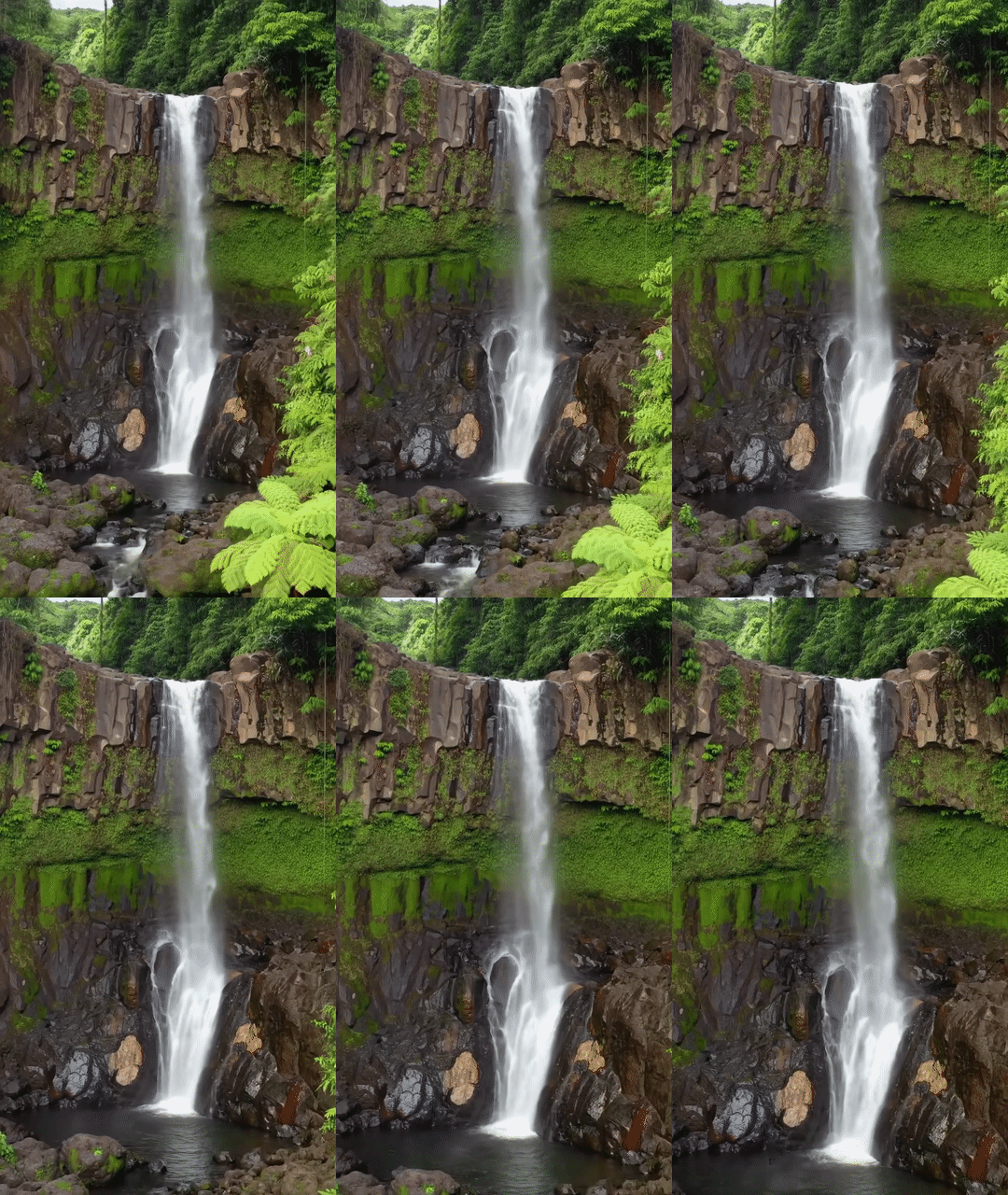
| 縦向き(9:16) 緑豊かな熱帯雨林の中にある雄大なハワイの滝の滑らかな動きを強調した動画を作成してください。リアルな水の流れ、詳細な葉、自然なライティングに焦点を当てて、静けさを表現してください。勢いよく流れる水、霧に包まれた雰囲気、生い茂る木々の間から差し込む木漏れ日を捉えてください。滑らかで映画のようなカメラワークで、滝とその周辺を映し出します。穏やかでリアルなトーンを目指し、ハワイの熱帯雨林の静かな美しさに視聴者を引き込みます。 |
|
モデル バージョン
Veo モデル固有の使用状況の詳細については、料金ページとレート制限をご覧ください。
Veo 3.1 プレビュー
| プロパティ | 説明 |
|---|---|
| モデルコード |
Gemini API
|
| サポートされるデータタイプ |
入力 テキスト、画像 出力 音声付きの動画 |
| 上限 |
テキスト入力 1,024 トークン 出力動画 1 |
| 最終更新 | 2026 年 1 月 |
Veo 3.1 Fast プレビュー
| プロパティ | 説明 |
|---|---|
| モデルコード |
Gemini API
|
| サポートされるデータタイプ |
入力 テキスト、画像 出力 音声付きの動画 |
| 上限 |
テキスト入力 1,024 トークン 出力動画 1 |
| 最終更新 | 2026 年 1 月 |
Veo 3.1 Lite プレビュー
| プロパティ | 説明 |
|---|---|
| モデルコード |
Gemini API
|
| サポートされるデータタイプ |
入力 テキスト、画像 出力 音声付きの動画 |
| 上限 |
テキスト入力 1,024 トークン 出力動画 1 |
| 最終更新 | 2026 年 3 月 |
Veo 3(非推奨)
| プロパティ | 説明 |
|---|---|
| モデルコード |
Gemini API
|
| サポートされるデータタイプ |
入力 テキスト、画像 出力 音声付きの動画 |
| 上限 |
テキスト入力 1,024 トークン 出力動画 1 |
| 最終更新 | 2025 年 7 月 |
Veo 3 Fast(非推奨)
| プロパティ | 説明 |
|---|---|
| モデルコード |
Gemini API
|
| サポートされるデータタイプ |
入力 テキスト、画像 出力 音声付きの動画 |
| 上限 |
テキスト入力 1,024 トークン 出力動画 1 |
| 最終更新 | 2025 年 7 月 |
Veo Fast バージョンを使用すると、デベロッパーは高品質を維持しながら、速度とビジネス ユースケースに最適化された音声付き動画を作成できます。広告をプログラムで生成するバックエンド サービス、クリエイティブ コンセプトの迅速な A/B テストを行うツール、ソーシャル メディア コンテンツを迅速に作成する必要があるアプリに最適です。
次のステップ
- Veo 3.1 API を使ってみるには、Veo クイックスタート Colab と Veo 3.1 アプレットをお試しください。
- プロンプト設計の概要で、より効果的なプロンプトを作成する方法を学習する。