

Para obtener más información sobre la comprensión de videos, consulta la guía Comprensión de videos.
Veo 3.1 es un modelo para generar videos de 8 segundos (720p, 1080p o 4K) con audio generado de forma nativa. Puedes acceder a este modelo de forma programática con la API de Gemini. Para obtener más información sobre las variantes disponibles del modelo Veo, consulta la sección Versiones del modelo.
Veo 3.1 se destaca en una amplia variedad de estilos visuales y cinematográficos, y presenta varias funciones nuevas:
- Videos verticales: Elige entre videos horizontales (
16:9) y verticales (9:16). - Extensión de video: Extiende videos que se generaron anteriormente con Veo.
- Generación específica de fotogramas: Genera un video especificando el primer y el último fotograma.
- Dirección basada en imágenes: Usa hasta tres imágenes de referencia para guiar el contenido del video generado.
Si deseas obtener más información para escribir instrucciones de texto eficaces para la generación de videos, consulta la guía de instrucciones de Veo.
Generación de texto a video
En los siguientes ejemplos, se muestra cómo puedes generar un video con diálogo, realismo cinematográfico o animación creativa:
Diálogo y efectos de sonido
Python
import time
from google import genai
from google.genai import types

client = genai.Client()

prompt = """A close up of two people staring at a cryptic drawing on a wall, torchlight flickering.
A man murmurs, 'This must be it. That's the secret code.' The woman looks at him and whispering excitedly, 'What did you find?'"""

operation = client.models.generate_videos(
    model="veo-3.1-generate-preview",
    prompt=prompt,
)

# Poll the operation status until the video is ready.
while not operation.done:
    print("Waiting for video generation to complete...")
    time.sleep(10)
    operation = client.operations.get(operation)

# Download the generated video.
generated_video = operation.response.generated_videos[0]
client.files.download(file=generated_video.video, destination="dialogue_example.mp4")
print("Generated video saved to dialogue_example.mp4")
JavaScript
import { GoogleGenAI } from "@google/genai";

const ai = new GoogleGenAI({});

const prompt = `A close up of two people staring at a cryptic drawing on a wall, torchlight flickering.
A man murmurs, 'This must be it. That's the secret code.' The woman looks at him and whispering excitedly, 'What did you find?'`;

let operation = await ai.models.generateVideos({
    model: "veo-3.1-generate-preview",
    prompt: prompt,
});

// Poll the operation status until the video is ready.
while (!operation.done) {
    console.log("Waiting for video generation to complete...")
    await new Promise((resolve) => setTimeout(resolve, 10000));
    operation = await ai.operations.getVideosOperation({
        operation: operation,
    });
}

// Download the generated video.
ai.files.download({
    file: operation.response.generatedVideos[0].video,
    downloadPath: "dialogue_example.mp4",
});
console.log(`Generated video saved to dialogue_example.mp4`);
Go
package main

import (
    "context"
    "log"
    "os"
    "time"

    "google.golang.org/genai"
)

func main() {
    ctx := context.Background()
    client, err := genai.NewClient(ctx, nil)
    if err != nil {
        log.Fatal(err)
    }

    prompt := `A close up of two people staring at a cryptic drawing on a wall, torchlight flickering.
    A man murmurs, 'This must be it. That's the secret code.' The woman looks at him and whispering excitedly, 'What did you find?'`

    operation, _ := client.Models.GenerateVideos(
        ctx,
        "veo-3.1-generate-preview",
        prompt,
        nil,
        nil,
    )

    // Poll the operation status until the video is ready.
    for !operation.Done {
    log.Println("Waiting for video generation to complete...")
        time.Sleep(10 * time.Second)
        operation, _ = client.Operations.GetVideosOperation(ctx, operation, nil)
    }

    // Download the generated video.
    video := operation.Response.GeneratedVideos[0]
    client.Files.Download(ctx, video.Video, nil)
    fname := "dialogue_example.mp4"
    _ = os.WriteFile(fname, video.Video.VideoBytes, 0644)
    log.Printf("Generated video saved to %s\n", fname)
}
Java
import com.google.genai.Client;
import com.google.genai.types.GenerateVideosOperation;
import com.google.genai.types.GeneratedVideo;

Client client = new Client();

String prompt =
    "A close up of two people staring at a cryptic drawing on a wall, torchlight flickering.\n"
        + "A man murmurs, 'This must be it. That's the secret code.' The woman looks at him and whispering excitedly, 'What did you find?'";

GenerateVideosOperation operation =
    client.models.generateVideos("veo-3.1-generate-preview", prompt, null, null);

// Poll the operation status until the video is ready.
while (!operation.done().orElse(false)) {
  System.out.println("Waiting for video generation to complete...");
  Thread.sleep(10000);
  operation = client.operations.getVideosOperation(operation, null);
}

// Download the generated video.
GeneratedVideo generatedVideo = operation.response().get().generatedVideos().get().get(0);
client.files.download(generatedVideo, "dialogue_example.mp4", null);
System.out.println("Generated video saved to dialogue_example.mp4");
REST
# Note: This script uses jq to parse the JSON response.
# GEMINI API Base URL
BASE_URL="https://generativelanguage.googleapis.com/v1beta"

# Send request to generate video and capture the operation name into a variable.
operation_name=$(curl -s "${BASE_URL}/models/veo-3.1-generate-preview:predictLongRunning" \
  -H "x-goog-api-key: $GEMINI_API_KEY" \
  -H "Content-Type: application/json" \
  -X "POST" \
  -d '{
    "instances": [{
        "prompt": "A close up of two people staring at a cryptic drawing on a wall, torchlight flickering. A man murmurs, \"This must be it. That'\''s the secret code.\" The woman looks at him and whispering excitedly, \"What did you find?\""
      }
    ]
  }' | jq -r .name)

# Poll the operation status until the video is ready
while true; do
  # Get the full JSON status and store it in a variable.
  status_response=$(curl -s -H "x-goog-api-key: $GEMINI_API_KEY" "${BASE_URL}/${operation_name}")

  # Check the "done" field from the JSON stored in the variable.
  is_done=$(echo "${status_response}" | jq .done)

  if [ "${is_done}" = "true" ]; then
    # Extract the download URI from the final response.
    video_uri=$(echo "${status_response}" | jq -r '.response.generateVideoResponse.generatedSamples[0].video.uri')
    echo "Downloading video from: ${video_uri}"

    # Download the video using the URI and API key and follow redirects.
    curl -L -o dialogue_example.mp4 -H "x-goog-api-key: $GEMINI_API_KEY" "${video_uri}"
    break
  fi
  # Wait for 5 seconds before checking again.
  sleep 10
done
Realismo cinematográfico
Python
import time
from google import genai
from google.genai import types

client = genai.Client()

prompt = """Drone shot following a classic red convertible driven by a man along a winding coastal road at sunset, waves crashing against the rocks below.
The convertible accelerates fast and the engine roars loudly."""

operation = client.models.generate_videos(
    model="veo-3.1-generate-preview",
    prompt=prompt,
)

# Poll the operation status until the video is ready.
while not operation.done:
    print("Waiting for video generation to complete...")
    time.sleep(10)
    operation = client.operations.get(operation)

# Download the generated video.
generated_video = operation.response.generated_videos[0]
client.files.download(file=generated_video.video, destination="realism_example.mp4")
print("Generated video saved to realism_example.mp4")
JavaScript
import { GoogleGenAI } from "@google/genai";

const ai = new GoogleGenAI({});

const prompt = `Drone shot following a classic red convertible driven by a man along a winding coastal road at sunset, waves crashing against the rocks below.
The convertible accelerates fast and the engine roars loudly.`;

let operation = await ai.models.generateVideos({
    model: "veo-3.1-generate-preview",
    prompt: prompt,
});

// Poll the operation status until the video is ready.
while (!operation.done) {
    console.log("Waiting for video generation to complete...")
    await new Promise((resolve) => setTimeout(resolve, 10000));
    operation = await ai.operations.getVideosOperation({
        operation: operation,
    });
}

// Download the generated video.
ai.files.download({
    file: operation.response.generatedVideos[0].video,
    downloadPath: "realism_example.mp4",
});
console.log(`Generated video saved to realism_example.mp4`);
Go
package main

import (
    "context"
    "log"
    "os"
    "time"

    "google.golang.org/genai"
)

func main() {
    ctx := context.Background()
    client, err := genai.NewClient(ctx, nil)
    if err != nil {
        log.Fatal(err)
    }

    prompt := `Drone shot following a classic red convertible driven by a man along a winding coastal road at sunset, waves crashing against the rocks below.
  The convertible accelerates fast and the engine roars loudly.`

    operation, _ := client.Models.GenerateVideos(
        ctx,
        "veo-3.1-generate-preview",
        prompt,
        nil,
        nil,
    )

    // Poll the operation status until the video is ready.
    for !operation.Done {
    log.Println("Waiting for video generation to complete...")
        time.Sleep(10 * time.Second)
        operation, _ = client.Operations.GetVideosOperation(ctx, operation, nil)
    }

    // Download the generated video.
    video := operation.Response.GeneratedVideos[0]
    client.Files.Download(ctx, video.Video, nil)
    fname := "realism_example.mp4"
    _ = os.WriteFile(fname, video.Video.VideoBytes, 0644)
    log.Printf("Generated video saved to %s\n", fname)
}
Java
import com.google.genai.Client;
import com.google.genai.types.GenerateVideosOperation;
import com.google.genai.types.GeneratedVideo;

Client client = new Client();

String prompt =
    "Drone shot following a classic red convertible driven by a man along a winding coastal road at sunset, waves crashing against the rocks below.\n"
        + "The convertible accelerates fast and the engine roars loudly.";

GenerateVideosOperation operation =
    client.models.generateVideos("veo-3.1-generate-preview", prompt, null, null);

// Poll the operation status until the video is ready.
while (!operation.done().orElse(false)) {
  System.out.println("Waiting for video generation to complete...");
  Thread.sleep(10000);
  operation = client.operations.getVideosOperation(operation, null);
}

// Download the generated video.
GeneratedVideo generatedVideo = operation.response().get().generatedVideos().get().get(0);
client.files.download(generatedVideo, "realism_example.mp4", null);
System.out.println("Generated video saved to realism_example.mp4");
REST
# Note: This script uses jq to parse the JSON response.
# GEMINI API Base URL
BASE_URL="https://generativelanguage.googleapis.com/v1beta"

# Send request to generate video and capture the operation name into a variable.
operation_name=$(curl -s "${BASE_URL}/models/veo-3.1-generate-preview:predictLongRunning" \
  -H "x-goog-api-key: $GEMINI_API_KEY" \
  -H "Content-Type: application/json" \
  -X "POST" \
  -d '{
    "instances": [{
        "prompt": "Drone shot following a classic red convertible driven by a man along a winding coastal road at sunset, waves crashing against the rocks below. The convertible accelerates fast and the engine roars loudly."
      }
    ]
  }' | jq -r .name)

# Poll the operation status until the video is ready
while true; do
  # Get the full JSON status and store it in a variable.
  status_response=$(curl -s -H "x-goog-api-key: $GEMINI_API_KEY" "${BASE_URL}/${operation_name}")

  # Check the "done" field from the JSON stored in the variable.
  is_done=$(echo "${status_response}" | jq .done)

  if [ "${is_done}" = "true" ]; then
    # Extract the download URI from the final response.
    video_uri=$(echo "${status_response}" | jq -r '.response.generateVideoResponse.generatedSamples[0].video.uri')
    echo "Downloading video from: ${video_uri}"

    # Download the video using the URI and API key and follow redirects.
    curl -L -o realism_example.mp4 -H "x-goog-api-key: $GEMINI_API_KEY" "${video_uri}"
    break
  fi
  # Wait for 5 seconds before checking again.
  sleep 10
done
Animación de creatividad
Python
import time
from google import genai

client = genai.Client()
prompt = "A whimsical stop-motion animation of a tiny robot tending to a garden of glowing mushrooms on a miniature planet."

operation = client.models.generate_videos(
    model="veo-3.1-generate-preview",
    prompt=prompt,
)

# Poll the operation status until the video is ready.
while not operation.done:
    print("Waiting for video generation to complete...")
    time.sleep(10)
    operation = client.operations.get(operation)

# Download the generated video.
generated_video = operation.response.generated_videos[0]
client.files.download(file=generated_video.video, destination="style_example.mp4")
print("Generated video saved to style_example.mp4")
JavaScript
import { GoogleGenAI } from "@google/genai";

const ai = new GoogleGenAI({});

const prompt = "A whimsical stop-motion animation of a tiny robot tending to a garden of glowing mushrooms on a miniature planet.";

let operation = await ai.models.generateVideos({
    model: "veo-3.1-generate-preview",
    prompt: prompt,
});

// Poll the operation status until the video is ready.
while (!operation.done) {
    console.log("Waiting for video generation to complete...")
    await new Promise((resolve) => setTimeout(resolve, 10000));
    operation = await ai.operations.getVideosOperation({
        operation: operation,
    });
}

// Download the generated video.
ai.files.download({
    file: operation.response.generatedVideos[0].video,
    downloadPath: "style_example.mp4",
});
console.log(`Generated video saved to style_example.mp4`);
Go
package main

import (
    "context"
    "log"
    "os"
    "time"

    "google.golang.org/genai"
)

func main() {
    ctx := context.Background()
    client, err := genai.NewClient(ctx, nil)
    if err != nil {
        log.Fatal(err)
    }

    prompt := `A whimsical stop-motion animation of a tiny robot tending to a garden of glowing mushrooms on a miniature planet.`

    operation, _ := client.Models.GenerateVideos(
        ctx,
        "veo-3.1-generate-preview",
        prompt,
        nil,
        nil,
    )

    // Poll the operation status until the video is ready.
    for !operation.Done {
    log.Println("Waiting for video generation to complete...")
        time.Sleep(10 * time.Second)
        operation, _ = client.Operations.GetVideosOperation(ctx, operation, nil)
    }

    // Download the generated video.
    video := operation.Response.GeneratedVideos[0]
    client.Files.Download(ctx, video.Video, nil)
    fname := "style_example.mp4"
    _ = os.WriteFile(fname, video.Video.VideoBytes, 0644)
    log.Printf("Generated video saved to %s\n", fname)
}
Java
import com.google.genai.Client;
import com.google.genai.types.GenerateVideosOperation;
import com.google.genai.types.GeneratedVideo;

Client client = new Client();

String prompt =
    "A whimsical stop-motion animation of a tiny robot tending to a garden of glowing mushrooms on a miniature planet.";

GenerateVideosOperation operation =
    client.models.generateVideos("veo-3.1-generate-preview", prompt, null, null);

// Poll the operation status until the video is ready.
while (!operation.done().orElse(false)) {
  System.out.println("Waiting for video generation to complete...");
  Thread.sleep(10000);
  operation = client.operations.getVideosOperation(operation, null);
}

// Download the generated video.
GeneratedVideo generatedVideo = operation.response().get().generatedVideos().get().get(0);
client.files.download(generatedVideo, "style_example.mp4", null);
System.out.println("Generated video saved to style_example.mp4");
REST
# Note: This script uses jq to parse the JSON response.
# GEMINI API Base URL
BASE_URL="https://generativelanguage.googleapis.com/v1beta"

# Send request to generate video and capture the operation name into a variable.
operation_name=$(curl -s "${BASE_URL}/models/veo-3.1-generate-preview:predictLongRunning" \
  -H "x-goog-api-key: $GEMINI_API_KEY" \
  -H "Content-Type: application/json" \
  -X "POST" \
  -d '{
    "instances": [{
        "prompt": "A whimsical stop-motion animation of a tiny robot tending to a garden of glowing mushrooms on a miniature planet."
      }
    ]
  }' | jq -r .name)

# Poll the operation status until the video is ready
while true; do
  # Get the full JSON status and store it in a variable.
  status_response=$(curl -s -H "x-goog-api-key: $GEMINI_API_KEY" "${BASE_URL}/${operation_name}")

  # Check the "done" field from the JSON stored in the variable.
  is_done=$(echo "${status_response}" | jq .done)

  if [ "${is_done}" = "true" ]; then
    # Extract the download URI from the final response.
    video_uri=$(echo "${status_response}" | jq -r '.response.generateVideoResponse.generatedSamples[0].video.uri')
    echo "Downloading video from: ${video_uri}"

    # Download the video using the URI and API key and follow redirects.
    curl -L -o style_example.mp4 -H "x-goog-api-key: $GEMINI_API_KEY" "${video_uri}"
    break
  fi
  # Wait for 5 seconds before checking again.
  sleep 10
done
Controla la relación de aspecto
Veo 3.1 te permite crear videos horizontales (16:9, el parámetro de configuración predeterminado) o verticales
(9:16). Puedes indicarle al modelo cuál quieres usar con el
parámetro aspect_ratio:
Python
import time
from google import genai
from google.genai import types

client = genai.Client()

prompt = """A montage of pizza making: a chef tossing and flattening the floury dough, ladling rich red tomato sauce in a spiral, sprinkling mozzarella cheese and pepperoni, and a final shot of the bubbling golden-brown pizza, upbeat electronic music with a rhythmical beat is playing, high energy professional video."""

operation = client.models.generate_videos(
    model="veo-3.1-generate-preview",
    prompt=prompt,
    config=types.GenerateVideosConfig(
      aspect_ratio="9:16",
    ),
)

# Poll the operation status until the video is ready.
while not operation.done:
    print("Waiting for video generation to complete...")
    time.sleep(10)
    operation = client.operations.get(operation)

# Download the generated video.
generated_video = operation.response.generated_videos[0]
client.files.download(file=generated_video.video, destination="pizza_making.mp4")
print("Generated video saved to pizza_making.mp4")
JavaScript
import { GoogleGenAI } from "@google/genai";

const ai = new GoogleGenAI({});

const prompt = `A montage of pizza making: a chef tossing and flattening the floury dough, ladling rich red tomato sauce in a spiral, sprinkling mozzarella cheese and pepperoni, and a final shot of the bubbling golden-brown pizza, upbeat electronic music with a rhythmical beat is playing, high energy professional video.`;

let operation = await ai.models.generateVideos({
    model: "veo-3.1-generate-preview",
    prompt: prompt,
    config: {
      aspectRatio: "9:16",
    },
});

// Poll the operation status until the video is ready.
while (!operation.done) {
    console.log("Waiting for video generation to complete...")
    await new Promise((resolve) => setTimeout(resolve, 10000));
    operation = await ai.operations.getVideosOperation({
        operation: operation,
    });
}

// Download the generated video.
ai.files.download({
    file: operation.response.generatedVideos[0].video,
    downloadPath: "pizza_making.mp4",
});
console.log(`Generated video saved to pizza_making.mp4`);
Go
package main

import (
    "context"
    "log"
    "os"
    "time"

    "google.golang.org/genai"
)

func main() {
    ctx := context.Background()
    client, err := genai.NewClient(ctx, nil)
    if err != nil {
        log.Fatal(err)
    }

    prompt := `A montage of pizza making: a chef tossing and flattening the floury dough, ladling rich red tomato sauce in a spiral, sprinkling mozzarella cheese and pepperoni, and a final shot of the bubbling golden-brown pizza, upbeat electronic music with a rhythmical beat is playing, high energy professional video.`

  videoConfig := &genai.GenerateVideosConfig{
      AspectRatio: "9:16",
  }

    operation, _ := client.Models.GenerateVideos(
        ctx,
        "veo-3.1-generate-preview",
        prompt,
        nil,
        videoConfig,
    )

    // Poll the operation status until the video is ready.
    for !operation.Done {
    log.Println("Waiting for video generation to complete...")
        time.Sleep(10 * time.Second)
        operation, _ = client.Operations.GetVideosOperation(ctx, operation, nil)
    }

    // Download the generated video.
    video := operation.Response.GeneratedVideos[0]
    client.Files.Download(ctx, video.Video, nil)
    fname := "pizza_making.mp4"
    _ = os.WriteFile(fname, video.Video.VideoBytes, 0644)
    log.Printf("Generated video saved to %s\n", fname)
}
REST
# Note: This script uses jq to parse the JSON response.
# GEMINI API Base URL
BASE_URL="https://generativelanguage.googleapis.com/v1beta"

# Send request to generate video and capture the operation name into a variable.
operation_name=$(curl -s "${BASE_URL}/models/veo-3.1-generate-preview:predictLongRunning" \
  -H "x-goog-api-key: $GEMINI_API_KEY" \
  -H "Content-Type: application/json" \
  -X "POST" \
  -d '{
    "instances": [{
        "prompt": "A montage of pizza making: a chef tossing and flattening the floury dough, ladling rich red tomato sauce in a spiral, sprinkling mozzarella cheese and pepperoni, and a final shot of the bubbling golden-brown pizza, upbeat electronic music with a rhythmical beat is playing, high energy professional video."
      }
    ],
    "parameters": {
      "aspectRatio": "9:16"
    }
  }' | jq -r .name)

# Poll the operation status until the video is ready
while true; do
  # Get the full JSON status and store it in a variable.
  status_response=$(curl -s -H "x-goog-api-key: $GEMINI_API_KEY" "${BASE_URL}/${operation_name}")

  # Check the "done" field from the JSON stored in the variable.
  is_done=$(echo "${status_response}" | jq .done)

  if [ "${is_done}" = "true" ]; then
    # Extract the download URI from the final response.
    video_uri=$(echo "${status_response}" | jq -r '.response.generateVideoResponse.generatedSamples[0].video.uri')
    echo "Downloading video from: ${video_uri}"

    # Download the video using the URI and API key and follow redirects.
    curl -L -o pizza_making.mp4 -H "x-goog-api-key: $GEMINI_API_KEY" "${video_uri}"
    break
  fi
  # Wait for 5 seconds before checking again.
  sleep 10
done
Controla la resolución
Veo 3.1 también puede generar directamente videos de 720p, 1080p o 4K (4K no está disponible para Veo 3.1 Lite).
Ten en cuenta que, cuanto mayor sea la resolución, mayor será la latencia. Los videos en 4K también son más costosos (consulta los precios).
La extensión de video también se limita a videos de 720p.
Python
import time
from google import genai
from google.genai import types

client = genai.Client()

prompt = """A stunning drone view of the Grand Canyon during a flamboyant sunset that highlights the canyon's colors. The drone slowly flies towards the sun then accelerates, dives and flies inside the canyon."""

operation = client.models.generate_videos(
    model="veo-3.1-generate-preview",
    prompt=prompt,
    config=types.GenerateVideosConfig(
      resolution="4k",
    ),
)

# Poll the operation status until the video is ready.
while not operation.done:
    print("Waiting for video generation to complete...")
    time.sleep(10)
    operation = client.operations.get(operation)

# Download the generated video.
generated_video = operation.response.generated_videos[0]
client.files.download(file=generated_video.video, destination="4k_grand_canyon.mp4")
print("Generated video saved to 4k_grand_canyon.mp4")
JavaScript
import { GoogleGenAI } from "@google/genai";

const ai = new GoogleGenAI({});

const prompt = `A stunning drone view of the Grand Canyon during a flamboyant sunset that highlights the canyon's colors. The drone slowly flies towards the sun then accelerates, dives and flies inside the canyon.`;

let operation = await ai.models.generateVideos({
    model: "veo-3.1-generate-preview",
    prompt: prompt,
    config: {
      resolution: "4k",
    },
});

// Poll the operation status until the video is ready.
while (!operation.done) {
    console.log("Waiting for video generation to complete...")
    await new Promise((resolve) => setTimeout(resolve, 10000));
    operation = await ai.operations.getVideosOperation({
        operation: operation,
    });
}

// Download the generated video.
ai.files.download({
    file: operation.response.generatedVideos[0].video,
    downloadPath: "4k_grand_canyon.mp4",
});
console.log(`Generated video saved to 4k_grand_canyon.mp4`);
Go
package main

import (
    "context"
    "log"
    "os"
    "time"

    "google.golang.org/genai"
)

func main() {
    ctx := context.Background()
    client, err := genai.NewClient(ctx, nil)
    if err != nil {
        log.Fatal(err)
    }

    prompt := `A stunning drone view of the Grand Canyon during a flamboyant sunset that highlights the canyon's colors. The drone slowly flies towards the sun then accelerates, dives and flies inside the canyon.`

  videoConfig := &genai.GenerateVideosConfig{
      Resolution: "4k",
  }

    operation, _ := client.Models.GenerateVideos(
        ctx,
        "veo-3.1-generate-preview",
        prompt,
        nil,
        videoConfig,
    )

    // Poll the operation status until the video is ready.
    for !operation.Done {
    log.Println("Waiting for video generation to complete...")
        time.Sleep(10 * time.Second)
        operation, _ = client.Operations.GetVideosOperation(ctx, operation, nil)
    }

    // Download the generated video.
    video := operation.Response.GeneratedVideos[0]
    client.Files.Download(ctx, video.Video, nil)
    fname := "4k_grand_canyon.mp4"
    _ = os.WriteFile(fname, video.Video.VideoBytes, 0644)
    log.Printf("Generated video saved to %s\n", fname)
}
REST
# Note: This script uses jq to parse the JSON response.
# GEMINI API Base URL
BASE_URL="https://generativelanguage.googleapis.com/v1beta"

# Send request to generate video and capture the operation name into a variable.
operation_name=$(curl -s "${BASE_URL}/models/veo-3.1-generate-preview:predictLongRunning" \
  -H "x-goog-api-key: $GEMINI_API_KEY" \
  -H "Content-Type: application/json" \
  -X "POST" \
  -d '{
    "instances": [{
        "prompt": "A stunning drone view of the Grand Canyon during a flamboyant sunset that highlights the canyon'\''s colors. The drone slowly flies towards the sun then accelerates, dives and flies inside the canyon."
      }
    ],
    "parameters": {
      "resolution": "4k"
    }
  }' | jq -r .name)

# Poll the operation status until the video is ready
while true; do
  # Get the full JSON status and store it in a variable.
  status_response=$(curl -s -H "x-goog-api-key: $GEMINI_API_KEY" "${BASE_URL}/${operation_name}")

  # Check the "done" field from the JSON stored in the variable.
  is_done=$(echo "${status_response}" | jq .done)

  if [ "${is_done}" = "true" ]; then
    # Extract the download URI from the final response.
    video_uri=$(echo "${status_response}" | jq -r '.response.generateVideoResponse.generatedSamples[0].video.uri')
    echo "Downloading video from: ${video_uri}"

    # Download the video using the URI and API key and follow redirects.
    curl -L -o 4k_grand_canyon.mp4 -H "x-goog-api-key: $GEMINI_API_KEY" "${video_uri}"
    break
  fi
  # Wait for 5 seconds before checking again.
  sleep 10
done
Generación de video a partir de imágenes
En el siguiente código, se muestra cómo generar una imagen con Gemini 3.1 Flash Image, también conocido como Nano Banana 2, y, luego, usar esa imagen como el fotograma inicial para generar un video con Veo 3.1.
Python
import time
from google import genai

client = genai.Client()

prompt = "Panning wide shot of a calico kitten sleeping in the sunshine"

# Step 1: Generate an image with Nano Banana 2.
image = client.models.generate_content(
    model="gemini-3.1-flash-image-preview",
    contents=prompt,
    config={"response_modalities":['IMAGE']}
)

# Step 2: Generate video with Veo 3.1 using the image.
operation = client.models.generate_videos(
    model="veo-3.1-generate-preview",
    prompt=prompt,
    image=image.parts[0].as_image(),
)

# Poll the operation status until the video is ready.
while not operation.done:
    print("Waiting for video generation to complete...")
    time.sleep(10)
    operation = client.operations.get(operation)

# Download the video.
video = operation.response.generated_videos[0]
client.files.download(file=video.video, destination="veo3_with_image_input.mp4")
print("Generated video saved to veo3_with_image_input.mp4")
JavaScript
import { GoogleGenAI } from "@google/genai";

const ai = new GoogleGenAI({});

const prompt = "Panning wide shot of a calico kitten sleeping in the sunshine";

// Step 1: Generate an image with Nano Banana 2.
const imageResponse = await ai.models.generateContent({
  model: "gemini-3.1-flash-image-preview",
  prompt: prompt,
});

// Step 2: Generate video with Veo 3.1 using the image.
let operation = await ai.models.generateVideos({
  model: "veo-3.1-generate-preview",
  prompt: prompt,
  image: {
    imageBytes: imageResponse.generatedImages[0].image.imageBytes,
    mimeType: "image/png",
  },
});

// Poll the operation status until the video is ready.
while (!operation.done) {
  console.log("Waiting for video generation to complete...")
  await new Promise((resolve) => setTimeout(resolve, 10000));
  operation = await ai.operations.getVideosOperation({
    operation: operation,
  });
}

// Download the video.
ai.files.download({
    file: operation.response.generatedVideos[0].video,
    downloadPath: "veo3_with_image_input.mp4",
});
console.log(`Generated video saved to veo3_with_image_input.mp4`);
Go
package main

import (
    "context"
    "log"
    "os"
    "time"

    "google.golang.org/genai"
)

func main() {
    ctx := context.Background()
    client, err := genai.NewClient(ctx, nil)
    if err != nil {
        log.Fatal(err)
    }

    prompt := "Panning wide shot of a calico kitten sleeping in the sunshine"

    // Step 1: Generate an image with Nano Banana 2.
    imageResponse, err := client.Models.GenerateContent(
        ctx,
        "gemini-3.1-flash-image-preview",
        prompt,
        nil, // GenerateImagesConfig
    )
    if err != nil {
        log.Fatal(err)
    }

    // Step 2: Generate video with Veo 3.1 using the image.
    operation, err := client.Models.GenerateVideos(
        ctx,
        "veo-3.1-generate-preview",
        prompt,
        imageResponse.GeneratedImages[0].Image,
        nil, // GenerateVideosConfig
    )
    if err != nil {
        log.Fatal(err)
    }

    // Poll the operation status until the video is ready.
    for !operation.Done {
        log.Println("Waiting for video generation to complete...")
        time.Sleep(10 * time.Second)
        operation, _ = client.Operations.GetVideosOperation(ctx, operation, nil)
    }

    // Download the video.
    video := operation.Response.GeneratedVideos[0]
    client.Files.Download(ctx, video.Video, nil)
    fname := "veo3_with_image_input.mp4"
    _ = os.WriteFile(fname, video.Video.VideoBytes, 0644)
    log.Printf("Generated video saved to %s\n", fname)
}
Java
import com.google.genai.Client;
import com.google.genai.types.Blob;
import com.google.genai.types.GenerateContentConfig;
import com.google.genai.types.GenerateContentResponse;
import com.google.genai.types.GenerateVideosOperation;
import com.google.genai.types.GeneratedVideo;
import com.google.genai.types.Image;

Client client = new Client();

String prompt = "Panning wide shot of a calico kitten sleeping in the sunshine";

// Step 1: Generate an image with Nano Banana 2.
GenerateContentResponse imageResponse =
    client.models.generateContent(
        "gemini-3.1-flash-image-preview",
        prompt,
        GenerateContentConfig.builder().responseModalities("IMAGE").build());

Blob inlineData = imageResponse.parts().get(0).inlineData().get();
Image image =
    Image.builder()
        .imageBytes(inlineData.data().get())
        .mimeType(inlineData.mimeType().orElse("image/png"))
        .build();

// Step 2: Generate video with Veo 3.1 using the image.
GenerateVideosOperation operation =
    client.models.generateVideos("veo-3.1-generate-preview", prompt, image, null);

// Poll the operation status until the video is ready.
while (!operation.done().orElse(false)) {
  System.out.println("Waiting for video generation to complete...");
  Thread.sleep(10000);
  operation = client.operations.getVideosOperation(operation, null);
}

// Download the video.
GeneratedVideo video = operation.response().get().generatedVideos().get().get(0);
client.files.download(video, "veo3_with_image_input.mp4", null);
System.out.println("Generated video saved to veo3_with_image_input.mp4");
Cómo usar imágenes de referencia
Veo 3.1 ahora acepta hasta 3 imágenes de referencia para guiar el contenido de los videos generados. Proporciona imágenes de una persona, un personaje o un producto para conservar la apariencia del sujeto en el video de salida.
Por ejemplo, si usas estas tres imágenes generadas con Nano Banana como referencias con una instrucción bien escrita, se crea el siguiente video:
`dress_image` |
`woman_image` |
`glasses_image` |
|---|---|---|

|

|

|
Python
import time
from google import genai

client = genai.Client()

prompt = "The video opens with a medium, eye-level shot of a beautiful woman with dark hair and warm brown eyes. She wears a magnificent, high-fashion flamingo dress with layers of pink and fuchsia feathers, complemented by whimsical pink, heart-shaped sunglasses. She walks with serene confidence through the crystal-clear, shallow turquoise water of a sun-drenched lagoon. The camera slowly pulls back to a medium-wide shot, revealing the breathtaking scene as the dress's long train glides and floats gracefully on the water's surface behind her. The cinematic, dreamlike atmosphere is enhanced by the vibrant colors of the dress against the serene, minimalist landscape, capturing a moment of pure elegance and high-fashion fantasy."

dress_reference = types.VideoGenerationReferenceImage(
  image=dress_image, # Generated separately with Nano Banana
  reference_type="asset"
)

sunglasses_reference = types.VideoGenerationReferenceImage(
  image=glasses_image, # Generated separately with Nano Banana
  reference_type="asset"
)

woman_reference = types.VideoGenerationReferenceImage(
  image=woman_image, # Generated separately with Nano Banana
  reference_type="asset"
)

operation = client.models.generate_videos(
    model="veo-3.1-generate-preview",
    prompt=prompt,
    config=types.GenerateVideosConfig(
      reference_images=[dress_reference, glasses_reference, woman_reference],
    ),
)

# Poll the operation status until the video is ready.
while not operation.done:
    print("Waiting for video generation to complete...")
    time.sleep(10)
    operation = client.operations.get(operation)

# Download the video.
video = operation.response.generated_videos[0]
client.files.download(file=video.video, destination="veo3.1_with_reference_images.mp4")
print("Generated video saved to veo3.1_with_reference_images.mp4")
JavaScript
import { GoogleGenAI } from "@google/genai";

const ai = new GoogleGenAI({});

const prompt = "The video opens with a medium, eye-level shot of a beautiful woman with dark hair and warm brown eyes. She wears a magnificent, high-fashion flamingo dress with layers of pink and fuchsia feathers, complemented by whimsical pink, heart-shaped sunglasses. She walks with serene confidence through the crystal-clear, shallow turquoise water of a sun-drenched lagoon. The camera slowly pulls back to a medium-wide shot, revealing the breathtaking scene as the dress's long train glides and floats gracefully on the water's surface behind her. The cinematic, dreamlike atmosphere is enhanced by the vibrant colors of the dress against the serene, minimalist landscape, capturing a moment of pure elegance and high-fashion fantasy.";

// dressImage, glassesImage, womanImage generated separately with Nano Banana
// and available as objects like { imageBytes: "...", mimeType: "image/png" }
const dressReference = {
  image: dressImage,
  referenceType: "asset",
};
const sunglassesReference = {
  image: glassesImage,
  referenceType: "asset",
};
const womanReference = {
  image: womanImage,
  referenceType: "asset",
};

let operation = await ai.models.generateVideos({
  model: "veo-3.1-generate-preview",
  prompt: prompt,
  config: {
    referenceImages: [
      dressReference,
      sunglassesReference,
      womanReference,
    ],
  },
});

// Poll the operation status until the video is ready.
while (!operation.done) {
  console.log("Waiting for video generation to complete...");
  await new Promise((resolve) => setTimeout(resolve, 10000));
  operation = await ai.operations.getVideosOperation({
    operation: operation,
  });
}

// Download the video.
ai.files.download({
  file: operation.response.generatedVideos[0].video,
  downloadPath: "veo3.1_with_reference_images.mp4",
});
console.log(`Generated video saved to veo3.1_with_reference_images.mp4`);
Go
package main

import (
    "context"
    "log"
    "os"
    "time"

    "google.golang.org/genai"
)

func main() {
    ctx := context.Background()
    client, err := genai.NewClient(ctx, nil)
    if err != nil {
        log.Fatal(err)
    }

  prompt := `The video opens with a medium, eye-level shot of a beautiful woman with dark hair and warm brown eyes. She wears a magnificent, high-fashion flamingo dress with layers of pink and fuchsia feathers, complemented by whimsical pink, heart-shaped sunglasses. She walks with serene confidence through the crystal-clear, shallow turquoise water of a sun-drenched lagoon. The camera slowly pulls back to a medium-wide shot, revealing the breathtaking scene as the dress's long train glides and floats gracefully on the water's surface behind her. The cinematic, dreamlike atmosphere is enhanced by the vibrant colors of the dress against the serene, minimalist landscape, capturing a moment of pure elegance and high-fashion fantasy.`

  // dressImage, glassesImage, womanImage generated separately with Nano Banana
  // and available as *genai.Image objects.
  var dressImage, glassesImage, womanImage *genai.Image

  dressReference := &genai.VideoGenerationReferenceImage{
    Image: dressImage,
    ReferenceType: "asset",
  }
  sunglassesReference := &genai.VideoGenerationReferenceImage{
    Image: glassesImage,
    ReferenceType: "asset",
  }
  womanReference := &genai.VideoGenerationReferenceImage{
    Image: womanImage,
    ReferenceType: "asset",
  }

    operation, _ := client.Models.GenerateVideos(
        ctx,
        "veo-3.1-generate-preview",
        prompt,
    nil, // image
        &genai.GenerateVideosConfig{
      ReferenceImages: []*genai.VideoGenerationReferenceImage{
        dressReference,
        sunglassesReference,
        womanReference,
      },
    },
    )

    // Poll the operation status until the video is ready.
    for !operation.Done {
        log.Println("Waiting for video generation to complete...")
        time.Sleep(10 * time.Second)
        operation, _ = client.Operations.GetVideosOperation(ctx, operation, nil)
    }

    // Download the video.
    video := operation.Response.GeneratedVideos[0]
    client.Files.Download(ctx, video.Video, nil)
    fname := "veo3.1_with_reference_images.mp4"
    _ = os.WriteFile(fname, video.Video.VideoBytes, 0644)
    log.Printf("Generated video saved to %s\n", fname)
}
REST
# Note: This script uses jq to parse the JSON response.
# It assumes dress_image_base64, glasses_image_base64, and woman_image_base64
# contain base64-encoded image data.

# GEMINI API Base URL
BASE_URL="https://generativelanguage.googleapis.com/v1beta"

# Send request to generate video and capture the operation name into a variable.
operation_name=$(curl -s "${BASE_URL}/models/veo-3.1-generate-preview:predictLongRunning" \
  -H "x-goog-api-key: $GEMINI_API_KEY" \
  -H "Content-Type: application/json" \
  -X "POST" \
  -d '{
    "instances": [{
      "prompt": "The video opens with a medium, eye-level shot of a beautiful woman with dark hair and warm brown eyes. She wears a magnificent, high-fashion flamingo dress with layers of pink and fuchsia feathers, complemented by whimsical pink, heart-shaped sunglasses. She walks with serene confidence through the crystal-clear, shallow turquoise water of a sun-drenched lagoon. The camera slowly pulls back to a medium-wide shot, revealing the breathtaking scene as the dress'\''s long train glides and floats gracefully on the water'\''s surface behind her. The cinematic, dreamlike atmosphere is enhanced by the vibrant colors of the dress against the serene, minimalist landscape, capturing a moment of pure elegance and high-fashion fantasy.",
      "referenceImages": [
        {
          "image": {"inlineData": {"mimeType": "image/png", "data": "'"$dress_image_base64"'"}},
          "referenceType": "asset"
        },
        {
          "image": {"inlineData": {"mimeType": "image/png", "data": "'"$glasses_image_base64"'"}},
          "referenceType": "asset"
        },
        {
          "image": {"inlineData": {"mimeType": "image/png", "data": "'"$woman_image_base64"'"}},
          "referenceType": "asset"
        }
      ]
    }],
  }' | jq -r .name)

# Poll the operation status until the video is ready
while true; do
  # Get the full JSON status and store it in a variable.
  status_response=$(curl -s -H "x-goog-api-key: $GEMINI_API_KEY" "${BASE_URL}/${operation_name}")

  # Check the "done" field from the JSON stored in the variable.
  is_done=$(echo "${status_response}" | jq .done)

  if [ "${is_done}" = "true" ]; then
    # Extract the download URI from the final response.
    video_uri=$(echo "${status_response}" | jq -r '.response.generateVideoResponse.generatedSamples[0].video.uri')
    echo "Downloading video from: ${video_uri}"

    # Download the video using the URI and API key and follow redirects.
    curl -L -o veo3.1_with_reference_images.mp4 -H "x-goog-api-key: $GEMINI_API_KEY" "${video_uri}"
    break
  fi
  # Wait for 10 seconds before checking again.
  sleep 10
done
Usa el primer y el último fotograma
Veo 3.1 te permite crear videos con interpolación o especificando el primer y el último fotograma del video. Para obtener información sobre cómo escribir instrucciones de texto eficaces para la generación de videos, consulta la guía de instrucciones de Veo.
Python
import time
from google import genai

client = genai.Client()

prompt = "A cinematic, haunting video. A ghostly woman with long white hair and a flowing dress swings gently on a rope swing beneath a massive, gnarled tree in a foggy, moonlit clearing. The fog thickens and swirls around her, and she slowly fades away, vanishing completely. The empty swing is left swaying rhythmically on its own in the eerie silence."

operation = client.models.generate_videos(
    model="veo-3.1-generate-preview",
    prompt=prompt,
    image=first_image, # The starting frame is passed as a primary input
    config=types.GenerateVideosConfig(
      last_frame=last_image # The ending frame is passed as a generation constraint in the config
    ),
)

# Poll the operation status until the video is ready.
while not operation.done:
    print("Waiting for video generation to complete...")
    time.sleep(10)
    operation = client.operations.get(operation)

# Download the video.
video = operation.response.generated_videos[0]
client.files.download(file=video.video, destination="veo3.1_with_interpolation.mp4")
print("Generated video saved to veo3.1_with_interpolation.mp4")
JavaScript
import { GoogleGenAI } from "@google/genai";

const ai = new GoogleGenAI({});

const prompt = "A cinematic, haunting video. A ghostly woman with long white hair and a flowing dress swings gently on a rope swing beneath a massive, gnarled tree in a foggy, moonlit clearing. The fog thickens and swirls around her, and she slowly fades away, vanishing completely. The empty swing is left swaying rhythmically on its own in the eerie silence.";

// firstImage and lastImage generated separately with Nano Banana
// and available as objects like { imageBytes: "...", mimeType: "image/png" }
let operation = await ai.models.generateVideos({
    model: "veo-3.1-generate-preview",
    prompt: prompt,
    image: firstImage, // The starting frame is passed as a primary input
    config: {
      lastFrame: lastImage, // The ending frame is passed as a generation constraint in the config
    },
});

// Poll the operation status until the video is ready.
while (!operation.done) {
    console.log("Waiting for video generation to complete...")
    await new Promise((resolve) => setTimeout(resolve, 10000));
    operation = await ai.operations.getVideosOperation({
        operation: operation,
    });
}

// Download the video.
ai.files.download({
    file: operation.response.generatedVideos[0].video,
    downloadPath: "veo3.1_with_interpolation.mp4",
});
console.log(`Generated video saved to veo3.1_with_interpolation.mp4`);
Go
package main

import (
    "context"
    "log"
    "os"
    "time"

    "google.golang.org/genai"
)

func main() {
    ctx := context.Background()
    client, err := genai.NewClient(ctx, nil)
    if err != nil {
        log.Fatal(err)
    }

  prompt := `A cinematic, haunting video. A ghostly woman with long white hair and a flowing dress swings gently on a rope swing beneath a massive, gnarled tree in a foggy, moonlit clearing. The fog thickens and swirls around her, and she slowly fades away, vanishing completely. The empty swing is left swaying rhythmically on its own in the eerie silence.`

  // firstImage and lastImage generated separately with Nano Banana
  // and available as *genai.Image objects.
  var firstImage, lastImage *genai.Image

    operation, _ := client.Models.GenerateVideos(
        ctx,
        "veo-3.1-generate-preview",
        prompt,
    firstImage, // The starting frame is passed as a primary input
        &genai.GenerateVideosConfig{
      LastFrame: lastImage, // The ending frame is passed as a generation constraint in the config
    },
    )

    // Poll the operation status until the video is ready.
    for !operation.Done {
        log.Println("Waiting for video generation to complete...")
        time.Sleep(10 * time.Second)
        operation, _ = client.Operations.GetVideosOperation(ctx, operation, nil)
    }

    // Download the video.
    video := operation.Response.GeneratedVideos[0]
    client.Files.Download(ctx, video.Video, nil)
    fname := "veo3.1_with_interpolation.mp4"
    _ = os.WriteFile(fname, video.Video.VideoBytes, 0644)
    log.Printf("Generated video saved to %s\n", fname)
}
REST
# Note: This script uses jq to parse the JSON response.
# It assumes first_image_base64 and last_image_base64
# contain base64-encoded image data.

# GEMINI API Base URL
BASE_URL="https://generativelanguage.googleapis.com/v1beta"

# Send request to generate video and capture the operation name into a variable.
# The starting frame is passed as a primary input
# The ending frame is passed as a generation constraint in the config
operation_name=$(curl -s "${BASE_URL}/models/veo-3.1-generate-preview:predictLongRunning" \
  -H "x-goog-api-key: $GEMINI_API_KEY" \
  -H "Content-Type: application/json" \
  -X "POST" \
  -d '{
    "instances": [{
      "prompt": "A cinematic, haunting video. A ghostly woman with long white hair and a flowing dress swings gently on a rope swing beneath a massive, gnarled tree in a foggy, moonlit clearing. The fog thickens and swirls around her, and she slowly fades away, vanishing completely. The empty swing is left swaying rhythmically on its own in the eerie silence.",
      "image": {"inlineData": {"mimeType": "image/png", "data": "'"$first_image_base64"'"}},
      "lastFrame": {"inlineData": {"mimeType": "image/png", "data": "'"$last_image_base64"'"}}
    }],
  }' | jq -r .name)

# Poll the operation status until the video is ready
while true; do
  # Get the full JSON status and store it in a variable.
  status_response=$(curl -s -H "x-goog-api-key: $GEMINI_API_KEY" "${BASE_URL}/${operation_name}")

  # Check the "done" field from the JSON stored in the variable.
  is_done=$(echo "${status_response}" | jq .done)

  if [ "${is_done}" = "true" ]; then
    # Extract the download URI from the final response.
    video_uri=$(echo "${status_response}" | jq -r '.response.generateVideoResponse.generatedSamples[0].video.uri')
    echo "Downloading video from: ${video_uri}"

    # Download the video using the URI and API key and follow redirects.
    curl -L -o veo3.1_with_interpolation.mp4 -H "x-goog-api-key: $GEMINI_API_KEY" "${video_uri}"
    break
  fi
  # Wait for 10 seconds before checking again.
  sleep 10
done
`first_image` |
`last_image` |
veo3.1_with_interpolation.mp4 |
|---|---|---|

|

|
|
Cómo extender videos de Veo
Usa Veo 3.1 para extender 7 segundos los videos que generaste anteriormente con Veo, hasta 20 veces.
Limitaciones de los videos de entrada:
- Solo se pueden extender los videos generados por Veo hasta 141 segundos.
- La API de Gemini solo admite extensiones de video para los videos generados por Veo.
- El video debe provenir de una generación anterior, como
operation.response.generated_videos[0].video - Los videos se almacenan durante 2 días, pero si se hace referencia a un video para extenderlo, se restablece el temporizador de almacenamiento de 2 días. Solo puedes extender los videos que se generaron o se usaron como referencia en los últimos dos días.
- Se espera que los videos de entrada tengan una duración, una relación de aspecto y dimensiones determinadas:
- Relación de aspecto: 9:16 o 16:9
- Resolución: 720p
- Duración del video: 141 segundos o menos
El resultado de la extensión es un solo video que combina el video de entrada del usuario y el video extendido generado para un máximo de 148 segundos de video.
En este ejemplo, se toma el video generado por Veo, que se muestra aquí con
su instrucción original, y se extiende con el parámetro video y una instrucción
nueva:
| Instrucción | Resultado: butterfly_video |
|---|---|
| Una mariposa de origami bate las alas y sale volando por las puertas francesas hacia el jardín. |
|
Python
import time
from google import genai

client = genai.Client()

prompt = "Track the butterfly into the garden as it lands on an orange origami flower. A fluffy white puppy runs up and gently pats the flower."

operation = client.models.generate_videos(
    model="veo-3.1-generate-preview",
    video=operation.response.generated_videos[0].video, # This must be a video from a previous generation
    prompt=prompt,
    config=types.GenerateVideosConfig(
        number_of_videos=1,
        resolution="720p"
    ),
)

# Poll the operation status until the video is ready.
while not operation.done:
    print("Waiting for video generation to complete...")
    time.sleep(10)
    operation = client.operations.get(operation)

# Download the video.
video = operation.response.generated_videos[0]
client.files.download(file=video.video, destination="veo3.1_extension.mp4")
print("Generated video saved to veo3.1_extension.mp4")
JavaScript
import { GoogleGenAI } from "@google/genai";

const ai = new GoogleGenAI({});

const prompt = "Track the butterfly into the garden as it lands on an orange origami flower. A fluffy white puppy runs up and gently pats the flower.";

// butterflyVideo must be a video from a previous generation
// available as an object like { videoBytes: "...", mimeType: "video/mp4" }
let operation = await ai.models.generateVideos({
    model: "veo-3.1-generate-preview",
    video: butterflyVideo,
    prompt: prompt,
    config: {
        numberOfVideos: 1,
        resolution: "720p",
    },
});

// Poll the operation status until the video is ready.
while (!operation.done) {
    console.log("Waiting for video generation to complete...")
    await new Promise((resolve) => setTimeout(resolve, 10000));
    operation = await ai.operations.getVideosOperation({
        operation: operation,
    });
}

// Download the video.
ai.files.download({
    file: operation.response.generatedVideos[0].video,
    downloadPath: "veo3.1_extension.mp4",
});
console.log(`Generated video saved to veo3.1_extension.mp4`);
Go
package main

import (
    "context"
    "log"
    "os"
    "time"

    "google.golang.org/genai"
)

func main() {
    ctx := context.Background()
    client, err := genai.NewClient(ctx, nil)
    if err != nil {
        log.Fatal(err)
    }

  prompt := `Track the butterfly into the garden as it lands on an orange origami flower. A fluffy white puppy runs up and gently pats the flower.`

  // butterflyVideo must be a video from a previous generation
  // available as a *genai.Video object.
  var butterflyVideo *genai.Video

    operation, _ := client.Models.GenerateVideos(
        ctx,
        "veo-3.1-generate-preview",
        prompt,
    nil, // image
    butterflyVideo,
        &genai.GenerateVideosConfig{
      NumberOfVideos: 1,
      Resolution: "720p",
    },
    )

    // Poll the operation status until the video is ready.
    for !operation.Done {
        log.Println("Waiting for video generation to complete...")
        time.Sleep(10 * time.Second)
        operation, _ = client.Operations.GetVideosOperation(ctx, operation, nil)
    }

    // Download the video.
    video := operation.Response.GeneratedVideos[0]
    client.Files.Download(ctx, video.Video, nil)
    fname := "veo3.1_extension.mp4"
    _ = os.WriteFile(fname, video.Video.VideoBytes, 0644)
    log.Printf("Generated video saved to %s\n", fname)
}
REST
# Note: This script uses jq to parse the JSON response.
# It assumes butterfly_video_base64 contains base64-encoded
# video data from a previous generation.

# GEMINI API Base URL
BASE_URL="https://generativelanguage.googleapis.com/v1beta"

# Send request to generate video and capture the operation name into a variable.
operation_name=$(curl -s "${BASE_URL}/models/veo-3.1-generate-preview:predictLongRunning" \
  -H "x-goog-api-key: $GEMINI_API_KEY" \
  -H "Content-Type: application/json" \
  -X "POST" \
  -d '{
    "instances": [{
      "prompt": "Track the butterfly into the garden as it lands on an orange origami flower. A fluffy white puppy runs up and gently pats the flower.",
      "video": {"inlineData": {"mimeType": "video/mp4", "data": "'"$butterfly_video_base64"'"}}
    }],
    "parameters": {
      "numberOfVideos": 1,
      "resolution": "720p"
    }
  }' | jq -r .name)

# Poll the operation status until the video is ready
while true; do
  # Get the full JSON status and store it in a variable.
  status_response=$(curl -s -H "x-goog-api-key: $GEMINI_API_KEY" "${BASE_URL}/${operation_name}")

  # Check the "done" field from the JSON stored in the variable.
  is_done=$(echo "${status_response}" | jq .done)

  if [ "${is_done}" = "true" ]; then
    # Extract the download URI from the final response.
    video_uri=$(echo "${status_response}" | jq -r '.response.generateVideoResponse.generatedSamples[0].video.uri')
    echo "Downloading video from: ${video_uri}"

    # Download the video using the URI and API key and follow redirects.
    curl -L -o veo3.1_extension.mp4 -H "x-goog-api-key: $GEMINI_API_KEY" "${video_uri}"
    break
  fi
  # Wait for 10 seconds before checking again.
  sleep 10
done
Para obtener información sobre cómo escribir instrucciones de texto eficaces para la generación de videos, consulta la guía de instrucciones de Veo.
Maneja operaciones asíncronas
La generación de videos es una tarea que requiere un uso intensivo de recursos de procesamiento. Cuando envías una solicitud
a la API, se inicia un trabajo de larga duración y se devuelve un objeto operation
de inmediato. Luego, debes sondear hasta que el video esté listo, lo que se indica cuando el estado done es verdadero.
El núcleo de este proceso es un bucle de sondeo, que verifica periódicamente el estado del trabajo.
Python
import time
from google import genai
from google.genai import types

client = genai.Client()

# After starting the job, you get an operation object.
operation = client.models.generate_videos(
    model="veo-3.1-generate-preview",
    prompt="A cinematic shot of a majestic lion in the savannah.",
)

# Alternatively, you can use operation.name to get the operation.
operation = types.GenerateVideosOperation(name=operation.name)

# This loop checks the job status every 10 seconds.
while not operation.done:
    time.sleep(10)
    # Refresh the operation object to get the latest status.
    operation = client.operations.get(operation)

# Once done, the result is in operation.response.
# ... process and download your video ...
JavaScript
import { GoogleGenAI } from "@google/genai";

const ai = new GoogleGenAI({});

// After starting the job, you get an operation object.
let operation = await ai.models.generateVideos({
  model: "veo-3.1-generate-preview",
  prompt: "A cinematic shot of a majestic lion in the savannah.",
});

// Alternatively, you can use operation.name to get the operation.
// operation = types.GenerateVideosOperation(name=operation.name)

// This loop checks the job status every 10 seconds.
while (!operation.done) {
    await new Promise((resolve) => setTimeout(resolve, 1000));
    // Refresh the operation object to get the latest status.
    operation = await ai.operations.getVideosOperation({ operation });
}

// Once done, the result is in operation.response.
// ... process and download your video ...
Go
package main

import (
    "context"
    "log"
    "time"

    "google.golang.org/genai"
)

func main() {
    ctx := context.Background()
    client, err := genai.NewClient(ctx, nil)
    if err != nil {
        log.Fatal(err)
    }

    // After starting the job, you get an operation object.
    operation, _ := client.Models.GenerateVideos(
        ctx,
        "veo-3.1-generate-preview",
        "A cinematic shot of a majestic lion in the savannah.",
        nil,
        nil,
    )

    // This loop checks the job status every 10 seconds.
    for !operation.Done {
        time.Sleep(10 * time.Second)
        // Refresh the operation object to get the latest status.
        operation, _ = client.Operations.GetVideosOperation(ctx, operation, nil)
    }

    // Once done, the result is in operation.Response.
    // ... process and download your video ...
}
Java
import com.google.genai.Client;
import com.google.genai.types.GenerateVideosOperation;

Client client = new Client();

// After starting the job, you get an operation object.
GenerateVideosOperation operation =
    client.models.generateVideos(
        "veo-3.1-generate-preview",
        "A cinematic shot of a majestic lion in the savannah.",
        null,
        null);

// Alternatively, you can use operation.name to construct the operation.
operation = GenerateVideosOperation.builder().name(operation.name().get()).build();

// This loop checks the job status every 10 seconds.
while (!operation.done().orElse(false)) {
  Thread.sleep(10000);
  // Refresh the operation object to get the latest status.
  operation = client.operations.getVideosOperation(operation, null);
}

// Once done, the result is in operation.response().
// ... process and download your video ...
REST
# Note: This script uses jq to parse the JSON response.
# GEMINI API Base URL
BASE_URL="https://generativelanguage.googleapis.com/v1beta"

# Send request to generate video and capture the operation name into a variable.
operation_name=$(curl -s "${BASE_URL}/models/veo-3.1-generate-preview:predictLongRunning" \
  -H "x-goog-api-key: $GEMINI_API_KEY" \
  -H "Content-Type: application/json" \
  -X "POST" \
  -d '{
    "instances": [{
        "prompt": "A cinematic shot of a majestic lion in the savannah."
      }
    ]
  }' | jq -r .name)

# This loop checks the job status every 10 seconds.
while true; do
  # Get the full JSON status and store it in a variable.
  status_response=$(curl -s -H "x-goog-api-key: $GEMINI_API_KEY" "${BASE_URL}/${operation_name}")

  # Check the "done" field from the JSON stored in the variable.
  is_done=$(echo "${status_response}" | jq .done)

  if [ "${is_done}" = "true" ]; then
    # Once done, the result is in status_response.
    # ... process and download your video ...
    echo "Video generation complete."
    break
  fi
  # Wait for 10 seconds before checking again.
  echo "Waiting for video generation to complete..."
  sleep 10
done
Parámetros y especificaciones de la API de Veo
Estos son los parámetros que puedes establecer en tu solicitud a la API para controlar el proceso de generación de video.
| Parámetro | Veo 3.1 y Veo 3.1 Fast | Veo 3.1 Lite | Veo 3 y Veo 3 Fast |
|---|---|---|---|
| Instancias | |||
prompt:Es la descripción de texto del video. Admite indicaciones de audio. |
string |
string |
string |
image:Es una imagen inicial para animar. |
Objeto Image |
Objeto Image |
Objeto Image |
lastFrame:Es la imagen final para la transición de un video de interpolación. Se debe usar en combinación con el parámetro image. |
Objeto Image |
Objeto Image |
Objeto Image |
referenceImages:Se pueden usar hasta tres imágenes como referencias de estilo y contenido. |
Objeto VideoGenerationReferenceImage |
Objeto n/a |
N/A |
video:Es el video que se usará para la extensión de video. |
Objeto Video de una generación anterior |
N/A | N/A |
| Parámetros | |||
aspectRatio:Es la relación de aspecto del video. |
"16:9" (predeterminado),"9:16" |
"16:9" (predeterminado),"9:16" |
"16:9" (predeterminado),"9:16" |
durationSeconds:Es la duración del video generado. |
"4", "6", "8".Debe ser "8" cuando se usan extensiones, imágenes de referencia o resoluciones de 1080p y 4K |
"4", "6", "8".Debe ser "8" cuando se usan imágenes de referencia o con 1080p |
"4", "6", "8".Debe ser "8" cuando se usan extensiones, imágenes de referencia o resoluciones de 1080p y 4K |
personGeneration:Controla la generación de personas. (consulta las Limitaciones para conocer las restricciones de región) |
Texto a video y extensión: Solo "allow_all"Imagen a video, interpolación e imágenes de referencia: Solo "allow_adult"
|
Texto a video:solo"allow_all"Imagen a video, interpolación y de referencia:solo "allow_adult"
|
Texto a video:"allow_all" soloImagen a video: "allow_adult" solo
|
resolution:Es la resolución del video. |
"720p" (predeterminado), "1080p" (solo admite una duración de 8 s),"4k" (solo admite una duración de 8 s)"720p" solo para la extensión
|
"720p" (predeterminado), "1080p" (solo admite una duración de 8 s) |
"720p" (predeterminado), "1080p" (solo admite una duración de 8 s),"4k" (solo admite una duración de 8 s)"720p" solo para la extensión
|
Ten en cuenta que el parámetro seed también está disponible para los modelos de Veo 3.
No garantiza el determinismo, pero lo mejora un poco.
Funciones del modelo
| Función | Veo 3.1 y Veo 3.1 Fast | Veo 3.1 Lite | Veo 3 y Veo 3 Fast |
|---|---|---|---|
| Audio: Genera audio con video de forma nativa. |
✔️ Siempre activado | ✔️ Siempre activado | ✔️ Siempre activado |
| Modalidades de entrada: Es el tipo de entrada que se usa para la generación. |
Texto a video, imagen a video, video a video | Texto a video, imagen a video | Texto a video, imagen a video |
| Resolución: Es la resolución de salida del video. |
720p, 1080p (solo con una duración de 8 s), 4K (solo con una duración de 8 s) 720p solo cuando se usa la extensión de video. |
720p, 1080p (solo 8 s de duración) |
720p y 1080p (solo 16:9) |
| Velocidad de fotogramas: Es la velocidad de fotogramas de salida del video. |
24 fotogramas | 24 fotogramas | 24 fotogramas |
| Duración del video: Es la duración del video generado. |
8 segundos, 6 segundos, 4 segundos 8 segundos solo si es 1080p o 4K, o si se usan imágenes de referencia |
8 segundos, 6 segundos, 4 segundos 8 segundos solo si es 1080p o si se usan imágenes de referencia |
8 segundos |
| Videos por solicitud: Es la cantidad de videos generados por solicitud. |
1 | 1 | 1 |
| Estado: Disponibilidad del modelo |
Vista previa | Vista previa | Estable |
Limitaciones
- Instrucciones con varios videos: Por el momento, no se admite hacer referencia a varios videos ni razonar sobre ellos. Intentar usar instrucciones con varios videos puede provocar una degradación del rendimiento del modelo o resultados inesperados.
- Idiomas admitidos: Se admite completamente el inglés (EN), pero no se evaluaron otros idiomas, por lo que es posible que funcionen, pero los resultados pueden variar.
- Latencia de la solicitud: Mín.: 11 segundos; Máx.: 6 minutos (durante las horas pico).
- Limitaciones regionales: En las ubicaciones de la UE, el Reino Unido, Suiza y MENA,
allow_adultes el único valor permitido parapersonGeneration. - Retención de videos: Los videos generados se almacenan en el servidor durante 2 días y, luego, se quitan. Para guardar una copia local, debes descargar el video en un plazo de 2 días después de su generación. Los videos extendidos se tratan como videos generados recientemente.
- Marcas de agua: Los videos creados por Veo tienen una marca de agua de SynthID, nuestra herramienta para agregar marcas de agua e identificar contenido generado por IA. Los videos se pueden verificar con la plataforma de verificación de SynthID.
- Seguridad: Los videos generados se pasan por filtros de seguridad y procesos de verificación de memorización que ayudan a mitigar los riesgos de privacidad, derechos de autor y sesgo.
- Error de audio: A veces, Veo 3.1 bloquea la generación de un video debido a filtros de seguridad o a otros problemas de procesamiento con el audio. No se te cobrará si se bloquea la generación del video.
Guía de instrucciones de Veo
En esta sección, se incluyen ejemplos de videos que puedes crear con Veo y se muestra cómo modificar las instrucciones para producir resultados diferentes.
Filtros de seguridad
Veo aplica filtros de seguridad en Gemini para garantizar que los videos generados y las fotos subidas no contengan contenido ofensivo. Se bloquean las instrucciones que infringen nuestras condiciones y lineamientos.
Conceptos básicos de la escritura de instrucciones
Las buenas instrucciones son descriptivas y claras. Para aprovechar Veo al máximo, comienza por identificar tu idea principal, definirla con palabras clave y modificadores, y, luego, incorporar terminología específica de video en tus instrucciones.
En tu instrucción, se deben incluir los siguientes elementos:
- Asunto: El objeto, la persona, el animal o el paisaje que deseas en tu video, como paisaje urbano, naturaleza, vehículos o cachorros.
- Acción: Lo que hace el sujeto (por ejemplo, caminar, correr o girar la cabeza).
- Estilo: Especifica la dirección creativa con palabras clave de estilo de película específicas, como ciencia ficción, película de terror, cine negro o estilos animados como dibujos animados.
- Posicionamiento y movimiento de la cámara: [Opcional] Controla la ubicación y el movimiento de la cámara con términos como vista aérea, a la altura de los ojos, toma cenital, toma con travelling o contrapicado extremo.
- Composición: [Opcional] Cómo se encuadra la toma, como toma amplia, primer plano, toma única o toma doble.
- Efectos de enfoque y lente: [Opcional] Usa términos como enfoque superficial, enfoque profundo, enfoque suave, lente macro y lente gran angular para lograr efectos visuales específicos.
- Ambiente: [Opcional] Cómo el color y la luz contribuyen a la escena, como tonos azules, noche o tonos cálidos.
Más sugerencias para escribir instrucciones
- Usa un lenguaje descriptivo: Usa adjetivos y adverbios para darle una idea clara a Veo.
- Mejora los detalles faciales: Especifica los detalles faciales como un enfoque de la foto, como usar la palabra retrato en la instrucción.
Para obtener estrategias de instrucciones más completas, consulta Introducción al diseño de instrucciones.
Instrucciones para el audio
Puedes proporcionarle a Veo indicaciones para efectos de sonido, ruido ambiental y diálogo. El modelo captura los matices de estas indicaciones para generar una banda sonora sincronizada.
- Diálogo: Usa comillas para el discurso específico. (Ejemplo: "Esta debe ser la clave", murmuró).
- Efectos de sonido (SFX): Describe los sonidos de forma explícita. (Ejemplo: neumáticos chirriando con fuerza, motor rugiendo).
- Ruido ambiental: Describe el paisaje sonoro del entorno. (Ejemplo: Un zumbido tenue e inquietante resuena en el fondo).
En estos videos, se muestra cómo se le dan instrucciones al generador de audio de Veo 3 con niveles de detalle cada vez más altos.
| Instrucción | Resultados generados |
|---|---|
| Más detalles (diálogo y ambiente) Una toma amplia de un bosque brumoso del noroeste del Pacífico. Dos excursionistas agotados, un hombre y una mujer, se abren paso entre los helechos cuando el hombre se detiene de repente y mira un árbol. Primer plano: Se ven marcas de garras frescas y profundas en la corteza del árbol. Hombre: (con la mano en su cuchillo de caza) "Ese no es un oso común". Mujer: (Con voz tensa por el miedo, mirando hacia el bosque) "¿Entonces qué es?" Un ladrido áspero, ramitas que se rompen, pasos en la tierra húmeda. Un pájaro solitario gorjea. |
|
| Menos detalles (diálogo) Animación de recortes de papel. Bibliotecario nuevo: "¿Dónde guardan los libros prohibidos?" Curador antiguo: "No lo hacemos. Ellos nos mantienen". |
|
Prueba estas instrucciones para escuchar el audio. Probar Veo
Cómo escribir instrucciones con imágenes de referencia
Puedes usar una o más imágenes como entradas para guiar los videos generados con las funciones de imagen a video de Veo. Veo usa la imagen de entrada como el fotograma inicial. Selecciona una imagen que se acerque más a lo que imaginas como la primera escena de tu video para animar objetos cotidianos, dar vida a dibujos y pinturas, y agregar movimiento y sonido a escenas de la naturaleza.
| Instrucción | Resultados generados |
|---|---|
| Imagen de entrada (generada por Nano Banana) Una foto macro hiperrealista de pequeños surfistas en miniatura que se deslizan por las olas del océano dentro de un lavabo de piedra rústico. Un grifo de latón antiguo está abierto, lo que crea un oleaje perpetuo. Surrealista, fantasiosa, con iluminación natural brillante. |

|
| Video de salida (generado por Veo 3.1) Un video macro surrealista y cinematográfico. Pequeños surfistas montan olas perpetuas y ondulantes dentro de un lavabo de piedra. Un grifo de latón antiguo abierto genera el oleaje infinito. La cámara se desplaza lentamente por la escena fantástica iluminada por el sol mientras las figuras en miniatura se deslizan con destreza por el agua de color turquesa. |
|
Veo 3.1 te permite usar imágenes de referencia o ingredientes para dirigir el contenido del video generado. Proporciona hasta tres imágenes de recursos de una sola persona, personaje o producto. Veo conserva la apariencia del sujeto en el video de salida.
| Instrucción | Resultados generados |
|---|---|
| Imagen de referencia (generada por Nano Banana) Un pez pescador de aguas profundas acecha en las profundidades oscuras, con los dientes al descubierto y el cebo brillante. |

|
| Imagen de referencia (generada por Nano Banana) Un disfraz de princesa rosa para niños con una varita y una tiara, sobre un fondo de producto liso. |

|
| Video de salida (generado por Veo 3.1) Crea una versión de dibujo animado graciosa del pez con el disfraz, nadando y agitando la varita. |
|
Con Veo 3.1, también puedes generar videos especificando el primer y el último fotograma del video.
| Instrucción | Resultados generados |
|---|---|
| Primera imagen (generada por Nano Banana) Una imagen frontal fotorrealista de alta calidad de un gato naranja que conduce un auto de carreras convertible rojo en la costa de la Riviera francesa. |
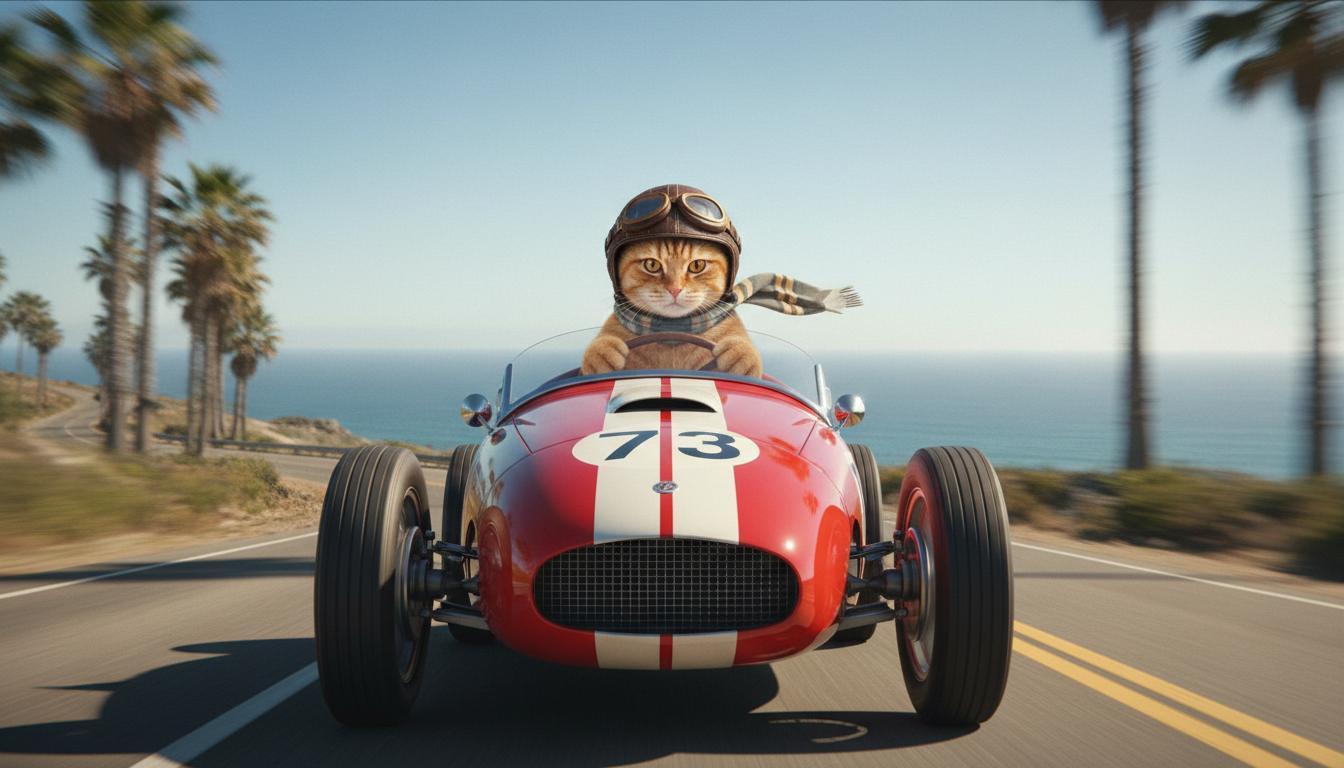
|
| Última imagen (generada por Nano Banana) Muestra lo que sucede cuando el auto despega de un acantilado. |
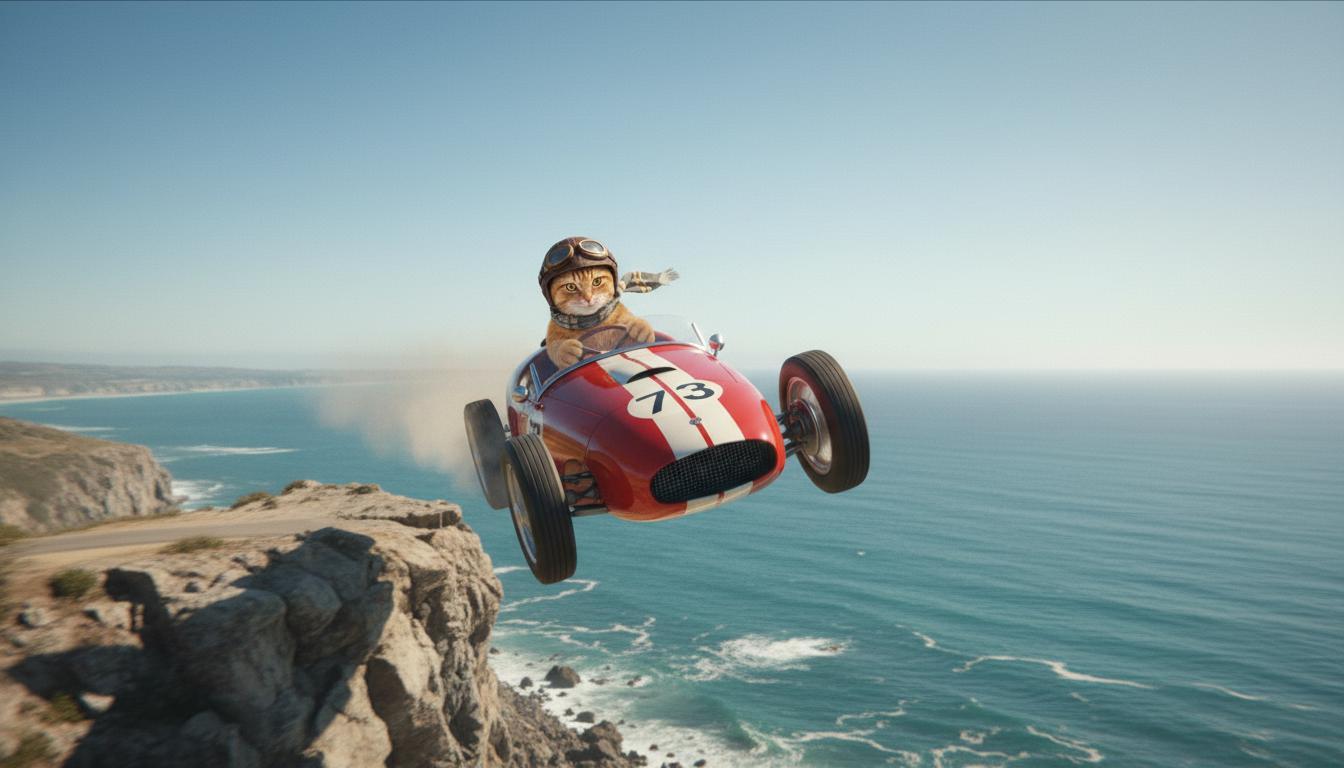
|
| Video de salida (generado por Veo 3.1) Opcional |
|
Esta función te brinda un control preciso sobre la composición de tu toma, ya que te permite definir el fotograma inicial y el final. Sube una imagen o usa un fotograma de una generación de video anterior para asegurarte de que la escena comience y termine exactamente como la imaginas.
Instrucciones para la extensión
Para extender tu video generado por Veo con Veo 3.1 (no disponible para Veo 3.1 Lite), usa el video como entrada junto con una instrucción de texto opcional. Extender finaliza el último segundo o los últimos 24 fotogramas de tu video y continúa la acción.
Ten en cuenta que la voz no se puede extender de forma eficaz si no está presente en el último segundo del video.
| Instrucción | Resultados generados |
|---|---|
| Video de entrada (generado por Veo 3.1) El parapente despega de la cima de la montaña y comienza a descender por las montañas con vista a los valles cubiertos de flores que se encuentran debajo. |
|
| Video de salida (generado por Veo 3.1) Extiende este video con el parapente descendiendo lentamente. |
|
Ejemplos de instrucciones y resultados
En esta sección, se presentan varias instrucciones y se destaca cómo los detalles descriptivos pueden mejorar el resultado de cada video.
Hielos
En este video, se muestra cómo puedes usar los elementos de los conceptos básicos de la escritura de instrucciones en tu instrucción.
| Instrucción | Resultados generados |
|---|---|
| Toma de primer plano (composición) de carámbanos que se derriten (sujeto) en una pared de roca congelada (contexto) con tonos azules fríos (ambiente), con zoom (movimiento de la cámara) que mantiene los detalles de las gotas de agua (acción). |
|
Hombre hablando por teléfono
En estos videos, se muestra cómo puedes revisar tu instrucción con detalles cada vez más específicos para que Veo ajuste el resultado a tu gusto.
| Instrucción | Resultados generados |
|---|---|
| Menos detalles La cámara se desplaza para mostrar un primer plano de un hombre desesperado con un abrigo verde. Está haciendo una llamada en un teléfono de disco de pared con una luz verde neón. Parece una escena de película. |
|
| Más detalles Una toma cinematográfica en primer plano sigue a un hombre desesperado con un abrigo verde desgastado mientras marca un teléfono de disco montado en una pared de ladrillos sucia, bañado por el resplandor misterioso de un letrero de neón verde. La cámara se acerca y revela la tensión en su mandíbula y la desesperación grabada en su rostro mientras lucha por hacer la llamada. La poca profundidad de campo se enfoca en su ceño fruncido y en el teléfono negro de disco, lo que difumina el fondo en un mar de colores neón y sombras indistintas, lo que crea una sensación de urgencia y aislamiento. |
|
Leopardo de las nieves
| Instrucción | Resultados generados |
|---|---|
| Instrucción simple: Una criatura adorable con pelaje de leopardo de las nieves camina por un bosque invernal, renderizado con estilo de dibujo animado 3D. |
|
| Instrucción detallada: Crea una escena animada breve en 3D con un estilo de dibujo animado alegre. Una criatura adorable con pelaje similar al de un leopardo de las nieves, ojos grandes y expresivos, y una forma amigable y redondeada, brinca alegremente por un bosque invernal fantástico. La escena debe incluir árboles redondeados cubiertos de nieve, copos de nieve que caen suavemente y luz solar cálida que se filtra a través de las ramas. Los movimientos saltarines y la amplia sonrisa de la criatura deben transmitir pura alegría. Busca un tono alegre y conmovedor con colores brillantes y alegres, y una animación divertida. |

|
Ejemplos por elementos de escritura
En estos ejemplos, se muestra cómo definir mejor tus instrucciones según cada elemento básico.
Asunto y contexto
Especifica el enfoque principal (sujeto) y el fondo o entorno (contexto).
| Instrucción | Resultados generados |
|---|---|
| Un renderizado arquitectónico de un edificio de departamentos de concreto blanco con formas orgánicas fluidas, que se integra a la perfección con una vegetación exuberante y elementos futuristas |
|
| Un satélite flotando en el espacio exterior con la luna y algunas estrellas de fondo. |
|
Acción
Especifica lo que hace el sujeto (p.ej., caminar, correr o girar la cabeza).
| Instrucción | Resultados generados |
|---|---|
| Un plano general de una mujer caminando por la playa, mirando contenta y relajada hacia el horizonte al atardecer. |
|
Estilo
Agrega palabras clave para dirigir la generación hacia una estética específica (p.ej., surrealista, vintage, futurista, cine negro).
| Instrucción | Resultados generados |
|---|---|
| Estilo de cine negro, un hombre y una mujer caminan por la calle, misterio, cinematográfico, blanco y negro. |
|
Movimiento y composición de la cámara
Especifica cómo se mueve la cámara (toma en primera persona, vista aérea, vista de seguimiento con dron) y cómo se encuadra la toma (plano general, primer plano, plano contrapicado).
| Instrucción | Resultados generados |
|---|---|
| Una toma en primera persona desde un auto antiguo que avanza bajo la lluvia, Canadá de noche, cinematográfica. |
|
| Primer plano extremo de un ojo con el reflejo de una ciudad. |
|
Ambiente
Las paletas de colores y la iluminación influyen en el estado de ánimo. Prueba con términos como "tonos cálidos de naranja apagado", "luz natural", "amanecer" o "tonos azules fríos".
| Instrucción | Resultados generados |
|---|---|
| Un primer plano de una niña que sostiene un adorable cachorro de golden retriever en el parque, con luz solar. |

|
| Plano medio corto cinematográfico de una mujer triste que viaja en un autobús bajo la lluvia, tonos azules fríos, ambiente triste. |

|
Relaciones de aspecto
Veo te permite especificar la relación de aspecto de tu video.
| Instrucción | Resultados generados |
|---|---|
| Panorámico (16:9) Crea un video con una vista de dron que sigue a un hombre que conduce un auto convertible rojo en Palm Springs, década de 1970, luz solar cálida, sombras largas. |

|
| Vertical (9:16) Crea un video que destaque el movimiento fluido de una majestuosa cascada hawaiana en una exuberante selva tropical. Enfócate en el flujo realista del agua, el follaje detallado y la iluminación natural para transmitir tranquilidad. Captura el agua que fluye, la atmósfera brumosa y la luz del sol moteada que se filtra a través del denso dosel. Usa movimientos de cámara fluidos y cinematográficos para mostrar la cascada y sus alrededores. Busca un tono pacífico y realista, que transporte al espectador a la belleza serena de la selva tropical de Hawái. |

|
Versiones del modelo
Consulta la página de Precios y los Límites de frecuencia para obtener más detalles sobre el uso específico del modelo Veo.
Versión preliminar de Veo 3.1
| Propiedad | Descripción |
|---|---|
| Código del modelo |
API de Gemini
|
| Tipos de datos admitidos |
Entrada Texto, imagen Resultado Video con audio |
| Límites de |
Entrada de texto 1,024 tokens Video de salida 1 |
| Última actualización | Enero de 2026 |
Versión preliminar de Veo 3.1 Fast
| Propiedad | Descripción |
|---|---|
| Código del modelo |
API de Gemini
|
| Tipos de datos admitidos |
Entrada Texto, imagen Resultado Video con audio |
| Límites de |
Entrada de texto 1,024 tokens Video de salida 1 |
| Última actualización | Enero de 2026 |
Versión preliminar de Veo 3.1 Lite
| Propiedad | Descripción |
|---|---|
| Código del modelo |
API de Gemini
|
| Tipos de datos admitidos |
Entrada Texto, imagen Resultado Video con audio |
| Límites de |
Entrada de texto 1,024 tokens Video de salida 1 |
| Última actualización | Marzo de 2026 |
Veo 3 (obsoleto)
| Propiedad | Descripción |
|---|---|
| Código del modelo |
API de Gemini
|
| Tipos de datos admitidos |
Entrada Texto, imagen Resultado Video con audio |
| Límites de |
Entrada de texto 1,024 tokens Video de salida 1 |
| Última actualización | Julio de 2025 |
Veo 3 Fast (obsoleto)
| Propiedad | Descripción |
|---|---|
| Código del modelo |
API de Gemini
|
| Tipos de datos admitidos |
Entrada Texto, imagen Resultado Video con audio |
| Límites de |
Entrada de texto 1,024 tokens Video de salida 1 |
| Última actualización | Julio de 2025 |
Las versiones de Veo Fast permiten que los desarrolladores creen videos con sonido, mantengan la alta calidad y optimicen la velocidad y los casos de uso empresarial. Son ideales para servicios de backend que generan anuncios de manera programática, herramientas para pruebas A/B rápidas de conceptos creativos o apps que necesitan producir contenido para redes sociales con rapidez.
¿Qué sigue?
- Para comenzar a usar la API de Veo 3.1, experimenta en el Colab de inicio rápido de Veo y el applet de Veo 3.1.
- Obtén información para escribir instrucciones aún mejores con nuestra Introducción al diseño de instrucciones.