

Untuk mempelajari pemahaman video, lihat panduan Pemahaman video.
Veo 3.1 adalah model untuk membuat video berdurasi 8 detik (720p, 1080p, atau 4k) dengan audio yang dibuat secara native. Anda dapat mengakses model ini secara terprogram menggunakan Gemini API. Untuk mempelajari lebih lanjut varian model Veo yang tersedia, lihat bagian Versi Model.
Veo 3.1 unggul dalam berbagai gaya visual dan sinematik serta memperkenalkan beberapa kemampuan baru:
- Video potret: Pilih antara video lanskap (
16:9) dan potret (9:16). - Ekstensi video: Memperpanjang video yang sebelumnya dibuat menggunakan Veo.
- Pembuatan khusus frame: Buat video dengan menentukan frame pertama dan terakhir.
- Arahan berbasis gambar: Gunakan hingga tiga gambar referensi untuk memandu konten video yang Anda buat.
Untuk mengetahui informasi selengkapnya tentang cara menulis perintah teks yang efektif untuk pembuatan video, lihat panduan perintah Veo
Pembuatan video dari teks
Contoh berikut menunjukkan cara membuat video dengan dialog, realisme sinematik, atau animasi kreatif:
Dialog & efek suara
Python
import time
from google import genai
from google.genai import types

client = genai.Client()

prompt = """A close up of two people staring at a cryptic drawing on a wall, torchlight flickering.
A man murmurs, 'This must be it. That's the secret code.' The woman looks at him and whispering excitedly, 'What did you find?'"""

operation = client.models.generate_videos(
    model="veo-3.1-generate-preview",
    prompt=prompt,
)

# Poll the operation status until the video is ready.
while not operation.done:
    print("Waiting for video generation to complete...")
    time.sleep(10)
    operation = client.operations.get(operation)

# Download the generated video.
generated_video = operation.response.generated_videos[0]
client.files.download(file=generated_video.video, destination="dialogue_example.mp4")
print("Generated video saved to dialogue_example.mp4")
JavaScript
import { GoogleGenAI } from "@google/genai";

const ai = new GoogleGenAI({});

const prompt = `A close up of two people staring at a cryptic drawing on a wall, torchlight flickering.
A man murmurs, 'This must be it. That's the secret code.' The woman looks at him and whispering excitedly, 'What did you find?'`;

let operation = await ai.models.generateVideos({
    model: "veo-3.1-generate-preview",
    prompt: prompt,
});

// Poll the operation status until the video is ready.
while (!operation.done) {
    console.log("Waiting for video generation to complete...")
    await new Promise((resolve) => setTimeout(resolve, 10000));
    operation = await ai.operations.getVideosOperation({
        operation: operation,
    });
}

// Download the generated video.
ai.files.download({
    file: operation.response.generatedVideos[0].video,
    downloadPath: "dialogue_example.mp4",
});
console.log(`Generated video saved to dialogue_example.mp4`);
Go
package main

import (
    "context"
    "log"
    "os"
    "time"

    "google.golang.org/genai"
)

func main() {
    ctx := context.Background()
    client, err := genai.NewClient(ctx, nil)
    if err != nil {
        log.Fatal(err)
    }

    prompt := `A close up of two people staring at a cryptic drawing on a wall, torchlight flickering.
    A man murmurs, 'This must be it. That's the secret code.' The woman looks at him and whispering excitedly, 'What did you find?'`

    operation, _ := client.Models.GenerateVideos(
        ctx,
        "veo-3.1-generate-preview",
        prompt,
        nil,
        nil,
    )

    // Poll the operation status until the video is ready.
    for !operation.Done {
    log.Println("Waiting for video generation to complete...")
        time.Sleep(10 * time.Second)
        operation, _ = client.Operations.GetVideosOperation(ctx, operation, nil)
    }

    // Download the generated video.
    video := operation.Response.GeneratedVideos[0]
    client.Files.Download(ctx, video.Video, nil)
    fname := "dialogue_example.mp4"
    _ = os.WriteFile(fname, video.Video.VideoBytes, 0644)
    log.Printf("Generated video saved to %s\n", fname)
}
Java
import com.google.genai.Client;
import com.google.genai.types.GenerateVideosOperation;
import com.google.genai.types.GeneratedVideo;

Client client = new Client();

String prompt =
    "A close up of two people staring at a cryptic drawing on a wall, torchlight flickering.\n"
        + "A man murmurs, 'This must be it. That's the secret code.' The woman looks at him and whispering excitedly, 'What did you find?'";

GenerateVideosOperation operation =
    client.models.generateVideos("veo-3.1-generate-preview", prompt, null, null);

// Poll the operation status until the video is ready.
while (!operation.done().orElse(false)) {
  System.out.println("Waiting for video generation to complete...");
  Thread.sleep(10000);
  operation = client.operations.getVideosOperation(operation, null);
}

// Download the generated video.
GeneratedVideo generatedVideo = operation.response().get().generatedVideos().get().get(0);
client.files.download(generatedVideo, "dialogue_example.mp4", null);
System.out.println("Generated video saved to dialogue_example.mp4");
REST
# Note: This script uses jq to parse the JSON response.
# GEMINI API Base URL
BASE_URL="https://generativelanguage.googleapis.com/v1beta"

# Send request to generate video and capture the operation name into a variable.
operation_name=$(curl -s "${BASE_URL}/models/veo-3.1-generate-preview:predictLongRunning" \
  -H "x-goog-api-key: $GEMINI_API_KEY" \
  -H "Content-Type: application/json" \
  -X "POST" \
  -d '{
    "instances": [{
        "prompt": "A close up of two people staring at a cryptic drawing on a wall, torchlight flickering. A man murmurs, \"This must be it. That'\''s the secret code.\" The woman looks at him and whispering excitedly, \"What did you find?\""
      }
    ]
  }' | jq -r .name)

# Poll the operation status until the video is ready
while true; do
  # Get the full JSON status and store it in a variable.
  status_response=$(curl -s -H "x-goog-api-key: $GEMINI_API_KEY" "${BASE_URL}/${operation_name}")

  # Check the "done" field from the JSON stored in the variable.
  is_done=$(echo "${status_response}" | jq .done)

  if [ "${is_done}" = "true" ]; then
    # Extract the download URI from the final response.
    video_uri=$(echo "${status_response}" | jq -r '.response.generateVideoResponse.generatedSamples[0].video.uri')
    echo "Downloading video from: ${video_uri}"

    # Download the video using the URI and API key and follow redirects.
    curl -L -o dialogue_example.mp4 -H "x-goog-api-key: $GEMINI_API_KEY" "${video_uri}"
    break
  fi
  # Wait for 5 seconds before checking again.
  sleep 10
done
Realisme sinematik
Python
import time
from google import genai
from google.genai import types

client = genai.Client()

prompt = """Drone shot following a classic red convertible driven by a man along a winding coastal road at sunset, waves crashing against the rocks below.
The convertible accelerates fast and the engine roars loudly."""

operation = client.models.generate_videos(
    model="veo-3.1-generate-preview",
    prompt=prompt,
)

# Poll the operation status until the video is ready.
while not operation.done:
    print("Waiting for video generation to complete...")
    time.sleep(10)
    operation = client.operations.get(operation)

# Download the generated video.
generated_video = operation.response.generated_videos[0]
client.files.download(file=generated_video.video, destination="realism_example.mp4")
print("Generated video saved to realism_example.mp4")
JavaScript
import { GoogleGenAI } from "@google/genai";

const ai = new GoogleGenAI({});

const prompt = `Drone shot following a classic red convertible driven by a man along a winding coastal road at sunset, waves crashing against the rocks below.
The convertible accelerates fast and the engine roars loudly.`;

let operation = await ai.models.generateVideos({
    model: "veo-3.1-generate-preview",
    prompt: prompt,
});

// Poll the operation status until the video is ready.
while (!operation.done) {
    console.log("Waiting for video generation to complete...")
    await new Promise((resolve) => setTimeout(resolve, 10000));
    operation = await ai.operations.getVideosOperation({
        operation: operation,
    });
}

// Download the generated video.
ai.files.download({
    file: operation.response.generatedVideos[0].video,
    downloadPath: "realism_example.mp4",
});
console.log(`Generated video saved to realism_example.mp4`);
Go
package main

import (
    "context"
    "log"
    "os"
    "time"

    "google.golang.org/genai"
)

func main() {
    ctx := context.Background()
    client, err := genai.NewClient(ctx, nil)
    if err != nil {
        log.Fatal(err)
    }

    prompt := `Drone shot following a classic red convertible driven by a man along a winding coastal road at sunset, waves crashing against the rocks below.
  The convertible accelerates fast and the engine roars loudly.`

    operation, _ := client.Models.GenerateVideos(
        ctx,
        "veo-3.1-generate-preview",
        prompt,
        nil,
        nil,
    )

    // Poll the operation status until the video is ready.
    for !operation.Done {
    log.Println("Waiting for video generation to complete...")
        time.Sleep(10 * time.Second)
        operation, _ = client.Operations.GetVideosOperation(ctx, operation, nil)
    }

    // Download the generated video.
    video := operation.Response.GeneratedVideos[0]
    client.Files.Download(ctx, video.Video, nil)
    fname := "realism_example.mp4"
    _ = os.WriteFile(fname, video.Video.VideoBytes, 0644)
    log.Printf("Generated video saved to %s\n", fname)
}
Java
import com.google.genai.Client;
import com.google.genai.types.GenerateVideosOperation;
import com.google.genai.types.GeneratedVideo;

Client client = new Client();

String prompt =
    "Drone shot following a classic red convertible driven by a man along a winding coastal road at sunset, waves crashing against the rocks below.\n"
        + "The convertible accelerates fast and the engine roars loudly.";

GenerateVideosOperation operation =
    client.models.generateVideos("veo-3.1-generate-preview", prompt, null, null);

// Poll the operation status until the video is ready.
while (!operation.done().orElse(false)) {
  System.out.println("Waiting for video generation to complete...");
  Thread.sleep(10000);
  operation = client.operations.getVideosOperation(operation, null);
}

// Download the generated video.
GeneratedVideo generatedVideo = operation.response().get().generatedVideos().get().get(0);
client.files.download(generatedVideo, "realism_example.mp4", null);
System.out.println("Generated video saved to realism_example.mp4");
REST
# Note: This script uses jq to parse the JSON response.
# GEMINI API Base URL
BASE_URL="https://generativelanguage.googleapis.com/v1beta"

# Send request to generate video and capture the operation name into a variable.
operation_name=$(curl -s "${BASE_URL}/models/veo-3.1-generate-preview:predictLongRunning" \
  -H "x-goog-api-key: $GEMINI_API_KEY" \
  -H "Content-Type: application/json" \
  -X "POST" \
  -d '{
    "instances": [{
        "prompt": "Drone shot following a classic red convertible driven by a man along a winding coastal road at sunset, waves crashing against the rocks below. The convertible accelerates fast and the engine roars loudly."
      }
    ]
  }' | jq -r .name)

# Poll the operation status until the video is ready
while true; do
  # Get the full JSON status and store it in a variable.
  status_response=$(curl -s -H "x-goog-api-key: $GEMINI_API_KEY" "${BASE_URL}/${operation_name}")

  # Check the "done" field from the JSON stored in the variable.
  is_done=$(echo "${status_response}" | jq .done)

  if [ "${is_done}" = "true" ]; then
    # Extract the download URI from the final response.
    video_uri=$(echo "${status_response}" | jq -r '.response.generateVideoResponse.generatedSamples[0].video.uri')
    echo "Downloading video from: ${video_uri}"

    # Download the video using the URI and API key and follow redirects.
    curl -L -o realism_example.mp4 -H "x-goog-api-key: $GEMINI_API_KEY" "${video_uri}"
    break
  fi
  # Wait for 5 seconds before checking again.
  sleep 10
done
Animasi kreatif
Python
import time
from google import genai

client = genai.Client()
prompt = "A whimsical stop-motion animation of a tiny robot tending to a garden of glowing mushrooms on a miniature planet."

operation = client.models.generate_videos(
    model="veo-3.1-generate-preview",
    prompt=prompt,
)

# Poll the operation status until the video is ready.
while not operation.done:
    print("Waiting for video generation to complete...")
    time.sleep(10)
    operation = client.operations.get(operation)

# Download the generated video.
generated_video = operation.response.generated_videos[0]
client.files.download(file=generated_video.video, destination="style_example.mp4")
print("Generated video saved to style_example.mp4")
JavaScript
import { GoogleGenAI } from "@google/genai";

const ai = new GoogleGenAI({});

const prompt = "A whimsical stop-motion animation of a tiny robot tending to a garden of glowing mushrooms on a miniature planet.";

let operation = await ai.models.generateVideos({
    model: "veo-3.1-generate-preview",
    prompt: prompt,
});

// Poll the operation status until the video is ready.
while (!operation.done) {
    console.log("Waiting for video generation to complete...")
    await new Promise((resolve) => setTimeout(resolve, 10000));
    operation = await ai.operations.getVideosOperation({
        operation: operation,
    });
}

// Download the generated video.
ai.files.download({
    file: operation.response.generatedVideos[0].video,
    downloadPath: "style_example.mp4",
});
console.log(`Generated video saved to style_example.mp4`);
Go
package main

import (
    "context"
    "log"
    "os"
    "time"

    "google.golang.org/genai"
)

func main() {
    ctx := context.Background()
    client, err := genai.NewClient(ctx, nil)
    if err != nil {
        log.Fatal(err)
    }

    prompt := `A whimsical stop-motion animation of a tiny robot tending to a garden of glowing mushrooms on a miniature planet.`

    operation, _ := client.Models.GenerateVideos(
        ctx,
        "veo-3.1-generate-preview",
        prompt,
        nil,
        nil,
    )

    // Poll the operation status until the video is ready.
    for !operation.Done {
    log.Println("Waiting for video generation to complete...")
        time.Sleep(10 * time.Second)
        operation, _ = client.Operations.GetVideosOperation(ctx, operation, nil)
    }

    // Download the generated video.
    video := operation.Response.GeneratedVideos[0]
    client.Files.Download(ctx, video.Video, nil)
    fname := "style_example.mp4"
    _ = os.WriteFile(fname, video.Video.VideoBytes, 0644)
    log.Printf("Generated video saved to %s\n", fname)
}
Java
import com.google.genai.Client;
import com.google.genai.types.GenerateVideosOperation;
import com.google.genai.types.GeneratedVideo;

Client client = new Client();

String prompt =
    "A whimsical stop-motion animation of a tiny robot tending to a garden of glowing mushrooms on a miniature planet.";

GenerateVideosOperation operation =
    client.models.generateVideos("veo-3.1-generate-preview", prompt, null, null);

// Poll the operation status until the video is ready.
while (!operation.done().orElse(false)) {
  System.out.println("Waiting for video generation to complete...");
  Thread.sleep(10000);
  operation = client.operations.getVideosOperation(operation, null);
}

// Download the generated video.
GeneratedVideo generatedVideo = operation.response().get().generatedVideos().get().get(0);
client.files.download(generatedVideo, "style_example.mp4", null);
System.out.println("Generated video saved to style_example.mp4");
REST
# Note: This script uses jq to parse the JSON response.
# GEMINI API Base URL
BASE_URL="https://generativelanguage.googleapis.com/v1beta"

# Send request to generate video and capture the operation name into a variable.
operation_name=$(curl -s "${BASE_URL}/models/veo-3.1-generate-preview:predictLongRunning" \
  -H "x-goog-api-key: $GEMINI_API_KEY" \
  -H "Content-Type: application/json" \
  -X "POST" \
  -d '{
    "instances": [{
        "prompt": "A whimsical stop-motion animation of a tiny robot tending to a garden of glowing mushrooms on a miniature planet."
      }
    ]
  }' | jq -r .name)

# Poll the operation status until the video is ready
while true; do
  # Get the full JSON status and store it in a variable.
  status_response=$(curl -s -H "x-goog-api-key: $GEMINI_API_KEY" "${BASE_URL}/${operation_name}")

  # Check the "done" field from the JSON stored in the variable.
  is_done=$(echo "${status_response}" | jq .done)

  if [ "${is_done}" = "true" ]; then
    # Extract the download URI from the final response.
    video_uri=$(echo "${status_response}" | jq -r '.response.generateVideoResponse.generatedSamples[0].video.uri')
    echo "Downloading video from: ${video_uri}"

    # Download the video using the URI and API key and follow redirects.
    curl -L -o style_example.mp4 -H "x-goog-api-key: $GEMINI_API_KEY" "${video_uri}"
    break
  fi
  # Wait for 5 seconds before checking again.
  sleep 10
done
Mengontrol rasio aspek
Veo 3.1 memungkinkan Anda membuat video lanskap (16:9, setelan default) atau potret
(9:16). Anda dapat memberi tahu model mana yang Anda inginkan menggunakan parameter aspect_ratio:
Python
import time
from google import genai
from google.genai import types

client = genai.Client()

prompt = """A montage of pizza making: a chef tossing and flattening the floury dough, ladling rich red tomato sauce in a spiral, sprinkling mozzarella cheese and pepperoni, and a final shot of the bubbling golden-brown pizza, upbeat electronic music with a rhythmical beat is playing, high energy professional video."""

operation = client.models.generate_videos(
    model="veo-3.1-generate-preview",
    prompt=prompt,
    config=types.GenerateVideosConfig(
      aspect_ratio="9:16",
    ),
)

# Poll the operation status until the video is ready.
while not operation.done:
    print("Waiting for video generation to complete...")
    time.sleep(10)
    operation = client.operations.get(operation)

# Download the generated video.
generated_video = operation.response.generated_videos[0]
client.files.download(file=generated_video.video, destination="pizza_making.mp4")
print("Generated video saved to pizza_making.mp4")
JavaScript
import { GoogleGenAI } from "@google/genai";

const ai = new GoogleGenAI({});

const prompt = `A montage of pizza making: a chef tossing and flattening the floury dough, ladling rich red tomato sauce in a spiral, sprinkling mozzarella cheese and pepperoni, and a final shot of the bubbling golden-brown pizza, upbeat electronic music with a rhythmical beat is playing, high energy professional video.`;

let operation = await ai.models.generateVideos({
    model: "veo-3.1-generate-preview",
    prompt: prompt,
    config: {
      aspectRatio: "9:16",
    },
});

// Poll the operation status until the video is ready.
while (!operation.done) {
    console.log("Waiting for video generation to complete...")
    await new Promise((resolve) => setTimeout(resolve, 10000));
    operation = await ai.operations.getVideosOperation({
        operation: operation,
    });
}

// Download the generated video.
ai.files.download({
    file: operation.response.generatedVideos[0].video,
    downloadPath: "pizza_making.mp4",
});
console.log(`Generated video saved to pizza_making.mp4`);
Go
package main

import (
    "context"
    "log"
    "os"
    "time"

    "google.golang.org/genai"
)

func main() {
    ctx := context.Background()
    client, err := genai.NewClient(ctx, nil)
    if err != nil {
        log.Fatal(err)
    }

    prompt := `A montage of pizza making: a chef tossing and flattening the floury dough, ladling rich red tomato sauce in a spiral, sprinkling mozzarella cheese and pepperoni, and a final shot of the bubbling golden-brown pizza, upbeat electronic music with a rhythmical beat is playing, high energy professional video.`

  videoConfig := &genai.GenerateVideosConfig{
      AspectRatio: "9:16",
  }

    operation, _ := client.Models.GenerateVideos(
        ctx,
        "veo-3.1-generate-preview",
        prompt,
        nil,
        videoConfig,
    )

    // Poll the operation status until the video is ready.
    for !operation.Done {
    log.Println("Waiting for video generation to complete...")
        time.Sleep(10 * time.Second)
        operation, _ = client.Operations.GetVideosOperation(ctx, operation, nil)
    }

    // Download the generated video.
    video := operation.Response.GeneratedVideos[0]
    client.Files.Download(ctx, video.Video, nil)
    fname := "pizza_making.mp4"
    _ = os.WriteFile(fname, video.Video.VideoBytes, 0644)
    log.Printf("Generated video saved to %s\n", fname)
}
REST
# Note: This script uses jq to parse the JSON response.
# GEMINI API Base URL
BASE_URL="https://generativelanguage.googleapis.com/v1beta"

# Send request to generate video and capture the operation name into a variable.
operation_name=$(curl -s "${BASE_URL}/models/veo-3.1-generate-preview:predictLongRunning" \
  -H "x-goog-api-key: $GEMINI_API_KEY" \
  -H "Content-Type: application/json" \
  -X "POST" \
  -d '{
    "instances": [{
        "prompt": "A montage of pizza making: a chef tossing and flattening the floury dough, ladling rich red tomato sauce in a spiral, sprinkling mozzarella cheese and pepperoni, and a final shot of the bubbling golden-brown pizza, upbeat electronic music with a rhythmical beat is playing, high energy professional video."
      }
    ],
    "parameters": {
      "aspectRatio": "9:16"
    }
  }' | jq -r .name)

# Poll the operation status until the video is ready
while true; do
  # Get the full JSON status and store it in a variable.
  status_response=$(curl -s -H "x-goog-api-key: $GEMINI_API_KEY" "${BASE_URL}/${operation_name}")

  # Check the "done" field from the JSON stored in the variable.
  is_done=$(echo "${status_response}" | jq .done)

  if [ "${is_done}" = "true" ]; then
    # Extract the download URI from the final response.
    video_uri=$(echo "${status_response}" | jq -r '.response.generateVideoResponse.generatedSamples[0].video.uri')
    echo "Downloading video from: ${video_uri}"

    # Download the video using the URI and API key and follow redirects.
    curl -L -o pizza_making.mp4 -H "x-goog-api-key: $GEMINI_API_KEY" "${video_uri}"
    break
  fi
  # Wait for 5 seconds before checking again.
  sleep 10
done
Mengontrol resolusi
Veo 3.1 juga dapat langsung membuat video 720p, 1080p, atau 4k (4k tidak tersedia untuk Veo 3.1 Lite).
Perhatikan bahwa makin tinggi resolusinya, makin tinggi latensinya. Video 4k juga lebih mahal (lihat harga).
Ekstensi video juga terbatas pada video 720p.
Python
import time
from google import genai
from google.genai import types

client = genai.Client()

prompt = """A stunning drone view of the Grand Canyon during a flamboyant sunset that highlights the canyon's colors. The drone slowly flies towards the sun then accelerates, dives and flies inside the canyon."""

operation = client.models.generate_videos(
    model="veo-3.1-generate-preview",
    prompt=prompt,
    config=types.GenerateVideosConfig(
      resolution="4k",
    ),
)

# Poll the operation status until the video is ready.
while not operation.done:
    print("Waiting for video generation to complete...")
    time.sleep(10)
    operation = client.operations.get(operation)

# Download the generated video.
generated_video = operation.response.generated_videos[0]
client.files.download(file=generated_video.video, destination="4k_grand_canyon.mp4")
print("Generated video saved to 4k_grand_canyon.mp4")
JavaScript
import { GoogleGenAI } from "@google/genai";

const ai = new GoogleGenAI({});

const prompt = `A stunning drone view of the Grand Canyon during a flamboyant sunset that highlights the canyon's colors. The drone slowly flies towards the sun then accelerates, dives and flies inside the canyon.`;

let operation = await ai.models.generateVideos({
    model: "veo-3.1-generate-preview",
    prompt: prompt,
    config: {
      resolution: "4k",
    },
});

// Poll the operation status until the video is ready.
while (!operation.done) {
    console.log("Waiting for video generation to complete...")
    await new Promise((resolve) => setTimeout(resolve, 10000));
    operation = await ai.operations.getVideosOperation({
        operation: operation,
    });
}

// Download the generated video.
ai.files.download({
    file: operation.response.generatedVideos[0].video,
    downloadPath: "4k_grand_canyon.mp4",
});
console.log(`Generated video saved to 4k_grand_canyon.mp4`);
Go
package main

import (
    "context"
    "log"
    "os"
    "time"

    "google.golang.org/genai"
)

func main() {
    ctx := context.Background()
    client, err := genai.NewClient(ctx, nil)
    if err != nil {
        log.Fatal(err)
    }

    prompt := `A stunning drone view of the Grand Canyon during a flamboyant sunset that highlights the canyon's colors. The drone slowly flies towards the sun then accelerates, dives and flies inside the canyon.`

  videoConfig := &genai.GenerateVideosConfig{
      Resolution: "4k",
  }

    operation, _ := client.Models.GenerateVideos(
        ctx,
        "veo-3.1-generate-preview",
        prompt,
        nil,
        videoConfig,
    )

    // Poll the operation status until the video is ready.
    for !operation.Done {
    log.Println("Waiting for video generation to complete...")
        time.Sleep(10 * time.Second)
        operation, _ = client.Operations.GetVideosOperation(ctx, operation, nil)
    }

    // Download the generated video.
    video := operation.Response.GeneratedVideos[0]
    client.Files.Download(ctx, video.Video, nil)
    fname := "4k_grand_canyon.mp4"
    _ = os.WriteFile(fname, video.Video.VideoBytes, 0644)
    log.Printf("Generated video saved to %s\n", fname)
}
REST
# Note: This script uses jq to parse the JSON response.
# GEMINI API Base URL
BASE_URL="https://generativelanguage.googleapis.com/v1beta"

# Send request to generate video and capture the operation name into a variable.
operation_name=$(curl -s "${BASE_URL}/models/veo-3.1-generate-preview:predictLongRunning" \
  -H "x-goog-api-key: $GEMINI_API_KEY" \
  -H "Content-Type: application/json" \
  -X "POST" \
  -d '{
    "instances": [{
        "prompt": "A stunning drone view of the Grand Canyon during a flamboyant sunset that highlights the canyon'\''s colors. The drone slowly flies towards the sun then accelerates, dives and flies inside the canyon."
      }
    ],
    "parameters": {
      "resolution": "4k"
    }
  }' | jq -r .name)

# Poll the operation status until the video is ready
while true; do
  # Get the full JSON status and store it in a variable.
  status_response=$(curl -s -H "x-goog-api-key: $GEMINI_API_KEY" "${BASE_URL}/${operation_name}")

  # Check the "done" field from the JSON stored in the variable.
  is_done=$(echo "${status_response}" | jq .done)

  if [ "${is_done}" = "true" ]; then
    # Extract the download URI from the final response.
    video_uri=$(echo "${status_response}" | jq -r '.response.generateVideoResponse.generatedSamples[0].video.uri')
    echo "Downloading video from: ${video_uri}"

    # Download the video using the URI and API key and follow redirects.
    curl -L -o 4k_grand_canyon.mp4 -H "x-goog-api-key: $GEMINI_API_KEY" "${video_uri}"
    break
  fi
  # Wait for 5 seconds before checking again.
  sleep 10
done
Pembuatan video dari gambar
Kode berikut menunjukkan cara membuat gambar menggunakan Gemini 3.1 Flash Image alias Nano Banana 2, lalu menggunakan gambar tersebut sebagai frame awal untuk membuat video dengan Veo 3.1.
Python
import time
from google import genai

client = genai.Client()

prompt = "Panning wide shot of a calico kitten sleeping in the sunshine"

# Step 1: Generate an image with Nano Banana 2.
image = client.models.generate_content(
    model="gemini-3.1-flash-image-preview",
    contents=prompt,
    config={"response_modalities":['IMAGE']}
)

# Step 2: Generate video with Veo 3.1 using the image.
operation = client.models.generate_videos(
    model="veo-3.1-generate-preview",
    prompt=prompt,
    image=image.parts[0].as_image(),
)

# Poll the operation status until the video is ready.
while not operation.done:
    print("Waiting for video generation to complete...")
    time.sleep(10)
    operation = client.operations.get(operation)

# Download the video.
video = operation.response.generated_videos[0]
client.files.download(file=video.video, destination="veo3_with_image_input.mp4")
print("Generated video saved to veo3_with_image_input.mp4")
JavaScript
import { GoogleGenAI } from "@google/genai";

const ai = new GoogleGenAI({});

const prompt = "Panning wide shot of a calico kitten sleeping in the sunshine";

// Step 1: Generate an image with Nano Banana 2.
const imageResponse = await ai.models.generateContent({
  model: "gemini-3.1-flash-image-preview",
  prompt: prompt,
});

// Step 2: Generate video with Veo 3.1 using the image.
let operation = await ai.models.generateVideos({
  model: "veo-3.1-generate-preview",
  prompt: prompt,
  image: {
    imageBytes: imageResponse.generatedImages[0].image.imageBytes,
    mimeType: "image/png",
  },
});

// Poll the operation status until the video is ready.
while (!operation.done) {
  console.log("Waiting for video generation to complete...")
  await new Promise((resolve) => setTimeout(resolve, 10000));
  operation = await ai.operations.getVideosOperation({
    operation: operation,
  });
}

// Download the video.
ai.files.download({
    file: operation.response.generatedVideos[0].video,
    downloadPath: "veo3_with_image_input.mp4",
});
console.log(`Generated video saved to veo3_with_image_input.mp4`);
Go
package main

import (
    "context"
    "log"
    "os"
    "time"

    "google.golang.org/genai"
)

func main() {
    ctx := context.Background()
    client, err := genai.NewClient(ctx, nil)
    if err != nil {
        log.Fatal(err)
    }

    prompt := "Panning wide shot of a calico kitten sleeping in the sunshine"

    // Step 1: Generate an image with Nano Banana 2.
    imageResponse, err := client.Models.GenerateContent(
        ctx,
        "gemini-3.1-flash-image-preview",
        prompt,
        nil, // GenerateImagesConfig
    )
    if err != nil {
        log.Fatal(err)
    }

    // Step 2: Generate video with Veo 3.1 using the image.
    operation, err := client.Models.GenerateVideos(
        ctx,
        "veo-3.1-generate-preview",
        prompt,
        imageResponse.GeneratedImages[0].Image,
        nil, // GenerateVideosConfig
    )
    if err != nil {
        log.Fatal(err)
    }

    // Poll the operation status until the video is ready.
    for !operation.Done {
        log.Println("Waiting for video generation to complete...")
        time.Sleep(10 * time.Second)
        operation, _ = client.Operations.GetVideosOperation(ctx, operation, nil)
    }

    // Download the video.
    video := operation.Response.GeneratedVideos[0]
    client.Files.Download(ctx, video.Video, nil)
    fname := "veo3_with_image_input.mp4"
    _ = os.WriteFile(fname, video.Video.VideoBytes, 0644)
    log.Printf("Generated video saved to %s\n", fname)
}
Java
import com.google.genai.Client;
import com.google.genai.types.Blob;
import com.google.genai.types.GenerateContentConfig;
import com.google.genai.types.GenerateContentResponse;
import com.google.genai.types.GenerateVideosOperation;
import com.google.genai.types.GeneratedVideo;
import com.google.genai.types.Image;

Client client = new Client();

String prompt = "Panning wide shot of a calico kitten sleeping in the sunshine";

// Step 1: Generate an image with Nano Banana 2.
GenerateContentResponse imageResponse =
    client.models.generateContent(
        "gemini-3.1-flash-image-preview",
        prompt,
        GenerateContentConfig.builder().responseModalities("IMAGE").build());

Blob inlineData = imageResponse.parts().get(0).inlineData().get();
Image image =
    Image.builder()
        .imageBytes(inlineData.data().get())
        .mimeType(inlineData.mimeType().orElse("image/png"))
        .build();

// Step 2: Generate video with Veo 3.1 using the image.
GenerateVideosOperation operation =
    client.models.generateVideos("veo-3.1-generate-preview", prompt, image, null);

// Poll the operation status until the video is ready.
while (!operation.done().orElse(false)) {
  System.out.println("Waiting for video generation to complete...");
  Thread.sleep(10000);
  operation = client.operations.getVideosOperation(operation, null);
}

// Download the video.
GeneratedVideo video = operation.response().get().generatedVideos().get().get(0);
client.files.download(video, "veo3_with_image_input.mp4", null);
System.out.println("Generated video saved to veo3_with_image_input.mp4");
Menggunakan gambar referensi
Veo 3.1 kini menerima hingga 3 gambar referensi untuk memandu konten video yang Anda buat. Berikan gambar orang, karakter, atau produk untuk mempertahankan tampilan subjek dalam video output.
Misalnya, menggunakan tiga gambar yang dibuat dengan Nano Banana ini sebagai referensi dengan perintah yang ditulis dengan baik akan menghasilkan video berikut:
`dress_image` |
`woman_image` |
`glasses_image` |
|---|---|---|

|

|

|
Python
import time
from google import genai

client = genai.Client()

prompt = "The video opens with a medium, eye-level shot of a beautiful woman with dark hair and warm brown eyes. She wears a magnificent, high-fashion flamingo dress with layers of pink and fuchsia feathers, complemented by whimsical pink, heart-shaped sunglasses. She walks with serene confidence through the crystal-clear, shallow turquoise water of a sun-drenched lagoon. The camera slowly pulls back to a medium-wide shot, revealing the breathtaking scene as the dress's long train glides and floats gracefully on the water's surface behind her. The cinematic, dreamlike atmosphere is enhanced by the vibrant colors of the dress against the serene, minimalist landscape, capturing a moment of pure elegance and high-fashion fantasy."

dress_reference = types.VideoGenerationReferenceImage(
  image=dress_image, # Generated separately with Nano Banana
  reference_type="asset"
)

sunglasses_reference = types.VideoGenerationReferenceImage(
  image=glasses_image, # Generated separately with Nano Banana
  reference_type="asset"
)

woman_reference = types.VideoGenerationReferenceImage(
  image=woman_image, # Generated separately with Nano Banana
  reference_type="asset"
)

operation = client.models.generate_videos(
    model="veo-3.1-generate-preview",
    prompt=prompt,
    config=types.GenerateVideosConfig(
      reference_images=[dress_reference, glasses_reference, woman_reference],
    ),
)

# Poll the operation status until the video is ready.
while not operation.done:
    print("Waiting for video generation to complete...")
    time.sleep(10)
    operation = client.operations.get(operation)

# Download the video.
video = operation.response.generated_videos[0]
client.files.download(file=video.video, destination="veo3.1_with_reference_images.mp4")
print("Generated video saved to veo3.1_with_reference_images.mp4")
JavaScript
import { GoogleGenAI } from "@google/genai";

const ai = new GoogleGenAI({});

const prompt = "The video opens with a medium, eye-level shot of a beautiful woman with dark hair and warm brown eyes. She wears a magnificent, high-fashion flamingo dress with layers of pink and fuchsia feathers, complemented by whimsical pink, heart-shaped sunglasses. She walks with serene confidence through the crystal-clear, shallow turquoise water of a sun-drenched lagoon. The camera slowly pulls back to a medium-wide shot, revealing the breathtaking scene as the dress's long train glides and floats gracefully on the water's surface behind her. The cinematic, dreamlike atmosphere is enhanced by the vibrant colors of the dress against the serene, minimalist landscape, capturing a moment of pure elegance and high-fashion fantasy.";

// dressImage, glassesImage, womanImage generated separately with Nano Banana
// and available as objects like { imageBytes: "...", mimeType: "image/png" }
const dressReference = {
  image: dressImage,
  referenceType: "asset",
};
const sunglassesReference = {
  image: glassesImage,
  referenceType: "asset",
};
const womanReference = {
  image: womanImage,
  referenceType: "asset",
};

let operation = await ai.models.generateVideos({
  model: "veo-3.1-generate-preview",
  prompt: prompt,
  config: {
    referenceImages: [
      dressReference,
      sunglassesReference,
      womanReference,
    ],
  },
});

// Poll the operation status until the video is ready.
while (!operation.done) {
  console.log("Waiting for video generation to complete...");
  await new Promise((resolve) => setTimeout(resolve, 10000));
  operation = await ai.operations.getVideosOperation({
    operation: operation,
  });
}

// Download the video.
ai.files.download({
  file: operation.response.generatedVideos[0].video,
  downloadPath: "veo3.1_with_reference_images.mp4",
});
console.log(`Generated video saved to veo3.1_with_reference_images.mp4`);
Go
package main

import (
    "context"
    "log"
    "os"
    "time"

    "google.golang.org/genai"
)

func main() {
    ctx := context.Background()
    client, err := genai.NewClient(ctx, nil)
    if err != nil {
        log.Fatal(err)
    }

  prompt := `The video opens with a medium, eye-level shot of a beautiful woman with dark hair and warm brown eyes. She wears a magnificent, high-fashion flamingo dress with layers of pink and fuchsia feathers, complemented by whimsical pink, heart-shaped sunglasses. She walks with serene confidence through the crystal-clear, shallow turquoise water of a sun-drenched lagoon. The camera slowly pulls back to a medium-wide shot, revealing the breathtaking scene as the dress's long train glides and floats gracefully on the water's surface behind her. The cinematic, dreamlike atmosphere is enhanced by the vibrant colors of the dress against the serene, minimalist landscape, capturing a moment of pure elegance and high-fashion fantasy.`

  // dressImage, glassesImage, womanImage generated separately with Nano Banana
  // and available as *genai.Image objects.
  var dressImage, glassesImage, womanImage *genai.Image

  dressReference := &genai.VideoGenerationReferenceImage{
    Image: dressImage,
    ReferenceType: "asset",
  }
  sunglassesReference := &genai.VideoGenerationReferenceImage{
    Image: glassesImage,
    ReferenceType: "asset",
  }
  womanReference := &genai.VideoGenerationReferenceImage{
    Image: womanImage,
    ReferenceType: "asset",
  }

    operation, _ := client.Models.GenerateVideos(
        ctx,
        "veo-3.1-generate-preview",
        prompt,
    nil, // image
        &genai.GenerateVideosConfig{
      ReferenceImages: []*genai.VideoGenerationReferenceImage{
        dressReference,
        sunglassesReference,
        womanReference,
      },
    },
    )

    // Poll the operation status until the video is ready.
    for !operation.Done {
        log.Println("Waiting for video generation to complete...")
        time.Sleep(10 * time.Second)
        operation, _ = client.Operations.GetVideosOperation(ctx, operation, nil)
    }

    // Download the video.
    video := operation.Response.GeneratedVideos[0]
    client.Files.Download(ctx, video.Video, nil)
    fname := "veo3.1_with_reference_images.mp4"
    _ = os.WriteFile(fname, video.Video.VideoBytes, 0644)
    log.Printf("Generated video saved to %s\n", fname)
}
REST
# Note: This script uses jq to parse the JSON response.
# It assumes dress_image_base64, glasses_image_base64, and woman_image_base64
# contain base64-encoded image data.

# GEMINI API Base URL
BASE_URL="https://generativelanguage.googleapis.com/v1beta"

# Send request to generate video and capture the operation name into a variable.
operation_name=$(curl -s "${BASE_URL}/models/veo-3.1-generate-preview:predictLongRunning" \
  -H "x-goog-api-key: $GEMINI_API_KEY" \
  -H "Content-Type: application/json" \
  -X "POST" \
  -d '{
    "instances": [{
      "prompt": "The video opens with a medium, eye-level shot of a beautiful woman with dark hair and warm brown eyes. She wears a magnificent, high-fashion flamingo dress with layers of pink and fuchsia feathers, complemented by whimsical pink, heart-shaped sunglasses. She walks with serene confidence through the crystal-clear, shallow turquoise water of a sun-drenched lagoon. The camera slowly pulls back to a medium-wide shot, revealing the breathtaking scene as the dress'\''s long train glides and floats gracefully on the water'\''s surface behind her. The cinematic, dreamlike atmosphere is enhanced by the vibrant colors of the dress against the serene, minimalist landscape, capturing a moment of pure elegance and high-fashion fantasy.",
      "referenceImages": [
        {
          "image": {"inlineData": {"mimeType": "image/png", "data": "'"$dress_image_base64"'"}},
          "referenceType": "asset"
        },
        {
          "image": {"inlineData": {"mimeType": "image/png", "data": "'"$glasses_image_base64"'"}},
          "referenceType": "asset"
        },
        {
          "image": {"inlineData": {"mimeType": "image/png", "data": "'"$woman_image_base64"'"}},
          "referenceType": "asset"
        }
      ]
    }],
  }' | jq -r .name)

# Poll the operation status until the video is ready
while true; do
  # Get the full JSON status and store it in a variable.
  status_response=$(curl -s -H "x-goog-api-key: $GEMINI_API_KEY" "${BASE_URL}/${operation_name}")

  # Check the "done" field from the JSON stored in the variable.
  is_done=$(echo "${status_response}" | jq .done)

  if [ "${is_done}" = "true" ]; then
    # Extract the download URI from the final response.
    video_uri=$(echo "${status_response}" | jq -r '.response.generateVideoResponse.generatedSamples[0].video.uri')
    echo "Downloading video from: ${video_uri}"

    # Download the video using the URI and API key and follow redirects.
    curl -L -o veo3.1_with_reference_images.mp4 -H "x-goog-api-key: $GEMINI_API_KEY" "${video_uri}"
    break
  fi
  # Wait for 10 seconds before checking again.
  sleep 10
done
Menggunakan frame pertama dan terakhir
Veo 3.1 memungkinkan Anda membuat video menggunakan interpolasi, atau menentukan frame pertama dan terakhir video. Untuk mengetahui informasi tentang cara menulis perintah teks yang efektif untuk pembuatan video, lihat panduan perintah Veo.
Python
import time
from google import genai

client = genai.Client()

prompt = "A cinematic, haunting video. A ghostly woman with long white hair and a flowing dress swings gently on a rope swing beneath a massive, gnarled tree in a foggy, moonlit clearing. The fog thickens and swirls around her, and she slowly fades away, vanishing completely. The empty swing is left swaying rhythmically on its own in the eerie silence."

operation = client.models.generate_videos(
    model="veo-3.1-generate-preview",
    prompt=prompt,
    image=first_image, # The starting frame is passed as a primary input
    config=types.GenerateVideosConfig(
      last_frame=last_image # The ending frame is passed as a generation constraint in the config
    ),
)

# Poll the operation status until the video is ready.
while not operation.done:
    print("Waiting for video generation to complete...")
    time.sleep(10)
    operation = client.operations.get(operation)

# Download the video.
video = operation.response.generated_videos[0]
client.files.download(file=video.video, destination="veo3.1_with_interpolation.mp4")
print("Generated video saved to veo3.1_with_interpolation.mp4")
JavaScript
import { GoogleGenAI } from "@google/genai";

const ai = new GoogleGenAI({});

const prompt = "A cinematic, haunting video. A ghostly woman with long white hair and a flowing dress swings gently on a rope swing beneath a massive, gnarled tree in a foggy, moonlit clearing. The fog thickens and swirls around her, and she slowly fades away, vanishing completely. The empty swing is left swaying rhythmically on its own in the eerie silence.";

// firstImage and lastImage generated separately with Nano Banana
// and available as objects like { imageBytes: "...", mimeType: "image/png" }
let operation = await ai.models.generateVideos({
    model: "veo-3.1-generate-preview",
    prompt: prompt,
    image: firstImage, // The starting frame is passed as a primary input
    config: {
      lastFrame: lastImage, // The ending frame is passed as a generation constraint in the config
    },
});

// Poll the operation status until the video is ready.
while (!operation.done) {
    console.log("Waiting for video generation to complete...")
    await new Promise((resolve) => setTimeout(resolve, 10000));
    operation = await ai.operations.getVideosOperation({
        operation: operation,
    });
}

// Download the video.
ai.files.download({
    file: operation.response.generatedVideos[0].video,
    downloadPath: "veo3.1_with_interpolation.mp4",
});
console.log(`Generated video saved to veo3.1_with_interpolation.mp4`);
Go
package main

import (
    "context"
    "log"
    "os"
    "time"

    "google.golang.org/genai"
)

func main() {
    ctx := context.Background()
    client, err := genai.NewClient(ctx, nil)
    if err != nil {
        log.Fatal(err)
    }

  prompt := `A cinematic, haunting video. A ghostly woman with long white hair and a flowing dress swings gently on a rope swing beneath a massive, gnarled tree in a foggy, moonlit clearing. The fog thickens and swirls around her, and she slowly fades away, vanishing completely. The empty swing is left swaying rhythmically on its own in the eerie silence.`

  // firstImage and lastImage generated separately with Nano Banana
  // and available as *genai.Image objects.
  var firstImage, lastImage *genai.Image

    operation, _ := client.Models.GenerateVideos(
        ctx,
        "veo-3.1-generate-preview",
        prompt,
    firstImage, // The starting frame is passed as a primary input
        &genai.GenerateVideosConfig{
      LastFrame: lastImage, // The ending frame is passed as a generation constraint in the config
    },
    )

    // Poll the operation status until the video is ready.
    for !operation.Done {
        log.Println("Waiting for video generation to complete...")
        time.Sleep(10 * time.Second)
        operation, _ = client.Operations.GetVideosOperation(ctx, operation, nil)
    }

    // Download the video.
    video := operation.Response.GeneratedVideos[0]
    client.Files.Download(ctx, video.Video, nil)
    fname := "veo3.1_with_interpolation.mp4"
    _ = os.WriteFile(fname, video.Video.VideoBytes, 0644)
    log.Printf("Generated video saved to %s\n", fname)
}
REST
# Note: This script uses jq to parse the JSON response.
# It assumes first_image_base64 and last_image_base64
# contain base64-encoded image data.

# GEMINI API Base URL
BASE_URL="https://generativelanguage.googleapis.com/v1beta"

# Send request to generate video and capture the operation name into a variable.
# The starting frame is passed as a primary input
# The ending frame is passed as a generation constraint in the config
operation_name=$(curl -s "${BASE_URL}/models/veo-3.1-generate-preview:predictLongRunning" \
  -H "x-goog-api-key: $GEMINI_API_KEY" \
  -H "Content-Type: application/json" \
  -X "POST" \
  -d '{
    "instances": [{
      "prompt": "A cinematic, haunting video. A ghostly woman with long white hair and a flowing dress swings gently on a rope swing beneath a massive, gnarled tree in a foggy, moonlit clearing. The fog thickens and swirls around her, and she slowly fades away, vanishing completely. The empty swing is left swaying rhythmically on its own in the eerie silence.",
      "image": {"inlineData": {"mimeType": "image/png", "data": "'"$first_image_base64"'"}},
      "lastFrame": {"inlineData": {"mimeType": "image/png", "data": "'"$last_image_base64"'"}}
    }],
  }' | jq -r .name)

# Poll the operation status until the video is ready
while true; do
  # Get the full JSON status and store it in a variable.
  status_response=$(curl -s -H "x-goog-api-key: $GEMINI_API_KEY" "${BASE_URL}/${operation_name}")

  # Check the "done" field from the JSON stored in the variable.
  is_done=$(echo "${status_response}" | jq .done)

  if [ "${is_done}" = "true" ]; then
    # Extract the download URI from the final response.
    video_uri=$(echo "${status_response}" | jq -r '.response.generateVideoResponse.generatedSamples[0].video.uri')
    echo "Downloading video from: ${video_uri}"

    # Download the video using the URI and API key and follow redirects.
    curl -L -o veo3.1_with_interpolation.mp4 -H "x-goog-api-key: $GEMINI_API_KEY" "${video_uri}"
    break
  fi
  # Wait for 10 seconds before checking again.
  sleep 10
done
`first_image` |
`last_image` |
veo3.1_with_interpolation.mp4 |
|---|---|---|

|

|
|
Memperpanjang video Veo
Gunakan Veo 3.1 untuk memperpanjang video yang sebelumnya Anda buat dengan Veo selama 7 detik dan hingga 20 kali.
Batasan video input:
- Video buatan Veo hanya berdurasi hingga 141 detik.
- Gemini API hanya mendukung ekstensi video untuk video buatan Veo.
- Video harus berasal dari generasi sebelumnya, seperti
operation.response.generated_videos[0].video - Video disimpan selama 2 hari, tetapi jika video direferensikan untuk ekstensi, timer penyimpanan 2 harinya akan direset. Anda hanya dapat memperpanjang video yang dibuat atau direferensikan dalam dua hari terakhir.
- Video input harus memiliki durasi, rasio aspek, dan dimensi tertentu:
- Rasio aspek: 9:16 atau 16:9
- Resolusi: 720p
- Durasi video: 141 detik atau kurang
Output ekstensi ini adalah satu video yang menggabungkan video input pengguna dan video yang diperpanjang yang dihasilkan hingga 148 detik video.
Contoh ini mengambil video yang dihasilkan Veo, yang ditampilkan di sini dengan
perintah aslinya, dan memperluasnya menggunakan parameter video dan perintah
baru:
| Perintah | Output: butterfly_video |
|---|---|
| Kupu-kupu origami mengepakkan sayapnya dan terbang keluar dari pintu kaca ganda menuju taman. |
|
Python
import time
from google import genai

client = genai.Client()

prompt = "Track the butterfly into the garden as it lands on an orange origami flower. A fluffy white puppy runs up and gently pats the flower."

operation = client.models.generate_videos(
    model="veo-3.1-generate-preview",
    video=operation.response.generated_videos[0].video, # This must be a video from a previous generation
    prompt=prompt,
    config=types.GenerateVideosConfig(
        number_of_videos=1,
        resolution="720p"
    ),
)

# Poll the operation status until the video is ready.
while not operation.done:
    print("Waiting for video generation to complete...")
    time.sleep(10)
    operation = client.operations.get(operation)

# Download the video.
video = operation.response.generated_videos[0]
client.files.download(file=video.video, destination="veo3.1_extension.mp4")
print("Generated video saved to veo3.1_extension.mp4")
JavaScript
import { GoogleGenAI } from "@google/genai";

const ai = new GoogleGenAI({});

const prompt = "Track the butterfly into the garden as it lands on an orange origami flower. A fluffy white puppy runs up and gently pats the flower.";

// butterflyVideo must be a video from a previous generation
// available as an object like { videoBytes: "...", mimeType: "video/mp4" }
let operation = await ai.models.generateVideos({
    model: "veo-3.1-generate-preview",
    video: butterflyVideo,
    prompt: prompt,
    config: {
        numberOfVideos: 1,
        resolution: "720p",
    },
});

// Poll the operation status until the video is ready.
while (!operation.done) {
    console.log("Waiting for video generation to complete...")
    await new Promise((resolve) => setTimeout(resolve, 10000));
    operation = await ai.operations.getVideosOperation({
        operation: operation,
    });
}

// Download the video.
ai.files.download({
    file: operation.response.generatedVideos[0].video,
    downloadPath: "veo3.1_extension.mp4",
});
console.log(`Generated video saved to veo3.1_extension.mp4`);
Go
package main

import (
    "context"
    "log"
    "os"
    "time"

    "google.golang.org/genai"
)

func main() {
    ctx := context.Background()
    client, err := genai.NewClient(ctx, nil)
    if err != nil {
        log.Fatal(err)
    }

  prompt := `Track the butterfly into the garden as it lands on an orange origami flower. A fluffy white puppy runs up and gently pats the flower.`

  // butterflyVideo must be a video from a previous generation
  // available as a *genai.Video object.
  var butterflyVideo *genai.Video

    operation, _ := client.Models.GenerateVideos(
        ctx,
        "veo-3.1-generate-preview",
        prompt,
    nil, // image
    butterflyVideo,
        &genai.GenerateVideosConfig{
      NumberOfVideos: 1,
      Resolution: "720p",
    },
    )

    // Poll the operation status until the video is ready.
    for !operation.Done {
        log.Println("Waiting for video generation to complete...")
        time.Sleep(10 * time.Second)
        operation, _ = client.Operations.GetVideosOperation(ctx, operation, nil)
    }

    // Download the video.
    video := operation.Response.GeneratedVideos[0]
    client.Files.Download(ctx, video.Video, nil)
    fname := "veo3.1_extension.mp4"
    _ = os.WriteFile(fname, video.Video.VideoBytes, 0644)
    log.Printf("Generated video saved to %s\n", fname)
}
REST
# Note: This script uses jq to parse the JSON response.
# It assumes butterfly_video_base64 contains base64-encoded
# video data from a previous generation.

# GEMINI API Base URL
BASE_URL="https://generativelanguage.googleapis.com/v1beta"

# Send request to generate video and capture the operation name into a variable.
operation_name=$(curl -s "${BASE_URL}/models/veo-3.1-generate-preview:predictLongRunning" \
  -H "x-goog-api-key: $GEMINI_API_KEY" \
  -H "Content-Type: application/json" \
  -X "POST" \
  -d '{
    "instances": [{
      "prompt": "Track the butterfly into the garden as it lands on an orange origami flower. A fluffy white puppy runs up and gently pats the flower.",
      "video": {"inlineData": {"mimeType": "video/mp4", "data": "'"$butterfly_video_base64"'"}}
    }],
    "parameters": {
      "numberOfVideos": 1,
      "resolution": "720p"
    }
  }' | jq -r .name)

# Poll the operation status until the video is ready
while true; do
  # Get the full JSON status and store it in a variable.
  status_response=$(curl -s -H "x-goog-api-key: $GEMINI_API_KEY" "${BASE_URL}/${operation_name}")

  # Check the "done" field from the JSON stored in the variable.
  is_done=$(echo "${status_response}" | jq .done)

  if [ "${is_done}" = "true" ]; then
    # Extract the download URI from the final response.
    video_uri=$(echo "${status_response}" | jq -r '.response.generateVideoResponse.generatedSamples[0].video.uri')
    echo "Downloading video from: ${video_uri}"

    # Download the video using the URI and API key and follow redirects.
    curl -L -o veo3.1_extension.mp4 -H "x-goog-api-key: $GEMINI_API_KEY" "${video_uri}"
    break
  fi
  # Wait for 10 seconds before checking again.
  sleep 10
done
Untuk mengetahui informasi tentang cara menulis perintah teks yang efektif untuk pembuatan video, lihat panduan perintah Veo.
Menangani operasi asinkron
Pembuatan video adalah tugas yang memerlukan komputasi intensif. Saat Anda mengirim permintaan ke API, API akan memulai tugas yang berjalan lama dan segera menampilkan objek operation. Kemudian, Anda harus melakukan polling hingga video siap, yang ditunjukkan dengan
status done yang bernilai benar.
Inti dari proses ini adalah loop polling, yang secara berkala memeriksa status tugas.
Python
import time
from google import genai
from google.genai import types

client = genai.Client()

# After starting the job, you get an operation object.
operation = client.models.generate_videos(
    model="veo-3.1-generate-preview",
    prompt="A cinematic shot of a majestic lion in the savannah.",
)

# Alternatively, you can use operation.name to get the operation.
operation = types.GenerateVideosOperation(name=operation.name)

# This loop checks the job status every 10 seconds.
while not operation.done:
    time.sleep(10)
    # Refresh the operation object to get the latest status.
    operation = client.operations.get(operation)

# Once done, the result is in operation.response.
# ... process and download your video ...
JavaScript
import { GoogleGenAI } from "@google/genai";

const ai = new GoogleGenAI({});

// After starting the job, you get an operation object.
let operation = await ai.models.generateVideos({
  model: "veo-3.1-generate-preview",
  prompt: "A cinematic shot of a majestic lion in the savannah.",
});

// Alternatively, you can use operation.name to get the operation.
// operation = types.GenerateVideosOperation(name=operation.name)

// This loop checks the job status every 10 seconds.
while (!operation.done) {
    await new Promise((resolve) => setTimeout(resolve, 1000));
    // Refresh the operation object to get the latest status.
    operation = await ai.operations.getVideosOperation({ operation });
}

// Once done, the result is in operation.response.
// ... process and download your video ...
Go
package main

import (
    "context"
    "log"
    "time"

    "google.golang.org/genai"
)

func main() {
    ctx := context.Background()
    client, err := genai.NewClient(ctx, nil)
    if err != nil {
        log.Fatal(err)
    }

    // After starting the job, you get an operation object.
    operation, _ := client.Models.GenerateVideos(
        ctx,
        "veo-3.1-generate-preview",
        "A cinematic shot of a majestic lion in the savannah.",
        nil,
        nil,
    )

    // This loop checks the job status every 10 seconds.
    for !operation.Done {
        time.Sleep(10 * time.Second)
        // Refresh the operation object to get the latest status.
        operation, _ = client.Operations.GetVideosOperation(ctx, operation, nil)
    }

    // Once done, the result is in operation.Response.
    // ... process and download your video ...
}
Java
import com.google.genai.Client;
import com.google.genai.types.GenerateVideosOperation;

Client client = new Client();

// After starting the job, you get an operation object.
GenerateVideosOperation operation =
    client.models.generateVideos(
        "veo-3.1-generate-preview",
        "A cinematic shot of a majestic lion in the savannah.",
        null,
        null);

// Alternatively, you can use operation.name to construct the operation.
operation = GenerateVideosOperation.builder().name(operation.name().get()).build();

// This loop checks the job status every 10 seconds.
while (!operation.done().orElse(false)) {
  Thread.sleep(10000);
  // Refresh the operation object to get the latest status.
  operation = client.operations.getVideosOperation(operation, null);
}

// Once done, the result is in operation.response().
// ... process and download your video ...
REST
# Note: This script uses jq to parse the JSON response.
# GEMINI API Base URL
BASE_URL="https://generativelanguage.googleapis.com/v1beta"

# Send request to generate video and capture the operation name into a variable.
operation_name=$(curl -s "${BASE_URL}/models/veo-3.1-generate-preview:predictLongRunning" \
  -H "x-goog-api-key: $GEMINI_API_KEY" \
  -H "Content-Type: application/json" \
  -X "POST" \
  -d '{
    "instances": [{
        "prompt": "A cinematic shot of a majestic lion in the savannah."
      }
    ]
  }' | jq -r .name)

# This loop checks the job status every 10 seconds.
while true; do
  # Get the full JSON status and store it in a variable.
  status_response=$(curl -s -H "x-goog-api-key: $GEMINI_API_KEY" "${BASE_URL}/${operation_name}")

  # Check the "done" field from the JSON stored in the variable.
  is_done=$(echo "${status_response}" | jq .done)

  if [ "${is_done}" = "true" ]; then
    # Once done, the result is in status_response.
    # ... process and download your video ...
    echo "Video generation complete."
    break
  fi
  # Wait for 10 seconds before checking again.
  echo "Waiting for video generation to complete..."
  sleep 10
done
Parameter dan spesifikasi Veo API
Berikut adalah parameter yang dapat Anda tetapkan dalam permintaan API untuk mengontrol proses pembuatan video.
| Parameter | Veo 3.1 & Veo 3.1 Fast | Veo 3.1 Lite | Veo 3 & Veo 3 Fast |
|---|---|---|---|
| Instance | |||
prompt:Deskripsi teks untuk video. Mendukung isyarat audio. |
string |
string |
string |
image:Gambar awal yang akan dianimasikan. |
Objek Image |
Objek Image |
Objek Image |
lastFrame:Gambar akhir untuk transisi video interpolasi. Harus digunakan bersama dengan parameter image. |
Objek Image |
Objek Image |
Objek Image |
referenceImages:Maksimum tiga gambar yang akan digunakan sebagai referensi gaya dan konten. |
Objek VideoGenerationReferenceImage |
Objek n/a |
t/a |
video:Video yang akan digunakan untuk ekstensi video. |
Objek Video dari generasi sebelumnya |
t/a | t/a |
| Parameter | |||
aspectRatio:Rasio aspek video. |
"16:9" (default),"9:16" |
"16:9" (default),"9:16" |
"16:9" (default),"9:16" |
durationSeconds:Durasi video yang dihasilkan. |
"4", "6", "8".Harus "8" saat menggunakan ekstensi, gambar referensi, atau dengan resolusi 1080p dan 4k |
"4", "6", "8".Harus "8" saat menggunakan gambar referensi atau dengan 1080p |
"4", "6", "8".Harus "8" saat menggunakan ekstensi, gambar referensi, atau dengan resolusi 1080p dan 4k |
personGeneration:Mengontrol pembuatan gambar orang. (Lihat Batasan untuk mengetahui batasan wilayah) |
Teks ke video & Ekstensi:"allow_all" sajaGambar ke video, Interpolasi, & Gambar referensi: "allow_adult" saja
|
Teks ke video: Khusus "allow_all"Gambar ke video, Interpolasi, & Gambar referensi: Khusus "allow_adult"
|
Teks ke video: Hanya "allow_all"Gambar ke video: Hanya "allow_adult"
|
resolution:Resolusi video. |
"720p" (default), "1080p" (hanya mendukung durasi 8 detik),"4k" (hanya mendukung durasi 8 detik)"720p" hanya untuk ekstensi
|
"720p" (default), "1080p" (hanya mendukung durasi 8 dtk) |
"720p" (default), "1080p" (hanya mendukung durasi 8 detik),"4k" (hanya mendukung durasi 8 detik)"720p" hanya untuk ekstensi
|
Perhatikan bahwa parameter seed juga tersedia untuk model Veo 3.
Hal ini tidak menjamin determinisme, tetapi sedikit meningkatkannya.
Fitur model
| Fitur | Veo 3.1 & Veo 3.1 Fast | Veo 3.1 Lite | Veo 3 & Veo 3 Fast |
|---|---|---|---|
| Audio: Membuat audio secara native dengan video. |
✔️ Selalu aktif | ✔️ Selalu aktif | ✔️ Selalu aktif |
| Modalitas input: Jenis input yang digunakan untuk pembuatan. |
Teks ke Video, Gambar ke Video, Video ke Video | Teks ke Video, Gambar ke Video | Teks ke Video, Gambar ke Video |
| Resolusi: Resolusi output video. |
720p, 1080p (hanya durasi 8 dtk), 4k (hanya durasi 8 dtk) Hanya 720p saat menggunakan ekstensi video. |
720p, 1080p (hanya durasi 8 dtk) |
720p & 1080p (khusus 16:9) |
| Kecepatan frame: Kecepatan frame output video. |
24 fps | 24 fps | 24 fps |
| Durasi video: Durasi video yang dihasilkan. |
8 detik, 6 detik, 4 detik 8 detik hanya jika 1080p atau 4k atau menggunakan gambar referensi |
8 detik, 6 detik, 4 detik 8 detik hanya jika 1080p atau menggunakan gambar referensi |
8 detik |
| Video per permintaan: Jumlah video yang dibuat per permintaan. |
1 | 1 | 1 |
| Status: Ketersediaan model |
Pratinjau | Pratinjau | Stabil |
Batasan
- Perintah multi-video: Merujuk atau memberikan penalaran di beberapa video saat ini tidak didukung. Mencoba perintah multi-video dapat mengakibatkan penurunan performa model atau output yang tidak terduga.
- Dukungan bahasa: Bahasa Inggris (EN) didukung sepenuhnya, tetapi bahasa lain belum dievaluasi, sehingga mungkin berfungsi, tetapi hasilnya dapat bervariasi.
- Latensi permintaan: Min: 11 detik; Maks: 6 menit (selama jam puncak).
- Batasan regional: Di lokasi Uni Eropa, Inggris Raya, Swiss, MENA,
allow_adultadalah satu-satunya nilai yang diizinkan untukpersonGeneration. - Retensi video: Video yang dihasilkan disimpan di server selama 2 hari, setelah itu video akan dihapus. Untuk menyimpan salinan lokal, Anda harus mendownload video dalam waktu 2 hari setelah pembuatan. Video yang diperpanjang akan diperlakukan sebagai video yang baru dibuat.
- Watermark: Video yang dibuat oleh Veo diberi watermark menggunakan SynthID, alat kami untuk memberi watermark dan mengidentifikasi konten buatan AI. Video dapat diverifikasi menggunakan platform verifikasi SynthID.
- Keamanan: Video yang dihasilkan akan melewati filter keamanan dan proses pemeriksaan penghafalan yang membantu memitigasi risiko privasi, hak cipta, dan bias.
- Error audio: Veo 3.1 terkadang akan memblokir pembuatan video karena filter keamanan atau masalah pemrosesan lainnya pada audio. Anda tidak akan dikenai biaya jika video Anda diblokir dan tidak dibuat.
Panduan perintah Veo
Bagian ini berisi contoh video yang dapat Anda buat menggunakan Veo, dan menunjukkan cara mengubah perintah untuk menghasilkan hasil yang berbeda.
Filter keamanan
Veo menerapkan filter keamanan di seluruh Gemini untuk membantu memastikan bahwa video yang dihasilkan dan foto yang diupload tidak berisi konten menyinggung. Perintah yang melanggar persyaratan dan pedoman kami akan diblokir.
Dasar-dasar penulisan perintah
Perintah yang baik bersifat deskriptif dan jelas. Untuk mengoptimalkan Veo, mulailah dengan mengidentifikasi ide inti Anda, sempurnakan ide Anda dengan menambahkan kata kunci dan pengubah, serta sertakan terminologi khusus video ke dalam perintah Anda.
Elemen berikut harus disertakan dalam perintah Anda:
- Subjek: Objek, orang, hewan, atau pemandangan yang Anda inginkan dalam video, seperti pemandangan kota, alam, kendaraan, atau anak.
- Tindakan: Aktivitas yang dilakukan subjek (misalnya, berjalan, berlari, atau menolehkan kepala).
- Gaya: Tentukan arahan kreatif menggunakan kata kunci gaya film tertentu, seperti fiksi ilmiah, film horor, film noir, atau gaya animasi seperti kartun.
- Pemosisian dan gerakan kamera: [Opsional] Kontrol lokasi dan gerakan kamera menggunakan istilah seperti tampilan udara, setinggi mata, pengambilan gambar dari atas ke bawah, pengambilan gambar dolly, atau sudut pandang cacing.
- Komposisi: [Opsional] Cara pengambilan gambar, seperti wide shot, close-up, single-shot, atau two-shot.
- Efek fokus dan lensa: [Opsional] Gunakan istilah seperti fokus dangkal, fokus dalam, soft focus, lensa makro, dan lensa sudut lebar untuk mendapatkan efek visual tertentu.
- Ambiance: [Opsional] Kontribusi warna dan cahaya pada latar, seperti nuansa biru, malam, atau nuansa hangat.
Tips lainnya untuk menulis perintah
- Gunakan bahasa deskriptif: Gunakan kata sifat dan kata keterangan untuk memberikan gambaran yang jelas kepada Veo.
- Sempurnakan detail wajah: Tentukan detail wajah sebagai fokus foto, misalnya dengan menggunakan kata potret dalam perintah.
Untuk strategi pembuatan perintah yang lebih komprehensif, buka Pengantar desain perintah.
Membuat perintah untuk audio
Anda dapat memberikan petunjuk kepada Veo untuk efek suara, suara bising di sekitar, dan dialog. Model ini menangkap nuansa isyarat tersebut untuk menghasilkan soundtrack yang disinkronkan.
- Dialog: Gunakan tanda petik untuk ucapan tertentu. (Contoh: "Ini pasti kuncinya", gumamnya.)
- Efek Suara (SFX): Jelaskan suara secara eksplisit. (Contoh: ban berdecit keras, mesin menderu.)
- Suara Bising di Sekitar: Deskripsikan atmosfer suara lingkungan. (Contoh: Dengungan samar dan menakutkan terdengar di latar belakang.)
Video ini menunjukkan cara memberikan perintah untuk pembuatan audio Veo 3 dengan tingkat detail yang makin tinggi.
| Perintah | Output yang dihasilkan |
|---|---|
| Lebih detail (Dialog dan suasana) Pengambilan gambar lebar dari hutan Pacific Northwest yang berkabut. Dua pendaki yang kelelahan, seorang pria dan seorang wanita, berjalan melewati pakis saat pria itu tiba-tiba berhenti, menatap sebatang pohon. Close-up: Bekas cakaran yang dalam dan baru terlihat di kulit pohon. Pria: (Tangan memegang pisau berburu) "Itu bukan beruang biasa." Perempuan: (Suara bergetar ketakutan, mengamati hutan) "Lalu apa itu?" Kulit kayu yang kasar, ranting yang patah, langkah kaki di tanah yang lembap. Seekor burung berkicau sendirian. |
|
| Kurang detail (Dialog) Animasi Potongan Kertas. Pustakawan Baru: "Di mana Anda menyimpan buku-buku terlarang?" Kurator Lama: "Tidak. Mereka menjaga kita." |
|
Coba sendiri perintah ini untuk mendengarkan audionya. Coba Veo
Membuat perintah dengan gambar referensi
Anda dapat menggunakan satu atau beberapa gambar sebagai input untuk memandu video yang Anda buat, menggunakan kemampuan gambar ke video Veo. Veo menggunakan gambar input sebagai frame awal. Pilih gambar yang paling mendekati bayangan Anda sebagai adegan pertama video untuk menganimasikan objek sehari-hari, menghidupkan gambar dan lukisan, serta menambahkan gerakan dan suara ke pemandangan alam.
| Perintah | Output yang dihasilkan |
|---|---|
| Gambar input (Dibuat oleh Nano Banana) Foto makro hiperrealistis dari peselancar miniatur kecil yang mengendarai ombak laut di dalam wastafel kamar mandi batu bergaya pedesaan. Keran kuningan antik mengalirkan air, menciptakan suara deburan ombak yang terus-menerus. Surealis, unik, pencahayaan alami yang terang. |

|
| Video Output (Dibuat oleh Veo 3.1) Video makro sinematik yang surealis. Peselancar kecil menunggangi ombak yang terus bergulung di dalam wastafel batu. Keran kuningan vintage yang mengalir menghasilkan suara deburan ombak tanpa akhir. Kamera perlahan menggeser pemandangan yang indah dan diterangi sinar matahari saat figur miniatur dengan ahli mengukir air berwarna biru kehijauan. |
|
Veo 3.1 memungkinkan Anda menggunakan gambar referensi atau bahan untuk mengarahkan konten video yang Anda buat. Berikan maksimal tiga gambar aset yang menampilkan satu orang, karakter, atau produk. Veo mempertahankan tampilan subjek dalam video output.
| Perintah | Output yang dihasilkan |
|---|---|
| Gambar referensi (Dibuat oleh Nano Banana) Ikan sungut ganda laut dalam mengintai di perairan gelap yang dalam, giginya terlihat dan umpannya bersinar. |

|
| Gambar referensi (Dibuat oleh Nano Banana) Kostum putri anak-anak berwarna merah muda lengkap dengan tongkat dan tiara, dengan latar belakang produk polos. |

|
| Video Output (Dibuat oleh Veo 3.1) Buat versi kartun konyol dari ikan yang mengenakan kostum, berenang, dan mengayunkan tongkat sihir. |
|
Dengan menggunakan Veo 3.1, Anda juga dapat membuat video dengan menentukan frame pertama dan terakhir video.
| Perintah | Output yang dihasilkan |
|---|---|
| Gambar pertama (Dibuat oleh Nano Banana) Gambar fotorealistik berkualitas tinggi dari depan yang menampilkan kucing berwarna jahe mengendarai mobil balap convertible merah di pantai French Riviera. |
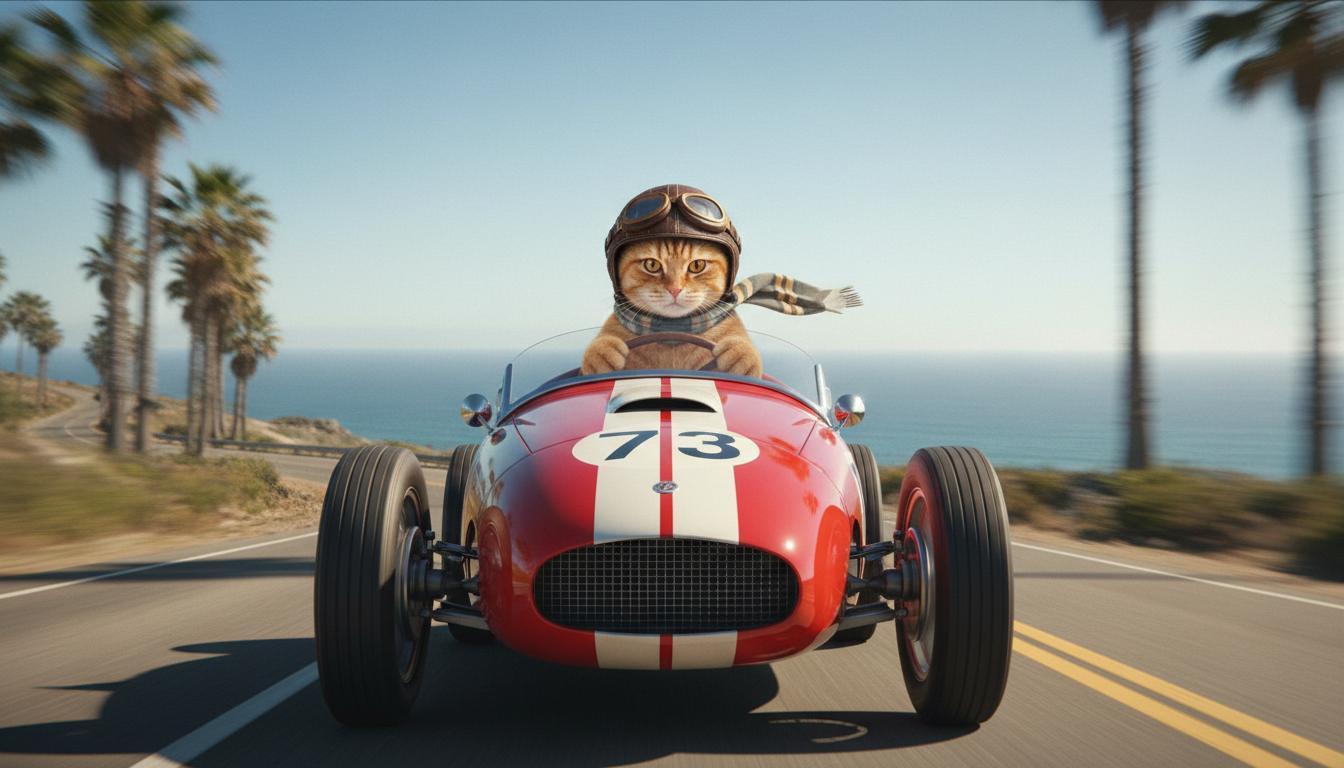
|
| Gambar terakhir (Dibuat oleh Nano Banana) Tunjukkan apa yang terjadi saat mobil meluncur dari tebing. |
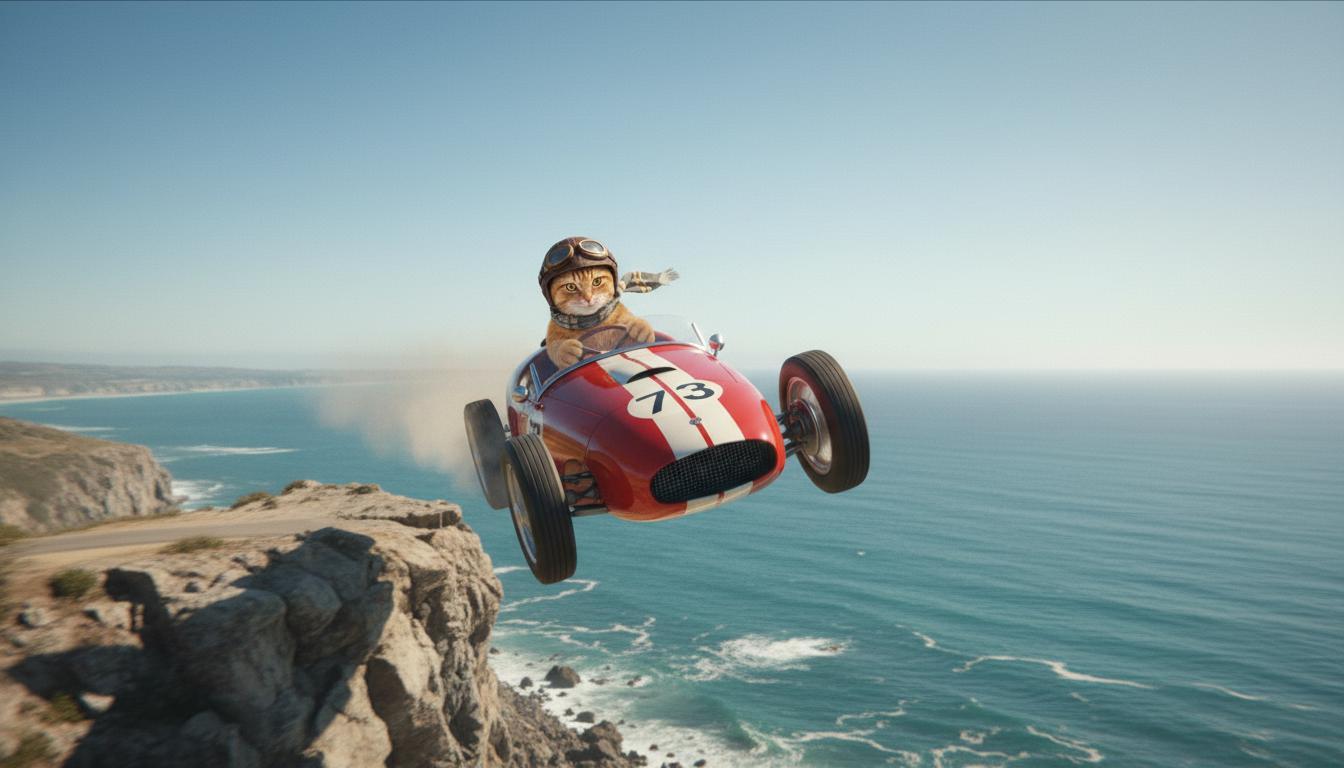
|
| Video Output (Dibuat oleh Veo 3.1) Opsional |
|
Fitur ini memberi Anda kontrol yang akurat atas komposisi foto dengan memungkinkan Anda menentukan frame awal dan akhir. Upload gambar atau gunakan frame dari pembuatan video sebelumnya untuk memastikan adegan Anda dimulai dan diakhiri persis seperti yang Anda bayangkan.
Perintah untuk ekstensi
Untuk memperpanjang video yang dihasilkan Veo dengan Veo 3.1 (tidak tersedia untuk Veo 3.1 Lite), gunakan video sebagai input bersama dengan perintah teks opsional. Fitur Perpanjang akan menyelesaikan detik terakhir atau 24 frame video Anda dan melanjutkan aksinya.
Perhatikan bahwa suara tidak dapat diperpanjang secara efektif jika tidak ada dalam 1 detik terakhir video.
| Perintah | Output yang dihasilkan |
|---|---|
| Video input (Dibuat oleh Veo 3.1) Paralayang lepas landas dari puncak gunung dan mulai meluncur turun dari gunung, menghadap ke lembah yang dipenuhi bunga di bawahnya. |
|
| Video Output (Dibuat oleh Veo 3.1) Perpanjang video ini dengan paralayang yang turun perlahan. |
|
Contoh perintah dan output
Bagian ini menyajikan beberapa perintah, yang menyoroti bagaimana detail deskriptif dapat meningkatkan hasil setiap video.
Bunga Es
Video ini menunjukkan cara menggunakan elemen dasar-dasar penulisan perintah dalam perintah Anda.
| Perintah | Output yang dihasilkan |
|---|---|
| Foto close-up (komposisi) es yang mencair (subjek) di dinding batu beku (konteks) dengan nuansa biru sejuk (suasana), diperbesar (gerakan kamera) mempertahankan detail close-up tetesan air (tindakan). |
|
Pria sedang menelepon
Video ini menunjukkan cara merevisi perintah dengan detail yang makin spesifik agar Veo menyempurnakan output sesuai keinginan Anda.
| Perintah | Output yang dihasilkan |
|---|---|
| Kurang detail Kamera bergerak mendekat untuk menampilkan close-up seorang pria putus asa yang mengenakan jas hujan hijau. Dia sedang menelepon menggunakan telepon dinding putar dengan lampu neon hijau. Rasanya seperti adegan film. |
|
| Detail selengkapnya Pengambilan gambar sinematik close-up mengikuti seorang pria putus asa yang mengenakan jas hujan hijau usang saat dia memutar nomor telepon putar yang terpasang di dinding bata kotor, bermandikan cahaya menyeramkan dari papan neon hijau. Kamera bergerak mendekat, memperlihatkan ketegangan di rahangnya dan keputusasaan yang terukir di wajahnya saat ia berjuang untuk melakukan panggilan. Depth of field yang dangkal berfokus pada dahinya yang berkerut dan telepon putar hitam, memburamkan latar belakang menjadi lautan warna neon dan bayangan yang tidak jelas, sehingga menciptakan kesan urgensi dan isolasi. |
|
Macan tutul salju
| Perintah | Output yang dihasilkan |
|---|---|
| Perintah sederhana: Makhluk lucu dengan bulu seperti macan tutul salju sedang berjalan di hutan musim dingin, render gaya kartun 3D. |
|
| Perintah mendetail: Buat adegan animasi 3D pendek dengan gaya kartun yang ceria. Makhluk lucu dengan bulu seperti macan tutul salju, mata ekspresif yang besar, dan bentuk bulat yang ramah, berjingkrak-jingkrak gembira di hutan musim dingin yang unik. Adegan harus menampilkan pohon-pohon bulat yang tertutup salju, kepingan salju yang turun dengan lembut, dan sinar matahari hangat yang menembus dahan-dahan. Gerakan makhluk yang lincah dan senyumnya yang lebar harus menyampaikan kegembiraan murni. Buat video dengan gaya bahasa yang ceria dan mengharukan, dengan warna-warna cerah dan ceria serta animasi yang menyenangkan. |

|
Contoh menurut elemen penulisan
Contoh berikut menunjukkan cara menyempurnakan perintah berdasarkan setiap elemen dasar.
Subjek dan konteks
Tentukan fokus utama (subjek) dan latar belakang atau lingkungan (konteks).
| Perintah | Output yang dihasilkan |
|---|---|
| Rendering arsitektur bangunan apartemen beton putih dengan bentuk organik yang mengalir, berpadu sempurna dengan tanaman hijau yang subur dan elemen futuristik |
|
| Satelit mengambang di luar angkasa dengan bulan dan beberapa bintang di latar belakang. |
|
Tindakan
Tentukan aktivitas yang dilakukan subjek (misalnya, berjalan, berlari, atau menoleh).
| Perintah | Output yang dihasilkan |
|---|---|
| Pengambilan gambar lebar seorang wanita yang berjalan di sepanjang pantai, tampak puas dan santai menghadap ke cakrawala saat matahari terbenam. |
|
Gaya
Tambahkan kata kunci untuk mengarahkan pembuatan ke estetika tertentu (misalnya, surealis, vintage, futuristik, film noir).
| Perintah | Output yang dihasilkan |
|---|---|
| Gaya film noir, pria dan wanita berjalan di jalan, misteri, sinematik, hitam putih. |
|
Gerakan dan komposisi kamera
Tentukan cara kamera bergerak (pengambilan gambar POV, tampilan udara, tampilan drone pelacak) dan cara pengambilan gambar dibingkai (pengambilan gambar lebar, close-up, sudut rendah).
| Perintah | Output yang dihasilkan |
|---|---|
| Foto POV dari mobil vintage yang melaju di tengah hujan, Kanada pada malam hari, sinematik. |
|
| Close-up ekstrem mata dengan pantulan kota di dalamnya. |
|
Suasana
Palet warna dan pencahayaan memengaruhi suasana. Coba istilah seperti "nuansa hangat oranye redup", "cahaya alami", "matahari terbit", atau "nuansa biru sejuk".
| Perintah | Output yang dihasilkan |
|---|---|
| Foto close-up seorang gadis yang menggendong anak golden retriever yang menggemaskan di taman, di bawah sinar matahari. |

|
| Foto close-up sinematik seorang perempuan sedih yang naik bus saat hujan, nuansa biru yang sejuk, suasana sedih. |

|
Rasio aspek
Veo memungkinkan Anda menentukan rasio aspek untuk video Anda.
| Perintah | Output yang dihasilkan |
|---|---|
| Layar lebar (16:9) Buat video dengan tampilan drone yang mengikuti seorang pria yang mengendarai mobil convertible merah di Palm Springs, tahun 1970-an, sinar matahari yang hangat, bayangan yang panjang. |

|
| Potret (9:16) Buat sorotan video yang menyoroti gerakan halus air terjun Hawaii yang megah di dalam hutan hujan yang rimbun. Fokus pada aliran air yang realistis, dedaunan yang mendetail, dan pencahayaan alami untuk menyampaikan ketenangan. Abadikan air yang mengalir deras, suasana berkabut, dan cahaya matahari belang-belang yang menembus kanopi lebat. Gunakan gerakan kamera yang halus dan sinematik untuk menampilkan air terjun dan sekitarnya. Gunakan nuansa yang tenang dan realistis, yang membawa penonton ke keindahan hutan hujan Hawaii yang tenang. |

|
Versi model
Lihat halaman Harga dan Batas kapasitas untuk mengetahui detail penggunaan khusus model Veo selengkapnya.
Veo 3.1 Preview
| Properti | Deskripsi |
|---|---|
| Kode model |
Gemini API
|
| Jenis data yang didukung |
Input Teks, Gambar Output Video dengan audio |
| Limits |
Input teks 1.024 token Video output 1 |
| Pembaruan terbaru | Januari 2026 |
Pratinjau Veo 3.1 Fast
| Properti | Deskripsi |
|---|---|
| Kode model |
Gemini API
|
| Jenis data yang didukung |
Input Teks, Gambar Output Video dengan audio |
| Limits |
Input teks 1.024 token Video output 1 |
| Pembaruan terbaru | Januari 2026 |
Pratinjau Veo 3.1 Lite
| Properti | Deskripsi |
|---|---|
| Kode model |
Gemini API
|
| Jenis data yang didukung |
Input Teks, gambar Output Video dengan audio |
| Limits |
Input teks 1.024 token Video output 1 |
| Pembaruan terbaru | Maret 2026 |
Veo 3 (Tidak Digunakan Lagi)
| Properti | Deskripsi |
|---|---|
| Kode model |
Gemini API
|
| Jenis data yang didukung |
Input Teks, Gambar Output Video dengan audio |
| Limits |
Input teks 1.024 token Video output 1 |
| Pembaruan terbaru | Juli 2025 |
Veo 3 Fast (Tidak digunakan lagi)
| Properti | Deskripsi |
|---|---|
| Kode model |
Gemini API
|
| Jenis data yang didukung |
Input Teks, Gambar Output Video dengan audio |
| Limits |
Input teks 1.024 token Video output 1 |
| Pembaruan terbaru | Juli 2025 |
Versi Veo Fast memungkinkan developer membuat video dengan suara sambil mempertahankan kualitas tinggi dan mengoptimalkan kecepatan serta kasus penggunaan bisnis. API ini ideal untuk layanan backend yang menghasilkan iklan secara terprogram, alat untuk pengujian A/B cepat pada konsep materi iklan, atau aplikasi yang perlu membuat konten media sosial dengan cepat.
Langkah berikutnya
- Mulai gunakan Veo 3.1 API dengan bereksperimen di Colab Panduan Memulai Veo dan applet Veo 3.1.
- Pelajari cara menulis perintah yang lebih baik dengan Pengantar desain perintah kami.