

Para saber mais sobre a compreensão de vídeos, consulte o guia Compreensão de vídeos.
O Veo 3.1 é um modelo para gerar vídeos de 8 segundos (720p, 1080p ou 4k) com áudio gerado de forma nativa. É possível acessar esse modelo de forma programática usando a API Gemini. Para saber mais sobre as variantes disponíveis do modelo do Veo, consulte a seção Versões do modelo.
O Veo 3.1 se destaca em uma ampla variedade de estilos visuais e cinematográficos e apresenta vários recursos novos:
- Vídeos no modo retrato: escolha entre vídeos no modo paisagem (
16:9) e retrato (9:16). - Extensão de vídeo: estenda vídeos que foram gerados anteriormente usando o Veo.
- Geração específica de frames: gere um vídeo especificando os primeiros e últimos frames.
- Direção baseada em imagens: use até três imagens de referência para orientar o conteúdo do vídeo gerado.
Para mais informações sobre como escrever comandos de texto eficazes para geração de vídeo, consulte o guia de comandos do Veo.
Geração de texto para vídeo
Os exemplos a seguir mostram como gerar um vídeo com diálogo, realismo cinematográfico ou animação criativa:
Diálogos e efeitos sonoros
Python
import time
from google import genai
from google.genai import types

client = genai.Client()

prompt = """A close up of two people staring at a cryptic drawing on a wall, torchlight flickering.
A man murmurs, 'This must be it. That's the secret code.' The woman looks at him and whispering excitedly, 'What did you find?'"""

operation = client.models.generate_videos(
    model="veo-3.1-generate-preview",
    prompt=prompt,
)

# Poll the operation status until the video is ready.
while not operation.done:
    print("Waiting for video generation to complete...")
    time.sleep(10)
    operation = client.operations.get(operation)

# Download the generated video.
generated_video = operation.response.generated_videos[0]
client.files.download(file=generated_video.video, destination="dialogue_example.mp4")
print("Generated video saved to dialogue_example.mp4")
JavaScript
import { GoogleGenAI } from "@google/genai";

const ai = new GoogleGenAI({});

const prompt = `A close up of two people staring at a cryptic drawing on a wall, torchlight flickering.
A man murmurs, 'This must be it. That's the secret code.' The woman looks at him and whispering excitedly, 'What did you find?'`;

let operation = await ai.models.generateVideos({
    model: "veo-3.1-generate-preview",
    prompt: prompt,
});

// Poll the operation status until the video is ready.
while (!operation.done) {
    console.log("Waiting for video generation to complete...")
    await new Promise((resolve) => setTimeout(resolve, 10000));
    operation = await ai.operations.getVideosOperation({
        operation: operation,
    });
}

// Download the generated video.
ai.files.download({
    file: operation.response.generatedVideos[0].video,
    downloadPath: "dialogue_example.mp4",
});
console.log(`Generated video saved to dialogue_example.mp4`);
Go
package main

import (
    "context"
    "log"
    "os"
    "time"

    "google.golang.org/genai"
)

func main() {
    ctx := context.Background()
    client, err := genai.NewClient(ctx, nil)
    if err != nil {
        log.Fatal(err)
    }

    prompt := `A close up of two people staring at a cryptic drawing on a wall, torchlight flickering.
    A man murmurs, 'This must be it. That's the secret code.' The woman looks at him and whispering excitedly, 'What did you find?'`

    operation, _ := client.Models.GenerateVideos(
        ctx,
        "veo-3.1-generate-preview",
        prompt,
        nil,
        nil,
    )

    // Poll the operation status until the video is ready.
    for !operation.Done {
    log.Println("Waiting for video generation to complete...")
        time.Sleep(10 * time.Second)
        operation, _ = client.Operations.GetVideosOperation(ctx, operation, nil)
    }

    // Download the generated video.
    video := operation.Response.GeneratedVideos[0]
    client.Files.Download(ctx, video.Video, nil)
    fname := "dialogue_example.mp4"
    _ = os.WriteFile(fname, video.Video.VideoBytes, 0644)
    log.Printf("Generated video saved to %s\n", fname)
}
Java
import com.google.genai.Client;
import com.google.genai.types.GenerateVideosOperation;
import com.google.genai.types.GeneratedVideo;

Client client = new Client();

String prompt =
    "A close up of two people staring at a cryptic drawing on a wall, torchlight flickering.\n"
        + "A man murmurs, 'This must be it. That's the secret code.' The woman looks at him and whispering excitedly, 'What did you find?'";

GenerateVideosOperation operation =
    client.models.generateVideos("veo-3.1-generate-preview", prompt, null, null);

// Poll the operation status until the video is ready.
while (!operation.done().orElse(false)) {
  System.out.println("Waiting for video generation to complete...");
  Thread.sleep(10000);
  operation = client.operations.getVideosOperation(operation, null);
}

// Download the generated video.
GeneratedVideo generatedVideo = operation.response().get().generatedVideos().get().get(0);
client.files.download(generatedVideo, "dialogue_example.mp4", null);
System.out.println("Generated video saved to dialogue_example.mp4");
REST
# Note: This script uses jq to parse the JSON response.
# GEMINI API Base URL
BASE_URL="https://generativelanguage.googleapis.com/v1beta"

# Send request to generate video and capture the operation name into a variable.
operation_name=$(curl -s "${BASE_URL}/models/veo-3.1-generate-preview:predictLongRunning" \
  -H "x-goog-api-key: $GEMINI_API_KEY" \
  -H "Content-Type: application/json" \
  -X "POST" \
  -d '{
    "instances": [{
        "prompt": "A close up of two people staring at a cryptic drawing on a wall, torchlight flickering. A man murmurs, \"This must be it. That'\''s the secret code.\" The woman looks at him and whispering excitedly, \"What did you find?\""
      }
    ]
  }' | jq -r .name)

# Poll the operation status until the video is ready
while true; do
  # Get the full JSON status and store it in a variable.
  status_response=$(curl -s -H "x-goog-api-key: $GEMINI_API_KEY" "${BASE_URL}/${operation_name}")

  # Check the "done" field from the JSON stored in the variable.
  is_done=$(echo "${status_response}" | jq .done)

  if [ "${is_done}" = "true" ]; then
    # Extract the download URI from the final response.
    video_uri=$(echo "${status_response}" | jq -r '.response.generateVideoResponse.generatedSamples[0].video.uri')
    echo "Downloading video from: ${video_uri}"

    # Download the video using the URI and API key and follow redirects.
    curl -L -o dialogue_example.mp4 -H "x-goog-api-key: $GEMINI_API_KEY" "${video_uri}"
    break
  fi
  # Wait for 5 seconds before checking again.
  sleep 10
done
Realismo cinematográfico
Python
import time
from google import genai
from google.genai import types

client = genai.Client()

prompt = """Drone shot following a classic red convertible driven by a man along a winding coastal road at sunset, waves crashing against the rocks below.
The convertible accelerates fast and the engine roars loudly."""

operation = client.models.generate_videos(
    model="veo-3.1-generate-preview",
    prompt=prompt,
)

# Poll the operation status until the video is ready.
while not operation.done:
    print("Waiting for video generation to complete...")
    time.sleep(10)
    operation = client.operations.get(operation)

# Download the generated video.
generated_video = operation.response.generated_videos[0]
client.files.download(file=generated_video.video, destination="realism_example.mp4")
print("Generated video saved to realism_example.mp4")
JavaScript
import { GoogleGenAI } from "@google/genai";

const ai = new GoogleGenAI({});

const prompt = `Drone shot following a classic red convertible driven by a man along a winding coastal road at sunset, waves crashing against the rocks below.
The convertible accelerates fast and the engine roars loudly.`;

let operation = await ai.models.generateVideos({
    model: "veo-3.1-generate-preview",
    prompt: prompt,
});

// Poll the operation status until the video is ready.
while (!operation.done) {
    console.log("Waiting for video generation to complete...")
    await new Promise((resolve) => setTimeout(resolve, 10000));
    operation = await ai.operations.getVideosOperation({
        operation: operation,
    });
}

// Download the generated video.
ai.files.download({
    file: operation.response.generatedVideos[0].video,
    downloadPath: "realism_example.mp4",
});
console.log(`Generated video saved to realism_example.mp4`);
Go
package main

import (
    "context"
    "log"
    "os"
    "time"

    "google.golang.org/genai"
)

func main() {
    ctx := context.Background()
    client, err := genai.NewClient(ctx, nil)
    if err != nil {
        log.Fatal(err)
    }

    prompt := `Drone shot following a classic red convertible driven by a man along a winding coastal road at sunset, waves crashing against the rocks below.
  The convertible accelerates fast and the engine roars loudly.`

    operation, _ := client.Models.GenerateVideos(
        ctx,
        "veo-3.1-generate-preview",
        prompt,
        nil,
        nil,
    )

    // Poll the operation status until the video is ready.
    for !operation.Done {
    log.Println("Waiting for video generation to complete...")
        time.Sleep(10 * time.Second)
        operation, _ = client.Operations.GetVideosOperation(ctx, operation, nil)
    }

    // Download the generated video.
    video := operation.Response.GeneratedVideos[0]
    client.Files.Download(ctx, video.Video, nil)
    fname := "realism_example.mp4"
    _ = os.WriteFile(fname, video.Video.VideoBytes, 0644)
    log.Printf("Generated video saved to %s\n", fname)
}
Java
import com.google.genai.Client;
import com.google.genai.types.GenerateVideosOperation;
import com.google.genai.types.GeneratedVideo;

Client client = new Client();

String prompt =
    "Drone shot following a classic red convertible driven by a man along a winding coastal road at sunset, waves crashing against the rocks below.\n"
        + "The convertible accelerates fast and the engine roars loudly.";

GenerateVideosOperation operation =
    client.models.generateVideos("veo-3.1-generate-preview", prompt, null, null);

// Poll the operation status until the video is ready.
while (!operation.done().orElse(false)) {
  System.out.println("Waiting for video generation to complete...");
  Thread.sleep(10000);
  operation = client.operations.getVideosOperation(operation, null);
}

// Download the generated video.
GeneratedVideo generatedVideo = operation.response().get().generatedVideos().get().get(0);
client.files.download(generatedVideo, "realism_example.mp4", null);
System.out.println("Generated video saved to realism_example.mp4");
REST
# Note: This script uses jq to parse the JSON response.
# GEMINI API Base URL
BASE_URL="https://generativelanguage.googleapis.com/v1beta"

# Send request to generate video and capture the operation name into a variable.
operation_name=$(curl -s "${BASE_URL}/models/veo-3.1-generate-preview:predictLongRunning" \
  -H "x-goog-api-key: $GEMINI_API_KEY" \
  -H "Content-Type: application/json" \
  -X "POST" \
  -d '{
    "instances": [{
        "prompt": "Drone shot following a classic red convertible driven by a man along a winding coastal road at sunset, waves crashing against the rocks below. The convertible accelerates fast and the engine roars loudly."
      }
    ]
  }' | jq -r .name)

# Poll the operation status until the video is ready
while true; do
  # Get the full JSON status and store it in a variable.
  status_response=$(curl -s -H "x-goog-api-key: $GEMINI_API_KEY" "${BASE_URL}/${operation_name}")

  # Check the "done" field from the JSON stored in the variable.
  is_done=$(echo "${status_response}" | jq .done)

  if [ "${is_done}" = "true" ]; then
    # Extract the download URI from the final response.
    video_uri=$(echo "${status_response}" | jq -r '.response.generateVideoResponse.generatedSamples[0].video.uri')
    echo "Downloading video from: ${video_uri}"

    # Download the video using the URI and API key and follow redirects.
    curl -L -o realism_example.mp4 -H "x-goog-api-key: $GEMINI_API_KEY" "${video_uri}"
    break
  fi
  # Wait for 5 seconds before checking again.
  sleep 10
done
Animação criativa
Python
import time
from google import genai

client = genai.Client()
prompt = "A whimsical stop-motion animation of a tiny robot tending to a garden of glowing mushrooms on a miniature planet."

operation = client.models.generate_videos(
    model="veo-3.1-generate-preview",
    prompt=prompt,
)

# Poll the operation status until the video is ready.
while not operation.done:
    print("Waiting for video generation to complete...")
    time.sleep(10)
    operation = client.operations.get(operation)

# Download the generated video.
generated_video = operation.response.generated_videos[0]
client.files.download(file=generated_video.video, destination="style_example.mp4")
print("Generated video saved to style_example.mp4")
JavaScript
import { GoogleGenAI } from "@google/genai";

const ai = new GoogleGenAI({});

const prompt = "A whimsical stop-motion animation of a tiny robot tending to a garden of glowing mushrooms on a miniature planet.";

let operation = await ai.models.generateVideos({
    model: "veo-3.1-generate-preview",
    prompt: prompt,
});

// Poll the operation status until the video is ready.
while (!operation.done) {
    console.log("Waiting for video generation to complete...")
    await new Promise((resolve) => setTimeout(resolve, 10000));
    operation = await ai.operations.getVideosOperation({
        operation: operation,
    });
}

// Download the generated video.
ai.files.download({
    file: operation.response.generatedVideos[0].video,
    downloadPath: "style_example.mp4",
});
console.log(`Generated video saved to style_example.mp4`);
Go
package main

import (
    "context"
    "log"
    "os"
    "time"

    "google.golang.org/genai"
)

func main() {
    ctx := context.Background()
    client, err := genai.NewClient(ctx, nil)
    if err != nil {
        log.Fatal(err)
    }

    prompt := `A whimsical stop-motion animation of a tiny robot tending to a garden of glowing mushrooms on a miniature planet.`

    operation, _ := client.Models.GenerateVideos(
        ctx,
        "veo-3.1-generate-preview",
        prompt,
        nil,
        nil,
    )

    // Poll the operation status until the video is ready.
    for !operation.Done {
    log.Println("Waiting for video generation to complete...")
        time.Sleep(10 * time.Second)
        operation, _ = client.Operations.GetVideosOperation(ctx, operation, nil)
    }

    // Download the generated video.
    video := operation.Response.GeneratedVideos[0]
    client.Files.Download(ctx, video.Video, nil)
    fname := "style_example.mp4"
    _ = os.WriteFile(fname, video.Video.VideoBytes, 0644)
    log.Printf("Generated video saved to %s\n", fname)
}
Java
import com.google.genai.Client;
import com.google.genai.types.GenerateVideosOperation;
import com.google.genai.types.GeneratedVideo;

Client client = new Client();

String prompt =
    "A whimsical stop-motion animation of a tiny robot tending to a garden of glowing mushrooms on a miniature planet.";

GenerateVideosOperation operation =
    client.models.generateVideos("veo-3.1-generate-preview", prompt, null, null);

// Poll the operation status until the video is ready.
while (!operation.done().orElse(false)) {
  System.out.println("Waiting for video generation to complete...");
  Thread.sleep(10000);
  operation = client.operations.getVideosOperation(operation, null);
}

// Download the generated video.
GeneratedVideo generatedVideo = operation.response().get().generatedVideos().get().get(0);
client.files.download(generatedVideo, "style_example.mp4", null);
System.out.println("Generated video saved to style_example.mp4");
REST
# Note: This script uses jq to parse the JSON response.
# GEMINI API Base URL
BASE_URL="https://generativelanguage.googleapis.com/v1beta"

# Send request to generate video and capture the operation name into a variable.
operation_name=$(curl -s "${BASE_URL}/models/veo-3.1-generate-preview:predictLongRunning" \
  -H "x-goog-api-key: $GEMINI_API_KEY" \
  -H "Content-Type: application/json" \
  -X "POST" \
  -d '{
    "instances": [{
        "prompt": "A whimsical stop-motion animation of a tiny robot tending to a garden of glowing mushrooms on a miniature planet."
      }
    ]
  }' | jq -r .name)

# Poll the operation status until the video is ready
while true; do
  # Get the full JSON status and store it in a variable.
  status_response=$(curl -s -H "x-goog-api-key: $GEMINI_API_KEY" "${BASE_URL}/${operation_name}")

  # Check the "done" field from the JSON stored in the variable.
  is_done=$(echo "${status_response}" | jq .done)

  if [ "${is_done}" = "true" ]; then
    # Extract the download URI from the final response.
    video_uri=$(echo "${status_response}" | jq -r '.response.generateVideoResponse.generatedSamples[0].video.uri')
    echo "Downloading video from: ${video_uri}"

    # Download the video using the URI and API key and follow redirects.
    curl -L -o style_example.mp4 -H "x-goog-api-key: $GEMINI_API_KEY" "${video_uri}"
    break
  fi
  # Wait for 5 seconds before checking again.
  sleep 10
done
Controlar a proporção
O Veo 3.1 permite criar vídeos no modo paisagem (16:9, a configuração padrão) ou retrato
(9:16). É possível informar ao modelo qual você quer usando o
parâmetro aspect_ratio:
Python
import time
from google import genai
from google.genai import types

client = genai.Client()

prompt = """A montage of pizza making: a chef tossing and flattening the floury dough, ladling rich red tomato sauce in a spiral, sprinkling mozzarella cheese and pepperoni, and a final shot of the bubbling golden-brown pizza, upbeat electronic music with a rhythmical beat is playing, high energy professional video."""

operation = client.models.generate_videos(
    model="veo-3.1-generate-preview",
    prompt=prompt,
    config=types.GenerateVideosConfig(
      aspect_ratio="9:16",
    ),
)

# Poll the operation status until the video is ready.
while not operation.done:
    print("Waiting for video generation to complete...")
    time.sleep(10)
    operation = client.operations.get(operation)

# Download the generated video.
generated_video = operation.response.generated_videos[0]
client.files.download(file=generated_video.video, destination="pizza_making.mp4")
print("Generated video saved to pizza_making.mp4")
JavaScript
import { GoogleGenAI } from "@google/genai";

const ai = new GoogleGenAI({});

const prompt = `A montage of pizza making: a chef tossing and flattening the floury dough, ladling rich red tomato sauce in a spiral, sprinkling mozzarella cheese and pepperoni, and a final shot of the bubbling golden-brown pizza, upbeat electronic music with a rhythmical beat is playing, high energy professional video.`;

let operation = await ai.models.generateVideos({
    model: "veo-3.1-generate-preview",
    prompt: prompt,
    config: {
      aspectRatio: "9:16",
    },
});

// Poll the operation status until the video is ready.
while (!operation.done) {
    console.log("Waiting for video generation to complete...")
    await new Promise((resolve) => setTimeout(resolve, 10000));
    operation = await ai.operations.getVideosOperation({
        operation: operation,
    });
}

// Download the generated video.
ai.files.download({
    file: operation.response.generatedVideos[0].video,
    downloadPath: "pizza_making.mp4",
});
console.log(`Generated video saved to pizza_making.mp4`);
Go
package main

import (
    "context"
    "log"
    "os"
    "time"

    "google.golang.org/genai"
)

func main() {
    ctx := context.Background()
    client, err := genai.NewClient(ctx, nil)
    if err != nil {
        log.Fatal(err)
    }

    prompt := `A montage of pizza making: a chef tossing and flattening the floury dough, ladling rich red tomato sauce in a spiral, sprinkling mozzarella cheese and pepperoni, and a final shot of the bubbling golden-brown pizza, upbeat electronic music with a rhythmical beat is playing, high energy professional video.`

  videoConfig := &genai.GenerateVideosConfig{
      AspectRatio: "9:16",
  }

    operation, _ := client.Models.GenerateVideos(
        ctx,
        "veo-3.1-generate-preview",
        prompt,
        nil,
        videoConfig,
    )

    // Poll the operation status until the video is ready.
    for !operation.Done {
    log.Println("Waiting for video generation to complete...")
        time.Sleep(10 * time.Second)
        operation, _ = client.Operations.GetVideosOperation(ctx, operation, nil)
    }

    // Download the generated video.
    video := operation.Response.GeneratedVideos[0]
    client.Files.Download(ctx, video.Video, nil)
    fname := "pizza_making.mp4"
    _ = os.WriteFile(fname, video.Video.VideoBytes, 0644)
    log.Printf("Generated video saved to %s\n", fname)
}
REST
# Note: This script uses jq to parse the JSON response.
# GEMINI API Base URL
BASE_URL="https://generativelanguage.googleapis.com/v1beta"

# Send request to generate video and capture the operation name into a variable.
operation_name=$(curl -s "${BASE_URL}/models/veo-3.1-generate-preview:predictLongRunning" \
  -H "x-goog-api-key: $GEMINI_API_KEY" \
  -H "Content-Type: application/json" \
  -X "POST" \
  -d '{
    "instances": [{
        "prompt": "A montage of pizza making: a chef tossing and flattening the floury dough, ladling rich red tomato sauce in a spiral, sprinkling mozzarella cheese and pepperoni, and a final shot of the bubbling golden-brown pizza, upbeat electronic music with a rhythmical beat is playing, high energy professional video."
      }
    ],
    "parameters": {
      "aspectRatio": "9:16"
    }
  }' | jq -r .name)

# Poll the operation status until the video is ready
while true; do
  # Get the full JSON status and store it in a variable.
  status_response=$(curl -s -H "x-goog-api-key: $GEMINI_API_KEY" "${BASE_URL}/${operation_name}")

  # Check the "done" field from the JSON stored in the variable.
  is_done=$(echo "${status_response}" | jq .done)

  if [ "${is_done}" = "true" ]; then
    # Extract the download URI from the final response.
    video_uri=$(echo "${status_response}" | jq -r '.response.generateVideoResponse.generatedSamples[0].video.uri')
    echo "Downloading video from: ${video_uri}"

    # Download the video using the URI and API key and follow redirects.
    curl -L -o pizza_making.mp4 -H "x-goog-api-key: $GEMINI_API_KEY" "${video_uri}"
    break
  fi
  # Wait for 5 seconds before checking again.
  sleep 10
done
Controlar a resolução
O Veo 3.1 também pode gerar vídeos em 720p, 1080p ou 4K (o 4K não está disponível para o Veo 3.1 Lite).
Quanto maior a resolução, maior será a latência. Os vídeos em 4K também são mais caros (consulte os preços).
A extensão de vídeo também é limitada a vídeos de 720p.
Python
import time
from google import genai
from google.genai import types

client = genai.Client()

prompt = """A stunning drone view of the Grand Canyon during a flamboyant sunset that highlights the canyon's colors. The drone slowly flies towards the sun then accelerates, dives and flies inside the canyon."""

operation = client.models.generate_videos(
    model="veo-3.1-generate-preview",
    prompt=prompt,
    config=types.GenerateVideosConfig(
      resolution="4k",
    ),
)

# Poll the operation status until the video is ready.
while not operation.done:
    print("Waiting for video generation to complete...")
    time.sleep(10)
    operation = client.operations.get(operation)

# Download the generated video.
generated_video = operation.response.generated_videos[0]
client.files.download(file=generated_video.video, destination="4k_grand_canyon.mp4")
print("Generated video saved to 4k_grand_canyon.mp4")
JavaScript
import { GoogleGenAI } from "@google/genai";

const ai = new GoogleGenAI({});

const prompt = `A stunning drone view of the Grand Canyon during a flamboyant sunset that highlights the canyon's colors. The drone slowly flies towards the sun then accelerates, dives and flies inside the canyon.`;

let operation = await ai.models.generateVideos({
    model: "veo-3.1-generate-preview",
    prompt: prompt,
    config: {
      resolution: "4k",
    },
});

// Poll the operation status until the video is ready.
while (!operation.done) {
    console.log("Waiting for video generation to complete...")
    await new Promise((resolve) => setTimeout(resolve, 10000));
    operation = await ai.operations.getVideosOperation({
        operation: operation,
    });
}

// Download the generated video.
ai.files.download({
    file: operation.response.generatedVideos[0].video,
    downloadPath: "4k_grand_canyon.mp4",
});
console.log(`Generated video saved to 4k_grand_canyon.mp4`);
Go
package main

import (
    "context"
    "log"
    "os"
    "time"

    "google.golang.org/genai"
)

func main() {
    ctx := context.Background()
    client, err := genai.NewClient(ctx, nil)
    if err != nil {
        log.Fatal(err)
    }

    prompt := `A stunning drone view of the Grand Canyon during a flamboyant sunset that highlights the canyon's colors. The drone slowly flies towards the sun then accelerates, dives and flies inside the canyon.`

  videoConfig := &genai.GenerateVideosConfig{
      Resolution: "4k",
  }

    operation, _ := client.Models.GenerateVideos(
        ctx,
        "veo-3.1-generate-preview",
        prompt,
        nil,
        videoConfig,
    )

    // Poll the operation status until the video is ready.
    for !operation.Done {
    log.Println("Waiting for video generation to complete...")
        time.Sleep(10 * time.Second)
        operation, _ = client.Operations.GetVideosOperation(ctx, operation, nil)
    }

    // Download the generated video.
    video := operation.Response.GeneratedVideos[0]
    client.Files.Download(ctx, video.Video, nil)
    fname := "4k_grand_canyon.mp4"
    _ = os.WriteFile(fname, video.Video.VideoBytes, 0644)
    log.Printf("Generated video saved to %s\n", fname)
}
REST
# Note: This script uses jq to parse the JSON response.
# GEMINI API Base URL
BASE_URL="https://generativelanguage.googleapis.com/v1beta"

# Send request to generate video and capture the operation name into a variable.
operation_name=$(curl -s "${BASE_URL}/models/veo-3.1-generate-preview:predictLongRunning" \
  -H "x-goog-api-key: $GEMINI_API_KEY" \
  -H "Content-Type: application/json" \
  -X "POST" \
  -d '{
    "instances": [{
        "prompt": "A stunning drone view of the Grand Canyon during a flamboyant sunset that highlights the canyon'\''s colors. The drone slowly flies towards the sun then accelerates, dives and flies inside the canyon."
      }
    ],
    "parameters": {
      "resolution": "4k"
    }
  }' | jq -r .name)

# Poll the operation status until the video is ready
while true; do
  # Get the full JSON status and store it in a variable.
  status_response=$(curl -s -H "x-goog-api-key: $GEMINI_API_KEY" "${BASE_URL}/${operation_name}")

  # Check the "done" field from the JSON stored in the variable.
  is_done=$(echo "${status_response}" | jq .done)

  if [ "${is_done}" = "true" ]; then
    # Extract the download URI from the final response.
    video_uri=$(echo "${status_response}" | jq -r '.response.generateVideoResponse.generatedSamples[0].video.uri')
    echo "Downloading video from: ${video_uri}"

    # Download the video using the URI and API key and follow redirects.
    curl -L -o 4k_grand_canyon.mp4 -H "x-goog-api-key: $GEMINI_API_KEY" "${video_uri}"
    break
  fi
  # Wait for 5 seconds before checking again.
  sleep 10
done
Geração de vídeo a partir de imagens
O código a seguir demonstra como gerar uma imagem usando o Gemini 3.1 Flash Image, também conhecido como Nano Banana 2, e usá-la como o frame inicial para gerar um vídeo com o Veo 3.1.
Python
import time
from google import genai

client = genai.Client()

prompt = "Panning wide shot of a calico kitten sleeping in the sunshine"

# Step 1: Generate an image with Nano Banana 2.
image = client.models.generate_content(
    model="gemini-3.1-flash-image-preview",
    contents=prompt,
    config={"response_modalities":['IMAGE']}
)

# Step 2: Generate video with Veo 3.1 using the image.
operation = client.models.generate_videos(
    model="veo-3.1-generate-preview",
    prompt=prompt,
    image=image.parts[0].as_image(),
)

# Poll the operation status until the video is ready.
while not operation.done:
    print("Waiting for video generation to complete...")
    time.sleep(10)
    operation = client.operations.get(operation)

# Download the video.
video = operation.response.generated_videos[0]
client.files.download(file=video.video, destination="veo3_with_image_input.mp4")
print("Generated video saved to veo3_with_image_input.mp4")
JavaScript
import { GoogleGenAI } from "@google/genai";

const ai = new GoogleGenAI({});

const prompt = "Panning wide shot of a calico kitten sleeping in the sunshine";

// Step 1: Generate an image with Nano Banana 2.
const imageResponse = await ai.models.generateContent({
  model: "gemini-3.1-flash-image-preview",
  prompt: prompt,
});

// Step 2: Generate video with Veo 3.1 using the image.
let operation = await ai.models.generateVideos({
  model: "veo-3.1-generate-preview",
  prompt: prompt,
  image: {
    imageBytes: imageResponse.generatedImages[0].image.imageBytes,
    mimeType: "image/png",
  },
});

// Poll the operation status until the video is ready.
while (!operation.done) {
  console.log("Waiting for video generation to complete...")
  await new Promise((resolve) => setTimeout(resolve, 10000));
  operation = await ai.operations.getVideosOperation({
    operation: operation,
  });
}

// Download the video.
ai.files.download({
    file: operation.response.generatedVideos[0].video,
    downloadPath: "veo3_with_image_input.mp4",
});
console.log(`Generated video saved to veo3_with_image_input.mp4`);
Go
package main

import (
    "context"
    "log"
    "os"
    "time"

    "google.golang.org/genai"
)

func main() {
    ctx := context.Background()
    client, err := genai.NewClient(ctx, nil)
    if err != nil {
        log.Fatal(err)
    }

    prompt := "Panning wide shot of a calico kitten sleeping in the sunshine"

    // Step 1: Generate an image with Nano Banana 2.
    imageResponse, err := client.Models.GenerateContent(
        ctx,
        "gemini-3.1-flash-image-preview",
        prompt,
        nil, // GenerateImagesConfig
    )
    if err != nil {
        log.Fatal(err)
    }

    // Step 2: Generate video with Veo 3.1 using the image.
    operation, err := client.Models.GenerateVideos(
        ctx,
        "veo-3.1-generate-preview",
        prompt,
        imageResponse.GeneratedImages[0].Image,
        nil, // GenerateVideosConfig
    )
    if err != nil {
        log.Fatal(err)
    }

    // Poll the operation status until the video is ready.
    for !operation.Done {
        log.Println("Waiting for video generation to complete...")
        time.Sleep(10 * time.Second)
        operation, _ = client.Operations.GetVideosOperation(ctx, operation, nil)
    }

    // Download the video.
    video := operation.Response.GeneratedVideos[0]
    client.Files.Download(ctx, video.Video, nil)
    fname := "veo3_with_image_input.mp4"
    _ = os.WriteFile(fname, video.Video.VideoBytes, 0644)
    log.Printf("Generated video saved to %s\n", fname)
}
Java
import com.google.genai.Client;
import com.google.genai.types.Blob;
import com.google.genai.types.GenerateContentConfig;
import com.google.genai.types.GenerateContentResponse;
import com.google.genai.types.GenerateVideosOperation;
import com.google.genai.types.GeneratedVideo;
import com.google.genai.types.Image;

Client client = new Client();

String prompt = "Panning wide shot of a calico kitten sleeping in the sunshine";

// Step 1: Generate an image with Nano Banana 2.
GenerateContentResponse imageResponse =
    client.models.generateContent(
        "gemini-3.1-flash-image-preview",
        prompt,
        GenerateContentConfig.builder().responseModalities("IMAGE").build());

Blob inlineData = imageResponse.parts().get(0).inlineData().get();
Image image =
    Image.builder()
        .imageBytes(inlineData.data().get())
        .mimeType(inlineData.mimeType().orElse("image/png"))
        .build();

// Step 2: Generate video with Veo 3.1 using the image.
GenerateVideosOperation operation =
    client.models.generateVideos("veo-3.1-generate-preview", prompt, image, null);

// Poll the operation status until the video is ready.
while (!operation.done().orElse(false)) {
  System.out.println("Waiting for video generation to complete...");
  Thread.sleep(10000);
  operation = client.operations.getVideosOperation(operation, null);
}

// Download the video.
GeneratedVideo video = operation.response().get().generatedVideos().get().get(0);
client.files.download(video, "veo3_with_image_input.mp4", null);
System.out.println("Generated video saved to veo3_with_image_input.mp4");
Como usar imagens de referência
O Veo 3.1 agora aceita até 3 imagens de referência para orientar o conteúdo do vídeo gerado. Forneça imagens de uma pessoa, personagem ou produto para preservar a aparência do objeto no vídeo gerado.
Por exemplo, usando estas três imagens geradas com o Nano Banana como referências com um comando bem escrito, você cria o seguinte vídeo:
`dress_image` |
`woman_image` |
`glasses_image` |
|---|---|---|

|

|

|
Python
import time
from google import genai

client = genai.Client()

prompt = "The video opens with a medium, eye-level shot of a beautiful woman with dark hair and warm brown eyes. She wears a magnificent, high-fashion flamingo dress with layers of pink and fuchsia feathers, complemented by whimsical pink, heart-shaped sunglasses. She walks with serene confidence through the crystal-clear, shallow turquoise water of a sun-drenched lagoon. The camera slowly pulls back to a medium-wide shot, revealing the breathtaking scene as the dress's long train glides and floats gracefully on the water's surface behind her. The cinematic, dreamlike atmosphere is enhanced by the vibrant colors of the dress against the serene, minimalist landscape, capturing a moment of pure elegance and high-fashion fantasy."

dress_reference = types.VideoGenerationReferenceImage(
  image=dress_image, # Generated separately with Nano Banana
  reference_type="asset"
)

sunglasses_reference = types.VideoGenerationReferenceImage(
  image=glasses_image, # Generated separately with Nano Banana
  reference_type="asset"
)

woman_reference = types.VideoGenerationReferenceImage(
  image=woman_image, # Generated separately with Nano Banana
  reference_type="asset"
)

operation = client.models.generate_videos(
    model="veo-3.1-generate-preview",
    prompt=prompt,
    config=types.GenerateVideosConfig(
      reference_images=[dress_reference, glasses_reference, woman_reference],
    ),
)

# Poll the operation status until the video is ready.
while not operation.done:
    print("Waiting for video generation to complete...")
    time.sleep(10)
    operation = client.operations.get(operation)

# Download the video.
video = operation.response.generated_videos[0]
client.files.download(file=video.video, destination="veo3.1_with_reference_images.mp4")
print("Generated video saved to veo3.1_with_reference_images.mp4")
JavaScript
import { GoogleGenAI } from "@google/genai";

const ai = new GoogleGenAI({});

const prompt = "The video opens with a medium, eye-level shot of a beautiful woman with dark hair and warm brown eyes. She wears a magnificent, high-fashion flamingo dress with layers of pink and fuchsia feathers, complemented by whimsical pink, heart-shaped sunglasses. She walks with serene confidence through the crystal-clear, shallow turquoise water of a sun-drenched lagoon. The camera slowly pulls back to a medium-wide shot, revealing the breathtaking scene as the dress's long train glides and floats gracefully on the water's surface behind her. The cinematic, dreamlike atmosphere is enhanced by the vibrant colors of the dress against the serene, minimalist landscape, capturing a moment of pure elegance and high-fashion fantasy.";

// dressImage, glassesImage, womanImage generated separately with Nano Banana
// and available as objects like { imageBytes: "...", mimeType: "image/png" }
const dressReference = {
  image: dressImage,
  referenceType: "asset",
};
const sunglassesReference = {
  image: glassesImage,
  referenceType: "asset",
};
const womanReference = {
  image: womanImage,
  referenceType: "asset",
};

let operation = await ai.models.generateVideos({
  model: "veo-3.1-generate-preview",
  prompt: prompt,
  config: {
    referenceImages: [
      dressReference,
      sunglassesReference,
      womanReference,
    ],
  },
});

// Poll the operation status until the video is ready.
while (!operation.done) {
  console.log("Waiting for video generation to complete...");
  await new Promise((resolve) => setTimeout(resolve, 10000));
  operation = await ai.operations.getVideosOperation({
    operation: operation,
  });
}

// Download the video.
ai.files.download({
  file: operation.response.generatedVideos[0].video,
  downloadPath: "veo3.1_with_reference_images.mp4",
});
console.log(`Generated video saved to veo3.1_with_reference_images.mp4`);
Go
package main

import (
    "context"
    "log"
    "os"
    "time"

    "google.golang.org/genai"
)

func main() {
    ctx := context.Background()
    client, err := genai.NewClient(ctx, nil)
    if err != nil {
        log.Fatal(err)
    }

  prompt := `The video opens with a medium, eye-level shot of a beautiful woman with dark hair and warm brown eyes. She wears a magnificent, high-fashion flamingo dress with layers of pink and fuchsia feathers, complemented by whimsical pink, heart-shaped sunglasses. She walks with serene confidence through the crystal-clear, shallow turquoise water of a sun-drenched lagoon. The camera slowly pulls back to a medium-wide shot, revealing the breathtaking scene as the dress's long train glides and floats gracefully on the water's surface behind her. The cinematic, dreamlike atmosphere is enhanced by the vibrant colors of the dress against the serene, minimalist landscape, capturing a moment of pure elegance and high-fashion fantasy.`

  // dressImage, glassesImage, womanImage generated separately with Nano Banana
  // and available as *genai.Image objects.
  var dressImage, glassesImage, womanImage *genai.Image

  dressReference := &genai.VideoGenerationReferenceImage{
    Image: dressImage,
    ReferenceType: "asset",
  }
  sunglassesReference := &genai.VideoGenerationReferenceImage{
    Image: glassesImage,
    ReferenceType: "asset",
  }
  womanReference := &genai.VideoGenerationReferenceImage{
    Image: womanImage,
    ReferenceType: "asset",
  }

    operation, _ := client.Models.GenerateVideos(
        ctx,
        "veo-3.1-generate-preview",
        prompt,
    nil, // image
        &genai.GenerateVideosConfig{
      ReferenceImages: []*genai.VideoGenerationReferenceImage{
        dressReference,
        sunglassesReference,
        womanReference,
      },
    },
    )

    // Poll the operation status until the video is ready.
    for !operation.Done {
        log.Println("Waiting for video generation to complete...")
        time.Sleep(10 * time.Second)
        operation, _ = client.Operations.GetVideosOperation(ctx, operation, nil)
    }

    // Download the video.
    video := operation.Response.GeneratedVideos[0]
    client.Files.Download(ctx, video.Video, nil)
    fname := "veo3.1_with_reference_images.mp4"
    _ = os.WriteFile(fname, video.Video.VideoBytes, 0644)
    log.Printf("Generated video saved to %s\n", fname)
}
REST
# Note: This script uses jq to parse the JSON response.
# It assumes dress_image_base64, glasses_image_base64, and woman_image_base64
# contain base64-encoded image data.

# GEMINI API Base URL
BASE_URL="https://generativelanguage.googleapis.com/v1beta"

# Send request to generate video and capture the operation name into a variable.
operation_name=$(curl -s "${BASE_URL}/models/veo-3.1-generate-preview:predictLongRunning" \
  -H "x-goog-api-key: $GEMINI_API_KEY" \
  -H "Content-Type: application/json" \
  -X "POST" \
  -d '{
    "instances": [{
      "prompt": "The video opens with a medium, eye-level shot of a beautiful woman with dark hair and warm brown eyes. She wears a magnificent, high-fashion flamingo dress with layers of pink and fuchsia feathers, complemented by whimsical pink, heart-shaped sunglasses. She walks with serene confidence through the crystal-clear, shallow turquoise water of a sun-drenched lagoon. The camera slowly pulls back to a medium-wide shot, revealing the breathtaking scene as the dress'\''s long train glides and floats gracefully on the water'\''s surface behind her. The cinematic, dreamlike atmosphere is enhanced by the vibrant colors of the dress against the serene, minimalist landscape, capturing a moment of pure elegance and high-fashion fantasy.",
      "referenceImages": [
        {
          "image": {"inlineData": {"mimeType": "image/png", "data": "'"$dress_image_base64"'"}},
          "referenceType": "asset"
        },
        {
          "image": {"inlineData": {"mimeType": "image/png", "data": "'"$glasses_image_base64"'"}},
          "referenceType": "asset"
        },
        {
          "image": {"inlineData": {"mimeType": "image/png", "data": "'"$woman_image_base64"'"}},
          "referenceType": "asset"
        }
      ]
    }],
  }' | jq -r .name)

# Poll the operation status until the video is ready
while true; do
  # Get the full JSON status and store it in a variable.
  status_response=$(curl -s -H "x-goog-api-key: $GEMINI_API_KEY" "${BASE_URL}/${operation_name}")

  # Check the "done" field from the JSON stored in the variable.
  is_done=$(echo "${status_response}" | jq .done)

  if [ "${is_done}" = "true" ]; then
    # Extract the download URI from the final response.
    video_uri=$(echo "${status_response}" | jq -r '.response.generateVideoResponse.generatedSamples[0].video.uri')
    echo "Downloading video from: ${video_uri}"

    # Download the video using the URI and API key and follow redirects.
    curl -L -o veo3.1_with_reference_images.mp4 -H "x-goog-api-key: $GEMINI_API_KEY" "${video_uri}"
    break
  fi
  # Wait for 10 seconds before checking again.
  sleep 10
done
Como usar o primeiro e o último frame
O Veo 3.1 permite criar vídeos usando interpolação ou especificando os primeiros e últimos frames do vídeo. Para saber como escrever comandos de texto eficazes para geração de vídeo, consulte o guia de comandos do Veo.
Python
import time
from google import genai

client = genai.Client()

prompt = "A cinematic, haunting video. A ghostly woman with long white hair and a flowing dress swings gently on a rope swing beneath a massive, gnarled tree in a foggy, moonlit clearing. The fog thickens and swirls around her, and she slowly fades away, vanishing completely. The empty swing is left swaying rhythmically on its own in the eerie silence."

operation = client.models.generate_videos(
    model="veo-3.1-generate-preview",
    prompt=prompt,
    image=first_image, # The starting frame is passed as a primary input
    config=types.GenerateVideosConfig(
      last_frame=last_image # The ending frame is passed as a generation constraint in the config
    ),
)

# Poll the operation status until the video is ready.
while not operation.done:
    print("Waiting for video generation to complete...")
    time.sleep(10)
    operation = client.operations.get(operation)

# Download the video.
video = operation.response.generated_videos[0]
client.files.download(file=video.video, destination="veo3.1_with_interpolation.mp4")
print("Generated video saved to veo3.1_with_interpolation.mp4")
JavaScript
import { GoogleGenAI } from "@google/genai";

const ai = new GoogleGenAI({});

const prompt = "A cinematic, haunting video. A ghostly woman with long white hair and a flowing dress swings gently on a rope swing beneath a massive, gnarled tree in a foggy, moonlit clearing. The fog thickens and swirls around her, and she slowly fades away, vanishing completely. The empty swing is left swaying rhythmically on its own in the eerie silence.";

// firstImage and lastImage generated separately with Nano Banana
// and available as objects like { imageBytes: "...", mimeType: "image/png" }
let operation = await ai.models.generateVideos({
    model: "veo-3.1-generate-preview",
    prompt: prompt,
    image: firstImage, // The starting frame is passed as a primary input
    config: {
      lastFrame: lastImage, // The ending frame is passed as a generation constraint in the config
    },
});

// Poll the operation status until the video is ready.
while (!operation.done) {
    console.log("Waiting for video generation to complete...")
    await new Promise((resolve) => setTimeout(resolve, 10000));
    operation = await ai.operations.getVideosOperation({
        operation: operation,
    });
}

// Download the video.
ai.files.download({
    file: operation.response.generatedVideos[0].video,
    downloadPath: "veo3.1_with_interpolation.mp4",
});
console.log(`Generated video saved to veo3.1_with_interpolation.mp4`);
Go
package main

import (
    "context"
    "log"
    "os"
    "time"

    "google.golang.org/genai"
)

func main() {
    ctx := context.Background()
    client, err := genai.NewClient(ctx, nil)
    if err != nil {
        log.Fatal(err)
    }

  prompt := `A cinematic, haunting video. A ghostly woman with long white hair and a flowing dress swings gently on a rope swing beneath a massive, gnarled tree in a foggy, moonlit clearing. The fog thickens and swirls around her, and she slowly fades away, vanishing completely. The empty swing is left swaying rhythmically on its own in the eerie silence.`

  // firstImage and lastImage generated separately with Nano Banana
  // and available as *genai.Image objects.
  var firstImage, lastImage *genai.Image

    operation, _ := client.Models.GenerateVideos(
        ctx,
        "veo-3.1-generate-preview",
        prompt,
    firstImage, // The starting frame is passed as a primary input
        &genai.GenerateVideosConfig{
      LastFrame: lastImage, // The ending frame is passed as a generation constraint in the config
    },
    )

    // Poll the operation status until the video is ready.
    for !operation.Done {
        log.Println("Waiting for video generation to complete...")
        time.Sleep(10 * time.Second)
        operation, _ = client.Operations.GetVideosOperation(ctx, operation, nil)
    }

    // Download the video.
    video := operation.Response.GeneratedVideos[0]
    client.Files.Download(ctx, video.Video, nil)
    fname := "veo3.1_with_interpolation.mp4"
    _ = os.WriteFile(fname, video.Video.VideoBytes, 0644)
    log.Printf("Generated video saved to %s\n", fname)
}
REST
# Note: This script uses jq to parse the JSON response.
# It assumes first_image_base64 and last_image_base64
# contain base64-encoded image data.

# GEMINI API Base URL
BASE_URL="https://generativelanguage.googleapis.com/v1beta"

# Send request to generate video and capture the operation name into a variable.
# The starting frame is passed as a primary input
# The ending frame is passed as a generation constraint in the config
operation_name=$(curl -s "${BASE_URL}/models/veo-3.1-generate-preview:predictLongRunning" \
  -H "x-goog-api-key: $GEMINI_API_KEY" \
  -H "Content-Type: application/json" \
  -X "POST" \
  -d '{
    "instances": [{
      "prompt": "A cinematic, haunting video. A ghostly woman with long white hair and a flowing dress swings gently on a rope swing beneath a massive, gnarled tree in a foggy, moonlit clearing. The fog thickens and swirls around her, and she slowly fades away, vanishing completely. The empty swing is left swaying rhythmically on its own in the eerie silence.",
      "image": {"inlineData": {"mimeType": "image/png", "data": "'"$first_image_base64"'"}},
      "lastFrame": {"inlineData": {"mimeType": "image/png", "data": "'"$last_image_base64"'"}}
    }],
  }' | jq -r .name)

# Poll the operation status until the video is ready
while true; do
  # Get the full JSON status and store it in a variable.
  status_response=$(curl -s -H "x-goog-api-key: $GEMINI_API_KEY" "${BASE_URL}/${operation_name}")

  # Check the "done" field from the JSON stored in the variable.
  is_done=$(echo "${status_response}" | jq .done)

  if [ "${is_done}" = "true" ]; then
    # Extract the download URI from the final response.
    video_uri=$(echo "${status_response}" | jq -r '.response.generateVideoResponse.generatedSamples[0].video.uri')
    echo "Downloading video from: ${video_uri}"

    # Download the video using the URI and API key and follow redirects.
    curl -L -o veo3.1_with_interpolation.mp4 -H "x-goog-api-key: $GEMINI_API_KEY" "${video_uri}"
    break
  fi
  # Wait for 10 seconds before checking again.
  sleep 10
done
`first_image` |
`last_image` |
veo3.1_with_interpolation.mp4 |
|---|---|---|

|

|
|
Como estender vídeos do Veo
Use o Veo 3.1 para estender em 7 segundos os vídeos que você já gerou com o Veo, até 20 vezes.
Limitações de entrada de vídeo:
- Vídeos gerados pelo Veo com até 141 segundos de duração.
- A API Gemini só aceita extensões de vídeo para vídeos gerados pelo Veo.
- O vídeo precisa ser de uma geração anterior, como
operation.response.generated_videos[0].video - Os vídeos são armazenados por dois dias, mas se um vídeo for referenciado para extensão, o timer de armazenamento de dois dias será redefinido. Só é possível estender vídeos que foram gerados ou referenciados nos últimos dois dias.
- Os vídeos de entrada precisam ter uma determinada duração, proporção e dimensões:
- Proporção: 9:16 ou 16:9
- Resolução: 720p
- Duração do vídeo: até 141 segundos
A saída da extensão é um único vídeo que combina o vídeo de entrada do usuário e o vídeo estendido gerado, com até 148 segundos de duração.
Este exemplo usa um vídeo gerado pelo Veo, mostrado aqui com
o comando original, e o estende usando o parâmetro video e um novo
comando:
| Comando | Saída: butterfly_video |
|---|---|
| Uma borboleta de origami bate as asas e voa pelas portas francesas em direção ao jardim. |
|
Python
import time
from google import genai

client = genai.Client()

prompt = "Track the butterfly into the garden as it lands on an orange origami flower. A fluffy white puppy runs up and gently pats the flower."

operation = client.models.generate_videos(
    model="veo-3.1-generate-preview",
    video=operation.response.generated_videos[0].video, # This must be a video from a previous generation
    prompt=prompt,
    config=types.GenerateVideosConfig(
        number_of_videos=1,
        resolution="720p"
    ),
)

# Poll the operation status until the video is ready.
while not operation.done:
    print("Waiting for video generation to complete...")
    time.sleep(10)
    operation = client.operations.get(operation)

# Download the video.
video = operation.response.generated_videos[0]
client.files.download(file=video.video, destination="veo3.1_extension.mp4")
print("Generated video saved to veo3.1_extension.mp4")
JavaScript
import { GoogleGenAI } from "@google/genai";

const ai = new GoogleGenAI({});

const prompt = "Track the butterfly into the garden as it lands on an orange origami flower. A fluffy white puppy runs up and gently pats the flower.";

// butterflyVideo must be a video from a previous generation
// available as an object like { videoBytes: "...", mimeType: "video/mp4" }
let operation = await ai.models.generateVideos({
    model: "veo-3.1-generate-preview",
    video: butterflyVideo,
    prompt: prompt,
    config: {
        numberOfVideos: 1,
        resolution: "720p",
    },
});

// Poll the operation status until the video is ready.
while (!operation.done) {
    console.log("Waiting for video generation to complete...")
    await new Promise((resolve) => setTimeout(resolve, 10000));
    operation = await ai.operations.getVideosOperation({
        operation: operation,
    });
}

// Download the video.
ai.files.download({
    file: operation.response.generatedVideos[0].video,
    downloadPath: "veo3.1_extension.mp4",
});
console.log(`Generated video saved to veo3.1_extension.mp4`);
Go
package main

import (
    "context"
    "log"
    "os"
    "time"

    "google.golang.org/genai"
)

func main() {
    ctx := context.Background()
    client, err := genai.NewClient(ctx, nil)
    if err != nil {
        log.Fatal(err)
    }

  prompt := `Track the butterfly into the garden as it lands on an orange origami flower. A fluffy white puppy runs up and gently pats the flower.`

  // butterflyVideo must be a video from a previous generation
  // available as a *genai.Video object.
  var butterflyVideo *genai.Video

    operation, _ := client.Models.GenerateVideos(
        ctx,
        "veo-3.1-generate-preview",
        prompt,
    nil, // image
    butterflyVideo,
        &genai.GenerateVideosConfig{
      NumberOfVideos: 1,
      Resolution: "720p",
    },
    )

    // Poll the operation status until the video is ready.
    for !operation.Done {
        log.Println("Waiting for video generation to complete...")
        time.Sleep(10 * time.Second)
        operation, _ = client.Operations.GetVideosOperation(ctx, operation, nil)
    }

    // Download the video.
    video := operation.Response.GeneratedVideos[0]
    client.Files.Download(ctx, video.Video, nil)
    fname := "veo3.1_extension.mp4"
    _ = os.WriteFile(fname, video.Video.VideoBytes, 0644)
    log.Printf("Generated video saved to %s\n", fname)
}
REST
# Note: This script uses jq to parse the JSON response.
# It assumes butterfly_video_base64 contains base64-encoded
# video data from a previous generation.

# GEMINI API Base URL
BASE_URL="https://generativelanguage.googleapis.com/v1beta"

# Send request to generate video and capture the operation name into a variable.
operation_name=$(curl -s "${BASE_URL}/models/veo-3.1-generate-preview:predictLongRunning" \
  -H "x-goog-api-key: $GEMINI_API_KEY" \
  -H "Content-Type: application/json" \
  -X "POST" \
  -d '{
    "instances": [{
      "prompt": "Track the butterfly into the garden as it lands on an orange origami flower. A fluffy white puppy runs up and gently pats the flower.",
      "video": {"inlineData": {"mimeType": "video/mp4", "data": "'"$butterfly_video_base64"'"}}
    }],
    "parameters": {
      "numberOfVideos": 1,
      "resolution": "720p"
    }
  }' | jq -r .name)

# Poll the operation status until the video is ready
while true; do
  # Get the full JSON status and store it in a variable.
  status_response=$(curl -s -H "x-goog-api-key: $GEMINI_API_KEY" "${BASE_URL}/${operation_name}")

  # Check the "done" field from the JSON stored in the variable.
  is_done=$(echo "${status_response}" | jq .done)

  if [ "${is_done}" = "true" ]; then
    # Extract the download URI from the final response.
    video_uri=$(echo "${status_response}" | jq -r '.response.generateVideoResponse.generatedSamples[0].video.uri')
    echo "Downloading video from: ${video_uri}"

    # Download the video using the URI and API key and follow redirects.
    curl -L -o veo3.1_extension.mp4 -H "x-goog-api-key: $GEMINI_API_KEY" "${video_uri}"
    break
  fi
  # Wait for 10 seconds before checking again.
  sleep 10
done
Para saber como escrever comandos de texto eficazes para geração de vídeo, consulte o guia de comandos do Veo.
Como lidar com operações assíncronas
A geração de vídeos é uma tarefa que exige muita computação. Quando você envia uma solicitação
para a API, ela inicia um job de longa duração e retorna imediatamente um objeto
operation. Em seguida, é preciso pesquisar até que o vídeo esteja pronto, o que é indicado pelo
status done como verdadeiro.
O núcleo desse processo é um loop de sondagem, que verifica periodicamente o status do job.
Python
import time
from google import genai
from google.genai import types

client = genai.Client()

# After starting the job, you get an operation object.
operation = client.models.generate_videos(
    model="veo-3.1-generate-preview",
    prompt="A cinematic shot of a majestic lion in the savannah.",
)

# Alternatively, you can use operation.name to get the operation.
operation = types.GenerateVideosOperation(name=operation.name)

# This loop checks the job status every 10 seconds.
while not operation.done:
    time.sleep(10)
    # Refresh the operation object to get the latest status.
    operation = client.operations.get(operation)

# Once done, the result is in operation.response.
# ... process and download your video ...
JavaScript
import { GoogleGenAI } from "@google/genai";

const ai = new GoogleGenAI({});

// After starting the job, you get an operation object.
let operation = await ai.models.generateVideos({
  model: "veo-3.1-generate-preview",
  prompt: "A cinematic shot of a majestic lion in the savannah.",
});

// Alternatively, you can use operation.name to get the operation.
// operation = types.GenerateVideosOperation(name=operation.name)

// This loop checks the job status every 10 seconds.
while (!operation.done) {
    await new Promise((resolve) => setTimeout(resolve, 1000));
    // Refresh the operation object to get the latest status.
    operation = await ai.operations.getVideosOperation({ operation });
}

// Once done, the result is in operation.response.
// ... process and download your video ...
Go
package main

import (
    "context"
    "log"
    "time"

    "google.golang.org/genai"
)

func main() {
    ctx := context.Background()
    client, err := genai.NewClient(ctx, nil)
    if err != nil {
        log.Fatal(err)
    }

    // After starting the job, you get an operation object.
    operation, _ := client.Models.GenerateVideos(
        ctx,
        "veo-3.1-generate-preview",
        "A cinematic shot of a majestic lion in the savannah.",
        nil,
        nil,
    )

    // This loop checks the job status every 10 seconds.
    for !operation.Done {
        time.Sleep(10 * time.Second)
        // Refresh the operation object to get the latest status.
        operation, _ = client.Operations.GetVideosOperation(ctx, operation, nil)
    }

    // Once done, the result is in operation.Response.
    // ... process and download your video ...
}
Java
import com.google.genai.Client;
import com.google.genai.types.GenerateVideosOperation;

Client client = new Client();

// After starting the job, you get an operation object.
GenerateVideosOperation operation =
    client.models.generateVideos(
        "veo-3.1-generate-preview",
        "A cinematic shot of a majestic lion in the savannah.",
        null,
        null);

// Alternatively, you can use operation.name to construct the operation.
operation = GenerateVideosOperation.builder().name(operation.name().get()).build();

// This loop checks the job status every 10 seconds.
while (!operation.done().orElse(false)) {
  Thread.sleep(10000);
  // Refresh the operation object to get the latest status.
  operation = client.operations.getVideosOperation(operation, null);
}

// Once done, the result is in operation.response().
// ... process and download your video ...
REST
# Note: This script uses jq to parse the JSON response.
# GEMINI API Base URL
BASE_URL="https://generativelanguage.googleapis.com/v1beta"

# Send request to generate video and capture the operation name into a variable.
operation_name=$(curl -s "${BASE_URL}/models/veo-3.1-generate-preview:predictLongRunning" \
  -H "x-goog-api-key: $GEMINI_API_KEY" \
  -H "Content-Type: application/json" \
  -X "POST" \
  -d '{
    "instances": [{
        "prompt": "A cinematic shot of a majestic lion in the savannah."
      }
    ]
  }' | jq -r .name)

# This loop checks the job status every 10 seconds.
while true; do
  # Get the full JSON status and store it in a variable.
  status_response=$(curl -s -H "x-goog-api-key: $GEMINI_API_KEY" "${BASE_URL}/${operation_name}")

  # Check the "done" field from the JSON stored in the variable.
  is_done=$(echo "${status_response}" | jq .done)

  if [ "${is_done}" = "true" ]; then
    # Once done, the result is in status_response.
    # ... process and download your video ...
    echo "Video generation complete."
    break
  fi
  # Wait for 10 seconds before checking again.
  echo "Waiting for video generation to complete..."
  sleep 10
done
Parâmetros e especificações da API Veo
Estes são os parâmetros que você pode definir na solicitação de API para controlar o processo de geração de vídeo.
| Parâmetro | Veo 3.1 e Veo 3.1 Fast | Veo 3.1 Lite | Veo 3 e Veo 3 Fast |
|---|---|---|---|
| Instâncias | |||
prompt:a descrição em texto do vídeo. Compatível com dicas de áudio. |
string |
string |
string |
image:uma imagem inicial para animar. |
Objeto Image |
Objeto Image |
Objeto Image |
lastFrame:a imagem final para a transição de um vídeo de interpolação. Precisa ser usado em combinação com o parâmetro image. |
Objeto Image |
Objeto Image |
Objeto Image |
referenceImages:até três imagens para usar como referências de estilo e conteúdo. |
Objeto VideoGenerationReferenceImage |
Objeto n/a |
N/A |
video:vídeo que será usado na extensão de vídeo. |
Objeto Video de uma geração anterior |
N/A | N/A |
| Parâmetros | |||
aspectRatio:a proporção do vídeo. |
"16:9" (padrão),"9:16" |
"16:9" (padrão),"9:16" |
"16:9" (padrão),"9:16" |
durationSeconds:duração do vídeo gerado. |
"4", "6", "8".Precisa ser "8" ao usar extensões, imagens de referência ou resoluções de 1080p e 4K |
"4", "6", "8".Precisa ser "8" ao usar imagens de referência ou com 1080p |
"4", "6", "8".Precisa ser "8" ao usar extensões, imagens de referência ou resoluções de 1080p e 4K |
personGeneration:controla a geração de pessoas. Consulte as restrições de região em Limitações. |
Texto para vídeo e extensão: somente "allow_all"Imagem para vídeo, interpolação e imagens de referência: somente "allow_adult"
|
Texto para vídeo: somente "allow_all"Imagem para vídeo, interpolação e imagens de referência: somente "allow_adult"
|
Texto para vídeo: somente "allow_all"Imagem para vídeo: somente "allow_adult"
|
resolution:a resolução do vídeo. |
"720p" (padrão), "1080p" (aceita apenas 8 segundos de duração),"4k" (aceita apenas 8 segundos de duração)"720p" apenas para extensão
|
"720p" (padrão), "1080p" (aceita apenas 8 segundos de duração) |
"720p" (padrão), "1080p" (aceita apenas 8 segundos de duração),"4k" (aceita apenas 8 segundos de duração)"720p" apenas para extensão
|
O parâmetro seed também está disponível para os modelos do Veo 3.
Isso não garante o determinismo, mas o melhora um pouco.
Recursos do modelo
| Recurso | Veo 3.1 e Veo 3.1 Fast | Veo 3.1 Lite | Veo 3 e Veo 3 Fast |
|---|---|---|---|
| Áudio: gera áudio com vídeo de forma nativa. |
✔️ Sempre ativado | ✔️ Sempre ativado | ✔️ Sempre ativado |
| Modalidades de entrada: o tipo de entrada usado para geração. |
Texto para vídeo, imagem para vídeo, vídeo para vídeo | Texto para vídeo, imagem para vídeo | Texto para vídeo, imagem para vídeo |
| Resolução: a resolução de saída do vídeo. |
720p, 1080p (somente 8 segundos de duração), 4k (somente 8 segundos de duração) 720p somente ao usar a extensão de vídeo. |
720p, 1080p (somente 8 segundos de duração) |
720p e 1080p (somente 16:9) |
| Frame rate: o frame rate de saída do vídeo. |
24 fps | 24 fps | 24 fps |
| Duração do vídeo: duração do vídeo gerado. |
8 segundos, 6 segundos, 4 segundos 8 segundos apenas se for 1080p ou 4K ou se usar imagens de referência |
8 segundos, 6 segundos, 4 segundos 8 segundos apenas se for 1080p ou se usar imagens de referência |
8 segundos |
| Vídeos por solicitação: número de vídeos gerados por solicitação. |
1 | 1 | 1 |
| Status: Disponibilidade do modelo |
Visualizar | Visualizar | Estável |
Limitações
- Comandos com vários vídeos:no momento, não é possível fazer referência ou raciocinar sobre vários vídeos. Tentar usar comandos com vários vídeos pode resultar em uma queda no desempenho do modelo ou em saídas inesperadas.
- Suporte a idiomas:o inglês (EN) é totalmente compatível, mas outros idiomas não foram avaliados. Portanto, eles podem funcionar, mas os resultados podem variar.
- Latência da solicitação: mínimo de 11 segundos; máximo de 6 minutos (durante os horários de pico).
- Limitações regionais:nos locais da UE, do Reino Unido, da Suíça e do Oriente Médio e Norte da África,
allow_adulté o único valor permitido parapersonGeneration. - Retenção de vídeos:os vídeos gerados são armazenados no servidor por dois dias e depois são removidos. Para salvar uma cópia local, faça o download do vídeo em até dois dias após a geração. Os vídeos estendidos são tratados como vídeos recém-gerados.
- Marcas-d'água:os vídeos criados pelo Veo são marcados com o SynthID, nossa ferramenta para adicionar marcas-d'água e identificar conteúdo gerado com IA. Os vídeos podem ser verificados usando a plataforma de verificação do SynthID.
- Segurança:os vídeos gerados passam por filtros de segurança e processos de verificação de memorização que ajudam a reduzir os riscos de privacidade, direitos autorais e viés.
- Erro de áudio:às vezes, o Veo 3.1 bloqueia a geração de um vídeo devido a filtros de segurança ou outros problemas de processamento com o áudio. Você não vai receber cobranças se o vídeo for bloqueado.
Guia de comandos do Veo
Esta seção contém exemplos de vídeos que você pode criar usando o Veo e mostra como modificar comandos para produzir resultados diferentes.
Filtros de segurança
O Veo aplica filtros de segurança no Gemini para garantir que os vídeos gerados e as fotos enviadas não tenham conteúdo ofensivo. Os comandos que violam nossos termos e diretrizes são bloqueados.
Noções básicas para escrever comandos
Bons comandos são descritivos e claros. Para aproveitar ao máximo o Veo, comece identificando sua ideia principal, refine-a adicionando palavras-chave e modificadores e incorpore terminologia específica de vídeo aos seus comandos.
Os seguintes elementos devem ser incluídos no comando:
- Assunto: o objeto, a pessoa, o animal ou o cenário que você quer no vídeo, como paisagem urbana, natureza, veículos ou filhotes.
- Ação: o que o sujeito está fazendo (por exemplo, andando, correndo ou virando a cabeça).
- Estilo: especifique a direção criativa usando palavras-chave de estilo de filme específicas, como ficção científica, filme de terror, film noir ou estilos de animação, como desenho animado.
- Posicionamento e movimento da câmera: [opcional] controle o local e o movimento da câmera usando termos como vista aérea, nível dos olhos, plano de cima para baixo, plano de carrinho ou plano de baixo para cima.
- Composição: [opcional] como a cena é enquadrada, como plano aberto, close-up, plano único ou plano duplo.
- Efeitos de foco e lente: [opcional] use termos como foco raso, foco profundo, foco suave, lente macro e lente grande angular para conseguir efeitos visuais específicos.
- Atmosfera: [opcional] como as cores e a iluminação contribuem para a cena, como tons azuis, noite ou tons quentes.
Mais dicas para escrever comandos
- Use uma linguagem descritiva: use adjetivos e advérbios para criar uma imagem clara para o Veo.
- Melhorar os detalhes faciais: especifique os detalhes faciais como foco da foto, por exemplo, usando a palavra retrato no comando.
Para estratégias de comando mais abrangentes, acesse Introdução ao design de comandos.
Comandos para áudio
Você pode dar dicas ao Veo para efeitos sonoros, ruído ambiente e diálogo. O modelo captura as nuances dessas dicas para gerar uma trilha sonora sincronizada.
- Diálogo:use aspas para falas específicas. (Exemplo: "Esta deve ser a chave", ele murmurou.)
- Efeitos sonoros (SFX): descreva os sons de forma explícita. (Exemplo: pneus cantando alto, motor roncando.)
- Ruído ambiente:descreva a paisagem sonora do ambiente. (Exemplo: um zumbido fraco e misterioso ecoa ao fundo.)
Esses vídeos mostram como usar comandos para gerar áudio no Veo 3 com níveis crescentes de detalhes.
| Comando | Resultado gerado |
|---|---|
| Mais detalhes (diálogo e ambiente) Um plano aberto de uma floresta enevoada no noroeste do Pacífico. Dois trilheiros exaustos, um homem e uma mulher, caminham entre samambaias quando o homem para de repente, olhando para uma árvore. Close: marcas de garras profundas e recentes estão cravadas na casca da árvore. Homem: (com a mão na faca de caça) "Não é um urso comum." Mulher: (com a voz trêmula de medo, olhando para a floresta) "Então o que é?" Um latido áspero, galhos quebrando, passos na terra úmida. Um pássaro solitário canta. |
|
| Menos detalhes (diálogo) Animação de recortes de papel. Novo bibliotecário: "Onde ficam os livros proibidos?" Curador antigo: "Não temos. Eles nos mantêm." |
|
Teste esses comandos para ouvir o áudio. Teste o Veo
Comandos com imagens de referência
Você pode usar uma ou mais imagens como entradas para orientar os vídeos gerados, usando os recursos de imagem para vídeo do Veo. O Veo usa a imagem de entrada como o frame inicial. Selecione uma imagem mais próxima do que você imagina como a primeira cena do seu vídeo para animar objetos do dia a dia, dar vida a desenhos e pinturas e adicionar movimento e som a cenas da natureza.
| Comando | Resultado gerado |
|---|---|
| Imagem de entrada (gerada pelo Nano Banana) Uma macrofotografia hiper-realista de surfistas em miniatura surfando nas ondas do mar dentro de uma pia de banheiro de pedra rústica. Uma torneira de latão vintage está aberta, criando o som de ondas contínuas. Iluminação natural surreal, lúdica e brilhante. |

|
| Vídeo de saída (gerado pelo Veo 3.1) Um vídeo macro surreal e cinematográfico. Surfistas minúsculos surfam em ondas perpétuas e ondulantes dentro de uma pia de pedra. Uma torneira de latão vintage aberta gera o som de surf infinito. A câmera se move lentamente pela cena lúdica e iluminada pelo sol, enquanto as figuras em miniatura deslizam com habilidade pela água azul-turquesa. |

|
Com o Veo 3.1, você pode usar imagens de referência ou ingredientes para direcionar o conteúdo do vídeo gerado. Forneça até três imagens de uma única pessoa, personagem ou produto. O Veo preserva a aparência do assunto no vídeo de saída.
| Comando | Resultado gerado |
|---|---|
| Imagem de referência (gerada pelo Nano Banana) Um peixe-pescador à espreita nas profundezas escuras do oceano, com os dentes à mostra e a isca brilhando. |

|
| Imagem de referência (gerada pelo Nano Banana) Uma fantasia rosa de princesa para crianças, com varinha e tiara, em um fundo de produto simples. |

|
| Vídeo de saída (gerado pelo Veo 3.1) Crie uma versão de desenho animado engraçada do peixe usando a fantasia, nadando e acenando com a varinha. |
|
Com o Veo 3.1, você também pode gerar vídeos especificando os primeiro e último frames do vídeo.
| Comando | Resultado gerado |
|---|---|
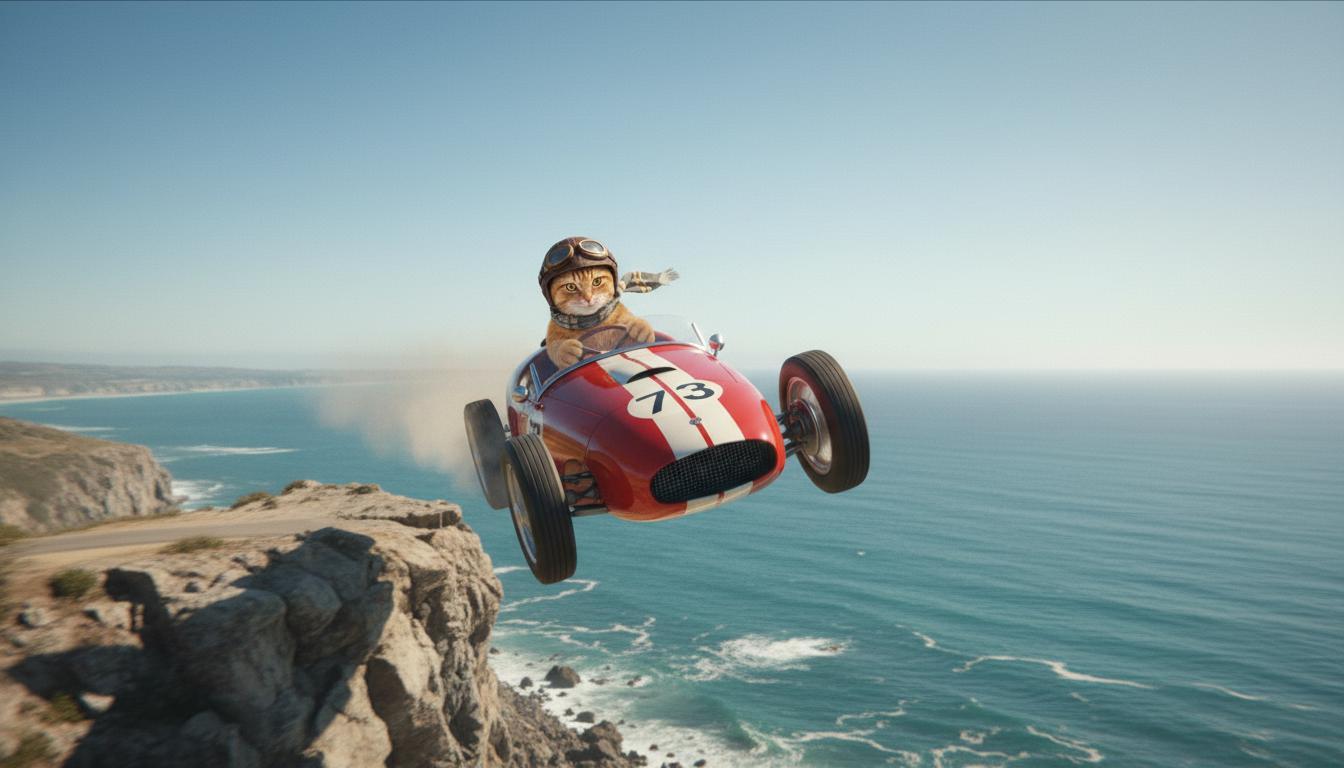
| Primeira imagem (gerada pelo Nano Banana) Uma imagem frontal fotorrealista de alta qualidade de um gato laranja dirigindo um carro de corrida conversível vermelho na costa da Riviera Francesa. |

|
| Última imagem (gerada pelo Nano Banana) Mostre o que acontece quando o carro sai de um penhasco. |
|
| Vídeo de saída (gerado pelo Veo 3.1) Opcional |
|
Esse recurso oferece controle preciso sobre a composição da foto, permitindo que você defina o frame inicial e final. Faça upload de uma imagem ou use um frame de uma geração de vídeo anterior para garantir que a cena comece e termine exatamente como você imagina.
Comandos de extensão
Para estender seu vídeo gerado pelo Veo com o Veo 3.1 (não disponível para o Veo 3.1 Lite), use o vídeo como entrada junto com um comando de texto opcional. A extensão finaliza o último segundo ou 24 frames do vídeo e continua a ação.
A voz não poderá ser estendida de forma eficaz se não estiver presente no último segundo do vídeo.
| Comando | Resultado gerado |
|---|---|
| Vídeo de entrada (gerado pelo Veo 3.1) O parapente decola do topo da montanha e começa a planar sobre os vales cobertos de flores. |
|
| Vídeo de saída (gerado pelo Veo 3.1) Estenda este vídeo com o parapente descendo lentamente. |
|
Exemplos de comandos e saídas
Esta seção apresenta vários comandos, destacando como os detalhes descritivos podem melhorar o resultado de cada vídeo.
Sinos
Este vídeo demonstra como usar os elementos dos conceitos básicos de criação de comandos no seu comando.
| Comando | Resultado gerado |
|---|---|
| Close-up (composição) de pingentes de gelo derretendo (objeto) em uma parede de rocha congelada (contexto) com tons de azul frio (ambiente), zoom (movimento da câmera) mantendo detalhes em close-up de gotas de água (ação). |
|
Homem no telefone
Esses vídeos mostram como revisar seu comando com detalhes cada vez mais específicos para que o Veo refine o resultado de acordo com suas preferências.
| Comando | Resultado gerado |
|---|---|
| Menos detalhes A câmera se aproxima para mostrar um close de um homem desesperado em um sobretudo verde. Ele está fazendo uma ligação em um telefone de disco de parede com uma luz verde neon. Parece uma cena de filme. |
|
| Mais detalhes Uma cena cinematográfica em close-up mostra um homem desesperado em um sobretudo verde desgastado enquanto ele disca em um telefone de disco montado em uma parede de tijolos áspera, banhado pelo brilho misterioso de um letreiro de neon verde. A câmera se aproxima, revelando a tensão em sua mandíbula e o desespero estampado em seu rosto enquanto ele tenta fazer a ligação. A profundidade de campo reduzida foca na testa franzida dele e no telefone preto, desfocando o fundo em um mar de cores neon e sombras indistintas, criando uma sensação de urgência e isolamento. |
|
Leopardo-das-neves
| Comando | Resultado gerado |
|---|---|
| Comando simples: Uma criatura fofa com pelo de leopardo-das-neves está caminhando em uma floresta de inverno, renderização no estilo de desenho animado 3D. |

|
| Comando detalhado: Crie uma cena curta de animação 3D em um estilo de desenho animado alegre. Uma criatura fofa com pelo de leopardo-das-neves, olhos grandes e expressivos e uma forma amigável e arredondada corre alegremente por uma floresta de inverno mágica. A cena deve mostrar árvores arredondadas cobertas de neve, flocos de neve caindo suavemente e luz solar quente filtrada pelos galhos. Os movimentos saltitantes e o sorriso largo da criatura devem transmitir pura alegria. Busque um tom otimista e emocionante, com cores vivas e alegres e animações divertidas. |

|
Exemplos por elementos de escrita
Estes exemplos mostram como refinar seus comandos de acordo com cada elemento básico.
Assunto e contexto
Especifique o foco principal (objeto) e o plano de fundo ou ambiente (contexto).
| Comando | Resultado gerado |
|---|---|
| Uma renderização arquitetônica de um prédio de apartamentos de concreto branco com formas orgânicas fluidas, que se misturam perfeitamente com vegetação exuberante e elementos futuristas |
|
| Um satélite flutuando no espaço sideral com a lua e algumas estrelas ao fundo. |
|
Ação
Especifique o que o sujeito está fazendo (por exemplo, caminhando, correndo ou virando a cabeça).
| Comando | Resultado gerado |
|---|---|
| Uma tomada aberta de uma mulher caminhando pela praia, olhando para o horizonte com um semblante de satisfação e relaxamento ao pôr do sol. |
|
Estilo
Adicione palavras-chave para direcionar a geração para uma estética específica (por exemplo, surreal, vintage, futurista, film noir).
| Comando | Resultado gerado |
|---|---|
| Estilo de filme noir, homem e mulher andando na rua, mistério, cinematográfico, preto e branco. |
|
Movimento e composição da câmera
Especifique como a câmera se move (tomada em primeira pessoa, vista aérea, vista de drone) e como a cena é enquadrada (plano aberto, plano fechado, ângulo baixo).
| Comando | Resultado gerado |
|---|---|
| Uma tomada em primeira pessoa de um carro vintage dirigindo na chuva, no Canadá à noite, cinematográfica. |
|
| Detalhe máximo de um olho com o reflexo de uma cidade. |
|
Ambiente
As paletas de cores e a iluminação influenciam o clima. Tente termos como "tons quentes de laranja suave", "luz natural", "nascer do sol" ou "tons de azul frio".
| Comando | Resultado gerado |
|---|---|
| Close de uma garota segurando um filhote adorável de golden retriever no parque, luz do sol. |

|
| Close cinematográfico de uma mulher triste andando de ônibus na chuva, tons de azul frio, clima triste. |

|
Proporções
O Veo permite especificar a proporção do vídeo.
| Comando | Resultado gerado |
|---|---|
| Widescreen (16:9) Crie um vídeo com uma vista de drone de um homem dirigindo um carro conversível vermelho em Palm Springs, década de 1970, luz solar quente, sombras longas. |

|
| Retrato (9:16) Crie um vídeo destacando os melhores momentos do movimento suave de uma cachoeira majestosa no Havaí em uma floresta tropical exuberante. Foque no fluxo realista da água, na folhagem detalhada e na iluminação natural para transmitir tranquilidade. Capture a água corrente, a atmosfera enevoada e a luz do sol filtrada pela copa densa das árvores. Use movimentos de câmera suaves e cinematográficos para mostrar a cachoeira e os arredores. Busque um tom pacífico e realista, transportando o espectador para a beleza serena da floresta tropical havaiana. |

|
Versões do modelo
Confira a página Preços e Limites de taxa para mais detalhes de uso específicos do modelo Veo.
Pré-lançamento do Veo 3.1
| Propriedade | Descrição |
|---|---|
| Código do modelo |
API Gemini
|
| Tipos de dados aceitos |
Entrada Texto, imagem Saída Vídeo com áudio |
| Limites de |
Entrada de texto 1.024 tokens Vídeo de saída 1 |
| Atualização mais recente | Janeiro de 2026 |
Veo 3.1 Fast Preview
| Propriedade | Descrição |
|---|---|
| Código do modelo |
API Gemini
|
| Tipos de dados aceitos |
Entrada Texto, imagem Saída Vídeo com áudio |
| Limites de |
Entrada de texto 1.024 tokens Vídeo de saída 1 |
| Atualização mais recente | Janeiro de 2026 |
Pré-lançamento do Veo 3.1 Lite
| Propriedade | Descrição |
|---|---|
| Código do modelo |
API Gemini
|
| Tipos de dados aceitos |
Entrada Texto, imagem Saída Vídeo com áudio |
| Limites de |
Entrada de texto 1.024 tokens Vídeo de saída 1 |
| Atualização mais recente | Março de 2026 |
Veo 3 (descontinuado)
| Propriedade | Descrição |
|---|---|
| Código do modelo |
API Gemini
|
| Tipos de dados aceitos |
Entrada Texto, imagem Saída Vídeo com áudio |
| Limites de |
Entrada de texto 1.024 tokens Vídeo de saída 1 |
| Atualização mais recente | Julho de 2025 |
Veo 3 Fast (descontinuado)
| Propriedade | Descrição |
|---|---|
| Código do modelo |
API Gemini
|
| Tipos de dados aceitos |
Entrada Texto, imagem Saída Vídeo com áudio |
| Limites de |
Entrada de texto 1.024 tokens Vídeo de saída 1 |
| Atualização mais recente | Julho de 2025 |
As versões do Veo Fast permitem que os desenvolvedores criem vídeos com som, mantendo a alta qualidade e otimizando a velocidade e os casos de uso comercial. Eles são ideais para serviços de back-end que geram anúncios de forma programática, ferramentas para testes A/B rápidos de conceitos de criativos ou apps que precisam produzir conteúdo para redes sociais rapidamente.
A seguir
- Comece a usar a API Veo 3.1 testando o Guia de início rápido do Veo no Colab e o applet do Veo 3.1.
- Aprenda a escrever comandos ainda melhores com nossa Introdução ao design de comandos.