

Com a replicação de voz, é possível replicar as características vocais de um falante usando uma pequena amostra de áudio com o endpoint Voices da API Gemini (POST /v1beta/voices). A conversão de texto em voz do Gemini 3.8 Flash (gemini-3.8-flash-tts) e a conversão de texto em voz do Gemini 3.8 Flash-Lite (gemini-3.8-flash-lite-tts) são compatíveis com a replicação de voz.
A maneira mais rápida de replicar, verificar o consentimento e testar uma voz replicada é
com a experiência interativa de Replicação de voz no
Google AI Studio. Você pode gravar
ou fazer upload de clipes de referência e consentimento diretamente no navegador, visualizar a
voz e copiar o ID voice_... resultante diretamente no código do aplicativo.
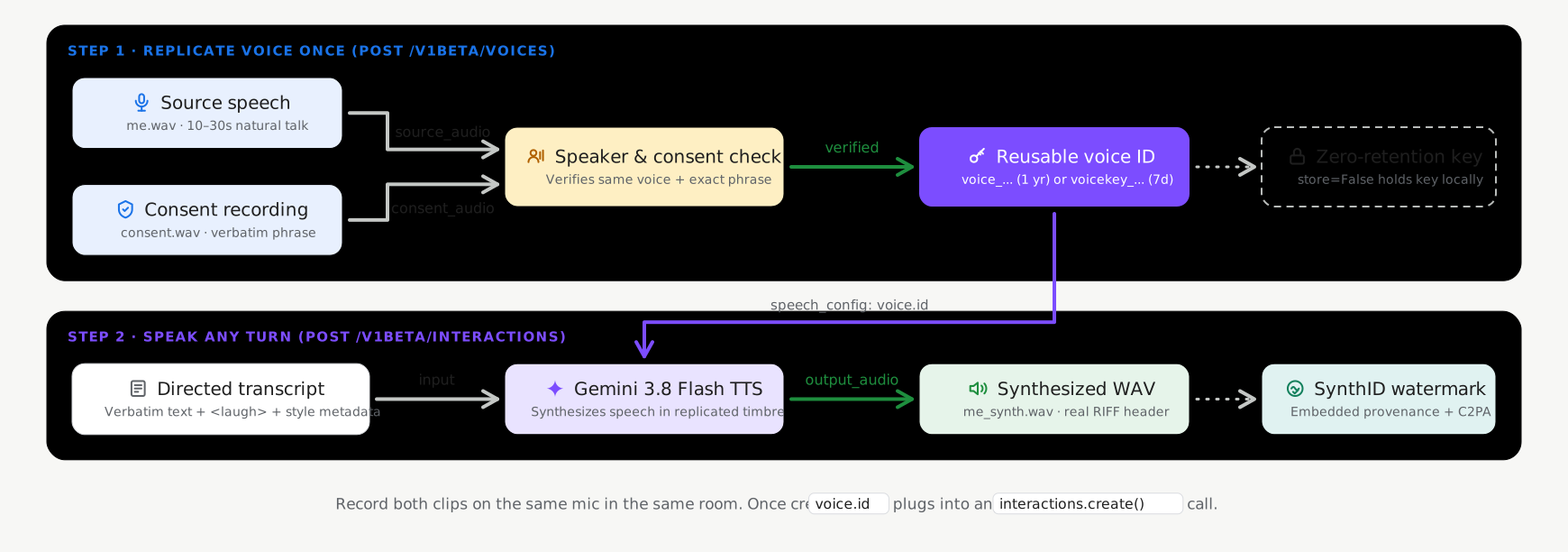
Modos de armazenamento com e sem estado
A replicação de voz oferece suporte a dois modos de armazenamento ao chamar voices.create
(POST /v1beta/voices), com o armazenamento com estado ativado por padrão:
- Armazenamento com estado (
store=True, padrão recomendado): o Google armazena seu perfil de voz verificado no projeto e retorna umvoice_id(replicated_voice.id, comovoice_abc123...) simples e persistente. Você pode transmitir essevoice_identre solicitações e gerenciá-lo comvoices.list(),voices.get()evoices.delete(). - Chaves sem estado gerenciadas pelo cliente (
store=False, opcional): para cargas de trabalho que exigem persistência zero do lado do servidor de perfis biométricos de voz, definastore=False. A API retorna umvoice_keycriptografado e independente (replicated_voice.key, começando comvoicekey_...) que seu aplicativo armazena localmente e transmite diretamente em solicitações de síntese.
| Modo de armazenamento | Identificador | Limite de projetos | Retenção (TTL) |
|---|---|---|---|
Vozes com estado (store=True) |
voice_... |
200 vozes por projeto (compartilhadas entre vozes solicitadas e replicadas) | 1 ano |
Chaves de voz sem estado (store=False) |
voicekey_... |
Gerenciada pelo cliente | 7 dias |
Requisitos de áudio e consentimento
Cada solicitação de replicação de CreateVoice exige duas gravações de áudio de humanos reais do mesmo falante adulto (WAV mono de 16 bits e 24 kHz recomendado):
- Áudio de referência (
source_audio): um clipe de 10 a 30 segundos de fala limpa e natural do falante cuja voz você quer replicar. - Áudio de consentimento (
consent_audio): uma gravação do mesmo locutor recitando claramente a declaração de consentimento obrigatória em um dos idiomas disponíveis (por exemplo, em inglês): > "I am the owner of this voice and I consent to Google using this voice to > create a synthetic voice model."
Criar uma voz replicada (padrão com estado)
Use o SDK GenAI do Google (google-genai 2.25.0+ / @google/genai 2.24.0+) ou a API REST
com store=True para criar e salvar um perfil de voz replicado no seu projeto:
Python
import base64
from google import genai

client = genai.Client()

with open("reference_speaker.wav", "rb") as f:
    source_b64 = base64.b64encode(f.read()).decode("utf-8")

with open("speaker_consent.wav", "rb") as f:
    consent_b64 = base64.b64encode(f.read()).decode("utf-8")

# Create a persistent replicated voice (store=True)
replicated_voice = client.voices.create(
    store=True,
    voice={
        "model": "gemini-3.8-flash-tts",
        "type": "replicated",
        "display_name": "Custom Replicated Speaker",
        "replicated": {
            "source_audio": {
                "mime_type": "audio/wav",
                "data": source_b64,
            },
            "consent_audio": {
                "mime_type": "audio/wav",
                "data": consent_b64,
            },
        },
    },
)

print(f"Created voice ID: {replicated_voice.id}")
JavaScript
import * as fs from "node:fs";
import { GoogleGenAI } from "@google/genai";

const ai = new GoogleGenAI();

const sourceB64 = fs.readFileSync("reference_speaker.wav").toString("base64");
const consentB64 = fs.readFileSync("speaker_consent.wav").toString("base64");

// Create a persistent replicated voice (store: true)
const replicatedVoice = await ai.voices.create({
  store: true,
  voice: {
    model: "gemini-3.8-flash-tts",
    type: "replicated",
    display_name: "Custom Replicated Speaker",
    replicated: {
      source_audio: {
        mime_type: "audio/wav",
        data: sourceB64,
      },
      consent_audio: {
        mime_type: "audio/wav",
        data: consentB64,
      },
    },
  },
});

console.log(`Created voice ID: ${replicatedVoice.id}`);
REST
SOURCE_B64=$(base64 -w 0 reference_speaker.wav)
CONSENT_B64=$(base64 -w 0 speaker_consent.wav)

curl "https://generativelanguage.googleapis.com/v1beta/voices" \
  -H "x-goog-api-key: $GEMINI_API_KEY" \
  -H "Content-Type: application/json" \
  -X POST \
  -d "{
    \"store\": true,
    \"voice\": {
      \"model\": \"gemini-3.8-flash-tts\",
      \"type\": \"replicated\",
      \"display_name\": \"Custom Replicated Speaker\",
      \"replicated\": {
        \"source_audio\": {
          \"mime_type\": \"audio/wav\",
          \"data\": \"$SOURCE_B64\"
        },
        \"consent_audio\": {
          \"mime_type\": \"audio/wav\",
          \"data\": \"$CONSENT_B64\"
        }
      }
    }
  }"
Sintetizar a fala com sua voz replicada
Transmita o id (voice_...) retornado na sua solicitação de síntese:
Python
import base64
from google import genai

client = genai.Client()

interaction = client.interactions.create(
    model="gemini-3.8-flash-tts",
    input=[{
        "type": "user_input",
        "content": [{
            "type": "text",
            "text": (
                "Hello! This audio was synthesized using a replicated"
                " speaker voice."
            ),
            "annotations": [{
                "type": "speech_metadata",
                "style": "warm and conversational",
            }],
        }],
    }],
    response_format={"type": "audio"},
    generation_config={
        "speech_config": [
            {"voice": replicated_voice.id},
        ]
    },
)

with open("replicated_speech.wav", "wb") as f:
    f.write(base64.b64decode(interaction.output_audio.data))
JavaScript
import * as fs from "node:fs";
import { GoogleGenAI } from "@google/genai";

const ai = new GoogleGenAI();

const interaction = await ai.interactions.create({
  model: "gemini-3.8-flash-tts",
  input: [{
    type: "user_input",
    content: [{
      type: "text",
      text: "Hello! This audio was synthesized using a replicated speaker voice.",
      annotations: [{
        type: "speech_metadata",
        style: "warm and conversational",
      }],
    }],
  }],
  response_format: { type: "audio" },
  generation_config: {
    speech_config: [
      { voice: replicatedVoice.id },
    ],
  },
});

fs.writeFileSync("replicated_speech.wav", Buffer.from(interaction.output_audio.data, "base64"));
REST
curl "https://generativelanguage.googleapis.com/v1beta/interactions" \
  -H "x-goog-api-key: $GEMINI_API_KEY" \
  -H "Content-Type: application/json" \
  -X POST \
  -d '{
    "model": "gemini-3.8-flash-tts",
    "input": [{
      "type": "user_input",
      "content": [{
        "type": "text",
        "text": "Hello! This audio was synthesized using a replicated speaker voice.",
        "annotations": [{
          "type": "speech_metadata",
          "style": "warm and conversational"
        }]
      }]
    }],
    "response_format": {"type": "audio"},
    "generation_config": {
      "speech_config": [
        {"voice": "voice_YOUR_REPLICATED_VOICE_ID"}
      ]
    }
  }'
Gerenciar vozes replicadas armazenadas
Quando criadas com store=True, as vozes replicadas podem ser listadas, filtradas, inspecionadas e excluídas pela API Voices. Consulte Biblioteca de vozes estendida e filtragem para conferir todos os parâmetros de filtro:
Python
from google import genai

client = genai.Client()

# List stored replicated voices in your project
response = client.voices.list(type_=["replicated"])
for voice in response.voices or []:
    print(voice.id, voice.display_name, voice.type)

# Retrieve a specific voice by ID
voice_details = client.voices.get(id=replicated_voice.id)

# Delete a stored replicated voice
client.voices.delete(id=replicated_voice.id)
JavaScript
import { GoogleGenAI } from "@google/genai";

const ai = new GoogleGenAI();

// List stored replicated voices in your project
const response = await ai.voices.list({ type: ["replicated"] });
for (const voice of response.voices ?? []) {
  console.log(voice.id, voice.display_name, voice.type);
}

// Retrieve a specific voice by ID
const voiceDetails = await ai.voices.get(replicatedVoice.id);

// Delete a stored replicated voice
await ai.voices.delete(replicatedVoice.id);
REST
# List stored replicated voices in your project
curl -G "https://generativelanguage.googleapis.com/v1beta/voices" \
  -H "x-goog-api-key: $GEMINI_API_KEY" \
  --data-urlencode "type=replicated"

# Retrieve a specific voice by ID
curl "https://generativelanguage.googleapis.com/v1beta/voices/voice_YOUR_REPLICATED_VOICE_ID" \
  -H "x-goog-api-key: $GEMINI_API_KEY"

# Delete a stored replicated voice
curl -X DELETE "https://generativelanguage.googleapis.com/v1beta/voices/voice_YOUR_REPLICATED_VOICE_ID" \
  -H "x-goog-api-key: $GEMINI_API_KEY"
Opção: chaves de voz gerenciadas pelo cliente sem estado (store=False)
Se o aplicativo não exigir persistência do lado do servidor dos perfis de voz, defina
store=False ao criar a voz replicada. A API retorna um voice_key criptografado (replicated_voice.key, começando com voicekey_...) que você armazena do lado do cliente e transmite diretamente em qualquer lugar em que um ID voice seja aceito:
Python
import base64
from google import genai

client = genai.Client()

with open("reference_speaker.wav", "rb") as f:
    source_b64 = base64.b64encode(f.read()).decode("utf-8")

with open("speaker_consent.wav", "rb") as f:
    consent_b64 = base64.b64encode(f.read()).decode("utf-8")

# Create a stateless client-managed voice key (store=False)
replicated_voice = client.voices.create(
    store=False,
    voice={
        "model": "gemini-3.8-flash-tts",
        "type": "replicated",
        "replicated": {
            "source_audio": {"mime_type": "audio/wav", "data": source_b64},
            "consent_audio": {"mime_type": "audio/wav", "data": consent_b64},
        },
    },
)

# Pass replicated_voice.key ("voicekey_...") directly as the speaker voice
interaction = client.interactions.create(
    model="gemini-3.8-flash-tts",
    input=[{
        "type": "user_input",
        "content": [{
            "type": "text",
            "text": "Hello! This audio uses a stateless client-managed voice key.",
            "annotations": [{
                "type": "speech_metadata",
                "style": "warm and conversational",
            }],
        }],
    }],
    response_format={"type": "audio"},
    generation_config={
        "speech_config": [
            {"voice": replicated_voice.key},
        ]
    },
)
JavaScript
import * as fs from "node:fs";
import { GoogleGenAI } from "@google/genai";

const ai = new GoogleGenAI();

const sourceB64 = fs.readFileSync("reference_speaker.wav").toString("base64");
const consentB64 = fs.readFileSync("speaker_consent.wav").toString("base64");

// Create a stateless client-managed voice key (store: false)
const replicatedVoice = await ai.voices.create({
  store: false,
  voice: {
    model: "gemini-3.8-flash-tts",
    type: "replicated",
    replicated: {
      source_audio: { mime_type: "audio/wav", data: sourceB64 },
      consent_audio: { mime_type: "audio/wav", data: consentB64 },
    },
  },
});

// Pass replicatedVoice.key ("voicekey_...") directly as the speaker voice
const interaction = await ai.interactions.create({
  model: "gemini-3.8-flash-tts",
  input: [{
    type: "user_input",
    content: [{
      type: "text",
      text: "Hello! This audio uses a stateless client-managed voice key.",
      annotations: [{
        type: "speech_metadata",
        style: "warm and conversational",
      }],
    }],
  }],
  response_format: { type: "audio" },
  generation_config: {
    speech_config: [
      { voice: replicatedVoice.key },
    ],
  },
});
REST
SOURCE_B64=$(base64 -w 0 reference_speaker.wav)
CONSENT_B64=$(base64 -w 0 speaker_consent.wav)

curl "https://generativelanguage.googleapis.com/v1beta/voices" \
  -H "x-goog-api-key: $GEMINI_API_KEY" \
  -H "Content-Type: application/json" \
  -X POST \
  -d "{
    \"store\": false,
    \"voice\": {
      \"model\": \"gemini-3.8-flash-tts\",
      \"type\": \"replicated\",
      \"replicated\": {
        \"source_audio\": {\"mime_type\": \"audio/wav\", \"data\": \"$SOURCE_B64\"},
        \"consent_audio\": {\"mime_type\": \"audio/wav\", \"data\": \"$CONSENT_B64\"}
      }
    }
  }"
Frases de consentimento disponíveis por idioma
O áudio de consentimento precisa recitar claramente a declaração exata em um dos 30 locais de idioma aceitos:
| Idioma | Localidade (lang_id) |
Declaração de consentimento literal |
|---|---|---|
| Árabe | ar-XA |
أنا مالك هذا الصوت وأوافق على أن تستخدم Google هذا الصوت لإنشاء نموذج صوتي اصطناعي. |
| Bengalês | bn-IN |
আমি এই ভয়েসের মালিক এবং আমি একটি সিন্থেটিক ভয়েস মডেল তৈরি করতে এই ভয়েস ব্যবহার করে Google-এর সাথে সম্মতি দিচ্ছি। |
| Chinês (simplificado) | zh-CN |
我是此声音的拥有者并授权谷歌使用此声音创建语音合成模型 |
| Holandês | nl-NL |
Ik ben de eigenaar van deze stem en ik geef Google toestemming om deze stem te gebruiken om een synthetisch stemmodel te maken. |
| Inglês (EUA) | en-US |
I am the owner of this voice and I consent to Google using this voice to create a synthetic voice model. |
| Inglês (Reino Unido) | en-GB |
I am the owner of this voice and I consent to Google using this voice to create a synthetic voice model. |
| Inglês (Índia) | en-IN |
I am the owner of this voice and I consent to Google using this voice to create a synthetic voice model. |
| Inglês (Austrália) | en-AU |
Eu sou o proprietário desta voz e concordo que o Google a use para criar um modelo de voz sintética. |
| French (France) | fr-FR |
Je suis le propriétaire de cette voix et j'autorise Google à utiliser cette voix pour créer un modèle de voix synthétique. |
| Francês (Canadá) | fr-CA |
Je suis le propriétaire de cette voix et j'autorise Google à utiliser cette voix pour créer un modèle de voix synthétique. |
| Alemão | de-DE |
Ich bin der Eigentümer dieser Stimme und bin damit einverstanden, dass Google diese Stimme zur Erstellung eines synthetischen Stimmmodells verwendet. |
| Guzerate | gu-IN |
હું આ વોઈસનો માલિક છું અને સિન્થેટિક વોઈસ મોડલ બનાવવા માટે આ વોઈસનો ઉપયોગ કરીને google ને હું સંમતિ આપું છું |
| Hindi | hi-IN |
मैं इस आवाज का मालिक हूं और मैं सिंथेटिक आवाज मॉडल बनाने के लिए Google को इस आवाज का उपयोग करने की सहमति देता हूं |
| Indonésio | id-ID |
Saya pemilik suara ini dan saya menyetujui Google menggunakan suara ini untuk membuat model suara sintetis. |
| Italiano | it-IT |
Sono il proprietario di questa voce e acconsento che Google la utilizzi per creare un modello di voce sintetica. |
| Japonês | ja-JP |
私はこの音声の所有者であり、Googleがこの音声を使用して音声合成モデルを作成することを承認します。 |
| Canarês | kn-IN |
ನಾನು ಈ ಧ್ವನಿಯ ಮಾಲಿಕ ಮತ್ತು ಸಂಶ್ಲೇಷಿತ ಧ್ವನಿ ಮಾದರಿಯನ್ನು ರಚಿಸಲು ಈ ಧ್ವನಿಯನ್ನು ಬಳಸಿಕೊಂಡುಗೂಗಲ್ ಗೆ ನಾನು ಸಮ್ಮತಿಸುತ್ತೇನೆ. |
| Coreano | ko-KR |
나는 이 음성의 소유자이며 구글이 이 음성을 사용하여 음성 합성 모델을 생성할 것을 허용합니다. |
| Malaiala | ml-IN |
ഈ ശബ്ദത്തിന്റെ ഉടമ ഞാനാണ്, ഒരു സിന്തറ്റിക് വോയ്സ് മോഡൽ സൃഷ്ടിക്കാൻ ഈ ശബ്ദം ഉപയോഗിക്കുന്നതിന് ഞാൻ Google-ന് സമ്മതം നൽകുന്നു. |
| Marati | mr-IN |
मी या आवाजाचा मालक आहे आणि सिंथेटिक व्हॉइस मॉडेल तयार करण्यासाठी हा आवाज वापरण्यासाठी मी Google ला संमती देतो |
| Polonês | pl-PL |
Jestem właścicielem tego głosu i wyrażam zgodę na wykorzystanie go przez Google w celu utworzenia syntetycznego modelu głosu. |
| Português (Brasil) | pt-BR |
Eu sou o proprietário desta voz e autorizo o Google a usá-la para criar um modelo de voz sintética. |
| Russo | ru-RU |
Я являюсь владельцем этого голоса и даю согласие Google на использование этого голоса для создания модели синтетического голоса. |
| Spanish (Spain) | es-ES |
Soy el propietario de esta voz y doy mi consentimiento para que Google la utilice para crear un modelo de voz sintética. |
| Espanhol (EUA) | es-US |
Soy el propietario de esta voz y doy mi consentimiento para que Google la utilice para crear un modelo de voz sintética. |
| Tâmil | ta-IN |
நான் இந்த குரலின் உரிமையாளர் மற்றும் செயற்கை குரல் மாதிரியை உருவாக்க இந்த குரலை பயன்படுத்த குகல்க்கு நான் ஒப்புக்கொள்கிறேன். |
| Telugu | te-IN |
నేను ఈ వాయిస్ యజమానిని మరియు సింతటిక్ వాయిస్ మోడల్ ని రూపొందించడానికి ఈ వాయిస్ ని ఉపయోగించడానికి googleకి నేను సమ్మతిస్తున్నాను. |
| Tailandês | th-TH |
ฉันเป็นเจ้าของเสียงนี้ และฉันยินยอมให้ Google ใช้เสียงนี้เพื่อสร้างแบบจำลองเสียงสังเคราะห์ |
| Turco | tr-TR |
Bu sesin sahibi benim ve Google'ın bu sesi kullanarak sentetik bir ses modeli oluşturmasına izin veriyorum. |
| Vietnamita | vi-VN |
Tôi là chủ sở hữu giọng nói này và tôi đồng ý cho Google sử dụng giọng nói này để tạo mô hình giọng nói tổng hợp. |
Práticas recomendadas para gravar áudio de referência
- Grave em um ambiente silencioso:minimize o eco do ambiente, o ruído de fundo, a música e as vozes sobrepostas.
- Corresponda as condições de gravação:grave
source_audioeconsent_audiono mesmo microfone e ambiente acústico para que a verificação de voz seja bem-sucedida. - Converter para WAV mono de 24 kHz:para ter os melhores resultados, faça uma nova amostragem do áudio de entrada para WAV mono PCM de 16 bits e 24 kHz antes da codificação.
A seguir
- Saiba como criar personas personalizadas com base em descrições de texto no Design de voz.
- Confira o estilo no nível da vez, tags inline e diálogo com vários locutores no guia da conversão de texto em voz.