

Replikasi suara memungkinkan Anda mereplikasi karakteristik vokal penutur dari sampel audio singkat menggunakan endpoint Suara Gemini API (POST /v1beta/voices). Baik Gemini 3.8 Flash TTS (gemini-3.8-flash-tts) maupun Gemini 3.8 Flash-Lite TTS (gemini-3.8-flash-lite-tts) mendukung Replikasi suara.
Cara tercepat untuk mereplikasi, memverifikasi izin, dan menguji suara yang direplikasi adalah dengan pengalaman Replikasi Suara interaktif di Google AI Studio. Anda dapat merekam
atau mengupload klip rujukan dan izin langsung di browser, melihat pratinjau
suara, dan menyalin ID voice_... yang dihasilkan langsung ke kode
aplikasi Anda.
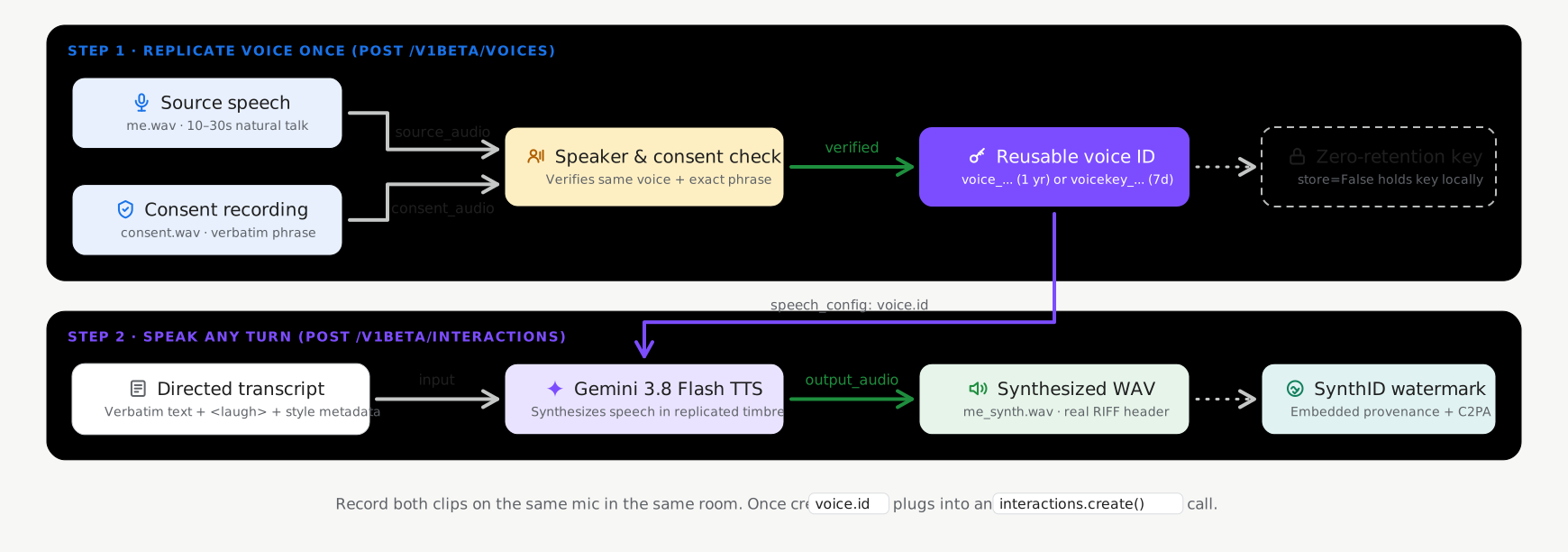
Mode penyimpanan stateful versus stateless
Replikasi suara mendukung dua mode penyimpanan saat memanggil voices.create
(POST /v1beta/voices), dengan penyimpanan stateful diaktifkan secara default:
- Penyimpanan berstatus (
store=True, default yang direkomendasikan): Google menyimpan profil suara terverifikasi Anda di project Anda dan menampilkanvoice_id(replicated_voice.id, sepertivoice_abc123...) yang ringan dan persisten. Anda dapat meneruskanvoice_idini di seluruh permintaan dan mengelolanya denganvoices.list(),voices.get(), danvoices.delete(). - Kunci yang dikelola klien tanpa status (
store=False, opsional): Untuk beban kerja yang memerlukan persistensi sisi server profil suara biometrik nol, tetapkanstore=False. API menampilkanvoice_keymandiri terenkripsi (replicated_voice.key, dimulai denganvoicekey_...) yang disimpan secara lokal oleh aplikasi Anda dan diteruskan langsung dalam permintaan sintesis.
| Mode penyimpanan | ID | Batas project | Retensi (TTL) |
|---|---|---|---|
Suara dengan status (store=True) |
voice_... |
200 suara per project (dibagikan di seluruh suara yang diminta dan direplikasi) | 1 year |
Kunci suara tanpa status (store=False) |
voicekey_... |
Dikelola klien | 7 hari |
Persyaratan audio dan izin
Setiap permintaan replikasi CreateVoice memerlukan dua rekaman audio manusia asli
dari pembicara dewasa yang sama (direkomendasikan WAV 16-bit mono 24 kHz):
- Audio referensi (
source_audio): Klip berdurasi 10–30 detik yang berisi ucapan bersih dan alami dari pembicara yang suaranya ingin Anda tiru. - Audio izin (
consent_audio): Rekaman suara dari penutur yang sama yang dengan jelas melafalkan pernyataan izin wajib dalam salah satu bahasa yang didukung (misalnya, dalam bahasa Inggris): > "Saya adalah pemilik suara ini dan saya mengizinkan Google menggunakan suara ini untuk > membuat model suara sintetis."
Membuat suara yang direplikasi (default stateful)
Gunakan Google GenAI SDK (google-genai 2.25.0+ / @google/genai 2.24.0+) atau REST API
dengan store=True untuk membuat dan menyimpan profil suara yang direplikasi di project Anda:
Python
import base64
from google import genai

client = genai.Client()

with open("reference_speaker.wav", "rb") as f:
    source_b64 = base64.b64encode(f.read()).decode("utf-8")

with open("speaker_consent.wav", "rb") as f:
    consent_b64 = base64.b64encode(f.read()).decode("utf-8")

# Create a persistent replicated voice (store=True)
replicated_voice = client.voices.create(
    store=True,
    voice={
        "model": "gemini-3.8-flash-tts",
        "type": "replicated",
        "display_name": "Custom Replicated Speaker",
        "replicated": {
            "source_audio": {
                "mime_type": "audio/wav",
                "data": source_b64,
            },
            "consent_audio": {
                "mime_type": "audio/wav",
                "data": consent_b64,
            },
        },
    },
)

print(f"Created voice ID: {replicated_voice.id}")
JavaScript
import * as fs from "node:fs";
import { GoogleGenAI } from "@google/genai";

const ai = new GoogleGenAI();

const sourceB64 = fs.readFileSync("reference_speaker.wav").toString("base64");
const consentB64 = fs.readFileSync("speaker_consent.wav").toString("base64");

// Create a persistent replicated voice (store: true)
const replicatedVoice = await ai.voices.create({
  store: true,
  voice: {
    model: "gemini-3.8-flash-tts",
    type: "replicated",
    display_name: "Custom Replicated Speaker",
    replicated: {
      source_audio: {
        mime_type: "audio/wav",
        data: sourceB64,
      },
      consent_audio: {
        mime_type: "audio/wav",
        data: consentB64,
      },
    },
  },
});

console.log(`Created voice ID: ${replicatedVoice.id}`);
REST
SOURCE_B64=$(base64 -w 0 reference_speaker.wav)
CONSENT_B64=$(base64 -w 0 speaker_consent.wav)

curl "https://generativelanguage.googleapis.com/v1beta/voices" \
  -H "x-goog-api-key: $GEMINI_API_KEY" \
  -H "Content-Type: application/json" \
  -X POST \
  -d "{
    \"store\": true,
    \"voice\": {
      \"model\": \"gemini-3.8-flash-tts\",
      \"type\": \"replicated\",
      \"display_name\": \"Custom Replicated Speaker\",
      \"replicated\": {
        \"source_audio\": {
          \"mime_type\": \"audio/wav\",
          \"data\": \"$SOURCE_B64\"
        },
        \"consent_audio\": {
          \"mime_type\": \"audio/wav\",
          \"data\": \"$CONSENT_B64\"
        }
      }
    }
  }"
Menyintesis ucapan dengan suara replikasi Anda
Teruskan id (voice_...) yang ditampilkan dalam permintaan sintesis Anda:
Python
import base64
from google import genai

client = genai.Client()

interaction = client.interactions.create(
    model="gemini-3.8-flash-tts",
    input=[{
        "type": "user_input",
        "content": [{
            "type": "text",
            "text": (
                "Hello! This audio was synthesized using a replicated"
                " speaker voice."
            ),
            "annotations": [{
                "type": "speech_metadata",
                "style": "warm and conversational",
            }],
        }],
    }],
    response_format={"type": "audio"},
    generation_config={
        "speech_config": [
            {"voice": replicated_voice.id},
        ]
    },
)

with open("replicated_speech.wav", "wb") as f:
    f.write(base64.b64decode(interaction.output_audio.data))
JavaScript
import * as fs from "node:fs";
import { GoogleGenAI } from "@google/genai";

const ai = new GoogleGenAI();

const interaction = await ai.interactions.create({
  model: "gemini-3.8-flash-tts",
  input: [{
    type: "user_input",
    content: [{
      type: "text",
      text: "Hello! This audio was synthesized using a replicated speaker voice.",
      annotations: [{
        type: "speech_metadata",
        style: "warm and conversational",
      }],
    }],
  }],
  response_format: { type: "audio" },
  generation_config: {
    speech_config: [
      { voice: replicatedVoice.id },
    ],
  },
});

fs.writeFileSync("replicated_speech.wav", Buffer.from(interaction.output_audio.data, "base64"));
REST
curl "https://generativelanguage.googleapis.com/v1beta/interactions" \
  -H "x-goog-api-key: $GEMINI_API_KEY" \
  -H "Content-Type: application/json" \
  -X POST \
  -d '{
    "model": "gemini-3.8-flash-tts",
    "input": [{
      "type": "user_input",
      "content": [{
        "type": "text",
        "text": "Hello! This audio was synthesized using a replicated speaker voice.",
        "annotations": [{
          "type": "speech_metadata",
          "style": "warm and conversational"
        }]
      }]
    }],
    "response_format": {"type": "audio"},
    "generation_config": {
      "speech_config": [
        {"voice": "voice_YOUR_REPLICATED_VOICE_ID"}
      ]
    }
  }'
Mengelola suara replikasi tersimpan
Saat dibuat dengan store=True, suara yang direplikasi dapat dicantumkan, difilter,
diperiksa, dan dihapus melalui Voices API (lihat
Extended Voice Library and filtering
untuk semua parameter filter):
Python
from google import genai

client = genai.Client()

# List stored replicated voices in your project
response = client.voices.list(type_=["replicated"])
for voice in response.voices or []:
    print(voice.id, voice.display_name, voice.type)

# Retrieve a specific voice by ID
voice_details = client.voices.get(id=replicated_voice.id)

# Delete a stored replicated voice
client.voices.delete(id=replicated_voice.id)
JavaScript
import { GoogleGenAI } from "@google/genai";

const ai = new GoogleGenAI();

// List stored replicated voices in your project
const response = await ai.voices.list({ type: ["replicated"] });
for (const voice of response.voices ?? []) {
  console.log(voice.id, voice.display_name, voice.type);
}

// Retrieve a specific voice by ID
const voiceDetails = await ai.voices.get(replicatedVoice.id);

// Delete a stored replicated voice
await ai.voices.delete(replicatedVoice.id);
REST
# List stored replicated voices in your project
curl -G "https://generativelanguage.googleapis.com/v1beta/voices" \
  -H "x-goog-api-key: $GEMINI_API_KEY" \
  --data-urlencode "type=replicated"

# Retrieve a specific voice by ID
curl "https://generativelanguage.googleapis.com/v1beta/voices/voice_YOUR_REPLICATED_VOICE_ID" \
  -H "x-goog-api-key: $GEMINI_API_KEY"

# Delete a stored replicated voice
curl -X DELETE "https://generativelanguage.googleapis.com/v1beta/voices/voice_YOUR_REPLICATED_VOICE_ID" \
  -H "x-goog-api-key: $GEMINI_API_KEY"
Opsi: Kunci suara yang dikelola klien tanpa status (store=False)
Jika aplikasi Anda tidak memerlukan persistensi profil suara sisi server, tetapkan
store=False saat membuat suara yang direplikasi. API menampilkan voice_key (replicated_voice.key, dimulai dengan voicekey_...) terenkripsi yang Anda simpan di sisi klien dan teruskan langsung ke mana pun ID voice diterima:
Python
import base64
from google import genai

client = genai.Client()

with open("reference_speaker.wav", "rb") as f:
    source_b64 = base64.b64encode(f.read()).decode("utf-8")

with open("speaker_consent.wav", "rb") as f:
    consent_b64 = base64.b64encode(f.read()).decode("utf-8")

# Create a stateless client-managed voice key (store=False)
replicated_voice = client.voices.create(
    store=False,
    voice={
        "model": "gemini-3.8-flash-tts",
        "type": "replicated",
        "replicated": {
            "source_audio": {"mime_type": "audio/wav", "data": source_b64},
            "consent_audio": {"mime_type": "audio/wav", "data": consent_b64},
        },
    },
)

# Pass replicated_voice.key ("voicekey_...") directly as the speaker voice
interaction = client.interactions.create(
    model="gemini-3.8-flash-tts",
    input=[{
        "type": "user_input",
        "content": [{
            "type": "text",
            "text": "Hello! This audio uses a stateless client-managed voice key.",
            "annotations": [{
                "type": "speech_metadata",
                "style": "warm and conversational",
            }],
        }],
    }],
    response_format={"type": "audio"},
    generation_config={
        "speech_config": [
            {"voice": replicated_voice.key},
        ]
    },
)
JavaScript
import * as fs from "node:fs";
import { GoogleGenAI } from "@google/genai";

const ai = new GoogleGenAI();

const sourceB64 = fs.readFileSync("reference_speaker.wav").toString("base64");
const consentB64 = fs.readFileSync("speaker_consent.wav").toString("base64");

// Create a stateless client-managed voice key (store: false)
const replicatedVoice = await ai.voices.create({
  store: false,
  voice: {
    model: "gemini-3.8-flash-tts",
    type: "replicated",
    replicated: {
      source_audio: { mime_type: "audio/wav", data: sourceB64 },
      consent_audio: { mime_type: "audio/wav", data: consentB64 },
    },
  },
});

// Pass replicatedVoice.key ("voicekey_...") directly as the speaker voice
const interaction = await ai.interactions.create({
  model: "gemini-3.8-flash-tts",
  input: [{
    type: "user_input",
    content: [{
      type: "text",
      text: "Hello! This audio uses a stateless client-managed voice key.",
      annotations: [{
        type: "speech_metadata",
        style: "warm and conversational",
      }],
    }],
  }],
  response_format: { type: "audio" },
  generation_config: {
    speech_config: [
      { voice: replicatedVoice.key },
    ],
  },
});
REST
SOURCE_B64=$(base64 -w 0 reference_speaker.wav)
CONSENT_B64=$(base64 -w 0 speaker_consent.wav)

curl "https://generativelanguage.googleapis.com/v1beta/voices" \
  -H "x-goog-api-key: $GEMINI_API_KEY" \
  -H "Content-Type: application/json" \
  -X POST \
  -d "{
    \"store\": false,
    \"voice\": {
      \"model\": \"gemini-3.8-flash-tts\",
      \"type\": \"replicated\",
      \"replicated\": {
        \"source_audio\": {\"mime_type\": \"audio/wav\", \"data\": \"$SOURCE_B64\"},
        \"consent_audio\": {\"mime_type\": \"audio/wav\", \"data\": \"$CONSENT_B64\"}
      }
    }
  }"
Frasa izin yang didukung menurut bahasa
Audio izin harus membacakan pernyataan persisnya dengan jelas dalam salah satu dari 30 lokalitas bahasa yang didukung:
| Language | Lokalitas (lang_id) |
Pernyataan Izin Kata demi Kata (Verbatim) |
|---|---|---|
| Arab | ar-XA |
أنا مالك هذا الصوت وأوافق على أن تستخدم Google هذا الصوت لإنشاء نموذج صوتي اصطناعي. |
| Bengali | bn-IN |
আমি এই ভয়েসের মালিক এবং আমি একটি সিন্থেটিক ভয়েস মডেল তৈরি করতে এই ভয়েস ব্যবহার করে Google-এর সাথে সম্মতি দিচ্ছি। |
| China (Aksara Sederhana) | zh-CN |
我是此声音的拥有者并授权谷歌使用此声音创建语音合成模型 |
| Belanda | nl-NL |
Ik ben de eigenaar van deze stem en ik geef Google toestemming om deze stem te gebruiken om een synthetisch stemmodel te maken. |
| Inggris (AS) | en-US |
I am the owner of this voice and I consent to Google using this voice to create a synthetic voice model. |
| Inggris (Inggris Raya) | en-GB |
I am the owner of this voice and I consent to Google using this voice to create a synthetic voice model. |
| Inggris (India) | en-IN |
I am the owner of this voice and I consent to Google using this voice to create a synthetic voice model. |
| Inggris (Australia) | en-AU |
I am the owner of this voice and I consent to Google using this voice to create a synthetic voice model. |
| Prancis (Prancis) | fr-FR |
Je suis le propriétaire de cette voix et j'autorise Google à utiliser cette voix pour créer un modèle de voix synthétique. |
| Prancis (Kanada) | fr-CA |
Je suis le propriétaire de cette voix et j'autorise Google à utiliser cette voix pour créer un modèle de voix synthétique. |
| Jerman | de-DE |
Ich bin der Eigentümer dieser Stimme und bin damit einverstanden, dass Google diese Stimme zur Erstellung eines synthetischen Stimmmodells verwendet. |
| Gujarati | gu-IN |
હું આ વોઈસનો માલિક છું અને સિન્થેટિક વોઈસ મોડલ બનાવવા માટે આ વોઈસનો ઉપયોગ કરીને google ને હું સંમતિ આપું છું |
| Hindi | hi-IN |
मैं इस आवाज का मालिक हूं और मैं सिंथेटिक आवाज मॉडल बनाने के लिए Google को इस आवाज का उपयोग करने की सहमति देता हूं |
| Indonesia | id-ID |
Saya pemilik suara ini dan saya menyetujui Google menggunakan suara ini untuk membuat model suara sintetis. |
| Italia | it-IT |
Sono il proprietario di questa voce e acconsento che Google la utilizzi per creare un modello di voce sintetica. |
| Jepang | ja-JP |
私はこの音声の所有者であり、Googleがこの音声を使用して音声合成モデルを作成することを承認します。 |
| Kannada | kn-IN |
ನಾನು ಈ ಧ್ವನಿಯ ಮಾಲಿಕ ಮತ್ತು ಸಂಶ್ಲೇಷಿತ ಧ್ವನಿ ಮಾದರಿಯನ್ನು ರಚಿಸಲು ಈ ಧ್ವನಿಯನ್ನು ಬಳಸಿಕೊಂಡುಗೂಗಲ್ ಗೆ ನಾನು ಸಮ್ಮತಿಸುತ್ತೇನೆ. |
| Korea | ko-KR |
나는 이 음성의 소유자이며 구글이 이 음성을 사용하여 음성 합성 모델을 생성할 것을 허용합니다. |
| Malayalam | ml-IN |
ഈ ശബ്ദത്തിന്റെ ഉടമ ഞാനാണ്, ഒരു സിന്തറ്റിക് വോയ്സ് മോഡൽ സൃഷ്ടിക്കാൻ ഈ ശബ്ദം ഉപയോഗിക്കുന്നതിന് ഞാൻ Google-ന് സമ്മതം നൽകുന്നു. |
| Marathi | mr-IN |
मी या आवाजाचा मालक आहे आणि सिंथेटिक व्हॉइस मॉडेल तयार करण्यासाठी हा आवाज वापरण्यासाठी मी Google ला संमती देतो |
| Polandia | pl-PL |
Jestem właścicielem tego głosu i wyrażam zgodę na wykorzystanie go przez Google w celu utworzenia syntetycznego modelu głosu. |
| Portugis (Brasil) | pt-BR |
Eu sou o proprietário desta voz e autorizo o Google a usá-la para criar um modelo de voz sintética. |
| Rusia | ru-RU |
Я являюсь владельцем этого голоса и даю согласие Google на использование этого голоса для создания модели синтетического голоса. |
| Spanyol (Spanyol) | es-ES |
Soy el propietario de esta voz y doy mi consentimiento para que Google la utilice para crear un modelo de voz sintética. |
| Spanyol (AS) | es-US |
Soy el propietario de esta voz y doy mi consentimiento para que Google la utilice para crear un modelo de voz sintética. |
| Tamil | ta-IN |
நான் இந்த குரலின் உரிமையாளர் மற்றும் செயற்கை குரல் மாதிரியை உருவாக்க இந்த குரலை பயன்படுத்த குகல்க்கு நான் ஒப்புக்கொள்கிறேன். |
| Telugu | te-IN |
నేను ఈ వాయిస్ యజమానిని మరియు సింతటిక్ వాయిస్ మోడల్ ని రూపొందించడానికి ఈ వాయిస్ ని ఉపయోగించడానికి googleకి నేను సమ్మతిస్తున్నాను. |
| Thai | th-TH |
ฉันเป็นเจ้าของเสียงนี้ และฉันยินยอมให้ Google ใช้เสียงนี้เพื่อสร้างแบบจำลองเสียงสังเคราะห์ |
| Turki | tr-TR |
Bu sesin sahibi benim ve Google'ın bu sesi kullanarak sentetik bir ses modeli oluşturmasına izin veriyorum. |
| Vietnam | vi-VN |
Tôi là chủ sở hữu giọng nói này và tôi đồng ý cho Google sử dụng giọng nói này để tạo mô hình giọng nói tổng hợp. |
Praktik terbaik untuk merekam audio referensi
- Merekam di lingkungan yang tenang: Minimalkan gema ruangan, suara bising di latar belakang, musik, dan suara yang tumpang-tindih.
- Cocokkan kondisi perekaman: Rekam
source_audiodanconsent_audiodengan mikrofon yang sama dalam setelan akustik yang sama sehingga pemeriksaan verifikasi penutur berhasil dengan andal. - Konversi ke WAV mono 24 kHz: Untuk hasil terbaik, lakukan resampling audio input ke WAV PCM 16-bit mono 24 kHz sebelum melakukan encoding.
Langkah berikutnya
- Pelajari cara membuat persona kustom dari deskripsi teks di Desain suara.
- Pelajari gaya tingkat giliran bicara, tag inline, dan dialog multi-penutur dalam Panduan text-to-speech.