

음성 복제를 사용하면 Gemini API 음성 엔드포인트 (POST /v1beta/voices)를 사용하여 짧은 오디오 샘플에서 화자의 음성 특징을 복제할 수 있습니다. Gemini 3.8 Flash TTS(gemini-3.8-flash-tts)와 Gemini 3.8 Flash-Lite TTS(gemini-3.8-flash-lite-tts) 모두 음성 복제를 지원합니다.
복제된 음성을 복제하고, 동의를 확인하고, 오디션을 보는 가장 빠른 방법은 Google AI Studio의 대화형 음성 복제 환경을 사용하는 것입니다. 브라우저에서 직접 참조 및 동의 클립을 녹화하거나 업로드하고, 음성을 미리 보고, 결과 voice_... ID를 애플리케이션 코드에 직접 복사할 수 있습니다.
스테이트풀(Stateful) 스토리지 모드와 스테이트리스(Stateless) 스토리지 모드
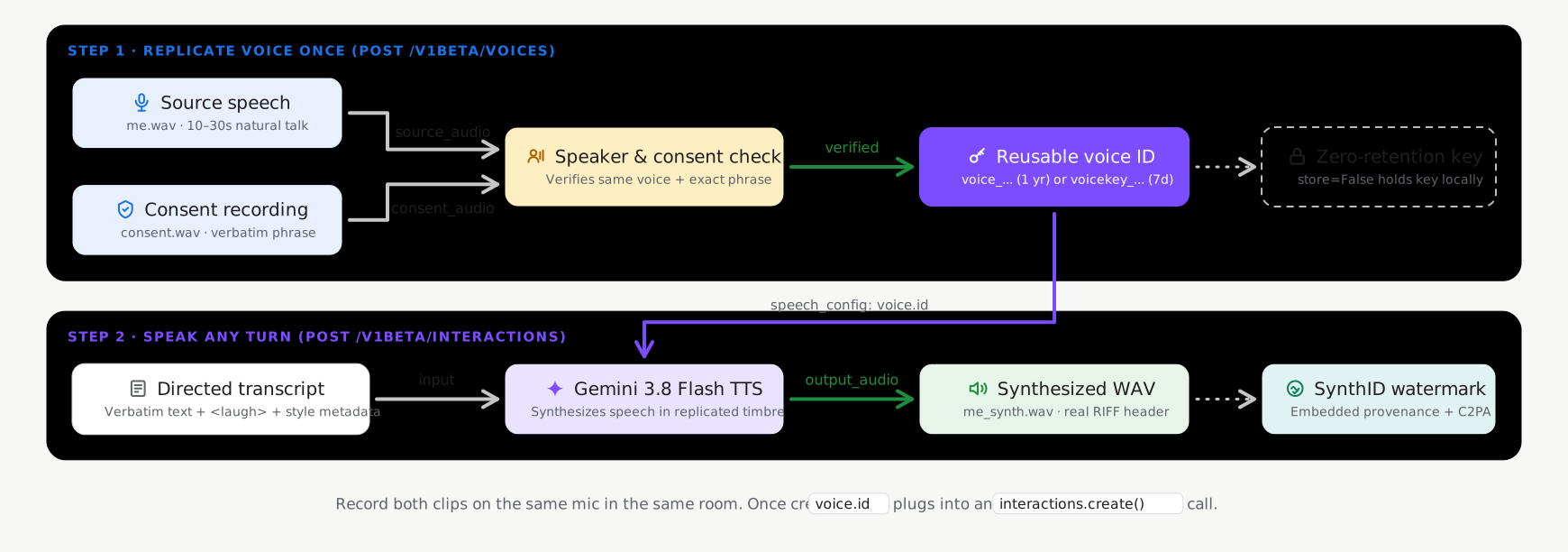
음성 복제는 voices.create(POST /v1beta/voices) 호출 시 두 가지 스토리지 모드를 지원하며, 기본적으로 상태 저장 스토리지가 사용 설정되어 있습니다.
- 상태 저장 스토리지 (
store=True, 권장 기본값): Google은 인증된 음성 프로필을 프로젝트에 저장하고 경량의 영구voice_id(replicated_voice.id, 예:voice_abc123...)를 반환합니다. 요청 전반에 걸쳐 이voice_id를 전달하고voices.list(),voices.get(),voices.delete()로 관리할 수 있습니다. - 상태 비저장 클라이언트 관리 키 (
store=False, 선택사항): 생체 인식 음성 프로필의 서버 측 지속성이 필요하지 않은 워크로드의 경우store=False를 설정합니다. API는 애플리케이션이 로컬에 저장하고 합성 요청에 직접 전달하는 암호화된 자체 포함voice_key(replicated_voice.key,voicekey_...로 시작)를 반환합니다.
| 저장 모드 | 식별자 | 프로젝트 한도 | 보관 (TTL) |
|---|---|---|---|
스테이트풀(Stateful) 음성(store=True) |
voice_... |
프로젝트당 200개의 음성 (프롬프트 음성 및 복제된 음성 간에 공유) | 1년 |
스테이트리스 음성 키 (store=False) |
voicekey_... |
클라이언트 관리 | 7일 |
오디오 및 동의 요건
모든 CreateVoice 복제 요청에는 동일한 성인 화자의 실제 사람 오디오 녹음 파일 2개가 필요합니다 (24kHz 모노 16비트 WAV 권장).
- 참조 오디오 (
source_audio): 복제하려는 음성의 화자가 말하는 깨끗하고 자연스러운 음성 10~30초 클립입니다. - 동의 오디오 (
consent_audio): 동일한 화자가 지원되는 언어 중 하나로 필수 동의 문구를 명확하게 낭독하는 녹음 파일(예: 영어): > '저는 이 음성의 소유자이며, Google이 이 음성을 사용하여 합성 음성 모델을 만드는 데 동의합니다.'
복제된 음성 만들기 (상태 저장 기본값)
Google GenAI SDK (google-genai 2.25.0 이상 / @google/genai 2.24.0 이상) 또는 store=True가 포함된 REST API를 사용하여 프로젝트에서 복제된 음성 프로필을 만들고 저장합니다.
Python
import base64
from google import genai

client = genai.Client()

with open("reference_speaker.wav", "rb") as f:
    source_b64 = base64.b64encode(f.read()).decode("utf-8")

with open("speaker_consent.wav", "rb") as f:
    consent_b64 = base64.b64encode(f.read()).decode("utf-8")

# Create a persistent replicated voice (store=True)
replicated_voice = client.voices.create(
    store=True,
    voice={
        "model": "gemini-3.8-flash-tts",
        "type": "replicated",
        "display_name": "Custom Replicated Speaker",
        "replicated": {
            "source_audio": {
                "mime_type": "audio/wav",
                "data": source_b64,
            },
            "consent_audio": {
                "mime_type": "audio/wav",
                "data": consent_b64,
            },
        },
    },
)

print(f"Created voice ID: {replicated_voice.id}")
자바스크립트
import * as fs from "node:fs";
import { GoogleGenAI } from "@google/genai";

const ai = new GoogleGenAI();

const sourceB64 = fs.readFileSync("reference_speaker.wav").toString("base64");
const consentB64 = fs.readFileSync("speaker_consent.wav").toString("base64");

// Create a persistent replicated voice (store: true)
const replicatedVoice = await ai.voices.create({
  store: true,
  voice: {
    model: "gemini-3.8-flash-tts",
    type: "replicated",
    display_name: "Custom Replicated Speaker",
    replicated: {
      source_audio: {
        mime_type: "audio/wav",
        data: sourceB64,
      },
      consent_audio: {
        mime_type: "audio/wav",
        data: consentB64,
      },
    },
  },
});

console.log(`Created voice ID: ${replicatedVoice.id}`);
REST
SOURCE_B64=$(base64 -w 0 reference_speaker.wav)
CONSENT_B64=$(base64 -w 0 speaker_consent.wav)

curl "https://generativelanguage.googleapis.com/v1beta/voices" \
  -H "x-goog-api-key: $GEMINI_API_KEY" \
  -H "Content-Type: application/json" \
  -X POST \
  -d "{
    \"store\": true,
    \"voice\": {
      \"model\": \"gemini-3.8-flash-tts\",
      \"type\": \"replicated\",
      \"display_name\": \"Custom Replicated Speaker\",
      \"replicated\": {
        \"source_audio\": {
          \"mime_type\": \"audio/wav\",
          \"data\": \"$SOURCE_B64\"
        },
        \"consent_audio\": {
          \"mime_type\": \"audio/wav\",
          \"data\": \"$CONSENT_B64\"
        }
      }
    }
  }"
복제된 음성으로 음성 합성
합성 요청에서 반환된 id (voice_...)를 전달합니다.
Python
import base64
from google import genai

client = genai.Client()

interaction = client.interactions.create(
    model="gemini-3.8-flash-tts",
    input=[{
        "type": "user_input",
        "content": [{
            "type": "text",
            "text": (
                "Hello! This audio was synthesized using a replicated"
                " speaker voice."
            ),
            "annotations": [{
                "type": "speech_metadata",
                "style": "warm and conversational",
            }],
        }],
    }],
    response_format={"type": "audio"},
    generation_config={
        "speech_config": [
            {"voice": replicated_voice.id},
        ]
    },
)

with open("replicated_speech.wav", "wb") as f:
    f.write(base64.b64decode(interaction.output_audio.data))
자바스크립트
import * as fs from "node:fs";
import { GoogleGenAI } from "@google/genai";

const ai = new GoogleGenAI();

const interaction = await ai.interactions.create({
  model: "gemini-3.8-flash-tts",
  input: [{
    type: "user_input",
    content: [{
      type: "text",
      text: "Hello! This audio was synthesized using a replicated speaker voice.",
      annotations: [{
        type: "speech_metadata",
        style: "warm and conversational",
      }],
    }],
  }],
  response_format: { type: "audio" },
  generation_config: {
    speech_config: [
      { voice: replicatedVoice.id },
    ],
  },
});

fs.writeFileSync("replicated_speech.wav", Buffer.from(interaction.output_audio.data, "base64"));
REST
curl "https://generativelanguage.googleapis.com/v1beta/interactions" \
  -H "x-goog-api-key: $GEMINI_API_KEY" \
  -H "Content-Type: application/json" \
  -X POST \
  -d '{
    "model": "gemini-3.8-flash-tts",
    "input": [{
      "type": "user_input",
      "content": [{
        "type": "text",
        "text": "Hello! This audio was synthesized using a replicated speaker voice.",
        "annotations": [{
          "type": "speech_metadata",
          "style": "warm and conversational"
        }]
      }]
    }],
    "response_format": {"type": "audio"},
    "generation_config": {
      "speech_config": [
        {"voice": "voice_YOUR_REPLICATED_VOICE_ID"}
      ]
    }
  }'
저장된 복제 음성 관리
store=True로 생성된 복제된 음성은 Voices API를 통해 나열, 필터링, 검사, 삭제할 수 있습니다 (모든 필터 매개변수는 확장된 음성 라이브러리 및 필터링 참고).
Python
from google import genai

client = genai.Client()

# List stored replicated voices in your project
response = client.voices.list(type_=["replicated"])
for voice in response.voices or []:
    print(voice.id, voice.display_name, voice.type)

# Retrieve a specific voice by ID
voice_details = client.voices.get(id=replicated_voice.id)

# Delete a stored replicated voice
client.voices.delete(id=replicated_voice.id)
자바스크립트
import { GoogleGenAI } from "@google/genai";

const ai = new GoogleGenAI();

// List stored replicated voices in your project
const response = await ai.voices.list({ type: ["replicated"] });
for (const voice of response.voices ?? []) {
  console.log(voice.id, voice.display_name, voice.type);
}

// Retrieve a specific voice by ID
const voiceDetails = await ai.voices.get(replicatedVoice.id);

// Delete a stored replicated voice
await ai.voices.delete(replicatedVoice.id);
REST
# List stored replicated voices in your project
curl -G "https://generativelanguage.googleapis.com/v1beta/voices" \
  -H "x-goog-api-key: $GEMINI_API_KEY" \
  --data-urlencode "type=replicated"

# Retrieve a specific voice by ID
curl "https://generativelanguage.googleapis.com/v1beta/voices/voice_YOUR_REPLICATED_VOICE_ID" \
  -H "x-goog-api-key: $GEMINI_API_KEY"

# Delete a stored replicated voice
curl -X DELETE "https://generativelanguage.googleapis.com/v1beta/voices/voice_YOUR_REPLICATED_VOICE_ID" \
  -H "x-goog-api-key: $GEMINI_API_KEY"
옵션: 상태 비저장 클라이언트 관리 음성 키 (store=False)
애플리케이션에 음성 프로필의 서버 측 지속성이 필요하지 않은 경우 복제된 음성을 만들 때 store=False를 설정합니다. API는 클라이언트 측에 저장하고 voice ID가 허용되는 모든 위치에 직접 전달하는 암호화된 voice_key (replicated_voice.key, voicekey_...로 시작)를 반환합니다.
Python
import base64
from google import genai

client = genai.Client()

with open("reference_speaker.wav", "rb") as f:
    source_b64 = base64.b64encode(f.read()).decode("utf-8")

with open("speaker_consent.wav", "rb") as f:
    consent_b64 = base64.b64encode(f.read()).decode("utf-8")

# Create a stateless client-managed voice key (store=False)
replicated_voice = client.voices.create(
    store=False,
    voice={
        "model": "gemini-3.8-flash-tts",
        "type": "replicated",
        "replicated": {
            "source_audio": {"mime_type": "audio/wav", "data": source_b64},
            "consent_audio": {"mime_type": "audio/wav", "data": consent_b64},
        },
    },
)

# Pass replicated_voice.key ("voicekey_...") directly as the speaker voice
interaction = client.interactions.create(
    model="gemini-3.8-flash-tts",
    input=[{
        "type": "user_input",
        "content": [{
            "type": "text",
            "text": "Hello! This audio uses a stateless client-managed voice key.",
            "annotations": [{
                "type": "speech_metadata",
                "style": "warm and conversational",
            }],
        }],
    }],
    response_format={"type": "audio"},
    generation_config={
        "speech_config": [
            {"voice": replicated_voice.key},
        ]
    },
)
자바스크립트
import * as fs from "node:fs";
import { GoogleGenAI } from "@google/genai";

const ai = new GoogleGenAI();

const sourceB64 = fs.readFileSync("reference_speaker.wav").toString("base64");
const consentB64 = fs.readFileSync("speaker_consent.wav").toString("base64");

// Create a stateless client-managed voice key (store: false)
const replicatedVoice = await ai.voices.create({
  store: false,
  voice: {
    model: "gemini-3.8-flash-tts",
    type: "replicated",
    replicated: {
      source_audio: { mime_type: "audio/wav", data: sourceB64 },
      consent_audio: { mime_type: "audio/wav", data: consentB64 },
    },
  },
});

// Pass replicatedVoice.key ("voicekey_...") directly as the speaker voice
const interaction = await ai.interactions.create({
  model: "gemini-3.8-flash-tts",
  input: [{
    type: "user_input",
    content: [{
      type: "text",
      text: "Hello! This audio uses a stateless client-managed voice key.",
      annotations: [{
        type: "speech_metadata",
        style: "warm and conversational",
      }],
    }],
  }],
  response_format: { type: "audio" },
  generation_config: {
    speech_config: [
      { voice: replicatedVoice.key },
    ],
  },
});
REST
SOURCE_B64=$(base64 -w 0 reference_speaker.wav)
CONSENT_B64=$(base64 -w 0 speaker_consent.wav)

curl "https://generativelanguage.googleapis.com/v1beta/voices" \
  -H "x-goog-api-key: $GEMINI_API_KEY" \
  -H "Content-Type: application/json" \
  -X POST \
  -d "{
    \"store\": false,
    \"voice\": {
      \"model\": \"gemini-3.8-flash-tts\",
      \"type\": \"replicated\",
      \"replicated\": {
        \"source_audio\": {\"mime_type\": \"audio/wav\", \"data\": \"$SOURCE_B64\"},
        \"consent_audio\": {\"mime_type\": \"audio/wav\", \"data\": \"$CONSENT_B64\"}
      }
    }
  }"
언어별 지원되는 동의 문구
동의 오디오는 지원되는 30개 언어 로케일 중 하나로 정확한 문구를 명확하게 낭독해야 합니다.
| 언어 | 언어 (lang_id) |
직접 인용 동의 문구 |
|---|---|---|
| 아랍어 | ar-XA |
أنا مالك هذا الصوت وأوافق على أن تستخدم Google هذا الصوت لإنشاء نموذج صوتي اصطناعي. |
| 벵골어 | bn-IN |
আমি এই ভয়েসের মালিক এবং আমি একটি সিন্থেটিক ভয়েস মডেল তৈরি করতে এই ভয়েস ব্যবহার করে Google-এর সাথে সম্মতি দিচ্ছি। |
| 중국어(간체) | zh-CN |
我是此声音的拥有者并授权谷歌使用此声音创建语音合成模型 |
| 네덜란드어 | nl-NL |
Ik ben de eigenaar van deze stem en ik geef Google toestemming om deze stem te gebruiken om een synthetisch stemmodel te maken. |
| 영어(미국) | en-US |
I am the owner of this voice and I consent to Google using this voice to create a synthetic voice model. |
| 영어(영국) | en-GB |
I am the owner of this voice and I consent to Google using this voice to create a synthetic voice model. |
| 영어 (인도) | en-IN |
I am the owner of this voice and I consent to Google using this voice to create a synthetic voice model. |
| 영어 (오스트레일리아) | en-AU |
I am the owner of this voice and I consent to Google using this voice to create a synthetic voice model. |
| 프랑스어(프랑스) | fr-FR |
Je suis le propriétaire de cette voix et j'autorise Google à utiliser cette voix pour créer un modèle de voix synthétique. |
| 프랑스어(캐나다) | fr-CA |
Je suis le propriétaire de cette voix et j'autorise Google à utiliser cette voix pour créer un modèle de voix synthétique. |
| 독일어 | de-DE |
Ich bin der Eigentümer dieser Stimme und bin damit einverstanden, dass Google diese Stimme zur Erstellung eines synthetischen Stimmmodells verwendet. |
| 구자라트어 | gu-IN |
હું આ વોઈસનો માલિક છું અને સિન્થેટિક વોઈસ મોડલ બનાવવા માટે આ વોઈસનો ઉપયોગ કરીને google ને હું સંમતિ આપું છું |
| 힌디어 | hi-IN |
मैं इस आवाज का मालिक हूं और मैं सिंथेटिक आवाज मॉडल बनाने के लिए Google को इस आवाज का उपयोग करने की सहमति देता हूं |
| 인도네시아어 | id-ID |
Saya pemilik suara ini dan saya menyetujui Google menggunakan suara ini untuk membuat model suara sintetis. |
| 이탈리아어 | it-IT |
Sono il proprietario di questa voce e acconsento che Google la utilizzi per creare un modello di voce sintetica. |
| 일본어 | ja-JP |
私はこの音声の所有者であり、Googleがこの音声を使用して音声合成モデルを作成することを承認します。 |
| 칸나다어 | kn-IN |
ನಾನು ಈ ಧ್ವನಿಯ ಮಾಲಿಕ ಮತ್ತು ಸಂಶ್ಲೇಷಿತ ಧ್ವನಿ ಮಾದರಿಯನ್ನು ರಚಿಸಲು ಈ ಧ್ವನಿಯನ್ನು ಬಳಸಿಕೊಂಡುಗೂಗಲ್ ಗೆ ನಾನು ಸಮ್ಮತಿಸುತ್ತೇನೆ. |
| 한국어 | ko-KR |
나는 이 음성의 소유자이며 구글이 이 음성을 사용하여 음성 합성 모델을 생성할 것을 허용합니다. |
| 말라얄람어 | ml-IN |
ഈ ശബ്ദത്തിന്റെ ഉടമ ഞാനാണ്, ഒരു സിന്തറ്റിക് വോയ്സ് മോഡൽ സൃഷ്ടിക്കാൻ ഈ ശബ്ദം ഉപയോഗിക്കുന്നതിന് ഞാൻ Google-ന് സമ്മതം നൽകുന്നു. |
| 마라티어 | mr-IN |
मी या आवाजाचा मालक आहे आणि सिंथेटिक व्हॉइस मॉडेल तयार करण्यासाठी हा आवाज वापरण्यासाठी मी Google ला संमती देतो |
| 폴란드어 | pl-PL |
Jestem właścicielem tego głosu i wyrażam zgodę na wykorzystanie go przez Google w celu utworzenia syntetycznego modelu głosu. |
| 포르투갈어(브라질) | pt-BR |
Eu sou o proprietário desta voz e autorizo o Google a usá-la para criar um modelo de voz sintética. |
| 러시아어 | ru-RU |
Я являюсь владельцем этого голоса и даю согласие Google на использование этого голоса для создания модели синтетического голоса. |
| 스페인어(스페인) | es-ES |
Soy el propietario de esta voz y doy mi consentimiento para que Google la utilice para crear un modelo de voz sintética. |
| 스페인어 (미국) | es-US |
Soy el propietario de esta voz y doy mi consentimiento para que Google la utilice para crear un modelo de voz sintética. |
| 타밀어 | ta-IN |
நான் இந்த குரலின் உரிமையாளர் மற்றும் செயற்கை குரல் மாதிரியை உருவாக்க இந்த குரலை பயன்படுத்த குகல்க்கு நான் ஒப்புக்கொள்கிறேன். |
| 텔루구어 | te-IN |
నేను ఈ వాయిస్ యజమానిని మరియు సింతటిక్ వాయిస్ మోడల్ ని రూపొందించడానికి ఈ వాయిస్ ని ఉపయోగించడానికి googleకి నేను సమ్మతిస్తున్నాను. |
| 태국어 | th-TH |
ฉันเป็นเจ้าของเสียงนี้ และฉันยินยอมให้ Google ใช้เสียงนี้เพื่อสร้างแบบจำลองเสียงสังเคราะห์ |
| 튀르키예어 | tr-TR |
Bu sesin sahibi benim ve Google'ın bu sesi kullanarak sentetik bir ses modeli oluşturmasına izin veriyorum. |
| 베트남어 | vi-VN |
Tôi là chủ sở hữu giọng nói này và tôi đồng ý cho Google sử dụng giọng nói này để tạo mô hình giọng nói tổng hợp. |
참조 오디오 녹음 권장사항
- 조용한 환경에서 녹음: 방의 에코, 배경 소음, 음악, 겹치는 음성을 최소화합니다.
- 녹음 조건 일치: 화자 확인 검사가 안정적으로 통과되도록 동일한 음향 설정에서 동일한 마이크로
source_audio와consent_audio를 모두 녹음합니다. - 24kHz 모노 WAV로 변환: 최상의 결과를 위해 인코딩 전에 입력 오디오를 24kHz 모노 16비트 PCM WAV로 리샘플링합니다.
다음 단계
- 음성 디자인에서 텍스트 설명으로 맞춤 페르소나를 만드는 방법을 알아보세요.
- 텍스트 음성 변환 가이드에서 턴 수준 스타일 지정, 인라인 태그, 다중 화자 대화를 살펴보세요.