

 ai.google.dev で表示 ai.google.dev で表示
|
 Google Colab で実行 Google Colab で実行 |
 Kaggle で実行 Kaggle で実行 |
 Vertex AI で開く Vertex AI で開く |
 GitHub 上のソースを見る GitHub 上のソースを見る
|
Gemma は、Gemini モデルの作成に使用されたものと同じ研究とテクノロジーに基づいて構築された、軽量で最先端のオープンモデルのファミリーです。Gemma 4 は、世界で最も効率的なオープン ウェイト モデル ファミリーになるように設計されています。
このドキュメントでは、Gemma 4 の思考機能を使用して、最終的な回答を提供する前に推論プロセスを生成する方法について説明します。Hugging Face transformers ライブラリを使用して、テキストのみのタスクとマルチモーダル(画像とテキスト)タスクの両方で思考モードを有効にする方法と、出力を解析して思考と回答を分離する方法について説明します。
このノートブックは T4 GPU で実行されます。
Python パッケージをインストールする
Gemma モデルの実行とリクエストの作成に必要な Hugging Face ライブラリをインストールします。
# Install PyTorch & other librariespip install torch accelerate# Install the transformers librarypip install transformers
モデルを読み込む
次のコード例に示すように、transformers ライブラリを使用して、AutoProcessor クラスと AutoModelForImageTextToText クラスを使用して processor と model のインスタンスを作成します。
MODEL_ID = "google/gemma-4-E2B-it" # @param ["google/gemma-4-E2B-it","google/gemma-4-E4B-it", "google/gemma-4-31B-it", "google/gemma-4-26B-A4B-it"]

from transformers import AutoProcessor, AutoModelForMultimodalLM

model = AutoModelForMultimodalLM.from_pretrained(MODEL_ID, dtype="auto", device_map="auto")
processor = AutoProcessor.from_pretrained(MODEL_ID)
Loading weights: 0%| | 0/2011 [00:00<?, ?it/s]
思考モードを含む単一のテキスト推論
モデルの思考機能を使用してレスポンスを生成するには、enable_thinking=True を渡します。プロセッサは、正しい思考トークンをプロンプトに挿入し、レスポンスの前に思考するようモデルに指示します。
| モデルの規模 | 思考モード | テンプレートの構造 / 出力 |
|---|---|---|
| E2B/E4B | OFF | <|turn>user\n[Prompt]<turn|>\n<|turn>model |
| E2B/E4B | ON | <|turn>system\n<|think|><turn|>\n<|turn>user\n[Prompt]<turn|>\n<|turn>model |
| 26B/31B | OFF | ⚠️ <|turn>user\n[Prompt]<turn|>\n<|turn>model\n<|channel>thought\n<channel|> |
| 26B/31B | ON | <|turn>system\n<|think|><turn|>\n<|turn>user\n[Prompt]<turn|>\n<|turn>model |
from transformers import TextStreamer

message = [
    {
        "role": "user", "content": "What is the water formula?"
    }
]

text = processor.apply_chat_template(message, tokenize=False, add_generation_prompt=True, enable_thinking=True)
inputs = processor(text=text, return_tensors="pt").to(model.device)
input_len = inputs["input_ids"].shape[-1]

streamer = TextStreamer(processor)
outputs = model.generate(**inputs, streamer=streamer, max_new_tokens=1024)
<bos><|turn>system
<|think|><turn|>
<|turn>user
What is the water formula?<turn|>
<|turn>model
<|channel>thought
Thinking Process:

1.  **Analyze the Request:** The user is asking, "What is the water formula?"
2.  **Interpret the Ambiguity:** The term "water formula" is highly ambiguous. It could refer to several things:
    *   **Chemical Formula:** \\(\text{H}_2\text{O}\\) (the molecular formula).
    *   **Physical/Scientific Formula:** The properties of water (e.g., polarity, hydrogen bonding, specific heat).
    *   **Biological/Chemical Formula:** The role of water in biochemistry (e.g., solvation, hydration shells).
    *   **Mathematical Formula:** Equations relating to water cycles, thermodynamics, or fluid dynamics.
    *   **Culinary/Recipe Formula:** A specific recipe.
    *   **A specific context missing:** Is this related to chemistry, physics, biology, engineering, or something else?
3.  **Determine the Most Likely Interpretation:** In a general knowledge context, when someone asks for a "formula" related to water, they most often mean the fundamental chemical structure.
4.  **Formulate the Primary Answer (Chemical):** State the chemical formula and briefly explain what it represents.
5.  **Address the Ambiguity (Provide Context/Alternatives):** Since the request is vague, offer other possible interpretations so the user can clarify.
6.  **Review Constraints (Self-Correction/Identity Check):** I am Gemma 4, an LLM. I can provide factual information based on my knowledge base. No tools are needed. The answer should be clear and comprehensive.

7.  **Draft the Response Structure:**
    *   Start with the most direct answer (Chemical Formula).
    *   Explain the components and bonding.
    *   Offer context for other possible meanings. (Drafting the final response based on this structure.)<channel|>The term "water formula" can be interpreted in several ways, depending on the context (chemistry, physics, biology, etc.).

Here are the most common interpretations:

### 1. Chemical Formula (The Most Common Answer)

The fundamental chemical formula for water is:


$$\text{H}_2\text{O}$$


*   **H** represents the element **Hydrogen**.
*   **O** represents the element **Oxygen**.

This formula indicates that one molecule of water is composed of two hydrogen atoms covalently bonded to one oxygen atom.

### 2. Molecular Structure and Bonding

Beyond the formula, the "formula" also describes how the atoms interact:

*   **Polarity:** Water is a highly **polar** molecule. Oxygen is much more electronegative than hydrogen, meaning it pulls the shared electrons closer to itself. This creates a partial negative charge (\\(\delta^-\\)) on the oxygen atom and partial positive charges (\\(\delta^+\\)) on the hydrogen atoms.
*   **Hydrogen Bonding:** The polarity allows water molecules to form **hydrogen bonds** with each other. This strong attraction is responsible for water's unique physical properties, such as its high specific heat, its ability to dissolve many substances (its role as a universal solvent), and its high surface tension.

### 3. Formula in Physics/Thermodynamics

If you are referring to a physical formula, it might relate to:

*   **Specific Heat Capacity:** The amount of energy required to raise the temperature of a given mass of water by one degree.
*   **Density and Volume:** Equations relating the mass, volume, and density of water under different temperatures and pressures.

***

**In summary, if you are asking for the basic chemical makeup, the formula is \\(\text{H}_2\text{O}\\).**

If you are looking for a specific formula in a different field (like a mathematical equation or a biological reaction), please provide more context!<turn|>
テキストが生成されると、レスポンスには推論ブロックと、特殊なトークンで囲まれた最終的な回答の両方が含まれます。parse_response ユーティリティを使用すると、thinking と answer を含む辞書に簡単に抽出できます。
response = processor.decode(outputs[0][input_len:], skip_special_tokens=False)
result = processor.parse_response(response)

for key, value in result.items():
  if key == "role":
    print(f"Role: {value}")
  elif key == "thinking":
    print(f"\n=== Thoughts ===\n{value}")
  elif key == "content":
    print(f"\n=== Answer ===\n{value}")
  elif key == "tool_calls":
    print(f"\n=== Tool Calls ===\n{value}")
  else:
    print(f"\n{key}: {value}...\n")
Role: assistant

=== Thoughts ===
Thinking Process:

1.  **Analyze the Request:** The user is asking, "What is the water formula?"
2.  **Interpret the Ambiguity:** The term "water formula" is highly ambiguous. It could refer to several things:
    *   **Chemical Formula:** \\(\text{H}_2\text{O}\\) (the molecular formula).
    *   **Physical/Scientific Formula:** The properties of water (e.g., polarity, hydrogen bonding, specific heat).
    *   **Biological/Chemical Formula:** The role of water in biochemistry (e.g., solvation, hydration shells).
    *   **Mathematical Formula:** Equations relating to water cycles, thermodynamics, or fluid dynamics.
    *   **Culinary/Recipe Formula:** A specific recipe.
    *   **A specific context missing:** Is this related to chemistry, physics, biology, engineering, or something else?
3.  **Determine the Most Likely Interpretation:** In a general knowledge context, when someone asks for a "formula" related to water, they most often mean the fundamental chemical structure.
4.  **Formulate the Primary Answer (Chemical):** State the chemical formula and briefly explain what it represents.
5.  **Address the Ambiguity (Provide Context/Alternatives):** Since the request is vague, offer other possible interpretations so the user can clarify.
6.  **Review Constraints (Self-Correction/Identity Check):** I am Gemma 4, an LLM. I can provide factual information based on my knowledge base. No tools are needed. The answer should be clear and comprehensive.

7.  **Draft the Response Structure:**
    *   Start with the most direct answer (Chemical Formula).
    *   Explain the components and bonding.
    *   Offer context for other possible meanings. (Drafting the final response based on this structure.)

=== Answer ===
The term "water formula" can be interpreted in several ways, depending on the context (chemistry, physics, biology, etc.).

Here are the most common interpretations:

### 1. Chemical Formula (The Most Common Answer)

The fundamental chemical formula for water is:


$$\text{H}_2\text{O}$$


*   **H** represents the element **Hydrogen**.
*   **O** represents the element **Oxygen**.

This formula indicates that one molecule of water is composed of two hydrogen atoms covalently bonded to one oxygen atom.

### 2. Molecular Structure and Bonding

Beyond the formula, the "formula" also describes how the atoms interact:

*   **Polarity:** Water is a highly **polar** molecule. Oxygen is much more electronegative than hydrogen, meaning it pulls the shared electrons closer to itself. This creates a partial negative charge (\\(\delta^-\\)) on the oxygen atom and partial positive charges (\\(\delta^+\\)) on the hydrogen atoms.
*   **Hydrogen Bonding:** The polarity allows water molecules to form **hydrogen bonds** with each other. This strong attraction is responsible for water's unique physical properties, such as its high specific heat, its ability to dissolve many substances (its role as a universal solvent), and its high surface tension.

### 3. Formula in Physics/Thermodynamics

If you are referring to a physical formula, it might relate to:

*   **Specific Heat Capacity:** The amount of energy required to raise the temperature of a given mass of water by one degree.
*   **Density and Volume:** Equations relating the mass, volume, and density of water under different temperatures and pressures.

***

**In summary, if you are asking for the basic chemical makeup, the formula is \\(\text{H}_2\text{O}\\).**

If you are looking for a specific formula in a different field (like a mathematical equation or a biological reaction), please provide more context!
単一の画像推論
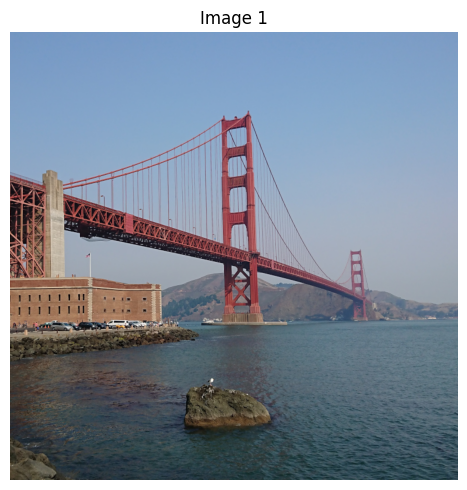
思考モデルを視覚データで使用する手順は、非常によく似ています。messages 配列の一部として画像を指定できます。画像と書式設定されたテキストをプロセッサに渡すだけで、モデルは視覚的な入力を推論してから応答します。
from PIL import Image
import matplotlib.pyplot as plt

prompt = "What is shown in this image?"
image_url = "https://raw.githubusercontent.com/google-gemma/cookbook/refs/heads/main/Demos/sample-data/GoldenGate.png"

# download image
!wget -q {image_url} -O image.png
image = Image.open("image.png")

# Display all images
print("=== Downloaded image ===")
fig, ax = plt.subplots(1, 1, figsize=(5, 5))
ax.imshow(image)
ax.set_title("Image 1")
ax.axis("off")
plt.tight_layout()
plt.show()

message = [
    {
        "role": "user", "content": [
          {"type": "image"},
          {"type": "text", "text": prompt}
        ]
    }
]

text = processor.apply_chat_template(message, tokenize=False, add_generation_prompt=True, enable_thinking=True)
inputs = processor(text=text, images=image, return_tensors="pt").to(model.device)
input_len = inputs["input_ids"].shape[-1]

outputs = model.generate(**inputs, max_new_tokens=1024)
response = processor.decode(outputs[0][input_len:], skip_special_tokens=False)

result = processor.parse_response(response)

for key, value in result.items():
  if key == "role":
    print(f"Role: {value}")
  elif key == "thinking":
    print(f"\n=== Thoughts ===\n{value}")
  elif key == "content":
    print(f"\n=== Answer ===\n{value}")
  elif key == "tool_calls":
    print(f"\n=== Tool Calls ===\n{value}")
  else:
    print(f"\n{key}: {value}...\n")
=== Downloaded image ===
Role: assistant

=== Thoughts ===
Here's a thinking process to arrive at the suggested description:

1.  **Analyze the Image Content:**
    *   **Dominant Feature:** A large suspension bridge with distinctive red/orange trusswork. This is immediately recognizable as the Golden Gate Bridge.
    *   **Setting:** Water (a large body of water, likely the bay/ocean).
    *   **Foreground/Midground:**
        *   Water in the immediate foreground (dark blue/green).
        *   A rocky outcrop/island in the middle foreground.
        *   A substantial stone/brick structure to the left (part of the bridge approach or a related structure).
    *   **Background:** Hazy landmasses/hills behind the bridge.
    *   **Sky:** Clear, light blue sky.
    *   **Atmosphere/Lighting:** Bright daylight, clear weather.

2.  **Identify Key Elements for Description:**
    *   The Bridge (Golden Gate Bridge).
    *   The Water/Bay.
    *   The Coastal/Land features.

3.  **Draft the Description (Focusing on detail and clarity):**
    *   *Initial thought:* It's a picture of the Golden Gate Bridge over the water.
    *   *Refinement (Adding detail):* The image shows the iconic red suspension bridge spanning a body of water. There is a rocky island in the foreground and some structures on the shore.
    *   *Enhancement (Adding context and visual appeal):* Mention the color, the scale, and the atmosphere.

4.  **Final Polish and Structure (Grouping similar ideas):** (This leads to the final structured response.)

    *   *Identification:* State clearly what the main subject is.
    *   *Setting:* Describe the environment (water, sky).
    *   *Details:* Mention specific foreground and background elements.

5.  **Review against the original prompt:** (The prompt asks "What is shown in this image?") The description accurately reflects the visual evidence. (Self-Correction: Ensure the identification is confident, which it is, based on the structure and color.)

=== Answer ===
This image shows the **Golden Gate Bridge** spanning a body of water, likely the San Francisco Bay.

Here is a breakdown of what is visible:

* **The Golden Gate Bridge:** The iconic red/orange suspension bridge dominates the frame, stretching across the water. Its distinctive structure and massive towers are clearly visible.
* **Water:** A large expanse of blue-green water fills the foreground and midground.
* **Foreground Elements:** In the immediate foreground, there is a dark, rocky outcrop or small island.
* **Shoreline/Structures:** To the left, there are stone and brick structures, suggesting the land or approach to the bridge.
* **Background:** Hazy hills or landmasses are visible in the distance behind the bridge.
* **Atmosphere:** The scene is brightly lit under a clear, light blue sky, suggesting fair weather.

In summary, it is a scenic photograph capturing the majestic view of the Golden Gate Bridge.
まとめと次のステップ
このガイドでは、Gemma 4 モデルの思考機能を使用して、最終的な回答の前に推論プロセスを生成する方法を学習しました。以下について学習しました。
apply_chat_templateのenable_thinking=Trueを使用して思考モードを有効にする。TextStreamerを使用して思考プロセスをリアルタイムで観察します。parse_responseを使用して、結合された出力を個別のthinkingブロックとanswerブロックに解析します。- マルチモーダル タスク(画像 + テキスト)に思考能力を適用します。
次のステップ
Gemma 4 のその他の機能: