

 ai.google.dev에서 보기 ai.google.dev에서 보기
|
 Google Colab에서 실행 Google Colab에서 실행
|
 Kaggle에서 실행 Kaggle에서 실행
|
 Vertex AI에서 열기 Vertex AI에서 열기
|
 GitHub에서 소스 보기 GitHub에서 소스 보기
|
Gemma는 Gemini 모델을 만드는 데 사용되는 것과 동일한 연구와 기술로 빌드된 최첨단 경량 개방형 모델군입니다. Gemma 4는 세계에서 가장 효율적인 개방형 가중치 모델군이 되도록 설계되었습니다.
이 문서에서는 Gemma 4의 사고 기능을 사용하여 최종 답변을 제공하기 전에 추론 프로세스를 생성하는 방법을 보여줍니다. Hugging Face transformers 라이브러리를 사용하여 텍스트 전용 작업과 멀티모달 (이미지-텍스트) 작업 모두에 사고 모드를 사용 설정하는 방법과 출력을 파싱하여 사고와 답변을 분리하는 방법을 알아봅니다.
이 노트북은 T4 GPU에서 실행됩니다.
Python 패키지 설치
Gemma 모델을 실행하고 요청을 보내는 데 필요한 Hugging Face 라이브러리를 설치합니다.
# Install PyTorch & other librariespip install torch accelerate# Install the transformers librarypip install transformers
모델 로드
다음 코드 예와 같이 transformers 라이브러리를 사용하여 AutoProcessor 및 AutoModelForImageTextToText 클래스를 사용하여 processor 및 model의 인스턴스를 만듭니다.
MODEL_ID = "google/gemma-4-E2B-it" # @param ["google/gemma-4-E2B-it","google/gemma-4-E4B-it", "google/gemma-4-31B-it", "google/gemma-4-26B-A4B-it"]

from transformers import AutoProcessor, AutoModelForMultimodalLM

model = AutoModelForMultimodalLM.from_pretrained(MODEL_ID, dtype="auto", device_map="auto")
processor = AutoProcessor.from_pretrained(MODEL_ID)
Loading weights: 0%| | 0/2011 [00:00<?, ?it/s]
사고를 통한 단일 텍스트 추론
모델의 사고 기능을 사용하여 응답을 생성하려면 enable_thinking=True를 전달합니다. 그러면 프로세서가 프롬프트에 올바른 사고 토큰을 삽입하여 모델에 응답하기 전에 생각하도록 지시합니다.
| 모델 크기 | 사고 상태 | 템플릿 구조 / 출력 |
|---|---|---|
| E2B/E4B | 사용 중지 | <|turn>user\n[Prompt]<turn|>\n<|turn>model |
| E2B/E4B | 사용 설정 | <|turn>system\n<|think|><turn|>\n<|turn>user\n[Prompt]<turn|>\n<|turn>model |
| 26B/31B | 사용 중지 | ⚠️ <|turn>user\n[Prompt]<turn|>\n<|turn>model\n<|channel>thought\n<channel|> |
| 26B/31B | 사용 설정 | <|turn>system\n<|think|><turn|>\n<|turn>user\n[Prompt]<turn|>\n<|turn>model |
from transformers import TextStreamer

message = [
    {
        "role": "user", "content": "What is the water formula?"
    }
]

text = processor.apply_chat_template(message, tokenize=False, add_generation_prompt=True, enable_thinking=True)
inputs = processor(text=text, return_tensors="pt").to(model.device)
input_len = inputs["input_ids"].shape[-1]

streamer = TextStreamer(processor)
outputs = model.generate(**inputs, streamer=streamer, max_new_tokens=1024)
<bos><|turn>system
<|think|><turn|>
<|turn>user
What is the water formula?<turn|>
<|turn>model
<|channel>thought
Thinking Process:

1.  **Analyze the Request:** The user is asking, "What is the water formula?"
2.  **Interpret the Ambiguity:** The term "water formula" is highly ambiguous. It could refer to several things:
    *   **Chemical Formula:** \\(\text{H}_2\text{O}\\) (the molecular formula).
    *   **Physical/Scientific Formula:** The properties of water (e.g., polarity, hydrogen bonding, specific heat).
    *   **Biological/Chemical Formula:** The role of water in biochemistry (e.g., solvation, hydration shells).
    *   **Mathematical Formula:** Equations relating to water cycles, thermodynamics, or fluid dynamics.
    *   **Culinary/Recipe Formula:** A specific recipe.
    *   **A specific context missing:** Is this related to chemistry, physics, biology, engineering, or something else?
3.  **Determine the Most Likely Interpretation:** In a general knowledge context, when someone asks for a "formula" related to water, they most often mean the fundamental chemical structure.
4.  **Formulate the Primary Answer (Chemical):** State the chemical formula and briefly explain what it represents.
5.  **Address the Ambiguity (Provide Context/Alternatives):** Since the request is vague, offer other possible interpretations so the user can clarify.
6.  **Review Constraints (Self-Correction/Identity Check):** I am Gemma 4, an LLM. I can provide factual information based on my knowledge base. No tools are needed. The answer should be clear and comprehensive.

7.  **Draft the Response Structure:**
    *   Start with the most direct answer (Chemical Formula).
    *   Explain the components and bonding.
    *   Offer context for other possible meanings. (Drafting the final response based on this structure.)<channel|>The term "water formula" can be interpreted in several ways, depending on the context (chemistry, physics, biology, etc.).

Here are the most common interpretations:

### 1. Chemical Formula (The Most Common Answer)

The fundamental chemical formula for water is:


$$\text{H}_2\text{O}$$


*   **H** represents the element **Hydrogen**.
*   **O** represents the element **Oxygen**.

This formula indicates that one molecule of water is composed of two hydrogen atoms covalently bonded to one oxygen atom.

### 2. Molecular Structure and Bonding

Beyond the formula, the "formula" also describes how the atoms interact:

*   **Polarity:** Water is a highly **polar** molecule. Oxygen is much more electronegative than hydrogen, meaning it pulls the shared electrons closer to itself. This creates a partial negative charge (\\(\delta^-\\)) on the oxygen atom and partial positive charges (\\(\delta^+\\)) on the hydrogen atoms.
*   **Hydrogen Bonding:** The polarity allows water molecules to form **hydrogen bonds** with each other. This strong attraction is responsible for water's unique physical properties, such as its high specific heat, its ability to dissolve many substances (its role as a universal solvent), and its high surface tension.

### 3. Formula in Physics/Thermodynamics

If you are referring to a physical formula, it might relate to:

*   **Specific Heat Capacity:** The amount of energy required to raise the temperature of a given mass of water by one degree.
*   **Density and Volume:** Equations relating the mass, volume, and density of water under different temperatures and pressures.

***

**In summary, if you are asking for the basic chemical makeup, the formula is \\(\text{H}_2\text{O}\\).**

If you are looking for a specific formula in a different field (like a mathematical equation or a biological reaction), please provide more context!<turn|>
텍스트가 생성되면 응답에 추론 블록과 특수 토큰으로 구분된 최종 답변이 모두 포함됩니다. parse_response 유틸리티를 사용하여 thinking 및 answer가 포함된 사전으로 쉽게 추출할 수 있습니다.
response = processor.decode(outputs[0][input_len:], skip_special_tokens=False)
result = processor.parse_response(response)

for key, value in result.items():
  if key == "role":
    print(f"Role: {value}")
  elif key == "thinking":
    print(f"\n=== Thoughts ===\n{value}")
  elif key == "content":
    print(f"\n=== Answer ===\n{value}")
  elif key == "tool_calls":
    print(f"\n=== Tool Calls ===\n{value}")
  else:
    print(f"\n{key}: {value}...\n")
Role: assistant

=== Thoughts ===
Thinking Process:

1.  **Analyze the Request:** The user is asking, "What is the water formula?"
2.  **Interpret the Ambiguity:** The term "water formula" is highly ambiguous. It could refer to several things:
    *   **Chemical Formula:** \\(\text{H}_2\text{O}\\) (the molecular formula).
    *   **Physical/Scientific Formula:** The properties of water (e.g., polarity, hydrogen bonding, specific heat).
    *   **Biological/Chemical Formula:** The role of water in biochemistry (e.g., solvation, hydration shells).
    *   **Mathematical Formula:** Equations relating to water cycles, thermodynamics, or fluid dynamics.
    *   **Culinary/Recipe Formula:** A specific recipe.
    *   **A specific context missing:** Is this related to chemistry, physics, biology, engineering, or something else?
3.  **Determine the Most Likely Interpretation:** In a general knowledge context, when someone asks for a "formula" related to water, they most often mean the fundamental chemical structure.
4.  **Formulate the Primary Answer (Chemical):** State the chemical formula and briefly explain what it represents.
5.  **Address the Ambiguity (Provide Context/Alternatives):** Since the request is vague, offer other possible interpretations so the user can clarify.
6.  **Review Constraints (Self-Correction/Identity Check):** I am Gemma 4, an LLM. I can provide factual information based on my knowledge base. No tools are needed. The answer should be clear and comprehensive.

7.  **Draft the Response Structure:**
    *   Start with the most direct answer (Chemical Formula).
    *   Explain the components and bonding.
    *   Offer context for other possible meanings. (Drafting the final response based on this structure.)

=== Answer ===
The term "water formula" can be interpreted in several ways, depending on the context (chemistry, physics, biology, etc.).

Here are the most common interpretations:

### 1. Chemical Formula (The Most Common Answer)

The fundamental chemical formula for water is:


$$\text{H}_2\text{O}$$


*   **H** represents the element **Hydrogen**.
*   **O** represents the element **Oxygen**.

This formula indicates that one molecule of water is composed of two hydrogen atoms covalently bonded to one oxygen atom.

### 2. Molecular Structure and Bonding

Beyond the formula, the "formula" also describes how the atoms interact:

*   **Polarity:** Water is a highly **polar** molecule. Oxygen is much more electronegative than hydrogen, meaning it pulls the shared electrons closer to itself. This creates a partial negative charge (\\(\delta^-\\)) on the oxygen atom and partial positive charges (\\(\delta^+\\)) on the hydrogen atoms.
*   **Hydrogen Bonding:** The polarity allows water molecules to form **hydrogen bonds** with each other. This strong attraction is responsible for water's unique physical properties, such as its high specific heat, its ability to dissolve many substances (its role as a universal solvent), and its high surface tension.

### 3. Formula in Physics/Thermodynamics

If you are referring to a physical formula, it might relate to:

*   **Specific Heat Capacity:** The amount of energy required to raise the temperature of a given mass of water by one degree.
*   **Density and Volume:** Equations relating the mass, volume, and density of water under different temperatures and pressures.

***

**In summary, if you are asking for the basic chemical makeup, the formula is \\(\text{H}_2\text{O}\\).**

If you are looking for a specific formula in a different field (like a mathematical equation or a biological reaction), please provide more context!
단일 이미지 추론
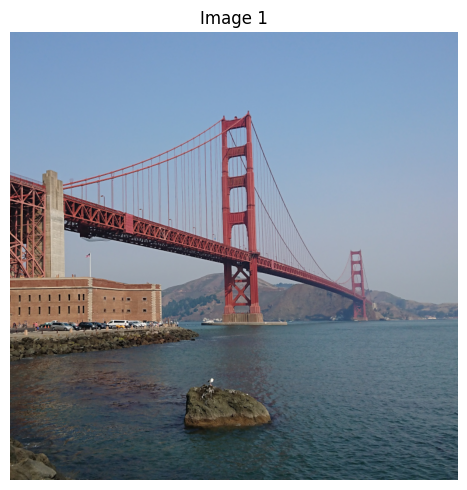
시각적 데이터와 함께 사고 모델을 사용하는 절차는 매우 유사합니다. messages 배열의 일부로 이미지를 제공할 수 있습니다. 형식이 지정된 텍스트와 함께 이미지를 프로세서에 전달하기만 하면 모델이 응답하기 전에 시각적 입력에 대해 추론합니다.
from PIL import Image
import matplotlib.pyplot as plt

prompt = "What is shown in this image?"
image_url = "https://raw.githubusercontent.com/google-gemma/cookbook/refs/heads/main/Demos/sample-data/GoldenGate.png"

# download image
!wget -q {image_url} -O image.png
image = Image.open("image.png")

# Display all images
print("=== Downloaded image ===")
fig, ax = plt.subplots(1, 1, figsize=(5, 5))
ax.imshow(image)
ax.set_title("Image 1")
ax.axis("off")
plt.tight_layout()
plt.show()

message = [
    {
        "role": "user", "content": [
          {"type": "image"},
          {"type": "text", "text": prompt}
        ]
    }
]

text = processor.apply_chat_template(message, tokenize=False, add_generation_prompt=True, enable_thinking=True)
inputs = processor(text=text, images=image, return_tensors="pt").to(model.device)
input_len = inputs["input_ids"].shape[-1]

outputs = model.generate(**inputs, max_new_tokens=1024)
response = processor.decode(outputs[0][input_len:], skip_special_tokens=False)

result = processor.parse_response(response)

for key, value in result.items():
  if key == "role":
    print(f"Role: {value}")
  elif key == "thinking":
    print(f"\n=== Thoughts ===\n{value}")
  elif key == "content":
    print(f"\n=== Answer ===\n{value}")
  elif key == "tool_calls":
    print(f"\n=== Tool Calls ===\n{value}")
  else:
    print(f"\n{key}: {value}...\n")
=== Downloaded image ===
Role: assistant

=== Thoughts ===
Here's a thinking process to arrive at the suggested description:

1.  **Analyze the Image Content:**
    *   **Dominant Feature:** A large suspension bridge with distinctive red/orange trusswork. This is immediately recognizable as the Golden Gate Bridge.
    *   **Setting:** Water (a large body of water, likely the bay/ocean).
    *   **Foreground/Midground:**
        *   Water in the immediate foreground (dark blue/green).
        *   A rocky outcrop/island in the middle foreground.
        *   A substantial stone/brick structure to the left (part of the bridge approach or a related structure).
    *   **Background:** Hazy landmasses/hills behind the bridge.
    *   **Sky:** Clear, light blue sky.
    *   **Atmosphere/Lighting:** Bright daylight, clear weather.

2.  **Identify Key Elements for Description:**
    *   The Bridge (Golden Gate Bridge).
    *   The Water/Bay.
    *   The Coastal/Land features.

3.  **Draft the Description (Focusing on detail and clarity):**
    *   *Initial thought:* It's a picture of the Golden Gate Bridge over the water.
    *   *Refinement (Adding detail):* The image shows the iconic red suspension bridge spanning a body of water. There is a rocky island in the foreground and some structures on the shore.
    *   *Enhancement (Adding context and visual appeal):* Mention the color, the scale, and the atmosphere.

4.  **Final Polish and Structure (Grouping similar ideas):** (This leads to the final structured response.)

    *   *Identification:* State clearly what the main subject is.
    *   *Setting:* Describe the environment (water, sky).
    *   *Details:* Mention specific foreground and background elements.

5.  **Review against the original prompt:** (The prompt asks "What is shown in this image?") The description accurately reflects the visual evidence. (Self-Correction: Ensure the identification is confident, which it is, based on the structure and color.)

=== Answer ===
This image shows the **Golden Gate Bridge** spanning a body of water, likely the San Francisco Bay.

Here is a breakdown of what is visible:

* **The Golden Gate Bridge:** The iconic red/orange suspension bridge dominates the frame, stretching across the water. Its distinctive structure and massive towers are clearly visible.
* **Water:** A large expanse of blue-green water fills the foreground and midground.
* **Foreground Elements:** In the immediate foreground, there is a dark, rocky outcrop or small island.
* **Shoreline/Structures:** To the left, there are stone and brick structures, suggesting the land or approach to the bridge.
* **Background:** Hazy hills or landmasses are visible in the distance behind the bridge.
* **Atmosphere:** The scene is brightly lit under a clear, light blue sky, suggesting fair weather.

In summary, it is a scenic photograph capturing the majestic view of the Golden Gate Bridge.
요약 및 다음 단계
이 가이드에서는 Gemma 4 모델의 사고 기능을 사용하여 최종 답변을 제공하기 전에 추론 프로세스를 생성하는 방법을 알아보았습니다. 다음과 같은 내용을 다루었습니다.
apply_chat_template에서enable_thinking=True를 사용하여 사고 모드를 사용 설정합니다.TextStreamer를 사용하여 사고 프로세스를 실시간으로 관찰합니다.parse_response를 사용하여 결합된 출력을 별도의thinking및answer블록으로 파싱합니다.- 사고 기능을 멀티모달 작업 (이미지 + 텍스트)에 적용합니다.
다음 단계
Gemma 4의 더 많은 기능을 살펴보세요.