

 ai.google.dev-এ দেখুন ai.google.dev-এ দেখুন |  গুগল কোলাবে চালান গুগল কোলাবে চালান |  Kaggle-এ চালান Kaggle-এ চালান |  ভার্টেক্স এআই-তে খুলুন ভার্টেক্স এআই-তে খুলুন |  গিটহাবে উৎস দেখুন গিটহাবে উৎস দেখুন |
জেমা ওপেন মডেল ব্যবহার করে কন্টেন্ট তৈরি, সারসংক্ষেপ এবং বিশ্লেষণ করা যায়, যা কয়েকটি কাজের মধ্যে অন্যতম। এই টিউটোরিয়ালে দেখানো হয়েছে কীভাবে কেরাস ব্যবহার করে জেমা চালানো শুরু করতে হয়, যার মধ্যে টেক্সট এবং ইমেজ ইনপুট দিয়ে টেক্সট কন্টেন্ট তৈরি করাও অন্তর্ভুক্ত। জেএএক্স, পাইটর্চ এবং টেনসরফ্লো ব্যবহার করে জেমা ও অন্যান্য মডেল চালানোর জন্য কেরাস ইমপ্লিমেন্টেশন সরবরাহ করে। আপনি যদি কেরাসে নতুন হন, তবে শুরু করার আগে ‘কেরাস দিয়ে শুরু করা’ (Getting started with Keras) লেখাটি পড়ে নিতে পারেন।
জেমা ৩ এবং এর পরবর্তী মডেলগুলো টেক্সট ও ইমেজ ইনপুট সমর্থন করে। পালি জেমা সহ কিছু ভ্যারিয়েন্ট ছাড়া, জেমার পূর্ববর্তী সংস্করণগুলো শুধুমাত্র টেক্সট ইনপুট সমর্থন করে।
কেরাস প্যাকেজ ইনস্টল করুন
Keras এবং KerasHub পাইথন প্যাকেজগুলো ইনস্টল করুন।
pip install -q -U keras keras-hub keras-nlpএকটি ব্যাকএন্ড নির্বাচন করুন
কেরাস হলো একটি উচ্চ-স্তরের, মাল্টি-ফ্রেমওয়ার্ক ডিপ লার্নিং এপিআই যা সরলতা এবং ব্যবহারের সুবিধার জন্য ডিজাইন করা হয়েছে। কেরাস ৩ আপনাকে ব্যাকএন্ড হিসেবে টেনসরফ্লো, জেএএক্স, বা পাইটর্চ বেছে নেওয়ার সুযোগ দেয়। এই টিউটোরিয়ালের জন্য তিনটিই কাজ করবে। এই টিউটোরিয়ালের জন্য, ব্যাকএন্ডটি জেএএক্স-এর জন্য কনফিগার করুন, কারণ এটি সাধারণত আরও ভালো পারফরম্যান্স প্রদান করে।
import os

os.environ["KERAS_BACKEND"] = "jax"  # Or "tensorflow" or "torch".
os.environ["XLA_PYTHON_CLIENT_MEM_FRACTION"] = "1.00"
প্যাকেজ আমদানি করুন
Keras এবং KerasHub প্যাকেজগুলো ইম্পোর্ট করুন।
import keras
import keras_hub
লোড মডেল
কেরাস অনেক জনপ্রিয় মডেল আর্কিটেকচারের ইমপ্লিমেন্টেশন প্রদান করে। জেমা ৪ মডেলের জন্য একটি এন্ড-টু-এন্ড, কজাল ল্যাঙ্গুয়েজ মডেলিং ইমপ্লিমেন্টেশন তৈরি করতে Gemma4CausalLM ক্লাস ব্যবহার করে একটি জেমা মডেল ডাউনলোড ও কনফিগার করুন। নিচের কোড উদাহরণে দেখানো অনুযায়ী from_preset() মেথড ব্যবহার করে মডেলটি তৈরি করুন:
gemma_lm = keras_hub.models.Gemma4CausalLM.from_preset(
    "gemma4_instruct_2b",
    dtype="bfloat16",
)
Gemma4CausalLM.from_preset() মেথডটি একটি পূর্বনির্ধারিত আর্কিটেকচার এবং ওয়েট থেকে মডেলটি ইনস্ট্যানশিয়েট করে। উপরের কোডে, "gemma#_xxxxxxx" স্ট্রিংটি Gemma-এর জন্য একটি পূর্বনির্ধারিত ভার্সন এবং প্যারামিটার সাইজ নির্দিষ্ট করে। আপনি Kaggle- এ Gemma মডেলগুলোর মডেল ভ্যারিয়েশন লিস্টিং-এ তাদের কোড স্ট্রিংগুলো খুঁজে পেতে পারেন।
মডেলটি ডাউনলোড হয়ে গেলে, মডেলটি সম্পর্কে আরও তথ্য পেতে summary() ফাংশনটি ব্যবহার করুন:
gemma_lm.summary()
সারাংশের আউটপুটে মডেলটির মোট প্রশিক্ষণযোগ্য প্যারামিটার সংখ্যা দেখানো হয়। মডেলের নামকরণের উদ্দেশ্যে, প্যারামিটার সংখ্যার মধ্যে এমবেডিং লেয়ারকে গণনা করা হয় না।
টেক্সট দিয়ে টেক্সট তৈরি করুন
পূর্ববর্তী ধাপগুলিতে কনফিগার করা Gemma মডেল অবজেক্টের generate() মেথড ব্যবহার করে একটি টেক্সট প্রম্পট সহ টেক্সট তৈরি করুন। ঐচ্ছিক max_length আর্গুমেন্টটি তৈরি হওয়া সিকোয়েন্সের সর্বোচ্চ দৈর্ঘ্য নির্দিষ্ট করে। নিম্নলিখিত কোড উদাহরণগুলিতে মডেলটিকে প্রম্পট করার কয়েকটি উপায় দেখানো হয়েছে।
output = gemma_lm.generate("what is keras in 3 bullet points?", max_length=64)
print(output)
what is keras in 3 bullet points?

* **A Deep Learning Framework:** Keras is a high-level API that makes it easy to build and train deep learning models by providing a user-friendly interface.
* **User-Friendly and Fast:** It abstracts away complex mathematical details, allowing users to
আপনি ইনপুট হিসাবে একটি তালিকা ব্যবহার করে ব্যাচড প্রম্পটও প্রদান করতে পারেন:
output = gemma_lm.generate(
    ["what is keras in 3 bullet points?",
     "The universe is"],
    max_length=64)
for item in output:
    print(item)
    print("-"*80)
what is keras in 3 bullet points?

* **A Deep Learning Framework:** Keras is a high-level API that makes it easy to build and train deep learning models by providing a user-friendly interface.
* **User-Friendly and Fast:** It abstracts away complex underlying computations, allowing users to
--------------------------------------------------------------------------------
The universe is vast and mysterious. It stretches beyond our comprehension, filled with wonders we are only beginning to uncover. From the swirling galaxies to the silent depths of the ocean, the universe whispers secrets of existence, inviting us to explore, to question, and to marvel at the sheer scale of it all.

This
--------------------------------------------------------------------------------
আপনি যদি JAX বা TensorFlow ব্যাকএন্ডে কাজ করেন, তাহলে আপনি লক্ষ্য করবেন যে দ্বিতীয় generate() কলটি আরও দ্রুত উত্তর প্রদান করে। এই পারফরম্যান্সের উন্নতির কারণ হলো, একটি নির্দিষ্ট ব্যাচ সাইজ এবং max_length এর জন্য generate() ফাংশনের প্রতিটি কল XLA দিয়ে কম্পাইল করা হয়। প্রথমবার চালানোটা ব্যয়বহুল, কিন্তু পরবর্তী রানগুলো দ্রুততর হয়।
একটি প্রম্পট টেমপ্লেট ব্যবহার করুন
আরও জটিল অনুরোধ বা একাধিক ধাপের চ্যাট ইন্টারঅ্যাকশন তৈরি করার সময়, আপনার অনুরোধের কাঠামো ঠিক করতে একটি প্রম্পট টেমপ্লেট ব্যবহার করুন। নিম্নলিখিত কোডটি জেমা প্রম্পটের জন্য একটি স্ট্যান্ডার্ড টেমপ্লেট তৈরি করে:
PROMPT_TEMPLATE = """<|turn>user
{question}
<turn|>
<|turn>model
"""
নিম্নলিখিত কোডটি দেখায় কিভাবে একটি সাধারণ অনুরোধ ফরম্যাট করতে টেমপ্লেট ব্যবহার করতে হয়:
question = """what is keras in 3 bullet points?"""
prompt = PROMPT_TEMPLATE.format(question=question)
output = gemma_lm.generate(prompt)
print(output)
<|turn>user
what is keras in 3 bullet points?
<turn|>
<|turn>model
Here are three bullet points explaining what Keras is:

* **High-Level API for Deep Learning:** Keras is a user-friendly, high-level neural networks API that allows developers to quickly build, train, and evaluate deep learning models with minimal code.
* **Abstraction and Flexibility:** It provides a flexible and modular interface, making it easy to define complex network architectures (like CNNs or RNNs) without getting bogged down in the low-level mathematical details of frameworks like TensorFlow.
* **Backend Agnostic:** Keras acts as a consistent interface that can run on top of various powerful deep learning backends (most commonly TensorFlow, but also others), allowing users to switch frameworks easily.<turn|>
ঐচ্ছিক: অন্য একটি স্যাম্পলার ব্যবহার করে দেখুন।
compile() ফাংশনে sampler আর্গুমেন্ট সেট করার মাধ্যমে আপনি মডেল অবজেক্ট তৈরির কৌশল নিয়ন্ত্রণ করতে পারেন। ডিফল্টরূপে, "greedy" স্যাম্পলিং ব্যবহৃত হবে। পরীক্ষা হিসেবে, একটি "top_k" কৌশল সেট করে দেখতে পারেন:
gemma_lm.compile(sampler="top_k")
output = gemma_lm.generate("The universe is", max_length=64)
print(output)
The universe is vast.

The stars glitter like scattered diamonds on a black velvet canvas. Nebulae swirl in vibrant hues, painting cosmic masterpieces, whispering tales of ancient creation. Galaxies spin in majestic dances, their arms reaching out into the void, a breathtaking spectacle for the eyes.

Everywhere, there, in
ডিফল্ট গ্রিডি অ্যালগরিদম সর্বদা সর্বোচ্চ সম্ভাবনার টোকেনটি বেছে নেয়, অন্যদিকে টপ-কে অ্যালগরিদম সর্বোচ্চ K সম্ভাবনার টোকেনগুলো থেকে এলোমেলোভাবে পরবর্তী টোকেনটি বেছে নেয়। আপনাকে কোনো স্যাম্পলার নির্দিষ্ট করতে হবে না, এবং শেষ কোড স্নিপেটটি আপনার ব্যবহারের ক্ষেত্রে সহায়ক না হলে আপনি তা উপেক্ষা করতে পারেন। উপলব্ধ স্যাম্পলারগুলো সম্পর্কে আরও জানতে চাইলে, স্যাম্পলারস (Samplers) দেখুন।
ছবির ডেটা দিয়ে টেক্সট তৈরি করুন
জেমা ৩ এবং এর পরবর্তী মডেলগুলোতে, আপনি আউটপুট তৈরি করার জন্য প্রম্পটের অংশ হিসেবে ছবি ব্যবহার করতে পারেন। এই সক্ষমতা আপনাকে ভিজ্যুয়াল কন্টেন্ট ব্যাখ্যা করতে অথবা কন্টেন্ট তৈরির জন্য ডেটা হিসেবে ছবি ব্যবহার করতে দেয়।
ইমেজ লোডার ফাংশন তৈরি করুন
নিম্নলিখিত ফাংশনটি একটি URL থেকে একটি ইমেজ ফাইল লোড করে এবং জেমা প্রম্পটে ব্যবহারের জন্য সেটিকে টোকেনাইজ করে:
import numpy as np
import PIL

def read_image(url):
    """Reads image from URL as NumPy array."""

    image_path = keras.utils.get_file(origin=url)
    image = PIL.Image.open(image_path)
    image = np.array(image)
    return image
প্রম্পটের জন্য ছবিটি লোড করুন
ছবিটি লোড করুন এবং ডেটা এমনভাবে ফরম্যাট করুন যাতে মডেলটি তা প্রসেস করতে পারে। পূর্ববর্তী বিভাগে সংজ্ঞায়িত read_image() ফাংশনটি ব্যবহার করুন, যেমনটি নীচের উদাহরণ কোডে দেখানো হয়েছে:
from matplotlib import pyplot as plt

image = read_image(
    "https://ai.google.dev/gemma/docs/images/thali-indian-plate.jpg"
)
plt.imshow(image)
<matplotlib.image.AxesImage at 0x7ebbf41738f0>
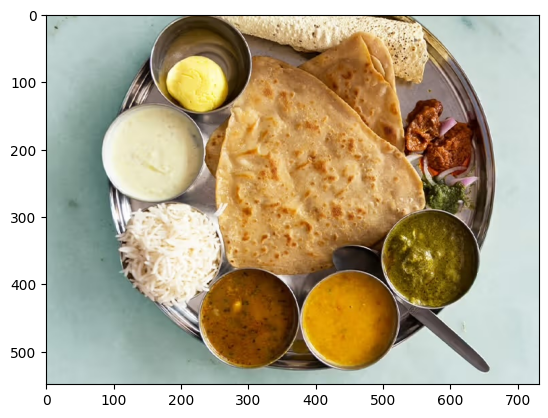
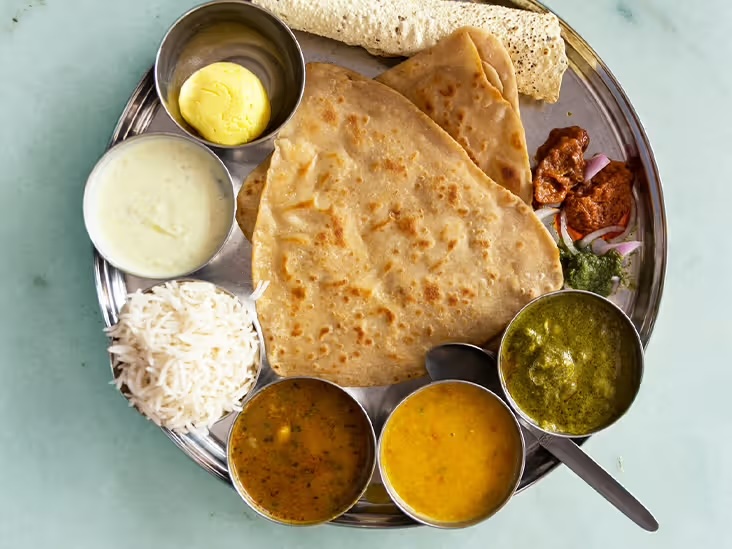
চিত্র ১. একটি ধাতব থালায় পরিবেশিত ভারতীয় থালি খাবারের ছবি।
একটি ছবি সহ অনুরোধ চালান
জেমা ৪ মডেলে ইমেজ কন্টেন্ট দিয়ে প্রম্পট করার সময়, ছবিটিকে প্রম্পটের অংশ হিসেবে অন্তর্ভুক্ত করতে আপনাকে একটি নির্দিষ্ট স্ট্রিং সিকোয়েন্স, <|image|> , ব্যবহার করতে হবে। আপনার অনুরোধটিকে নিম্নলিখিত প্রম্পট কোডে দেখানো অনুযায়ী ফরম্যাট করতে, পূর্বে সংজ্ঞায়িত PROMPT_TEMPLATE স্ট্রিং-এর মতো একটি প্রম্পট টেমপ্লেট ব্যবহার করুন:
question = """Which cuisine is this: <|image|>?
Identify the food items present. Which macros is the meal
high and low on? Keep your answer short.
"""

output = gemma_lm.generate(
    {
        "images": image,
        "prompts": PROMPT_TEMPLATE.format(question=question),
    },
)
print(output)
<|turn>user
Which cuisine is this: <|image>?
Identify the food items present. Which macros is the meal
high and low on? Keep your answer short.

<turn|>
<|turn>model
Based on the image, here is the analysis:

**Cuisine:**
The food items strongly suggest **Indian cuisine** or South Asian cuisine.

**Food Items Present:**

*   **Flatbread:** Likely Roti, Chapati, or Naan.
*   **Rice:** Plain steamed white rice.
*   **Dips/Condiments:** A white sauce (like raita or yogurt-based sauce), and several curries/sauces (one appears to be a lentil/vegetable curry, another a tomato/onion-based curry, and others green/spicy sauces).

**Macros Analysis (General Estimate):**

*   **High on:** Carbohydrates (from rice and flatbread) and Fats (depending on how the flatbread was cooked and the richness of the sauces/curries).
*   **Low on:** Protein (unless a significant amount of meat/legumes is present in the unseen curries) and Fiber (unless the curries are vegetable-heavy).<turn|>
আপনি যদি ছোট আকারের জিপিইউ ব্যবহার করেন এবং মেমোরি শেষ হয়ে যাওয়ার (OOM) ত্রুটির সম্মুখীন হন, তাহলে আপনি max_images_per_prompt এবং sequence_length মান কমিয়ে আনতে পারেন। নিচের কোডটিতে দেখানো হয়েছে কীভাবে sequence length কমিয়ে ৭৬৮ করা যায়।
gemma_lm.preprocessor.max_images_per_prompt = 2
gemma_lm.preprocessor.sequence_length = 768
একাধিক ছবি সহ অনুরোধ চালান
একটি প্রম্পটে একাধিক ছবি ব্যবহার করার সময়, প্রদত্ত প্রতিটি ছবির জন্য একাধিক <|image|> টোকেন ব্যবহার করুন, যেমনটি নিম্নলিখিত উদাহরণে দেখানো হয়েছে:
photo_a = read_image("https://raw.githubusercontent.com/google-gemma/cookbook/refs/heads/main/apps/sample-data/GoldenGate.png")
photo_b = read_image("https://raw.githubusercontent.com/google-gemma/cookbook/refs/heads/main/apps/sample-data/surprise.png")

question = """I have two images:

Photo A: <|image|>
Photo B: <|image|>

Tell me a bit about these.
Keep it short.
"""

output = gemma_lm.generate(
    {
        "images": [photo_a, photo_b],
        "prompts": PROMPT_TEMPLATE.format(question=question),
    },
)
print(output)
<|turn>user
I have two images:

Photo A: <|image>
Photo B: <|image>

Tell me a bit about these.
Keep it short.

<turn|>
<|turn>model
Photo A is a picture of the **Golden Gate Bridge** in San Francisco, California, with water and hills in the background.

Photo B is a close-up portrait of a **cat** with black and white markings and striking green eyes.<turn|>
এরপর কী?
এই টিউটোরিয়ালে, আপনি Keras এবং Gemma ব্যবহার করে কীভাবে টেক্সট তৈরি করতে হয় তা শিখেছেন। এরপর কী শিখবেন তার জন্য এখানে কয়েকটি পরামর্শ দেওয়া হলো:
- জেমা মডেলকে কীভাবে ফাইন-টিউন করতে হয় তা শিখুন।
- একটি জেমা মডেলে কীভাবে ডিস্ট্রিবিউটেড ফাইন-টিউনিং এবং ইনফারেন্স সম্পাদন করতে হয় তা শিখুন।
- Vertex AI-এর সাথে Gemma ইন্টিগ্রেশন সম্পর্কে জানুন
- Vertex AI-এর সাথে জেমা মডেল কীভাবে ব্যবহার করতে হয় তা শিখুন।