

 مشاهده در ai.google.dev مشاهده در ai.google.dev |  در گوگل کولب اجرا کنید در گوگل کولب اجرا کنید |  دویدن در کاگل دویدن در کاگل |  باز کردن در Vertex AI باز کردن در Vertex AI |  مشاهده منبع در گیتهاب مشاهده منبع در گیتهاب |
تولید محتوا، خلاصهسازی و تحلیل محتوا تنها برخی از کارهایی هستند که میتوانید با مدلهای باز Gemma انجام دهید. این آموزش به شما نشان میدهد که چگونه اجرای Gemma را با استفاده از Keras شروع کنید، از جمله تولید محتوای متنی با ورودی متن و تصویر. Keras پیادهسازیهایی را برای اجرای Gemma و سایر مدلها با استفاده از JAX، PyTorch و TensorFlow ارائه میدهد. اگر در Keras تازهکار هستید، بهتر است قبل از شروع، بخش «شروع به کار با Keras» را مطالعه کنید.
مدلهای Gemma 3 و بالاتر از ورودی متن و تصویر پشتیبانی میکنند. نسخههای قبلی Gemma فقط از ورودی متن پشتیبانی میکنند، به جز برخی از انواع آن، از جمله PaliGemma .
نصب بستههای Keras
بستههای پایتون Keras و KerasHub را نصب کنید.
pip install -q -U keras keras-hub keras-nlpیک بکاند انتخاب کنید
Keras یک API یادگیری عمیق چند فریمورکی و سطح بالا است که برای سادگی و سهولت استفاده طراحی شده است. Keras 3 به شما امکان میدهد backend را انتخاب کنید: TensorFlow، JAX یا PyTorch. هر سه برای این آموزش کار خواهند کرد. برای این آموزش، backend را برای JAX پیکربندی کنید زیرا معمولاً عملکرد بهتری را ارائه میدهد.
import os

os.environ["KERAS_BACKEND"] = "jax"  # Or "tensorflow" or "torch".
os.environ["XLA_PYTHON_CLIENT_MEM_FRACTION"] = "1.00"
بستههای وارداتی
بستههای Keras و KerasHub را وارد کنید.
import keras
import keras_hub
مدل بار
Keras پیادهسازیهای بسیاری از معماریهای مدل محبوب را ارائه میدهد. برای ساخت یک پیادهسازی مدلسازی زبان سببی سرتاسری برای مدلهای Gemma 4، یک مدل Gemma را با استفاده از کلاس Gemma4CausalLM دانلود و پیکربندی کنید. مدل را با استفاده از متد from_preset() ایجاد کنید، همانطور که در مثال کد زیر نشان داده شده است:
gemma_lm = keras_hub.models.Gemma4CausalLM.from_preset(
    "gemma4_instruct_2b",
    dtype="bfloat16",
)
متد Gemma4CausalLM.from_preset() مدل را از یک معماری و وزنهای از پیش تعیینشده نمونهسازی میکند. در کد بالا، رشته "gemma#_xxxxxxx" یک نسخه از پیش تعیینشده و اندازه پارامتر برای Gemma را مشخص میکند. میتوانید رشتههای کد مربوط به مدلهای Gemma را در فهرست تغییرات مدل آنها در Kaggle پیدا کنید.
پس از دانلود مدل، از تابع summary() برای کسب اطلاعات بیشتر در مورد مدل استفاده کنید:
gemma_lm.summary()
خروجی خلاصه، تعداد کل پارامترهای قابل آموزش مدلها را نشان میدهد. برای نامگذاری مدل، لایه جاسازی در برابر تعداد پارامترها محاسبه نمیشود.
تولید متن با متن
با استفاده از متد generate() از شیء مدل Gemma که در مراحل قبلی پیکربندی کردهاید، متن را با یک اعلان متنی تولید کنید. آرگومان اختیاری max_length حداکثر طول توالی تولید شده را مشخص میکند. مثالهای کد زیر چند روش برای اعلان مدل را نشان میدهد.
output = gemma_lm.generate("what is keras in 3 bullet points?", max_length=64)
print(output)
what is keras in 3 bullet points?

* **A Deep Learning Framework:** Keras is a high-level API that makes it easy to build and train deep learning models by providing a user-friendly interface.
* **User-Friendly and Fast:** It abstracts away complex mathematical details, allowing users to
همچنین میتوانید با استفاده از یک لیست به عنوان ورودی، درخواستهای دستهای ارائه دهید:
output = gemma_lm.generate(
    ["what is keras in 3 bullet points?",
     "The universe is"],
    max_length=64)
for item in output:
    print(item)
    print("-"*80)
what is keras in 3 bullet points?

* **A Deep Learning Framework:** Keras is a high-level API that makes it easy to build and train deep learning models by providing a user-friendly interface.
* **User-Friendly and Fast:** It abstracts away complex underlying computations, allowing users to
--------------------------------------------------------------------------------
The universe is vast and mysterious. It stretches beyond our comprehension, filled with wonders we are only beginning to uncover. From the swirling galaxies to the silent depths of the ocean, the universe whispers secrets of existence, inviting us to explore, to question, and to marvel at the sheer scale of it all.

This
--------------------------------------------------------------------------------
اگر روی بکاندهای JAX یا TensorFlow اجرا میکنید، باید متوجه شده باشید که فراخوانی دوم generate() سریعتر پاسخ را برمیگرداند. این بهبود عملکرد به این دلیل است که هر فراخوانی برای generate() برای اندازه دسته و max_length مشخص با XLA کامپایل میشود. اجرای اول پرهزینه است، اما اجراهای بعدی سریعتر هستند.
از یک الگوی آماده استفاده کنید
هنگام ساخت درخواستهای پیچیدهتر یا تعاملات چت چند نوبتی، از یک الگوی اعلان برای ساختاردهی درخواست خود استفاده کنید. کد زیر یک الگوی استاندارد برای اعلانهای Gemma ایجاد میکند:
PROMPT_TEMPLATE = """<|turn>user
{question}
<turn|>
<|turn>model
"""
کد زیر نحوه استفاده از الگو برای قالببندی یک درخواست ساده را نشان میدهد:
question = """what is keras in 3 bullet points?"""
prompt = PROMPT_TEMPLATE.format(question=question)
output = gemma_lm.generate(prompt)
print(output)
<|turn>user
what is keras in 3 bullet points?
<turn|>
<|turn>model
Here are three bullet points explaining what Keras is:

* **High-Level API for Deep Learning:** Keras is a user-friendly, high-level neural networks API that allows developers to quickly build, train, and evaluate deep learning models with minimal code.
* **Abstraction and Flexibility:** It provides a flexible and modular interface, making it easy to define complex network architectures (like CNNs or RNNs) without getting bogged down in the low-level mathematical details of frameworks like TensorFlow.
* **Backend Agnostic:** Keras acts as a consistent interface that can run on top of various powerful deep learning backends (most commonly TensorFlow, but also others), allowing users to switch frameworks easily.<turn|>
اختیاری: یک نمونهگیر دیگر را امتحان کنید
شما میتوانید با تنظیم آرگومان sampler روی compile() استراتژی تولید برای شیء مدل را کنترل کنید. به طور پیشفرض، از نمونهگیری "greedy" استفاده خواهد شد. به عنوان یک آزمایش، سعی کنید استراتژی "top_k" را تنظیم کنید:
gemma_lm.compile(sampler="top_k")
output = gemma_lm.generate("The universe is", max_length=64)
print(output)
The universe is vast.

The stars glitter like scattered diamonds on a black velvet canvas. Nebulae swirl in vibrant hues, painting cosmic masterpieces, whispering tales of ancient creation. Galaxies spin in majestic dances, their arms reaching out into the void, a breathtaking spectacle for the eyes.

Everywhere, there, in
در حالی که الگوریتم حریصانه پیشفرض همیشه توکنی را با بیشترین احتمال انتخاب میکند، الگوریتم top-K به طور تصادفی توکن بعدی را از بین توکنهایی با احتمال K بالا انتخاب میکند. لازم نیست نمونهگیر را مشخص کنید و اگر قطعه کد آخر برای مورد استفاده شما مفید نیست، میتوانید آن را نادیده بگیرید. اگر میخواهید درباره نمونهگیرهای موجود بیشتر بدانید، به Samplers مراجعه کنید.
تولید متن با دادههای تصویر
با مدلهای Gemma 3 و بالاتر، میتوانید از تصاویر به عنوان بخشی از یک اعلان برای تولید خروجی استفاده کنید. این قابلیت به شما امکان میدهد از Gemma برای تفسیر محتوای بصری یا استفاده از تصاویر به عنوان داده برای تولید محتوا استفاده کنید.
ایجاد تابع بارگذاری تصویر
تابع زیر یک فایل تصویری را از یک URL بارگذاری کرده و آن را برای استفاده در Gemma prompt توکنسازی میکند:
import numpy as np
import PIL

def read_image(url):
    """Reads image from URL as NumPy array."""

    image_path = keras.utils.get_file(origin=url)
    image = PIL.Image.open(image_path)
    image = np.array(image)
    return image
بارگذاری تصویر برای دریافت اعلان
تصویر را بارگذاری کنید و دادهها را طوری قالببندی کنید که مدل بتواند آن را پردازش کند. از تابع read_image() که در بخش قبلی تعریف شده است، همانطور که در کد مثال زیر نشان داده شده است، استفاده کنید:
from matplotlib import pyplot as plt

image = read_image(
    "https://ai.google.dev/gemma/docs/images/thali-indian-plate.jpg"
)
plt.imshow(image)
<matplotlib.image.AxesImage at 0x7ebbf41738f0>
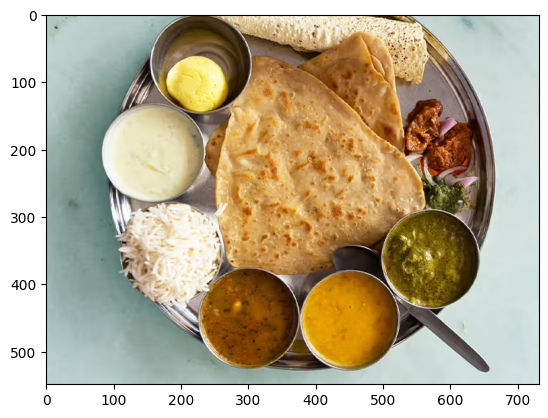
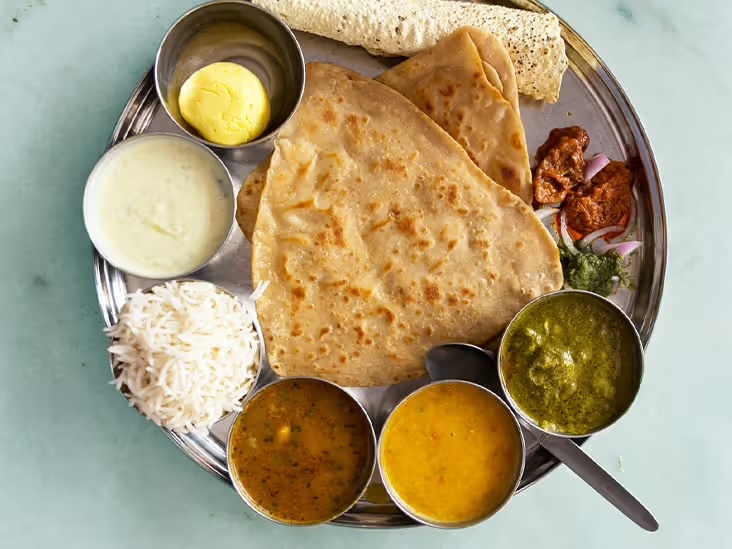
شکل ۱. تصویر غذای هندی تالی روی بشقاب فلزی.
اجرای درخواست با تصویر
هنگام فراخوانی مدل Gemma 4 با محتوای تصویر، از یک رشته خاص <|image|> در اعلان خود برای گنجاندن تصویر به عنوان بخشی از اعلان استفاده میکنید. از یک الگوی اعلان، مانند رشته PROMPT_TEMPLATE که قبلاً تعریف شده است، برای قالببندی درخواست خود مطابق کد اعلان زیر استفاده کنید:
question = """Which cuisine is this: <|image|>?
Identify the food items present. Which macros is the meal
high and low on? Keep your answer short.
"""

output = gemma_lm.generate(
    {
        "images": image,
        "prompts": PROMPT_TEMPLATE.format(question=question),
    },
)
print(output)
<|turn>user
Which cuisine is this: <|image>?
Identify the food items present. Which macros is the meal
high and low on? Keep your answer short.

<turn|>
<|turn>model
Based on the image, here is the analysis:

**Cuisine:**
The food items strongly suggest **Indian cuisine** or South Asian cuisine.

**Food Items Present:**

*   **Flatbread:** Likely Roti, Chapati, or Naan.
*   **Rice:** Plain steamed white rice.
*   **Dips/Condiments:** A white sauce (like raita or yogurt-based sauce), and several curries/sauces (one appears to be a lentil/vegetable curry, another a tomato/onion-based curry, and others green/spicy sauces).

**Macros Analysis (General Estimate):**

*   **High on:** Carbohydrates (from rice and flatbread) and Fats (depending on how the flatbread was cooked and the richness of the sauces/curries).
*   **Low on:** Protein (unless a significant amount of meat/legumes is present in the unseen curries) and Fiber (unless the curries are vegetable-heavy).<turn|>
اگر از پردازنده گرافیکی (GPU) کوچکتری استفاده میکنید و با خطاهای کمبود حافظه (OOM) مواجه میشوید، میتوانید max_images_per_prompt و sequence_length روی مقادیر کوچکتری تنظیم کنید. کد زیر نحوه کاهش طول دنباله به ۷۶۸ را نشان میدهد.
gemma_lm.preprocessor.max_images_per_prompt = 2
gemma_lm.preprocessor.sequence_length = 768
درخواستها را با چندین تصویر اجرا کنید
هنگام استفاده از بیش از یک تصویر در یک اعلان، برای هر تصویر ارائه شده از چندین توکن <|image|> استفاده کنید، همانطور که در مثال زیر نشان داده شده است:
photo_a = read_image("https://raw.githubusercontent.com/google-gemma/cookbook/refs/heads/main/apps/sample-data/GoldenGate.png")
photo_b = read_image("https://raw.githubusercontent.com/google-gemma/cookbook/refs/heads/main/apps/sample-data/surprise.png")

question = """I have two images:

Photo A: <|image|>
Photo B: <|image|>

Tell me a bit about these.
Keep it short.
"""

output = gemma_lm.generate(
    {
        "images": [photo_a, photo_b],
        "prompts": PROMPT_TEMPLATE.format(question=question),
    },
)
print(output)
<|turn>user
I have two images:

Photo A: <|image>
Photo B: <|image>

Tell me a bit about these.
Keep it short.

<turn|>
<|turn>model
Photo A is a picture of the **Golden Gate Bridge** in San Francisco, California, with water and hills in the background.

Photo B is a close-up portrait of a **cat** with black and white markings and striking green eyes.<turn|>
قدم بعدی چیست؟
در این آموزش، شما یاد گرفتید که چگونه با استفاده از Keras و Gemma متن تولید کنید. در اینجا چند پیشنهاد برای یادگیریهای بعدی ارائه شده است:
- یاد بگیرید که چگونه یک مدل Gemma را تنظیم دقیق کنید .
- یاد بگیرید که چگونه تنظیم دقیق توزیعشده و استنتاج را روی مدل Gemma انجام دهید.
- درباره ادغام Gemma با Vertex AI اطلاعات کسب کنید
- یاد بگیرید که چگونه از مدلهای Gemma با Vertex AI استفاده کنید .