
 View on ai.google.dev View on ai.google.dev
|
 Run in Google Colab Run in Google Colab
|
 Run in Kaggle Run in Kaggle
|
 Open in Vertex AI Open in Vertex AI
|
 View source on GitHub View source on GitHub
|
EmbeddingGemma 2 maps text, images, audio, and video into a unified 768-dimensional vector space. So you can fine-tune it on cross-modal triplets, such as (text_query, positive_image, negative_image), using the same Sentence Transformers training pipeline used for text.
Example Scenario: Korean Ink Wash Painting Archive Search
Imagine you are building a digital archive search engine for a museum exhibition of traditional Joseon-dynasty Korean paintings:
- Shin Yunbok, Dano Pungjeong (Scenery on Dano Day) (
ink-wash-1.png): Genre painting (pungsokhwa) of women bathing by a stream and riding a swing during the Dano festival
- Jeong Seon, Inwangjesaekdo (Clearing after Rain on Mount Inwang) (
ink-wash-2.png): True-view landscape painting (jingyeong sansuhwa) of rain-soaked granite peaks emerging from mist
- Kim Hongdo, Seodang (Village School) (
ink-wash-3.png): Genre painting of a village schoolmaster, a weeping student, and giggling classmates
Out of the box, EmbeddingGemma 2 can retrieve the right painting when given a descriptive scene caption (such as "Scenery on Dano Day" or "Village School"). However, when a user searches by artist name alone (e.g. "Show me an ink wash painting of Shin Yunbok."), a model sees three visually similar traditional Korean ink wash works and may misrank them without domain-specific artist attribution.
What this guide covers:
- Installing dependencies and loading EmbeddingGemma 2 (
google/embeddinggemma-2) with text and vision encoders - Evaluating baseline text-to-image retrieval performance (comparing artist-based queries vs. descriptive scene queries) before fine-tuning
- Preparing cross-modal
(anchor, positive, negative)training triplets linking artist names to their paintings - Fine-tuning the model using
SentenceTransformerTrainer,MultipleNegativesRankingLoss, and column-specific task prompts - Evaluating post-training improvements and saving your adapted multimodal model
New to multimodal inference with EmbeddingGemma 2? See Multimodal Embeddings with EmbeddingGemma 2 for an overview of image, audio, video, and interleaved inputs.
Setup and Installation
Install sentence-transformers, transformers, datasets, and the multimedia libraries (pillow, soundfile, torchcodec) required for processing images, audio, and video.
Sentence Transformers is a Python framework for using and training embedding and reranker models. For more details on the framework, see the Sentence Transformers documentation.
pip install -U sentence-transformers transformers datasets pillow soundfile torchcodec(Optional) Hugging Face Authentication
You need a valid Hugging Face Token to publish your model. If you are running inside Google Colab, you can securely load your Hugging Face Token from Colab secrets; otherwise you can pass the token directly to login(). Make sure your token has write access if you plan to push your fine-tuned model to the Hub.
# Login into Hugging Face Hub
from huggingface_hub import login
login()
Load the Base Model
Load google/embeddinggemma-2 using SentenceTransformer.
from sentence_transformers import SentenceTransformer

model_id = "google/embeddinggemma-2"
model = SentenceTransformer(
    model_id,
    config_kwargs={"audio_config": None},
)

print(f"Device: {model.device}")
print(f"dtype: {model.dtype}")
print(model)
print("Total number of parameters in the model:", sum(p.numel() for p in model.parameters()))
Loading weights:   0%|          | 0/624 [00:00<?, ?it/s]
Device: cuda:0
dtype: torch.bfloat16
SentenceTransformer(
  (0): Transformer({'transformer_task': 'feature-extraction', 'modality_config': {'text': {'method': 'forward', 'method_output_name': 'last_hidden_state'}, 'image': {'method': 'forward', 'method_output_name': 'last_hidden_state'}, 'audio': {'method': 'forward', 'method_output_name': 'last_hidden_state'}, 'video': {'method': 'forward', 'method_output_name': 'last_hidden_state'}, 'message': {'method': 'forward', 'method_output_name': 'last_hidden_state', 'format': 'structured'} }, 'module_output_name': 'token_embeddings', 'architecture': 'EmbeddingGemma2Model'})
  (1): Pooling({'embedding_dimension': 768, 'pooling_mode': 'mean', 'include_prompt': True})
  (2): Normalize({'module_input_name': 'sentence_embedding', 'module_output_name': 'sentence_embedding'})
)
Total number of parameters in the model: 438760448
Tip: Since this tutorial fine-tunes on text and image data, we pass
config_kwargs={"audio_config": None}during initialization to omit the audio encoder and reduce GPU memory usage during training. If your fine-tuning dataset also includes audio, initializeSentenceTransformer(model_id)with default settings to load all modality encoders.
Note on Precision: EmbeddingGemma 2 activations are incompatible with
float16. Usebfloat16(default on supported GPUs) orfloat32.
Baseline Evaluation (Before Fine-Tuning)
First, let's load the three Joseon-dynasty ink wash paintings and test how the base model ranks them when a visitor searches by artist name:
"Show me an ink wash painting of Shin Yunbok."
Our three candidate paintings are:
- Shin Yunbok, Dano Pungjeong (Scenery on Dano Day) (
ink-wash-1.png) — Target Match - Jeong Seon, Inwangjesaekdo (Clearing after Rain on Mount Inwang) (
ink-wash-2.png) — Hard Negative - Kim Hongdo, Seodang (Village School) (
ink-wash-3.png) — Hard Negative
from PIL import Image
from IPython.display import display
import requests

IMAGE_SIZE = 240

def load_image(url):
    return Image.open(requests.get(url, stream=True).raw).convert("RGB").resize((IMAGE_SIZE, IMAGE_SIZE))

# Load Korean ink wash paintings
ink_wash_1 = load_image("https://github.com/bebechien/gemma/raw/refs/heads/main/images/ink-wash-1.png")
ink_wash_2 = load_image("https://github.com/bebechien/gemma/raw/refs/heads/main/images/ink-wash-2.png")
ink_wash_3 = load_image("https://github.com/bebechien/gemma/raw/refs/heads/main/images/ink-wash-3.png")

task_name = "Retrieval-query"
query = "Show me an ink wash painting of Shin Yunbok."

candidates = [
    {"label": "Shin Yunbok, Dano Pungjeong (Scenery on Dano Day)", "image": ink_wash_1},
    {"label": "Jeong Seon, Inwangjesaekdo (Clearing after Rain on Mount Inwang)", "image": ink_wash_2},
    {"label": "Kim Hongdo, Seodang (Village School)", "image": ink_wash_3},
]

for item in candidates:
    print(item["label"])
    display(item["image"])

def evaluate_retrieval(query_text, candidate_items):
    print(f"Query: {query_text}")
    query_emb = model.encode(query_text, prompt_name=task_name)
    image_embs = model.encode([item["image"] for item in candidate_items])
    similarities = model.similarity(query_emb, image_embs)[0]

    for item, score in zip(candidate_items, similarities):
        print(f"Painting: {item['label']:<66} -> 🤖 Score: {score.item():.4f}")

print("-"*80)
print("Baseline Scores (Before Fine-Tuning):")
evaluate_retrieval(query, candidates)
Shin Yunbok, Dano Pungjeong (Scenery on Dano Day)
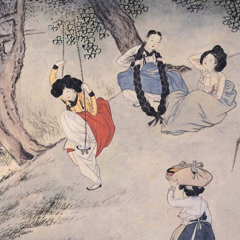
Jeong Seon, Inwangjesaekdo (Clearing after Rain on Mount Inwang)

Kim Hongdo, Seodang (Village School)

--------------------------------------------------------------------------------
Baseline Scores (Before Fine-Tuning):
Query: Show me an ink wash painting of Shin Yunbok.
Painting: Shin Yunbok, Dano Pungjeong (Scenery on Dano Day)                  -> 🤖 Score: 0.6753
Painting: Jeong Seon, Inwangjesaekdo (Clearing after Rain on Mount Inwang)   -> 🤖 Score: 0.7005
Painting: Kim Hongdo, Seodang (Village School)                               -> 🤖 Score: 0.6631
Note on Task Prompts for Cross-Modal Search: Task-specific prompt prefixes apply to text inputs only. Here we encode the text query with
prompt_name="Retrieval-query"("task: search result | query: ") and encode the candidate images directly without a text prefix. For details on all available prompts, see the EmbeddingGemma 2 model card.
Why Did the Baseline Query Misrank the Paintings?
In the baseline evaluation above, searching for "Show me an ink wash painting of Shin Yunbok." misranks the candidates: the base model assigns the highest similarity score to Jeong Seon's Inwangjesaekdo instead of the true match, Shin Yunbok's Dano Pungjeong.
Note that the base model does retrieve the correct image out of the box when you provide a descriptive caption about the visual scene itself (such as "Dano Pungjeong (Scenery on Dano Day)" or "Seodang (Village School)" below). However, because an artist's name ("Shin Yunbok") is domain metadata rather than a literal visual description of the scene, fine-tuning is needed to teach the model to associate each artist with their painting.
query_desc = "Dano Pungjeong (Scenery on Dano Day)"
evaluate_retrieval(query_desc, candidates)

print("-"*80)
query_desc = "Seodang (Village School)"
evaluate_retrieval(query_desc, candidates)
Query: Dano Pungjeong (Scenery on Dano Day)
Painting: Shin Yunbok, Dano Pungjeong (Scenery on Dano Day)                  -> 🤖 Score: 0.6892
Painting: Jeong Seon, Inwangjesaekdo (Clearing after Rain on Mount Inwang)   -> 🤖 Score: 0.6767
Painting: Kim Hongdo, Seodang (Village School)                               -> 🤖 Score: 0.6478
--------------------------------------------------------------------------------
Query: Seodang (Village School)
Painting: Shin Yunbok, Dano Pungjeong (Scenery on Dano Day)                  -> 🤖 Score: 0.6777
Painting: Jeong Seon, Inwangjesaekdo (Clearing after Rain on Mount Inwang)   -> 🤖 Score: 0.6782
Painting: Kim Hongdo, Seodang (Village School)                               -> 🤖 Score: 0.6997
Prepare the Multimodal Fine-Tuning Dataset
To teach the model to associate each Joseon-dynasty master with their artwork, we structure our training data as cross-modal contrastive triplets: (anchor, positive, negative):
anchor(Text): The artist's name ("Shin Yunbok","Jeong Seon","Kim Hongdo").positive(Image): The matchingPIL.Imagepainting by that artist.negative(Image): Another traditional Korean ink wash painting by a different artist, acting as a visual hard negative.
SentenceTransformerTrainer automatically inspects each column's modality and preprocesses text and images transparently—no manual tokenization or pixel preprocessing is required.
from datasets import Dataset

triplets = [
    [
        "Shin Yunbok",
        ink_wash_1,
        ink_wash_2,
    ],
    [
        "Jeong Seon",
        ink_wash_2,
        ink_wash_3,
    ],
    [
        "Kim Hongdo",
        ink_wash_3,
        ink_wash_1,
    ],
]

# Convert into a Hugging Face Dataset with text 'anchor' and image 'positive'/'negative' columns
data_as_dicts = [
    {"anchor": row[0], "positive": row[1], "negative": row[2]}
    for row in triplets
]
train_dataset = Dataset.from_list(data_as_dicts)
print(train_dataset)
Dataset({
    features: ['anchor', 'positive', 'negative'],
    num_rows: 3
})
Tip (Other Multimodal Formats): Dataset columns can also contain image file paths/URLs, audio waveforms, video paths, or multimodal dictionaries like
{"text": "caption", "image": pil_image}when training on interleaved inputs.
Fine-Tuning the Multimodal Model
We fine-tune the model using SentenceTransformerTrainer and MultipleNegativesRankingLoss, which pulls (anchor, positive) text-image pairs closer together in the shared 768-dimensional embedding space while pushing (anchor, negative) pairs—and in-batch negatives—apart.
Crucially, because only the anchor column contains text while positive and negative contain images, we pass a column-specific prompt mapping prompts={"anchor": model.prompts[task_name]} in SentenceTransformerTrainingArguments. This ensures the task prefix is prepended only to text queries and not to image inputs.
from sentence_transformers import (
    SentenceTransformerTrainer,
    SentenceTransformerTrainingArguments,
)
from sentence_transformers.sentence_transformer.losses import MultipleNegativesRankingLoss
from transformers import TrainerCallback

# Initialize contrastive ranking loss
loss = MultipleNegativesRankingLoss(model)

# Configure training arguments
args = SentenceTransformerTrainingArguments(
    output_dir="my-multimodal-embeddinggemma-2",
    prompts={"anchor": model.prompts[task_name]},  # Apply task prompt prefix only to the text 'anchor' column
    num_train_epochs=5,
    per_device_train_batch_size=1,
    learning_rate=2e-5,
    bf16=True,                                     # EmbeddingGemma 2 uses bfloat16 (incompatible with fp16)
    fp16=False,
    logging_steps=train_dataset.num_rows,
    report_to="none",
)

class EvaluationCallback(TrainerCallback):
    """Callback that evaluates cross-modal retrieval scores at each logging step."""

    def __init__(self, eval_fn):
        self.eval_fn = eval_fn

    def on_log(self, args, state, control, **kwargs):
        print(f"\n--- Step {state.global_step} Evaluation ---")
        self.eval_fn()

trainer = SentenceTransformerTrainer(
    model=model,
    args=args,
    train_dataset=train_dataset,
    loss=loss,
    callbacks=[EvaluationCallback(lambda: evaluate_retrieval(query, candidates))],
)

trainer.train()
Computing widget examples: 0%| | 0/1 [00:00<?, ?example/s]
--- Step 3 Evaluation ---
Query: Show me an ink wash painting of Shin Yunbok.
Painting: Shin Yunbok, Dano Pungjeong (Scenery on Dano Day)                  -> 🤖 Score: 0.7203
Painting: Jeong Seon, Inwangjesaekdo (Clearing after Rain on Mount Inwang)   -> 🤖 Score: 0.6359
Painting: Kim Hongdo, Seodang (Village School)                               -> 🤖 Score: 0.6785

--- Step 6 Evaluation ---
Query: Show me an ink wash painting of Shin Yunbok.
Painting: Shin Yunbok, Dano Pungjeong (Scenery on Dano Day)                  -> 🤖 Score: 0.7185
Painting: Jeong Seon, Inwangjesaekdo (Clearing after Rain on Mount Inwang)   -> 🤖 Score: 0.6257
Painting: Kim Hongdo, Seodang (Village School)                               -> 🤖 Score: 0.6610

--- Step 9 Evaluation ---
Query: Show me an ink wash painting of Shin Yunbok.
Painting: Shin Yunbok, Dano Pungjeong (Scenery on Dano Day)                  -> 🤖 Score: 0.7107
Painting: Jeong Seon, Inwangjesaekdo (Clearing after Rain on Mount Inwang)   -> 🤖 Score: 0.6157
Painting: Kim Hongdo, Seodang (Village School)                               -> 🤖 Score: 0.6544

--- Step 12 Evaluation ---
Query: Show me an ink wash painting of Shin Yunbok.
Painting: Shin Yunbok, Dano Pungjeong (Scenery on Dano Day)                  -> 🤖 Score: 0.7067
Painting: Jeong Seon, Inwangjesaekdo (Clearing after Rain on Mount Inwang)   -> 🤖 Score: 0.6129
Painting: Kim Hongdo, Seodang (Village School)                               -> 🤖 Score: 0.6515

--- Step 15 Evaluation ---
Query: Show me an ink wash painting of Shin Yunbok.
Painting: Shin Yunbok, Dano Pungjeong (Scenery on Dano Day)                  -> 🤖 Score: 0.7070
Painting: Jeong Seon, Inwangjesaekdo (Clearing after Rain on Mount Inwang)   -> 🤖 Score: 0.6126
Painting: Kim Hongdo, Seodang (Village School)                               -> 🤖 Score: 0.6522
Writing model shards:   0%|          | 0/1 [00:00<?, ?it/s]
--- Step 15 Evaluation ---
Query: Show me an ink wash painting of Shin Yunbok.
Painting: Shin Yunbok, Dano Pungjeong (Scenery on Dano Day)                  -> 🤖 Score: 0.7070
Painting: Jeong Seon, Inwangjesaekdo (Clearing after Rain on Mount Inwang)   -> 🤖 Score: 0.6126
Painting: Kim Hongdo, Seodang (Village School)                               -> 🤖 Score: 0.6522
TrainOutput(global_step=15, training_loss=0.49939937591552735, metrics={'train_runtime': 20.5693, 'train_samples_per_second': 0.729, 'train_steps_per_second': 0.729, 'total_flos': 0.0, 'train_loss': 0.49939937591552735, 'epoch': 5.0})
Evaluation After Fine-Tuning
Let's run our test query once more on the fine-tuned model and compare the post-training cross-modal similarity scores against our baseline:
print("Post-Training Scores (After Fine-Tuning):")
evaluate_retrieval(query, candidates)
Post-Training Scores (After Fine-Tuning):
Query: Show me an ink wash painting of Shin Yunbok.
Painting: Shin Yunbok, Dano Pungjeong (Scenery on Dano Day)                  -> 🤖 Score: 0.7070
Painting: Jeong Seon, Inwangjesaekdo (Clearing after Rain on Mount Inwang)   -> 🤖 Score: 0.6126
Painting: Kim Hongdo, Seodang (Village School)                               -> 🤖 Score: 0.6522
What Changed After Fine-Tuning?
Before fine-tuning, all three Joseon-dynasty paintings shared a similar traditional Korean ink wash aesthetic, causing the base model to misrank Jeong Seon's Inwangjesaekdo above Shin Yunbok's Dano Pungjeong when queried for "Show me an ink wash painting of Shin Yunbok."
After just 5 epochs (15 steps) of contrastive fine-tuning on (artist_name, positive_image, negative_image) triplets:
- Even though the training anchors only contained artist names (
"Shin Yunbok","Jeong Seon","Kim Hongdo"), the model generalizes to the natural-language query "Show me an ink wash painting of Shin Yunbok." - Shin Yunbok, Dano Pungjeong (Scenery on Dano Day) (
ink-wash-1.png) rises from Rank #2 to Rank #1, already claiming the top rank after the very first epoch (Step 3). - The competing ink-wash hard negatives (Jeong Seon and Kim Hongdo) are pushed further apart in the shared 768-dimensional embedding space.
Saving and Sharing Your Model
Save your fine-tuned multimodal model locally so it can be reloaded directly with SentenceTransformer:
# Save locally
model.save_pretrained("my-multimodal-embeddinggemma-2-finetuned")
To share your adapted model with your team or deploy it from the Hugging Face Hub, use push_to_hub:
# Optional: Push your fine-tuned model to the Hugging Face Hub
model.push_to_hub("my-multimodal-embeddinggemma-2-finetuned")
Summary and Next Steps
You have learned how to fine-tune EmbeddingGemma 2 for cross-modal text-to-image retrieval using multimodal triplets and SentenceTransformerTrainer.
Explore what more you can do with EmbeddingGemma 2: