

Gemini kann Audioeingaben analysieren und Textantworten generieren.
Python
from google import genai
import base64

client = genai.Client()

uploaded_file = client.files.upload(file="path/to/sample.mp3")

interaction = client.interactions.create(
    model="gemini-3.6-flash",
    input=[
        {"type": "text", "text": "Describe this audio clip"},
        {
            "type": "audio",
            "uri": uploaded_file.uri,
            "mime_type": uploaded_file.mime_type
        }
    ]
)
print(interaction.output_text)
JavaScript
import { GoogleGenAI } from "@google/genai";

const client = new GoogleGenAI({});

const uploadedFile = await client.files.upload({
    file: "path/to/sample.mp3",
    config: { mime_type: "audio/mp3" }
});

const interaction = await client.interactions.create({
    model: "gemini-3.6-flash",
    input: [
        {type: "text", text: "Describe this audio clip"},
        {
            type: "audio",
            uri: uploadedFile.uri,
            mime_type: uploadedFile.mimeType
        }
    ]
});
console.log(interaction.output_text);
REST
# First upload the file, then use the URI:
curl -X POST "https://generativelanguage.googleapis.com/v1beta/interactions" \
  -H "x-goog-api-key: $GEMINI_API_KEY" \
  -H 'Content-Type: application/json' \
  -d '{
    "model": "gemini-3.6-flash",
    "input": [
      {"type": "text", "text": "Describe this audio clip"},
      {
        "type": "audio",
        "uri": "YOUR_FILE_URI",
        "mime_type": "audio/mp3"
      }
    ]
  }'
Übersicht
Gemini kann Audioeingaben analysieren und verstehen und Textantworten generieren. Dadurch sind folgende Anwendungsfälle möglich:
- Audioinhalte beschreiben, zusammenfassen oder Fragen dazu beantworten
- Transkription und Übersetzung (Sprache zu Text)
- Sprecherbestimmung (verschiedene Sprecher identifizieren)
- Erkennung von Emotionen in Sprache und Musik
- Bestimmte Segmente mit Zeitstempeln analysieren
Informationen zu Sprach- und Videointeraktionen in Echtzeit finden Sie in der Live API. Für spezielle Modelle für die Umwandlung von Sprache in Text mit Unterstützung für die Echtzeit-Transkription, verwenden Sie die Google Cloud Speech-to-Text API.
Sprache zu Text transkribieren
In diesem Beispiel wird gezeigt, wie Sie Sprache mit Zeitstempeln, Sprecherbestimmung und Emotionserkennung mithilfe strukturierter Ausgabentranskribieren, übersetzen und zusammenfassen.
Python
from google import genai

client = genai.Client()

YOUTUBE_URL = "https://www.youtube.com/watch?v=ku-N-eS1lgM"

prompt = """
  Process the audio file and generate a detailed transcription.

  Requirements:
  1. Identify distinct speakers (e.g., Speaker 1, Speaker 2).
  2. Provide accurate timestamps for each segment (Format: MM:SS).
  3. Detect the primary language of each segment.
  4. If not English, provide the English translation.
  5. Identify the primary emotion: Happy, Sad, Angry, or Neutral.
  6. Provide a brief summary at the beginning.
"""

response_schema = {
    "type": "object",
    "properties": {
        "summary": {"type": "string"},
        "segments": {
            "type": "array",
            "items": {
                "type": "object",
                "properties": {
                    "speaker": {"type": "string"},
                    "timestamp": {"type": "string"},
                    "content": {"type": "string"},
                    "language": {"type": "string"},
                    "emotion": {
                        "type": "string",
                        "enum": ["happy", "sad", "angry", "neutral"]
                    }
                },
                "required": ["speaker", "timestamp", "content", "emotion"]
            }
        }
    },
    "required": ["summary", "segments"]
}

interaction = client.interactions.create(
    model="gemini-3.6-flash",
    input=[
        {"type": "video", "uri": YOUTUBE_URL, "mime_type": "video/mp4"},
        {"type": "text", "text": prompt}
    ],
    response_format=response_schema,
)

print(interaction.output_text)
JavaScript
import { GoogleGenAI } from "@google/genai";

const client = new GoogleGenAI({});

const YOUTUBE_URL = "https://www.youtube.com/watch?v=ku-N-eS1lgM";

const prompt = `
  Process the audio file and generate a detailed transcription.

  Requirements:
  1. Identify distinct speakers (e.g., Speaker 1, Speaker 2).
  2. Provide accurate timestamps for each segment (Format: MM:SS).
  3. Detect the primary language of each segment.
  4. If not English, provide the English translation.
  5. Identify the primary emotion: Happy, Sad, Angry, or Neutral.
  6. Provide a brief summary at the beginning.
`;

const responseSchema = {
    type: "object",
    properties: {
        summary: { type: "string" },
        segments: {
            type: "array",
            items: {
                type: "object",
                properties: {
                    speaker: { type: "string" },
                    timestamp: { type: "string" },
                    content: { type: "string" },
                    language: { type: "string" },
                    emotion: {
                        type: "string",
                        enum: ["happy", "sad", "angry", "neutral"]
                    }
                },
                required: ["speaker", "timestamp", "content", "emotion"]
            }
        }
    },
    required: ["summary", "segments"]
};

const interaction = await client.interactions.create({
    model: "gemini-3.6-flash",
    input: [
        { type: "video", uri: YOUTUBE_URL, mime_type: "video/mp4" },
        { type: "text", text: prompt }
    ],
    response_format: responseSchema,
});

console.log(JSON.parse(interaction.output_text));
REST
curl -X POST "https://generativelanguage.googleapis.com/v1beta/interactions" \
  -H "x-goog-api-key: $GEMINI_API_KEY" \
  -H 'Content-Type: application/json' \
  -d '{
    "model": "gemini-3.6-flash",
    "input": [
      {
        "type": "video",
        "uri": "https://www.youtube.com/watch?v=ku-N-eS1lgM",
        "mime_type": "video/mp4"
      },
      {
        "type": "text",
        "text": "Transcribe with speaker diarization and emotion detection."
      }
    ],
    "response_format": {
        "type": "object",
        "properties": {
          "summary": {"type": "string"},
          "segments": {
            "type": "array",
            "items": {
              "type": "object",
              "properties": {
                "speaker": {"type": "string"},
                "timestamp": {"type": "string"},
                "content": {"type": "string"},
                "emotion": {"type": "string", "enum": ["happy", "sad", "angry", "neutral"]}
              }
            }
          }
        }
      }
  }'
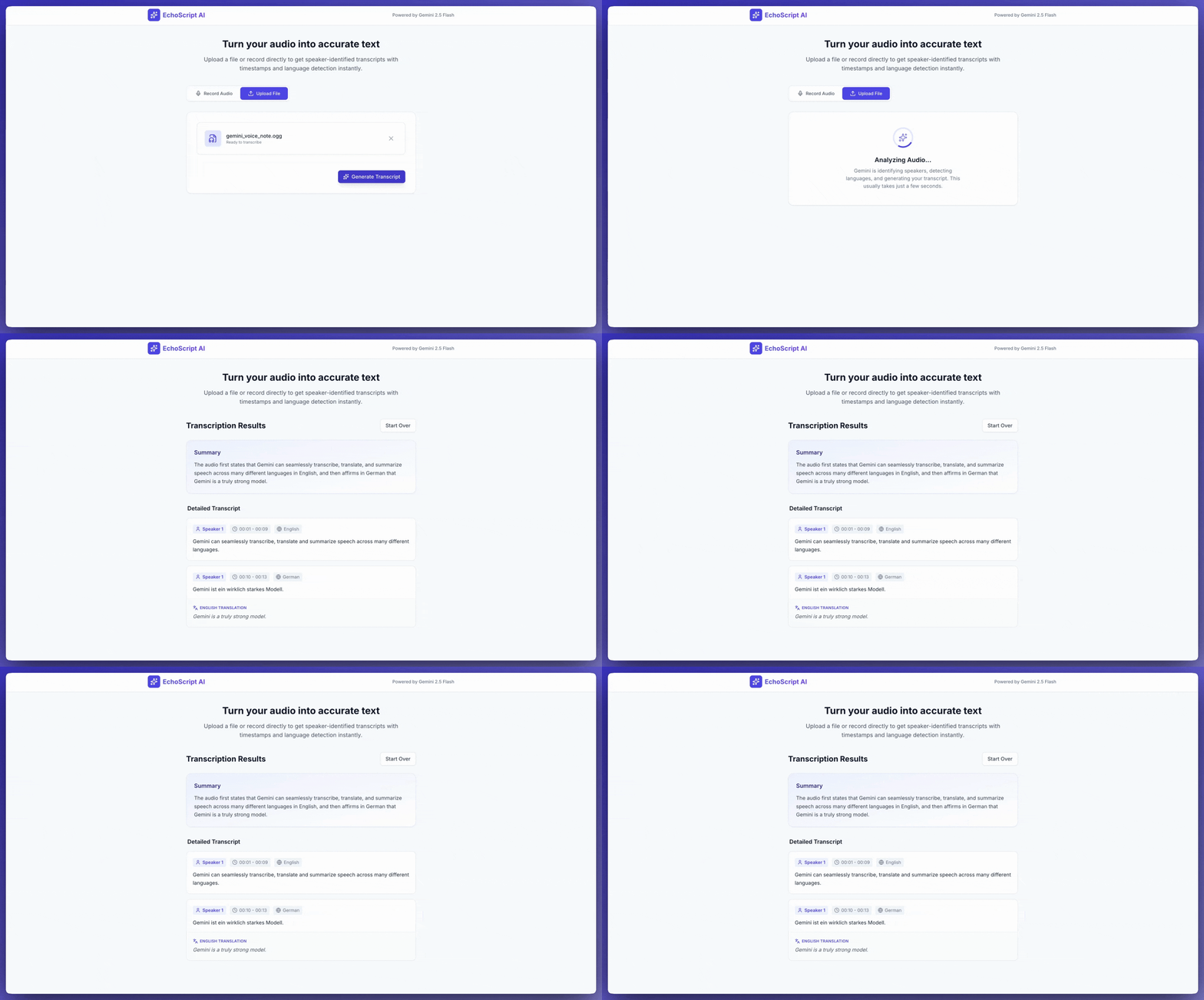
Eingabeaudio
Sie können Audiodaten auf folgende Arten bereitstellen:
- Laden Sie eine Audiodatei hoch, bevor Sie eine Anfrage senden.
- Übergeben Sie Inline-Audiodaten mit der Anfrage.
Audiodatei hochladen
Verwenden Sie die Files API für Dateien, die größer als 20 MB sind.
Python
from google import genai

client = genai.Client()

uploaded_file = client.files.upload(file="path/to/sample.mp3")

interaction = client.interactions.create(
    model="gemini-3.6-flash",
    input=[
        {"type": "text", "text": "Describe this audio clip"},
        {
            "type": "audio",
            "uri": uploaded_file.uri,
            "mime_type": uploaded_file.mime_type
        }
    ]
)
print(interaction.output_text)
JavaScript
import { GoogleGenAI } from "@google/genai";

const client = new GoogleGenAI({});

const uploadedFile = await client.files.upload({
    file: "path/to/sample.mp3",
    config: { mimeType: "audio/mp3" }
});

const interaction = await client.interactions.create({
    model: "gemini-3.6-flash",
    input: [
        {type: "text", text: "Describe this audio clip"},
        {
            type: "audio",
            uri: uploadedFile.uri,
            mime_type: uploadedFile.mimeType
        }
    ]
});
console.log(interaction.output_text);
REST
# First upload the file using the Files API, then use the URI:
curl -X POST "https://generativelanguage.googleapis.com/v1beta/interactions" \
  -H "x-goog-api-key: $GEMINI_API_KEY" \
  -H 'Content-Type: application/json' \
  -d '{
    "model": "gemini-3.6-flash",
    "input": [
      {"type": "text", "text": "Describe this audio clip"},
      {
        "type": "audio",
        "uri": "YOUR_FILE_URI",
        "mime_type": "audio/mp3"
      }
    ]
  }'
Audiodaten inline übergeben
Für kleine Audiodateien mit einer Gesamtgröße von weniger als 20 MB:
Python
from google import genai
import base64

client = genai.Client()

with open('path/to/small-sample.mp3', 'rb') as f:
    audio_bytes = f.read()

interaction = client.interactions.create(
    model="gemini-3.6-flash",
    input=[
        {"type": "text", "text": "Describe this audio clip"},
        {
            "type": "audio",
            "data": base64.b64encode(audio_bytes).decode('utf-8'),
            "mime_type": "audio/mp3"
        }
    ]
)
print(interaction.output_text)
JavaScript
import { GoogleGenAI } from "@google/genai";
import * as fs from "node:fs";

const client = new GoogleGenAI({});

const audioData = fs.readFileSync("path/to/small-sample.mp3", {
    encoding: "base64"
});

const interaction = await client.interactions.create({
    model: "gemini-3.6-flash",
    input: [
        {type: "text", text: "Describe this audio clip"},
        {
            type: "audio",
            data: audioData,
            mime_type: "audio/mp3"
        }
    ]
});
console.log(interaction.output_text);
REST
AUDIO_PATH="path/to/sample.mp3"

if [[ "$(base64 --version 2>&1)" = *"FreeBSD"* ]]; then
  B64FLAGS="--input"
else
  B64FLAGS="-w0"
fi

curl -X POST "https://generativelanguage.googleapis.com/v1beta/interactions" \
  -H "x-goog-api-key: $GEMINI_API_KEY" \
  -H 'Content-Type: application/json' \
  -d '{
    "model": "gemini-3.6-flash",
    "input": [
      {"type": "text", "text": "Describe this audio clip"},
      {
        "type": "audio",
        "data": "'$(base64 $B64FLAGS $AUDIO_PATH)'",
        "mime_type": "audio/mp3"
      }
    ]
  }'
Hinweise zu Inline-Audiodaten: * Die maximale Anfragengröße beträgt insgesamt 20 MB (einschließlich Prompts und aller Dateien). * Wenn Sie die Datei wiederverwenden möchten, laden Sie sie stattdessen hoch.
Transkript erstellen
Wenn Sie ein Transkript erstellen möchten, fordern Sie es im Prompt an:
Python
interaction = client.interactions.create(
    model="gemini-3.6-flash",
    input=[
        {"type": "text", "text": "Generate a transcript of the speech."},
        {
            "type": "audio",
            "uri": uploaded_file.uri,
            "mime_type": uploaded_file.mime_type
        }
    ]
)
print(interaction.output_text)
JavaScript
const interaction = await client.interactions.create({
    model: "gemini-3.6-flash",
    input: [
        { type: "text", text: "Generate a transcript of the speech." },
        {
            type: "audio",
            uri: uploadedFile.uri,
            mime_type: uploadedFile.mimeType
        }
    ]
});
console.log(interaction.output_text);
Auf Zeitstempel verweisen
Verwenden Sie das Format MM:SS, um auf bestimmte Abschnitte zu verweisen:
Python
interaction = client.interactions.create(
    model="gemini-3.6-flash",
    input=[
        {"type": "text", "text": "Provide a transcript from 02:30 to 03:29."},
        {
            "type": "audio",
            "uri": uploaded_file.uri,
            "mime_type": uploaded_file.mime_type
        }
    ]
)
JavaScript
const interaction = await client.interactions.create({
    model: "gemini-3.6-flash",
    input: [
        { type: "text", text: "Provide a transcript from 02:30 to 03:29." },
        { type: "audio", uri: uploadedFile.uri, mime_type: "audio/mp3" }
    ]
});
Tokens zählen
So zählen Sie Tokens in einer Audiodatei:
Python
response = client.models.count_tokens(
    model="gemini-3.6-flash",
    contents=[uploaded_file]
)
print(response)
JavaScript
const response = await client.models.countTokens({
    model: "gemini-3.6-flash",
    contents: [
        { fileData: { fileUri: uploadedFile.uri, mimeType: uploadedFile.mimeType } }
    ]
});
console.log(response.totalTokens);
Unterstützte Audioformate
- WAV –
audio/wav - MP3 –
audio/mp3 - AIFF –
audio/aiff - AAC –
audio/aac - OGG Vorbis –
audio/ogg - FLAC –
audio/flac
Technische Details zu Audio
- Tokens: 32 Tokens pro Sekunde Audio (1 Minute = 1.920 Tokens)
- Nicht-Sprache: Gemini versteht Geräusche, die keine Sprache sind (Vogelgesang, Sirenen usw.).
- Maximale Länge: 9,5 Stunden Audio pro Prompt
- Auflösung: Auf 16 kbit/s heruntergesampelt
- Kanäle: Mehrkanal-Audio wird zu einem einzelnen Kanal kombiniert.
Nächste Schritte
- Files API: Audiodateien hochladen und verwalten
- Systemanweisungen: Modellverhalten anpassen
- Strukturierte Ausgabe: Transkriptionsergebnisse im JSON-Format abrufen