

코드 실행
Gemini API는 모델이 Python 코드를 생성하고 실행할 수 있는 코드 실행 도구를 제공합니다. 그런 다음 모델은 최종 출력을 도출할 때까지 코드 실행 결과를 통해 반복적으로 학습할 수 있습니다. 코드 실행을 사용하여 코드 기반 추론의 이점을 활용하는 애플리케이션을 빌드할 수 있습니다. 예를 들어 코드 실행을 사용하여 방정식을 풀거나 텍스트를 처리할 수 있습니다. 코드 실행 환경에 포함된 라이브러리를 사용하여 더 전문적인 작업을 실행할 수도 있습니다.
Gemini는 Python으로만 코드를 실행할 수 있습니다. Gemini에 다른 언어로 코드를 생성해 달라고 요청할 수는 있지만 모델이 코드 실행 도구를 사용하여 코드를 실행할 수는 없습니다.
코드 실행 사용 설정
코드 실행을 사용 설정하려면 모델에서 코드 실행 도구를 구성하세요. 이를 통해 모델이 코드를 생성하고 실행할 수 있습니다.
Python
# This will only work for SDK newer than 2.0.0
from google import genai

client = genai.Client()

interaction = client.interactions.create(
    model="gemini-3-flash-preview",
    input="What is the sum of the first 50 prime numbers? "
          "Generate and run code for the calculation, and make sure you get all 50.",
    tools=[{"type": "code_execution"}]
)

for step in interaction.steps:
    if step.type == "model_output":
        for content_block in step.content:
            if content_block.type == "text":
                print(content_block.text)
    elif step.type == "code_execution_call":
        print(step.arguments.code)
    elif step.type == "code_execution_result":
        print(step.result)
자바스크립트
// This will only work for SDK newer than 2.0.0
import { GoogleGenAI } from "@google/genai";

const client = new GoogleGenAI({});

const interaction = await client.interactions.create({
    model: "gemini-3-flash-preview",
    input: "What is the sum of the first 50 prime numbers? " +
           "Generate and run code for the calculation, and make sure you get all 50.",
    tools: [{ type: "code_execution" }]
});

for (const step of interaction.steps) {
    if (step.type === "model_output") {
        for (const contentBlock of step.content) {
            if (contentBlock.type === "text") {
                console.log(contentBlock.text);
            }
        }
    } else if (step.type === "code_execution_call") {
        console.log(step.arguments.code);
    } else if (step.type === "code_execution_result") {
        console.log(step.result);
    }
}
REST
# Specifies the API revision to avoid breaking changes when they become default
curl -X POST "https://generativelanguage.googleapis.com/v1beta/interactions" \
-H "x-goog-api-key: $GEMINI_API_KEY" \
-H 'Content-Type: application/json' \
-H "Api-Revision: 2026-05-20" \
-d '{
    "model": "gemini-3-flash-preview",
    "input": "What is the sum of the first 50 prime numbers? Generate and run code for the calculation, and make sure you get all 50.",
    "tools": [{"type": "code_execution"}]
}'
출력은 가독성을 위해 서식이 지정된 다음과 같이 표시될 수 있습니다.
Okay, I need to calculate the sum of the first 50 prime numbers. Here's how I'll
approach this:

1.  **Generate Prime Numbers:** I'll use an iterative method to find prime
    numbers. I'll start with 2 and check if each subsequent number is divisible
    by any number between 2 and its square root. If not, it's a prime.
2.  **Store Primes:** I'll store the prime numbers in a list until I have 50 of
    them.
3.  **Calculate the Sum:**  Finally, I'll sum the prime numbers in the list.

Here's the Python code to do this:

def is_prime(n):
  """Efficiently checks if a number is prime."""
  if n <= 1:
    return False
  if n <= 3:
    return True
  if n % 2 == 0 or n % 3 == 0:
    return False
  i = 5
  while i * i <= n:
    if n % i == 0 or n % (i + 2) == 0:
      return False
    i += 6
  return True

primes = []
num = 2
while len(primes) < 50:
  if is_prime(num):
    primes.append(num)
  num += 1

sum_of_primes = sum(primes)
print(f'{primes=}')
print(f'{sum_of_primes=}')

primes=[2, 3, 5, 7, 11, 13, 17, 19, 23, 29, 31, 37, 41, 43, 47, 53, 59, 61, 67,
71, 73, 79, 83, 89, 97, 101, 103, 107, 109, 113, 127, 131, 137, 139, 149, 151,
157, 163, 167, 173, 179, 181, 191, 193, 197, 199, 211, 223, 227, 229]
sum_of_primes=5117

The sum of the first 50 prime numbers is 5117.
이 출력은 코드 실행을 사용할 때 모델이 반환하는 여러 콘텐츠 부분을 결합합니다.
text: 모델에서 생성된 인라인 텍스트code_execution_call: 실행 목적으로 모델에서 생성된 코드code_execution_result: 실행 가능한 코드의 결과
이미지를 사용한 코드 실행 (Gemini 3)
이제 Gemini 3 Flash 모델이 Python 코드를 작성하고 실행하여 이미지를 적극적으로 조작하고 검사할 수 있습니다.
사용 사례
- 확대/축소 및 검사: 모델은 세부정보가 너무 작을 때(예: 멀리 있는 게이지를 읽는 경우) 이를 암시적으로 감지하고 더 높은 해상도로 영역을 잘라 다시 검사하는 코드를 작성합니다.
- 시각적 수학: 모델은 코드를 사용하여 다단계 계산을 실행할 수 있습니다 (예: 영수증의 항목 합계).
- 이미지 주석: 모델은 질문에 답하기 위해 이미지를 주석으로 달 수 있습니다(예: 관계를 보여주는 화살표를 그림).
이미지를 사용한 코드 실행 사용 설정
이미지를 사용한 코드 실행은 Gemini 3 Flash에서 공식적으로 지원됩니다. 도구로서의 코드 실행과 사고를 모두 사용 설정하면 이 동작을 활성화할 수 있습니다.
Python
# This will only work for SDK newer than 2.0.0
from google import genai
import requests
import base64
from PIL import Image
import io

image_path = "https://goo.gle/instrument-img"
image_bytes = requests.get(image_path).content

client = genai.Client()

interaction = client.interactions.create(
    model="gemini-3-flash-preview",
    input=[
        {"type": "image", "data": base64.b64encode(image_bytes).decode('\utf-8'), "mime_type": "image/jpeg"},
        {"type": "text", "text": "Zoom into the expression pedals and tell me how many pedals are there?"}
    ],
    tools=[{"type": "code_execution"}]
)

for step in interaction.steps:
    if step.type == "model_output":
        for content_block in step.content:
            if content_block.type == "text":
                print(content_block.text)
            elif content_block.type == "image":
                # Display generated image
                display(Image.open(io.BytesIO(base64.b64decode(content_block.data))))
    elif step.type == "code_execution_call":
        print(step.arguments.code)
    elif step.type == "code_execution_result":
        print(step.result)
자바스크립트
// This will only work for SDK newer than 2.0.0
import { GoogleGenAI } from "@google/genai";

async function main() {
  const client = new GoogleGenAI({});

  // 1. Prepare Image Data
  const imageUrl = "https://goo.gle/instrument-img";
  const response = await fetch(imageUrl);
  const imageArrayBuffer = await response.arrayBuffer();
  const base64ImageData = Buffer.from(imageArrayBuffer).toString('base64');

  // 2. Call the API with Code Execution enabled
  const interaction = await client.interactions.create({
    model: "gemini-3-flash-preview",
    input: [
      {
        type: "image",
        data: base64ImageData,
        mime_type: "image/jpeg"
      },
      { type: "text", text: "Zoom into the expression pedals and tell me how many pedals are there?" }
    ],
    tools: [{ type: "code_execution" }]
  });

  // 3. Process the response (Text, Code, and Execution Results)
  for (const step of interaction.steps) {
    if (step.type === "model_output") {
      for (const contentBlock of step.content) {
        if (contentBlock.type === "text") {
          console.log("Text:", contentBlock.text);
        }
      }
    } else if (step.type === "code_execution_call") {
      console.log(`\nGenerated Code:\n`, step.arguments.code);
    } else if (step.type === "code_execution_result") {
      console.log(`\nExecution Output:\n`, step.result);
    }
  }
}

main();
REST
IMG_URL="https://goo.gle/instrument-img"
MODEL="gemini-3-flash-preview"

MIME_TYPE=$(curl -sIL "$IMG_URL" | grep -i '^content-type:' | awk -F ': ' '{print $2}' | sed 's/\r$//' | head -n 1)
if [[ -z "$MIME_TYPE" || ! "$MIME_TYPE" == image/* ]]; then
  MIME_TYPE="image/jpeg"
fi

if [[ "$(uname)" == "Darwin" ]]; then
  IMAGE_B64=$(curl -sL "$IMG_URL" | base64 -b 0)
elif [[ "$(base64 --version 2>&1)" = *"FreeBSD"* ]]; then
  IMAGE_B64=$(curl -sL "$IMG_URL" | base64)
else
  IMAGE_B64=$(curl -sL "$IMG_URL" | base64 -w0)
fi

# Use jq to create the JSON payload to avoid "Argument list too long" error with large base64 strings
echo -n "$IMAGE_B64" > image_b64.txt
jq -n \
  --rawfile b64 image_b64.txt \
  --arg mime "$MIME_TYPE" \
  '{
    model: "gemini-3-flash-preview",
    input: [
      {type: "image", data: $b64, mime_type: $mime},
      {type: "text", text: "Zoom into the expression pedals and tell me how many pedals are there?"}
    ],
    tools: [{type: "code_execution"}]
  }' > payload.json

# Specifies the API revision to avoid breaking changes when they become default
curl -X POST "https://generativelanguage.googleapis.com/v1beta/interactions" \
    -H "x-goog-api-key: $GEMINI_API_KEY" \
    -H 'Content-Type: application/json' \
    -H "Api-Revision: 2026-05-20" \
    -d @payload.json
멀티턴 상호작용에서 코드 실행 사용
previous_interaction_id을 사용하여 멀티턴 대화의 일부로 코드 실행을 사용할 수도 있습니다.
Python
# This will only work for SDK newer than 2.0.0
from google import genai

client = genai.Client()

# First turn
interaction1 = client.interactions.create(
    model="gemini-3-flash-preview",
    input="I have a math question for you.",
    tools=[{"type": "code_execution"}]
)
print(interaction1.steps[-1].content[0].text)

# Second turn - follow-up with code execution
interaction2 = client.interactions.create(
    model="gemini-3-flash-preview",
    previous_interaction_id=interaction1.id,
    input="What is the sum of the first 50 prime numbers? "
          "Generate and run code for the calculation, and make sure you get all 50.",
    tools=[{"type": "code_execution"}]
)

for step in interaction2.steps:
    if step.type == "model_output":
        for content_block in step.content:
            if content_block.type == "text":
                print(content_block.text)
    elif step.type == "code_execution_call":
        print(step.arguments.code)
    elif step.type == "code_execution_result":
        print(step.result)
자바스크립트
// This will only work for SDK newer than 2.0.0
import { GoogleGenAI } from "@google/genai";

const client = new GoogleGenAI({});

// First turn
const interaction1 = await client.interactions.create({
    model: "gemini-3-flash-preview",
    input: "I have a math question for you.",
    tools: [{ type: "code_execution" }]
});
console.log(interaction1.steps.at(-1).content[0].text);

// Second turn - follow-up with code execution
const interaction2 = await client.interactions.create({
    model: "gemini-3-flash-preview",
    previous_interaction_id: interaction1.id,
    input: "What is the sum of the first 50 prime numbers? " +
           "Generate and run code for the calculation, and make sure you get all 50.",
    tools: [{ type: "code_execution" }]
});

for (const step of interaction2.steps) {
    if (step.type === "model_output") {
        for (const contentBlock of step.content) {
            if (contentBlock.type === "text") {
                console.log(contentBlock.text);
            }
        }
    } else if (step.type === "code_execution_call") {
        console.log(step.arguments.code);
    } else if (step.type === "code_execution_result") {
        console.log(step.result);
    }
}
REST
# First turn
# Specifies the API revision to avoid breaking changes when they become default
RESPONSE1=$(curl -s -X POST "https://generativelanguage.googleapis.com/v1beta/interactions" \
-H "x-goog-api-key: $GEMINI_API_KEY" \
-H 'Content-Type: application/json' \
-H "Api-Revision: 2026-05-20" \
-d '{
    "model": "gemini-3-flash-preview",
    "input": "I have a math question for you.",
    "tools": [{"type": "code_execution"}]
}')

INTERACTION_ID=$(echo $RESPONSE1 | jq -r '.id')

# Second turn with previous_interaction_id
# Specifies the API revision to avoid breaking changes when they become default
curl -X POST "https://generativelanguage.googleapis.com/v1beta/interactions" \
-H "x-goog-api-key: $GEMINI_API_KEY" \
-H 'Content-Type: application/json' \
-H "Api-Revision: 2026-05-20" \
-d '{
    "model": "gemini-3-flash-preview",
    "previous_interaction_id": "'"$INTERACTION_ID"'",
    "input": "What is the sum of the first 50 prime numbers? Generate and run code for the calculation, and make sure you get all 50.",
    "tools": [{"type": "code_execution"}]
}'
입력/출력 (I/O)
Gemini 2.0 Flash부터 코드 실행은 파일 입력과 그래프 출력을 지원합니다. 이러한 입력 및 출력 기능을 사용하면 CSV 파일과 텍스트 파일을 업로드하고 파일에 대해 질문하고 대답의 일부로 Matplotlib 그래프를 생성할 수 있습니다. 출력 파일은 응답에 인라인 이미지로 반환됩니다.
I/O 가격 책정
코드 실행 I/O를 사용하면 입력 토큰과 출력 토큰에 대한 요금이 청구됩니다.
입력 토큰:
- 사용자 프롬프트
출력 토큰:
- 모델에서 생성된 코드
- 코드 환경의 코드 실행 출력
- 사고 토큰
- 모델에서 생성된 요약
I/O 세부정보
코드 실행 I/O를 사용할 때는 다음 기술 세부정보에 유의하세요.
- 코드 환경의 최대 런타임은 30초입니다.
- 코드 환경에서 오류가 발생하면 모델이 코드 출력을 재생성할 수 있습니다. 이 작업은 최대 5번까지 실행될 수 있습니다.
- 최대 파일 입력 크기는 모델 토큰 창에 의해 제한됩니다. AI Studio에서 Gemini Flash 2.0을 사용하는 경우 최대 입력 파일 크기는 토큰 100만 개입니다 (지원되는 입력 유형의 텍스트 파일의 경우 약 2MB). 너무 큰 파일을 업로드하면 AI Studio에서 전송할 수 없습니다.
- 코드 실행은 텍스트 및 CSV 파일에서 가장 잘 작동합니다.
- 입력 파일은 인라인 데이터로 전달하거나 Files API를 사용하여 업로드할 수 있으며, 출력 파일은 항상 인라인 데이터로 반환됩니다.
결제
Gemini API에서 코드 실행을 사용 설정하는 데에는 추가 비용이 발생하지 않습니다. 사용 중인 Gemini 모델에 따라 입력 및 출력 토큰의 현재 요율로 비용이 청구됩니다.
코드 실행의 청구에 대해 몇 가지 중요한 사항은 다음과 같습니다.
- 모델에 전달하는 입력 토큰에 대해서는 비용이 한 번만 청구되며, 모델에서 사용자에게 반환하는 최종 출력 토큰에 대해서는 비용이 청구됩니다.
- 생성된 코드를 나타내는 토큰은 출력 토큰으로 계산됩니다. 생성된 코드에는 텍스트 및 멀티모달 출력(예: 이미지)이 포함될 수 있습니다.
- 코드 실행 결과도 출력 토큰으로 집계됩니다.
결제 모델은 다음 다이어그램에 나와 있습니다.
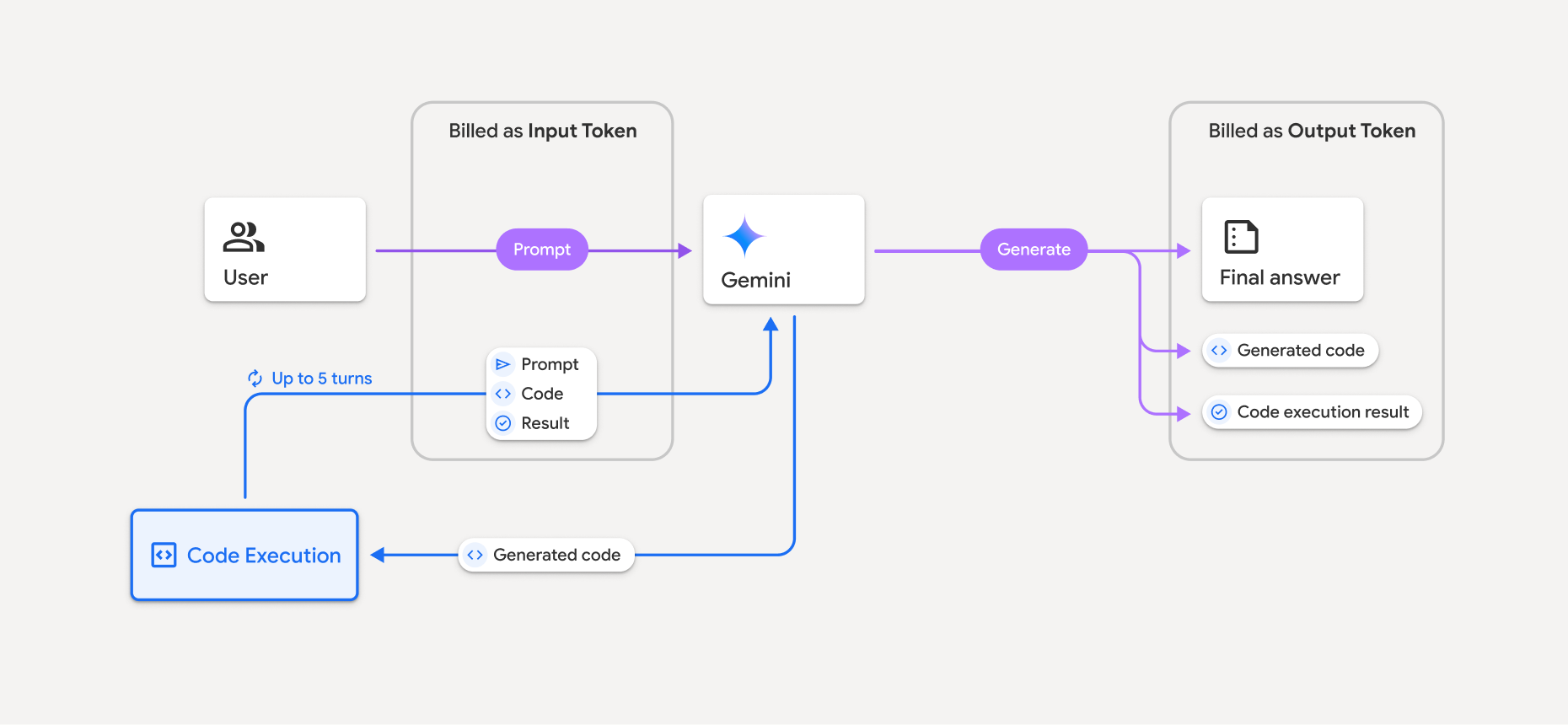
- 사용 중인 Gemini 모델에 따라 입력 및 출력 토큰의 현재 요율로 비용이 청구됩니다.
- 응답을 생성할 때 Gemini에 코드 실행이 사용되는 경우 원본 프롬프트, 생성된 코드, 실행된 코드 결과가 중간 토큰 라벨로 표시되고 입력 토큰으로 청구됩니다.
- 그런 후 Gemini가 요약을 생성하고 생성된 코드, 실행된 코드 결과, 최종 요약을 반환합니다. 이러한 토큰은 출력 토큰으로 청구됩니다.
- Gemini API에는 API 응답에 중간 토큰 수가 포함되기 때문에 초기 프롬프트 이상으로 추가된 입력 토큰이 발생하는 이유를 알 수 있습니다.
제한사항
- 모델은 코드를 생성 및 실행할 수만 있습니다. 미디어 파일과 같은 다른 아티팩트는 반환할 수 없습니다.
- 일부 경우에 코드 실행을 사용 설정하면 모델 출력의 다른 영역(예: 스토리 작성)에서 성능이 저하될 수 있습니다.
- 모델마다 코드 실행을 성공적으로 사용하는 기능에 약간의 차이가 있습니다.
지원되는 도구 조합
코드 실행 도구를 Google 검색을 사용한 그라운딩과 결합하여 더 복잡한 사용 사례를 지원할 수 있습니다.
Gemini 3 모델은 코드 실행과 같은 기본 제공 도구와 맞춤 도구(함수 호출)의 조합을 지원합니다.
지원되는 라이브러리
코드 실행 환경에는 다음 라이브러리가 포함됩니다.
- attrs
- 체스
- contourpy
- fpdf
- geopandas
- imageio
- jinja2
- joblib
- jsonschema
- jsonschema-specifications
- lxml
- matplotlib
- mpmath
- numpy
- opencv-python
- openpyxl
- 패키징
- pandas
- pillow
- protobuf
- pylatex
- pyparsing
- PyPDF2
- python-dateutil
- python-docx
- python-pptx
- reportlab
- scikit-learn
- scipy
- seaborn
- 육
- striprtf
- sympy
- tabulate
- tensorflow
- toolz
- xlrd
사용자의 고유 라이브러리는 설치할 수 없습니다.
다음 단계
- 다음과 같이
- 다른 Gemini API 도구 알아보기: