

تنفيذ الرموز البرمجية
توفّر Gemini API أداة لتنفيذ الرموز البرمجية تتيح للنموذج إنشاء رموز Python وتشغيلها. يمكن للنموذج بعد ذلك التعلّم بشكل متكرّر من نتائج تنفيذ الرموز البرمجية إلى أن يصل إلى ناتج نهائي. يمكنك استخدام أداة تنفيذ الرموز البرمجية لإنشاء تطبيقات تستفيد من الاستدلال المستند إلى الرموز البرمجية. على سبيل المثال، يمكنك استخدام أداة تنفيذ الرموز البرمجية لحلّ المعادلات أو معالجة النصوص. يمكنك أيضًا استخدام المكتبات المضمّنة في بيئة تنفيذ الرموز البرمجية لإجراء مهام أكثر تخصّصًا.
لا يمكن لـ Gemini تنفيذ الرموز البرمجية إلا بلغة Python. يمكنك مع ذلك أن تطلب من Gemini إنشاء رموز برمجية بلغة أخرى، ولكن لا يمكن للنموذج استخدام أداة تنفيذ الرموز البرمجية لتشغيلها.
تفعيل أداة تنفيذ الرموز البرمجية
لتفعيل أداة تنفيذ الرموز البرمجية، عليك إعدادها على النموذج. يسمح ذلك للنموذج بإنشاء الرموز البرمجية وتشغيلها.
Python
# This will only work for SDK newer than 2.0.0
from google import genai

client = genai.Client()

interaction = client.interactions.create(
    model="gemini-3-flash-preview",
    input="What is the sum of the first 50 prime numbers? "
          "Generate and run code for the calculation, and make sure you get all 50.",
    tools=[{"type": "code_execution"}]
)

for step in interaction.steps:
    if step.type == "model_output":
        for content_block in step.content:
            if content_block.type == "text":
                print(content_block.text)
    elif step.type == "code_execution_call":
        print(step.arguments.code)
    elif step.type == "code_execution_result":
        print(step.result)
JavaScript
// This will only work for SDK newer than 2.0.0
import { GoogleGenAI } from "@google/genai";

const client = new GoogleGenAI({});

const interaction = await client.interactions.create({
    model: "gemini-3-flash-preview",
    input: "What is the sum of the first 50 prime numbers? " +
           "Generate and run code for the calculation, and make sure you get all 50.",
    tools: [{ type: "code_execution" }]
});

for (const step of interaction.steps) {
    if (step.type === "model_output") {
        for (const contentBlock of step.content) {
            if (contentBlock.type === "text") {
                console.log(contentBlock.text);
            }
        }
    } else if (step.type === "code_execution_call") {
        console.log(step.arguments.code);
    } else if (step.type === "code_execution_result") {
        console.log(step.result);
    }
}
REST
# Specifies the API revision to avoid breaking changes when they become default
curl -X POST "https://generativelanguage.googleapis.com/v1beta/interactions" \
-H "x-goog-api-key: $GEMINI_API_KEY" \
-H 'Content-Type: application/json' \
-H "Api-Revision: 2026-05-20" \
-d '{
    "model": "gemini-3-flash-preview",
    "input": "What is the sum of the first 50 prime numbers? Generate and run code for the calculation, and make sure you get all 50.",
    "tools": [{"type": "code_execution"}]
}'
قد تبدو النتيجة على النحو التالي، وقد تم تنسيقها لتسهيل قراءتها:
Okay, I need to calculate the sum of the first 50 prime numbers. Here's how I'll
approach this:

1.  **Generate Prime Numbers:** I'll use an iterative method to find prime
    numbers. I'll start with 2 and check if each subsequent number is divisible
    by any number between 2 and its square root. If not, it's a prime.
2.  **Store Primes:** I'll store the prime numbers in a list until I have 50 of
    them.
3.  **Calculate the Sum:**  Finally, I'll sum the prime numbers in the list.

Here's the Python code to do this:

def is_prime(n):
  """Efficiently checks if a number is prime."""
  if n <= 1:
    return False
  if n <= 3:
    return True
  if n % 2 == 0 or n % 3 == 0:
    return False
  i = 5
  while i * i <= n:
    if n % i == 0 or n % (i + 2) == 0:
      return False
    i += 6
  return True

primes = []
num = 2
while len(primes) < 50:
  if is_prime(num):
    primes.append(num)
  num += 1

sum_of_primes = sum(primes)
print(f'{primes=}')
print(f'{sum_of_primes=}')

primes=[2, 3, 5, 7, 11, 13, 17, 19, 23, 29, 31, 37, 41, 43, 47, 53, 59, 61, 67,
71, 73, 79, 83, 89, 97, 101, 103, 107, 109, 113, 127, 131, 137, 139, 149, 151,
157, 163, 167, 173, 179, 181, 191, 193, 197, 199, 211, 223, 227, 229]
sum_of_primes=5117

The sum of the first 50 prime numbers is 5117.
تجمع هذه النتيجة عدة أجزاء من المحتوى يعرضها النموذج عند استخدام أداة تنفيذ الرموز البرمجية:
text: نص مضمّن من إنشاء النموذجcode_execution_call: رمز من إنشاء النموذج يُفترض تنفيذهcode_execution_result: نتيجة الرمز القابل للتنفيذ
تنفيذ الرموز البرمجية باستخدام الصور (Gemini 3)
يمكن الآن لنموذج Gemini 3 Flash كتابة رموز Python وتنفيذها لمعالجة الصور وفحصها بشكل نشط.
حالات الاستخدام
- التكبير والفحص: يرصد النموذج ضمنيًا متى تكون التفاصيل صغيرة جدًا (مثل قراءة مقياس بعيد)، ويكتب رمزًا لاقتصاص المنطقة وإعادة فحصها بدقة أعلى.
- الرياضيات المرئية: يمكن للنموذج إجراء عمليات حسابية متعددة الخطوات باستخدام الرموز البرمجية (مثل جمع بنود في فاتورة).
- إضافة تعليقات توضيحية إلى الصور: يمكن للنموذج إضافة تعليقات توضيحية إلى الصور للإجابة عن الأسئلة، مثل رسم أسهم لعرض العلاقات.
تفعيل أداة تنفيذ الرموز البرمجية باستخدام الصور
تتوفّر أداة تنفيذ الرموز البرمجية باستخدام الصور رسميًا في Gemini 3 Flash. يمكنك تفعيل هذا السلوك من خلال تفعيل كل من "الاستخدام كأداة تنفيذ رموز برمجية" و"التفكير".
Python
# This will only work for SDK newer than 2.0.0
from google import genai
import requests
import base64
from PIL import Image
import io

image_path = "https://goo.gle/instrument-img"
image_bytes = requests.get(image_path).content

client = genai.Client()

interaction = client.interactions.create(
    model="gemini-3-flash-preview",
    input=[
        {"type": "image", "data": base64.b64encode(image_bytes).decode('\utf-8'), "mime_type": "image/jpeg"},
        {"type": "text", "text": "Zoom into the expression pedals and tell me how many pedals are there?"}
    ],
    tools=[{"type": "code_execution"}]
)

for step in interaction.steps:
    if step.type == "model_output":
        for content_block in step.content:
            if content_block.type == "text":
                print(content_block.text)
            elif content_block.type == "image":
                # Display generated image
                display(Image.open(io.BytesIO(base64.b64decode(content_block.data))))
    elif step.type == "code_execution_call":
        print(step.arguments.code)
    elif step.type == "code_execution_result":
        print(step.result)
JavaScript
// This will only work for SDK newer than 2.0.0
import { GoogleGenAI } from "@google/genai";

async function main() {
  const client = new GoogleGenAI({});

  // 1. Prepare Image Data
  const imageUrl = "https://goo.gle/instrument-img";
  const response = await fetch(imageUrl);
  const imageArrayBuffer = await response.arrayBuffer();
  const base64ImageData = Buffer.from(imageArrayBuffer).toString('base64');

  // 2. Call the API with Code Execution enabled
  const interaction = await client.interactions.create({
    model: "gemini-3-flash-preview",
    input: [
      {
        type: "image",
        data: base64ImageData,
        mime_type: "image/jpeg"
      },
      { type: "text", text: "Zoom into the expression pedals and tell me how many pedals are there?" }
    ],
    tools: [{ type: "code_execution" }]
  });

  // 3. Process the response (Text, Code, and Execution Results)
  for (const step of interaction.steps) {
    if (step.type === "model_output") {
      for (const contentBlock of step.content) {
        if (contentBlock.type === "text") {
          console.log("Text:", contentBlock.text);
        }
      }
    } else if (step.type === "code_execution_call") {
      console.log(`\nGenerated Code:\n`, step.arguments.code);
    } else if (step.type === "code_execution_result") {
      console.log(`\nExecution Output:\n`, step.result);
    }
  }
}

main();
REST
IMG_URL="https://goo.gle/instrument-img"
MODEL="gemini-3-flash-preview"

MIME_TYPE=$(curl -sIL "$IMG_URL" | grep -i '^content-type:' | awk -F ': ' '{print $2}' | sed 's/\r$//' | head -n 1)
if [[ -z "$MIME_TYPE" || ! "$MIME_TYPE" == image/* ]]; then
  MIME_TYPE="image/jpeg"
fi

if [[ "$(uname)" == "Darwin" ]]; then
  IMAGE_B64=$(curl -sL "$IMG_URL" | base64 -b 0)
elif [[ "$(base64 --version 2>&1)" = *"FreeBSD"* ]]; then
  IMAGE_B64=$(curl -sL "$IMG_URL" | base64)
else
  IMAGE_B64=$(curl -sL "$IMG_URL" | base64 -w0)
fi

# Use jq to create the JSON payload to avoid "Argument list too long" error with large base64 strings
echo -n "$IMAGE_B64" > image_b64.txt
jq -n \
  --rawfile b64 image_b64.txt \
  --arg mime "$MIME_TYPE" \
  '{
    model: "gemini-3-flash-preview",
    input: [
      {type: "image", data: $b64, mime_type: $mime},
      {type: "text", text: "Zoom into the expression pedals and tell me how many pedals are there?"}
    ],
    tools: [{type: "code_execution"}]
  }' > payload.json

# Specifies the API revision to avoid breaking changes when they become default
curl -X POST "https://generativelanguage.googleapis.com/v1beta/interactions" \
    -H "x-goog-api-key: $GEMINI_API_KEY" \
    -H 'Content-Type: application/json' \
    -H "Api-Revision: 2026-05-20" \
    -d @payload.json
استخدام أداة تنفيذ الرموز البرمجية في التفاعلات المتعددة الأدوار
يمكنك أيضًا استخدام أداة تنفيذ الرموز البرمجية كجزء من محادثة متعددة الأدوار باستخدام previous_interaction_id.
Python
# This will only work for SDK newer than 2.0.0
from google import genai

client = genai.Client()

# First turn
interaction1 = client.interactions.create(
    model="gemini-3-flash-preview",
    input="I have a math question for you.",
    tools=[{"type": "code_execution"}]
)
print(interaction1.steps[-1].content[0].text)

# Second turn - follow-up with code execution
interaction2 = client.interactions.create(
    model="gemini-3-flash-preview",
    previous_interaction_id=interaction1.id,
    input="What is the sum of the first 50 prime numbers? "
          "Generate and run code for the calculation, and make sure you get all 50.",
    tools=[{"type": "code_execution"}]
)

for step in interaction2.steps:
    if step.type == "model_output":
        for content_block in step.content:
            if content_block.type == "text":
                print(content_block.text)
    elif step.type == "code_execution_call":
        print(step.arguments.code)
    elif step.type == "code_execution_result":
        print(step.result)
JavaScript
// This will only work for SDK newer than 2.0.0
import { GoogleGenAI } from "@google/genai";

const client = new GoogleGenAI({});

// First turn
const interaction1 = await client.interactions.create({
    model: "gemini-3-flash-preview",
    input: "I have a math question for you.",
    tools: [{ type: "code_execution" }]
});
console.log(interaction1.steps.at(-1).content[0].text);

// Second turn - follow-up with code execution
const interaction2 = await client.interactions.create({
    model: "gemini-3-flash-preview",
    previous_interaction_id: interaction1.id,
    input: "What is the sum of the first 50 prime numbers? " +
           "Generate and run code for the calculation, and make sure you get all 50.",
    tools: [{ type: "code_execution" }]
});

for (const step of interaction2.steps) {
    if (step.type === "model_output") {
        for (const contentBlock of step.content) {
            if (contentBlock.type === "text") {
                console.log(contentBlock.text);
            }
        }
    } else if (step.type === "code_execution_call") {
        console.log(step.arguments.code);
    } else if (step.type === "code_execution_result") {
        console.log(step.result);
    }
}
REST
# First turn
# Specifies the API revision to avoid breaking changes when they become default
RESPONSE1=$(curl -s -X POST "https://generativelanguage.googleapis.com/v1beta/interactions" \
-H "x-goog-api-key: $GEMINI_API_KEY" \
-H 'Content-Type: application/json' \
-H "Api-Revision: 2026-05-20" \
-d '{
    "model": "gemini-3-flash-preview",
    "input": "I have a math question for you.",
    "tools": [{"type": "code_execution"}]
}')

INTERACTION_ID=$(echo $RESPONSE1 | jq -r '.id')

# Second turn with previous_interaction_id
# Specifies the API revision to avoid breaking changes when they become default
curl -X POST "https://generativelanguage.googleapis.com/v1beta/interactions" \
-H "x-goog-api-key: $GEMINI_API_KEY" \
-H 'Content-Type: application/json' \
-H "Api-Revision: 2026-05-20" \
-d '{
    "model": "gemini-3-flash-preview",
    "previous_interaction_id": "'"$INTERACTION_ID"'",
    "input": "What is the sum of the first 50 prime numbers? Generate and run code for the calculation, and make sure you get all 50.",
    "tools": [{"type": "code_execution"}]
}'
الإدخال والإخراج
بدءًا من Gemini 2.0 Flash، تتيح أداة تنفيذ الرموز البرمجية إدخال الملفات وإخراج الرسوم البيانية. باستخدام إمكانات الإدخال والإخراج هذه ، يمكنك تحميل ملفات CSV وملفات نصية وطرح أسئلة حول الملفات، وإنشاء رسوم بيانية باستخدام Matplotlibكجزء من الردّ. يتم عرض ملفات الإخراج كصور مضمّنة في الردّ.
تسعير الإدخال والإخراج
عند استخدام إمكانات الإدخال والإخراج في أداة تنفيذ الرموز البرمجية، يتم تحصيل رسوم منك مقابل الرموز المميّزة للإدخال والرموز المميّزة للإخراج:
الرموز المميّزة للإدخال:
- طلب المستخدم
الرموز المميّزة للإخراج:
- الرمز من إنشاء النموذج
- ناتج تنفيذ الرمز في بيئة الرمز
- الرموز المميّزة للتفكير
- الملخّص من إنشاء النموذج
تفاصيل الإدخال والإخراج
عند استخدام إمكانات الإدخال والإخراج في أداة تنفيذ الرموز البرمجية، يُرجى العِلم بالتفاصيل الفنية التالية:
- الحد الأقصى لوقت تشغيل بيئة الرمز هو 30 ثانية.
- إذا أظهرت بيئة الرمز خطأً، قد يقرّر النموذج إعادة إنشاء ناتج الرمز. ويمكن أن يحدث ذلك ما يصل إلى 5 مرات.
- يتم تحديد الحد الأقصى لحجم ملف الإدخال من خلال نافذة الرموز المميّزة للنموذج. في AI Studio، عند استخدام Gemini Flash 2.0، يبلغ الحد الأقصى لحجم ملف الإدخال مليون رمز مميّز (حوالي 2 ميغابايت للملفات النصية من أنواع الإدخال المتوافقة). إذا حمّلت ملفًا كبيرًا جدًا، لن يسمح لك AI Studio بإرساله.
- تعمل أداة تنفيذ الرموز البرمجية على أفضل نحو مع الملفات النصية وملفات CSV.
- يمكن تمرير ملف الإدخال كبيانات مضمّنة أو تحميله باستخدام الـ Files API، ويتم دائمًا عرض ملف الإخراج كبيانات مضمّنة.
الفوترة
لا يتم تحصيل أي رسوم إضافية مقابل تفعيل أداة تنفيذ الرموز البرمجية من Gemini API. سيتم تحصيل رسوم منك بالسعر الحالي للرموز المميّزة للإدخال والإخراج استنادًا إلى نموذج Gemini الذي تستخدمه.
في ما يلي بعض المعلومات الأخرى التي يجب معرفتها حول الفوترة المتعلقة بأداة تنفيذ الرموز البرمجية:
- لا يتم تحصيل رسوم منك إلا مرة واحدة مقابل الرموز المميّزة للإدخال التي تمرّرها إلى النموذج، ويتم تحصيل رسوم منك مقابل الرموز المميّزة للإخراج النهائي التي يعرضها لك النموذج.
- يتم احتساب الرموز المميّزة التي تمثّل الرمز من إنشاء النموذج كرموز مميّزة للإخراج. يمكن أن يشمل الرمز من إنشاء النموذج نصًا ونتائج متعددة الوسائط، مثل الصور.
- يتم أيضًا احتساب نتائج تنفيذ الرموز البرمجية كرموز مميّزة للإخراج.
يظهر نموذج الفوترة في الرسم البياني التالي:
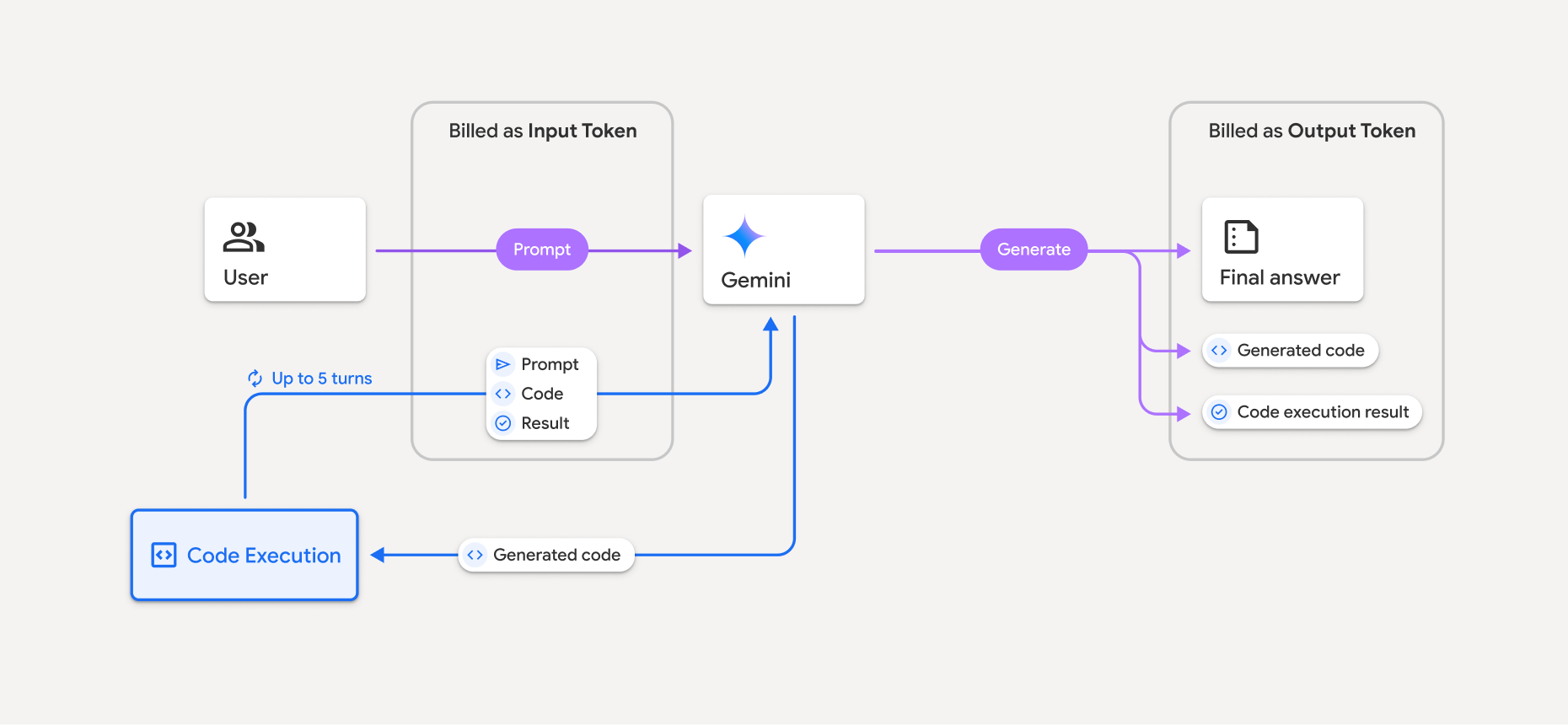
- سيتم تحصيل رسوم منك بالسعر الحالي للرموز المميّزة للإدخال والإخراج استنادًا إلى نموذج Gemini الذي تستخدمه.
- إذا استخدم Gemini أداة تنفيذ الرموز البرمجية عند إنشاء ردّك، يتم تصنيف الطلب الأصلي والرمز من إنشاء النموذج ونتيجة الرمز الذي تم تنفيذه على أنّها رموز مميّزة وسيطة ويتم تحصيل رسوم منك مقابلها كـ رموز مميّزة للإدخال.
- بعد ذلك، يُنشئ Gemini ملخّصًا ويعرض الرمز من إنشاء النموذج ونتيجة الرمز الذي تم تنفيذه والملخّص النهائي. ويتم تحصيل رسوم منك مقابل هذه العناصر كـ رموز مميّزة للإخراج.
- تتضمّن Gemini API عددًا للرموز المميّزة الوسيطة في الردّ من واجهة برمجة التطبيقات، ما يتيح لك معرفة سبب حصولك على رموز مميّزة إضافية للإدخال بخلاف طلبك الأولي.
القيود
- لا يمكن للنموذج سوى إنشاء الرموز البرمجية وتنفيذها. ولا يمكنه عرض عناصر أخرى، مثل ملفات الوسائط.
- في بعض الحالات، يمكن أن يؤدي تفعيل أداة تنفيذ الرموز البرمجية إلى حدوث تراجعات في جوانب أخرى من مخرجات النموذج (على سبيل المثال، كتابة قصة).
- هناك بعض الاختلاف في قدرة النماذج المختلفة على استخدام أداة تنفيذ الرموز البرمجية بنجاح.
مجموعات الأدوات المتوافقة
يمكن الجمع بين أداة تنفيذ الرموز البرمجية و تحديد المصدر من خلال "بحث Google" لـ تقديم حالات استخدام أكثر تعقيدًا.
تتيح نماذج Gemini 3 الجمع بين الأدوات المضمّنة (مثل أداة تنفيذ الرموز البرمجية) والأدوات المخصّصة (استدعاء الدوال).
المكتبات المتوافقة
تتضمّن بيئة تنفيذ الرموز البرمجية المكتبات التالية:
- attrs
- شطرنج
- contourpy
- fpdf
- geopandas
- imageio
- jinja2
- joblib
- jsonschema
- jsonschema-specifications
- lxml
- matplotlib
- mpmath
- مكتبة نامبي
- opencv-python
- openpyxl
- حزمة محتوى التطبيق
- باندا
- وسادة
- protobuf
- pylatex
- pyparsing
- PyPDF2
- python-dateutil
- python-docx
- python-pptx
- reportlab
- scikit-learn
- scipy
- seaborn
- ستة
- striprtf
- sympy
- tabulate
- tensorflow
- toolz
- xlrd
لا يمكنك تثبيت مكتباتك الخاصة.
الخطوات التالية
- جرِّب
- تعرَّف على أدوات Gemini API الأخرى: