

Codeausführung
Die Gemini API bietet ein Tool zur Codeausführung, mit dem das Modell Python-Code generieren und ausführen kann. Das Modell kann dann iterativ aus den Ergebnissen der Codeausführung lernen, bis es eine endgültige Ausgabe erstellt hat. Sie können die Codeausführung verwenden, um Anwendungen zu erstellen, die von codebasierten Schlussfolgerungen profitieren. Beispielsweise können Sie die Codeausführung verwenden, um Gleichungen zu lösen oder Text zu verarbeiten. Sie können auch die Bibliotheken verwenden, die in der Codeausführungsumgebung enthalten sind, um speziellere Aufgaben auszuführen.
Gemini kann Code nur in Python ausführen. Sie können Gemini weiterhin bitten, Code in einer anderen Sprache zu generieren, aber das Modell kann das Tool zur Codeausführung nicht verwenden, um ihn auszuführen.
Codeausführung aktivieren
Konfigurieren Sie das Tool zur Codeausführung für das Modell, um die Codeausführung zu aktivieren. So kann das Modell Code generieren und ausführen.
Python
# This will only work for SDK newer than 2.0.0
from google import genai

client = genai.Client()

interaction = client.interactions.create(
    model="gemini-3-flash-preview",
    input="What is the sum of the first 50 prime numbers? "
          "Generate and run code for the calculation, and make sure you get all 50.",
    tools=[{"type": "code_execution"}]
)

for step in interaction.steps:
    if step.type == "model_output":
        for content_block in step.content:
            if content_block.type == "text":
                print(content_block.text)
    elif step.type == "code_execution_call":
        print(step.arguments.code)
    elif step.type == "code_execution_result":
        print(step.result)
JavaScript
// This will only work for SDK newer than 2.0.0
import { GoogleGenAI } from "@google/genai";

const client = new GoogleGenAI({});

const interaction = await client.interactions.create({
    model: "gemini-3-flash-preview",
    input: "What is the sum of the first 50 prime numbers? " +
           "Generate and run code for the calculation, and make sure you get all 50.",
    tools: [{ type: "code_execution" }]
});

for (const step of interaction.steps) {
    if (step.type === "model_output") {
        for (const contentBlock of step.content) {
            if (contentBlock.type === "text") {
                console.log(contentBlock.text);
            }
        }
    } else if (step.type === "code_execution_call") {
        console.log(step.arguments.code);
    } else if (step.type === "code_execution_result") {
        console.log(step.result);
    }
}
REST
# Specifies the API revision to avoid breaking changes when they become default
curl -X POST "https://generativelanguage.googleapis.com/v1beta/interactions" \
-H "x-goog-api-key: $GEMINI_API_KEY" \
-H 'Content-Type: application/json' \
-H "Api-Revision: 2026-05-20" \
-d '{
    "model": "gemini-3-flash-preview",
    "input": "What is the sum of the first 50 prime numbers? Generate and run code for the calculation, and make sure you get all 50.",
    "tools": [{"type": "code_execution"}]
}'
Die Ausgabe könnte in etwa so aussehen. Sie wurde zur besseren Lesbarkeit formatiert:
Okay, I need to calculate the sum of the first 50 prime numbers. Here's how I'll
approach this:

1.  **Generate Prime Numbers:** I'll use an iterative method to find prime
    numbers. I'll start with 2 and check if each subsequent number is divisible
    by any number between 2 and its square root. If not, it's a prime.
2.  **Store Primes:** I'll store the prime numbers in a list until I have 50 of
    them.
3.  **Calculate the Sum:**  Finally, I'll sum the prime numbers in the list.

Here's the Python code to do this:

def is_prime(n):
  """Efficiently checks if a number is prime."""
  if n <= 1:
    return False
  if n <= 3:
    return True
  if n % 2 == 0 or n % 3 == 0:
    return False
  i = 5
  while i * i <= n:
    if n % i == 0 or n % (i + 2) == 0:
      return False
    i += 6
  return True

primes = []
num = 2
while len(primes) < 50:
  if is_prime(num):
    primes.append(num)
  num += 1

sum_of_primes = sum(primes)
print(f'{primes=}')
print(f'{sum_of_primes=}')

primes=[2, 3, 5, 7, 11, 13, 17, 19, 23, 29, 31, 37, 41, 43, 47, 53, 59, 61, 67,
71, 73, 79, 83, 89, 97, 101, 103, 107, 109, 113, 127, 131, 137, 139, 149, 151,
157, 163, 167, 173, 179, 181, 191, 193, 197, 199, 211, 223, 227, 229]
sum_of_primes=5117

The sum of the first 50 prime numbers is 5117.
Diese Ausgabe kombiniert mehrere Inhaltsteile, die das Modell bei der Codeausführung zurückgibt:
text: Inline-Text, der vom Modell generiert wurdecode_execution_call: Code, der vom Modell generiert wurde und ausgeführt werden sollcode_execution_result: Ergebnis des ausführbaren Codes
Codeausführung mit Bildern (Gemini 3)
Das Gemini 3 Flash-Modell kann jetzt Python-Code schreiben und ausführen, um Bilder aktiv zu bearbeiten und zu prüfen.
Anwendungsbeispiele
- Zoomen und prüfen: Das Modell erkennt implizit, wenn Details zu klein sind (z.B. beim Lesen eines Messgeräts in der Ferne), und schreibt Code, um den Bereich zuzuschneiden und mit höherer Auflösung noch einmal zu prüfen.
- Visuelle Mathematik: Das Modell kann mit Code mehrstufige Berechnungen ausführen (z.B. Posten auf einer Rechnung summieren).
- Bildannotation: Das Modell kann Bilder annotieren, um Fragen zu beantworten, z. B. Pfeile zeichnen, um Beziehungen darzustellen.
Codeausführung mit Bildern aktivieren
Die Codeausführung mit Bildern wird in Gemini 3 Flash offiziell unterstützt. Sie können dieses Verhalten aktivieren, indem Sie sowohl die Codeausführung als Tool als auch die Funktion „Thinking“ aktivieren.
Python
# This will only work for SDK newer than 2.0.0
from google import genai
import requests
import base64
from PIL import Image
import io

image_path = "https://goo.gle/instrument-img"
image_bytes = requests.get(image_path).content

client = genai.Client()

interaction = client.interactions.create(
    model="gemini-3-flash-preview",
    input=[
        {"type": "image", "data": base64.b64encode(image_bytes).decode('\utf-8'), "mime_type": "image/jpeg"},
        {"type": "text", "text": "Zoom into the expression pedals and tell me how many pedals are there?"}
    ],
    tools=[{"type": "code_execution"}]
)

for step in interaction.steps:
    if step.type == "model_output":
        for content_block in step.content:
            if content_block.type == "text":
                print(content_block.text)
            elif content_block.type == "image":
                # Display generated image
                display(Image.open(io.BytesIO(base64.b64decode(content_block.data))))
    elif step.type == "code_execution_call":
        print(step.arguments.code)
    elif step.type == "code_execution_result":
        print(step.result)
JavaScript
// This will only work for SDK newer than 2.0.0
import { GoogleGenAI } from "@google/genai";

async function main() {
  const client = new GoogleGenAI({});

  // 1. Prepare Image Data
  const imageUrl = "https://goo.gle/instrument-img";
  const response = await fetch(imageUrl);
  const imageArrayBuffer = await response.arrayBuffer();
  const base64ImageData = Buffer.from(imageArrayBuffer).toString('base64');

  // 2. Call the API with Code Execution enabled
  const interaction = await client.interactions.create({
    model: "gemini-3-flash-preview",
    input: [
      {
        type: "image",
        data: base64ImageData,
        mime_type: "image/jpeg"
      },
      { type: "text", text: "Zoom into the expression pedals and tell me how many pedals are there?" }
    ],
    tools: [{ type: "code_execution" }]
  });

  // 3. Process the response (Text, Code, and Execution Results)
  for (const step of interaction.steps) {
    if (step.type === "model_output") {
      for (const contentBlock of step.content) {
        if (contentBlock.type === "text") {
          console.log("Text:", contentBlock.text);
        }
      }
    } else if (step.type === "code_execution_call") {
      console.log(`\nGenerated Code:\n`, step.arguments.code);
    } else if (step.type === "code_execution_result") {
      console.log(`\nExecution Output:\n`, step.result);
    }
  }
}

main();
REST
IMG_URL="https://goo.gle/instrument-img"
MODEL="gemini-3-flash-preview"

MIME_TYPE=$(curl -sIL "$IMG_URL" | grep -i '^content-type:' | awk -F ': ' '{print $2}' | sed 's/\r$//' | head -n 1)
if [[ -z "$MIME_TYPE" || ! "$MIME_TYPE" == image/* ]]; then
  MIME_TYPE="image/jpeg"
fi

if [[ "$(uname)" == "Darwin" ]]; then
  IMAGE_B64=$(curl -sL "$IMG_URL" | base64 -b 0)
elif [[ "$(base64 --version 2>&1)" = *"FreeBSD"* ]]; then
  IMAGE_B64=$(curl -sL "$IMG_URL" | base64)
else
  IMAGE_B64=$(curl -sL "$IMG_URL" | base64 -w0)
fi

# Use jq to create the JSON payload to avoid "Argument list too long" error with large base64 strings
echo -n "$IMAGE_B64" > image_b64.txt
jq -n \
  --rawfile b64 image_b64.txt \
  --arg mime "$MIME_TYPE" \
  '{
    model: "gemini-3-flash-preview",
    input: [
      {type: "image", data: $b64, mime_type: $mime},
      {type: "text", text: "Zoom into the expression pedals and tell me how many pedals are there?"}
    ],
    tools: [{type: "code_execution"}]
  }' > payload.json

# Specifies the API revision to avoid breaking changes when they become default
curl -X POST "https://generativelanguage.googleapis.com/v1beta/interactions" \
    -H "x-goog-api-key: $GEMINI_API_KEY" \
    -H 'Content-Type: application/json' \
    -H "Api-Revision: 2026-05-20" \
    -d @payload.json
Codeausführung in Multi-Turn-Interaktionen verwenden
Sie können die Codeausführung auch als Teil einer Multi-Turn-Unterhaltung mit previous_interaction_id verwenden.
Python
# This will only work for SDK newer than 2.0.0
from google import genai

client = genai.Client()

# First turn
interaction1 = client.interactions.create(
    model="gemini-3-flash-preview",
    input="I have a math question for you.",
    tools=[{"type": "code_execution"}]
)
print(interaction1.steps[-1].content[0].text)

# Second turn - follow-up with code execution
interaction2 = client.interactions.create(
    model="gemini-3-flash-preview",
    previous_interaction_id=interaction1.id,
    input="What is the sum of the first 50 prime numbers? "
          "Generate and run code for the calculation, and make sure you get all 50.",
    tools=[{"type": "code_execution"}]
)

for step in interaction2.steps:
    if step.type == "model_output":
        for content_block in step.content:
            if content_block.type == "text":
                print(content_block.text)
    elif step.type == "code_execution_call":
        print(step.arguments.code)
    elif step.type == "code_execution_result":
        print(step.result)
JavaScript
// This will only work for SDK newer than 2.0.0
import { GoogleGenAI } from "@google/genai";

const client = new GoogleGenAI({});

// First turn
const interaction1 = await client.interactions.create({
    model: "gemini-3-flash-preview",
    input: "I have a math question for you.",
    tools: [{ type: "code_execution" }]
});
console.log(interaction1.steps.at(-1).content[0].text);

// Second turn - follow-up with code execution
const interaction2 = await client.interactions.create({
    model: "gemini-3-flash-preview",
    previous_interaction_id: interaction1.id,
    input: "What is the sum of the first 50 prime numbers? " +
           "Generate and run code for the calculation, and make sure you get all 50.",
    tools: [{ type: "code_execution" }]
});

for (const step of interaction2.steps) {
    if (step.type === "model_output") {
        for (const contentBlock of step.content) {
            if (contentBlock.type === "text") {
                console.log(contentBlock.text);
            }
        }
    } else if (step.type === "code_execution_call") {
        console.log(step.arguments.code);
    } else if (step.type === "code_execution_result") {
        console.log(step.result);
    }
}
REST
# First turn
# Specifies the API revision to avoid breaking changes when they become default
RESPONSE1=$(curl -s -X POST "https://generativelanguage.googleapis.com/v1beta/interactions" \
-H "x-goog-api-key: $GEMINI_API_KEY" \
-H 'Content-Type: application/json' \
-H "Api-Revision: 2026-05-20" \
-d '{
    "model": "gemini-3-flash-preview",
    "input": "I have a math question for you.",
    "tools": [{"type": "code_execution"}]
}')

INTERACTION_ID=$(echo $RESPONSE1 | jq -r '.id')

# Second turn with previous_interaction_id
# Specifies the API revision to avoid breaking changes when they become default
curl -X POST "https://generativelanguage.googleapis.com/v1beta/interactions" \
-H "x-goog-api-key: $GEMINI_API_KEY" \
-H 'Content-Type: application/json' \
-H "Api-Revision: 2026-05-20" \
-d '{
    "model": "gemini-3-flash-preview",
    "previous_interaction_id": "'"$INTERACTION_ID"'",
    "input": "What is the sum of the first 50 prime numbers? Generate and run code for the calculation, and make sure you get all 50.",
    "tools": [{"type": "code_execution"}]
}'
Ein- und Ausgabe (E/A)
Ab Gemini 2.0 Flash unterstützt die Code ausführung die Dateieingabe und die Grafikausgabe. Mit diesen Ein- und Ausgabe funktionen können Sie CSV- und Textdateien hochladen, Fragen zu den Dateien stellen und Matplotlib-Diagramme als Teil der Antwort generieren lassen. Die Ausgabedateien werden als Inline-Bilder in der Antwort zurückgegeben.
E/A-Preise
Bei der Verwendung der Codeausführung für die Ein- und Ausgabe werden Ihnen Eingabe- und Ausgabetokens in Rechnung gestellt:
Eingabetokens
- Nutzer-Prompt
Ausgabetokens
- Code, der vom Modell generiert wurde
- Ausgabe der Codeausführung in der Codeumgebung
- Thinking-Tokens
- Vom Modell generierte Zusammenfassung
E/A-Details
Beachten Sie die folgenden technischen Details, wenn Sie die Codeausführung für die Ein- und Ausgabe verwenden:
- Die maximale Laufzeit der Codeumgebung beträgt 30 Sekunden.
- Wenn die Codeumgebung einen Fehler generiert, kann das Modell die Codeausgabe neu generieren. Dies kann bis zu fünf Mal geschehen.
- Die maximale Größe der Eingabedatei ist durch das Tokenfenster des Modells begrenzt. In AI Studio mit Gemini Flash 2.0 beträgt die maximale Größe der Eingabedatei 1 Million Tokens (ungefähr 2 MB für Textdateien der unterstützten Eingabetypen). Wenn Sie eine zu große Datei hochladen, können Sie sie in AI Studio nicht senden.
- Die Codeausführung funktioniert am besten mit Text- und CSV-Dateien.
- Die Eingabedatei kann als Inline-Daten übergeben oder mit der Files API hochgeladen werden. Die Ausgabedatei wird immer als Inline-Daten zurückgegeben.
Abrechnung
Für die Aktivierung der Codeausführung über die Gemini API fallen keine zusätzlichen Kosten an. Die Abrechnung erfolgt zum aktuellen Preis für Eingabe- und Ausgabetokens basierend auf dem verwendeten Gemini-Modell.
Weitere Informationen zur Abrechnung der Codeausführung:
- Ihnen werden nur die Eingabetokens in Rechnung gestellt, die Sie an das Modell übergeben, und die Ausgabetokens, die Ihnen vom Modell zurückgegeben werden.
- Tokens, die generierten Code darstellen, werden als Ausgabetokens gezählt. Generierter Code kann Text und multimodale Ausgaben wie Bilder enthalten.
- Ergebnisse der Codeausführung werden ebenfalls als Ausgabetokens gezählt.
Das Abrechnungsmodell ist im folgenden Diagramm dargestellt:
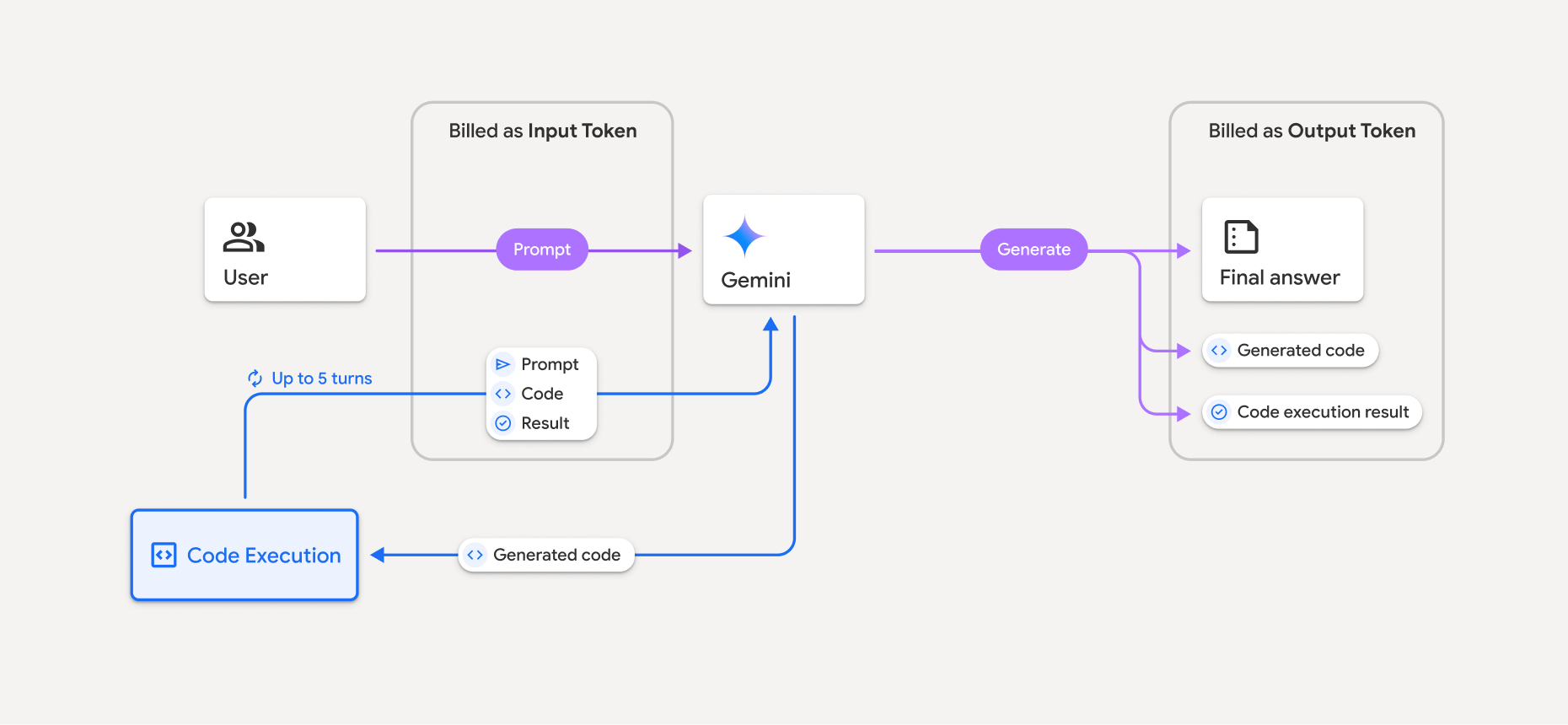
- Die Abrechnung erfolgt zum aktuellen Preis für Eingabe- und Ausgabetokens basierend auf dem verwendeten Gemini-Modell.
- Wenn Gemini bei der Generierung Ihrer Antwort die Codeausführung verwendet, werden der ursprüngliche Prompt, der generierte Code und das Ergebnis des ausgeführten Codes als Zwischentokens bezeichnet und als Eingabetokens in Rechnung gestellt.
- Gemini generiert dann eine Zusammenfassung und gibt den generierten Code, das Ergebnis des ausgeführten Codes und die endgültige Zusammenfassung zurück. Diese werden als Ausgabetokens in Rechnung gestellt.
- Die Gemini API enthält in der API-Antwort eine Anzahl der Zwischentokens, damit Sie wissen, warum Sie zusätzliche Eingabetokens über Ihren ursprünglichen Prompt hinaus erhalten.
Beschränkungen
- Das Modell kann nur Code generieren und ausführen. Es kann keine anderen Artefakte wie Mediendateien zurückgeben.
- In einigen Fällen kann die Aktivierung der Codeausführung zu Regressionen in anderen Bereichen der Modellausgabe führen (z. B. beim Schreiben einer Geschichte).
- Die Fähigkeit der verschiedenen Modelle, die Codeausführung erfolgreich zu nutzen, variiert.
Unterstützte Toolkombinationen
Das Tool zur Codeausführung kann mit der Fundierung mit der Google Suche kombiniert werden, um komplexere Anwendungsfälle zu ermöglichen.
Gemini 3-Modelle unterstützen die Kombination von integrierten Tools (wie der Codeausführung) mit benutzerdefinierten Tools (Funktionsaufrufe).
Unterstützte Bibliotheken
Die Codeausführungsumgebung enthält die folgenden Bibliotheken:
- attrs
- chess
- contourpy
- fpdf
- geopandas
- imageio
- jinja2
- joblib
- jsonschema
- jsonschema-specifications
- lxml
- matplotlib
- mpmath
- numpy
- opencv-python
- openpyxl
- packaging
- pandas
- pillow
- protobuf
- pylatex
- pyparsing
- PyPDF2
- python-dateutil
- python-docx
- python-pptx
- reportlab
- scikit-learn
- scipy
- seaborn
- six
- striprtf
- sympy
- tabulate
- tensorflow
- toolz
- xlrd
Sie können keine eigenen Bibliotheken installieren.
Nächste Schritte
- Jetzt wechseln:
- Weitere Informationen zu anderen Gemini API-Tools: