

Gemini API には、モデルが Python コードを生成して実行できるコード実行ツールが用意されています。モデルは、最終的な出力に到達するまで、コード実行の結果から反復的に学習できます。コード実行を使用して、コードベースの推論を活用するアプリケーションを構築できます。たとえば、コード実行を使用して方程式を解いたり、テキストを処理したりできます。コード実行環境に含まれるライブラリを使用して、より専門的なタスクを実行することもできます。
Gemini は Python でのみコードを実行できます。Gemini に別の言語でコードを生成するように依頼することはできますが、モデルはコード実行ツールを使用して実行することはできません。
コード実行を有効にする
コード実行を有効にするには、モデルでコード実行ツールを構成します。これにより、モデルはコードを生成して実行できます。
Python
from google import genai

client = genai.Client()

interaction = client.interactions.create(
    model="gemini-3.5-flash",
    input="What is the sum of the first 50 prime numbers? "
          "Generate and run code for the calculation, and make sure you get all 50.",
    tools=[{"type": "code_execution"}]
)

for step in interaction.steps:
    if step.type == "model_output":
        for content_block in step.content:
            if content_block.type == "text":
                print(content_block.text)
    elif step.type == "code_execution_call":
        print(step.arguments.code)
    elif step.type == "code_execution_result":
        print(step.result)
JavaScript
import { GoogleGenAI } from "@google/genai";

const client = new GoogleGenAI({});

const interaction = await client.interactions.create({
    model: "gemini-3.5-flash",
    input: "What is the sum of the first 50 prime numbers? " +
           "Generate and run code for the calculation, and make sure you get all 50.",
    tools: [{ type: "code_execution" }]
});

for (const step of interaction.steps) {
    if (step.type === "model_output") {
        for (const contentBlock of step.content) {
            if (contentBlock.type === "text") {
                console.log(contentBlock.text);
            }
        }
    } else if (step.type === "code_execution_call") {
        console.log(step.arguments.code);
    } else if (step.type === "code_execution_result") {
        console.log(step.result);
    }
}
REST
curl -X POST "https://generativelanguage.googleapis.com/v1beta/interactions" \
-H "x-goog-api-key: $GEMINI_API_KEY" \
-H 'Content-Type: application/json' \
-d '{
    "model": "gemini-3.5-flash",
    "input": "What is the sum of the first 50 prime numbers? Generate and run code for the calculation, and make sure you get all 50.",
    "tools": [{"type": "code_execution"}]
}'
出力は次のようになります。読みやすくするためにフォーマットされています。
Okay, I need to calculate the sum of the first 50 prime numbers. Here's how I'll
approach this:

1.  **Generate Prime Numbers:** I'll use an iterative method to find prime
    numbers. I'll start with 2 and check if each subsequent number is divisible
    by any number between 2 and its square root. If not, it's a prime.
2.  **Store Primes:** I'll store the prime numbers in a list until I have 50 of
    them.
3.  **Calculate the Sum:**  Finally, I'll sum the prime numbers in the list.

Here's the Python code to do this:

def is_prime(n):
  """Efficiently checks if a number is prime."""
  if n <= 1:
    return False
  if n <= 3:
    return True
  if n % 2 == 0 or n % 3 == 0:
    return False
  i = 5
  while i * i <= n:
    if n % i == 0 or n % (i + 2) == 0:
      return False
    i += 6
  return True

primes = []
num = 2
while len(primes) < 50:
  if is_prime(num):
    primes.append(num)
  num += 1

sum_of_primes = sum(primes)
print(f'{primes=}')
print(f'{sum_of_primes=}')

primes=[2, 3, 5, 7, 11, 13, 17, 19, 23, 29, 31, 37, 41, 43, 47, 53, 59, 61, 67,
71, 73, 79, 83, 89, 97, 101, 103, 107, 109, 113, 127, 131, 137, 139, 149, 151,
157, 163, 167, 173, 179, 181, 191, 193, 197, 199, 211, 223, 227, 229]
sum_of_primes=5117

The sum of the first 50 prime numbers is 5117.
この出力は、コード実行時にモデルが返す複数のコンテンツ部分を組み合わせたものです。
text: モデルによって生成されたインライン テキストcode_execution_call: 実行されることを目的とし、モデルによって生成されたコードcode_execution_result: 実行可能コードの結果
画像を使用したコード実行(Gemini 3)
Gemini 3 Flash モデルで Python コードを記述して実行し、画像を積極的に操作して検査できるようになりました。
ユースケース
- ズームと検査: モデルは、詳細が小さすぎる場合 (遠くのゲージの読み取りなど)を暗黙的に検出し、コードを記述して領域を切り抜き、 高解像度で再検査します。
- ビジュアル数学: モデルは、コードを使用して複数ステップの計算を実行できます(例: 領収書の明細の合計)。
- 画像アノテーション: モデルは、画像にアノテーションを付けて質問に回答できます(関係を示す矢印を描画するなど)。
画像を使用したコード実行を有効にする
画像を使用したコード実行は、Gemini 3 Flash で正式にサポートされています。この動作を有効にするには、ツールとしてのコード実行と思考の両方を有効にします。
Python
from google import genai
import requests
import base64
from PIL import Image
import io

image_path = "https://goo.gle/instrument-img"
image_bytes = requests.get(image_path).content

client = genai.Client()

interaction = client.interactions.create(
    model="gemini-3.5-flash",
    input=[
        {"type": "image", "data": base64.b64encode(image_bytes).decode('\utf-8'), "mime_type": "image/jpeg"},
        {"type": "text", "text": "Zoom into the expression pedals and tell me how many pedals are there?"}
    ],
    tools=[{"type": "code_execution"}]
)

for step in interaction.steps:
    if step.type == "model_output":
        for content_block in step.content:
            if content_block.type == "text":
                print(content_block.text)
            elif content_block.type == "image":
                display(Image.open(io.BytesIO(base64.b64decode(content_block.data))))
    elif step.type == "code_execution_call":
        print(step.arguments.code)
    elif step.type == "code_execution_result":
        print(step.result)
JavaScript
import { GoogleGenAI } from "@google/genai";

async function main() {
  const client = new GoogleGenAI({});

  const imageUrl = "https://goo.gle/instrument-img";
  const response = await fetch(imageUrl);
  const imageArrayBuffer = await response.arrayBuffer();
  const base64ImageData = Buffer.from(imageArrayBuffer).toString('base64');

  const interaction = await client.interactions.create({
    model: "gemini-3.5-flash",
    input: [
      {
        type: "image",
        data: base64ImageData,
        mime_type: "image/jpeg"
      },
      { type: "text", text: "Zoom into the expression pedals and tell me how many pedals are there?" }
    ],
    tools: [{ type: "code_execution" }]
  });

  for (const step of interaction.steps) {
    if (step.type === "model_output") {
      for (const contentBlock of step.content) {
        if (contentBlock.type === "text") {
          console.log("Text:", contentBlock.text);
        }
      }
    } else if (step.type === "code_execution_call") {
      console.log(`\nGenerated Code:\n`, step.arguments.code);
    } else if (step.type === "code_execution_result") {
      console.log(`\nExecution Output:\n`, step.result);
    }
  }
}

main();
REST
IMG_URL="https://goo.gle/instrument-img"
MODEL="gemini-3.5-flash"

MIME_TYPE=$(curl -sIL "$IMG_URL" | grep -i '^content-type:' | awk -F ': ' '{print $2}' | sed 's/\r$//' | head -n 1)
if [[ -z "$MIME_TYPE" || ! "$MIME_TYPE" == image/* ]]; then
  MIME_TYPE="image/jpeg"
fi

if [[ "$(uname)" == "Darwin" ]]; then
  IMAGE_B64=$(curl -sL "$IMG_URL" | base64 -b 0)
elif [[ "$(base64 --version 2>&1)" = *"FreeBSD"* ]]; then
  IMAGE_B64=$(curl -sL "$IMG_URL" | base64)
else
  IMAGE_B64=$(curl -sL "$IMG_URL" | base64 -w0)
fi

# Use jq to create the JSON payload to avoid "Argument list too long" error with large base64 strings
echo -n "$IMAGE_B64" > image_b64.txt
jq -n \
  --rawfile b64 image_b64.txt \
  --arg mime "$MIME_TYPE" \
  '{
    model: "gemini-3.5-flash",
    input: [
      {type: "image", data: $b64, mime_type: $mime},
      {type: "text", text: "Zoom into the expression pedals and tell me how many pedals are there?"}
    ],
    tools: [{type: "code_execution"}]
  }' > payload.json

curl -X POST "https://generativelanguage.googleapis.com/v1beta/interactions" \
    -H "x-goog-api-key: $GEMINI_API_KEY" \
    -H 'Content-Type: application/json' \
    -d @payload.json
マルチターン インタラクションでコード実行を使用する
previous_interaction_id を使用して、マルチターン会話の一部としてコード実行を使用することもできます。
Python
from google import genai

client = genai.Client()

interaction1 = client.interactions.create(
    model="gemini-3.5-flash",
    input="I have a math question for you.",
    tools=[{"type": "code_execution"}]
)
print(interaction1.output_text)

interaction2 = client.interactions.create(
    model="gemini-3.5-flash",
    previous_interaction_id=interaction1.id,
    input="What is the sum of the first 50 prime numbers? "
          "Generate and run code for the calculation, and make sure you get all 50.",
    tools=[{"type": "code_execution"}]
)

for step in interaction2.steps:
    if step.type == "model_output":
        for content_block in step.content:
            if content_block.type == "text":
                print(content_block.text)
    elif step.type == "code_execution_call":
        print(step.arguments.code)
    elif step.type == "code_execution_result":
        print(step.result)
JavaScript
import { GoogleGenAI } from "@google/genai";

const client = new GoogleGenAI({});

const interaction1 = await client.interactions.create({
    model: "gemini-3.5-flash",
    input: "I have a math question for you.",
    tools: [{ type: "code_execution" }]
});
console.log(interaction1.output_text);

const interaction2 = await client.interactions.create({
    model: "gemini-3.5-flash",
    previous_interaction_id: interaction1.id,
    input: "What is the sum of the first 50 prime numbers? " +
           "Generate and run code for the calculation, and make sure you get all 50.",
    tools: [{ type: "code_execution" }]
});

for (const step of interaction2.steps) {
    if (step.type === "model_output") {
        for (const contentBlock of step.content) {
            if (contentBlock.type === "text") {
                console.log(contentBlock.text);
            }
        }
    } else if (step.type === "code_execution_call") {
        console.log(step.arguments.code);
    } else if (step.type === "code_execution_result") {
        console.log(step.result);
    }
}
REST
# First turn
RESPONSE1=$(curl -s -X POST "https://generativelanguage.googleapis.com/v1beta/interactions" \
-H "x-goog-api-key: $GEMINI_API_KEY" \
-H 'Content-Type: application/json' \
-d '{
    "model": "gemini-3.5-flash",
    "input": "I have a math question for you.",
    "tools": [{"type": "code_execution"}]
}')

INTERACTION_ID=$(echo $RESPONSE1 | jq -r '.id')

# Second turn with previous_interaction_id
curl -X POST "https://generativelanguage.googleapis.com/v1beta/interactions" \
-H "x-goog-api-key: $GEMINI_API_KEY" \
-H 'Content-Type: application/json' \
-d '{
    "model": "gemini-3.5-flash",
    "previous_interaction_id": "'"$INTERACTION_ID"'",
    "input": "What is the sum of the first 50 prime numbers? Generate and run code for the calculation, and make sure you get all 50.",
    "tools": [{"type": "code_execution"}]
}'
入出力(I/O)
Gemini 2.0 Flash 以降、コード実行ではファイル入力とグラフ出力がサポートされています。これらの入出力 機能を使用すると、CSV ファイルとテキスト ファイルをアップロードし、ファイルに関する質問をしたり、レスポンスの一部として Matplotlib グラフを生成したりできます。出力ファイルは、レスポンスでインライン画像として返されます。
I/O の料金
コード実行 I/O を使用する場合、入力トークンと出力トークンに対して課金されます。
入力トークン:
- ユーザーによるプロンプト
出力トークン:
- モデルによって生成されたコード
- コード環境でのコード実行出力
- 思考トークン
- モデルによって生成された要約
I/O の詳細
コード実行 I/O を使用する場合は、次の技術的な詳細に注意してください。
- コード環境の最大実行時間は 30 秒です。
- コード環境でエラーが発生した場合、モデルはコード出力を再生成することがあります。これは最大 5 回まで発生する可能性があります。
- 最大ファイル入力サイズは、モデル トークン ウィンドウによって制限されます。モデルの最大コンテキスト ウィンドウを超えるファイルをアップロードすると、API はエラーを返します。
- コード実行は、テキスト ファイルと CSV ファイルで最適に動作します。
- 入力ファイルはインライン データとして渡すか、 Files API を使用してアップロードできます 。出力ファイルは常にインライン データとして返されます。
課金
Gemini API からのコード実行を有効にしても、追加料金は発生しません。 使用している Gemini モデルに基づいて、入力トークンと出力トークンの現在のレートで課金されます。
コード実行の課金に関するその他の注意事項は次のとおりです。
- モデルに渡す入力トークンに対しては一度だけ課金され、モデルから返された最終出力トークンに対して課金されます。
- 生成されたコードを表すトークンは、出力トークンとしてカウントされます。生成されたコードには、テキストとマルチモーダル出力(画像など)を含めることができます。
- コード実行の結果も出力トークンとしてカウントされます。
課金モデルを次の図に示します。
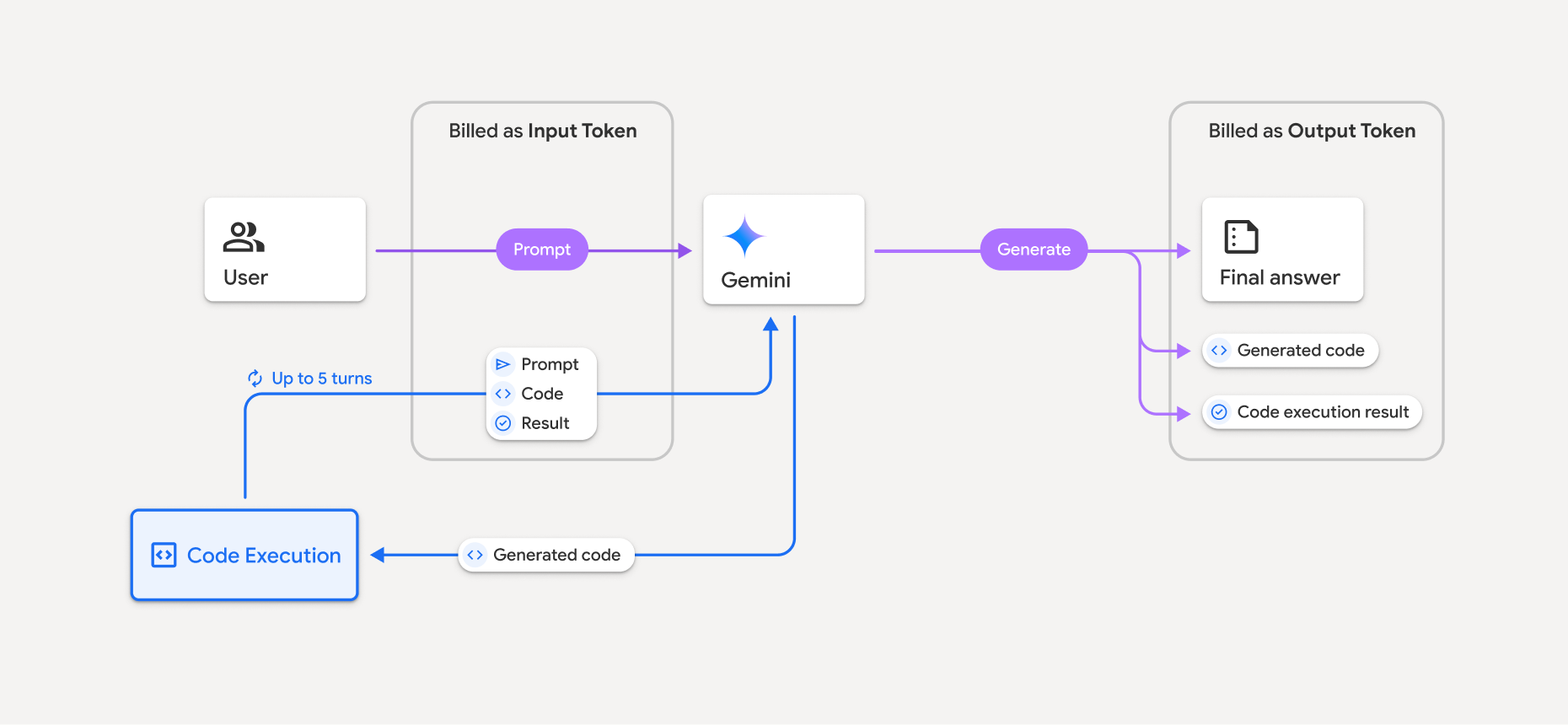
- 使用している Gemini モデルに基づいて、入力トークンと出力トークンの現在のレートで課金されます。
- Gemini がレスポンスの生成時にコード実行を使用する場合、元のプロンプト、生成されたコード、実行されたコードの結果には中間トークン というラベルが付けられ、入力トークン として課金されます。
- Gemini は要約を生成し、生成されたコード、実行されたコードの結果、最終的な要約を返します。これらは出力トークン として課金されます。
- Gemini API の API レスポンスには中間トークン数が含まれるため、最初のプロンプト以外の追加の入力トークンを取得する理由がわかります。
制限事項
- モデルはコードの生成と実行のみが可能です。メディア ファイルなど、他のアーティファクトを返すことはできません。
- コード実行を有効にすると、モデル出力の他の領域(ストーリーの作成など)で回帰が発生することがあります。
- コード実行を正常に使用できるかどうかは、モデルによって異なります。
サポートされているツールの組み合わせ
コード実行ツールを Google 検索によるグラウンディングと組み合わせて 、より複雑なユースケースに対応できます。
Gemini 3 モデルでは、組み込みツール(コード実行など)とカスタムツール(関数呼び出し)を組み合わせることができます。
サポートされているライブラリ
コード実行環境には、次のライブラリが含まれています。
- attrs
- チェス
- contourpy
- fpdf
- geopandas
- imageio
- jinja2
- joblib
- jsonschema
- jsonschema-specifications
- lxml
- matplotlib
- mpmath
- numpy
- opencv-python
- openpyxl
- パッケージ化
- pandas
- pillow
- protobuf
- pylatex
- pyparsing
- PyPDF2
- python-dateutil
- python-docx
- python-pptx
- reportlab
- scikit-learn
- scipy
- seaborn
- six
- striprtf
- sympy
- tabulate
- tensorflow
- toolz
- xlrd
独自のライブラリをインストールすることはできません。
次のステップ
- ぜひ
- 他の Gemini API ツールについて学習する: