

Gemini API มีเครื่องมือเรียกใช้โค้ดที่ช่วยให้โมเดลสร้างและรันโค้ด Python ได้ จากนั้นโมเดลจะเรียนรู้ซ้ำๆ จากผลการเรียกใช้โค้ดจนกว่าจะได้เอาต์พุตสุดท้าย คุณสามารถใช้การเรียกใช้โค้ดเพื่อสร้างแอปพลิเคชันที่ได้รับประโยชน์จากการให้เหตุผลตามโค้ด เช่น คุณสามารถใช้การเรียกใช้โค้ดเพื่อแก้สมการหรือประมวลผลข้อความ นอกจากนี้ คุณยังใช้ ไลบรารีที่รวมอยู่ในสภาพแวดล้อมการเรียกใช้โค้ดเพื่อทำงานที่เฉพาะเจาะจงมากขึ้นได้ด้วย
Gemini สามารถเรียกใช้โค้ดใน Python ได้เท่านั้น คุณยังคงขอความช่วยเหลือจาก Gemini ให้สร้างโค้ดในภาษาอื่นได้ แต่โมเดลจะใช้เครื่องมือการเรียกใช้โค้ดเพื่อดำเนินการไม่ได้
เปิดใช้การเรียกใช้โค้ด
หากต้องการเปิดใช้การเรียกใช้โค้ด ให้กำหนดค่าเครื่องมือเรียกใช้โค้ดในโมเดล ซึ่งจะช่วยให้โมเดลสร้างและรันโค้ดได้
Python
from google import genai

client = genai.Client()

interaction = client.interactions.create(
    model="gemini-3.5-flash",
    input="What is the sum of the first 50 prime numbers? "
          "Generate and run code for the calculation, and make sure you get all 50.",
    tools=[{"type": "code_execution"}]
)

for step in interaction.steps:
    if step.type == "model_output":
        for content_block in step.content:
            if content_block.type == "text":
                print(content_block.text)
    elif step.type == "code_execution_call":
        print(step.arguments.code)
    elif step.type == "code_execution_result":
        print(step.result)
JavaScript
import { GoogleGenAI } from "@google/genai";

const client = new GoogleGenAI({});

const interaction = await client.interactions.create({
    model: "gemini-3.5-flash",
    input: "What is the sum of the first 50 prime numbers? " +
           "Generate and run code for the calculation, and make sure you get all 50.",
    tools: [{ type: "code_execution" }]
});

for (const step of interaction.steps) {
    if (step.type === "model_output") {
        for (const contentBlock of step.content) {
            if (contentBlock.type === "text") {
                console.log(contentBlock.text);
            }
        }
    } else if (step.type === "code_execution_call") {
        console.log(step.arguments.code);
    } else if (step.type === "code_execution_result") {
        console.log(step.result);
    }
}
REST
curl -X POST "https://generativelanguage.googleapis.com/v1beta/interactions" \
-H "x-goog-api-key: $GEMINI_API_KEY" \
-H 'Content-Type: application/json' \
-d '{
    "model": "gemini-3.5-flash",
    "input": "What is the sum of the first 50 prime numbers? Generate and run code for the calculation, and make sure you get all 50.",
    "tools": [{"type": "code_execution"}]
}'
เอาต์พุตอาจมีลักษณะดังต่อไปนี้ ซึ่งจัดรูปแบบให้อ่านง่าย
Okay, I need to calculate the sum of the first 50 prime numbers. Here's how I'll
approach this:

1.  **Generate Prime Numbers:** I'll use an iterative method to find prime
    numbers. I'll start with 2 and check if each subsequent number is divisible
    by any number between 2 and its square root. If not, it's a prime.
2.  **Store Primes:** I'll store the prime numbers in a list until I have 50 of
    them.
3.  **Calculate the Sum:**  Finally, I'll sum the prime numbers in the list.

Here's the Python code to do this:

def is_prime(n):
  """Efficiently checks if a number is prime."""
  if n <= 1:
    return False
  if n <= 3:
    return True
  if n % 2 == 0 or n % 3 == 0:
    return False
  i = 5
  while i * i <= n:
    if n % i == 0 or n % (i + 2) == 0:
      return False
    i += 6
  return True

primes = []
num = 2
while len(primes) < 50:
  if is_prime(num):
    primes.append(num)
  num += 1

sum_of_primes = sum(primes)
print(f'{primes=}')
print(f'{sum_of_primes=}')

primes=[2, 3, 5, 7, 11, 13, 17, 19, 23, 29, 31, 37, 41, 43, 47, 53, 59, 61, 67,
71, 73, 79, 83, 89, 97, 101, 103, 107, 109, 113, 127, 131, 137, 139, 149, 151,
157, 163, 167, 173, 179, 181, 191, 193, 197, 199, 211, 223, 227, 229]
sum_of_primes=5117

The sum of the first 50 prime numbers is 5117.
เอาต์พุตนี้รวมส่วนเนื้อหาหลายส่วนที่โมเดลแสดงผลเมื่อใช้การเรียกใช้โค้ด
text: ข้อความแบบอินไลน์ที่โมเดลสร้างขึ้นcode_execution_call: โค้ดที่โมเดลสร้างขึ้นเพื่อเรียกใช้code_execution_result: ผลลัพธ์ของโค้ดที่เรียกใช้ได้
การเรียกใช้โค้ดกับรูปภาพ (Gemini 3)
ตอนนี้โมเดล Gemini 3 Flash สามารถเขียนและเรียกใช้โค้ด Python เพื่อจัดการและตรวจสอบรูปภาพได้อย่างมีประสิทธิภาพ
กรณีการใช้งาน
- ซูมและตรวจสอบ: โมเดลจะตรวจหาโดยนัยเมื่อรายละเอียดมีขนาดเล็กเกินไป (เช่น การอ่านมาตรวัดที่อยู่ไกลออกไป) และเขียนโค้ดเพื่อครอบตัดและตรวจสอบพื้นที่อีกครั้ง ด้วยความละเอียดที่สูงขึ้น
- คณิตศาสตร์เชิงภาพ: โมเดลสามารถทำการคำนวณหลายขั้นตอนโดยใช้โค้ด (เช่น การรวมรายการในใบเสร็จ)
- การใส่คำอธิบายประกอบในรูปภาพ: โมเดลสามารถใส่คำอธิบายประกอบในรูปภาพเพื่อตอบคำถาม เช่น การวาดลูกศรเพื่อแสดงความสัมพันธ์
เปิดใช้การเรียกใช้โค้ดกับรูปภาพ
Gemini 3 Flash รองรับการเรียกใช้โค้ดกับรูปภาพอย่างเป็นทางการ คุณสามารถเปิดใช้งานลักษณะการทำงานนี้ได้โดยเปิดใช้ทั้งการเรียกใช้โค้ดเป็นเครื่องมือและการคิด
Python
from google import genai
import requests
import base64
from PIL import Image
import io

image_path = "https://goo.gle/instrument-img"
image_bytes = requests.get(image_path).content

client = genai.Client()

interaction = client.interactions.create(
    model="gemini-3.5-flash",
    input=[
        {"type": "image", "data": base64.b64encode(image_bytes).decode('\utf-8'), "mime_type": "image/jpeg"},
        {"type": "text", "text": "Zoom into the expression pedals and tell me how many pedals are there?"}
    ],
    tools=[{"type": "code_execution"}]
)

for step in interaction.steps:
    if step.type == "model_output":
        for content_block in step.content:
            if content_block.type == "text":
                print(content_block.text)
            elif content_block.type == "image":
                display(Image.open(io.BytesIO(base64.b64decode(content_block.data))))
    elif step.type == "code_execution_call":
        print(step.arguments.code)
    elif step.type == "code_execution_result":
        print(step.result)
JavaScript
import { GoogleGenAI } from "@google/genai";

async function main() {
  const client = new GoogleGenAI({});

  const imageUrl = "https://goo.gle/instrument-img";
  const response = await fetch(imageUrl);
  const imageArrayBuffer = await response.arrayBuffer();
  const base64ImageData = Buffer.from(imageArrayBuffer).toString('base64');

  const interaction = await client.interactions.create({
    model: "gemini-3.5-flash",
    input: [
      {
        type: "image",
        data: base64ImageData,
        mime_type: "image/jpeg"
      },
      { type: "text", text: "Zoom into the expression pedals and tell me how many pedals are there?" }
    ],
    tools: [{ type: "code_execution" }]
  });

  for (const step of interaction.steps) {
    if (step.type === "model_output") {
      for (const contentBlock of step.content) {
        if (contentBlock.type === "text") {
          console.log("Text:", contentBlock.text);
        }
      }
    } else if (step.type === "code_execution_call") {
      console.log(`\nGenerated Code:\n`, step.arguments.code);
    } else if (step.type === "code_execution_result") {
      console.log(`\nExecution Output:\n`, step.result);
    }
  }
}

main();
REST
IMG_URL="https://goo.gle/instrument-img"
MODEL="gemini-3.5-flash"

MIME_TYPE=$(curl -sIL "$IMG_URL" | grep -i '^content-type:' | awk -F ': ' '{print $2}' | sed 's/\r$//' | head -n 1)
if [[ -z "$MIME_TYPE" || ! "$MIME_TYPE" == image/* ]]; then
  MIME_TYPE="image/jpeg"
fi

if [[ "$(uname)" == "Darwin" ]]; then
  IMAGE_B64=$(curl -sL "$IMG_URL" | base64 -b 0)
elif [[ "$(base64 --version 2>&1)" = *"FreeBSD"* ]]; then
  IMAGE_B64=$(curl -sL "$IMG_URL" | base64)
else
  IMAGE_B64=$(curl -sL "$IMG_URL" | base64 -w0)
fi

# Use jq to create the JSON payload to avoid "Argument list too long" error with large base64 strings
echo -n "$IMAGE_B64" > image_b64.txt
jq -n \
  --rawfile b64 image_b64.txt \
  --arg mime "$MIME_TYPE" \
  '{
    model: "gemini-3.5-flash",
    input: [
      {type: "image", data: $b64, mime_type: $mime},
      {type: "text", text: "Zoom into the expression pedals and tell me how many pedals are there?"}
    ],
    tools: [{type: "code_execution"}]
  }' > payload.json

curl -X POST "https://generativelanguage.googleapis.com/v1beta/interactions" \
    -H "x-goog-api-key: $GEMINI_API_KEY" \
    -H 'Content-Type: application/json' \
    -d @payload.json
ใช้การเรียกใช้โค้ดในการสนทนาไปมาหลายรอบ
นอกจากนี้ คุณยังใช้การเรียกใช้โค้ดเป็นส่วนหนึ่งของการสนทนาไปมาได้โดยใช้ previous_interaction_id
Python
from google import genai

client = genai.Client()

interaction1 = client.interactions.create(
    model="gemini-3.5-flash",
    input="I have a math question for you.",
    tools=[{"type": "code_execution"}]
)
print(interaction1.output_text)

interaction2 = client.interactions.create(
    model="gemini-3.5-flash",
    previous_interaction_id=interaction1.id,
    input="What is the sum of the first 50 prime numbers? "
          "Generate and run code for the calculation, and make sure you get all 50.",
    tools=[{"type": "code_execution"}]
)

for step in interaction2.steps:
    if step.type == "model_output":
        for content_block in step.content:
            if content_block.type == "text":
                print(content_block.text)
    elif step.type == "code_execution_call":
        print(step.arguments.code)
    elif step.type == "code_execution_result":
        print(step.result)
JavaScript
import { GoogleGenAI } from "@google/genai";

const client = new GoogleGenAI({});

const interaction1 = await client.interactions.create({
    model: "gemini-3.5-flash",
    input: "I have a math question for you.",
    tools: [{ type: "code_execution" }]
});
console.log(interaction1.output_text);

const interaction2 = await client.interactions.create({
    model: "gemini-3.5-flash",
    previous_interaction_id: interaction1.id,
    input: "What is the sum of the first 50 prime numbers? " +
           "Generate and run code for the calculation, and make sure you get all 50.",
    tools: [{ type: "code_execution" }]
});

for (const step of interaction2.steps) {
    if (step.type === "model_output") {
        for (const contentBlock of step.content) {
            if (contentBlock.type === "text") {
                console.log(contentBlock.text);
            }
        }
    } else if (step.type === "code_execution_call") {
        console.log(step.arguments.code);
    } else if (step.type === "code_execution_result") {
        console.log(step.result);
    }
}
REST
# First turn
RESPONSE1=$(curl -s -X POST "https://generativelanguage.googleapis.com/v1beta/interactions" \
-H "x-goog-api-key: $GEMINI_API_KEY" \
-H 'Content-Type: application/json' \
-d '{
    "model": "gemini-3.5-flash",
    "input": "I have a math question for you.",
    "tools": [{"type": "code_execution"}]
}')

INTERACTION_ID=$(echo $RESPONSE1 | jq -r '.id')

# Second turn with previous_interaction_id
curl -X POST "https://generativelanguage.googleapis.com/v1beta/interactions" \
-H "x-goog-api-key: $GEMINI_API_KEY" \
-H 'Content-Type: application/json' \
-d '{
    "model": "gemini-3.5-flash",
    "previous_interaction_id": "'"$INTERACTION_ID"'",
    "input": "What is the sum of the first 50 prime numbers? Generate and run code for the calculation, and make sure you get all 50.",
    "tools": [{"type": "code_execution"}]
}'
อินพุต/เอาต์พุต (I/O)
การเรียกใช้โค้ดรองรับอินพุตไฟล์และเอาต์พุตกราฟตั้งแต่ Gemini 2.0 Flashเป็นต้นไป การใช้ความสามารถด้านอินพุตและเอาต์พุต เหล่านี้จะช่วยให้คุณอัปโหลดไฟล์ CSV และไฟล์ข้อความ ถามคำถามเกี่ยวกับ ไฟล์ และสร้างกราฟ Matplotlib เป็นส่วน หนึ่งของการตอบกลับได้ ระบบจะแสดงไฟล์เอาต์พุตเป็นรูปภาพแบบอินไลน์ในการตอบกลับ
การกำหนดราคา I/O
เมื่อใช้ I/O การเรียกใช้โค้ด ระบบจะเรียกเก็บเงินจากคุณสำหรับโทเค็นอินพุตและโทเค็นเอาต์พุต
โทเค็นอินพุต:
- พรอมต์ของผู้ใช้
โทเค็นเอาต์พุต:
- โค้ดที่โมเดลสร้างขึ้น
- เอาต์พุตการเรียกใช้โค้ดในสภาพแวดล้อมโค้ด
- โทเค็นการคิด
- ข้อมูลสรุปที่โมเดลสร้างขึ้น
รายละเอียด I/O
เมื่อใช้ I/O การเรียกใช้โค้ด โปรดทราบรายละเอียดทางเทคนิคต่อไปนี้
- รันไทม์สูงสุดของสภาพแวดล้อมโค้ดคือ 30 วินาที
- หากสภาพแวดล้อมโค้ดสร้างข้อผิดพลาด โมเดลอาจตัดสินใจสร้างเอาต์พุตโค้ดใหม่ ซึ่งอาจเกิดขึ้นได้สูงสุด 5 ครั้ง
- ขนาดอินพุตไฟล์สูงสุดจะจำกัดตามหน้าต่างโทเค็นของโมเดล หากคุณอัปโหลดไฟล์ที่มีขนาดเกินหน้าต่างบริบทสูงสุดของโมเดล API จะแสดงข้อผิดพลาด
- การเรียกใช้โค้ดทำงานได้ดีที่สุดกับไฟล์ข้อความและไฟล์ CSV
- คุณสามารถส่งไฟล์อินพุตเป็นข้อมูลแบบอินไลน์หรืออัปโหลดโดยใช้ Files API, และระบบจะแสดงไฟล์เอาต์พุตเป็นข้อมูลแบบอินไลน์เสมอ
การเรียกเก็บเงิน
การเปิดใช้การเรียกใช้โค้ดจาก Gemini API จะไม่มีค่าใช้จ่ายเพิ่มเติม ระบบจะเรียกเก็บเงินจากคุณตามอัตราปัจจุบันของโทเค็นอินพุตและเอาต์พุตโดยอิงตามโมเดล Gemini ที่คุณใช้
สิ่งอื่นๆ ที่ควรทราบเกี่ยวกับการเรียกเก็บเงินสำหรับการเรียกใช้โค้ดมีดังนี้
- ระบบจะเรียกเก็บเงินจากคุณเพียงครั้งเดียวสำหรับโทเค็นอินพุตที่คุณส่งไปยังโมเดล และจะเรียกเก็บเงินสำหรับโทเค็นเอาต์พุตสุดท้ายที่โมเดลส่งกลับมาให้คุณ
- โทเค็นที่แสดงโค้ดที่สร้างขึ้นจะนับเป็นโทเค็นเอาต์พุต โค้ดที่สร้างขึ้นอาจมีข้อความและเอาต์พุตหลายรูปแบบ เช่น รูปภาพ
- ผลลัพธ์การเรียกใช้โค้ดจะนับเป็นโทเค็นเอาต์พุตด้วย
โมเดลการเรียกเก็บเงินแสดงอยู่ในแผนภาพต่อไปนี้
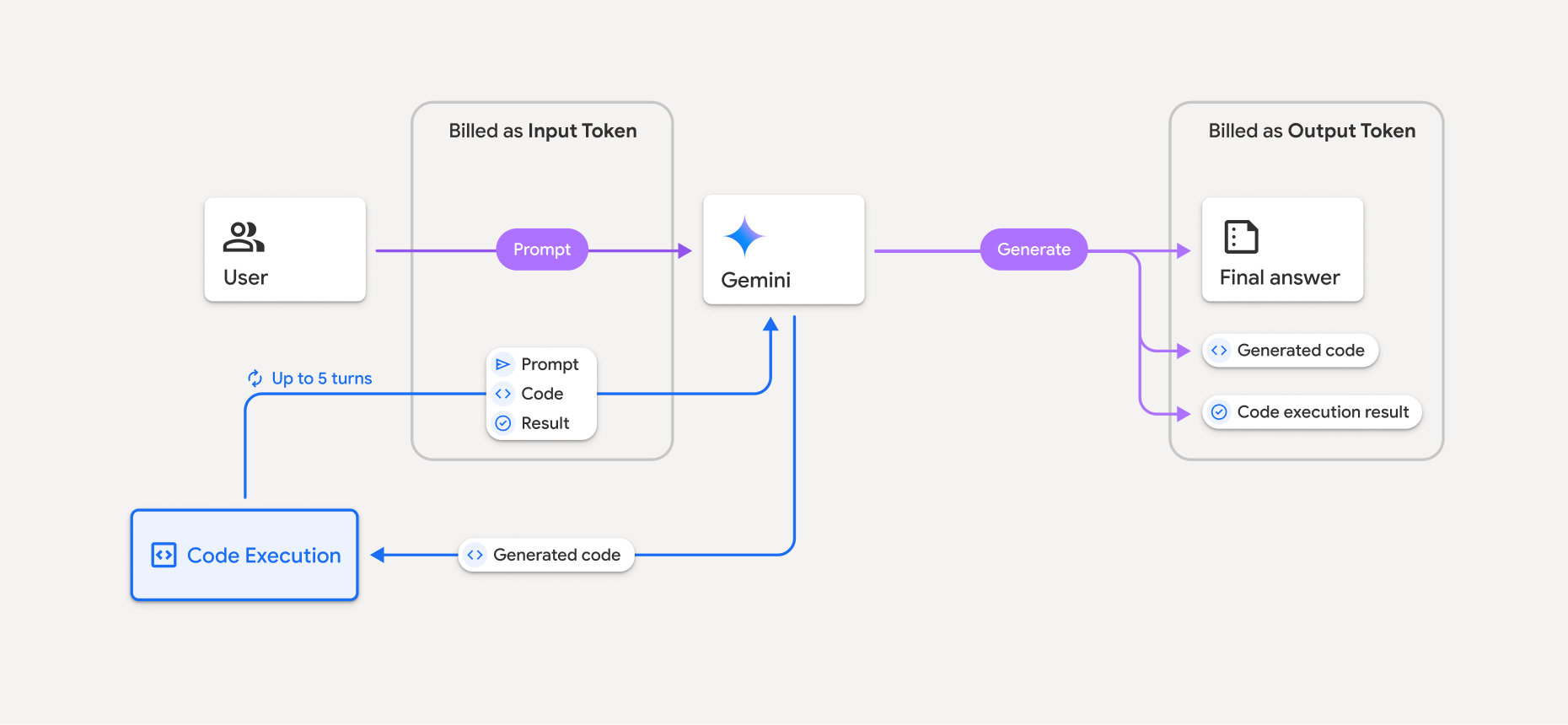
- ระบบจะเรียกเก็บเงินจากคุณตามอัตราปัจจุบันของโทเค็นอินพุตและเอาต์พุตโดยอิงตามโมเดล Gemini ที่คุณใช้
- หาก Gemini ใช้การเรียกใช้โค้ดเมื่อสร้างการตอบกลับ พรอมต์เดิม โค้ดที่สร้างขึ้น และผลลัพธ์ของโค้ดที่เรียกใช้จะติดป้ายกำกับเป็น โทเค็นระดับกลาง และระบบจะเรียกเก็บเงินเป็น โทเค็นอินพุต
- จากนั้น Gemini จะสร้างข้อมูลสรุปและแสดงโค้ดที่สร้างขึ้น ผลลัพธ์ของโค้ดที่เรียกใช้ และข้อมูลสรุปสุดท้าย ซึ่งระบบจะเรียกเก็บเงินเป็น โทเค็นเอาต์พุต
- Gemini API จะรวมจำนวนโทเค็นระดับกลางไว้ในการตอบกลับจาก API เพื่อให้คุณทราบว่าเหตุใดคุณจึงได้รับโทเค็นอินพุตเพิ่มเติมนอกเหนือจากพรอมต์เริ่มต้น
ข้อจำกัด
- โมเดลสามารถสร้างและเรียกใช้โค้ดได้เท่านั้น โดยไม่สามารถแสดงผลอาร์ติแฟกต์อื่นๆ เช่น ไฟล์สื่อ
- ในบางกรณี การเปิดใช้การเรียกใช้โค้ดอาจทำให้เกิดการถดถอยในส่วนอื่นๆ ของเอาต์พุตโมเดล (เช่น การเขียนเรื่องราว)
- โมเดลต่างๆ มีความสามารถในการใช้การเรียกใช้โค้ดให้สำเร็จแตกต่างกันไป
ชุดค่าผสมของเครื่องมือที่รองรับ
คุณสามารถใช้เครื่องมือเรียกใช้โค้ดร่วมกับ การเชื่อมต่อแหล่งข้อมูลกับ Google Search เพื่อ รองรับกรณีการใช้งานที่ซับซ้อนมากขึ้น
โมเดล Gemini 3 รองรับการรวมเครื่องมือในตัว (เช่น การเรียกใช้โค้ด) กับเครื่องมือที่กำหนดเอง (การเรียกฟังก์ชัน)
ไลบรารีที่รองรับ
สภาพแวดล้อมการเรียกใช้โค้ดมีไลบรารีต่อไปนี้
- attrs
- chess
- contourpy
- fpdf
- geopandas
- imageio
- jinja2
- joblib
- jsonschema
- jsonschema-specifications
- lxml
- matplotlib
- mpmath
- numpy
- opencv-python
- openpyxl
- packaging
- pandas
- pillow
- protobuf
- pylatex
- pyparsing
- PyPDF2
- python-dateutil
- python-docx
- python-pptx
- reportlab
- scikit-learn
- scipy
- seaborn
- six
- striprtf
- sympy
- tabulate
- tensorflow
- toolz
- xlrd
คุณจะติดตั้งไลบรารีของคุณเองไม่ได้
ขั้นตอนถัดไป
- ลองใช้
- ดูข้อมูลเกี่ยวกับเครื่องมืออื่นๆ ของ Gemini API ได้ที่