

Penelusuran File
Gemini API memungkinkan Retrieval Augmented Generation ("RAG") melalui alat Penelusuran File. Penelusuran File mengimpor, membagi, dan mengindeks data Anda untuk memungkinkan pengambilan informasi relevan yang cepat berdasarkan perintah yang diberikan. Informasi ini kemudian digunakan sebagai konteks untuk model, sehingga model dapat memberikan jawaban yang lebih akurat dan relevan.
Untuk membuat Penelusuran File menjadi sederhana dan terjangkau bagi developer, kami membuat penyimpanan file dan pembuatan embedding pada waktu kueri tanpa biaya. Anda hanya membayar pembuatan embedding saat pertama kali mengindeks file (dengan biaya model embedding yang berlaku) dan biaya token input / output model Gemini normal. Paradigma penagihan baru ini membuat Alat Penelusuran File lebih mudah dan lebih hemat biaya untuk dibuat dan diskalakan.
Mengupload langsung ke penyimpanan Penelusuran File
Contoh ini menunjukkan cara mengupload file langsung ke penyimpanan penelusuran file:
Python
# This will only work for SDK newer than 2.0.0
from google import genai
from google.genai import types
import time

client = genai.Client()

# File name will be visible in citations
file_search_store = client.file_search_stores.create(
    config={
        'display_name': 'your-fileSearchStore-name',
        'embedding_model': 'models/gemini-embedding-2'
    }
)

operation = client.file_search_stores.upload_to_file_search_store(
  file='sample.txt',
  file_search_store_name=file_search_store.name,
  config={
      'display_name' : 'display-file-name',
  }
)

while not operation.done:
    time.sleep(5)
    operation = client.operations.get(operation)

interaction = client.interactions.create(
    model="gemini-3-flash-preview",
    input="Can you tell me about [insert question]",
    tools=[{
        "type": "file_search",
        "file_search_store_names": [file_search_store.name]
    }]
)

for step in interaction.steps:
    if step.type == "model_output":
        for content_block in step.content:
            if content_block.type == "text":
                print(content_block.text)
                if content_block.annotations:
                    print("\nSources:")
                    for annotation in content_block.annotations:
                        if annotation.type == "file_citation":
                            print(f"  - {annotation.file_name}: {annotation.source}")
JavaScript
// This will only work for SDK newer than 2.0.0
const { GoogleGenAI } = require('@google/genai');

const ai = new GoogleGenAI({});

async function run() {
  // File name will be visible in citations
  const fileSearchStore = await ai.fileSearchStores.create({
    config: {
      displayName: 'your-fileSearchStore-name',
      embeddingModel: 'models/gemini-embedding-2'
    }
  });

  let operation = await ai.fileSearchStores.uploadToFileSearchStore({
    file: 'file.txt',
    fileSearchStoreName: fileSearchStore.name,
    config: {
      displayName: 'file-name',
    }
  });

  while (!operation.done) {
    await new Promise(resolve => setTimeout(resolve, 5000));
    operation = await ai.operations.get({ operation });
  }

  const interaction = await ai.interactions.create({
    model: "gemini-3-flash-preview",
    input: "Can you tell me about [insert question]",
    tools: [{
      type: "file_search",
      file_search_store_names: [fileSearchStore.name]
    }]
  });

  for (const step of interaction.steps) {
    if (step.type === 'model_output') {
      for (const contentBlock of step.content) {
        if (contentBlock.type === 'text') {
          console.log(contentBlock.text);
          if (contentBlock.annotations) {
            console.log("\nSources:");
            for (const annotation of contentBlock.annotations) {
              if (annotation.type === 'file_citation') {
                console.log(`  - ${annotation.file_name}: ${annotation.source}`);
              }
            }
          }
        }
      }
    }
  }
}

run();
Lihat referensi API untuk uploadToFileSearchStore guna mengetahui informasi selengkapnya.
Mengimpor file
Atau, Anda dapat mengupload file yang ada dan mengimpornya ke penyimpanan penelusuran file:
Python
# This will only work for SDK newer than 2.0.0
from google import genai
from google.genai import types
import time

client = genai.Client()

# File name will be visible in citations
sample_file = client.files.upload(file='sample.txt', config={'display_name': 'display_file_name'})

file_search_store = client.file_search_stores.create(
    config={
        'display_name': 'your-fileSearchStore-name',
        'embedding_model': 'models/gemini-embedding-2'
    }
)

operation = client.file_search_stores.import_file(
    file_search_store_name=file_search_store.name,
    file_name=sample_file.name
)

while not operation.done:
    time.sleep(5)
    operation = client.operations.get(operation)

interaction = client.interactions.create(
    model="gemini-3-flash-preview",
    input="Can you tell me about [insert question]",
    tools=[{
        "type": "file_search",
        "file_search_store_names": [file_search_store.name]
    }]
)

for step in interaction.steps:
    if step.type == "model_output":
        for content_block in step.content:
            if content_block.type == "text":
                print(content_block.text)
JavaScript
// This will only work for SDK newer than 2.0.0
const { GoogleGenAI } = require('@google/genai');

const ai = new GoogleGenAI({});

async function run() {
  // File name will be visible in citations
  const sampleFile = await ai.files.upload({
    file: 'sample.txt',
    config: { displayName: 'file-name' }
  });

  const fileSearchStore = await ai.fileSearchStores.create({
    config: {
      displayName: 'your-fileSearchStore-name',
      embeddingModel: 'models/gemini-embedding-2'
    }
  });

  let operation = await ai.fileSearchStores.importFile({
    fileSearchStoreName: fileSearchStore.name,
    fileName: sampleFile.name
  });

  while (!operation.done) {
    await new Promise(resolve => setTimeout(resolve, 5000));
    operation = await ai.operations.get({ operation: operation });
  }

  const interaction = await ai.interactions.create({
    model: "gemini-3-flash-preview",
    input: "Can you tell me about [insert question]",
    tools: [{
      type: "file_search",
      file_search_store_names: [fileSearchStore.name]
    }]
  });

  for (const step of interaction.steps) {
    if (step.type === 'model_output') {
      for (const contentBlock of step.content) {
        if (contentBlock.type === 'text') {
          console.log(contentBlock.text);
        }
      }
    }
  }
}

run();
Lihat referensi API untuk importFile guna mengetahui informasi selengkapnya.
Konfigurasi pembagian
Saat Anda mengimpor file ke penyimpanan Penelusuran File, file tersebut akan otomatis dipecah menjadi beberapa bagian, disematkan, diindeks, dan diupload ke penyimpanan Penelusuran File. Jika Anda
memerlukan kontrol yang lebih besar atas strategi pembagian, Anda dapat menentukan setelan
chunking_config
untuk menetapkan jumlah maksimum token per bagian dan jumlah maksimum token yang tumpang-tindih.
Python
# This will only work for SDK newer than 2.0.0
from google import genai
from google.genai import types
import time

client = genai.Client()

operation = client.file_search_stores.upload_to_file_search_store(
    file_search_store_name=file_search_store.name,
    file='sample.txt',
    config={
        'chunking_config': {
          'white_space_config': {
            'max_tokens_per_chunk': 200,
            'max_overlap_tokens': 20
          }
        }
    }
)

while not operation.done:
    time.sleep(5)
    operation = client.operations.get(operation)

print("Custom chunking complete.")
JavaScript
// This will only work for SDK newer than 2.0.0
const { GoogleGenAI } = require('@google/genai');

const ai = new GoogleGenAI({});

let operation = await ai.fileSearchStores.uploadToFileSearchStore({
  file: 'file.txt',
  fileSearchStoreName: fileSearchStore.name,
  config: {
    displayName: 'file-name',
    chunkingConfig: {
      whiteSpaceConfig: {
        maxTokensPerChunk: 200,
        maxOverlapTokens: 20
      }
    }
  }
});

while (!operation.done) {
  await new Promise(resolve => setTimeout(resolve, 5000));
  operation = await ai.operations.get({ operation });
}
console.log("Custom chunking complete.");
Untuk menggunakan penyimpanan Penelusuran File, teruskan sebagai alat ke interactions.create
metode, seperti yang ditunjukkan dalam contoh Upload dan Impor.
Cara kerjanya
Penelusuran File menggunakan teknik yang disebut penelusuran semantik untuk menemukan informasi yang relevan dengan perintah pengguna. Tidak seperti penelusuran berbasis kata kunci standar, penelusuran semantik memahami arti dan konteks kueri Anda.
Saat Anda mengimpor file, file tersebut akan dikonversi menjadi representasi numerik yang disebut embedding, yang menangkap makna semantik teks. Embedding ini disimpan dalam database Penelusuran File khusus. Saat Anda membuat kueri, kueri tersebut juga akan dikonversi menjadi embedding. Kemudian, sistem akan melakukan Penelusuran File untuk menemukan bagian dokumen yang paling mirip dan relevan dari penyimpanan Penelusuran File.
Tidak ada Time To Live (TTL) untuk embedding dan file; keduanya akan tetap ada hingga dihapus secara manual, atau saat model tidak digunakan lagi.
Berikut perincian proses penggunaan File Search uploadToFileSearchStore API:
Membuat penyimpanan Penelusuran File: Penyimpanan Penelusuran File berisi data yang diproses dari file Anda. Penyimpanan ini adalah penampung persisten untuk embedding yang akan dioperasikan oleh penelusuran semantik.
Mengupload file dan mengimpor ke penyimpanan Penelusuran File: Upload file secara bersamaan dan impor hasilnya ke penyimpanan Penelusuran File. Tindakan ini akan membuat objek
Filesementara, yang merupakan referensi ke dokumen mentah Anda. Data tersebut kemudian dibagi, dikonversi menjadi embedding Penelusuran File, dan diindeks. ObjekFileakan dihapus setelah 48 jam, sedangkan data yang diimpor ke penyimpanan Penelusuran File akan disimpan tanpa batas waktu hingga Anda memilih untuk menghapusnya.Membuat kueri dengan Penelusuran File: Terakhir, Anda menggunakan alat
FileSearchdalam panggilangenerateContent. Dalam konfigurasi alat, Anda menentukanFileSearchRetrievalResource, yang mengarah keFileSearchStoreyang ingin Anda telusuri. Hal ini memberi tahu model untuk melakukan penelusuran semantik pada penyimpanan Penelusuran File tertentu guna menemukan informasi yang relevan untuk mendasari responsnya.
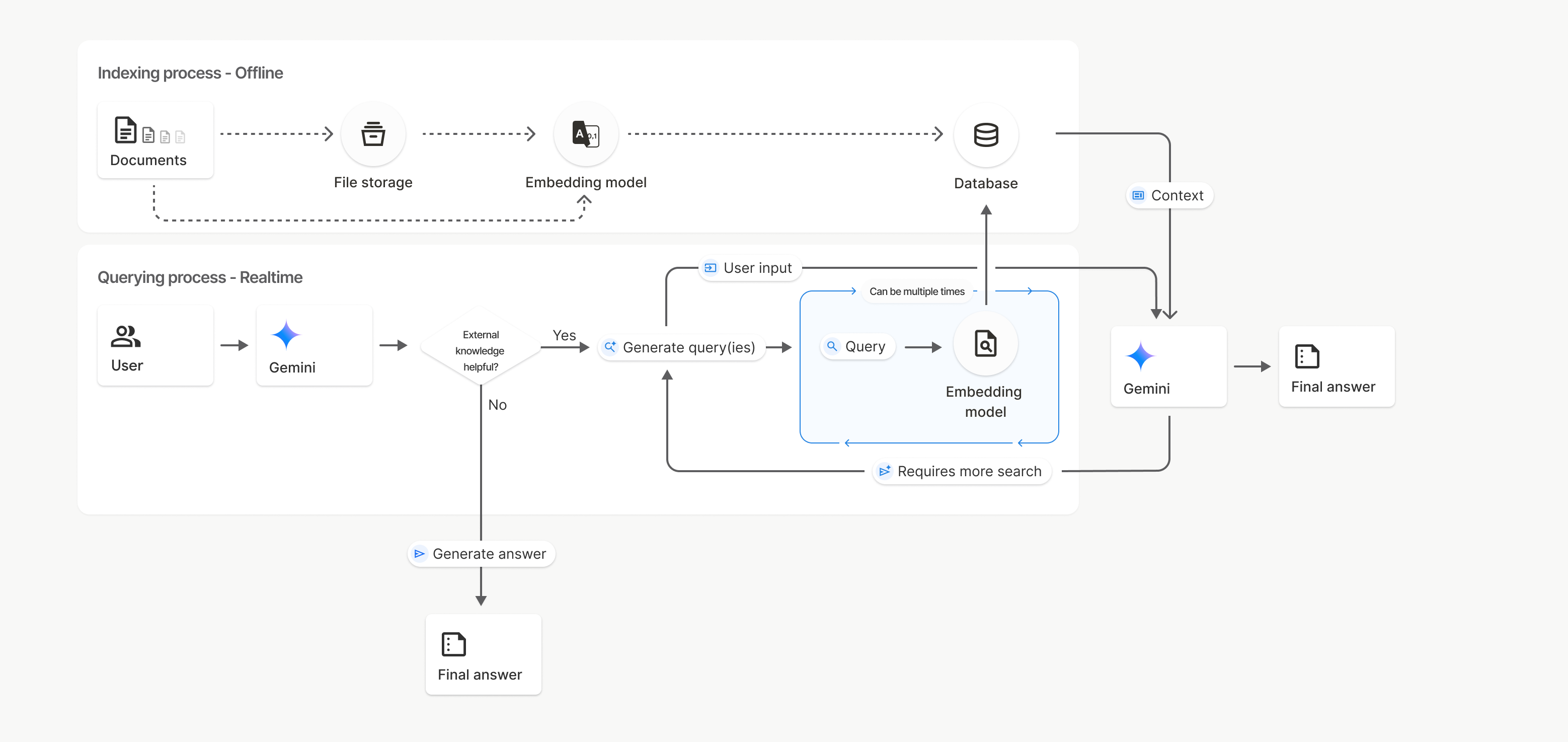
Dalam diagram ini, garis putus-putus dari Documents ke Embedding model
(menggunakan gemini-embedding-001)
mewakili uploadToFileSearchStore API (melewati File storage).
Jika tidak, menggunakan Files API untuk membuat
dan kemudian mengimpor file secara terpisah akan memindahkan proses pengindeksan dari Documents ke
File storage, lalu ke Embedding model.
Penyimpanan Penelusuran File
Penyimpanan Penelusuran File adalah penampung untuk embedding dokumen Anda. Meskipun file mentah yang diupload melalui File API akan dihapus setelah 48 jam, data yang diimpor ke penyimpanan Penelusuran File akan disimpan tanpa batas waktu hingga Anda menghapusnya secara manual. Anda dapat membuat beberapa penyimpanan Penelusuran File untuk mengatur dokumen. FileSearchStore API memungkinkan Anda membuat, mencantumkan, mendapatkan, dan menghapus untuk mengelola penyimpanan penelusuran file. Nama penyimpanan Penelusuran File memiliki cakupan global.
Berikut beberapa contoh cara mengelola penyimpanan Penelusuran File:
Python
# This will only work for SDK newer than 2.0.0
file_search_store = client.file_search_stores.create(
    config={
        'display_name': 'my-file_search-store-123',
        'embedding_model': 'models/gemini-embedding-2'
    }
)

for file_search_store in client.file_search_stores.list():
    print(file_search_store)

my_file_search_store = client.file_search_stores.get(name='fileSearchStores/my-file_search-store-123')

client.file_search_stores.delete(name='fileSearchStores/my-file_search-store-123', config={'force': True})
JavaScript
// This will only work for SDK newer than 2.0.0
const fileSearchStore = await ai.fileSearchStores.create({
  config: {
    displayName: 'my-file_search-store-123',
    embeddingModel: 'models/gemini-embedding-2'
  }
});

const fileSearchStores = await ai.fileSearchStores.list();
for await (const store of fileSearchStores) {
  console.log(store);
}

const myFileSearchStore = await ai.fileSearchStores.get({
  name: 'fileSearchStores/my-file_search-store-123'
});

await ai.fileSearchStores.delete({
  name: 'fileSearchStores/my-file_search-store-123',
  config: { force: true }
});
REST
curl -X POST "https://generativelanguage.googleapis.com/v1beta/fileSearchStores?key=${GEMINI_API_KEY}" \
    -H "Content-Type: application/json" \
    -d '{ "displayName": "My Store", "embedding_model": "models/gemini-embedding-2" }'

curl "https://generativelanguage.googleapis.com/v1beta/fileSearchStores?key=${GEMINI_API_KEY}" \

curl "https://generativelanguage.googleapis.com/v1beta/fileSearchStores/my-file_search-store-123?key=${GEMINI_API_KEY}"

curl -X DELETE "https://generativelanguage.googleapis.com/v1beta/fileSearchStores/my-file_search-store-123?key=${GEMINI_API_KEY}"
Dokumen penelusuran file
Anda dapat mengelola dokumen satu per satu di penyimpanan file dengan
File Search Documents API untuk list setiap dokumen
di penyimpanan penelusuran file, get informasi tentang dokumen, dan delete sebuah
dokumen berdasarkan nama.
Python
# This will only work for SDK newer than 2.0.0
for document_in_store in client.file_search_stores.documents.list(parent='fileSearchStores/my-file_search-store-123'):
  print(document_in_store)

file_search_document = client.file_search_stores.documents.get(name='fileSearchStores/my-file_search-store-123/documents/my_doc')
print(file_search_document)

client.file_search_stores.documents.delete(name='fileSearchStores/my-file_search-store-123/documents/my_doc', config={'force': True})
JavaScript
// This will only work for SDK newer than 2.0.0
const documents = await ai.fileSearchStores.documents.list({
  parent: 'fileSearchStores/my-file_search-store-123'
});
for await (const doc of documents) {
  console.log(doc);
}

const fileSearchDocument = await ai.fileSearchStores.documents.get({
  name: 'fileSearchStores/my-file_search-store-123/documents/my_doc'
});

await ai.fileSearchStores.documents.delete({
  name: 'fileSearchStores/my-file_search-store-123/documents/my_doc'
});
REST
curl "https://generativelanguage.googleapis.com/v1beta/fileSearchStores/my-file_search-store-123/documents?key=${GEMINI_API_KEY}"

curl "https://generativelanguage.googleapis.com/v1beta/fileSearchStores/my-file_search-store-123/documents/my_doc?key=${GEMINI_API_KEY}"

curl -X DELETE "https://generativelanguage.googleapis.com/v1beta/fileSearchStores/my-file_search-store-123/documents/my_doc?key=${GEMINI_API_KEY}&force=true"
Metadata file
Anda dapat menambahkan metadata kustom ke file untuk membantu memfilternya atau memberikan konteks tambahan. Metadata adalah kumpulan key-value pair.
Python
# This will only work for SDK newer than 2.0.0
op = client.file_search_stores.import_file(
    file_search_store_name=file_search_store.name,
    file_name=sample_file.name,
    config={
        'custom_metadata': [
            {"key": "author", "string_value": "Robert Graves"},
            {"key": "year", "numeric_value": 1934}
        ]
    }
)
JavaScript
// This will only work for SDK newer than 2.0.0
let operation = await ai.fileSearchStores.importFile({
  fileSearchStoreName: fileSearchStore.name,
  fileName: sampleFile.name,
  config: {
    customMetadata: [
      { key: "author", stringValue: "Robert Graves" },
      { key: "year", numericValue: 1934 }
    ]
  }
});
Hal ini berguna jika Anda memiliki beberapa dokumen di penyimpanan Penelusuran File dan hanya ingin menelusuri sebagian dokumen tersebut.
Python
# This will only work for SDK newer than 2.0.0
interaction = client.interactions.create(
    model="gemini-3-flash-preview",
    input="Tell me about the book 'I, Claudius'",
    tools=[{
        "type": "file_search",
        "file_search_store_names": [file_search_store.name],
        "metadata_filter": 'author="Robert Graves"',
    }]
)

for step in interaction.steps:
    if step.type == "model_output":
        for content_block in step.content:
            if content_block.type == "text":
                print(content_block.text)
JavaScript
// This will only work for SDK newer than 2.0.0
const interaction = await ai.interactions.create({
  model: "gemini-3-flash-preview",
  input: "Tell me about the book 'I, Claudius'",
  tools: [{
    type: "file_search",
    file_search_store_names: [fileSearchStore.name],
    metadata_filter: 'author="Robert Graves"',
  }]
});

for (const step of interaction.steps) {
  if (step.type === 'model_output') {
    for (const contentBlock of step.content) {
      if (contentBlock.type === 'text') {
        console.log(contentBlock.text);
      }
    }
  }
}
REST
# Specifies the API revision to avoid breaking changes when they become default
curl "https://generativelanguage.googleapis.com/v1beta/interactions" \
    -H "x-goog-api-key: $GEMINI_API_KEY" \
    -H 'Content-Type: application/json' \
    -H "Api-Revision: 2026-05-20" \
    -X POST \
    -d '{
            "model": "gemini-3-flash-preview",
            "input": [{"type": "text", "text": "Tell me about the book I, Claudius"}],
            "tools": [{
                "type": "file_search",
                "file_search_store_names": ["'$STORE_NAME'"],
                "metadata_filter": "author = \"Robert Graves\""
            }]
        }' 2> /dev/null > response.json

cat response.json
Panduan tentang penerapan sintaksis filter daftar untuk metadata_filter dapat ditemukan
di google.aip.dev/160
Kutipan
Saat Anda menggunakan Penelusuran File, respons model dapat menyertakan kutipan yang menentukan bagian dokumen yang diupload yang digunakan untuk membuat jawaban. Hal ini membantu pemeriksaan fakta dan verifikasi.
Anda dapat mengakses informasi kutipan melalui kolom annotations dalam blok konten langkah model_output.
Python
# This will only work for SDK newer than 2.0.0
for step in interaction.steps:
    if step.type == "model_output":
        for content_block in step.content:
            if content_block.annotations:
                print(content_block.annotations)
JavaScript
// This will only work for SDK newer than 2.0.0
for (const step of interaction.steps) {
    if (step.type === "model_output") {
        for (const contentBlock of step.content) {
            if (contentBlock.annotations) {
                console.log(contentBlock.annotations);
            }
        }
    }
}
Untuk mengetahui informasi mendetail tentang struktur metadata grounding, lihat contoh di buku resep Penelusuran File atau bagian grounding di dokumen Grounding dengan Google Penelusuran.
Metadata kustom dalam data grounding
Jika telah menambahkan metadata kustom ke file, Anda dapat mengaksesnya di metadata grounding respons model. Hal ini berguna untuk meneruskan konteks tambahan (seperti URL, nomor halaman, atau penulis) dari dokumen sumber ke logika aplikasi. Setiap grounding_chunk di retrieved_context berisi metadata kustom ini.
Python
# This will only work for SDK newer than 2.0.0
interaction = client.interactions.create(
    model="gemini-3-flash-preview",
    input="Tell me about [insert question]",
    tools=[{
        "type": "file_search",
        "file_search_store_names": [file_search_store.name]
    }]
)

for step in interaction.steps:
    if step.type == "model_output":
        for content_block in step.content:
            if content_block.annotations:
                for annotation in content_block.annotations:
                    print(annotation)
JavaScript
  // This will only work for SDK newer than 2.0.0
  const interaction = await ai.interactions.create({
    model: "gemini-3-flash-preview",
    input: "Tell me about [insert question]",
    tools: [{
      type: "file_search",
      file_search_store_names: [fileSearchStore.name]
    }]
  });

  for (const step of interaction.steps) {
    if (step.type === 'model_output') {
      for (const contentBlock of step.content) {
        if (contentBlock.annotations) {
          contentBlock.annotations.forEach((annotation) => {
            console.log(annotation);
          });
        }
      }
    }
  }
REST
{
  "steps": [
    {
      "type": "model_output",
      "content": [
        {
          "type": "text",
          "text": "...",
          "annotations": [
            {
              "file_name": "...",
              "source": "...",
              "custom_metadata": [
                {
                  "key": "author",
                  "string_value": "Robert Graves"
                },
                {
                  "key": "year",
                  "numeric_value": 1934
                }
              ]
            }
          ]
        }
      ]
    }
  ]
}
Output terstruktur
Mulai dari model Gemini 3, Anda dapat menggabungkan alat penelusuran file dengan output terstruktur.
Python
# This will only work for SDK newer than 2.0.0
from pydantic import BaseModel, Field

class Money(BaseModel):
    amount: str = Field(description="The numerical part of the amount.")
    currency: str = Field(description="The currency of amount.")

interaction = client.interactions.create(
    model="gemini-3-flash-preview",
    input="What is the minimum hourly wage in Tokyo right now?",
    tools=[{
        "type": "file_search",
        "file_search_store_names": [file_search_store.name]
    }],
    response_format={
        "type": "text",
        "mime_type": "application/json",
        "schema": Money.model_json_schema()
    },
)
result = Money.model_validate_json(interaction.steps[-1].content[0].text)
print(result)
JavaScript
// This will only work for SDK newer than 2.0.0
import { z } from "zod";

const moneyJsonSchema = {
  type: "object",
  properties: {
    amount: { type: "string", description: "The numerical part of the amount." },
    currency: { type: "string", description: "The currency of amount." }
  },
  required: ["amount", "currency"]
};

const moneySchema = z.fromJSONSchema(moneyJsonSchema);

async function run() {
  const interaction = await ai.interactions.create({
    model: "gemini-3-flash-preview",
    input: "What is the minimum hourly wage in Tokyo right now?",
    tools: [{
      type: "file_search",
      file_search_store_names: [fileSearchStore.name],
    }],
    response_format: {
      type: 'text',
      mime_type: 'application/json',
      schema: moneyJsonSchema
    },
  });

  const result = moneySchema.parse(JSON.parse(interaction.steps.at(-1).content[0].text));
  console.log(result);
}

run();
REST
# Specifies the API revision to avoid breaking changes when they become default
curl "https://generativelanguage.googleapis.com/v1beta/interactions" \
  -H "x-goog-api-key: $GEMINI_API_KEY" \
  -H 'Content-Type: application/json' \
  -H "Api-Revision: 2026-05-20" \
  -X POST \
  -d '{
    "model": "gemini-3-flash-preview",
    "input": "What is the minimum hourly wage in Tokyo right now?",
    "tools": [{
      "type": "file_search",
      "file_search_store_names": ["$FILE_SEARCH_STORE_NAME"]
    }],
    "response_format": {
      "type": "text",
      "mime_type": "application/json",
      "schema": {
        "type": "object",
        "properties": {
          "amount": {"type": "string", "description": "The numerical part of the amount."},
          "currency": {"type": "string", "description": "The currency of amount."}
        },
        "required": ["amount", "currency"]
      }
    }
  }'
Model yang didukung
Model berikut mendukung Penelusuran File:
| Model | Penelusuran File |
|---|---|
| Pratinjau Gemini 3.1 Pro | ✔️ |
| Gemini 3.1 Flash-Lite | ✔️ |
| Pratinjau Gemini 3.1 Flash-Lite | ✔️ |
| Pratinjau Gemini 3 Flash | ✔️ |
| Gemini 2.5 Pro | ✔️ |
| Gemini 2.5 Flash-Lite | ✔️ |
Kombinasi alat yang didukung
Model Gemini 3 mendukung penggabungan alat bawaan (seperti Penelusuran File) dengan alat kustom (pemanggilan fungsi). Pelajari lebih lanjut di halaman kombinasi alat.
Jenis file yang didukung
Penelusuran File mendukung berbagai format file, yang tercantum di bagian berikut.
Jenis file aplikasi
application/dartapplication/ecmascriptapplication/jsonapplication/ms-javaapplication/mswordapplication/pdfapplication/sqlapplication/typescriptapplication/vnd.curlapplication/vnd.dartapplication/vnd.ibm.secure-containerapplication/vnd.jupyterapplication/vnd.ms-excelapplication/vnd.oasis.opendocument.textapplication/vnd.openxmlformats-officedocument.presentationml.presentationapplication/vnd.openxmlformats-officedocument.spreadsheetml.sheetapplication/vnd.openxmlformats-officedocument.wordprocessingml.documentapplication/vnd.openxmlformats-officedocument.wordprocessingml.templateapplication/x-cshapplication/x-hwpapplication/x-hwp-v5application/x-latexapplication/x-phpapplication/x-powershellapplication/x-shapplication/x-shellscriptapplication/x-texapplication/x-zshapplication/xmlapplication/zip
Jenis file teks
text/1d-interleaved-parityfectext/REDtext/SGMLtext/cache-manifesttext/calendartext/cqltext/cql-extensiontext/cql-identifiertext/csstext/csvtext/csv-schematext/dnstext/encaprtptext/enrichedtext/exampletext/fhirpathtext/flexfectext/fwdredtext/gff3text/grammar-ref-listtext/hl7v2text/htmltext/javascripttext/jcr-cndtext/jsxtext/markdowntext/mizartext/n3text/parameterstext/parityfectext/phptext/plaintext/provenance-notationtext/prs.fallenstein.rsttext/prs.lines.tagtext/prs.prop.logictext/raptorfectext/rfc822-headerstext/rtftext/rtp-enc-aescm128text/rtploopbacktext/rtxtext/sgmltext/shaclctext/shextext/spdxtext/stringstext/t140text/tab-separated-valuestext/texmacstext/trofftext/tsvtext/tsxtext/turtletext/ulpfectext/uri-listtext/vcardtext/vnd.DMClientScripttext/vnd.IPTC.NITFtext/vnd.IPTC.NewsMLtext/vnd.atext/vnd.abctext/vnd.ascii-arttext/vnd.curltext/vnd.debian.copyrighttext/vnd.dvb.subtitletext/vnd.esmertec.theme-descriptortext/vnd.exchangeabletext/vnd.familysearch.gedcomtext/vnd.ficlab.flttext/vnd.flytext/vnd.fmi.flexstortext/vnd.gmltext/vnd.graphviztext/vnd.hanstext/vnd.hgltext/vnd.in3d.3dmltext/vnd.in3d.spottext/vnd.latex-ztext/vnd.motorola.reflextext/vnd.ms-mediapackagetext/vnd.net2phone.commcenter.commandtext/vnd.radisys.msml-basic-layouttext/vnd.senx.warpscripttext/vnd.sositext/vnd.sun.j2me.app-descriptortext/vnd.trolltech.linguisttext/vnd.wap.sitext/vnd.wap.sltext/vnd.wap.wmltext/vnd.wap.wmlscripttext/vtttext/wgsltext/x-asmtext/x-bibtextext/x-bootext/x-ctext/x-c++hdrtext/x-c++srctext/x-cassandratext/x-chdrtext/x-coffeescripttext/x-componenttext/x-cshtext/x-csharptext/x-csrctext/x-cudatext/x-dtext/x-difftext/x-dsrctext/x-emacs-lisptext/x-erlangtext/x-gff3text/x-gotext/x-haskelltext/x-javatext/x-java-propertiestext/x-java-sourcetext/x-kotlintext/x-lilypondtext/x-lisptext/x-literate-haskelltext/x-luatext/x-moctext/x-objcsrctext/x-pascaltext/x-pcs-gcdtext/x-perltext/x-perl-scripttext/x-pythontext/x-python-scripttext/x-r-markdowntext/x-rsrctext/x-rsttext/x-ruby-scripttext/x-rusttext/x-sasstext/x-scalatext/x-schemetext/x-script.pythontext/x-scsstext/x-setexttext/x-sfvtext/x-shtext/x-siestatext/x-sostext/x-sqltext/x-swifttext/x-tcltext/x-textext/x-vbasictext/x-vcalendartext/xmltext/xml-dtdtext/xml-external-parsed-entitytext/yaml
Batasan
- Live API: Penelusuran File tidak didukung di Live API.
- Ketidakcocokan alat: Penelusuran File saat ini tidak dapat digabungkan dengan alat lain seperti Grounding dengan Google Penelusuran, Konteks URL, dll.
Batas kapasitas
File Search API memiliki batas berikut untuk menerapkan stabilitas layanan:
- Ukuran file maksimum / batas per dokumen: 100 MB
- Total ukuran penyimpanan Penelusuran File project (berdasarkan tingkat pengguna):
- Gratis: 1 GB
- Tingkat 1: 10 GB
- Tingkat 2: 100 GB
- Tingkat 3: 1 TB
- Rekomendasi: Batasi ukuran setiap penyimpanan Penelusuran File hingga di bawah 20 GB untuk memastikan latensi pengambilan yang optimal.
Harga
- Developer dikenai biaya untuk embedding pada waktu pengindeksan berdasarkan harga embedding yang ada ($0,15 per 1 juta token).
- Penyimpanan tidak dikenai biaya.
- Embedding waktu kueri tidak dikenai biaya.
- Token dokumen yang diambil dikenai biaya sebagai reguler token konteks.
Langkah berikutnya
- Lihat referensi API untuk Penyimpanan Penelusuran File dan Dokumen Penelusuran File.