

ファイル検索
Gemini API では、ファイル検索ツールを使用して検索拡張生成(RAG)が可能です。ファイル検索では、データがインポート、チャンク化、インデックス登録され、指定されたプロンプトに基づいて関連情報を迅速に取得できます。取得した情報はモデルのコンテキストとして使用されるため、より正確で関連性の高い回答を提供できます。ファイル検索では、gemini-embedding-001 でサポートされているテキスト エンベディングと、gemini-embedding-2 でサポートされている画像/マルチモーダル エンベディングを使用して、マルチモーダル機能を提供することもできます。
クエリ時のファイルの保存とエンベディングの生成は無料です。エンベディングの作成に対して料金が発生するのは、ファイルを初めてインデックス登録するときと、通常の Gemini モデルの入力 / 出力トークンの費用のみです。この新しい課金パラダイムにより、ファイル検索ツールをより簡単かつ費用対効果の高い方法で構築、スケーリングできます。詳細については、 料金セクションをご覧ください。
ファイル検索ストアに直接アップロードする
この例では、ファイルを ファイル検索ストアに直接アップロードする方法を示します。
Python
# This will only work for SDK newer than 2.0.0
from google import genai
from google.genai import types
import time

client = genai.Client()

# File name will be visible in citations
file_search_store = client.file_search_stores.create(
    config={
        'display_name': 'your-fileSearchStore-name',
        'embedding_model': 'models/gemini-embedding-2'
    }
)

operation = client.file_search_stores.upload_to_file_search_store(
  file='sample.txt',
  file_search_store_name=file_search_store.name,
  config={
      'display_name' : 'display-file-name',
  }
)

while not operation.done:
    time.sleep(5)
    operation = client.operations.get(operation)

interaction = client.interactions.create(
    model="gemini-3-flash-preview",
    input="Can you tell me about [insert question]",
    tools=[{
        "type": "file_search",
        "file_search_store_names": [file_search_store.name]
    }]
)

for step in interaction.steps:
    if step.type == "model_output":
        for content_block in step.content:
            if content_block.type == "text":
                print(content_block.text)
                if content_block.annotations:
                    print("\nSources:")
                    for annotation in content_block.annotations:
                        if annotation.type == "file_citation":
                            print(f"  - {annotation.file_name}: {annotation.source}")
JavaScript
// This will only work for SDK newer than 2.0.0
const { GoogleGenAI } = require('@google/genai');

const ai = new GoogleGenAI({});

async function run() {
  // File name will be visible in citations
  const fileSearchStore = await ai.fileSearchStores.create({
    config: {
      displayName: 'your-fileSearchStore-name',
      embeddingModel: 'models/gemini-embedding-2'
    }
  });

  let operation = await ai.fileSearchStores.uploadToFileSearchStore({
    file: 'file.txt',
    fileSearchStoreName: fileSearchStore.name,
    config: {
      displayName: 'file-name',
    }
  });

  while (!operation.done) {
    await new Promise(resolve => setTimeout(resolve, 5000));
    operation = await ai.operations.get({ operation });
  }

  const interaction = await ai.interactions.create({
    model: "gemini-3-flash-preview",
    input: "Can you tell me about [insert question]",
    tools: [{
      type: "file_search",
      file_search_store_names: [fileSearchStore.name]
    }]
  });

  for (const step of interaction.steps) {
    if (step.type === 'model_output') {
      for (const contentBlock of step.content) {
        if (contentBlock.type === 'text') {
          console.log(contentBlock.text);
          if (contentBlock.annotations) {
            console.log("\nSources:");
            for (const annotation of contentBlock.annotations) {
              if (annotation.type === 'file_citation') {
                console.log(`  - ${annotation.file_name}: ${annotation.source}`);
              }
            }
          }
        }
      }
    }
  }
}

run();
詳細については、uploadToFileSearchStore の API リファレンスをご覧ください。
ファイルのインポート
または、既存のファイルをアップロードして、ファイル検索ストアにインポートすることもできます。
Python
# This will only work for SDK newer than 2.0.0
from google import genai
from google.genai import types
import time

client = genai.Client()

# File name will be visible in citations
sample_file = client.files.upload(file='sample.txt', config={'display_name': 'display_file_name'})

file_search_store = client.file_search_stores.create(
    config={
        'display_name': 'your-fileSearchStore-name',
        'embedding_model': 'models/gemini-embedding-2'
    }
)

operation = client.file_search_stores.import_file(
    file_search_store_name=file_search_store.name,
    file_name=sample_file.name
)

while not operation.done:
    time.sleep(5)
    operation = client.operations.get(operation)

interaction = client.interactions.create(
    model="gemini-3-flash-preview",
    input="Can you tell me about [insert question]",
    tools=[{
        "type": "file_search",
        "file_search_store_names": [file_search_store.name]
    }]
)

for step in interaction.steps:
    if step.type == "model_output":
        for content_block in step.content:
            if content_block.type == "text":
                print(content_block.text)
JavaScript
// This will only work for SDK newer than 2.0.0
const { GoogleGenAI } = require('@google/genai');

const ai = new GoogleGenAI({});

async function run() {
  // File name will be visible in citations
  const sampleFile = await ai.files.upload({
    file: 'sample.txt',
    config: { displayName: 'file-name' }
  });

  const fileSearchStore = await ai.fileSearchStores.create({
    config: {
      displayName: 'your-fileSearchStore-name',
      embeddingModel: 'models/gemini-embedding-2'
    }
  });

  let operation = await ai.fileSearchStores.importFile({
    fileSearchStoreName: fileSearchStore.name,
    fileName: sampleFile.name
  });

  while (!operation.done) {
    await new Promise(resolve => setTimeout(resolve, 5000));
    operation = await ai.operations.get({ operation: operation });
  }

  const interaction = await ai.interactions.create({
    model: "gemini-3-flash-preview",
    input: "Can you tell me about [insert question]",
    tools: [{
      type: "file_search",
      file_search_store_names: [fileSearchStore.name]
    }]
  });

  for (const step of interaction.steps) {
    if (step.type === 'model_output') {
      for (const contentBlock of step.content) {
        if (contentBlock.type === 'text') {
          console.log(contentBlock.text);
        }
      }
    }
  }
}

run();
詳細については、importFile の API リファレンスをご覧ください。
チャンク化の設定
ファイルをファイル検索ストアにインポートすると、自動的にチャンクに分割され、埋め込み、インデックス登録され、ファイル検索ストアにアップロードされます。チャンク化戦略をより細かく制御する必要がある場合は、
chunking_config 設定
を指定して、チャンクあたりのトークンの最大数と重複する
トークンの最大数を設定できます。
Python
# This will only work for SDK newer than 2.0.0
from google import genai
from google.genai import types
import time

client = genai.Client()

operation = client.file_search_stores.upload_to_file_search_store(
    file_search_store_name=file_search_store.name,
    file='sample.txt',
    config={
        'chunking_config': {
          'white_space_config': {
            'max_tokens_per_chunk': 200,
            'max_overlap_tokens': 20
          }
        }
    }
)

while not operation.done:
    time.sleep(5)
    operation = client.operations.get(operation)

print("Custom chunking complete.")
JavaScript
// This will only work for SDK newer than 2.0.0
const { GoogleGenAI } = require('@google/genai');

const ai = new GoogleGenAI({});

let operation = await ai.fileSearchStores.uploadToFileSearchStore({
  file: 'file.txt',
  fileSearchStoreName: fileSearchStore.name,
  config: {
    displayName: 'file-name',
    chunkingConfig: {
      whiteSpaceConfig: {
        maxTokensPerChunk: 200,
        maxOverlapTokens: 20
      }
    }
  }
});

while (!operation.done) {
  await new Promise(resolve => setTimeout(resolve, 5000));
  operation = await ai.operations.get({ operation });
}
console.log("Custom chunking complete.");
ファイル検索ストアを使用するには、interactions.create
メソッドにツールとして渡します。これは、アップロードとインポートの例に示されています。
仕組み
ファイル検索では、セマンティック検索と呼ばれる手法を使用して、ユーザー プロンプトに関連する情報を検索します。標準のキーワード ベースの検索とは異なり、セマンティック検索ではクエリの意味とコンテキストが理解されます。
ファイルをインポートすると、アップロードされたコンテンツのセマンティックな意味を捉える エンベディングと呼ばれる数値表現に変換されます。これらのエンベディングは、専用のファイル検索データベースに保存されます。 クエリを行うと、エンベディングにも変換されます。その後、システムはファイル検索を実行して、ファイル検索ストアから最も類似した関連性の高いドキュメント チャンクを検索します。
エンベディングには有効期間(TTL)はありません。手動で削除されるか、モデルが非推奨になるまで保持されます。ただし、ファイルは 48 時間後に削除されます。
ファイル検索 uploadToFileSearchStore API を使用するプロセスの概要は次のとおりです。
ファイル検索ストアを作成する: ファイル検索ストアには、ファイルから処理された データが含まれます。これは、セマンティック検索が実行されるエンベディングの永続的なコンテナです。
ファイルをアップロードしてファイル検索ストアにインポートする: ファイルをアップロードし、結果をファイル検索ストアに同時にインポートします。これにより、元のドキュメントを参照する一時的な
Fileオブジェクトが作成されます。そのデータはチャンク化され、ファイル検索エンベディングに変換されてインデックス登録されます。Fileオブジェクトは 48 時間後に削除されますが、ファイル検索ストアにインポートされたデータは、削除するまで無期限に保存されます。ファイル検索でクエリを実行する: 最後に、
FileSearchツールをgenerateContent呼び出しで使用します。ツール構成で、検索するFileSearchStoreを指すFileSearchRetrievalResourceを指定します。これにより、モデルは特定のファイル検索ストアでセマンティック検索を実行し、レスポンスのグラウンディングに関連する情報を検索します。
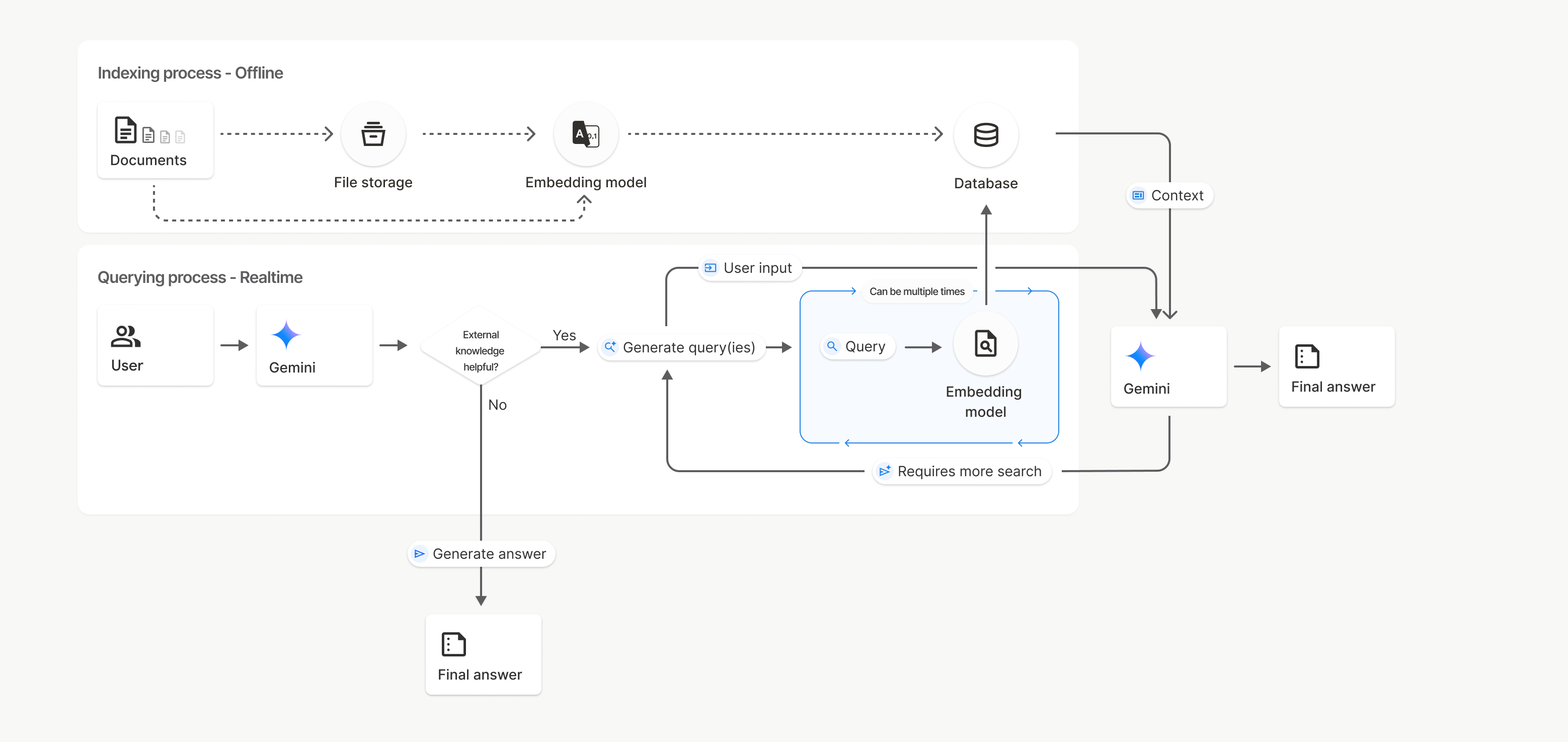
この図では、[ドキュメント]から [エンベディング モデル](gemini-embedding-001を使用)への点線は、uploadToFileSearchStore API([ファイル ストレージ]をバイパス)を表しています。それ以外の場合は、[Files API] を使用してファイルを個別に作成
してからインポートすると、インデックス登録プロセスが [ドキュメント] から
[ファイル ストレージ]、[エンベディング モデル] に移動します。
ファイル検索ストア
ファイル検索ストアは、ドキュメント エンベディングのコンテナです。File API を使用してアップロードされた元のファイルは 48 時間後に削除されますが、ファイル検索ストアにインポートされたデータは、手動で削除するまで無期限に保存されます。複数のファイル検索ストアを作成して、ドキュメントを整理できます。FileSearchStore API を使用すると、ファイル検索ストアの作成、一覧表示、取得、削除を行って管理できます。ファイル検索ストア名はグローバル スコープです。
ファイル検索ストアを管理する方法の例を次に示します。
Python
# This will only work for SDK newer than 2.0.0
file_search_store = client.file_search_stores.create(
    config={
        'display_name': 'my-file_search-store-123',
        'embedding_model': 'models/gemini-embedding-2'
    }
)

for file_search_store in client.file_search_stores.list():
    print(file_search_store)

my_file_search_store = client.file_search_stores.get(name='fileSearchStores/my-file_search-store-123')

client.file_search_stores.delete(name='fileSearchStores/my-file_search-store-123', config={'force': True})
JavaScript
// This will only work for SDK newer than 2.0.0
const fileSearchStore = await ai.fileSearchStores.create({
  config: {
    displayName: 'my-file_search-store-123',
    embeddingModel: 'models/gemini-embedding-2'
  }
});

const fileSearchStores = await ai.fileSearchStores.list();
for await (const store of fileSearchStores) {
  console.log(store);
}

const myFileSearchStore = await ai.fileSearchStores.get({
  name: 'fileSearchStores/my-file_search-store-123'
});

await ai.fileSearchStores.delete({
  name: 'fileSearchStores/my-file_search-store-123',
  config: { force: true }
});
REST
curl -X POST "https://generativelanguage.googleapis.com/v1beta/fileSearchStores?key=${GEMINI_API_KEY}" \
    -H "Content-Type: application/json" \
    -d '{ "displayName": "My Store", "embedding_model": "models/gemini-embedding-2" }'

curl "https://generativelanguage.googleapis.com/v1beta/fileSearchStores?key=${GEMINI_API_KEY}" \

curl "https://generativelanguage.googleapis.com/v1beta/fileSearchStores/my-file_search-store-123?key=${GEMINI_API_KEY}"

curl -X DELETE "https://generativelanguage.googleapis.com/v1beta/fileSearchStores/my-file_search-store-123?key=${GEMINI_API_KEY}"
ファイル検索ドキュメント
ファイル検索ドキュメント API を使用すると、ファイルストア内の個々のドキュメントを管理できます。ファイル検索ストア内の各ドキュメントを list し、ドキュメントに関する情報を get し、名前でドキュメントを delete できます。
Python
# This will only work for SDK newer than 2.0.0
for document_in_store in client.file_search_stores.documents.list(parent='fileSearchStores/my-file_search-store-123'):
  print(document_in_store)

file_search_document = client.file_search_stores.documents.get(name='fileSearchStores/my-file_search-store-123/documents/my_doc')
print(file_search_document)

client.file_search_stores.documents.delete(name='fileSearchStores/my-file_search-store-123/documents/my_doc', config={'force': True})
JavaScript
// This will only work for SDK newer than 2.0.0
const documents = await ai.fileSearchStores.documents.list({
  parent: 'fileSearchStores/my-file_search-store-123'
});
for await (const doc of documents) {
  console.log(doc);
}

const fileSearchDocument = await ai.fileSearchStores.documents.get({
  name: 'fileSearchStores/my-file_search-store-123/documents/my_doc'
});

await ai.fileSearchStores.documents.delete({
  name: 'fileSearchStores/my-file_search-store-123/documents/my_doc'
});
REST
curl "https://generativelanguage.googleapis.com/v1beta/fileSearchStores/my-file_search-store-123/documents?key=${GEMINI_API_KEY}"

curl "https://generativelanguage.googleapis.com/v1beta/fileSearchStores/my-file_search-store-123/documents/my_doc?key=${GEMINI_API_KEY}"

curl -X DELETE "https://generativelanguage.googleapis.com/v1beta/fileSearchStores/my-file_search-store-123/documents/my_doc?key=${GEMINI_API_KEY}&force=true"
ファイルのメタデータ
カスタム メタデータをファイルに追加して、フィルタリングや追加のコンテキストの提供に役立てることができます。メタデータは Key-Value ペアのセットです。
Python
# This will only work for SDK newer than 2.0.0
op = client.file_search_stores.import_file(
    file_search_store_name=file_search_store.name,
    file_name=sample_file.name,
    config={
        'custom_metadata': [
            {"key": "author", "string_value": "Robert Graves"},
            {"key": "year", "numeric_value": 1934}
        ]
    }
)
JavaScript
// This will only work for SDK newer than 2.0.0
let operation = await ai.fileSearchStores.importFile({
  fileSearchStoreName: fileSearchStore.name,
  fileName: sampleFile.name,
  config: {
    customMetadata: [
      { key: "author", stringValue: "Robert Graves" },
      { key: "year", numericValue: 1934 }
    ]
  }
});
これは、ファイル検索ストアに複数のドキュメントがあり、そのサブセットのみを検索する場合に便利です。
Python
# This will only work for SDK newer than 2.0.0
interaction = client.interactions.create(
    model="gemini-3-flash-preview",
    input="Tell me about the book 'I, Claudius'",
    tools=[{
        "type": "file_search",
        "file_search_store_names": [file_search_store.name],
        "metadata_filter": 'author="Robert Graves"',
    }]
)

for step in interaction.steps:
    if step.type == "model_output":
        for content_block in step.content:
            if content_block.type == "text":
                print(content_block.text)
JavaScript
// This will only work for SDK newer than 2.0.0
const interaction = await ai.interactions.create({
  model: "gemini-3-flash-preview",
  input: "Tell me about the book 'I, Claudius'",
  tools: [{
    type: "file_search",
    file_search_store_names: [fileSearchStore.name],
    metadata_filter: 'author="Robert Graves"',
  }]
});

for (const step of interaction.steps) {
  if (step.type === 'model_output') {
    for (const contentBlock of step.content) {
      if (contentBlock.type === 'text') {
        console.log(contentBlock.text);
      }
    }
  }
}
REST
# Specifies the API revision to avoid breaking changes when they become default
curl "https://generativelanguage.googleapis.com/v1beta/interactions" \
    -H "x-goog-api-key: $GEMINI_API_KEY" \
    -H 'Content-Type: application/json' \
    -H "Api-Revision: 2026-05-20" \
    -X POST \
    -d '{
            "model": "gemini-3-flash-preview",
            "input": [{"type": "text", "text": "Tell me about the book I, Claudius"}],
            "tools": [{
                "type": "file_search",
                "file_search_store_names": ["'$STORE_NAME'"],
                "metadata_filter": "author = \"Robert Graves\""
            }]
        }' 2> /dev/null > response.json

cat response.json
metadata_filter のリストフィルタ構文の実装に関するガイダンスについては、google.aip.dev/160 をご覧ください。
マルチモーダル ファイル検索
マルチモーダル ファイル検索を使用すると、画像をネイティブに埋め込んで検索できるため、リッチなマルチモーダル RAG アプリケーションが可能になります。
エンベディング モデルを構成する
FileSearchStore を作成する場合は、デフォルトのテキストのみのエンベディング モデルをオーバーライドして、マルチモーダル モデルを使用する必要があります。models/gemini-embedding-2 を使用して、テキストと画像の両方を処理します。
Python
store = client.file_search_stores.create(
    config={
        "display_name": "Multimodal Catalog",
        "embedding_model": "models/gemini-embedding-2",
    }
)
JavaScript
const fileSearchStore = await ai.fileSearchStores.create({
  config: {
    displayName: "Multimodal Catalog",
    embeddingModel: "models/gemini-embedding-2",
  },
});
REST
curl -X POST "https://generativelanguage.googleapis.com/v1beta/fileSearchStores?key=$GEMINI_API_KEY" \
    -H "Content-Type: application/json" \
    -d '{
      "display_name": "Multimodal Catalog",
      "embedding_model": "models/gemini-embedding-2"
    }'
画像のアップロード
マルチモーダル エンベディング モデルを使用してストアを作成したら、 ファイル検索ストアに直接アップロードするまたはファイルのインポートで説明されているのと同じアップロード API を使用して、画像ファイルを直接アップロードできます。
画像ファイルの要件:
- 画像ファイルの解像度は 4K x 4K ピクセル以下にする必要があります。
- サポートされている形式は PNG、JPEG です。
引用
ファイル検索を使用すると、モデルのレスポンスに、アップロードしたドキュメントのどの部分が回答の生成に使用されたかを指定する引用が含まれることがあります。これは、ファクト チェックと検証に役立ちます。
引用情報には、レスポンスの model_output ステップの content ブロック内の annotations 属性からアクセスできます。
Python
# This will only work for SDK newer than 2.0.0
for step in interaction.steps:
    if step.type == 'model_output':
        for content in step.content:
            if content.type == 'text' and content.annotations:
                print(content.annotations)
JavaScript
// This will only work for SDK newer than 2.0.0
for (const step of interaction.steps) {
  if (step.type === 'model_output') {
    for (const contentBlock of step.content) {
      if (contentBlock.type === 'text' && contentBlock.annotations) {
        console.log(JSON.stringify(contentBlock.annotations, null, 2));
      }
    }
  }
}
引用の構造の詳細については、 Interactions の API リファレンスをご覧ください。
ページ番号
ページがあるドキュメント(PDF など)でファイル検索を使用すると、モデルのレスポンスに情報が見つかったページ番号が含まれることがあります。
この情報には、file_citation アノテーションの page_number 属性からアクセスできます。
Python
# Iterate through citations and check for page numbers
for step in interaction.steps:
    if step.type == "model_output":
        for content in step.content:
            if content.type == "text" and content.annotations:
                for annotation in content.annotations:
                    if annotation.type == "file_citation" and annotation.page_number:
                        print(f"Cited Page: {annotation.page_number}")
JavaScript
for (const step of interaction.steps) {
  if (step.type === 'model_output') {
    for (const block of step.content) {
      if (block.type === 'text' && block.annotations) {
        for (const annotation of block.annotations) {
          if (annotation.type === 'file_citation' && annotation.pageNumber) {
            console.log(`Cited Page: ${annotation.pageNumber}`);
          }
        }
      }
    }
  }
}
メディアの引用
生成中にモデルが画像チャンクを参照すると、API は media_id を含むアノテーションに file_citation 型のアノテーションを返します。この ID を使用すると、モデルが参照した正確な画像チャンクをダウンロードできます。この media_id は複数の検索呼び出しで保持されるため、同じ画像を確実に取得したり、ID を使用してキャッシュに保存したりできます。
次のスニペットは、REST レスポンス ステップの例です。
{
  "type": "model_output",
  "content": [
    {
      "type": "text",
      "text": "...",
      "annotations": [
        {
          "type": "file_citation",
          "file_name": "product_image",
          "media_id": "fileSearchStores/my-store-123/media/BlobId-456"
        }
      ]
    }
  ]
}
次のコード スニペットは、media_id を取得してメディアをダウンロードする方法を示しています。
Python
# Iterate through citations and download media if present
for step in interaction.steps:
    if step.type == "model_output":
        for content in step.content:
            if content.type == "text" and content.annotations:
                for annotation in content.annotations:
                    if annotation.type == "file_citation" and annotation.media_id:
                        print(f"Cited Media ID: {annotation.media_id}")
                        # Download the blob using the SDK
                        blob_content = client.file_search_stores.download_media(
                            media_id=annotation.media_id
                        )
                        # Save blob_content to file...
JavaScript
for (const step of interaction.steps) {
  if (step.type === 'model_output') {
    for (const block of step.content) {
      if (block.type === 'text' && block.annotations) {
        for (const annotation of block.annotations) {
          if (annotation.type === 'file_citation' && annotation.mediaId) {
            console.log(`Cited Media ID: ${annotation.mediaId}`);
            const blobContent = await ai.fileSearchStores.downloadMedia(annotation.mediaId);
            // Save blobContent to file...
          }
        }
      }
    }
  }
}
REST
curl -X GET "https://generativelanguage.googleapis.com/v1/fileSearchStores/my-store-123/media/BlobId-456" \
  -H "x-goog-api-key: $GEMINI_API_KEY"
カスタム メタデータ
ファイルにカスタム メタデータを追加した場合は、モデルのレスポンスのアノテーションでアクセスできます。これは、ソース ドキュメントからアプリケーション ロジックに追加のコンテキスト(URL、ページ番号、作成者など)を渡す場合に便利です。file_citation 型の各引用アノテーションには、このカスタム メタデータが含まれています。
Python
# This will only work for SDK newer than 2.0.0
interaction = client.interactions.create(
    model="gemini-3-flash-preview",
    input="Tell me about [insert question]",
    tools=[{
        "type": "file_search",
        "file_search_store_names": [file_search_store.name]
    }]
)

for step in interaction.steps:
    if step.type == "model_output":
        for content_block in step.content:
            if content_block.annotations:
                for annotation in content_block.annotations:
                    print(annotation)
JavaScript
  // This will only work for SDK newer than 2.0.0
  const interaction = await ai.interactions.create({
    model: "gemini-3-flash-preview",
    input: "Tell me about [insert question]",
    tools: [{
      type: "file_search",
      file_search_store_names: [fileSearchStore.name]
    }]
  });

  for (const step of interaction.steps) {
    if (step.type === 'model_output') {
      for (const contentBlock of step.content) {
        if (contentBlock.annotations) {
          contentBlock.annotations.forEach((annotation) => {
            console.log(annotation);
          });
        }
      }
    }
  }
REST
{
  "steps": [
    {
      "type": "model_output",
      "content": [
        {
          "type": "text",
          "text": "...",
          "annotations": [
            {
              "file_name": "...",
              "source": "...",
              "custom_metadata": [
                {
                  "key": "author",
                  "string_value": "Robert Graves"
                },
                {
                  "key": "year",
                  "numeric_value": 1934
                }
              ]
            }
          ]
        }
      ]
    }
  ]
}
構造化出力
Gemini 3 モデル以降では、ファイル検索ツールと 構造化出力を組み合わせることができます。
Python
# This will only work for SDK newer than 2.0.0
from pydantic import BaseModel, Field

class Money(BaseModel):
    amount: str = Field(description="The numerical part of the amount.")
    currency: str = Field(description="The currency of amount.")

interaction = client.interactions.create(
    model="gemini-3-flash-preview",
    input="What is the minimum hourly wage in Tokyo right now?",
    tools=[{
        "type": "file_search",
        "file_search_store_names": [file_search_store.name]
    }],
    response_format={
        "type": "text",
        "mime_type": "application/json",
        "schema": Money.model_json_schema()
    },
)
result = Money.model_validate_json(interaction.steps[-1].content[0].text)
print(result)
JavaScript
// This will only work for SDK newer than 2.0.0
import { z } from "zod";

const moneyJsonSchema = {
  type: "object",
  properties: {
    amount: { type: "string", description: "The numerical part of the amount." },
    currency: { type: "string", description: "The currency of amount." }
  },
  required: ["amount", "currency"]
};

const moneySchema = z.fromJSONSchema(moneyJsonSchema);

async function run() {
  const interaction = await ai.interactions.create({
    model: "gemini-3-flash-preview",
    input: "What is the minimum hourly wage in Tokyo right now?",
    tools: [{
      type: "file_search",
      file_search_store_names: [fileSearchStore.name],
    }],
    response_format: {
      type: 'text',
      mime_type: 'application/json',
      schema: moneyJsonSchema
    },
  });

  const result = moneySchema.parse(JSON.parse(interaction.steps.at(-1).content[0].text));
  console.log(result);
}

run();
REST
# Specifies the API revision to avoid breaking changes when they become default
curl "https://generativelanguage.googleapis.com/v1beta/interactions" \
  -H "x-goog-api-key: $GEMINI_API_KEY" \
  -H 'Content-Type: application/json' \
  -H "Api-Revision: 2026-05-20" \
  -X POST \
  -d '{
    "model": "gemini-3-flash-preview",
    "input": "What is the minimum hourly wage in Tokyo right now?",
    "tools": [{
      "type": "file_search",
      "file_search_store_names": ["$FILE_SEARCH_STORE_NAME"]
    }],
    "response_format": {
      "type": "text",
      "mime_type": "application/json",
      "schema": {
        "type": "object",
        "properties": {
          "amount": {"type": "string", "description": "The numerical part of the amount."},
          "currency": {"type": "string", "description": "The currency of amount."}
        },
        "required": ["amount", "currency"]
      }
    }
  }'
サポートされているモデル
次のモデルはファイル検索をサポートしています。
| モデル | ファイル検索 |
|---|---|
| Gemini 3.1 Pro プレビュー | ✔️ |
| Gemini 3.1 Flash-Lite | ✔️ |
| Gemini 3.1 Flash-Lite プレビュー | ✔️ |
| Gemini 3 Flash プレビュー | ✔️ |
| Gemini 2.5 Pro | ✔️ |
| Gemini 2.5 Flash-Lite | ✔️ |
サポートされているツールの組み合わせ
Gemini 3 モデルでは、組み込みツール(ファイル検索など)とカスタムツール(関数呼び出し)を組み合わせることができます。詳細については、 ツールの組み合わせのページをご覧ください。
サポートされているファイル形式
ファイル検索では、次のセクションに示すように、幅広いファイル形式がサポートされています。
アプリケーション ファイル形式
application/dartapplication/ecmascriptapplication/jsonapplication/ms-javaapplication/mswordapplication/pdfapplication/sqlapplication/typescriptapplication/vnd.curlapplication/vnd.dartapplication/vnd.ibm.secure-containerapplication/vnd.jupyterapplication/vnd.ms-excelapplication/vnd.oasis.opendocument.textapplication/vnd.openxmlformats-officedocument.presentationml.presentationapplication/vnd.openxmlformats-officedocument.spreadsheetml.sheetapplication/vnd.openxmlformats-officedocument.wordprocessingml.documentapplication/vnd.openxmlformats-officedocument.wordprocessingml.templateapplication/x-cshapplication/x-hwpapplication/x-hwp-v5application/x-latexapplication/x-phpapplication/x-powershellapplication/x-shapplication/x-shellscriptapplication/x-texapplication/x-zshapplication/xmlapplication/zip
テキスト ファイル形式
text/1d-interleaved-parityfectext/REDtext/SGMLtext/cache-manifesttext/calendartext/cqltext/cql-extensiontext/cql-identifiertext/csstext/csvtext/csv-schematext/dnstext/encaprtptext/enrichedtext/exampletext/fhirpathtext/flexfectext/fwdredtext/gff3text/grammar-ref-listtext/hl7v2text/htmltext/javascripttext/jcr-cndtext/jsxtext/markdowntext/mizartext/n3text/parameterstext/parityfectext/phptext/plaintext/provenance-notationtext/prs.fallenstein.rsttext/prs.lines.tagtext/prs.prop.logictext/raptorfectext/rfc822-headerstext/rtftext/rtp-enc-aescm128text/rtploopbacktext/rtxtext/sgmltext/shaclctext/shextext/spdxtext/stringstext/t140text/tab-separated-valuestext/texmacstext/trofftext/tsvtext/tsxtext/turtletext/ulpfectext/uri-listtext/vcardtext/vnd.DMClientScripttext/vnd.IPTC.NITFtext/vnd.IPTC.NewsMLtext/vnd.atext/vnd.abctext/vnd.ascii-arttext/vnd.curltext/vnd.debian.copyrighttext/vnd.dvb.subtitletext/vnd.esmertec.theme-descriptortext/vnd.exchangeabletext/vnd.familysearch.gedcomtext/vnd.ficlab.flttext/vnd.flytext/vnd.fmi.flexstortext/vnd.gmltext/vnd.graphviztext/vnd.hanstext/vnd.hgltext/vnd.in3d.3dmltext/vnd.in3d.spottext/vnd.latex-ztext/vnd.motorola.reflextext/vnd.ms-mediapackagetext/vnd.net2phone.commcenter.commandtext/vnd.radisys.msml-basic-layouttext/vnd.senx.warpscripttext/vnd.sositext/vnd.sun.j2me.app-descriptortext/vnd.trolltech.linguisttext/vnd.wap.sitext/vnd.wap.sltext/vnd.wap.wmltext/vnd.wap.wmlscripttext/vtttext/wgsltext/x-asmtext/x-bibtextext/x-bootext/x-ctext/x-c++hdrtext/x-c++srctext/x-cassandratext/x-chdrtext/x-coffeescripttext/x-componenttext/x-cshtext/x-csharptext/x-csrctext/x-cudatext/x-dtext/x-difftext/x-dsrctext/x-emacs-lisptext/x-erlangtext/x-gff3text/x-gotext/x-haskelltext/x-javatext/x-java-propertiestext/x-java-sourcetext/x-kotlintext/x-lilypondtext/x-lisptext/x-literate-haskelltext/x-luatext/x-moctext/x-objcsrctext/x-pascaltext/x-pcs-gcdtext/x-perltext/x-perl-scripttext/x-pythontext/x-python-scripttext/x-r-markdowntext/x-rsrctext/x-rsttext/x-ruby-scripttext/x-rusttext/x-sasstext/x-scalatext/x-schemetext/x-script.pythontext/x-scsstext/x-setexttext/x-sfvtext/x-shtext/x-siestatext/x-sostext/x-sqltext/x-swifttext/x-tcltext/x-textext/x-vbasictext/x-vcalendartext/xmltext/xml-dtdtext/xml-external-parsed-entitytext/yaml
制限事項
- Live API: ファイル検索は Live APIではサポートされていません。
- ツールの非互換性: 現時点では、ファイル検索を他のツール (Google 検索によるグラウンディング、 URL コンテキストなど)と組み合わせることはできません。
レート上限
ファイル検索 API には、サービスの安定性を確保するために次の制限があります。
- 最大ファイルサイズ / ドキュメントあたりの上限: 100 MB
- プロジェクトのファイル検索ストアの合計サイズ (ユーザー階層に基づく):
- 無料: 1 GB
- Tier 1: 10 GB
- Tier 2: 100 GB
- Tier 3: 1 TB
- 推奨事項: 取得レイテンシを最適化するため、各ファイル検索ストアのサイズを 20 GB 未満に制限してください。
料金
- エンベディングの料金は、既存の エンベディングの料金に基づいて、インデックス登録時に課金されます。
- ストレージは無料です。
- クエリ時のエンベディングは無料です。
- 取得したドキュメント トークンは、通常の コンテキスト トークンとして課金されます。