

Wyszukiwanie plików
Interfejs Gemini API umożliwia generowanie wspomagane wyszukiwaniem („RAG”) za pomocą narzędzia wyszukiwania plików. Wyszukiwarka plików importuje, dzieli na części i indeksuje dane, aby umożliwić szybkie wyszukiwanie odpowiednich informacji na podstawie podanego promptu. Te informacje są następnie wykorzystywane jako kontekst dla modelu, co pozwala mu udzielać dokładniejszych i trafniejszych odpowiedzi. Wyszukiwanie plików może też udostępniać funkcje multimodalne z wektorami dystrybucyjnymi tekstu obsługiwanymi przez gemini-embedding-001 oraz wektorami dystrybucyjnymi obrazów i multimodalnymi obsługiwanymi przez gemini-embedding-2.
Przechowywanie plików i generowanie osadzania w momencie wysyłania zapytania jest bezpłatne. Płacisz tylko za tworzenie osadzania podczas pierwszego indeksowania plików oraz za normalne koszty tokenów wejściowych i wyjściowych modelu Gemini. Ten nowy model rozliczeń sprawia, że narzędzie do wyszukiwania plików jest łatwiejsze i bardziej opłacalne w tworzeniu i skalowaniu. Szczegółowe informacje znajdziesz w sekcji Ceny.
Bezpośrednie przesyłanie do sklepu wyszukiwarki plików
Ten przykład pokazuje, jak bezpośrednio przesłać plik do wyszukiwarki plików:
Python
# This will only work for SDK newer than 2.0.0
from google import genai
from google.genai import types
import time

client = genai.Client()

# File name will be visible in citations
file_search_store = client.file_search_stores.create(
    config={
        'display_name': 'your-fileSearchStore-name',
        'embedding_model': 'models/gemini-embedding-2'
    }
)

operation = client.file_search_stores.upload_to_file_search_store(
  file='sample.txt',
  file_search_store_name=file_search_store.name,
  config={
      'display_name' : 'display-file-name',
  }
)

while not operation.done:
    time.sleep(5)
    operation = client.operations.get(operation)

interaction = client.interactions.create(
    model="gemini-3-flash-preview",
    input="Can you tell me about [insert question]",
    tools=[{
        "type": "file_search",
        "file_search_store_names": [file_search_store.name]
    }]
)

for step in interaction.steps:
    if step.type == "model_output":
        for content_block in step.content:
            if content_block.type == "text":
                print(content_block.text)
                if content_block.annotations:
                    print("\nSources:")
                    for annotation in content_block.annotations:
                        if annotation.type == "file_citation":
                            print(f"  - {annotation.file_name}: {annotation.source}")
JavaScript
// This will only work for SDK newer than 2.0.0
const { GoogleGenAI } = require('@google/genai');

const ai = new GoogleGenAI({});

async function run() {
  // File name will be visible in citations
  const fileSearchStore = await ai.fileSearchStores.create({
    config: {
      displayName: 'your-fileSearchStore-name',
      embeddingModel: 'models/gemini-embedding-2'
    }
  });

  let operation = await ai.fileSearchStores.uploadToFileSearchStore({
    file: 'file.txt',
    fileSearchStoreName: fileSearchStore.name,
    config: {
      displayName: 'file-name',
    }
  });

  while (!operation.done) {
    await new Promise(resolve => setTimeout(resolve, 5000));
    operation = await ai.operations.get({ operation });
  }

  const interaction = await ai.interactions.create({
    model: "gemini-3-flash-preview",
    input: "Can you tell me about [insert question]",
    tools: [{
      type: "file_search",
      file_search_store_names: [fileSearchStore.name]
    }]
  });

  for (const step of interaction.steps) {
    if (step.type === 'model_output') {
      for (const contentBlock of step.content) {
        if (contentBlock.type === 'text') {
          console.log(contentBlock.text);
          if (contentBlock.annotations) {
            console.log("\nSources:");
            for (const annotation of contentBlock.annotations) {
              if (annotation.type === 'file_citation') {
                console.log(`  - ${annotation.file_name}: ${annotation.source}`);
              }
            }
          }
        }
      }
    }
  }
}

run();
Więcej informacji znajdziesz w dokumentacji interfejsu API uploadToFileSearchStore.
Importowanie plików
Możesz też przesłać istniejący plik i zaimportować go do magazynu wyszukiwania plików:
Python
# This will only work for SDK newer than 2.0.0
from google import genai
from google.genai import types
import time

client = genai.Client()

# File name will be visible in citations
sample_file = client.files.upload(file='sample.txt', config={'display_name': 'display_file_name'})

file_search_store = client.file_search_stores.create(
    config={
        'display_name': 'your-fileSearchStore-name',
        'embedding_model': 'models/gemini-embedding-2'
    }
)

operation = client.file_search_stores.import_file(
    file_search_store_name=file_search_store.name,
    file_name=sample_file.name
)

while not operation.done:
    time.sleep(5)
    operation = client.operations.get(operation)

interaction = client.interactions.create(
    model="gemini-3-flash-preview",
    input="Can you tell me about [insert question]",
    tools=[{
        "type": "file_search",
        "file_search_store_names": [file_search_store.name]
    }]
)

for step in interaction.steps:
    if step.type == "model_output":
        for content_block in step.content:
            if content_block.type == "text":
                print(content_block.text)
JavaScript
// This will only work for SDK newer than 2.0.0
const { GoogleGenAI } = require('@google/genai');

const ai = new GoogleGenAI({});

async function run() {
  // File name will be visible in citations
  const sampleFile = await ai.files.upload({
    file: 'sample.txt',
    config: { displayName: 'file-name' }
  });

  const fileSearchStore = await ai.fileSearchStores.create({
    config: {
      displayName: 'your-fileSearchStore-name',
      embeddingModel: 'models/gemini-embedding-2'
    }
  });

  let operation = await ai.fileSearchStores.importFile({
    fileSearchStoreName: fileSearchStore.name,
    fileName: sampleFile.name
  });

  while (!operation.done) {
    await new Promise(resolve => setTimeout(resolve, 5000));
    operation = await ai.operations.get({ operation: operation });
  }

  const interaction = await ai.interactions.create({
    model: "gemini-3-flash-preview",
    input: "Can you tell me about [insert question]",
    tools: [{
      type: "file_search",
      file_search_store_names: [fileSearchStore.name]
    }]
  });

  for (const step of interaction.steps) {
    if (step.type === 'model_output') {
      for (const contentBlock of step.content) {
        if (contentBlock.type === 'text') {
          console.log(contentBlock.text);
        }
      }
    }
  }
}

run();
Więcej informacji znajdziesz w dokumentacji interfejsu API importFile.
Konfiguracja dzielenia na części
Gdy zaimportujesz plik do sklepu File Search, zostanie on automatycznie podzielony na części, osadzony, zindeksowany i przesłany do sklepu File Search. Jeśli potrzebujesz większej kontroli nad strategią dzielenia na części, możesz określić ustawienie chunking_config, aby ustawić maksymalną liczbę tokenów w części i maksymalną liczbę nakładających się tokenów.
Python
# This will only work for SDK newer than 2.0.0
from google import genai
from google.genai import types
import time

client = genai.Client()

operation = client.file_search_stores.upload_to_file_search_store(
    file_search_store_name=file_search_store.name,
    file='sample.txt',
    config={
        'chunking_config': {
          'white_space_config': {
            'max_tokens_per_chunk': 200,
            'max_overlap_tokens': 20
          }
        }
    }
)

while not operation.done:
    time.sleep(5)
    operation = client.operations.get(operation)

print("Custom chunking complete.")
JavaScript
// This will only work for SDK newer than 2.0.0
const { GoogleGenAI } = require('@google/genai');

const ai = new GoogleGenAI({});

let operation = await ai.fileSearchStores.uploadToFileSearchStore({
  file: 'file.txt',
  fileSearchStoreName: fileSearchStore.name,
  config: {
    displayName: 'file-name',
    chunkingConfig: {
      whiteSpaceConfig: {
        maxTokensPerChunk: 200,
        maxOverlapTokens: 20
      }
    }
  }
});

while (!operation.done) {
  await new Promise(resolve => setTimeout(resolve, 5000));
  operation = await ai.operations.get({ operation });
}
console.log("Custom chunking complete.");
Aby użyć sklepu File Search, przekaż go jako narzędzie do metody interactions.create, jak pokazano w przykładach przesyłania i importowania.
Jak to działa
Wyszukiwanie plików korzysta z techniki zwanej wyszukiwaniem semantycznym, aby znajdować informacje istotne dla promptu użytkownika. W przeciwieństwie do standardowego wyszukiwania opartego na słowach kluczowych wyszukiwanie semantyczne rozumie znaczenie i kontekst Twojego zapytania.
Podczas importowania pliku jest on przekształcany w reprezentacje numeryczne zwane wektorami dystrybucyjnymi, które odzwierciedlają znaczenie semantyczne przesłanej treści. Te wektory są przechowywane w specjalistycznej bazie danych wyszukiwania plików. Gdy wysyłasz zapytanie, jest ono również przekształcane w wektor. Następnie system przeprowadza wyszukiwanie plików, aby znaleźć najbardziej podobne i trafne fragmenty dokumentów w magazynie wyszukiwania plików.
W przypadku wektorów nie ma czasu życia (TTL); są one przechowywane do momentu ręcznego usunięcia lub wycofania modelu. Pliki są jednak usuwane po 48 godzinach.
Oto opis procesu korzystania z interfejsu File Search
uploadToFileSearchStore API:
Utwórz sklep wyszukiwania plików: sklep wyszukiwania plików zawiera przetworzone dane z Twoich plików. Jest to trwały kontener na wektory dystrybucyjne, na których będzie działać wyszukiwanie semantyczne.
Prześlij plik i zaimportuj go do sklepu wyszukiwania plików: jednocześnie prześlij plik i zaimportuj wyniki do sklepu wyszukiwania plików. Spowoduje to utworzenie tymczasowego obiektu
File, który jest odwołaniem do Twojego dokumentu w formacie nieprzetworzonym. Dane są następnie dzielone na części, konwertowane na wektory dystrybucyjne wyszukiwania plików i indeksowane.FileObiekt zostanie usunięty po 48 godzinach, a dane zaimportowane do magazynu wyszukiwania plików będą przechowywane bezterminowo, dopóki nie zdecydujesz się ich usunąć.Zapytanie za pomocą wyszukiwania plików: na koniec używasz narzędzia
FileSearchw wywołaniugenerateContent. W konfiguracji narzędzia określaszFileSearchRetrievalResource, który wskazujeFileSearchStore, którego chcesz wyszukać. Dzięki temu model przeprowadzi wyszukiwanie semantyczne w tym konkretnym sklepie wyszukiwania plików, aby znaleźć odpowiednie informacje, na których będzie opierać swoją odpowiedź.
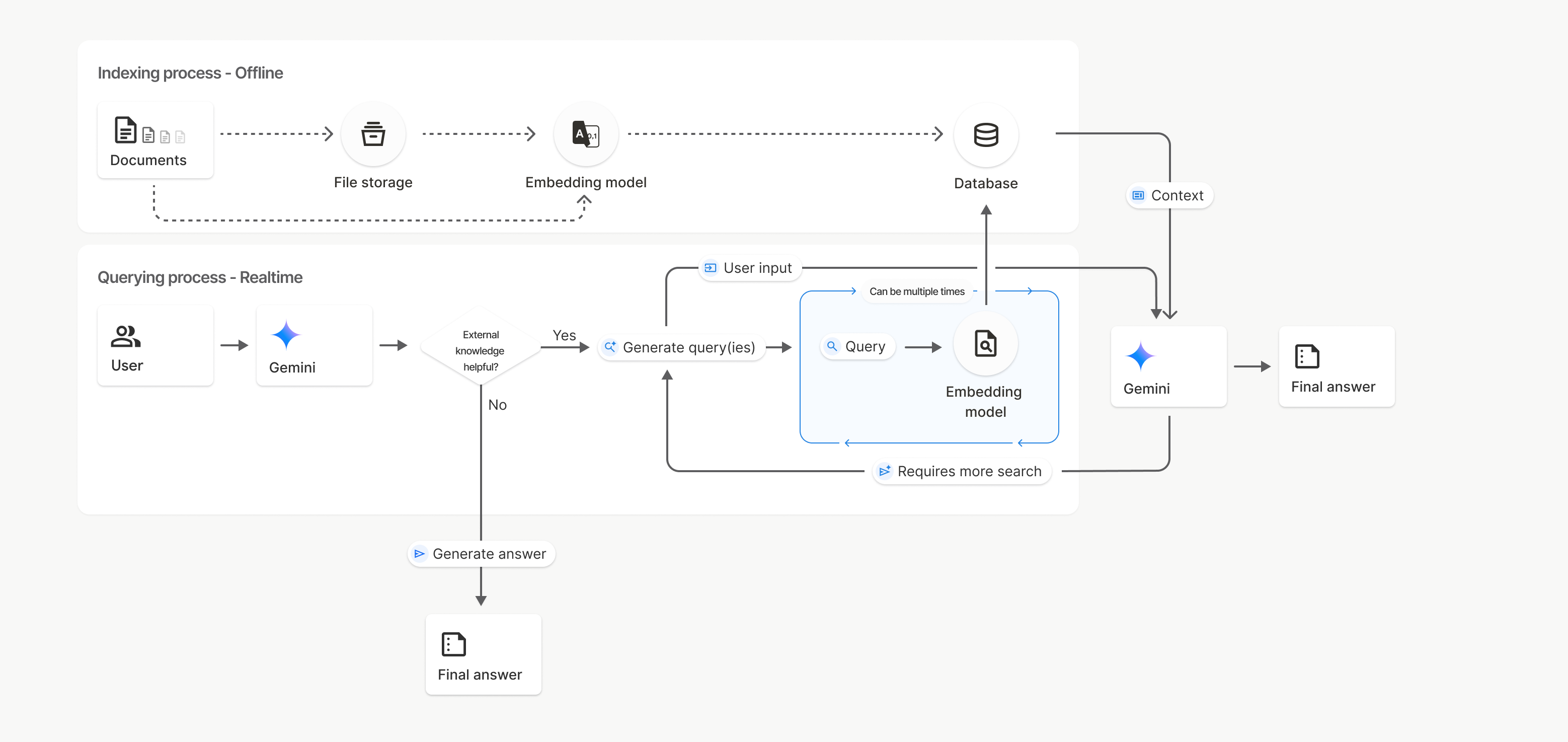
Na tym diagramie linia przerywana od Dokumentów do Modelu osadzania
(z użyciem gemini-embedding-001)
reprezentuje interfejs uploadToFileSearchStore API (z pominięciem Pamięci plików).
W przeciwnym razie użycie interfejsu Files API do oddzielnego tworzenia, a następnie importowania plików przenosi proces indeksowania z Dokumentów do pamięci plików, a potem do modelu osadzania.
Sklepy wyszukiwania plików
Magazyn wyszukiwania plików to kontener na osadzenia dokumentów. Surowe pliki przesłane za pomocą interfejsu File API są usuwane po 48 godzinach, ale dane zaimportowane do sklepu wyszukiwania plików są przechowywane bezterminowo, dopóki nie usuniesz ich ręcznie. Możesz utworzyć kilka sklepów wyszukiwania plików, aby uporządkować dokumenty. Interfejs API FileSearchStore umożliwia tworzenie, wyświetlanie, pobieranie i usuwanie sklepów z wyszukiwarką plików. Nazwy sklepów w wyszukiwarce plików mają zasięg globalny.
Oto kilka przykładów zarządzania sklepami w wyszukiwarce plików:
Python
# This will only work for SDK newer than 2.0.0
file_search_store = client.file_search_stores.create(
    config={
        'display_name': 'my-file_search-store-123',
        'embedding_model': 'models/gemini-embedding-2'
    }
)

for file_search_store in client.file_search_stores.list():
    print(file_search_store)

my_file_search_store = client.file_search_stores.get(name='fileSearchStores/my-file_search-store-123')

client.file_search_stores.delete(name='fileSearchStores/my-file_search-store-123', config={'force': True})
JavaScript
// This will only work for SDK newer than 2.0.0
const fileSearchStore = await ai.fileSearchStores.create({
  config: {
    displayName: 'my-file_search-store-123',
    embeddingModel: 'models/gemini-embedding-2'
  }
});

const fileSearchStores = await ai.fileSearchStores.list();
for await (const store of fileSearchStores) {
  console.log(store);
}

const myFileSearchStore = await ai.fileSearchStores.get({
  name: 'fileSearchStores/my-file_search-store-123'
});

await ai.fileSearchStores.delete({
  name: 'fileSearchStores/my-file_search-store-123',
  config: { force: true }
});
REST
curl -X POST "https://generativelanguage.googleapis.com/v1beta/fileSearchStores?key=${GEMINI_API_KEY}" \
    -H "Content-Type: application/json" \
    -d '{ "displayName": "My Store", "embedding_model": "models/gemini-embedding-2" }'

curl "https://generativelanguage.googleapis.com/v1beta/fileSearchStores?key=${GEMINI_API_KEY}" \

curl "https://generativelanguage.googleapis.com/v1beta/fileSearchStores/my-file_search-store-123?key=${GEMINI_API_KEY}"

curl -X DELETE "https://generativelanguage.googleapis.com/v1beta/fileSearchStores/my-file_search-store-123?key=${GEMINI_API_KEY}"
Dokumenty wyszukiwania plików
Poszczególnymi dokumentami w magazynach plików możesz zarządzać za pomocą interfejsu File Search Documents API, aby list każdy dokument w magazynie wyszukiwania plików, get informacje o dokumencie i delete dokument według nazwy.
Python
# This will only work for SDK newer than 2.0.0
for document_in_store in client.file_search_stores.documents.list(parent='fileSearchStores/my-file_search-store-123'):
  print(document_in_store)

file_search_document = client.file_search_stores.documents.get(name='fileSearchStores/my-file_search-store-123/documents/my_doc')
print(file_search_document)

client.file_search_stores.documents.delete(name='fileSearchStores/my-file_search-store-123/documents/my_doc', config={'force': True})
JavaScript
// This will only work for SDK newer than 2.0.0
const documents = await ai.fileSearchStores.documents.list({
  parent: 'fileSearchStores/my-file_search-store-123'
});
for await (const doc of documents) {
  console.log(doc);
}

const fileSearchDocument = await ai.fileSearchStores.documents.get({
  name: 'fileSearchStores/my-file_search-store-123/documents/my_doc'
});

await ai.fileSearchStores.documents.delete({
  name: 'fileSearchStores/my-file_search-store-123/documents/my_doc'
});
REST
curl "https://generativelanguage.googleapis.com/v1beta/fileSearchStores/my-file_search-store-123/documents?key=${GEMINI_API_KEY}"

curl "https://generativelanguage.googleapis.com/v1beta/fileSearchStores/my-file_search-store-123/documents/my_doc?key=${GEMINI_API_KEY}"

curl -X DELETE "https://generativelanguage.googleapis.com/v1beta/fileSearchStores/my-file_search-store-123/documents/my_doc?key=${GEMINI_API_KEY}&force=true"
Metadane pliku
Możesz dodać do plików niestandardowe metadane, aby ułatwić ich filtrowanie lub zapewnić dodatkowy kontekst. Metadane to zbiór par klucz-wartość.
Python
# This will only work for SDK newer than 2.0.0
op = client.file_search_stores.import_file(
    file_search_store_name=file_search_store.name,
    file_name=sample_file.name,
    config={
        'custom_metadata': [
            {"key": "author", "string_value": "Robert Graves"},
            {"key": "year", "numeric_value": 1934}
        ]
    }
)
JavaScript
// This will only work for SDK newer than 2.0.0
let operation = await ai.fileSearchStores.importFile({
  fileSearchStoreName: fileSearchStore.name,
  fileName: sampleFile.name,
  config: {
    customMetadata: [
      { key: "author", stringValue: "Robert Graves" },
      { key: "year", numericValue: 1934 }
    ]
  }
});
Jest to przydatne, gdy w magazynie wyszukiwania plików masz wiele dokumentów i chcesz przeszukiwać tylko ich podzbiór.
Python
# This will only work for SDK newer than 2.0.0
interaction = client.interactions.create(
    model="gemini-3-flash-preview",
    input="Tell me about the book 'I, Claudius'",
    tools=[{
        "type": "file_search",
        "file_search_store_names": [file_search_store.name],
        "metadata_filter": 'author="Robert Graves"',
    }]
)

for step in interaction.steps:
    if step.type == "model_output":
        for content_block in step.content:
            if content_block.type == "text":
                print(content_block.text)
JavaScript
// This will only work for SDK newer than 2.0.0
const interaction = await ai.interactions.create({
  model: "gemini-3-flash-preview",
  input: "Tell me about the book 'I, Claudius'",
  tools: [{
    type: "file_search",
    file_search_store_names: [fileSearchStore.name],
    metadata_filter: 'author="Robert Graves"',
  }]
});

for (const step of interaction.steps) {
  if (step.type === 'model_output') {
    for (const contentBlock of step.content) {
      if (contentBlock.type === 'text') {
        console.log(contentBlock.text);
      }
    }
  }
}
REST
# Specifies the API revision to avoid breaking changes when they become default
curl "https://generativelanguage.googleapis.com/v1beta/interactions" \
    -H "x-goog-api-key: $GEMINI_API_KEY" \
    -H 'Content-Type: application/json' \
    -H "Api-Revision: 2026-05-20" \
    -X POST \
    -d '{
            "model": "gemini-3-flash-preview",
            "input": [{"type": "text", "text": "Tell me about the book I, Claudius"}],
            "tools": [{
                "type": "file_search",
                "file_search_store_names": ["'$STORE_NAME'"],
                "metadata_filter": "author = \"Robert Graves\""
            }]
        }' 2> /dev/null > response.json

cat response.json
Wskazówki dotyczące wdrażania składni filtra listy dla metadata_filter znajdziesz na stronie google.aip.dev/160
Wyszukiwanie plików multimodalnych
Multimodalne wyszukiwanie plików umożliwia natywne osadzanie i wyszukiwanie obrazów, co pozwala tworzyć zaawansowane, multimodalne aplikacje RAG.
Konfigurowanie modelu wektora dystrybucyjnego
Gdy tworzysz FileSearchStore, musisz zastąpić domyślny model osadzania tylko tekstu, aby używać modelu multimodalnego. Użyj models/gemini-embedding-2, aby przetwarzać tekst i obrazy.
Python
store = client.file_search_stores.create(
    config={
        "display_name": "Multimodal Catalog",
        "embedding_model": "models/gemini-embedding-2",
    }
)
JavaScript
const fileSearchStore = await ai.fileSearchStores.create({
  config: {
    displayName: "Multimodal Catalog",
    embeddingModel: "models/gemini-embedding-2",
  },
});
REST
curl -X POST "https://generativelanguage.googleapis.com/v1beta/fileSearchStores?key=$GEMINI_API_KEY" \
    -H "Content-Type: application/json" \
    -d '{
      "display_name": "Multimodal Catalog",
      "embedding_model": "models/gemini-embedding-2"
    }'
Prześlij obrazy
Po utworzeniu sklepu za pomocą modelu osadzania multimodalnego możesz przesyłać pliki obrazów bezpośrednio za pomocą tych samych interfejsów API przesyłania opisanych w sekcjach Bezpośrednie przesyłanie do sklepu File Search i Importowanie plików.
Wymagania dotyczące plików graficznych:
- Pliki obrazów muszą mieć rozdzielczość maksymalnie 4K x 4K pikseli.
- Obsługiwane formaty to PNG i JPEG.
Cytaty
Gdy używasz wyszukiwania plików, odpowiedź modelu może zawierać cytaty, które wskazują, które części przesłanych dokumentów zostały użyte do wygenerowania odpowiedzi. Ułatwia to weryfikację informacji.
Informacje o cytowaniu znajdziesz w atrybucie annotations w blokach content odpowiedzi w kroku model_output.
Python
# This will only work for SDK newer than 2.0.0
for step in interaction.steps:
    if step.type == 'model_output':
        for content in step.content:
            if content.type == 'text' and content.annotations:
                print(content.annotations)
JavaScript
// This will only work for SDK newer than 2.0.0
for (const step of interaction.steps) {
  if (step.type === 'model_output') {
    for (const contentBlock of step.content) {
      if (contentBlock.type === 'text' && contentBlock.annotations) {
        console.log(JSON.stringify(contentBlock.annotations, null, 2));
      }
    }
  }
}
Szczegółowe informacje o strukturze cytatów znajdziesz w dokumentacji API do interakcji.
Numery stron
Gdy używasz wyszukiwania plików w przypadku dokumentów, które mają strony (np. plików PDF), odpowiedź modelu może zawierać numer strony, na której znaleziono informacje.
Dostęp do tych informacji możesz uzyskać za pomocą atrybutu page_number adnotacji file_citation.
Python
# Iterate through citations and check for page numbers
for step in interaction.steps:
    if step.type == "model_output":
        for content in step.content:
            if content.type == "text" and content.annotations:
                for annotation in content.annotations:
                    if annotation.type == "file_citation" and annotation.page_number:
                        print(f"Cited Page: {annotation.page_number}")
JavaScript
for (const step of interaction.steps) {
  if (step.type === 'model_output') {
    for (const block of step.content) {
      if (block.type === 'text' && block.annotations) {
        for (const annotation of block.annotations) {
          if (annotation.type === 'file_citation' && annotation.pageNumber) {
            console.log(`Cited Page: ${annotation.pageNumber}`);
          }
        }
      }
    }
  }
}
Cytaty z mediów
Gdy model odwołuje się do fragmentu obrazu podczas generowania, interfejs API zwraca w adnotacjach adnotację typu file_citation, która zawiera media_id. Możesz użyć tego identyfikatora, aby pobrać dokładny fragment obrazu, do którego odnosi się model. Ten media_id jest trwały w przypadku wielu wywołań wyszukiwania, co pozwala niezawodnie pobierać ten sam obraz lub zapisywać go w pamięci podręcznej za pomocą identyfikatora.
Poniższy fragment to przykład kroku odpowiedzi REST:
{
  "type": "model_output",
  "content": [
    {
      "type": "text",
      "text": "...",
      "annotations": [
        {
          "type": "file_citation",
          "file_name": "product_image",
          "media_id": "fileSearchStores/my-store-123/media/BlobId-456"
        }
      ]
    }
  ]
}
Poniższe fragmenty kodu pokazują, jak pobrać media_id i pobrać multimedia:
Python
# Iterate through citations and download media if present
for step in interaction.steps:
    if step.type == "model_output":
        for content in step.content:
            if content.type == "text" and content.annotations:
                for annotation in content.annotations:
                    if annotation.type == "file_citation" and annotation.media_id:
                        print(f"Cited Media ID: {annotation.media_id}")
                        # Download the blob using the SDK
                        blob_content = client.file_search_stores.download_media(
                            media_id=annotation.media_id
                        )
                        # Save blob_content to file...
JavaScript
for (const step of interaction.steps) {
  if (step.type === 'model_output') {
    for (const block of step.content) {
      if (block.type === 'text' && block.annotations) {
        for (const annotation of block.annotations) {
          if (annotation.type === 'file_citation' && annotation.mediaId) {
            console.log(`Cited Media ID: ${annotation.mediaId}`);
            const blobContent = await ai.fileSearchStores.downloadMedia(annotation.mediaId);
            // Save blobContent to file...
          }
        }
      }
    }
  }
}
REST
curl -X GET "https://generativelanguage.googleapis.com/v1/fileSearchStores/my-store-123/media/BlobId-456" \
  -H "x-goog-api-key: $GEMINI_API_KEY"
Niestandardowe metadane
Jeśli do plików dodano metadane niestandardowe, możesz uzyskać do nich dostęp w adnotacjach do odpowiedzi modelu. Jest to przydatne do przekazywania dodatkowego kontekstu (np. adresów URL, numerów stron lub autorów) z dokumentów źródłowych do logiki aplikacji. Każda adnotacja cytatu typu file_citation zawiera te niestandardowe metadane.
Python
# This will only work for SDK newer than 2.0.0
interaction = client.interactions.create(
    model="gemini-3-flash-preview",
    input="Tell me about [insert question]",
    tools=[{
        "type": "file_search",
        "file_search_store_names": [file_search_store.name]
    }]
)

for step in interaction.steps:
    if step.type == "model_output":
        for content_block in step.content:
            if content_block.annotations:
                for annotation in content_block.annotations:
                    print(annotation)
JavaScript
  // This will only work for SDK newer than 2.0.0
  const interaction = await ai.interactions.create({
    model: "gemini-3-flash-preview",
    input: "Tell me about [insert question]",
    tools: [{
      type: "file_search",
      file_search_store_names: [fileSearchStore.name]
    }]
  });

  for (const step of interaction.steps) {
    if (step.type === 'model_output') {
      for (const contentBlock of step.content) {
        if (contentBlock.annotations) {
          contentBlock.annotations.forEach((annotation) => {
            console.log(annotation);
          });
        }
      }
    }
  }
REST
{
  "steps": [
    {
      "type": "model_output",
      "content": [
        {
          "type": "text",
          "text": "...",
          "annotations": [
            {
              "file_name": "...",
              "source": "...",
              "custom_metadata": [
                {
                  "key": "author",
                  "string_value": "Robert Graves"
                },
                {
                  "key": "year",
                  "numeric_value": 1934
                }
              ]
            }
          ]
        }
      ]
    }
  ]
}
Uporządkowane dane wyjściowe
W przypadku modeli Gemini 3 możesz połączyć narzędzie do wyszukiwania plików z danymi strukturalnymi.
Python
# This will only work for SDK newer than 2.0.0
from pydantic import BaseModel, Field

class Money(BaseModel):
    amount: str = Field(description="The numerical part of the amount.")
    currency: str = Field(description="The currency of amount.")

interaction = client.interactions.create(
    model="gemini-3-flash-preview",
    input="What is the minimum hourly wage in Tokyo right now?",
    tools=[{
        "type": "file_search",
        "file_search_store_names": [file_search_store.name]
    }],
    response_format={
        "type": "text",
        "mime_type": "application/json",
        "schema": Money.model_json_schema()
    },
)
result = Money.model_validate_json(interaction.steps[-1].content[0].text)
print(result)
JavaScript
// This will only work for SDK newer than 2.0.0
import { z } from "zod";

const moneyJsonSchema = {
  type: "object",
  properties: {
    amount: { type: "string", description: "The numerical part of the amount." },
    currency: { type: "string", description: "The currency of amount." }
  },
  required: ["amount", "currency"]
};

const moneySchema = z.fromJSONSchema(moneyJsonSchema);

async function run() {
  const interaction = await ai.interactions.create({
    model: "gemini-3-flash-preview",
    input: "What is the minimum hourly wage in Tokyo right now?",
    tools: [{
      type: "file_search",
      file_search_store_names: [fileSearchStore.name],
    }],
    response_format: {
      type: 'text',
      mime_type: 'application/json',
      schema: moneyJsonSchema
    },
  });

  const result = moneySchema.parse(JSON.parse(interaction.steps.at(-1).content[0].text));
  console.log(result);
}

run();
REST
# Specifies the API revision to avoid breaking changes when they become default
curl "https://generativelanguage.googleapis.com/v1beta/interactions" \
  -H "x-goog-api-key: $GEMINI_API_KEY" \
  -H 'Content-Type: application/json' \
  -H "Api-Revision: 2026-05-20" \
  -X POST \
  -d '{
    "model": "gemini-3-flash-preview",
    "input": "What is the minimum hourly wage in Tokyo right now?",
    "tools": [{
      "type": "file_search",
      "file_search_store_names": ["$FILE_SEARCH_STORE_NAME"]
    }],
    "response_format": {
      "type": "text",
      "mime_type": "application/json",
      "schema": {
        "type": "object",
        "properties": {
          "amount": {"type": "string", "description": "The numerical part of the amount."},
          "currency": {"type": "string", "description": "The currency of amount."}
        },
        "required": ["amount", "currency"]
      }
    }
  }'
Obsługiwane modele
Wyszukiwanie plików jest obsługiwane przez te modele:
| Model | Wyszukiwanie plików |
|---|---|
| Gemini 3.1 Pro (wersja testowa) | ✔️ |
| Gemini 3.1 Flash-Lite | ✔️ |
| Gemini 3.1 Flash-Lite (wersja testowa) | ✔️ |
| Gemini 3 Flash (wersja testowa) | ✔️ |
| Gemini 2.5 Pro | ✔️ |
| Gemini 2.5 Flash-Lite | ✔️ |
Obsługiwane kombinacje narzędzi
Modele Gemini 3 obsługują łączenie wbudowanych narzędzi (takich jak wyszukiwanie plików) z narzędziami niestandardowymi (wywoływanie funkcji). Więcej informacji znajdziesz na stronie kombinacje narzędzi.
Obsługiwane typy plików
Wyszukiwanie plików obsługuje szeroką gamę formatów plików, które są wymienione w kolejnych sekcjach.
Typy plików aplikacji
application/dartapplication/ecmascriptapplication/jsonapplication/ms-javaapplication/mswordapplication/pdfapplication/sqlapplication/typescriptapplication/vnd.curlapplication/vnd.dartapplication/vnd.ibm.secure-containerapplication/vnd.jupyterapplication/vnd.ms-excelapplication/vnd.oasis.opendocument.textapplication/vnd.openxmlformats-officedocument.presentationml.presentationapplication/vnd.openxmlformats-officedocument.spreadsheetml.sheetapplication/vnd.openxmlformats-officedocument.wordprocessingml.documentapplication/vnd.openxmlformats-officedocument.wordprocessingml.templateapplication/x-cshapplication/x-hwpapplication/x-hwp-v5application/x-latexapplication/x-phpapplication/x-powershellapplication/x-shapplication/x-shellscriptapplication/x-texapplication/x-zshapplication/xmlapplication/zip
Typy plików tekstowych
text/1d-interleaved-parityfectext/REDtext/SGMLtext/cache-manifesttext/calendartext/cqltext/cql-extensiontext/cql-identifiertext/csstext/csvtext/csv-schematext/dnstext/encaprtptext/enrichedtext/exampletext/fhirpathtext/flexfectext/fwdredtext/gff3text/grammar-ref-listtext/hl7v2text/htmltext/javascripttext/jcr-cndtext/jsxtext/markdowntext/mizartext/n3text/parameterstext/parityfectext/phptext/plaintext/provenance-notationtext/prs.fallenstein.rsttext/prs.lines.tagtext/prs.prop.logictext/raptorfectext/rfc822-headerstext/rtftext/rtp-enc-aescm128text/rtploopbacktext/rtxtext/sgmltext/shaclctext/shextext/spdxtext/stringstext/t140text/tab-separated-valuestext/texmacstext/trofftext/tsvtext/tsxtext/turtletext/ulpfectext/uri-listtext/vcardtext/vnd.DMClientScripttext/vnd.IPTC.NITFtext/vnd.IPTC.NewsMLtext/vnd.atext/vnd.abctext/vnd.ascii-arttext/vnd.curltext/vnd.debian.copyrighttext/vnd.dvb.subtitletext/vnd.esmertec.theme-descriptortext/vnd.exchangeabletext/vnd.familysearch.gedcomtext/vnd.ficlab.flttext/vnd.flytext/vnd.fmi.flexstortext/vnd.gmltext/vnd.graphviztext/vnd.hanstext/vnd.hgltext/vnd.in3d.3dmltext/vnd.in3d.spottext/vnd.latex-ztext/vnd.motorola.reflextext/vnd.ms-mediapackagetext/vnd.net2phone.commcenter.commandtext/vnd.radisys.msml-basic-layouttext/vnd.senx.warpscripttext/vnd.sositext/vnd.sun.j2me.app-descriptortext/vnd.trolltech.linguisttext/vnd.wap.sitext/vnd.wap.sltext/vnd.wap.wmltext/vnd.wap.wmlscripttext/vtttext/wgsltext/x-asmtext/x-bibtextext/x-bootext/x-ctext/x-c++hdrtext/x-c++srctext/x-cassandratext/x-chdrtext/x-coffeescripttext/x-componenttext/x-cshtext/x-csharptext/x-csrctext/x-cudatext/x-dtext/x-difftext/x-dsrctext/x-emacs-lisptext/x-erlangtext/x-gff3text/x-gotext/x-haskelltext/x-javatext/x-java-propertiestext/x-java-sourcetext/x-kotlintext/x-lilypondtext/x-lisptext/x-literate-haskelltext/x-luatext/x-moctext/x-objcsrctext/x-pascaltext/x-pcs-gcdtext/x-perltext/x-perl-scripttext/x-pythontext/x-python-scripttext/x-r-markdowntext/x-rsrctext/x-rsttext/x-ruby-scripttext/x-rusttext/x-sasstext/x-scalatext/x-schemetext/x-script.pythontext/x-scsstext/x-setexttext/x-sfvtext/x-shtext/x-siestatext/x-sostext/x-sqltext/x-swifttext/x-tcltext/x-textext/x-vbasictext/x-vcalendartext/xmltext/xml-dtdtext/xml-external-parsed-entitytext/yaml
Ograniczenia
- Interfejs Live API: wyszukiwanie plików nie jest obsługiwane w interfejsie Live API.
- Niezgodność narzędzi: wyszukiwania plików nie można obecnie łączyć z innymi narzędziami, takimi jak powiązanie ze źródłem informacji przy użyciu wyszukiwarki Google czy kontekst adresu URL.
Ograniczenia liczby żądań
Aby zapewnić stabilność usługi, interfejs API wyszukiwania plików ma te limity:
- Maksymalny rozmiar pliku / limit na dokument: 100 MB
- Całkowity rozmiar pamięci wyszukiwania plików w projekcie (zależny od poziomu użytkownika):
- Bezpłatnie: 1 GB
- Poziom 1: 10 GB
- Poziom 2: 100 GB
- Poziom 3: 1 TB
- Rekomendacja: aby zapewnić optymalne opóźnienia pobierania, ogranicz rozmiar każdego sklepu wyszukiwania plików do poniżej 20 GB.
Ceny
- Opłaty za wektoryzację są naliczane w momencie indeksowania na podstawie obowiązującego cennika wektoryzacji.
- Przechowywanie jest bezpłatne.
- Wektory dystrybucyjne podczas zapytań są bezpłatne.
- Pobrane tokeny dokumentu są rozliczane jako zwykłe tokeny kontekstu.
Co dalej?
- Zapoznaj się z dokumentacją interfejsu API dotyczącą magazynów wyszukiwania plików i dokumentów.