

مدلهای ER رباتهای Gemini میتوانند کد پایتون را برای دستکاری تصاویر بنویسند و اجرا کنند و قبل از پاسخ دادن، منطق را اعمال کنند. این صفحه نمونههایی از اجرای کد را پوشش میدهد: تشخیص شیء با بزرگنمایی و برش، خواندن ابزار، اندازهگیری سیال، خواندن برد مدار و حاشیهنویسی تصویر.
برای تطبیق این مثالها با مورد استفاده خودتان، متن اعلان و فایل تصویر آپلود شده را با متن خودتان جایگزین کنید. همچنین میتوانید طرحواره JSON درخواستی را در اعلان تنظیم کنید تا با ساختار خروجی مورد نیاز برنامه شما مطابقت داشته باشد، یا یک system_instruction برای اعمال فرمت و دقت خروجی اضافه کنید.
برای کد کامل قابل اجرا، به کتاب آشپزی رباتیک مراجعه کنید.
سطح تفکر
شما میتوانید سطح تفکر مدل را کنترل کنید تا تأخیر را با دقت جایگزین کنید. وظایف مکانی مانند تشخیص اشیا با سطح تفکر پایین به خوبی انجام میشوند. وظایف پیچیده مانند شمارش یا تخمین وزن از سطح تفکر بالاتر سود میبرند.
مثال زیر سطح تفکر را برای یک کار شمارش پیچیده در high قرار میدهد:
پایتون
from google import genai

client = genai.Client()

uploaded_file = client.files.upload(file="scene.jpeg")

interaction = client.interactions.create(
    model="gemini-robotics-er-2-preview",
    input=[
        {
            "type": "image",
            "uri": uploaded_file.uri,
            "mime_type": uploaded_file.mime_type
        },
        {"type": "text", "text": "Identify and count all objects on the table."}
    ],
    generation_config={
        "thinking_level": "high"  # Use "minimal" or "low" for faster spatial tasks
    }
)

print(interaction.output_text)
برای جزئیات بیشتر به تفکر مراجعه کنید.
تشخیص اشیا (بزرگنمایی و برش)
مثال زیر از اجرای کد برای بزرگنمایی و برش تصویر برای نمایش واضحتر هنگام تشخیص اشیاء و بازگرداندن کادرهای محصورکننده استفاده میکند.
پایتون
from google import genai

client = genai.Client()

uploaded_file = client.files.upload(file="sorting.jpeg")

prompt = """
Return JSON in the format {label: val, y: val, x: val, y2: val, x2: val} for
the compostable objects in this scene. Please Zoom and crop the image for a
clearer view. Return an annotated image of the final result with the bounding
boxes drawn on it to the API caller as a part of your process.
"""

interaction = client.interactions.create(
    model="gemini-robotics-er-2-preview",
    input=[
        {
            "type": "image",
            "uri": uploaded_file.uri,
            "mime_type": uploaded_file.mime_type
        },
        {"type": "text", "text": prompt}
    ],
    tools=[{"type": "code_execution"}]
)

print(interaction.output_text)
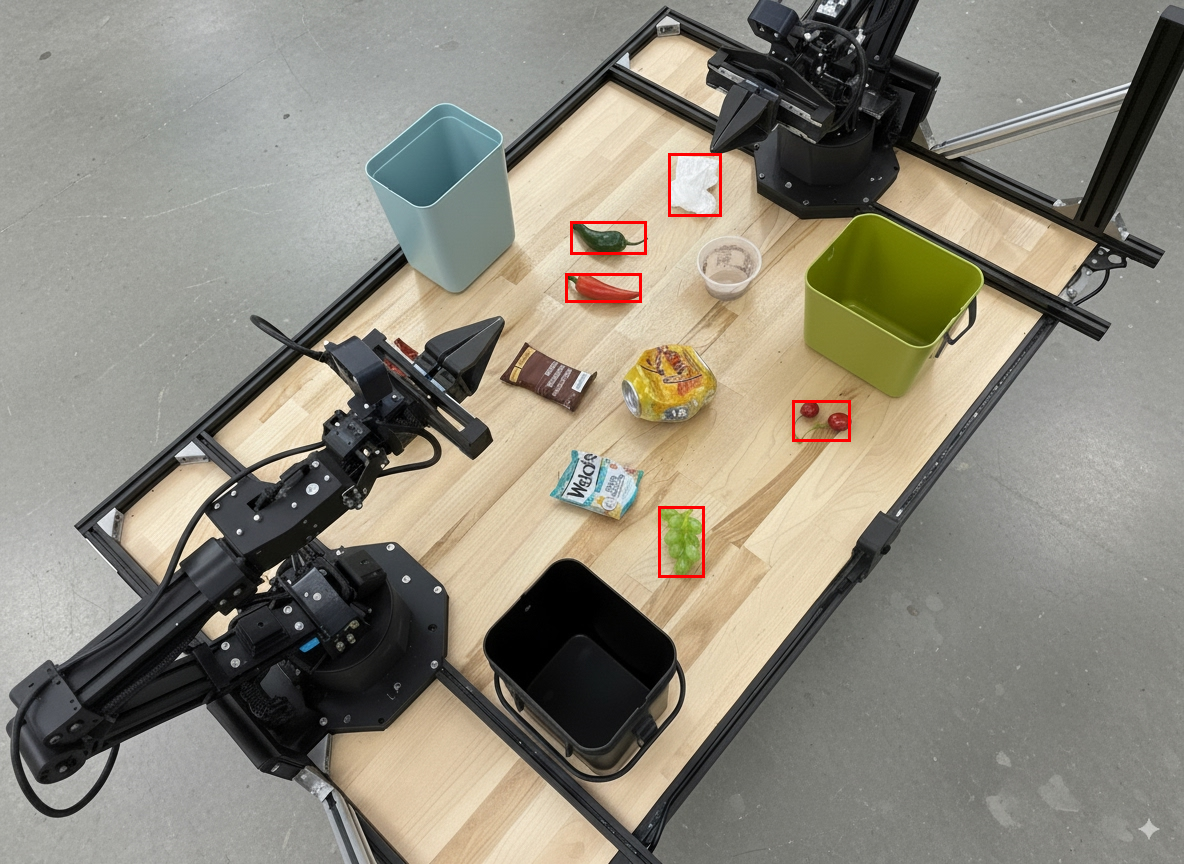
خروجی مدل مشابه پاسخ json زیر خواهد بود:
[
  {"label": "compostable", "y": 256, "x": 482, "y2": 295, "x2": 546},
  {"label": "compostable", "y": 317, "x": 478, "y2": 350, "x2": 542},
  {"label": "compostable", "y": 586, "x": 556, "y2": 668, "x2": 595},
  {"label": "compostable", "y": 463, "x": 669, "y2": 511, "x2": 718},
  {"label": "compostable", "y": 178, "x": 565, "y2": 250, "x2": 609}
]
تصویر زیر جعبههای برگردانده شده از مدل را نشان میدهد.
یک گیج آنالوگ را بخوانید و منطق را اعمال کنید
مثال زیر نحوه استفاده از مدل برای خواندن یک گیج آنالوگ و انجام محاسبات زمان را نشان میدهد. این مدل از یک دستورالعمل سیستمی برای اعمال خروجی JSON استفاده میکند.
پایتون
from google import genai

client = genai.Client()

uploaded_file = client.files.upload(file="gauge.jpeg")

interaction = client.interactions.create(
    model="gemini-robotics-er-2-preview",
    system_instruction="Be precise. When JSON is requested, reply with ONLY that JSON (no preface, no code block).",
    input=[
        {
            "type": "image",
            "uri": uploaded_file.uri,
            "mime_type": uploaded_file.mime_type
        },
        {"type": "text", "text": """Read the current value from this gauge. Then, calculate how long
        it will take at the current rate for the value to reach maximum.
        Reply in JSON: {"current_value": val, "max_value": val,
        "time_to_max_minutes": val}"""}
    ],
    tools=[{"type": "code_execution"}]
)

print(interaction.output_text)
مایع را در ظرف اندازه گیری کنید
مثال زیر نحوه استفاده از اجرای کد برای اندازهگیری سطح سیال در یک ظرف را نشان میدهد.
پایتون
from google import genai

client = genai.Client()

uploaded_file = client.files.upload(file="fluid.jpeg")

interaction = client.interactions.create(
    model="gemini-robotics-er-2-preview",
    system_instruction="Be precise. When JSON is requested, reply with ONLY that JSON (no preface, no code block).",
    input=[
        {
            "type": "image",
            "uri": uploaded_file.uri,
            "mime_type": uploaded_file.mime_type
        },
        {"type": "text", "text": """Measure the amount of fluid in the container. Reply in JSON:
        {"fluid_level_ml": val, "container_capacity_ml": val,
        "percentage_full": val}"""}
    ],
    tools=[{"type": "code_execution"}]
)

print(interaction.output_text)
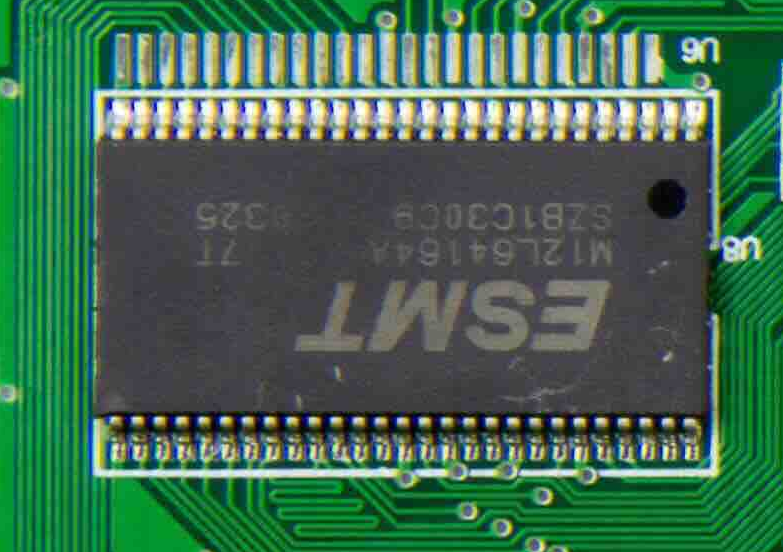
خواندن علائم روی برد مدار چاپی
مثال زیر نحوه استفاده از اجرای کد برای خواندن علائم روی برد مدار را نشان میدهد.
پایتون
from google import genai

client = genai.Client()

uploaded_file = client.files.upload(file="circuit_board.jpeg")

interaction = client.interactions.create(
    model="gemini-robotics-er-2-preview",
    system_instruction="Be precise. When JSON is requested, reply with ONLY that JSON (no preface, no code block).",
    input=[
        {
            "type": "image",
            "uri": uploaded_file.uri,
            "mime_type": uploaded_file.mime_type
        },
        {"type": "text", "text": """Read all visible component labels and markings on this circuit
        board. Reply in JSON: {"components": [{"label": val,
        "location": [y, x]}]}"""}
    ],
    tools=[{"type": "code_execution"}]
)

print(interaction.output_text)
حاشیهنویسی تصویر
مثال زیر نحوه استفاده از اجرای کد برای حاشیهنویسی یک تصویر (مثلاً رسم فلش برای دستورالعملهای دفع) و بازگرداندن تصویر اصلاحشده را نشان میدهد.
پایتون
from google import genai

client = genai.Client()

# Load your image
uploaded_file = client.files.upload(file="sorting.jpeg")

prompt = """
Look at this image and return it as an annotated version using arrows of
different colors to represent which items should go in which bins for
disposal. You must return the final image to the API caller.
"""

interaction = client.interactions.create(
    model="gemini-robotics-er-2-preview",
    input=[
        {
            "type": "image",
            "uri": uploaded_file.uri,
            "mime_type": uploaded_file.mime_type
        },
        {"type": "text", "text": prompt}
    ],
    tools=[{"type": "code_execution"}]
)

print(interaction.output_text)
در ادامه نمونهای از ورودی تصویر آمده است.
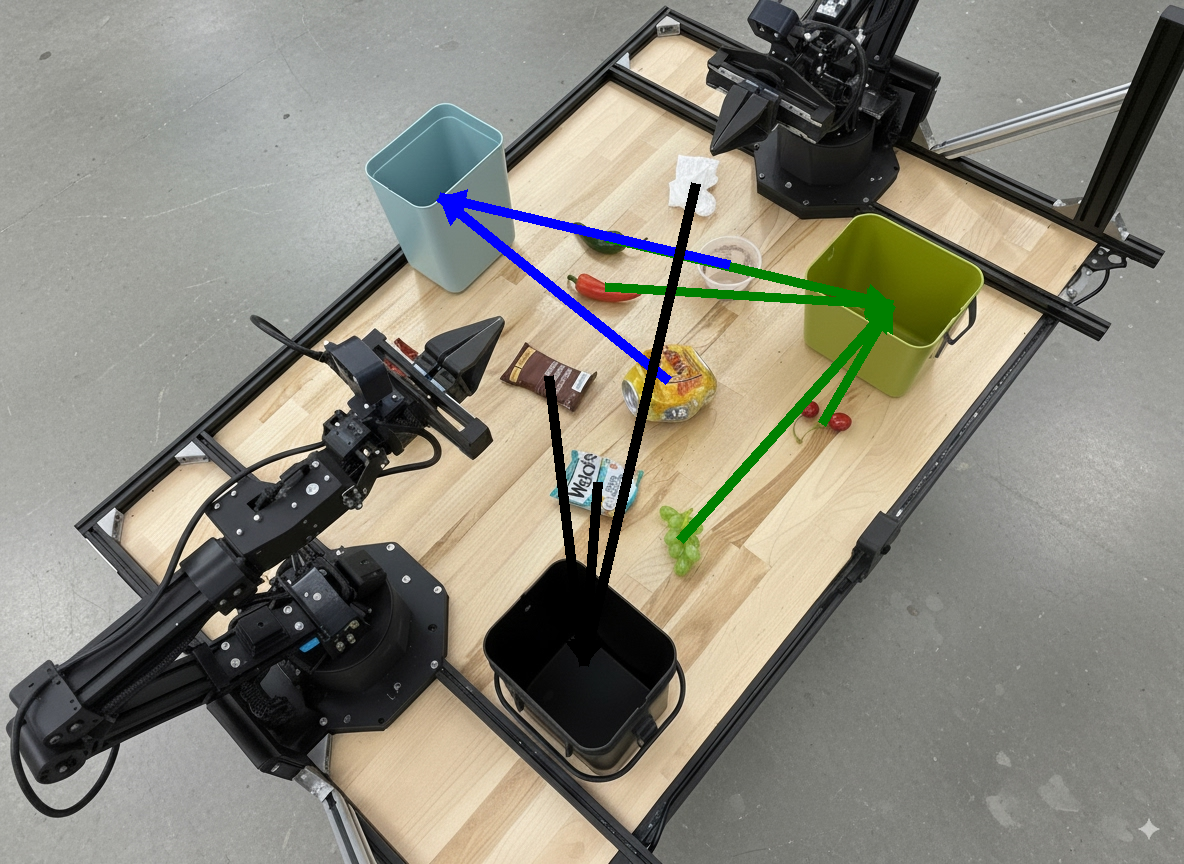
خروجی مدل مشابه زیر خواهد بود:
  The annotated image shows the suggested disposal locations for the items on the table:
  - **Green bin (Compost/Organic)**: Green chili, red chili, grapes, and cherries.
  - **Blue bin (Recycling)**: Yellow crushed can and plastic container.
  - **Black bin (Trash)**: Chocolate bar wrapper, Welch's packet, and white tissue.
قدم بعدی چیست؟
- هماهنگسازی وظایف — وظایف بلندمدت با APIهای سفارشی ربات.
- رباتیک با استریمینگ — استریمینگ دوطرفه بلادرنگ (فقط Gemini Robotics ER 2).
- درک ویدیو — یافتن لحظه و طبقهبندی پیشرفت (فقط Gemini Robotics ER 2).
مدلهای ER رباتهای Gemini میتوانند کد پایتون را برای دستکاری تصاویر بنویسند و اجرا کنند و قبل از پاسخ دادن، منطق را اعمال کنند. این صفحه نمونههایی از اجرای کد را پوشش میدهد: تشخیص شیء با بزرگنمایی و برش، خواندن ابزار، اندازهگیری سیال، خواندن برد مدار و حاشیهنویسی تصویر.
برای تطبیق این مثالها با مورد استفاده خودتان، متن اعلان و فایل تصویر آپلود شده را با متن خودتان جایگزین کنید. همچنین میتوانید طرحواره JSON درخواستی را در اعلان تنظیم کنید تا با ساختار خروجی مورد نیاز برنامه شما مطابقت داشته باشد، یا یک system_instruction برای اعمال فرمت و دقت خروجی اضافه کنید.
برای کد کامل قابل اجرا، به کتاب آشپزی رباتیک مراجعه کنید.
سطح تفکر
شما میتوانید سطح تفکر مدل را کنترل کنید تا تأخیر را با دقت جایگزین کنید. وظایف مکانی مانند تشخیص اشیا با سطح تفکر پایین به خوبی انجام میشوند. وظایف پیچیده مانند شمارش یا تخمین وزن از سطح تفکر بالاتر سود میبرند.
مثال زیر سطح تفکر را برای یک کار شمارش پیچیده در high قرار میدهد:
پایتون
from google import genai

client = genai.Client()

uploaded_file = client.files.upload(file="scene.jpeg")

interaction = client.interactions.create(
    model="gemini-robotics-er-2-preview",
    input=[
        {
            "type": "image",
            "uri": uploaded_file.uri,
            "mime_type": uploaded_file.mime_type
        },
        {"type": "text", "text": "Identify and count all objects on the table."}
    ],
    generation_config={
        "thinking_level": "high"  # Use "minimal" or "low" for faster spatial tasks
    }
)

print(interaction.output_text)
برای جزئیات بیشتر به تفکر مراجعه کنید.
تشخیص اشیا (بزرگنمایی و برش)
مثال زیر از اجرای کد برای بزرگنمایی و برش تصویر برای نمایش واضحتر هنگام تشخیص اشیاء و بازگرداندن کادرهای محصورکننده استفاده میکند.
پایتون
from google import genai

client = genai.Client()

uploaded_file = client.files.upload(file="sorting.jpeg")

prompt = """
Return JSON in the format {label: val, y: val, x: val, y2: val, x2: val} for
the compostable objects in this scene. Please Zoom and crop the image for a
clearer view. Return an annotated image of the final result with the bounding
boxes drawn on it to the API caller as a part of your process.
"""

interaction = client.interactions.create(
    model="gemini-robotics-er-2-preview",
    input=[
        {
            "type": "image",
            "uri": uploaded_file.uri,
            "mime_type": uploaded_file.mime_type
        },
        {"type": "text", "text": prompt}
    ],
    tools=[{"type": "code_execution"}]
)

print(interaction.output_text)
خروجی مدل مشابه پاسخ json زیر خواهد بود:
[
  {"label": "compostable", "y": 256, "x": 482, "y2": 295, "x2": 546},
  {"label": "compostable", "y": 317, "x": 478, "y2": 350, "x2": 542},
  {"label": "compostable", "y": 586, "x": 556, "y2": 668, "x2": 595},
  {"label": "compostable", "y": 463, "x": 669, "y2": 511, "x2": 718},
  {"label": "compostable", "y": 178, "x": 565, "y2": 250, "x2": 609}
]
تصویر زیر جعبههای برگردانده شده از مدل را نشان میدهد.
یک گیج آنالوگ را بخوانید و منطق را اعمال کنید
مثال زیر نحوه استفاده از مدل برای خواندن یک گیج آنالوگ و انجام محاسبات زمان را نشان میدهد. این مدل از یک دستورالعمل سیستمی برای اعمال خروجی JSON استفاده میکند.
پایتون
from google import genai

client = genai.Client()

uploaded_file = client.files.upload(file="gauge.jpeg")

interaction = client.interactions.create(
    model="gemini-robotics-er-2-preview",
    system_instruction="Be precise. When JSON is requested, reply with ONLY that JSON (no preface, no code block).",
    input=[
        {
            "type": "image",
            "uri": uploaded_file.uri,
            "mime_type": uploaded_file.mime_type
        },
        {"type": "text", "text": """Read the current value from this gauge. Then, calculate how long
        it will take at the current rate for the value to reach maximum.
        Reply in JSON: {"current_value": val, "max_value": val,
        "time_to_max_minutes": val}"""}
    ],
    tools=[{"type": "code_execution"}]
)

print(interaction.output_text)
مایع را در ظرف اندازه گیری کنید
مثال زیر نحوه استفاده از اجرای کد برای اندازهگیری سطح سیال در یک ظرف را نشان میدهد.
پایتون
from google import genai

client = genai.Client()

uploaded_file = client.files.upload(file="fluid.jpeg")

interaction = client.interactions.create(
    model="gemini-robotics-er-2-preview",
    system_instruction="Be precise. When JSON is requested, reply with ONLY that JSON (no preface, no code block).",
    input=[
        {
            "type": "image",
            "uri": uploaded_file.uri,
            "mime_type": uploaded_file.mime_type
        },
        {"type": "text", "text": """Measure the amount of fluid in the container. Reply in JSON:
        {"fluid_level_ml": val, "container_capacity_ml": val,
        "percentage_full": val}"""}
    ],
    tools=[{"type": "code_execution"}]
)

print(interaction.output_text)
خواندن علائم روی برد مدار چاپی
مثال زیر نحوه استفاده از اجرای کد برای خواندن علائم روی برد مدار را نشان میدهد.
پایتون
from google import genai

client = genai.Client()

uploaded_file = client.files.upload(file="circuit_board.jpeg")

interaction = client.interactions.create(
    model="gemini-robotics-er-2-preview",
    system_instruction="Be precise. When JSON is requested, reply with ONLY that JSON (no preface, no code block).",
    input=[
        {
            "type": "image",
            "uri": uploaded_file.uri,
            "mime_type": uploaded_file.mime_type
        },
        {"type": "text", "text": """Read all visible component labels and markings on this circuit
        board. Reply in JSON: {"components": [{"label": val,
        "location": [y, x]}]}"""}
    ],
    tools=[{"type": "code_execution"}]
)

print(interaction.output_text)
حاشیهنویسی تصویر
مثال زیر نحوه استفاده از اجرای کد برای حاشیهنویسی یک تصویر (مثلاً رسم فلش برای دستورالعملهای دفع) و بازگرداندن تصویر اصلاحشده را نشان میدهد.
پایتون
from google import genai

client = genai.Client()

# Load your image
uploaded_file = client.files.upload(file="sorting.jpeg")

prompt = """
Look at this image and return it as an annotated version using arrows of
different colors to represent which items should go in which bins for
disposal. You must return the final image to the API caller.
"""

interaction = client.interactions.create(
    model="gemini-robotics-er-2-preview",
    input=[
        {
            "type": "image",
            "uri": uploaded_file.uri,
            "mime_type": uploaded_file.mime_type
        },
        {"type": "text", "text": prompt}
    ],
    tools=[{"type": "code_execution"}]
)

print(interaction.output_text)
در ادامه نمونهای از ورودی تصویر آمده است.
خروجی مدل مشابه زیر خواهد بود:
  The annotated image shows the suggested disposal locations for the items on the table:
  - **Green bin (Compost/Organic)**: Green chili, red chili, grapes, and cherries.
  - **Blue bin (Recycling)**: Yellow crushed can and plastic container.
  - **Black bin (Trash)**: Chocolate bar wrapper, Welch's packet, and white tissue.
قدم بعدی چیست؟
- هماهنگسازی وظایف — وظایف بلندمدت با APIهای سفارشی ربات.
- رباتیک با استریمینگ — استریمینگ دوطرفه بلادرنگ (فقط Gemini Robotics ER 2).
- درک ویدیو — یافتن لحظه و طبقهبندی پیشرفت (فقط Gemini Robotics ER 2).
مدلهای ER رباتهای Gemini میتوانند کد پایتون را برای دستکاری تصاویر بنویسند و اجرا کنند و قبل از پاسخ دادن، منطق را اعمال کنند. این صفحه نمونههایی از اجرای کد را پوشش میدهد: تشخیص شیء با بزرگنمایی و برش، خواندن ابزار، اندازهگیری سیال، خواندن برد مدار و حاشیهنویسی تصویر.
برای تطبیق این مثالها با مورد استفاده خودتان، متن اعلان و فایل تصویر آپلود شده را با متن خودتان جایگزین کنید. همچنین میتوانید طرحواره JSON درخواستی را در اعلان تنظیم کنید تا با ساختار خروجی مورد نیاز برنامه شما مطابقت داشته باشد، یا یک system_instruction برای اعمال فرمت و دقت خروجی اضافه کنید.
برای کد کامل قابل اجرا، به کتاب آشپزی رباتیک مراجعه کنید.
سطح تفکر
شما میتوانید سطح تفکر مدل را کنترل کنید تا تأخیر را با دقت جایگزین کنید. وظایف مکانی مانند تشخیص اشیا با سطح تفکر پایین به خوبی انجام میشوند. وظایف پیچیده مانند شمارش یا تخمین وزن از سطح تفکر بالاتر سود میبرند.
مثال زیر سطح تفکر را برای یک کار شمارش پیچیده در high قرار میدهد:
پایتون
from google import genai

client = genai.Client()

uploaded_file = client.files.upload(file="scene.jpeg")

interaction = client.interactions.create(
    model="gemini-robotics-er-2-preview",
    input=[
        {
            "type": "image",
            "uri": uploaded_file.uri,
            "mime_type": uploaded_file.mime_type
        },
        {"type": "text", "text": "Identify and count all objects on the table."}
    ],
    generation_config={
        "thinking_level": "high"  # Use "minimal" or "low" for faster spatial tasks
    }
)

print(interaction.output_text)
برای جزئیات بیشتر به تفکر مراجعه کنید.
تشخیص اشیا (بزرگنمایی و برش)
مثال زیر از اجرای کد برای بزرگنمایی و برش تصویر برای نمایش واضحتر هنگام تشخیص اشیاء و بازگرداندن کادرهای محصورکننده استفاده میکند.
پایتون
from google import genai

client = genai.Client()

uploaded_file = client.files.upload(file="sorting.jpeg")

prompt = """
Return JSON in the format {label: val, y: val, x: val, y2: val, x2: val} for
the compostable objects in this scene. Please Zoom and crop the image for a
clearer view. Return an annotated image of the final result with the bounding
boxes drawn on it to the API caller as a part of your process.
"""

interaction = client.interactions.create(
    model="gemini-robotics-er-2-preview",
    input=[
        {
            "type": "image",
            "uri": uploaded_file.uri,
            "mime_type": uploaded_file.mime_type
        },
        {"type": "text", "text": prompt}
    ],
    tools=[{"type": "code_execution"}]
)

print(interaction.output_text)
خروجی مدل مشابه پاسخ json زیر خواهد بود:
[
  {"label": "compostable", "y": 256, "x": 482, "y2": 295, "x2": 546},
  {"label": "compostable", "y": 317, "x": 478, "y2": 350, "x2": 542},
  {"label": "compostable", "y": 586, "x": 556, "y2": 668, "x2": 595},
  {"label": "compostable", "y": 463, "x": 669, "y2": 511, "x2": 718},
  {"label": "compostable", "y": 178, "x": 565, "y2": 250, "x2": 609}
]
تصویر زیر جعبههای برگردانده شده از مدل را نشان میدهد.
یک گیج آنالوگ را بخوانید و منطق را اعمال کنید
مثال زیر نحوه استفاده از مدل برای خواندن یک گیج آنالوگ و انجام محاسبات زمان را نشان میدهد. این مدل از یک دستورالعمل سیستمی برای اعمال خروجی JSON استفاده میکند.
پایتون
from google import genai

client = genai.Client()

uploaded_file = client.files.upload(file="gauge.jpeg")

interaction = client.interactions.create(
    model="gemini-robotics-er-2-preview",
    system_instruction="Be precise. When JSON is requested, reply with ONLY that JSON (no preface, no code block).",
    input=[
        {
            "type": "image",
            "uri": uploaded_file.uri,
            "mime_type": uploaded_file.mime_type
        },
        {"type": "text", "text": """Read the current value from this gauge. Then, calculate how long
        it will take at the current rate for the value to reach maximum.
        Reply in JSON: {"current_value": val, "max_value": val,
        "time_to_max_minutes": val}"""}
    ],
    tools=[{"type": "code_execution"}]
)

print(interaction.output_text)
مایع را در ظرف اندازه گیری کنید
مثال زیر نحوه استفاده از اجرای کد برای اندازهگیری سطح سیال در یک ظرف را نشان میدهد.
پایتون
from google import genai

client = genai.Client()

uploaded_file = client.files.upload(file="fluid.jpeg")

interaction = client.interactions.create(
    model="gemini-robotics-er-2-preview",
    system_instruction="Be precise. When JSON is requested, reply with ONLY that JSON (no preface, no code block).",
    input=[
        {
            "type": "image",
            "uri": uploaded_file.uri,
            "mime_type": uploaded_file.mime_type
        },
        {"type": "text", "text": """Measure the amount of fluid in the container. Reply in JSON:
        {"fluid_level_ml": val, "container_capacity_ml": val,
        "percentage_full": val}"""}
    ],
    tools=[{"type": "code_execution"}]
)

print(interaction.output_text)
خواندن علائم روی برد مدار چاپی
مثال زیر نحوه استفاده از اجرای کد برای خواندن علائم روی برد مدار را نشان میدهد.
پایتون
from google import genai

client = genai.Client()

uploaded_file = client.files.upload(file="circuit_board.jpeg")

interaction = client.interactions.create(
    model="gemini-robotics-er-2-preview",
    system_instruction="Be precise. When JSON is requested, reply with ONLY that JSON (no preface, no code block).",
    input=[
        {
            "type": "image",
            "uri": uploaded_file.uri,
            "mime_type": uploaded_file.mime_type
        },
        {"type": "text", "text": """Read all visible component labels and markings on this circuit
        board. Reply in JSON: {"components": [{"label": val,
        "location": [y, x]}]}"""}
    ],
    tools=[{"type": "code_execution"}]
)

print(interaction.output_text)
حاشیهنویسی تصویر
مثال زیر نحوه استفاده از اجرای کد برای حاشیهنویسی یک تصویر (مثلاً رسم فلش برای دستورالعملهای دفع) و بازگرداندن تصویر اصلاحشده را نشان میدهد.
پایتون
from google import genai

client = genai.Client()

# Load your image
uploaded_file = client.files.upload(file="sorting.jpeg")

prompt = """
Look at this image and return it as an annotated version using arrows of
different colors to represent which items should go in which bins for
disposal. You must return the final image to the API caller.
"""

interaction = client.interactions.create(
    model="gemini-robotics-er-2-preview",
    input=[
        {
            "type": "image",
            "uri": uploaded_file.uri,
            "mime_type": uploaded_file.mime_type
        },
        {"type": "text", "text": prompt}
    ],
    tools=[{"type": "code_execution"}]
)

print(interaction.output_text)
در ادامه نمونهای از ورودی تصویر آمده است.
خروجی مدل مشابه زیر خواهد بود:
  The annotated image shows the suggested disposal locations for the items on the table:
  - **Green bin (Compost/Organic)**: Green chili, red chili, grapes, and cherries.
  - **Blue bin (Recycling)**: Yellow crushed can and plastic container.
  - **Black bin (Trash)**: Chocolate bar wrapper, Welch's packet, and white tissue.
قدم بعدی چیست؟
- هماهنگسازی وظایف — وظایف بلندمدت با APIهای سفارشی ربات.
- رباتیک با استریمینگ — استریمینگ دوطرفه بلادرنگ (فقط Gemini Robotics ER 2).
- درک ویدیو — یافتن لحظه و طبقهبندی پیشرفت (فقط Gemini Robotics ER 2).
مدلهای ER رباتهای Gemini میتوانند کد پایتون را برای دستکاری تصاویر بنویسند و اجرا کنند و قبل از پاسخ دادن، منطق را اعمال کنند. این صفحه نمونههایی از اجرای کد را پوشش میدهد: تشخیص شیء با بزرگنمایی و برش، خواندن ابزار، اندازهگیری سیال، خواندن برد مدار و حاشیهنویسی تصویر.
برای تطبیق این مثالها با مورد استفاده خودتان، متن اعلان و فایل تصویر آپلود شده را با متن خودتان جایگزین کنید. همچنین میتوانید طرحواره JSON درخواستی را در اعلان تنظیم کنید تا با ساختار خروجی مورد نیاز برنامه شما مطابقت داشته باشد، یا یک system_instruction برای اعمال فرمت و دقت خروجی اضافه کنید.
برای کد کامل قابل اجرا، به کتاب آشپزی رباتیک مراجعه کنید.
سطح تفکر
شما میتوانید سطح تفکر مدل را کنترل کنید تا تأخیر را با دقت جایگزین کنید. وظایف مکانی مانند تشخیص اشیا با سطح تفکر پایین به خوبی انجام میشوند. وظایف پیچیده مانند شمارش یا تخمین وزن از سطح تفکر بالاتر سود میبرند.
مثال زیر سطح تفکر را برای یک کار شمارش پیچیده در high قرار میدهد:
پایتون
from google import genai

client = genai.Client()

uploaded_file = client.files.upload(file="scene.jpeg")

interaction = client.interactions.create(
    model="gemini-robotics-er-2-preview",
    input=[
        {
            "type": "image",
            "uri": uploaded_file.uri,
            "mime_type": uploaded_file.mime_type
        },
        {"type": "text", "text": "Identify and count all objects on the table."}
    ],
    generation_config={
        "thinking_level": "high"  # Use "minimal" or "low" for faster spatial tasks
    }
)

print(interaction.output_text)
برای جزئیات بیشتر به تفکر مراجعه کنید.
تشخیص اشیا (بزرگنمایی و برش)
مثال زیر از اجرای کد برای بزرگنمایی و برش تصویر برای نمایش واضحتر هنگام تشخیص اشیاء و بازگرداندن کادرهای محصورکننده استفاده میکند.
پایتون
from google import genai

client = genai.Client()

uploaded_file = client.files.upload(file="sorting.jpeg")

prompt = """
Return JSON in the format {label: val, y: val, x: val, y2: val, x2: val} for
the compostable objects in this scene. Please Zoom and crop the image for a
clearer view. Return an annotated image of the final result with the bounding
boxes drawn on it to the API caller as a part of your process.
"""

interaction = client.interactions.create(
    model="gemini-robotics-er-2-preview",
    input=[
        {
            "type": "image",
            "uri": uploaded_file.uri,
            "mime_type": uploaded_file.mime_type
        },
        {"type": "text", "text": prompt}
    ],
    tools=[{"type": "code_execution"}]
)

print(interaction.output_text)
خروجی مدل مشابه پاسخ json زیر خواهد بود:
[
  {"label": "compostable", "y": 256, "x": 482, "y2": 295, "x2": 546},
  {"label": "compostable", "y": 317, "x": 478, "y2": 350, "x2": 542},
  {"label": "compostable", "y": 586, "x": 556, "y2": 668, "x2": 595},
  {"label": "compostable", "y": 463, "x": 669, "y2": 511, "x2": 718},
  {"label": "compostable", "y": 178, "x": 565, "y2": 250, "x2": 609}
]
تصویر زیر جعبههای برگردانده شده از مدل را نشان میدهد.
یک گیج آنالوگ را بخوانید و منطق را اعمال کنید
مثال زیر نحوه استفاده از مدل برای خواندن یک گیج آنالوگ و انجام محاسبات زمان را نشان میدهد. این مدل از یک دستورالعمل سیستمی برای اعمال خروجی JSON استفاده میکند.
پایتون
from google import genai

client = genai.Client()

uploaded_file = client.files.upload(file="gauge.jpeg")

interaction = client.interactions.create(
    model="gemini-robotics-er-2-preview",
    system_instruction="Be precise. When JSON is requested, reply with ONLY that JSON (no preface, no code block).",
    input=[
        {
            "type": "image",
            "uri": uploaded_file.uri,
            "mime_type": uploaded_file.mime_type
        },
        {"type": "text", "text": """Read the current value from this gauge. Then, calculate how long
        it will take at the current rate for the value to reach maximum.
        Reply in JSON: {"current_value": val, "max_value": val,
        "time_to_max_minutes": val}"""}
    ],
    tools=[{"type": "code_execution"}]
)

print(interaction.output_text)
مایع را در ظرف اندازه گیری کنید
مثال زیر نحوه استفاده از اجرای کد برای اندازهگیری سطح سیال در یک ظرف را نشان میدهد.
پایتون
from google import genai

client = genai.Client()

uploaded_file = client.files.upload(file="fluid.jpeg")

interaction = client.interactions.create(
    model="gemini-robotics-er-2-preview",
    system_instruction="Be precise. When JSON is requested, reply with ONLY that JSON (no preface, no code block).",
    input=[
        {
            "type": "image",
            "uri": uploaded_file.uri,
            "mime_type": uploaded_file.mime_type
        },
        {"type": "text", "text": """Measure the amount of fluid in the container. Reply in JSON:
        {"fluid_level_ml": val, "container_capacity_ml": val,
        "percentage_full": val}"""}
    ],
    tools=[{"type": "code_execution"}]
)

print(interaction.output_text)
خواندن علائم روی برد مدار چاپی
مثال زیر نحوه استفاده از اجرای کد برای خواندن علائم روی برد مدار را نشان میدهد.
پایتون
from google import genai

client = genai.Client()

uploaded_file = client.files.upload(file="circuit_board.jpeg")

interaction = client.interactions.create(
    model="gemini-robotics-er-2-preview",
    system_instruction="Be precise. When JSON is requested, reply with ONLY that JSON (no preface, no code block).",
    input=[
        {
            "type": "image",
            "uri": uploaded_file.uri,
            "mime_type": uploaded_file.mime_type
        },
        {"type": "text", "text": """Read all visible component labels and markings on this circuit
        board. Reply in JSON: {"components": [{"label": val,
        "location": [y, x]}]}"""}
    ],
    tools=[{"type": "code_execution"}]
)

print(interaction.output_text)
حاشیهنویسی تصویر
مثال زیر نحوه استفاده از اجرای کد برای حاشیهنویسی یک تصویر (مثلاً رسم فلش برای دستورالعملهای دفع) و بازگرداندن تصویر اصلاحشده را نشان میدهد.
پایتون
from google import genai

client = genai.Client()

# Load your image
uploaded_file = client.files.upload(file="sorting.jpeg")

prompt = """
Look at this image and return it as an annotated version using arrows of
different colors to represent which items should go in which bins for
disposal. You must return the final image to the API caller.
"""

interaction = client.interactions.create(
    model="gemini-robotics-er-2-preview",
    input=[
        {
            "type": "image",
            "uri": uploaded_file.uri,
            "mime_type": uploaded_file.mime_type
        },
        {"type": "text", "text": prompt}
    ],
    tools=[{"type": "code_execution"}]
)

print(interaction.output_text)
در ادامه نمونهای از ورودی تصویر آمده است.
خروجی مدل مشابه زیر خواهد بود:
  The annotated image shows the suggested disposal locations for the items on the table:
  - **Green bin (Compost/Organic)**: Green chili, red chili, grapes, and cherries.
  - **Blue bin (Recycling)**: Yellow crushed can and plastic container.
  - **Black bin (Trash)**: Chocolate bar wrapper, Welch's packet, and white tissue.
قدم بعدی چیست؟
- هماهنگسازی وظایف — وظایف بلندمدت با APIهای سفارشی ربات.
- رباتیک با استریمینگ — استریمینگ دوطرفه بلادرنگ (فقط Gemini Robotics ER 2).
- درک ویدیو — یافتن لحظه و طبقهبندی پیشرفت (فقط Gemini Robotics ER 2).