

Nano Banana 圖像生成功能
- 試用 Nano Banana 2 應用程式
- 你也可以根據提示詞自行建構:
-
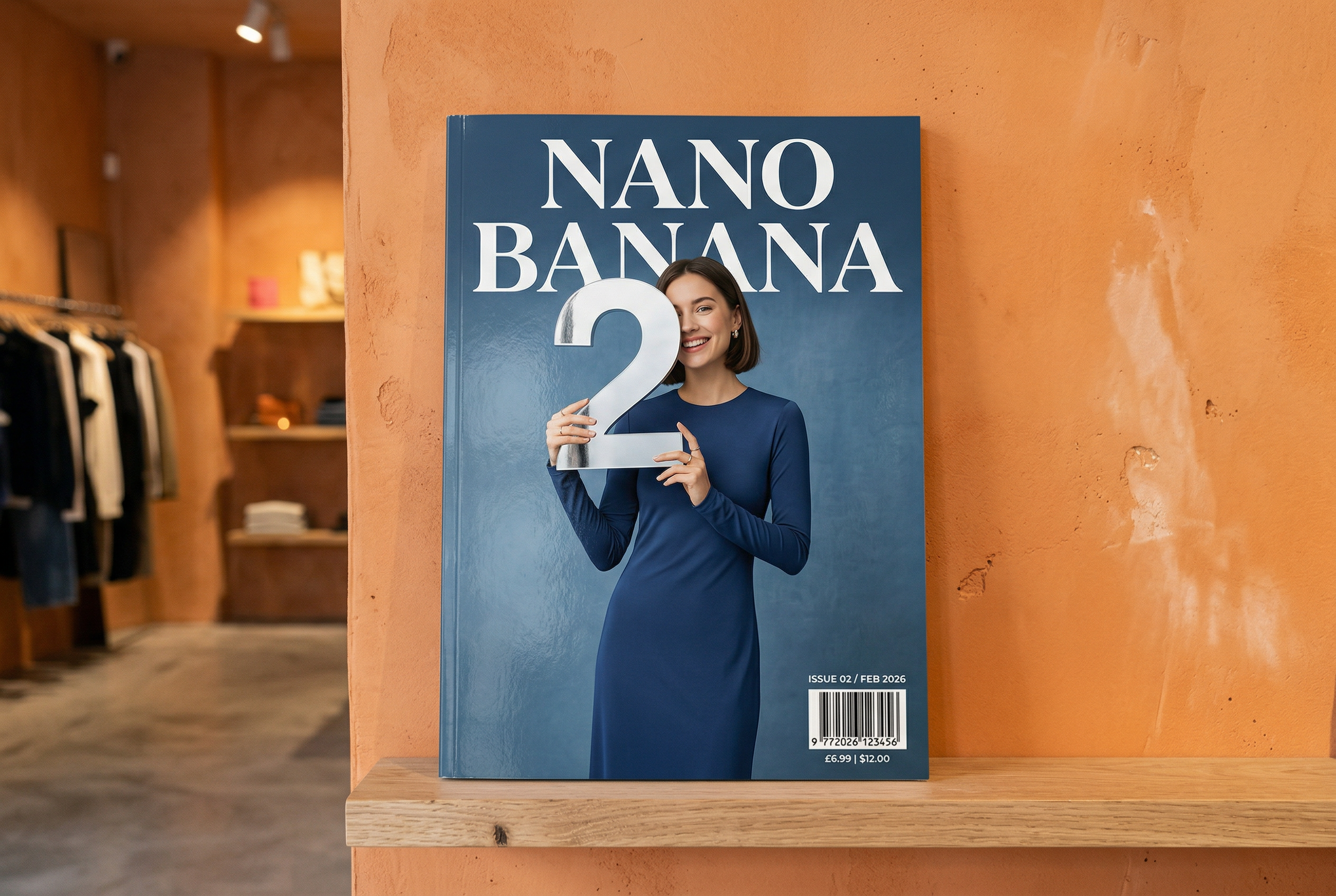

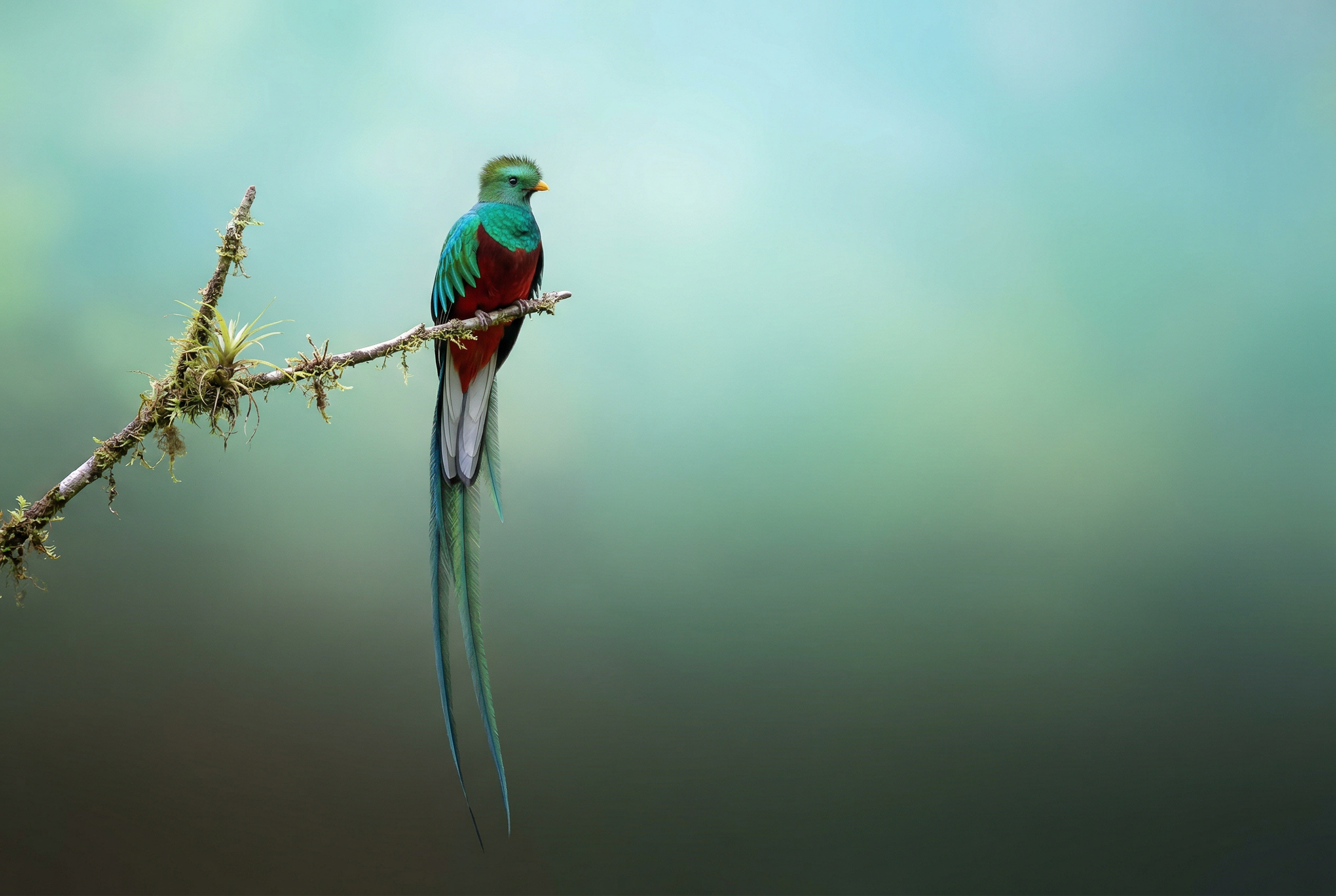



-
採用 Nano Banana 2 技術生成 -
由 Nano Banana Pro 生成 -
採用 Nano Banana 2 技術生成 -

由 Nano Banana Pro 生成 -
由 Nano Banana Pro 生成 -
由 Nano Banana Pro 生成 -
由 Nano Banana Pro 生成 提示:「代表可愛小狗的圖示。背景為白色。以色彩豐富的觸覺 3D 風格製作圖示。沒有文字。"在 AI Studio 中使用 Nano Banana 製作圖示、貼圖和素材資源 -
採用 Nano Banana 2 技術生成
Nano Banana 是 Gemini 原生圖像生成功能的名稱。 Gemini 可透過對話互動生成及處理圖像, 並支援文字、圖像、影片或圖文組合。自由創作、編輯和反覆調整視覺內容,享有前所未有的掌控力。
Nano Banana 是指 Gemini API 中提供的四種不同模型:
- Nano Banana 2 Lite (Gemini 3.1 Flash Lite Image)
(
gemini-3.1-flash-lite-image):這是速度最快、成本最低的 Gemini 圖像模型,專為速度和規模而設計,適用於速度和成本是主要運作限制的情況。不適合多個參考輸入內容或多輪連續編輯。 - Nano Banana 2 (Gemini 3.1 Flash Image)
(
gemini-3.1-flash-image):用途最廣泛的模型,適用於所有工作。這款模型兼顧速度和 4K 生成技術,並具備豐富的全球知識庫,以及可靠的文字顯示效果。擅長處理多張參考圖像,並確保一致性。 - Nano Banana Pro (Gemini 3 Pro 圖像)
(
gemini-3-pro-image):最適合處理複雜的視覺化工作,提供最高程度的世界知識、進階本地化、準確的品牌一致性,以及精確的創意控制。 - Nano Banana (Gemini 2.5 Flash Image)
(
gemini-2.5-flash-image):Nano Banana 系列的舊版先驅。 雖然 Nano Banana 2 Lite 仍是可靠的工具,但我們強烈建議客戶改用 Nano Banana 2 Lite,享受更優質的體驗、更快的生成速度,以及更低的 API 價格。
所有生成的圖片都會加上 SynthID 浮水印。
圖像生成 (文字轉圖像)
Python
from google import genai
from google.genai import types
from PIL import Image

client = genai.Client()

prompt = ("Create a picture of a nano banana dish in a fancy restaurant with a Gemini theme")
response = client.models.generate_content(
    model="gemini-3.1-flash-image",
    contents=[prompt],
)

for part in response.parts:
    if part.text is not None:
        print(part.text)
    elif part.inline_data is not None:
        image = part.as_image()
        image.save("generated_image.png")
JavaScript
import { GoogleGenAI } from "@google/genai";
import * as fs from "node:fs";

async function main() {

  const ai = new GoogleGenAI({});

  const prompt =
    "Create a picture of a nano banana dish in a fancy restaurant with a Gemini theme";

  const response = await ai.models.generateContent({
    model: "gemini-3.1-flash-image",
    contents: prompt,
  });
  for (const part of response.candidates[0].content.parts) {
    if (part.text) {
      console.log(part.text);
    } else if (part.inlineData) {
      const imageData = part.inlineData.data;
      const buffer = Buffer.from(imageData, "base64");
      fs.writeFileSync("gemini-native-image.png", buffer);
      console.log("Image saved as gemini-native-image.png");
    }
  }
}

main();
Go
package main

import (
  "context"
  "fmt"
  "log"
  "os"
  "google.golang.org/genai"
)

func main() {

  ctx := context.Background()
  client, err := genai.NewClient(ctx, nil)
  if err != nil {
      log.Fatal(err)
  }

  result, _ := client.Models.GenerateContent(
      ctx,
      "gemini-3.1-flash-image",
      genai.Text("Create a picture of a nano banana dish in a " +
                 " fancy restaurant with a Gemini theme"),
  )

  for _, part := range result.Candidates[0].Content.Parts {
      if part.Text != "" {
          fmt.Println(part.Text)
      } else if part.InlineData != nil {
          imageBytes := part.InlineData.Data
          outputFilename := "gemini_generated_image.png"
          _ = os.WriteFile(outputFilename, imageBytes, 0644)
      }
  }
}
Java
import com.google.genai.Client;
import com.google.genai.types.GenerateContentConfig;
import com.google.genai.types.GenerateContentResponse;
import com.google.genai.types.Part;

import java.io.IOException;
import java.nio.file.Files;
import java.nio.file.Paths;

public class TextToImage {
  public static void main(String[] args) throws IOException {

    try (Client client = new Client()) {
      GenerateContentConfig config = GenerateContentConfig.builder()
          .responseModalities("TEXT", "IMAGE")
          .build();

      GenerateContentResponse response = client.models.generateContent(
          "gemini-3.1-flash-image",
          "Create a picture of a nano banana dish in a fancy restaurant with a Gemini theme",
          config);

      for (Part part : response.parts()) {
        if (part.text().isPresent()) {
          System.out.println(part.text().get());
        } else if (part.inlineData().isPresent()) {
          var blob = part.inlineData().get();
          if (blob.data().isPresent()) {
            Files.write(Paths.get("_01_generated_image.png"), blob.data().get());
          }
        }
      }
    }
  }
}
C#
using Google.GenAI;
using System;
using System.Collections.Generic;
using System.IO;
using System.Threading.Tasks;

public class TextToImage {
  public static async Task Main(string[] args) {
    var client = new Client();

    var response = await client.Models.GenerateContentAsync(
        model: "gemini-3.1-flash-image",
        contents: new List<Part>
        {
            new Part { Text = "Create a picture of a nano banana dish in a fancy restaurant with a Gemini theme" }
        }
    );

    foreach (var candidate in response.Candidates) {
        foreach (var part in candidate.Content.Parts) {
            if (part.Text != null) {
                Console.WriteLine(part.Text);
            } else if (part.InlineData != null) {
                var imageBytes = Convert.FromBase64String(part.InlineData.Data);
                await File.WriteAllBytesAsync("generated_image.png", imageBytes);
                Console.WriteLine("Image saved as generated_image.png");
            }
        }
    }
  }
}
REST
curl -s -X POST \
  "https://generativelanguage.googleapis.com/v1/models/gemini-3.1-flash-image:generateContent" \
  -H "x-goog-api-key: $GEMINI_API_KEY" \
  -H "Content-Type: application/json" \
  -d '{
    "contents": [{
      "parts": [
        {"text": "Create a picture of a nano banana dish in a fancy restaurant with a Gemini theme"}
      ]
    }]
  }'
圖像編輯 (文字和圖像轉圖像)
提醒:請確認您具備必要權限,可使用上傳的所有圖像。 請勿生成侵犯他人權利的內容,包括欺騙、騷擾或傷害他人的影片或圖像。使用這項生成式 AI 服務時,須遵守《使用限制政策》。
提供圖片並使用文字提示新增、移除或修改元素、變更風格,或調整色彩分級。
以下範例說明如何上傳 base64 編碼的圖片。
如要瞭解多張圖片、較大的酬載和支援的 MIME 類型,請參閱「圖片理解」頁面。
Python
from google import genai
from google.genai import types
from PIL import Image

client = genai.Client()

prompt = (
    "Create a picture of my cat eating a nano-banana in a "
    "fancy restaurant under the Gemini constellation",
)

image = Image.open("/path/to/cat_image.png")

response = client.models.generate_content(
    model="gemini-3.1-flash-image",
    contents=[prompt, image],
)

for part in response.parts:
    if part.text is not None:
        print(part.text)
    elif part.inline_data is not None:
        image = part.as_image()
        image.save("generated_image.png")
JavaScript
import { GoogleGenAI } from "@google/genai";
import * as fs from "node:fs";

async function main() {

  const ai = new GoogleGenAI({});

  const imagePath = "path/to/cat_image.png";
  const imageData = fs.readFileSync(imagePath);
  const base64Image = imageData.toString("base64");

  const prompt = [
    { text: "Create a picture of my cat eating a nano-banana in a" +
            "fancy restaurant under the Gemini constellation" },
    {
      inlineData: {
        mimeType: "image/png",
        data: base64Image,
      },
    },
  ];

  const response = await ai.models.generateContent({
    model: "gemini-3.1-flash-image",
    contents: prompt,
  });
  for (const part of response.candidates[0].content.parts) {
    if (part.text) {
      console.log(part.text);
    } else if (part.inlineData) {
      const imageData = part.inlineData.data;
      const buffer = Buffer.from(imageData, "base64");
      fs.writeFileSync("gemini-native-image.png", buffer);
      console.log("Image saved as gemini-native-image.png");
    }
  }
}

main();
Go
package main

import (
 "context"
 "fmt"
 "log"
 "os"
 "google.golang.org/genai"
)

func main() {

 ctx := context.Background()
 client, err := genai.NewClient(ctx, nil)
 if err != nil {
     log.Fatal(err)
 }

 imagePath := "/path/to/cat_image.png"
 imgData, _ := os.ReadFile(imagePath)

 parts := []*genai.Part{
   genai.NewPartFromText("Create a picture of my cat eating a nano-banana in a fancy restaurant under the Gemini constellation"),
   &genai.Part{
     InlineData: &genai.Blob{
       MIMEType: "image/png",
       Data:     imgData,
     },
   },
 }

 contents := []*genai.Content{
   genai.NewContentFromParts(parts, genai.RoleUser),
 }

 result, _ := client.Models.GenerateContent(
     ctx,
     "gemini-3.1-flash-image",
     contents,
 )

 for _, part := range result.Candidates[0].Content.Parts {
     if part.Text != "" {
         fmt.Println(part.Text)
     } else if part.InlineData != nil {
         imageBytes := part.InlineData.Data
         outputFilename := "gemini_generated_image.png"
         _ = os.WriteFile(outputFilename, imageBytes, 0644)
     }
 }
}
Java
import com.google.genai.Client;
import com.google.genai.types.Content;
import com.google.genai.types.GenerateContentConfig;
import com.google.genai.types.GenerateContentResponse;
import com.google.genai.types.Part;

import java.io.IOException;
import java.nio.file.Files;
import java.nio.file.Path;
import java.nio.file.Paths;

public class TextAndImageToImage {
  public static void main(String[] args) throws IOException {

    try (Client client = new Client()) {
      GenerateContentConfig config = GenerateContentConfig.builder()
          .responseModalities("TEXT", "IMAGE")
          .build();

      GenerateContentResponse response = client.models.generateContent(
          "gemini-3.1-flash-image",
          Content.fromParts(
              Part.fromText("""
                  Create a picture of my cat eating a nano-banana in
                  a fancy restaurant under the Gemini constellation
                  """),
              Part.fromBytes(
                  Files.readAllBytes(
                      Path.of("src/main/resources/cat.jpg")),
                  "image/jpeg")),
          config);

      for (Part part : response.parts()) {
        if (part.text().isPresent()) {
          System.out.println(part.text().get());
        } else if (part.inlineData().isPresent()) {
          var blob = part.inlineData().get();
          if (blob.data().isPresent()) {
            Files.write(Paths.get("gemini_generated_image.png"), blob.data().get());
          }
        }
      }
    }
  }
}
C#
using Google.GenAI;
using System;
using System.Collections.Generic;
using System.IO;
using System.Threading.Tasks;

public class TextAndImageToImage {
  public static async Task Main(string[] args) {
    var client = new Client();

    var response = await client.Models.GenerateContentAsync(
        model: "gemini-3.1-flash-image",
        contents: new List<Part>
        {
            new Part { Text = "Create a picture of my cat eating a nano-banana in a fancy restaurant under the Gemini constellation" },
            new Part
            {
                FileData = new FileData { FileUri = "file:///path/to/cat_image.png" }
            }
        }
    );

    foreach (var candidate in response.Candidates) {
        foreach (var part in candidate.Content.Parts) {
            if (part.Text != null) {
                Console.WriteLine(part.Text);
            } else if (part.InlineData != null) {
                var imageBytes = Convert.FromBase64String(part.InlineData.Data);
                await File.WriteAllBytesAsync("gemini_generated_image.png", imageBytes);
                Console.WriteLine("Image saved as gemini_generated_image.png");
            }
        }
    }
  }
}
REST
curl -s -X POST \
  "https://generativelanguage.googleapis.com/v1/models/gemini-3.1-flash-image:generateContent" \
    -H "x-goog-api-key: $GEMINI_API_KEY" \
    -H 'Content-Type: application/json' \
    -d "{
      \"contents\": [{
        \"parts\":[
            {\"text\": \"'Create a picture of my cat eating a nano-banana in a fancy restaurant under the Gemini constellation\"},
            {
              \"inline_data\": {
                \"mime_type\":\"image/jpeg\",
                \"data\": \"<BASE64_IMAGE_DATA>\"
              }
            }
        ]
      }]
    }"
多輪圖像編輯
繼續透過對話生成及編輯圖像。建議使用對話或多輪對話來疊代圖像。以下範例顯示生成光合作用資訊圖表的提示。
Python
from google import genai
from google.genai import types

client = genai.Client()

chat = client.chats.create(
    model="gemini-3.1-flash-image",
    config=types.GenerateContentConfig(
        response_modalities=['TEXT', 'IMAGE'],
        tools=[{"google_search": {}}]
    )
)

message = "Create a vibrant infographic that explains photosynthesis as if it were a recipe for a plant's favorite food. Show the \"ingredients\" (sunlight, water, CO2) and the \"finished dish\" (sugar/energy). The style should be like a page from a colorful kids' cookbook, suitable for a 4th grader."

response = chat.send_message(message)

for part in response.parts:
    if part.text is not None:
        print(part.text)
    elif image:= part.as_image():
        image.save("photosynthesis.png")
JavaScript
import { GoogleGenAI } from "@google/genai";

const ai = new GoogleGenAI({});

async function main() {
  const chat = ai.chats.create({
    model: "gemini-3.1-flash-image",
    config: {
      responseModalities: ['TEXT', 'IMAGE'],
      tools: [{googleSearch: {}}],
    },
  });
}

await main();

const message = "Create a vibrant infographic that explains photosynthesis as if it were a recipe for a plant's favorite food. Show the \"ingredients\" (sunlight, water, CO2) and the \"finished dish\" (sugar/energy). The style should be like a page from a colorful kids' cookbook, suitable for a 4th grader."

let response = await chat.sendMessage({message});

for (const part of response.candidates[0].content.parts) {
    if (part.text) {
      console.log(part.text);
    } else if (part.inlineData) {
      const imageData = part.inlineData.data;
      const buffer = Buffer.from(imageData, "base64");
      fs.writeFileSync("photosynthesis.png", buffer);
      console.log("Image saved as photosynthesis.png");
    }
}
Go
package main

import (
    "context"
    "fmt"
    "log"
    "os"

    "google.golang.org/genai"
)

func main() {
    ctx := context.Background()
    client, err := genai.NewClient(ctx, nil)
    if err != nil {
        log.Fatal(err)
    }
    defer client.Close()

    model := client.GenerativeModel("gemini-3.1-flash-image")
    model.GenerationConfig = &pb.GenerationConfig{
        ResponseModalities: []pb.ResponseModality{genai.Text, genai.Image},
    }
    chat := model.StartChat()

    message := "Create a vibrant infographic that explains photosynthesis as if it were a recipe for a plant's favorite food. Show the \"ingredients\" (sunlight, water, CO2) and the \"finished dish\" (sugar/energy). The style should be like a page from a colorful kids' cookbook, suitable for a 4th grader."

    resp, err := chat.SendMessage(ctx, genai.Text(message))
    if err != nil {
        log.Fatal(err)
    }

    for _, part := range resp.Candidates[0].Content.Parts {
        if txt, ok := part.(genai.Text); ok {
            fmt.Printf("%s", string(txt))
        } else if img, ok := part.(genai.ImageData); ok {
            err := os.WriteFile("photosynthesis.png", img.Data, 0644)
            if err != nil {
                log.Fatal(err)
            }
        }
    }
}
Java
import com.google.genai.Chat;
import com.google.genai.Client;
import com.google.genai.types.Content;
import com.google.genai.types.GenerateContentConfig;
import com.google.genai.types.GenerateContentResponse;
import com.google.genai.types.GoogleSearch;
import com.google.genai.types.ImageConfig;
import com.google.genai.types.Part;
import com.google.genai.types.RetrievalConfig;
import com.google.genai.types.Tool;
import com.google.genai.types.ToolConfig;

import java.io.IOException;
import java.nio.file.Files;
import java.nio.file.Path;
import java.nio.file.Paths;

public class MultiturnImageEditing {
  public static void main(String[] args) throws IOException {

    try (Client client = new Client()) {

      GenerateContentConfig config = GenerateContentConfig.builder()
          .responseModalities("TEXT", "IMAGE")
          .tools(Tool.builder()
              .googleSearch(GoogleSearch.builder().build())
              .build())
          .build();

      Chat chat = client.chats.create("gemini-3.1-flash-image", config);

      GenerateContentResponse response = chat.sendMessage("""
          Create a vibrant infographic that explains photosynthesis
          as if it were a recipe for a plant's favorite food.
          Show the "ingredients" (sunlight, water, CO2)
          and the "finished dish" (sugar/energy).
          The style should be like a page from a colorful
          kids' cookbook, suitable for a 4th grader.
          """);

      for (Part part : response.parts()) {
        if (part.text().isPresent()) {
          System.out.println(part.text().get());
        } else if (part.inlineData().isPresent()) {
          var blob = part.inlineData().get();
          if (blob.data().isPresent()) {
            Files.write(Paths.get("photosynthesis.png"), blob.data().get());
          }
        }
      }
      // ...
    }
  }
}
C#
using Google.GenAI;
using System;
using System.Collections.Generic;
using System.IO;
using System.Threading.Tasks;

public class MultiturnImageEditing {
  public static async Task Main(string[] args) {
    var client = new Client();

    var response = await client.Models.GenerateContentAsync(
        model: "gemini-3.1-flash-image",
        contents: new List<Part>
        {
            new Part { Text = "Create a vibrant infographic that explains photosynthesis as if it were a recipe for a plant's favorite food. Show the \"ingredients\" (sunlight, water, CO2) and the \"finished dish\" (sugar/energy). The style should be like a page from a colorful kids' cookbook, suitable for a 4th grader." }
        },
        config: new GenerateContentConfig
        {
            ResponseModalities = new List<string> { "TEXT", "IMAGE" },
            Tools = new List<Tool> { new Tool { GoogleSearch = new GoogleSearch() } }
        }
    );

    foreach (var candidate in response.Candidates) {
        foreach (var part in candidate.Content.Parts) {
            if (part.Text != null) {
                Console.WriteLine(part.Text);
            } else if (part.InlineData != null) {
                var imageBytes = Convert.FromBase64String(part.InlineData.Data);
                await File.WriteAllBytesAsync("photosynthesis.png", imageBytes);
                Console.WriteLine("Image saved as photosynthesis.png");
            }
        }
    }
  }
}
REST
curl -s -X POST \
  "https://generativelanguage.googleapis.com/v1/models/gemini-3.1-flash-image:generateContent" \
  -H "x-goog-api-key: $GEMINI_API_KEY" \
  -H "Content-Type: application/json" \
  -d '{
    "contents": [{
      "role": "user",
      "parts": [
        {"text": "Create a vibrant infographic that explains photosynthesis as if it were a recipe for a plants favorite food. Show the \"ingredients\" (sunlight, water, CO2) and the \"finished dish\" (sugar/energy). The style should be like a page from a colorful kids cookbook, suitable for a 4th grader."}
      ]
    }],
    "generationConfig": {
      "responseModalities": ["TEXT", "IMAGE"]
    }
  }'
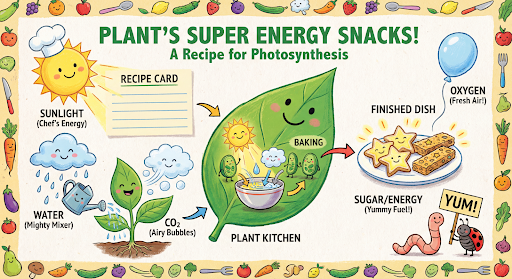
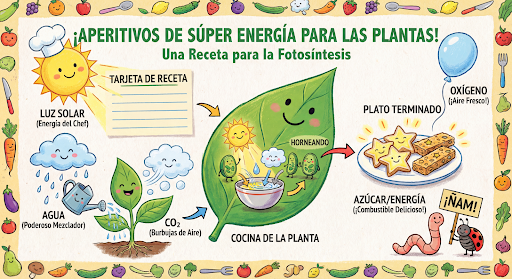
接著,您可以在同一個對話中,要求將圖片上的文字改為西班牙文。
Python
message = "Update this infographic to be in Spanish. Do not change any other elements of the image."
aspect_ratio = "16:9" # "1:1","1:4","1:8","2:3","3:2","3:4","4:1","4:3","4:5","5:4","8:1","9:16","16:9","21:9"
resolution = "2K" # "512", "1K", "2K", "4K"

response = chat.send_message(message,
    config=types.GenerateContentConfig(
        response_format={"image": {aspect_ratio: aspect_ratio,                 image_size: resolution}},
    ))

for part in response.parts:
    if part.text is not None:
        print(part.text)
    elif image:= part.as_image():
        image.save("photosynthesis_spanish.png")
JavaScript
const message = 'Update this infographic to be in Spanish. Do not change any other elements of the image.';
const aspectRatio = '16:9';
const resolution = '2K';

let response = await chat.sendMessage({
  message,
  config: {
    responseModalities: ['TEXT', 'IMAGE'],
    responseFormat: {
    image: {
      aspectRatio: aspectRatio,
      imageSize: resolution,
    }
  },
    tools: [{googleSearch: {}}],
  },
});

for (const part of response.candidates[0].content.parts) {
    if (part.text) {
      console.log(part.text);
    } else if (part.inlineData) {
      const imageData = part.inlineData.data;
      const buffer = Buffer.from(imageData, "base64");
      fs.writeFileSync("photosynthesis2.png", buffer);
      console.log("Image saved as photosynthesis2.png");
    }
}
Go
message = "Update this infographic to be in Spanish. Do not change any other elements of the image."
aspect_ratio = "16:9" // "1:1","1:4","1:8","2:3","3:2","3:4","4:1","4:3","4:5","5:4","8:1","9:16","16:9","21:9"
resolution = "2K"     // "512", "1K", "2K", "4K"

model.GenerationConfig.ImageConfig = &pb.ImageConfig{
    AspectRatio: aspect_ratio,
    ImageSize:   resolution,
}

resp, err = chat.SendMessage(ctx, genai.Text(message))
if err != nil {
    log.Fatal(err)
}

for _, part := range resp.Candidates[0].Content.Parts {
    if txt, ok := part.(genai.Text); ok {
        fmt.Printf("%s", string(txt))
    } else if img, ok := part.(genai.ImageData); ok {
        err := os.WriteFile("photosynthesis_spanish.png", img.Data, 0644)
        if err != nil {
            log.Fatal(err)
        }
    }
}
Java
String aspectRatio = "16:9"; // "1:1","1:4","1:8","2:3","3:2","3:4","4:1","4:3","4:5","5:4","8:1","9:16","16:9","21:9"
String resolution = "2K"; // "512", "1K", "2K", "4K"

config = GenerateContentConfig.builder()
    .responseModalities("TEXT", "IMAGE")
    .imageConfig(ImageConfig.builder()
        .aspectRatio(aspectRatio)
        .imageSize(resolution)
        .build())
    .build();

response = chat.sendMessage(
    "Update this infographic to be in Spanish. " +
    "Do not change any other elements of the image.",
    config);

for (Part part : response.parts()) {
  if (part.text().isPresent()) {
    System.out.println(part.text().get());
  } else if (part.inlineData().isPresent()) {
    var blob = part.inlineData().get();
    if (blob.data().isPresent()) {
      Files.write(Paths.get("photosynthesis_spanish.png"), blob.data().get());
    }
  }
}
C#
using Google.GenAI;
using System;
using System.Collections.Generic;
using System.IO;
using System.Threading.Tasks;

public class MultiturnImageEditingSpanish {
  public static async Task Main(string[] args) {
    var client = new Client();

    var response = await client.Models.GenerateContentAsync(
        model: "gemini-3.1-flash-image",
        contents: new List<Part>
        {
            new Part { Text = "Update this infographic to be in Spanish. Do not change any other elements of the image." }
        },
        config: new GenerateContentConfig
        {
            ResponseModalities = new List<string> { "TEXT", "IMAGE" },
            ImageConfig = new ImageConfig
            {
                AspectRatio = "16:9",
                ImageSize = "2K"
            }
        }
    );

    foreach (var candidate in response.Candidates) {
        foreach (var part in candidate.Content.Parts) {
            if (part.Text != null) {
                Console.WriteLine(part.Text);
            } else if (part.InlineData != null) {
                var imageBytes = Convert.FromBase64String(part.InlineData.Data);
                await File.WriteAllBytesAsync("photosynthesis_spanish.png", imageBytes);
                Console.WriteLine("Image saved as photosynthesis_spanish.png");
            }
        }
    }
  }
}
REST
curl -s -X POST \
  "https://generativelanguage.googleapis.com/v1/models/gemini-3.1-flash-image:generateContent" \
  -H "x-goog-api-key: $GEMINI_API_KEY" \
  -H 'Content-Type: application/json' \
  -d '{
    "contents": [
      {
        "role": "user",
        "parts": [{"text": "Create a vibrant infographic that explains photosynthesis..."}]
      },
      {
        "role": "model",
        "parts": [{"inline_data": {"mime_type": "image/png", "data": "<PREVIOUS_IMAGE_DATA>"}}]
      },
      {
        "role": "user",
        "parts": [{"text": "Update this infographic to be in Spanish. Do not change any other elements of the image."}]
      }
    ],
    "tools": [{"google_search": {}}],
    "generationConfig": {
      "responseModalities": ["TEXT", "IMAGE"],
      "responseFormat": {
    "image": {
        "aspectRatio": "16:9",
        "imageSize": "2K"
      }
  }
    }
  }'
全新 Gemini 3 圖像模型
Gemini 3 提供最先進的圖像生成和編輯模型。Gemini 3.1 Flash Image 經過最佳化處理,速度快且適合大量使用情境,而 Gemini 3 Pro Image 則經過最佳化處理,適合製作專業素材資源。這類模型具備進階推論能力,可處理最困難的工作流程,擅長執行複雜的多輪建立和修改工作。
- 高解析度輸出:內建生成 1K、2K 和 4K 圖像的功能。
- Gemini 3.1 Flash Image 新增較小的 512 (0.5K) 解析度。
- Gemini 3.1 Flash Lite Image 僅支援 1K 解析度。
- 進階文字算繪:可為資訊圖表、菜單、圖表和行銷素材資源生成清晰的風格化文字。
- 以 Google 搜尋做為基準:模型可使用 Google 搜尋做為工具,根據即時資料驗證事實並生成圖像 (例如目前的天氣地圖、股票圖表、近期事件)。
- Gemini 3.1 Flash Lite Image 模型不支援這項功能。
- Gemini 3.1 Flash Image 除了 Google 網頁搜尋,還整合了 Google 圖片搜尋的以 Google 搜尋強化事實基礎功能。
- 思考模式:模型會運用「思考」程序,推論複雜的提示。這項功能會生成臨時的「想法圖像」(顯示在後端,但不會收費),以改善構圖,然後再製作最終的高品質輸出內容。
- 最多 14 張參考圖片:現在最多可混合 14 張參考圖片,生成最終圖片。
- 新增長寬比:Gemini 3.1 Flash Lite Image 新增
1:1、3:2、2:3、3:4、4:3、4:5、5:4、9:16、16:9、21:9長寬比。
最多可使用 14 張參考圖片
Gemini 3 圖像模型最多可混合 14 張參考圖片。這 14 張圖片可包括:
| Gemini 3.1 Flash Lite Image | Gemini 3.1 Flash Image | Gemini 3 Pro Image |
|---|---|---|
| 最多 14 張高保真物件圖片,可加入最終圖片 | 最多 10 張高保真物件圖片,可納入最終圖片 | 最多 6 張高保真物件圖片,可加入最終圖片 |
| 不適用 | 最多 4 張角色圖片,確保角色一致性 | 最多 5 張角色圖片,確保角色一致性 |
| 不適用 | 不適用 | 最多 3 張圖片做為風格參考 |
Python
from google import genai
from google.genai import types
from PIL import Image

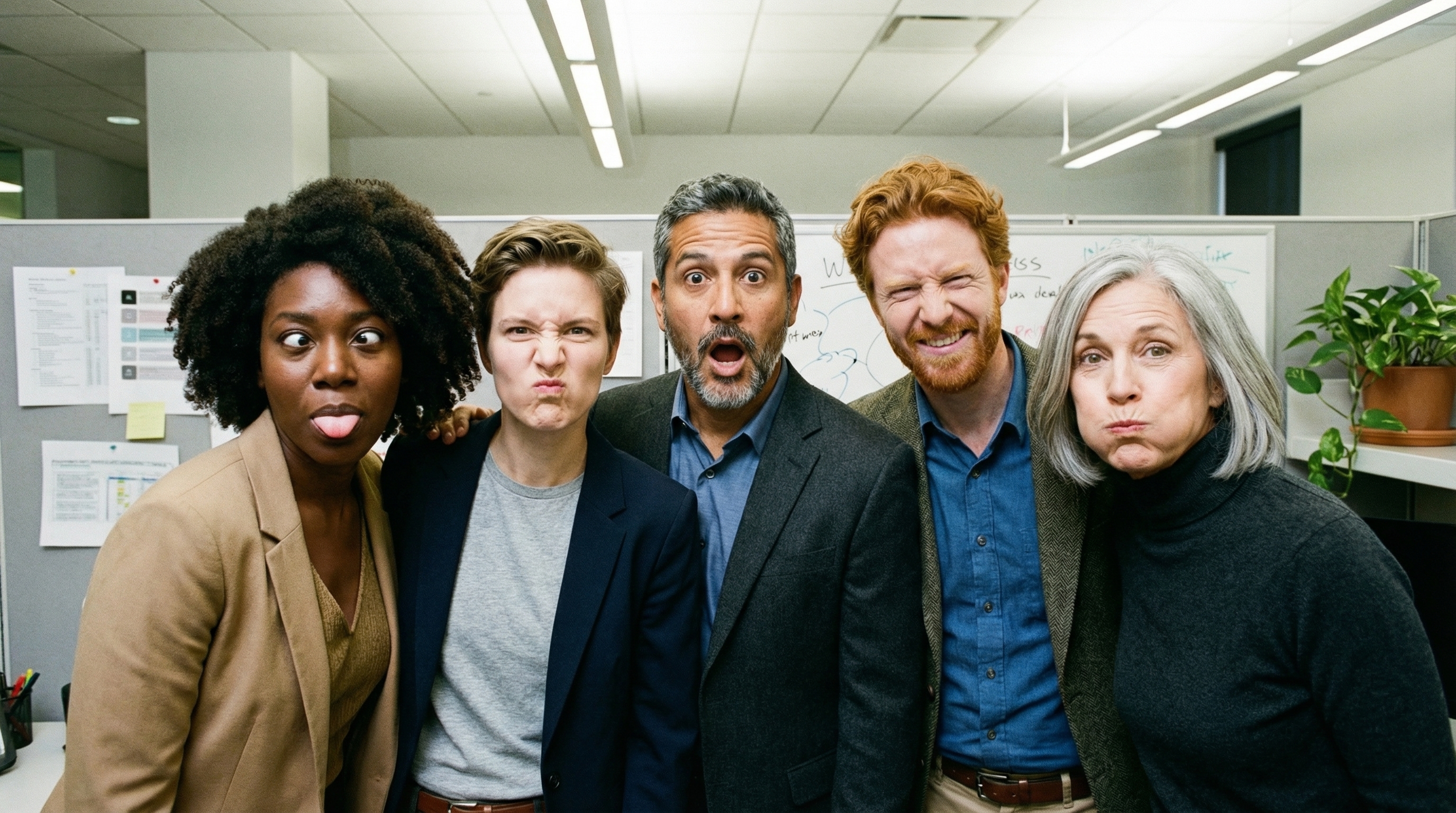
prompt = "An office group photo of these people, they are making funny faces."
aspect_ratio = "5:4" # "1:1","1:4","1:8","2:3","3:2","3:4","4:1","4:3","4:5","5:4","8:1","9:16","16:9","21:9"
resolution = "2K" # "512", "1K", "2K", "4K"

client = genai.Client()

response = client.models.generate_content(
    model="gemini-3.1-flash-image",
    contents=[
        prompt,
        Image.open('person1.png'),
        Image.open('person2.png'),
        Image.open('person3.png'),
        Image.open('person4.png'),
        Image.open('person5.png'),
    ],
    config=types.GenerateContentConfig(
        response_modalities=['TEXT', 'IMAGE'],
        response_format={"image": {aspect_ratio: aspect_ratio,                 image_size: resolution}},
    )
)

for part in response.parts:
    if part.text is not None:
        print(part.text)
    elif image:= part.as_image():
        image.save("office.png")
JavaScript
import { GoogleGenAI } from "@google/genai";
import * as fs from "node:fs";

async function main() {

  const ai = new GoogleGenAI({});

  const prompt =
      'An office group photo of these people, they are making funny faces.';
  const aspectRatio = '5:4';
  const resolution = '2K';

const contents = [
  { text: prompt },
  {
    inlineData: {
      mimeType: "image/jpeg",
      data: base64ImageFile1,
    },
  },
  {
    inlineData: {
      mimeType: "image/jpeg",
      data: base64ImageFile2,
    },
  },
  {
    inlineData: {
      mimeType: "image/jpeg",
      data: base64ImageFile3,
    },
  },
  {
    inlineData: {
      mimeType: "image/jpeg",
      data: base64ImageFile4,
    },
  },
  {
    inlineData: {
      mimeType: "image/jpeg",
      data: base64ImageFile5,
    },
  }
];

const response = await ai.models.generateContent({
    model: 'gemini-3.1-flash-image',
    contents: contents,
    config: {
      responseModalities: ['TEXT', 'IMAGE'],
      responseFormat: {
    image: {
        aspectRatio: aspectRatio,
        imageSize: resolution,
      }
  },
    },
  });

  for (const part of response.candidates[0].content.parts) {
    if (part.text) {
      console.log(part.text);
    } else if (part.inlineData) {
      const imageData = part.inlineData.data;
      const buffer = Buffer.from(imageData, "base64");
      fs.writeFileSync("image.png", buffer);
      console.log("Image saved as image.png");
    }
  }

}

main();
Go
package main

import (
    "context"
    "fmt"
    "log"
    "os"

    "google.golang.org/genai"
)

func main() {
    ctx := context.Background()
    client, err := genai.NewClient(ctx, nil)
    if err != nil {
        log.Fatal(err)
    }
    defer client.Close()

    model := client.GenerativeModel("gemini-3.1-flash-image")
    model.GenerationConfig = &pb.GenerationConfig{
        ResponseModalities: []pb.ResponseModality{genai.Text, genai.Image},
        ImageConfig: &pb.ImageConfig{
            AspectRatio: "5:4",
            ImageSize:   "2K",
        },
    }

    img1, err := os.ReadFile("person1.png")
    if err != nil { log.Fatal(err) }
    img2, err := os.ReadFile("person2.png")
    if err != nil { log.Fatal(err) }
    img3, err := os.ReadFile("person3.png")
    if err != nil { log.Fatal(err) }
    img4, err := os.ReadFile("person4.png")
    if err != nil { log.Fatal(err) }
    img5, err := os.ReadFile("person5.png")
    if err != nil { log.Fatal(err) }

    parts := []genai.Part{
        genai.Text("An office group photo of these people, they are making funny faces."),
        genai.ImageData{MIMEType: "image/png", Data: img1},
        genai.ImageData{MIMEType: "image/png", Data: img2},
        genai.ImageData{MIMEType: "image/png", Data: img3},
        genai.ImageData{MIMEType: "image/png", Data: img4},
        genai.ImageData{MIMEType: "image/png", Data: img5},
    }

    resp, err := model.GenerateContent(ctx, parts...)
    if err != nil {
        log.Fatal(err)
    }

    for _, part := range resp.Candidates[0].Content.Parts {
        if txt, ok := part.(genai.Text); ok {
            fmt.Printf("%s", string(txt))
        } else if img, ok := part.(genai.ImageData); ok {
            err := os.WriteFile("office.png", img.Data, 0644)
            if err != nil {
                log.Fatal(err)
            }
        }
    }
}
Java
import com.google.genai.Client;
import com.google.genai.types.Content;
import com.google.genai.types.GenerateContentConfig;
import com.google.genai.types.GenerateContentResponse;
import com.google.genai.types.ImageConfig;
import com.google.genai.types.Part;

import java.io.IOException;
import java.nio.file.Files;
import java.nio.file.Path;
import java.nio.file.Paths;

public class GroupPhoto {
  public static void main(String[] args) throws IOException {

    try (Client client = new Client()) {
      GenerateContentConfig config = GenerateContentConfig.builder()
          .responseModalities("TEXT", "IMAGE")
          .imageConfig(ImageConfig.builder()
              .aspectRatio("5:4")
              .imageSize("2K")
              .build())
          .build();

      GenerateContentResponse response = client.models.generateContent(
          "gemini-3.1-flash-image",
          Content.fromParts(
              Part.fromText("An office group photo of these people, they are making funny faces."),
              Part.fromBytes(Files.readAllBytes(Path.of("person1.png")), "image/png"),
              Part.fromBytes(Files.readAllBytes(Path.of("person2.png")), "image/png"),
              Part.fromBytes(Files.readAllBytes(Path.of("person3.png")), "image/png"),
              Part.fromBytes(Files.readAllBytes(Path.of("person4.png")), "image/png"),
              Part.fromBytes(Files.readAllBytes(Path.of("person5.png")), "image/png")
          ), config);

      for (Part part : response.parts()) {
        if (part.text().isPresent()) {
          System.out.println(part.text().get());
        } else if (part.inlineData().isPresent()) {
          var blob = part.inlineData().get();
          if (blob.data().isPresent()) {
            Files.write(Paths.get("office.png"), blob.data().get());
          }
        }
      }
    }
  }
}
C#
using Google.GenAI;
using System;
using System.Collections.Generic;
using System.IO;
using System.Threading.Tasks;

public class GroupPhoto {
  public static async Task Main(string[] args) {
    var client = new Client();

    var response = await client.Models.GenerateContentAsync(
        model: "gemini-3.1-flash-image",
        contents: new List<Part>
        {
            new Part { Text = "An office group photo of these people, they are making funny faces." },
            new Part { FileData = new FileData { FileUri = "file:///person1.png" } },
            new Part { FileData = new FileData { FileUri = "file:///person2.png" } },
            new Part { FileData = new FileData { FileUri = "file:///person3.png" } },
            new Part { FileData = new FileData { FileUri = "file:///person4.png" } },
            new Part { FileData = new FileData { FileUri = "file:///person5.png" } }
        },
        config: new GenerateContentConfig
        {
            ResponseModalities = new List<string> { "TEXT", "IMAGE" },
            ImageConfig = new ImageConfig
            {
                AspectRatio = "5:4",
                ImageSize = "2K"
            }
        }
    );

    foreach (var candidate in response.Candidates) {
        foreach (var part in candidate.Content.Parts) {
            if (part.Text != null) {
                Console.WriteLine(part.Text);
            } else if (part.InlineData != null) {
                var imageBytes = Convert.FromBase64String(part.InlineData.Data);
                await File.WriteAllBytesAsync("office.png", imageBytes);
                Console.WriteLine("Image saved as office.png");
            }
        }
    }
  }
}
REST
curl -s -X POST \
  "https://generativelanguage.googleapis.com/v1/models/gemini-3.1-flash-image:generateContent" \
    -H "x-goog-api-key: $GEMINI_API_KEY" \
    -H 'Content-Type: application/json' \
    -d "{
      \"contents\": [{
        \"parts\":[
            {\"text\": \"An office group photo of these people, they are making funny faces.\"},
            {\"inline_data\": {\"mime_type\":\"image/png\", \"data\": \"<BASE64_DATA_IMG_1>\"}},
            {\"inline_data\": {\"mime_type\":\"image/png\", \"data\": \"<BASE64_DATA_IMG_2>\"}},
            {\"inline_data\": {\"mime_type\":\"image/png\", \"data\": \"<BASE64_DATA_IMG_3>\"}},
            {\"inline_data\": {\"mime_type\":\"image/png\", \"data\": \"<BASE64_DATA_IMG_4>\"}},
            {\"inline_data\": {\"mime_type\":\"image/png\", \"data\": \"<BASE64_DATA_IMG_5>\"}}
        ]
      }],
      \"generationConfig\": {
        \"responseModalities\": [\"TEXT\", \"IMAGE\"],
        \"responseFormat\": {
        \"image\": {
          \"aspectRatio\": \"5:4\",
          \"imageSize\": \"2K\"
        }
      }
      }
    }"
以 Google 搜尋建立基準
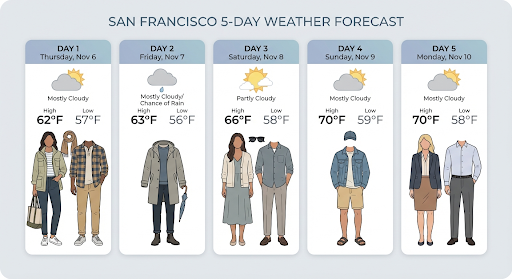
使用 Google 搜尋工具,根據天氣預報、股票圖表或近期活動等即時資訊生成圖片。
請注意,使用 Google 搜尋建立基準生成圖像時,系統不會將圖片搜尋結果傳送至生成模型,且不會顯示在回覆中 (請參閱「以 Google 搜尋建立圖像基準」一文)。
Python
from google import genai
prompt = "Visualize the current weather forecast for the next 5 days in San Francisco as a clean, modern weather chart. Add a visual on what I should wear each day"
aspect_ratio = "16:9" # "1:1","1:4","1:8","2:3","3:2","3:4","4:1","4:3","4:5","5:4","8:1","9:16","16:9","21:9"

client = genai.Client()

response = client.models.generate_content(
    model="gemini-3.1-flash-image",
    contents=prompt,
    config=types.GenerateContentConfig(
        response_modalities=['Text', 'Image'],
        response_format={"image": {aspect_ratio: aspect_ratio,}},
        tools=[{"google_search": {}}]
    )
)

for part in response.parts:
    if part.text is not None:
        print(part.text)
    elif image:= part.as_image():
        image.save("weather.png")
JavaScript
import { GoogleGenAI } from "@google/genai";
import * as fs from "node:fs";

async function main() {

  const ai = new GoogleGenAI({});

  const prompt = 'Visualize the current weather forecast for the next 5 days in San Francisco as a clean, modern weather chart. Add a visual on what I should wear each day';
  const aspectRatio = '16:9';
  const resolution = '2K';

const response = await ai.models.generateContent({
    model: 'gemini-3.1-flash-image',
    contents: prompt,
    config: {
      responseModalities: ['TEXT', 'IMAGE'],
      responseFormat: {
    image: {
        aspectRatio: aspectRatio,
        imageSize: resolution,
      }
  },
    tools: [{ googleSearch: {} }]
    },
  });

  for (const part of response.candidates[0].content.parts) {
    if (part.text) {
      console.log(part.text);
    } else if (part.inlineData) {
      const imageData = part.inlineData.data;
      const buffer = Buffer.from(imageData, "base64");
      fs.writeFileSync("image.png", buffer);
      console.log("Image saved as image.png");
    }
  }

}

main();
Java
import com.google.genai.Client;
import com.google.genai.types.GenerateContentConfig;
import com.google.genai.types.GenerateContentResponse;
import com.google.genai.types.GoogleSearch;
import com.google.genai.types.ImageConfig;
import com.google.genai.types.Part;
import com.google.genai.types.Tool;

import java.io.IOException;
import java.nio.file.Files;
import java.nio.file.Paths;

public class SearchGrounding {
  public static void main(String[] args) throws IOException {

    try (Client client = new Client()) {
      GenerateContentConfig config = GenerateContentConfig.builder()
          .responseModalities("TEXT", "IMAGE")
          .imageConfig(ImageConfig.builder()
              .aspectRatio("16:9")
              .build())
          .tools(Tool.builder()
              .googleSearch(GoogleSearch.builder().build())
              .build())
          .build();

      GenerateContentResponse response = client.models.generateContent(
          "gemini-3.1-flash-image", """
              Visualize the current weather forecast for the next 5 days
              in San Francisco as a clean, modern weather chart.
              Add a visual on what I should wear each day
              """,
          config);

      for (Part part : response.parts()) {
        if (part.text().isPresent()) {
          System.out.println(part.text().get());
        } else if (part.inlineData().isPresent()) {
          var blob = part.inlineData().get();
          if (blob.data().isPresent()) {
            Files.write(Paths.get("weather.png"), blob.data().get());
          }
        }
      }
    }
  }
}
C#
using Google.GenAI;
using System;
using System.Collections.Generic;
using System.IO;
using System.Threading.Tasks;

public class SearchGrounding {
  public static async Task Main(string[] args) {
    var client = new Client();

    var response = await client.Models.GenerateContentAsync(
        model: "gemini-3.1-flash-image",
        contents: new List<Part>
        {
            new Part { Text = "Visualize the current weather forecast for the next 5 days in San Francisco as a clean, modern weather chart. Add a visual on what I should wear each day" }
        },
        config: new GenerateContentConfig
        {
            ResponseModalities = new List<string> { "TEXT", "IMAGE" },
            ImageConfig = new ImageConfig
            {
                AspectRatio = "16:9"
            },
            Tools = new List<Tool> { new Tool { GoogleSearch = new GoogleSearch() } }
        }
    );

    foreach (var candidate in response.Candidates) {
        foreach (var part in candidate.Content.Parts) {
            if (part.Text != null) {
                Console.WriteLine(part.Text);
            } else if (part.InlineData != null) {
                var imageBytes = Convert.FromBase64String(part.InlineData.Data);
                await File.WriteAllBytesAsync("weather.png", imageBytes);
                Console.WriteLine("Image saved as weather.png");
            }
        }
    }
  }
}
REST
curl -s -X POST \
  "https://generativelanguage.googleapis.com/v1/models/gemini-3.1-flash-image:generateContent" \
  -H "x-goog-api-key: $GEMINI_API_KEY" \
  -H "Content-Type: application/json" \
  -d '{
    "contents": [{"parts": [{"text": "Visualize the current weather forecast for the next 5 days in San Francisco as a clean, modern weather chart. Add a visual on what I should wear each day"}]}],
    "tools": [{"google_search": {}}],
    "generationConfig": {
      "responseModalities": ["TEXT", "IMAGE"],
      "responseFormat": {
    "image": {"aspectRatio": "16:9"}
  }
    }
  }'
回應會包含 groundingMetadata,其中含有下列必填欄位:
searchEntryPoint:包含 HTML 和 CSS,可轉譯必要的搜尋建議。groundingChunks:傳回用於生成圖片的前 3 個網路來源
以 Google 搜尋功能建立圖片基準 (3.1 Flash)
以 Google 搜尋強化事實基礎來生成圖像時,模型會使用透過 Google 搜尋擷取的網路圖片做為視覺背景。圖片搜尋是現有「以 Google 搜尋強化事實基礎」工具中的全新搜尋類型,可與標準的Google 網頁搜尋並用。
如要啟用圖片搜尋功能,請在 API 要求中設定 googleSearch 工具,並在 searchTypes 物件中指定 imageSearch。圖片搜尋可以單獨使用,也可以與網頁搜尋搭配使用。
請注意,圖片的 Google 搜尋基礎功能無法用於搜尋人物。
Python
from google import genai
prompt = "A detailed painting of a Timareta butterfly resting on a flower"

client = genai.Client()

response = client.models.generate_content(
    model="gemini-3.1-flash-image",
    contents=prompt,
    config=types.GenerateContentConfig(
        response_modalities=["IMAGE"],
        tools=[
            types.Tool(google_search=types.GoogleSearch(
                search_types=types.SearchTypes(
                    web_search=types.WebSearch(),
                    image_search=types.ImageSearch()
                )
            ))
        ]
    )
)

# Display grounding sources if available
if response.candidates and response.candidates[0].grounding_metadata and response.candidates[0].grounding_metadata.search_entry_point:
    display(HTML(response.candidates[0].grounding_metadata.search_entry_point.rendered_content))
JavaScript
import { GoogleGenAI } from "@google/genai";

async function main() {

  const ai = new GoogleGenAI({});

  const prompt = "A detailed painting of a Timareta butterfly resting on a flower";

  const response = await ai.models.generateContent({
    model: "gemini-3.1-flash-image",
    contents: prompt,
    config: {
      responseModalities: ["IMAGE"],
      tools: [
        {
          googleSearch: {
            searchTypes: {
              webSearch: {},
              imageSearch: {}
            }
          }
        }
      ]
    }
  });

  // Display grounding sources if available
  if (response.candidates && response.candidates[0].groundingMetadata && response.candidates[0].groundingMetadata.searchEntryPoint) {
      console.log(response.candidates[0].groundingMetadata.searchEntryPoint.renderedContent);
  }
}

main();
Go
package main

import (
  "context"
  "fmt"
  "log"

  "google.golang.org/genai"
  pb "google.golang.org/genai/schema"
)

func main() {
  ctx := context.Background()
  client, err := genai.NewClient(ctx, nil)
  if err != nil {
    log.Fatal(err)
  }
  defer client.Close()

  model := client.GenerativeModel("gemini-3.1-flash-image")
  model.Tools = []*pb.Tool{
    {
      GoogleSearch: &pb.GoogleSearch{
        SearchTypes: &pb.SearchTypes{
          WebSearch:   &pb.WebSearch{},
          ImageSearch: &pb.ImageSearch{},
        },
      },
    },
  }
  model.GenerationConfig = &pb.GenerationConfig{
    ResponseModalities: []pb.ResponseModality{genai.Image},
  }

  prompt := "A detailed painting of a Timareta butterfly resting on a flower"
  resp, err := model.GenerateContent(ctx, genai.Text(prompt))
  if err != nil {
    log.Fatal(err)
  }

  if resp.Candidates[0].GroundingMetadata != nil && resp.Candidates[0].GroundingMetadata.SearchEntryPoint != nil {
    fmt.Println(resp.Candidates[0].GroundingMetadata.SearchEntryPoint.RenderedContent)
  }
}
Java
import com.google.genai.Client;
import com.google.genai.types.GenerateContentConfig;
import com.google.genai.types.GenerateContentResponse;
import com.google.genai.types.GoogleSearch;
import com.google.genai.types.ImageSearch;
import com.google.genai.types.SearchTypes;
import com.google.genai.types.Tool;
import com.google.genai.types.WebSearch;

import java.io.IOException;

public class ImageSearchGrounding {
  public static void main(String[] args) throws IOException {

    try (Client client = new Client()) {
      GenerateContentConfig config = GenerateContentConfig.builder()
          .responseModalities("IMAGE")
          .tools(Tool.builder()
              .googleSearch(GoogleSearch.builder()
                  .searchTypes(SearchTypes.builder()
                      .webSearch(WebSearch.builder().build())
                      .imageSearch(ImageSearch.builder().build())
                      .build())
                  .build())
              .build())
          .build();

      GenerateContentResponse response = client.models.generateContent(
          "gemini-3.1-flash-image",
          "A detailed painting of a Timareta butterfly resting on a flower",
          config);

      if (response.candidates().isPresent() && !response.candidates().get().isEmpty()) {
        var candidate = response.candidates().get().get(0);
        if (candidate.groundingMetadata().isPresent() && candidate.groundingMetadata().get().searchEntryPoint().isPresent()) {
          System.out.println(candidate.groundingMetadata().get().searchEntryPoint().get().renderedContent().orElse(""));
        }
      }
    }
  }
}
C#
using Google.GenAI;
using System;
using System.Collections.Generic;
using System.Threading.Tasks;

public class ImageSearchGrounding {
  public static async Task Main(string[] args) {
    var client = new Client();

    var response = await client.Models.GenerateContentAsync(
        model: "gemini-3.1-flash-image",
        contents: new List<Part>
        {
            new Part { Text = "A detailed painting of a Timareta butterfly resting on a flower" }
        },
        config: new GenerateContentConfig
        {
            ResponseModalities = new List<string> { "IMAGE" },
            Tools = new List<Tool>
            {
                new Tool
                {
                    GoogleSearch = new GoogleSearch
                    {
                        SearchTypes = new SearchTypes
                        {
                            WebSearch = new WebSearch(),
                            ImageSearch = new ImageSearch()
                        }
                    }
                }
            }
        }
    );

    foreach (var candidate in response.Candidates) {
        if (candidate.GroundingMetadata != null && candidate.GroundingMetadata.SearchEntryPoint != null) {
            Console.WriteLine(candidate.GroundingMetadata.SearchEntryPoint.RenderedContent);
        }
    }
  }
}
REST
curl -s -X POST \
  "https://generativelanguage.googleapis.com/v1/models/gemini-3.1-flash-image:generateContent" \
  -H "x-goog-api-key: $GEMINI_API_KEY" \
  -H "Content-Type: application/json" \
  -d '{
    "contents": [{"parts": [{"text": "A detailed painting of a Timareta butterfly resting on a flower"}]}],
    "tools": [{"google_search": {"searchTypes": {"webSearch": {}, "imageSearch": {}}}}],
    "generationConfig": {
      "responseModalities": ["IMAGE"]
    }
  }'
螢幕規定
在「以 Google 搜尋強化事實基礎」功能中使用圖片搜尋時,必須遵守下列條件:
- 來源出處:你必須提供包含來源圖片的網頁連結 (「包含頁面」,而非圖片檔案本身),且使用者可辨識為連結。
- 直接導覽:如果選擇顯示來源圖片,必須提供從來源圖片到所含來源網頁的直接單點路徑。任何會延遲或阻礙使用者存取來源網頁的實作方式皆不允許,包括但不限於任何多重點擊路徑,或使用中繼圖片檢視器。
回應
如果是以圖片搜尋結果為基準的回覆,API 會提供清楚的歸因和中繼資料,將輸出內容連結至經過驗證的來源。groundingMetadata 物件中的主要欄位包括:
imageSearchQueries:模型用於視覺內容 (圖片搜尋) 的特定查詢。groundingChunks:包含所擷取結果的來源資訊。如果是圖片來源,系統會使用新的圖片區塊類型,以重新導向網址的形式傳回。這段內容包括:uri:用於歸因的網頁網址 (到達網頁)。image_uri:圖片的直接網址。
groundingSupports:提供具體對應,將生成的內容連結至相關的引用來源。searchEntryPoint:包含「Google 搜尋」資訊方塊,內含符合規定的 HTML 和 CSS,可顯示搜尋建議。
從影片生成圖片 (3.1 Flash 和 3.1 Flash Lite)
影片轉圖像功能可使用影片內容做為多模態參考,生成新圖像。這項功能可製作高品質的影片縮圖、電影海報、摘要資訊圖表,或以影片場景為靈感的新作品。
生成圖片時,模型會分析影片影格的內容 (最多可達模型的輸入權杖上限 131,072 個權杖),擷取視覺主題和重要事件,然後搭配文字提示合成輸出圖片。
您可以直接在 API 要求中傳遞公開的 YouTube 網址,也可以使用 Files API 上傳本機影片檔案。
Python
from google import genai
from google.genai import types

client = genai.Client()

# Pass a public YouTube video URL as part of the contents
response = client.models.generate_content(
    model="gemini-3.1-flash-image",
    contents=[
        types.Part(
          file_data=types.FileData(file_uri="https://www.youtube.com/watch?v=UTdfxFyOQTI"),
          video_metadata=types.VideoMetadata(fps=0.5)
        ),
        "Generate a poster image that captures the key themes of this video."
    ],
    config=types.GenerateContentConfig(
        response_modalities=["TEXT", "IMAGE"]
    )
)

# Save the generated image part
for part in response.parts:
    if part.inline_data is not None:
        image = part.as_image()
        image.save("video_poster.png")
        print("Image saved as video_poster.png")
JavaScript
import { GoogleGenAI } from "@google/genai";
import * as fs from "node:fs";

async function main() {
  const ai = new GoogleGenAI({});

  const response = await ai.models.generateContent({
    model: "gemini-3.1-flash-image",
    contents: [
      {
        fileData: {
          fileUri: "https://www.youtube.com/watch?v=UTdfxFyOQTI",
        },
        videoMetadata: {
          fps: 0.5
        }
      },
      { text: "Generate a poster image that captures the key themes of this video." }
    ],
    config: {
      responseModalities: ["TEXT", "IMAGE"]
    }
  });

  for (const part of response.candidates[0].content.parts) {
    if (part.inlineData) {
      const imageData = part.inlineData.data;
      const buffer = Buffer.from(imageData, "base64");
      fs.writeFileSync("video_poster.png", buffer);
      console.log("Image saved as video_poster.png");
    }
  }
}

main();
Go
package main

import (
    "context"
    "log"
    "os"
    "google.golang.org/genai"
)

func main() {
    ctx := context.Background()
    client, err := genai.NewClient(ctx, nil)
    if err != nil {
        log.Fatal(err)
    }

    videoPart := genai.NewPartFromURI("https://www.youtube.com/watch?v=UTdfxFyOQTI", "video/mp4")
    videoPart.VideoMetadata = &genai.VideoMetadata{FPS: genai.Ptr(0.5)}

    parts := []*genai.Part{
        videoPart,
        genai.NewPartFromText("Generate a poster image that captures the key themes of this video."),
    }

    contents := []*genai.Content{
        genai.NewContentFromParts(parts, genai.RoleUser),
    }

    result, err := client.Models.GenerateContent(
        ctx,
        "gemini-3.1-flash-image",
        contents,
        &genai.GenerateContentConfig{
            ResponseModalities: []string{"TEXT", "IMAGE"},
        },
    )
    if err != nil {
        log.Fatal(err)
    }

    for _, part := range result.Candidates[0].Content.Parts {
        if part.InlineData != nil {
            imageBytes := part.InlineData.Data
            _ = os.WriteFile("video_poster.png", imageBytes, 0644)
            log.Println("Image saved as video_poster.png")
        }
    }
}
Java
import com.google.genai.Client;
import com.google.genai.types.Content;
import com.google.genai.types.FileData;
import com.google.genai.types.GenerateContentConfig;
import com.google.genai.types.GenerateContentResponse;
import com.google.genai.types.Part;
import com.google.genai.types.VideoMetadata;
import com.google.common.collect.ImmutableList;

import java.io.IOException;
import java.nio.file.Files;
import java.nio.file.Paths;

public class VideoToImage {
  public static void main(String[] args) throws IOException {

    try (Client client = new Client()) {
      Part videoPart = Part.builder()
          .fileData(FileData.builder()
              .fileUri("https://www.youtube.com/watch?v=UTdfxFyOQTI")
              .build())
          .videoMetadata(VideoMetadata.builder()
              .fps(0.5)
              .build())
          .build();

      Part textPart = Part.builder()
          .text("Generate a poster image that captures the key themes of this video.")
          .build();

      GenerateContentConfig config = GenerateContentConfig.builder()
          .responseModalities("TEXT", "IMAGE")
          .build();

      GenerateContentResponse response = client.models.generateContent(
          "gemini-3.1-flash-image",
          Content.builder()
              .role("user")
              .parts(ImmutableList.of(videoPart, textPart))
              .build(),
          config);

      for (Part part : response.parts()) {
        if (part.inlineData().isPresent()) {
          var blob = part.inlineData().get();
          if (blob.data().isPresent()) {
            Files.write(Paths.get("video_poster.png"), blob.data().get());
            System.out.println("Image saved as video_poster.png");
          }
        }
      }
    }
  }
}
C#
using Google.GenAI;
using Google.GenAI.Types;
using System;
using System.Collections.Generic;
using System.IO;
using System.Threading.Tasks;

public class VideoToImage {
  public static async Task Main(string[] args) {
    var client = new Client();

    var response = await client.Models.GenerateContentAsync(
        model: "gemini-3.1-flash-image",
        contents: new List<Part>
        {
            new Part
            {
                FileData = new FileData { FileUri = "https://www.youtube.com/watch?v=UTdfxFyOQTI" },
                VideoMetadata = new VideoMetadata { Fps = 0.5 }
            },
            new Part { Text = "Generate a poster image that captures the key themes of this video." }
        },
        config: new GenerateContentConfig
        {
            ResponseModalities = new List<string> { "TEXT", "IMAGE" }
        }
    );

    foreach (var candidate in response.Candidates) {
        foreach (var part in candidate.Content.Parts) {
            if (part.InlineData != null) {
                var imageBytes = Convert.FromBase64String(part.InlineData.Data);
                await File.WriteAllBytesAsync("video_poster.png", imageBytes);
                Console.WriteLine("Image saved as video_poster.png");
            }
        }
    }
  }
}
REST
curl -s -X POST \
  "https://generativelanguage.googleapis.com/v1/models/gemini-3.1-flash-image:generateContent" \
  -H "x-goog-api-key: $GEMINI_API_KEY" \
  -H "Content-Type: application/json" \
  -d '{
    "contents": [{
      "parts": [
        {
          "file_data": {
            "file_uri": "https://www.youtube.com/watch?v=UTdfxFyOQTI"
          },
          "video_metadata": {
            "fps": 0.5
          }
        },
        {"text": "Generate a poster image that captures the key themes of this video."}
      ]
    }],
    "generationConfig": {
      "responseModalities": ["TEXT", "IMAGE"]
    }
  }'
生成最高 4K 解析度的圖片
Gemini 3 圖像模型預設會生成 1K 圖片,但也能輸出 2K、
4K 和 512 (0.5K) 圖片 (僅限 Gemini 3.1 Flash Image)。如要產生高解析度素材資源,請在 generation_config 中指定 image_size。
必須使用大寫的「K」(例如 1K、2K、4K)。512 值不會使用「K」後置字元。系統會拒絕小寫參數 (例如 1k)。
Python
from google import genai
from google.genai import types

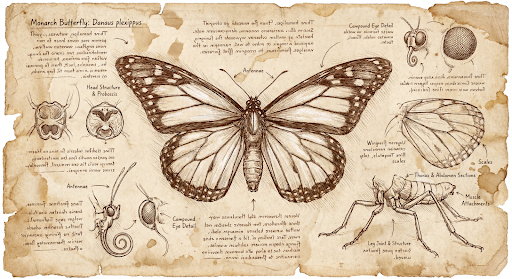
prompt = "Da Vinci style anatomical sketch of a dissected Monarch butterfly. Detailed drawings of the head, wings, and legs on textured parchment with notes in English."
aspect_ratio = "1:1" # "1:1","1:4","1:8","2:3","3:2","3:4","4:1","4:3","4:5","5:4","8:1","9:16","16:9","21:9"
resolution = "1K" # "512", "1K", "2K", "4K"

client = genai.Client()

response = client.models.generate_content(
    model="gemini-3.1-flash-image",
    contents=prompt,
    config=types.GenerateContentConfig(
        response_modalities=['TEXT', 'IMAGE'],
        response_format={"image": {aspect_ratio: aspect_ratio,                 image_size: resolution}},
    )
)

for part in response.parts:
    if part.text is not None:
        print(part.text)
    elif image:= part.as_image():
        image.save("butterfly.png")
JavaScript
import { GoogleGenAI } from "@google/genai";
import * as fs from "node:fs";

async function main() {

  const ai = new GoogleGenAI({});

  const prompt =
      'Da Vinci style anatomical sketch of a dissected Monarch butterfly. Detailed drawings of the head, wings, and legs on textured parchment with notes in English.';
  const aspectRatio = '1:1';
  const resolution = '1K';

  const response = await ai.models.generateContent({
    model: 'gemini-3.1-flash-image',
    contents: prompt,
    config: {
      responseModalities: ['TEXT', 'IMAGE'],
      responseFormat: {
    image: {
        aspectRatio: aspectRatio,
        imageSize: resolution,
      }
  },
    },
  });

  for (const part of response.candidates[0].content.parts) {
    if (part.text) {
      console.log(part.text);
    } else if (part.inlineData) {
      const imageData = part.inlineData.data;
      const buffer = Buffer.from(imageData, "base64");
      fs.writeFileSync("image.png", buffer);
      console.log("Image saved as image.png");
    }
  }

}

main();
Go
package main

import (
    "context"
    "fmt"
    "log"
    "os"

    "google.golang.org/genai"
)

func main() {
    ctx := context.Background()
    client, err := genai.NewClient(ctx, nil)
    if err != nil {
        log.Fatal(err)
    }
    defer client.Close()

    model := client.GenerativeModel("gemini-3.1-flash-image")
    model.GenerationConfig = &pb.GenerationConfig{
        ResponseModalities: []pb.ResponseModality{genai.Text, genai.Image},
        ImageConfig: &pb.ImageConfig{
            AspectRatio: "1:1",
            ImageSize:   "1K",
        },
    }

    prompt := "Da Vinci style anatomical sketch of a dissected Monarch butterfly. Detailed drawings of the head, wings, and legs on textured parchment with notes in English."
    resp, err := model.GenerateContent(ctx, genai.Text(prompt))
    if err != nil {
        log.Fatal(err)
    }

    for _, part := range resp.Candidates[0].Content.Parts {
        if txt, ok := part.(genai.Text); ok {
            fmt.Printf("%s", string(txt))
        } else if img, ok := part.(genai.ImageData); ok {
            err := os.WriteFile("butterfly.png", img.Data, 0644)
            if err != nil {
                log.Fatal(err)
            }
        }
    }
}
Java
import com.google.genai.Client;
import com.google.genai.types.GenerateContentConfig;
import com.google.genai.types.GenerateContentResponse;
import com.google.genai.types.GoogleSearch;
import com.google.genai.types.ImageConfig;
import com.google.genai.types.Part;
import com.google.genai.types.Tool;

import java.io.IOException;
import java.nio.file.Files;
import java.nio.file.Paths;

public class HiRes {
    public static void main(String[] args) throws IOException {

      try (Client client = new Client()) {
        GenerateContentConfig config = GenerateContentConfig.builder()
            .responseModalities("TEXT", "IMAGE")
            .imageConfig(ImageConfig.builder()
                .aspectRatio("16:9")
                .imageSize("4K")
                .build())
            .build();

        GenerateContentResponse response = client.models.generateContent(
            "gemini-3.1-flash-image", """
              Da Vinci style anatomical sketch of a dissected Monarch butterfly.
              Detailed drawings of the head, wings, and legs on textured
              parchment with notes in English.
              """,
            config);

        for (Part part : response.parts()) {
          if (part.text().isPresent()) {
            System.out.println(part.text().get());
          } else if (part.inlineData().isPresent()) {
            var blob = part.inlineData().get();
            if (blob.data().isPresent()) {
              Files.write(Paths.get("butterfly.png"), blob.data().get());
            }
          }
        }
      }
    }
}
C#
using Google.GenAI;
using System;
using System.Collections.Generic;
using System.IO;
using System.Threading.Tasks;

public class HiRes {
  public static async Task Main(string[] args) {
    var client = new Client();

    var response = await client.Models.GenerateContentAsync(
        model: "gemini-3.1-flash-image",
        contents: new List<Part>
        {
            new Part { Text = "Da Vinci style anatomical sketch of a dissected Monarch butterfly. Detailed drawings of the head, wings, and legs on textured parchment with notes in English." }
        },
        config: new GenerateContentConfig
        {
            ResponseModalities = new List<string> { "TEXT", "IMAGE" },
            ImageConfig = new ImageConfig
            {
                AspectRatio = "1:1",
                ImageSize = "1K"
            }
        }
    );

    foreach (var candidate in response.Candidates) {
        foreach (var part in candidate.Content.Parts) {
            if (part.Text != null) {
                Console.WriteLine(part.Text);
            } else if (part.InlineData != null) {
                var imageBytes = Convert.FromBase64String(part.InlineData.Data);
                await File.WriteAllBytesAsync("butterfly.png", imageBytes);
                Console.WriteLine("Image saved as butterfly.png");
            }
        }
    }
  }
}
REST
curl -s -X POST \
  "https://generativelanguage.googleapis.com/v1/models/gemini-3.1-flash-image:generateContent" \
  -H "x-goog-api-key: $GEMINI_API_KEY" \
  -H "Content-Type: application/json" \
  -d '{
    "contents": [{"parts": [{"text": "Da Vinci style anatomical sketch of a dissected Monarch butterfly. Detailed drawings of the head, wings, and legs on textured parchment with notes in English."}]}],
    "tools": [{"google_search": {}}],
    "generationConfig": {
      "responseModalities": ["TEXT", "IMAGE"],
      "responseFormat": {
    "image": {"aspectRatio": "1:1", "imageSize": "1K"}
  }
    }
  }'
以下是根據這項提示生成的圖片範例:
思考過程
Gemini 3 圖像模型是思考型模型,會使用推論程序 (「思考」) 處理複雜的提示。這項功能預設為啟用,且無法在 API 中停用。如要進一步瞭解思考過程,請參閱 Gemini 思考指南。
模型最多會生成兩張暫時圖片,測試構圖和邏輯。「思考」中的最後一張圖片也是最終轉譯圖片。
你可以查看生成最終圖像的過程。
Python
for part in response.parts:
    if part.thought:
        if part.text:
            print(part.text)
        elif image:= part.as_image():
            image.show()
JavaScript
for (const part of response.candidates[0].content.parts) {
  if (part.thought) {
    if (part.text) {
      console.log(part.text);
    } else if (part.inlineData) {
      const imageData = part.inlineData.data;
      const buffer = Buffer.from(imageData, 'base64');
      fs.writeFileSync('image.png', buffer);
      console.log('Image saved as image.png');
    }
  }
}
Java
for (Part part : response.parts()) {
  if (part.thought().orElse(false)) {
    if (part.text().isPresent()) {
      System.out.println(part.text().get());
    } else if (part.inlineData().isPresent()) {
      var blob = part.inlineData().get();
      if (blob.data().isPresent()) {
        Files.write(Paths.get("image.png"), blob.data().get());
        System.out.println("Image saved as image.png");
      }
    }
  }
}
C#
foreach (var candidate in response.Candidates) {
    foreach (var part in candidate.Content.Parts) {
        if (part.Thought) {
            if (part.Text != null) {
                Console.WriteLine(part.Text);
            } else if (part.InlineData != null) {
                var imageBytes = Convert.FromBase64String(part.InlineData.Data);
                await File.WriteAllBytesAsync("image.png", imageBytes);
                Console.WriteLine("Image saved as image.png");
            }
        }
    }
}
控管思考程度
透過 Gemini 3.1 Flash Image 和 Gemini 3.1 Flash Lite Image,你可以控制模型思考的程度,在品質和延遲之間取得平衡。預設 thinkingLevel 為 minimal,支援的層級為 minimal 和 high。將 thinkingLevel 設為 minimal 可提供延遲時間最短的回應。請注意,
「最少思考」並不代表模型完全不會思考。
您可以新增 includeThoughts 布林值,決定是否要在回覆中傳回模型生成的想法,或將其隱藏。
Python
from google import genai

response = client.models.generate_content(
    model="gemini-3.1-flash-image",
    contents="A futuristic city built inside a giant glass bottle floating in space",
    config=types.GenerateContentConfig(
        response_modalities=["IMAGE"],
        thinking_config=types.ThinkingConfig(
            thinking_level="High",
            include_thoughts=True
        ),
    )
)

for part in response.parts:
    if part.thought: # Skip outputting thoughts
      continue
    if part.text:
      display(Markdown(part.text))
    elif image:= part.as_image():
      image.show()
JavaScript
import { GoogleGenAI } from "@google/genai";
import * as fs from "node:fs";

async function main() {

  const ai = new GoogleGenAI({});

  const response = await ai.models.generateContent({
    model: "gemini-3.1-flash-image",
    contents: "A futuristic city built inside a giant glass bottle floating in space",
    config: {
      responseModalities: ["IMAGE"],
      thinkingConfig: {
        thinkingLevel: "High",
        includeThoughts: true
      },
    },
  });

  for (const part of response.candidates[0].content.parts) {
    if (part.thought) { // Skip outputting thoughts
      continue;
    }
    if (part.text) {
      console.log(part.text);
    } else if (part.inlineData) {
      const imageData = part.inlineData.data;
      const buffer = Buffer.from(imageData, "base64");
      fs.writeFileSync("image.png", buffer);
      console.log("Image saved as image.png");
    }
  }
}
main();
Go
package main

import (
    "context"
    "fmt"
    "log"
    "os"

    "google.golang.org/genai"
    pb "google.golang.org/genai/schema"
)

func main() {
    ctx := context.Background()
    client, err := genai.NewClient(ctx, nil)
    if err != nil {
        log.Fatal(err)
    }
    defer client.Close()

    model := client.GenerativeModel("gemini-3.1-flash-image")
    model.GenerationConfig = &pb.GenerationConfig{
        ResponseModalities: []pb.ResponseModality{genai.Image},
        ThinkingConfig: &pb.ThinkingConfig{
            ThinkingLevel:   "High",
            IncludeThoughts: true,
        },
    }

    prompt := "A futuristic city built inside a giant glass bottle floating in space"
    resp, err := model.GenerateContent(ctx, genai.Text(prompt))
    if err != nil {
        log.Fatal(err)
    }

    for _, part := range resp.Candidates[0].Content.Parts {
        if part.Thought { // Skip outputting thoughts
            continue
        }
        if txt, ok := part.(genai.Text); ok {
            fmt.Printf("%s", string(txt))
        } else if img, ok := part.(genai.ImageData); ok {
            err := os.WriteFile("image.png", img.Data, 0644)
            if err != nil {
                log.Fatal(err)
            }
        }
    }
}
Java
import com.google.genai.Client;
import com.google.genai.types.GenerateContentConfig;
import com.google.genai.types.GenerateContentResponse;
import com.google.genai.types.Part;
import com.google.genai.types.ThinkingConfig;

import java.io.IOException;
import java.nio.file.Files;
import java.nio.file.Paths;

public class ThinkingLevels {
  public static void main(String[] args) throws IOException {

    try (Client client = new Client()) {
      GenerateContentConfig config = GenerateContentConfig.builder()
          .responseModalities("IMAGE")
          .thinkingConfig(ThinkingConfig.builder()
              .thinkingLevel("High")
              .includeThoughts(true)
              .build())
          .build();

      GenerateContentResponse response = client.models.generateContent(
          "gemini-3.1-flash-image",
          "A futuristic city built inside a giant glass bottle floating in space",
          config);

      for (Part part : response.parts()) {
        if (part.thought().orElse(false)) {
          // Skip outputting thoughts
          continue;
        }
        if (part.text().isPresent()) {
          System.out.println(part.text().get());
        } else if (part.inlineData().isPresent()) {
          var blob = part.inlineData().get();
          if (blob.data().isPresent()) {
            Files.write(Paths.get("image.png"), blob.data().get());
            System.out.println("Image saved as image.png");
          }
        }
      }
    }
  }
}
C#
using Google.GenAI;
using System;
using System.Collections.Generic;
using System.IO;
using System.Threading.Tasks;

public class ThinkingLevels {
  public static async Task Main(string[] args) {
    var client = new Client();

    var response = await client.Models.GenerateContentAsync(
        model: "gemini-3.1-flash-image",
        contents: new List<Part>
        {
            new Part { Text = "A futuristic city built inside a giant glass bottle floating in space" }
        },
        config: new GenerateContentConfig
        {
            ResponseModalities = new List<string> { "IMAGE" },
            ThinkingConfig = new ThinkingConfig
            {
                ThinkingLevel = "High",
                IncludeThoughts = true
            }
        }
    );

    foreach (var candidate in response.Candidates) {
        foreach (var part in candidate.Content.Parts) {
            if (part.Thought) {
                // Skip outputting thoughts
                continue;
            }
            if (part.Text != null) {
                Console.WriteLine(part.Text);
            } else if (part.InlineData != null) {
                var imageBytes = Convert.FromBase64String(part.InlineData.Data);
                await File.WriteAllBytesAsync("image.png", imageBytes);
                Console.WriteLine("Image saved as image.png");
            }
        }
    }
  }
}
REST
curl -s -X POST \
  "https://generativelanguage.googleapis.com/v1/models/gemini-3.1-flash-image:generateContent" \
  -H "x-goog-api-key: $GEMINI_API_KEY" \
  -H "Content-Type: application/json" \
  -d '{
    "contents": [{"parts": [{"text": "A futuristic city built inside a giant glass bottle floating in space"}]}],
    "generationConfig": {
      "responseModalities": ["IMAGE"],
      "thinkingConfig": {
        "thinkingLevel": "High",
        "includeThoughts": true
      }
    }
  }'
請注意,無論 includeThoughts 設為 true 或 false,系統都會收取思考權杖費用,因為無論您是否查看思考過程,系統預設都會執行思考程序。
想法簽名
思想簽章是模型內部思考過程的加密表示法,用於在多輪互動中保留推理脈絡。所有回應都包含 thought_signature 欄位。一般來說,如果在模型回覆中收到想法簽章,您應該在下一個回合傳送對話記錄時,完全按照收到的內容傳回該簽章。如果無法傳播想法簽章,可能會導致回應失敗。如要進一步瞭解簽章,請參閱想法簽章說明文件。
思想簽章的運作方式如下:
- 回覆中所有含有圖片
mimetype的inline_data部分都應有簽章。 - 如果想法之後緊接著有文字部分 (在任何圖片之前),則第一個文字部分也應包含簽名。
- 如果
inline_data含有圖片的mimetype部分是想法的一部分,就不會有簽名。
以下程式碼範例顯示包含想法簽章的位置:
[
  {
    "inline_data": {
      "data": "<base64_image_data_0>",
      "mime_type": "image/png"
    },
    "thought": true // Thoughts don't have signatures
  },
  {
    "inline_data": {
      "data": "<base64_image_data_1>",
      "mime_type": "image/png"
    },
    "thought": true // Thoughts don't have signatures
  },
  {
    "inline_data": {
      "data": "<base64_image_data_2>",
      "mime_type": "image/png"
    },
    "thought": true // Thoughts don't have signatures
  },
  {
    "text": "Here is a step-by-step guide to baking macarons, presented in three separate images.\n\n### Step 1: Piping the Batter\n\nThe first step after making your macaron batter is to pipe it onto a baking sheet. This requires a steady hand to create uniform circles.\n\n",
    "thought_signature": "<Signature_A>" // The first non-thought part always has a signature
  },
  {
    "inline_data": {
      "data": "<base64_image_data_3>",
      "mime_type": "image/png"
    },
    "thought_signature": "<Signature_B>" // All image parts have a signatures
  },
  {
    "text": "\n\n### Step 2: Baking and Developing Feet\n\nOnce piped, the macarons are baked in the oven. A key sign of a successful bake is the development of \"feet\"—the ruffled edge at the base of each macaron shell.\n\n"
    // Follow-up text parts don't have signatures
  },
  {
    "inline_data": {
      "data": "<base64_image_data_4>",
      "mime_type": "image/png"
    },
    "thought_signature": "<Signature_C>" // All image parts have a signatures
  },
  {
    "text": "\n\n### Step 3: Assembling the Macaron\n\nThe final step is to pair the cooled macaron shells by size and sandwich them together with your desired filling, creating the classic macaron dessert.\n\n"
  },
  {
    "inline_data": {
      "data": "<base64_image_data_5>",
      "mime_type": "image/png"
    },
    "thought_signature": "<Signature_D>" // All image parts have a signatures
  }
]
其他圖像生成模式
Gemini 支援其他圖像互動模式,具體取決於提示結構和情境,包括:
- 文字生成圖片和文字 (交錯):輸出圖片和相關文字。
- 提示範例:「Generate an illustrated recipe for a paella.」(生成西班牙海鮮飯的插圖食譜)。
- 圖片和文字轉圖片和文字 (交錯):使用輸入的圖片和文字,建立新的相關圖片和文字。
- 提示範例:(附上附家具的房間圖片)「我的空間還適合什麼顏色的沙發?可以更新圖片嗎?」
批次生成圖片
如需產生大量圖片,可以使用批次 API。你可換取更高的速率限制,但須等待最多 24 小時。
如需 Batch API 圖片範例和程式碼,請參閱 Batch API 圖片生成說明文件和食譜。
提示撰寫指南和策略
如要精通圖像生成,首先要掌握一項基本原則:
描述場景,不要只列出關鍵字。 這項模型的核心優勢在於深入理解語言,與不相關的字詞清單相比,敘事性描述段落幾乎都能產生更優質、更連貫的圖片。
生成圖片的提示
下列策略可協助您撰寫有效提示,生成所需圖片。
攝影
如要生成真實感十足的圖片,請使用攝影術語。提及相機角度、鏡頭類型、光線和細節,引導模型生成寫實的結果。
| 提示 | 生成的內容 |
|---|---|
| 相片:一位年長的日本陶藝家,臉上刻滿深刻的皺紋,面帶溫暖的微笑,他正在仔細檢查剛上釉的茶碗。場景設定為他充滿鄉村風、陽光充足的工作室。柔和的黃金時段光線從窗戶灑入,照亮整個場景,凸顯黏土的細緻紋理。使用 85mm 人像鏡頭拍攝,呈現柔和模糊的背景 (散景)。整體氛圍寧靜且充滿大師風範。直向。 |

|
風格獨特的插圖和貼紙
如要製作貼紙、圖示或素材資源,請明確指定樣式並要求白色背景。
| 提示 | 生成的內容 |
|---|---|
| 可愛風格的貼紙:一隻戴著小竹帽的開心小熊貓。正在啃食綠色竹葉。設計特色是粗體、簡潔的輪廓、簡單的賽璐珞陰影,以及鮮豔的色調。背景必須為白色。 |

|
圖片中的文字準確
Gemini 擅長算繪文字,清楚說明文字、字型樣式 (描述性) 和整體設計。使用 Gemini 3 Pro Image 製作專業素材。
| 提示 | 生成的內容 |
|---|---|
| 為名為「The Daily Grind」的咖啡廳設計現代極簡風格的標誌。文字應使用簡潔的粗體 Sans Serif 字型。色彩配置為黑白,將標誌放在圓圈中。善用咖啡豆。 |

|
產品模型和商業攝影
非常適合為電子商務、廣告或品牌宣傳製作乾淨俐落的專業產品照片。
| 提示 | 生成的內容 |
|---|---|
| 高解析度攝影棚產品照:霧面黑色極簡陶瓷咖啡杯,擺放在拋光水泥表面上。燈光是三點柔光箱設定,旨在營造柔和的漫射高光,並消除刺眼的陰影。攝影機角度略為抬高,以 45 度拍攝,展現俐落線條。極度寫實,並清晰呈現咖啡冒出的蒸氣。正方形圖片。 |

|
極簡風和負空間設計
非常適合用於建立網站、簡報或行銷素材的背景,並在上面疊加文字。
| 提示 | 生成的內容 |
|---|---|
| 極簡構圖,畫面右下角有一片精緻的紅楓葉。背景是廣闊的米白色空白畫布,為文字創造出大量的負空間。左上角有柔和的漫射光源。正方形圖片。 |

|
連續圖像 (漫畫格 / 分鏡腳本)
以角色一致性和場景描述為基礎,為視覺故事創作建立面板。如要確保文字準確度和敘事能力,建議使用 Gemini 3.1 Pro 和 Gemini 3.1 Flash Image 撰寫提示。
| 提示 | 生成的內容 |
|---|---|
|
輸入圖片: 
提示:製作 3 格漫畫,採用高對比黑白墨水,呈現粗獷的黑色電影藝術風格。將角色置於幽默的場景中。 |
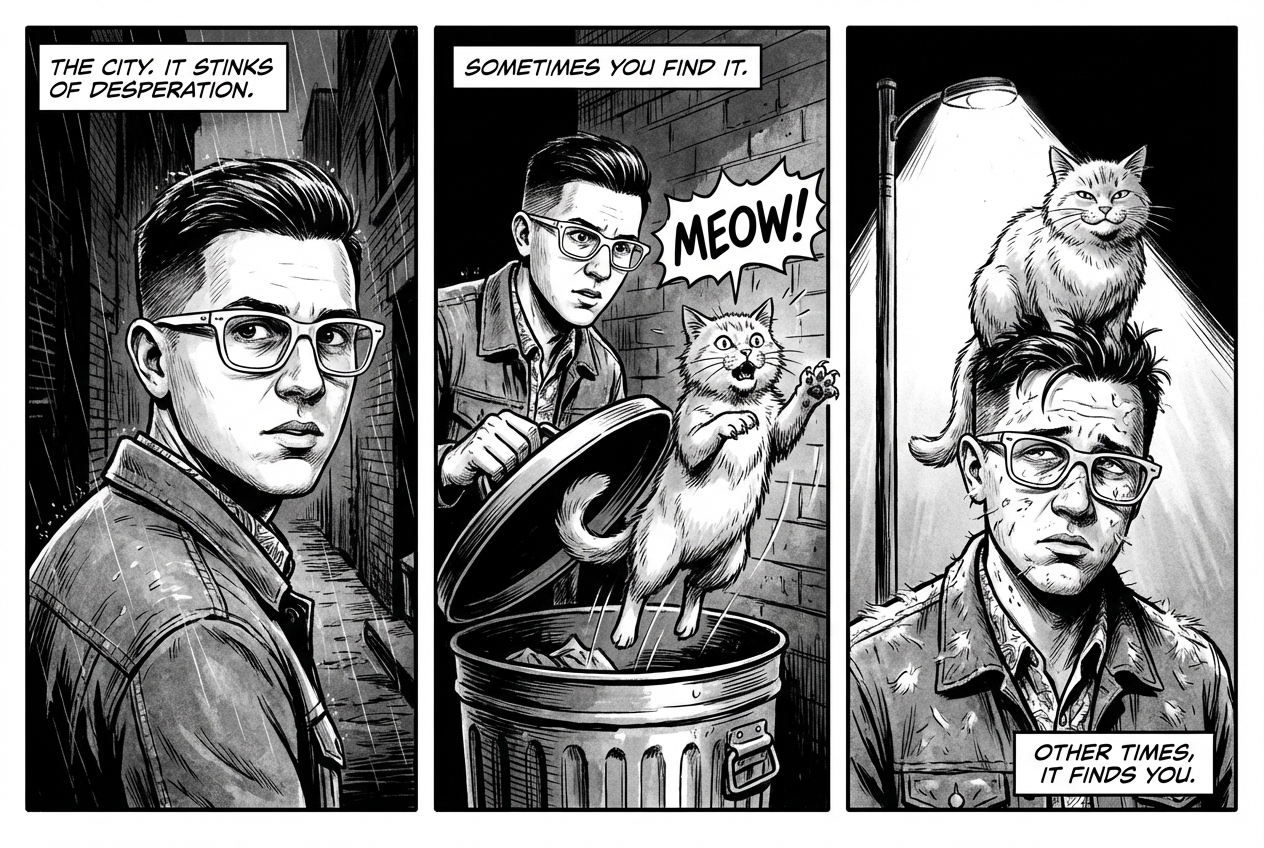
|
以 Google 搜尋建立基準
使用 Google 搜尋,根據近期或即時資訊生成圖片。 這項功能適用於新聞、天氣和其他時效性主題。
| 提示 | 生成的內容 |
|---|---|
| 製作昨晚阿森納在歐洲冠軍聯賽的賽事圖表,風格簡約但時尚 |
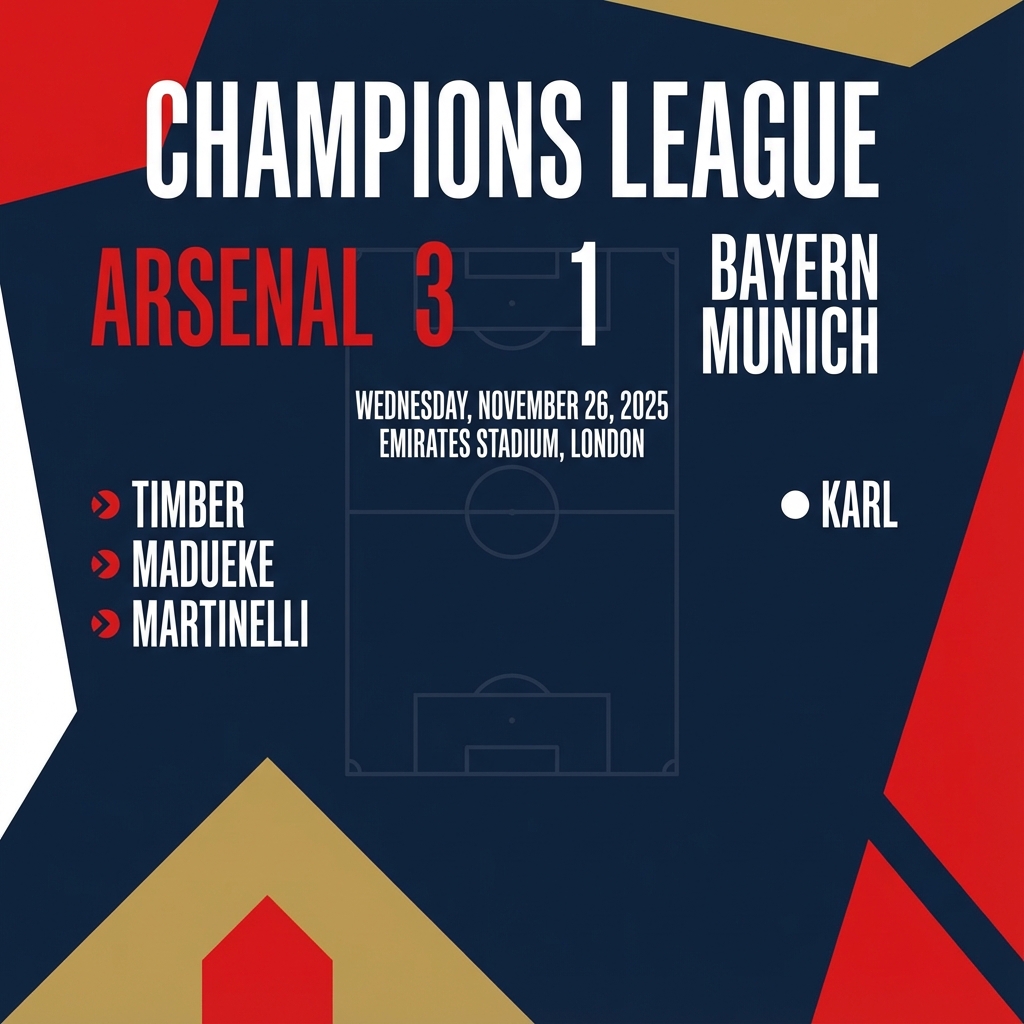
|
編輯圖片的提示
這些範例說明如何提供圖片和文字提示,以進行編輯、合成和風格轉移。
新增及移除元素
提供圖片並說明想做的變更。模型會與原始圖片的風格、光線和透視效果相符。
| 提示 | 生成的內容 |
|---|---|
|
輸入圖片: 
提示:請使用我提供的貓咪圖片,在貓咪頭上加上一頂小小的針織魔法師帽。讓寵物看起來舒適地坐著,並與相片的柔和光線相符。 |

|
塗改 (語意遮罩)
以對話方式定義「遮罩」,編輯圖像的特定部分,其餘部分則保持不變。
| 提示 | 生成的內容 |
|---|---|
|
輸入圖片: 
提示:使用提供的客廳圖片,只將藍色沙發換成復古的棕色皮革切斯特菲爾德沙發。保持房間其他部分不變,包括沙發上的枕頭和燈光。 |

|
風格轉換
提供圖片,要求模型以不同藝術風格重新創作內容。
| 提示 | 生成的內容 |
|---|---|
|
輸入圖片: 
提示:將提供的現代城市夜景相片,轉換成梵谷《星夜》的藝術風格。保留建築物和車輛的原始構圖,但以旋轉的厚塗筆觸和深藍色與亮黃色的戲劇性調色盤,呈現所有元素。 |
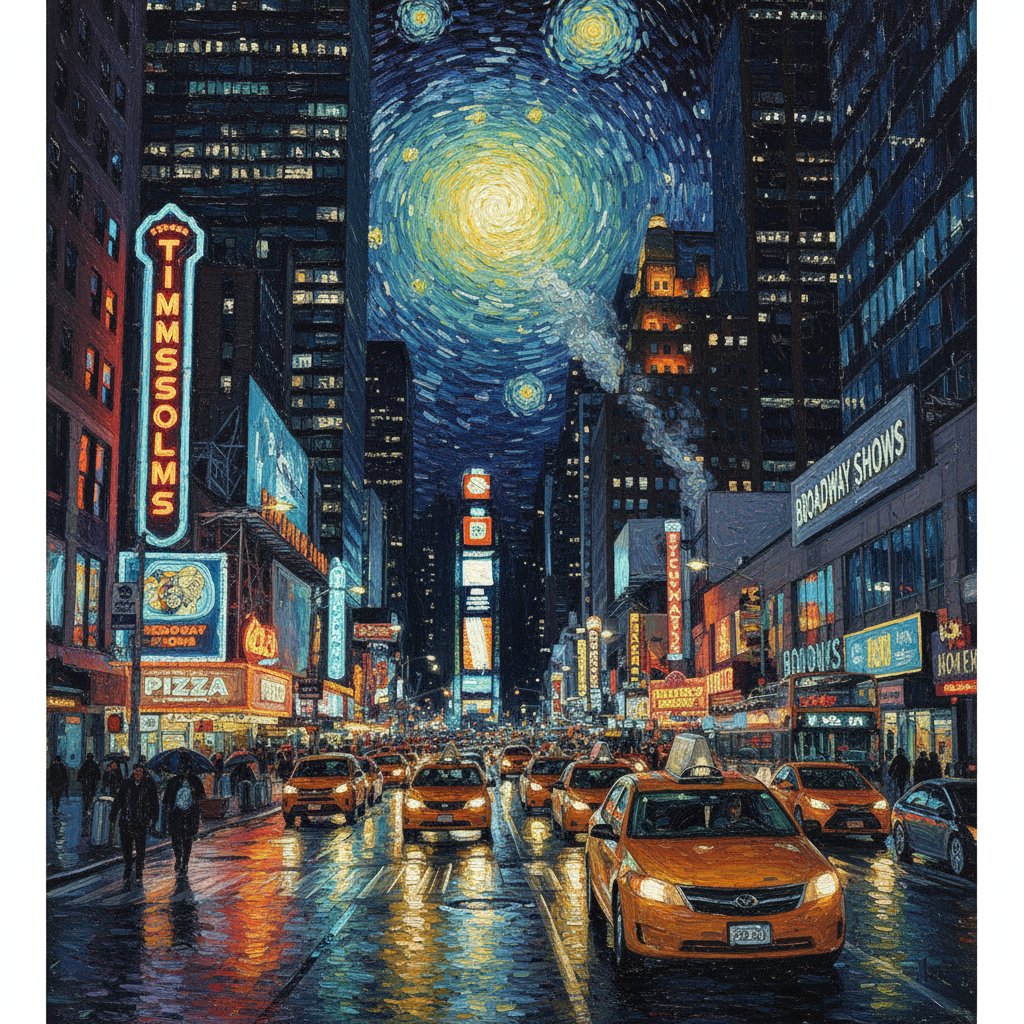
|
進階合成:合併多張圖片
提供多張圖片做為情境,建立新的複合場景。這項功能非常適合製作產品模型或創意拼貼。
| 提示 | 生成的內容 |
|---|---|
|
輸入圖片: 

提示:製作專業的電子商務時尚相片。將第一張圖片中的藍色花卉洋裝,套用在第二張圖片中的女性身上。生成一張寫實風格的全身照,圖中女子穿著這件洋裝,並根據戶外環境調整光線和陰影。 |
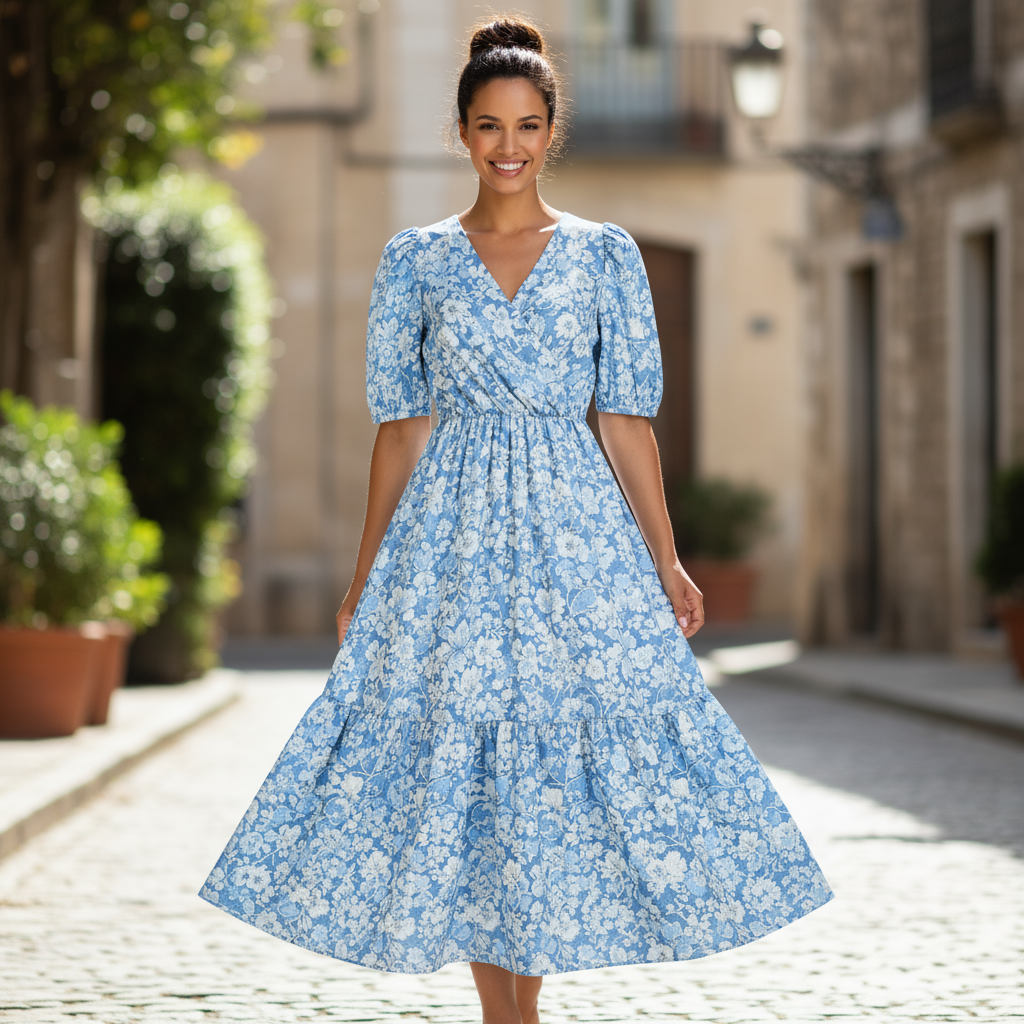
|
保留高保真細節
為確保編輯時保留重要細節 (例如臉部或標誌),請在編輯要求中詳細說明這些細節。
| 提示 | 生成的內容 |
|---|---|
|
輸入圖片: 

提示:以第一張圖片為基礎,生成一位棕髮、藍眼且表情中性的女性。將第二張圖片中的標誌加到她穿的黑色 T 恤上。務必保留該名女性的臉部和特徵。標誌應看起來像是自然印在布料上,並隨著襯衫的摺疊而彎曲。 |

|
讓某個事物活起來
上傳草圖或手繪圖,要求模型將其精修成完成的圖片。
| 提示 | 生成的內容 |
|---|---|
|
輸入圖片: 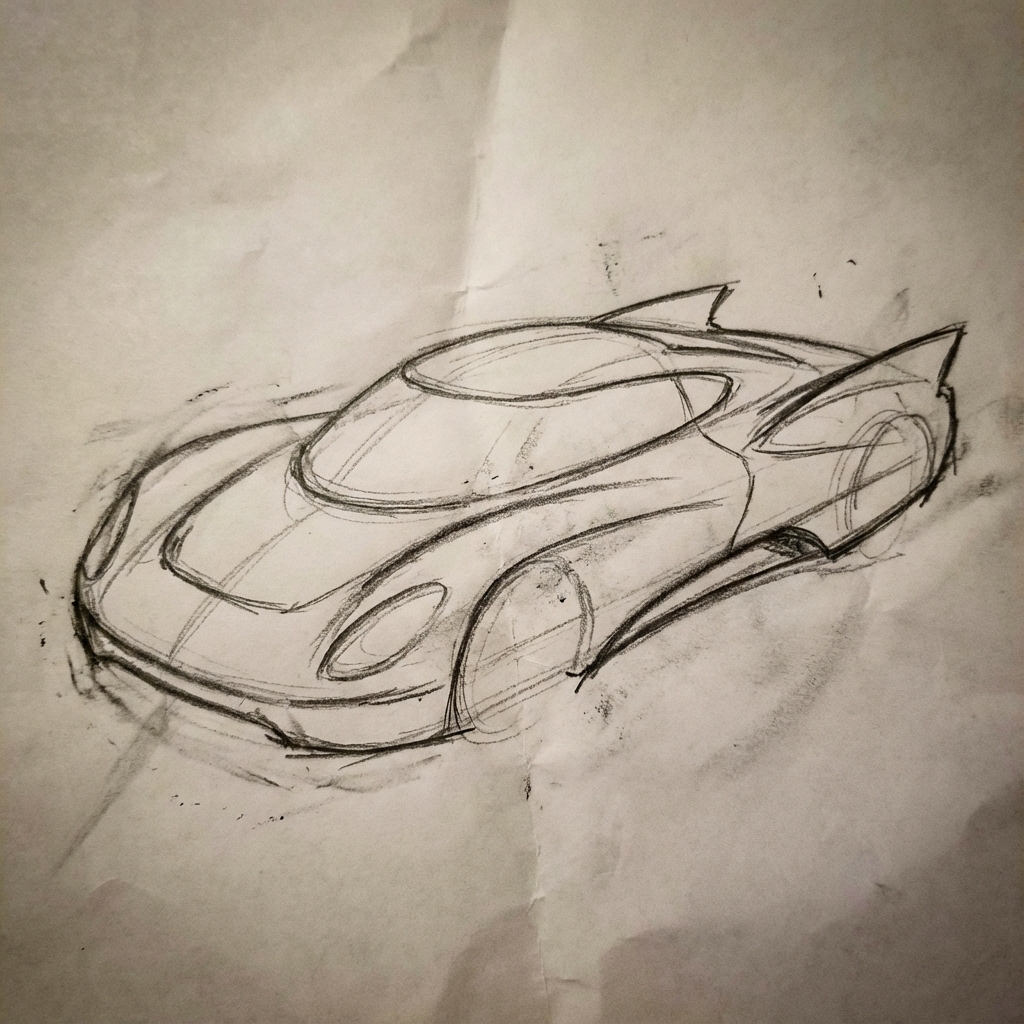
提示:將這張未來汽車的鉛筆草圖,變成展示間中概念車的精美照片。保留草圖中的俐落線條和低調外觀,但加入金屬藍色塗裝和霓虹燈環照明。 |
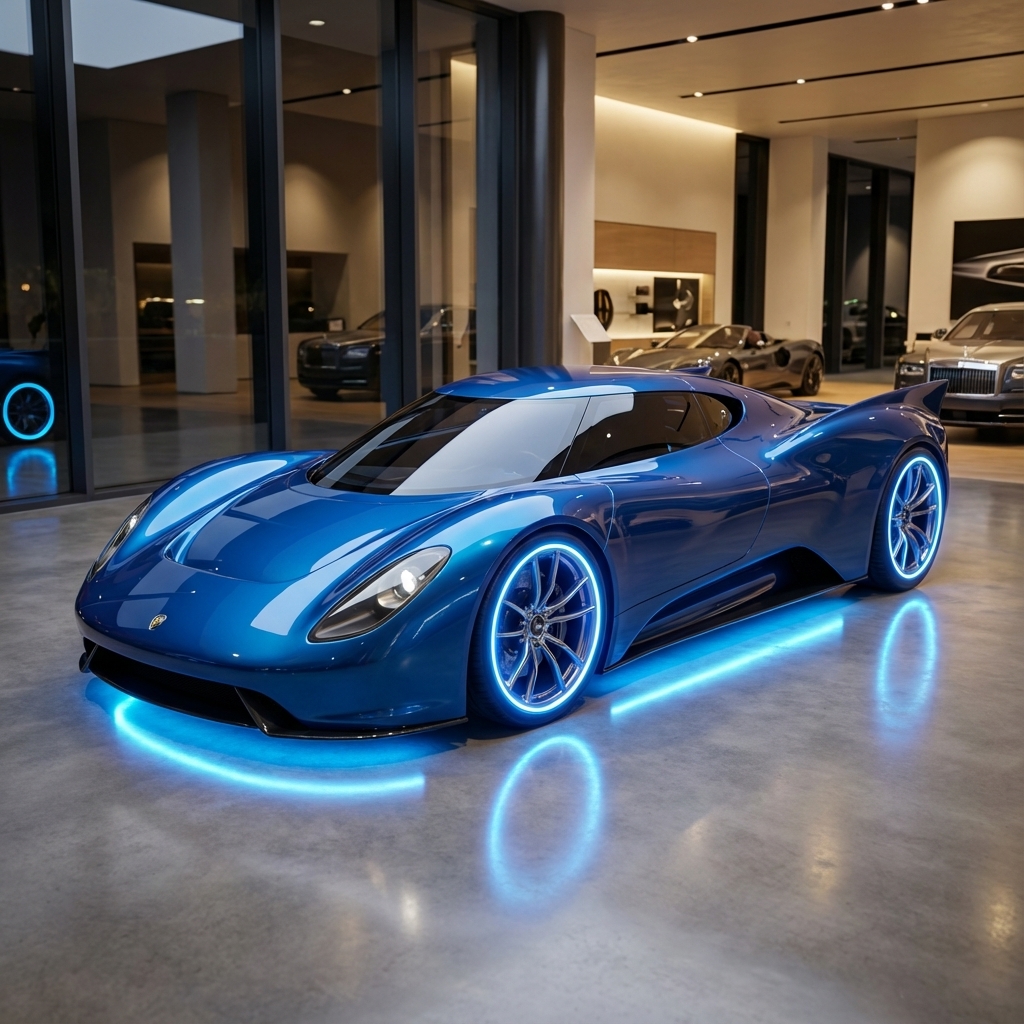
|
角色一致性:360 度全景
您可以透過不同角度的提示詞,反覆生成角色的 360 度檢視畫面。為獲得最佳效果,請在後續的提示中加入先前生成的圖片,以維持一致性。如要生成複雜姿勢,請附上所需姿勢的參考圖像。
| 提示 | 生成的內容 |
|---|---|
|
輸入圖片:
提示:這名男子在白色背景前拍攝的攝影棚肖像照,側臉朝右 |


|
最佳做法
如要讓結果從良好提升至優異,請在工作流程中納入這些專業策略。
- 盡量詳細說明:提供的細節越多,你對結果的掌控權就越大。請描述「奇幻盔甲」,例如「裝飾華麗的精靈板甲,刻有銀葉圖案,高領,肩甲形狀像獵鷹翅膀」。
- 提供背景資訊和意圖:說明圖片的用途。模型對背景資訊的理解程度會影響最終輸出內容。舉例來說,「為高檔簡約護膚品牌設計標誌」的結果會比「設計標誌」更好。
- 反覆測試及修正:別期望第一次就能生成完美的圖片。運用模型的對話功能進行小幅變更。接著輸入「很棒,但可以讓光線暖一點嗎?」或「維持所有設定,但將角色的表情改為更嚴肅。」等提示。
- 使用逐步指示:如果場景複雜且包含許多元素,請將提示分成多個步驟。「首先,請在黎明時分製作一片寧靜的霧林背景。接著,在前景中加入長滿青苔的古老石祭壇。最後,在祭壇上放置一把發光的劍。」
- 使用「語意負面提示詞」:不要說「沒有車」,而是正面描述想要的場景:「空蕩蕩的街道,沒有任何交通跡象」。
- 控制相機:使用攝影和電影語言控制構圖。例如
wide-angle shot、macro shot、low-angle perspective。
限制
- 為獲得最佳效能,請使用下列語言:英文、ar-EG、de-DE、es-MX、fr-FR、hi-IN、id-ID、it-IT、ja-JP、ko-KR、pt-BR、ru-RU、ua-UA、vi-VN、zh-CN。
- 圖像生成功能不支援音訊輸入內容。只有 Gemini 3.1 Flash Image 和 Gemini 3.1 Flash Lite Image 支援影片輸入。
- 模型不一定會輸出使用者明確要求的確切圖像數量。
gemini-2.5-flash-image最多可輸入 3 張圖片,gemini-3-pro-image則支援 5 張高保真度圖片,最多可輸入 14 張圖片。gemini-3.1-flash-image支援最多 4 個字元的相似度,以及單一工作流程中最多 10 個物件的保真度。- 為圖片生成文字時,建議先生成文字,然後要求提供含有該文字的圖片,這樣 Gemini 的效果最好。
gemini-3.1-flash-image目前,以 Google 搜尋強化事實基礎時,不支援使用網路搜尋中的人物真實圖像。- 所有生成的圖片都會加上 SynthID 浮水印。
選用設定
您可以在 generate_content 呼叫的 config 欄位中,視需要設定模型輸出內容的回應模式和長寬比。
輸出類型
模型預設會傳回文字和圖片回應 (即 response_modalities=['Text', 'Image'])。您可以設定回應只傳回圖片,不傳回文字,方法是使用 response_modalities=['Image']。
Python
response = client.models.generate_content(
    model="gemini-3.1-flash-image",
    contents=[prompt],
    config=types.GenerateContentConfig(
        response_modalities=['Image']
    )
)
JavaScript
const response = await ai.models.generateContent({
    model: "gemini-3.1-flash-image",
    contents: prompt,
    config: {
        responseModalities: ['Image']
    }
  });
Go
result, _ := client.Models.GenerateContent(
    ctx,
    "gemini-3.1-flash-image",
    genai.Text("Create a picture of a nano banana dish in a " +
                " fancy restaurant with a Gemini theme"),
    &genai.GenerateContentConfig{
        ResponseModalities: "Image",
    },
  )
Java
response = client.models.generateContent(
    "gemini-3.1-flash-image",
    prompt,
    GenerateContentConfig.builder()
        .responseModalities("IMAGE")
        .build());
C#
var response = await client.Models.GenerateContentAsync(
    model: "gemini-3.1-flash-image",
    contents: new List<Part> { new Part { Text = prompt } },
    config: new GenerateContentConfig
    {
        ResponseModalities = new List<string> { "IMAGE" }
    }
);
REST
curl -s -X POST \
  "https://generativelanguage.googleapis.com/v1/models/gemini-3.1-flash-image:generateContent" \
  -H "x-goog-api-key: $GEMINI_API_KEY" \
  -H "Content-Type: application/json" \
  -d '{
    "contents": [{
      "parts": [
        {"text": "Create a picture of a nano banana dish in a fancy restaurant with a Gemini theme"}
      ]
    }],
    "generationConfig": {
      "responseModalities": ["Image"]
    }
  }'
顯示比例和圖片大小
模型預設會將輸出圖片大小設為與輸入圖片相同,否則會生成 1:1 的正方形。您可以使用回應要求中 response_format 下方的 aspect_ratio 欄位,控制輸出圖片的顯示比例,如下所示:
Python
# For gemini-2.5-flash-image
response = client.models.generate_content(
    model="gemini-2.5-flash-image",
    contents=[prompt],
    config=types.GenerateContentConfig(
        response_format={"image": {aspect_ratio: "16:9",}}
    )
)

# For gemini-3.1-flash-image and gemini-3-pro-image
response = client.models.generate_content(
    model="gemini-3.1-flash-image",
    contents=[prompt],
    config=types.GenerateContentConfig(
        response_format={"image": {aspect_ratio: "16:9",                 image_size: "2K",}}
    )
)
JavaScript
// For gemini-2.5-flash-image
const response = await ai.models.generateContent({
    model: "gemini-2.5-flash-image",
    contents: prompt,
    config: {
      responseFormat: {
    image: {
        aspectRatio: "16:9",
      }
  },
    }
  });

// For gemini-3.1-flash-image and gemini-3-pro-image
const response_gemini3 = await ai.models.generateContent({
    model: "gemini-3.1-flash-image",
    contents: prompt,
    config: {
      responseFormat: {
    image: {
        aspectRatio: "16:9",
        imageSize: "2K",
      }
  },
    }
  });
Go
// For gemini-2.5-flash-image
result, _ := client.Models.GenerateContent(
    ctx,
    "gemini-2.5-flash-image",
    genai.Text("Create a picture of a nano banana dish in a " +
                " fancy restaurant with a Gemini theme"),
    &genai.GenerateContentConfig{
        ImageConfig: &genai.ImageConfig{
          AspectRatio: "16:9",
        },
    }
  )

// For gemini-3.1-flash-image and gemini-3-pro-image
result_gemini3, _ := client.Models.GenerateContent(
    ctx,
    "gemini-3.1-flash-image",
    genai.Text("Create a picture of a nano banana dish in a " +
                " fancy restaurant with a Gemini theme"),
    &genai.GenerateContentConfig{
        ImageConfig: &genai.ImageConfig{
          AspectRatio: "16:9",
          ImageSize: "2K",
        },
    }
  )
Java
// For gemini-2.5-flash-image
response = client.models.generateContent(
    "gemini-2.5-flash-image",
    prompt,
    GenerateContentConfig.builder()
        .imageConfig(ImageConfig.builder()
            .aspectRatio("16:9")
            .build())
        .build());

// For gemini-3.1-flash-image and gemini-3-pro-image
response_gemini3 = client.models.generateContent(
    "gemini-3.1-flash-image",
    prompt,
    GenerateContentConfig.builder()
        .imageConfig(ImageConfig.builder()
            .aspectRatio("16:9")
            .imageSize("2K")
            .build())
        .build());
C#
// For gemini-2.5-flash-image
var response = await client.Models.GenerateContentAsync(
    model: "gemini-2.5-flash-image",
    contents: new List<Part> { new Part { Text = prompt } },
    config: new GenerateContentConfig
    {
        ImageConfig = new ImageConfig
        {
            AspectRatio = "16:9"
        }
    }
);

// For gemini-3.1-flash-image and gemini-3-pro-image
var response_gemini3 = await client.Models.GenerateContentAsync(
    model: "gemini-3.1-flash-image",
    contents: new List<Part> { new Part { Text = prompt } },
    config: new GenerateContentConfig
    {
        ImageConfig = new ImageConfig
        {
            AspectRatio = "16:9",
            ImageSize = "2K"
        }
    }
);
REST
# For gemini-2.5-flash-image
curl -s -X POST \
  "https://generativelanguage.googleapis.com/v1/models/gemini-2.5-flash-image:generateContent" \
  -H "x-goog-api-key: $GEMINI_API_KEY" \
  -H 'Content-Type: application/json' \
  -d '{
    "contents": [{
      "parts": [
        {"text": "Create a picture of a nano banana dish in a fancy restaurant with a Gemini theme"}
      ]
    }],
    "generationConfig": {
      "responseFormat": {
    "image": {
        "aspectRatio": "16:9"
      }
  }
    }
  }'

# For gemini-3-pro-image
curl -s -X POST \
  "https://generativelanguage.googleapis.com/v1/models/gemini-3.1-flash-image:generateContent" \
  -H "x-goog-api-key: $GEMINI_API_KEY" \
  -H 'Content-Type: application/json' \
  -d '{
    "contents": [{
      "parts": [
        {"text": "Create a picture of a nano banana dish in a fancy restaurant with a Gemini theme"}
      ]
    }],
    "generationConfig": {
      "responseFormat": {
    "image": {
        "aspectRatio": "16:9",
        "imageSize": "2K"
      }
  }
    }
  }'
下表列出可用的不同比例和生成的圖片大小:
3.1 Flash Image
| 顯示比例 | 512 解析度 | 500 個詞元 | 1K 解析度 | 1,000 個符記 | 2K 解析度 | 2,000 個權杖 | 4K 解析度 | 4,000 個權杖 |
|---|---|---|---|---|---|---|---|---|
| 1:1 | 512x512 | 747 | 1024x1024 | 1120 | 2048 x 2048 | 1680 | 4096x4096 | 2520 |
| 1:4 | 256x1024 | 747 | 512x2048 | 1120 | 1024x4096 | 1680 | 2048x8192 | 2520 |
| 1:8 | 192x1536 | 747 | 384x3072 | 1120 | 768x6144 | 1680 | 1536x12288 | 2520 |
| 2:3 | 424x632 | 747 | 848x1264 | 1120 | 1696x2528 | 1680 | 3392x5056 | 2520 |
| 3:2 | 632x424 | 747 | 1264x848 | 1120 | 2528x1696 | 1680 | 5056x3392 | 2520 |
| 3:4 | 448x600 | 747 | 896x1200 | 1120 | 1792x2400 | 1680 | 3584x4800 | 2520 |
| 4:1 | 1024x256 | 747 | 2048x512 | 1120 | 4096x1024 | 1680 | 8192x2048 | 2520 |
| 4:3 | 600x448 | 747 | 1200x896 | 1120 | 2400x1792 | 1680 | 4800x3584 | 2520 |
| 4:5 | 464x576 | 747 | 928x1152 | 1120 | 1856x2304 | 1680 | 3712x4608 | 2520 |
| 5:4 | 576x464 | 747 | 1152x928 | 1120 | 2304x1856 | 1680 | 4608x3712 | 2520 |
| 8:1 | 1536x192 | 747 | 3072x384 | 1120 | 6144x768 | 1680 | 12288x1536 | 2520 |
| 9:16 | 384x688 | 747 | 768x1376 | 1120 | 1536x2752 | 1680 | 3072x5504 | 2520 |
| 16:9 | 688x384 | 747 | 1376x768 | 1120 | 2752x1536 | 1680 | 5504x3072 | 2520 |
| 21:9 | 792x168 | 747 | 1584x672 | 1120 | 3168x1344 | 1680 | 6336x2688 | 2520 |
3.1 Flash Lite 映像檔
| 顯示比例 | 512 解析度 | 500 個詞元 | 1K 解析度 | 1,000 個符記 |
|---|---|---|---|---|
| 1:1 | 512x512 | 747 | 1024x1024 | 1120 |
| 1:4 | 256x1024 | 747 | 512x2048 | 1120 |
| 1:8 | 192x1536 | 747 | 384x3072 | 1120 |
| 2:3 | 424x632 | 747 | 848x1264 | 1120 |
| 3:2 | 632x424 | 747 | 1264x848 | 1120 |
| 3:4 | 448x600 | 747 | 896x1200 | 1120 |
| 4:1 | 1024x256 | 747 | 2048x512 | 1120 |
| 4:3 | 600x448 | 747 | 1200x896 | 1120 |
| 4:5 | 464x576 | 747 | 928x1152 | 1120 |
| 5:4 | 576x464 | 747 | 1152x928 | 1120 |
| 8:1 | 1536x192 | 747 | 3072x384 | 1120 |
| 9:16 | 384x688 | 747 | 768x1376 | 1120 |
| 16:9 | 688x384 | 747 | 1376x768 | 1120 |
| 21:9 | 792x168 | 747 | 1584x672 | 1120 |
3.1 Pro Image
| 顯示比例 | 1K 解析度 | 1,000 個符記 | 2K 解析度 | 2,000 個權杖 | 4K 解析度 | 4,000 個權杖 |
|---|---|---|---|---|---|---|
| 1:1 | 1024x1024 | 1120 | 2048 x 2048 | 1120 | 4096x4096 | 2000 |
| 2:3 | 848x1264 | 1120 | 1696x2528 | 1120 | 3392x5056 | 2000 |
| 3:2 | 1264x848 | 1120 | 2528x1696 | 1120 | 5056x3392 | 2000 |
| 3:4 | 896x1200 | 1120 | 1792x2400 | 1120 | 3584x4800 | 2000 |
| 4:3 | 1200x896 | 1120 | 2400x1792 | 1120 | 4800x3584 | 2000 |
| 4:5 | 928x1152 | 1120 | 1856x2304 | 1120 | 3712x4608 | 2000 |
| 5:4 | 1152x928 | 1120 | 2304x1856 | 1120 | 4608x3712 | 2000 |
| 9:16 | 768x1376 | 1120 | 1536x2752 | 1120 | 3072x5504 | 2000 |
| 16:9 | 1376x768 | 1120 | 2752x1536 | 1120 | 5504x3072 | 2000 |
| 21:9 | 1584x672 | 1120 | 3168x1344 | 1120 | 6336x2688 | 2000 |
Gemini 2.5 Flash Image
| 顯示比例 | 解析度 | 詞元 |
|---|---|---|
| 1:1 | 1024x1024 | 1290 |
| 2:3 | 832x1248 | 1290 |
| 3:2 | 1248x832 | 1290 |
| 3:4 | 864x1184 | 1290 |
| 4:3 | 1184x864 | 1290 |
| 4:5 | 896x1152 | 1290 |
| 5:4 | 1152x896 | 1290 |
| 9:16 | 768x1344 | 1290 |
| 16:9 | 1344x768 | 1290 |
| 21:9 | 1536x672 | 1290 |
多種模型供您選擇
選擇最適合特定用途的模型。
Gemini 3.1 Flash Image (Nano Banana 2) 是圖像生成模型的首選,因為在效能、智慧、成本和延遲時間之間取得最佳平衡。詳情請參閱模型定價和功能頁面。
Gemini 3.1 Flash Lite Image (Nano Banana 2 Lite) 是圖像生成系列模型的效率專家,可提供超低延遲且經濟實惠的圖像生成和編輯功能。詳情請參閱模型定價和功能頁面。
Gemini 3 Pro Image (Nano Banana Pro) 專為專業資產製作和複雜指令而設計。這個模型會使用 Google 搜尋進行實況基礎作業,並預設「思考」程序,在生成圖像前先修正構圖,且能生成最高 4K 解析度的圖像。詳情請參閱模型定價和功能頁面。
Gemini 2.5 Flash Image (Nano Banana) 的設計宗旨是速度和效率。這個模型經過最佳化,可處理大量低延遲工作,並生成 1024 像素的圖片。詳情請參閱模型定價和功能頁面。
Imagen 的適用時機
除了使用 Gemini 內建的圖像生成功能,你也可以透過 Gemini API 存取專門的圖像生成模型 Imagen。請務必在關閉日期前完成遷移。