

জেমিনি অডিও ইনপুট বিশ্লেষণ করে লিখিত উত্তর তৈরি করতে পারে।
পাইথন
from google import genai
import base64

client = genai.Client()

uploaded_file = client.files.upload(file="path/to/sample.mp3")

interaction = client.interactions.create(
    model="gemini-3.6-flash",
    input=[
        {"type": "text", "text": "Describe this audio clip"},
        {
            "type": "audio",
            "uri": uploaded_file.uri,
            "mime_type": uploaded_file.mime_type
        }
    ]
)
print(interaction.output_text)
জাভাস্ক্রিপ্ট
import { GoogleGenAI } from "@google/genai";

const client = new GoogleGenAI({});

const uploadedFile = await client.files.upload({
    file: "path/to/sample.mp3",
    config: { mime_type: "audio/mp3" }
});

const interaction = await client.interactions.create({
    model: "gemini-3.6-flash",
    input: [
        {type: "text", text: "Describe this audio clip"},
        {
            type: "audio",
            uri: uploadedFile.uri,
            mime_type: uploadedFile.mimeType
        }
    ]
});
console.log(interaction.output_text);
বিশ্রাম
# First upload the file, then use the URI:
curl -X POST "https://generativelanguage.googleapis.com/v1beta/interactions" \
  -H "x-goog-api-key: $GEMINI_API_KEY" \
  -H 'Content-Type: application/json' \
  -d '{
    "model": "gemini-3.6-flash",
    "input": [
      {"type": "text", "text": "Describe this audio clip"},
      {
        "type": "audio",
        "uri": "YOUR_FILE_URI",
        "mime_type": "audio/mp3"
      }
    ]
  }'
সংক্ষিপ্ত বিবরণ
জেমিনি অডিও ইনপুট বিশ্লেষণ ও বুঝতে এবং টেক্সট প্রতিক্রিয়া তৈরি করতে পারে, যা নিম্নলিখিত ক্ষেত্রগুলিতে ব্যবহারের সুযোগ করে দেয়:
- অডিও বিষয়বস্তু সম্পর্কে বর্ণনা করুন, সারসংক্ষেপ করুন বা প্রশ্নের উত্তর দিন।
- প্রতিলিপি এবং অনুবাদ (বক্তৃতা থেকে পাঠ্য)
- বক্তা ডায়েরিতে অন্তর্ভুক্তি (বিভিন্ন বক্তাকে শনাক্ত করা)
- বক্তৃতা এবং সঙ্গীতে আবেগ সনাক্তকরণ
- টাইমস্ট্যাম্প ব্যবহার করে নির্দিষ্ট অংশ বিশ্লেষণ করা
রিয়েল-টাইম ভয়েস এবং ভিডিও ইন্টারঅ্যাকশনের জন্য, লাইভ এপিআই (Live API) দেখুন। রিয়েল-টাইম ট্রান্সক্রিপশন সমর্থনসহ বিশেষ স্পিচ-টু-টেক্সট মডেলের জন্য, গুগল ক্লাউড স্পিচ-টু-টেক্সট এপিআই (Google Cloud Speech-to-Text API ) ব্যবহার করুন।
বক্তৃতাকে টেক্সটে রূপান্তর করুন
এই উদাহরণটি দেখায় কিভাবে স্ট্রাকচার্ড আউটপুট ব্যবহার করে টাইমস্ট্যাম্প, স্পিকার ডায়ারাইজেশন এবং আবেগ শনাক্তকরণের মাধ্যমে বক্তৃতা প্রতিলিপি, অনুবাদ এবং সংক্ষিপ্ত করতে হয়।
পাইথন
from google import genai

client = genai.Client()

YOUTUBE_URL = "https://www.youtube.com/watch?v=ku-N-eS1lgM"

prompt = """
  Process the audio file and generate a detailed transcription.

  Requirements:
  1. Identify distinct speakers (e.g., Speaker 1, Speaker 2).
  2. Provide accurate timestamps for each segment (Format: MM:SS).
  3. Detect the primary language of each segment.
  4. If not English, provide the English translation.
  5. Identify the primary emotion: Happy, Sad, Angry, or Neutral.
  6. Provide a brief summary at the beginning.
"""

response_schema = {
    "type": "object",
    "properties": {
        "summary": {"type": "string"},
        "segments": {
            "type": "array",
            "items": {
                "type": "object",
                "properties": {
                    "speaker": {"type": "string"},
                    "timestamp": {"type": "string"},
                    "content": {"type": "string"},
                    "language": {"type": "string"},
                    "emotion": {
                        "type": "string",
                        "enum": ["happy", "sad", "angry", "neutral"]
                    }
                },
                "required": ["speaker", "timestamp", "content", "emotion"]
            }
        }
    },
    "required": ["summary", "segments"]
}

interaction = client.interactions.create(
    model="gemini-3.6-flash",
    input=[
        {"type": "video", "uri": YOUTUBE_URL, "mime_type": "video/mp4"},
        {"type": "text", "text": prompt}
    ],
    response_format=response_schema,
)

print(interaction.output_text)
জাভাস্ক্রিপ্ট
import { GoogleGenAI } from "@google/genai";

const client = new GoogleGenAI({});

const YOUTUBE_URL = "https://www.youtube.com/watch?v=ku-N-eS1lgM";

const prompt = `
  Process the audio file and generate a detailed transcription.

  Requirements:
  1. Identify distinct speakers (e.g., Speaker 1, Speaker 2).
  2. Provide accurate timestamps for each segment (Format: MM:SS).
  3. Detect the primary language of each segment.
  4. If not English, provide the English translation.
  5. Identify the primary emotion: Happy, Sad, Angry, or Neutral.
  6. Provide a brief summary at the beginning.
`;

const responseSchema = {
    type: "object",
    properties: {
        summary: { type: "string" },
        segments: {
            type: "array",
            items: {
                type: "object",
                properties: {
                    speaker: { type: "string" },
                    timestamp: { type: "string" },
                    content: { type: "string" },
                    language: { type: "string" },
                    emotion: {
                        type: "string",
                        enum: ["happy", "sad", "angry", "neutral"]
                    }
                },
                required: ["speaker", "timestamp", "content", "emotion"]
            }
        }
    },
    required: ["summary", "segments"]
};

const interaction = await client.interactions.create({
    model: "gemini-3.6-flash",
    input: [
        { type: "video", uri: YOUTUBE_URL, mime_type: "video/mp4" },
        { type: "text", text: prompt }
    ],
    response_format: responseSchema,
});

console.log(JSON.parse(interaction.output_text));
বিশ্রাম
curl -X POST "https://generativelanguage.googleapis.com/v1beta/interactions" \
  -H "x-goog-api-key: $GEMINI_API_KEY" \
  -H 'Content-Type: application/json' \
  -d '{
    "model": "gemini-3.6-flash",
    "input": [
      {
        "type": "video",
        "uri": "https://www.youtube.com/watch?v=ku-N-eS1lgM",
        "mime_type": "video/mp4"
      },
      {
        "type": "text",
        "text": "Transcribe with speaker diarization and emotion detection."
      }
    ],
    "response_format": {
        "type": "object",
        "properties": {
          "summary": {"type": "string"},
          "segments": {
            "type": "array",
            "items": {
              "type": "object",
              "properties": {
                "speaker": {"type": "string"},
                "timestamp": {"type": "string"},
                "content": {"type": "string"},
                "emotion": {"type": "string", "enum": ["happy", "sad", "angry", "neutral"]}
              }
            }
          }
        }
      }
  }'
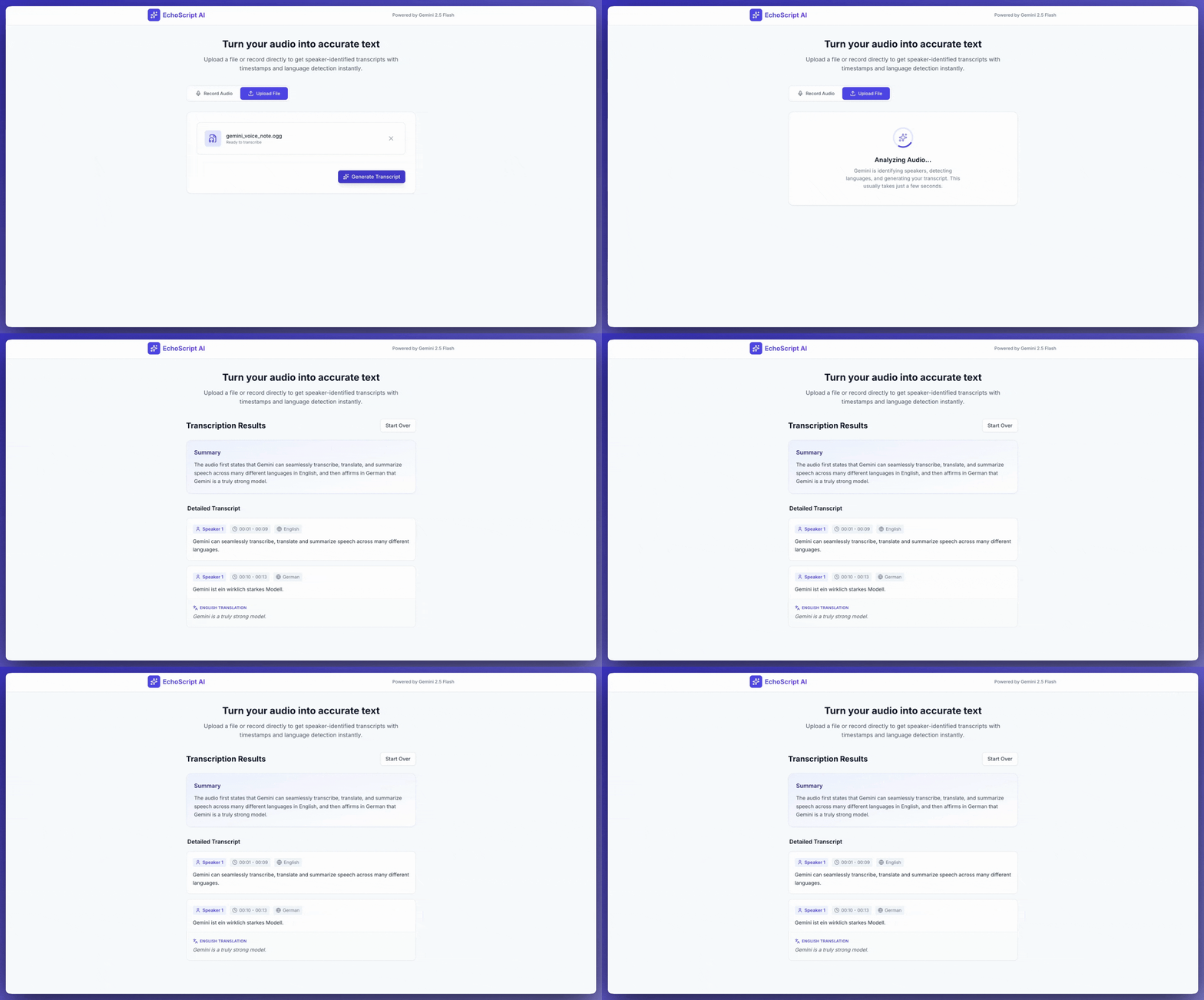
ইনপুট অডিও
আপনি নিম্নলিখিত উপায়ে অডিও ডেটা প্রদান করতে পারেন:
- অনুরোধ করার আগে একটি অডিও ফাইল আপলোড করুন ।
- অনুরোধের সাথে ইনলাইন অডিও ডেটা প্রেরণ করুন ।
একটি অডিও ফাইল আপলোড করুন
২০ মেগাবাইটের চেয়ে বড় ফাইলের জন্য ফাইলস এপিআই (Files API) ব্যবহার করুন।
পাইথন
from google import genai

client = genai.Client()

uploaded_file = client.files.upload(file="path/to/sample.mp3")

interaction = client.interactions.create(
    model="gemini-3.6-flash",
    input=[
        {"type": "text", "text": "Describe this audio clip"},
        {
            "type": "audio",
            "uri": uploaded_file.uri,
            "mime_type": uploaded_file.mime_type
        }
    ]
)
print(interaction.output_text)
জাভাস্ক্রিপ্ট
import { GoogleGenAI } from "@google/genai";

const client = new GoogleGenAI({});

const uploadedFile = await client.files.upload({
    file: "path/to/sample.mp3",
    config: { mimeType: "audio/mp3" }
});

const interaction = await client.interactions.create({
    model: "gemini-3.6-flash",
    input: [
        {type: "text", text: "Describe this audio clip"},
        {
            type: "audio",
            uri: uploadedFile.uri,
            mime_type: uploadedFile.mimeType
        }
    ]
});
console.log(interaction.output_text);
বিশ্রাম
# First upload the file using the Files API, then use the URI:
curl -X POST "https://generativelanguage.googleapis.com/v1beta/interactions" \
  -H "x-goog-api-key: $GEMINI_API_KEY" \
  -H 'Content-Type: application/json' \
  -d '{
    "model": "gemini-3.6-flash",
    "input": [
      {"type": "text", "text": "Describe this audio clip"},
      {
        "type": "audio",
        "uri": "YOUR_FILE_URI",
        "mime_type": "audio/mp3"
      }
    ]
  }'
অডিও ডেটা ইনলাইনে পাঠান
২০ মেগাবাইটের কম মোট অনুরোধ আকারের ছোট অডিও ফাইলগুলির জন্য:
পাইথন
from google import genai
import base64

client = genai.Client()

with open('path/to/small-sample.mp3', 'rb') as f:
    audio_bytes = f.read()

interaction = client.interactions.create(
    model="gemini-3.6-flash",
    input=[
        {"type": "text", "text": "Describe this audio clip"},
        {
            "type": "audio",
            "data": base64.b64encode(audio_bytes).decode('utf-8'),
            "mime_type": "audio/mp3"
        }
    ]
)
print(interaction.output_text)
জাভাস্ক্রিপ্ট
import { GoogleGenAI } from "@google/genai";
import * as fs from "node:fs";

const client = new GoogleGenAI({});

const audioData = fs.readFileSync("path/to/small-sample.mp3", {
    encoding: "base64"
});

const interaction = await client.interactions.create({
    model: "gemini-3.6-flash",
    input: [
        {type: "text", text: "Describe this audio clip"},
        {
            type: "audio",
            data: audioData,
            mime_type: "audio/mp3"
        }
    ]
});
console.log(interaction.output_text);
বিশ্রাম
AUDIO_PATH="path/to/sample.mp3"

if [[ "$(base64 --version 2>&1)" = *"FreeBSD"* ]]; then
  B64FLAGS="--input"
else
  B64FLAGS="-w0"
fi

curl -X POST "https://generativelanguage.googleapis.com/v1beta/interactions" \
  -H "x-goog-api-key: $GEMINI_API_KEY" \
  -H 'Content-Type: application/json' \
  -d '{
    "model": "gemini-3.6-flash",
    "input": [
      {"type": "text", "text": "Describe this audio clip"},
      {
        "type": "audio",
        "data": "'$(base64 $B64FLAGS $AUDIO_PATH)'",
        "mime_type": "audio/mp3"
      }
    ]
  }'
ইনলাইন অডিও ডেটা সংক্রান্ত নোট: * অনুরোধের সর্বোচ্চ আকার মোট ২০ এমবি (প্রম্পট এবং সমস্ত ফাইল সহ) * পুনঃব্যবহারের জন্য, ফাইলটি আপলোড করুন
একটি প্রতিলিপি পান
ট্রান্সক্রিপ্ট পেতে, প্রম্পটে এর জন্য অনুরোধ করুন:
পাইথন
interaction = client.interactions.create(
    model="gemini-3.6-flash",
    input=[
        {"type": "text", "text": "Generate a transcript of the speech."},
        {
            "type": "audio",
            "uri": uploaded_file.uri,
            "mime_type": uploaded_file.mime_type
        }
    ]
)
print(interaction.output_text)
জাভাস্ক্রিপ্ট
const interaction = await client.interactions.create({
    model: "gemini-3.6-flash",
    input: [
        { type: "text", text: "Generate a transcript of the speech." },
        {
            type: "audio",
            uri: uploadedFile.uri,
            mime_type: uploadedFile.mimeType
        }
    ]
});
console.log(interaction.output_text);
টাইমস্ট্যাম্পগুলি দেখুন
নির্দিষ্ট বিভাগ উল্লেখ করতে MM:SS বিন্যাস ব্যবহার করুন:
পাইথন
interaction = client.interactions.create(
    model="gemini-3.6-flash",
    input=[
        {"type": "text", "text": "Provide a transcript from 02:30 to 03:29."},
        {
            "type": "audio",
            "uri": uploaded_file.uri,
            "mime_type": uploaded_file.mime_type
        }
    ]
)
জাভাস্ক্রিপ্ট
const interaction = await client.interactions.create({
    model: "gemini-3.6-flash",
    input: [
        { type: "text", text: "Provide a transcript from 02:30 to 03:29." },
        { type: "audio", uri: uploadedFile.uri, mime_type: "audio/mp3" }
    ]
});
টোকেন গণনা করুন
একটি অডিও ফাইলে টোকেন গণনা করুন:
পাইথন
response = client.models.count_tokens(
    model="gemini-3.6-flash",
    contents=[uploaded_file]
)
print(response)
জাভাস্ক্রিপ্ট
const response = await client.models.countTokens({
    model: "gemini-3.6-flash",
    contents: [
        { fileData: { fileUri: uploadedFile.uri, mimeType: uploadedFile.mimeType } }
    ]
});
console.log(response.totalTokens);
সমর্থিত অডিও ফরম্যাট
- WAV -
audio/wav - MP3 -
audio/mp3 - AIFF -
audio/aiff - AAC -
audio/aac - OGG Vorbis -
audio/ogg - FLAC -
audio/flac
অডিও সম্পর্কে প্রযুক্তিগত বিবরণ
- টোকেন : প্রতি সেকেন্ড অডিওর জন্য ৩২টি টোকেন (১ মিনিট = ১,৯২০টি টোকেন)
- অবাচনিক শব্দ : মিথুন রাশি অবাচনিক শব্দ (পাখির গান, সাইরেন ইত্যাদি) বুঝতে পারে।
- প্রতিটি প্রম্পটের জন্য সর্বোচ্চ দৈর্ঘ্য : ৯.৫ ঘণ্টার অডিও
- রেজোলিউশন : ১৬ কেবিপিএস-এ ডাউনস্যাম্পল করা হয়েছে
- চ্যানেল : একাধিক চ্যানেলের অডিও একত্রিত করে একটি একক চ্যানেল তৈরি করা হয়েছে
এরপর কী?
- ফাইল এপিআই : অডিও ফাইল আপলোড এবং পরিচালনা করুন
- সিস্টেম নির্দেশাবলী : মডেলের আচরণ কাস্টমাইজ করুন
- কাঠামোগত আউটপুট : ট্রান্সক্রিপশনের ফলাফল JSON ফরম্যাটে পান