

Gemini API 提供執行程式碼工具,可讓模型生成及執行 Python 程式碼。模型接著會根據程式碼執行結果反覆試驗學習,直到生成最終輸出內容。您可以使用程式碼執行功能,建構根據程式碼進行推論的應用程式。舉例來說,您可以使用執行程式碼功能解方程式或處理文字。您也可以使用程式碼執行環境中包含的程式庫,執行更專業的工作。
Gemini 只能執行 Python 程式碼。您仍可要求 Gemini 以其他語言生成程式碼,但模型無法使用程式碼執行工具執行程式碼。
啟用程式碼執行功能
如要啟用執行程式碼功能,請在模型上設定程式碼執行工具。模型就能生成及執行程式碼。
Python
from google import genai

client = genai.Client()

interaction = client.interactions.create(
    model="gemini-3.5-flash",
    input="What is the sum of the first 50 prime numbers? "
          "Generate and run code for the calculation, and make sure you get all 50.",
    tools=[{"type": "code_execution"}]
)

for step in interaction.steps:
    if step.type == "model_output":
        for content_block in step.content:
            if content_block.type == "text":
                print(content_block.text)
    elif step.type == "code_execution_call":
        print(step.arguments.code)
    elif step.type == "code_execution_result":
        print(step.result)
JavaScript
import { GoogleGenAI } from "@google/genai";

const client = new GoogleGenAI({});

const interaction = await client.interactions.create({
    model: "gemini-3.5-flash",
    input: "What is the sum of the first 50 prime numbers? " +
           "Generate and run code for the calculation, and make sure you get all 50.",
    tools: [{ type: "code_execution" }]
});

for (const step of interaction.steps) {
    if (step.type === "model_output") {
        for (const contentBlock of step.content) {
            if (contentBlock.type === "text") {
                console.log(contentBlock.text);
            }
        }
    } else if (step.type === "code_execution_call") {
        console.log(step.arguments.code);
    } else if (step.type === "code_execution_result") {
        console.log(step.result);
    }
}
REST
curl -X POST "https://generativelanguage.googleapis.com/v1beta/interactions" \
-H "x-goog-api-key: $GEMINI_API_KEY" \
-H 'Content-Type: application/json' \
-d '{
    "model": "gemini-3.5-flash",
    "input": "What is the sum of the first 50 prime numbers? Generate and run code for the calculation, and make sure you get all 50.",
    "tools": [{"type": "code_execution"}]
}'
輸出內容可能如下所示,為了方便閱讀,我們已將其格式化:
Okay, I need to calculate the sum of the first 50 prime numbers. Here's how I'll
approach this:

1.  **Generate Prime Numbers:** I'll use an iterative method to find prime
    numbers. I'll start with 2 and check if each subsequent number is divisible
    by any number between 2 and its square root. If not, it's a prime.
2.  **Store Primes:** I'll store the prime numbers in a list until I have 50 of
    them.
3.  **Calculate the Sum:**  Finally, I'll sum the prime numbers in the list.

Here's the Python code to do this:

def is_prime(n):
  """Efficiently checks if a number is prime."""
  if n <= 1:
    return False
  if n <= 3:
    return True
  if n % 2 == 0 or n % 3 == 0:
    return False
  i = 5
  while i * i <= n:
    if n % i == 0 or n % (i + 2) == 0:
      return False
    i += 6
  return True

primes = []
num = 2
while len(primes) < 50:
  if is_prime(num):
    primes.append(num)
  num += 1

sum_of_primes = sum(primes)
print(f'{primes=}')
print(f'{sum_of_primes=}')

primes=[2, 3, 5, 7, 11, 13, 17, 19, 23, 29, 31, 37, 41, 43, 47, 53, 59, 61, 67,
71, 73, 79, 83, 89, 97, 101, 103, 107, 109, 113, 127, 131, 137, 139, 149, 151,
157, 163, 167, 173, 179, 181, 191, 193, 197, 199, 211, 223, 227, 229]
sum_of_primes=5117

The sum of the first 50 prime numbers is 5117.
這項輸出內容結合了模型在使用執行程式碼功能時傳回的幾個內容部分:
text:模型產生的內嵌文字code_execution_call:模型產生的程式碼,可供執行code_execution_result:可執行程式碼的結果
使用圖片執行程式碼 (Gemini 3)
Gemini 3 Flash 模型現在可以撰寫及執行 Python 程式碼,主動操控及檢查圖片。
用途
- 縮放及檢查:模型會隱含偵測細節是否過小 (例如讀取遠處的儀表),並編寫程式碼來裁剪及重新檢查該區域,以提高解析度。
- 視覺數學:模型可使用程式碼執行多步驟計算 (例如加總收據上的項目)。
- 圖片註解:模型可為圖片加上註解來回答問題,例如繪製箭頭來顯示關係。
啟用圖片的程式碼執行功能
Gemini 3 Flash 正式支援使用圖片執行程式碼。如要啟用這項行為,請同時啟用「程式碼執行」工具和「思考」功能。
Python
from google import genai
import requests
import base64
from PIL import Image
import io

image_path = "https://goo.gle/instrument-img"
image_bytes = requests.get(image_path).content

client = genai.Client()

interaction = client.interactions.create(
    model="gemini-3.5-flash",
    input=[
        {"type": "image", "data": base64.b64encode(image_bytes).decode('\utf-8'), "mime_type": "image/jpeg"},
        {"type": "text", "text": "Zoom into the expression pedals and tell me how many pedals are there?"}
    ],
    tools=[{"type": "code_execution"}]
)

for step in interaction.steps:
    if step.type == "model_output":
        for content_block in step.content:
            if content_block.type == "text":
                print(content_block.text)
            elif content_block.type == "image":
                display(Image.open(io.BytesIO(base64.b64decode(content_block.data))))
    elif step.type == "code_execution_call":
        print(step.arguments.code)
    elif step.type == "code_execution_result":
        print(step.result)
JavaScript
import { GoogleGenAI } from "@google/genai";

async function main() {
  const client = new GoogleGenAI({});

  const imageUrl = "https://goo.gle/instrument-img";
  const response = await fetch(imageUrl);
  const imageArrayBuffer = await response.arrayBuffer();
  const base64ImageData = Buffer.from(imageArrayBuffer).toString('base64');

  const interaction = await client.interactions.create({
    model: "gemini-3.5-flash",
    input: [
      {
        type: "image",
        data: base64ImageData,
        mime_type: "image/jpeg"
      },
      { type: "text", text: "Zoom into the expression pedals and tell me how many pedals are there?" }
    ],
    tools: [{ type: "code_execution" }]
  });

  for (const step of interaction.steps) {
    if (step.type === "model_output") {
      for (const contentBlock of step.content) {
        if (contentBlock.type === "text") {
          console.log("Text:", contentBlock.text);
        }
      }
    } else if (step.type === "code_execution_call") {
      console.log(`\nGenerated Code:\n`, step.arguments.code);
    } else if (step.type === "code_execution_result") {
      console.log(`\nExecution Output:\n`, step.result);
    }
  }
}

main();
REST
IMG_URL="https://goo.gle/instrument-img"
MODEL="gemini-3.5-flash"

MIME_TYPE=$(curl -sIL "$IMG_URL" | grep -i '^content-type:' | awk -F ': ' '{print $2}' | sed 's/\r$//' | head -n 1)
if [[ -z "$MIME_TYPE" || ! "$MIME_TYPE" == image/* ]]; then
  MIME_TYPE="image/jpeg"
fi

if [[ "$(uname)" == "Darwin" ]]; then
  IMAGE_B64=$(curl -sL "$IMG_URL" | base64 -b 0)
elif [[ "$(base64 --version 2>&1)" = *"FreeBSD"* ]]; then
  IMAGE_B64=$(curl -sL "$IMG_URL" | base64)
else
  IMAGE_B64=$(curl -sL "$IMG_URL" | base64 -w0)
fi

# Use jq to create the JSON payload to avoid "Argument list too long" error with large base64 strings
echo -n "$IMAGE_B64" > image_b64.txt
jq -n \
  --rawfile b64 image_b64.txt \
  --arg mime "$MIME_TYPE" \
  '{
    model: "gemini-3.5-flash",
    input: [
      {type: "image", data: $b64, mime_type: $mime},
      {type: "text", text: "Zoom into the expression pedals and tell me how many pedals are there?"}
    ],
    tools: [{type: "code_execution"}]
  }' > payload.json

curl -X POST "https://generativelanguage.googleapis.com/v1beta/interactions" \
    -H "x-goog-api-key: $GEMINI_API_KEY" \
    -H 'Content-Type: application/json' \
    -d @payload.json
在多輪互動中使用程式碼執行功能
您也可以在多輪對話中使用 previous_interaction_id 執行程式碼。
Python
from google import genai

client = genai.Client()

interaction1 = client.interactions.create(
    model="gemini-3.5-flash",
    input="I have a math question for you.",
    tools=[{"type": "code_execution"}]
)
print(interaction1.output_text)

interaction2 = client.interactions.create(
    model="gemini-3.5-flash",
    previous_interaction_id=interaction1.id,
    input="What is the sum of the first 50 prime numbers? "
          "Generate and run code for the calculation, and make sure you get all 50.",
    tools=[{"type": "code_execution"}]
)

for step in interaction2.steps:
    if step.type == "model_output":
        for content_block in step.content:
            if content_block.type == "text":
                print(content_block.text)
    elif step.type == "code_execution_call":
        print(step.arguments.code)
    elif step.type == "code_execution_result":
        print(step.result)
JavaScript
import { GoogleGenAI } from "@google/genai";

const client = new GoogleGenAI({});

const interaction1 = await client.interactions.create({
    model: "gemini-3.5-flash",
    input: "I have a math question for you.",
    tools: [{ type: "code_execution" }]
});
console.log(interaction1.output_text);

const interaction2 = await client.interactions.create({
    model: "gemini-3.5-flash",
    previous_interaction_id: interaction1.id,
    input: "What is the sum of the first 50 prime numbers? " +
           "Generate and run code for the calculation, and make sure you get all 50.",
    tools: [{ type: "code_execution" }]
});

for (const step of interaction2.steps) {
    if (step.type === "model_output") {
        for (const contentBlock of step.content) {
            if (contentBlock.type === "text") {
                console.log(contentBlock.text);
            }
        }
    } else if (step.type === "code_execution_call") {
        console.log(step.arguments.code);
    } else if (step.type === "code_execution_result") {
        console.log(step.result);
    }
}
REST
# First turn
RESPONSE1=$(curl -s -X POST "https://generativelanguage.googleapis.com/v1beta/interactions" \
-H "x-goog-api-key: $GEMINI_API_KEY" \
-H 'Content-Type: application/json' \
-d '{
    "model": "gemini-3.5-flash",
    "input": "I have a math question for you.",
    "tools": [{"type": "code_execution"}]
}')

INTERACTION_ID=$(echo $RESPONSE1 | jq -r '.id')

# Second turn with previous_interaction_id
curl -X POST "https://generativelanguage.googleapis.com/v1beta/interactions" \
-H "x-goog-api-key: $GEMINI_API_KEY" \
-H 'Content-Type: application/json' \
-d '{
    "model": "gemini-3.5-flash",
    "previous_interaction_id": "'"$INTERACTION_ID"'",
    "input": "What is the sum of the first 50 prime numbers? Generate and run code for the calculation, and make sure you get all 50.",
    "tools": [{"type": "code_execution"}]
}'
輸入/輸出 (I/O)
自 Gemini 2.0 Flash 起,程式碼執行功能支援檔案輸入和圖表輸出。有了這些輸入和輸出功能,您就能上傳 CSV 和文字檔、詢問檔案相關問題,並讓系統在回覆中生成 Matplotlib 圖表。輸出檔案會以內嵌圖片的形式傳回。
I/O 價格
使用執行程式碼 I/O 時,系統會根據輸入權杖和輸出權杖向您收費:
輸入內容詞元:
- 使用者提示詞
輸出內容詞元:
- 模型生成的程式碼
- 程式碼環境中的程式碼執行輸出內容
- 思考詞元
- 模型生成的摘要
I/O 詳細資料
使用程式碼執行 I/O 時,請注意下列技術細節:
- 程式碼環境的執行時間上限為 30 秒。
- 如果程式碼環境產生錯誤,模型可能會決定重新生成程式碼輸出內容。最多可重複 5 次。
- 檔案輸入大小上限取決於模型權杖視窗。如果上傳的檔案超過模型的脈絡視窗上限,API 會傳回錯誤。
- 執行程式碼功能最適合搭配文字和 CSV 檔案使用。
- 輸入檔案可以內嵌資料形式傳遞,也可以使用 Files API 上傳,輸出檔案一律以內嵌資料形式傳回。
帳單
啟用 Gemini API 的程式碼執行功能無須額外付費。 系統會根據您使用的 Gemini 模型,以目前的輸入和輸出權杖費率計費。
以下是程式碼執行計費的其他注意事項:
- 系統只會針對傳送至模型的輸入權杖向您收費一次,並針對模型傳回的最終輸出權杖向您收費。
- 代表生成程式碼的權杖會計為輸出權杖。生成的程式碼可能包含文字和圖片等多模態輸出內容。
- 執行程式碼的結果也會計為輸出權杖。
計費模式如下圖所示:
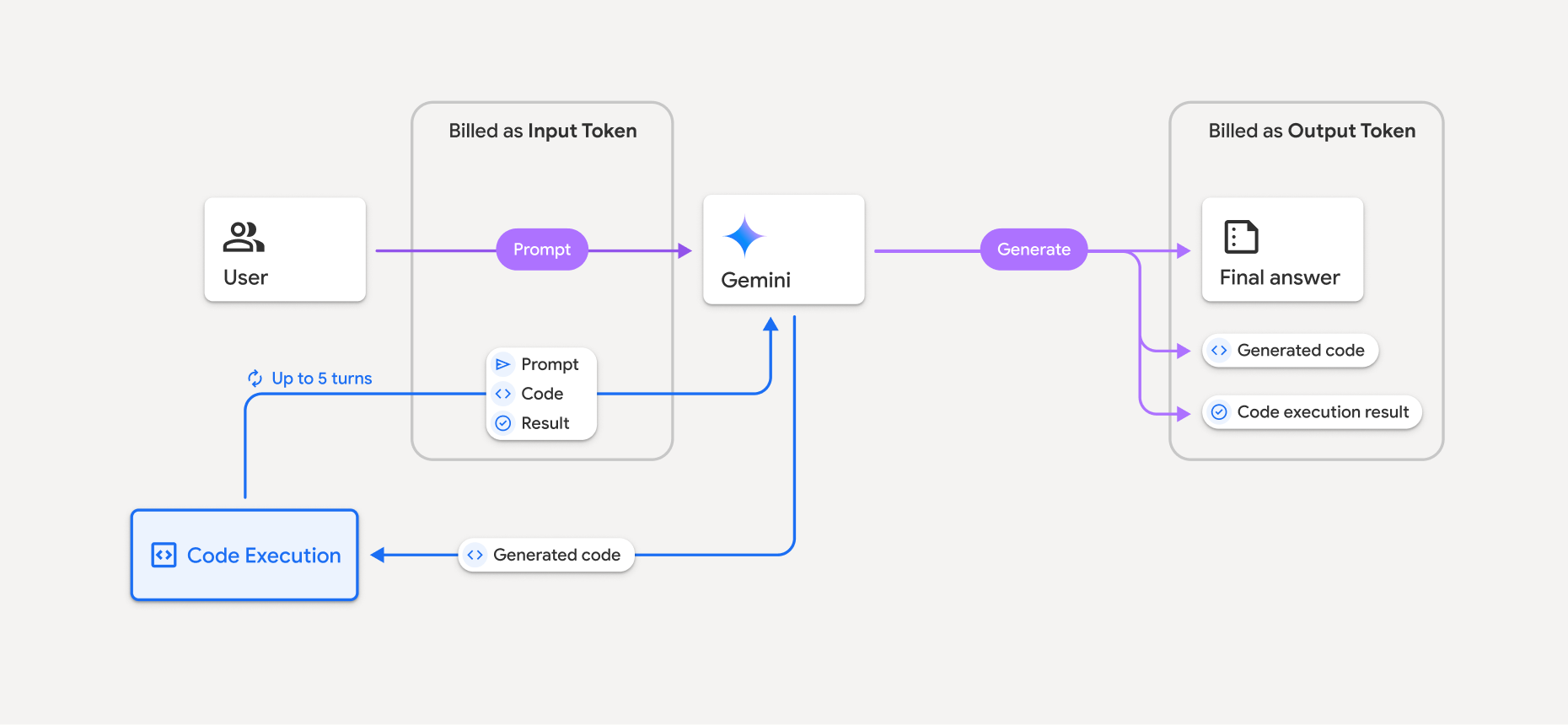
- 系統會根據您使用的 Gemini 模型,以目前的輸入和輸出權杖費率計費。
- 如果 Gemini 在生成回覆時執行程式碼,系統會將原始提示、生成的程式碼和執行的程式碼結果標示為中間權杖,並以輸入權杖計費。
- 接著生成摘要,並傳回生成的程式碼、執行程式碼的結果,以及最終摘要。這些會以輸出權杖計費。
- Gemini API 會在 API 回應中提供中繼權杖計數,讓您瞭解為何會收到超出初始提示的額外輸入權杖。
限制
- 模型只能生成及執行程式碼,無法傳回其他構件,例如媒體檔案。
- 在某些情況下,啟用執行程式碼功能可能會導致模型輸出內容的其他部分出現迴歸現象 (例如撰寫故事)。
- 不同模型成功執行程式碼的能力有所差異。
支援的工具組合
執行程式碼工具可與以 Google 搜尋強化事實基礎搭配使用,以支援更複雜的應用情境。
Gemini 3 模型支援結合內建工具 (例如程式碼執行) 和自訂工具 (函式呼叫)。
支援的程式庫
程式碼執行環境包含下列程式庫:
- attrs
- 棋子
- contourpy
- fpdf
- geopandas
- imageio
- jinja2
- joblib
- jsonschema
- jsonschema-specifications
- lxml
- matplotlib
- mpmath
- numpy
- opencv-python
- openpyxl
- 包裝
- pandas
- pillow
- protobuf
- pylatex
- pyparsing
- PyPDF2
- python-dateutil
- python-docx
- python-pptx
- reportlab
- scikit-learn
- scipy
- seaborn
- 六
- striprtf
- sympy
- tabulate
- TensorFlow
- toolz
- xlrd
無法安裝自己的程式庫。
後續步驟
- 試試
- 瞭解其他 Gemini API 工具: