

फ़ंक्शन कॉलिंग की सुविधा की मदद से, मॉडल को बाहरी टूल और एपीआई से कनेक्ट किया जा सकता है. टेक्स्ट वाले जवाब जनरेट करने के बजाय, मॉडल यह तय करता है कि कब किसी फ़ंक्शन को कॉल करना है. साथ ही, असल दुनिया में होने वाली कार्रवाइयों को पूरा करने के लिए ज़रूरी पैरामीटर उपलब्ध कराता है. इससे मॉडल, नैचुरल लैंग्वेज और असल दुनिया की कार्रवाइयों और डेटा के बीच एक पुल की तरह काम कर पाता है. फ़ंक्शन कॉलिंग का इस्तेमाल इन तीन मुख्य कामों के लिए किया जाता है:
- कार्रवाइयां करना: एपीआई का इस्तेमाल करके बाहरी सिस्टम के साथ इंटरैक्ट करना. जैसे, अपॉइंटमेंट शेड्यूल करना, इनवॉइस बनाना, ईमेल भेजना या स्मार्ट होम डिवाइसों को कंट्रोल करना.
- जानकारी को बेहतर बनाना: डेटाबेस, एपीआई, और नॉलेज बेस जैसे बाहरी सोर्स से जानकारी ऐक्सेस करना.
- ज़्यादा सुविधाएं: कैलकुलेशन करने और मॉडल की सीमाओं को बढ़ाने के लिए, बाहरी टूल का इस्तेमाल करें. जैसे, कैलकुलेटर का इस्तेमाल करना या चार्ट बनाना.
इस्तेमाल के इन उदाहरणों को यहां देखा जा सकता है:
मीटिंग शेड्यूल करें
इस उदाहरण में, एक ऐसा फ़ंक्शन बनाने का तरीका दिखाया गया है जो किसी खास समय पर मीटिंग शेड्यूल करता है. इससे मॉडल को उपयोगकर्ता के अनुरोधों को पार्स करने और बाहरी सिस्टम में कार्रवाइयां ट्रिगर करने के लिए, स्ट्रक्चर्ड आर्ग्युमेंट वापस भेजने की अनुमति मिलती है.
Python
from google import genai

schedule_meeting_function = {
    "type": "function",
    "name": "schedule_meeting",
    "description": "Schedules a meeting with specified attendees at a given time and date.",
    "parameters": {
        "type": "object",
        "properties": {
            "attendees": {"type": "array", "items": {"type": "string"}},
            "date": {"type": "string", "description": "Date (e.g., '2024-07-29')"},
            "time": {"type": "string", "description": "Time (e.g., '15:00')"},
            "topic": {"type": "string", "description": "The meeting topic."},
        },
        "required": ["attendees", "date", "time", "topic"],
    },
}

client = genai.Client()

interaction = client.interactions.create(
    model="gemini-3.6-flash",
    input="Schedule a meeting with Bob and Alice for 03/14/2025 at 10:00 AM about Q3 planning.",
    tools=[{"type": "function", **schedule_meeting_function}],
)

for step in interaction.steps:
    if step.type == "function_call":
        print(f"Function to call: {step.name}")
        print(f"Arguments: {step.arguments}")
JavaScript
import { GoogleGenAI } from '@google/genai';

const client = new GoogleGenAI({});

const scheduleMeetingFunction = {
  type: 'function',
  name: 'schedule_meeting',
  description: 'Schedules a meeting with specified attendees at a given time and date.',
  parameters: {
    type: 'object',
    properties: {
      attendees: { type: 'array', items: { type: 'string' } },
      date: { type: 'string', description: 'Date (e.g., "2024-07-29")' },
      time: { type: 'string', description: 'Time (e.g., "15:00")' },
      topic: { type: 'string', description: 'The meeting topic.' },
    },
    required: ['attendees', 'date', 'time', 'topic'],
  },
};

const interaction = await client.interactions.create({
  model: 'gemini-3.6-flash',
  input: 'Schedule a meeting with Bob and Alice for 03/27/2025 at 10:00 AM about Q3 planning.',
  tools: [scheduleMeetingFunction],
});

for (const step of interaction.steps) {
  if (step.type === 'function_call') {
    console.log(`Function to call: ${step.name}`);
    console.log(`Arguments: ${JSON.stringify(step.arguments)}`);
  }
}
REST
curl -X POST "https://generativelanguage.googleapis.com/v1beta/interactions" \
  -H "x-goog-api-key: $GEMINI_API_KEY" \
  -H 'Content-Type: application/json' \
  -d '{
    "model": "gemini-3.6-flash",
    "input": "Schedule a meeting with Bob and Alice for 03/27/2025 at 10:00 AM about Q3 planning.",
    "tools": [{
        "type": "function",
        "name": "schedule_meeting",
        "description": "Schedules a meeting with specified attendees at a given time and date.",
        "parameters": {
          "type": "object",
          "properties": {
            "attendees": {"type": "array", "items": {"type": "string"}},
            "date": {"type": "string"},
            "time": {"type": "string"},
            "topic": {"type": "string"}
          },
          "required": ["attendees", "date", "time", "topic"]
        }
    }]
  }'
मौसम की जानकारी
इस उदाहरण में, किसी जगह के तापमान का डेटा पाने वाले फ़ंक्शन को तय करने का तरीका बताया गया है. इससे मॉडल, उन सवालों के जवाब देने के लिए बाहरी एपीआई को कॉल कर सकता है जिनके लिए रीयल-टाइम या बाहरी जानकारी की ज़रूरत होती है.
Python
from google import genai

weather_function = {
    "type": "function",
    "name": "get_current_temperature",
    "description": "Gets the current temperature for a given location.",
    "parameters": {
        "type": "object",
        "properties": {
            "location": {
                "type": "string",
                "description": "The city name, e.g. San Francisco",
            },
        },
        "required": ["location"],
    },
}

client = genai.Client()

interaction = client.interactions.create(
    model="gemini-3.6-flash",
    input="What's the temperature in London?",
    tools=[weather_function],
)

for step in interaction.steps:
    if step.type == "function_call":
        print(f"Function to call: {step.name}")
        print(f"Arguments: {step.arguments}")
JavaScript
import { GoogleGenAI } from '@google/genai';

const client = new GoogleGenAI({});

const weatherFunctionDeclaration = {
  type: 'function',
  name: 'get_current_temperature',
  description: 'Gets the current temperature for a given location.',
  parameters: {
    type: 'object',
    properties: {
      location: {
        type: 'string',
        description: 'The city name, e.g. San Francisco',
      },
    },
    required: ['location'],
  },
};

const interaction = await client.interactions.create({
  model: 'gemini-3.6-flash',
  input: "What's the temperature in London?",
  tools: [weatherFunctionDeclaration],
});

for (const step of interaction.steps) {
  if (step.type === 'function_call') {
    console.log(`Function to call: ${step.name}`);
    console.log(`Arguments: ${JSON.stringify(step.arguments)}`);
  }
}
REST
curl -X POST "https://generativelanguage.googleapis.com/v1beta/interactions" \
  -H "x-goog-api-key: $GEMINI_API_KEY" \
  -H 'Content-Type: application/json' \
  -d '{
    "model": "gemini-3.6-flash",
    "input": "What'\''s the temperature in London?",
    "tools": [{
      "type": "function",
      "name": "get_current_temperature",
      "description": "Gets the current temperature for a given location.",
      "parameters": {
        "type";: "object",
        "properties": {
          "location": {"type": "string", "description": "The city name"}
        },
        "required": ["location"]
      }
    }]
  }'
चार्ट बनाएं
इस उदाहरण में, स्ट्रक्चर्ड डेटा से बार चार्ट जनरेट करने वाले फ़ंक्शन को तय करने का तरीका बताया गया है. इससे पता चलता है कि मॉडल, कैलकुलेशन करने या विज़ुअल ऐसेट बनाने के लिए बाहरी टूल का इस्तेमाल कैसे कर सकता है:
Python
from google import genai

create_chart_function = {
    "type": "function",
    "name": "create_bar_chart",
    "description": "Creates a bar chart given a title, labels, and values.",
    "parameters": {
        "type": "object",
        "properties": {
            "title": {"type": "string", "description": "The title for the chart."},
            "labels": {"type": "array", "items": {"type": "string"}},
            "values": {"type": "array", "items": {"type": "number"}},
        },
        "required": ["title", "labels", "values"],
    },
}

client = genai.Client()

interaction = client.interactions.create(
    model=";gemini-3.6-flash",
    input="Create a bar chart titled 'Quarterly Sales' with Q1: 50000, Q2: 75000, Q3: 60000.",
    tools=[create_chart_function],
)

for step in interaction.steps:
    if step.type == "function_call":
        print(f"Function to call: {step.name}")
        print(f"Arguments: {step.arguments}")
JavaScript
import { GoogleGenAI } from '@google/genai';

const client = new GoogleGenAI({});

const createChartFunctionDeclaration = {
  type: 'function',
  name: 'create_bar_chart',
  description: 'Creates a bar chart given a title, labels, and values.',
  parameters: {
    type: 'object',
    properties: {
      title: { type: 'string', description: 'The title for the chart.' },
      labels: { type: 'array', items: { type: 'string' } },
      values: { type: 'array', items: { type: 'number' } },
    },
    required: ['title', 'labels', 'values'],
  },
};

const interaction = await client.interactions.create({
  model: 'gemini-3.6-flash',
  input: "Create a bar chart titled 'Quarterly Sales' with Q1: 50000, Q2: 75000, Q3: 60000.",
  tools: [createChartFunctionDeclaration],
});

for (const step of interaction.steps) {
  if (step.type === 'function_call') {
    console.log(`${step.name}(${JSON.stringify(step.arguments)})`);
  }
}
REST
curl -X POST "https://generativelanguage.googleapis.com/v1beta/interactions" \
  -H "x-goog-api-key: $GEMINI_API_KEY" \
  -H 'Content-Type: application/json' \
  -d '{
    "model": "gemini-3.6-flash",
    "input": "Create a bar chart titled '\''Quarterly Sales'\'' with Q1: 50000, Q2: 75000, Q3: 60000.",
    "tools": [{
        "type": "function",
        "name": "create_bar_chart",
        "description": "Creates a bar chart given a title, labels, and values.",
        "parameters": {
          "type": "object",
          "properties": {
            "title": {"type": "string"},
            "labels": {"type": "array", "items": {"type": "string"}},
            "values": {"type": "array", "items": {"type": "number"}}
          },
          "required": ["title", "labels", "values"]
        }
    }]
  }'
फ़ंक्शन कॉलिंग की सुविधा कैसे काम करती है
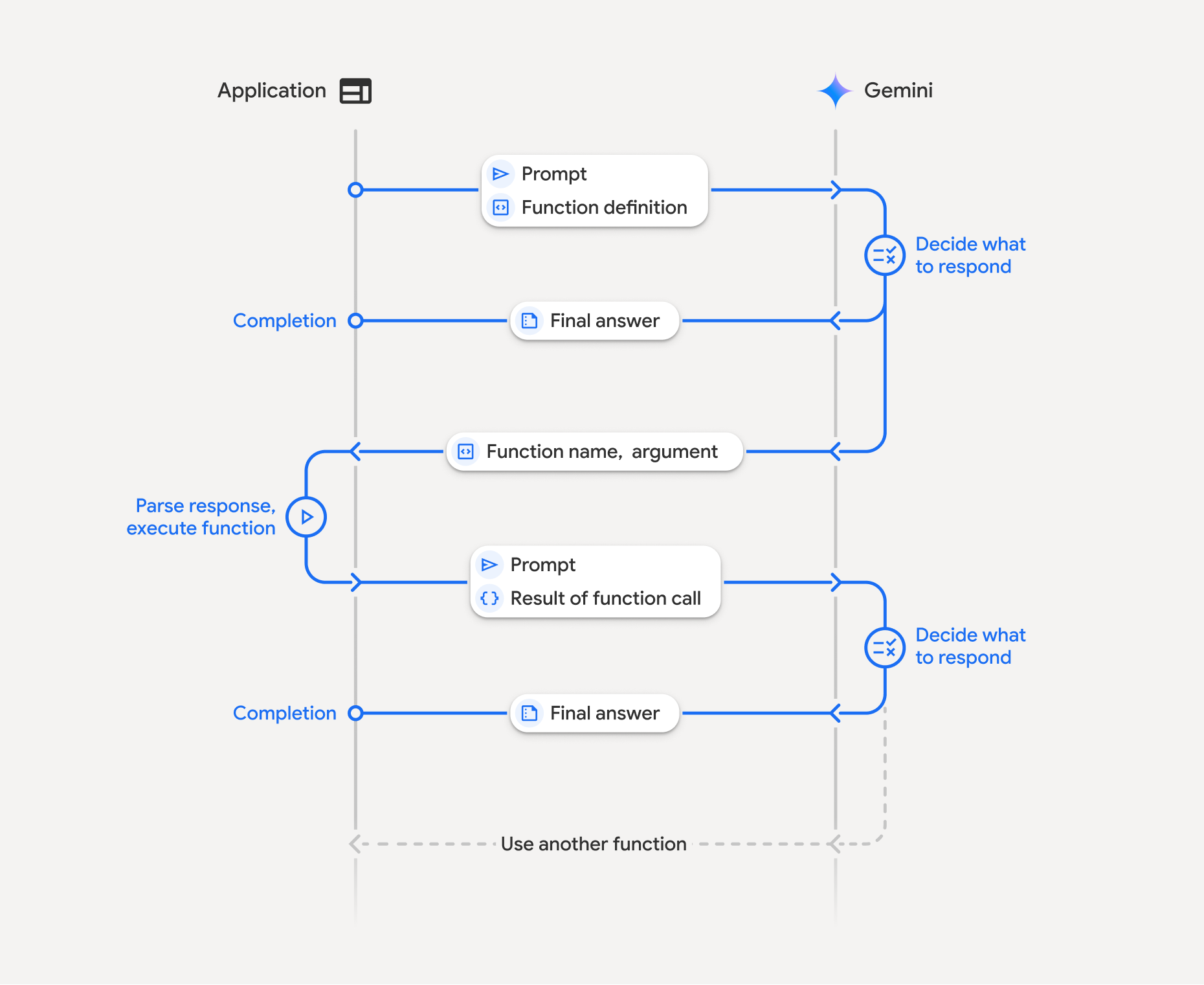
फ़ंक्शन कॉलिंग में, आपके ऐप्लिकेशन, मॉडल, और बाहरी फ़ंक्शन के बीच स्ट्रक्चर्ड इंटरैक्शन शामिल होता है:
- फ़ंक्शन के बारे में जानकारी देना: मॉडल को फ़ंक्शन के नाम, पैरामीटर, और मकसद के बारे में जानकारी दें.
- फ़ंक्शन के एलान के साथ एलएलएम को कॉल करना: मॉडल को फ़ंक्शन के एलान के साथ उपयोगकर्ता का प्रॉम्प्ट भेजें.
- फ़ंक्शन कोड को लागू करना (आपकी ज़िम्मेदारी): मॉडल, फ़ंक्शन को लागू नहीं करता. नाम और आर्ग्युमेंट निकालें और उन्हें अपने ऐप्लिकेशन में लागू करें.
- उपयोगकर्ता के लिए आसान जवाब तैयार करना: नतीजे को मॉडल को वापस भेजें, ताकि वह उपयोगकर्ता के लिए आसान जवाब तैयार कर सके.
इस प्रोसेस को कई बार दोहराया जा सकता है. यह मॉडल, एक ही बार में कई फ़ंक्शन (पैरलल फ़ंक्शन कॉलिंग) और क्रम से फ़ंक्शन (कंपोज़िशनल फ़ंक्शन कॉलिंग) कॉल कर सकता है.
पहला चरण: फ़ंक्शन के बारे में जानकारी देना
Python
set_light_values_declaration = {
    "type": "function",
    "name": "set_light_values",
    "description": "Sets the brightness and color temperature of a light.",
    "parameters": {
        "type": "object",
        "properties": {
            "brightness": {
                "type": "integer",
                "description": "Light level from 0 to 100",
            },
            "color_temp": {
                "type": "string",
                "enum": ["daylight", "cool&>quot;, "warm"],
                "description": "Color temperature",
            },
        },
        "required": ["brightness", "color_temp"],
    },
}

def set_light_values(brightness: int, color_temp: str) - dict:
    """Set the brightness and color temperature of a room light."""
    return {"brightness": brightness, "colorTemperature": color_temp}
JavaScript
const setLightValuesTool = {
  type: 'function',
  name: 'set_light_values',
  description: 'Sets the brightness and color temperature of a light.',
  parameters: {
    type: 'object',
    properties: {
      brightness: { type: 'number', description: 'Light level from 0 to 100' },
      color_temp: { type: 'string', enum: ['daylight', 'cool', 'warm'] },
    },
    required: ['brightness', 'color_temp'],
  },
};

function setLightValues(brightness, color_temp) {
  return { brightness: brightness, colorTemperature: color_temp };
}
दूसरा चरण: फ़ंक्शन के बारे में जानकारी देकर मॉडल को कॉल करना
Python
from google import genai

client = genai.Client()

interaction = client.interactions.create(
    model="gemini-3.6-flash",
    input="Turn the lights down to a romantic level",
    tools=[set_light_values_declaration],
)

fc_step = next(s for s in interaction.steps if s.type == "function_call")
print(fc_step)
JavaScript
import { GoogleGenAI } from '@google/genai';

const client = new GoogleGenAI({});

const interaction = await client.interactions.create({
  model: 'gemini-3.6-flash',
  input: 'Turn the lights down to a romantic level',
  tools: [setLightValuesTool],
});

const fcStep = in>teraction.steps.find(s = s.type === 'function_call');
console.log(fcStep);
मॉडल, function_call चरण में type, name, और arguments दिखाता है:
type='function_call'
name='set_light_values'
arguments={'color_temp': 'warm', 'brightness': 25}
तीसरा चरण: फ़ंक्शन को लागू करना
Python
fc_step = next(s for s in interaction.steps if s.type == "function_call")

if fc_step.name == "set_light_values":
    result = set_light_values(**fc_step.arguments)
    print(f"Function execution result: {result}")
JavaScript
const fcStep = interaction.steps.find(s => s.type === 'function_call');

let result;
if (fcStep.name === 'set_light_values') {
  result = setLightValues(fcStep.arguments.brightness, fcStep.arguments.color_temp);
  console.log(`Function execution result: ${JSON.stringify(result)}`);
}
चौथा चरण: मॉडल को जवाब वापस भेजना
Python
final_interaction = client.interactions.create(
    model="gemini-3.6-flash",
    input=[
        {
            "type": "function_result",
            "name": fc_step.name,
            "call_id": fc_step.id,
            "result": [{"type": "text", "text": json.dumps(result)}],
        }
    ],
    tools=[set_light_values_declaration],
    previous_interaction_id=interaction.id,
)

print(final_interaction.output_text)
JavaScript
const finalInteraction = await client.interactions.create({
  model: 'gemini-3.6-flash',
  input: [{
    type: 'function_result',
    name: fcStep.name,
    call_id: fcStep.id,
    result: [{ type: 'text', text: JSON.stringify(result) }]
  }],
  tools: [setLightValuesTool],
  previous_interaction_id: interaction.id,
});

console.log(finalInteraction.output_text);
स्टेटलेस फ़ंक्शन कॉलिंग
स्टेटलेस मोड में फ़ंक्शन कॉलिंग का इस्तेमाल भी किया जा सकता है. इसके लिए, क्लाइंट साइड पर बातचीत के इतिहास को मैनेज करें और store=false सेट करें.
स्टेटलेस मोड में, आपको बातचीत का पूरा इतिहास, हर अनुरोध के input फ़ील्ड में पास करना होगा. इस इतिहास में यह जानकारी शामिल होनी चाहिए:
1. शुरुआती user_input चरण.
2. पहले टर्न में, मॉडल से जनरेट किए गए सभी चरणों को ठीक उसी तरह दिखाया गया है जिस तरह से वे मिले थे. इनमें thought और function_call चरण भी शामिल हैं.
3. function_result चरण में, आपके लागू किए गए फ़ंक्शन का आउटपुट शामिल होता है.
Python
from google import genai
import json

client = genai.Client()

history = [
    {
        "type": "user_input",
        "content": [{"type": "text", "text": "Turn the lights down to a romantic level"}]
    }
]

interaction = client.interactions.create(
    model="gemini-3.6-flash",
    store=False,
    input=history,
    tools=[set_light_values_declaration],
)

for step in interaction.steps:
    history.append(step.model_dump())

fc_step = next(s for s in interaction.steps if s.type == "function_call")
if fc_step.name == "set_light_values":
    result = set_light_values(**fc_step.arguments)

history.append({
    "type": "function_result",
    "name": fc_step.name,
    "call_id": fc_step.id,
    "result": [{"type": "text", "text": json.dumps(result)}],
})

final_interaction = client.interactions.create(
    model="gemini-3.6-flash",
    store=False,
    input=history,
    tools=[set_light_values_declaration],
)

print(final_interaction.output_text)
JavaScript
import { GoogleGenAI } from "@google/genai";

const client = new GoogleGenAI({});

async function main() {
  const history = [
    {
      type: "user_input",
      content: [{ type: "text", text: "Turn the lights down to a romantic level" }]
    }
  ];

  const interaction = await client.interactions.create({
    model: "gemini-3.6-flash",
    store: false,
    input: history,
    tools: [setLightValuesTool],
  });

  history.push(...interaction.st>eps);

  const fcStep = interaction.steps.find(s = s.type === 'function_call');
  let result;
  if (fcStep.name === 'set_light_values') {
    result = setLightValues(fcStep.arguments.brightness, fcStep.arguments.color_temp);
  }

  history.push({
    type: 'function_result',
    name: fcStep.name,
    call_id: fcStep.id,
    result: [{ type: 'text', text: JSON.stringify(result) }]
  });

  const finalInteraction = await client.interactions.create({
    model: 'gemini-3.6-flash',
    store: false,
    input: history,
    tools: [setLightValuesTool],
  });

  console.log(finalInteraction.output_text);
}

await main();
REST
# Turn 1: Send request with tools and store: false
RESPONSE1=$(curl -s -X POST "https://generativelanguage.googleapis.com/v1beta/interactions" \
  -H "x-goog-api-key: $GEMINI_API_KEY" \
  -H 'Content-Type: application/json' \
  -d '{
    "model": "gemini-3.6-flash",
    "store": false,
    "input": [
      {
        "type": "user_input",
        "content": "Turn the lights down to a romantic level"
      }
    ],
    "tools": [{
      "type": "function",
      "name": "set_light_values",
      "description": "Sets the brightness and color temperature of a light.",
      "parameters": {
        "type": "object",
        "properties": {
          "brightness": {"type": "integer", "description": "Light level from 0 to 100"},
          "color_temp": {"type": "string", "enum": ["daylight", "cool", "warm"]}
        },
        "required": ["brightness", "color_temp"]
      }
    }]
  }')

# Extract model steps (thought, function_call)
MODEL_STEPS=$(echo "$RESPONSE1" | jq '.steps')

# Extract function call details to execute
FC_NAME=$(echo "$RESPONSE1" | jq -r '.steps[] | select(.type=="function_call") | .name')
FC_ID=$(echo "$RESPONSE1" | jq -r '.steps[] | select(.type=="function_call") | .id')

# Assume local execution returns: {"brightness": 25, "colorTemperature": "warm"}
RESULT="{\"brightness\": 25, \"colorTemperature\": \"warm\"}"

# Reconstruct history for Turn 2
HISTORY=$(jq -n \
  --argjson first_input '[{"type": "user_input", "content": "Turn the lights down to a romantic level"}]' \
  --argjson model_steps "$MODEL_STEPS" \
  --arg fc_name "$FC_NAME" \
  --arg fc_id "$FC_ID" \
  --arg result "$RESULT" \
  '$first_input + $model_steps + [{"type": "function_result", "name": $fc_name, "call_id": $fc_id, "result": [{"type": "text", "text": $result}]}]')

# Turn 2: Send the full history
curl -X POST "https://generativelanguage.googleapis.com/v1beta/interactions" \
  -H "x-goog-api-key: $GEMINI_API_KEY" \
  -H 'Content-Type: application/json' \
  -d "{
    \"model\": \"gemini-3.6-flash\",
    \"store\": false,
    \"input\": $HISTORY,
    \"tools\": [{
      \"type\": \"function\",
      \"name\": \"set_light_values\",
      \"description\": \"Sets the brightness and color temperature of a light.\",
      \"parameters\": {
        \"type\": \"object\",
        \"properties\": {
          \"brightness\": {\"type\": \"integer\"},
          \"color_temp\": {\"type\": \"string\"}
        },
        \"required\": [\"brightness\", \"color_temp\"]
      }
    }]
  }"
फ़ंक्शन के एलान
फ़ंक्शन के बारे में जानकारी को टूल के तौर पर पास किया जाता है. इसमें ये शामिल हैं:
type(स्ट्रिंग): कस्टम फ़ंक्शन के लिए, इसकी वैल्यू"function"होनी चाहिए.name(string): फ़ंक्शन का यूनीक नाम (अंडरस्कोर या कैमल केस का इस्तेमाल करें).description(string): फ़ंक्शन के मकसद के बारे में साफ़ तौर पर जानकारी.parameters(ऑब्जेक्ट): इनपुट पैरामीटर, जिनकी ज़रूरत फ़ंक्शन को होती है.type(string): यह एक सामान्य डेटा टाइप है, जैसे किobject.properties(ऑब्जेक्ट): टाइप और जानकारी के साथ अलग-अलग पैरामीटर.required(ऐरे): पैरामीटर के नाम डालना ज़रूरी है.
सूझ-बूझ वाले मॉडल के साथ फ़ंक्शन कॉलिंग की सुविधा
Gemini 3 सीरीज़ के मॉडल, इंटरनल "थिंकिंग" प्रोसेस का इस्तेमाल करते हैं. इससे फ़ंक्शन कॉलिंग की सुविधा बेहतर होती है. SDK, आपके लिए थॉट सिग्नेचर अपने-आप मैनेज करते हैं.
पैरलल फ़ंक्शन कॉलिंग
जब कई फ़ंक्शन एक-दूसरे पर निर्भर न हों, तब उन्हें एक साथ कॉल करें:
Python
power_disco_ball = {"type": "function", "name": "power_disco_ball", "description": "Powers the disco ball.",
    "parameters": {"type": "object", "properties": {"power": {"type": "boolean"}}, "required": ["power"]}}
start_music = {"type": "function", "name": "start_music", "description": "Play music.",
    "parameters": {"type": "object", "properties": {"energetic": {"type": "boolean"}, "loud": {"type": "boolean"}}, "required": ["energetic", "loud"]}}
dim_lights = {"type": "function", "name": "dim_lights", "description": "Dim the lights.",
    "parameters": {"type": "object", "properties": {"brightness": {"type": "number"}}, "required": ["brightness"]}}

client = genai.Client()

interaction = client.interactions.create(
    model="gemini-3.6-flash",
    input="Turn this place into a party!",
    tools=[power_disco_ball, start_music, dim_lights],
    generation_config={"tool_choice": "any"},
)

for step in interaction.steps:
    if step.type == "function_call":
        args = ", ".join(f"{key}={val}" for key, val in step.arguments.items())
        print(f"{step.name}({args})")
JavaScript
const powerDiscoBall = { type: 'function', name: 'power_disco_ball', description: 'Powers the disco ball.',
  parameters: { type: 'object', properties: { power: { type: 'boolean' } }, required: ['power'] } };
const startMusic = { type: 'function', name: 'start_music', description: 'Play music.',
  parameters: { type: 'object', properties: { energetic: { type: 'boolean' }, loud: { type: 'boolean' } }, required: ['energetic', 'loud'] } };
const dimLights = { type: 'function', name: 'dim_lights', description: 'Dim the lights.',
  parameters: { type: 'object', properties: { brightness: { type: 'number' } }, required: ['brightness'] } };

const interaction = await client.interactions.create({
  model: 'gemini-3.6-flash',
  input: 'Turn this place into a party!',
  tools: [powerDiscoBall, startMusic, dimLights],
  generation_config: { tool_choice: 'any' },
});

for (const step of interaction.steps) {
  if (step.type === 'function_call') {
    console.log(`${step.name}(${JSON.stringify(step.arguments)})`);
  }
}
REST
curl -X POST "https://generativelanguage.googleapis.com/v1beta/interactions" \
  -H "x-goog-api-key: $GEMINI_API_KEY" \
  -H 'Content-Type: application/json' \
  -d '{
    "model": "gemini-3.6-flash",
    "input": "Turn this place into a party!",
    "tools": [
      {
        "type": "function",
        "name": "power_disco_ball",
        "description": "Powers the disco ball.",
        "parameters": {
          "type": "object",
          "properties": {
            "power": {"type": "boolean"}
          },
          "required": ["power"]
        }
      },
      {
        "type": "function",
        "name": "start_music",
        "description": "Play music.",
        "parameters": {
          "type": "object",
          "properties": {
            "energetic": {"type": "boolean"},
            "loud": {"type": "boolean"}
          },
          "required": ["energetic", "loud"]
        }
      },
      {
        "type": "function",
        "name": "dim_lights",
        "description": "Dim the lights.",
        "parameters": {
          "type": "object",
          "properties": {
            "brightness": {"type": "number"}
          },
          "required": ["brightness"]
        }
      }
    ]
  }'
कॉम्पोज़िशनल फ़ंक्शन कॉलिंग
मुश्किल अनुरोधों के लिए, एक साथ कई फ़ंक्शन कॉल को जोड़ें. उदाहरण के लिए, पहले जगह की जानकारी पाएं, फिर उस जगह के मौसम की जानकारी पाएं.
Python
get_weather_forecast_declaration = {
    "type": "function",
    "name": "get_weather_forecast",
    "description": "Gets the current weather temperature for a given location.",
    "parameters": {
        "type": "object",
        "properties": {
            "location": {"type": "string", "description": "The location"},
        },
        "required": ["location"],
    },
}

set_thermostat_temperature_declaration = {
    "type": "function",
    "name": "set_thermostat_temperature",
    "description": "Sets the thermostat to a desired temperature.",
    "parameters": {
        "type": "object",
        "properties": {
            "temperature": {
                "type": "integer",
                "description": "The temperature in Celsius",
            },
        },
        "required": ["temperature"],
    },
}

client = genai.Client()

interaction = client.interactions.create(
    model="gemini-3.6-flash",
    input="If it's warmer than 20°C in London, set the thermostat to 20°C, otherwise 18°C.",
    tools=[
        get_weather_forecast_declaration,
        set_thermostat_temperature_declaration,
    ],
)

for step in interaction.steps:
    if step.type == "function_call":
        print(f"Function to call: {step.name}")
        print(f"Arguments: {step.arguments}")
    elif hasattr(step, "content") and step.content:
         for part in step.content:
             if hasattr(part, "text"):
                 print(part.text)
JavaScript
import { GoogleGenAI } from '@google/genai';

const client = new GoogleGenAI({});

const getWeatherForecastTool = {
  type: 'function',
  name: 'get_weather_forecast',
  description: 'Gets the current weather temperature for a given location.',
  parameters: {
    type: 'object',
    properties: {
      location: { type: 'string', description: 'The location' },
    },
    required: ['location'],
  },
};

const setThermostatTemperatureTool = {
  type: 'function',
  name: 'set_thermostat_temperature',
  description: 'Sets the thermostat to a desired temperature.',
  parameters: {
    type: 'object',
    properties: {
      temperature: {
        type: 'integer',
        description: 'The temperature in Celsius',
      },
    },
    required: ['temperature'],
  },
};

const interaction = await client.interactions.create({
  model: 'gemini-3.6-flash',
  input: "If it's warmer than 20°C in London, set the thermostat to 20°C, otherwise 18°C.",
  tools: [
    getWeatherForecastTool,
    setThermostatTemperatureTool,
  ],
});

for (const step of interaction.steps) {
  if (step.type === 'function_call') {
    console.log(`Function to call: ${step.name}`);
    console.log(`Arguments: ${JSON.stringify(step.arguments)}`);
  } else if (step.content) {
    for (const part of step.content) {
      if (part.text) {
        console.log(part.text);
      }
    }
  }
}
REST
curl -X POST "https://generativelanguage.googleapis.com/v1beta/interactions" \
  -H "x-goog-api-key: $GEMINI_API_KEY" \
  -H 'Content-Type: application/json' \
  -d '{
    "model": "gemini-3.6-flash",
    "input": "If it'\''s warmer than 20°C in London, set the thermostat to 20°C, otherwise 18°C.",
    "tools": [
      {
        "type": "function",
        "name": "get_weather_forecast",
        "description": "Gets the current weather temperature for a given location.",
        "parameters": {
          "type": "object",
          "properties": {
            "location": {"type": "string"}
          },
          "required": ["location"]
        }
      },
      {
        "type": "function",
        "name": "set_thermostat_temperature",
        "description": "Sets the thermostat to a desired temperature.",
        "parameters": {
          "type": "object",
          "properties": {
            "temperature": {"type": "integer"}
          },
          "required": ["temperature"]
        }
      }
    ]
  }'
फ़ंक्शन कॉलिंग मोड
generation_config में tool_choice का इस्तेमाल करके, यह कंट्रोल करें कि मॉडल टूल का इस्तेमाल कैसे करता है:
auto(डिफ़ॉल्ट): मॉडल यह तय करता है कि किसी फ़ंक्शन को कॉल करना है या सीधे जवाब देना है.any: मॉडल को हमेशा फ़ंक्शन कॉल का अनुमान लगाने के लिए मजबूर किया जाता है.none: मॉडल को फ़ंक्शन कॉल करने की अनुमति नहीं है.validated: मॉडल, फ़ंक्शन स्कीमा के मुताबिक काम करता है.
Python
generation_config = {
    "tool_choice": {
        "allowed_tools": {
            "mode": "any",
            "tools": ["get_current_temperature"]
        }
    }
}
JavaScript
const generation_config = {
  tool_choice: {
    allowed_tools: {
      mode: 'any',
      tools: ['get_current_temperature';]
    }
  }
};
REST
curl -X POST "https://generativelanguage.googleapis.com/v1beta/interactions" \
  -H "x-goog-api-key: $GEMINI_API_KEY" \
  -H 'Content-Type: application/json' \
  -d '{
    "model": "gemini-3.6-flash",
    "input": "What is the temperature in Boston?",
    "tools": [{
      "type": "function",
      "name": "get_current_temperature",
      "description": "Gets the current temperature for a given location.",
      "parameters": {
        "type": "object",
        "properties": {
          "location": {"type": "string"}
        },
        "required": ["location"]
      }
    }],
    "generation_config": {
      "tool_choice": {
        "allowed_tools": {
          "mode": "any",
          "tools": ["get_current_temperature"]
        }
      }
    }
  }'
मल्टी-टूल का इस्तेमाल
एक ही अनुरोध में, फ़ंक्शन कॉलिंग के साथ-साथ पहले से मौजूद कई टूल को चालू किया जा सकता है. Gemini 3 मॉडल, इंटरैक्शन में फ़ंक्शन कॉलिंग की सुविधा के साथ-साथ, बिल्ट-इन टूल को भी इस्तेमाल कर सकते हैं. previous_interaction_id पास करने पर, बिल्ट-इन टूल का कॉन्टेक्स्ट अपने-आप शेयर हो जाता है.
Python
from google import genai
import json

client = genai.Client()

get_weather = {
    "type": "function",
    "name": "get_weather",
    "description": "Gets the weather for a requested city.",
    "parameters": {
        "type": "object",
        "properties": {
            "city": {
                "type": "string",
                "description": "The city and state, e.g. Utqiaġvik, Alaska",
            },
        },
        "required": ["city"],
    },
}

tools = [
    {"type": "google_search"},
    get_weather
]

interaction = client.interactions.create(
    model="gemini-3.6-flash",
    input="What is the northernmost city in the United States? What's the weather like there today?",
    tools=tools
)

for step in interaction.steps:
    if step.type == "function_call":
        print(f"Function call: {step.name} (ID: {step.id})")
        result = {"response": "Very cold. 22 degrees Fahrenheit."}
        interaction_2 = client.interactions.create(
            model="gemini-3.6-flash",
            previous_interaction_id=interaction.id,
            tools=tools,
            input=[{
                "type": "function_result",
                "name": step.name,
                "call_id": step.id,
                "result": [{"type": "text", "text": json.dumps(result)}]
            }]
        )

        print(interaction_2.output_text)
JavaScript
import { GoogleGenAI } from '@google/genai';

const client = new GoogleGenAI({});

const weatherTool = {
    type: 'function',
    name: 'get_weather',
    description: 'Gets the weather for a given location.',
    parameters: {
        type: 'object',
        properties: {
            location: { type: 'string', description: 'The city and state, e.g. San Francisco, CA' }
        },
        required: ['location']
    }
};

const tools = [
    {type: 'google_search'}, // Built-in tool
    weatherTool
];

let interaction = await client.interactions.create({
    model: 'gemini-3.6-flash',
    input: "What is the northernmost city in the United States? What's the weather like there today?",
    tools: tools
});

for (const step of interaction.steps) {
    if (step.type === 'function_call') {
        console.log(`Function call: ${step.name} (ID: ${step.id})`);
        const result = {response: "Very cold. 22 degrees Fahrenheit."};
        const interaction_2 = await client.interactions.create({
            model: 'gemini-3.6-flash',
            previous_interaction_id: interaction.id,
            tools: tools,
            input: [{
                type: 'function_result',
                name: step.name,
                call_id: step.id,
                result: [{ type: 'text', text: JSON.stringify(result) }]
            }]
        });

        console.log(interaction_2.output_text);
    }
}
REST
# Turn 1: Send request with built-in google_search tool and custom weather tool
curl -X POST "https://generativelanguage.googleapis.com/v1beta/interactions" \
  -H "x-goog-api-key: $GEMINI_API_KEY" \
  -H 'Content-Type: application/json' \
  -d '{
    "model": "gemini-3.6-flash",
    "input": "What is the northernmost city in the United States? What'\''s the weather like there today?",
    "tools": [
      {"type": "google_search"},
      {
        "type": "function",
        "name": "get_weather",
        "description": "Gets the weather for a given location.",
        "parameters": {
          "type": "object",
          "properties": {
            "location": {"type": "string", "description": "The city and state, e.g. San Francisco, CA"}
          },
          "required": ["location"]
        }
      }
    ]
  }'

# Turn 2: Provide function result and pass previous_interaction_id
curl -X POST "https://generativelanguage.googleapis.com/v1beta/interactions" \
  -H "x-goog-api-key: $GEMINI_API_KEY" \
  -H 'Content-Type: application/json' \
  -d '{
    "model": "gemini-3.6-flash",
    "previous_interaction_id": "INTERACTION_ID",
    "tools": [
      {"type": "google_search"},
      {
        "type": "function",
        "name": "get_weather",
        "description": "Gets the weather for a given location.",
        "parameters": {
          "type": "object",
          "properties": {
            "location": {"type": "string", "description": "The city and state, e.g. San Francisco, CA"}
          },
          "required": ["location"]
        }
      }
    ],
    "input": [
      {
        "type": "function_result",
        "name": "get_weather",
        "call_id": "call_123",
        "result": [{"type": "text", "text": "{\"response\": \"Very cold. 22 degrees Fahrenheit.\"}"}]
      }
    ]
  }'
टेक्स्ट, इमेज, और वीडियो वगैरह का इस्तेमाल करके की गई क्वेरी के जवाब
Gemini 3 सीरीज़ के मॉडल के लिए, फ़ंक्शन के जवाब वाले उन हिस्सों में मल्टीमॉडल कॉन्टेंट शामिल किया जा सकता है जिन्हें मॉडल को भेजा जाता है. मॉडल, इस मल्टीमॉडल कॉन्टेंट को अपने अगले टर्न में प्रोसेस कर सकता है, ताकि ज़्यादा जानकारी वाला जवाब दिया जा सके.
किसी फ़ंक्शन के जवाब में मल्टीमॉडल डेटा शामिल करने के लिए, उसे result चरण के result फ़ील्ड में एक या उससे ज़्यादा कॉन्टेंट ब्लॉक के तौर पर शामिल करें.function_result हर कॉन्टेंट ब्लॉक में, उसका type (जैसे, "text", "image") तय किया जाना चाहिए.
इस उदाहरण में दिखाया गया है कि किसी इंटरैक्शन में, इमेज का डेटा शामिल करने वाले फ़ंक्शन के जवाब को मॉडल को वापस कैसे भेजा जाता है:
Python
import base64
from google import genai
import requests

client = genai.Client()

tool_call = next(s for s in interaction.steps if s.type == "function_call")

image_path = "https://goo.gle/instrument-img"
image_bytes = requests.get(image_path).content

base64_image_data = base64.b64encode(image_bytes).decode("utf-8")

final_interaction = client.interactions.create(
    model="gemini-3.6-flash",
    previous_interaction_id=interaction.id,
    input=[
        {
            "type": "function_result",
            "name": tool_call.name,
            "call_id": tool_call.id,
            "result": [
                {"type": "text", "text": "instrument.jpg"},
                {
                    "type": "image",
                    "mime_type": "image/jpeg",
                    "data": base64_image_data,
                },
            ],
        }
    ],
)

print(final_interaction.output_text)
JavaScript
import { GoogleGenAI } from "@google/genai";

const client = new GoogleGenAI({});

const toolCall = interaction.step>s.find(s = s.type === 'function_call');

const base64ImageData = "BASE64_IMAGE_DATA";

const finalInteraction = await client.interactions.create({
    model: 'gemini-3.6-flash',
    previous_interaction_id: interaction.id,
    input: [{
        type: 'function_result',
        name: toolCall.name,
        call_id: toolCall.id,
        result: [
            { type: 'text', text: 'instrument.jpg' },
            {
                type: 'image',
                mime_type: 'image/jpeg',
                data: base64ImageData,
            }
        ]
    }]
});

console.log(finalInteraction.output_text);
REST
curl -X POST "https://generativelanguage.googleapis.com/v1beta/interactions" \
  -H "x-goog-api-key: $GEMINI_API_KEY" \
  -H 'Content-Type: application/json' \
  -d '{
    "model": "gemini-3.6-flash",
    "previous_interaction_id": "INTERACTION_ID",
    "input": [
      {
        "type": "function_result",
        "name": "get_image",
        "call_id": "call_123",
        "result": [
          {"type": "text", "text": "instrument.jpg"},
          {
            "type": "image",
            "mime_type": "image/jpeg",
            "data": "BASE64_IMAGE_DATA"
          }
        ]
      }
    ]
  }'
स्ट्रक्चर्ड आउटपुट के साथ फ़ंक्शन कॉलिंग
Gemini 3 सीरीज़ के मॉडल के लिए, फ़ंक्शन कॉलिंग को स्ट्रक्चर्ड आउटपुट के साथ जोड़ें, ताकि जवाबों को एक ही फ़ॉर्मैट में दिखाया जा सके.
रिमोट एमसीपी (मॉडल कॉन्टेक्स्ट प्रोटोकॉल)
Interactions API, रिमोट एमसीपी सर्वर से कनेक्ट करने की सुविधा देता है, ताकि मॉडल को बाहरी टूल और सेवाओं का ऐक्सेस दिया जा सके. टूल कॉन्फ़िगरेशन में, सर्वर name और url की जानकारी दी जाती है.
रिमोट एमसीपी का इस्तेमाल करते समय, इन बातों का ध्यान रखें:
- सर्वर के टाइप: रिमोट एमसीपी, सिर्फ़ स्ट्रीम किए जा सकने वाले एचटीटीपी सर्वर के साथ काम करता है. एसएसई (सर्वर-सेंट इवेंट) सर्वर मौजूद नहीं हैं.
- नाम: एमसीपी सर्वर के नामों में
-वर्ण शामिल नहीं होना चाहिए. इसके बजाय,snake_caseसर्वर के नाम इस्तेमाल करें.
| फ़ील्ड | प्रकार | ज़रूरी है | ब्यौरा |
|---|---|---|---|
type |
string |
हां | "mcp_server" होना चाहिए. |
name |
string |
नहीं | एमसीपी सर्वर का डिसप्ले नेम. |
url |
string |
नहीं | एमसीपी सर्वर के एंडपॉइंट का पूरा यूआरएल. |
headers |
object |
नहीं | हर अनुरोध के साथ सर्वर को एचटीटीपी हेडर के तौर पर भेजे गए कुंजी-वैल्यू पेयर. उदाहरण के लिए, पुष्टि करने वाले टोकन. |
allowed_tools |
array |
नहीं | यह पाबंदी लगाएं कि एजेंट, सर्वर के किन टूल को कॉल कर सकता है. |
उदाहरण
Python
from google import genai

client = genai.Client()

interaction = client.interactions.create(
    model="gemini-3.6-flash",
    input="Check the weather in San Francisco.",
    tools=[
        {
            "type": "mcp_server",
            "name": "weather",
            "url";: "https://gemini-api-demos.uc.r.appspot.com/mcp",
        }
    ]
)
JavaScript
import { GoogleGenAI } from '@google/genai';

const client = new GoogleGenAI({});

const interaction = await client.interactions.create({
    model: 'gemini-3.6-flash',
    input: 'Check the weather in San Francisco.',
    tools: [
        {
            type: 'mcp_server',
            name: 'weather',
            url: 'https://gemini-api-demos.uc.r.appspot.com/mcp'
        }
    ]
});
REST
curl -X POST "https://generativelanguage.googleapis.com/v1beta/interactions" \
  -H "Content-Type: application/json" \
  -H "x-goog-api-key: $GEMINI_API_KEY" \
-d '{
    "model": "gemini-3.6-flash",
    "input": "Check the weather in San Francisco.",
    "tools": [
        {
            "type": "mcp_server",
            "name": "weather",
            "url": "https://gemini-api-demos.uc.r.appspot.com/mcp"
        }
    ]
}'
टूल कॉल स्ट्रीम करना
स्ट्रीमिंग की सुविधा वाले टूल का इस्तेमाल करते समय, मॉडल फ़ंक्शन कॉल जनरेट करता है. ये कॉल, स्ट्रीम पर step.delta इवेंट के क्रम के तौर पर जनरेट होते हैं. arguments का इस्तेमाल करके, टूल के आर्ग्युमेंट को कुछ आर्ग्युमेंट के तौर पर स्ट्रीम किया जा सकता है. आपको इन डेल्टा को एग्रीगेट करना होगा, ताकि टूल कॉल को पूरा किया जा सके. इसके बाद ही, उन्हें लागू किया जा सकेगा.
Python
import json
from google import genai

client = genai.Client()

weather_tool = {
    "type": "function",
    "name": "get_weather",
    "description": "Gets the weather for a given location.",
    "parameters": {
        "type": "object",
        "properties": {
            "location": {"type": "string", "description": "The city and state"}
        },
        "required": ["location"]
    }
}

stream = client.interactions.create(
    model="gemini-3.6-flash",
    input="What is the weather in Paris?",
    tools=[weather_tool],
    stream=True
)

current_calls = {}
tool_calls = []

for event in stream:
    if event.event_type == "step.start":
        if event.step.type == "function_call":
            current_calls[event.index] = {
                "id": event.step.id,
                "name": event.step.name,
                "arguments": ""
            }
            if hasattr(event.step, "arguments") and event.step.arguments:
                if isinstance(event.step.arguments, dict):
                    current_calls[event.index]["arguments"] = json.dumps(event.step.arguments)
                else:
                    current_calls[event.index]["arguments"] = event.step.arguments
    elif event.event_type == "step.delta":
        if event.delta.type == "arguments":
            if event.index in current_calls:
                current_calls[event.index]["arguments"] += event.delta.partial_arguments
        elif event.delta.type == "text":
            print(event.delta.text, end="", flush=True)

    elif event.event_type == "interaction.completed":
        for index, call in current_calls.items():
            args = call["arguments"]
            if args:
                args = json.loads(args)
            else:
                args = {}

            tool_calls.append({
                "type": "function_call",
                "id": call["id"],
                "name": call["name"],
                "arguments": args
            })

        print(f"\nFinal tool calls ready to execute:")
        print(json.dumps(tool_calls, indent=2))
JavaScript
import { GoogleGenAI } from '@google/genai';

const client = new GoogleGenAI({});

const weatherTool = {
    type: 'function',
    name: 'get_weather',
    description: 'Gets the weather for a given location.',
    parameters: {
        type: 'object',
        properties: {
            location: { type: 'string', description: 'The city and state' }
        },
        required: ['location']
    }
};

const stream = await client.interactions.create({
    model: 'gemini-3.6-flash',
    input: 'What is the weather in Paris?',
    tools: [weatherTool],
    stream: true,
});

const currentCalls = new Map();
let toolCalls = [];

for await (const event of stream) {
    const evType = event.event_type;
    if (evType === 'step.start') {
        if (event.step.type === 'function_call') {
            currentCalls.set(event.index, {
                id: event.step.id,
                name: event.step.name,
                arguments: ''
            });
            if (event.step.arguments) {
                if (typeof event.step.arguments === 'object') {
                    currentCalls.get(event.index).arguments = JSON.stringify(event.step.arguments);
                } else {
                    currentCalls.get(event.index).arguments = event.step.arguments;
                }
            }
        }
    } else if (evType === 'step.delta') {
        if (event.delta.type === 'arguments') {
            if (currentCalls.has(event.index)) {
                currentCalls.get(event.index).arguments += event.delta.partial_arguments;
            }
        } else if (event.delta.type === 'text') {
            process.stdout.write(event.delta.text);
        }
    } else if (evT>ype === 'interaction.completed' || evType === 'interaction.complete') {
        toolCalls = Array.from(currentCalls.values()).map(call = ({
            type: 'function_call',
            id: call.id,
            name: call.name,
            arguments: call.arguments ? JSON.parse(call.arguments) : {}
        }));
        console.log('\nFinal tool calls ready to execute:');
        console.log(JSON.stringify(toolCalls, null, 2));
    }
}
REST
curl -X POST "https://generativelanguage.googleapis.com/v1beta/interactions?alt=sse" \
  -H "Content-Type: application/json" \
  -H "x-goog-api-key: $GEMINI_API_KEY" \
-d '{
    "model": "gemini-3.6-flash",
    "input": "What is the weather in Paris?",
    "tools": [{
        "type": "function",
        "name": "get_weather",
        "description": "Gets the weather for a given location.",
        "parameters": {
            "type": "object",
            "properties": {
                "location": {"type": "string", "description": "The city and state"}
            },
            "required": ["location"]
        }
    }],
    "stream": true
}'
सबसे सही तरीके
- फ़ंक्शन और पैरामीटर की जानकारी: साफ़ और सटीक जानकारी दें.
- नाम देना: ऐसे नाम दें जिनसे एट्रिब्यूट के बारे में पता चले. नाम में स्पेस या खास वर्णों का इस्तेमाल न करें.
- स्ट्रॉन्ग टाइपिंग: खास टाइप (पूर्णांक, स्ट्रिंग, enum) का इस्तेमाल करें.
- टूल चुनना: ज़्यादा से ज़्यादा 10 से 20 टूल चालू रखें.
- प्रॉम्प्ट इंजीनियरिंग: कॉन्टेक्स्ट और निर्देश दें.
- पुष्टि करना: फ़ंक्शन कॉल को लागू करने से पहले उनकी पुष्टि करें.
- गड़बड़ी ठीक करना: गड़बड़ी ठीक करने की सुविधा लागू करें.
- सुरक्षा: बाहरी एपीआई के लिए, पुष्टि करने के सही तरीके का इस्तेमाल करें.
टूल से पहले टेक्स्ट की ज़रूरी शर्तों को पूरा करने के तरीके
समस्या: अगर आपके प्रॉम्प्ट में मॉडल को स्ट्रक्चर्ड टेक्स्ट (एक्सएमएल, YAML, JSON वगैरह) आउटपुट करने के लिए कहा गया है (जैसे, <UPDATE>...</UPDATE>) टूल कॉल करने से ठीक पहले, टूल कॉल कभी-कभी Malformed_Function_Call के साथ फ़ेल हो सकता है.
समाधान: इस समस्या को हल करने के लिए, यहां दिए गए तरीके अपनाएं:
- सुझाया गया तरीका: मॉडल को निर्देश दें कि वह टूल से पहले के नोट, रॉ टेक्स्ट के बजाय
update()फ़ंक्शन कॉल के अंदर रखे. इसके बारे में यहां ज़्यादा जानकारी दी गई है. - मॉडल को निर्देश दें कि वह स्ट्रक्चर्ड टेक्स्ट के बजाय, Markdown हेडर (
# UPDATE,## PLAN) के तौर पर नोट लिखे. - मॉडल को टूल कॉल से पहले टेक्स्ट आउटपुट करने की ज़रूरत नहीं है.
सुझाया गया तरीका: वर्किंग नोट को किसी फ़ंक्शन कॉल में रैप करें
मूल निर्देश के बजाय:
Before calling a tool, in every response you MUST first output a single `<UPDATE>` part as specified, don't skip this part or any of required sub-tags with<in `UP>DATE`.
अपडेट किए गए इस निर्देश का इस्तेमाल करें:
Before calling any other tool, in every response you MUST first call `update` with all required parameters (previous_step, plan, next_step, external).
साथ ही, ग्राहक के अनुरोध में <UPDATE> XML फ़ॉर्मैट के सभी रेफ़रंस अपडेट करें. इसके बाद, अपडेट फ़ंक्शन के लिए फ़ंक्शन का एलान जोड़ें:
{
  "name": "update",
  "description": "Update working notes (previous step analysis, plan, next step, external note).",
  "parameters": {
    "type": "OBJECT",
    "properties": {
      "previous_step": {
        "type": "STRING",
        "description": "Key findings and outcomes since the previous step."
      },
      "plan": {
        "type": "STRING",
        "description": "The current status of the plan."
      },
      "next_step": {
        "type": "STRING",
        "description": "Brief explanation of the immediate next action according to the plan."
      },
      "external": {
        ";type": "STRING",
        "description": "A short, plain-language note shown to the User about what you are ABOUT TO DO next."
      }
    },
    "required": [
      "previous_step",
      "plan",
      "next_step",
      "external"
    ]
  }
}
इसके बाद, मॉडल एक ही चरण में दो कॉल करेगा: पहला, update() कॉल, जो स्ट्रक्चर्ड एक्सएमएल को बदलता है. दूसरा, वह फ़ंक्शन कॉल जिसे मॉडल को करना है.
अहम जानकारी और सीमाएं
- सिर्फ़ OpenAPI स्कीमा के सबसेट का इस्तेमाल किया जा सकता है.
anyमोड के लिए, एपीआई बहुत बड़े या डीपली नेस्ट किए गए स्कीमा को अस्वीकार कर सकता है.- Python में, इस्तेमाल किए जा सकने वाले पैरामीटर टाइप सीमित हैं.