

تتيح لك ميزة "استدعاء الدوال" ربط النماذج بالأدوات وواجهات برمجة التطبيقات الخارجية. بدلاً من إنشاء ردود نصية، يحدّد النموذج الوقت المناسب لاستدعاء دوال معيّنة ويقدّم المَعلمات اللازمة لتنفيذ إجراءات واقعية. يتيح ذلك للنموذج أن يكون بمثابة جسر بين اللغة الطبيعية والإجراءات والبيانات في العالم الحقيقي. تتضمّن ميزة "استدعاء الدالة" 3 حالات استخدام أساسية:
- اتّخاذ إجراءات: التفاعل مع الأنظمة الخارجية باستخدام واجهات برمجة التطبيقات، مثل تحديد المواعيد أو إنشاء الفواتير أو إرسال الرسائل الإلكترونية أو التحكّم في الأجهزة المنزلية الذكية
- تعزيز المعرفة: الوصول إلى المعلومات من مصادر خارجية، مثل قواعد البيانات وواجهات برمجة التطبيقات وقواعد المعلومات
- توسيع الإمكانات: يمكنك استخدام أدوات خارجية لإجراء العمليات الحسابية وتوسيع حدود النموذج، مثل استخدام آلة حاسبة أو إنشاء رسومات بيانية.
يمكنك تصفّح أمثلة على حالات الاستخدام هذه أدناه:
تحديد موعد اجتماع
يوضّح هذا المثال كيفية تحديد دالة تحدّد موعدًا لاجتماع مع الضيوف في وقت معيّن، ما يسمح للنموذج بتحليل طلبات المستخدمين وعرض وسيطات منظَّمة لتنفيذ إجراءات في أنظمة خارجية.
Python
from google import genai

schedule_meeting_function = {
    "type": "function",
    "name": "schedule_meeting",
    "description": "Schedules a meeting with specified attendees at a given time and date.",
    "parameters": {
        "type": "object",
        "properties": {
            "attendees": {"type": "array", "items": {"type": "string"}},
            "date": {"type": "string", "description": "Date (e.g., '2024-07-29')"},
            "time": {"type": "string", "description": "Time (e.g., '15:00')"},
            "topic": {"type": "string", "description": "The meeting topic."},
        },
        "required": ["attendees", "date", "time", "topic"],
    },
}

client = genai.Client()

interaction = client.interactions.create(
    model="gemini-3.8-flash",
    input="Schedule a meeting with Bob and Alice for 03/14/2025 at 10:00 AM about Q3 planning.",
    tools=[{"type": "function", **schedule_meeting_function}],
)

for step in interaction.steps:
    if step.type == "function_call":
        print(f"Function to call: {step.name}")
        print(f"Arguments: {step.arguments}")
JavaScript
import { GoogleGenAI } from '@google/genai';

const client = new GoogleGenAI({});

const scheduleMeetingFunction = {
  type: 'function',
  name: 'schedule_meeting',
  description: 'Schedules a meeting with specified attendees at a given time and date.',
  parameters: {
    type: 'object',
    properties: {
      attendees: { type: 'array', items: { type: 'string' } },
      date: { type: 'string', description: 'Date (e.g., "2024-07-29")' },
      time: { type: 'string', description: 'Time (e.g., "15:00")' },
      topic: { type: 'string', description: 'The meeting topic.' },
    },
    required: ['attendees', 'date', 'time', 'topic'],
  },
};

const interaction = await client.interactions.create({
  model: 'gemini-3.8-flash',
  input: 'Schedule a meeting with Bob and Alice for 03/27/2025 at 10:00 AM about Q3 planning.',
  tools: [scheduleMeetingFunction],
});

for (const step of interaction.steps) {
  if (step.type === 'function_call') {
    console.log(`Function to call: ${step.name}`);
    console.log(`Arguments: ${JSON.stringify(step.arguments)}`);
  }
}
جافا
import com.google.genai.Client;
import com.google.genai.gaos.models.interactions.CreateModelInteraction;
import com.google.genai.gaos.models.interactions.Function;
import com.google.genai.gaos.models.interactions.FunctionCallStep;
import com.google.genai.gaos.models.interactions.Interaction;
import com.google.genai.gaos.models.interactions.InteractionsInput;
import com.google.genai.gaos.models.interactions.Model;
import com.google.genai.gaos.models.interactions.Step;
import com.google.genai.gaos.models.operations.CreateInteractionRequestBody;
import java.util.Arrays;
import java.util.Collections;
import java.util.HashMap;
import java.util.Map;

Client client = new Client();

Map<String, Object> attendeesProp = new HashMap<>();
attendeesProp.put("type", "array");
attendeesProp.put("items", Collections.singletonMap("type", "string"));

Map<String, Object> dateProp = new HashMap<>();
dateProp.put("type", "string");
dateProp.put("description", "Date (e.g., '2024-07-29')");

Map<String, Object> timeProp = new HashMap<>();
timeProp.put("type", "string");
timeProp.put("description", "Time (e.g., '15:00')");

Map<String, Object> topicProp = new HashMap<>();
topicProp.put("type", "string");
topicProp.put("description", "The meeting topic.");

Map<String, Object> properties = new HashMap<>();
properties.put("attendees", attendeesProp);
properties.put("date", dateProp);
properties.put("time", timeProp);
properties.put("topic", topicProp);

Map<String, Object> parameters = new HashMap<>();
parameters.put("type", "object");
parameters.put("properties", properties);
parameters.put("required", Arrays.asList("attendees", "date", "time", "topic"));

Function scheduleMeetingFunction =
    Function.builder()
        .name("schedule_meeting")
        .description("Schedules a meeting with specified attendees at a given time and date.")
        .parameters(parameters)
        .build();

CreateModelInteraction params =
    CreateModelInteraction.builder()
        .model(Model.of("gemini-3.8-flash"))
        .input(
            InteractionsInput.of(
                "Schedule a meeting with Bob and Alice for 03/14/2025 at 10:00 AM about Q3 planning."))
        .tools(Arrays.asList(scheduleMeetingFunction))
        .build();

Interaction interaction =
    client.interactions.create(CreateInteractionRequestBody.of(params)).interaction().get();

if (interaction.steps().isPresent()) {
  for (Step step : interaction.steps().get()) {
    if (step instanceof FunctionCallStep) {
      FunctionCallStep functionCall = (FunctionCallStep) step;
      System.out.println("Function to call: " + functionCall.name().orElse(""));
      System.out.println("Arguments: " + functionCall.arguments().orElse(null));
    }
  }
}
Go
package main

import (
    "context"
    "fmt"
    "log"

    "google.golang.org/genai"
    "google.golang.org/genai/interactions/models/interactions"
    "google.golang.org/genai/interactions/models/operations"
)

func main() {
    ctx := context.Background()
    client, err := genai.NewClient(ctx, nil)
    if err != nil {
        log.Fatal(err)
    }

    scheduleMeetingFunction := interactions.NewTool(interactions.Function{
        Name:        genai.Ptr("schedule_meeting"),
        Description: genai.Ptr("Schedules a meeting with specified attendees at a given time and date."),
        Parameters: map[string]any{
            "type": "object",
            "properties": map[string]any{
                "attendees": map[string]any{
                    "type":  "array",
                    "items": map[string]any{"type": "string"},
                },
                "date": map[string]any{
                    "type":        "string",
                    "description": "Date (e.g., '2024-07-29')",
                },
                "time": map[string]any{
                    "type":        "string",
                    "description": "Time (e.g., '15:00')",
                },
                "topic": map[string]any{
                    "type":        "string",
                    "description": "The meeting topic.",
                },
            },
            "required": []string{"attendees", "date", "time", "topic"},
        },
    })

    resp, err := client.Interactions.Create(ctx, operations.CreateInteractionRequest{
        Body: operations.NewCreateInteractionRequestBody(
            interactions.CreateModelInteraction{
                Model: interactions.Model("gemini-3.8-flash"),
                Input: interactions.NewInteractionsInput("Schedule a meeting with Bob and Alice for 03/14/2025 at 10:00 AM about Q3 planning."),
                Tools: []interactions.Tool{scheduleMeetingFunction},
            },
        ),
    })
    if err != nil {
        log.Fatal(err)
    }

    for _, step := range resp.Interaction.Steps {
        if step.FunctionCallStep != nil {
            fc := step.FunctionCallStep
            fmt.Println("Function to call:", fc.Name)
            fmt.Println("Arguments:", fc.Arguments)
        }
    }
}
REST
curl -X POST "https://generativelanguage.googleapis.com/v1beta/interactions" \
  -H "x-goog-api-key: $GEMINI_API_KEY" \
  -H 'Content-Type: application/json' \
  -d '{
    "model": "gemini-3.8-flash",
    "input": "Schedule a meeting with Bob and Alice for 03/27/2025 at 10:00 AM about Q3 planning.",
    "tools": [{
        "type": "function",
        "name": "schedule_meeting",
        "description": "Schedules a meeting with specified attendees at a given time and date.",
        "parameters": {
          "type": "object",
          "properties": {
            "attendees": {"type": "array", "items": {"type": "string"}},
            "date": {"type": "string"},
            "time": {"type": "string"},
            "topic": {"type": "string"}
          },
          "required": ["attendees", "date", "time", "topic"]
        }
    }]
  }'
الحصول على معلومات الطقس
يوضّح هذا المثال كيفية تحديد دالة تسترد بيانات درجة الحرارة لموقع جغرافي، ما يتيح للنموذج استدعاء واجهات برمجة تطبيقات خارجية للإجابة عن طلبات البحث التي تتطلّب معلومات في الوقت الفعلي أو معلومات خارجية.
Python
from google import genai

weather_function = {
    "type": "function",
    "name": "get_current_temperature",
    "description": "Gets the current temperature for a given location.",
    "parameters": {
        "type": "object",
        "properties": {
            "location": {
                "type": "string",
                "description": "The city name, e.g. San Francisco",
            },
        },
        "required": ["location"],
    },
}

client = genai.Client()

interaction = client.interactions.create(
    model="gemini-3.8-flash",
    input="What's the temperature in London?",
    tools=[weather_function],
)

for step in interaction.steps:
    if step.type == "function_call":
        print(f"Function to call: {step.name}")
        print(f"Arguments: {step.arguments}")
JavaScript
import { GoogleGenAI } from '@google/genai';

const client = new GoogleGenAI({});

const weatherFunctionDeclaration = {
  type: 'function',
  name: 'get_current_temperature',
  description: 'Gets the current temperature for a given location.',
  parameters: {
    type: 'object',
    properties: {
      location: {
        type: 'string',
        description: 'The city name, e.g. San Francisco',
      },
    },
    required: ['location'],
  },
};

const interaction = await client.interactions.create({
  model: 'gemini-3.8-flash',
  input: "What's the temperature in London?",
  tools: [weatherFunctionDeclaration],
});

for (const step of interaction.steps) {
  if (step.type === 'function_call') {
    console.log(`Function to call: ${step.name}`);
    console.log(`Arguments: ${JSON.stringify(step.arguments)}`);
  }
}
جافا
import com.google.genai.Client;
import com.google.genai.gaos.models.interactions.CreateModelInteraction;
import com.google.genai.gaos.models.interactions.Function;
import com.google.genai.gaos.models.interactions.FunctionCallStep;
import com.google.genai.gaos.models.interactions.Interaction;
import com.google.genai.gaos.models.interactions.InteractionsInput;
import com.google.genai.gaos.models.interactions.Model;
import com.google.genai.gaos.models.interactions.Step;
import com.google.genai.gaos.models.operations.CreateInteractionRequestBody;
import java.util.Arrays;
import java.util.HashMap;
import java.util.Map;

Client client = new Client();

Map<String, Object> locationProp = new HashMap<>();
locationProp.put("type", "string");
locationProp.put("description", "The city name, e.g. San Francisco");

Map<String, Object> properties = new HashMap<>();
properties.put("location", locationProp);

Map<String, Object> parameters = new HashMap<>();
parameters.put("type", "object");
parameters.put("properties", properties);
parameters.put("required", Arrays.asList("location"));

Function weatherFunction =
    Function.builder()
        .name("get_current_temperature")
        .description("Gets the current temperature for a given location.")
        .parameters(parameters)
        .build();

CreateModelInteraction params =
    CreateModelInteraction.builder()
        .model(Model.of("gemini-3.8-flash"))
        .input(InteractionsInput.of("What's the temperature in London?"))
        .tools(Arrays.asList(weatherFunction))
        .build();

Interaction interaction =
    client.interactions.create(CreateInteractionRequestBody.of(params)).interaction().get();

if (interaction.steps().isPresent()) {
  for (Step step : interaction.steps().get()) {
    if (step instanceof FunctionCallStep) {
      FunctionCallStep functionCall = (FunctionCallStep) step;
      System.out.println("Function to call: " + functionCall.name().orElse(""));
      System.out.println("Arguments: " + functionCall.arguments().orElse(null));
    }
  }
}
Go
package main

import (
    "context"
    "fmt"
    "log"

    "google.golang.org/genai"
    "google.golang.org/genai/interactions/models/interactions"
    "google.golang.org/genai/interactions/models/operations"
)

func main() {
    ctx := context.Background()
    client, err := genai.NewClient(ctx, nil)
    if err != nil {
        log.Fatal(err)
    }

    weatherFunction := interactions.NewTool(interactions.Function{
        Name:        genai.Ptr("get_current_temperature"),
        Description: genai.Ptr("Gets the current temperature for a given location."),
        Parameters: map[string]any{
            "type": "object",
            "properties": map[string]any{
                "location": map[string]any{
                    "type":        "string",
                    "description": "The city name, e.g. San Francisco",
                },
            },
            "required": []string{"location"},
        },
    })

    resp, err := client.Interactions.Create(ctx, operations.CreateInteractionRequest{
        Body: operations.NewCreateInteractionRequestBody(
            interactions.CreateModelInteraction{
                Model: interactions.Model("gemini-3.8-flash"),
                Input: interactions.NewInteractionsInput("What's the temperature in London?"),
                Tools: []interactions.Tool{weatherFunction},
            },
        ),
    })
    if err != nil {
        log.Fatal(err)
    }

    for _, step := range resp.Interaction.Steps {
        if step.FunctionCallStep != nil {
            fc := step.FunctionCallStep
            fmt.Println("Function to call:", fc.Name)
            fmt.Println("Arguments:", fc.Arguments)
        }
    }
}
REST
curl -X POST "https://generativelanguage.googleapis.com/v1beta/interactions" \
  -H "x-goog-api-key: $GEMINI_API_KEY" \
  -H 'Content-Type: application/json' \
  -d '{
    "model": "gemini-3.8-flash",
    "input": "What'\''s the temperature in London?",
    "tools": [{
      "type": "function",
      "name": "get_current_temperature",
      "description": "Gets the current temperature for a given location.",
      "parameters": {
        "type": "object",
        "properties": {
          "location": {"type": "string", "description": "The city name"}
        },
        "required": ["location"]
      }
    }]
  }'
إنشاء رسم بياني
يوضّح هذا المثال كيفية تحديد دالة تنشئ رسمًا بيانيًا شريطيًا من بيانات منظَّمة، ما يوضّح كيف يمكن للنموذج استخدام أدوات خارجية لإجراء العمليات الحسابية أو إنشاء أصول مرئية:
Python
from google import genai

create_chart_function = {
    "type": "function",
    "name": "create_bar_chart",
    "description": "Creates a bar chart given a title, labels, and values.",
    "parameters": {
        "type": "object",
        "properties": {
            "title": {"type": "string", "description": "The title for the chart."},
            "labels": {"type": "array", "items": {"type": "string"}},
            "values": {"type": "array", "items": {"type": "number"}},
        },
        "required": ["title", "labels", "values"],
    },
}

client = genai.Client()

interaction = client.interactions.create(
    model="gemini-3.8-flash",
    input="Create a bar chart titled 'Quarterly Sales' with Q1: 50000, Q2: 75000, Q3: 60000.",
    tools=[create_chart_function],
)

for step in interaction.steps:
    if step.type == "function_call":
        print(f"Function to call: {step.name}")
        print(f"Arguments: {step.arguments}")
JavaScript
import { GoogleGenAI } from '@google/genai';

const client = new GoogleGenAI({});

const createChartFunctionDeclaration = {
  type: 'function',
  name: 'create_bar_chart',
  description: 'Creates a bar chart given a title, labels, and values.',
  parameters: {
    type: 'object',
    properties: {
      title: { type: 'string', description: 'The title for the chart.' },
      labels: { type: 'array', items: { type: 'string' } },
      values: { type: 'array', items: { type: 'number' } },
    },
    required: ['title', 'labels', 'values'],
  },
};

const interaction = await client.interactions.create({
  model: 'gemini-3.8-flash',
  input: "Create a bar chart titled 'Quarterly Sales' with Q1: 50000, Q2: 75000, Q3: 60000.",
  tools: [createChartFunctionDeclaration],
});

for (const step of interaction.steps) {
  if (step.type === 'function_call') {
    console.log(`${step.name}(${JSON.stringify(step.arguments)})`);
  }
}
جافا
import com.google.genai.Client;
import com.google.genai.gaos.models.interactions.CreateModelInteraction;
import com.google.genai.gaos.models.interactions.Function;
import com.google.genai.gaos.models.interactions.FunctionCallStep;
import com.google.genai.gaos.models.interactions.Interaction;
import com.google.genai.gaos.models.interactions.InteractionsInput;
import com.google.genai.gaos.models.interactions.Model;
import com.google.genai.gaos.models.interactions.Step;
import com.google.genai.gaos.models.operations.CreateInteractionRequestBody;
import java.util.Arrays;
import java.util.Collections;
import java.util.HashMap;
import java.util.Map;

Client client = new Client();

Map<String, Object> properties = new HashMap<>();
Map<String, Object> titleMap = new HashMap<>();
titleMap.put("type", "string");
titleMap.put("description", "The title for the chart.");
properties.put("title", titleMap);

Map<String, Object> labelsMap = new HashMap<>();
labelsMap.put("type", "array");
labelsMap.put("items", Collections.singletonMap("type", "string"));
properties.put("labels", labelsMap);

Map<String, Object> valuesMap = new HashMap<>();
valuesMap.put("type", "array");
valuesMap.put("items", Collections.singletonMap("type", "number"));
properties.put("values", valuesMap);

Map<String, Object> parameters = new HashMap<>();
parameters.put("type", "object");
parameters.put("properties", properties);
parameters.put("required", Arrays.asList("title", "labels", "values"));

Function createChartFunction =
    Function.builder()
        .name("create_bar_chart")
        .description("Creates a bar chart given a title, labels, and values.")
        .parameters(parameters)
        .build();

CreateModelInteraction params =
    CreateModelInteraction.builder()
        .model(Model.of("gemini-3.8-flash"))
        .input(
            InteractionsInput.of(
                "Create a bar chart titled 'Quarterly Sales' with Q1: 50000, Q2: 75000, Q3: 60000."))
        .tools(Arrays.asList(createChartFunction))
        .build();

Interaction interaction =
    client.interactions.create(CreateInteractionRequestBody.of(params)).interaction().get();

if (interaction.steps().isPresent()) {
  for (Step step : interaction.steps().get()) {
    if (step instanceof FunctionCallStep) {
      FunctionCallStep functionCall = (FunctionCallStep) step;
      System.out.println("Function to call: " + functionCall.name().orElse(""));
      System.out.println("Arguments: " + functionCall.arguments().orElse(null));
    }
  }
}
Go
package main

import (
    "context"
    "fmt"
    "log"

    "google.golang.org/genai"
    "google.golang.org/genai/interactions/models/interactions"
    "google.golang.org/genai/interactions/models/operations"
)

func main() {
    ctx := context.Background()
    client, err := genai.NewClient(ctx, nil)
    if err != nil {
        log.Fatal(err)
    }

    createChartFunction := interactions.NewTool(interactions.Function{
        Name:        genai.Ptr("create_bar_chart"),
        Description: genai.Ptr("Creates a bar chart given a title, labels, and values."),
        Parameters: map[string]any{
            "type": "object",
            "properties": map[string]any{
                "title": map[string]any{
                    "type":        "string",
                    "description": "The title for the chart.",
                },
                "labels": map[string]any{
                    "type":  "array",
                    "items": map[string]any{"type": "string"},
                },
                "values": map[string]any{
                    "type":  "array",
                    "items": map[string]any{"type": "number"},
                },
            },
            "required": []string{"title", "labels", "values"},
        },
    })

    resp, err := client.Interactions.Create(ctx, operations.CreateInteractionRequest{
        Body: operations.NewCreateInteractionRequestBody(
            interactions.CreateModelInteraction{
                Model: interactions.Model("gemini-3.8-flash"),
                Input: interactions.NewInteractionsInput("Create a bar chart titled 'Quarterly Sales' with Q1: 50000, Q2: 75000, Q3: 60000."),
                Tools: []interactions.Tool{createChartFunction},
            },
        ),
    })
    if err != nil {
        log.Fatal(err)
    }

    for _, step := range resp.Interaction.Steps {
        if step.FunctionCallStep != nil {
            fc := step.FunctionCallStep
            fmt.Println("Function to call:", fc.Name)
            fmt.Println("Arguments:", fc.Arguments)
        }
    }
}
REST
curl -X POST "https://generativelanguage.googleapis.com/v1beta/interactions" \
  -H "x-goog-api-key: $GEMINI_API_KEY" \
  -H 'Content-Type: application/json' \
  -d '{
    "model": "gemini-3.8-flash",
    "input": "Create a bar chart titled '\''Quarterly Sales'\'' with Q1: 50000, Q2: 75000, Q3: 60000.",
    "tools": [{
        "type": "function",
        "name": "create_bar_chart",
        "description": "Creates a bar chart given a title, labels, and values.",
        "parameters": {
          "type": "object",
          "properties": {
            "title": {"type": "string"},
            "labels": {"type": "array", "items": {"type": "string"}},
            "values": {"type": "array", "items": {"type": "number"}}
          },
          "required": ["title", "labels", "values"]
        }
    }]
  }'
طريقة عمل ميزة "استدعاء الدالة"
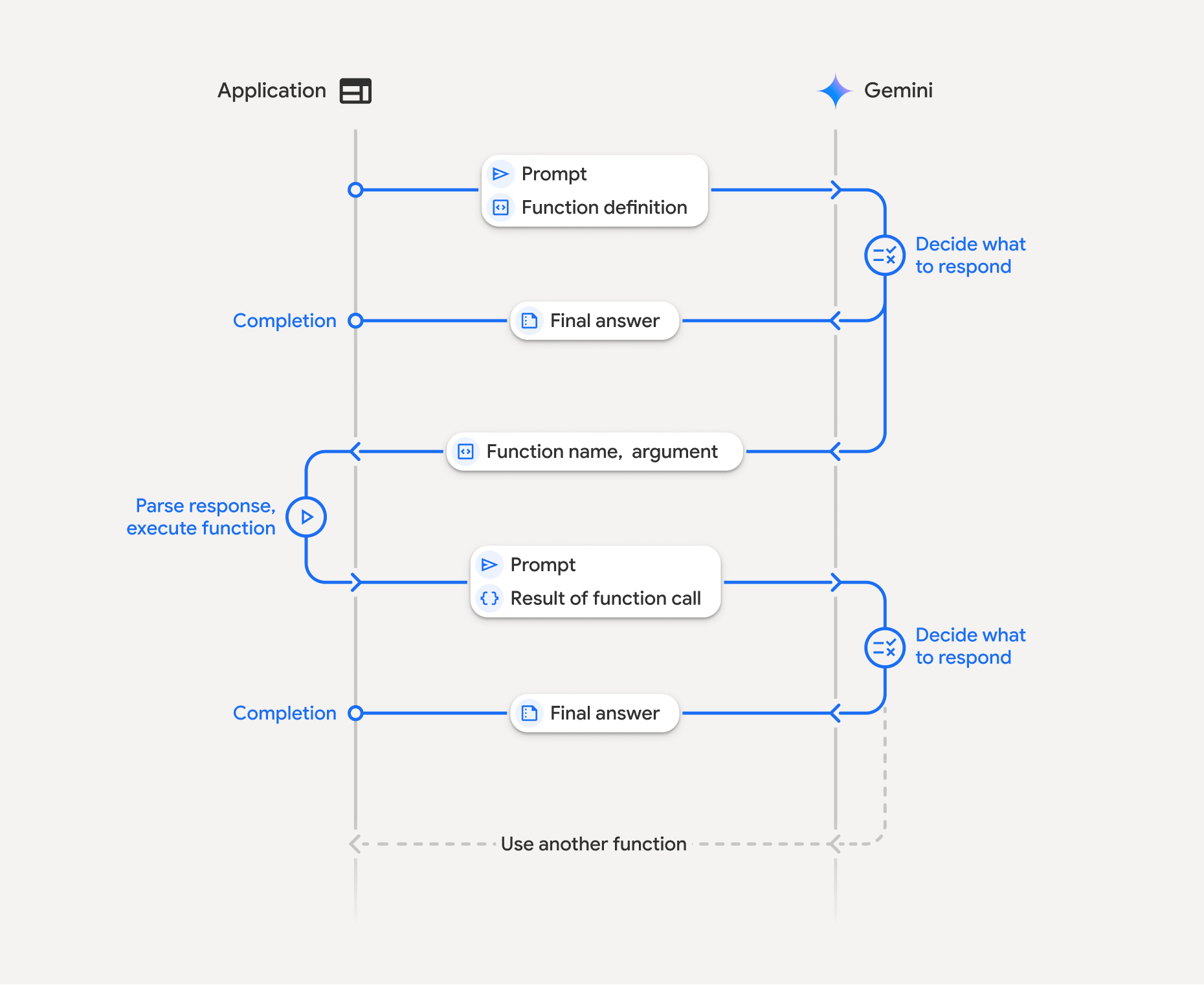
تتضمّن ميزة "استدعاء الدوال" تفاعلاً منظَّمًا بين تطبيقك والنموذج والدوال الخارجية، وذلك على النحو التالي:
- تحديد تعريف الدالة: حدِّد اسم الدالة ومَعلماتها وغرضها للنموذج.
- استدعاء النموذج اللغوي الكبير باستخدام تعريفات الدوال: أرسِل طلب المستخدم مع تعريفات الدوال إلى النموذج.
- تنفيذ رمز الدالة (مسؤوليتك): لا ينفّذ النموذج الدالة بنفسه. استخرِج الاسم والمعلَمات ونفِّذها في تطبيقك.
- إنشاء ردّ سهل الاستخدام: إرسال النتيجة مرة أخرى إلى النموذج للحصول على ردّ نهائي سهل الاستخدام
يمكن تكرار هذه العملية عدة مرات. يتيح النموذج استدعاء عدة دوال في دورة واحدة (استدعاء الدوال المتوازي) وبشكل تسلسلي (استدعاء الدوال التركيبي).
الخطوة 1: تحديد تعريف دالة
Python
set_light_values_declaration = {
    "type": "function",
    "name": "set_light_values",
    "description": "Sets the brightness and color temperature of a light.",
    "parameters": {
        "type": "object",
        "properties": {
            "brightness": {
                "type": "integer",
                "description": "Light level from 0 to 100",
            },
            "color_temp": {
                "type": "string",
                "enum": ["daylight", "cool", "warm"],
                "description": "Color temperature",
            },
        },
        "required": ["brightness", "color_temp"],
    },
}

def set_light_values(brightness: int, color_temp: str) -> dict:
    """Set the brightness and color temperature of a room light."""
    return {"brightness": brightness, "colorTemperature": color_temp}
JavaScript
const setLightValuesTool = {
  type: 'function',
  name: 'set_light_values',
  description: 'Sets the brightness and color temperature of a light.',
  parameters: {
    type: 'object',
    properties: {
      brightness: { type: 'number', description: 'Light level from 0 to 100' },
      color_temp: { type: 'string', enum: ['daylight', 'cool', 'warm'] },
    },
    required: ['brightness', 'color_temp'],
  },
};

function setLightValues(brightness, color_temp) {
  return { brightness: brightness, colorTemperature: color_temp };
}
جافا
import com.google.genai.gaos.models.interactions.Function;
import java.util.Arrays;
import java.util.HashMap;
import java.util.Map;
import java.util.function.BiFunction;

Map<String, Object> brightnessProp = new HashMap<>();
brightnessProp.put("type", "integer");
brightnessProp.put("description", "Light level from 0 to 100");

Map<String, Object> colorTempProp = new HashMap<>();
colorTempProp.put("type", "string");
colorTempProp.put("enum", Arrays.asList("daylight", "cool", "warm"));
colorTempProp.put("description", "Color temperature");

Map<String, Object> properties = new HashMap<>();
properties.put("brightness", brightnessProp);
properties.put("color_temp", colorTempProp);

Map<String, Object> parameters = new HashMap<>();
parameters.put("type", "object");
parameters.put("properties", properties);
parameters.put("required", Arrays.asList("brightness", "color_temp"));

Function setLightValuesDeclaration =
    Function.builder()
        .name("set_light_values")
        .description("Sets the brightness and color temperature of a light.")
        .parameters(parameters)
        .build();

BiFunction<Integer, String, Map<String, Object>> setLightValues =
    (brightness, colorTemp) -> {
      Map<String, Object> result = new HashMap<>();
      result.put("brightness", brightness);
      result.put("colorTemperature", colorTemp);
      return result;
    };
Go
package main

import (
    "google.golang.org/genai"
    "google.golang.org/genai/interactions/models/interactions"
)

func setLightValues(brightness int, colorTemp string) map[string]any {
    return map[string]any{
        "brightness":       brightness,
        "colorTemperature": colorTemp,
    }
}

func main() {
    setLightValuesDeclaration := interactions.NewTool(interactions.Function{
        Name:        genai.Ptr("set_light_values"),
        Description: genai.Ptr("Sets the brightness and color temperature of a light."),
        Parameters: map[string]any{
            "type": "object",
            "properties": map[string]any{
                "brightness": map[string]any{
                    "type":        "integer",
                    "description": "Light level from 0 to 100",
                },
                "color_temp": map[string]any{
                    "type":        "string",
                    "enum":        []string{"daylight", "cool", "warm"},
                    "description": "Color temperature",
                },
            },
            "required": []string{"brightness", "color_temp"},
        },
    })
    _ = setLightValuesDeclaration
}
الخطوة 2: استدعاء النموذج باستخدام تعريفات الدوال
Python
from google import genai

client = genai.Client()

interaction = client.interactions.create(
    model="gemini-3.8-flash",
    input="Turn the lights down to a romantic level",
    tools=[set_light_values_declaration],
)

fc_step = next(s for s in interaction.steps if s.type == "function_call")
print(fc_step)
JavaScript
import { GoogleGenAI } from '@google/genai';

const client = new GoogleGenAI({});

const interaction = await client.interactions.create({
  model: 'gemini-3.8-flash',
  input: 'Turn the lights down to a romantic level',
  tools: [setLightValuesTool],
});

const fcStep = interaction.steps.find(s => s.type === 'function_call');
console.log(fcStep);
جافا
import com.google.genai.Client;
import com.google.genai.gaos.models.interactions.CreateModelInteraction;
import com.google.genai.gaos.models.interactions.Function;
import com.google.genai.gaos.models.interactions.FunctionCallStep;
import com.google.genai.gaos.models.interactions.Interaction;
import com.google.genai.gaos.models.interactions.InteractionsInput;
import com.google.genai.gaos.models.interactions.Model;
import com.google.genai.gaos.models.interactions.Step;
import com.google.genai.gaos.models.operations.CreateInteractionRequestBody;
import java.util.Arrays;
import java.util.HashMap;
import java.util.Map;

Client client = new Client();

Map<String, Object> brightnessProp = new HashMap<>();
brightnessProp.put("type", "integer");
brightnessProp.put("description", "Light level from 0 to 100");

Map<String, Object> colorTempProp = new HashMap<>();
colorTempProp.put("type", "string");
colorTempProp.put("enum", Arrays.asList("daylight", "cool", "warm"));
colorTempProp.put("description", "Color temperature");

Map<String, Object> properties = new HashMap<>();
properties.put("brightness", brightnessProp);
properties.put("color_temp", colorTempProp);

Map<String, Object> parameters = new HashMap<>();
parameters.put("type", "object");
parameters.put("properties", properties);
parameters.put("required", Arrays.asList("brightness", "color_temp"));

Function setLightValuesDeclaration =
    Function.builder()
        .name("set_light_values")
        .description("Sets the brightness and color temperature of a light.")
        .parameters(parameters)
        .build();

CreateModelInteraction params =
    CreateModelInteraction.builder()
        .model(Model.of("gemini-3.8-flash"))
        .input(InteractionsInput.of("Turn the lights down to a romantic level"))
        .tools(Arrays.asList(setLightValuesDeclaration))
        .build();

Interaction interaction =
    client.interactions.create(CreateInteractionRequestBody.of(params)).interaction().get();

FunctionCallStep fcStep = null;
if (interaction.steps().isPresent()) {
  for (Step step : interaction.steps().get()) {
    if (step instanceof FunctionCallStep) {
      fcStep = (FunctionCallStep) step;
      break;
    }
  }
}
System.out.println(fcStep);
Go
package main

import (
    "context"
    "fmt"
    "log"

    "google.golang.org/genai"
    "google.golang.org/genai/interactions/models/interactions"
    "google.golang.org/genai/interactions/models/operations"
)

func main() {
    ctx := context.Background()
    client, err := genai.NewClient(ctx, nil)
    if err != nil {
        log.Fatal(err)
    }

    setLightValuesDeclaration := interactions.NewTool(interactions.Function{
        Name:        genai.Ptr("set_light_values"),
        Description: genai.Ptr("Sets the brightness and color temperature of a light."),
        Parameters: map[string]any{
            "type": "object",
            "properties": map[string]any{
                "brightness": map[string]any{
                    "type":        "integer",
                    "description": "Light level from 0 to 100",
                },
                "color_temp": map[string]any{
                    "type":        "string",
                    "enum":        []string{"daylight", "cool", "warm"},
                    "description": "Color temperature",
                },
            },
            "required": []string{"brightness", "color_temp"},
        },
    })

    resp, err := client.Interactions.Create(ctx, operations.CreateInteractionRequest{
        Body: operations.NewCreateInteractionRequestBody(
            interactions.CreateModelInteraction{
                Model: interactions.Model("gemini-3.8-flash"),
                Input: interactions.NewInteractionsInput("Turn the lights down to a romantic level"),
                Tools: []interactions.Tool{setLightValuesDeclaration},
            },
        ),
    })
    if err != nil {
        log.Fatal(err)
    }

    var fcStep *interactions.FunctionCallStep
    for _, step := range resp.Interaction.Steps {
        if step.FunctionCallStep != nil {
            fcStep = step.FunctionCallStep
            break
        }
    }
    fmt.Println(fcStep)
}
يعرض النموذج خطوة function_call تتضمّن type وname وarguments:
type='function_call'
name='set_light_values'
arguments={'color_temp': 'warm', 'brightness': 25}
الخطوة 3: تنفيذ الدالة
Python
fc_step = next(s for s in interaction.steps if s.type == "function_call")

if fc_step.name == "set_light_values":
    result = set_light_values(**fc_step.arguments)
    print(f"Function execution result: {result}")
JavaScript
const fcStep = interaction.steps.find(s => s.type === 'function_call');

let result;
if (fcStep.name === 'set_light_values') {
  result = setLightValues(fcStep.arguments.brightness, fcStep.arguments.color_temp);
  console.log(`Function execution result: ${JSON.stringify(result)}`);
}
جافا
import com.google.genai.Client;
import com.google.genai.gaos.models.interactions.CreateModelInteraction;
import com.google.genai.gaos.models.interactions.Function;
import com.google.genai.gaos.models.interactions.FunctionCallStep;
import com.google.genai.gaos.models.interactions.Interaction;
import com.google.genai.gaos.models.interactions.InteractionsInput;
import com.google.genai.gaos.models.interactions.Model;
import com.google.genai.gaos.models.interactions.Step;
import com.google.genai.gaos.models.operations.CreateInteractionRequestBody;
import java.util.Arrays;
import java.util.Collections;
import java.util.HashMap;
import java.util.Map;
import java.util.function.BiFunction;

Client client = new Client();

Map<String, Object> brightnessProp = new HashMap<>();
brightnessProp.put("type", "integer");
brightnessProp.put("description", "Light level from 0 to 100");

Map<String, Object> colorTempProp = new HashMap<>();
colorTempProp.put("type", "string");
colorTempProp.put("enum", Arrays.asList("daylight", "cool", "warm"));
colorTempProp.put("description", "Color temperature");

Map<String, Object> properties = new HashMap<>();
properties.put("brightness", brightnessProp);
properties.put("color_temp", colorTempProp);

Map<String, Object> parameters = new HashMap<>();
parameters.put("type", "object");
parameters.put("properties", properties);
parameters.put("required", Arrays.asList("brightness", "color_temp"));

Function setLightValuesDeclaration =
    Function.builder()
        .name("set_light_values")
        .description("Sets the brightness and color temperature of a light.")
        .parameters(parameters)
        .build();

BiFunction<Integer, String, Map<String, Object>> setLightValues =
    (brightness, colorTemp) -> {
      Map<String, Object> result = new HashMap<>();
      result.put("brightness", brightness);
      result.put("colorTemperature", colorTemp);
      return result;
    };

CreateModelInteraction params =
    CreateModelInteraction.builder()
        .model(Model.of("gemini-3.8-flash"))
        .input(InteractionsInput.of("Turn the lights down to a romantic level"))
        .tools(Arrays.asList(setLightValuesDeclaration))
        .build();

Interaction interaction =
    client.interactions.create(CreateInteractionRequestBody.of(params)).interaction().get();

if (interaction.steps().isPresent()) {
  for (Step step : interaction.steps().get()) {
    if (step instanceof FunctionCallStep) {
      FunctionCallStep fcStep = (FunctionCallStep) step;
      if ("set_light_values".equals(fcStep.name().orElse(""))) {
        Map<String, Object> args = fcStep.arguments().orElse(Collections.emptyMap());
        int brightness = ((Number) args.getOrDefault("brightness", 25)).intValue();
        String colorTemp = (String) args.getOrDefault("color_temp", "warm");
        Map<String, Object> result = setLightValues.apply(brightness, colorTemp);
        System.out.println("Function execution result: " + result);
      }
    }
  }
}
Go
package main

import (
    "context"
    "fmt"
    "log"

    "google.golang.org/genai"
    "google.golang.org/genai/interactions/models/interactions"
    "google.golang.org/genai/interactions/models/operations"
)

func setLightValues(brightness int, colorTemp string) map[string]any {
    return map[string]any{
        "brightness":       brightness,
        "colorTemperature": colorTemp,
    }
}

func main() {
    ctx := context.Background()
    client, err := genai.NewClient(ctx, nil)
    if err != nil {
        log.Fatal(err)
    }

    setLightValuesDeclaration := interactions.NewTool(interactions.Function{
        Name:        genai.Ptr("set_light_values"),
        Description: genai.Ptr("Sets the brightness and color temperature of a light."),
        Parameters: map[string]any{
            "type": "object",
            "properties": map[string]any{
                "brightness": map[string]any{
                    "type":        "integer",
                    "description": "Light level from 0 to 100",
                },
                "color_temp": map[string]any{
                    "type":        "string",
                    "enum":        []string{"daylight", "cool", "warm"},
                    "description": "Color temperature",
                },
            },
            "required": []string{"brightness", "color_temp"},
        },
    })

    resp, err := client.Interactions.Create(ctx, operations.CreateInteractionRequest{
        Body: operations.NewCreateInteractionRequestBody(
            interactions.CreateModelInteraction{
                Model: interactions.Model("gemini-3.8-flash"),
                Input: interactions.NewInteractionsInput("Turn the lights down to a romantic level"),
                Tools: []interactions.Tool{setLightValuesDeclaration},
            },
        ),
    })
    if err != nil {
        log.Fatal(err)
    }

    for _, step := range resp.Interaction.Steps {
        if step.FunctionCallStep != nil {
            fcStep := step.FunctionCallStep
            if fcStep.Name == "set_light_values" {
                brightness := 25
                if b, ok := fcStep.Arguments["brightness"].(float64); ok {
                    brightness = int(b)
                }
                colorTemp := "warm"
                if c, ok := fcStep.Arguments["color_temp"].(string); ok {
                    colorTemp = c
                }
                result := setLightValues(brightness, colorTemp)
                fmt.Println("Function execution result:", result)
            }
        }
    }
}
الخطوة 4: إرسال النتيجة إلى النموذج
Python
final_interaction = client.interactions.create(
    model="gemini-3.8-flash",
    input=[
        {
            "type": "function_result",
            "name": fc_step.name,
            "call_id": fc_step.id,
            "result": [{"type": "text", "text": json.dumps(result)}],
        }
    ],
    tools=[set_light_values_declaration],
    previous_interaction_id=interaction.id,
)

print(final_interaction.output_text)
JavaScript
const finalInteraction = await client.interactions.create({
  model: 'gemini-3.8-flash',
  input: [{
    type: 'function_result',
    name: fcStep.name,
    call_id: fcStep.id,
    result: [{ type: 'text', text: JSON.stringify(result) }]
  }],
  tools: [setLightValuesTool],
  previous_interaction_id: interaction.id,
});

console.log(finalInteraction.output_text);
جافا
import com.google.genai.Client;
import com.google.genai.gaos.models.interactions.CreateModelInteraction;
import com.google.genai.gaos.models.interactions.Function;
import com.google.genai.gaos.models.interactions.FunctionCallStep;
import com.google.genai.gaos.models.interactions.FunctionResultStep;
import com.google.genai.gaos.models.interactions.FunctionResultStepResultUnion;
import com.google.genai.gaos.models.interactions.FunctionResultSubcontent;
import com.google.genai.gaos.models.interactions.Interaction;
import com.google.genai.gaos.models.interactions.InteractionsInput;
import com.google.genai.gaos.models.interactions.Model;
import com.google.genai.gaos.models.interactions.Step;
import com.google.genai.gaos.models.interactions.TextContent;
import com.google.genai.gaos.models.operations.CreateInteractionRequestBody;
import java.util.Arrays;
import java.util.HashMap;
import java.util.Map;

Client client = new Client();

Map<String, Object> brightnessProp = new HashMap<>();
brightnessProp.put("type", "integer");
brightnessProp.put("description", "Light level from 0 to 100");

Map<String, Object> colorTempProp = new HashMap<>();
colorTempProp.put("type", "string");
colorTempProp.put("enum", Arrays.asList("daylight", "cool", "warm"));
colorTempProp.put("description", "Color temperature");

Map<String, Object> properties = new HashMap<>();
properties.put("brightness", brightnessProp);
properties.put("color_temp", colorTempProp);

Map<String, Object> parameters = new HashMap<>();
parameters.put("type", "object");
parameters.put("properties", properties);
parameters.put("required", Arrays.asList("brightness", "color_temp"));

Function setLightValuesDeclaration =
    Function.builder()
        .name("set_light_values")
        .description("Sets the brightness and color temperature of a light.")
        .parameters(parameters)
        .build();

CreateModelInteraction params =
    CreateModelInteraction.builder()
        .model(Model.of("gemini-3.8-flash"))
        .input(InteractionsInput.of("Turn the lights down to a romantic level"))
        .tools(Arrays.asList(setLightValuesDeclaration))
        .build();

Interaction interaction =
    client.interactions.create(CreateInteractionRequestBody.of(params)).interaction().get();

FunctionCallStep fcStep = null;
if (interaction.steps().isPresent()) {
  for (Step step : interaction.steps().get()) {
    if (step instanceof FunctionCallStep) {
      fcStep = (FunctionCallStep) step;
      break;
    }
  }
}

if (fcStep != null) {
  String resultJson = "{\"brightness\": 25, \"colorTemperature\": \"warm\"}";
  FunctionResultStep resultStep =
      FunctionResultStep.builder()
          .name(fcStep.name().orElse(""))
          .callId(fcStep.id().orElse(""))
          .result(
              FunctionResultStepResultUnion.of(
                  Arrays.<FunctionResultSubcontent>asList(
                      TextContent.builder().text(resultJson).build())))
          .build();

  CreateModelInteraction finalParams =
      CreateModelInteraction.builder()
          .model(Model.of("gemini-3.8-flash"))
          .previousInteractionId(interaction.id().orElse(""))
          .tools(Arrays.asList(setLightValuesDeclaration))
          .input(InteractionsInput.ofStep(Arrays.<Step>asList(resultStep)))
          .build();

  Interaction finalInteraction =
      client
          .interactions
          .create(CreateInteractionRequestBody.of(finalParams))
          .interaction()
          .get();

  System.out.println(finalInteraction.outputText().orElse(""));
}
Go
package main

import (
    "context"
    "fmt"
    "log"

    "google.golang.org/genai"
    "google.golang.org/genai/interactions/models/interactions"
    "google.golang.org/genai/interactions/models/operations"
)

func main() {
    ctx := context.Background()
    client, err := genai.NewClient(ctx, nil)
    if err != nil {
        log.Fatal(err)
    }

    setLightValuesDeclaration := interactions.NewTool(interactions.Function{
        Name:        genai.Ptr("set_light_values"),
        Description: genai.Ptr("Sets the brightness and color temperature of a light."),
        Parameters: map[string]any{
            "type": "object",
            "properties": map[string]any{
                "brightness": map[string]any{
                    "type":        "integer",
                    "description": "Light level from 0 to 100",
                },
                "color_temp": map[string]any{
                    "type":        "string",
                    "enum":        []string{"daylight", "cool", "warm"},
                    "description": "Color temperature",
                },
            },
            "required": []string{"brightness", "color_temp"},
        },
    })

    resp, err := client.Interactions.Create(ctx, operations.CreateInteractionRequest{
        Body: operations.NewCreateInteractionRequestBody(
            interactions.CreateModelInteraction{
                Model: interactions.Model("gemini-3.8-flash"),
                Input: interactions.NewInteractionsInput("Turn the lights down to a romantic level"),
                Tools: []interactions.Tool{setLightValuesDeclaration},
            },
        ),
    })
    if err != nil {
        log.Fatal(err)
    }

    var fcStep *interactions.FunctionCallStep
    for _, step := range resp.Interaction.Steps {
        if step.FunctionCallStep != nil {
            fcStep = step.FunctionCallStep
            break
        }
    }

    if fcStep != nil {
        resultJson := `{"brightness": 25, "colorTemperature": "warm"}`
        resultStep := interactions.NewStep(interactions.FunctionResultStep{
            Name:   genai.Ptr(fcStep.Name),
            CallID: fcStep.ID,
            Result: interactions.NewFunctionResultStepResultUnion([]interactions.FunctionResultSubcontent{
                interactions.NewFunctionResultSubcontent(interactions.TextContent{
                    Text: resultJson,
                }),
            }),
        })

        finalResp, err := client.Interactions.Create(ctx, operations.CreateInteractionRequest{
            Body: operations.NewCreateInteractionRequestBody(
                interactions.CreateModelInteraction{
                    Model:                 interactions.Model("gemini-3.8-flash"),
                    PreviousInteractionID: resp.Interaction.ID,
                    Tools:                 []interactions.Tool{setLightValuesDeclaration},
                    Input:                 interactions.NewInteractionsInput([]interactions.Step{resultStep}),
                },
            ),
        })
        if err != nil {
            log.Fatal(err)
        }

        fmt.Println(finalResp.Interaction.GetOutputText())
    }
}
استدعاء الدوال بدون حالة
يمكنك أيضًا استخدام ميزة "استدعاء الدوال" في الوضع غير الاحتفاظ بالحالة من خلال إدارة سجلّ المحادثات من جهة العميل وتعيين store=false.
في الوضع غير المرتبط بحالة، يجب تمرير السجلّ الكامل للمحادثة في الحقل input لكل طلب لاحق. يجب أن يتضمّن هذا السجلّ ما يلي:
1. الخطوة user_input الأولية
2. جميع الخطوات التي أنشأها النموذج والتي تم عرضها في الجولة الأولى (بما في ذلك الخطوتان thought وfunction_call) كما تم تلقّيها تمامًا
3- الخطوة function_result التي تحتوي على ناتج الدالة التي تم تنفيذها
Python
from google import genai
import json

client = genai.Client()

history = [
    {
        "type": "user_input",
        "content": [{"type": "text", "text": "Turn the lights down to a romantic level"}]
    }
]

interaction = client.interactions.create(
    model="gemini-3.8-flash",
    store=False,
    input=history,
    tools=[set_light_values_declaration],
)

for step in interaction.steps:
    history.append(step.model_dump())

fc_step = next(s for s in interaction.steps if s.type == "function_call")
if fc_step.name == "set_light_values":
    result = set_light_values(**fc_step.arguments)

history.append({
    "type": "function_result",
    "name": fc_step.name,
    "call_id": fc_step.id,
    "result": [{"type": "text", "text": json.dumps(result)}],
})

final_interaction = client.interactions.create(
    model="gemini-3.8-flash",
    store=False,
    input=history,
    tools=[set_light_values_declaration],
)

print(final_interaction.output_text)
JavaScript
import { GoogleGenAI } from "@google/genai";

const client = new GoogleGenAI({});

async function main() {
  const history = [
    {
      type: "user_input",
      content: [{ type: "text", text: "Turn the lights down to a romantic level" }]
    }
  ];

  const interaction = await client.interactions.create({
    model: "gemini-3.8-flash",
    store: false,
    input: history,
    tools: [setLightValuesTool],
  });

  history.push(...interaction.steps);

  const fcStep = interaction.steps.find(s => s.type === 'function_call');
  let result;
  if (fcStep.name === 'set_light_values') {
    result = setLightValues(fcStep.arguments.brightness, fcStep.arguments.color_temp);
  }

  history.push({
    type: 'function_result',
    name: fcStep.name,
    call_id: fcStep.id,
    result: [{ type: 'text', text: JSON.stringify(result) }]
  });

  const finalInteraction = await client.interactions.create({
    model: 'gemini-3.8-flash',
    store: false,
    input: history,
    tools: [setLightValuesTool],
  });

  console.log(finalInteraction.output_text);
}

await main();
جافا
import com.google.genai.Client;
import com.google.genai.gaos.models.interactions.CreateModelInteraction;
import com.google.genai.gaos.models.interactions.Function;
import com.google.genai.gaos.models.interactions.FunctionCallStep;
import com.google.genai.gaos.models.interactions.FunctionResultStep;
import com.google.genai.gaos.models.interactions.FunctionResultStepResultUnion;
import com.google.genai.gaos.models.interactions.FunctionResultSubcontent;
import com.google.genai.gaos.models.interactions.Interaction;
import com.google.genai.gaos.models.interactions.InteractionsInput;
import com.google.genai.gaos.models.interactions.Model;
import com.google.genai.gaos.models.interactions.Step;
import com.google.genai.gaos.models.interactions.TextContent;
import com.google.genai.gaos.models.interactions.UserInputStep;
import com.google.genai.gaos.models.operations.CreateInteractionRequestBody;
import java.util.ArrayList;
import java.util.Arrays;
import java.util.HashMap;
import java.util.List;
import java.util.Map;

Client client = new Client();

Map<String, Object> brightnessProp = new HashMap<>();
brightnessProp.put("type", "integer");
brightnessProp.put("description", "Light level from 0 to 100");

Map<String, Object> colorTempProp = new HashMap<>();
colorTempProp.put("type", "string");
colorTempProp.put("enum", Arrays.asList("daylight", "cool", "warm"));
colorTempProp.put("description", "Color temperature");

Map<String, Object> properties = new HashMap<>();
properties.put("brightness", brightnessProp);
properties.put("color_temp", colorTempProp);

Map<String, Object> parameters = new HashMap<>();
parameters.put("type", "object");
parameters.put("properties", properties);
parameters.put("required", Arrays.asList("brightness", "color_temp"));

Function setLightValuesDeclaration =
    Function.builder()
        .name("set_light_values")
        .description("Sets the brightness and color temperature of a light.")
        .parameters(parameters)
        .build();

List<Step> history = new ArrayList<>();
history.add(
    UserInputStep.builder()
        .content(
            Arrays.asList(
                TextContent.builder()
                    .text("Turn the lights down to a romantic level")
                    .build()))
        .build());

CreateModelInteraction params =
    CreateModelInteraction.builder()
        .model(Model.of("gemini-3.8-flash"))
        .store(false)
        .input(InteractionsInput.ofStep(history))
        .tools(Arrays.asList(setLightValuesDeclaration))
        .build();

Interaction interaction =
    client.interactions.create(CreateInteractionRequestBody.of(params)).interaction().get();

FunctionCallStep fcStep = null;
if (interaction.steps().isPresent()) {
  history.addAll(interaction.steps().get());
  for (Step step : interaction.steps().get()) {
    if (step instanceof FunctionCallStep) {
      fcStep = (FunctionCallStep) step;
      break;
    }
  }
}

if (fcStep != null) {
  String resultJson = "{\"brightness\": 25, \"colorTemperature\": \"warm\"}";
  history.add(
      FunctionResultStep.builder()
          .name(fcStep.name().orElse(""))
          .callId(fcStep.id().orElse(""))
          .result(
              FunctionResultStepResultUnion.of(
                  Arrays.<FunctionResultSubcontent>asList(
                      TextContent.builder().text(resultJson).build())))
          .build());

  CreateModelInteraction finalParams =
      CreateModelInteraction.builder()
          .model(Model.of("gemini-3.8-flash"))
          .store(false)
          .input(InteractionsInput.ofStep(history))
          .tools(Arrays.asList(setLightValuesDeclaration))
          .build();

  Interaction finalInteraction =
      client
          .interactions
          .create(CreateInteractionRequestBody.of(finalParams))
          .interaction()
          .get();

  System.out.println(finalInteraction.outputText().orElse(""));
}
Go
package main

import (
    "context"
    "fmt"
    "log"

    "google.golang.org/genai"
    "google.golang.org/genai/interactions/models/interactions"
    "google.golang.org/genai/interactions/models/operations"
)

func main() {
    ctx := context.Background()
    client, err := genai.NewClient(ctx, nil)
    if err != nil {
        log.Fatal(err)
    }

    setLightValuesDeclaration := interactions.NewTool(interactions.Function{
        Name:        genai.Ptr("set_light_values"),
        Description: genai.Ptr("Sets the brightness and color temperature of a light."),
        Parameters: map[string]any{
            "type": "object",
            "properties": map[string]any{
                "brightness": map[string]any{
                    "type":        "integer",
                    "description": "Light level from 0 to 100",
                },
                "color_temp": map[string]any{
                    "type":        "string",
                    "enum":        []string{"daylight", "cool", "warm"},
                    "description": "Color temperature",
                },
            },
            "required": []string{"brightness", "color_temp"},
        },
    })

    history := []interactions.Step{
        interactions.NewStep(interactions.UserInputStep{
            Content: []interactions.Content{
                interactions.NewContent(interactions.TextContent{
                    Text: "Turn the lights down to a romantic level",
                }),
            },
        }),
    }

    resp, err := client.Interactions.Create(ctx, operations.CreateInteractionRequest{
        Body: operations.NewCreateInteractionRequestBody(
            interactions.CreateModelInteraction{
                Model: interactions.Model("gemini-3.8-flash"),
                Store: genai.Ptr(false),
                Input: interactions.NewInteractionsInput(history),
                Tools: []interactions.Tool{setLightValuesDeclaration},
            },
        ),
    })
    if err != nil {
        log.Fatal(err)
    }

    history = append(history, resp.Interaction.Steps...)
    var fcStep *interactions.FunctionCallStep
    for _, step := range resp.Interaction.Steps {
        if step.FunctionCallStep != nil {
            fcStep = step.FunctionCallStep
            break
        }
    }

    if fcStep != nil {
        resultJson := `{"brightness": 25, "colorTemperature": "warm"}`
        history = append(history, interactions.NewStep(interactions.FunctionResultStep{
            Name:   genai.Ptr(fcStep.Name),
            CallID: fcStep.ID,
            Result: interactions.NewFunctionResultStepResultUnion([]interactions.FunctionResultSubcontent{
                interactions.NewFunctionResultSubcontent(interactions.TextContent{
                    Text: resultJson,
                }),
            }),
        }))

        finalResp, err := client.Interactions.Create(ctx, operations.CreateInteractionRequest{
            Body: operations.NewCreateInteractionRequestBody(
                interactions.CreateModelInteraction{
                    Model: interactions.Model("gemini-3.8-flash"),
                    Store: genai.Ptr(false),
                    Input: interactions.NewInteractionsInput(history),
                    Tools: []interactions.Tool{setLightValuesDeclaration},
                },
            ),
        })
        if err != nil {
            log.Fatal(err)
        }

        fmt.Println(finalResp.Interaction.GetOutputText())
    }
}
REST
# Turn 1: Send request with tools and store: false
RESPONSE1=$(curl -s -X POST "https://generativelanguage.googleapis.com/v1beta/interactions" \
  -H "x-goog-api-key: $GEMINI_API_KEY" \
  -H 'Content-Type: application/json' \
  -d '{
    "model": "gemini-3.8-flash",
    "store": false,
    "input": [
      {
        "type": "user_input",
        "content": "Turn the lights down to a romantic level"
      }
    ],
    "tools": [{
      "type": "function",
      "name": "set_light_values",
      "description": "Sets the brightness and color temperature of a light.",
      "parameters": {
        "type": "object",
        "properties": {
          "brightness": {"type": "integer", "description": "Light level from 0 to 100"},
          "color_temp": {"type": "string", "enum": ["daylight", "cool", "warm"]}
        },
        "required": ["brightness", "color_temp"]
      }
    }]
  }')

# Extract model steps (thought, function_call)
MODEL_STEPS=$(echo "$RESPONSE1" | jq '.steps')

# Extract function call details to execute
FC_NAME=$(echo "$RESPONSE1" | jq -r '.steps[] | select(.type=="function_call") | .name')
FC_ID=$(echo "$RESPONSE1" | jq -r '.steps[] | select(.type=="function_call") | .id')

# Assume local execution returns: {"brightness": 25, "colorTemperature": "warm"}
RESULT="{\"brightness\": 25, \"colorTemperature\": \"warm\"}"

# Reconstruct history for Turn 2
HISTORY=$(jq -n \
  --argjson first_input '[{"type": "user_input", "content": "Turn the lights down to a romantic level"}]' \
  --argjson model_steps "$MODEL_STEPS" \
  --arg fc_name "$FC_NAME" \
  --arg fc_id "$FC_ID" \
  --arg result "$RESULT" \
  '$first_input + $model_steps + [{"type": "function_result", "name": $fc_name, "call_id": $fc_id, "result": [{"type": "text", "text": $result}]}]')

# Turn 2: Send the full history
curl -X POST "https://generativelanguage.googleapis.com/v1beta/interactions" \
  -H "x-goog-api-key: $GEMINI_API_KEY" \
  -H 'Content-Type: application/json' \
  -d "{
    \"model\": \"gemini-3.8-flash\",
    \"store\": false,
    \"input\": $HISTORY,
    \"tools\": [{
      \"type\": \"function\",
      \"name\": \"set_light_values\",
      \"description\": \"Sets the brightness and color temperature of a light.\",
      \"parameters\": {
        \"type\": \"object\",
        \"properties\": {
          \"brightness\": {\"type\": \"integer\"},
          \"color_temp\": {\"type\": \"string\"}
        },
        \"required\": [\"brightness\", \"color_temp\"]
      }
    }]
  }"
تعريفات الدوال
يتم تمرير تعريف الدالة كأداة ويتضمّن ما يلي:
-
type(سلسلة): يجب أن تكون القيمة"function"للدوال المخصّصة. -
name(سلسلة): اسم دالة فريد (استخدِم شُرطًا سفلية أو camelCase). -
description(سلسلة): شرح واضح للغرض من الدالة. parameters(الكائن): مَعلمات الإدخال التي تتوقّعها الدالة.type(سلسلة): نوع البيانات العام، مثلobject.-
properties(كائن): مَعلمات فردية تتضمّن النوع والوصف required(مصفوفة): أسماء المَعلمات الإلزامية.
استدعاء الدوال باستخدام "النماذج المفكّرة"
تستخدم نماذج سلسلة Gemini 3 عملية "تفكير" داخلية تعمل على تحسين عملية استدعاء الدوال. تتولّى حِزم تطوير البرامج (SDK) تلقائيًا إدارة توقيعات الأفكار نيابةً عنك.
استدعاء الدوال بشكل متوازٍ
استدعاء عدة دوال في الوقت نفسه عندما تكون مستقلة:
Python
power_disco_ball = {"type": "function", "name": "power_disco_ball", "description": "Powers the disco ball.",
    "parameters": {"type": "object", "properties": {"power": {"type": "boolean"}}, "required": ["power"]}}
start_music = {"type": "function", "name": "start_music", "description": "Play music.",
    "parameters": {"type": "object", "properties": {"energetic": {"type": "boolean"}, "loud": {"type": "boolean"}}, "required": ["energetic", "loud"]}}
dim_lights = {"type": "function", "name": "dim_lights", "description": "Dim the lights.",
    "parameters": {"type": "object", "properties": {"brightness": {"type": "number"}}, "required": ["brightness"]}}

client = genai.Client()

interaction = client.interactions.create(
    model="gemini-3.8-flash",
    input="Turn this place into a party!",
    tools=[power_disco_ball, start_music, dim_lights],
    generation_config={"tool_choice": "any"},
)

for step in interaction.steps:
    if step.type == "function_call":
        args = ", ".join(f"{key}={val}" for key, val in step.arguments.items())
        print(f"{step.name}({args})")
JavaScript
const powerDiscoBall = { type: 'function', name: 'power_disco_ball', description: 'Powers the disco ball.',
  parameters: { type: 'object', properties: { power: { type: 'boolean' } }, required: ['power'] } };
const startMusic = { type: 'function', name: 'start_music', description: 'Play music.',
  parameters: { type: 'object', properties: { energetic: { type: 'boolean' }, loud: { type: 'boolean' } }, required: ['energetic', 'loud'] } };
const dimLights = { type: 'function', name: 'dim_lights', description: 'Dim the lights.',
  parameters: { type: 'object', properties: { brightness: { type: 'number' } }, required: ['brightness'] } };

const interaction = await client.interactions.create({
  model: 'gemini-3.8-flash',
  input: 'Turn this place into a party!',
  tools: [powerDiscoBall, startMusic, dimLights],
  generation_config: { tool_choice: 'any' },
});

for (const step of interaction.steps) {
  if (step.type === 'function_call') {
    console.log(`${step.name}(${JSON.stringify(step.arguments)})`);
  }
}
جافا
import com.google.genai.Client;
import com.google.genai.gaos.models.interactions.CreateModelInteraction;
import com.google.genai.gaos.models.interactions.Function;
import com.google.genai.gaos.models.interactions.FunctionCallStep;
import com.google.genai.gaos.models.interactions.GenerationConfig;
import com.google.genai.gaos.models.interactions.Interaction;
import com.google.genai.gaos.models.interactions.InteractionsInput;
import com.google.genai.gaos.models.interactions.Model;
import com.google.genai.gaos.models.interactions.Step;
import com.google.genai.gaos.models.interactions.ToolChoice;
import com.google.genai.gaos.models.interactions.ToolChoiceType;
import com.google.genai.gaos.models.operations.CreateInteractionRequestBody;
import java.util.Arrays;
import java.util.Collections;
import java.util.HashMap;
import java.util.Map;

Client client = new Client();

Map<String, Object> discoParams = new HashMap<>();
discoParams.put("type", "object");
discoParams.put(
    "properties", Collections.singletonMap("power", Collections.singletonMap("type", "boolean")));
discoParams.put("required", Arrays.asList("power"));

Function powerDiscoBall =
    Function.builder()
        .name("power_disco_ball")
        .description("Powers the disco ball.")
        .parameters(discoParams)
        .build();

Map<String, Object> musicProps = new HashMap<>();
musicProps.put("energetic", Collections.singletonMap("type", "boolean"));
musicProps.put("loud", Collections.singletonMap("type", "boolean"));
Map<String, Object> musicParams = new HashMap<>();
musicParams.put("type", "object");
musicParams.put("properties", musicProps);
musicParams.put("required", Arrays.asList("energetic", "loud"));

Function startMusic =
    Function.builder()
        .name("start_music")
        .description("Play music.")
        .parameters(musicParams)
        .build();

Map<String, Object> lightsParams = new HashMap<>();
lightsParams.put("type", "object");
lightsParams.put(
    "properties",
    Collections.singletonMap("brightness", Collections.singletonMap("type", "number")));
lightsParams.put("required", Arrays.asList("brightness"));

Function dimLights =
    Function.builder()
        .name("dim_lights")
        .description("Dim the lights.")
        .parameters(lightsParams)
        .build();

CreateModelInteraction params =
    CreateModelInteraction.builder()
        .model(Model.of("gemini-3.8-flash"))
        .input(InteractionsInput.of("Turn this place into a party!"))
        .tools(Arrays.asList(powerDiscoBall, startMusic, dimLights))
        .generationConfig(
            GenerationConfig.builder().toolChoice(ToolChoice.of(ToolChoiceType.ANY)).build())
        .build();

Interaction interaction =
    client.interactions.create(CreateInteractionRequestBody.of(params)).interaction().get();

if (interaction.steps().isPresent()) {
  for (Step step : interaction.steps().get()) {
    if (step instanceof FunctionCallStep) {
      FunctionCallStep fc = (FunctionCallStep) step;
      System.out.println(fc.name().orElse("") + "(" + fc.arguments().orElse(null) + ")");
    }
  }
}
Go
package main

import (
    "context"
    "fmt"
    "log"

    "google.golang.org/genai"
    "google.golang.org/genai/interactions/models/interactions"
    "google.golang.org/genai/interactions/models/operations"
)

func main() {
    ctx := context.Background()
    client, err := genai.NewClient(ctx, nil)
    if err != nil {
        log.Fatal(err)
    }

    powerDiscoBall := interactions.NewTool(interactions.Function{
        Name:        genai.Ptr("power_disco_ball"),
        Description: genai.Ptr("Powers the disco ball."),
        Parameters: map[string]any{
            "type": "object",
            "properties": map[string]any{
                "power": map[string]any{"type": "boolean"},
            },
            "required": []string{"power"},
        },
    })

    startMusic := interactions.NewTool(interactions.Function{
        Name:        genai.Ptr("start_music"),
        Description: genai.Ptr("Play music."),
        Parameters: map[string]any{
            "type": "object",
            "properties": map[string]any{
                "energetic": map[string]any{"type": "boolean"},
                "loud":      map[string]any{"type": "boolean"},
            },
            "required": []string{"energetic", "loud"},
        },
    })

    dimLights := interactions.NewTool(interactions.Function{
        Name:        genai.Ptr("dim_lights"),
        Description: genai.Ptr("Dim the lights."),
        Parameters: map[string]any{
            "type": "object",
            "properties": map[string]any{
                "brightness": map[string]any{"type": "number"},
            },
            "required": []string{"brightness"},
        },
    })

    resp, err := client.Interactions.Create(ctx, operations.CreateInteractionRequest{
        Body: operations.NewCreateInteractionRequestBody(
            interactions.CreateModelInteraction{
                Model: interactions.Model("gemini-3.8-flash"),
                Input: interactions.NewInteractionsInput("Turn this place into a party!"),
                Tools: []interactions.Tool{powerDiscoBall, startMusic, dimLights},
                GenerationConfig: &interactions.GenerationConfig{
                    ToolChoice: genai.Ptr(interactions.NewToolChoice(interactions.ToolChoiceTypeAny)),
                },
            },
        ),
    })
    if err != nil {
        log.Fatal(err)
    }

    for _, step := range resp.Interaction.Steps {
        if step.FunctionCallStep != nil {
            fc := step.FunctionCallStep
            fmt.Printf("%s(%v)\n", fc.Name, fc.Arguments)
        }
    }
}
REST
curl -X POST "https://generativelanguage.googleapis.com/v1beta/interactions" \
  -H "x-goog-api-key: $GEMINI_API_KEY" \
  -H 'Content-Type: application/json' \
  -d '{
    "model": "gemini-3.8-flash",
    "input": "Turn this place into a party!",
    "tools": [
      {
        "type": "function",
        "name": "power_disco_ball",
        "description": "Powers the disco ball.",
        "parameters": {
          "type": "object",
          "properties": {
            "power": {"type": "boolean"}
          },
          "required": ["power"]
        }
      },
      {
        "type": "function",
        "name": "start_music",
        "description": "Play music.",
        "parameters": {
          "type": "object",
          "properties": {
            "energetic": {"type": "boolean"},
            "loud": {"type": "boolean"}
          },
          "required": ["energetic", "loud"]
        }
      },
      {
        "type": "function",
        "name": "dim_lights",
        "description": "Dim the lights.",
        "parameters": {
          "type": "object",
          "properties": {
            "brightness": {"type": "number"}
          },
          "required": ["brightness"]
        }
      }
    ]
  }'
استدعاء الدوال التركيبي
ربط استدعاءات دوال متعددة معًا لتنفيذ طلبات معقّدة (مثل الحصول على الموقع الجغرافي أولاً، ثم الحصول على حالة الطقس في هذا الموقع الجغرافي)
Python
get_weather_forecast_declaration = {
    "type": "function",
    "name": "get_weather_forecast",
    "description": "Gets the current weather temperature for a given location.",
    "parameters": {
        "type": "object",
        "properties": {
            "location": {"type": "string", "description": "The location"},
        },
        "required": ["location"],
    },
}

set_thermostat_temperature_declaration = {
    "type": "function",
    "name": "set_thermostat_temperature",
    "description": "Sets the thermostat to a desired temperature.",
    "parameters": {
        "type": "object",
        "properties": {
            "temperature": {
                "type": "integer",
                "description": "The temperature in Celsius",
            },
        },
        "required": ["temperature"],
    },
}

client = genai.Client()

interaction = client.interactions.create(
    model="gemini-3.8-flash",
    input="If it's warmer than 20°C in London, set the thermostat to 20°C, otherwise 18°C.",
    tools=[
        get_weather_forecast_declaration,
        set_thermostat_temperature_declaration,
    ],
)

for step in interaction.steps:
    if step.type == "function_call":
        print(f"Function to call: {step.name}")
        print(f"Arguments: {step.arguments}")
    elif hasattr(step, "content") and step.content:
         for part in step.content:
             if hasattr(part, "text"):
                 print(part.text)
JavaScript
import { GoogleGenAI } from '@google/genai';

const client = new GoogleGenAI({});

const getWeatherForecastTool = {
  type: 'function',
  name: 'get_weather_forecast',
  description: 'Gets the current weather temperature for a given location.',
  parameters: {
    type: 'object',
    properties: {
      location: { type: 'string', description: 'The location' },
    },
    required: ['location'],
  },
};

const setThermostatTemperatureTool = {
  type: 'function',
  name: 'set_thermostat_temperature',
  description: 'Sets the thermostat to a desired temperature.',
  parameters: {
    type: 'object',
    properties: {
      temperature: {
        type: 'integer',
        description: 'The temperature in Celsius',
      },
    },
    required: ['temperature'],
  },
};

const interaction = await client.interactions.create({
  model: 'gemini-3.8-flash',
  input: "If it's warmer than 20°C in London, set the thermostat to 20°C, otherwise 18°C.",
  tools: [
    getWeatherForecastTool,
    setThermostatTemperatureTool,
  ],
});

for (const step of interaction.steps) {
  if (step.type === 'function_call') {
    console.log(`Function to call: ${step.name}`);
    console.log(`Arguments: ${JSON.stringify(step.arguments)}`);
  } else if (step.content) {
    for (const part of step.content) {
      if (part.text) {
        console.log(part.text);
      }
    }
  }
}
جافا
import com.google.genai.Client;
import com.google.genai.gaos.models.interactions.Content;
import com.google.genai.gaos.models.interactions.CreateModelInteraction;
import com.google.genai.gaos.models.interactions.Function;
import com.google.genai.gaos.models.interactions.FunctionCallStep;
import com.google.genai.gaos.models.interactions.Interaction;
import com.google.genai.gaos.models.interactions.InteractionsInput;
import com.google.genai.gaos.models.interactions.Model;
import com.google.genai.gaos.models.interactions.ModelOutputStep;
import com.google.genai.gaos.models.interactions.Step;
import com.google.genai.gaos.models.interactions.TextContent;
import com.google.genai.gaos.models.operations.CreateInteractionRequestBody;
import java.util.Arrays;
import java.util.HashMap;
import java.util.Map;

Client client = new Client();

Map<String, Object> locationProp = new HashMap<>();
locationProp.put("type", "string");
locationProp.put("description", "The location");

Map<String, Object> weatherProps = new HashMap<>();
weatherProps.put("location", locationProp);

Map<String, Object> weatherParams = new HashMap<>();
weatherParams.put("type", "object");
weatherParams.put("properties", weatherProps);
weatherParams.put("required", Arrays.asList("location"));

Function getWeatherForecastDeclaration =
    Function.builder()
        .name("get_weather_forecast")
        .description("Gets the current weather temperature for a given location.")
        .parameters(weatherParams)
        .build();

Map<String, Object> tempProp = new HashMap<>();
tempProp.put("type", "integer");
tempProp.put("description", "The temperature in Celsius");

Map<String, Object> thermostatProps = new HashMap<>();
thermostatProps.put("temperature", tempProp);

Map<String, Object> thermostatParams = new HashMap<>();
thermostatParams.put("type", "object");
thermostatParams.put("properties", thermostatProps);
thermostatParams.put("required", Arrays.asList("temperature"));

Function setThermostatTemperatureDeclaration =
    Function.builder()
        .name("set_thermostat_temperature")
        .description("Sets the thermostat to a desired temperature.")
        .parameters(thermostatParams)
        .build();

CreateModelInteraction params =
    CreateModelInteraction.builder()
        .model(Model.of("gemini-3.8-flash"))
        .input(
            InteractionsInput.of(
                "If it's warmer than 20°C in London, set the thermostat to 20°C, otherwise 18°C."))
        .tools(Arrays.asList(getWeatherForecastDeclaration, setThermostatTemperatureDeclaration))
        .build();

Interaction interaction =
    client.interactions.create(CreateInteractionRequestBody.of(params)).interaction().get();

if (interaction.steps().isPresent()) {
  for (Step step : interaction.steps().get()) {
    if (step instanceof FunctionCallStep) {
      FunctionCallStep fc = (FunctionCallStep) step;
      System.out.println("Function to call: " + fc.name().orElse(""));
      System.out.println("Arguments: " + fc.arguments().orElse(null));
    } else if (step instanceof ModelOutputStep) {
      ModelOutputStep outputStep = (ModelOutputStep) step;
      if (outputStep.content().isPresent()) {
        for (Content part : outputStep.content().get()) {
          if (part instanceof TextContent) {
            System.out.println(((TextContent) part).text().orElse(""));
          }
        }
      }
    }
  }
}
Go
package main

import (
    "context"
    "fmt"
    "log"

    "google.golang.org/genai"
    "google.golang.org/genai/interactions/models/interactions"
    "google.golang.org/genai/interactions/models/operations"
)

func main() {
    ctx := context.Background()
    client, err := genai.NewClient(ctx, nil)
    if err != nil {
        log.Fatal(err)
    }

    getWeatherForecastDeclaration := interactions.NewTool(interactions.Function{
        Name:        genai.Ptr("get_weather_forecast"),
        Description: genai.Ptr("Gets the current weather temperature for a given location."),
        Parameters: map[string]any{
            "type": "object",
            "properties": map[string]any{
                "location": map[string]any{
                    "type":        "string",
                    "description": "The location",
                },
            },
            "required": []string{"location"},
        },
    })

    setThermostatTemperatureDeclaration := interactions.NewTool(interactions.Function{
        Name:        genai.Ptr("set_thermostat_temperature"),
        Description: genai.Ptr("Sets the thermostat to a desired temperature."),
        Parameters: map[string]any{
            "type": "object",
            "properties": map[string]any{
                "temperature": map[string]any{
                    "type":        "integer",
                    "description": "The temperature in Celsius",
                },
            },
            "required": []string{"temperature"},
        },
    })

    resp, err := client.Interactions.Create(ctx, operations.CreateInteractionRequest{
        Body: operations.NewCreateInteractionRequestBody(
            interactions.CreateModelInteraction{
                Model: interactions.Model("gemini-3.8-flash"),
                Input: interactions.NewInteractionsInput("If it's warmer than 20°C in London, set the thermostat to 20°C, otherwise 18°C."),
                Tools: []interactions.Tool{getWeatherForecastDeclaration, setThermostatTemperatureDeclaration},
            },
        ),
    })
    if err != nil {
        log.Fatal(err)
    }

    for _, step := range resp.Interaction.Steps {
        if step.FunctionCallStep != nil {
            fc := step.FunctionCallStep
            fmt.Println("Function to call:", fc.Name)
            fmt.Println("Arguments:", fc.Arguments)
        } else if step.ModelOutputStep != nil {
            for _, part := range step.ModelOutputStep.Content {
                if part.TextContent != nil {
                    fmt.Println(part.TextContent.Text)
                }
            }
        }
    }
}
REST
curl -X POST "https://generativelanguage.googleapis.com/v1beta/interactions" \
  -H "x-goog-api-key: $GEMINI_API_KEY" \
  -H 'Content-Type: application/json' \
  -d '{
    "model": "gemini-3.8-flash",
    "input": "If it'\''s warmer than 20°C in London, set the thermostat to 20°C, otherwise 18°C.",
    "tools": [
      {
        "type": "function",
        "name": "get_weather_forecast",
        "description": "Gets the current weather temperature for a given location.",
        "parameters": {
          "type": "object",
          "properties": {
            "location": {"type": "string"}
          },
          "required": ["location"]
        }
      },
      {
        "type": "function",
        "name": "set_thermostat_temperature",
        "description": "Sets the thermostat to a desired temperature.",
        "parameters": {
          "type": "object",
          "properties": {
            "temperature": {"type": "integer"}
          },
          "required": ["temperature"]
        }
      }
    ]
  }'
أوضاع استدعاء الدالة
التحكّم في كيفية استخدام النموذج للأدوات باستخدام tool_choice في generation_config:
auto(القيمة التلقائية): يقرّر النموذج ما إذا كان سيستدعي دالة أو سيردّ مباشرةً.-
any: يكون النموذج مقيّدًا بالتنبؤ دائمًا باستدعاء دالة. -
none: يُحظر على النموذج إجراء طلبات وظائف. validated: يضمن النموذج الالتزام بمخطط الدالة.
Python
generation_config = {
    "tool_choice": {
        "allowed_tools": {
            "mode": "any",
            "tools": ["get_current_temperature"]
        }
    }
}
JavaScript
const generation_config = {
  tool_choice: {
    allowed_tools: {
      mode: 'any',
      tools: ['get_current_temperature']
    }
  }
};
جافا
import com.google.genai.gaos.models.interactions.AllowedTools;
import com.google.genai.gaos.models.interactions.GenerationConfig;
import com.google.genai.gaos.models.interactions.ToolChoice;
import com.google.genai.gaos.models.interactions.ToolChoiceConfig;
import com.google.genai.gaos.models.interactions.ToolChoiceType;
import java.util.Arrays;

GenerationConfig generationConfig =
    GenerationConfig.builder()
        .toolChoice(
            ToolChoice.of(
                ToolChoiceConfig.builder()
                    .allowedTools(
                        AllowedTools.builder()
                            .mode(ToolChoiceType.ANY)
                            .tools(Arrays.asList("get_current_temperature"))
                            .build())
                    .build()))
        .build();
Go
package main

import (
    "google.golang.org/genai"
    "google.golang.org/genai/interactions/models/interactions"
)

func main() {
    generationConfig := interactions.GenerationConfig{
        ToolChoice: genai.Ptr(interactions.NewToolChoice(interactions.ToolChoiceConfig{
            AllowedTools: &interactions.AllowedTools{
                Mode:  interactions.ToolChoiceTypeAny.ToPointer(),
                Tools: []string{"get_current_temperature"},
            },
        })),
    }
    _ = generationConfig
}
REST
curl -X POST "https://generativelanguage.googleapis.com/v1beta/interactions" \
  -H "x-goog-api-key: $GEMINI_API_KEY" \
  -H 'Content-Type: application/json' \
  -d '{
    "model": "gemini-3.8-flash",
    "input": "What is the temperature in Boston?",
    "tools": [{
      "type": "function",
      "name": "get_current_temperature",
      "description": "Gets the current temperature for a given location.",
      "parameters": {
        "type": "object",
        "properties": {
          "location": {"type": "string"}
        },
        "required": ["location"]
      }
    }],
    "generation_config": {
      "tool_choice": {
        "allowed_tools": {
          "mode": "any",
          "tools": ["get_current_temperature"]
        }
      }
    }
  }'
استخدام أدوات متعددة
يمكنك تفعيل أدوات متعددة، والجمع بين الأدوات المضمّنة واستدعاء الدوال في الطلب نفسه. يمكن لنماذج Gemini 3 الجمع بين الأدوات المضمّنة وميزة "استدعاء الدوال" الجاهزة للاستخدام في "التفاعلات". يؤدي تمرير previous_interaction_id
إلى تداول سياق الأداة المضمّنة تلقائيًا.
Python
from google import genai
import json

client = genai.Client()

get_weather = {
    "type": "function",
    "name": "get_weather",
    "description": "Gets the weather for a requested city.",
    "parameters": {
        "type": "object",
        "properties": {
            "city": {
                "type": "string",
                "description": "The city and state, e.g. Utqiaġvik, Alaska",
            },
        },
        "required": ["city"],
    },
}

tools = [
    {"type": "google_search"},
    get_weather
]

interaction = client.interactions.create(
    model="gemini-3.8-flash",
    input="What is the northernmost city in the United States? What's the weather like there today?",
    tools=tools
)

for step in interaction.steps:
    if step.type == "function_call":
        print(f"Function call: {step.name} (ID: {step.id})")
        result = {"response": "Very cold. 22 degrees Fahrenheit."}
        interaction_2 = client.interactions.create(
            model="gemini-3.8-flash",
            previous_interaction_id=interaction.id,
            tools=tools,
            input=[{
                "type": "function_result",
                "name": step.name,
                "call_id": step.id,
                "result": [{"type": "text", "text": json.dumps(result)}]
            }]
        )

        print(interaction_2.output_text)
JavaScript
import { GoogleGenAI } from '@google/genai';

const client = new GoogleGenAI({});

const weatherTool = {
  type: 'function',
  name: 'get_weather',
  description: 'Gets the weather for a given location.',
  parameters: {
    type: 'object',
    properties: {
      location: {
        type: 'string',
        description: 'The city and state, e.g. San Francisco, CA',
      },
    },
    required: ['location'],
  },
};

const tools = [
  { type: 'google_search' }, // Built-in tool
  weatherTool,
];

const interaction = await client.interactions.create({
  model: 'gemini-3.8-flash',
  input: "What is the northernmost city in the United States? What's the weather like there today?",
  tools: tools,
});

for (const step of interaction.steps) {
  if (step.type === 'function_call') {
    console.log(`Function call: ${step.name} (ID: ${step.id})`);
    const result = { response: 'Very cold. 22 degrees Fahrenheit.' };
    const interaction_2 = await client.interactions.create({
      model: 'gemini-3.8-flash',
      previous_interaction_id: interaction.id,
      tools: tools,
      input: [
        {
          type: 'function_result',
          name: step.name,
          call_id: step.id,
          result: [{ type: 'text', text: JSON.stringify(result) }],
        },
      ],
    });

    console.log(interaction_2.output_text);
  }
}
جافا
import com.google.genai.Client;
import com.google.genai.gaos.models.interactions.CreateModelInteraction;
import com.google.genai.gaos.models.interactions.Function;
import com.google.genai.gaos.models.interactions.FunctionCallStep;
import com.google.genai.gaos.models.interactions.FunctionResultStep;
import com.google.genai.gaos.models.interactions.FunctionResultStepResultUnion;
import com.google.genai.gaos.models.interactions.FunctionResultSubcontent;
import com.google.genai.gaos.models.interactions.GoogleSearch;
import com.google.genai.gaos.models.interactions.Interaction;
import com.google.genai.gaos.models.interactions.InteractionsInput;
import com.google.genai.gaos.models.interactions.Model;
import com.google.genai.gaos.models.interactions.Step;
import com.google.genai.gaos.models.interactions.TextContent;
import com.google.genai.gaos.models.interactions.Tool;
import com.google.genai.gaos.models.operations.CreateInteractionRequestBody;
import java.util.Arrays;
import java.util.HashMap;
import java.util.List;
import java.util.Map;

Client client = new Client();

Map<String, Object> cityProp = new HashMap<>();
cityProp.put("type", "string");
cityProp.put("description", "The city and state, e.g. Utqiaġvik, Alaska");

Map<String, Object> properties = new HashMap<>();
properties.put("city", cityProp);

Map<String, Object> parameters = new HashMap<>();
parameters.put("type", "object");
parameters.put("properties", properties);
parameters.put("required", Arrays.asList("city"));

Function getWeather =
    Function.builder()
        .name("get_weather")
        .description("Gets the weather for a requested city.")
        .parameters(parameters)
        .build();

List<Tool> tools = Arrays.asList(GoogleSearch.builder().build(), getWeather);

CreateModelInteraction params =
    CreateModelInteraction.builder()
        .model(Model.of("gemini-3.8-flash"))
        .input(
            InteractionsInput.of(
                "What is the northernmost city in the United States? What's the weather like there today?"))
        .tools(tools)
        .build();

Interaction interaction =
    client.interactions.create(CreateInteractionRequestBody.of(params)).interaction().get();

if (interaction.steps().isPresent()) {
  for (Step step : interaction.steps().get()) {
    if (step instanceof FunctionCallStep) {
      FunctionCallStep fcStep = (FunctionCallStep) step;
      System.out.printf(
          "Function call: %s (ID: %s)%n", fcStep.name().orElse(""), fcStep.id().orElse(""));
      String resultJson = "{\"response\": \"Very cold. 22 degrees Fahrenheit.\"}";

      FunctionResultStep resultStep =
          FunctionResultStep.builder()
              .name(fcStep.name().orElse(""))
              .callId(fcStep.id().orElse(""))
              .result(
                  FunctionResultStepResultUnion.of(
                      Arrays.<FunctionResultSubcontent>asList(
                          TextContent.builder().text(resultJson).build())))
              .build();

      CreateModelInteraction params2 =
          CreateModelInteraction.builder()
              .model(Model.of("gemini-3.8-flash"))
              .previousInteractionId(interaction.id().orElse(""))
              .tools(tools)
              .input(InteractionsInput.ofStep(Arrays.<Step>asList(resultStep)))
              .build();

      Interaction interaction2 =
          client
              .interactions
              .create(CreateInteractionRequestBody.of(params2))
              .interaction()
              .get();

      System.out.println(interaction2.outputText().orElse(""));
    }
  }
}
Go
package main

import (
    "context"
    "fmt"
    "log"

    "google.golang.org/genai"
    "google.golang.org/genai/interactions/models/interactions"
    "google.golang.org/genai/interactions/models/operations"
)

func main() {
    ctx := context.Background()
    client, err := genai.NewClient(ctx, nil)
    if err != nil {
        log.Fatal(err)
    }

    getWeather := interactions.NewTool(interactions.Function{
        Name:        genai.Ptr("get_weather"),
        Description: genai.Ptr("Gets the weather for a requested city."),
        Parameters: map[string]any{
            "type": "object",
            "properties": map[string]any{
                "city": map[string]any{
                    "type":        "string",
                    "description": "The city and state, e.g. Utqiaġvik, Alaska",
                },
            },
            "required": []string{"city"},
        },
    })

    tools := []interactions.Tool{
        interactions.NewTool(interactions.GoogleSearch{}),
        getWeather,
    }

    resp, err := client.Interactions.Create(ctx, operations.CreateInteractionRequest{
        Body: operations.NewCreateInteractionRequestBody(
            interactions.CreateModelInteraction{
                Model: interactions.Model("gemini-3.8-flash"),
                Input: interactions.NewInteractionsInput("What is the northernmost city in the United States? What's the weather like there today?"),
                Tools: tools,
            },
        ),
    })
    if err != nil {
        log.Fatal(err)
    }

    for _, step := range resp.Interaction.Steps {
        if step.FunctionCallStep != nil {
            fcStep := step.FunctionCallStep
            fmt.Printf("Function call: %s (ID: %s)\n", fcStep.Name, fcStep.ID)
            resultJson := `{"response": "Very cold. 22 degrees Fahrenheit."}`

            resultStep := interactions.NewStep(interactions.FunctionResultStep{
                Name:   genai.Ptr(fcStep.Name),
                CallID: fcStep.ID,
                Result: interactions.NewFunctionResultStepResultUnion([]interactions.FunctionResultSubcontent{
                    interactions.NewFunctionResultSubcontent(interactions.TextContent{
                        Text: resultJson,
                    }),
                }),
            })

            resp2, err := client.Interactions.Create(ctx, operations.CreateInteractionRequest{
                Body: operations.NewCreateInteractionRequestBody(
                    interactions.CreateModelInteraction{
                        Model:                 interactions.Model("gemini-3.8-flash"),
                        PreviousInteractionID: resp.Interaction.ID,
                        Tools:                 tools,
                        Input:                 interactions.NewInteractionsInput([]interactions.Step{resultStep}),
                    },
                ),
            })
            if err != nil {
                log.Fatal(err)
            }

            fmt.Println(resp2.Interaction.GetOutputText())
        }
    }
}
REST
# Turn 1: Send request with built-in google_search tool and custom weather tool
curl -X POST "https://generativelanguage.googleapis.com/v1beta/interactions" \
  -H "x-goog-api-key: $GEMINI_API_KEY" \
  -H 'Content-Type: application/json' \
  -d '{
    "model": "gemini-3.8-flash",
    "input": "What is the northernmost city in the United States? What'\''s the weather like there today?",
    "tools": [
      {"type": "google_search"},
      {
        "type": "function",
        "name": "get_weather",
        "description": "Gets the weather for a given location.",
        "parameters": {
          "type": "object",
          "properties": {
            "location": {"type": "string", "description": "The city and state, e.g. San Francisco, CA"}
          },
          "required": ["location"]
        }
      }
    ]
  }'

# Turn 2: Provide function result and pass previous_interaction_id
curl -X POST "https://generativelanguage.googleapis.com/v1beta/interactions" \
  -H "x-goog-api-key: $GEMINI_API_KEY" \
  -H 'Content-Type: application/json' \
  -d '{
    "model": "gemini-3.8-flash",
    "previous_interaction_id": "INTERACTION_ID",
    "tools": [
      {"type": "google_search"},
      {
        "type": "function",
        "name": "get_weather",
        "description": "Gets the weather for a given location.",
        "parameters": {
          "type": "object",
          "properties": {
            "location": {"type": "string", "description": "The city and state, e.g. San Francisco, CA"}
          },
          "required": ["location"]
        }
      }
    ],
    "input": [
      {
        "type": "function_result",
        "name": "get_weather",
        "call_id": "call_123",
        "result": [{"type": "text", "text": "{\"response\": \"Very cold. 22 degrees Fahrenheit.\"}"}]
      }
    ]
  }'
ردود الدوال المتعددة الوسائط
بالنسبة إلى نماذج سلسلة Gemini 3، يمكنك تضمين محتوى متعدد الوسائط في أجزاء ردود الدوال التي ترسلها إلى النموذج. يمكن للنموذج معالجة هذا المحتوى المتعدد الوسائط في دوره التالي لتقديم ردّ أكثر دقة.
لتضمين بيانات متعددة الوسائط في ردّ الدالة، أدرِجها ككتلة محتوى واحدة أو أكثر في الحقل result من الخطوة function_result. يجب أن يحدّد كلّ قسم من أقسام المحتوى type (مثلاً، "text" أو "image").
يوضّح المثال التالي كيفية إرسال استجابة دالة تحتوي على بيانات صورة إلى النموذج في تفاعل:
Python
import base64
from google import genai
import requests

client = genai.Client()

tool_call = next(s for s in interaction.steps if s.type == "function_call")

image_path = "https://goo.gle/instrument-img"
image_bytes = requests.get(image_path).content

base64_image_data = base64.b64encode(image_bytes).decode("utf-8")

final_interaction = client.interactions.create(
    model="gemini-3.8-flash",
    previous_interaction_id=interaction.id,
    input=[
        {
            "type": "function_result",
            "name": tool_call.name,
            "call_id": tool_call.id,
            "result": [
                {"type": "text", "text": "instrument.jpg"},
                {
                    "type": "image",
                    "mime_type": "image/jpeg",
                    "data": base64_image_data,
                },
            ],
        }
    ],
)

print(final_interaction.output_text)
JavaScript
import { GoogleGenAI } from "@google/genai";

const client = new GoogleGenAI({});

const toolCall = interaction.steps.find(s => s.type === 'function_call');

const base64ImageData = "BASE64_IMAGE_DATA";

const finalInteraction = await client.interactions.create({
    model: 'gemini-3.8-flash',
    previous_interaction_id: interaction.id,
    input: [{
        type: 'function_result',
        name: toolCall.name,
        call_id: toolCall.id,
        result: [
            { type: 'text', text: 'instrument.jpg' },
            {
                type: 'image',
                mime_type: 'image/jpeg',
                data: base64ImageData,
            }
        ]
    }]
});

console.log(finalInteraction.output_text);
جافا
import com.google.genai.Client;
import com.google.genai.gaos.models.interactions.CreateModelInteraction;
import com.google.genai.gaos.models.interactions.Function;
import com.google.genai.gaos.models.interactions.FunctionCallStep;
import com.google.genai.gaos.models.interactions.FunctionResultStep;
import com.google.genai.gaos.models.interactions.FunctionResultStepResultUnion;
import com.google.genai.gaos.models.interactions.FunctionResultSubcontent;
import com.google.genai.gaos.models.interactions.ImageContent;
import com.google.genai.gaos.models.interactions.ImageContentMimeType;
import com.google.genai.gaos.models.interactions.Interaction;
import com.google.genai.gaos.models.interactions.InteractionsInput;
import com.google.genai.gaos.models.interactions.Model;
import com.google.genai.gaos.models.interactions.Step;
import com.google.genai.gaos.models.interactions.TextContent;
import com.google.genai.gaos.models.operations.CreateInteractionRequestBody;
import java.util.Arrays;
import java.util.HashMap;
import java.util.Map;

Client client = new Client();

Map<String, Object> parameters = new HashMap<>();
parameters.put("type", "object");

Function getInstrumentImage =
    Function.builder()
        .name("get_instrument_image")
        .description("Gets an image of an instrument.")
        .parameters(parameters)
        .build();

CreateModelInteraction params =
    CreateModelInteraction.builder()
        .model(Model.of("gemini-3.8-flash"))
        .input(InteractionsInput.of("Show me the instrument."))
        .tools(Arrays.asList(getInstrumentImage))
        .build();

Interaction interaction =
    client.interactions.create(CreateInteractionRequestBody.of(params)).interaction().get();

FunctionCallStep toolCall = null;
if (interaction.steps().isPresent()) {
  for (Step step : interaction.steps().get()) {
    if (step instanceof FunctionCallStep) {
      toolCall = (FunctionCallStep) step;
      break;
    }
  }
}

if (toolCall != null) {
  String base64ImageData = "BASE64_IMAGE_DATA";

  FunctionResultStep resultStep =
      FunctionResultStep.builder()
          .name(toolCall.name().orElse(""))
          .callId(toolCall.id().orElse(""))
          .result(
              FunctionResultStepResultUnion.of(
                  Arrays.<FunctionResultSubcontent>asList(
                      TextContent.builder().text("instrument.jpg").build(),
                      ImageContent.builder()
                          .mimeType(ImageContentMimeType.IMAGE_JPEG)
                          .data(base64ImageData)
                          .build())))
          .build();

  CreateModelInteraction finalParams =
      CreateModelInteraction.builder()
          .model(Model.of("gemini-3.8-flash"))
          .previousInteractionId(interaction.id().orElse(""))
          .input(InteractionsInput.ofStep(Arrays.<Step>asList(resultStep)))
          .build();

  Interaction finalInteraction =
      client
          .interactions
          .create(CreateInteractionRequestBody.of(finalParams))
          .interaction()
          .get();

  System.out.println(finalInteraction.outputText().orElse(""));
}
Go
package main

import (
    "context"
    "fmt"
    "log"

    "google.golang.org/genai"
    "google.golang.org/genai/interactions/models/interactions"
    "google.golang.org/genai/interactions/models/operations"
)

func main() {
    ctx := context.Background()
    client, err := genai.NewClient(ctx, nil)
    if err != nil {
        log.Fatal(err)
    }

    getInstrumentImage := interactions.NewTool(interactions.Function{
        Name:        genai.Ptr("get_instrument_image"),
        Description: genai.Ptr("Gets an image of an instrument."),
        Parameters: map[string]any{
            "type": "object",
        },
    })

    resp, err := client.Interactions.Create(ctx, operations.CreateInteractionRequest{
        Body: operations.NewCreateInteractionRequestBody(
            interactions.CreateModelInteraction{
                Model: interactions.Model("gemini-3.8-flash"),
                Input: interactions.NewInteractionsInput("Show me the instrument."),
                Tools: []interactions.Tool{getInstrumentImage},
            },
        ),
    })
    if err != nil {
        log.Fatal(err)
    }

    var toolCall *interactions.FunctionCallStep
    for _, step := range resp.Interaction.Steps {
        if step.FunctionCallStep != nil {
            toolCall = step.FunctionCallStep
            break
        }
    }

    if toolCall != nil {
        base64ImageData := "BASE64_IMAGE_DATA"

        resultStep := interactions.NewStep(interactions.FunctionResultStep{
            Name:   genai.Ptr(toolCall.Name),
            CallID: toolCall.ID,
            Result: interactions.NewFunctionResultStepResultUnion([]interactions.FunctionResultSubcontent{
                interactions.NewFunctionResultSubcontent(interactions.TextContent{
                    Text: "instrument.jpg",
                }),
                interactions.NewFunctionResultSubcontent(interactions.ImageContent{
                    MimeType: interactions.ImageContentMimeTypeImageJpeg.ToPointer(),
                    Data:     genai.Ptr(base64ImageData),
                }),
            }),
        })

        finalResp, err := client.Interactions.Create(ctx, operations.CreateInteractionRequest{
            Body: operations.NewCreateInteractionRequestBody(
                interactions.CreateModelInteraction{
                    Model:                 interactions.Model("gemini-3.8-flash"),
                    PreviousInteractionID: resp.Interaction.ID,
                    Input:                 interactions.NewInteractionsInput([]interactions.Step{resultStep}),
                },
            ),
        })
        if err != nil {
            log.Fatal(err)
        }

        fmt.Println(finalResp.Interaction.GetOutputText())
    }
}
REST
curl -X POST "https://generativelanguage.googleapis.com/v1beta/interactions" \
  -H "x-goog-api-key: $GEMINI_API_KEY" \
  -H 'Content-Type: application/json' \
  -d '{
    "model": "gemini-3.8-flash",
    "previous_interaction_id": "INTERACTION_ID",
    "input": [
      {
        "type": "function_result",
        "name": "get_image",
        "call_id": "call_123",
        "result": [
          {"type": "text", "text": "instrument.jpg"},
          {
            "type": "image",
            "mime_type": "image/jpeg",
            "data": "BASE64_IMAGE_DATA"
          }
        ]
      }
    ]
  }'
استدعاء الدالة مع الناتج المنظَّم
بالنسبة إلى نماذج سلسلة Gemini 3، يمكنك الجمع بين ميزة "استدعاء الدوال" والنتائج المنظَّمة للحصول على ردود منسَّقة باستمرار.
بروتوكول سياق النموذج (MCP) عن بُعد
تتيح واجهة برمجة التطبيقات Interactions API الربط بخوادم MCP بعيدة لمنح النموذج إمكانية الوصول إلى الأدوات والخدمات الخارجية. عليك تقديم الخادم name وurl في إعدادات الأدوات.
عند استخدام Remote MCP، يُرجى مراعاة القيود التالية:
- أنواع الخوادم: لا يعمل خادم MCP البعيد إلا مع خوادم HTTP التي يمكن بثها. لا تتوافق هذه الميزة مع خوادم SSE (Server-Sent Events).
- التسمية: يجب ألا تتضمّن أسماء خادم MCP الحرف
-. استخدِم أسماء خوادمsnake_caseبدلاً من ذلك.
| الحقل | النوع | مطلوب | الوصف |
|---|---|---|---|
type |
string |
نعم | يجب أن تكون "mcp_server". |
name |
string |
لا | اسم معروض لخادم MCP |
url |
string |
لا | عنوان URL الكامل لنقطة نهاية خادم MCP |
headers |
object |
لا | أزواج المفتاح/القيمة التي يتم إرسالها كعناوين HTTP مع كل طلب إلى الخادم (على سبيل المثال، رموز المصادقة المميزة) |
allowed_tools |
array |
لا | تقييد الأدوات التي يمكن للوكيل استدعاؤها من الخادم |
مثال
Python
from google import genai

client = genai.Client()

interaction = client.interactions.create(
    model="gemini-3.8-flash",
    input="Check the weather in San Francisco.",
    tools=[
        {
            "type": "mcp_server",
            "name": "weather",
            "url": "https://gemini-api-demos.uc.r.appspot.com/mcp",
        }
    ]
)
JavaScript
import { GoogleGenAI } from '@google/genai';

const client = new GoogleGenAI({});

const interaction = await client.interactions.create({
    model: 'gemini-3.8-flash',
    input: 'Check the weather in San Francisco.',
    tools: [
        {
            type: 'mcp_server',
            name: 'weather',
            url: 'https://gemini-api-demos.uc.r.appspot.com/mcp'
        }
    ]
});
جافا
import com.google.genai.Client;
import com.google.genai.gaos.models.interactions.CreateModelInteraction;
import com.google.genai.gaos.models.interactions.Interaction;
import com.google.genai.gaos.models.interactions.InteractionsInput;
import com.google.genai.gaos.models.interactions.MCPServer;
import com.google.genai.gaos.models.interactions.Model;
import com.google.genai.gaos.models.operations.CreateInteractionRequestBody;
import java.util.Arrays;

Client client = new Client();

CreateModelInteraction params =
    CreateModelInteraction.builder()
        .model(Model.of("gemini-3.8-flash"))
        .input(InteractionsInput.of("Check the weather in San Francisco."))
        .tools(
            Arrays.asList(
                MCPServer.builder()
                    .name("weather")
                    .url("https://gemini-api-demos.uc.r.appspot.com/mcp")
                    .build()))
        .build();

Interaction interaction =
    client.interactions.create(CreateInteractionRequestBody.of(params)).interaction().get();
Go
package main

import (
    "context"
    "log"

    "google.golang.org/genai"
    "google.golang.org/genai/interactions/models/interactions"
    "google.golang.org/genai/interactions/models/operations"
)

func main() {
    ctx := context.Background()
    client, err := genai.NewClient(ctx, nil)
    if err != nil {
        log.Fatal(err)
    }

    resp, err := client.Interactions.Create(ctx, operations.CreateInteractionRequest{
        Body: operations.NewCreateInteractionRequestBody(
            interactions.CreateModelInteraction{
                Model: interactions.Model("gemini-3.8-flash"),
                Input: interactions.NewInteractionsInput("Check the weather in San Francisco."),
                Tools: []interactions.Tool{
                    interactions.NewTool(interactions.MCPServer{
                        Name: genai.Ptr("weather"),
                        URL:  genai.Ptr("https://gemini-api-demos.uc.r.appspot.com/mcp"),
                    }),
                },
            },
        ),
    })
    if err != nil {
        log.Fatal(err)
    }
    _ = resp
}
REST
curl -X POST "https://generativelanguage.googleapis.com/v1beta/interactions" \
  -H "Content-Type: application/json" \
  -H "x-goog-api-key: $GEMINI_API_KEY" \
-d '{
    "model": "gemini-3.8-flash",
    "input": "Check the weather in San Francisco.",
    "tools": [
        {
            "type": "mcp_server",
            "name": "weather",
            "url": "https://gemini-api-demos.uc.r.appspot.com/mcp"
        }
    ]
}'
طلبات استخدام الأدوات أثناء البث
عند استخدام أدوات مع البث، ينشئ النموذج طلبات الدوال كسلسلة من أحداث step.delta في البث. يمكن بث وسيطات الأدوات
كوسيطات جزئية باستخدام arguments. يجب تجميع هذه الفروق لإعادة إنشاء عمليات استدعاء الأدوات الكاملة قبل تنفيذها.
Python
import json
from google import genai

client = genai.Client()

weather_tool = {
    "type": "function",
    "name": "get_weather",
    "description": "Gets the weather for a given location.",
    "parameters": {
        "type": "object",
        "properties": {
            "location": {"type": "string", "description": "The city and state"}
        },
        "required": ["location"]
    }
}

stream = client.interactions.create(
    model="gemini-3.8-flash",
    input="What is the weather in Paris?",
    tools=[weather_tool],
    stream=True
)

current_calls = {}
tool_calls = []

for event in stream:
    if event.event_type == "step.start":
        if event.step.type == "function_call":
            current_calls[event.index] = {
                "id": event.step.id,
                "name": event.step.name,
                "arguments": ""
            }
            if hasattr(event.step, "arguments") and event.step.arguments:
                if isinstance(event.step.arguments, dict):
                    current_calls[event.index]["arguments"] = json.dumps(event.step.arguments)
                else:
                    current_calls[event.index]["arguments"] = event.step.arguments
    elif event.event_type == "step.delta":
        if event.delta.type == "arguments":
            if event.index in current_calls:
                current_calls[event.index]["arguments"] += event.delta.partial_arguments
        elif event.delta.type == "text":
            print(event.delta.text, end="", flush=True)

    elif event.event_type == "interaction.completed":
        for index, call in current_calls.items():
            args = call["arguments"]
            if args:
                args = json.loads(args)
            else:
                args = {}

            tool_calls.append({
                "type": "function_call",
                "id": call["id"],
                "name": call["name"],
                "arguments": args
            })

        print(f"\nFinal tool calls ready to execute:")
        print(json.dumps(tool_calls, indent=2))
JavaScript
import { GoogleGenAI } from '@google/genai';

const client = new GoogleGenAI({});

const weatherTool = {
    type: 'function',
    name: 'get_weather',
    description: 'Gets the weather for a given location.',
    parameters: {
        type: 'object',
        properties: {
            location: { type: 'string', description: 'The city and state' }
        },
        required: ['location']
    }
};

const stream = await client.interactions.create({
    model: 'gemini-3.8-flash',
    input: 'What is the weather in Paris?',
    tools: [weatherTool],
    stream: true,
});

const currentCalls = new Map();
let toolCalls = [];

for await (const event of stream) {
    const evType = event.event_type;
    if (evType === 'step.start') {
        if (event.step.type === 'function_call') {
            currentCalls.set(event.index, {
                id: event.step.id,
                name: event.step.name,
                arguments: ''
            });
            if (event.step.arguments) {
                if (typeof event.step.arguments === 'object') {
                    currentCalls.get(event.index).arguments = JSON.stringify(event.step.arguments);
                } else {
                    currentCalls.get(event.index).arguments = event.step.arguments;
                }
            }
        }
    } else if (evType === 'step.delta') {
        if (event.delta.type === 'arguments') {
            if (currentCalls.has(event.index)) {
                currentCalls.get(event.index).arguments += event.delta.partial_arguments;
            }
        } else if (event.delta.type === 'text') {
            process.stdout.write(event.delta.text);
        }
    } else if (evType === 'interaction.completed' || evType === 'interaction.complete') {
        toolCalls = Array.from(currentCalls.values()).map(call => ({
            type: 'function_call',
            id: call.id,
            name: call.name,
            arguments: call.arguments ? JSON.parse(call.arguments) : {}
        }));
        console.log('\nFinal tool calls ready to execute:');
        console.log(JSON.stringify(toolCalls, null, 2));
    }
}
جافا
import com.google.genai.Client;
import com.google.genai.gaos.models.interactions.ArgumentsDelta;
import com.google.genai.gaos.models.interactions.CreateModelInteraction;
import com.google.genai.gaos.models.interactions.Function;
import com.google.genai.gaos.models.interactions.FunctionCallStep;
import com.google.genai.gaos.models.interactions.InteractionCompletedEvent;
import com.google.genai.gaos.models.interactions.InteractionSSEEvent;
import com.google.genai.gaos.models.interactions.InteractionSSEStreamEvent;
import com.google.genai.gaos.models.interactions.InteractionsInput;
import com.google.genai.gaos.models.interactions.Model;
import com.google.genai.gaos.models.interactions.Step;
import com.google.genai.gaos.models.interactions.StepDelta;
import com.google.genai.gaos.models.interactions.StepDeltaData;
import com.google.genai.gaos.models.interactions.StepStart;
import com.google.genai.gaos.models.interactions.TextDelta;
import com.google.genai.gaos.models.operations.CreateInteractionRequestBody;
import com.google.genai.gaos.models.operations.CreateInteractionResponse;
import com.google.genai.gaos.utils.EventStream;
import java.util.ArrayList;
import java.util.Arrays;
import java.util.HashMap;
import java.util.List;
import java.util.Map;

Client client = new Client();

Map<String, Object> locationProp = new HashMap<>();
locationProp.put("type", "string");
locationProp.put("description", "The city and state");

Map<String, Object> properties = new HashMap<>();
properties.put("location", locationProp);

Map<String, Object> parameters = new HashMap<>();
parameters.put("type", "object");
parameters.put("properties", properties);
parameters.put("required", Arrays.asList("location"));

Function weatherTool =
    Function.builder()
        .name("get_weather")
        .description("Gets the weather for a given location.")
        .parameters(parameters)
        .build();

CreateModelInteraction params =
    CreateModelInteraction.builder()
        .model(Model.of("gemini-3.8-flash"))
        .input(InteractionsInput.of("What is the weather in Paris?"))
        .tools(Arrays.asList(weatherTool))
        .stream(true)
        .build();

CreateInteractionResponse response =
    client.interactions.create(CreateInteractionRequestBody.of(params));

Map<Integer, Map<String, Object>> currentCalls = new HashMap<>();
List<Map<String, Object>> toolCalls = new ArrayList<>();

try (EventStream<InteractionSSEStreamEvent> events = response.events()) {
  for (InteractionSSEStreamEvent streamEvent : events) {
    InteractionSSEEvent event = streamEvent.data().orElse(null);
    if (event instanceof StepStart) {
      StepStart stepStart = (StepStart) event;
      Step step = stepStart.step().orElse(null);
      if (step instanceof FunctionCallStep) {
        FunctionCallStep fcStep = (FunctionCallStep) step;
        int idx = stepStart.index().orElse(0);
        Map<String, Object> callInfo = new HashMap<>();
        callInfo.put("id", fcStep.id().orElse(""));
        callInfo.put("name", fcStep.name().orElse(""));
        callInfo.put("arguments", new StringBuilder());
        if (fcStep.arguments().isPresent() && !fcStep.arguments().get().isEmpty()) {
          ((StringBuilder) callInfo.get("arguments")).append(fcStep.arguments().get().toString());
        }
        currentCalls.put(idx, callInfo);
      }
    } else if (event instanceof StepDelta) {
      StepDelta stepDelta = (StepDelta) event;
      StepDeltaData delta = stepDelta.delta().orElse(null);
      int idx = stepDelta.index().orElse(0);
      if (delta instanceof ArgumentsDelta) {
        String partialArgs = ((ArgumentsDelta) delta).arguments().orElse("");
        if (currentCalls.containsKey(idx)) {
          ((StringBuilder) currentCalls.get(idx).get("arguments")).append(partialArgs);
        }
      } else if (delta instanceof TextDelta) {
        ((TextDelta) delta).text().ifPresent(System.out::print);
      }
    } else if (event instanceof InteractionCompletedEvent) {
      for (Map<String, Object> call : currentCalls.values()) {
        Map<String, Object> finishedCall = new HashMap<>();
        finishedCall.put("type", "function_call");
        finishedCall.put("id", call.get("id"));
        finishedCall.put("name", call.get("name"));
        finishedCall.put("arguments", call.get("arguments").toString());
        toolCalls.add(finishedCall);
      }
      System.out.println("\nFinal tool calls ready to execute:");
      System.out.println(toolCalls);
    }
  }
}
Go
package main

import (
    "context"
    "fmt"
    "log"
    "strings"

    "google.golang.org/genai"
    "google.golang.org/genai/interactions/models/interactions"
    "google.golang.org/genai/interactions/models/operations"
)

type callState struct {
    id        string
    name      string
    arguments *strings.Builder
}

func main() {
    ctx := context.Background()
    client, err := genai.NewClient(ctx, nil)
    if err != nil {
        log.Fatal(err)
    }

    weatherTool := interactions.NewTool(interactions.Function{
        Name:        genai.Ptr("get_weather"),
        Description: genai.Ptr("Gets the weather for a given location."),
        Parameters: map[string]any{
            "type": "object",
            "properties": map[string]any{
                "location": map[string]any{
                    "type":        "string",
                    "description": "The city and state",
                },
            },
            "required": []string{"location"},
        },
    })

    resp, err := client.Interactions.Create(ctx, operations.CreateInteractionRequest{
        Body: operations.NewCreateInteractionRequestBody(
            interactions.CreateModelInteraction{
                Model:  interactions.Model("gemini-3.8-flash"),
                Input:  interactions.NewInteractionsInput("What is the weather in Paris?"),
                Tools:  []interactions.Tool{weatherTool},
                Stream: genai.Ptr(true),
            },
        ),
    })
    if err != nil {
        log.Fatal(err)
    }
    defer resp.InteractionSSEStreamEvent.Close()

    currentCalls := make(map[int]*callState)
    var toolCalls []map[string]any

    for resp.InteractionSSEStreamEvent.Next() {
        event := resp.InteractionSSEStreamEvent.Value()
        if stepStart := event.GetDataStepStart(); stepStart != nil {
            if fcStep := stepStart.GetStepFunctionCall(); fcStep != nil {
                idx := stepStart.Index
                builder := &strings.Builder{}
                if len(fcStep.Arguments) > 0 {
                    builder.WriteString(fmt.Sprint(fcStep.Arguments))
                }
                currentCalls[idx] = &callState{
                    id:        fcStep.ID,
                    name:      fcStep.Name,
                    arguments: builder,
                }
            }
        } else if stepDelta := event.GetDataStepDelta(); stepDelta != nil {
            idx := stepDelta.Index
            if argsDelta := stepDelta.GetDeltaArgumentsDelta(); argsDelta != nil {
                if argsDelta.Arguments != nil {
                    if call, ok := currentCalls[idx]; ok {
                        call.arguments.WriteString(*argsDelta.Arguments)
                    }
                }
            } else if textDelta := stepDelta.GetDeltaText(); textDelta != nil {
                fmt.Print(textDelta.GetText())
            }
        } else if completed := event.GetDataInteractionCompleted(); completed != nil {
            for _, call := range currentCalls {
                toolCalls = append(toolCalls, map[string]any{
                    "type":      "function_call",
                    "id":        call.id,
                    "name":      call.name,
                    "arguments": call.arguments.String(),
                })
            }
            fmt.Println("\nFinal tool calls ready to execute:")
            fmt.Println(toolCalls)
        }
    }
}
REST
curl -X POST "https://generativelanguage.googleapis.com/v1beta/interactions?alt=sse" \
  -H "Content-Type: application/json" \
  -H "x-goog-api-key: $GEMINI_API_KEY" \
-d '{
    "model": "gemini-3.8-flash",
    "input": "What is the weather in Paris?",
    "tools": [{
        "type": "function",
        "name": "get_weather",
        "description": "Gets the weather for a given location.",
        "parameters": {
            "type": "object",
            "properties": {
                "location": {"type": "string", "description": "The city and state"}
            },
            "required": ["location"]
        }
    }],
    "stream": true
}'
أفضل الممارسات
- أوصاف الدوال والمَعلمات: يجب أن تكون واضحة ومحدّدة.
- التسمية: استخدِم أسماء وصفية بدون مسافات أو رموز خاصة.
- الكتابة القوية: استخدِم أنواعًا محدّدة (عدد صحيح، سلسلة، تعداد).
- اختيار الأدوات: يجب أن يظلّ عدد الأدوات النشطة بين 10 و20 أداة كحدّ أقصى.
- هندسة الطلبات: قدِّم السياق والتعليمات.
- التحقّق من الصحة: تحقَّق من صحة استدعاءات الدوال قبل تنفيذها.
- معالجة الأخطاء: اتَّخِذ إجراءات فعالة لمعالجة الأخطاء.
- الأمان: استخدِم المصادقة المناسبة لواجهات برمجة التطبيقات الخارجية.
حلول بديلة لمتطلبات النص قبل استخدام الأداة
المشكلة: إذا كان طلبك يتطلّب من النموذج إخراج نص منظَّم (XML أو YAML أو JSON أو غير ذلك) (مثلاً، <UPDATE>...</UPDATE>) مباشرةً قبل طلب استخدام الأداة، قد يتعذّر أحيانًا تنفيذ طلب استخدام الأداة مع ظهور الخطأ Malformed_Function_Call.
الحلول: يمكن حلّ هذه المشكلة باستخدام الحلول البديلة التالية:
- الخيار المفضّل: اطلب من النموذج وضع ملاحظاته المسبقة حول الأدوات داخل استدعاء دالة
update()مخصّص بدلاً من النص الأولي (التفاصيل أدناه). - اطلب من النموذج كتابة الملاحظات كعناوين Markdown (
# UPDATEو## PLAN) بدلاً من النص المنظَّم. - لا تطلب من النموذج عرض نص قبل إجراء مكالمات الأدوات.
الحل البديل المفضّل: تضمين الملاحظات العملية في استدعاء دالة مخصّصة
بدلاً من التعليمات الأصلية:
Before calling a tool, in every response you MUST first output a single `<UPDATE>` part as specified, don't skip this part or any of required sub-tags within `<UPDATE>`.
استخدِم التعليمات المعدَّلة التالية:
Before calling any other tool, in every response you MUST first call `update` with all required parameters (previous_step, plan, next_step, external).
عدِّل جميع الإشارات إلى تنسيق XML القديم <UPDATE> في طلب العميل. بعد ذلك، أضِف بيان الدالة المقابل لدالة التعديل:
{
  "name": "update",
  "description": "Update working notes (previous step analysis, plan, next step, external note).",
  "parameters": {
    "type": "OBJECT",
    "properties": {
      "previous_step": {
        "type": "STRING",
        "description": "Key findings and outcomes since the previous step."
      },
      "plan": {
        "type": "STRING",
        "description": "The current status of the plan."
      },
      "next_step": {
        "type": "STRING",
        "description": "Brief explanation of the immediate next action according to the plan."
      },
      "external": {
        "type": "STRING",
        "description": "A short, plain-language note shown to the User about what you are ABOUT TO DO next."
      }
    },
    "required": [
      "previous_step",
      "plan",
      "next_step",
      "external"
    ]
  }
}
بعد ذلك، سيُجري النموذج استدعاءَين في الخطوة نفسها: استدعاء update() الذي يحلّ محل XML المنظَّم، واستدعاء الدالة الفعلي الذي يريد إجراءه.
الملاحظات والقيود
- يتوفّر جزء فقط من مخطط OpenAPI.
- بالنسبة إلى الوضع
any، قد ترفض واجهة برمجة التطبيقات المخططات الكبيرة جدًا أو المتداخلة بشكل كبير. - أنواع المَعلمات المتوافقة في Python محدودة.