

Modelet ER të Gemini Robotics mund të tregojnë objekte, t'i gjurmojnë ato në video, t'i zbulojnë ato me kuti kufizuese dhe të gjenerojnë trajektore lëvizjeje.
Për kodin e plotë të ekzekutueshëm, shihni librin e gatimit të Robotics .
Trego objektet
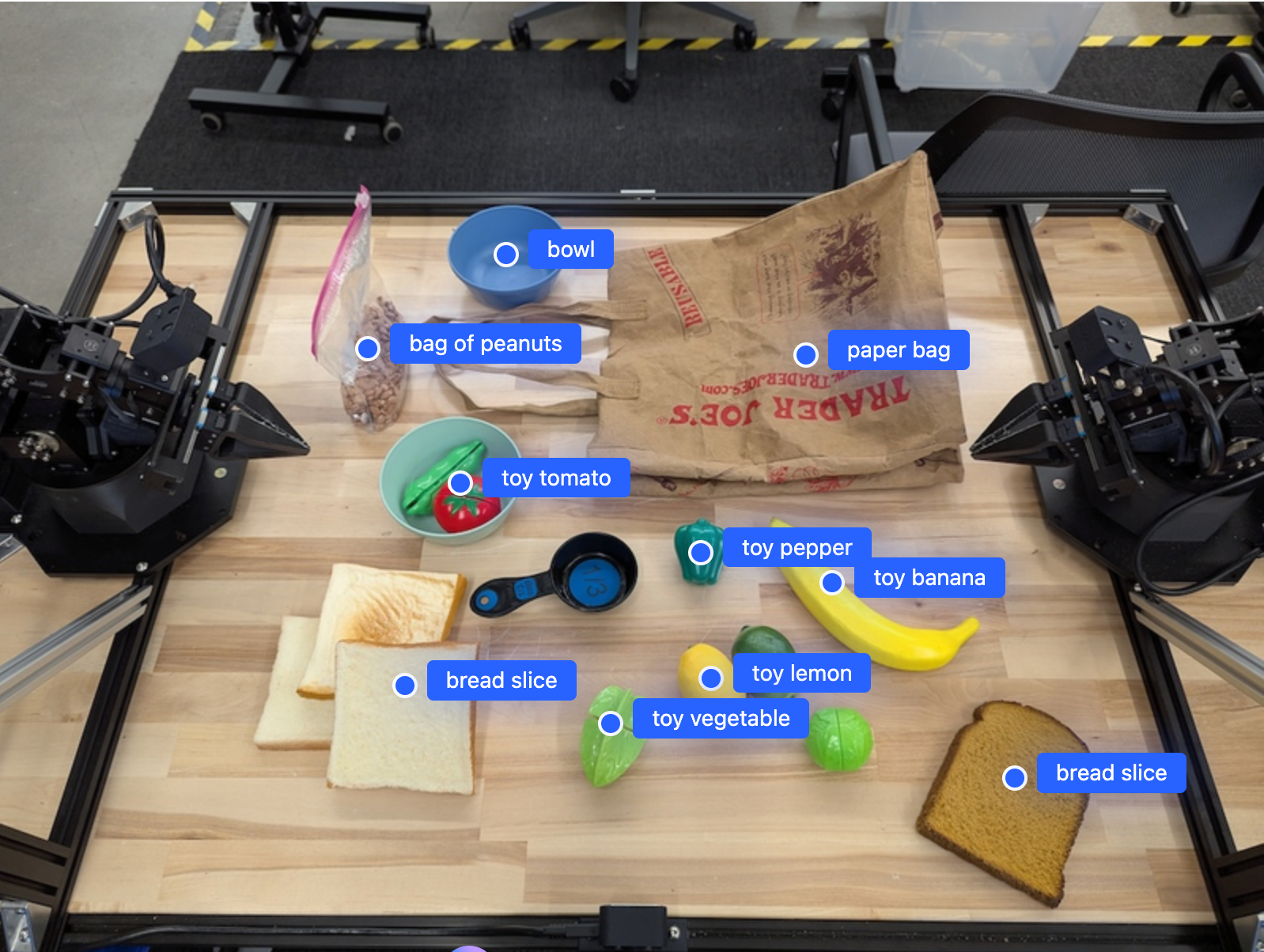
Shembulli i mëposhtëm gjen objekte specifike në një imazh dhe kthen koordinatat e tyre të normalizuara [y, x] :
Python
from google import genai

PROMPT = """
          Point to no more than 10 items in the image. The label returned
          should be an identifying name for the object detected.
          The answer should follow the json format: [{"point": <point>,
          "label": <label1>}, ...]. The points are in [y, x] format
          normalized to 0-1000.
        """
client = genai.Client()

uploaded_file = client.files.upload(file="my-image.png")

image_response = client.interactions.create(
    model="gemini-robotics-er-2-preview",
    input=[
        {
            "type": "image",
            "uri": uploaded_file.uri,
            "mime_type": uploaded_file.mime_type
        },
        {"type": "text", "text": PROMPT}
    ],
    generation_config={"thinking_level": "high"},
)

print(image_response.output_text)
PUSHTIM
# First, ensure you have the image file locally.
# Encode the image to base64
IMAGE_BASE64=$(base64 -w 0 my-image.png)

curl -X POST \
  "https://generativelanguage.googleapis.com/v1beta/interactions" \
  -H "x-goog-api-key: $GEMINI_API_KEY" \
  -H "Content-Type: application/json" \
  -d '{
    "model": "gemini-robotics-er-2-preview",
    "input": {
      "parts": [
        {
          "inlineData": {
            "mimeType": "image/png",
            "data": "'"${IMAGE_BASE64}"'"
          }
        },
        {
          "text": "Point to no more than 10 items in the image. The label returned should be an identifying name for the object detected. The answer should follow the json format: [{\"point\": [y, x], \"label\": <label1>}, ...]. The points are in [y, x] format normalized to 0-1000."
        }
      ]
    },
    "generation_config": {
      "thinking_config": {
        "thinking_level": "high"
      }
    }
  }'
Rezultati do të jetë një varg JSON që përmban objekte, secila me një point (koordinatat e normalizuara [y, x] ) dhe një label që identifikon objektin.
JSON
[
  {"point": [376, 508], "label": "small banana"},
  {"point": [287, 609], "label": "larger banana"},
  {"point": [223, 303], "label": "pink starfruit"},
  {"point": [435, 172], "label": "paper bag"},
  {"point": [270, 786], "label": "green plastic bowl"},
  {"point": [488, 775], "label": "metal measuring cup"},
  {"point": [673, 580], "label": "dark blue bowl"},
  {"point": [471, 353], "label": "light blue bowl"},
  {"point": [492, 497], "label": "bread"},
  {"point": [525, 429], "label": "lime"}
]
Imazhi i mëposhtëm është një shembull se si mund të shfaqen këto pika:
Ndjekja e objekteve në një video
Gemini Robotics ER 2 mund të analizojë gjithashtu kuadro video për të ndjekur objektet me kalimin e kohës. Shihni Hyrjet Video për një listë të formateve të mbështetura të videos.
Python
from google import genai

client = genai.Client()

uploaded_file = client.files.upload(file="my-video.mp4")

prompt = """
          Point to the red ball in every frame where it appears.
          The answer should follow the json format: [{"point": [y, x],
          "label": <label>}, ...]. The points are in [y, x] format
          normalized to 0-1000. Return one entry per frame that contains
          the object.
        """

image_response = client.interactions.create(
  model="gemini-robotics-er-2-preview",
  input=[
    {
        "type": "video",
        "uri": uploaded_file.uri,
        "mime_type": uploaded_file.mime_type
    },
    {"type": "text", "text": prompt}
  ],
)

print(image_response.output_text)
Kutitë e zbulimit dhe kufizimit të objekteve
Përveç pikave, mund ta nxisni modelin të kthejë kuti kufizuese 2D, të cilat ofrojnë më shumë detaje hapësinore për objektet e zbuluara.
Python
from google import genai

client = genai.Client()

uploaded_file = client.files.upload(file="my-image.png")

prompt = """
          Detect all objects in this image and return bounding boxes.
          The answer should follow the JSON format:
          [{"label": <label>, "y": <y_min>, "x": <x_min>,
            "y2": <y_max>, "x2": <x_max>}, ...]
          where coordinates are normalized to 0-1000.
        """

image_response = client.interactions.create(
  model="gemini-robotics-er-2-preview",
  input=[
    {
        "type": "image",
        "uri": uploaded_file.uri,
        "mime_type": uploaded_file.mime_type
    },
    {"type": "text", "text": prompt}
  ],
)

print(image_response.output_text)
Trajektoret
Gemini Robotics ER 2 mund të gjenerojë sekuenca pikash që përcaktojnë një trajektore, e dobishme për udhëzimin e lëvizjes së robotit.
Ky shembull kërkon një trajektore për të lëvizur një stilolaps të kuq në një organizues, duke përfshirë një vlerësim të pikave të ndërmjetme. Kodi është reduktuar për të shfaqur vetëm kërkesën.
Python
prompt = """
          Generate a trajectory for the robotic arm to pick up the red pen
          and place it in the organizer. Return a list of waypoints as JSON:
          [{"step": <int>, "point": [y, x], "action": <description>}, ...]
          where coordinates are normalized to 0-1000.
        """
Bërja e një hapësire për një laptop
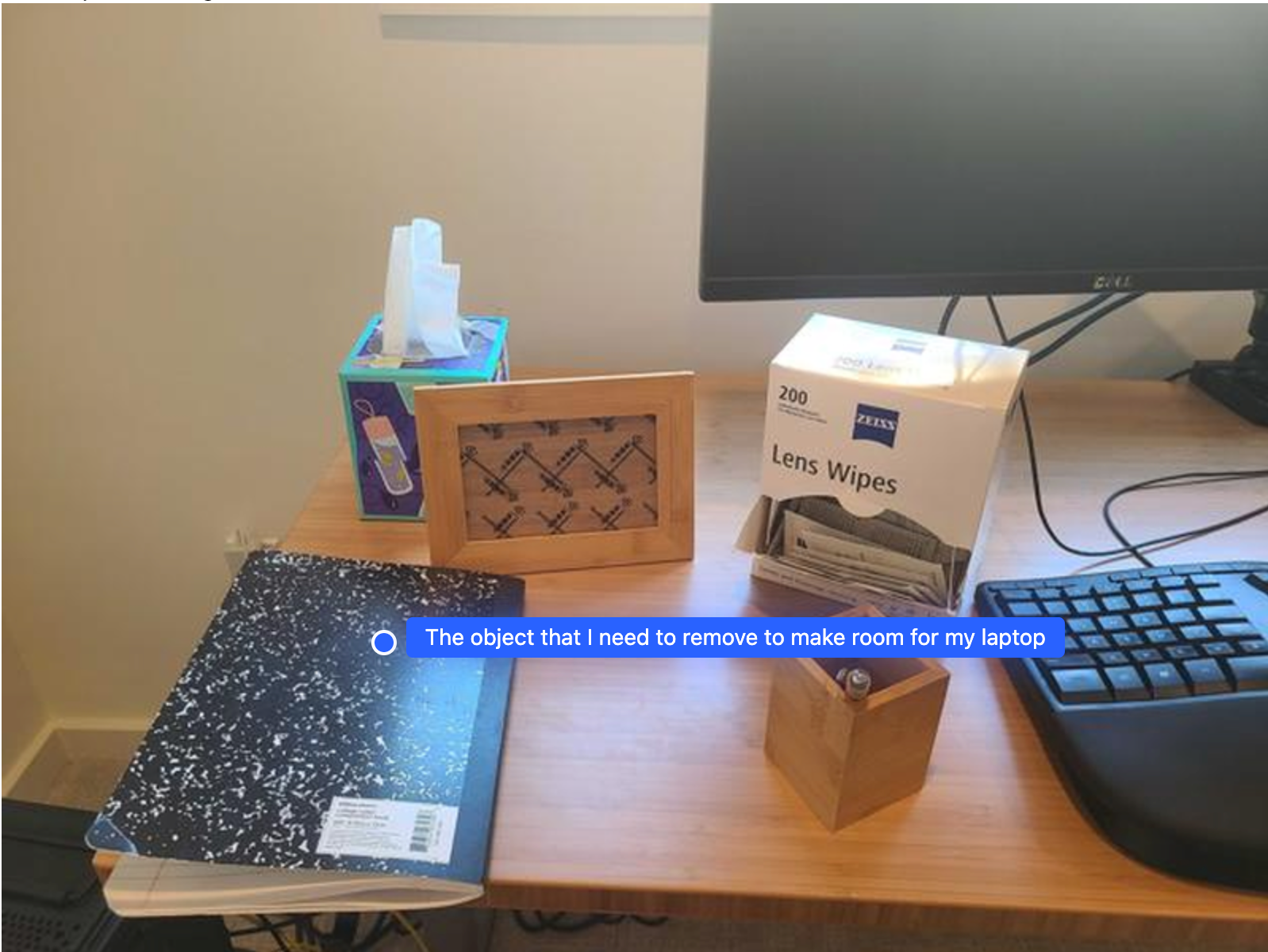
Ky shembull tregon se si Gemini Robotics ER mund të arsyetojë rreth një hapësire. Kërkesa i kërkon modelit të identifikojë se cili objekt duhet të zhvendoset për të krijuar hapësirë për një artikull tjetër.
Python
from google import genai

client = genai.Client()

uploaded_file = client.files.upload(file="path/to/image-with-objects.jpg")

prompt = """
          Point to the object that I need to remove to make room for my laptop
          The answer should follow the JSON format: [{"point": <point>,
          "label": <label1>}, ...]. The points are in [y, x] format normalized to 0-1000.
        """

image_response = client.interactions.create(
  model="gemini-robotics-er-2-preview",
  input=[
    {
        "type": "image",
        "uri": uploaded_file.uri,
        "mime_type": uploaded_file.mime_type
    },
    {"type": "text", "text": prompt}
  ],
)

print(image_response.output_text)
Përgjigja përmban një koordinatë 2D të objektit që i përgjigjet pyetjes së përdoruesit, në këtë rast, objektit që duhet të lëvizë për të bërë vend për një laptop.
[
  {"point": [672, 301], "label": "The object that I need to remove to make room for my laptop"}
]
Paketimi i një dreke
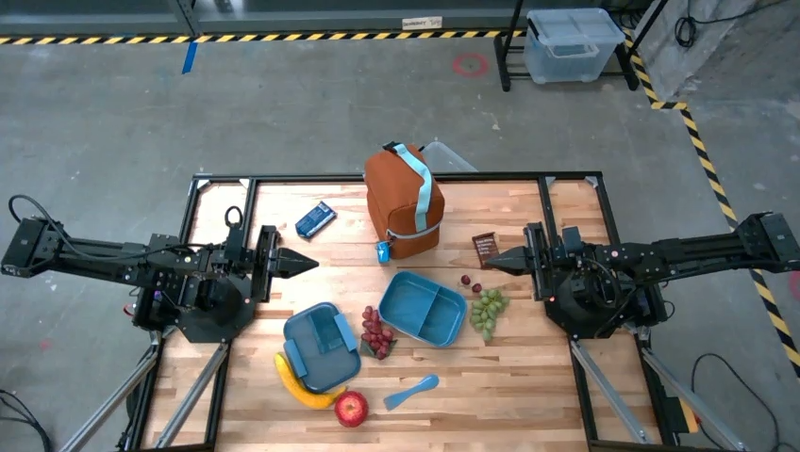
Modeli gjithashtu mund të ofrojë udhëzime për detyra me shumë hapa dhe të tregojë objektet përkatëse për secilin hap. Ky shembull tregon se si modeli planifikon një seri hapash për të paketuar një çantë dreke.
Python
from google import genai

client = genai.Client()

uploaded_file = client.files.upload(file="path/to/image-of-lunch.jpg")

prompt = """
          Explain how to pack the lunch box and lunch bag. Point to each
          object that you refer to. Each point should be in the format:
          [{"point": [y, x], "label": }], where the coordinates are
          normalized between 0-1000.
        """

image_response = client.interactions.create(
  model="gemini-robotics-er-2-preview",
  input=[
    {
        "type": "image",
        "uri": uploaded_file.uri,
        "mime_type": uploaded_file.mime_type
    },
    {"type": "text", "text": prompt}
  ],
)

print(image_response.output_text)
Përgjigja e kësaj pyetjeje është një sërë udhëzimesh hap pas hapi se si të paketoni një çantë dreke nga të dhënat e imazhit.
Fut imazhin
Prodhimi i modelit
Based on the image, here is a plan to pack the lunch box and lunch bag:

1.  **Pack the fruit into the lunch box.** Place the [apple](apple), [banana](banana), [red grapes](red grapes), and [green grapes](green grapes) into the [blue lunch box](blue lunch box).
2.  **Add the spoon to the lunch box.** Put the [blue spoon](blue spoon) inside the lunch box as well.
3.  **Close the lunch box.** Secure the lid on the [blue lunch box](blue lunch box).
4.  **Place the lunch box inside the lunch bag.** Put the closed [blue lunch box](blue lunch box) into the [brown lunch bag](brown lunch bag).
5.  **Pack the remaining items into the lunch bag.** Place the [blue snack bar](blue snack bar) and the [brown snack bar](brown snack bar) into the [brown lunch bag](brown lunch bag).

Here is the list of objects and their locations:
*   [{"point": [899, 440], "label": "apple"}]
*   [{"point": [814, 363], "label": "banana"}]
*   [{"point": [727, 470], "label": "red grapes"}]
*   [{"point": [675, 608], "label": "green grapes"}]
*   [{"point": [706, 529], "label": "blue lunch box"}]
*   [{"point": [864, 517], "label": "blue spoon"}]
*   [{"point": [499, 401], "label": "blue snack bar"}]
*   [{"point": [614, 705], "label": "brown snack bar"}]
*   [{"point": [448, 501], "label": "brown lunch bag"}]
Çfarë vjen më pas
- Aftësitë agjentike — ekzekutimi i kodit, leximi i instrumenteve, shënimi i imazheve.
- Orkestrimi i detyrave — detyra me horizont të gjatë me API-të e robotëve të personalizuar.
- Robotikë me transmetim — transmetim dypalësh në kohë reale (vetëm Gemini Robotics ER 2).
- Kuptimi i videos — gjetja e momenteve dhe klasifikimi i progresit (vetëm Gemini Robotics ER 2).