

借助语音复刻功能,您可以使用 Gemini API Voices 端点 (POST /v1beta/voices) 通过简短的音频样本复刻说话者的声音特征。Gemini 3.8 Flash TTS (gemini-3.8-flash-tts) 和 Gemini 3.8 Flash-Lite TTS (gemini-3.8-flash-lite-tts) 均支持语音复刻。
在 Google AI Studio 中,您可以通过交互式声音复制体验,以最快的方式复制声音、验证同意情况并试听复制的声音。您可以在浏览器中直接录制或上传参考片段和同意片段,预览语音,并将生成的 voice_... ID 直接复制到应用代码中。
有状态与无状态存储模式
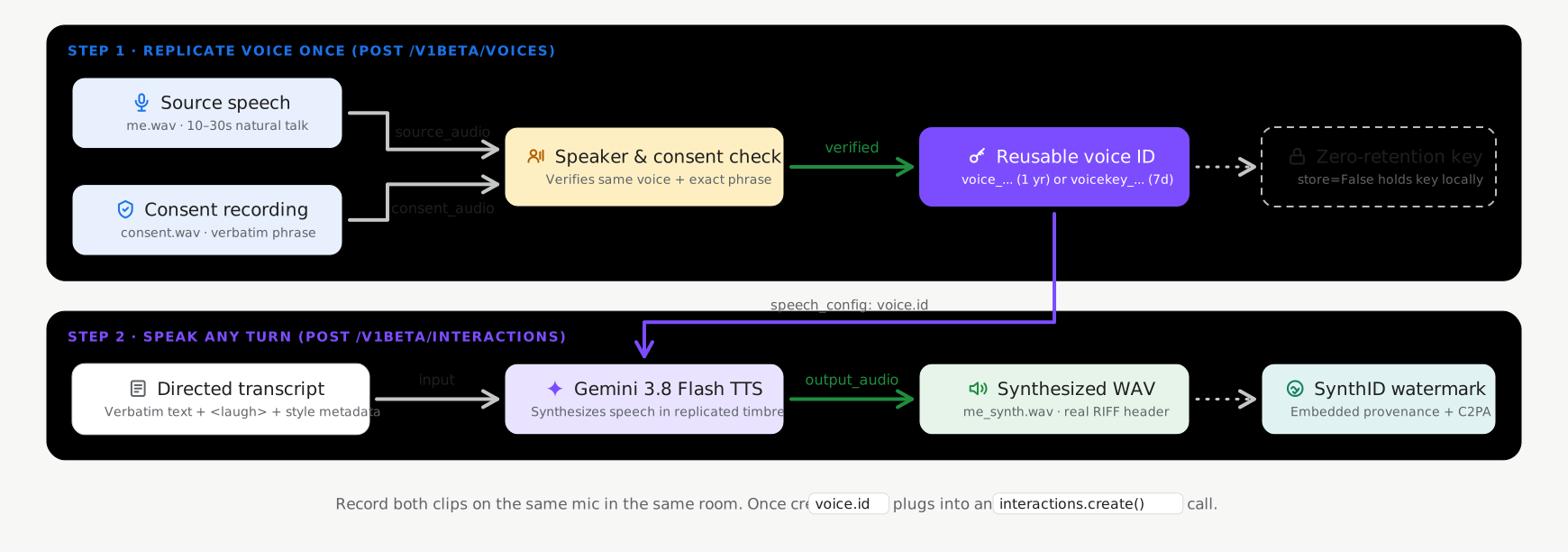
在调用 voices.create (POST /v1beta/voices) 时,语音复刻支持两种存储模式,默认启用有状态存储:
- 有状态存储(
store=True,建议的默认值):Google 会将经过验证的声纹个人资料存储在您的项目中,并返回轻量级持久性voice_id(replicated_voice.id,例如voice_abc123...)。您可以在请求之间传递此voice_id,并使用voices.list()、voices.get()和voices.delete()对其进行管理。 - 无状态的客户端管理密钥(
store=False,可选):对于需要零服务器端持久保存生物识别语音配置的工作负载,请设置store=False。该 API 会返回一个加密的独立voice_key(replicated_voice.key,以voicekey_...开头),您的应用会在本地存储该voice_key,并直接在合成请求中传递该voice_key。
| 存储模式 | 标识符 | 项目数量限制 | 保留期限 (TTL) |
|---|---|---|---|
有状态语音 (store=True) |
voice_... |
每个项目 200 个声音(在提示声音和复制声音之间共享) | 1 年 |
无状态语音键 (store=False) |
voicekey_... |
由客户管理 | 7 天 |
音频和用户意见征求要求
每次 CreateVoice 复制请求都需要来自同一位成人说话者的两段真实人声录音(建议采用 24kHz 单声道 16 位 WAV 格式):
- 参考音频 (
source_audio):一段 10-30 秒的干净自然的人声片段,来自您要复制其声音的说话者。 - 同意音频 (
consent_audio):同一说话者清晰地朗读强制性同意声明的录音,所用语言为支持的语言之一(例如英语): > “本人是此语音的所有者,并同意 Google 使用此语音来创建合成语音模型。”
创建复制的语音(有状态默认)
使用 Google GenAI SDK(google-genai 2.25.0+ / @google/genai 2.24.0+)或 REST API 与 store=True 结合,在您的项目中创建并保存复制的语音个人资料:
Python
import base64
from google import genai

client = genai.Client()

with open("reference_speaker.wav", "rb") as f:
    source_b64 = base64.b64encode(f.read()).decode("utf-8")

with open("speaker_consent.wav", "rb") as f:
    consent_b64 = base64.b64encode(f.read()).decode("utf-8")

# Create a persistent replicated voice (store=True)
replicated_voice = client.voices.create(
    store=True,
    voice={
        "model": "gemini-3.8-flash-tts",
        "type": "replicated",
        "display_name": "Custom Replicated Speaker",
        "replicated": {
            "source_audio": {
                "mime_type": "audio/wav",
                "data": source_b64,
            },
            "consent_audio": {
                "mime_type": "audio/wav",
                "data": consent_b64,
            },
        },
    },
)

print(f"Created voice ID: {replicated_voice.id}")
JavaScript
import * as fs from "node:fs";
import { GoogleGenAI } from "@google/genai";

const ai = new GoogleGenAI();

const sourceB64 = fs.readFileSync("reference_speaker.wav").toString("base64");
const consentB64 = fs.readFileSync("speaker_consent.wav").toString("base64");

// Create a persistent replicated voice (store: true)
const replicatedVoice = await ai.voices.create({
  store: true,
  voice: {
    model: "gemini-3.8-flash-tts",
    type: "replicated",
    display_name: "Custom Replicated Speaker",
    replicated: {
      source_audio: {
        mime_type: "audio/wav",
        data: sourceB64,
      },
      consent_audio: {
        mime_type: "audio/wav",
        data: consentB64,
      },
    },
  },
});

console.log(`Created voice ID: ${replicatedVoice.id}`);
REST
SOURCE_B64=$(base64 -w 0 reference_speaker.wav)
CONSENT_B64=$(base64 -w 0 speaker_consent.wav)

curl "https://generativelanguage.googleapis.com/v1beta/voices" \
  -H "x-goog-api-key: $GEMINI_API_KEY" \
  -H "Content-Type: application/json" \
  -X POST \
  -d "{
    \"store\": true,
    \"voice\": {
      \"model\": \"gemini-3.8-flash-tts\",
      \"type\": \"replicated\",
      \"display_name\": \"Custom Replicated Speaker\",
      \"replicated\": {
        \"source_audio\": {
          \"mime_type\": \"audio/wav\",
          \"data\": \"$SOURCE_B64\"
        },
        \"consent_audio\": {
          \"mime_type\": \"audio/wav\",
          \"data\": \"$CONSENT_B64\"
        }
      }
    }
  }"
使用复制的语音合成语音
在合成请求中传递返回的 id (voice_...):
Python
import base64
from google import genai

client = genai.Client()

interaction = client.interactions.create(
    model="gemini-3.8-flash-tts",
    input=[{
        "type": "user_input",
        "content": [{
            "type": "text",
            "text": (
                "Hello! This audio was synthesized using a replicated"
                " speaker voice."
            ),
            "annotations": [{
                "type": "speech_metadata",
                "style": "warm and conversational",
            }],
        }],
    }],
    response_format={"type": "audio"},
    generation_config={
        "speech_config": [
            {"voice": replicated_voice.id},
        ]
    },
)

with open("replicated_speech.wav", "wb") as f:
    f.write(base64.b64decode(interaction.output_audio.data))
JavaScript
import * as fs from "node:fs";
import { GoogleGenAI } from "@google/genai";

const ai = new GoogleGenAI();

const interaction = await ai.interactions.create({
  model: "gemini-3.8-flash-tts",
  input: [{
    type: "user_input",
    content: [{
      type: "text",
      text: "Hello! This audio was synthesized using a replicated speaker voice.",
      annotations: [{
        type: "speech_metadata",
        style: "warm and conversational",
      }],
    }],
  }],
  response_format: { type: "audio" },
  generation_config: {
    speech_config: [
      { voice: replicatedVoice.id },
    ],
  },
});

fs.writeFileSync("replicated_speech.wav", Buffer.from(interaction.output_audio.data, "base64"));
REST
curl "https://generativelanguage.googleapis.com/v1beta/interactions" \
  -H "x-goog-api-key: $GEMINI_API_KEY" \
  -H "Content-Type: application/json" \
  -X POST \
  -d '{
    "model": "gemini-3.8-flash-tts",
    "input": [{
      "type": "user_input",
      "content": [{
        "type": "text",
        "text": "Hello! This audio was synthesized using a replicated speaker voice.",
        "annotations": [{
          "type": "speech_metadata",
          "style": "warm and conversational"
        }]
      }]
    }],
    "response_format": {"type": "audio"},
    "generation_config": {
      "speech_config": [
        {"voice": "voice_YOUR_REPLICATED_VOICE_ID"}
      ]
    }
  }'
管理存储的复制声音
使用 store=True 创建的复制声音可以通过 Voices API 进行列出、过滤、检查和删除(如需查看所有过滤参数,请参阅扩展语音库和过滤):
Python
from google import genai

client = genai.Client()

# List stored replicated voices in your project
response = client.voices.list(type_=["replicated"])
for voice in response.voices or []:
    print(voice.id, voice.display_name, voice.type)

# Retrieve a specific voice by ID
voice_details = client.voices.get(id=replicated_voice.id)

# Delete a stored replicated voice
client.voices.delete(id=replicated_voice.id)
JavaScript
import { GoogleGenAI } from "@google/genai";

const ai = new GoogleGenAI();

// List stored replicated voices in your project
const response = await ai.voices.list({ type: ["replicated"] });
for (const voice of response.voices ?? []) {
  console.log(voice.id, voice.display_name, voice.type);
}

// Retrieve a specific voice by ID
const voiceDetails = await ai.voices.get(replicatedVoice.id);

// Delete a stored replicated voice
await ai.voices.delete(replicatedVoice.id);
REST
# List stored replicated voices in your project
curl -G "https://generativelanguage.googleapis.com/v1beta/voices" \
  -H "x-goog-api-key: $GEMINI_API_KEY" \
  --data-urlencode "type=replicated"

# Retrieve a specific voice by ID
curl "https://generativelanguage.googleapis.com/v1beta/voices/voice_YOUR_REPLICATED_VOICE_ID" \
  -H "x-goog-api-key: $GEMINI_API_KEY"

# Delete a stored replicated voice
curl -X DELETE "https://generativelanguage.googleapis.com/v1beta/voices/voice_YOUR_REPLICATED_VOICE_ID" \
  -H "x-goog-api-key: $GEMINI_API_KEY"
选项:无状态的客户端管理的语音密钥 (store=False)
如果您的应用要求在服务器端完全不保留语音个人资料,请在创建复制的语音时设置 store=False。该 API 会返回一个加密的 voice_key(replicated_voice.key,以 voicekey_... 开头),您可以在客户端存储该 ID,并在接受 voice ID 的任何位置直接传递该 ID:
Python
import base64
from google import genai

client = genai.Client()

with open("reference_speaker.wav", "rb") as f:
    source_b64 = base64.b64encode(f.read()).decode("utf-8")

with open("speaker_consent.wav", "rb") as f:
    consent_b64 = base64.b64encode(f.read()).decode("utf-8")

# Create a stateless client-managed voice key (store=False)
replicated_voice = client.voices.create(
    store=False,
    voice={
        "model": "gemini-3.8-flash-tts",
        "type": "replicated",
        "replicated": {
            "source_audio": {"mime_type": "audio/wav", "data": source_b64},
            "consent_audio": {"mime_type": "audio/wav", "data": consent_b64},
        },
    },
)

# Pass replicated_voice.key ("voicekey_...") directly as the speaker voice
interaction = client.interactions.create(
    model="gemini-3.8-flash-tts",
    input=[{
        "type": "user_input",
        "content": [{
            "type": "text",
            "text": "Hello! This audio uses a stateless client-managed voice key.",
            "annotations": [{
                "type": "speech_metadata",
                "style": "warm and conversational",
            }],
        }],
    }],
    response_format={"type": "audio"},
    generation_config={
        "speech_config": [
            {"voice": replicated_voice.key},
        ]
    },
)
JavaScript
import * as fs from "node:fs";
import { GoogleGenAI } from "@google/genai";

const ai = new GoogleGenAI();

const sourceB64 = fs.readFileSync("reference_speaker.wav").toString("base64");
const consentB64 = fs.readFileSync("speaker_consent.wav").toString("base64");

// Create a stateless client-managed voice key (store: false)
const replicatedVoice = await ai.voices.create({
  store: false,
  voice: {
    model: "gemini-3.8-flash-tts",
    type: "replicated",
    replicated: {
      source_audio: { mime_type: "audio/wav", data: sourceB64 },
      consent_audio: { mime_type: "audio/wav", data: consentB64 },
    },
  },
});

// Pass replicatedVoice.key ("voicekey_...") directly as the speaker voice
const interaction = await ai.interactions.create({
  model: "gemini-3.8-flash-tts",
  input: [{
    type: "user_input",
    content: [{
      type: "text",
      text: "Hello! This audio uses a stateless client-managed voice key.",
      annotations: [{
        type: "speech_metadata",
        style: "warm and conversational",
      }],
    }],
  }],
  response_format: { type: "audio" },
  generation_config: {
    speech_config: [
      { voice: replicatedVoice.key },
    ],
  },
});
REST
SOURCE_B64=$(base64 -w 0 reference_speaker.wav)
CONSENT_B64=$(base64 -w 0 speaker_consent.wav)

curl "https://generativelanguage.googleapis.com/v1beta/voices" \
  -H "x-goog-api-key: $GEMINI_API_KEY" \
  -H "Content-Type: application/json" \
  -X POST \
  -d "{
    \"store\": false,
    \"voice\": {
      \"model\": \"gemini-3.8-flash-tts\",
      \"type\": \"replicated\",
      \"replicated\": {
        \"source_audio\": {\"mime_type\": \"audio/wav\", \"data\": \"$SOURCE_B64\"},
        \"consent_audio\": {\"mime_type\": \"audio/wav\", \"data\": \"$CONSENT_B64\"}
      }
    }
  }"
不同语言支持的用户意见征求短语
同意音频必须清晰地朗读 30 种支持的语言区域设置中的确切声明:
| 语言 | 语言区域 (lang_id) |
意见声明原文 |
|---|---|---|
| 阿拉伯语 | ar-XA |
أنا مالك هذا الصوت وأوافق على أن تستخدم Google هذا الصوت لإنشاء نموذج صوتي اصطناعي. |
| 孟加拉语 | bn-IN |
আমি এই ভয়েসের মালিক এবং আমি একটি সিন্থেটিক ভয়েস মডেল তৈরি করতে এই ভয়েস ব্যবহার করে Google-এর সাথে সম্মতি দিচ্ছি। |
| 简体中文 | zh-CN |
我是此声音的拥有者并授权谷歌使用此声音创建语音合成模型 |
| 荷兰语 | nl-NL |
Ik ben de eigenaar van deze stem en ik geef Google toestemming om deze stem te gebruiken om een synthetisch stemmodel te maken. |
| 英语(美国) | en-US |
本人是此语音的所有者,并同意 Google 使用此语音来创建合成语音模型。 |
| 英语(英国) | en-GB |
本人是此语音的所有者,并同意 Google 使用此语音来创建合成语音模型。 |
| 英语(印度) | en-IN |
本人是此语音的所有者,并同意 Google 使用此语音来创建合成语音模型。 |
| 英语(澳大利亚) | en-AU |
本人是此语音的所有者,并同意 Google 使用此语音来创建合成语音模型。 |
| 法语(法国) | fr-FR |
Je suis le propriétaire de cette voix et j'autorise Google à utiliser cette voix pour créer un modèle de voix synthétique. |
| 法语(加拿大) | fr-CA |
Je suis le propriétaire de cette voix et j'autorise Google à utiliser cette voix pour créer un modèle de voix synthétique. |
| 德语 | de-DE |
Ich bin der Eigentümer dieser Stimme und bin damit einverstanden, dass Google diese Stimme zur Erstellung eines synthetischen Stimmmodells verwendet. |
| 古吉拉特语 | gu-IN |
હું આ વોઈસનો માલિક છું અને સિન્થેટિક વોઈસ મોડલ બનાવવા માટે આ વોઈસનો ઉપયોગ કરીને google ને હું સંમતિ આપું છું |
| 印地语 | hi-IN |
मैं इस आवाज का मालिक हूं और मैं सिंथेटिक आवाज मॉडल बनाने के लिए Google को इस आवाज का उपयोग करने की सहमति देता हूं |
| 印度尼西亚语 | id-ID |
Saya pemilik suara ini dan saya menyetujui Google menggunakan suara ini untuk membuat model suara sintetis. |
| 意大利语 | it-IT |
Sono il proprietario di questa voce e acconsento che Google la utilizzi per creare un modello di voce sintetica. |
| 日语 | ja-JP |
私はこの音声の所有者であり、Googleがこの音声を使用して音声合成モデルを作成することを承認します。 |
| 卡纳达语 | kn-IN |
ನಾನು ಈ ಧ್ವನಿಯ ಮಾಲಿಕ ಮತ್ತು ಸಂಶ್ಲೇಷಿತ ಧ್ವನಿ ಮಾದರಿಯನ್ನು ರಚಿಸಲು ಈ ಧ್ವನಿಯನ್ನು ಬಳಸಿಕೊಂಡುಗೂಗಲ್ ಗೆ ನಾನು ಸಮ್ಮತಿಸುತ್ತೇನೆ. |
| 韩语 | ko-KR |
나는 이 음성의 소유자이며 구글이 이 음성을 사용하여 음성 합성 모델을 생성할 것을 허용합니다. |
| 马拉雅拉姆语 | ml-IN |
ഈ ശബ്ദത്തിന്റെ ഉടമ ഞാനാണ്, ഒരു സിന്തറ്റിക് വോയ്സ് മോഡൽ സൃഷ്ടിക്കാൻ ഈ ശബ്ദം ഉപയോഗിക്കുന്നതിന് ഞാൻ Google-ന് സമ്മതം നൽകുന്നു. |
| 马拉地语 | mr-IN |
मी या आवाजाचा मालक आहे आणि सिंथेटिक व्हॉइस मॉडेल तयार करण्यासाठी हा आवाज वापरण्यासाठी मी Google ला संमती देतो |
| 波兰语 | pl-PL |
Jestem właścicielem tego głosu i wyrażam zgodę na wykorzystanie go przez Google w celu utworzenia syntetycznego modelu głosu. |
| 葡萄牙语(巴西) | pt-BR |
Eu sou o proprietário desta voz e autorizo o Google a usá-la para criar um modelo de voz sintética. |
| 俄语 | ru-RU |
Я являюсь владельцем этого голоса и даю согласие Google на использование этого голоса для создания модели синтетического голоса. |
| 西班牙语(西班牙) | es-ES |
Soy el propietario de esta voz y doy mi consentimiento para que Google la utilice para crear un modelo de voz sintética. |
| 西班牙语(美国) | es-US |
Soy el propietario de esta voz y doy mi consentimiento para que Google la utilice para crear un modelo de voz sintética. |
| 泰米尔语 | ta-IN |
நான் இந்த குரலின் உரிமையாளர் மற்றும் செயற்கை குரல் மாதிரியை உருவாக்க இந்த குரலை பயன்படுத்த குகல்க்கு நான் ஒப்புக்கொள்கிறேன். |
| 泰卢固语 | te-IN |
నేను ఈ వాయిస్ యజమానిని మరియు సింతటిక్ వాయిస్ మోడల్ ని రూపొందించడానికి ఈ వాయిస్ ని ఉపయోగించడానికి googleకి నేను సమ్మతిస్తున్నాను. |
| 泰语 | th-TH |
ฉันเป็นเจ้าของเสียงนี้ และฉันยินยอมให้ Google ใช้เสียงนี้เพื่อสร้างแบบจำลองเสียงสังเคราะห์ |
| 土耳其语 | tr-TR |
Bu sesin sahibi benim ve Google'ın bu sesi kullanarak sentetik bir ses modeli oluşturmasına izin veriyorum. |
| 越南语 | vi-VN |
Tôi là chủ sở hữu giọng nói này và tôi đồng ý cho Google sử dụng giọng nói này để tạo mô hình giọng nói tổng hợp. |
录制参考音频的最佳实践
- 在安静的环境中录制:尽量减少房间回声、背景噪声、音乐和重叠的声音。
- 匹配录制条件:在相同的声学设置下,使用同一麦克风录制
source_audio和consent_audio,以便可靠地通过说话人验证检查。 - 转换为 24kHz 单声道 WAV:为获得最佳效果,请在编码前将输入音频重新采样为 24kHz 单声道 16 位 PCM WAV。