

語音複製功能可透過 Gemini API Voices 端點 (POST /v1beta/voices),使用簡短音訊樣本複製說話者的聲音特徵。Gemini 3.8 Flash TTS (gemini-3.8-flash-tts) 和 Gemini 3.8 Flash-Lite TTS (gemini-3.8-flash-lite-tts) 皆支援語音複製功能。
如要快速複製、驗證同意聲明及試聽複製的聲音,請使用 Google AI Studio 中的互動式語音複製體驗。你可以在瀏覽器中直接錄製或上傳參考和同意聲明片段、預覽語音,並將產生的 voice_... ID 直接複製到應用程式程式碼。
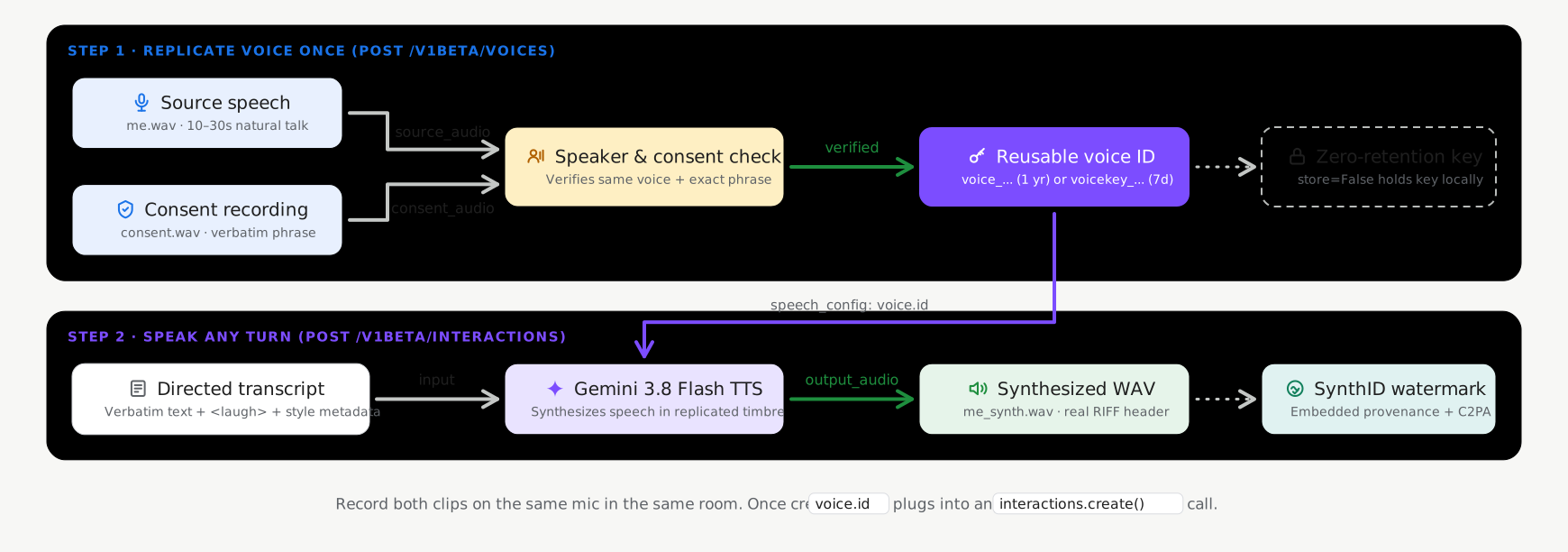
有狀態與無狀態儲存模式
語音複製功能在呼叫 voices.create
(POST /v1beta/voices) 時支援兩種儲存模式,且預設啟用有狀態儲存模式:
- 具狀態儲存空間 (
store=True,建議預設):Google 會將驗證過的語音設定檔儲存在專案中,並傳回輕量型永久voice_id(replicated_voice.id,例如voice_abc123...)。您可以跨要求傳遞這個voice_id,並使用voices.list()、voices.get()和voices.delete()管理。 - 無狀態用戶端管理金鑰 (
store=False,選用):如要處理的工作負載不需要在伺服器端保存生物特徵辨識語音設定檔,請設定store=False。API 會傳回加密的獨立式voice_key(replicated_voice.key,開頭為voicekey_...),應用程式會在本機儲存這個權杖,並直接在合成要求中傳遞。
| 儲存模式 | ID | 專案數量上限 | 保留時間 (TTL) |
|---|---|---|---|
有狀態的語音 (store=True) |
voice_... |
每個專案 200 個聲音 (提示和複製的聲音共用) | 1 年 |
無狀態語音金鑰 (store=False) |
voicekey_... |
用戶端管理 | 7 天 |
音訊和同意聲明規定
每項 CreateVoice 複製要求都需要同一位成人說話者的兩段真人錄音 (建議使用 24kHz 單聲道 16 位元 WAV 格式):
- 參考音訊 (
source_audio):10 到 30 秒的乾淨自然語音片段,來自你想複製聲音的講者。 - 同意聲明錄音檔 (
consent_audio):同一位講者清楚朗讀強制性同意聲明的錄音檔,朗讀時須使用支援的語言 (例如英文): >「我是這個聲音的擁有者,我同意 Google 用這個聲音建立合成語音模型。」
建立複製的語音 (有狀態的預設值)
使用 Google GenAI SDK (google-genai 2.25.0 以上版本 / @google/genai 2.24.0 以上版本) 或 REST API
搭配 store=True,在專案中建立及儲存複製的語音設定檔:
Python
import base64
from google import genai

client = genai.Client()

with open("reference_speaker.wav", "rb") as f:
    source_b64 = base64.b64encode(f.read()).decode("utf-8")

with open("speaker_consent.wav", "rb") as f:
    consent_b64 = base64.b64encode(f.read()).decode("utf-8")

# Create a persistent replicated voice (store=True)
replicated_voice = client.voices.create(
    store=True,
    voice={
        "model": "gemini-3.8-flash-tts",
        "type": "replicated",
        "display_name": "Custom Replicated Speaker",
        "replicated": {
            "source_audio": {
                "mime_type": "audio/wav",
                "data": source_b64,
            },
            "consent_audio": {
                "mime_type": "audio/wav",
                "data": consent_b64,
            },
        },
    },
)

print(f"Created voice ID: {replicated_voice.id}")
JavaScript
import * as fs from "node:fs";
import { GoogleGenAI } from "@google/genai";

const ai = new GoogleGenAI();

const sourceB64 = fs.readFileSync("reference_speaker.wav").toString("base64");
const consentB64 = fs.readFileSync("speaker_consent.wav").toString("base64");

// Create a persistent replicated voice (store: true)
const replicatedVoice = await ai.voices.create({
  store: true,
  voice: {
    model: "gemini-3.8-flash-tts",
    type: "replicated",
    display_name: "Custom Replicated Speaker",
    replicated: {
      source_audio: {
        mime_type: "audio/wav",
        data: sourceB64,
      },
      consent_audio: {
        mime_type: "audio/wav",
        data: consentB64,
      },
    },
  },
});

console.log(`Created voice ID: ${replicatedVoice.id}`);
REST
SOURCE_B64=$(base64 -w 0 reference_speaker.wav)
CONSENT_B64=$(base64 -w 0 speaker_consent.wav)

curl "https://generativelanguage.googleapis.com/v1beta/voices" \
  -H "x-goog-api-key: $GEMINI_API_KEY" \
  -H "Content-Type: application/json" \
  -X POST \
  -d "{
    \"store\": true,
    \"voice\": {
      \"model\": \"gemini-3.8-flash-tts\",
      \"type\": \"replicated\",
      \"display_name\": \"Custom Replicated Speaker\",
      \"replicated\": {
        \"source_audio\": {
          \"mime_type\": \"audio/wav\",
          \"data\": \"$SOURCE_B64\"
        },
        \"consent_audio\": {
          \"mime_type\": \"audio/wav\",
          \"data\": \"$CONSENT_B64\"
        }
      }
    }
  }"
以複製的聲音合成語音
在合成要求中傳遞傳回的 id (voice_...):
Python
import base64
from google import genai

client = genai.Client()

interaction = client.interactions.create(
    model="gemini-3.8-flash-tts",
    input=[{
        "type": "user_input",
        "content": [{
            "type": "text",
            "text": (
                "Hello! This audio was synthesized using a replicated"
                " speaker voice."
            ),
            "annotations": [{
                "type": "speech_metadata",
                "style": "warm and conversational",
            }],
        }],
    }],
    response_format={"type": "audio"},
    generation_config={
        "speech_config": [
            {"voice": replicated_voice.id},
        ]
    },
)

with open("replicated_speech.wav", "wb") as f:
    f.write(base64.b64decode(interaction.output_audio.data))
JavaScript
import * as fs from "node:fs";
import { GoogleGenAI } from "@google/genai";

const ai = new GoogleGenAI();

const interaction = await ai.interactions.create({
  model: "gemini-3.8-flash-tts",
  input: [{
    type: "user_input",
    content: [{
      type: "text",
      text: "Hello! This audio was synthesized using a replicated speaker voice.",
      annotations: [{
        type: "speech_metadata",
        style: "warm and conversational",
      }],
    }],
  }],
  response_format: { type: "audio" },
  generation_config: {
    speech_config: [
      { voice: replicatedVoice.id },
    ],
  },
});

fs.writeFileSync("replicated_speech.wav", Buffer.from(interaction.output_audio.data, "base64"));
REST
curl "https://generativelanguage.googleapis.com/v1beta/interactions" \
  -H "x-goog-api-key: $GEMINI_API_KEY" \
  -H "Content-Type: application/json" \
  -X POST \
  -d '{
    "model": "gemini-3.8-flash-tts",
    "input": [{
      "type": "user_input",
      "content": [{
        "type": "text",
        "text": "Hello! This audio was synthesized using a replicated speaker voice.",
        "annotations": [{
          "type": "speech_metadata",
          "style": "warm and conversational"
        }]
      }]
    }],
    "response_format": {"type": "audio"},
    "generation_config": {
      "speech_config": [
        {"voice": "voice_YOUR_REPLICATED_VOICE_ID"}
      ]
    }
  }'
管理儲存的複製語音
使用 store=True 建立的複製聲音可透過 Voices API 列出、篩選、檢查及刪除 (如需所有篩選參數,請參閱「擴充聲音庫和篩選」):
Python
from google import genai

client = genai.Client()

# List stored replicated voices in your project
response = client.voices.list(type_=["replicated"])
for voice in response.voices or []:
    print(voice.id, voice.display_name, voice.type)

# Retrieve a specific voice by ID
voice_details = client.voices.get(id=replicated_voice.id)

# Delete a stored replicated voice
client.voices.delete(id=replicated_voice.id)
JavaScript
import { GoogleGenAI } from "@google/genai";

const ai = new GoogleGenAI();

// List stored replicated voices in your project
const response = await ai.voices.list({ type: ["replicated"] });
for (const voice of response.voices ?? []) {
  console.log(voice.id, voice.display_name, voice.type);
}

// Retrieve a specific voice by ID
const voiceDetails = await ai.voices.get(replicatedVoice.id);

// Delete a stored replicated voice
await ai.voices.delete(replicatedVoice.id);
REST
# List stored replicated voices in your project
curl -G "https://generativelanguage.googleapis.com/v1beta/voices" \
  -H "x-goog-api-key: $GEMINI_API_KEY" \
  --data-urlencode "type=replicated"

# Retrieve a specific voice by ID
curl "https://generativelanguage.googleapis.com/v1beta/voices/voice_YOUR_REPLICATED_VOICE_ID" \
  -H "x-goog-api-key: $GEMINI_API_KEY"

# Delete a stored replicated voice
curl -X DELETE "https://generativelanguage.googleapis.com/v1beta/voices/voice_YOUR_REPLICATED_VOICE_ID" \
  -H "x-goog-api-key: $GEMINI_API_KEY"
選項:無狀態用戶端管理的語音金鑰 (store=False)
如果應用程式需要語音設定檔的伺服器端零持續性,請在建立複製語音時設定 store=False。API 會傳回加密的 voice_key (replicated_voice.key,開頭為 voicekey_...),您可以在用戶端儲存該 ID,並在接受 voice ID 的任何位置直接傳遞:
Python
import base64
from google import genai

client = genai.Client()

with open("reference_speaker.wav", "rb") as f:
    source_b64 = base64.b64encode(f.read()).decode("utf-8")

with open("speaker_consent.wav", "rb") as f:
    consent_b64 = base64.b64encode(f.read()).decode("utf-8")

# Create a stateless client-managed voice key (store=False)
replicated_voice = client.voices.create(
    store=False,
    voice={
        "model": "gemini-3.8-flash-tts",
        "type": "replicated",
        "replicated": {
            "source_audio": {"mime_type": "audio/wav", "data": source_b64},
            "consent_audio": {"mime_type": "audio/wav", "data": consent_b64},
        },
    },
)

# Pass replicated_voice.key ("voicekey_...") directly as the speaker voice
interaction = client.interactions.create(
    model="gemini-3.8-flash-tts",
    input=[{
        "type": "user_input",
        "content": [{
            "type": "text",
            "text": "Hello! This audio uses a stateless client-managed voice key.",
            "annotations": [{
                "type": "speech_metadata",
                "style": "warm and conversational",
            }],
        }],
    }],
    response_format={"type": "audio"},
    generation_config={
        "speech_config": [
            {"voice": replicated_voice.key},
        ]
    },
)
JavaScript
import * as fs from "node:fs";
import { GoogleGenAI } from "@google/genai";

const ai = new GoogleGenAI();

const sourceB64 = fs.readFileSync("reference_speaker.wav").toString("base64");
const consentB64 = fs.readFileSync("speaker_consent.wav").toString("base64");

// Create a stateless client-managed voice key (store: false)
const replicatedVoice = await ai.voices.create({
  store: false,
  voice: {
    model: "gemini-3.8-flash-tts",
    type: "replicated",
    replicated: {
      source_audio: { mime_type: "audio/wav", data: sourceB64 },
      consent_audio: { mime_type: "audio/wav", data: consentB64 },
    },
  },
});

// Pass replicatedVoice.key ("voicekey_...") directly as the speaker voice
const interaction = await ai.interactions.create({
  model: "gemini-3.8-flash-tts",
  input: [{
    type: "user_input",
    content: [{
      type: "text",
      text: "Hello! This audio uses a stateless client-managed voice key.",
      annotations: [{
        type: "speech_metadata",
        style: "warm and conversational",
      }],
    }],
  }],
  response_format: { type: "audio" },
  generation_config: {
    speech_config: [
      { voice: replicatedVoice.key },
    ],
  },
});
REST
SOURCE_B64=$(base64 -w 0 reference_speaker.wav)
CONSENT_B64=$(base64 -w 0 speaker_consent.wav)

curl "https://generativelanguage.googleapis.com/v1beta/voices" \
  -H "x-goog-api-key: $GEMINI_API_KEY" \
  -H "Content-Type: application/json" \
  -X POST \
  -d "{
    \"store\": false,
    \"voice\": {
      \"model\": \"gemini-3.8-flash-tts\",
      \"type\": \"replicated\",
      \"replicated\": {
        \"source_audio\": {\"mime_type\": \"audio/wav\", \"data\": \"$SOURCE_B64\"},
        \"consent_audio\": {\"mime_type\": \"audio/wav\", \"data\": \"$CONSENT_B64\"}
      }
    }
  }"
各語言支援的同意聲明用語
同意聲明音訊必須清楚朗讀以下其中一種語言的確切聲明內容 (支援 30 種語言):
| 語言 | 語言代碼 (lang_id) |
同意聲明全文 |
|---|---|---|
| 阿拉伯文 | ar-XA |
أنا مالك هذا الصوت وأوافق على أن تستخدم Google هذا الصوت لإنشاء نموذج صوتي اصطناعي. |
| 孟加拉文 | bn-IN |
আমি এই ভয়েসের মালিক এবং আমি একটি সিন্থেটিক ভয়েস মডেল তৈরি করতে এই ভয়েস ব্যবহার করে Google-এর সাথে সম্মতি দিচ্ছি। |
| 中文 (簡體) | zh-CN |
我是此声音的拥有者并授权谷歌使用此声音创建语音合成模型 |
| 荷蘭文 | nl-NL |
Ik ben de eigenaar van deze stem en ik geef Google toestemming om deze stem te gebruiken om een synthetisch stemmodel te maken. |
| 英文 (美國) | en-US |
I am the owner of this voice and I consent to Google using this voice to create a synthetic voice model. |
| 英文 (英式) | en-GB |
I am the owner of this voice and I consent to Google using this voice to create a synthetic voice model. |
| English (India) | en-IN |
I am the owner of this voice and I consent to Google using this voice to create a synthetic voice model. |
| 英文 (澳洲) | en-AU |
I am the owner of this voice and I consent to Google using this voice to create a synthetic voice model. |
| 法文 (法國) | fr-FR |
Je suis le propriétaire de cette voix et j'autorise Google à utiliser cette voix pour créer un modèle de voix synthétique. |
| 法文 (加拿大) | fr-CA |
Je suis le propriétaire de cette voix et j'autorise Google à utiliser cette voix pour créer un modèle de voix synthétique. |
| 德文 | de-DE |
Ich bin der Eigentümer dieser Stimme und bin damit einverstanden, dass Google diese Stimme zur Erstellung eines synthetischen Stimmmodells verwendet. |
| 古吉拉特文 | gu-IN |
હું આ વોઈસનો માલિક છું અને સિન્થેટિક વોઈસ મોડલ બનાવવા માટે આ વોઈસનો ઉપયોગ કરીને google ને હું સંમતિ આપું છું |
| 北印度文 | hi-IN |
मैं इस आवाज का मालिक हूं और मैं सिंथेटिक आवाज मॉडल बनाने के लिए Google को इस आवाज का उपयोग करने की सहमति देता हूं |
| 印尼文 | id-ID |
Saya pemilik suara ini dan saya menyetujui Google menggunakan suara ini untuk membuat model suara sintetis. |
| 義大利文 | it-IT |
Sono il proprietario di questa voce e acconsento che Google la utilizzi per creare un modello di voce sintetica. |
| 日文 | ja-JP |
私はこの音声の所有者であり、Googleがこの音声を使用して音声合成モデルを作成することを承認します。 |
| 卡納達文 | kn-IN |
ನಾನು ಈ ಧ್ವನಿಯ ಮಾಲಿಕ ಮತ್ತು ಸಂಶ್ಲೇಷಿತ ಧ್ವನಿ ಮಾದರಿಯನ್ನು ರಚಿಸಲು ಈ ಧ್ವನಿಯನ್ನು ಬಳಸಿಕೊಂಡುಗೂಗಲ್ ಗೆ ನಾನು ಸಮ್ಮತಿಸುತ್ತೇನೆ. |
| 韓文 | ko-KR |
나는 이 음성의 소유자이며 구글이 이 음성을 사용하여 음성 합성 모델을 생성할 것을 허용합니다. |
| 馬拉雅拉姆文 | ml-IN |
ഈ ശബ്ദത്തിന്റെ ഉടമ ഞാനാണ്, ഒരു സിന്തറ്റിക് വോയ്സ് മോഡൽ സൃഷ്ടിക്കാൻ ഈ ശബ്ദം ഉപയോഗിക്കുന്നതിന് ഞാൻ Google-ന് സമ്മതം നൽകുന്നു. |
| 馬拉地文 | mr-IN |
मी या आवाजाचा मालक आहे आणि सिंथेटिक व्हॉइस मॉडेल तयार करण्यासाठी हा आवाज वापरण्यासाठी मी Google ला संमती देतो |
| 波蘭文 | pl-PL |
Jestem właścicielem tego głosu i wyrażam zgodę na wykorzystanie go przez Google w celu utworzenia syntetycznego modelu głosu. |
| 葡萄牙文 (巴西) | pt-BR |
Eu sou o proprietário desta voz e autorizo o Google a usá-la para criar um modelo de voz sintética. |
| 俄文 | ru-RU |
Я являюсь владельцем этого голоса и даю согласие Google на использование этого голоса для создания модели синтетического голоса. |
| 西班牙文 (西班牙) | es-ES |
Soy el propietario de esta voz y doy mi consentimiento para que Google la utilice para crear un modelo de voz sintética. |
| 西班牙文 (美國) | es-US |
Soy el propietario de esta voz y doy mi consentimiento para que Google la utilice para crear un modelo de voz sintética. |
| 泰米爾文 | ta-IN |
நான் இந்த குரலின் உரிமையாளர் மற்றும் செயற்கை குரல் மாதிரியை உருவாக்க இந்த குரலை பயன்படுத்த குகல்க்கு நான் ஒப்புக்கொள்கிறேன். |
| 泰盧固文 | te-IN |
నేను ఈ వాయిస్ యజమానిని మరియు సింతటిక్ వాయిస్ మోడల్ ని రూపొందించడానికి ఈ వాయిస్ ని ఉపయోగించడానికి googleకి నేను సమ్మతిస్తున్నాను. |
| Thai | th-TH |
ฉันเป็นเจ้าของเสียงนี้ และฉันยินยอมให้ Google ใช้เสียงนี้เพื่อสร้างแบบจำลองเสียงสังเคราะห์ |
| 土耳其文 | tr-TR |
Bu sesin sahibi benim ve Google'ın bu sesi kullanarak sentetik bir ses modeli oluşturmasına izin veriyorum. |
| 越南文 | vi-VN |
Tôi là chủ sở hữu giọng nói này và tôi đồng ý cho Google sử dụng giọng nói này để tạo mô hình giọng nói tổng hợp. |
錄製參考音訊的最佳做法
- 在安靜的環境中錄製:盡量減少室內回音、背景噪音、音樂和重疊的聲音。
- 符合錄音條件:在相同的聲學環境中,使用同一個麥克風錄製
source_audio和consent_audio,確保揚聲器驗證檢查順利通過。 - 轉換為 24kHz 單聲道 WAV:為獲得最佳結果,請先將輸入音訊重新取樣為 24kHz 單聲道 16 位元 PCM WAV,再進行編碼。