

رابط برنامهنویسی کاربردی Gemini یک ابزار اجرای کد ارائه میدهد که مدل را قادر میسازد کد پایتون را تولید و اجرا کند. سپس مدل میتواند به صورت تکراری از نتایج اجرای کد یاد بگیرد تا زمانی که به خروجی نهایی برسد. میتوانید از اجرای کد برای ساخت برنامههایی استفاده کنید که از استدلال مبتنی بر کد بهره میبرند. به عنوان مثال، میتوانید از اجرای کد برای حل معادلات یا پردازش متن استفاده کنید. همچنین میتوانید از کتابخانههای موجود در محیط اجرای کد برای انجام وظایف تخصصیتر استفاده کنید.
Gemini فقط قادر به اجرای کد در پایتون است. شما هنوز میتوانید از Gemini بخواهید که کد را به زبان دیگری تولید کند، اما مدل نمیتواند از ابزار اجرای کد برای اجرای آن استفاده کند.
فعال کردن اجرای کد
برای فعال کردن اجرای کد، ابزار اجرای کد را روی مدل پیکربندی کنید. این به مدل اجازه میدهد تا کد را تولید و اجرا کند.
پایتون
from google import genai

client = genai.Client()

interaction = client.interactions.create(
    model="gemini-3.5-flash",
    input="What is the sum of the first 50 prime numbers? "
          "Generate and run code for the calculation, and make sure you get all 50.",
    tools=[{"type": "code_execution"}]
)

for step in interaction.steps:
    if step.type == "model_output":
        for content_block in step.content:
            if content_block.type == "text":
                print(content_block.text)
    elif step.type == "code_execution_call":
        print(step.arguments.code)
    elif step.type == "code_execution_result":
        print(step.result)
جاوا اسکریپت
import { GoogleGenAI } from "@google/genai";

const client = new GoogleGenAI({});

const interaction = await client.interactions.create({
    model: "gemini-3.5-flash",
    input: "What is the sum of the first 50 prime numbers? " +
           "Generate and run code for the calculation, and make sure you get all 50.",
    tools: [{ type: "code_execution" }]
});

for (const step of interaction.steps) {
    if (step.type === "model_output") {
        for (const contentBlock of step.content) {
            if (contentBlock.type === "text") {
                console.log(contentBlock.text);
            }
        }
    } else if (step.type === "code_execution_call") {
        console.log(step.arguments.code);
    } else if (step.type === "code_execution_result") {
        console.log(step.result);
    }
}
استراحت
curl -X POST "https://generativelanguage.googleapis.com/v1beta/interactions" \
-H "x-goog-api-key: $GEMINI_API_KEY" \
-H 'Content-Type: application/json' \
-d '{
    "model": "gemini-3.5-flash",
    "input": "What is the sum of the first 50 prime numbers? Generate and run code for the calculation, and make sure you get all 50.",
    "tools": [{"type": "code_execution"}]
}'
خروجی ممکن است چیزی شبیه به زیر باشد که برای خوانایی بیشتر قالببندی شده است:
Okay, I need to calculate the sum of the first 50 prime numbers. Here's how I'll
approach this:

1.  **Generate Prime Numbers:** I'll use an iterative method to find prime
    numbers. I'll start with 2 and check if each subsequent number is divisible
    by any number between 2 and its square root. If not, it's a prime.
2.  **Store Primes:** I'll store the prime numbers in a list until I have 50 of
    them.
3.  **Calculate the Sum:**  Finally, I'll sum the prime numbers in the list.

Here's the Python code to do this:

def is_prime(n):
  """Efficiently checks if a number is prime."""
  if n <= 1:
    return False
  if n <= 3:
    return True
  if n % 2 == 0 or n % 3 == 0:
    return False
  i = 5
  while i * i <= n:
    if n % i == 0 or n % (i + 2) == 0:
      return False
    i += 6
  return True

primes = []
num = 2
while len(primes) < 50:
  if is_prime(num):
    primes.append(num)
  num += 1

sum_of_primes = sum(primes)
print(f'{primes=}')
print(f'{sum_of_primes=}')

primes=[2, 3, 5, 7, 11, 13, 17, 19, 23, 29, 31, 37, 41, 43, 47, 53, 59, 61, 67,
71, 73, 79, 83, 89, 97, 101, 103, 107, 109, 113, 127, 131, 137, 139, 149, 151,
157, 163, 167, 173, 179, 181, 191, 193, 197, 199, 211, 223, 227, 229]
sum_of_primes=5117

The sum of the first 50 prime numbers is 5117.
این خروجی چندین بخش محتوا را که مدل هنگام استفاده از اجرای کد برمیگرداند، ترکیب میکند:
-
text: متن درونخطی تولید شده توسط مدل -
code_execution_call: کدی که توسط مدلی که قرار است اجرا شود تولید میشود -
code_execution_result: نتیجه کد اجرایی
اجرای کد با تصاویر (Gemini 3)
مدل Gemini 3 Flash اکنون میتواند کد پایتون را برای دستکاری و بررسی فعال تصاویر بنویسد و اجرا کند.
موارد استفاده
- بزرگنمایی و بازرسی : مدل بهطور ضمنی تشخیص میدهد که چه زمانی جزئیات خیلی کوچک هستند (مثلاً خواندن یک گیج از راه دور) و کدی مینویسد تا ناحیه را برش داده و با وضوح بالاتر دوباره بررسی کند.
- ریاضی بصری : این مدل میتواند محاسبات چند مرحلهای را با استفاده از کد انجام دهد (مثلاً جمع کردن اقلام ردیف در یک رسید).
- حاشیهنویسی تصویر : مدل میتواند برای پاسخ به سوالات، تصاویر را حاشیهنویسی کند، مانند رسم فلش برای نشان دادن روابط.
فعال کردن اجرای کد با تصاویر
اجرای کد با تصاویر رسماً در Gemini 3 Flash پشتیبانی میشود. میتوانید این رفتار را با فعال کردن هر دو گزینهی اجرای کد به عنوان یک ابزار و تفکر فعال کنید.
پایتون
from google import genai
import requests
import base64
from PIL import Image
import io

image_path = "https://goo.gle/instrument-img"
image_bytes = requests.get(image_path).content

client = genai.Client()

interaction = client.interactions.create(
    model="gemini-3.5-flash",
    input=[
        {"type": "image", "data": base64.b64encode(image_bytes).decode('\utf-8'), "mime_type": "image/jpeg"},
        {"type": "text", "text": "Zoom into the expression pedals and tell me how many pedals are there?"}
    ],
    tools=[{"type": "code_execution"}]
)

for step in interaction.steps:
    if step.type == "model_output":
        for content_block in step.content:
            if content_block.type == "text":
                print(content_block.text)
            elif content_block.type == "image":
                display(Image.open(io.BytesIO(base64.b64decode(content_block.data))))
    elif step.type == "code_execution_call":
        print(step.arguments.code)
    elif step.type == "code_execution_result":
        print(step.result)
جاوا اسکریپت
import { GoogleGenAI } from "@google/genai";

async function main() {
  const client = new GoogleGenAI({});

  const imageUrl = "https://goo.gle/instrument-img";
  const response = await fetch(imageUrl);
  const imageArrayBuffer = await response.arrayBuffer();
  const base64ImageData = Buffer.from(imageArrayBuffer).toString('base64');

  const interaction = await client.interactions.create({
    model: "gemini-3.5-flash",
    input: [
      {
        type: "image",
        data: base64ImageData,
        mime_type: "image/jpeg"
      },
      { type: "text", text: "Zoom into the expression pedals and tell me how many pedals are there?" }
    ],
    tools: [{ type: "code_execution" }]
  });

  for (const step of interaction.steps) {
    if (step.type === "model_output") {
      for (const contentBlock of step.content) {
        if (contentBlock.type === "text") {
          console.log("Text:", contentBlock.text);
        }
      }
    } else if (step.type === "code_execution_call") {
      console.log(`\nGenerated Code:\n`, step.arguments.code);
    } else if (step.type === "code_execution_result") {
      console.log(`\nExecution Output:\n`, step.result);
    }
  }
}

main();
استراحت
IMG_URL="https://goo.gle/instrument-img"
MODEL="gemini-3.5-flash"

MIME_TYPE=$(curl -sIL "$IMG_URL" | grep -i '^content-type:' | awk -F ': ' '{print $2}' | sed 's/\r$//' | head -n 1)
if [[ -z "$MIME_TYPE" || ! "$MIME_TYPE" == image/* ]]; then
  MIME_TYPE="image/jpeg"
fi

if [[ "$(uname)" == "Darwin" ]]; then
  IMAGE_B64=$(curl -sL "$IMG_URL" | base64 -b 0)
elif [[ "$(base64 --version 2>&1)" = *"FreeBSD"* ]]; then
  IMAGE_B64=$(curl -sL "$IMG_URL" | base64)
else
  IMAGE_B64=$(curl -sL "$IMG_URL" | base64 -w0)
fi

# Use jq to create the JSON payload to avoid "Argument list too long" error with large base64 strings
echo -n "$IMAGE_B64" > image_b64.txt
jq -n \
  --rawfile b64 image_b64.txt \
  --arg mime "$MIME_TYPE" \
  '{
    model: "gemini-3.5-flash",
    input: [
      {type: "image", data: $b64, mime_type: $mime},
      {type: "text", text: "Zoom into the expression pedals and tell me how many pedals are there?"}
    ],
    tools: [{type: "code_execution"}]
  }' > payload.json

curl -X POST "https://generativelanguage.googleapis.com/v1beta/interactions" \
    -H "x-goog-api-key: $GEMINI_API_KEY" \
    -H 'Content-Type: application/json' \
    -d @payload.json
استفاده از اجرای کد در تعاملات چند نوبتی
همچنین میتوانید با استفاده از previous_interaction_id از اجرای کد به عنوان بخشی از یک مکالمه چند نوبتی استفاده کنید.
پایتون
from google import genai

client = genai.Client()

interaction1 = client.interactions.create(
    model="gemini-3.5-flash",
    input="I have a math question for you.",
    tools=[{"type": "code_execution"}]
)
print(interaction1.output_text)

interaction2 = client.interactions.create(
    model="gemini-3.5-flash",
    previous_interaction_id=interaction1.id,
    input="What is the sum of the first 50 prime numbers? "
          "Generate and run code for the calculation, and make sure you get all 50.",
    tools=[{"type": "code_execution"}]
)

for step in interaction2.steps:
    if step.type == "model_output":
        for content_block in step.content:
            if content_block.type == "text":
                print(content_block.text)
    elif step.type == "code_execution_call":
        print(step.arguments.code)
    elif step.type == "code_execution_result":
        print(step.result)
جاوا اسکریپت
import { GoogleGenAI } from "@google/genai";

const client = new GoogleGenAI({});

const interaction1 = await client.interactions.create({
    model: "gemini-3.5-flash",
    input: "I have a math question for you.",
    tools: [{ type: "code_execution" }]
});
console.log(interaction1.output_text);

const interaction2 = await client.interactions.create({
    model: "gemini-3.5-flash",
    previous_interaction_id: interaction1.id,
    input: "What is the sum of the first 50 prime numbers? " +
           "Generate and run code for the calculation, and make sure you get all 50.",
    tools: [{ type: "code_execution" }]
});

for (const step of interaction2.steps) {
    if (step.type === "model_output") {
        for (const contentBlock of step.content) {
            if (contentBlock.type === "text") {
                console.log(contentBlock.text);
            }
        }
    } else if (step.type === "code_execution_call") {
        console.log(step.arguments.code);
    } else if (step.type === "code_execution_result") {
        console.log(step.result);
    }
}
استراحت
# First turn
RESPONSE1=$(curl -s -X POST "https://generativelanguage.googleapis.com/v1beta/interactions" \
-H "x-goog-api-key: $GEMINI_API_KEY" \
-H 'Content-Type: application/json' \
-d '{
    "model": "gemini-3.5-flash",
    "input": "I have a math question for you.",
    "tools": [{"type": "code_execution"}]
}')

INTERACTION_ID=$(echo $RESPONSE1 | jq -r '.id')

# Second turn with previous_interaction_id
curl -X POST "https://generativelanguage.googleapis.com/v1beta/interactions" \
-H "x-goog-api-key: $GEMINI_API_KEY" \
-H 'Content-Type: application/json' \
-d '{
    "model": "gemini-3.5-flash",
    "previous_interaction_id": "'"$INTERACTION_ID"'",
    "input": "What is the sum of the first 50 prime numbers? Generate and run code for the calculation, and make sure you get all 50.",
    "tools": [{"type": "code_execution"}]
}'
ورودی/خروجی (I/O)
با شروع از Gemini 2.0 Flash ، اجرای کد از ورودی فایل و خروجی نمودار پشتیبانی میکند. با استفاده از این قابلیتهای ورودی و خروجی، میتوانید فایلهای CSV و متنی را آپلود کنید، در مورد فایلها سؤال بپرسید و نمودارهای Matplotlib را به عنوان بخشی از پاسخ تولید کنید. فایلهای خروجی به عنوان تصاویر درونخطی در پاسخ بازگردانده میشوند.
قیمتگذاری ورودی/خروجی
هنگام استفاده از ورودی/خروجی اجرای کد، برای توکنهای ورودی و توکنهای خروجی هزینه دریافت میشود:
توکنهای ورودی:
- درخواست کاربر
توکنهای خروجی:
- کد تولید شده توسط مدل
- خروجی اجرای کد در محیط کد
- توکنهای تفکر
- خلاصه تولید شده توسط مدل
جزئیات ورودی/خروجی
هنگام کار با ورودی/خروجی اجرای کد، از جزئیات فنی زیر آگاه باشید:
- حداکثر زمان اجرای محیط کد 30 ثانیه است.
- اگر محیط کد خطایی ایجاد کند، مدل ممکن است تصمیم بگیرد خروجی کد را دوباره تولید کند. این اتفاق میتواند تا ۵ بار رخ دهد.
- حداکثر اندازه ورودی فایل توسط پنجره توکن مدل محدود میشود. اگر فایلی را آپلود کنید که از حداکثر اندازه پنجره زمینه مدل تجاوز کند، API خطا میدهد.
- اجرای کد با فایلهای متنی و CSV بهترین عملکرد را دارد.
- فایل ورودی میتواند به صورت داده درونخطی ارسال شود یا با استفاده از API فایلها آپلود شود، و فایل خروجی همیشه به صورت داده درونخطی بازگردانده میشود.
صورتحساب
هیچ هزینه اضافی برای فعال کردن اجرای کد از API Gemini وجود ندارد. هزینه شما بر اساس نرخ فعلی توکنهای ورودی و خروجی و بر اساس مدل Gemini که استفاده میکنید، محاسبه خواهد شد.
در اینجا چند نکته دیگر وجود دارد که باید در مورد صدور صورتحساب برای اجرای کد بدانید:
- شما فقط یک بار برای توکنهای ورودی که به مدل میدهید، صورتحساب دریافت میکنید و برای توکنهای خروجی نهایی که توسط مدل به شما بازگردانده میشود، صورتحساب دریافت خواهید کرد.
- توکنهایی که نشاندهندهی کد تولید شده هستند، به عنوان توکنهای خروجی محسوب میشوند. کد تولید شده میتواند شامل متن و خروجی چندوجهی مانند تصاویر باشد.
- نتایج اجرای کد نیز به عنوان توکنهای خروجی شمارش میشوند.
مدل محاسبهی هزینهها در نمودار زیر نشان داده شده است:
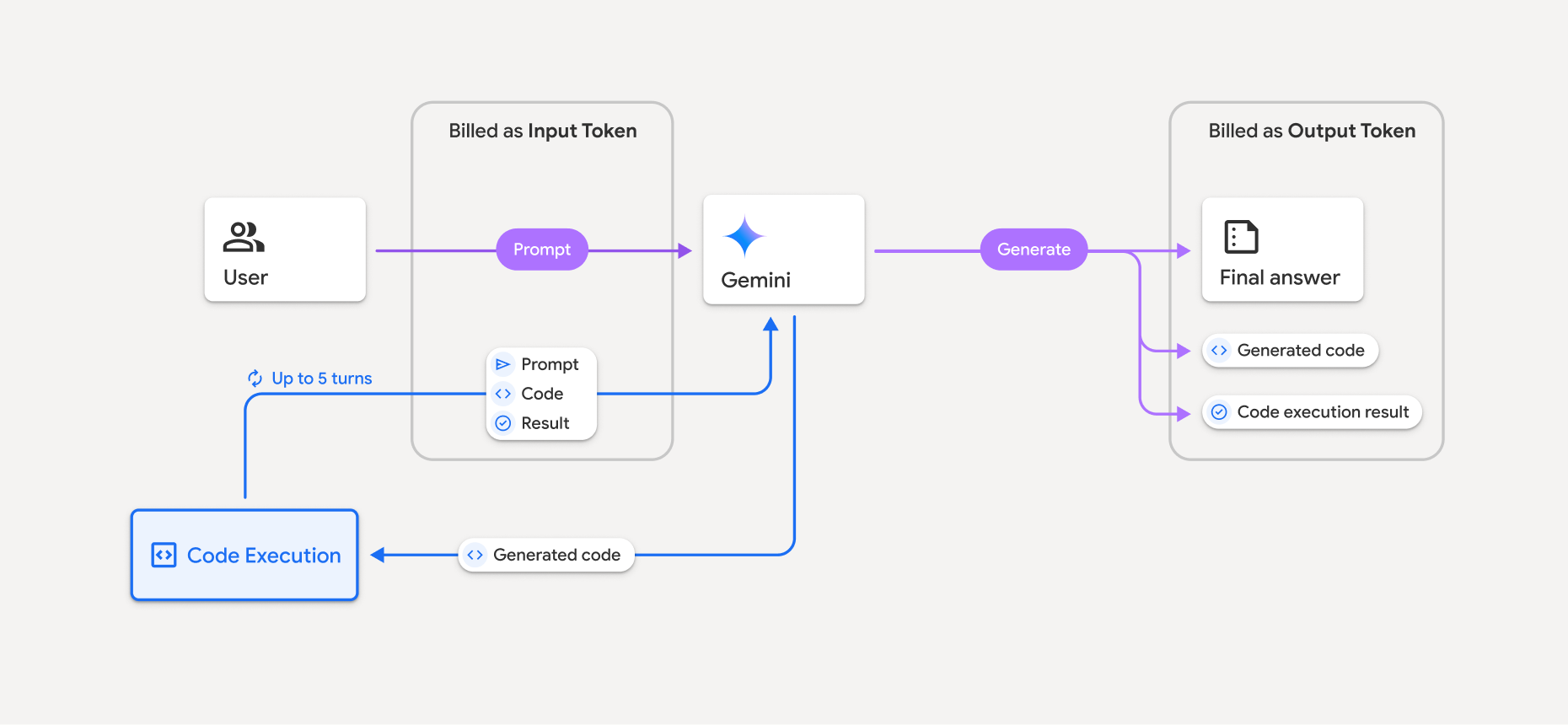
- بر اساس مدل Gemini که استفاده میکنید، هزینه شما با نرخ فعلی توکنهای ورودی و خروجی محاسبه میشود.
- اگر Gemini هنگام تولید پاسخ شما از اجرای کد استفاده کند، اعلان اصلی، کد تولید شده و نتیجه کد اجرا شده، توکنهای میانی نامیده میشوند و به عنوان توکنهای ورودی ثبت میشوند.
- سپس Gemini خلاصهای تولید میکند و کد تولید شده، نتیجه کد اجرا شده و خلاصه نهایی را برمیگرداند. اینها به عنوان توکنهای خروجی ثبت میشوند.
- رابط برنامهنویسی Gemini شامل تعداد توکنهای میانی در پاسخ API است، بنابراین میدانید که چرا توکنهای ورودی اضافی فراتر از درخواست اولیه خود دریافت میکنید.
محدودیتها
- این مدل فقط میتواند کد تولید و اجرا کند. نمیتواند مصنوعات دیگری مانند فایلهای رسانهای را برگرداند.
- در برخی موارد، فعال کردن اجرای کد میتواند منجر به رگرسیون در سایر حوزههای خروجی مدل شود (برای مثال، نوشتن یک داستان).
- در توانایی مدلهای مختلف برای استفاده موفقیتآمیز از اجرای کد، تفاوتهایی وجود دارد.
ترکیب ابزارهای پشتیبانی شده
ابزار اجرای کد را میتوان با Grounding با جستجوی گوگل ترکیب کرد تا موارد استفاده پیچیدهتری را پشتیبانی کند.
مدلهای Gemini 3 از ترکیب ابزارهای داخلی (مانند اجرای کد) با ابزارهای سفارشی (فراخوانی تابع) پشتیبانی میکنند.
کتابخانههای پشتیبانیشده
محیط اجرای کد شامل کتابخانههای زیر است:
- جذابیتها
- شطرنج
- کانتورپی
- اف پی دی اف
- ژئوپانداها
- ایمیجیو
- جینجا۲
- شغلمحور
- جیسوناسکِما
- مشخصات jsonschema
- lxml
- کتابخانه متپلات
- ام پی مت
- نامپی
- opencv-python
- اوپنپایکسل
- بسته بندی
- پانداها
- بالش
- پروتوباف
- پیلاتکس
- پیپارسینگ
- پایPDF2
- پایتون-dateutil
- پایتون-docx
- پایتون-pptx
- گزارش آزمایشگاه
- سایکیت-لرن
- اسکیپی
- دریازاده
- شش
- استریپآرتیاف
- سمپی
- جدول بندی کردن
- تنسورفلو
- ابزار
- ایکس ال آر دی
شما نمیتوانید کتابخانههای خودتان را نصب کنید.
قدم بعدی چیست؟
- امتحان کنید
- درباره سایر ابزارهای API Gemini اطلاعات کسب کنید: