

Gemini API cung cấp một công cụ thực thi mã cho phép mô hình tạo và chạy mã Python. Sau đó, mô hình có thể học lặp lại từ kết quả thực thi mã cho đến khi đưa ra kết quả cuối cùng. Bạn có thể sử dụng tính năng thực thi mã để xây dựng các ứng dụng hưởng lợi từ khả năng suy luận dựa trên mã. Ví dụ: bạn có thể sử dụng tính năng thực thi mã để giải phương trình hoặc xử lý văn bản. Bạn cũng có thể sử dụng các thư viện có trong môi trường thực thi mã để thực hiện các tác vụ chuyên biệt hơn.
Gemini chỉ có thể thực thi mã bằng Python. Bạn vẫn có thể yêu cầu Gemini tạo mã bằng một ngôn ngữ khác, nhưng mô hình này không thể sử dụng công cụ thực thi mã để chạy mã đó.
Bật tính năng thực thi mã
Để bật tính năng thực thi mã, hãy định cấu hình công cụ thực thi mã trên mô hình. Điều này cho phép mô hình tạo và chạy mã.
Python
from google import genai

client = genai.Client()

interaction = client.interactions.create(
    model="gemini-3.5-flash",
    input="What is the sum of the first 50 prime numbers? "
          "Generate and run code for the calculation, and make sure you get all 50.",
    tools=[{"type": "code_execution"}]
)

for step in interaction.steps:
    if step.type == "model_output":
        for content_block in step.content:
            if content_block.type == "text":
                print(content_block.text)
    elif step.type == "code_execution_call":
        print(step.arguments.code)
    elif step.type == "code_execution_result":
        print(step.result)
JavaScript
import { GoogleGenAI } from "@google/genai";

const client = new GoogleGenAI({});

const interaction = await client.interactions.create({
    model: "gemini-3.5-flash",
    input: "What is the sum of the first 50 prime numbers? " +
           "Generate and run code for the calculation, and make sure you get all 50.",
    tools: [{ type: "code_execution" }]
});

for (const step of interaction.steps) {
    if (step.type === "model_output") {
        for (const contentBlock of step.content) {
            if (contentBlock.type === "text") {
                console.log(contentBlock.text);
            }
        }
    } else if (step.type === "code_execution_call") {
        console.log(step.arguments.code);
    } else if (step.type === "code_execution_result") {
        console.log(step.result);
    }
}
REST
curl -X POST "https://generativelanguage.googleapis.com/v1beta/interactions" \
-H "x-goog-api-key: $GEMINI_API_KEY" \
-H 'Content-Type: application/json' \
-d '{
    "model": "gemini-3.5-flash",
    "input": "What is the sum of the first 50 prime numbers? Generate and run code for the calculation, and make sure you get all 50.",
    "tools": [{"type": "code_execution"}]
}'
Kết quả có thể có dạng như sau (đã được định dạng để dễ đọc):
Okay, I need to calculate the sum of the first 50 prime numbers. Here's how I'll
approach this:

1.  **Generate Prime Numbers:** I'll use an iterative method to find prime
    numbers. I'll start with 2 and check if each subsequent number is divisible
    by any number between 2 and its square root. If not, it's a prime.
2.  **Store Primes:** I'll store the prime numbers in a list until I have 50 of
    them.
3.  **Calculate the Sum:**  Finally, I'll sum the prime numbers in the list.

Here's the Python code to do this:

def is_prime(n):
  """Efficiently checks if a number is prime."""
  if n <= 1:
    return False
  if n <= 3:
    return True
  if n % 2 == 0 or n % 3 == 0:
    return False
  i = 5
  while i * i <= n:
    if n % i == 0 or n % (i + 2) == 0:
      return False
    i += 6
  return True

primes = []
num = 2
while len(primes) < 50:
  if is_prime(num):
    primes.append(num)
  num += 1

sum_of_primes = sum(primes)
print(f'{primes=}')
print(f'{sum_of_primes=}')

primes=[2, 3, 5, 7, 11, 13, 17, 19, 23, 29, 31, 37, 41, 43, 47, 53, 59, 61, 67,
71, 73, 79, 83, 89, 97, 101, 103, 107, 109, 113, 127, 131, 137, 139, 149, 151,
157, 163, 167, 173, 179, 181, 191, 193, 197, 199, 211, 223, 227, 229]
sum_of_primes=5117

The sum of the first 50 prime numbers is 5117.
Kết quả này kết hợp một số phần nội dung mà mô hình trả về khi sử dụng tính năng thực thi mã:
text: Văn bản cùng dòng do mô hình tạocode_execution_call: Mã do mô hình tạo để thực thicode_execution_result: Kết quả của mã thực thi
Thực thi mã với hình ảnh (Gemini 3)
Mô hình Gemini 3 Flash hiện có thể viết và thực thi mã Python để chủ động thao tác và kiểm tra hình ảnh.
Trường hợp sử dụng
- Phóng to và kiểm tra: Mô hình này ngầm phát hiện khi các chi tiết quá nhỏ (ví dụ: đọc một đồng hồ đo ở xa) và viết mã để cắt và kiểm tra lại khu vực đó ở độ phân giải cao hơn.
- Toán học trực quan: Mô hình này có thể chạy các phép tính nhiều bước bằng mã (ví dụ: tính tổng các mục hàng trên biên lai).
- Chú thích hình ảnh: Mô hình này có thể chú thích hình ảnh để trả lời câu hỏi, chẳng hạn như vẽ mũi tên để thể hiện mối quan hệ.
Bật tính năng thực thi mã với hình ảnh
Tính năng thực thi mã với hình ảnh được chính thức hỗ trợ trong Gemini 3 Flash. Bạn có thể kích hoạt hành vi này bằng cách bật cả tính năng Thực thi mã như một công cụ và Tư duy.
Python
from google import genai
import requests
import base64
from PIL import Image
import io

image_path = "https://goo.gle/instrument-img"
image_bytes = requests.get(image_path).content

client = genai.Client()

interaction = client.interactions.create(
    model="gemini-3.5-flash",
    input=[
        {"type": "image", "data": base64.b64encode(image_bytes).decode('\utf-8'), "mime_type": "image/jpeg"},
        {"type": "text", "text": "Zoom into the expression pedals and tell me how many pedals are there?"}
    ],
    tools=[{"type": "code_execution"}]
)

for step in interaction.steps:
    if step.type == "model_output":
        for content_block in step.content:
            if content_block.type == "text":
                print(content_block.text)
            elif content_block.type == "image":
                display(Image.open(io.BytesIO(base64.b64decode(content_block.data))))
    elif step.type == "code_execution_call":
        print(step.arguments.code)
    elif step.type == "code_execution_result":
        print(step.result)
JavaScript
import { GoogleGenAI } from "@google/genai";

async function main() {
  const client = new GoogleGenAI({});

  const imageUrl = "https://goo.gle/instrument-img";
  const response = await fetch(imageUrl);
  const imageArrayBuffer = await response.arrayBuffer();
  const base64ImageData = Buffer.from(imageArrayBuffer).toString('base64');

  const interaction = await client.interactions.create({
    model: "gemini-3.5-flash",
    input: [
      {
        type: "image",
        data: base64ImageData,
        mime_type: "image/jpeg"
      },
      { type: "text", text: "Zoom into the expression pedals and tell me how many pedals are there?" }
    ],
    tools: [{ type: "code_execution" }]
  });

  for (const step of interaction.steps) {
    if (step.type === "model_output") {
      for (const contentBlock of step.content) {
        if (contentBlock.type === "text") {
          console.log("Text:", contentBlock.text);
        }
      }
    } else if (step.type === "code_execution_call") {
      console.log(`\nGenerated Code:\n`, step.arguments.code);
    } else if (step.type === "code_execution_result") {
      console.log(`\nExecution Output:\n`, step.result);
    }
  }
}

main();
REST
IMG_URL="https://goo.gle/instrument-img"
MODEL="gemini-3.5-flash"

MIME_TYPE=$(curl -sIL "$IMG_URL" | grep -i '^content-type:' | awk -F ': ' '{print $2}' | sed 's/\r$//' | head -n 1)
if [[ -z "$MIME_TYPE" || ! "$MIME_TYPE" == image/* ]]; then
  MIME_TYPE="image/jpeg"
fi

if [[ "$(uname)" == "Darwin" ]]; then
  IMAGE_B64=$(curl -sL "$IMG_URL" | base64 -b 0)
elif [[ "$(base64 --version 2>&1)" = *"FreeBSD"* ]]; then
  IMAGE_B64=$(curl -sL "$IMG_URL" | base64)
else
  IMAGE_B64=$(curl -sL "$IMG_URL" | base64 -w0)
fi

# Use jq to create the JSON payload to avoid "Argument list too long" error with large base64 strings
echo -n "$IMAGE_B64" > image_b64.txt
jq -n \
  --rawfile b64 image_b64.txt \
  --arg mime "$MIME_TYPE" \
  '{
    model: "gemini-3.5-flash",
    input: [
      {type: "image", data: $b64, mime_type: $mime},
      {type: "text", text: "Zoom into the expression pedals and tell me how many pedals are there?"}
    ],
    tools: [{type: "code_execution"}]
  }' > payload.json

curl -X POST "https://generativelanguage.googleapis.com/v1beta/interactions" \
    -H "x-goog-api-key: $GEMINI_API_KEY" \
    -H 'Content-Type: application/json' \
    -d @payload.json
Sử dụng tính năng thực thi mã trong các lượt tương tác nhiều lượt
Bạn cũng có thể sử dụng tính năng thực thi mã trong cuộc trò chuyện nhiều lượt bằng previous_interaction_id.
Python
from google import genai

client = genai.Client()

interaction1 = client.interactions.create(
    model="gemini-3.5-flash",
    input="I have a math question for you.",
    tools=[{"type": "code_execution"}]
)
print(interaction1.output_text)

interaction2 = client.interactions.create(
    model="gemini-3.5-flash",
    previous_interaction_id=interaction1.id,
    input="What is the sum of the first 50 prime numbers? "
          "Generate and run code for the calculation, and make sure you get all 50.",
    tools=[{"type": "code_execution"}]
)

for step in interaction2.steps:
    if step.type == "model_output":
        for content_block in step.content:
            if content_block.type == "text":
                print(content_block.text)
    elif step.type == "code_execution_call":
        print(step.arguments.code)
    elif step.type == "code_execution_result":
        print(step.result)
JavaScript
import { GoogleGenAI } from "@google/genai";

const client = new GoogleGenAI({});

const interaction1 = await client.interactions.create({
    model: "gemini-3.5-flash",
    input: "I have a math question for you.",
    tools: [{ type: "code_execution" }]
});
console.log(interaction1.output_text);

const interaction2 = await client.interactions.create({
    model: "gemini-3.5-flash",
    previous_interaction_id: interaction1.id,
    input: "What is the sum of the first 50 prime numbers? " +
           "Generate and run code for the calculation, and make sure you get all 50.",
    tools: [{ type: "code_execution" }]
});

for (const step of interaction2.steps) {
    if (step.type === "model_output") {
        for (const contentBlock of step.content) {
            if (contentBlock.type === "text") {
                console.log(contentBlock.text);
            }
        }
    } else if (step.type === "code_execution_call") {
        console.log(step.arguments.code);
    } else if (step.type === "code_execution_result") {
        console.log(step.result);
    }
}
REST
# First turn
RESPONSE1=$(curl -s -X POST "https://generativelanguage.googleapis.com/v1beta/interactions" \
-H "x-goog-api-key: $GEMINI_API_KEY" \
-H 'Content-Type: application/json' \
-d '{
    "model": "gemini-3.5-flash",
    "input": "I have a math question for you.",
    "tools": [{"type": "code_execution"}]
}')

INTERACTION_ID=$(echo $RESPONSE1 | jq -r '.id')

# Second turn with previous_interaction_id
curl -X POST "https://generativelanguage.googleapis.com/v1beta/interactions" \
-H "x-goog-api-key: $GEMINI_API_KEY" \
-H 'Content-Type: application/json' \
-d '{
    "model": "gemini-3.5-flash",
    "previous_interaction_id": "'"$INTERACTION_ID"'",
    "input": "What is the sum of the first 50 prime numbers? Generate and run code for the calculation, and make sure you get all 50.",
    "tools": [{"type": "code_execution"}]
}'
Đầu vào/đầu ra (I/O)
Kể từ Gemini 2.0 Flash, tính năng thực thi mã hỗ trợ đầu vào tệp và đầu ra biểu đồ. Khi sử dụng các tính năng đầu vào và đầu ra này, bạn có thể tải tệp CSV và tệp văn bản lên, đặt câu hỏi về các tệp đó và tạo biểu đồ Matplotlib trong phản hồi. Các tệp đầu ra được trả về dưới dạng hình ảnh cùng dòng trong phản hồi.
Giá I/O
Khi sử dụng tính năng thực thi mã I/O, bạn sẽ bị tính phí cho mã thông báo đầu vào và mã thông báo đầu ra:
Mã thông báo đầu vào:
- Câu lệnh của người dùng
Mã thông báo đầu ra:
- Mã do mô hình tạo
- Kết quả thực thi mã trong môi trường mã
- Mã thông báo tư duy
- Tóm tắt do mô hình tạo
Thông tin chi tiết về I/O
Khi sử dụng tính năng thực thi mã I/O, hãy lưu ý các thông tin kỹ thuật sau:
- Thời gian chạy tối đa của môi trường mã là 30 giây.
- Nếu môi trường mã tạo ra lỗi, mô hình có thể quyết định tạo lại kết quả mã. Điều này có thể xảy ra tối đa 5 lần.
- Kích thước tệp đầu vào tối đa bị giới hạn bởi cửa sổ mã thông báo của mô hình. Nếu bạn tải một tệp vượt quá cửa sổ ngữ cảnh tối đa của mô hình, API sẽ trả về lỗi.
- Tính năng thực thi mã hoạt động hiệu quả nhất với tệp văn bản và tệp CSV.
- Tệp đầu vào có thể được truyền dưới dạng dữ liệu cùng dòng hoặc tải lên bằng Files API, và tệp đầu ra luôn được trả về dưới dạng dữ liệu cùng dòng.
Thanh toán
Bạn không phải trả thêm phí khi bật tính năng thực thi mã từ Gemini API. Bạn sẽ bị tính phí theo mức giá hiện tại của mã thông báo đầu vào và đầu ra dựa trên mô hình Gemini mà bạn đang sử dụng.
Sau đây là một số thông tin khác bạn cần biết về việc thanh toán cho tính năng thực thi mã:
- Bạn chỉ bị tính phí một lần cho các mã thông báo đầu vào mà bạn truyền cho mô hình và bạn sẽ bị tính phí cho các mã thông báo đầu ra cuối cùng mà mô hình trả về cho bạn.
- Mã thông báo đại diện cho mã được tạo được tính là mã thông báo đầu ra. Mã được tạo có thể bao gồm văn bản và đầu ra đa phương thức như hình ảnh.
- Kết quả thực thi mã cũng được tính là mã thông báo đầu ra.
Mô hình thanh toán được minh hoạ trong sơ đồ sau:
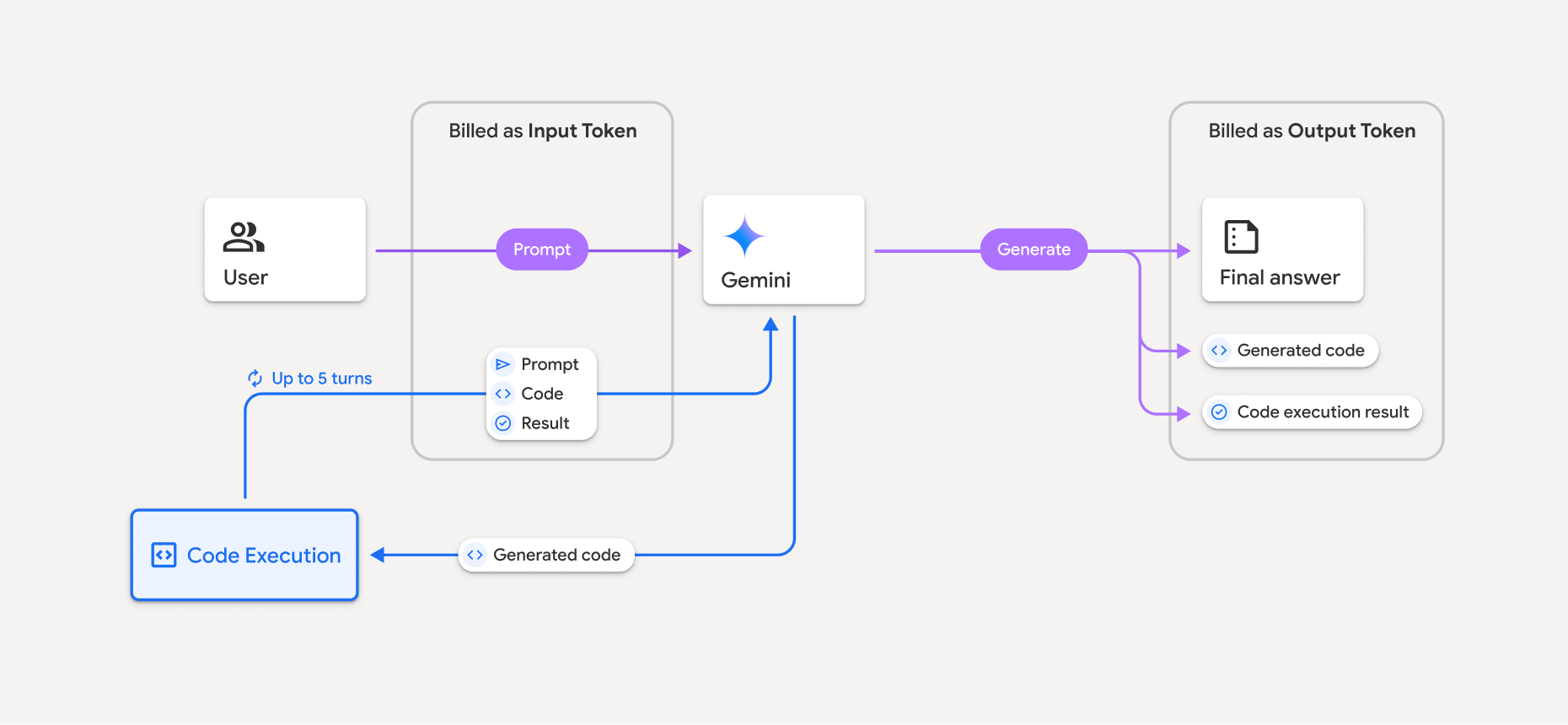
- Bạn sẽ bị tính phí theo mức giá hiện tại của mã thông báo đầu vào và đầu ra dựa trên mô hình Gemini mà bạn đang sử dụng.
- Nếu Gemini sử dụng tính năng thực thi mã khi tạo phản hồi, thì câu lệnh ban đầu, mã được tạo và kết quả của mã được thực thi sẽ được gắn nhãn là mã thông báo trung gian và được tính phí là mã thông báo đầu vào.
- Sau đó, Gemini sẽ tạo một bản tóm tắt và trả về mã được tạo, kết quả của mã được thực thi và bản tóm tắt cuối cùng. Các mã này được tính phí là mã thông báo đầu ra.
- Gemini API bao gồm số lượng mã thông báo trung gian trong phản hồi của API, vì vậy, bạn biết lý do mình nhận được thêm mã thông báo đầu vào ngoài câu lệnh ban đầu.
Các điểm hạn chế
- Mô hình này chỉ có thể tạo và thực thi mã. Mô hình này không thể trả về các cấu phần phần mềm khác như tệp nội dung nghe nhìn.
- Trong một số trường hợp, việc bật tính năng thực thi mã có thể dẫn đến tình trạng hồi quy ở các khu vực khác của đầu ra của mô hình (ví dụ: viết một câu chuyện).
- Có một số điểm khác biệt về khả năng sử dụng tính năng thực thi mã thành công của các mô hình khác nhau.
Các cách kết hợp công cụ được hỗ trợ
Công cụ thực thi mã có thể kết hợp với tính năng Bám sát nguồn bằng Google Tìm kiếm để hỗ trợ các trường hợp sử dụng phức tạp hơn.
Các mô hình Gemini 3 hỗ trợ việc kết hợp các công cụ tích hợp (như Thực thi mã) với các công cụ tuỳ chỉnh (gọi hàm).
Các thư viện được hỗ trợ
Môi trường thực thi mã bao gồm các thư viện sau:
- attrs
- chess
- contourpy
- fpdf
- geopandas
- imageio
- jinja2
- joblib
- jsonschema
- jsonschema-specifications
- lxml
- matplotlib
- mpmath
- numpy
- opencv-python
- openpyxl
- packaging
- pandas
- pillow
- protobuf
- pylatex
- pyparsing
- PyPDF2
- python-dateutil
- python-docx
- python-pptx
- reportlab
- scikit-learn
- scipy
- seaborn
- six
- striprtf
- sympy
- tabulate
- tensorflow
- toolz
- xlrd
Bạn không thể cài đặt thư viện của riêng mình.
Bước tiếp theo
- Thử
- Tìm hiểu về các công cụ khác của Gemini API: