

Google Search से सटीक जानकारी पाने की सुविधा
Google Search से सटीक जानकारी पाने की सुविधा, Gemini मॉडल को रीयल-टाइम वेब कॉन्टेंट से कनेक्ट करती है. साथ ही, यह सुविधा सभी उपलब्ध भाषाओं में काम करती है. इससे Gemini, ज़्यादा सटीक जवाब दे पाता है. साथ ही, यह अपनी जानकारी की सीमा से बाहर जाकर, पुष्टि किए जा सकने वाले सोर्स का हवाला दे पाता है.
सटीक जानकारी पाने की सुविधा की मदद से, ऐसे ऐप्लिकेशन बनाए जा सकते हैं जो:
- तथ्यों की सटीक जानकारी दें: जवाबों को असल दुनिया की जानकारी पर आधारित करके, मॉडल के गलत जवाब देने की समस्या को कम करें.
- रीयल-टाइम जानकारी ऐक्सेस करें: हाल ही में हुई घटनाओं और विषयों के बारे में सवालों के जवाब दें.
रेफ़रंस दें: मॉडल के दावों के सोर्स दिखाकर, उपयोगकर्ताओं का भरोसा जीतें.
Python
from google import genai

client = genai.Client()

interaction = client.interactions.create(
    model="gemini-3.5-flash",
    input="Who won the euro 2024?",
    tools=[{"type": "google_search"}]
)

print(interaction.output_text)
JavaScript
import { GoogleGenAI } from "@google/genai";

const client = new GoogleGenAI({});

const interaction = await client.interactions.create({
    model: "gemini-3.5-flash",
    input: "Who won the euro 2024?",
    tools: [{ type: "google_search" }]
});

console.log(interaction.output_text);
REST
curl -X POST "https://generativelanguage.googleapis.com/v1beta/interactions" \
  -H "x-goog-api-key: $GEMINI_API_KEY" \
  -H "Content-Type: application/json" \
  -H "Api-Revision: 2026-05-20" \
  -d '{
    "model": "gemini-3.5-flash",
    "input": "Who won the euro 2024?",
    "tools": [{"type": "google_search"}]
  }'
Google Search से सटीक जानकारी पाने की सुविधा कैसे काम करती है
google_search टूल चालू करने पर, मॉडल, जानकारी खोजने, प्रोसेस करने, और उसका हवाला देने से जुड़े पूरे वर्कफ़्लो को अपने-आप मैनेज करता है.
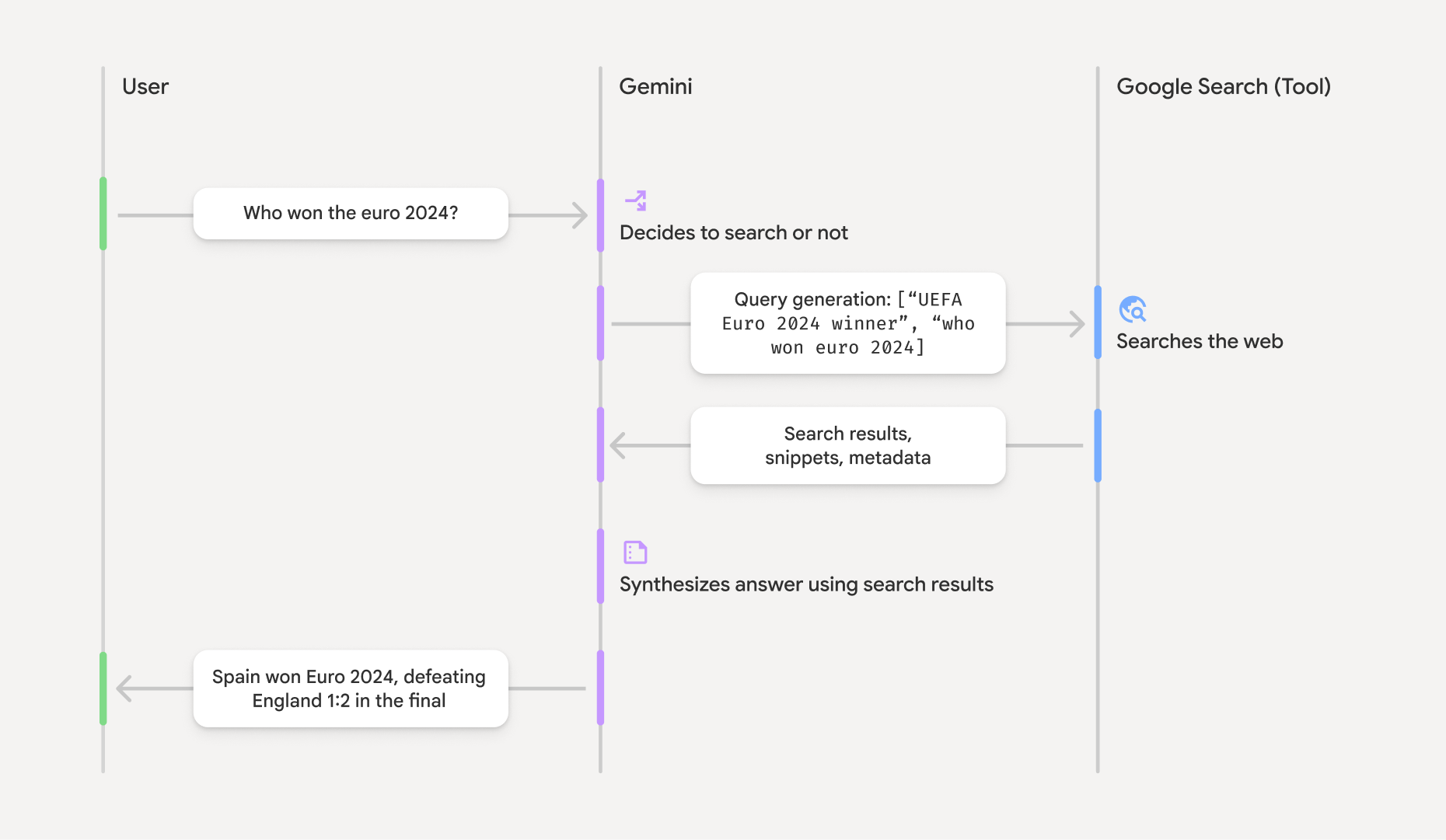
- उपयोगकर्ता का प्रॉम्प्ट: आपका ऐप्लिकेशन,
google_searchटूल चालू होने पर, उपयोगकर्ता का प्रॉम्प्ट Gemini API को भेजता है. - प्रॉम्प्ट का विश्लेषण: मॉडल, प्रॉम्प्ट का विश्लेषण करता है और यह तय करता है कि Google Search की मदद से जवाब को बेहतर बनाया जा सकता है या नहीं.
- Google Search: ज़रूरत पड़ने पर, मॉडल अपने-आप एक या एक से ज़्यादा खोज क्वेरी जनरेट करता है और उन्हें एक्ज़ीक्यूट करता है.
- खोज के नतीजों को प्रोसेस करना: मॉडल, खोज के नतीजों को प्रोसेस करता है, जानकारी को सिंथेसाइज़ करता है, और जवाब तैयार करता है.
- सटीक जानकारी वाला जवाब: एपीआई, खोज के नतीजों के आधार पर, उपयोगकर्ता के लिए फ़ाइनल और आसान जवाब देता है. इस जवाब में, मॉडल का टेक्स्ट जवाब शामिल होता है. साथ ही, इसमें इनलाइन
annotationsभी शामिल होते हैं, जिनमें रेफ़रंस के साथ-साथgoogle_search_callऔरgoogle_search_resultके चरण शामिल होते हैं. इनमें खोज क्वेरी और खोज के सुझाव भी शामिल होते हैं.
सटीक जानकारी वाले जवाब को समझना
जवाब के लिए सटीक जानकारी मिलने पर, मॉडल के टेक्स्ट आउटपुट में, टेक्स्ट कॉन्टेंट ब्लॉक पर सीधे तौर पर इनलाइन annotations शामिल होते हैं. इन एनोटेशन में, रेफ़रंस की जानकारी दी जाती है. इससे जवाब के हिस्सों को उनके सोर्स से लिंक किया जाता है.
{
  "steps": [
    {
      "type": "thought",
      "summary": [
        {
          "type": "text",
          "text": "The user is asking for the winner of Euro 2024. I need to search for the result of the Euro 2024 final."
        }
      ],
      "signature": "CoMDAXLI2nynRYojJIy6B1Jh9os2crpWLfB0..."
    },
    {
      "type": "google_search_call",
      "arguments": {
        "queries": ["UEFA Euro 2024 winner"]
      }
    },
    {
      "type": "google_search_result",
      "call_id": "search_001",
      "result": [
        {
          "search_suggestions": "<!-- HTML and CSS for the search widget -->"
        }
      ]
    },
    {
      "type": "model_output",
      "content": [
        {
          "type": "text",
          "text": "Spain won Euro 2024, defeating England 2-1 in the final. This victory marks Spain's record fourth European Championship title.",
          "annotations": [
            {
              "type": "url_citation",
              "url": "https://www.aljazeera.com/sports/euro-2024-final",
              "title": "aljazeera.com",
              "start_index": 0,
              "end_index": 56
            },
            {
              "type": "url_citation",
              "url": "https://www.uefa.com/euro2024/news/spain-wins-euro-2024",
              "title": "uefa.com",
              "start_index": 57,
              "end_index": 124
            }
          ]
        }
      ]
    }
  ]
}
जवाब में मौजूद मुख्य फ़ील्ड:
google_search_call: इसमें, मॉडल की ओर से एक्ज़ीक्यूट की गई खोजqueriesशामिल होती हैं.google_search_result: इसमेंsearch_suggestionsशामिल होते हैं. यह आपके यूज़र इंटरफ़ेस (यूआई) में खोज के सुझाव दिखाने के लिए, एचटीएमएल स्निपेट होता है. इस्तेमाल की पूरी ज़रूरी शर्तें, सेवा की शर्तों में बताई गई हैं.textwithannotations: मॉडल का सिंथेसाइज़ किया गया जवाब, जिसमें इनलाइन रेफ़रंस शामिल होते हैं. हरurl_citationएनोटेशन, टेक्स्ट के किसी सेगमेंट (start_indexऔरend_indexसे तय किया गया) को सोर्स यूआरएल से लिंक करता है. इनलाइन रेफ़रंस बनाने के लिए, यह ज़रूरी है.
Google Search से सटीक जानकारी पाने की सुविधा का इस्तेमाल, यूआरएल कॉन्टेक्स्ट टूल के साथ भी किया जा सकता है. इससे, सार्वजनिक वेब डेटा और आपके दिए गए खास यूआरएल, दोनों के आधार पर जवाब दिए जा सकते हैं.
इनलाइन रेफ़रंस की मदद से सोर्स को एट्रिब्यूट करना
एपीआई, टेक्स्ट कॉन्टेंट ब्लॉक पर इनलाइन url_citation एनोटेशन दिखाता है. इससे आपको यह तय करने का पूरा कंट्रोल मिलता है कि आपको अपने यूज़र इंटरफ़ेस (यूआई) में सोर्स कैसे दिखाने हैं.
हर एनोटेशन में start_index और end_index शामिल होता है. इससे यह पता चलता है कि यह टेक्स्ट के किस हिस्से का हवाला देता है. इन्हें एक्सट्रैक्ट और दिखाने का तरीका यहां बताया गया है.
Python
for step in interaction.steps:
    if step.type == "model_output":
        for content_block in step.content:
            if content_block.type == "text":
                print(content_block.text)
                if content_block.annotations:
                    print("\nCitations:")
                    for annotation in content_block.annotations:
                        if annotation.type == "url_citation":
                            cited_text = content_block.text[annotation.start_index:annotation.end_index]
                            print(f"  [{annotation.title}]({annotation.url})")
                            print(f"    Cited text: \"{cited_text}\"")
JavaScript
for (const step of interaction.steps) {
  if (step.type === 'model_output') {
    for (const contentBlock of step.content) {
      if (contentBlock.type === 'text') {
        console.log(contentBlock.text);
        if (contentBlock.annotations) {
          console.log("\nCitations:");
          for (const annotation of contentBlock.annotations) {
            if (annotation.type === 'url_citation') {
              const citedText = contentBlock.text.slice(annotation.startIndex, annotation.endIndex);
              console.log(`  [${annotation.title}](${annotation.url})`);
              console.log(`    Cited text: "${citedText}"`);
            }
          }
        }
      }
    }
  }
}
आउटपुट में, टेक्स्ट के बाद उसके रेफ़रंस दिखेंगे:
Spain won Euro 2024, defeating England 2-1 in the final. This victory marks Spain's record fourth European Championship title.

Citations:
  [aljazeera.com](https://www.aljazeera.com/sports/euro-2024-final)
    Cited text: "Spain won Euro 2024, defeating England 2-1 in the final."
  [uefa.com](https://www.uefa.com/euro2024/news/spain-wins-euro-2024)
    Cited text: "This victory marks Spain's record fourth European Championship title."
कीमत
Gemini 3 के साथ, Google Search से सटीक जानकारी पाने की सुविधा का इस्तेमाल करने पर, आपके प्रोजेक्ट से हर उस खोज क्वेरी के लिए शुल्क लिया जाता है जिसे मॉडल एक्ज़ीक्यूट करने का फ़ैसला लेता है. अगर मॉडल, किसी एक प्रॉम्प्ट का जवाब देने के लिए एक से ज़्यादा खोज क्वेरी एक्ज़ीक्यूट करने का फ़ैसला लेता है (उदाहरण के लिए, एक ही एपीआई कॉल में "UEFA Euro 2024 winner" और "Spain vs England Euro 2024 final
score" खोजना), तो इस अनुरोध के लिए, टूल के दो बार इस्तेमाल का शुल्क लिया जाएगा. बिलिंग के मकसद से, यूनीक क्वेरी की गिनती करते समय, हम खाली वेब खोज क्वेरी को अनदेखा करते हैं. यह बिलिंग मॉडल सिर्फ़ Gemini 3 मॉडल पर लागू होता है. Gemini 2.5 या उससे पुराने मॉडल के साथ, खोज के लिए सटीक जानकारी पाने की सुविधा का इस्तेमाल करने पर, आपके प्रोजेक्ट से हर प्रॉम्प्ट के लिए शुल्क लिया जाता है.
कीमत की ज़्यादा जानकारी के लिए, Gemini API की कीमत वाला पेज देखें.
काम करने वाले मॉडल
मॉडल की पूरी क्षमताओं के बारे में जानने के लिए, मॉडल खास जानकारी वाला पेज देखें.
| मॉडल | Google Search से सटीक जानकारी पाने की सुविधा |
|---|---|
| Gemini 3.5 Flash | ✔️ |
| Gemini 3.1 Flash Image Preview | ✔️ |
| Gemini 3.1 Pro Preview | ✔️ |
| Gemini 3 Pro Image Preview | ✔️ |
| Gemini 3 Flash Preview | ✔️ |
| Gemini 2.5 Pro | ✔️ |
| Gemini 2.5 Flash | ✔️ |
| Gemini 2.5 Flash-Lite | ✔️ |
| Gemini 2.0 Flash | ✔️ |
टूल के काम करने वाले कॉम्बिनेशन
ज़्यादा मुश्किल इस्तेमाल के उदाहरणों के लिए, Google Search से सटीक जानकारी पाने की सुविधा का इस्तेमाल, कोड एक्ज़ीक्यूशन और यूआरएल कॉन्टेक्स्ट जैसे अन्य टूल के साथ किया जा सकता है.
Gemini 3 मॉडल, बिल्ट-इन टूल (जैसे, Google Search से सटीक जानकारी पाने की सुविधा) को कस्टम टूल (फ़ंक्शन कॉलिंग) के साथ इस्तेमाल करने की सुविधा देते हैं. ज़्यादा जानने के लिए, टूल के कॉम्बिनेशन वाला पेज देखें.
आगे क्या करना है
- उपलब्ध अन्य टूल के बारे में जानें, जैसे कि फ़ंक्शन कॉलिंग.
- यूआरएल कॉन्टेक्स्ट टूल का इस्तेमाल करके, खास यूआरएल की मदद से प्रॉम्प्ट को बेहतर बनाने का तरीका जानें.